Vocabulary Instruction
…supporting students’ word awareness needs to
be attended to explicitly and systematically.
Bringing Words to Life Beck, McKeown, and
Kucan
Choosing Words to Teach
 Tier I most basic words clock, baby,
happy
 Tier II high frequency for mature
language users and are found across
a variety of domains coincidence, absurd,
fortunate
 Tier III words whose frequency of
use is quite low and often limited to
specific domains isotope, lathe, peninsula
Process for discriminating
Tier II Words
 List all H/M deemed voc. words. Check for
words assessed. (selection test, theme
skills, and summative).
 List all ELD words (ELD handbook) Check
assessments.
 Select 15 most versatile, worthy words.
 Present all words and student friendly
definitions for vocabulary of the week.
Instructional Sequence for New
Words
1. Pronounce word
2. Students repeat word 3 times (parts, then
fast)
3. Clarify part of speech
4. Provide accessible synonym and brief
explanation
5. Provide multiple accessible examples
(image, act out, “showing” sentence etc.)
6. Rephrase explanation, students complete
sentence with new word
Students visually SEE target
word!
Throughout the week
 Provide list of remaining words (not in the
list of 15) and student friendly explanations.
Add to vocabulary folder.
 Provide interactive activities for students to
practice, expand knowledge of selected
voc. words.
 Practice vocabulary words within PB pages
(homework).
 Assess word knowledge (teacher
generated)
 Extend and then maintain.
 www.google.com Click on images
 You should be prompted to logon with
your email user name and password
 Click on the thumbnail of the picture (at
least 400 X 300 pixels)
 Click on see full size image
 When the full size picture appears, right
click and then save picture as
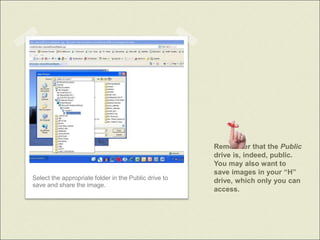
 Save to a folder in the Public drive.
Remember that the Public
drive is, indeed, public.
You may also want to
save images in your “H”
drive, which only you can
access.
Select the appropriate folder in the Public drive to
save and share the image.
… introducing new vocabulary should be thought
about more as explaining a word’s meaning than
providing a definition for the word.
It is clear that a large and rich vocabulary is the
hallmark of an educated individual.
Students need to develop an interest and
awareness in words beyond school vocabulary
assignments in order to adequately build their
vocabulary repertoires.
Students need to keep using words if they are to
“own” new words.
Quotes from Bringing Words to
Life

Vocabulary Instruction

  • 1.
    Vocabulary Instruction …supporting students’word awareness needs to be attended to explicitly and systematically. Bringing Words to Life Beck, McKeown, and Kucan
  • 2.
    Choosing Words toTeach  Tier I most basic words clock, baby, happy  Tier II high frequency for mature language users and are found across a variety of domains coincidence, absurd, fortunate  Tier III words whose frequency of use is quite low and often limited to specific domains isotope, lathe, peninsula
  • 3.
    Process for discriminating TierII Words  List all H/M deemed voc. words. Check for words assessed. (selection test, theme skills, and summative).  List all ELD words (ELD handbook) Check assessments.  Select 15 most versatile, worthy words.  Present all words and student friendly definitions for vocabulary of the week.
  • 4.
    Instructional Sequence forNew Words 1. Pronounce word 2. Students repeat word 3 times (parts, then fast) 3. Clarify part of speech 4. Provide accessible synonym and brief explanation 5. Provide multiple accessible examples (image, act out, “showing” sentence etc.) 6. Rephrase explanation, students complete sentence with new word Students visually SEE target word!
  • 5.
    Throughout the week Provide list of remaining words (not in the list of 15) and student friendly explanations. Add to vocabulary folder.  Provide interactive activities for students to practice, expand knowledge of selected voc. words.  Practice vocabulary words within PB pages (homework).  Assess word knowledge (teacher generated)  Extend and then maintain.
  • 6.
     www.google.com Clickon images  You should be prompted to logon with your email user name and password  Click on the thumbnail of the picture (at least 400 X 300 pixels)  Click on see full size image  When the full size picture appears, right click and then save picture as  Save to a folder in the Public drive.
  • 7.
    Remember that thePublic drive is, indeed, public. You may also want to save images in your “H” drive, which only you can access. Select the appropriate folder in the Public drive to save and share the image.
  • 8.
    … introducing newvocabulary should be thought about more as explaining a word’s meaning than providing a definition for the word. It is clear that a large and rich vocabulary is the hallmark of an educated individual. Students need to develop an interest and awareness in words beyond school vocabulary assignments in order to adequately build their vocabulary repertoires. Students need to keep using words if they are to “own” new words. Quotes from Bringing Words to Life