The VMware IT Academy: What It Is All About And Advantages To Education 
VMware vSphere Install Configure Manage
VMware Certified Professional on vSphere 5 
Audience: 
–System administrators 
–System operators 
–Systems engineers 
–Consultants 
Professional 
Currently a VCP4 
*Achieve VCP4 or take vSphere: What’s New [V5] 
VCP5 
Just starting or VCP2 
VCP5 
vSphere: Install, Configure, Manage [V5] 
VCP5 
VCP5 
Currently a VCP3 
*What’s New: vSphere 5 
*No additional requirement 
After Feb 29: vSphere: What’s New [V5] 
Not a VCP4 but have completed a VCP4 qualifying course 
VCP5 Exam 
VCP5 Exam 
VCP5 Exam 
VCP5 Exam 
After Feb 29: vSphere: Install, Configure, Manage [V5]
Agenda 
Introduction 
Why Virtualization Is Important 
VMware’s Education Programs, Value Proposition & Benefits 
VMware IT Academy Program, Offerings & Eligibility 
Program Costs 
Program Success Metrics 
Support 
Questions 
http://www.certificationkey.com/VCP550.html
Why Virtualization Is Important & The VMware IT Academy 
Current Economy 
Reduces Capital Expenses 
Reduces Operational Expenses 
Promotes Green IT 
Enables “Cloud” Computing 
Demand for VMware Certified Professionals 
Over 1,500 schools and 10,000 students are using the eLearning part of the IT Academy 
Over 400 schools are participating in the Instructor Led part of the IT Academy program and over 3,000 students have been trained and are candidates to become a VMware Certified Professional 
http://www.certificationkey.com/VCP550.html
Why Virtualization Is Important Part Two 
Tom Silver, senior VP and chief marketing officer for the 
technology jobs Web site Dice.com, says that the total job 
count for his site was down 12 percent from January 2008 
through the first week of November. But for those with 
virtualization experience, including both VMware and general 
skills, available jobs increased by 43 percent and 37 percent, 
respectively. 
Source: http://virtualizationreview.com/features/print.aspx?editorialsid=2604
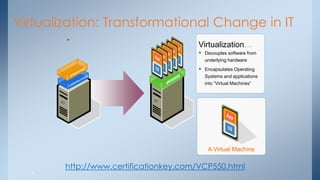
Virtualization: Transformational Change in IT 
• 
Virtualization… 
Decouples software from underlying hardware 
Encapsulates Operating Systems and applications into “Virtual Machines” 
A Virtual Machine 
6 
http://www.certificationkey.com/VCP550.html
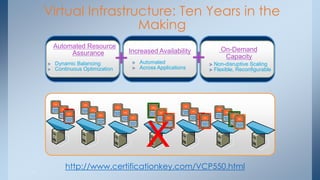
Virtual Infrastructure: Ten Years in the Making 
X 
Automated Resource Assurance Dynamic Balancing Continuous Optimization 
Increased Availability Automated Across Applications 
On-Demand Capacity Non-disruptive Scaling Flexible, Reconfigurable 
+ 
+ 
7 
http://www.certificationkey.com/VCP550.html
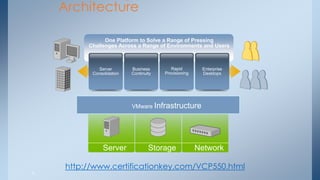
Computing 
Architecture 
One Platform to Solve a Range of Pressing 
Challenges Across a Range of Environments and Users 
Server 
Consolidation 
VMware Infrastructure 
Business 
Continuity 
Rapid 
Provisioning 
Enterprise 
Desktops 
Server Storage Network 
8 
http://www.certificationkey.com/VCP550.html
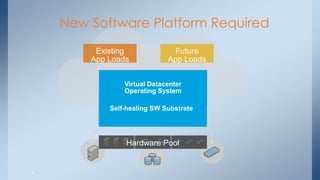
New Software Platform Required 
Hardware Pool 
Existing App Loads 
Future App Loads 
An Elastic, Self-managing, Self-healing SW Substrate 
Virtual Datacenter Operating System 
9
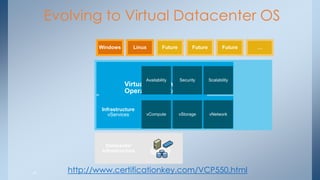
Evolving to Virtual Datacenter OS 
Linux 
Windows 
Datacenter Infrastructure 
Application vServices 
Infrastructure vServices 
Virtual Datacenter Operating System 
vCompute 
vStorage 
vNetwork 
Availability 
Security 
Scalability 
Future 
Future 
Future 
… 
10 
http://www.certificationkey.com/VCP550.html
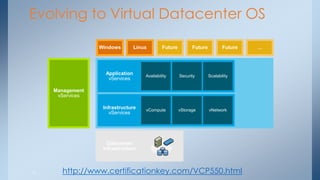
Evolving to Virtual Datacenter OS 
Datacenter 
Infrastructure 
Future 
Future 
Future 
… 
Linux 
Windows 
Application vServices 
Infrastructure vServices 
vCompute 
vStorage 
vNetwork 
Availability 
Security 
Scalability 
Management vServices 
11 
http://www.certificationkey.com/VCP550.html
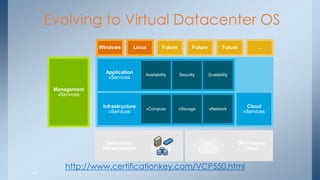
Evolving to Virtual Datacenter OS 
Datacenter Infrastructure 
Linux 
Windows 
Management vServices 
Future 
Future 
Future 
… 
Application vServices 
Infrastructure vServices 
vCompute 
vStorage 
vNetwork 
Availability 
Security 
Scalability 
Off-Premise Cloud 
Cloud vServices 
12 
http://www.certificationkey.com/VCP550.html
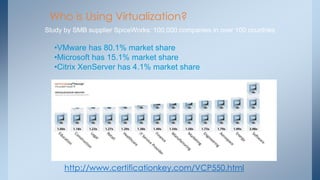
Who is Using Virtualization? 
Study by SMB supplier SpiceWorks: 100,000 companies in over 100 countries 
•VMware has 80.1% market share 
•Microsoft has 15.1% market share 
•Citrix XenServer has 4.1% market share 
http://www.certificationkey.com/VCP550.html
14 
VMware Global Education & Research Programs 
Open & Inclusive Collaborative Programs 
VMware Academic Program 
VMware Labs 
VMware IT Academy Program 
http://www.certificationkey.com/VCP550.html
15 
Value Proposition & Goals 
Value Proposition 
Schools – Use of Industry Leading Intellectual Property 
Students – Affordable Access To Training & Professional Certification 
VMware – Proliferation Of Virtualization Competencies 
Goals & Objectives 
Drive Collaboration Between Schools & Between Students With Communities 
Maximize Awareness and Competencies on Virtualization Products and Technologies 
Supply the IT industry a pool of VMware Certified Professionals (VCP) 
http://www.certificationkey.com/VCP550.html
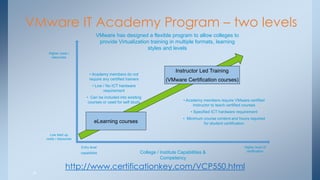
VMware IT Academy Program – two levels 
16 
eLearning courses 
Instructor Led Training (VMware Certification courses) 
College / Institute Capabilities & Competency 
Higher level of certification 
Entry level 
capabilities 
Low start up costs / resources 
Higher costs / resources 
• Academy members do not require any certified trainers 
• Low / No ICT hardware requirement 
• Can be included into existing courses or used for self study 
• Academy members require VMware certified Instructor to teach certified courses 
• Specified ICT hardware requirement 
• Minimum course content and hours required for student certification 
VMware has designed a flexible program to allow colleges to provide Virtualization training in multiple formats, learning styles and levels 
http://www.certificationkey.com/VCP550.html
VMware IT Academy eLearning Offerings 
Infrastructure Virtualization VMware vSphere Fundamentals 4.1 VMware vSphere: What's New in vSphere 4 VMware ESXi: Administration Transition to ESXi Essentials Virtualization Management VMware vCenter CapacityIQ Fundamentals VMware vCloud Director Fundamentals VMware vCenter Lab Manager 4.0 Fundamentals VMware vCenter Chargeback Fundamentals VMware vCenter AppSpeed Fundamentals VMware Capacity Planner 2.7 
17
VMware IT Academy eLearning Offerings 
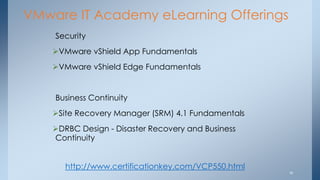
Security 
VMware vShield App Fundamentals 
VMware vShield Edge Fundamentals Business Continuity 
Site Recovery Manager (SRM) 4.1 Fundamentals 
DRBC Design - Disaster Recovery and Business Continuity 
18 
http://www.certificationkey.com/VCP550.html
VMware IT Academy eLearning Offerings 
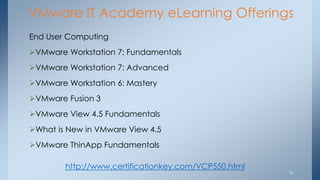
End User Computing 
VMware Workstation 7: Fundamentals 
VMware Workstation 7: Advanced 
VMware Workstation 6: Mastery 
VMware Fusion 3 
VMware View 4.5 Fundamentals 
What is New in VMware View 4.5 
VMware ThinApp Fundamentals 
19 
http://www.certificationkey.com/VCP550.html
20 
VMware IT Academy Instructor Led Offerings 
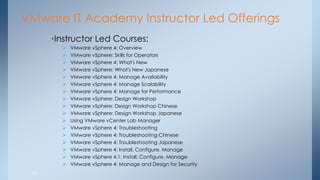
•Instructor Led Courses: 
VMware vSphere 4: Overview 
VMware vSphere: Skills for Operators 
VMware vSphere 4: What's New 
VMware vSphere: What's New Japanese 
VMware vSphere 4: Manage Availability 
VMware vSphere 4: Manage Scalability 
VMware vSphere 4: Manage for Performance 
VMware vSphere: Design Workshop 
VMware vSphere: Design Workshop Chinese 
VMware vSphere: Design Workshop Japanese 
Using VMware vCenter Lab Manager 
VMware vSphere 4: Troubleshooting 
VMware vSphere 4: Troubleshooting Chinese 
VMware vSphere 4: Troubleshooting Japanese 
VMware vSphere 4: Install, Configure, Manage 
VMware vSphere 4.1: Install, Configure, Manage 
VMware vSphere 4: Manage and Design for Security
21 
VMware IT Academy Instructor Led Offerings 
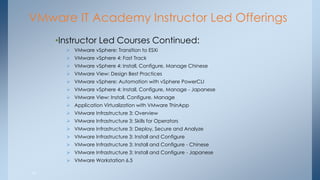
•Instructor Led Courses Continued: 
VMware vSphere: Transition to ESXi 
VMware vSphere 4: Fast Track 
VMware vSphere 4: Install, Configure, Manage Chinese 
VMware View: Design Best Practices 
VMware vSphere: Automation with vSphere PowerCLI 
VMware vSphere 4: Install, Configure, Manage - Japanese 
VMware View: Install, Configure, Manage 
Application Virtualization with VMware ThinApp 
VMware Infrastructure 3: Overview 
VMware Infrastructure 3: Skills for Operators 
VMware Infrastructure 3: Deploy, Secure and Analyze 
VMware Infrastructure 3: Install and Configure 
VMware Infrastructure 3: Install and Configure - Chinese 
VMware Infrastructure 3: Install and Configure - Japanese 
VMware Workstation 6.5
Spring Source Instructor Led Offerings 
Core Spring v3 
Rich Web Applications with Spring 
Enterprise Integration with Spring 
22
Eligibility for VMware IT Academy Program 
 VMware Academy program open to Accredited, degree & diploma granting higher education institutions worldwide offering 2- or 4- year college programs are eligible to participate in the program 
 Technical schools offering accredited degrees through distance education programs are also eligible to participate in the program 
 No minimum course enrollment commitment (i.e. Academy members can scale classes as the markets and opportunity demand) 
http://www.certificationkey.com/VCP550.html
24 
Program Costs 
 No cost to Join. A simple registration form submitted for approval. 
 Student course kits purchased directly from VMware’s print vendor to leverage VMware’s price point based on quantity & scale. Student kits should cost less than $50 USD including tax & shipping when ordering in quantity 10 or more. 
IT Academy partners can purchase certification vouchers directly from VMware’s certification testing delivery partner (Pearson VUE) at a discounted rate of 70% off commercial cost. 
 IT Academy partners receive eLearning courses to use at “No Charge” to supplement instructor led courses or for reference for any courses desired. 
Note: eLearning courses do not satisfy the prerequisite for the VMware VCP Certification. The cost of printing, shipping and taxes will vary by region as will the cost of certification test delivery. 
http://www.certificationkey.com/VCP550.html
VMware IT Academy - Support 
Administrative Support: 
Program Manager 
Operations 
myLearn LMS for Class, Student, Certification Vouchers & Evaluations 
Technical Support - VMware Forum: 
http://communities.vmware.com 
Mentoring via WebEx with Playback 
Course Materials – Gilmore – Dedicated School Storefront 
Certification – Pearson VUE – Redeemable Discount Vouchers 
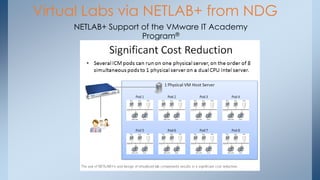
Hardware – Recommendations on either physical servers or virtual via NETLAB+ from NDG 
http://www.certificationkey.com/VCP550.html
26 
VMware IT Academy Program Success Metrics 
 # of students participating over time 
 # of students completing certifications over time 
 Quality Ratings ≥ Commercial Scores as measured by student feedback scores 
 Academy members and student direct program feedback 
VMware will measure academy program members success using the metrics above. These inputs will be used to determine further program enhancements and future program direction 
http://www.certificationkey.com/VCP550.html
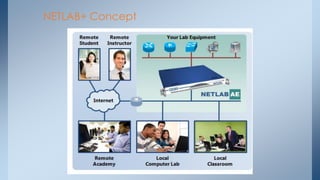
NETLAB+ Concept
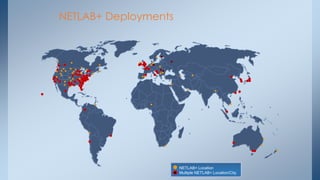
NETLAB+ Deployments 
NETLAB+ Location Multiple NETLAB+ Location/City
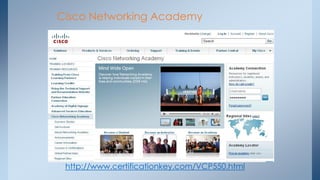
Cisco Networking Academy 
http://www.certificationkey.com/VCP550.html
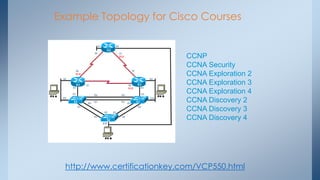
Example Topology for Cisco Courses 
CCNP 
CCNA Security 
CCNA Exploration 2 
CCNA Exploration 3 
CCNA Exploration 4 
CCNA Discovery 2 
CCNA Discovery 3 
CCNA Discovery 4 
http://www.certificationkey.com/VCP550.html
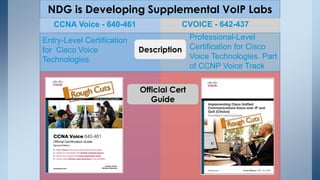
NDG is Developing Supplemental VoIP Labs 
CVOICE - 642-437 
CCNA Voice - 640-461 
Entry-Level Certification for Cisco Voice Technologies 
Professional-Level Certification for Cisco Voice Technologies. Part of CCNP Voice Track 
Description 
Official Cert 
Guide
VMware IT Academy - ICM 
http://www.certificationkey.com/VCP550.html
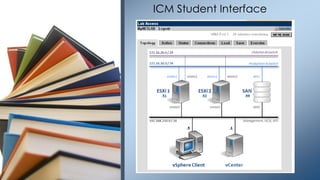
ICM Student Interface
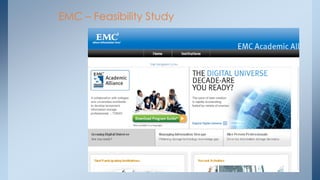
EMC – Feasibility Study
Questions 
http://www.certificationkey.com/VCP550.html
Backup Slides 
•Additional Information 
36 
http://www.certificationkey.com/VCP550.html
37 
Additional Information - Agenda 
ILT Equipment requirements overview 
VMware Certified Instructor requirements 
Pearson VUE Testing Center Overview 
VMware Certified Professional (VCP) Overview 
http://www.certificationkey.com/VCP550.html
Server, Storage & Network Infrastructure 
•Server Requirements: 
• A VMware certified x86 (Intel Xeon or AMD Opteron) based 64bit server with 2GB RAM or more (4 or 8 GB recommeded), 36GB local disk storage (72GB or more recommended) & DVD ROM & access to Keyboard, mouse & monitor capabilities (see http://www.vmware.com/pdf/vi3_systems_guide.pdf & http://www.vmware.com/pdf/vi3_io_guide.pdf ) 
• A minimum of 3 x 1Gbit NIC interface cards ( see supported NIC models http://www.vmware.com/pdf/vi3_io_guide.pdf ) 
• A minimum of 1 VMware supported Fibre Channel adapter per server (http://www.vmware.com/pdf/vi3_san_guide.pdf) 
• 
38 
http://www.certificationkey.com/VCP550.html
Server, Storage & Network Infrastructure 
•Storage Requirements: 
• 1 x shared NAS device listed on the VMware SAN compatibility guide (see http://www.vmware.com/pdf/vi3_san_guide.pdf) or use of a customised NFS server 
• 1 x Fibre Channel switch & Storage Area Network (on VMware certified device list – see http://www.vmware.com/pdf/vi3_san_guide.pdf) . This array must be capable of having a minimum of 3 dedicated LUNs (10GB each) for each server & 2 shared LUNs 100GB each for use by all servers. 
• Sufficient Fibre Channel switches to connect the servers to the storage array. 
http://www.certificationkey.com/VCP550.html
•Network Requirements: 
• All student & server networking components should be 1 Gbps network connected and appropriate network isolation should be in place (i.e. ESX server management & training network separated from academy production network) 
• NAS / IP Storage device should be connected to the ESX server management network 
• Static IP address allocation scheme for specific components (4 per server recommended) & DHCP addressing capabilities to cater for up to 10 IP addresses per physical ESX host for virtual machines created during the class exercises) 
•Virtual Center Server Requirements: 
• Sufficient hardware (virtual or physical) to run a Windows 2003 Virtual Machine per ESX server within the classroom environment. VMware recommends these Virtual Center servers be run as VMs on top of a common ESX host within the training environment. 
• 
40 
Server, Storage & Network Infrastructure
•Classroom Computer Requirements: 
• Standard x86 PCs with Intel or AMD processors (500 Mhz or better recommended) capable of running Windows XP Pro or Windows Server 2003 with 512MB RAM or more recommended) with keyboard, mouse & monitor. Computers must be capable of running VMware Virtual Infrastructure Client (with .NET framework 1.1 or higher installed). 
• Computers should be setup in as standard a manner as possible and allow access to external websites for students and instructors. 
• Access to training environment can be provided by remote capability. For this VMware recommends use of VMware’s secure Virtual Desktop Infrastructure capability through VMware View 3 capability. 
41 
Server, Storage & Network Infrastructure 
http://www.certificationkey.com/VCP550.html
Example ILT Infrastructure Requirements - Diagram 
42 
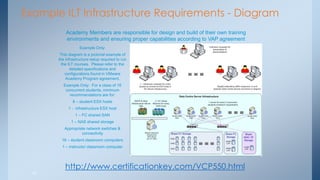
Example Only: 
This diagram is a pictorial example of the infrastructure setup required to run the ILT courses. Please refer to the detailed specifications and configurations found in VMware Academy Program agreement. 
Example Only: For a class of 16 concurrent students, minimum recommendations are for: 
8 – student ESX hosts 
1 - infrastructure ESX host 
1 – FC shared SAN 
1 – NAS shared storage 
Appropriate network switches & connectivity 
16 – student classroom computers 
1 – instructor classroom computer 
Academy Members are responsible for design and build of their own training environments and ensuring proper capabilities according to VAP agreement 
http://www.certificationkey.com/VCP550.html
Virtual Labs via NETLAB+ from NDG 
NETLAB+ Support of the VMware IT Academy Program®
VMware IT Academy Instructor Requirements 
•For each certified course, a VMware IT Academy Instructor needs to: 
• Attend and actively participate in the specified course & any pre-requisite courses. This requirement can also be met by attending a Live On Line qualifying course, viewing a recorded Live On Line course and providing screen shots of completed labs either using the schools hardware or NDG’s virtual lab support that they make available for IT Academy instructor candidates for completing the lab requirement. 
• Pass the associated VMware authorized exam with an instructor pass mark of 350 on the VCP 4 exam (higher than the standard student pass mark of 300) 
44 
http://www.certificationkey.com/VCP550.html
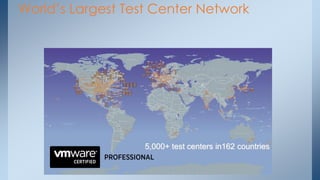
World’s Largest Test Center Network 
5,000+ test centers in162 countries

VMware VCP550 Q&A Training

  • 1.
    The VMware ITAcademy: What It Is All About And Advantages To Education VMware vSphere Install Configure Manage
  • 2.
    VMware Certified Professionalon vSphere 5 Audience: –System administrators –System operators –Systems engineers –Consultants Professional Currently a VCP4 *Achieve VCP4 or take vSphere: What’s New [V5] VCP5 Just starting or VCP2 VCP5 vSphere: Install, Configure, Manage [V5] VCP5 VCP5 Currently a VCP3 *What’s New: vSphere 5 *No additional requirement After Feb 29: vSphere: What’s New [V5] Not a VCP4 but have completed a VCP4 qualifying course VCP5 Exam VCP5 Exam VCP5 Exam VCP5 Exam After Feb 29: vSphere: Install, Configure, Manage [V5]
  • 3.
    Agenda Introduction WhyVirtualization Is Important VMware’s Education Programs, Value Proposition & Benefits VMware IT Academy Program, Offerings & Eligibility Program Costs Program Success Metrics Support Questions http://www.certificationkey.com/VCP550.html
  • 4.
    Why Virtualization IsImportant & The VMware IT Academy Current Economy Reduces Capital Expenses Reduces Operational Expenses Promotes Green IT Enables “Cloud” Computing Demand for VMware Certified Professionals Over 1,500 schools and 10,000 students are using the eLearning part of the IT Academy Over 400 schools are participating in the Instructor Led part of the IT Academy program and over 3,000 students have been trained and are candidates to become a VMware Certified Professional http://www.certificationkey.com/VCP550.html
  • 5.
    Why Virtualization IsImportant Part Two Tom Silver, senior VP and chief marketing officer for the technology jobs Web site Dice.com, says that the total job count for his site was down 12 percent from January 2008 through the first week of November. But for those with virtualization experience, including both VMware and general skills, available jobs increased by 43 percent and 37 percent, respectively. Source: http://virtualizationreview.com/features/print.aspx?editorialsid=2604
  • 6.
    Virtualization: Transformational Changein IT • Virtualization… Decouples software from underlying hardware Encapsulates Operating Systems and applications into “Virtual Machines” A Virtual Machine 6 http://www.certificationkey.com/VCP550.html
  • 7.
    Virtual Infrastructure: TenYears in the Making X Automated Resource Assurance Dynamic Balancing Continuous Optimization Increased Availability Automated Across Applications On-Demand Capacity Non-disruptive Scaling Flexible, Reconfigurable + + 7 http://www.certificationkey.com/VCP550.html
  • 8.
    Computing Architecture OnePlatform to Solve a Range of Pressing Challenges Across a Range of Environments and Users Server Consolidation VMware Infrastructure Business Continuity Rapid Provisioning Enterprise Desktops Server Storage Network 8 http://www.certificationkey.com/VCP550.html
  • 9.
    New Software PlatformRequired Hardware Pool Existing App Loads Future App Loads An Elastic, Self-managing, Self-healing SW Substrate Virtual Datacenter Operating System 9
  • 10.
    Evolving to VirtualDatacenter OS Linux Windows Datacenter Infrastructure Application vServices Infrastructure vServices Virtual Datacenter Operating System vCompute vStorage vNetwork Availability Security Scalability Future Future Future … 10 http://www.certificationkey.com/VCP550.html
  • 11.
    Evolving to VirtualDatacenter OS Datacenter Infrastructure Future Future Future … Linux Windows Application vServices Infrastructure vServices vCompute vStorage vNetwork Availability Security Scalability Management vServices 11 http://www.certificationkey.com/VCP550.html
  • 12.
    Evolving to VirtualDatacenter OS Datacenter Infrastructure Linux Windows Management vServices Future Future Future … Application vServices Infrastructure vServices vCompute vStorage vNetwork Availability Security Scalability Off-Premise Cloud Cloud vServices 12 http://www.certificationkey.com/VCP550.html
  • 13.
    Who is UsingVirtualization? Study by SMB supplier SpiceWorks: 100,000 companies in over 100 countries •VMware has 80.1% market share •Microsoft has 15.1% market share •Citrix XenServer has 4.1% market share http://www.certificationkey.com/VCP550.html
  • 14.
    14 VMware GlobalEducation & Research Programs Open & Inclusive Collaborative Programs VMware Academic Program VMware Labs VMware IT Academy Program http://www.certificationkey.com/VCP550.html
  • 15.
    15 Value Proposition& Goals Value Proposition Schools – Use of Industry Leading Intellectual Property Students – Affordable Access To Training & Professional Certification VMware – Proliferation Of Virtualization Competencies Goals & Objectives Drive Collaboration Between Schools & Between Students With Communities Maximize Awareness and Competencies on Virtualization Products and Technologies Supply the IT industry a pool of VMware Certified Professionals (VCP) http://www.certificationkey.com/VCP550.html
  • 16.
    VMware IT AcademyProgram – two levels 16 eLearning courses Instructor Led Training (VMware Certification courses) College / Institute Capabilities & Competency Higher level of certification Entry level capabilities Low start up costs / resources Higher costs / resources • Academy members do not require any certified trainers • Low / No ICT hardware requirement • Can be included into existing courses or used for self study • Academy members require VMware certified Instructor to teach certified courses • Specified ICT hardware requirement • Minimum course content and hours required for student certification VMware has designed a flexible program to allow colleges to provide Virtualization training in multiple formats, learning styles and levels http://www.certificationkey.com/VCP550.html
  • 17.
    VMware IT AcademyeLearning Offerings Infrastructure Virtualization VMware vSphere Fundamentals 4.1 VMware vSphere: What's New in vSphere 4 VMware ESXi: Administration Transition to ESXi Essentials Virtualization Management VMware vCenter CapacityIQ Fundamentals VMware vCloud Director Fundamentals VMware vCenter Lab Manager 4.0 Fundamentals VMware vCenter Chargeback Fundamentals VMware vCenter AppSpeed Fundamentals VMware Capacity Planner 2.7 17
  • 18.
    VMware IT AcademyeLearning Offerings Security VMware vShield App Fundamentals VMware vShield Edge Fundamentals Business Continuity Site Recovery Manager (SRM) 4.1 Fundamentals DRBC Design - Disaster Recovery and Business Continuity 18 http://www.certificationkey.com/VCP550.html
  • 19.
    VMware IT AcademyeLearning Offerings End User Computing VMware Workstation 7: Fundamentals VMware Workstation 7: Advanced VMware Workstation 6: Mastery VMware Fusion 3 VMware View 4.5 Fundamentals What is New in VMware View 4.5 VMware ThinApp Fundamentals 19 http://www.certificationkey.com/VCP550.html
  • 20.
    20 VMware ITAcademy Instructor Led Offerings •Instructor Led Courses: VMware vSphere 4: Overview VMware vSphere: Skills for Operators VMware vSphere 4: What's New VMware vSphere: What's New Japanese VMware vSphere 4: Manage Availability VMware vSphere 4: Manage Scalability VMware vSphere 4: Manage for Performance VMware vSphere: Design Workshop VMware vSphere: Design Workshop Chinese VMware vSphere: Design Workshop Japanese Using VMware vCenter Lab Manager VMware vSphere 4: Troubleshooting VMware vSphere 4: Troubleshooting Chinese VMware vSphere 4: Troubleshooting Japanese VMware vSphere 4: Install, Configure, Manage VMware vSphere 4.1: Install, Configure, Manage VMware vSphere 4: Manage and Design for Security
  • 21.
    21 VMware ITAcademy Instructor Led Offerings •Instructor Led Courses Continued: VMware vSphere: Transition to ESXi VMware vSphere 4: Fast Track VMware vSphere 4: Install, Configure, Manage Chinese VMware View: Design Best Practices VMware vSphere: Automation with vSphere PowerCLI VMware vSphere 4: Install, Configure, Manage - Japanese VMware View: Install, Configure, Manage Application Virtualization with VMware ThinApp VMware Infrastructure 3: Overview VMware Infrastructure 3: Skills for Operators VMware Infrastructure 3: Deploy, Secure and Analyze VMware Infrastructure 3: Install and Configure VMware Infrastructure 3: Install and Configure - Chinese VMware Infrastructure 3: Install and Configure - Japanese VMware Workstation 6.5
  • 22.
    Spring Source InstructorLed Offerings Core Spring v3 Rich Web Applications with Spring Enterprise Integration with Spring 22
  • 23.
    Eligibility for VMwareIT Academy Program  VMware Academy program open to Accredited, degree & diploma granting higher education institutions worldwide offering 2- or 4- year college programs are eligible to participate in the program  Technical schools offering accredited degrees through distance education programs are also eligible to participate in the program  No minimum course enrollment commitment (i.e. Academy members can scale classes as the markets and opportunity demand) http://www.certificationkey.com/VCP550.html
  • 24.
    24 Program Costs  No cost to Join. A simple registration form submitted for approval.  Student course kits purchased directly from VMware’s print vendor to leverage VMware’s price point based on quantity & scale. Student kits should cost less than $50 USD including tax & shipping when ordering in quantity 10 or more. IT Academy partners can purchase certification vouchers directly from VMware’s certification testing delivery partner (Pearson VUE) at a discounted rate of 70% off commercial cost.  IT Academy partners receive eLearning courses to use at “No Charge” to supplement instructor led courses or for reference for any courses desired. Note: eLearning courses do not satisfy the prerequisite for the VMware VCP Certification. The cost of printing, shipping and taxes will vary by region as will the cost of certification test delivery. http://www.certificationkey.com/VCP550.html
  • 25.
    VMware IT Academy- Support Administrative Support: Program Manager Operations myLearn LMS for Class, Student, Certification Vouchers & Evaluations Technical Support - VMware Forum: http://communities.vmware.com Mentoring via WebEx with Playback Course Materials – Gilmore – Dedicated School Storefront Certification – Pearson VUE – Redeemable Discount Vouchers Hardware – Recommendations on either physical servers or virtual via NETLAB+ from NDG http://www.certificationkey.com/VCP550.html
  • 26.
    26 VMware ITAcademy Program Success Metrics  # of students participating over time  # of students completing certifications over time  Quality Ratings ≥ Commercial Scores as measured by student feedback scores  Academy members and student direct program feedback VMware will measure academy program members success using the metrics above. These inputs will be used to determine further program enhancements and future program direction http://www.certificationkey.com/VCP550.html
  • 27.
  • 28.
    NETLAB+ Deployments NETLAB+Location Multiple NETLAB+ Location/City
  • 29.
    Cisco Networking Academy http://www.certificationkey.com/VCP550.html
  • 30.
    Example Topology forCisco Courses CCNP CCNA Security CCNA Exploration 2 CCNA Exploration 3 CCNA Exploration 4 CCNA Discovery 2 CCNA Discovery 3 CCNA Discovery 4 http://www.certificationkey.com/VCP550.html
  • 31.
    NDG is DevelopingSupplemental VoIP Labs CVOICE - 642-437 CCNA Voice - 640-461 Entry-Level Certification for Cisco Voice Technologies Professional-Level Certification for Cisco Voice Technologies. Part of CCNP Voice Track Description Official Cert Guide
  • 32.
    VMware IT Academy- ICM http://www.certificationkey.com/VCP550.html
  • 33.
  • 34.
  • 35.
  • 36.
    Backup Slides •AdditionalInformation 36 http://www.certificationkey.com/VCP550.html
  • 37.
    37 Additional Information- Agenda ILT Equipment requirements overview VMware Certified Instructor requirements Pearson VUE Testing Center Overview VMware Certified Professional (VCP) Overview http://www.certificationkey.com/VCP550.html
  • 38.
    Server, Storage &Network Infrastructure •Server Requirements: • A VMware certified x86 (Intel Xeon or AMD Opteron) based 64bit server with 2GB RAM or more (4 or 8 GB recommeded), 36GB local disk storage (72GB or more recommended) & DVD ROM & access to Keyboard, mouse & monitor capabilities (see http://www.vmware.com/pdf/vi3_systems_guide.pdf & http://www.vmware.com/pdf/vi3_io_guide.pdf ) • A minimum of 3 x 1Gbit NIC interface cards ( see supported NIC models http://www.vmware.com/pdf/vi3_io_guide.pdf ) • A minimum of 1 VMware supported Fibre Channel adapter per server (http://www.vmware.com/pdf/vi3_san_guide.pdf) • 38 http://www.certificationkey.com/VCP550.html
  • 39.
    Server, Storage &Network Infrastructure •Storage Requirements: • 1 x shared NAS device listed on the VMware SAN compatibility guide (see http://www.vmware.com/pdf/vi3_san_guide.pdf) or use of a customised NFS server • 1 x Fibre Channel switch & Storage Area Network (on VMware certified device list – see http://www.vmware.com/pdf/vi3_san_guide.pdf) . This array must be capable of having a minimum of 3 dedicated LUNs (10GB each) for each server & 2 shared LUNs 100GB each for use by all servers. • Sufficient Fibre Channel switches to connect the servers to the storage array. http://www.certificationkey.com/VCP550.html
  • 40.
    •Network Requirements: •All student & server networking components should be 1 Gbps network connected and appropriate network isolation should be in place (i.e. ESX server management & training network separated from academy production network) • NAS / IP Storage device should be connected to the ESX server management network • Static IP address allocation scheme for specific components (4 per server recommended) & DHCP addressing capabilities to cater for up to 10 IP addresses per physical ESX host for virtual machines created during the class exercises) •Virtual Center Server Requirements: • Sufficient hardware (virtual or physical) to run a Windows 2003 Virtual Machine per ESX server within the classroom environment. VMware recommends these Virtual Center servers be run as VMs on top of a common ESX host within the training environment. • 40 Server, Storage & Network Infrastructure
  • 41.
    •Classroom Computer Requirements: • Standard x86 PCs with Intel or AMD processors (500 Mhz or better recommended) capable of running Windows XP Pro or Windows Server 2003 with 512MB RAM or more recommended) with keyboard, mouse & monitor. Computers must be capable of running VMware Virtual Infrastructure Client (with .NET framework 1.1 or higher installed). • Computers should be setup in as standard a manner as possible and allow access to external websites for students and instructors. • Access to training environment can be provided by remote capability. For this VMware recommends use of VMware’s secure Virtual Desktop Infrastructure capability through VMware View 3 capability. 41 Server, Storage & Network Infrastructure http://www.certificationkey.com/VCP550.html
  • 42.
    Example ILT InfrastructureRequirements - Diagram 42 Example Only: This diagram is a pictorial example of the infrastructure setup required to run the ILT courses. Please refer to the detailed specifications and configurations found in VMware Academy Program agreement. Example Only: For a class of 16 concurrent students, minimum recommendations are for: 8 – student ESX hosts 1 - infrastructure ESX host 1 – FC shared SAN 1 – NAS shared storage Appropriate network switches & connectivity 16 – student classroom computers 1 – instructor classroom computer Academy Members are responsible for design and build of their own training environments and ensuring proper capabilities according to VAP agreement http://www.certificationkey.com/VCP550.html
  • 43.
    Virtual Labs viaNETLAB+ from NDG NETLAB+ Support of the VMware IT Academy Program®
  • 44.
    VMware IT AcademyInstructor Requirements •For each certified course, a VMware IT Academy Instructor needs to: • Attend and actively participate in the specified course & any pre-requisite courses. This requirement can also be met by attending a Live On Line qualifying course, viewing a recorded Live On Line course and providing screen shots of completed labs either using the schools hardware or NDG’s virtual lab support that they make available for IT Academy instructor candidates for completing the lab requirement. • Pass the associated VMware authorized exam with an instructor pass mark of 350 on the VCP 4 exam (higher than the standard student pass mark of 300) 44 http://www.certificationkey.com/VCP550.html
  • 45.
    World’s Largest TestCenter Network 5,000+ test centers in162 countries