VIRTUALIZE WITH CONFIDENCE
NetWize/Dell/VMware
David Pierce
Dell Solutions Architect
david_pierce@dell.com
Mark Millward
Dell Systems Consultant
Mark_Millward@dell.com
2
Agenda.
• Dell | VMware – A Better Together Story
• Dell Servers with VMware
• Dell Storage with VMware
• Dell Networking with VMware
• Dell Systems Management with VMware
Dell | VMware – A Better Together Story
4
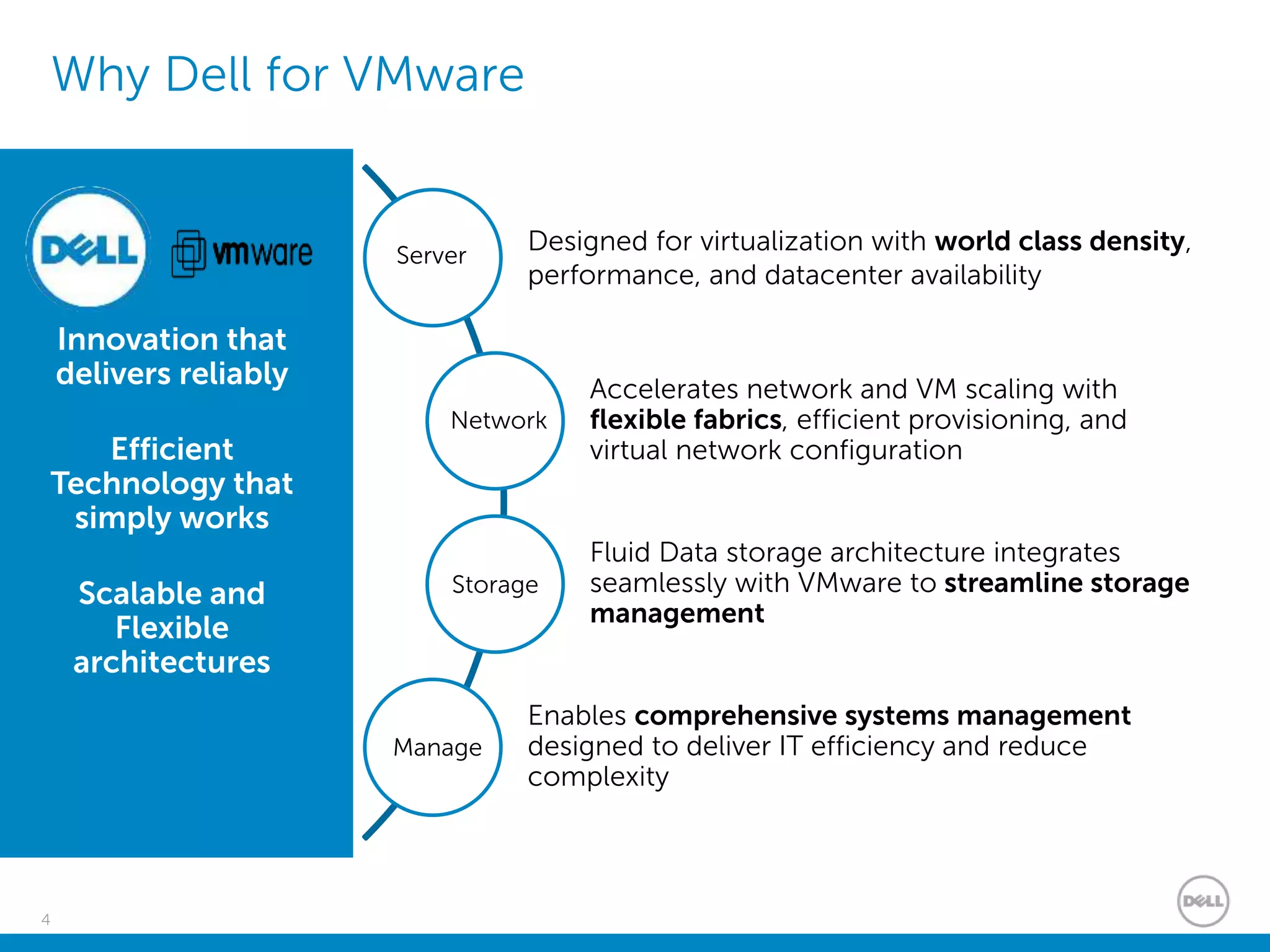
Why Dell for VMware
Innovation that
delivers reliably
Efficient
Technology that
simply works
Scalable and
Flexible
architectures
Designed for virtualization with world class density,
performance, and datacenter availability
Accelerates network and VM scaling with
flexible fabrics, efficient provisioning, and
virtual network configuration
Fluid Data storage architecture integrates
seamlessly with VMware to streamline storage
management
Enables comprehensive systems management
designed to deliver IT efficiency and reduce
complexity
Manage
Server
Storage
Network
5
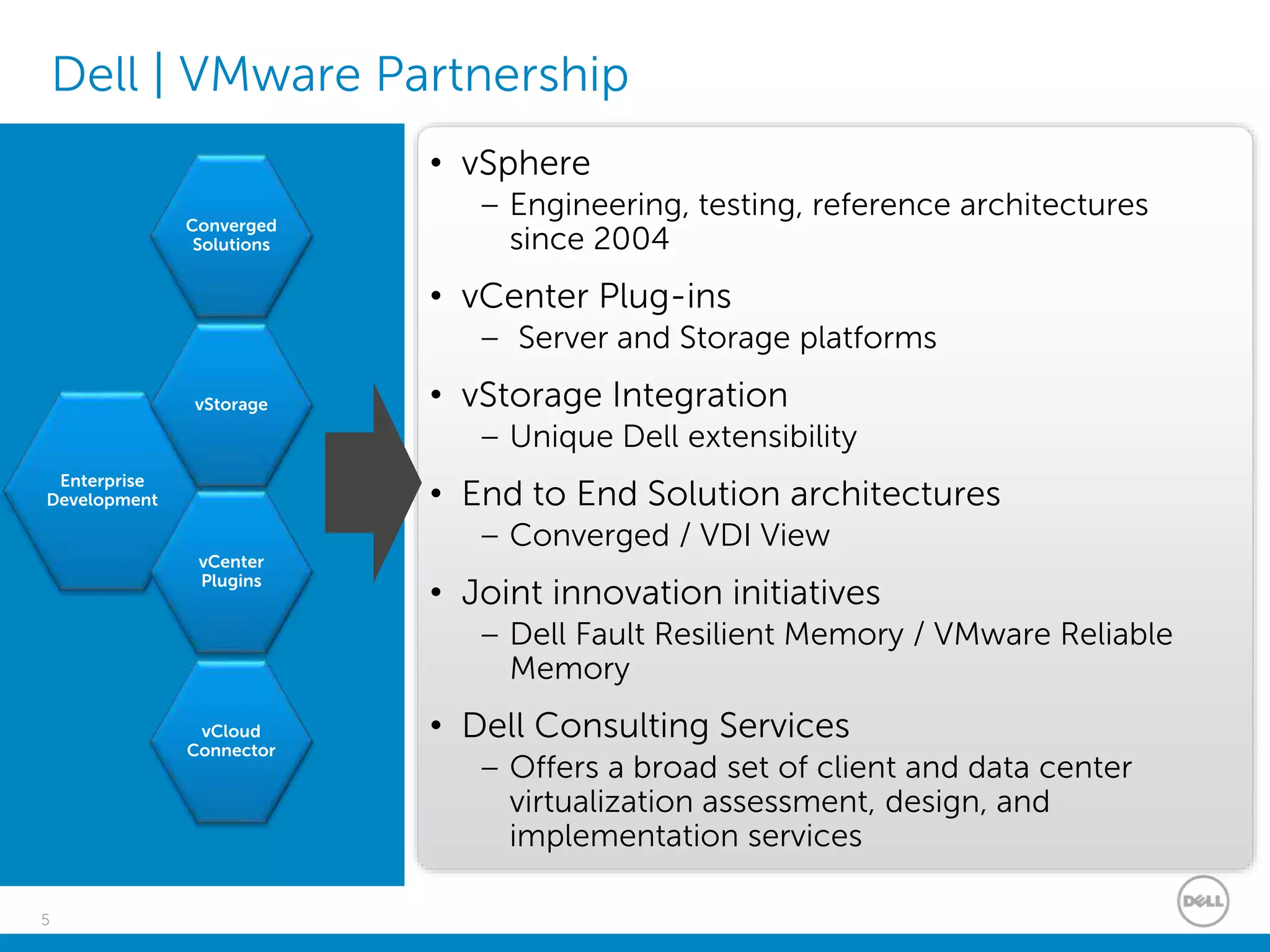
Dell | VMware Partnership
• vSphere
– Engineering, testing, reference architectures
since 2004
• vCenter Plug-ins
– Server and Storage platforms
• vStorage Integration
– Unique Dell extensibility
• End to End Solution architectures
– Converged / VDI View
• Joint innovation initiatives
– Dell Fault Resilient Memory / VMware Reliable
Memory
• Dell Consulting Services
– Offers a broad set of client and data center
virtualization assessment, design, and
implementation services
Enterprise
Development
Converged
Solutions
vCloud
Connector
vCenter
Plugins
vStorage
Dell Servers with VMware
7
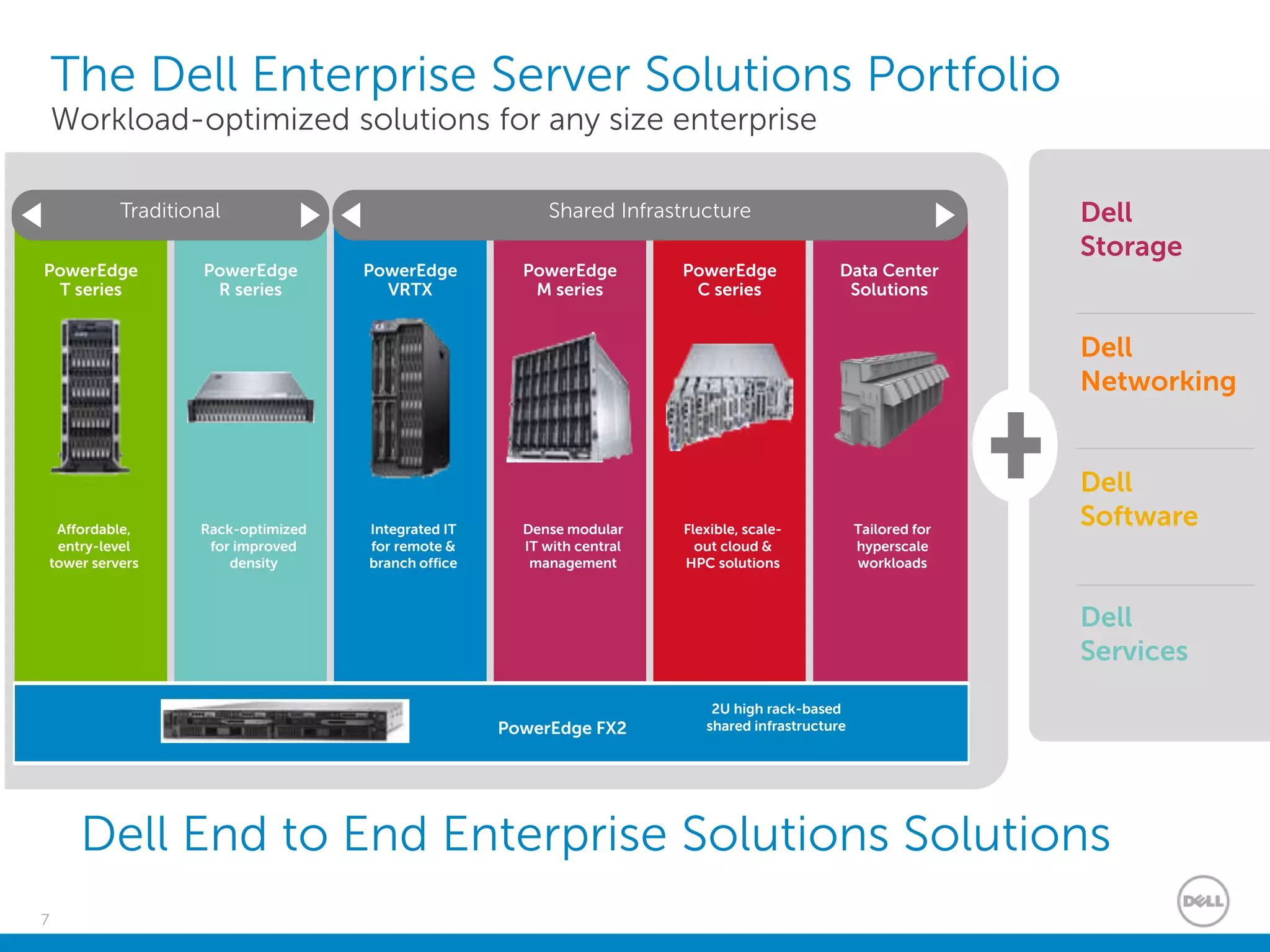
The Dell Enterprise Server Solutions Portfolio
Workload-optimized solutions for any size enterprise
Dell
Networking
Dell
Storage
PowerEdge
T series
Affordable,
entry-level
tower servers
PowerEdge
R series
Rack-optimized
for improved
density
PowerEdge
VRTX
Integrated IT
for remote &
branch office
PowerEdge
M series
Dense modular
IT with central
management
PowerEdge
C series
Flexible, scale-
out cloud &
HPC solutions
Data Center
Solutions
Tailored for
hyperscale
workloads
Traditional Shared Infrastructure
General purpose Distributed applications
Dell
Software
Dell
Services
Dell End to End Enterprise Solutions Solutions
PowerEdge FX2
2U high rack-based
shared infrastructure
8
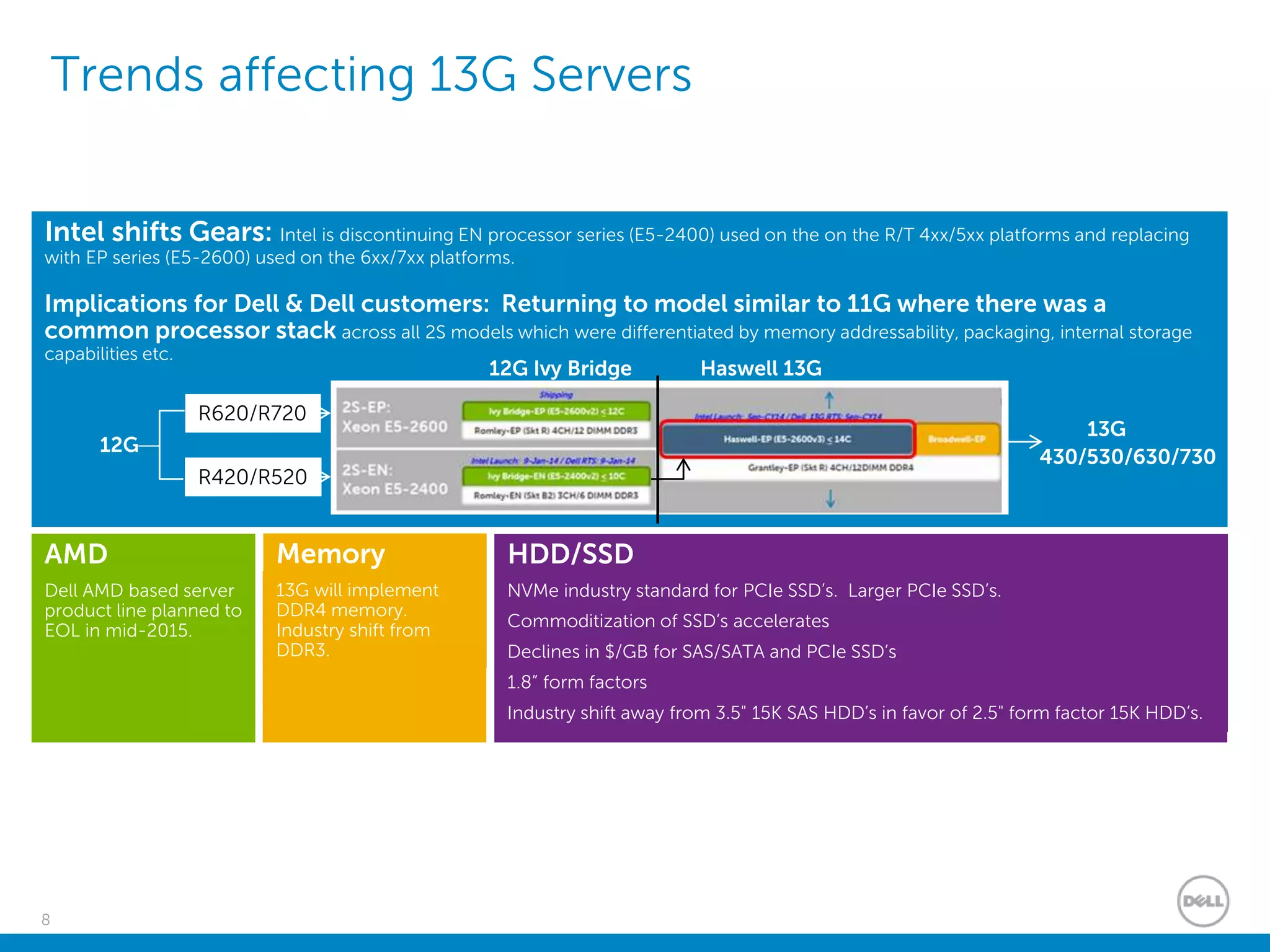
Trends affecting 13G Servers
AMD
Dell AMD based server
product line planned to
EOL in mid-2015.
Intel shifts Gears: Intel is discontinuing EN processor series (E5-2400) used on the on the R/T 4xx/5xx platforms and replacing
with EP series (E5-2600) used on the 6xx/7xx platforms.
Implications for Dell & Dell customers: Returning to model similar to 11G where there was a
common processor stack across all 2S models which were differentiated by memory addressability, packaging, internal storage
capabilities etc.
R420/R520
R620/R720
430/530/630/730
12G
13G
12G Ivy Bridge Haswell 13G
Memory
13G will implement
DDR4 memory.
Industry shift from
DDR3.
HDD/SSD
NVMe industry standard for PCIe SSD’s. Larger PCIe SSD’s.
Commoditization of SSD’s accelerates
Declines in $/GB for SAS/SATA and PCIe SSD’s
1.8” form factors
Industry shift away from 3.5" 15K SAS HDD’s in favor of 2.5" form factor 15K HDD’s.
9
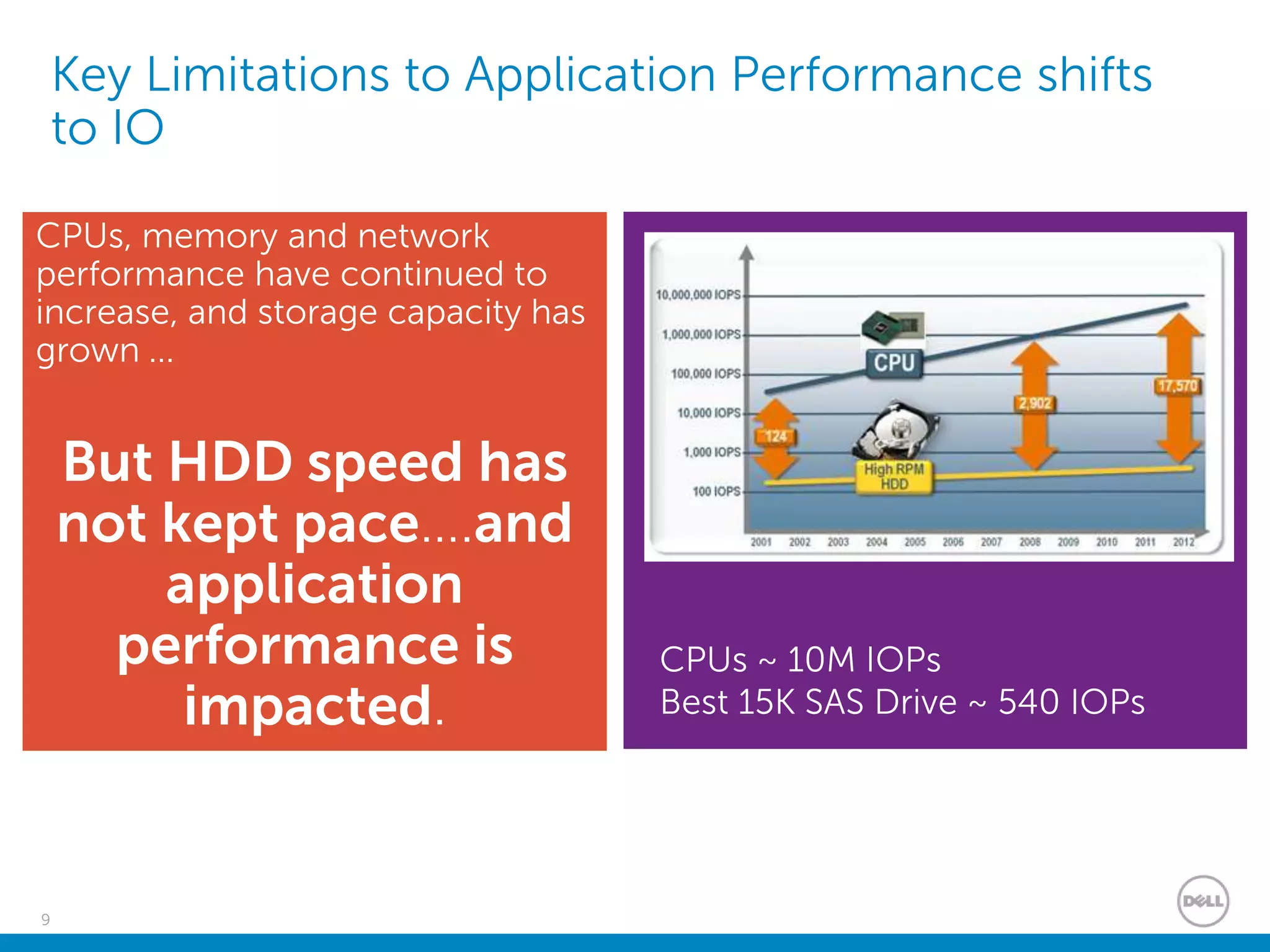
Key Limitations to Application Performance shifts
to IO
CPUs, memory and network
performance have continued to
increase, and storage capacity has
grown ...
But HDD speed has
not kept pace….and
application
performance is
impacted.
CPUs ~ 10M IOPs
Best 15K SAS Drive ~ 540 IOPs
10
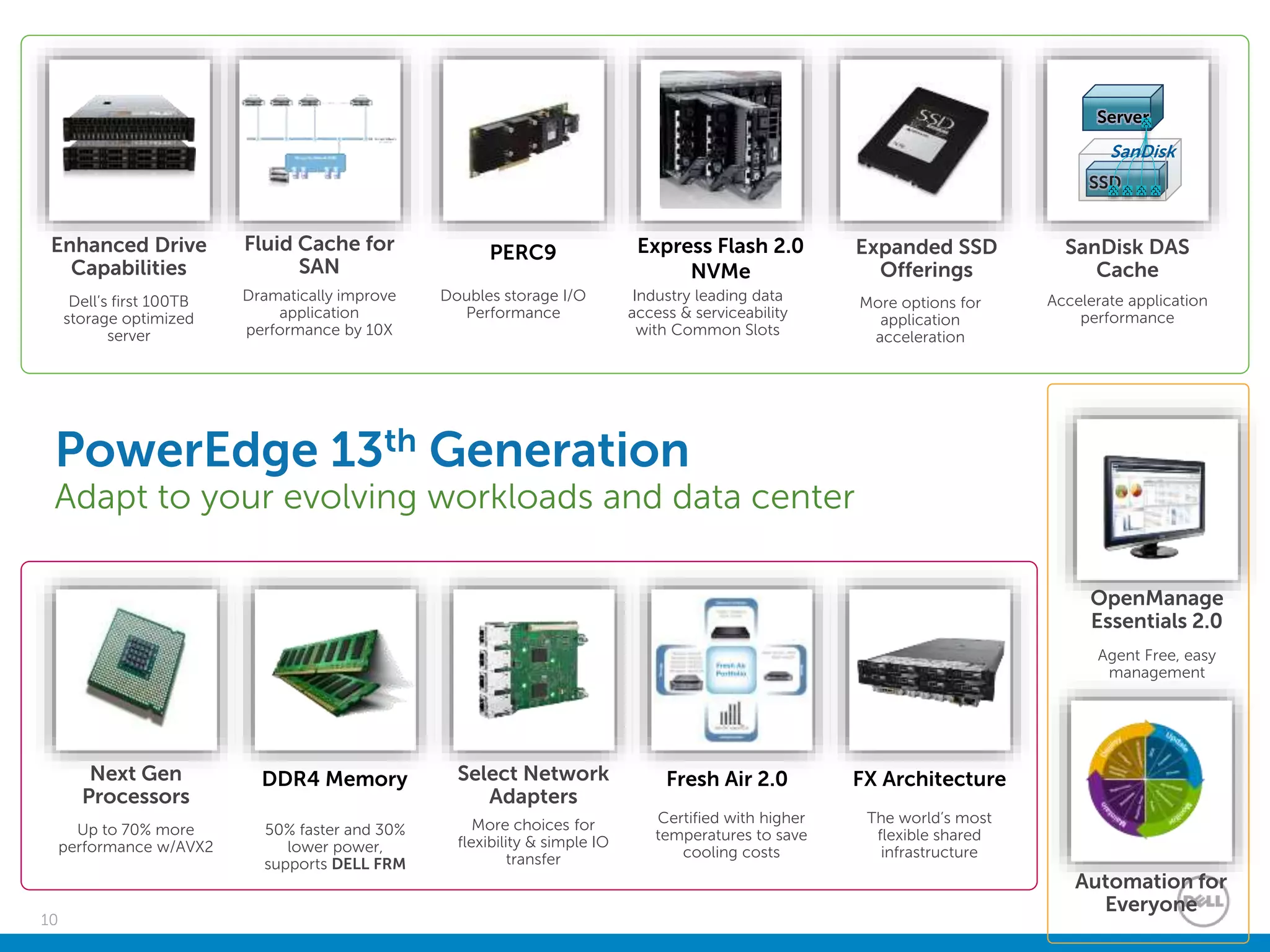
Fresh Air 2.0
Certified with higher
temperatures to save
cooling costs
Select Network
Adapters
More choices for
flexibility & simple IO
transfer
DDR4 Memory
50% faster and 30%
lower power,
supports DELL FRM
FX Architecture
The world’s most
flexible shared
infrastructure
Next Gen
Processors
Up to 70% more
performance w/AVX2
OpenManage
Essentials 2.0
Agent Free, easy
management
Automation for
Everyone
PowerEdge 13th Generation
Adapt to your evolving workloads and data center
Enhanced Drive
Capabilities
Dell’s first 100TB
storage optimized
server
Express Flash 2.0
NVMe
Industry leading data
access & serviceability
with Common Slots
PERC9
Doubles storage I/O
Performance
Expanded SSD
Offerings
More options for
application
acceleration
Fluid Cache for
SAN
Dramatically improve
application
performance by 10X
SanDisk DAS
Cache
Accelerate application
performance
SSD
Server
SanDisk
11
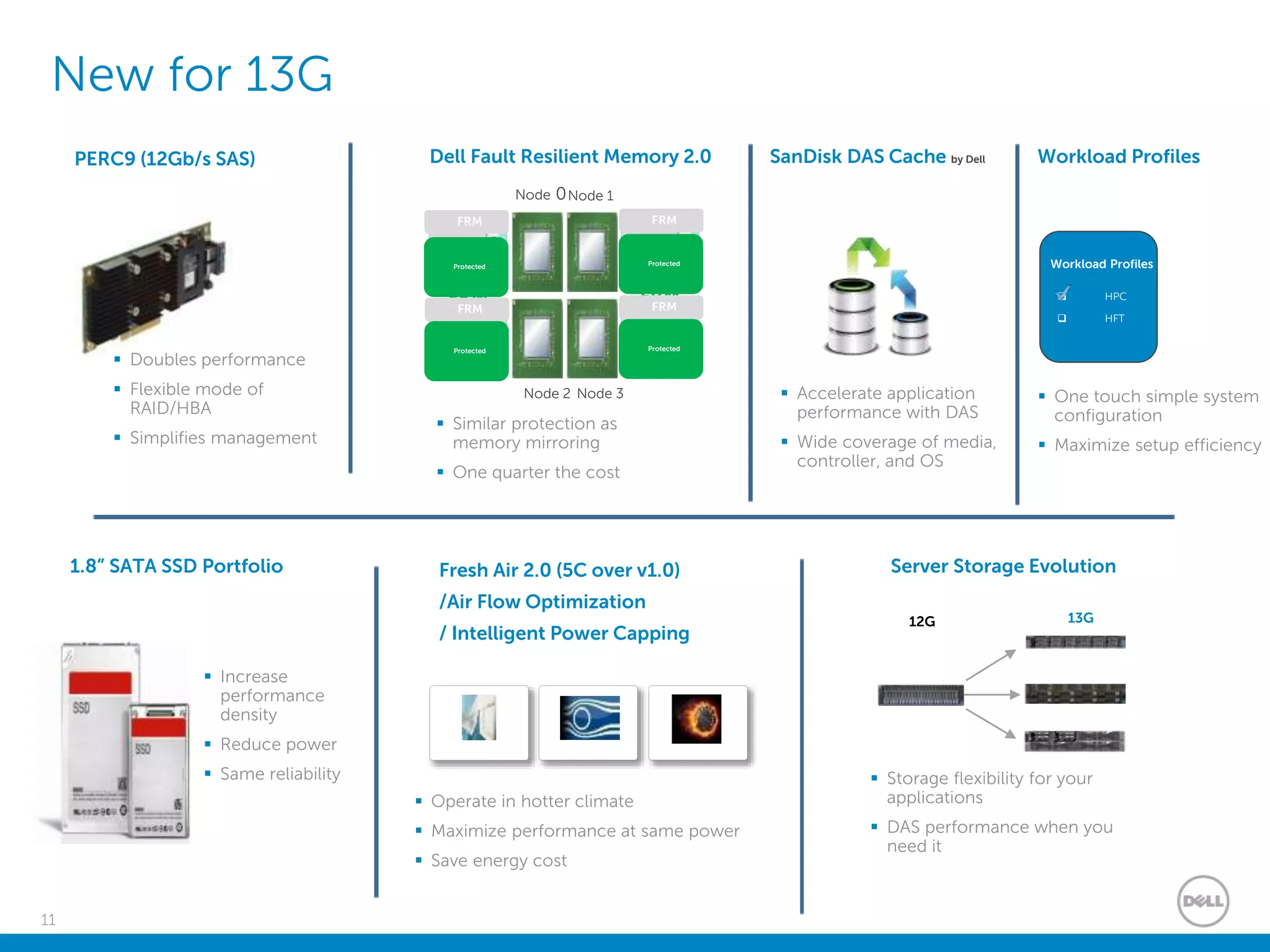
PERC9 (12Gb/s SAS)
 Doubles performance
 Flexible mode of
RAID/HBA
 Simplifies management
New for 13G
 Increase
performance
density
 Reduce power
 Same reliability
Hype
rvisor
Node 0Node 1
Hype
rvisor
FRM
zone
FRM
zoneHype
rviso
r
Node 2 Node 3
Hype
rvisor
FRM FRM
FRM FRM
Protected
Protected
Protected
Protected
Dell Fault Resilient Memory 2.0
 Similar protection as
memory mirroring
 One quarter the cost
1.8” SATA SSD Portfolio
SanDisk DAS Cache by Dell
 Accelerate application
performance with DAS
 Wide coverage of media,
controller, and OS
12G 13G
Server Storage Evolution
 Storage flexibility for your
applications
 DAS performance when you
need it
Fresh Air 2.0 (5C over v1.0)
/Air Flow Optimization
/ Intelligent Power Capping
 Operate in hotter climate
 Maximize performance at same power
 Save energy cost
Workload Profiles
 One touch simple system
configuration
 Maximize setup efficiency
Workload Profiles
 HPC
 HFT
12
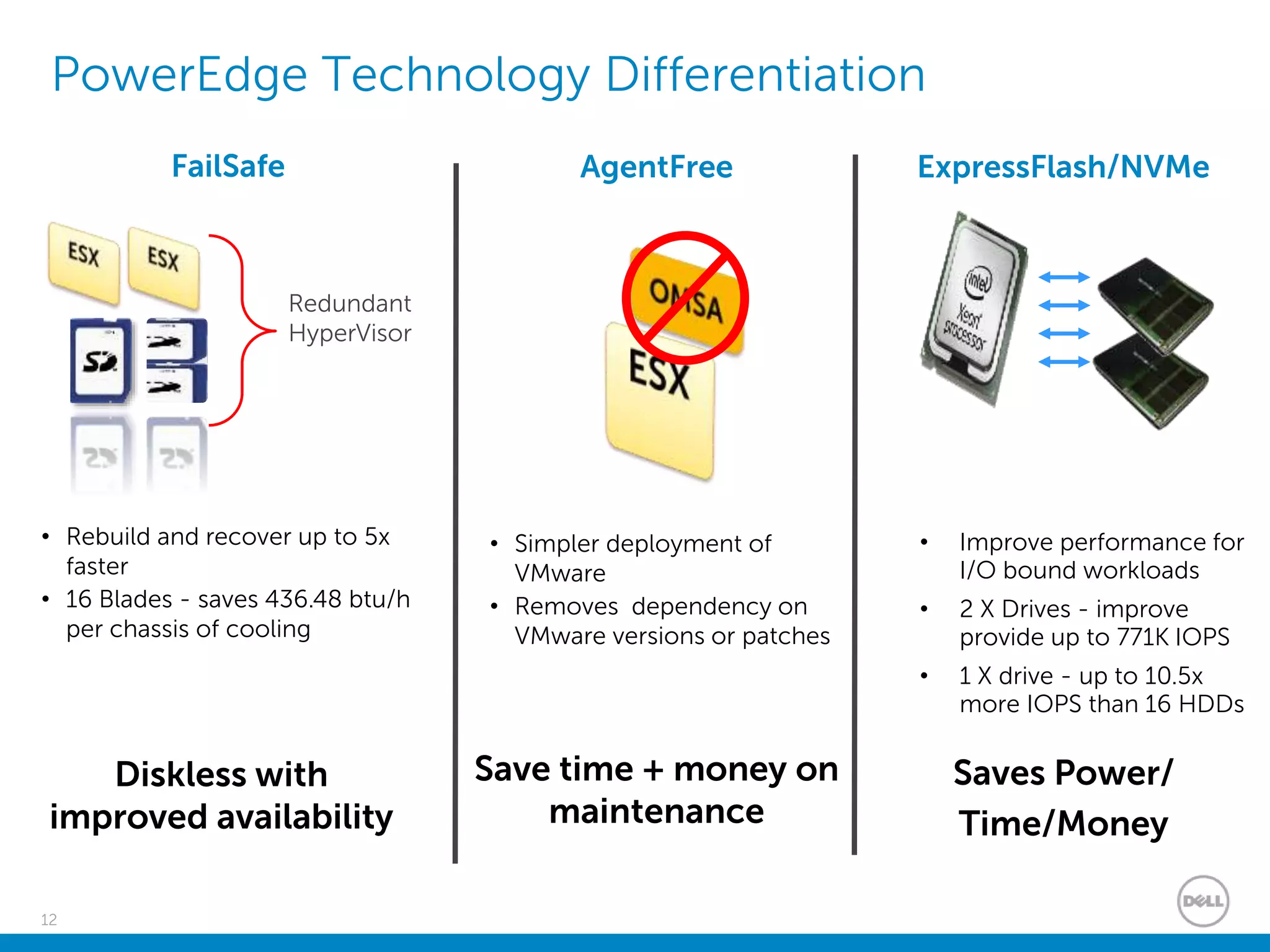
PowerEdge Technology Differentiation
FailSafe ExpressFlash/NVMe
Redundant
HyperVisor
AgentFree
• Simpler deployment of
VMware
• Removes dependency on
VMware versions or patches
Save time + money on
maintenance
• Improve performance for
I/O bound workloads
• 2 X Drives - improve
provide up to 771K IOPS
• 1 X drive - up to 10.5x
more IOPS than 16 HDDs
• Rebuild and recover up to 5x
faster
• 16 Blades - saves 436.48 btu/h
per chassis of cooling
Diskless with
improved availability
Saves Power/
Time/Money
13
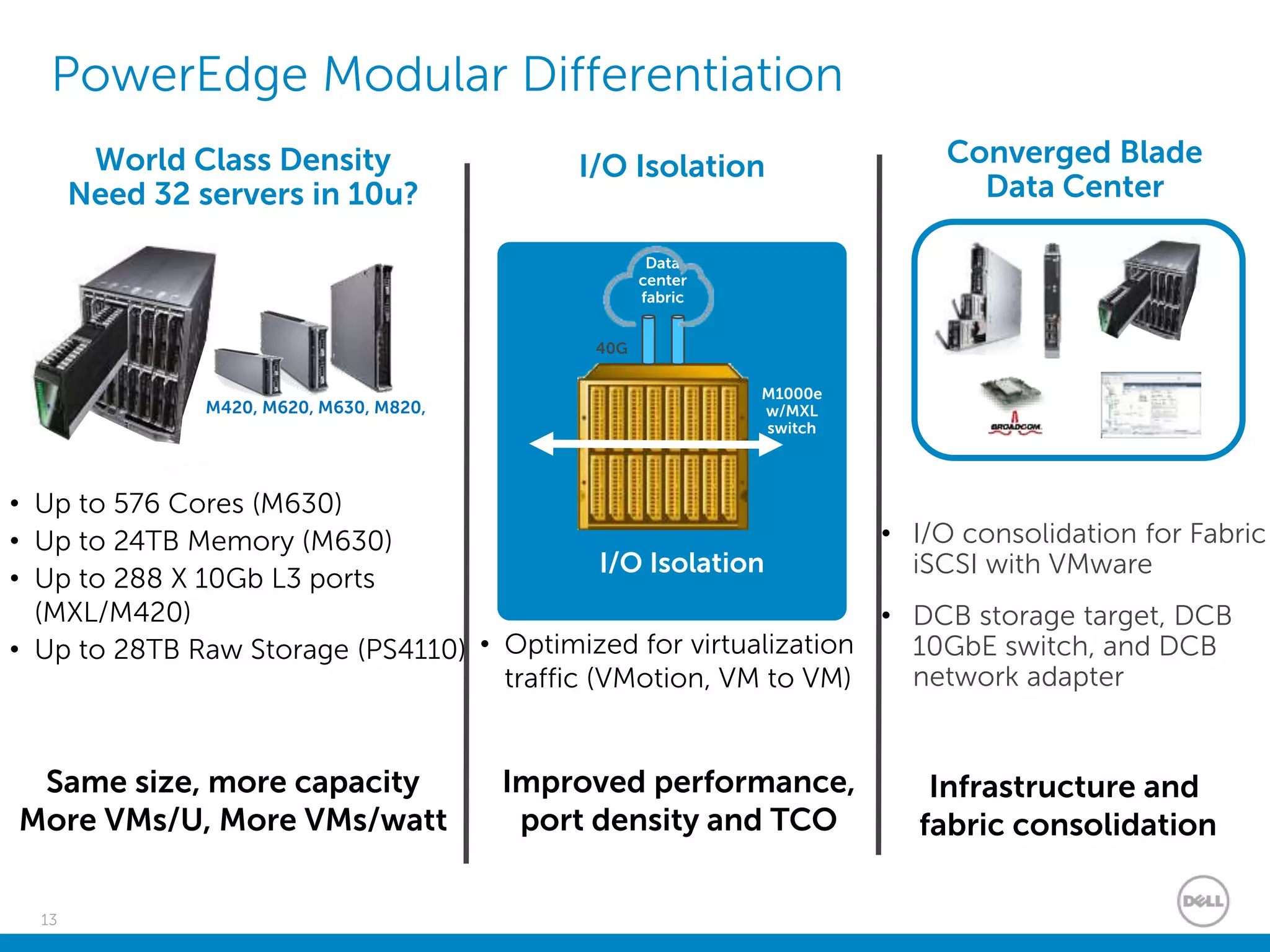
PowerEdge Modular Differentiation
I/O Isolation
• I/O consolidation for Fabric
iSCSI with VMware
• DCB storage target, DCB
10GbE switch, and DCB
network adapter
I/O Isolation Converged Blade
Data Center
M1000e
w/MXL
switch
40G
Data
center
fabric
• Optimized for virtualization
traffic (VMotion, VM to VM)
Improved performance,
port density and TCO
Same size, more capacity
More VMs/U, More VMs/watt
M420, M620, M630, M820,
World Class Density
Need 32 servers in 10u?
• Up to 576 Cores (M630)
• Up to 24TB Memory (M630)
• Up to 288 X 10Gb L3 ports
(MXL/M420)
• Up to 28TB Raw Storage (PS4110)
Infrastructure and
fabric consolidation
14
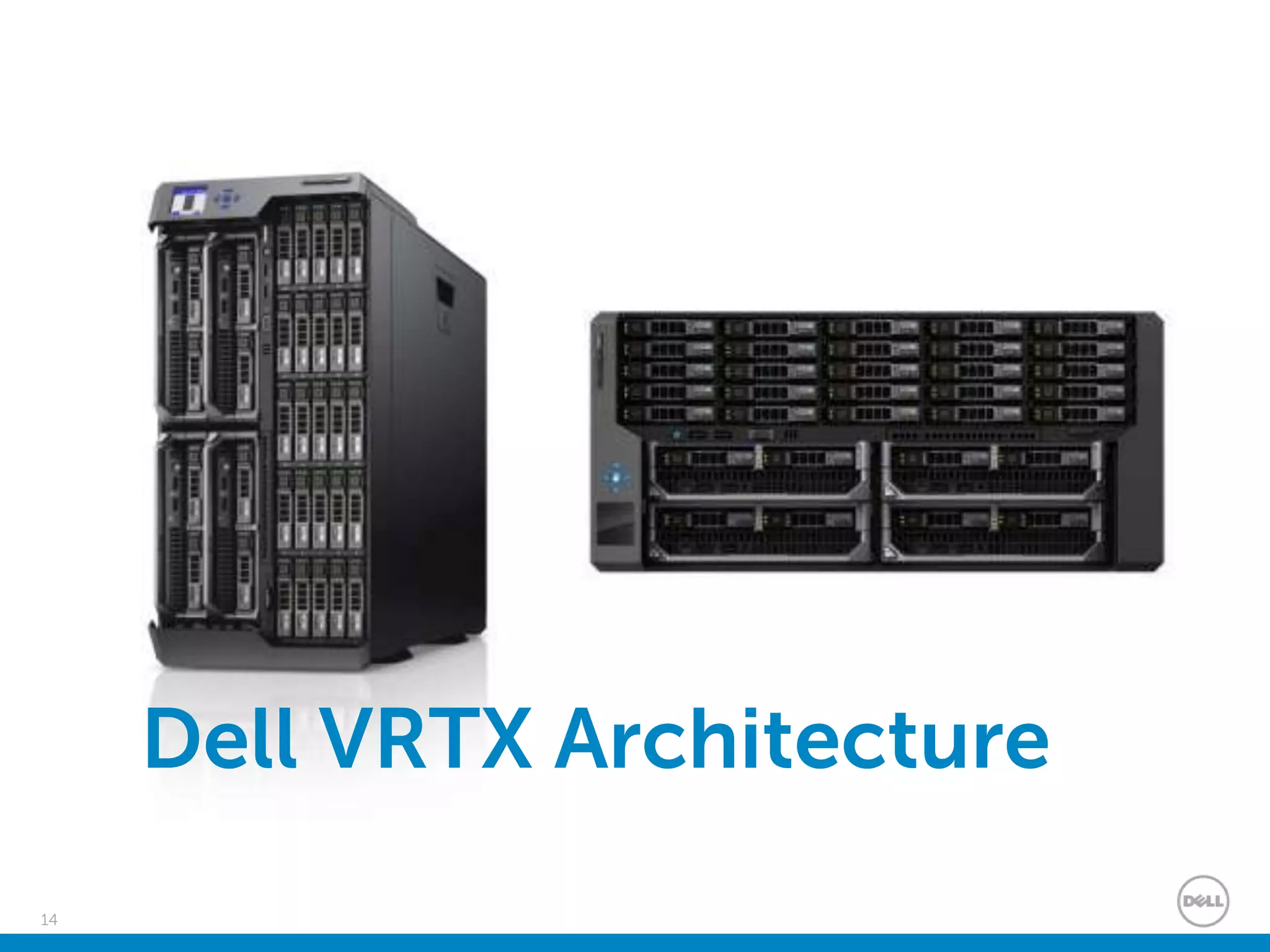
Dell VRTX Architecture
15
What is VRTX?
• VRTX - abbreviation of Vertex
• Vertex the point of intersection of three or more lines or planes of a solid
figure
– Servers
– Storage
– Networking
16
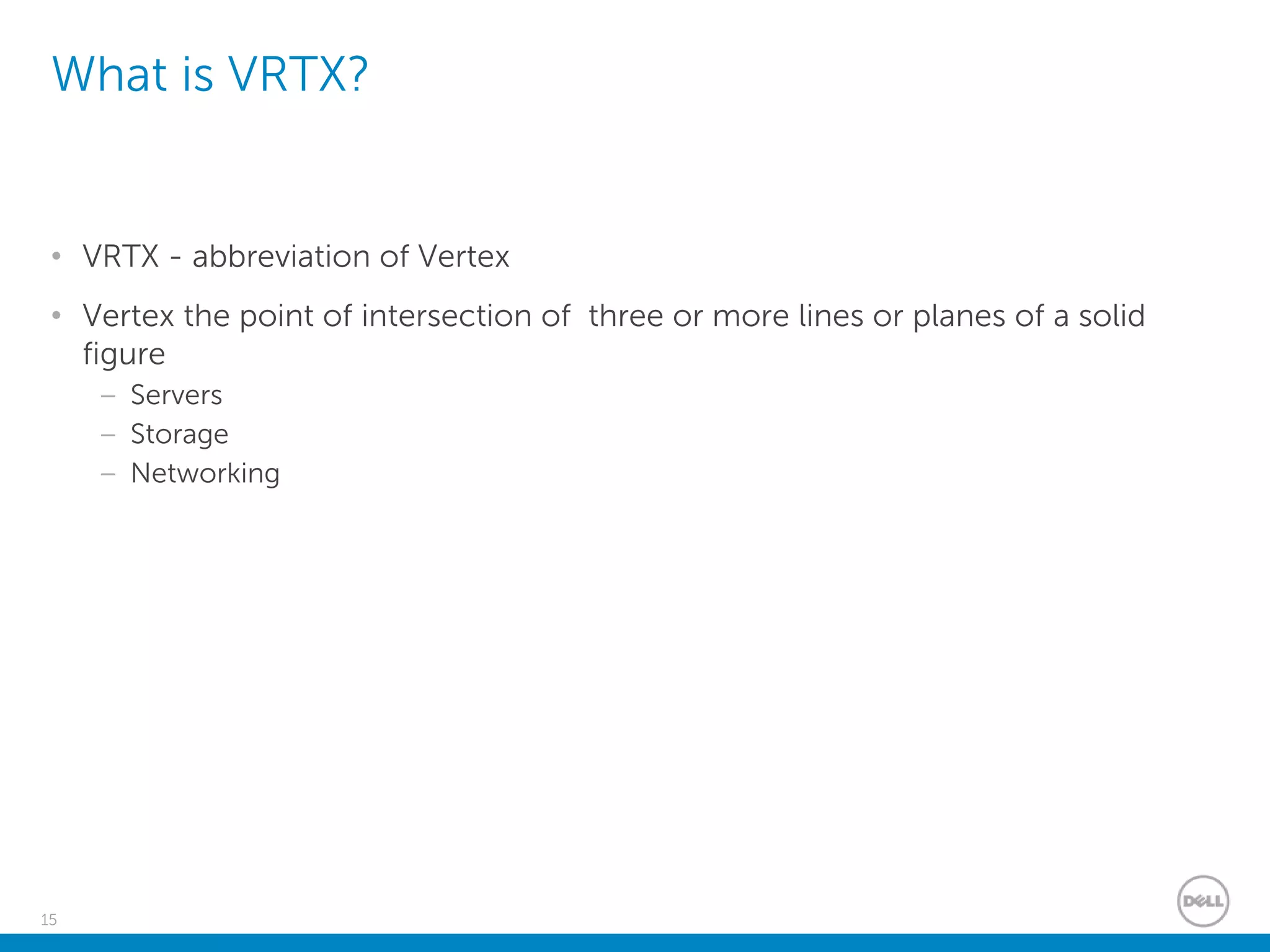
What does VRTX mean for you
Do you have this problem?
17
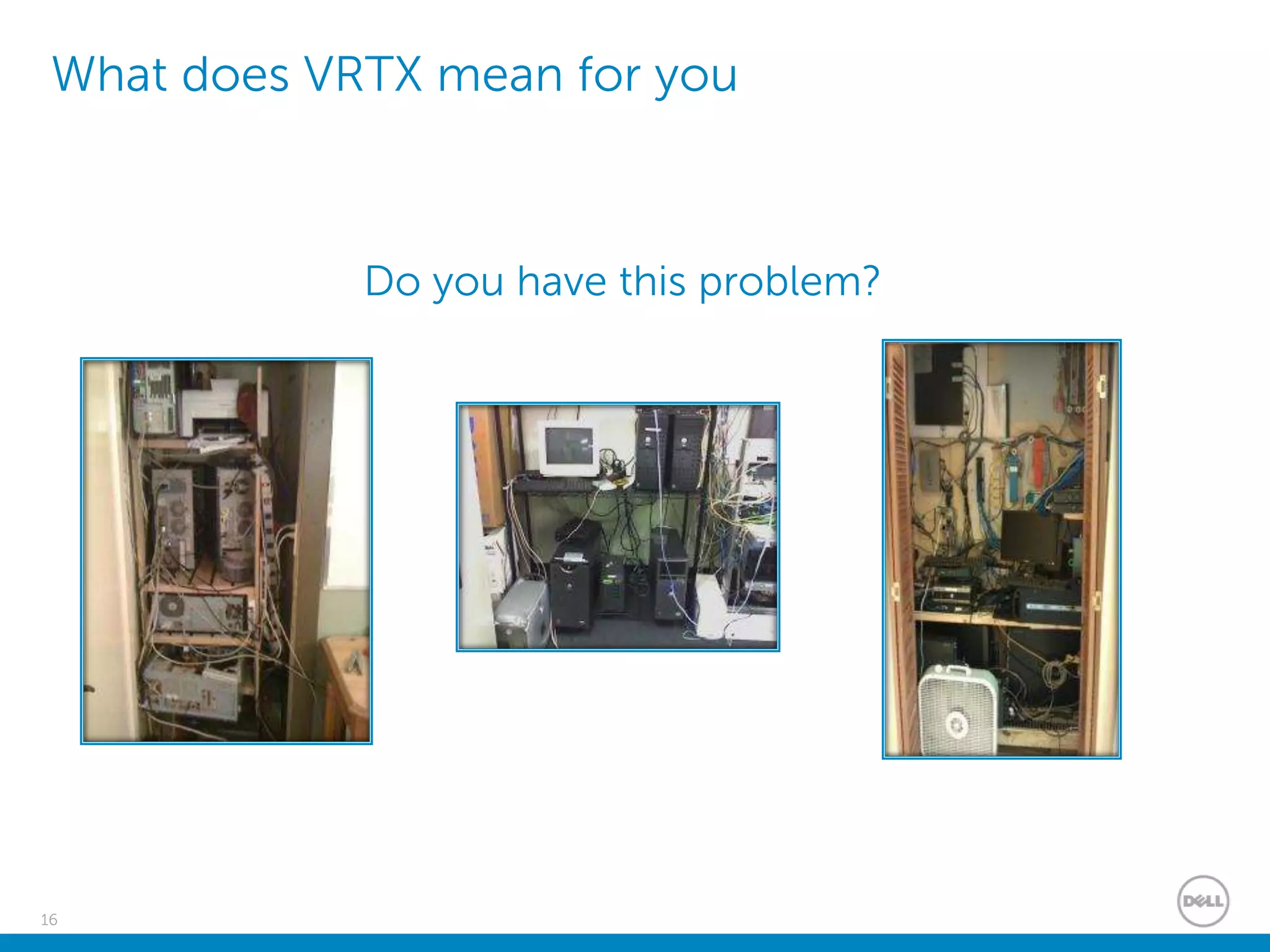
VRTX – Making the complex simple
An entire datacenter in 5U
Current environment
Complex, Inefficient, Rigid
PowerEdge VRTX
Simple, Efficient, Versatile
Only 12 inches
Only19inches
18
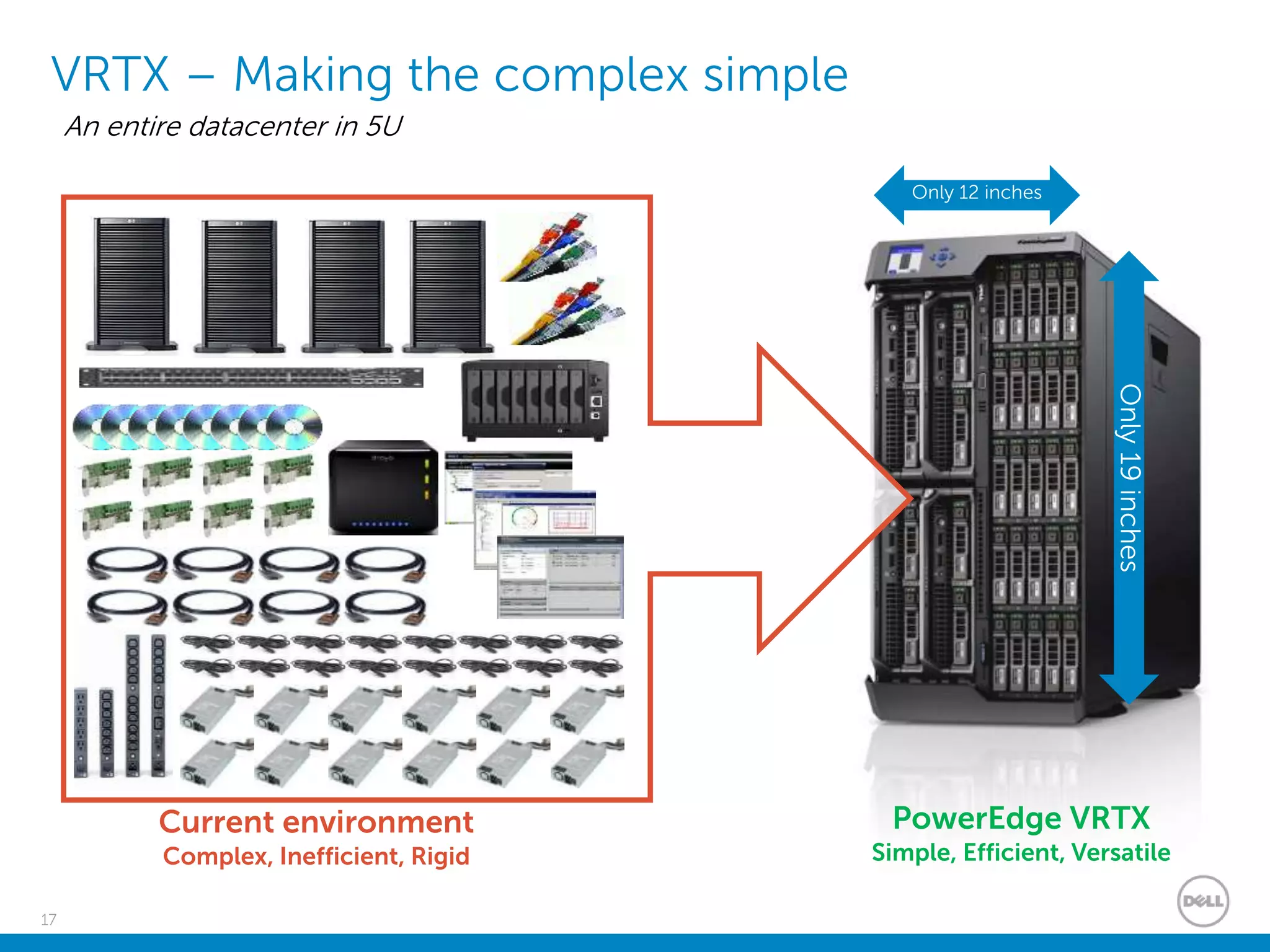
PowerEdge VRTX – Front & Rear Views
LCD Display
Panel
Up to 4 PowerEdge
M-Series Servers
Internal low latency,
fast storage
Shared Storage
25 x 2.5” or 12 x 3.5” (expandable)
8 External
PCIe Slots
Hot Plug
Redundant PSUs
Remote
Management
Ports
Locking Front
Cover
Shared
DVD
KVM
Ports
Hot Plug
Redundant
Blowers8 RJ45
NIC ports
19
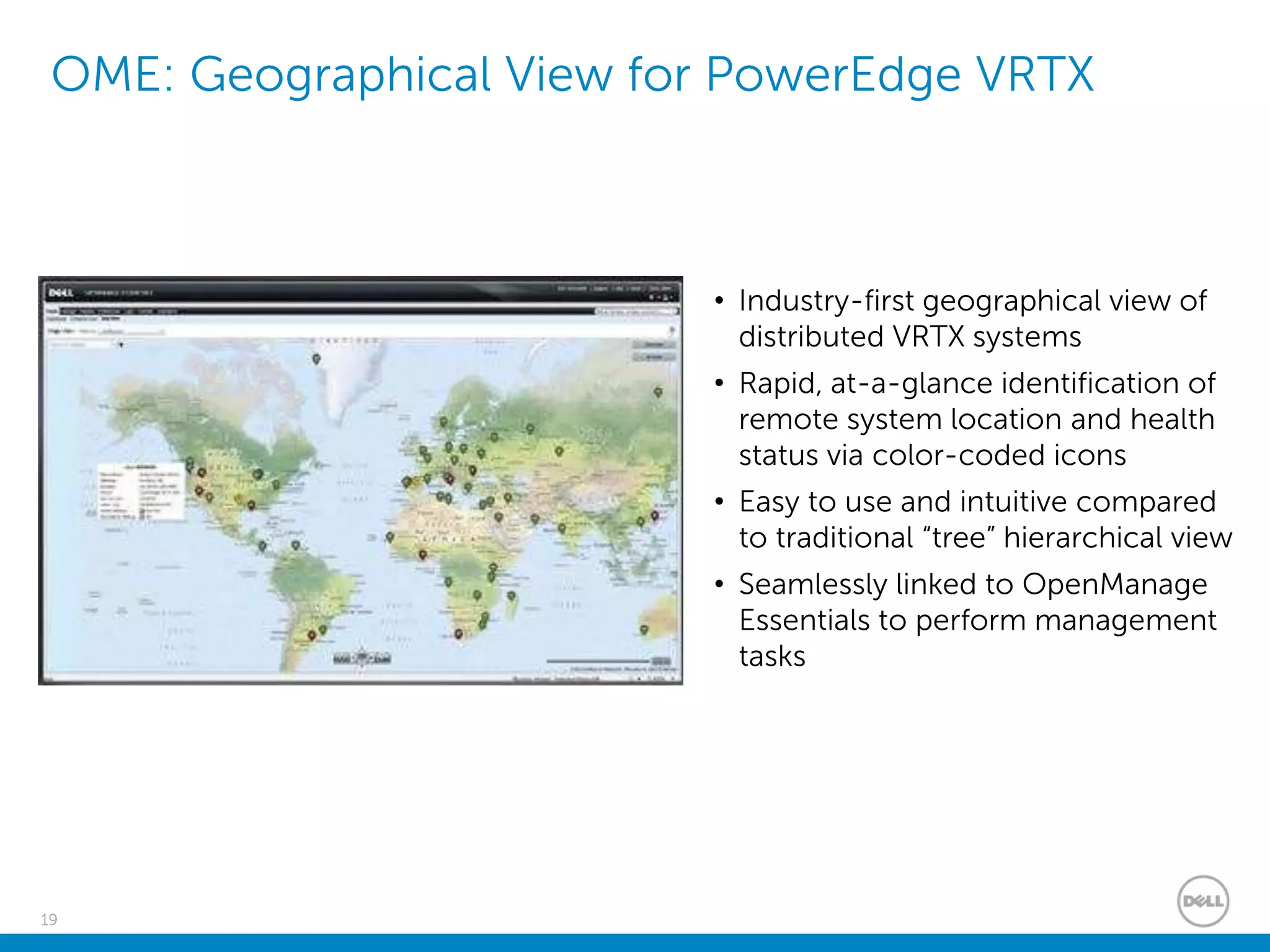
OME: Geographical View for PowerEdge VRTX
• Industry-first geographical view of
distributed VRTX systems
• Rapid, at-a-glance identification of
remote system location and health
status via color-coded icons
• Easy to use and intuitive compared
to traditional “tree” hierarchical view
• Seamlessly linked to OpenManage
Essentials to perform management
tasks
20
Dell FX2 Architecture
21
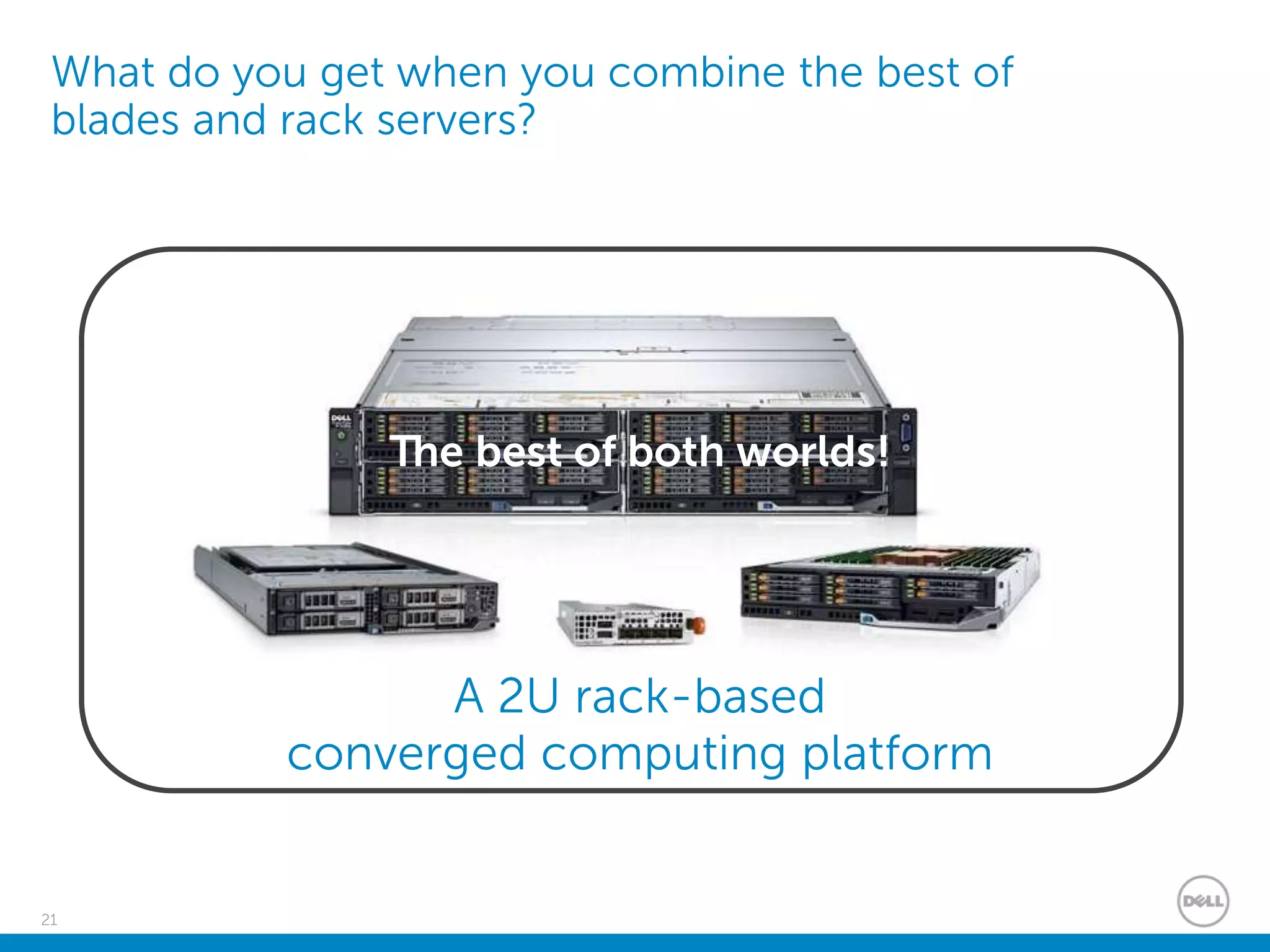
What do you get when you combine the best of
blades and rack servers?
Density and
shared
infrastructure
efficiency
BLADES
Simplicity and
cost benefits
RACKS
A 2U rack-based
converged computing platform
The best of both worlds!
22
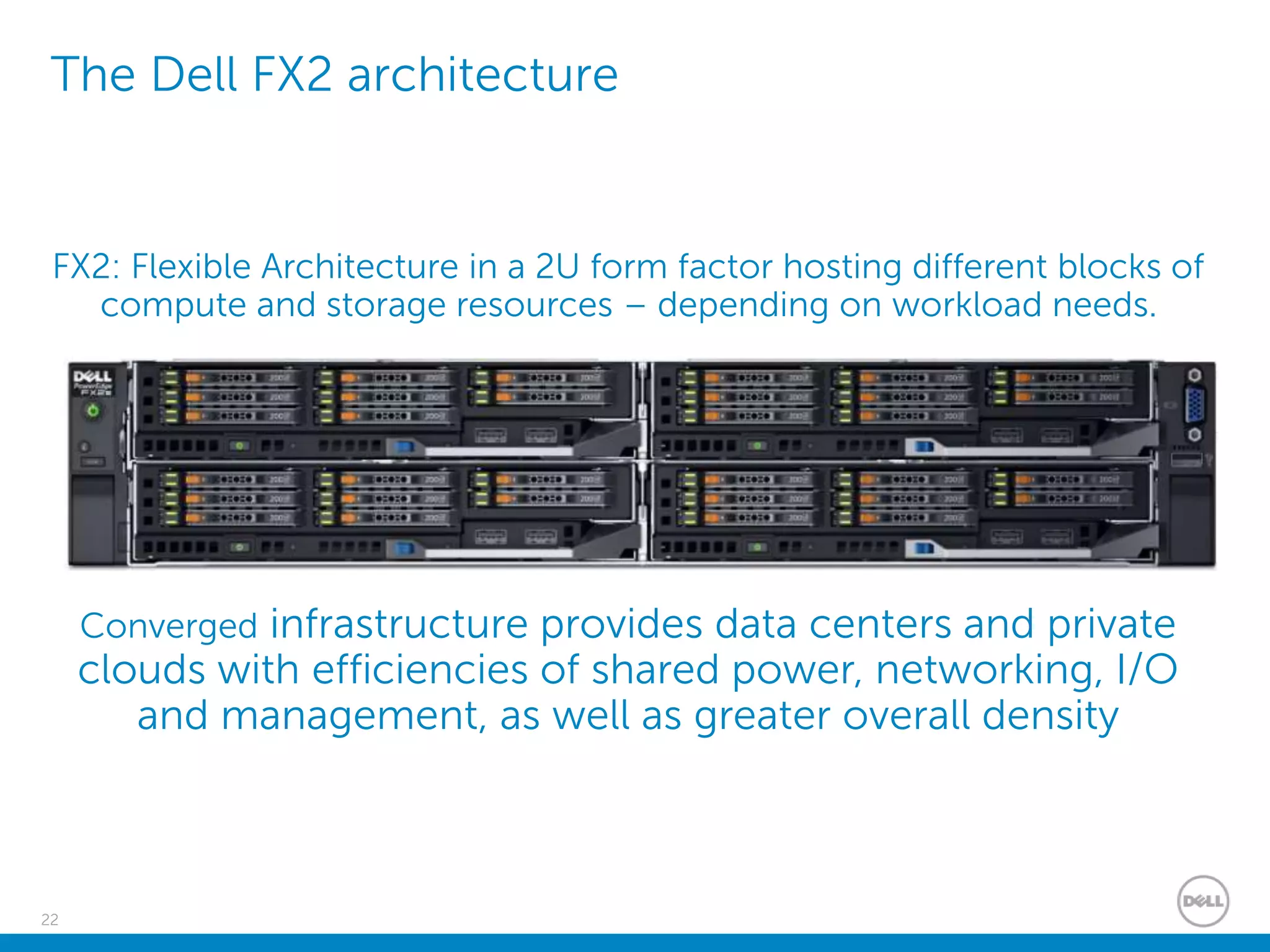
The Dell FX2 architecture
FX2: Flexible Architecture in a 2U form factor hosting different blocks of
compute and storage resources – depending on workload needs.
Converged infrastructure provides data centers and private
clouds with efficiencies of shared power, networking, I/O
and management, as well as greater overall density
23
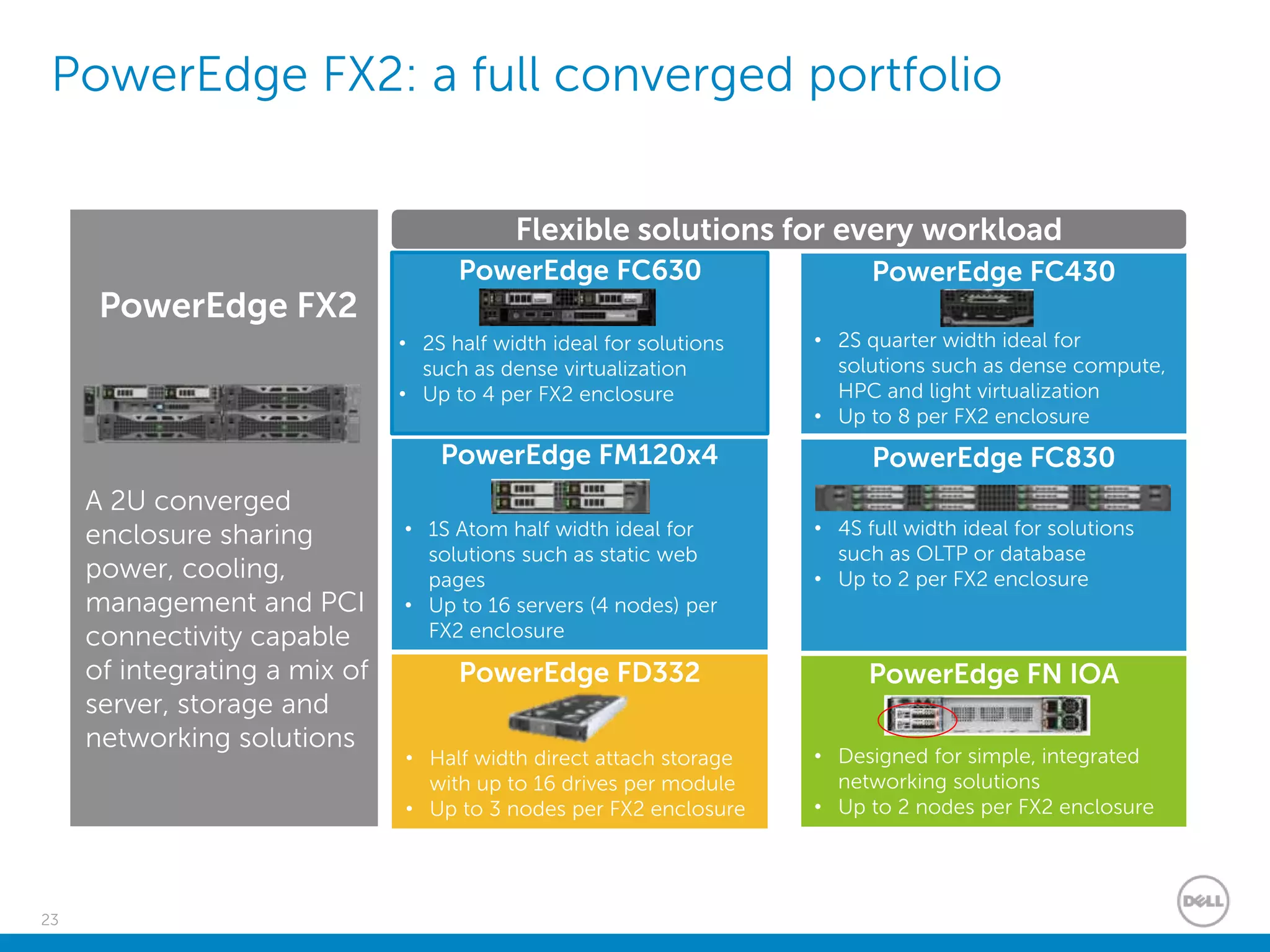
PowerEdge FX2: a full converged portfolio
A 2U converged
enclosure sharing
power, cooling,
management and PCI
connectivity capable
of integrating a mix of
server, storage and
networking solutions
PowerEdge FC630
• 2S half width ideal for solutions
such as dense virtualization
• Up to 4 per FX2 enclosure
PowerEdge FC430
• 2S quarter width ideal for
solutions such as dense compute,
HPC and light virtualization
• Up to 8 per FX2 enclosure
PowerEdge FM120x4
• 1S Atom half width ideal for
solutions such as static web
pages
• Up to 16 servers (4 nodes) per
FX2 enclosure
PowerEdge FC830
• 4S full width ideal for solutions
such as OLTP or database
• Up to 2 per FX2 enclosure
Flexible solutions for every workload
PowerEdge FX2
PowerEdge FD332
• Half width direct attach storage
with up to 16 drives per module
• Up to 3 nodes per FX2 enclosure
PowerEdge FN IOA
• Designed for simple, integrated
networking solutions
• Up to 2 nodes per FX2 enclosure
24
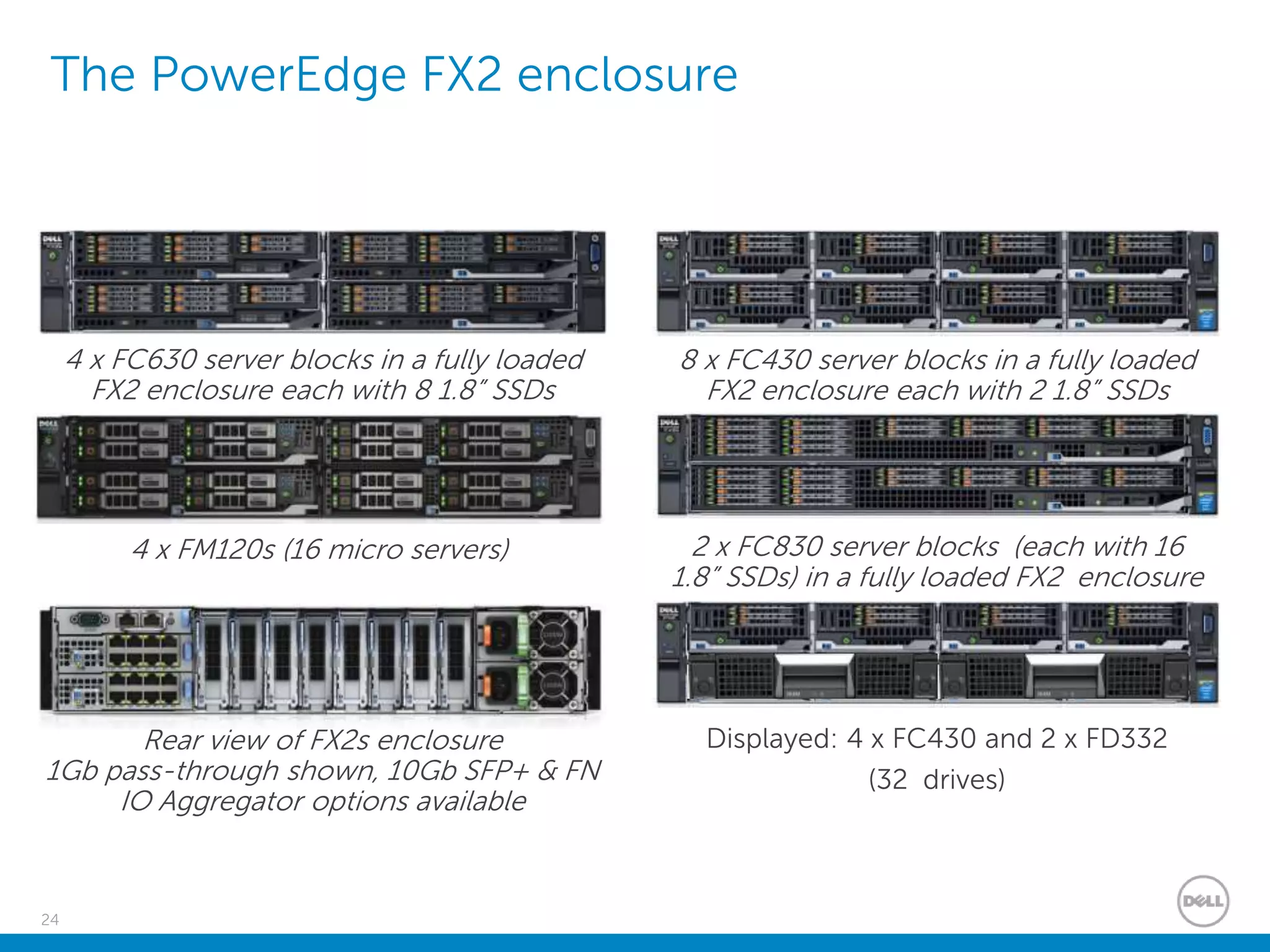
The PowerEdge FX2 enclosure
4 x FC630 server blocks in a fully loaded
FX2 enclosure each with 8 1.8” SSDs
Rear view of FX2s enclosure
1Gb pass-through shown, 10Gb SFP+ & FN
IO Aggregator options available
8 x FC430 server blocks in a fully loaded
FX2 enclosure each with 2 1.8” SSDs
2 x FC830 server blocks (each with 16
1.8” SSDs) in a fully loaded FX2 enclosure
Displayed: 4 x FC430 and 2 x FD332
(32 drives)
4 x FM120s (16 micro servers)
25
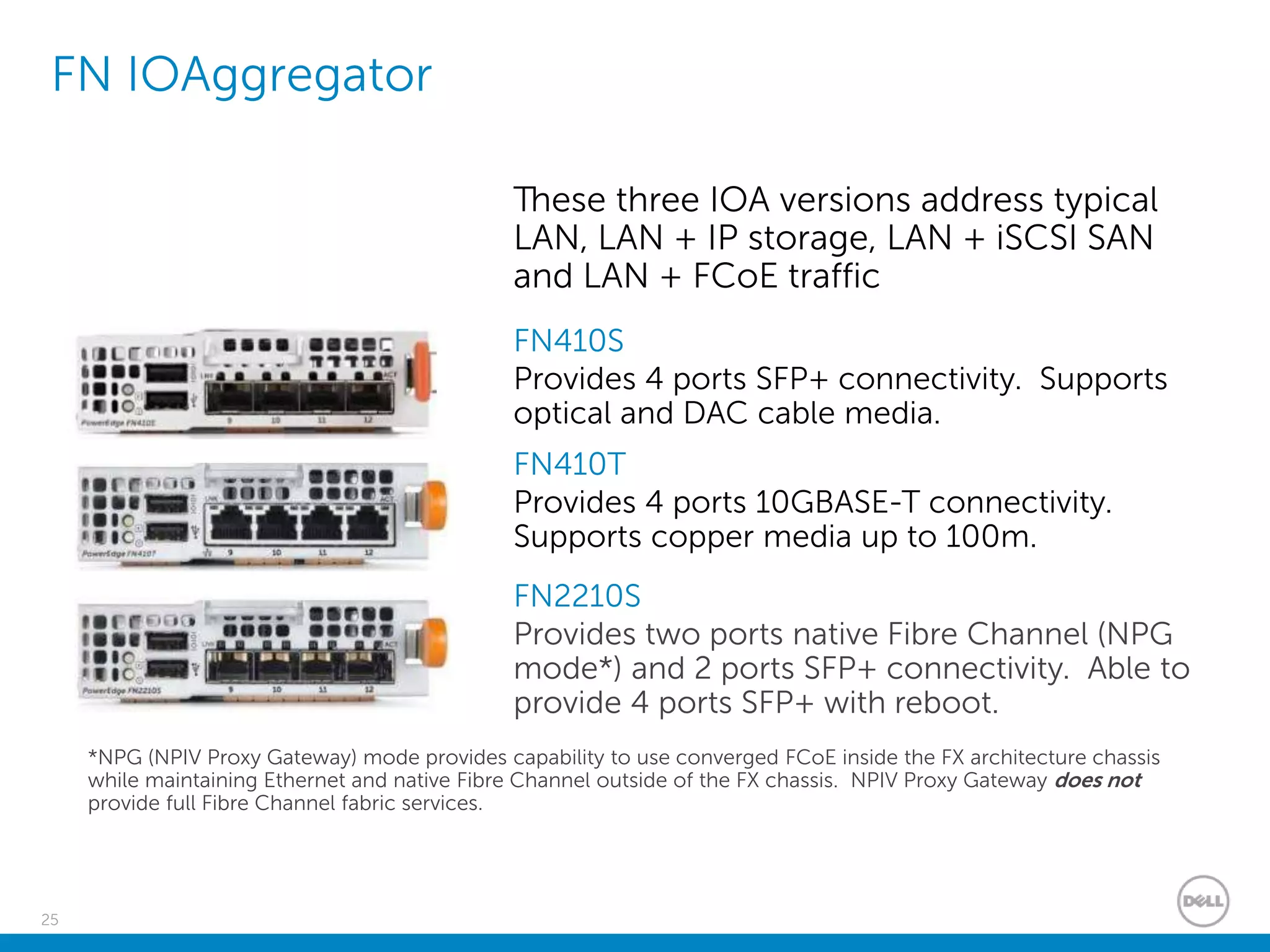
FN IOAggregator
These three IOA versions address typical
LAN, LAN + IP storage, LAN + iSCSI SAN
and LAN + FCoE traffic
FN410T
Provides 4 ports 10GBASE-T connectivity.
Supports copper media up to 100m.
FN410S
Provides 4 ports SFP+ connectivity. Supports
optical and DAC cable media.
FN2210S
Provides two ports native Fibre Channel (NPG
mode*) and 2 ports SFP+ connectivity. Able to
provide 4 ports SFP+ with reboot.
*NPG (NPIV Proxy Gateway) mode provides capability to use converged FCoE inside the FX architecture chassis
while maintaining Ethernet and native Fibre Channel outside of the FX chassis. NPIV Proxy Gateway does not
provide full Fibre Channel fabric services.
Dell Storage with VMware
27
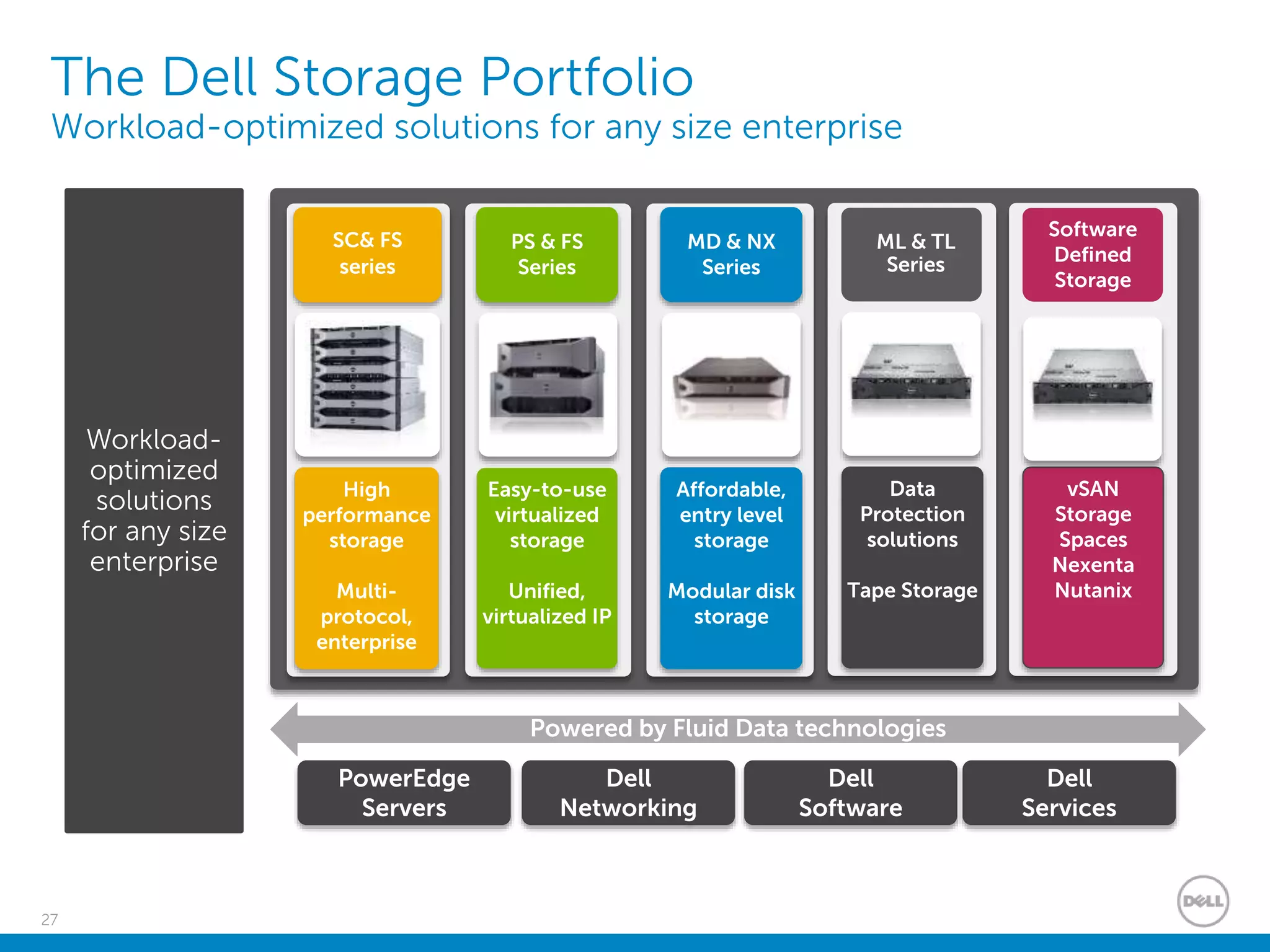
The Dell Storage Portfolio
Workload-optimized solutions for any size enterprise
Powered by Fluid Data technologies
High
performance
storage
Multi-
protocol,
enterprise
SC& FS
series
Easy-to-use
virtualized
storage
Unified,
virtualized IP
PS & FS
Series
Affordable,
entry level
storage
Modular disk
storage
MD & NX
Series
Data
Protection
solutions
Tape Storage
ML & TL
Series
PowerEdge
Servers
Dell
Networking
Dell
Software
Dell
Services
Workload-
optimized
solutions
for any size
enterprise
vSAN
Storage
Spaces
Nexenta
Nutanix
Software
Defined
Storage
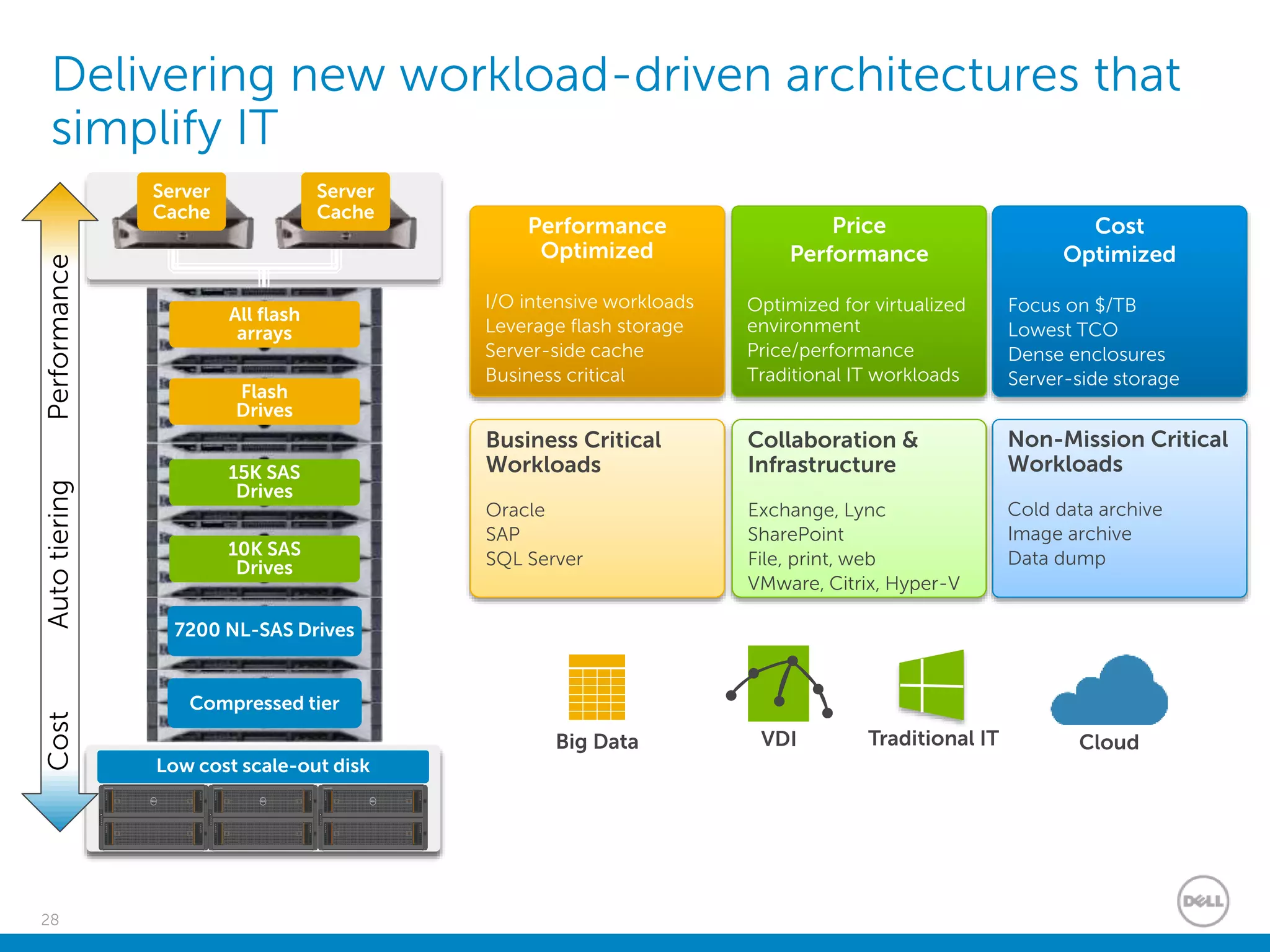
28
Delivering new workload-driven architectures that
simplify IT
Performance
Optimized
I/O intensive workloads
Leverage flash storage
Server-side cache
Business critical
Price
Performance
Optimized for virtualized
environment
Price/performance
Traditional IT workloads
Cost
Optimized
Focus on $/TB
Lowest TCO
Dense enclosures
Server-side storage
Business Critical
Workloads
Oracle
SAP
SQL Server
Collaboration &
Infrastructure
Exchange, Lync
SharePoint
File, print, web
VMware, Citrix, Hyper-V
Non-Mission Critical
Workloads
Cold data archive
Image archive
Data dump
VDI CloudBig Data Traditional IT
Server
Cache
Server
Cache
Low cost scale-out disk
Flash
Drives
All flash
arrays
15K SAS
Drives
10K SAS
Drives
7200 NL-SAS Drives
Compressed tier
CostPerformanceAutotiering
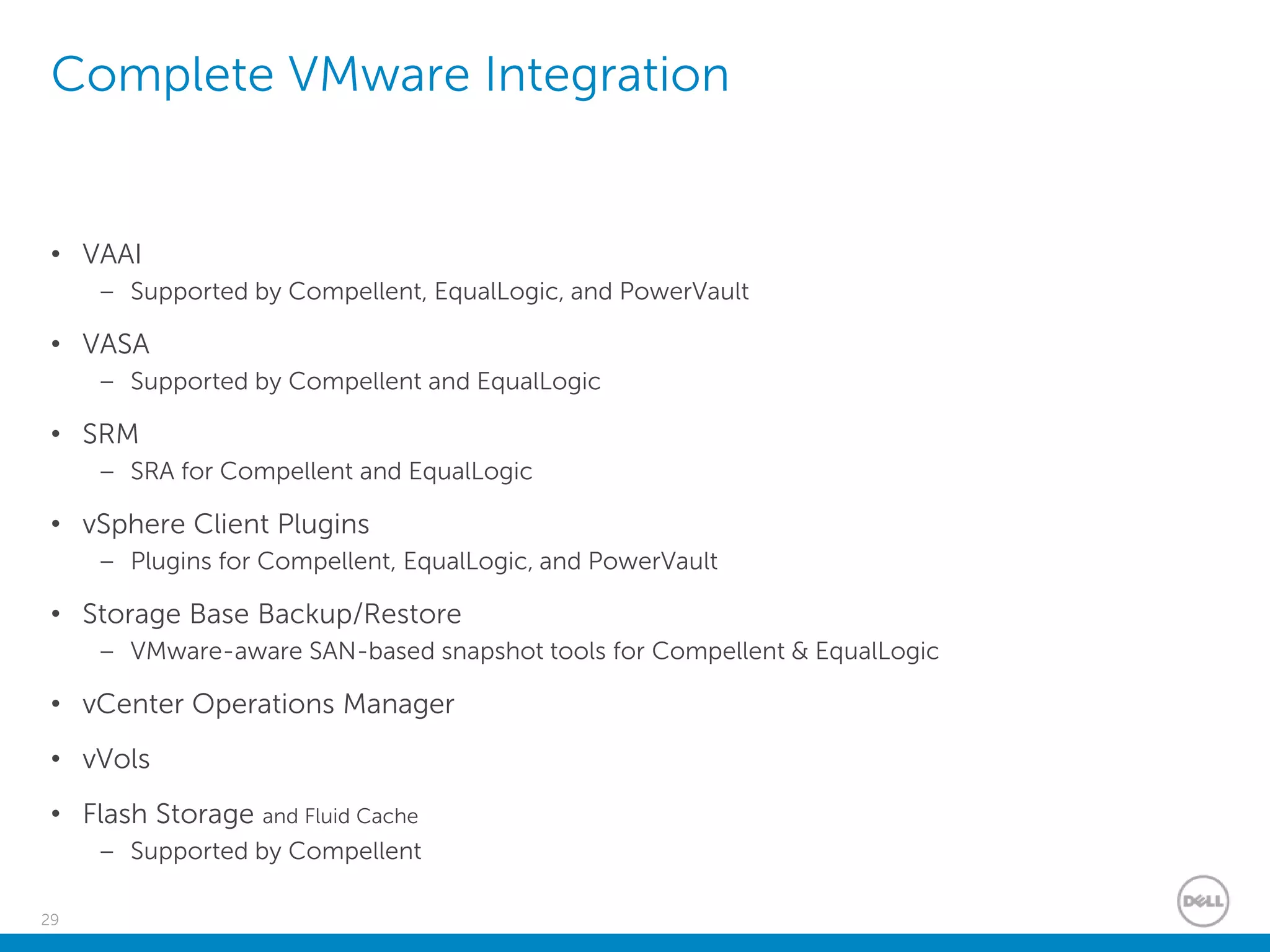
29
Complete VMware Integration
• VAAI
– Supported by Compellent, EqualLogic, and PowerVault
• VASA
– Supported by Compellent and EqualLogic
• SRM
– SRA for Compellent and EqualLogic
• vSphere Client Plugins
– Plugins for Compellent, EqualLogic, and PowerVault
• Storage Base Backup/Restore
– VMware-aware SAN-based snapshot tools for Compellent & EqualLogic
• vCenter Operations Manager
• vVols
• Flash Storage and Fluid Cache
– Supported by Compellent
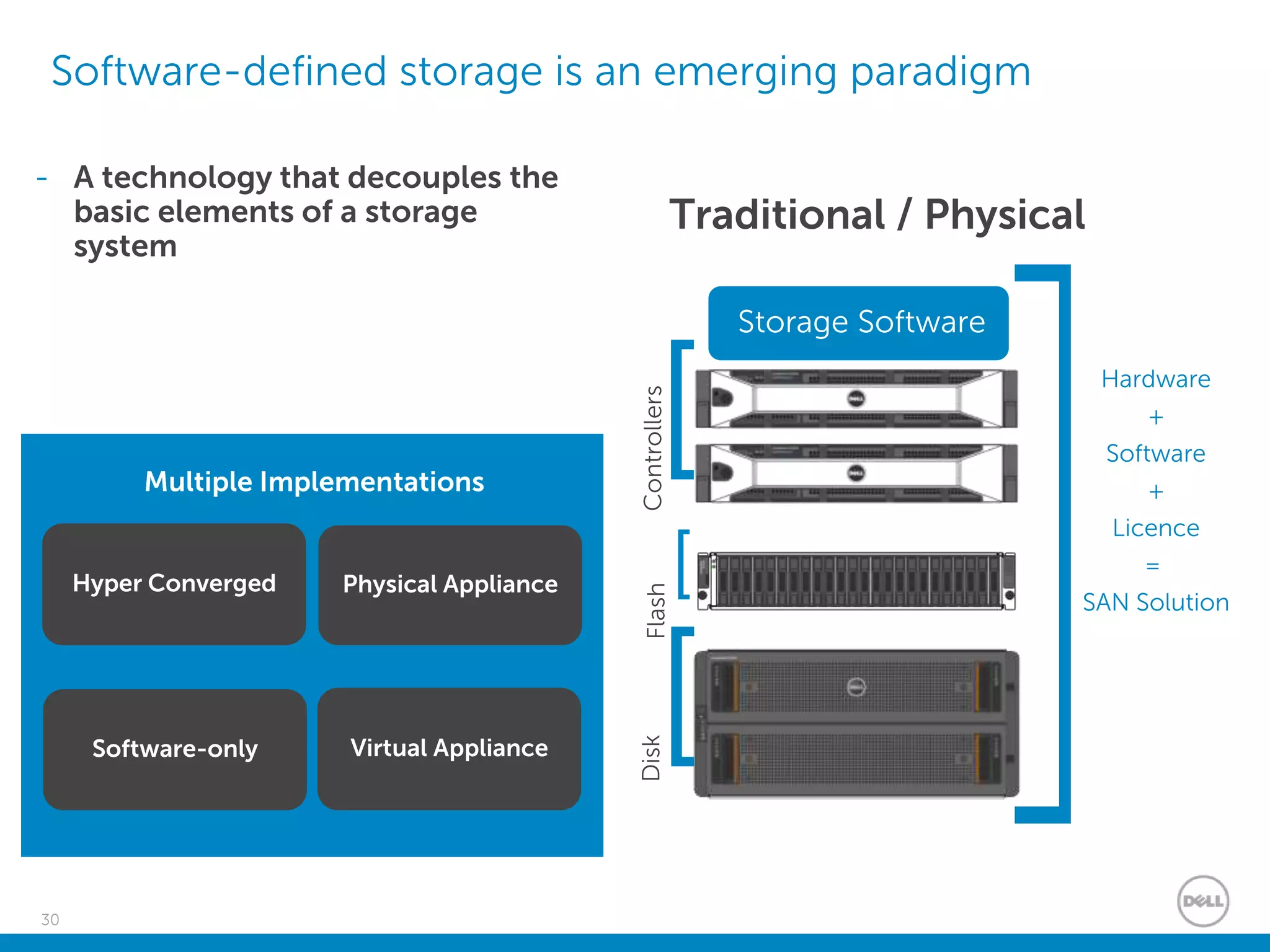
30
Software-defined storage is an emerging paradigm
Storage Software
ControllersFlashDisk
[
[
[
Hardware
+
Software
+
Licence
=
SAN Solution
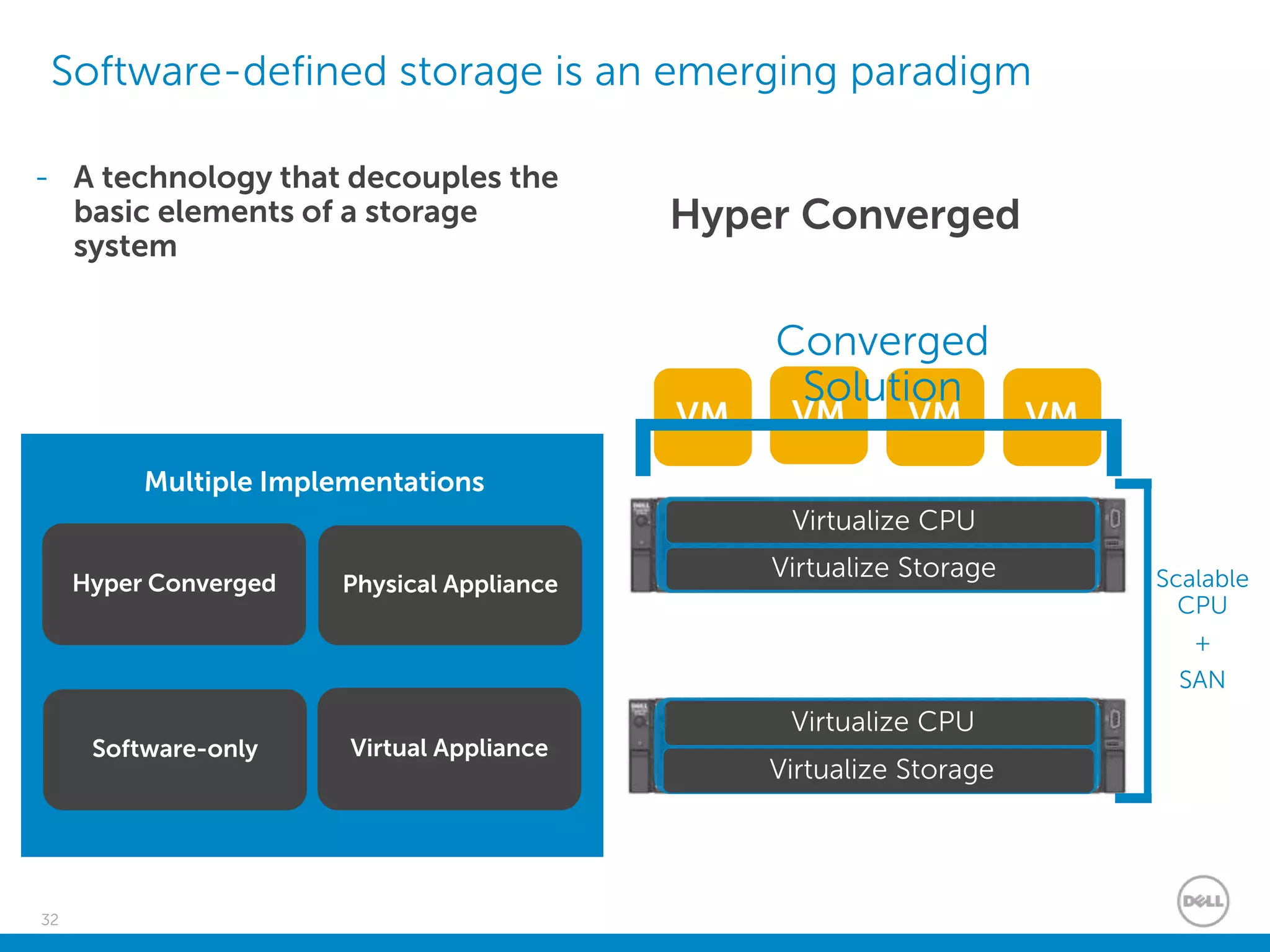
- A technology that decouples the
basic elements of a storage
system
Multiple Implementations
Hyper Converged
Software-only Virtual Appliance
Physical Appliance
Traditional / Physical
31
Software-defined storage is an emerging paradigm
- A technology that decouples the
basic elements of a storage
system
Multiple Implementations
Hyper Converged
Software-only Virtual Appliance
Physical Appliance
Serverwithinternal
storageJBOD
[
[
]Storage
Solution
SDS Software
Server
Software-only
32
Software-defined storage is an emerging paradigm
- A technology that decouples the
basic elements of a storage
system
Multiple Implementations
Hyper Converged
Software-only Virtual Appliance
Physical Appliance
Hyper Converged
Virtualize CPU
Virtualize Storage
Virtualize CPU
Virtualize Storage
VM VM VM VM
Converged
Solution
Scalable
CPU
+
SAN
33
Software-defined storage is an emerging paradigm
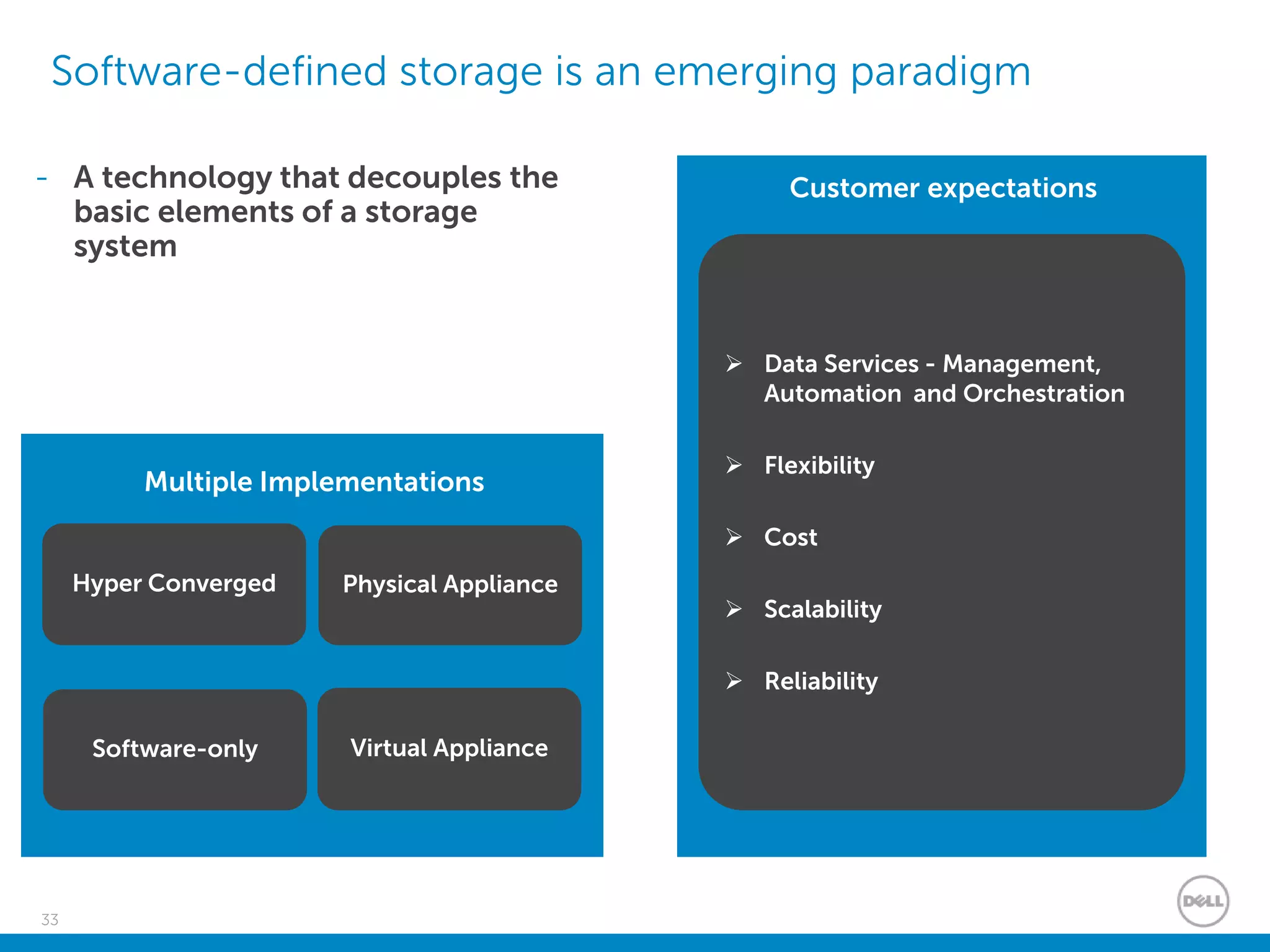
Customer expectations
 Data Services - Management,
Automation and Orchestration
 Flexibility
 Cost
 Scalability
 Reliability
- A technology that decouples the
basic elements of a storage
system
Multiple Implementations
Hyper Converged
Software-only Virtual Appliance
Physical Appliance
Dell Networking with VMware
Confidential
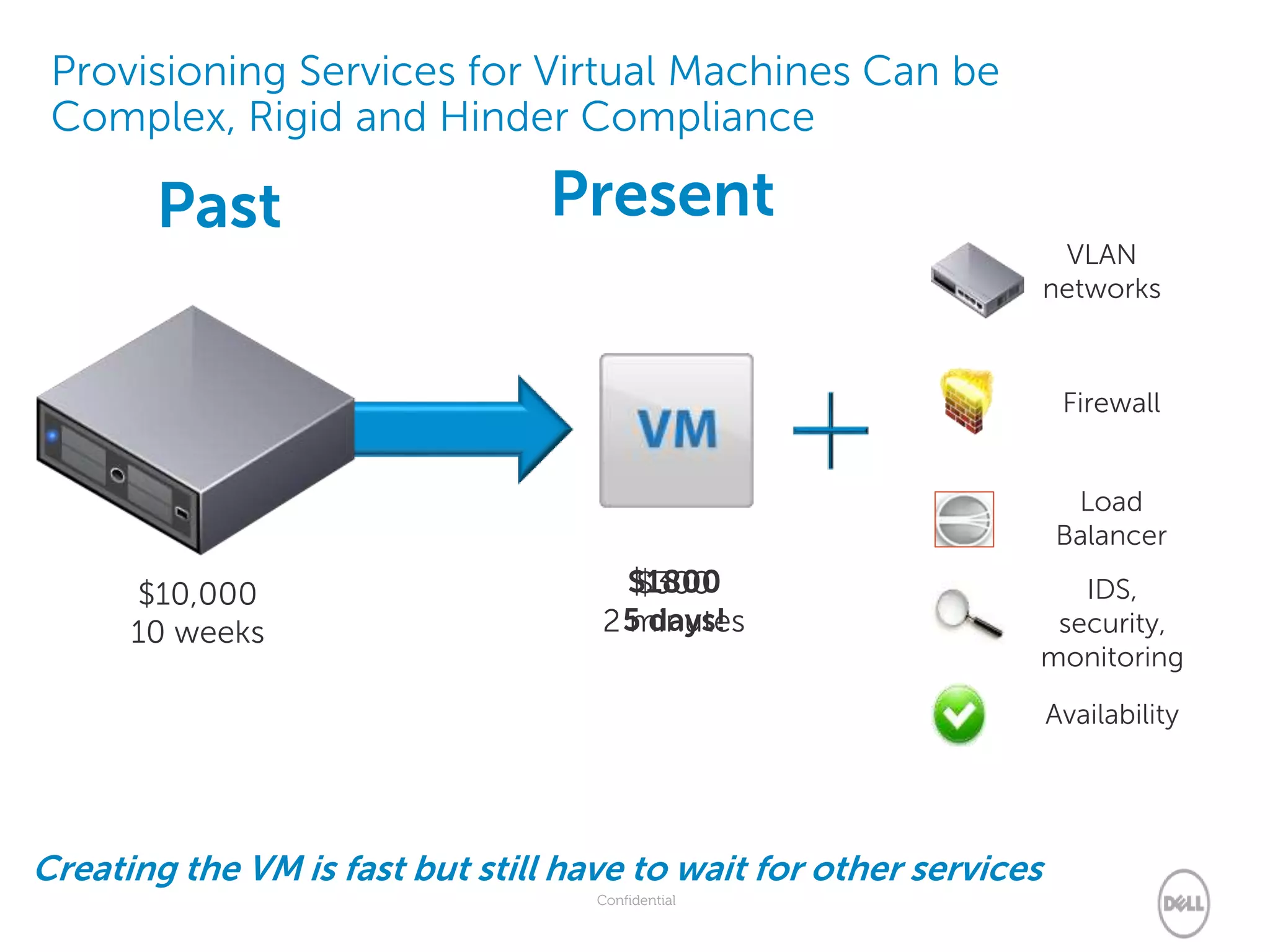
Provisioning Services for Virtual Machines Can be
Complex, Rigid and Hinder Compliance
$1800
5 days!
$300
2 minutes
$10,000
10 weeks
PresentPast
Creating the VM is fast but still have to wait for other services
VLAN
networks
Firewall
IDS,
security,
monitoring
Availability
Load
Balancer
Confidential
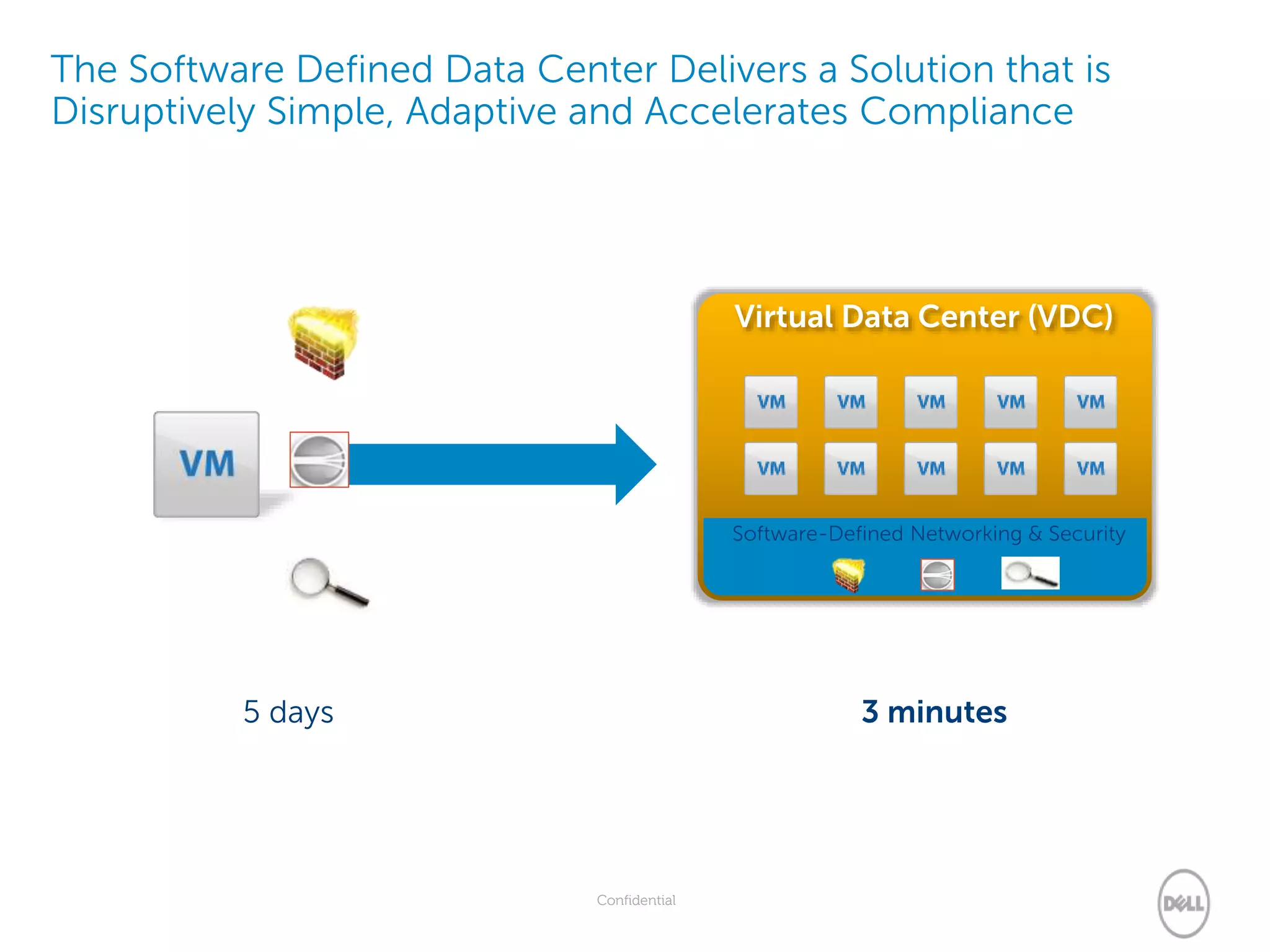
The Software Defined Data Center Delivers a Solution that is
Disruptively Simple, Adaptive and Accelerates Compliance
5 days 3 minutes
Virtual Data Center (VDC)
Software-Defined Networking & Security
37
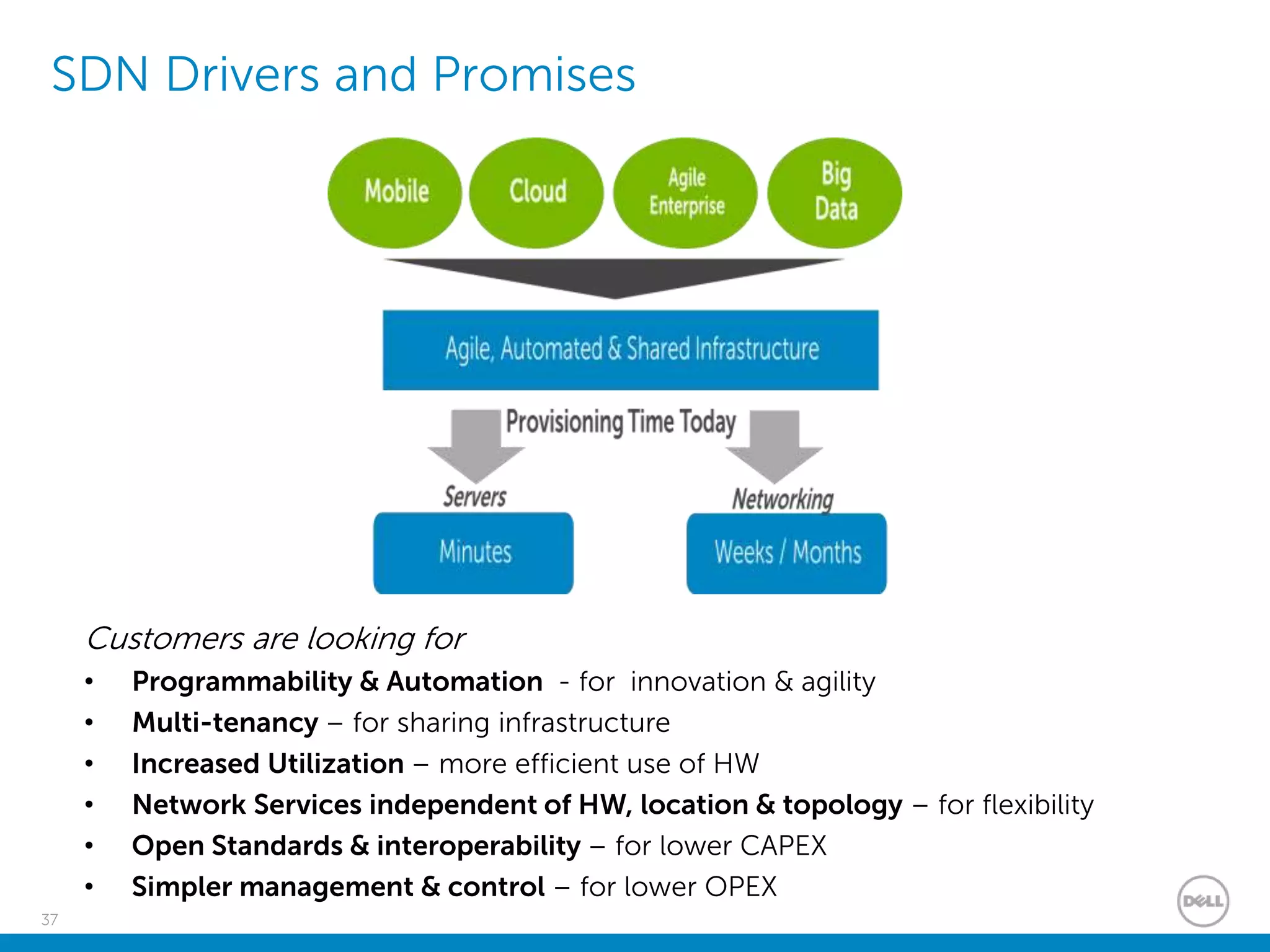
SDN Drivers and Promises
Customers are looking for
• Programmability & Automation - for innovation & agility
• Multi-tenancy – for sharing infrastructure
• Increased Utilization – more efficient use of HW
• Network Services independent of HW, location & topology – for flexibility
• Open Standards & interoperability – for lower CAPEX
• Simpler management & control – for lower OPEX
38
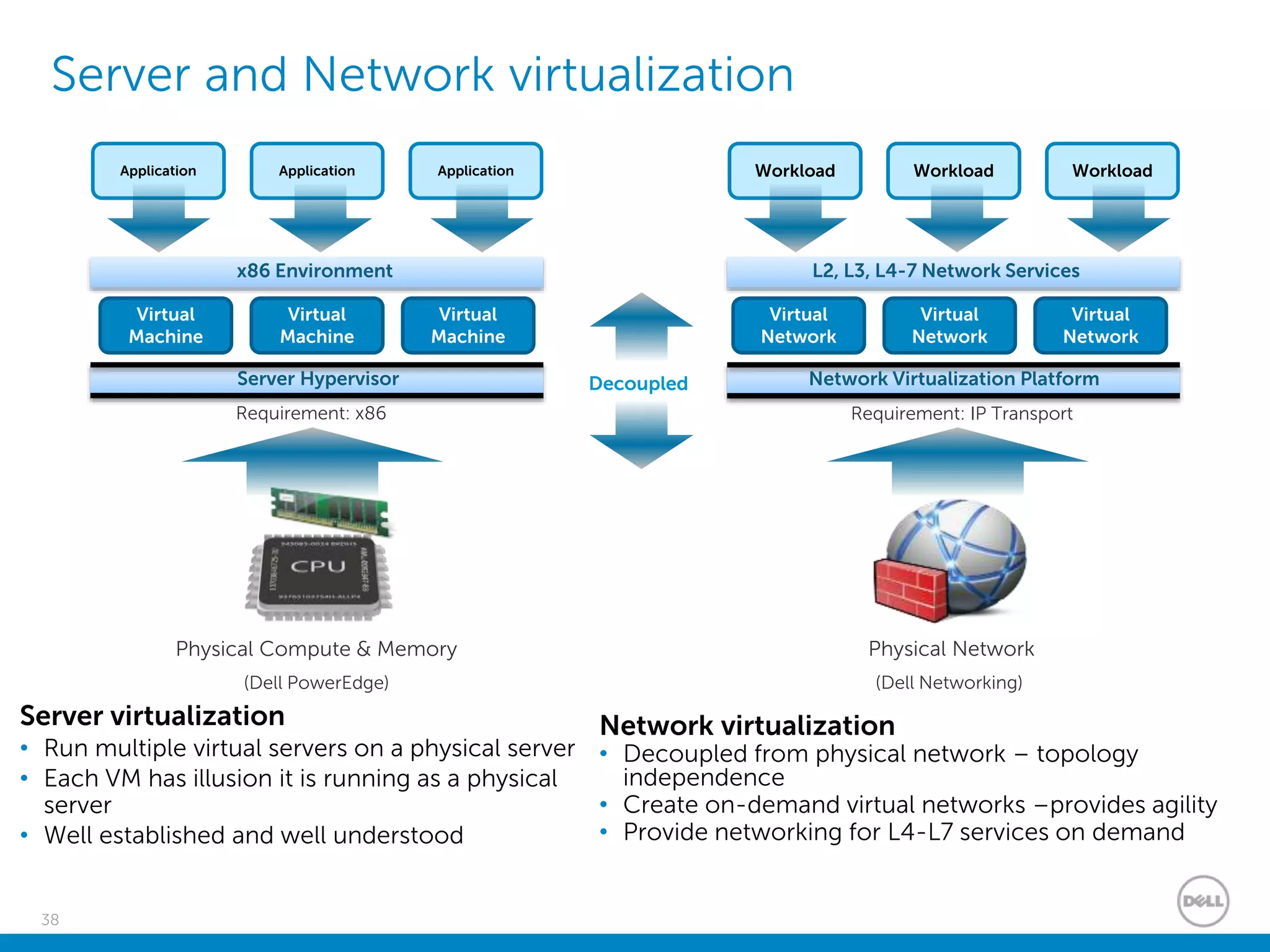
Server and Network virtualization
Physical Compute & Memory
(Dell PowerEdge)
Server Hypervisor
Requirement: x86
Virtual
Machine
Virtual
Machine
Virtual
Machine
Application Application Application
x86 Environment
Physical Network
(Dell Networking)
Network Virtualization Platform
Requirement: IP Transport
Virtual
Network
Virtual
Network
Virtual
Network
Workload Workload Workload
L2, L3, L4-7 Network Services
Decoupled
Server virtualization
• Run multiple virtual servers on a physical server
• Each VM has illusion it is running as a physical
server
• Well established and well understood
Network virtualization
• Decoupled from physical network – topology
independence
• Create on-demand virtual networks –provides agility
• Provide networking for L4-L7 services on demand
39
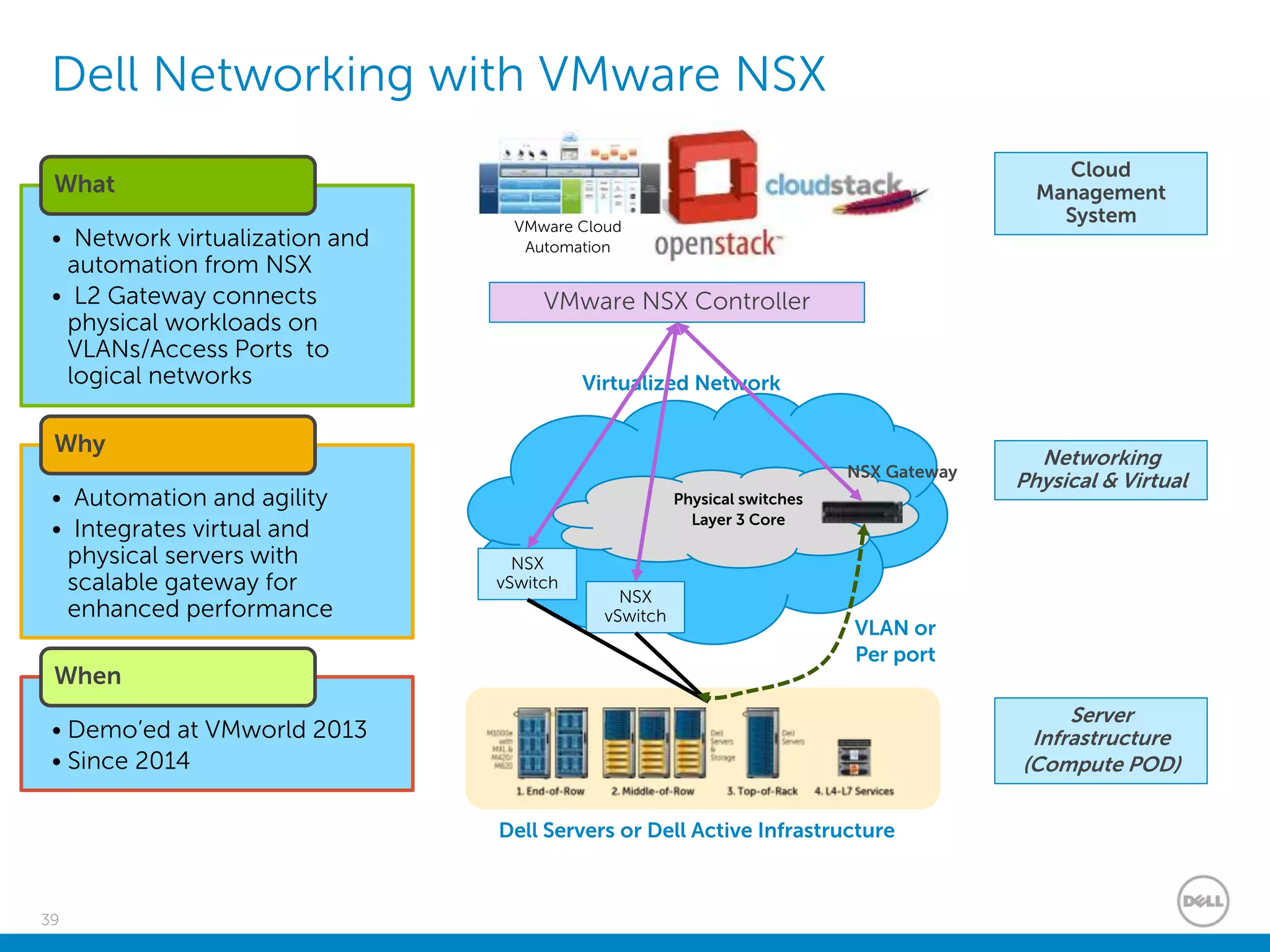
Dell Networking with VMware NSX
Server
Infrastructure
(Compute POD)
Networking
Physical & Virtual
Cloud
Management
System
Virtualized Network
Physical switches
Layer 3 Core
Dell Servers or Dell Active Infrastructure
NSX
vSwitch
NSX Gateway
VMware NSX Controller
NSX
vSwitch
• Network virtualization and
automation from NSX
• L2 Gateway connects
physical workloads on
VLANs/Access Ports to
logical networks
What
• Automation and agility
• Integrates virtual and
physical servers with
scalable gateway for
enhanced performance
Why
• Demo’ed at VMworld 2013
• Since 2014
When
VLAN or
Per port
VMware Cloud
Automation
40
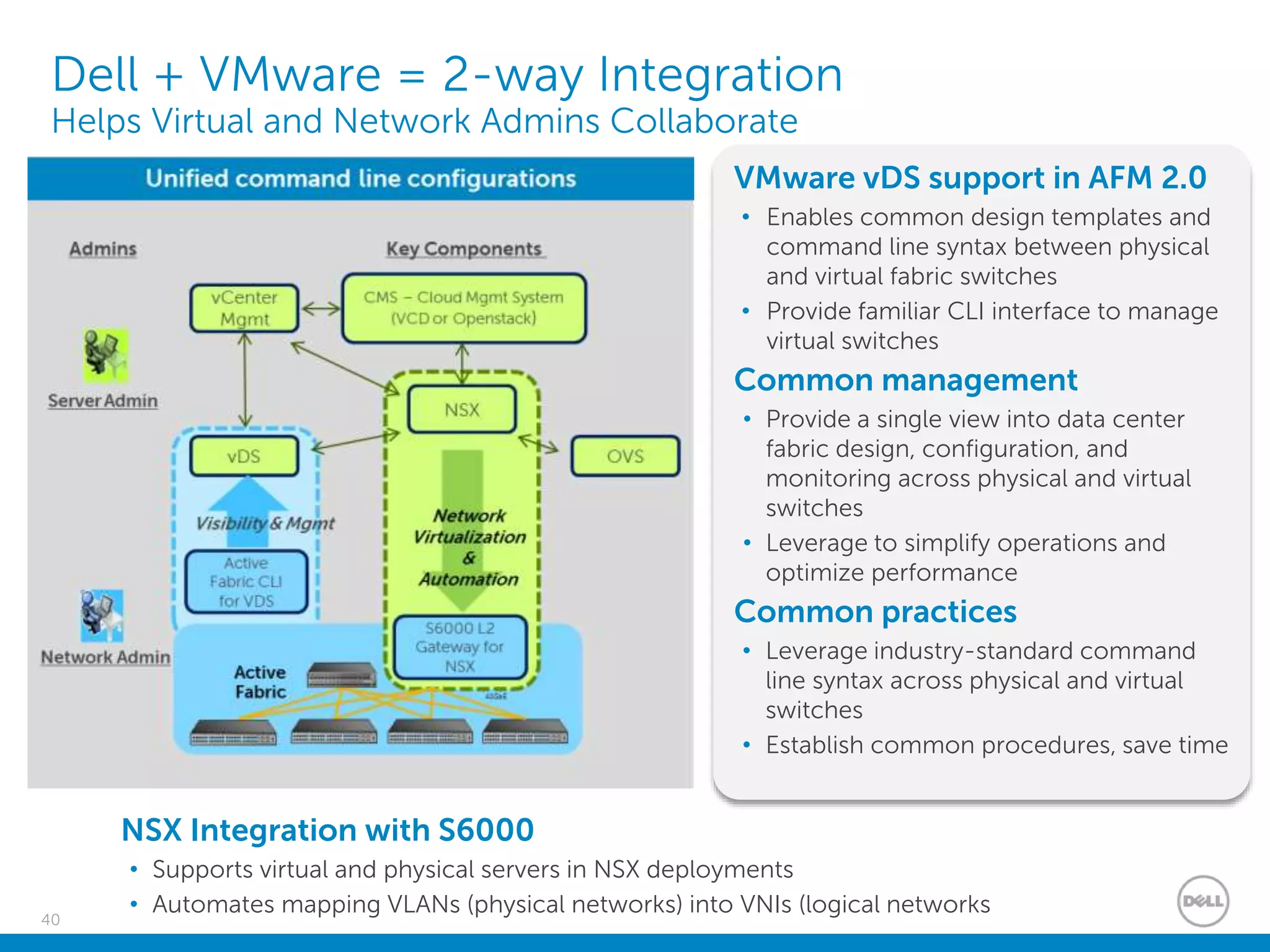
Dell + VMware = 2-way Integration
Helps Virtual and Network Admins Collaborate
NSX Integration with S6000
• Supports virtual and physical servers in NSX deployments
• Automates mapping VLANs (physical networks) into VNIs (logical networks
VMware vDS support in AFM 2.0
• Enables common design templates and
command line syntax between physical
and virtual fabric switches
• Provide familiar CLI interface to manage
virtual switches
Common management
• Provide a single view into data center
fabric design, configuration, and
monitoring across physical and virtual
switches
• Leverage to simplify operations and
optimize performance
Common practices
• Leverage industry-standard command
line syntax across physical and virtual
switches
• Establish common procedures, save time
Dell Systems Management with VMware
Confidential
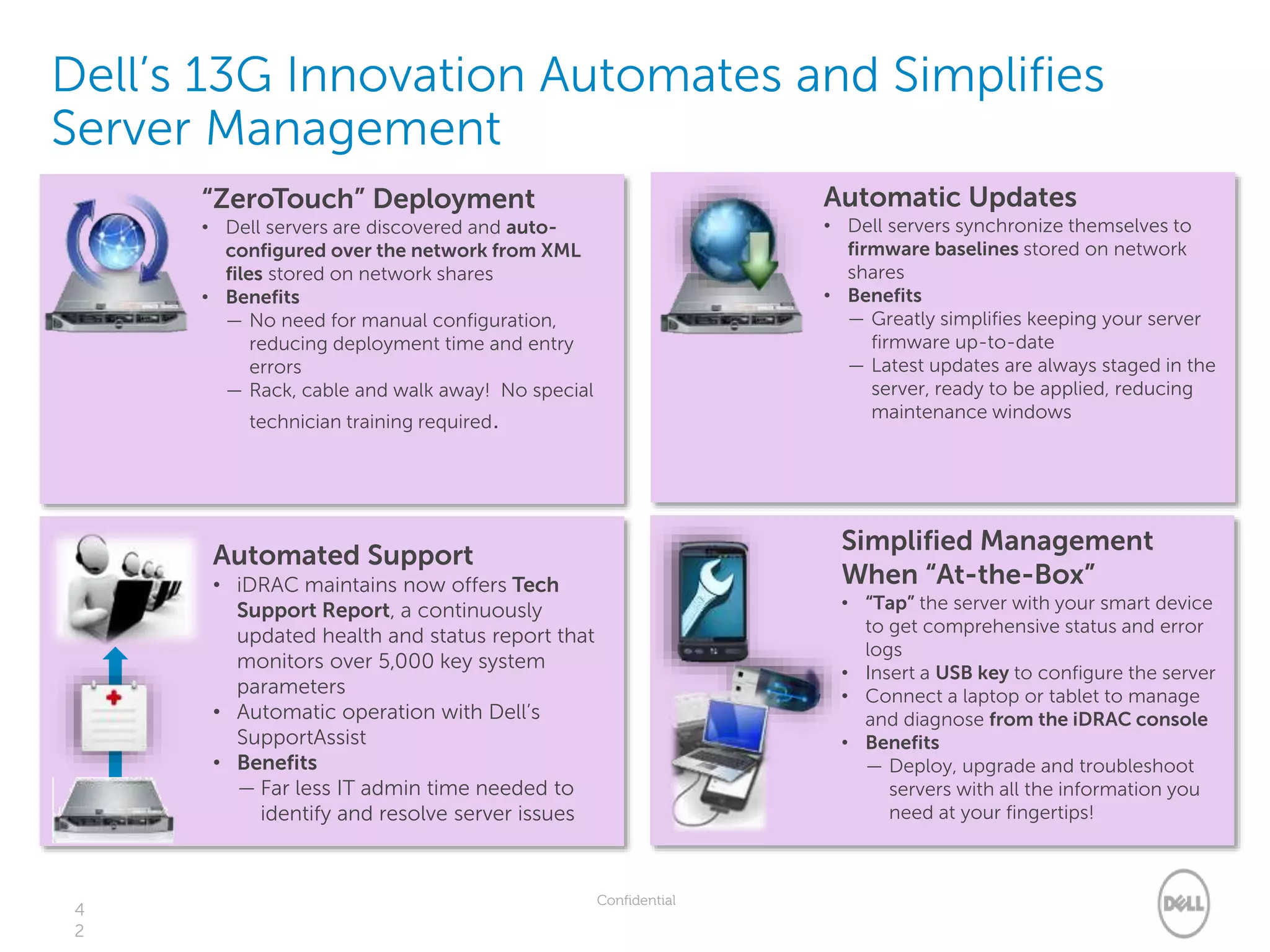
Dell’s 13G Innovation Automates and Simplifies
Server Management
4
2
“ZeroTouch” Deployment
• Dell servers are discovered and auto-
configured over the network from XML
files stored on network shares
• Benefits
— No need for manual configuration,
reducing deployment time and entry
errors
— Rack, cable and walk away! No special
technician training required.
Automatic Updates
• Dell servers synchronize themselves to
firmware baselines stored on network
shares
• Benefits
— Greatly simplifies keeping your server
firmware up-to-date
— Latest updates are always staged in the
server, ready to be applied, reducing
maintenance windows
Automated Support
• iDRAC maintains now offers Tech
Support Report, a continuously
updated health and status report that
monitors over 5,000 key system
parameters
• Automatic operation with Dell’s
SupportAssist
• Benefits
— Far less IT admin time needed to
identify and resolve server issues
Simplified Management
When “At-the-Box”
• “Tap” the server with your smart device
to get comprehensive status and error
logs
• Insert a USB key to configure the server
• Connect a laptop or tablet to manage
and diagnose from the iDRAC console
• Benefits
— Deploy, upgrade and troubleshoot
servers with all the information you
need at your fingertips!
Confidential
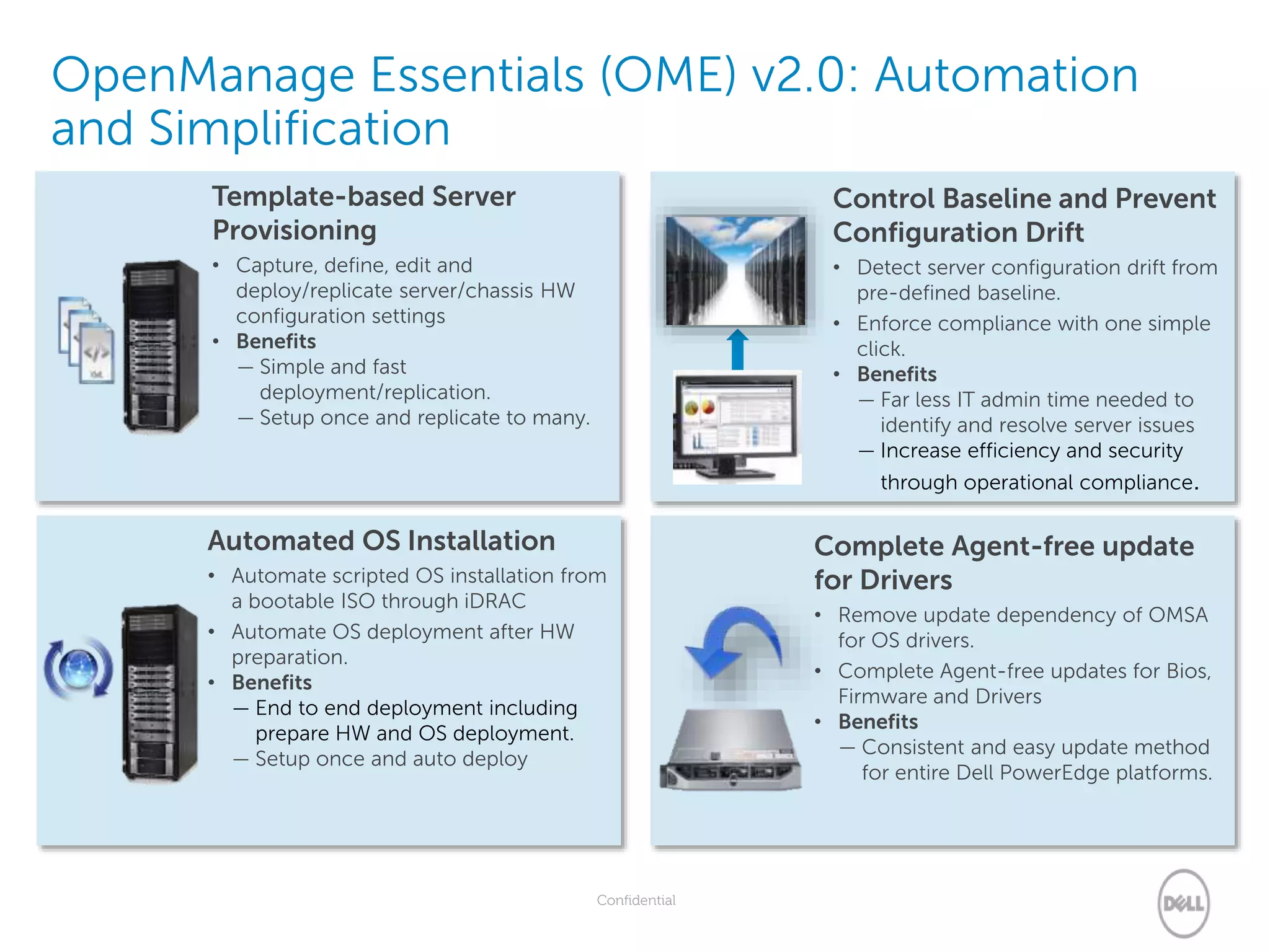
OpenManage Essentials (OME) v2.0: Automation
and Simplification
Automated OS Installation
• Automate scripted OS installation from
a bootable ISO through iDRAC
• Automate OS deployment after HW
preparation.
• Benefits
— End to end deployment including
prepare HW and OS deployment.
— Setup once and auto deploy
Complete Agent-free update
for Drivers
• Remove update dependency of OMSA
for OS drivers.
• Complete Agent-free updates for Bios,
Firmware and Drivers
• Benefits
— Consistent and easy update method
for entire Dell PowerEdge platforms.
Template-based Server
Provisioning
• Capture, define, edit and
deploy/replicate server/chassis HW
configuration settings
• Benefits
— Simple and fast
deployment/replication.
— Setup once and replicate to many.
Control Baseline and Prevent
Configuration Drift
• Detect server configuration drift from
pre-defined baseline.
• Enforce compliance with one simple
click.
• Benefits
— Far less IT admin time needed to
identify and resolve server issues
— Increase efficiency and security
through operational compliance.
44
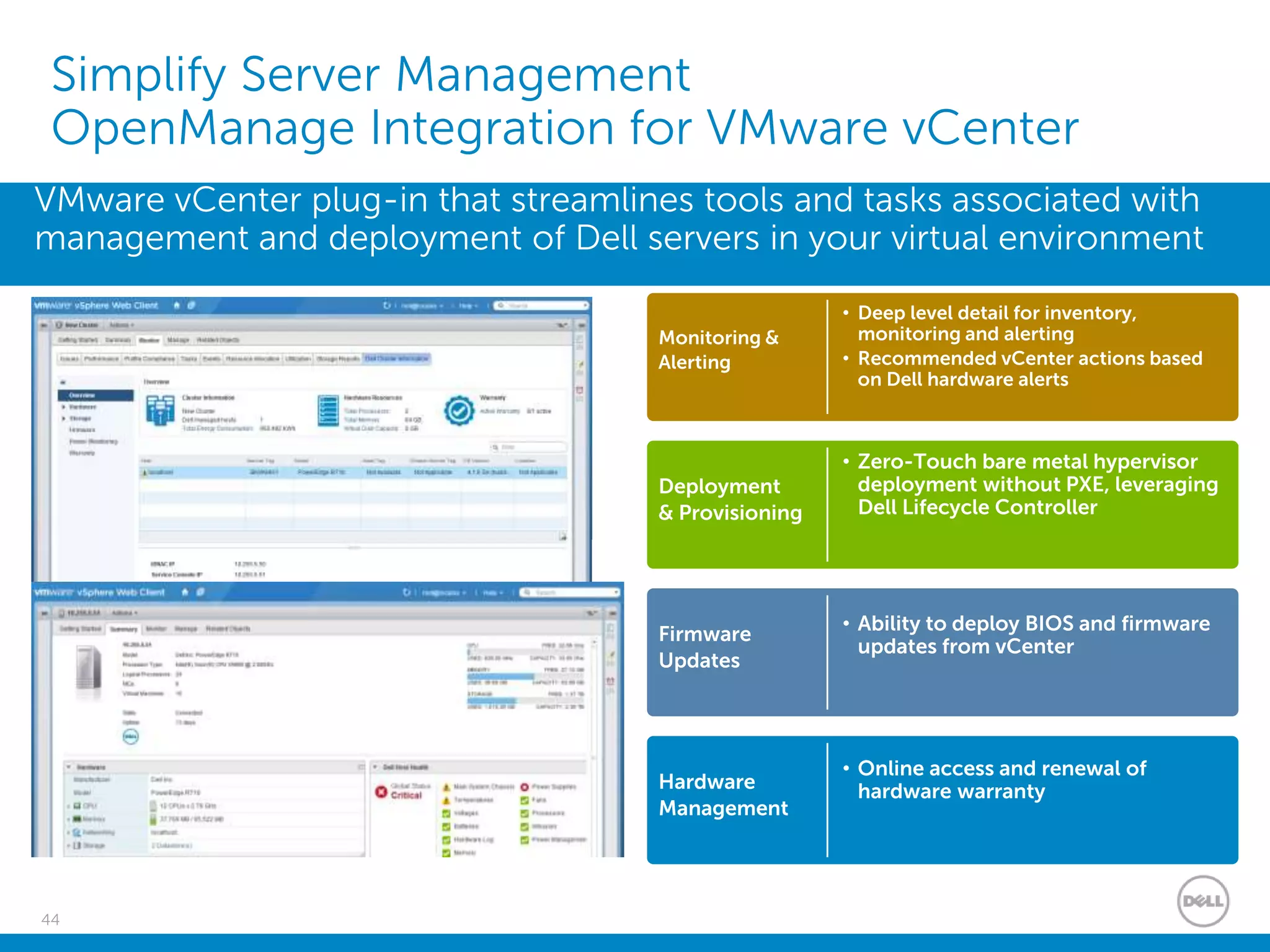
Simplify Server Management
OpenManage Integration for VMware vCenter
VMware vCenter plug-in that streamlines tools and tasks associated with
management and deployment of Dell servers in your virtual environment
Monitoring &
Alerting
• Deep level detail for inventory,
monitoring and alerting
• Recommended vCenter actions based
on Dell hardware alerts
Deployment
& Provisioning
• Zero-Touch bare metal hypervisor
deployment without PXE, leveraging
Dell Lifecycle Controller
Firmware
Updates
• Ability to deploy BIOS and firmware
updates from vCenter
Hardware
Management
• Online access and renewal of
hardware warranty
45
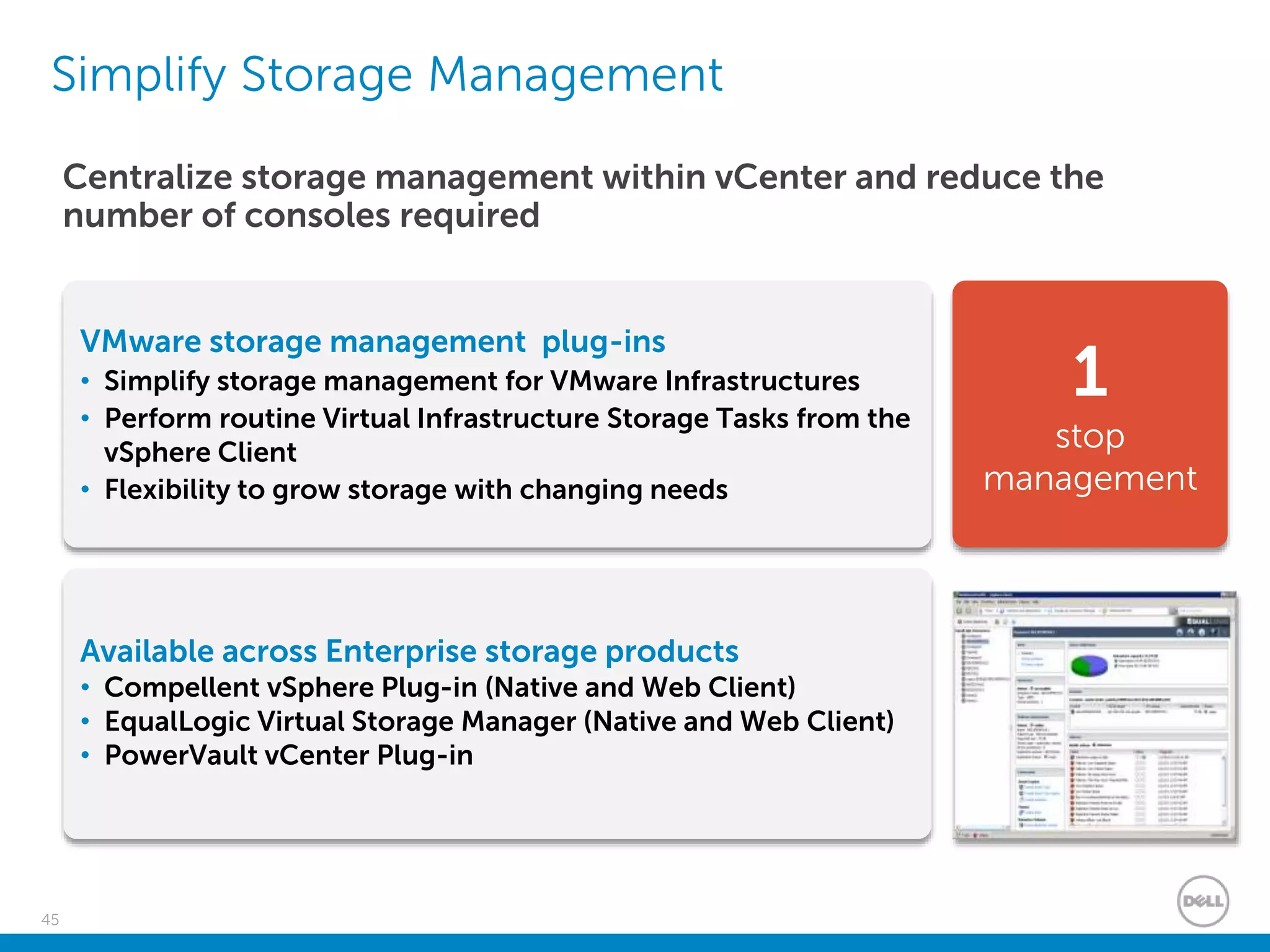
Simplify Storage Management
1
stop
management
Centralize storage management within vCenter and reduce the
number of consoles required
Available across Enterprise storage products
• Compellent vSphere Plug-in (Native and Web Client)
• EqualLogic Virtual Storage Manager (Native and Web Client)
• PowerVault vCenter Plug-in
VMware storage management plug-ins
• Simplify storage management for VMware Infrastructures
• Perform routine Virtual Infrastructure Storage Tasks from the
vSphere Client
• Flexibility to grow storage with changing needs
46
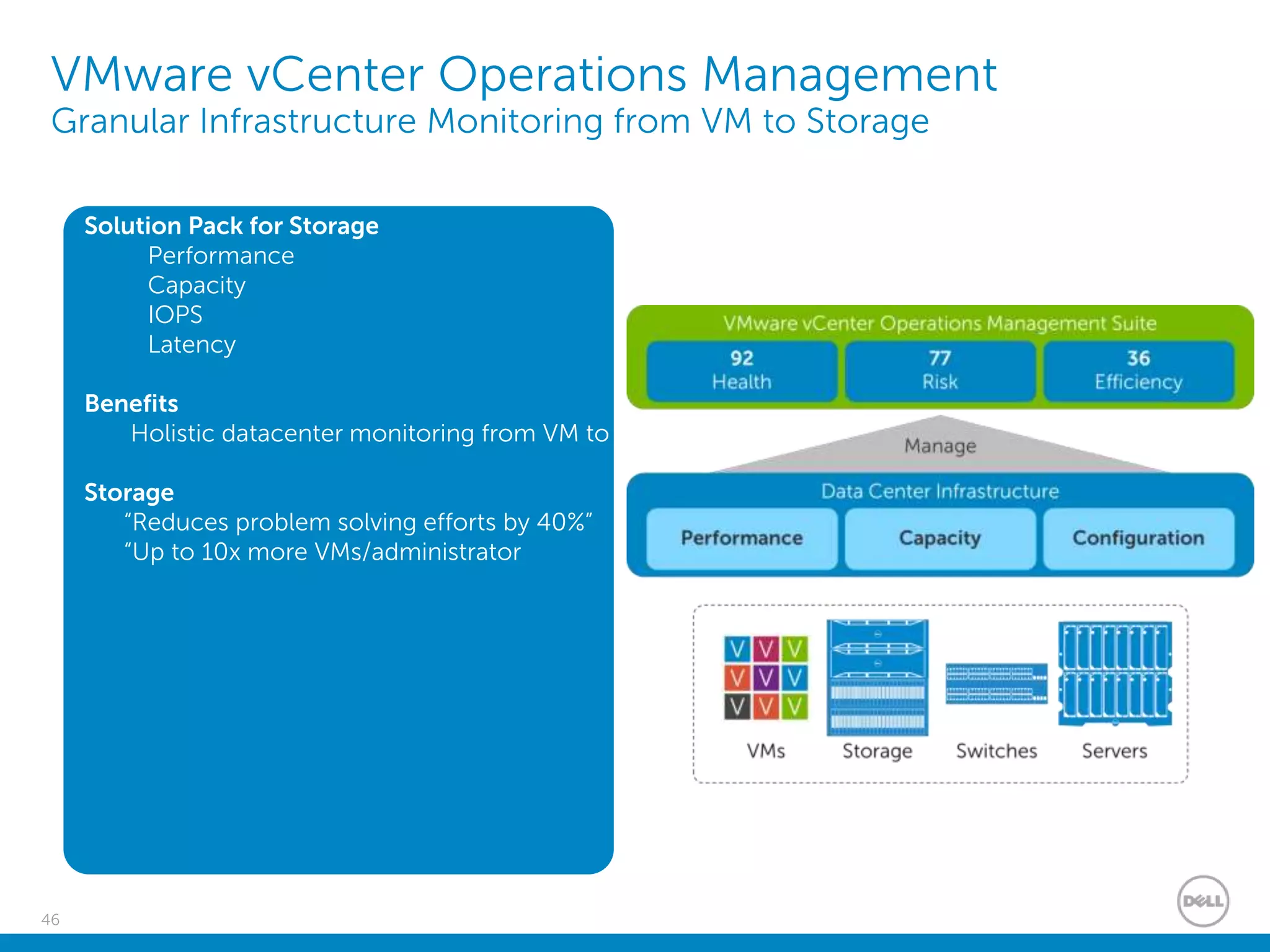
VMware vCenter Operations Management
Granular Infrastructure Monitoring from VM to Storage
Solution Pack for Storage
Performance
Capacity
IOPS
Latency
Benefits
Holistic datacenter monitoring from VM to
Storage
“Reduces problem solving efforts by 40%”
“Up to 10x more VMs/administrator
47
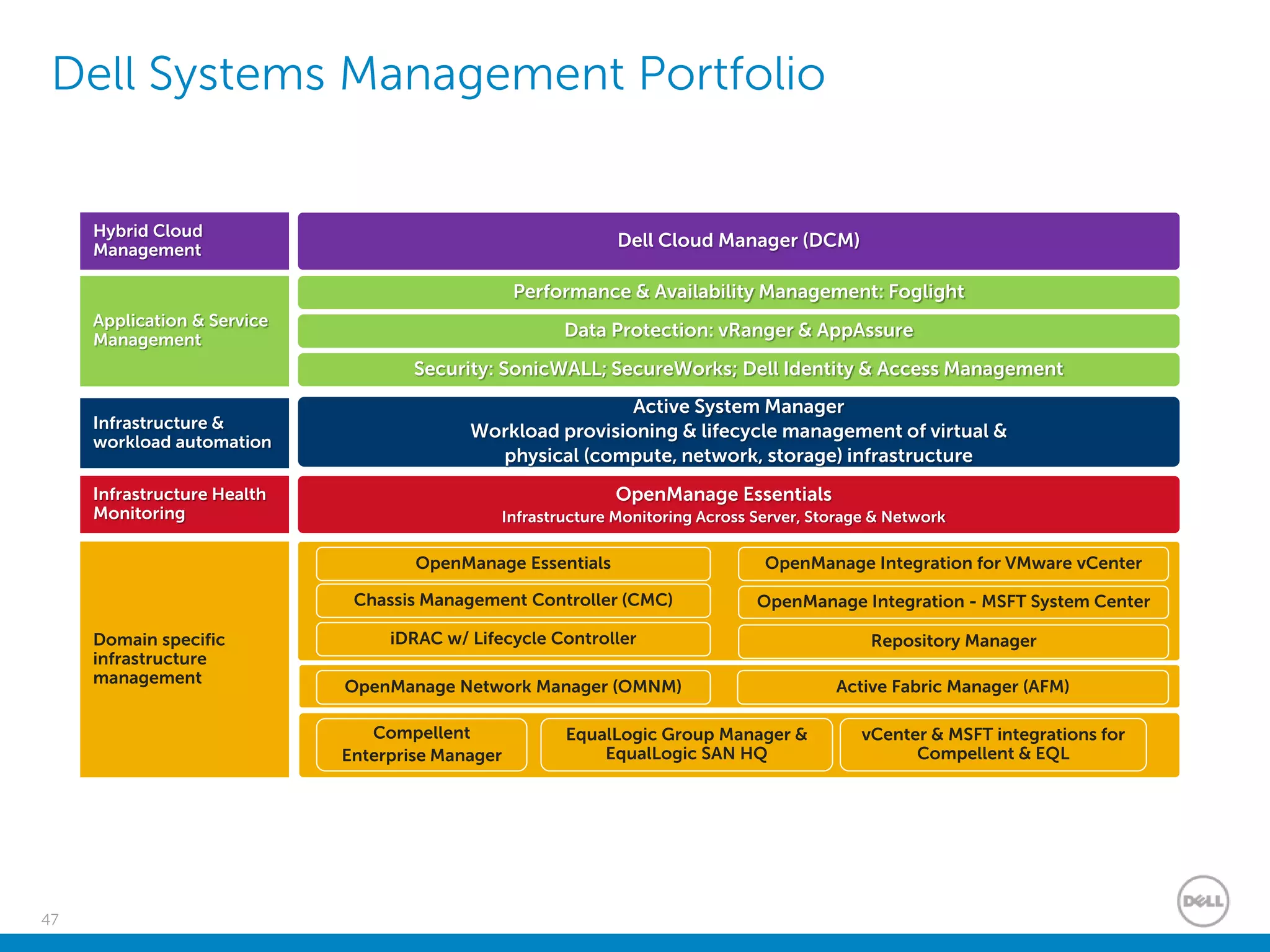
Application & Service
Management
Performance & Availability Management: Foglight
Data Protection: vRanger & AppAssure
Security: SonicWALL; SecureWorks; Dell Identity & Access Management
Domain specific
infrastructure
management
OpenManage Integration - MSFT System Center
OpenManage Integration for VMware vCenter
Active System Manager
Workload provisioning & lifecycle management of virtual &
physical (compute, network, storage) infrastructure
Infrastructure &
workload automation
Infrastructure Health
Monitoring
OpenManage Essentials
Infrastructure Monitoring Across Server, Storage & Network
Chassis Management Controller (CMC)
iDRAC w/ Lifecycle Controller
OpenManage Essentials
Hybrid Cloud
Management
Dell Cloud Manager (DCM)
Active Fabric Manager (AFM)OpenManage Network Manager (OMNM)
EqualLogic Group Manager &
EqualLogic SAN HQ
Compellent
Enterprise Manager
vCenter & MSFT integrations for
Compellent & EQL
Repository Manager
Dell Systems Management Portfolio
48
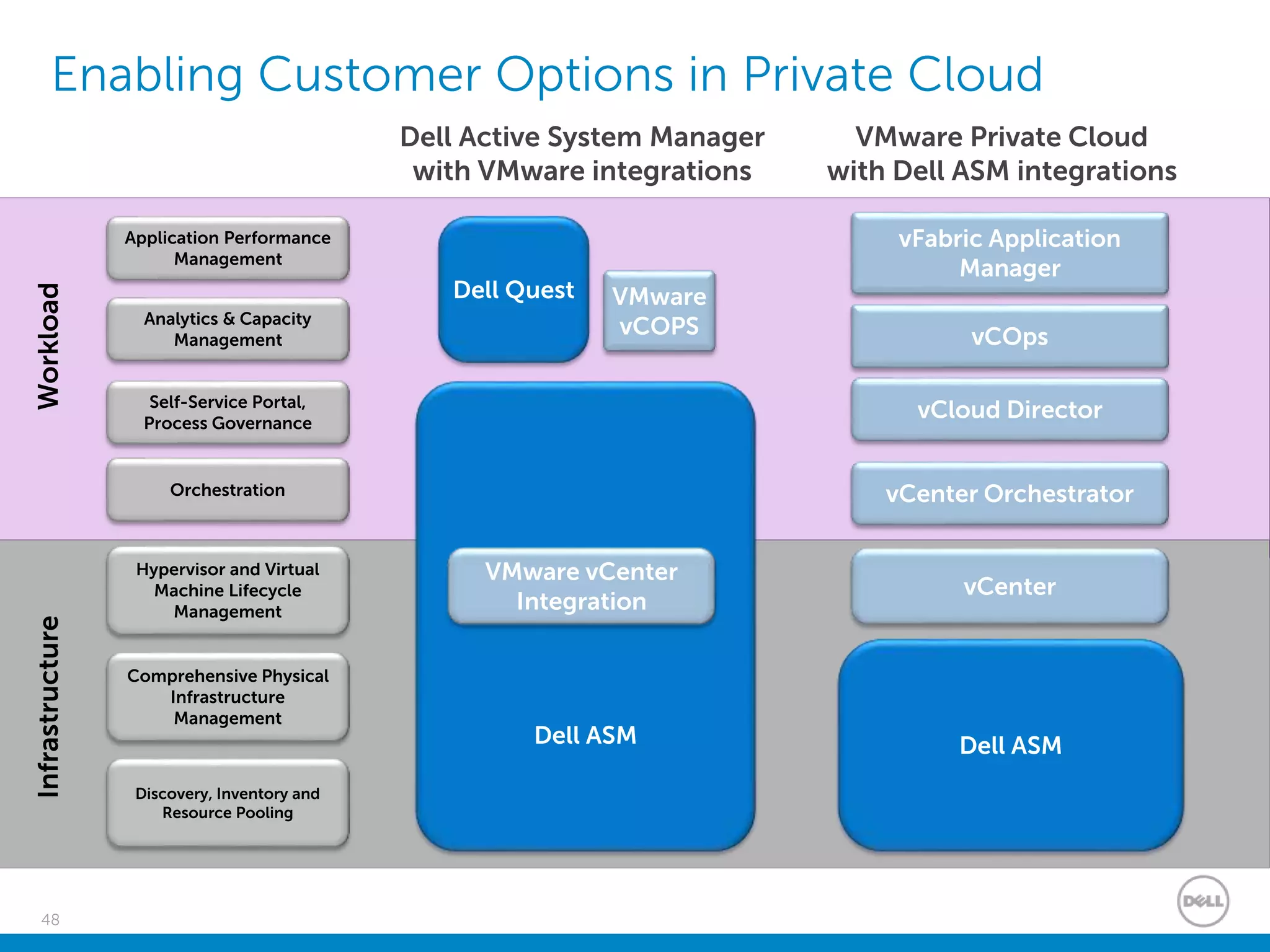
Enabling Customer Options in Private Cloud
Discovery, Inventory and
Resource Pooling
Comprehensive Physical
Infrastructure
Management
Self-Service Portal,
Process Governance
Analytics & Capacity
Management
Dell Quest
Hypervisor and Virtual
Machine Lifecycle
Management
Orchestration
Application Performance
Management
InfrastructureWorkload
Dell ASM
vCloud Director
vCOps
vCenter Orchestrator
vFabric Application
Manager
Dell ASM
VMware vCenter
Integration
VMware
vCOPS
vCenter
Dell Active System Manager
with VMware integrations
VMware Private Cloud
with Dell ASM integrations
Thank you

Virtualize with Confidence

  • 1.
    VIRTUALIZE WITH CONFIDENCE NetWize/Dell/VMware DavidPierce Dell Solutions Architect david_pierce@dell.com Mark Millward Dell Systems Consultant Mark_Millward@dell.com
  • 2.
    2 Agenda. • Dell |VMware – A Better Together Story • Dell Servers with VMware • Dell Storage with VMware • Dell Networking with VMware • Dell Systems Management with VMware
  • 3.
    Dell | VMware– A Better Together Story
  • 4.
    4 Why Dell forVMware Innovation that delivers reliably Efficient Technology that simply works Scalable and Flexible architectures Designed for virtualization with world class density, performance, and datacenter availability Accelerates network and VM scaling with flexible fabrics, efficient provisioning, and virtual network configuration Fluid Data storage architecture integrates seamlessly with VMware to streamline storage management Enables comprehensive systems management designed to deliver IT efficiency and reduce complexity Manage Server Storage Network
  • 5.
    5 Dell | VMwarePartnership • vSphere – Engineering, testing, reference architectures since 2004 • vCenter Plug-ins – Server and Storage platforms • vStorage Integration – Unique Dell extensibility • End to End Solution architectures – Converged / VDI View • Joint innovation initiatives – Dell Fault Resilient Memory / VMware Reliable Memory • Dell Consulting Services – Offers a broad set of client and data center virtualization assessment, design, and implementation services Enterprise Development Converged Solutions vCloud Connector vCenter Plugins vStorage
  • 6.
  • 7.
    7 The Dell EnterpriseServer Solutions Portfolio Workload-optimized solutions for any size enterprise Dell Networking Dell Storage PowerEdge T series Affordable, entry-level tower servers PowerEdge R series Rack-optimized for improved density PowerEdge VRTX Integrated IT for remote & branch office PowerEdge M series Dense modular IT with central management PowerEdge C series Flexible, scale- out cloud & HPC solutions Data Center Solutions Tailored for hyperscale workloads Traditional Shared Infrastructure General purpose Distributed applications Dell Software Dell Services Dell End to End Enterprise Solutions Solutions PowerEdge FX2 2U high rack-based shared infrastructure
  • 8.
    8 Trends affecting 13GServers AMD Dell AMD based server product line planned to EOL in mid-2015. Intel shifts Gears: Intel is discontinuing EN processor series (E5-2400) used on the on the R/T 4xx/5xx platforms and replacing with EP series (E5-2600) used on the 6xx/7xx platforms. Implications for Dell & Dell customers: Returning to model similar to 11G where there was a common processor stack across all 2S models which were differentiated by memory addressability, packaging, internal storage capabilities etc. R420/R520 R620/R720 430/530/630/730 12G 13G 12G Ivy Bridge Haswell 13G Memory 13G will implement DDR4 memory. Industry shift from DDR3. HDD/SSD NVMe industry standard for PCIe SSD’s. Larger PCIe SSD’s. Commoditization of SSD’s accelerates Declines in $/GB for SAS/SATA and PCIe SSD’s 1.8” form factors Industry shift away from 3.5" 15K SAS HDD’s in favor of 2.5" form factor 15K HDD’s.
  • 9.
    9 Key Limitations toApplication Performance shifts to IO CPUs, memory and network performance have continued to increase, and storage capacity has grown ... But HDD speed has not kept pace….and application performance is impacted. CPUs ~ 10M IOPs Best 15K SAS Drive ~ 540 IOPs
  • 10.
    10 Fresh Air 2.0 Certifiedwith higher temperatures to save cooling costs Select Network Adapters More choices for flexibility & simple IO transfer DDR4 Memory 50% faster and 30% lower power, supports DELL FRM FX Architecture The world’s most flexible shared infrastructure Next Gen Processors Up to 70% more performance w/AVX2 OpenManage Essentials 2.0 Agent Free, easy management Automation for Everyone PowerEdge 13th Generation Adapt to your evolving workloads and data center Enhanced Drive Capabilities Dell’s first 100TB storage optimized server Express Flash 2.0 NVMe Industry leading data access & serviceability with Common Slots PERC9 Doubles storage I/O Performance Expanded SSD Offerings More options for application acceleration Fluid Cache for SAN Dramatically improve application performance by 10X SanDisk DAS Cache Accelerate application performance SSD Server SanDisk
  • 11.
    11 PERC9 (12Gb/s SAS) Doubles performance  Flexible mode of RAID/HBA  Simplifies management New for 13G  Increase performance density  Reduce power  Same reliability Hype rvisor Node 0Node 1 Hype rvisor FRM zone FRM zoneHype rviso r Node 2 Node 3 Hype rvisor FRM FRM FRM FRM Protected Protected Protected Protected Dell Fault Resilient Memory 2.0  Similar protection as memory mirroring  One quarter the cost 1.8” SATA SSD Portfolio SanDisk DAS Cache by Dell  Accelerate application performance with DAS  Wide coverage of media, controller, and OS 12G 13G Server Storage Evolution  Storage flexibility for your applications  DAS performance when you need it Fresh Air 2.0 (5C over v1.0) /Air Flow Optimization / Intelligent Power Capping  Operate in hotter climate  Maximize performance at same power  Save energy cost Workload Profiles  One touch simple system configuration  Maximize setup efficiency Workload Profiles  HPC  HFT
  • 12.
    12 PowerEdge Technology Differentiation FailSafeExpressFlash/NVMe Redundant HyperVisor AgentFree • Simpler deployment of VMware • Removes dependency on VMware versions or patches Save time + money on maintenance • Improve performance for I/O bound workloads • 2 X Drives - improve provide up to 771K IOPS • 1 X drive - up to 10.5x more IOPS than 16 HDDs • Rebuild and recover up to 5x faster • 16 Blades - saves 436.48 btu/h per chassis of cooling Diskless with improved availability Saves Power/ Time/Money
  • 13.
    13 PowerEdge Modular Differentiation I/OIsolation • I/O consolidation for Fabric iSCSI with VMware • DCB storage target, DCB 10GbE switch, and DCB network adapter I/O Isolation Converged Blade Data Center M1000e w/MXL switch 40G Data center fabric • Optimized for virtualization traffic (VMotion, VM to VM) Improved performance, port density and TCO Same size, more capacity More VMs/U, More VMs/watt M420, M620, M630, M820, World Class Density Need 32 servers in 10u? • Up to 576 Cores (M630) • Up to 24TB Memory (M630) • Up to 288 X 10Gb L3 ports (MXL/M420) • Up to 28TB Raw Storage (PS4110) Infrastructure and fabric consolidation
  • 14.
  • 15.
    15 What is VRTX? •VRTX - abbreviation of Vertex • Vertex the point of intersection of three or more lines or planes of a solid figure – Servers – Storage – Networking
  • 16.
    16 What does VRTXmean for you Do you have this problem?
  • 17.
    17 VRTX – Makingthe complex simple An entire datacenter in 5U Current environment Complex, Inefficient, Rigid PowerEdge VRTX Simple, Efficient, Versatile Only 12 inches Only19inches
  • 18.
    18 PowerEdge VRTX –Front & Rear Views LCD Display Panel Up to 4 PowerEdge M-Series Servers Internal low latency, fast storage Shared Storage 25 x 2.5” or 12 x 3.5” (expandable) 8 External PCIe Slots Hot Plug Redundant PSUs Remote Management Ports Locking Front Cover Shared DVD KVM Ports Hot Plug Redundant Blowers8 RJ45 NIC ports
  • 19.
    19 OME: Geographical Viewfor PowerEdge VRTX • Industry-first geographical view of distributed VRTX systems • Rapid, at-a-glance identification of remote system location and health status via color-coded icons • Easy to use and intuitive compared to traditional “tree” hierarchical view • Seamlessly linked to OpenManage Essentials to perform management tasks
  • 20.
  • 21.
    21 What do youget when you combine the best of blades and rack servers? Density and shared infrastructure efficiency BLADES Simplicity and cost benefits RACKS A 2U rack-based converged computing platform The best of both worlds!
  • 22.
    22 The Dell FX2architecture FX2: Flexible Architecture in a 2U form factor hosting different blocks of compute and storage resources – depending on workload needs. Converged infrastructure provides data centers and private clouds with efficiencies of shared power, networking, I/O and management, as well as greater overall density
  • 23.
    23 PowerEdge FX2: afull converged portfolio A 2U converged enclosure sharing power, cooling, management and PCI connectivity capable of integrating a mix of server, storage and networking solutions PowerEdge FC630 • 2S half width ideal for solutions such as dense virtualization • Up to 4 per FX2 enclosure PowerEdge FC430 • 2S quarter width ideal for solutions such as dense compute, HPC and light virtualization • Up to 8 per FX2 enclosure PowerEdge FM120x4 • 1S Atom half width ideal for solutions such as static web pages • Up to 16 servers (4 nodes) per FX2 enclosure PowerEdge FC830 • 4S full width ideal for solutions such as OLTP or database • Up to 2 per FX2 enclosure Flexible solutions for every workload PowerEdge FX2 PowerEdge FD332 • Half width direct attach storage with up to 16 drives per module • Up to 3 nodes per FX2 enclosure PowerEdge FN IOA • Designed for simple, integrated networking solutions • Up to 2 nodes per FX2 enclosure
  • 24.
    24 The PowerEdge FX2enclosure 4 x FC630 server blocks in a fully loaded FX2 enclosure each with 8 1.8” SSDs Rear view of FX2s enclosure 1Gb pass-through shown, 10Gb SFP+ & FN IO Aggregator options available 8 x FC430 server blocks in a fully loaded FX2 enclosure each with 2 1.8” SSDs 2 x FC830 server blocks (each with 16 1.8” SSDs) in a fully loaded FX2 enclosure Displayed: 4 x FC430 and 2 x FD332 (32 drives) 4 x FM120s (16 micro servers)
  • 25.
    25 FN IOAggregator These threeIOA versions address typical LAN, LAN + IP storage, LAN + iSCSI SAN and LAN + FCoE traffic FN410T Provides 4 ports 10GBASE-T connectivity. Supports copper media up to 100m. FN410S Provides 4 ports SFP+ connectivity. Supports optical and DAC cable media. FN2210S Provides two ports native Fibre Channel (NPG mode*) and 2 ports SFP+ connectivity. Able to provide 4 ports SFP+ with reboot. *NPG (NPIV Proxy Gateway) mode provides capability to use converged FCoE inside the FX architecture chassis while maintaining Ethernet and native Fibre Channel outside of the FX chassis. NPIV Proxy Gateway does not provide full Fibre Channel fabric services.
  • 26.
  • 27.
    27 The Dell StoragePortfolio Workload-optimized solutions for any size enterprise Powered by Fluid Data technologies High performance storage Multi- protocol, enterprise SC& FS series Easy-to-use virtualized storage Unified, virtualized IP PS & FS Series Affordable, entry level storage Modular disk storage MD & NX Series Data Protection solutions Tape Storage ML & TL Series PowerEdge Servers Dell Networking Dell Software Dell Services Workload- optimized solutions for any size enterprise vSAN Storage Spaces Nexenta Nutanix Software Defined Storage
  • 28.
    28 Delivering new workload-drivenarchitectures that simplify IT Performance Optimized I/O intensive workloads Leverage flash storage Server-side cache Business critical Price Performance Optimized for virtualized environment Price/performance Traditional IT workloads Cost Optimized Focus on $/TB Lowest TCO Dense enclosures Server-side storage Business Critical Workloads Oracle SAP SQL Server Collaboration & Infrastructure Exchange, Lync SharePoint File, print, web VMware, Citrix, Hyper-V Non-Mission Critical Workloads Cold data archive Image archive Data dump VDI CloudBig Data Traditional IT Server Cache Server Cache Low cost scale-out disk Flash Drives All flash arrays 15K SAS Drives 10K SAS Drives 7200 NL-SAS Drives Compressed tier CostPerformanceAutotiering
  • 29.
    29 Complete VMware Integration •VAAI – Supported by Compellent, EqualLogic, and PowerVault • VASA – Supported by Compellent and EqualLogic • SRM – SRA for Compellent and EqualLogic • vSphere Client Plugins – Plugins for Compellent, EqualLogic, and PowerVault • Storage Base Backup/Restore – VMware-aware SAN-based snapshot tools for Compellent & EqualLogic • vCenter Operations Manager • vVols • Flash Storage and Fluid Cache – Supported by Compellent
  • 30.
    30 Software-defined storage isan emerging paradigm Storage Software ControllersFlashDisk [ [ [ Hardware + Software + Licence = SAN Solution - A technology that decouples the basic elements of a storage system Multiple Implementations Hyper Converged Software-only Virtual Appliance Physical Appliance Traditional / Physical
  • 31.
    31 Software-defined storage isan emerging paradigm - A technology that decouples the basic elements of a storage system Multiple Implementations Hyper Converged Software-only Virtual Appliance Physical Appliance Serverwithinternal storageJBOD [ [ ]Storage Solution SDS Software Server Software-only
  • 32.
    32 Software-defined storage isan emerging paradigm - A technology that decouples the basic elements of a storage system Multiple Implementations Hyper Converged Software-only Virtual Appliance Physical Appliance Hyper Converged Virtualize CPU Virtualize Storage Virtualize CPU Virtualize Storage VM VM VM VM Converged Solution Scalable CPU + SAN
  • 33.
    33 Software-defined storage isan emerging paradigm Customer expectations  Data Services - Management, Automation and Orchestration  Flexibility  Cost  Scalability  Reliability - A technology that decouples the basic elements of a storage system Multiple Implementations Hyper Converged Software-only Virtual Appliance Physical Appliance
  • 34.
  • 35.
    Confidential Provisioning Services forVirtual Machines Can be Complex, Rigid and Hinder Compliance $1800 5 days! $300 2 minutes $10,000 10 weeks PresentPast Creating the VM is fast but still have to wait for other services VLAN networks Firewall IDS, security, monitoring Availability Load Balancer
  • 36.
    Confidential The Software DefinedData Center Delivers a Solution that is Disruptively Simple, Adaptive and Accelerates Compliance 5 days 3 minutes Virtual Data Center (VDC) Software-Defined Networking & Security
  • 37.
    37 SDN Drivers andPromises Customers are looking for • Programmability & Automation - for innovation & agility • Multi-tenancy – for sharing infrastructure • Increased Utilization – more efficient use of HW • Network Services independent of HW, location & topology – for flexibility • Open Standards & interoperability – for lower CAPEX • Simpler management & control – for lower OPEX
  • 38.
    38 Server and Networkvirtualization Physical Compute & Memory (Dell PowerEdge) Server Hypervisor Requirement: x86 Virtual Machine Virtual Machine Virtual Machine Application Application Application x86 Environment Physical Network (Dell Networking) Network Virtualization Platform Requirement: IP Transport Virtual Network Virtual Network Virtual Network Workload Workload Workload L2, L3, L4-7 Network Services Decoupled Server virtualization • Run multiple virtual servers on a physical server • Each VM has illusion it is running as a physical server • Well established and well understood Network virtualization • Decoupled from physical network – topology independence • Create on-demand virtual networks –provides agility • Provide networking for L4-L7 services on demand
  • 39.
    39 Dell Networking withVMware NSX Server Infrastructure (Compute POD) Networking Physical & Virtual Cloud Management System Virtualized Network Physical switches Layer 3 Core Dell Servers or Dell Active Infrastructure NSX vSwitch NSX Gateway VMware NSX Controller NSX vSwitch • Network virtualization and automation from NSX • L2 Gateway connects physical workloads on VLANs/Access Ports to logical networks What • Automation and agility • Integrates virtual and physical servers with scalable gateway for enhanced performance Why • Demo’ed at VMworld 2013 • Since 2014 When VLAN or Per port VMware Cloud Automation
  • 40.
    40 Dell + VMware= 2-way Integration Helps Virtual and Network Admins Collaborate NSX Integration with S6000 • Supports virtual and physical servers in NSX deployments • Automates mapping VLANs (physical networks) into VNIs (logical networks VMware vDS support in AFM 2.0 • Enables common design templates and command line syntax between physical and virtual fabric switches • Provide familiar CLI interface to manage virtual switches Common management • Provide a single view into data center fabric design, configuration, and monitoring across physical and virtual switches • Leverage to simplify operations and optimize performance Common practices • Leverage industry-standard command line syntax across physical and virtual switches • Establish common procedures, save time
  • 41.
  • 42.
    Confidential Dell’s 13G InnovationAutomates and Simplifies Server Management 4 2 “ZeroTouch” Deployment • Dell servers are discovered and auto- configured over the network from XML files stored on network shares • Benefits — No need for manual configuration, reducing deployment time and entry errors — Rack, cable and walk away! No special technician training required. Automatic Updates • Dell servers synchronize themselves to firmware baselines stored on network shares • Benefits — Greatly simplifies keeping your server firmware up-to-date — Latest updates are always staged in the server, ready to be applied, reducing maintenance windows Automated Support • iDRAC maintains now offers Tech Support Report, a continuously updated health and status report that monitors over 5,000 key system parameters • Automatic operation with Dell’s SupportAssist • Benefits — Far less IT admin time needed to identify and resolve server issues Simplified Management When “At-the-Box” • “Tap” the server with your smart device to get comprehensive status and error logs • Insert a USB key to configure the server • Connect a laptop or tablet to manage and diagnose from the iDRAC console • Benefits — Deploy, upgrade and troubleshoot servers with all the information you need at your fingertips!
  • 43.
    Confidential OpenManage Essentials (OME)v2.0: Automation and Simplification Automated OS Installation • Automate scripted OS installation from a bootable ISO through iDRAC • Automate OS deployment after HW preparation. • Benefits — End to end deployment including prepare HW and OS deployment. — Setup once and auto deploy Complete Agent-free update for Drivers • Remove update dependency of OMSA for OS drivers. • Complete Agent-free updates for Bios, Firmware and Drivers • Benefits — Consistent and easy update method for entire Dell PowerEdge platforms. Template-based Server Provisioning • Capture, define, edit and deploy/replicate server/chassis HW configuration settings • Benefits — Simple and fast deployment/replication. — Setup once and replicate to many. Control Baseline and Prevent Configuration Drift • Detect server configuration drift from pre-defined baseline. • Enforce compliance with one simple click. • Benefits — Far less IT admin time needed to identify and resolve server issues — Increase efficiency and security through operational compliance.
  • 44.
    44 Simplify Server Management OpenManageIntegration for VMware vCenter VMware vCenter plug-in that streamlines tools and tasks associated with management and deployment of Dell servers in your virtual environment Monitoring & Alerting • Deep level detail for inventory, monitoring and alerting • Recommended vCenter actions based on Dell hardware alerts Deployment & Provisioning • Zero-Touch bare metal hypervisor deployment without PXE, leveraging Dell Lifecycle Controller Firmware Updates • Ability to deploy BIOS and firmware updates from vCenter Hardware Management • Online access and renewal of hardware warranty
  • 45.
    45 Simplify Storage Management 1 stop management Centralizestorage management within vCenter and reduce the number of consoles required Available across Enterprise storage products • Compellent vSphere Plug-in (Native and Web Client) • EqualLogic Virtual Storage Manager (Native and Web Client) • PowerVault vCenter Plug-in VMware storage management plug-ins • Simplify storage management for VMware Infrastructures • Perform routine Virtual Infrastructure Storage Tasks from the vSphere Client • Flexibility to grow storage with changing needs
  • 46.
    46 VMware vCenter OperationsManagement Granular Infrastructure Monitoring from VM to Storage Solution Pack for Storage Performance Capacity IOPS Latency Benefits Holistic datacenter monitoring from VM to Storage “Reduces problem solving efforts by 40%” “Up to 10x more VMs/administrator
  • 47.
    47 Application & Service Management Performance& Availability Management: Foglight Data Protection: vRanger & AppAssure Security: SonicWALL; SecureWorks; Dell Identity & Access Management Domain specific infrastructure management OpenManage Integration - MSFT System Center OpenManage Integration for VMware vCenter Active System Manager Workload provisioning & lifecycle management of virtual & physical (compute, network, storage) infrastructure Infrastructure & workload automation Infrastructure Health Monitoring OpenManage Essentials Infrastructure Monitoring Across Server, Storage & Network Chassis Management Controller (CMC) iDRAC w/ Lifecycle Controller OpenManage Essentials Hybrid Cloud Management Dell Cloud Manager (DCM) Active Fabric Manager (AFM)OpenManage Network Manager (OMNM) EqualLogic Group Manager & EqualLogic SAN HQ Compellent Enterprise Manager vCenter & MSFT integrations for Compellent & EQL Repository Manager Dell Systems Management Portfolio
  • 48.
    48 Enabling Customer Optionsin Private Cloud Discovery, Inventory and Resource Pooling Comprehensive Physical Infrastructure Management Self-Service Portal, Process Governance Analytics & Capacity Management Dell Quest Hypervisor and Virtual Machine Lifecycle Management Orchestration Application Performance Management InfrastructureWorkload Dell ASM vCloud Director vCOps vCenter Orchestrator vFabric Application Manager Dell ASM VMware vCenter Integration VMware vCOPS vCenter Dell Active System Manager with VMware integrations VMware Private Cloud with Dell ASM integrations
  • 49.

Editor's Notes

  • #5 PowerEdge Servers are designed for virtualization providing world class density, performance and DC availability Network fabric that enables VM scaling, flexible fabrics and efficient provisioning Data architecture that integrates seamlessly with VMware streamlining server and storage management Systems management that designed to deliver efficiency and reduce complexity
  • #6 Dell has been a significant partner with VMware since 2004 with the launch of our OEM program supporting ESX 2.1.2 Since then, we were first to market with embedded SD for ESXi (R805) and continue to innovate around h/w as well as provide solution stacks for VMware. Most recently, Converged and View. Our innovation around management includes the PlugIns for vCenter. Our storage integration provides unique extensibility for MD, EQL and Compellent. From a services perspective, Dell was the 1st VMware vCloud provider and we continue to offer a vCloud connector such that customers can bridge their current Virtualization infrastructure with the Dell Public vCloud We have a significant investment in intellectual capital with > 680 VCP’s globally
  • #11 The PE 13G design tenets bring together a solution that adapt to the evolving workloads and datacenter. Talk briefly to each area.
  • #13 FailSafe - When properly used in systems with ESXi, the Redundant SD architecture will remove a single point of failure for flash based embedded hypervisor while improving reliability, simplicity of deployment, and security for the ESX kernel. Since this is a diskless boot architecture, reductions in total cost of ownership (TCO) can also be projected as a benefit in power/cooling challenged environments with lower power consumption and lower exhaust temperatures when using NAND Flash vs mechanical platters with Drives . A single Blade server with 2 hard drives require about 4 watts per drive of power (idle). 4W x 2 Blades (idle) = 8W. This equates to 27.28 btu/h of cooling required. A Blade chassis with 16 blades consists of 32 drives. This equates to 128 watts @ 436.48 btu/h per chassis of cooling required. A Data Center with 1000 servers consists of 2000 drives. This equates to 8,000 watts @ 27,400 btu/h per Data Center of cooling required AgentFree AgentFree provides management of h/w without OS s/w. This unique architecture reduces the requirement for the OMSA VIB installation on each server. Since the server is managed out of band using iDRAC Enterprise, all h/w information can be captured with or without an OS. In this case with ESX, there is no VIB required which frees sysadmins from the bonds of an agent. Simpler to deploy and patch. ExpressFlash   Dell PowerEdge Express Flash is a high performance storage device designed for low latency, high input output operations per second (IOPS), and enterprise class storage reliability and serviceability. The Dell PowerEdge Express Flash PCIe SSD is based on Single Level Cell (SLC) NAND flash technology with a high-speed PCIe 2.0 compliant interface. The high-speed PCIe 2.0 compliant interface helps improve performance for I/O bound solutions. The volume seen by ESX is formatted with VMFS and can host IO bound Workloads There are 4 key use cases. Single instance VMs where performance is critical. IO is dedicated to the VM while the VM is hosted on ExpressFlash. SQL/Oracle/Exchange can all be run within this environment with outstanding performance IO characteristics. Typical SAN environments are shared and queing within the SAN controller is likely vs a dedicated IO environment VDI environments where density per system or mitigation of boot storms is desired vMotion without a SAN. Also known as Enhanced vMotion. Enhanced Vmotion does not need a SAN and benefits from highspeed Flash SSD’s. Swap to host cache is an ESXi 5.1 feature that allows users to configure a special swap cache on local SSD storage. With Express Flash PCIe SSDs, this host cache will be much faster than the regular swap files on typical rotational hard disks and will significantly reduce access latency Fire your agent and you can save up to $2.5 million in server maintenance. G12000686 Feb-12   Dell PowerEdge 12th generation servers Agent-Free monitoring: Installing, testing, and maintaining software agents for monitoring server components is time consuming for IT resources and power-robbing for precious CPU cycles. It is common in the industry to require agents or drivers to monitor many components such as Network Adapters and RAID cards. Our Dell PowerEdge 12th generation servers differ from others; we have “fired your agents” to deliver agent-free monitoring for NICs, RAID, and other sensors and data points. In a data center with 10,000 servers, not having to maintain management agents can result in a savings of up to $2.5M over the servers’ lifecycle. *Calculations based on February, 2012 testing by Principled Technologies on an enterprise with 1,000 servers supporting a total of 20 configurations of operating systems, applications, and hardware with a fully-loaded system administrator cost of $98,000.
  • #14 World Class Density. Dell – 512 Cores – 10U Cisco – 128 Cores in 8U HP – 256 Cores in 10U IO Isolation – by consolidating ports within the Chassis, IO is isolated within the chassis. This isolation is optimized for VM to VM traffic. Also, improves port reduction of external ports for > TCO Dell first to market with iSCSI over DCB DCB storage target, DCB 10GbE switch, and DCB network adapter – all within a blade chassis LAN/SAN Convergence for Fabric A providing I/O Consolidation
  • #18 Current environment: Multiple server chassis’, storage enclosure(s), network switches, management tools and consoles, power cables, and network cables result in sprawl, complexity, inefficiency, hassle and cost, and IT rigidity. With PowerEdge VRTX: Single chassis the size of a tower server houses up to 4 servers, huge storage capacity (~48TB) and network switch Unified sys mgmt tool and single console instead of three (one each for servers, storage and networking As few as three cords/cables: Two power cables (for redundancy and high availability) , and a single network cable.
  • #19 This slide calls out some of the key features of VRTX.
  • #24 These are the components of the PowerEdge portfolio that will be rolling out over the next year. Initially – in December 2014, the FX2 chassis, the FM120x4 server block and the FC630 server block will ship, followed by the FC430 server and FD332 storage block in early 2015, followed soon after that by the 4 socket FC830 server.
  • #28 Targeted time to cover slide: 1
  • #29 Targeted time to cover slide: 3 There is also a natural alignment between these storage trends and the workloads that customers deploy. Performance Optimized Business critical applications, like Oracle, SAP, and SQL Server, are usually IO intensive workloads that benefit most from performance-focused flash technologies, like SSD drives, hybrid arrays, all flash arrays, and server-side flash. Moving forward, customers will deploy these workloads on storage solutions designed more and more around flash-based technologies. Price Performance Collaboration and infrastructure applications are traditional IT workloads that run for the most part on top of virtualized environments. Customers will continue to focus on storage solutions that are highly integrated into VMware, Hyper-V, and Citrix and that offer a balance of features and costs. Over time, these applications will move, as storage solutions evolve and the agility of modern architectures to move applications dynamically across tiers accelerates. Cost Optimized And finally, large data archives, data dumps, cold storage for backup are typically non-mission critical workloads where cost is king and $/TB is a key metric. While not all customers may be technically savvy about Oracle or image archives, most are familiar with “buzz” across the industry around big data, VDI, cloud, etc. For the most part, these “buzz words” align well with how we are thinking about storage and the prevailing trends presented here today. By implementing this strategy, Dell is able to deliver workload-driven architectures that allow customers to better address their changing business needs. On the left, you’ll see a sample architecture that builds connects the technology trends into a real deployment aligned to key workloads. For example, if your business has application that requires really heavy performance (things like Oracle, SAP and SQL), a performance-optimized solution that leverages flash may make the most sense for your business. If you have gobs of data that isn’t really delivering value to your business, a cost-optimized solution is ideal for your storage needs because it will allow you to reduce the overall cost of supporting your data. This becomes increasingly important given data growth and shrinking budgets…a few of those “known” storage trends we’ve talked about. And finally, you still need to run your business. That means you need a balance of price and performance …. likely plugging into a virtualized environment probably with VMware or Microsoft that allows you to leverage the investments you’ve already made, thereby reducing your total cost of ownership.
  • #34 SDS is a key component of Software Defined Enterprise SDS Not a product A technology that decouples the basic elements of a storage system – the storage hardware and storage software Multiple Implementations: Multiple architectures for SDS with emphasis on different capabilities and to a great degree reflect the GTM strategy of the vendor Compustorage clusters: Combine storage management and application compute on the same platform. This provides the benefit of having the data close to the application compute resource and reduces the number of hardware components in the solution. Ex: VMware VSAN, Scale Computing, Hadoop, Nutanix Physical Appliance: These are traditional storage arrays – i.e. Compellent. With integration with hypervisors and applications these solutions provide many of the benefits of SDS and also have proven data protection and reliability. Some vendors are building layers on top of the appliance allowing for separation of the control plane from the data plane to give the user the ability to control the placement of data in abstracted devices based on data heuristics. EMC is leading this effort which allows them to protect their platform revenue while providing some of the benefits of SDS. Ex: EMC ViPR. And there are some other vendors who offer a device between the servers and storage array that abstract the physical location of the servers LUNs providing abstraction to the unique characteristics of the arrays and enables data movement and common storage management. Ex: IBM SVC, EMC vPLEX, HDS VSP, NetApp vFiler Software Only: Functionality is delivered in a software package that can be run on “any server”. Essentially these are build your own storage system / array. The architecture is similar to commercially available storage arrays but allow the customer to purchase hardware independent of the software. Ex: Nexenta Nexentastore, Inktank Ceph, MS Storage Spaces Virtual Appliance: Virtual Storage Appliance provide traditional storage array functionality in a virtual machine. These provide the same UI and features as the “like” physical appliance and provide hardware independence. Integration with Hypervisor is dependent on the vendors solution. Ex: HP Storevirtual (Lefthand), NetApp Ontap Edge The different architectures / products do a varying job of delivering the attributes that customers are expecting from SDS. Customer Expectations: Data Services - Management, Automation and Orchestration: Customers want utmost flexibility to manage their storage needs. With the growing popularity of cloud and XaaS, customers want Storage as a Service. Customers are looking for solutions that are easy to manage on a day to day basis. They are looking to automate tasks to reduce the time and steps required and minimize the knowledge required to administer storage. They want to provision and manage their portion of the infrastructure based on heuristic requirements. SDS aims to offer this level of management, automation and orchestration to deliver storage as a service. Cost: With the explosion of data, customers are looking to store more on less. They want to reduce storage costs. SDS provides a solution via abstraction from the physical storage hardware. This provides the ability to use storage solutions from different providers, deploy the solutions on standardized technologies and provide common simpler architecture and management. Scalability: Customers’ data is growing at an unpredictable pace. They want their storage infrastructure to adapt to this growth. They want the solution to grow after it is in production. Solutions that require architectural changes at points in the growth curve can be very disruptive to IT. SDS aims to offer “unlimited” storage capacity with a scale-out storage architecture. Customers can add storage without disruption as their businesses grow, as their data grow. Reliability: Storage reliability and data protection have been foundational for storage providers for a long time. There is an adage in IT, a lot of things can go wrong in a data center, but if I have my data things will be OK i.e. I will keep my job. There are business applications whose data is more important than cost or performance. Traditional architectures provided reliability via hardware. Modern architectures provided reliability via software and hardware. SDS aims to provide the reliability completely via software without depending on the underlying hardware.
  • #36 Thanks to virtualization, compute became software-defined. A VM is very cost efficient today. And, because it’s a software-defined construct, it’s flexible, easy to automate, and deployable in minutes. <click> But VM’s are in reality today dependent on physical storage, physical networks, security and availability services that are largely delivered via hardware. These services are expensive, inflexible, manually configured and provisioned, and difficult to automate…. Resulting in higher total cost and decreased agility. There’s clearly a mismatch. <click> In a physical data center time consuming manual processes are required to get IT resources aligned and allocated in order to deliver applications, thus delaying revenue generation and hampering business efficiency. Server virtualization reduced the provisioning time for workloads from days to minutes and unlocked a tremendous amount of efficiency in the data center. The next barrier to data center efficiency is in the networking and security infrastructure that typically require days or even weeks to provision
  • #40 What? Top of Rack switch to bridge physical and virtual environments using VXLAN ToR uses network virtualization overlays with VXLAN encapsulation and decapsulation Gateway functionality built on Dell Networking S6000 Top of Rack switch Why? Business agility – connects physical servers and storage to NSX virtual networks Increased customer value - Help customers realize the true benefits of Network Virtualization with an S6000 bridging physical and virtual environments When? General Availability for S6000 is now
  • #43 Questions: ZeroTouch Deployment: Do you agree that removing the 1st touch need to initially configure hardware is beneficial? For example not having to set the iDRAC IP address directly? What do you find most painful about the initial deployment of servers and other infrastructure? Would integrating with a DHCP server be preferred in your environment? How about DNS? We want to make this operate over a protected management network like iDRAC uses. Any issues you see? Want the deployment to use an XML configuration file that the customer creates and stores on a repository. Any issues? Asset and Power Location Service Have you been looking for a DCIM solution that reports asset location automatically? What kinds of methods: contact, RF, etc? Would you consider retrofitting your existing racks for this feature? Or would you only use this on new rack deployments? Is it important to report the power topology so you can trace power distribution from wall to PDUs to IT assets? Unified PE-C PE Mgmt Do you use both types of PE servers? Do you see value in using the same tools? Would you need advanced mgmt like vKVM and vMedia for your PE-C servers? Any issues with the PE-C management? Have you used Dell’s Crowbar tools for OpenStack applications? Would you like to use it for PE also? How important is it to remain free of agents with PowerEdge-C products? Granular Power Advisor How much power savings per server is high enough to warrant reporting? Is just the more granular reporting of power for items like HDDs, memory, CPU, GPU, useful by itself? Would you feel comfortable if the server handled the power-down of unused devices automatically?
  • #46 The various storage plugins for VMware vCenter provide management of Dell’s Compellent, Equallogic and PowerVault storage within the standard VMware management framework Beyond the native integration with the VMware storage APIs, the plugins also provide access with the vCenter UI to Routine storage provisioning tasks Storage replication and snapshot information By consolidating the storage management within the native VMware management framework, Dell reduces the complexity of a customer’s VMware environment by reducing the number of consoles required for day to day management of the infrastructure. Deployment of new storage capacity is accelerated and the consistency of the environment is increased through the automated deployment of storage resources.
  • #48 This slide represents a summarized view of system management ecosystem that Dell is cultivating. Element manager -> DSG portfolio. It shows Dell’s ability to deliver solutions around a broad spectrum of customer needs. Dell does not take a stack based approach with its portfolio. We think it is about mapping specific customer needs to capabilities in the products. The value in this ecosystem is that customers can leverage 1 or more complementary products across the stack and the integration that exists (or is being developed) between different products to create a robust experience for the customer. Below is a description of each layer (bottom to top): Domain specific infrastructure management Dell provides a set of element management tools that enable administrators to gain granular control over configuration and management of hardware elements. Outlined in this layer are foundational tools offered by Dell that span server, storage and network. Infrastructure Health Monitoring A key aspect of on-going management is ensuring good infrastructure health. OpenManage Essentials enables infrastructure monitoring across all three domains – server, storage and network. Workload Provisioning & Infrastructure Monitoring Active System Manager (ASM) is the cornerstone of converged management. ASM offers template-based automation and orchestration to enable seamless workload delivery. ASM also enables resource pooling and end-to-end infrastructure lifecycle management. Application & Service Management Over the past few years, Dell has built a strong portfolio of products that enable application-level/service-level management. Key categories called out are in the areas of performance & availability management, data protection and security.