Virtualization & CloudComputing
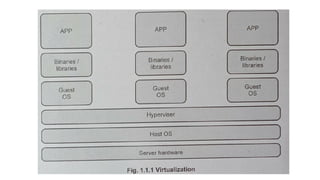
• Virtualization: A technology that allows for creation of virtual instances or
representations of physical resources such as servers, storage devices and
networks using a specialized software called hypervisor or virtual machine
monitor (VMM).
• These VMs can then be used to run multiple OSs, applications or services,
independently on a single physical host machine.
• Host Machine: on which the VM is going to be built
• Guest Machine: VM
Virtualization & CloudComputing
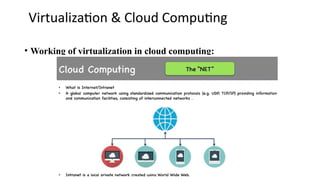
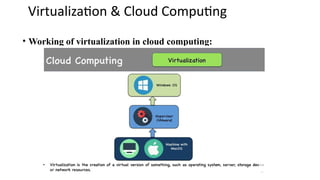
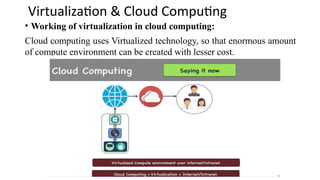
• Working of virtualization in cloud computing:
Cloud computing uses Virtualized technology, so that enormous amount
of compute environment can be created with lesser cost.
Virtualization & CloudComputing
• Types of virtualization:
1. Server virtualization: Better utilization of h/w resources, improves efficiency & cost
savings.
2. Storage virtualization: Abstracts physical storage devices (SDD,HDD), creates a
virtual storage pool, allocated & managed independently.
3. Network virtualization: creates virtual networks that are decoupled from the physical
n/w infrastructure. Establish VLANs , VPNs over shared physical n/w, increases flexibility,
scalability & security.
4. Desktop virtualization: Also known as virtual desktop infrastructure(VDI), runs
multiple virtual desktops on a single host. Each one have its own OS, applications.
Virtualization & CloudComputing
• Virtualization summary:
A powerful technology that provides efficient and flexible
utilization of resources, improved scalability & simplified management
in IT environments.
A fundamental technology in modern data centers, cloud
computing & IT infrastructure management.
Virtualization & CloudComputing
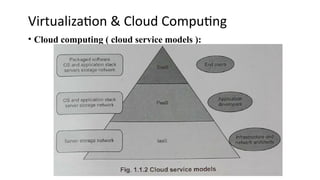
• Cloud service models:
1. IaaS:Infrastructure as a Service(HaaS) (AWS, Azure, Google Cloud
Platform(GCP))
2. PaaS: Platform as a Service. (Google App Engine, Microsoft Azure App Service)
3. SaaS: Software as a Service(pay as you go) CRM, ERP & productivity tools (
Salesforce, MS Office 360, Google workspace, gmail)
4. AaaS
5. FaaS
Virtualization & CloudComputing
• CC Summary:
A paradigm-shifting technology, provides on-demand access to
scalable computing resources & services over the internet.
16.
Virtualization & CloudComputing
• Need of Virtualization:
1.Cost Savings
2. Administration Efficiency
3. Fast Deployment
4. Infrastructure cost reduction
5. Increased flexibility
17.
Virtualization & CloudComputing
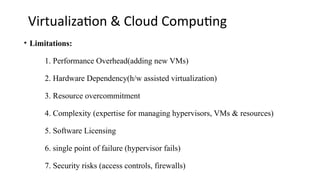
• Limitations:
1. Performance Overhead(adding new VMs)
2. Hardware Dependency(h/w assisted virtualization)
3. Resource overcommitment
4. Complexity (expertise for managing hypervisors, VMs & resources)
5. Software Licensing
6. single point of failure (hypervisor fails)
7. Security risks (access controls, firewalls)
18.
Types of H/WVirtualization(Server Vi/ HW
Assisted Vi)
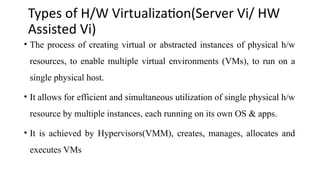
• The process of creating virtual or abstracted instances of physical h/w
resources, to enable multiple virtual environments (VMs), to run on a
single physical host.
• It allows for efficient and simultaneous utilization of single physical h/w
resource by multiple instances, each running on its own OS & apps.
• It is achieved by Hypervisors(VMM), creates, manages, allocates and
executes VMs
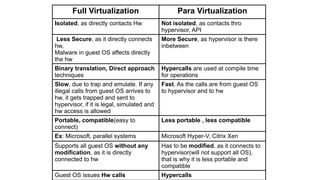
Full Virtualization ParaVirtualization
Isolated, as directly contacts Hw Not isolated, as contacts thro
hypervisor, API
Less Secure, as it directly connects
hw,
Malware in guest OS affects directly
the hw
More Secure, as hypervisor is there
inbetween
Binary translation, Direct approach
techniques
Hypercalls are used at compile time
for operations
Slow, due to trap and emulate. If any
illegal calls from guest OS arrives to
hw, it gets trapped and sent to
hypervisor, if it is legal, simulated and
hw access is allowed
Fast. As the calls are from guest OS
to hypervisor and to hw
Portable, compatible(easy to
connect)
Less portable , less compatible
Ex: Microsoft, parallel systems Microsoft Hyper-V, Citrix Xen
Supports all guest OS without any
modification, as it is directly
connected to hw
Has to be modified, as it connects to
hypervisor(will not support all OS),
that is why it is less portable and
compatible
Guest OS issues Hw calls Hypercalls
21.
Types of H/WVirtualization(Server Vi)
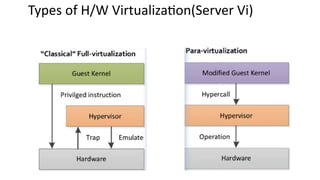
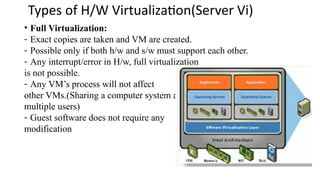
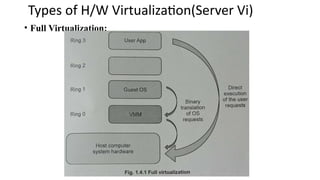
• Full Virtualization:
- Exact copies are taken and VM are created.
- Possible only if both h/w and s/w must support each other.
- Any interrupt/error in H/w, full virtualization
is not possible.
- Any VM’s process will not affect
other VMs.(Sharing a computer system among
multiple users)
- Guest software does not require any
modification
22.
Types of H/WVirtualization(Server Vi)
• Full Virtualization:
23.
Types of H/WVirtualization(Server Vi)
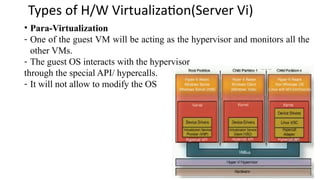
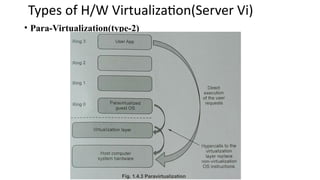
• Para-Virtualization
- One of the guest VM will be acting as the hypervisor and monitors all the
other VMs.
- The guest OS interacts with the hypervisor
through the special API/ hypercalls.
- It will not allow to modify the OS
24.
Types of H/WVirtualization(Server Vi)
• Para-Virtualization(type-2)
25.
Types of H/WVirtualization(Server Vi)
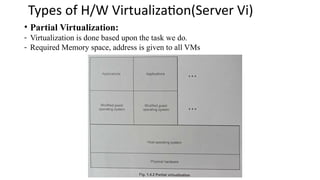
• Partial Virtualization:
- Virtualization is done based upon the task we do.
- Required Memory space, address is given to all VMs
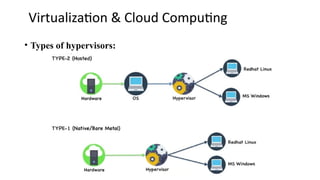
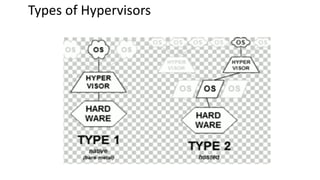
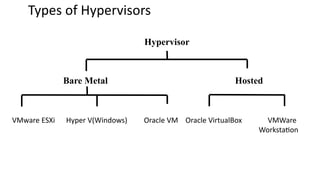
Types of Hypervisors
BareMetal Hosted
VMware ESXi Hyper V(Windows) Oracle VM Oracle VirtualBox VMWare
Workstation
Hypervisor
28.
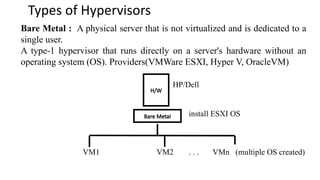
Types of Hypervisors
BareMetal : A physical server that is not virtualized and is dedicated to a
single user.
A type-1 hypervisor that runs directly on a server's hardware without an
operating system (OS). Providers(VMWare ESXI, Hyper V, OracleVM)
HP/Dell
install ESXI OS
VM1 VM2 . . . VMn (multiple OS created)
H/W
Bare Metal
29.
Types of Hypervisors
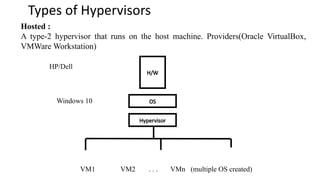
Hosted:
A type-2 hypervisor that runs on the host machine. Providers(Oracle VirtualBox,
VMWare Workstation)
HP/Dell
Windows 10
VM1 VM2 . . . VMn (multiple OS created)
H/W
OS
Hypervisor
30.
Types of Hypervisors
BareMetal : These hypervisors are used in big industries , large data
centers (Google, FB, YT), Cloud computing.
Requires more resources.
Performance is high. Scalability is high. Never gets down.
1TB RAM, 10 TB HDD, Intel CPU, will be used by the Baremetal
hypervisor and VMs.
Hosted: For small enterprises. Not much resources(RAM, Hw, Cpu) are not
required.
256 RAM, 4TB HDD. This h/w will be used by host OS, hypervisor and
other VMs OS, thus Less performance.
Ex:My Laptop



![Unit-2-final.pdf Cloud computingkltklgrfopsrt][hdc[png](https://cdn.slidesharecdn.com/ss_thumbnails/unit-2-final-260209155828-6f7d06cf-thumbnail.jpg?width=640&height=640&fit=bounds)


