VAaaS
Vulnerabilities Assessment as a Service
Jeremy CANALE
contact@jeremycanale.com Entity: Information System Security
VAaaS
• LAB: Automated Cloud Security Enhancement
• Purpose: Automated AWS Cloud Security Scan
• Stack: OpenVAS + OMP CLI + GSA
• Informing Amazon AWS – Penetration Testing Request Form
• Setup our LAB – EC2 Start/Stop + EC2 OpenVAS
• Automated Updating last CVE / NVts
• Manual Scan on EC2 Instance
• Fully automated AWS VPC EC2 vulnerability assessment
• Security Dashboard / Infrastructure Ressources Diagram
• Increasing Scanning Performance ? How to ?
Stack: OpenVAS (+OMP) + Reddis + GSA
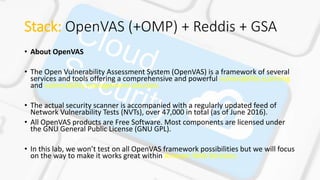
• About OpenVAS
• The Open Vulnerability Assessment System (OpenVAS) is a framework of several
services and tools offering a comprehensive and powerful vulnerability scanning
and vulnerability management solution.
• The actual security scanner is accompanied with a regularly updated feed of
Network Vulnerability Tests (NVTs), over 47,000 in total (as of June 2016).
• All OpenVAS products are Free Software. Most components are licensed under
the GNU General Public License (GNU GPL).
• In this lab, we won’t test on all OpenVAS framework possibilities but we will focus
on the way to make it works great within Amazon Web Services.
Stack: OpenVAS (+OMP) + Reddis + GSA
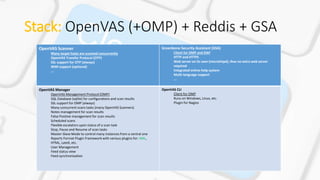
OpenVAS Scanner
Many target hosts are scanned concurrently
OpenVAS Transfer Protocol (OTP)
SSL support for OTP (always)
WMI support (optional)
...
Greenbone Security Assistant (GSA)
Client for OMP and OAP
HTTP and HTTPS
Web server on its own (microhttpd), thus no extra web server
required
Integrated online-help system
Multi-language support
...
OpenVAS Manager
OpenVAS Management Protocol (OMP)
SQL Database (sqlite) for configurations and scan results
SSL support for OMP (always)
Many concurrent scans tasks (many OpenVAS Scanners)
Notes management for scan results
False Positive management for scan results
Scheduled scans
Flexible escalators upon status of a scan task
Stop, Pause and Resume of scan tasks
Master-Slave Mode to control many instances from a central one
Reports Format Plugin Framework with various plugins for: XML,
HTML, LateX, etc.
User Management
Feed status view
Feed synchronisation
OpenVAS CLI
Client for OMP
Runs on Windows, Linux, etc.
Plugin for Nagios
Stack: OpenVAS (+OMP) + Reddis + GSA
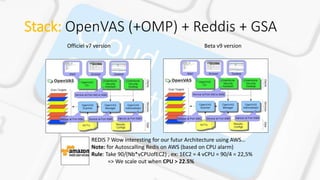
Officiel v7 version Beta v9 version
REDIS ? Wow interesting for our futur Architecture using AWS…
Note: for Autoscalling Redis on AWS (based on CPU alarm)
Rule: Take 90/(Nb*vCPUofEC2) , ex: 1EC2 = 4 vCPU = 90/4 = 22,5%
=> We scale out when CPU > 22.5%
Stack: OpenVAS (+OMP) + Reddis + GSA
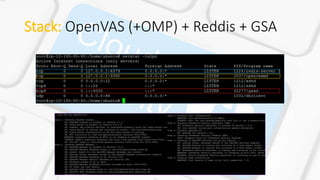
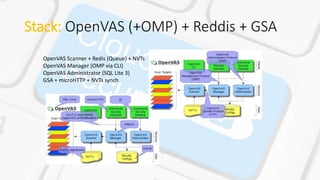
OpenVAS Scanner + Redis (Queue) + NVTs
OpenVAS Manager (OMP via CLI)
OpenVAS Administrator (SQL Lite 3)
GSA + microHTTP + NVTs synch
Informing Amazon AWS –
Penetration Testing Request Form
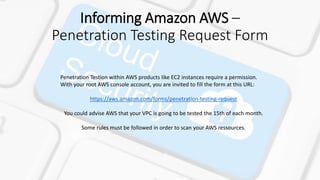
Penetration Testion within AWS products like EC2 instances require a permission.
With your root AWS console account, you are invited to fill the form at this URL:
https://aws.amazon.com/forms/penetration-testing-request
You could advise AWS that your VPC is going to be tested the 15th of each month.
Some rules must be followed in order to scan your AWS ressources.
Informing Amazon AWS –
Penetration Testing Request Form
Vulnerability and Penetration Requesting Permission Testing
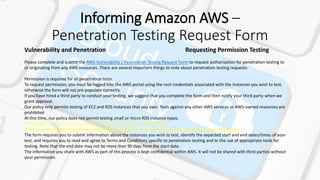
Please complete and submit the AWS Vulnerability / Penetration Testing Request Form to request authorization for penetration testing to
or originating from any AWS resources. There are several important things to note about penetration testing requests:
Permission is required for all penetration tests.
To request permission, you must be logged into the AWS portal using the root credentials associated with the instances you wish to test,
otherwise the form will not pre-populate correctly.
If you have hired a third party to conduct your testing, we suggest that you complete the form and then notify your third party when we
grant approval.
Our policy only permits testing of EC2 and RDS instances that you own. Tests against any other AWS services or AWS-owned resources are
prohibited
At this time, our policy does not permit testing small or micro RDS instance types.
Testing of m1.small, t1.micro or t2.nano EC2 instance types is not permitted.
This is to prevent potential adverse performance impacts on resources that may be shared with other customers.
The form requires you to submit information about the instances you wish to test, identify the expected start and end dates/times of your
test, and requires you to read and agree to Terms and Conditions specific to penetration testing and to the use of appropriate tools for
testing. Note that the end date may not be more than 90 days from the start date.
The information you share with AWS as part of this process is kept confidential within AWS. It will not be shared with third parties without
your permission.
Automated Updating last CVE / NVts
before scanning
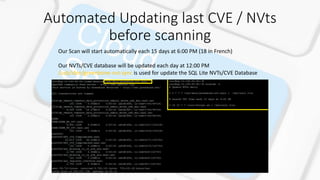
Our Scan will start automatically each 15 days at 6:00 PM (18 in French)
Our NVTs/CVE database will be updated each day at 12:00 PM
/usb/sbin/greenbone-nvt-sync is used for update the SQL Lite NVTs/CVE Database
Setup LAB (1/3)
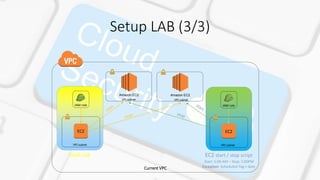
Our current VPC is not a PRODUCTION environment which means our ressources are not not setup for
running at night: Billing Optimization !
- We have a dedicated EC2 Instance running with a dedicated role which contains a crontab BASH
script for:
- Starting all VPC EC2 instance at 5:00 AM (or value in Schedule-Tag)
- Stopping all VPC EC2 instance at 5:00 PM (or value in Schedule-Tag)
ex: if Schedule-Tag = [1-5] [5-17]: Monday to Wednesday, 5:AM to 5:00PM (17h00 French)
[1-5] [NA-NA]: Monday to Wednesday, ALL TIME RUNNING
Exception: if Schedule-Exception present:
format: YEAR-MONTH-DAY HOUR 2016-12-13 18 : 2016-12-16 18
=> Let this EC2 instance running from 2016-12-13 6:00 PM to 2016-12-16 6:00 PM
- We have a dedicated EC2 instance running with our LAB environment with a full IAM permission
role -> t2.2xlarge
Setup LAB (2/3)
EC2 Start/Stop Role
Policy attached:
{
"Statement": [
{
"Action": [
"ec2:DescribeInstances",
"ec2:StartInstances",
"ec2:StopInstances",
"ec2:CreateTags"
],
"Effect": "Allow",
"Resource": "*"
}
]
}
{
"Statement": [
{
"Effect": "Allow",
"Action": [
"ec2:*",
],
"Resource": "*"
}
]
}
EC2 LAB Role
Policy attached:
Setup LAB (3/3)
Current VPC
VPC subnet VPC subnet
Amazon EC2 Amazon EC2
IAM role
EC2
VPC subnet
IAM role
EC2
VPC subnet
VaaS Lab EC2 start / stop script
Start: 5:00 AM – Stop: 5:00PM
Exception: Scheduled-Tag + date
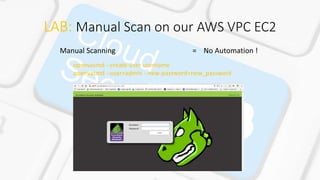
LAB: Manual Scan on our AWS VPC EC2
Manual Scanning = No Automation !
openvasmd --create-user username
openvasmd --user=admin --new-password=new_password
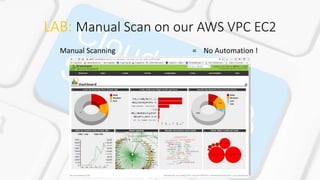
LAB: Manual Scan on our AWS VPC EC2
Manual Scanning = No Automation !
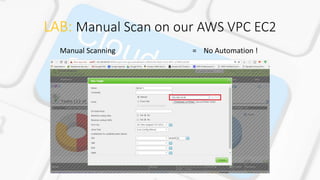
LAB: Manual Scan on our AWS VPC EC2
Manual Scanning = No Automation !
LAB: Fully automated AWS VPC EC2
vulnerability assessment
We could see, OMP works with
login/password but also with credential
file. The best way ! ( Ohh  )
AWS tips: We could download this file
from an S3 bucket before calling OMP
commands.
(For Security paranoid, not in this paper)
We could see that OMP CLI is only
working with 1 target (=1 IP) at the
time… ( No  )
We could see that OMP CLI could also
work with XML file. ( Yeahh  )
OMP CLI ?
LAB: Fully automated AWS VPC EC2
vulnerability assessment
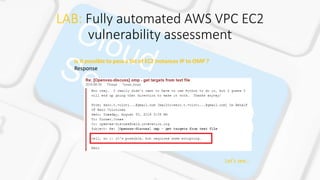
Is it possible to pass a list of EC2 Instances IP to OMP ?
Response:
Let’s see…
LAB: Fully automated AWS VPC EC2
vulnerability assessment
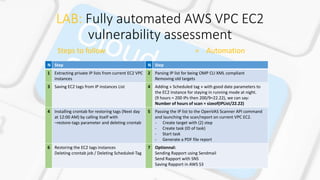
N Step N Step
1 Extracting private IP lists from current EC2 VPC
instances
2 Parsing IP list for being OMP CLI XML compliant
Removing old targets
3 Saving EC2 tags from IP instances List 4 Adding « Scheduled tag » with good date parameters to
the EC2 Instance for staying in running mode at night.
(9 hours = 200 IPs then 200/9=22.22), we can say:
Number of hours of scan = sizeof(IPList/22.22)
4 Installing crontab for restoring tags (Next day
at 12:00 AM) by calling itself with
–restore-tags parameter and deleting crontab
5 Passing the IP list to the OpenVAS Scanner API command
and launching the scan/report on current VPC EC2.
- Create target with (2) step
- Create task (ID of task)
- Start task
- Generate a PDF file report
6 Restoring the EC2 tags instances
Deleting crontab job / Deleting Scheduled-Tag
7 Optionnal:
Sending Rapport using Sendmail
Send Rapport with SNS
Saving Rapport in AWS S3
Steps to follow = Automation
LAB: Fully automated AWS VPC EC2
vulnerability assessment
Steps to follow = Automation
N Step N Step
1 aws ec2 describe-instances --instance-ids --query
Reservations[].Instances[].PrivateIpAddress > $target
+ Custom code
2 Custom code
3 aws ec2 describe-tags --filters "Name=resource-
type,Values=instance" --output json > $file
+ Custom code
4 aws ec2 describe-instances --instance-ids --query
'Reservations[].Instances[].[InstanceId]' --filters Name=instance-
state-name,Values=running
&
aws ec2 create-tags --resources $name --tags Key="Schedule-
Exception",Value="$TagToDelete“
+ Custom code
4 Custom code (--restore-tag) parameter 5 Custom code
6 aws ec2 delete-tags --resources $name --tags
Key="Schedule-Exception",Value="$TagsToDel“
+ Custom code
7 Custom code
LAB: Fully automated AWS VPC EC2
vulnerability assessment
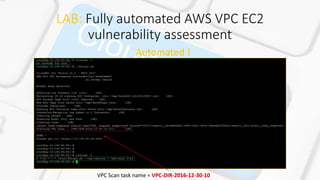
Automated !
VPC Scan task name = VPC-DIR-2016-12-30-10
LAB: Fully automated AWS VPC EC2
vulnerability assessment
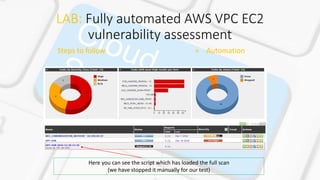
Steps to follow = Automation
Here you can see the script which has loaded the full scan
(we have stopped it manually for our test)
LAB: Fully automated AWS VPC EC2
vulnerability assessment
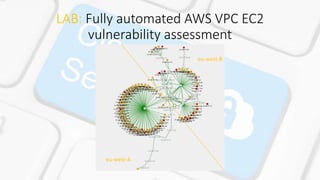
eu-west-A
eu-west-B
Informations
http://www.openvas.org/
https://aws.amazon.com/blogs/security/
https://cve.mitre.org/
https://linkedin.com/jcanale13
https://github.com/m0rtix/ (code will be available soon)

VAaaS

  • 1.
    VAaaS Vulnerabilities Assessment asa Service Jeremy CANALE contact@jeremycanale.com Entity: Information System Security
  • 2.
    VAaaS • LAB: AutomatedCloud Security Enhancement • Purpose: Automated AWS Cloud Security Scan • Stack: OpenVAS + OMP CLI + GSA • Informing Amazon AWS – Penetration Testing Request Form • Setup our LAB – EC2 Start/Stop + EC2 OpenVAS • Automated Updating last CVE / NVts • Manual Scan on EC2 Instance • Fully automated AWS VPC EC2 vulnerability assessment • Security Dashboard / Infrastructure Ressources Diagram • Increasing Scanning Performance ? How to ?
  • 3.
    Stack: OpenVAS (+OMP)+ Reddis + GSA • About OpenVAS • The Open Vulnerability Assessment System (OpenVAS) is a framework of several services and tools offering a comprehensive and powerful vulnerability scanning and vulnerability management solution. • The actual security scanner is accompanied with a regularly updated feed of Network Vulnerability Tests (NVTs), over 47,000 in total (as of June 2016). • All OpenVAS products are Free Software. Most components are licensed under the GNU General Public License (GNU GPL). • In this lab, we won’t test on all OpenVAS framework possibilities but we will focus on the way to make it works great within Amazon Web Services.
  • 4.
    Stack: OpenVAS (+OMP)+ Reddis + GSA OpenVAS Scanner Many target hosts are scanned concurrently OpenVAS Transfer Protocol (OTP) SSL support for OTP (always) WMI support (optional) ... Greenbone Security Assistant (GSA) Client for OMP and OAP HTTP and HTTPS Web server on its own (microhttpd), thus no extra web server required Integrated online-help system Multi-language support ... OpenVAS Manager OpenVAS Management Protocol (OMP) SQL Database (sqlite) for configurations and scan results SSL support for OMP (always) Many concurrent scans tasks (many OpenVAS Scanners) Notes management for scan results False Positive management for scan results Scheduled scans Flexible escalators upon status of a scan task Stop, Pause and Resume of scan tasks Master-Slave Mode to control many instances from a central one Reports Format Plugin Framework with various plugins for: XML, HTML, LateX, etc. User Management Feed status view Feed synchronisation OpenVAS CLI Client for OMP Runs on Windows, Linux, etc. Plugin for Nagios
  • 5.
    Stack: OpenVAS (+OMP)+ Reddis + GSA Officiel v7 version Beta v9 version REDIS ? Wow interesting for our futur Architecture using AWS… Note: for Autoscalling Redis on AWS (based on CPU alarm) Rule: Take 90/(Nb*vCPUofEC2) , ex: 1EC2 = 4 vCPU = 90/4 = 22,5% => We scale out when CPU > 22.5%
  • 6.
    Stack: OpenVAS (+OMP)+ Reddis + GSA
  • 7.
    Stack: OpenVAS (+OMP)+ Reddis + GSA OpenVAS Scanner + Redis (Queue) + NVTs OpenVAS Manager (OMP via CLI) OpenVAS Administrator (SQL Lite 3) GSA + microHTTP + NVTs synch
  • 8.
    Informing Amazon AWS– Penetration Testing Request Form Penetration Testion within AWS products like EC2 instances require a permission. With your root AWS console account, you are invited to fill the form at this URL: https://aws.amazon.com/forms/penetration-testing-request You could advise AWS that your VPC is going to be tested the 15th of each month. Some rules must be followed in order to scan your AWS ressources.
  • 9.
    Informing Amazon AWS– Penetration Testing Request Form Vulnerability and Penetration Requesting Permission Testing Please complete and submit the AWS Vulnerability / Penetration Testing Request Form to request authorization for penetration testing to or originating from any AWS resources. There are several important things to note about penetration testing requests: Permission is required for all penetration tests. To request permission, you must be logged into the AWS portal using the root credentials associated with the instances you wish to test, otherwise the form will not pre-populate correctly. If you have hired a third party to conduct your testing, we suggest that you complete the form and then notify your third party when we grant approval. Our policy only permits testing of EC2 and RDS instances that you own. Tests against any other AWS services or AWS-owned resources are prohibited At this time, our policy does not permit testing small or micro RDS instance types. Testing of m1.small, t1.micro or t2.nano EC2 instance types is not permitted. This is to prevent potential adverse performance impacts on resources that may be shared with other customers. The form requires you to submit information about the instances you wish to test, identify the expected start and end dates/times of your test, and requires you to read and agree to Terms and Conditions specific to penetration testing and to the use of appropriate tools for testing. Note that the end date may not be more than 90 days from the start date. The information you share with AWS as part of this process is kept confidential within AWS. It will not be shared with third parties without your permission.
  • 10.
    Automated Updating lastCVE / NVts before scanning Our Scan will start automatically each 15 days at 6:00 PM (18 in French) Our NVTs/CVE database will be updated each day at 12:00 PM /usb/sbin/greenbone-nvt-sync is used for update the SQL Lite NVTs/CVE Database
  • 11.
    Setup LAB (1/3) Ourcurrent VPC is not a PRODUCTION environment which means our ressources are not not setup for running at night: Billing Optimization ! - We have a dedicated EC2 Instance running with a dedicated role which contains a crontab BASH script for: - Starting all VPC EC2 instance at 5:00 AM (or value in Schedule-Tag) - Stopping all VPC EC2 instance at 5:00 PM (or value in Schedule-Tag) ex: if Schedule-Tag = [1-5] [5-17]: Monday to Wednesday, 5:AM to 5:00PM (17h00 French) [1-5] [NA-NA]: Monday to Wednesday, ALL TIME RUNNING Exception: if Schedule-Exception present: format: YEAR-MONTH-DAY HOUR 2016-12-13 18 : 2016-12-16 18 => Let this EC2 instance running from 2016-12-13 6:00 PM to 2016-12-16 6:00 PM - We have a dedicated EC2 instance running with our LAB environment with a full IAM permission role -> t2.2xlarge
  • 12.
    Setup LAB (2/3) EC2Start/Stop Role Policy attached: { "Statement": [ { "Action": [ "ec2:DescribeInstances", "ec2:StartInstances", "ec2:StopInstances", "ec2:CreateTags" ], "Effect": "Allow", "Resource": "*" } ] } { "Statement": [ { "Effect": "Allow", "Action": [ "ec2:*", ], "Resource": "*" } ] } EC2 LAB Role Policy attached:
  • 13.
    Setup LAB (3/3) CurrentVPC VPC subnet VPC subnet Amazon EC2 Amazon EC2 IAM role EC2 VPC subnet IAM role EC2 VPC subnet VaaS Lab EC2 start / stop script Start: 5:00 AM – Stop: 5:00PM Exception: Scheduled-Tag + date
  • 14.
    LAB: Manual Scanon our AWS VPC EC2 Manual Scanning = No Automation ! openvasmd --create-user username openvasmd --user=admin --new-password=new_password
  • 15.
    LAB: Manual Scanon our AWS VPC EC2 Manual Scanning = No Automation !
  • 16.
    LAB: Manual Scanon our AWS VPC EC2 Manual Scanning = No Automation !
  • 17.
    LAB: Fully automatedAWS VPC EC2 vulnerability assessment We could see, OMP works with login/password but also with credential file. The best way ! ( Ohh  ) AWS tips: We could download this file from an S3 bucket before calling OMP commands. (For Security paranoid, not in this paper) We could see that OMP CLI is only working with 1 target (=1 IP) at the time… ( No  ) We could see that OMP CLI could also work with XML file. ( Yeahh  ) OMP CLI ?
  • 18.
    LAB: Fully automatedAWS VPC EC2 vulnerability assessment Is it possible to pass a list of EC2 Instances IP to OMP ? Response: Let’s see…
  • 19.
    LAB: Fully automatedAWS VPC EC2 vulnerability assessment N Step N Step 1 Extracting private IP lists from current EC2 VPC instances 2 Parsing IP list for being OMP CLI XML compliant Removing old targets 3 Saving EC2 tags from IP instances List 4 Adding « Scheduled tag » with good date parameters to the EC2 Instance for staying in running mode at night. (9 hours = 200 IPs then 200/9=22.22), we can say: Number of hours of scan = sizeof(IPList/22.22) 4 Installing crontab for restoring tags (Next day at 12:00 AM) by calling itself with –restore-tags parameter and deleting crontab 5 Passing the IP list to the OpenVAS Scanner API command and launching the scan/report on current VPC EC2. - Create target with (2) step - Create task (ID of task) - Start task - Generate a PDF file report 6 Restoring the EC2 tags instances Deleting crontab job / Deleting Scheduled-Tag 7 Optionnal: Sending Rapport using Sendmail Send Rapport with SNS Saving Rapport in AWS S3 Steps to follow = Automation
  • 20.
    LAB: Fully automatedAWS VPC EC2 vulnerability assessment Steps to follow = Automation N Step N Step 1 aws ec2 describe-instances --instance-ids --query Reservations[].Instances[].PrivateIpAddress > $target + Custom code 2 Custom code 3 aws ec2 describe-tags --filters "Name=resource- type,Values=instance" --output json > $file + Custom code 4 aws ec2 describe-instances --instance-ids --query 'Reservations[].Instances[].[InstanceId]' --filters Name=instance- state-name,Values=running & aws ec2 create-tags --resources $name --tags Key="Schedule- Exception",Value="$TagToDelete“ + Custom code 4 Custom code (--restore-tag) parameter 5 Custom code 6 aws ec2 delete-tags --resources $name --tags Key="Schedule-Exception",Value="$TagsToDel“ + Custom code 7 Custom code
  • 21.
    LAB: Fully automatedAWS VPC EC2 vulnerability assessment Automated ! VPC Scan task name = VPC-DIR-2016-12-30-10
  • 22.
    LAB: Fully automatedAWS VPC EC2 vulnerability assessment Steps to follow = Automation Here you can see the script which has loaded the full scan (we have stopped it manually for our test)
  • 23.
    LAB: Fully automatedAWS VPC EC2 vulnerability assessment eu-west-A eu-west-B
  • 24.