Using For Internet Publishing Laura Solomon Library Services Manager OPLIN [email_address] www.oplin.org
The agenda today: What is WordPress & some stuff about it Comparison to Blogger Some examples of Wordpress installs How OPLIN uses WordPress Installing and working with WordPress
What is WordPress?
What constitutes a blog? Ongoing chronicle of information Frequently updated Pieces/parts: Main content area with posts Archive of older posts A way for people to leave posts Links to other sites One or more RSS feeds
Wordpress is not… Content Management System (CMS)
What can WordPress do? Act as a supplemental section or blog  Provide additional functionality
What CAN’T Wordpress do (probably)? Replace your entire web site
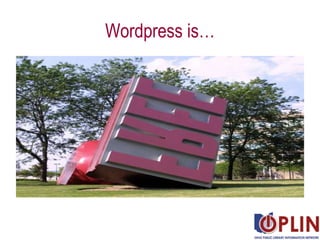
Wordpress is…
A little background The largest self-hosting blogging tool in the world Open source Can download and customize it
Different flavors of Wordpress Hosted Local Photo courtesty of iShot71 (Flickr)
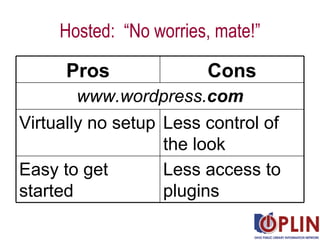
Hosted:  “No worries, mate!” www.wordpress. com Less access to plugins Easy to get started Less control of the look  Virtually no setup Cons Pros
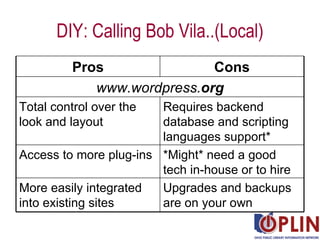
DIY: Calling Bob Vila..(Local) www.wordpress. org Cons Pros Upgrades and backups are on your own More easily integrated into existing sites *Might* need a good tech in-house or to hire Access to more plug-ins Requires backend database and scripting languages support* Total control over the look and layout
How does this compare to Blogger?
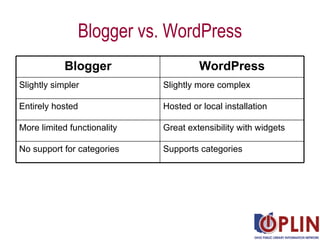
Blogger vs. WordPress Supports categories No support for categories Great extensibility with widgets More limited functionality Hosted or local installation Entirely hosted Slightly more complex Slightly simpler WordPress Blogger
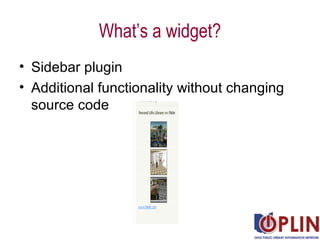
What’s a widget? Sidebar plugin Additional functionality without changing source code
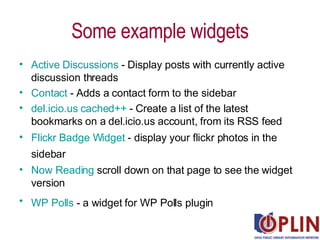
Some example widgets Active Discussions  - Display posts with currently active discussion threads  Contact  - Adds a contact form to the sidebar  del.icio.us  cached++  - Create a list of the latest bookmarks on a del.icio.us account, from its RSS feed  Flickr  Badge Widget  - display your flickr photos in the sidebar   Now Reading  scroll down on that page to see the widget version  WP Polls  - a widget for WP Polls plugin
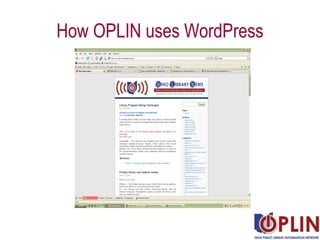
How OPLIN uses WordPress
Actually installing WordPress Ingredients: MySQL database (preferably with admin tool) Web server PHP Download of Wordpress Caffeine helps, I swear
Your new best friend! http:// www.apachefriends.org/en/xampp.html
Do this… Allow a really good chunk o’time
Surround yourself with happy thoughts
Be patient
Actual demo here
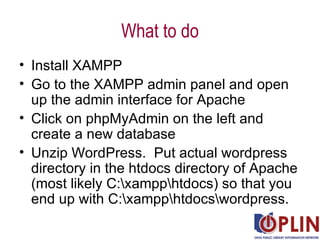
What to do Install XAMPP  Go to the XAMPP admin panel and open up the admin interface for Apache Click on phpMyAdmin on the left and create a new database Unzip WordPress.  Put actual wordpress directory in the htdocs directory of Apache (most likely C:\xampp\htdocs) so that you end up with C:\xampp\htdocs\wordpress.
Take a deep breath, the hard parts are over! You’re now ready to install WordPress! Go to  http://your_domain_and_path_here/wordpress Follow the wizard Remember, if you have (properly!!) locked down MySQL, the username and password are  not  “root/no password”
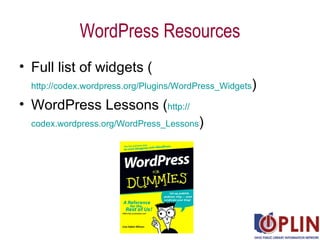
WordPress Resources Full list of widgets ( http://codex.wordpress.org/Plugins/WordPress_Widgets ) WordPress Lessons ( http:// codex.wordpress.org/WordPress_Lessons )
Video Tutorials WordPress.com - Step-by-Step Tutorial on How to Blog  ( http://youtube.com/watch?v=MWYi4_COZMU ) WordPress Tutorial - How to Edit a WordPress Page   ( http://youtube.com/watch?v=rnMnpt6u5uo ) Wordpress tutorial--installing on a local server ( http://youtube.com/watch?v=OD4nh5A5up4 ) Wordpress Tutorial  ( http:// youtube.com/watch?v =H1ImndT0fC8 )
Where is this presentation? http://www.slideshare.net/OPLIN Questions? [email_address]

Using Wordpress for Internet Publishing

  • 1.
    Using For InternetPublishing Laura Solomon Library Services Manager OPLIN [email_address] www.oplin.org
  • 2.
    The agenda today:What is WordPress & some stuff about it Comparison to Blogger Some examples of Wordpress installs How OPLIN uses WordPress Installing and working with WordPress
  • 3.
  • 4.
    What constitutes ablog? Ongoing chronicle of information Frequently updated Pieces/parts: Main content area with posts Archive of older posts A way for people to leave posts Links to other sites One or more RSS feeds
  • 5.
    Wordpress is not…Content Management System (CMS)
  • 6.
    What can WordPressdo? Act as a supplemental section or blog Provide additional functionality
  • 7.
    What CAN’T Wordpressdo (probably)? Replace your entire web site
  • 8.
  • 9.
    A little backgroundThe largest self-hosting blogging tool in the world Open source Can download and customize it
  • 10.
    Different flavors ofWordpress Hosted Local Photo courtesty of iShot71 (Flickr)
  • 11.
    Hosted: “Noworries, mate!” www.wordpress. com Less access to plugins Easy to get started Less control of the look Virtually no setup Cons Pros
  • 12.
    DIY: Calling BobVila..(Local) www.wordpress. org Cons Pros Upgrades and backups are on your own More easily integrated into existing sites *Might* need a good tech in-house or to hire Access to more plug-ins Requires backend database and scripting languages support* Total control over the look and layout
  • 13.
    How does thiscompare to Blogger?
  • 14.
    Blogger vs. WordPressSupports categories No support for categories Great extensibility with widgets More limited functionality Hosted or local installation Entirely hosted Slightly more complex Slightly simpler WordPress Blogger
  • 15.
    What’s a widget?Sidebar plugin Additional functionality without changing source code
  • 16.
    Some example widgetsActive Discussions - Display posts with currently active discussion threads Contact - Adds a contact form to the sidebar del.icio.us cached++ - Create a list of the latest bookmarks on a del.icio.us account, from its RSS feed Flickr Badge Widget - display your flickr photos in the sidebar Now Reading scroll down on that page to see the widget version WP Polls - a widget for WP Polls plugin
  • 17.
    How OPLIN usesWordPress
  • 18.
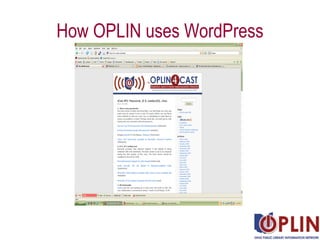
    How OPLIN usesWordPress
  • 19.
    Actually installing WordPressIngredients: MySQL database (preferably with admin tool) Web server PHP Download of Wordpress Caffeine helps, I swear
  • 20.
    Your new bestfriend! http:// www.apachefriends.org/en/xampp.html
  • 21.
    Do this… Allowa really good chunk o’time
  • 22.
    Surround yourself withhappy thoughts
  • 23.
  • 24.
  • 25.
    What to doInstall XAMPP Go to the XAMPP admin panel and open up the admin interface for Apache Click on phpMyAdmin on the left and create a new database Unzip WordPress. Put actual wordpress directory in the htdocs directory of Apache (most likely C:\xampp\htdocs) so that you end up with C:\xampp\htdocs\wordpress.
  • 26.
    Take a deepbreath, the hard parts are over! You’re now ready to install WordPress! Go to http://your_domain_and_path_here/wordpress Follow the wizard Remember, if you have (properly!!) locked down MySQL, the username and password are not “root/no password”
  • 27.
    WordPress Resources Fulllist of widgets ( http://codex.wordpress.org/Plugins/WordPress_Widgets ) WordPress Lessons ( http:// codex.wordpress.org/WordPress_Lessons )
  • 28.
    Video Tutorials WordPress.com- Step-by-Step Tutorial on How to Blog ( http://youtube.com/watch?v=MWYi4_COZMU ) WordPress Tutorial - How to Edit a WordPress Page ( http://youtube.com/watch?v=rnMnpt6u5uo ) Wordpress tutorial--installing on a local server ( http://youtube.com/watch?v=OD4nh5A5up4 ) Wordpress Tutorial ( http:// youtube.com/watch?v =H1ImndT0fC8 )
  • 29.
    Where is thispresentation? http://www.slideshare.net/OPLIN Questions? [email_address]