Using Open Media Resources in
Schools
Finding and using Open Media Content for Teaching, Learning, and
Developing Curriculum Resources
“Information technology can help to equalise the distribution of high quality
educational opportunities throughout the world. In particular, having
learning materials freely available for adaptation and re-purposing can
expand access to learning of better quality at lower cost.
Unesco 2012
Open Educational Resources
Image Credit: World Map D Rumsey Map Collection
What is Open Media & Content?
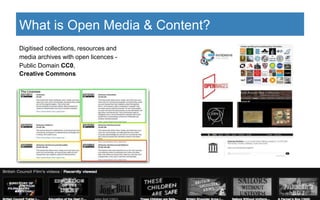
Digitised collections, resources and
media archives with open licences -
Public Domain CC0,
Creative Commons
● Cultural and heritage organisations,
● Individual Galleries, Libraries and Museums
● Open content repositories and archives
● Repositories & archives that include Open Content
● Curation platforms
● Public bodies and governmental organisations
● Scientific organisations with archives
● OER (Open Educational Resources) repositories
● Non profit and crowd-sourced projects
● Individual Curators and Collectors of Content
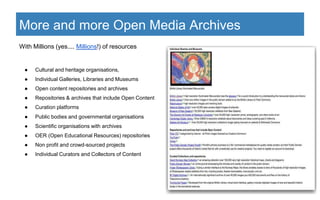
With Millions (yes.... Millions!) of resources
More and more Open Media Archives
1. Find images, video, audio that can be used freely, safely in all curriculum areas
2. Generate creative ideas for using digital content in all subjects
3. Improve research skills
4. Encourage critical thinking
5. Develop digital literacy
6. Introduce curation, metadata and tagging skills
7. Enable the world today to be viewed through a historical and cultural lens
8. Facilitate computational thinking
9. Give a context for applying ICT, computational thinking, coding and web skills
10. Enable remixing, repurposing and sharing
11. Help teachers and learners gain a practical, usable understanding of Copyright and IP
Benefits of using Open Content and Media in
school
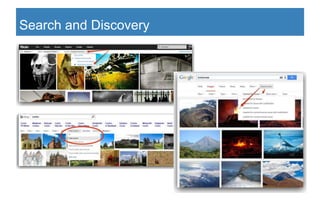
Search and Discovery
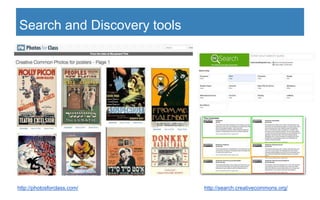
Search and Discovery tools
http://photosforclass.com/ http://search.creativecommons.org/
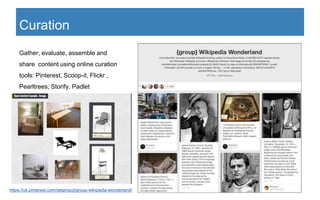
Curation
Gather, evaluate, assemble and
share content using online curation
tools: Pinterest, Scoop-it, Flickr ,
Pearltrees, Storify, Padlet
https://uk.pinterest.com/stepinput/group-wikipedia-wonderland/
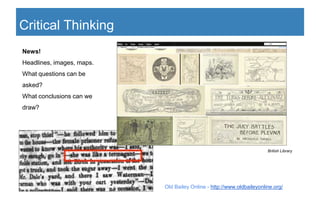
News!
Headlines, images, maps.
What questions can be
asked?
What conclusions can we
draw?
British Library
Critical Thinking
Old Bailey Online - http://www.oldbaileyonline.org/
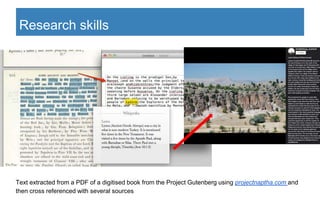
Research skills
Text extracted from a PDF of a digitised book from the Project Gutenberg using projectnaptha.com and
then cross referenced with several sources
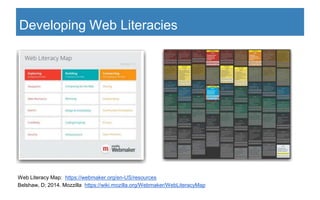
Web Literacy Map: https://webmaker.org/en-US/resources
Belshaw, D; 2014. Mozzilla https://wiki.mozilla.org/Webmaker/WebLiteracyMap
Developing Web Literacies
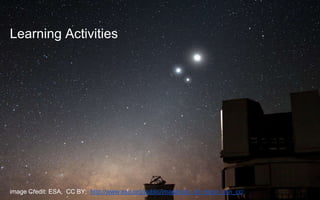
Learning Activities
image Credit: ESA, CC BY; http://www.eso.org/public/images/yb_vlt_moon_cnn_cc/
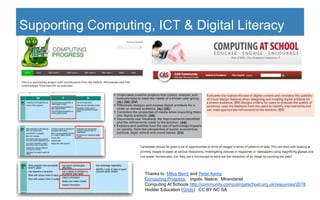
Supporting Computing, ICT & Digital Literacy
Thanks to Miles Berry and Peter Kemp
Computing Progress, Ingots, Naace, Mirandanet
Computing At Schools http://community.computingatschool.org.uk/resources/2078
Hodder Education (Grids) CC BY NC SA
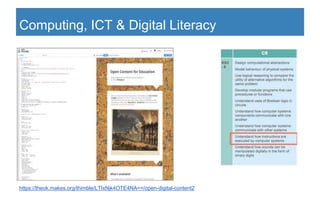
Computing, ICT & Digital Literacy
https://theok.makes.org/thimble/LTIxNjk4OTE4NA==/open-digital-content2
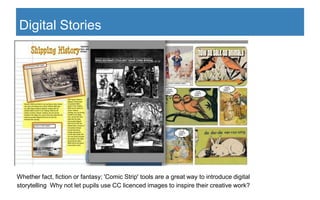
Digital Stories
Whether fact, fiction or fantasy; 'Comic Strip' tools are a great way to introduce digital
storytelling Why not let pupils use CC licenced images to inspire their creative work?
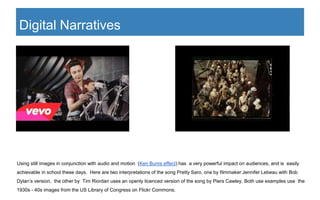
Using still images in conjunction with audio and motion (Ken Burns effect) has a very powerful impact on audiences, and is easily
achievable in school these days. Here are two interpretations of the song Pretty Saro, one by filmmaker Jennifer Lebeau with Bob
Dylan’s version, the other by Tim Riordan uses an openly licenced version of the song by Piers Cawley. Both use examples use the
1930s - 40s images from the US Library of Congress on Flickr Commons.
Digital Narratives
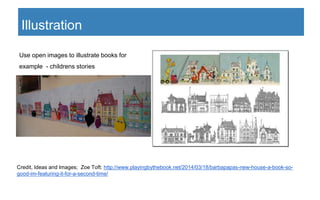
Use open images to illustrate books for
example - childrens stories
Illustration
Credit, Ideas and Images; Zoe Toft: http://www.playingbythebook.net/2014/03/18/barbapapas-new-house-a-book-so-
good-im-featuring-it-for-a-second-time/
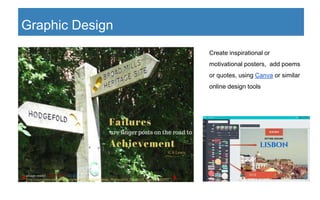
Create inspirational or
motivational posters, add poems
or quotes, using Canva or similar
online design tools
Graphic Design
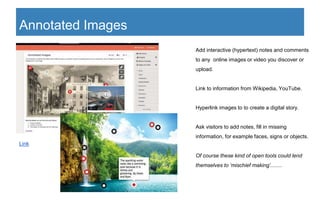
Add interactive (hypertext) notes and comments
to any online images or video you discover or
upload.
Link to information from Wikipedia, YouTube.
Hyperlink images to to create a digital story.
Ask visitors to add notes, fill in missing
information, for example faces, signs or objects.
Of course these kind of open tools could lend
themselves to ‘mischief making’........
Annotated Images
Link
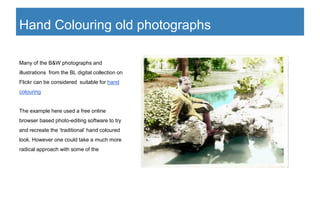
Many of the B&W photographs and
illustrations from the BL digital collection on
Flickr can be considered suitable for hand
colouring
The example here used a free online
browser based photo-editing software to try
and recreate the ‘traditional’ hand coloured
look. However one could take a much more
radical approach with some of the
Hand Colouring old photographs
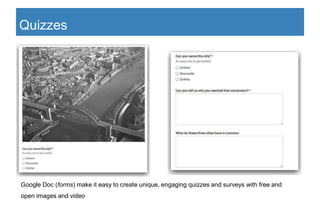
Quizzes
Google Doc (forms) make it easy to create unique, engaging quizzes and surveys with free and
open images and video
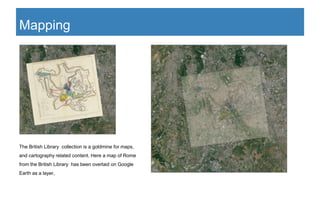
Mapping
The British Library collection is a goldmine for maps,
and cartography related content. Here a map of Rome
from the British Library has been overlaid on Google
Earth as a layer,
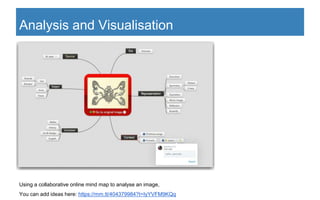
Using a collaborative online mind map to analyse an image,
You can add ideas here: https://mm.tt/404379984?t=IyYVFM9KQq
Analysis and Visualisation
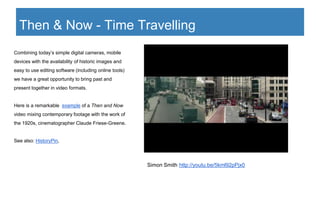
Combining today’s simple digital cameras, mobile
devices with the availability of historic images and
easy to use editing software (including online tools)
we have a great opportunity to bring past and
present together in video formats.
Here is a remarkable example of a Then and Now
video mixing contemporary footage with the work of
the 1920s, cinematographer Claude Friese-Greene.
See also: HistoryPin,
Simon Smith http://youtu.be/5kml92pPjx0
Then & Now - Time Travelling
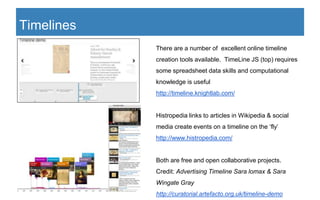
There are a number of excellent online timeline
creation tools available. TimeLine JS (top) requires
some spreadsheet data skills and computational
knowledge is useful
http://timeline.knightlab.com/
Histropedia links to articles in Wikipedia & social
media create events on a timeline on the ‘fly’
http://www.histropedia.com/
Both are free and open collaborative projects.
Credit: Advertising Timeline Sara lomax & Sara
Wingate Gray
http://curatorial.artefacto.org.uk/timeline-demo
Timelines
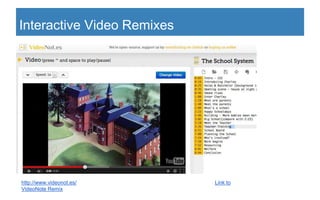
Interactive Video Remixes
http://www.videonot.es/ Link to
VideoNote Remix
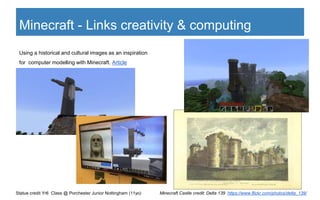
Minecraft - Links creativity & computing
Statue credit Yr6 Class @ Porchester Junior Nottingham (11yo)
Using a historical and cultural images as an inspiration
for computer modelling with Minecraft. Article
Minecraft Castle credit: Delta 139 https://www.flickr.com/photos/delta_139/
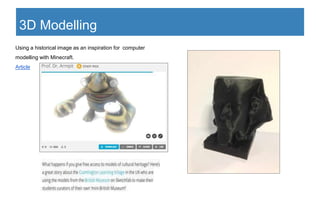
3D Modelling
Using a historical image as an inspiration for computer
modelling with Minecraft.
Article
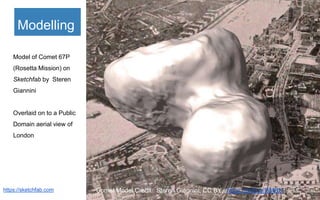
Modelling
https://sketchfab.com
Model of Comet 67P
(Rosetta Mission) on
Sketchfab by Steren
Giannini
Overlaid on to a Public
Domain aerial view of
London
Comet Model Credit:: Steren Giannini, CC BY, https://skfb.ly/BMRK
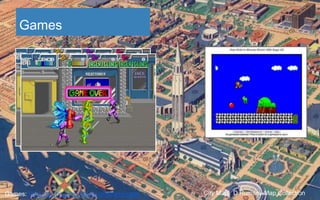
Games
City Map: D Rumsey Map CollectionGames: https://archive.org/details/internetarcade
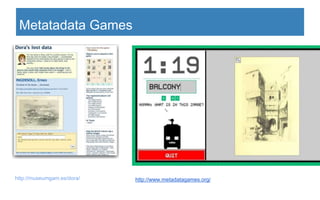
Metatadata Games
http://museumgam.es/dora/ http://www.metadatagames.org/
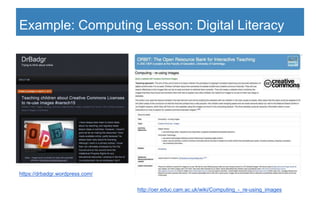
Example: Computing Lesson: Digital Literacy
http://oer.educ.cam.ac.uk/wiki/Computing_-_re-using_images
https://drbadgr.wordpress.com/
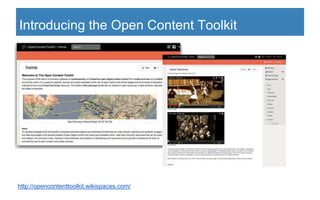
http://opencontenttoolkit.wikispaces.com/
Introducing the Open Content Toolkit
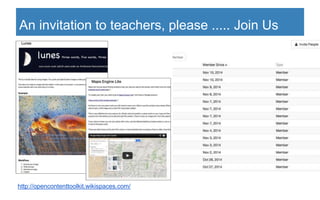
An invitation to teachers, please ..... Join Us
http://opencontenttoolkit.wikispaces.com/
Other Initiatives - Leicester LEA
Leicester LEA has:
1. Allowed all its 84 schools to
create and share Open
Educational Resources (OER)
2. Published guidance & legal
frameworks for schools
3. Provided excellent
downloadable resources to help
schools get started with this
initiative
Credit: Josie Fraser @josiefraser
http://schools.leicester.gov.uk/ls/open-education/
http://oerresearchhub.org/2014/11/10/making-oer-mainstream-in-schools/
Thank You
Twitter: @Theokl, Contact info: http://about.me/theo.kuechel
Finding and using Open Media Content for Teaching, Learning, and
Developing Curriculum Resources
Open Content Toolkit : http://opencontenttoolkit.wikispaces.com/

Using open resources in school

  • 1.
    Using Open MediaResources in Schools Finding and using Open Media Content for Teaching, Learning, and Developing Curriculum Resources
  • 2.
    “Information technology canhelp to equalise the distribution of high quality educational opportunities throughout the world. In particular, having learning materials freely available for adaptation and re-purposing can expand access to learning of better quality at lower cost. Unesco 2012 Open Educational Resources Image Credit: World Map D Rumsey Map Collection
  • 3.
    What is OpenMedia & Content? Digitised collections, resources and media archives with open licences - Public Domain CC0, Creative Commons
  • 4.
    ● Cultural andheritage organisations, ● Individual Galleries, Libraries and Museums ● Open content repositories and archives ● Repositories & archives that include Open Content ● Curation platforms ● Public bodies and governmental organisations ● Scientific organisations with archives ● OER (Open Educational Resources) repositories ● Non profit and crowd-sourced projects ● Individual Curators and Collectors of Content With Millions (yes.... Millions!) of resources More and more Open Media Archives
  • 5.
    1. Find images,video, audio that can be used freely, safely in all curriculum areas 2. Generate creative ideas for using digital content in all subjects 3. Improve research skills 4. Encourage critical thinking 5. Develop digital literacy 6. Introduce curation, metadata and tagging skills 7. Enable the world today to be viewed through a historical and cultural lens 8. Facilitate computational thinking 9. Give a context for applying ICT, computational thinking, coding and web skills 10. Enable remixing, repurposing and sharing 11. Help teachers and learners gain a practical, usable understanding of Copyright and IP Benefits of using Open Content and Media in school
  • 6.
  • 7.
    Search and Discoverytools http://photosforclass.com/ http://search.creativecommons.org/
  • 8.
    Curation Gather, evaluate, assembleand share content using online curation tools: Pinterest, Scoop-it, Flickr , Pearltrees, Storify, Padlet https://uk.pinterest.com/stepinput/group-wikipedia-wonderland/
  • 9.
    News! Headlines, images, maps. Whatquestions can be asked? What conclusions can we draw? British Library Critical Thinking Old Bailey Online - http://www.oldbaileyonline.org/
  • 10.
    Research skills Text extractedfrom a PDF of a digitised book from the Project Gutenberg using projectnaptha.com and then cross referenced with several sources
  • 11.
    Web Literacy Map:https://webmaker.org/en-US/resources Belshaw, D; 2014. Mozzilla https://wiki.mozilla.org/Webmaker/WebLiteracyMap Developing Web Literacies
  • 12.
    Learning Activities image Credit:ESA, CC BY; http://www.eso.org/public/images/yb_vlt_moon_cnn_cc/
  • 13.
    Supporting Computing, ICT& Digital Literacy Thanks to Miles Berry and Peter Kemp Computing Progress, Ingots, Naace, Mirandanet Computing At Schools http://community.computingatschool.org.uk/resources/2078 Hodder Education (Grids) CC BY NC SA
  • 14.
    Computing, ICT &Digital Literacy https://theok.makes.org/thimble/LTIxNjk4OTE4NA==/open-digital-content2
  • 15.
    Digital Stories Whether fact,fiction or fantasy; 'Comic Strip' tools are a great way to introduce digital storytelling Why not let pupils use CC licenced images to inspire their creative work?
  • 16.
    Using still imagesin conjunction with audio and motion (Ken Burns effect) has a very powerful impact on audiences, and is easily achievable in school these days. Here are two interpretations of the song Pretty Saro, one by filmmaker Jennifer Lebeau with Bob Dylan’s version, the other by Tim Riordan uses an openly licenced version of the song by Piers Cawley. Both use examples use the 1930s - 40s images from the US Library of Congress on Flickr Commons. Digital Narratives
  • 17.
    Use open imagesto illustrate books for example - childrens stories Illustration Credit, Ideas and Images; Zoe Toft: http://www.playingbythebook.net/2014/03/18/barbapapas-new-house-a-book-so- good-im-featuring-it-for-a-second-time/
  • 18.
    Create inspirational or motivationalposters, add poems or quotes, using Canva or similar online design tools Graphic Design
  • 19.
    Add interactive (hypertext)notes and comments to any online images or video you discover or upload. Link to information from Wikipedia, YouTube. Hyperlink images to to create a digital story. Ask visitors to add notes, fill in missing information, for example faces, signs or objects. Of course these kind of open tools could lend themselves to ‘mischief making’........ Annotated Images Link
  • 20.
    Many of theB&W photographs and illustrations from the BL digital collection on Flickr can be considered suitable for hand colouring The example here used a free online browser based photo-editing software to try and recreate the ‘traditional’ hand coloured look. However one could take a much more radical approach with some of the Hand Colouring old photographs
  • 21.
    Quizzes Google Doc (forms)make it easy to create unique, engaging quizzes and surveys with free and open images and video
  • 22.
    Mapping The British Librarycollection is a goldmine for maps, and cartography related content. Here a map of Rome from the British Library has been overlaid on Google Earth as a layer,
  • 23.
    Using a collaborativeonline mind map to analyse an image, You can add ideas here: https://mm.tt/404379984?t=IyYVFM9KQq Analysis and Visualisation
  • 24.
    Combining today’s simpledigital cameras, mobile devices with the availability of historic images and easy to use editing software (including online tools) we have a great opportunity to bring past and present together in video formats. Here is a remarkable example of a Then and Now video mixing contemporary footage with the work of the 1920s, cinematographer Claude Friese-Greene. See also: HistoryPin, Simon Smith http://youtu.be/5kml92pPjx0 Then & Now - Time Travelling
  • 25.
    There are anumber of excellent online timeline creation tools available. TimeLine JS (top) requires some spreadsheet data skills and computational knowledge is useful http://timeline.knightlab.com/ Histropedia links to articles in Wikipedia & social media create events on a timeline on the ‘fly’ http://www.histropedia.com/ Both are free and open collaborative projects. Credit: Advertising Timeline Sara lomax & Sara Wingate Gray http://curatorial.artefacto.org.uk/timeline-demo Timelines
  • 26.
  • 27.
    Minecraft - Linkscreativity & computing Statue credit Yr6 Class @ Porchester Junior Nottingham (11yo) Using a historical and cultural images as an inspiration for computer modelling with Minecraft. Article Minecraft Castle credit: Delta 139 https://www.flickr.com/photos/delta_139/
  • 28.
    3D Modelling Using ahistorical image as an inspiration for computer modelling with Minecraft. Article
  • 29.
    Modelling https://sketchfab.com Model of Comet67P (Rosetta Mission) on Sketchfab by Steren Giannini Overlaid on to a Public Domain aerial view of London Comet Model Credit:: Steren Giannini, CC BY, https://skfb.ly/BMRK
  • 30.
    Games City Map: DRumsey Map CollectionGames: https://archive.org/details/internetarcade
  • 31.
  • 32.
    Example: Computing Lesson:Digital Literacy http://oer.educ.cam.ac.uk/wiki/Computing_-_re-using_images https://drbadgr.wordpress.com/
  • 33.
  • 34.
    An invitation toteachers, please ..... Join Us http://opencontenttoolkit.wikispaces.com/
  • 35.
    Other Initiatives -Leicester LEA Leicester LEA has: 1. Allowed all its 84 schools to create and share Open Educational Resources (OER) 2. Published guidance & legal frameworks for schools 3. Provided excellent downloadable resources to help schools get started with this initiative Credit: Josie Fraser @josiefraser http://schools.leicester.gov.uk/ls/open-education/ http://oerresearchhub.org/2014/11/10/making-oer-mainstream-in-schools/
  • 36.
    Thank You Twitter: @Theokl,Contact info: http://about.me/theo.kuechel Finding and using Open Media Content for Teaching, Learning, and Developing Curriculum Resources Open Content Toolkit : http://opencontenttoolkit.wikispaces.com/

Editor's Notes

  • #2 Naace Strategic Conference, East Midlands Conference Centre; 25th - 26th March, 2015.
  • #3 The Open Education Resources statement in Paris 2012 gave the ‘Green Light’ for educational institutions, and schools to consider developing and using OERs (Open Educational Resources). See also Leicester LA OER Strategy (slide 35)
  • #4 Content and Resources that can be accessed and shared, because it is in the public domain or Licenced under Creative Commons The minimum requirement for inclusion is that they can be freely shared online, but wherever possibe we should all be pushing for/using the more Open Licences (marked in green on the table).
  • #5 The Open Content Toolkit shares categorised links to millions of open content resources from collections and archives and online repositories. http://opencontenttoolkit.wikispaces.com/Links+to+Open+Content (see also slide 33)
  • #6 It is important to recognise that not all these things will happen overnight. It is a very gradual processes. Whilst the (1) is common to all it may be best to try and focus learning activities to work relating to just a few of these benefits.
  • #7 Most image search tool have adopted a search ‘by use’ filter in their toolsets recently. This should mean means there is no excuse now for misusing copyrighted images. It is important to check every image used or shared online by a school. At the time of writing I personally know of two schools that are currently being asked for substantial payments by Getty Images. Note Getty images http://www.gettyimages.co.uk/ and The Getty which shares open content are completely different organisations https://www.getty.edu/about/opencontent.html
  • #8 Two more use search tools for finding Creative Commons licenced content, The CC Search, (due to be upgraded) can search across media formats. Try the Open Clip Art Library for (Vector Image) files you edit using SVG Edit http://svg-edit.googlecode.com/ Photos for Class is a filtered search which draws on Flickr metadata and returns properly attributed images. User can report images if they think are unsuitable for class use. Use the direct to Flickr link for larger images.
  • #9 Couple of examples of use of online curation tools Padlet https://padlet.com and Pinterest https://uk.pinterest.com/ being used to curate some CC and open images. The Wikipedia Wonderland is constantly being updated with content from Wikimedia.
  • #10 Historic images, texts - all provide hidden clues that can ignite to some interesting research activities.
  • #11 Project Gutenberg https://www.gutenberg.org/
  • #12 Mozilla defines web literacy as the skills and competencies needed for reading, writing and participating on the web. To chart these skills and competencies, Mozilla worked alongside a community of stakeholders to create the Web Literacy Map. This interactive tool should prove very useful for combining computing, open content and the curriculum.
  • #13 The following slides - illustrate some learning activities possible using open content and media
  • #14  There are plenty of resources available from organisations such as Computing At School to support mapping curriculum activities to computing. Many of these can be easily integrated with Open Content. Just some quick snippets on the slides as examples.
  • #15 Mozzilla Thimble https://thimble.webmaker.org/ used to adapt a template in order to showcase the British Library One Million Images on Flickr https://www.flickr.com/photos/britishlibrary/
  • #19 Use ‘free’ online design tools to design and create motivational posters, illustrate, quotes, proverbs and poems or indeed to create a metaphor for the theme of this years Naace conference.
  • #20 Annotating images is a useful way of adding meaning. Of course it can be used by teachers to create resources, is even better for collaborative and class work. These examples use Thinglink https://www.thinglink.com but there are many more tools. The Waterfall example is from some work done at Hopwood CP school school using blogs with David Mitchell @deputymitchell
  • #22 Why not add some contextual; questions to a MC Quiz to extend the learning beyond ‘just knowing the answer’
  • #24 Online MindMaps are great for collaborative learning - this example use MindMeister https://www.mindmeister.com There are other ‘free’ alternatives includingMind42 https://mind42.com - more listed here http://www.freetech4teachers.com/2010/03/nine-tools-for-collaboratively-creating.html#.VRaMSJOsUxI
  • #25 Although the original video is a BFI copy of the work of the 1920s, cinematographer Claude Friese-Greene - there are plenty of historic open videos that could be used. - Pond5 http://www.pond5.com/stock-video-footage/1/*.html or the Internet Archive Moving Image portal https://archive.org/details/movies are great sources.
  • #26 Timelines are a great way to study historical and time related information. Open media archives and collections offer many unique primary sources that you can use to to create interactive online timelines and bring them to life.
  • #27 VIdeonot.es is an open source app that allow you to create notes as you watch an online video, the notes sync to timeline/timecodes which you can use to jump between sections of the video. Works with most online video services including YouTube, Vimeo. Accessed through Google Drive, and exports to Evernote.
  • #28 Thanks to Simon Widdowson @xannov at Porchester Junior School for sharing his class’s amazing work.
  • #29 Many Sketchfab users make their 3D models under an open Creative Commons licence. They can be be downloaded under a Creative Commons Licence. The British Museum, HTC and Microsoft have all contributed resources. Interactive models such as the example above from British Museum could be used to help understand form, provide different viewpoints for drawing, or develop animations and games. create of its artefacts 3D copies using a 3D printer. Indeed a new way to engage with museums and collections.
  • #31 Open Content can be a great resource and inspiration if you want to make/play games. The background to this slide is from the open Rumsey Map Collection http://www.davidrumsey.com/view/view The internet Archive has a large collection of over 7000 classic games from the 1980s onwards that can be paleyed using emulation https://archive.org/details/classicpcgames
  • #32 Metatdata games gamify adding tags to online resources. “When you play and submit tags, you are helping libraries, museums, and universities across the country. Without your help some of these images, videos, and audio clips could be lost forever in the jumbles of the internet”
  • #33 A lesson on Image Licensing (Digital Literacy) shared in a blog by Dr. Jo Badge @jobadge and adapted by the Education Faculty at the University of Cambridge
  • #34 Has been created to offer schools a unique opportunity to recognise the breadth, variety and scope of digital archives and media collections. Please consider joining the community, the more users and contributors there are the better. Share your ideas and any work, no matter how even it it is just a little, or you have been using open content for just a short time Critical and constructive feedback is very welcome, and essential to improving the toolkit for all. Please consider adding your feedback to the discussions at the foot of each page. Please share widely - thanks.
  • #36 “Leicester City Council has given permission to the 84 community and voluntary controlled schools across the city to create and share Open Educational Resources (OER), by releasing the learning materials they create under an open licence. By default, the rights of work created in the line of employment are assigned to the employer, unless a specific agreement has been made. This permission makes sharing resources simpler for everyone at these schools”