
Using Dashboards to Transform
Application Data Visualization
Kathy Brown, PSC Group
Shean McManus, PSC Group
•Kathy Brown
•Senior Consultant, PSC Group
•IBM Champion
•Nerd Girl
•@IamKathyBrown
•www.runningnotes.net
•Shean McManus
•Senior Consultant, PSC Group
•IBM Champion
•@sheanpmcmanus
•www.spmcmanus.net
Who Are We?
•Edward Tufte example
•Tips
•A picture is worth a thousand words
•Charts can be useful or useless
•Work with the business process and stakeholders
•Statistics can be bent to our own purpose
•Know your audience
Data Visualization
Workflow Dashboards
• Traditional Methods of Accessing Data
– Scrolling through views or grids (Notes or otherwise)
– Categorized views
– Full-text Search / Find
– Custom views
– Email Links
Workflow Dashboard
• How to Make an Effective Dashboard
– Avoid Clutter
– Reduce clicks
– Implement customization
– Know what your users want need to see
Effective dashboards can transform a business process
Workflow Dashboard
• Designed for efficiency
– Access to actionable items at a glance
– Can pull from multiple sources
– Can reduce reliance on email as action triggers
– Can enhance with metrics, statistics and other information
Workflow Dashboard
• Features of My Demo
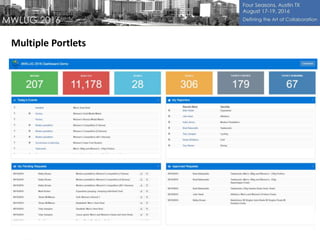
– Multiple mini-views (portlets) on one screen
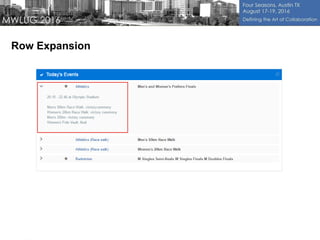
– Row expansion
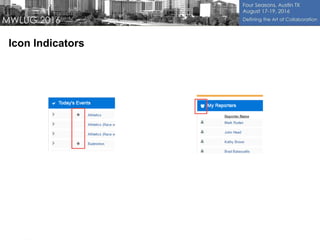
– Icon indicators
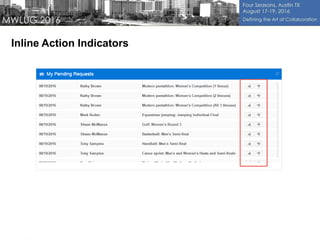
– Inline action buttons
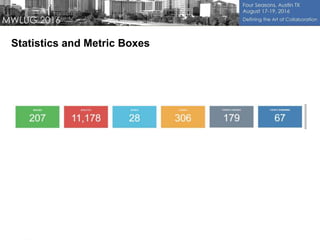
– Metrics / Statistic boxes
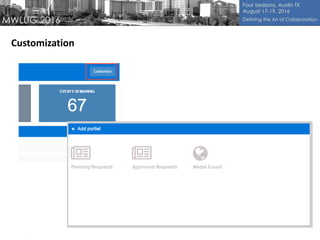
– Customization (by role or user)
Workflow Dashboard
Demo
Multiple Portlets
Row Expansion
Icon Indicators
Inline Action Indicators
Statistics and Metric Boxes
Customization
•Tools Used
– Twitter Bootstrap
– Bootstrap compatible Theme
– jQuery
– Domino Server (DDS or REST)
– CSS
– SSJS
– Xpages Extension Library (for RPC calls)
Workflow Dashboard
•Possibilities
– Non-Domino data using REST
– Non-Domino front end using same design techniques
– Extend with features
•Drag and drop
•Tabbed Views
•Wire portlets together
•Limited only by imagination (design best practices still apply)
Workflow Dashboard
Manager Dashboards
• Traditional Methods of Accessing Data
– Scrolling through Notes views
– Categorized views
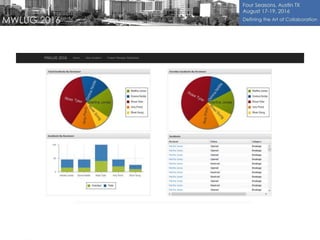
• In this demo, at least six different views
– Custom views
– Export to Excel or other tool for analysis
Manager Dashboard
• How to Make an Effective Dashboard
– Avoid Clutter
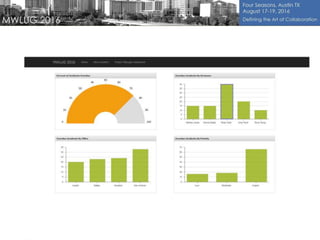
– Provide charts and graphs to quickly pinpoint problem areas
– Highlight overdue items and overloaded resources
– Charts and graphs from REST service and single underlying view
Manager Dashboard
• Manager Dashboards designed for efficiency
– Can pull from multiple sources
– Can display multiple perspectives on a single page
Manager Dashboard
Demo
•Tools Used
– Twitter Bootstrap
– Bootstrap compatible Theme
– jQuery
–Sencha Grids and Charts
– Domino Server (DDS or REST)
– CSS
– SSJS
Manager Dashboard
•Possibilities
– Non-Domino data using REST
– Non-Domino front end using same design techniques
– Extend with features
•Drill down or filter within charts
•Export charts
Manager Dashboard
•Dashboard Best Practices
Designing and Building Great Dashboards - 6 Golden Rules to
Successful Dashboard Design
https://www.geckoboard.com/blog/building-great-dashboards-6-golden-rules-to-successful-dashboard-
design/#.V6ZDAVUrJD8
Building Data Dashboards – Best Practices
https://www.geckoboard.com/learn/guides/data-dashboards-best-practices/#.V7R5Y9UrJD8
Edward Tufte
https://www.edwardtufte.com/tufte/
•Themes
Keene Themes: http://keenthemes.com/
Wrap Bootstrap: https://wrapbootstrap.com/tag/dashboard
Start Bootstrap: https://startbootstrap.com/template-categories/admin-dashboard/
Bootstrap: http://themes.getbootstrap.com/products/dashboard
Links and Resources
29

Using Dashboards to Transform Application Data Visualization

  • 1.
    Using Dashboards toTransform Application Data Visualization Kathy Brown, PSC Group Shean McManus, PSC Group
  • 2.
    •Kathy Brown •Senior Consultant,PSC Group •IBM Champion •Nerd Girl •@IamKathyBrown •www.runningnotes.net •Shean McManus •Senior Consultant, PSC Group •IBM Champion •@sheanpmcmanus •www.spmcmanus.net Who Are We?
  • 3.
    •Edward Tufte example •Tips •Apicture is worth a thousand words •Charts can be useful or useless •Work with the business process and stakeholders •Statistics can be bent to our own purpose •Know your audience Data Visualization
  • 4.
  • 5.
    • Traditional Methodsof Accessing Data – Scrolling through views or grids (Notes or otherwise) – Categorized views – Full-text Search / Find – Custom views – Email Links Workflow Dashboard
  • 6.
    • How toMake an Effective Dashboard – Avoid Clutter – Reduce clicks – Implement customization – Know what your users want need to see Effective dashboards can transform a business process Workflow Dashboard
  • 7.
    • Designed forefficiency – Access to actionable items at a glance – Can pull from multiple sources – Can reduce reliance on email as action triggers – Can enhance with metrics, statistics and other information Workflow Dashboard
  • 8.
    • Features ofMy Demo – Multiple mini-views (portlets) on one screen – Row expansion – Icon indicators – Inline action buttons – Metrics / Statistic boxes – Customization (by role or user) Workflow Dashboard
  • 9.
  • 10.
  • 11.
  • 12.
  • 13.
  • 14.
  • 15.
  • 16.
    •Tools Used – TwitterBootstrap – Bootstrap compatible Theme – jQuery – Domino Server (DDS or REST) – CSS – SSJS – Xpages Extension Library (for RPC calls) Workflow Dashboard
  • 17.
    •Possibilities – Non-Domino datausing REST – Non-Domino front end using same design techniques – Extend with features •Drag and drop •Tabbed Views •Wire portlets together •Limited only by imagination (design best practices still apply) Workflow Dashboard
  • 18.
  • 19.
    • Traditional Methodsof Accessing Data – Scrolling through Notes views – Categorized views • In this demo, at least six different views – Custom views – Export to Excel or other tool for analysis Manager Dashboard
  • 20.
    • How toMake an Effective Dashboard – Avoid Clutter – Provide charts and graphs to quickly pinpoint problem areas – Highlight overdue items and overloaded resources – Charts and graphs from REST service and single underlying view Manager Dashboard
  • 21.
    • Manager Dashboardsdesigned for efficiency – Can pull from multiple sources – Can display multiple perspectives on a single page Manager Dashboard
  • 22.
  • 25.
    •Tools Used – TwitterBootstrap – Bootstrap compatible Theme – jQuery –Sencha Grids and Charts – Domino Server (DDS or REST) – CSS – SSJS Manager Dashboard
  • 26.
    •Possibilities – Non-Domino datausing REST – Non-Domino front end using same design techniques – Extend with features •Drill down or filter within charts •Export charts Manager Dashboard
  • 27.
    •Dashboard Best Practices Designingand Building Great Dashboards - 6 Golden Rules to Successful Dashboard Design https://www.geckoboard.com/blog/building-great-dashboards-6-golden-rules-to-successful-dashboard- design/#.V6ZDAVUrJD8 Building Data Dashboards – Best Practices https://www.geckoboard.com/learn/guides/data-dashboards-best-practices/#.V7R5Y9UrJD8 Edward Tufte https://www.edwardtufte.com/tufte/ •Themes Keene Themes: http://keenthemes.com/ Wrap Bootstrap: https://wrapbootstrap.com/tag/dashboard Start Bootstrap: https://startbootstrap.com/template-categories/admin-dashboard/ Bootstrap: http://themes.getbootstrap.com/products/dashboard Links and Resources
  • 29.

Editor's Notes

  • #6 Discuss traditional ways of accomplishing tasks in workflow applications: Navigating views, searching, email links, categorized views, custom viewws
  • #7 Discuss traditional ways of accomplishing tasks in workflow applications: Navigating views, searching, email links, categorized views, custom viewws
  • #8 Discuss traditional ways of accomplishing tasks in workflow applications: Navigating views, searching, email links, categorized views, custom viewws
  • #9 Discuss traditional ways of accomplishing tasks in workflow applications: Navigating views, searching, email links, categorized views, custom viewws
  • #20 Discuss traditional ways of accomplishing tasks in workflow applications: Navigating views, searching, email links, categorized views, custom viewws
  • #21 Discuss traditional ways of accomplishing tasks in workflow applications: Navigating views, searching, email links, categorized views, custom viewws
  • #22 Discuss traditional ways of accomplishing tasks in workflow applications: Navigating views, searching, email links, categorized views, custom viewws