User Experience What I’ve learned over the past couple of years.
What Have I Done? Views Panels Nodequeue Advanced Help User Titles Delicious Node access Arbitrator Paging DHTML Menu Taxonomy Redirect Taxonomy Lineage Forum Access ACL LiveJournal Crossposter Dashboard Masquerade Update Status D6 Theme System
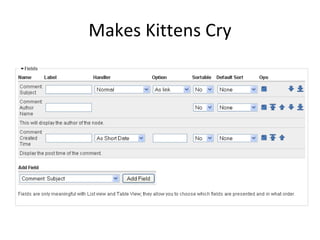
Makes Kittens Cry
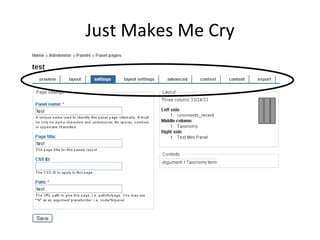
Just Makes Me Cry
Developers bad at UI? Sorry, I don’t buy it. Modular systems have trouble with Big Picture. Lack of time. Good UI is a lot of work. Tools not there / available. Browsers have limited, rigid capabilities. Sometimes UI just isn’t the priority. Developers tend to be focused on functionality. Developers often only focus on a single user target.
Who is the actor? Site Builder First time site builder Experienced site builder Site Administrator Site User
Site Builder CCK, Views, Panels, Block, Menu, Theming First experience with Drupal Less important once a site is up and running Knowledge level varied The more accessible Drupal gets, the less knowledge the average site builder has.
Site Administrator Content organization, User Management, Complex content creation Very important for long term sites! Administrators are much less knowledgable than Builders Very important to  find  content Very important to  summarize  activity
Site User Content consumption, simple content creation, such as forums, blog posts, etc. Generally more focused on  consuming  information than  creating  it. This is more the focus of the overall site design, layout and navigation tree.
Focus Currently, we focus on the  site builder , and let the builder focus on the  site user. Does the  site administrator  get shafted here? Focus on the  new site builder  can steal functionality from the  experienced site builder. Conversely, focus on the  experienced site builder  can confuse the  new site builder.
Process of Using a UI See it Experiment with it Do something with it
Seeing is Understanding Organization Matters!!! The most important pieces of the UI should draw the eye Logical progression to next most important piece Grouping similar or related items helps build a memory map Build on associations
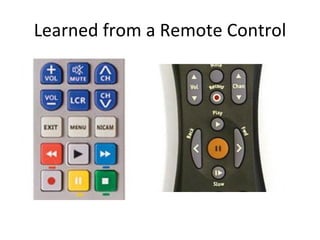
Learned from a Remote Control
Information Accessibility Windows method Hide everything Unix method Optimize for speed Difficult to learn Expert mode This is a sign of failure, up front Not too much Not too little Easily find more – Don’t hide, prioritize Provide feedback after operations
Use Existing Assumptions Links to Administer a Thing near a Thing Train the user. Let the user know this. Use digestible bites – control the stream of information. Show the important stuff up front. Create paths to related information.  There does not have to be just one way to get somewhere! If you re-use a pattern, users will learn this and your life becomes easier.
Pitfalls to Avoid Put everything on just one form. Yes this is hard to avoid. Forms that don’t show their results. Preview!!! Browsers are weak with unsaved form data; don’t make the user leave the page unless you’re prepared.
Conclusion Know who the actors are and cater to them. Understand how people see an interface and design visually. Strive to keep the information accessible. Take advantage of existing assumptions.

User Experience

  • 1.
    User Experience WhatI’ve learned over the past couple of years.
  • 2.
    What Have IDone? Views Panels Nodequeue Advanced Help User Titles Delicious Node access Arbitrator Paging DHTML Menu Taxonomy Redirect Taxonomy Lineage Forum Access ACL LiveJournal Crossposter Dashboard Masquerade Update Status D6 Theme System
  • 3.
  • 4.
  • 5.
    Developers bad atUI? Sorry, I don’t buy it. Modular systems have trouble with Big Picture. Lack of time. Good UI is a lot of work. Tools not there / available. Browsers have limited, rigid capabilities. Sometimes UI just isn’t the priority. Developers tend to be focused on functionality. Developers often only focus on a single user target.
  • 6.
    Who is theactor? Site Builder First time site builder Experienced site builder Site Administrator Site User
  • 7.
    Site Builder CCK,Views, Panels, Block, Menu, Theming First experience with Drupal Less important once a site is up and running Knowledge level varied The more accessible Drupal gets, the less knowledge the average site builder has.
  • 8.
    Site Administrator Contentorganization, User Management, Complex content creation Very important for long term sites! Administrators are much less knowledgable than Builders Very important to find content Very important to summarize activity
  • 9.
    Site User Contentconsumption, simple content creation, such as forums, blog posts, etc. Generally more focused on consuming information than creating it. This is more the focus of the overall site design, layout and navigation tree.
  • 10.
    Focus Currently, wefocus on the site builder , and let the builder focus on the site user. Does the site administrator get shafted here? Focus on the new site builder can steal functionality from the experienced site builder. Conversely, focus on the experienced site builder can confuse the new site builder.
  • 11.
    Process of Usinga UI See it Experiment with it Do something with it
  • 12.
    Seeing is UnderstandingOrganization Matters!!! The most important pieces of the UI should draw the eye Logical progression to next most important piece Grouping similar or related items helps build a memory map Build on associations
  • 13.
    Learned from aRemote Control
  • 14.
    Information Accessibility Windowsmethod Hide everything Unix method Optimize for speed Difficult to learn Expert mode This is a sign of failure, up front Not too much Not too little Easily find more – Don’t hide, prioritize Provide feedback after operations
  • 15.
    Use Existing AssumptionsLinks to Administer a Thing near a Thing Train the user. Let the user know this. Use digestible bites – control the stream of information. Show the important stuff up front. Create paths to related information. There does not have to be just one way to get somewhere! If you re-use a pattern, users will learn this and your life becomes easier.
  • 16.
    Pitfalls to AvoidPut everything on just one form. Yes this is hard to avoid. Forms that don’t show their results. Preview!!! Browsers are weak with unsaved form data; don’t make the user leave the page unless you’re prepared.
  • 17.
    Conclusion Know whothe actors are and cater to them. Understand how people see an interface and design visually. Strive to keep the information accessible. Take advantage of existing assumptions.