EVERNOTE PART 3
         using the Evernote application


Time to wor k on you r cy be r safe ty projec t
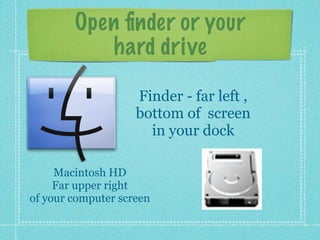
Open finder or your
            hard drive

                    Finder - far left ,
                    bottom of screen
                      in your dock

     Macintosh HD
     Far upper right
of your computer screen
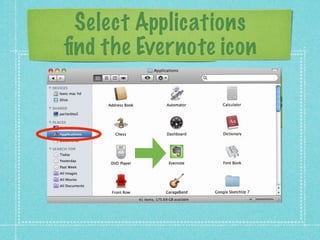
Select Applications
find the Evernote icon
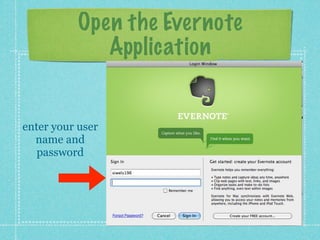
Open the Evernote
              Application


enter your user
  name and
   password
Time to work


you will now have time to work on your cyber
safety presentations - research is key

use web clipping to save your information to
your evernote notebook

use evernote app on mac

  • 1.
    EVERNOTE PART 3 using the Evernote application Time to wor k on you r cy be r safe ty projec t
  • 2.
    Open finder oryour hard drive Finder - far left , bottom of screen in your dock Macintosh HD Far upper right of your computer screen
  • 3.
  • 4.
    Open the Evernote Application enter your user name and password
  • 5.
    Time to work youwill now have time to work on your cyber safety presentations - research is key use web clipping to save your information to your evernote notebook