"You are not planning to fail, but you are failing
to plan“ – Benjamin Franklin
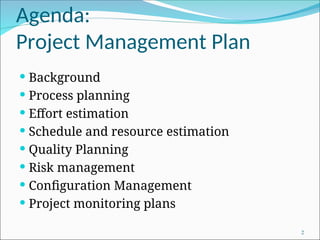
Agenda:
Project Management Plan
 Background
 Process planning
 Effort estimation
 Schedule and resource estimation
 Quality Planning
 Risk management
 Configuration Management
 Project monitoring plans
2
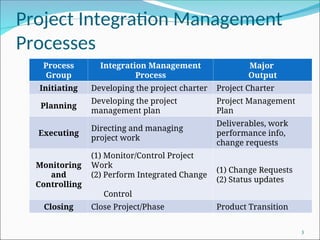
Project Integration Management
Processes
3
Process
Group
Integration Management
Process
Major
Output
Initiating Developing the project charter Project Charter
Planning
Developing the project
management plan
Project Management
Plan
Executing
Directing and managing
project work
Deliverables, work
performance info,
change requests
Monitoring
and
Controlling
(1) Monitor/Control Project
Work
(2) Perform Integrated Change
Control
(1) Change Requests
(2) Status updates
Closing Close Project/Phase Product Transition
Course Technology 2001 4
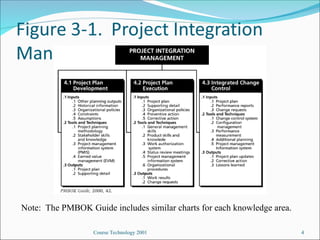
Note: The PMBOK Guide includes similar charts for each knowledge area.
Course Technology 2001 5
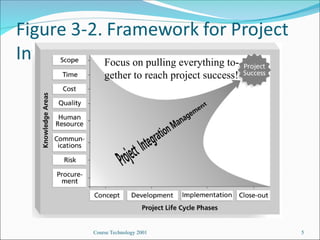
Focus on pulling everything to-
gether to reach project success!
Course Technology 2001 6
Project Plan Development
 A project plan is a document used to coordinate
all project planning documents
 Its main purpose is to guide project execution
 Project plans assist the project manager in
leading the project team and assessing project
status
 Project performance should be measured against
a baseline project plan
Course Technology 2001 7
Attributes of Project Plans
Just as projects are unique, so are project plans
 Plans should be dynamic
 Plans should be flexible
 Plans should be updated as changes occur
 Plans should first and foremost guide project
execution
Course Technology 2001 8
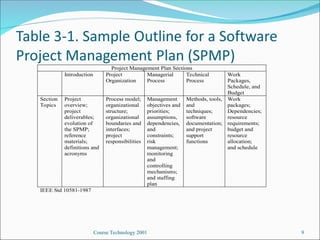
Common Elements of a
Project Plan
 Introduction or overview of the project
 Description of how the project is organized
 Management and technical processes used on
the project
 Work to be done, schedule, and budget
information
Course Technology 2001 9
Project Management Plan Sections
Introduction Project
Organization
Managerial
Process
Technical
Process
Work
Packages,
Schedule, and
Budget
Section
Topics
Project
overview;
project
deliverables;
evolution of
the SPMP;
reference
materials;
definitions and
acronyms
Process model;
organizational
structure;
organizational
boundaries and
interfaces;
project
responsibilities
Management
objectives and
priorities;
assumptions,
dependencies,
and
constraints;
risk
management;
monitoring
and
controlling
mechanisms;
and staffing
plan
Methods, tools,
and
techniques;
software
documentation;
and project
support
functions
Work
packages;
Dependencies;
resource
requirements;
budget and
resource
allocation;
and schedule
IEEE Std 10581-1987
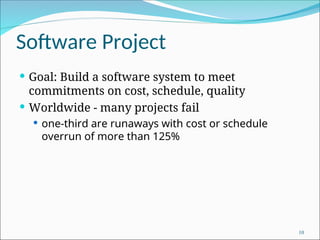
Software Project
 Goal: Build a software system to meet
commitments on cost, schedule, quality
 Worldwide - many projects fail
 one-third are runaways with cost or schedule
overrun of more than 125%
10
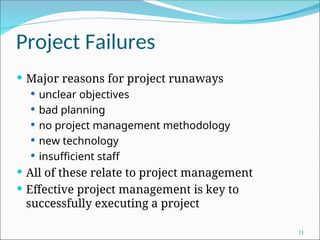
Project Failures
 Major reasons for project runaways
 unclear objectives
 bad planning
 no project management methodology
 new technology
 insufficient staff
 All of these relate to project management
 Effective project management is key to
successfully executing a project
11
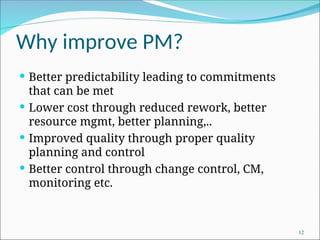
Why improve PM?
 Better predictability leading to commitments
that can be met
 Lower cost through reduced rework, better
resource mgmt, better planning,..
 Improved quality through proper quality
planning and control
 Better control through change control, CM,
monitoring etc.
12
Why improve PM ….
 Better visibility into project health and state
leading to timely intervention
 Better handling of risks reducing the chances of
failure
 All this leads to higher customer satisfaction
 And self and organization improvement
13
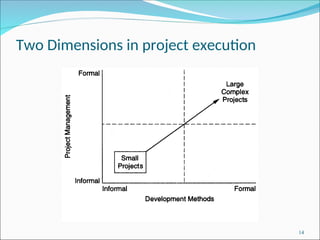
Two Dimensions in project execution
14
Process-based Project Execution
 Small project both engg and PM can be done
informally
 Large projects require formality
 Formality: well defined processes used for each
task; measurements used to control
 Here we focus on processes for PM only
15
The Project Mgmt Process
 Has three phases - planning, monitoring and
control, and closure
 Planning is done before the main engineering
life cycle (LC) and closure after the LC
 Monitoring phase is in parallel with LC
16
Project Planning
 Basic objective:
 To create a plan to meet the commitments of the
project
 create a path that, if followed, will lead to a
successful project
 Planning involves
 defining the LC process to be followed, estimates,
detailed schedule, plan for quality, etc.
 Main output
 a project management plan, and
 project schedule 17
Key Planning Tasks
 Define suitable processes for executing the project
 Estimate effort
 Define project milestones and create a schedule
 Define quality objectives and a quality plan
 Identify risks and make plans to mitigate them
 Define measurement plan, project-tracking procedures,
training plan, team organization, etc.
18
Process Planning
 Plan how the project will be executed, (ie. the
process to be followed)
 Process will decide the tasks, their ordering,
milestones
 Hence process planning is an important project
planning task
 Should plan for LC and PM processes as well as
supporting processes
19
Life Cycle Process
 Various LC models - waterfall, iterative,
prototyping; diff models suit different
projects
 During planning can select the model that is
best for the project
 This gives the overall process which has to be
fine-tuned to suit the project needs
 Usually done by process tailoring - changing
the process to suit the project
 Tailoring finally results in adding, deleting,
modifying some process steps
20
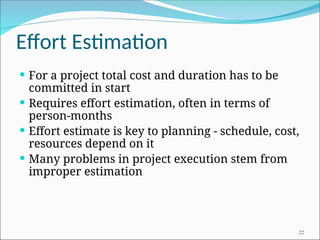
Effort Estimation
 For a project total cost and duration has to be
committed in start
 Requires effort estimation, often in terms of
person-months
 Effort estimate is key to planning - schedule, cost,
resources depend on it
 Many problems in project execution stem from
improper estimation
22
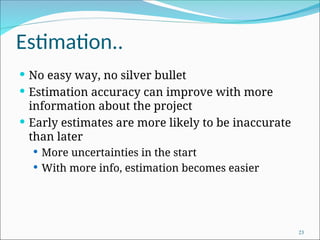
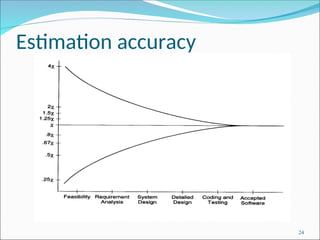
Estimation..
 No easy way, no silver bullet
 Estimation accuracy can improve with more
information about the project
 Early estimates are more likely to be inaccurate
than later
 More uncertainties in the start
 With more info, estimation becomes easier
23
Estimation accuracy
24
Effort Estimation Models..
 A model tries to determine the effort estimate from
some parameter values
 A model also requires input about the project, and
cannot work in vacuum
 So to apply a model, we should be able to extract
properties about the system
 Two types of models
 top-down and
 bottom-up
25
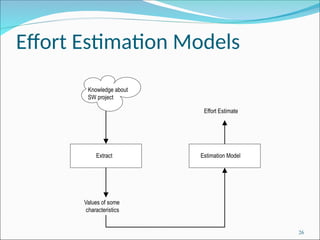
Effort Estimation Models
Extract Estimation Model
Values of some
characteristics
Effort Estimate
Knowledge about
SW project
26
Top-down Estimation
 First determines the total effort, then effort
for components
 Usually works with overall size
 One method is to see estimate as a function of
effort; the common function used is
Effort = a * size b
 E is in person-months, size in KLOC
 Constants a and b determined through
regression analysis of past project data
27
Top down estimation
 Can also estimate from size and productivity
 Get the estimate of the total size of the software
 Estimate project productivity using past data and
project characteristics
 Obtain the overall effort estimate from productivity
and size estimates
 Effort distribution data from similar project are
used to estimate effort for different phases
28
Bottom-up Estimation
 Effort for components and phases first estimated,
then the total
 Can use activity based costing - all activities
enumerated and then each activity estimated
separately
 Can group activities into classes - their effort
estimate from past data
29
An Estimation Procedure
 Identify programs/components in the system
and classify them as simple, medium, or
complex (S/M/C)
 Define the average coding effort for S/M/C
 Get the total coding effort.
 Use the effort distribution in similar projects to
estimate effort for other tasks and total
 Refine the estimates based on project specific
factors
30
COCOMO Model for Estimation
 Is a top-down approach
 Uses size, but adjusts using some factors
 Basic procedure
 Obtain initial estimate using size
 Determine a set of 15 multiplying factors from
different project attributes
 Adjust the effort estimate by scaling it with the
final multiplying factor
31
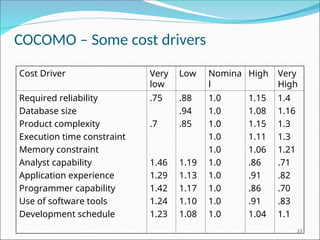
COCOMO..
 Initial estimate: a * size b
; some standard
values for a, b given for diff project types
 There are 15 cost driver attributes line
reliability, complexity, application
experience, capability, …
 Each factor is rated, and for the rating a
multiplication factor is given
 Final effort adjustment factor is the product
of the factors for all 15 attributes
32
COCOMO – Some cost drivers
Cost Driver Very
low
Low Nomina
l
High Very
High
Required reliability
Database size
Product complexity
Execution time constraint
Memory constraint
Analyst capability
Application experience
Programmer capability
Use of software tools
Development schedule
.75
.7
1.46
1.29
1.42
1.24
1.23
.88
.94
.85
1.19
1.13
1.17
1.10
1.08
1.0
1.0
1.0
1.0
1.0
1.0
1.0
1.0
1.0
1.0
1.15
1.08
1.15
1.11
1.06
.86
.91
.86
.91
1.04
1.4
1.16
1.3
1.3
1.21
.71
.82
.70
.83
1.1
33
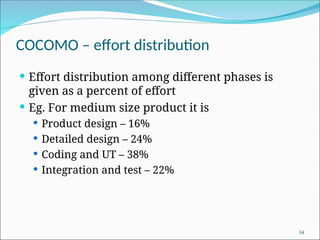
COCOMO – effort distribution
 Effort distribution among different phases is
given as a percent of effort
 Eg. For medium size product it is
 Product design – 16%
 Detailed design – 24%
 Coding and UT – 38%
 Integration and test – 22%
34
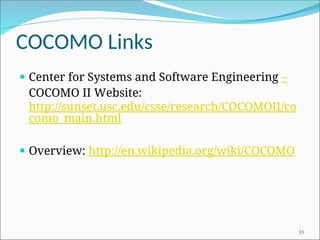
COCOMO Links
 Center for Systems and Software Engineering –
COCOMO II Website:
http://sunset.usc.edu/csse/research/COCOMOII/co
como_main.html
 Overview: http://en.wikipedia.org/wiki/COCOMO
35
Project Schedule
 A project Schedule is at two levels - overall
schedule and detailed schedule
 Overall schedule comprises of major milestones
and final date
 Detailed schedule is the assignment of lowest
level tasks to resources
37
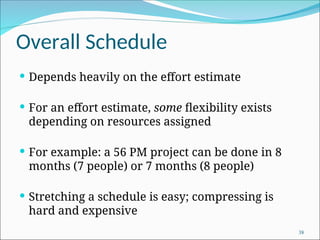
Overall Schedule
 Depends heavily on the effort estimate
 For an effort estimate, some flexibility exists
depending on resources assigned
 For example: a 56 PM project can be done in 8
months (7 people) or 7 months (8 people)
 Stretching a schedule is easy; compressing is
hard and expensive
38
Overall Scheduling...
 One method is to estimate schedule S (in months)
as a function of effort in PMs
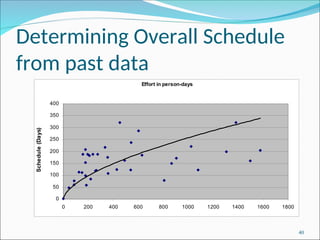
 Can determine the function through analysis of
past data; the function is non linear
 COCOMO: S = 2.5 E 3.8
 Often this schedule is checked and corrected for
the specific project
39
Determining Overall Schedule
from past data
Effort in person-days
0
50
100
150
200
250
300
350
400
0 200 400 600 800 1000 1200 1400 1600 1800
Schedule
(Days)
40
Determining Milestones
 With effort and overall schedule decided, avg
project resources are fixed
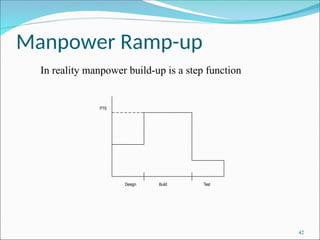
 Manpower ramp-up in a project decides the
milestones
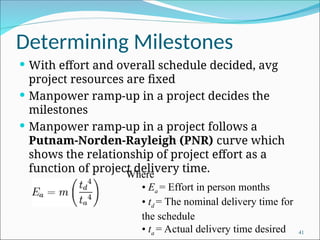
 Manpower ramp-up in a project follows a
Putnam-Norden-Rayleigh (PNR) curve which
shows the relationship of project effort as a
function of project delivery time.
41
Where
• Ea = Effort in person months
• td = The nominal delivery time for
the schedule
• ta = Actual delivery time desired
Manpower Ramp-up
Design Build Test
PTS
42
In reality manpower build-up is a step function
Milestones ...
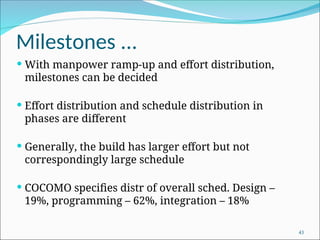
 With manpower ramp-up and effort distribution,
milestones can be decided
 Effort distribution and schedule distribution in
phases are different
 Generally, the build has larger effort but not
correspondingly large schedule
 COCOMO specifies distr of overall sched. Design –
19%, programming – 62%, integration – 18%
43
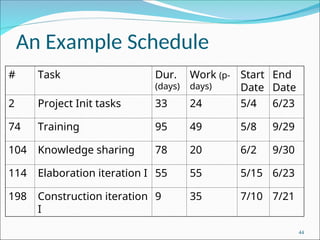
An Example Schedule
# Task Dur.
(days)
Work (p-
days)
Start
Date
End
Date
2 Project Init tasks 33 24 5/4 6/23
74 Training 95 49 5/8 9/29
104 Knowledge sharing 78 20 6/2 9/30
114 Elaboration iteration I 55 55 5/15 6/23
198 Construction iteration
I
9 35 7/10 7/21
44
Detailed Scheduling
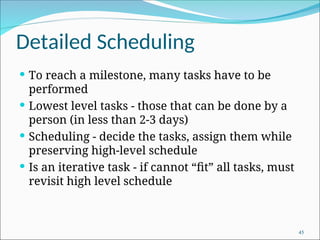
 To reach a milestone, many tasks have to be
performed
 Lowest level tasks - those that can be done by a
person (in less than 2-3 days)
 Scheduling - decide the tasks, assign them while
preserving high-level schedule
 Is an iterative task - if cannot “fit” all tasks, must
revisit high level schedule
45
Detailed Scheduling
 Detailed schedule not done completely in the start -
it evolves
 Can use MS Project for keeping it
 Detailed Schedule is the most live document for
managing the project
 Any activity to be done must get reflected in the
detailed schedule
46
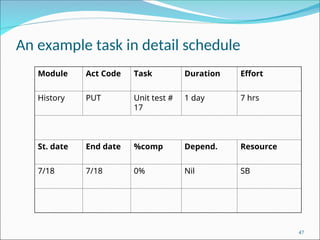
An example task in detail schedule
Module Act Code Task Duration Effort
History PUT Unit test #
17
1 day 7 hrs
St. date End date %comp Depend. Resource
7/18 7/18 0% Nil SB
47
Detail schedule
 Each task has name, date, duration, resource etc
assigned
 % done is for tracking (tools use it)
 The detailed schedule has to be consistent with
milestones
 Tasks are sub-activities of milestone level
activities, so effort should add up, total schedule
should be preserved
48
Team Structure
 To assign tasks in detailed schedule, need to have
a clear team structure
 Hierarchic team organization is most common
 Project manager has overall responsibility; also
does design etc.
 Has programmers and testers for executing
detailed tasks
 May have config controller, db manager, etc
49
Team structure..
 An alternative – democratic teams
 Can work for small teams; leadership rotates
 Another one used for products
 A dev team led by a dev mgr, a test team led by
test mgr, and a prog. Mgmt team
 All three report to a product mgr
 Allows specialization of tasks and separate career
ladders for devs, tests, PMs
50
SCM process and planning
 Have discussed Software Configuration
Management (SCM) process earlier
 During planning, the SCM activities are planned
along with who will perform them
 Have discussed planning also earlier
 Includes defining CM items, naming scheme,
directory structure, access restrictions, change
control, versioning, release procedure etc
51
Quality Planning
 Delivering high quality is a basic goal
 Quality can be defined in many ways
 Current industry standard - delivered defect
density (e.g. #defects/KLOC)
 Defect - something that causes software to
behave in an inconsistent manner
 Aim of a project - deliver software with low
delivered defect density
53
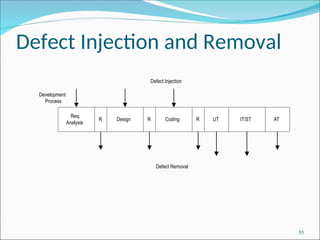
Defect Injection and Removal
 Software development is labor intensive
 Defects are injected at any stage
 As quality goal is low delivered defect density,
these defects have to be removed
 Done primarily by quality control (QC) activities
of reviews and testing
54
Defect Injection and Removal
Req.
Analysis
Design R Coding R UT IT/ST AT
Development
Process
Defect Injection
R
Defect Removal
55
Approaches to Quality
Management
 Ad hoc - some testing, some reviews done as and
when needed
 Procedural - defined procedures are followed in
a project
 Quantitative - defect data analysis done to
manage the quality process
56
Procedural Approach
 A quality plan defines what QC tasks will be
undertaken and when
 Main QC tasks - reviews and testing
 Guidelines and procedures for reviews and
testing are provided
 During project execution, adherence to the plan
and procedures ensured
57
Quantitative Approach
 Goes beyond asking “has the procedure been
executed”
 Analyzes defect data to make judgements about
quality
 Past data is very important
 Key parameters - defect injection and removal
rates, defect removal efficiency (DRE)
58
Quality Plan
 The quality plan drives the quality activities in
the project
 Level of plan depends on models available
 Must define QC tasks that have to be performed
in the project
 Can specify defect levels for each QC tasks (if
models and data available)
59
Risk Management
 Any project can fail - reasons can be technical,
managerial, etc.
 Project management aims to tackle the project
management aspect
 Engineering life cycles aim to tackle the engineering
issues
 A project may fail due to unforeseen events - risk
management aims to tackle this
61
Risk Management
 Risk: any condition or event whose occurrence is
not certain but which can cause the project to
fail
 Aim of risk management: minimize the effect of
risks on a project
62
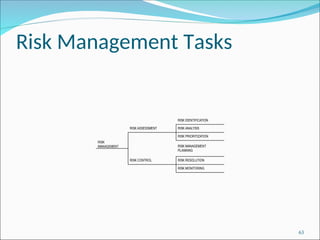
Risk Management Tasks
RISK
MANAGEMENT
RISK ASSESSMENT
RISK IDENTIFICATION
RISK ANALYSIS
RISK PRIORITIZATION
RISK MANAGEMENT
PLANNING
RISK RESOLUTION
RISK MONITORING
RISK CONTROL
63
Risk Identification
 To identify possible risks to a project, i.e. to those
events that might occur and which might cause
the project to fail
 No “algorithm” possible, done by “what ifs”,
checklists, past experience
 Can have a list of “top 10” risks that projects have
seen in past
64
Top Risk Examples
 Shortage of technically trained manpower
 Too many requirement changes
 Unclear requirements
 Not meeting performance requirements
 Unrealistic schedules
 Insufficient business knowledge
 Working on new technology
65
Risk Prioritization
 The number of risks might be large
 Must prioritize them to focus attention on the
“high risk” areas
 For prioritization, impact of each risk must be
understood
 In addition, probability of the risk occurring
should also be understood
66
Risk Prioritization ...
 Risk exposure (RE) = probability of risk occurring
* risk impact
 RE is the expected value of loss for a risk
 Prioritization can be done based on risk
exposure value
 Plans can be made to handle high RE risks
67
A Simple approach to Risk
Prioritization
 Classify risk occurrence probabilities as: Low,
Medium, High
 Classify risk impact as: Low, Medium, High
 Identify those that are HH, or HM/MH
 Focus on these for risk mitigation
 Will work for most small and medium sized
projects
68
Risk Control
 Can the risk be avoided?
 E.g. if new hardware is a risk, it can be avoided by
working with proven hardware
 For others, risk mitigation steps need to be
planned and executed
 Actions taken in the project such that if the risk
materializes, its impact is minimal
 Involves extra cost
69
Risk Mitigation Examples
 Too many requirement changes
 Convince client that changes in requirements will
have an impact on the schedule
 Define a procedure for requirement changes
 Maintain cumulative impact of changes and make
it visible to client
 Negotiate payment on actual effort.
70
Examples ...
 Manpower attrition
 Ensure that multiple resources are assigned on
key project areas
 Have team building sessions
 Rotate jobs among team members
 Keep backup resources in the project
 Maintain documentation of individual’s work
 Follow the CM process and guidelines strictly
71
Examples ...
 Unrealistic schedules
 Negotiate for better schedule
 Identify parallel tasks
 Have resources ready early
 Identify areas that can be automated
 If the critical path is not within the schedule,
negotiate with the client
 Negotiate payment on actual effort
72
Risk Mitigation Plan
 Risk mitigation involves steps that are to be
performed (hence has extra cost)
 It is not a paper plan - these steps should be
scheduled and executed
 These are different from the steps one would
take if the risk materializes - they are performed
only if needed
 Risks must be revisited periodically
73
Background
 A plan is a mere document that can guide
 It must be executed
 To ensure execution goes as per plan, it must be
monitored and controlled
 Monitoring requires measurements
 And methods for interpreting them
 Monitoring plan has to plan for all the tasks
related to monitoring
75
Measurements
 Must plan for measurements in a project
 Without planning, measurements will not be
done
 Main measurements – effort, size, schedule,
and defects
 Effort – as this is the main resource; often tracked
through effort reporting tools
 Defects – as they determine quality; often defect
logging and tracking systems used
 During planning – what will be measured,
how, tool support, and data management
76
Project Tracking
 Goal: To get visibility in project execution so
corrective actions can be taken when needed to
ensure project succeeds
 Diff types of monitoring done at projects;
measurements provide data for it
77
Tracking…
 Activity-level monitoring
 Each activity in detailed schd is getting done
 Often done daily by managers
 A task done marked 100%; tools can determine
status of higher level tasks
 Status reports
 Generally done weekly to take stock
 Summary of activities completed, pending
 Issues to be resolved
78
Tracking…
 Milestone analysis
 A bigger review at milestones
 Actual vs estimated for effort and sched is done
 Risks are revisited
 Changes to product and their impact may be
analyzed
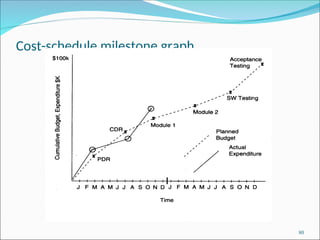
 Cost-schedule milestone graph is another way of
doing this
79
Cost-schedule milestone graph
80
Project Management Plan
 The project management plan (PMP) contains
outcome of all planning activities - focuses on
overall project management
 Besides PMP, a project schedule is needed
 Reflects what activities get done in the project
 Microsoft project (MSP) can be used for this
 Based on project planning; is essential for day-to-day
management
 Does not replace PMP !
81
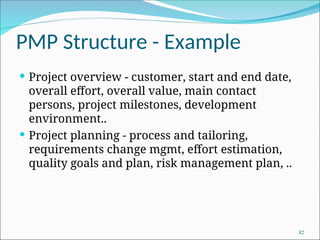
PMP Structure - Example
 Project overview - customer, start and end date,
overall effort, overall value, main contact
persons, project milestones, development
environment..
 Project planning - process and tailoring,
requirements change mgmt, effort estimation,
quality goals and plan, risk management plan, ..
82
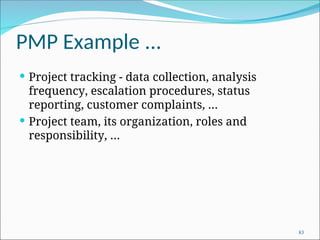
PMP Example ...
 Project tracking - data collection, analysis
frequency, escalation procedures, status
reporting, customer complaints, …
 Project team, its organization, roles and
responsibility, …
83
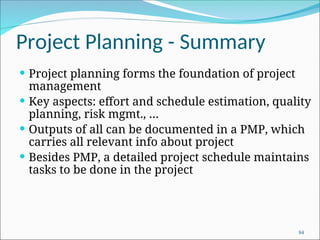
Project Planning - Summary
 Project planning forms the foundation of project
management
 Key aspects: effort and schedule estimation, quality
planning, risk mgmt., …
 Outputs of all can be documented in a PMP, which
carries all relevant info about project
 Besides PMP, a detailed project schedule maintains
tasks to be done in the project
84

Project Planning for undergraduate students

  • 1.
    "You are notplanning to fail, but you are failing to plan“ – Benjamin Franklin
  • 2.
    Agenda: Project Management Plan Background  Process planning  Effort estimation  Schedule and resource estimation  Quality Planning  Risk management  Configuration Management  Project monitoring plans 2
  • 3.
    Project Integration Management Processes 3 Process Group IntegrationManagement Process Major Output Initiating Developing the project charter Project Charter Planning Developing the project management plan Project Management Plan Executing Directing and managing project work Deliverables, work performance info, change requests Monitoring and Controlling (1) Monitor/Control Project Work (2) Perform Integrated Change Control (1) Change Requests (2) Status updates Closing Close Project/Phase Product Transition
  • 4.
    Course Technology 20014 Note: The PMBOK Guide includes similar charts for each knowledge area.
  • 5.
    Course Technology 20015 Focus on pulling everything to- gether to reach project success!
  • 6.
    Course Technology 20016 Project Plan Development  A project plan is a document used to coordinate all project planning documents  Its main purpose is to guide project execution  Project plans assist the project manager in leading the project team and assessing project status  Project performance should be measured against a baseline project plan
  • 7.
    Course Technology 20017 Attributes of Project Plans Just as projects are unique, so are project plans  Plans should be dynamic  Plans should be flexible  Plans should be updated as changes occur  Plans should first and foremost guide project execution
  • 8.
    Course Technology 20018 Common Elements of a Project Plan  Introduction or overview of the project  Description of how the project is organized  Management and technical processes used on the project  Work to be done, schedule, and budget information
  • 9.
    Course Technology 20019 Project Management Plan Sections Introduction Project Organization Managerial Process Technical Process Work Packages, Schedule, and Budget Section Topics Project overview; project deliverables; evolution of the SPMP; reference materials; definitions and acronyms Process model; organizational structure; organizational boundaries and interfaces; project responsibilities Management objectives and priorities; assumptions, dependencies, and constraints; risk management; monitoring and controlling mechanisms; and staffing plan Methods, tools, and techniques; software documentation; and project support functions Work packages; Dependencies; resource requirements; budget and resource allocation; and schedule IEEE Std 10581-1987
  • 10.
    Software Project  Goal:Build a software system to meet commitments on cost, schedule, quality  Worldwide - many projects fail  one-third are runaways with cost or schedule overrun of more than 125% 10
  • 11.
    Project Failures  Majorreasons for project runaways  unclear objectives  bad planning  no project management methodology  new technology  insufficient staff  All of these relate to project management  Effective project management is key to successfully executing a project 11
  • 12.
    Why improve PM? Better predictability leading to commitments that can be met  Lower cost through reduced rework, better resource mgmt, better planning,..  Improved quality through proper quality planning and control  Better control through change control, CM, monitoring etc. 12
  • 13.
    Why improve PM….  Better visibility into project health and state leading to timely intervention  Better handling of risks reducing the chances of failure  All this leads to higher customer satisfaction  And self and organization improvement 13
  • 14.
    Two Dimensions inproject execution 14
  • 15.
    Process-based Project Execution Small project both engg and PM can be done informally  Large projects require formality  Formality: well defined processes used for each task; measurements used to control  Here we focus on processes for PM only 15
  • 16.
    The Project MgmtProcess  Has three phases - planning, monitoring and control, and closure  Planning is done before the main engineering life cycle (LC) and closure after the LC  Monitoring phase is in parallel with LC 16
  • 17.
    Project Planning  Basicobjective:  To create a plan to meet the commitments of the project  create a path that, if followed, will lead to a successful project  Planning involves  defining the LC process to be followed, estimates, detailed schedule, plan for quality, etc.  Main output  a project management plan, and  project schedule 17
  • 18.
    Key Planning Tasks Define suitable processes for executing the project  Estimate effort  Define project milestones and create a schedule  Define quality objectives and a quality plan  Identify risks and make plans to mitigate them  Define measurement plan, project-tracking procedures, training plan, team organization, etc. 18
  • 19.
    Process Planning  Planhow the project will be executed, (ie. the process to be followed)  Process will decide the tasks, their ordering, milestones  Hence process planning is an important project planning task  Should plan for LC and PM processes as well as supporting processes 19
  • 20.
    Life Cycle Process Various LC models - waterfall, iterative, prototyping; diff models suit different projects  During planning can select the model that is best for the project  This gives the overall process which has to be fine-tuned to suit the project needs  Usually done by process tailoring - changing the process to suit the project  Tailoring finally results in adding, deleting, modifying some process steps 20
  • 22.
    Effort Estimation  Fora project total cost and duration has to be committed in start  Requires effort estimation, often in terms of person-months  Effort estimate is key to planning - schedule, cost, resources depend on it  Many problems in project execution stem from improper estimation 22
  • 23.
    Estimation..  No easyway, no silver bullet  Estimation accuracy can improve with more information about the project  Early estimates are more likely to be inaccurate than later  More uncertainties in the start  With more info, estimation becomes easier 23
  • 24.
  • 25.
    Effort Estimation Models.. A model tries to determine the effort estimate from some parameter values  A model also requires input about the project, and cannot work in vacuum  So to apply a model, we should be able to extract properties about the system  Two types of models  top-down and  bottom-up 25
  • 26.
    Effort Estimation Models ExtractEstimation Model Values of some characteristics Effort Estimate Knowledge about SW project 26
  • 27.
    Top-down Estimation  Firstdetermines the total effort, then effort for components  Usually works with overall size  One method is to see estimate as a function of effort; the common function used is Effort = a * size b  E is in person-months, size in KLOC  Constants a and b determined through regression analysis of past project data 27
  • 28.
    Top down estimation Can also estimate from size and productivity  Get the estimate of the total size of the software  Estimate project productivity using past data and project characteristics  Obtain the overall effort estimate from productivity and size estimates  Effort distribution data from similar project are used to estimate effort for different phases 28
  • 29.
    Bottom-up Estimation  Effortfor components and phases first estimated, then the total  Can use activity based costing - all activities enumerated and then each activity estimated separately  Can group activities into classes - their effort estimate from past data 29
  • 30.
    An Estimation Procedure Identify programs/components in the system and classify them as simple, medium, or complex (S/M/C)  Define the average coding effort for S/M/C  Get the total coding effort.  Use the effort distribution in similar projects to estimate effort for other tasks and total  Refine the estimates based on project specific factors 30
  • 31.
    COCOMO Model forEstimation  Is a top-down approach  Uses size, but adjusts using some factors  Basic procedure  Obtain initial estimate using size  Determine a set of 15 multiplying factors from different project attributes  Adjust the effort estimate by scaling it with the final multiplying factor 31
  • 32.
    COCOMO..  Initial estimate:a * size b ; some standard values for a, b given for diff project types  There are 15 cost driver attributes line reliability, complexity, application experience, capability, …  Each factor is rated, and for the rating a multiplication factor is given  Final effort adjustment factor is the product of the factors for all 15 attributes 32
  • 33.
    COCOMO – Somecost drivers Cost Driver Very low Low Nomina l High Very High Required reliability Database size Product complexity Execution time constraint Memory constraint Analyst capability Application experience Programmer capability Use of software tools Development schedule .75 .7 1.46 1.29 1.42 1.24 1.23 .88 .94 .85 1.19 1.13 1.17 1.10 1.08 1.0 1.0 1.0 1.0 1.0 1.0 1.0 1.0 1.0 1.0 1.15 1.08 1.15 1.11 1.06 .86 .91 .86 .91 1.04 1.4 1.16 1.3 1.3 1.21 .71 .82 .70 .83 1.1 33
  • 34.
    COCOMO – effortdistribution  Effort distribution among different phases is given as a percent of effort  Eg. For medium size product it is  Product design – 16%  Detailed design – 24%  Coding and UT – 38%  Integration and test – 22% 34
  • 35.
    COCOMO Links  Centerfor Systems and Software Engineering – COCOMO II Website: http://sunset.usc.edu/csse/research/COCOMOII/co como_main.html  Overview: http://en.wikipedia.org/wiki/COCOMO 35
  • 37.
    Project Schedule  Aproject Schedule is at two levels - overall schedule and detailed schedule  Overall schedule comprises of major milestones and final date  Detailed schedule is the assignment of lowest level tasks to resources 37
  • 38.
    Overall Schedule  Dependsheavily on the effort estimate  For an effort estimate, some flexibility exists depending on resources assigned  For example: a 56 PM project can be done in 8 months (7 people) or 7 months (8 people)  Stretching a schedule is easy; compressing is hard and expensive 38
  • 39.
    Overall Scheduling...  Onemethod is to estimate schedule S (in months) as a function of effort in PMs  Can determine the function through analysis of past data; the function is non linear  COCOMO: S = 2.5 E 3.8  Often this schedule is checked and corrected for the specific project 39
  • 40.
    Determining Overall Schedule frompast data Effort in person-days 0 50 100 150 200 250 300 350 400 0 200 400 600 800 1000 1200 1400 1600 1800 Schedule (Days) 40
  • 41.
    Determining Milestones  Witheffort and overall schedule decided, avg project resources are fixed  Manpower ramp-up in a project decides the milestones  Manpower ramp-up in a project follows a Putnam-Norden-Rayleigh (PNR) curve which shows the relationship of project effort as a function of project delivery time. 41 Where • Ea = Effort in person months • td = The nominal delivery time for the schedule • ta = Actual delivery time desired
  • 42.
    Manpower Ramp-up Design BuildTest PTS 42 In reality manpower build-up is a step function
  • 43.
    Milestones ...  Withmanpower ramp-up and effort distribution, milestones can be decided  Effort distribution and schedule distribution in phases are different  Generally, the build has larger effort but not correspondingly large schedule  COCOMO specifies distr of overall sched. Design – 19%, programming – 62%, integration – 18% 43
  • 44.
    An Example Schedule #Task Dur. (days) Work (p- days) Start Date End Date 2 Project Init tasks 33 24 5/4 6/23 74 Training 95 49 5/8 9/29 104 Knowledge sharing 78 20 6/2 9/30 114 Elaboration iteration I 55 55 5/15 6/23 198 Construction iteration I 9 35 7/10 7/21 44
  • 45.
    Detailed Scheduling  Toreach a milestone, many tasks have to be performed  Lowest level tasks - those that can be done by a person (in less than 2-3 days)  Scheduling - decide the tasks, assign them while preserving high-level schedule  Is an iterative task - if cannot “fit” all tasks, must revisit high level schedule 45
  • 46.
    Detailed Scheduling  Detailedschedule not done completely in the start - it evolves  Can use MS Project for keeping it  Detailed Schedule is the most live document for managing the project  Any activity to be done must get reflected in the detailed schedule 46
  • 47.
    An example taskin detail schedule Module Act Code Task Duration Effort History PUT Unit test # 17 1 day 7 hrs St. date End date %comp Depend. Resource 7/18 7/18 0% Nil SB 47
  • 48.
    Detail schedule  Eachtask has name, date, duration, resource etc assigned  % done is for tracking (tools use it)  The detailed schedule has to be consistent with milestones  Tasks are sub-activities of milestone level activities, so effort should add up, total schedule should be preserved 48
  • 49.
    Team Structure  Toassign tasks in detailed schedule, need to have a clear team structure  Hierarchic team organization is most common  Project manager has overall responsibility; also does design etc.  Has programmers and testers for executing detailed tasks  May have config controller, db manager, etc 49
  • 50.
    Team structure..  Analternative – democratic teams  Can work for small teams; leadership rotates  Another one used for products  A dev team led by a dev mgr, a test team led by test mgr, and a prog. Mgmt team  All three report to a product mgr  Allows specialization of tasks and separate career ladders for devs, tests, PMs 50
  • 51.
    SCM process andplanning  Have discussed Software Configuration Management (SCM) process earlier  During planning, the SCM activities are planned along with who will perform them  Have discussed planning also earlier  Includes defining CM items, naming scheme, directory structure, access restrictions, change control, versioning, release procedure etc 51
  • 53.
    Quality Planning  Deliveringhigh quality is a basic goal  Quality can be defined in many ways  Current industry standard - delivered defect density (e.g. #defects/KLOC)  Defect - something that causes software to behave in an inconsistent manner  Aim of a project - deliver software with low delivered defect density 53
  • 54.
    Defect Injection andRemoval  Software development is labor intensive  Defects are injected at any stage  As quality goal is low delivered defect density, these defects have to be removed  Done primarily by quality control (QC) activities of reviews and testing 54
  • 55.
    Defect Injection andRemoval Req. Analysis Design R Coding R UT IT/ST AT Development Process Defect Injection R Defect Removal 55
  • 56.
    Approaches to Quality Management Ad hoc - some testing, some reviews done as and when needed  Procedural - defined procedures are followed in a project  Quantitative - defect data analysis done to manage the quality process 56
  • 57.
    Procedural Approach  Aquality plan defines what QC tasks will be undertaken and when  Main QC tasks - reviews and testing  Guidelines and procedures for reviews and testing are provided  During project execution, adherence to the plan and procedures ensured 57
  • 58.
    Quantitative Approach  Goesbeyond asking “has the procedure been executed”  Analyzes defect data to make judgements about quality  Past data is very important  Key parameters - defect injection and removal rates, defect removal efficiency (DRE) 58
  • 59.
    Quality Plan  Thequality plan drives the quality activities in the project  Level of plan depends on models available  Must define QC tasks that have to be performed in the project  Can specify defect levels for each QC tasks (if models and data available) 59
  • 61.
    Risk Management  Anyproject can fail - reasons can be technical, managerial, etc.  Project management aims to tackle the project management aspect  Engineering life cycles aim to tackle the engineering issues  A project may fail due to unforeseen events - risk management aims to tackle this 61
  • 62.
    Risk Management  Risk:any condition or event whose occurrence is not certain but which can cause the project to fail  Aim of risk management: minimize the effect of risks on a project 62
  • 63.
    Risk Management Tasks RISK MANAGEMENT RISKASSESSMENT RISK IDENTIFICATION RISK ANALYSIS RISK PRIORITIZATION RISK MANAGEMENT PLANNING RISK RESOLUTION RISK MONITORING RISK CONTROL 63
  • 64.
    Risk Identification  Toidentify possible risks to a project, i.e. to those events that might occur and which might cause the project to fail  No “algorithm” possible, done by “what ifs”, checklists, past experience  Can have a list of “top 10” risks that projects have seen in past 64
  • 65.
    Top Risk Examples Shortage of technically trained manpower  Too many requirement changes  Unclear requirements  Not meeting performance requirements  Unrealistic schedules  Insufficient business knowledge  Working on new technology 65
  • 66.
    Risk Prioritization  Thenumber of risks might be large  Must prioritize them to focus attention on the “high risk” areas  For prioritization, impact of each risk must be understood  In addition, probability of the risk occurring should also be understood 66
  • 67.
    Risk Prioritization ... Risk exposure (RE) = probability of risk occurring * risk impact  RE is the expected value of loss for a risk  Prioritization can be done based on risk exposure value  Plans can be made to handle high RE risks 67
  • 68.
    A Simple approachto Risk Prioritization  Classify risk occurrence probabilities as: Low, Medium, High  Classify risk impact as: Low, Medium, High  Identify those that are HH, or HM/MH  Focus on these for risk mitigation  Will work for most small and medium sized projects 68
  • 69.
    Risk Control  Canthe risk be avoided?  E.g. if new hardware is a risk, it can be avoided by working with proven hardware  For others, risk mitigation steps need to be planned and executed  Actions taken in the project such that if the risk materializes, its impact is minimal  Involves extra cost 69
  • 70.
    Risk Mitigation Examples Too many requirement changes  Convince client that changes in requirements will have an impact on the schedule  Define a procedure for requirement changes  Maintain cumulative impact of changes and make it visible to client  Negotiate payment on actual effort. 70
  • 71.
    Examples ...  Manpowerattrition  Ensure that multiple resources are assigned on key project areas  Have team building sessions  Rotate jobs among team members  Keep backup resources in the project  Maintain documentation of individual’s work  Follow the CM process and guidelines strictly 71
  • 72.
    Examples ...  Unrealisticschedules  Negotiate for better schedule  Identify parallel tasks  Have resources ready early  Identify areas that can be automated  If the critical path is not within the schedule, negotiate with the client  Negotiate payment on actual effort 72
  • 73.
    Risk Mitigation Plan Risk mitigation involves steps that are to be performed (hence has extra cost)  It is not a paper plan - these steps should be scheduled and executed  These are different from the steps one would take if the risk materializes - they are performed only if needed  Risks must be revisited periodically 73
  • 75.
    Background  A planis a mere document that can guide  It must be executed  To ensure execution goes as per plan, it must be monitored and controlled  Monitoring requires measurements  And methods for interpreting them  Monitoring plan has to plan for all the tasks related to monitoring 75
  • 76.
    Measurements  Must planfor measurements in a project  Without planning, measurements will not be done  Main measurements – effort, size, schedule, and defects  Effort – as this is the main resource; often tracked through effort reporting tools  Defects – as they determine quality; often defect logging and tracking systems used  During planning – what will be measured, how, tool support, and data management 76
  • 77.
    Project Tracking  Goal:To get visibility in project execution so corrective actions can be taken when needed to ensure project succeeds  Diff types of monitoring done at projects; measurements provide data for it 77
  • 78.
    Tracking…  Activity-level monitoring Each activity in detailed schd is getting done  Often done daily by managers  A task done marked 100%; tools can determine status of higher level tasks  Status reports  Generally done weekly to take stock  Summary of activities completed, pending  Issues to be resolved 78
  • 79.
    Tracking…  Milestone analysis A bigger review at milestones  Actual vs estimated for effort and sched is done  Risks are revisited  Changes to product and their impact may be analyzed  Cost-schedule milestone graph is another way of doing this 79
  • 80.
  • 81.
    Project Management Plan The project management plan (PMP) contains outcome of all planning activities - focuses on overall project management  Besides PMP, a project schedule is needed  Reflects what activities get done in the project  Microsoft project (MSP) can be used for this  Based on project planning; is essential for day-to-day management  Does not replace PMP ! 81
  • 82.
    PMP Structure -Example  Project overview - customer, start and end date, overall effort, overall value, main contact persons, project milestones, development environment..  Project planning - process and tailoring, requirements change mgmt, effort estimation, quality goals and plan, risk management plan, .. 82
  • 83.
    PMP Example ... Project tracking - data collection, analysis frequency, escalation procedures, status reporting, customer complaints, …  Project team, its organization, roles and responsibility, … 83
  • 84.
    Project Planning -Summary  Project planning forms the foundation of project management  Key aspects: effort and schedule estimation, quality planning, risk mgmt., …  Outputs of all can be documented in a PMP, which carries all relevant info about project  Besides PMP, a detailed project schedule maintains tasks to be done in the project 84