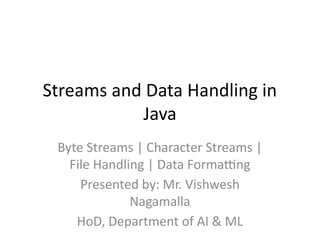
Streams and DataHandling in
Java
Byte Streams | Character Streams |
File Handling | Data Formatting
Presented by: Mr. Vishwesh
Nagamalla
HoD, Department of AI & ML
2.
Introduction to Streams
•A stream is a sequence of data that flows
from a source to a destination.
• Java uses streams to perform I/O operations.
• Two types: Input Stream (reads), Output
Stream (writes)
• Can handle bytes or characters.
3.
Types of Streams
•Byte Streams – For binary data
(FileInputStream, FileOutputStream)
• Character Streams – For text data (FileReader,
FileWriter)
• Buffered Streams – For faster I/O
(BufferedReader, BufferedWriter)
• Data Streams – For primitive data
(DataInputStream, DataOutputStream)
• Object Streams – For objects
(ObjectInputStream, ObjectOutputStream)
4.
The Byte-Stream I/OHierarchy
• Parent Classes: InputStream, OutputStream
• Subclasses: FileInputStream,
FileOutputStream, BufferedInputStream,
BufferedOutputStream, DataInputStream,
DataOutputStream, ObjectInputStream,
ObjectOutputStream
• Example:
• FileInputStream fin = new
FileInputStream("test.bin");
• int data = fin.read();
Buffered Streams
• Improvesperformance by reducing disk
access.
• Stores data temporarily in memory buffer.
• Example:
• BufferedReader br = new BufferedReader(new
FileReader("file.txt"));
• String line = br.readLine();
7.
Random Access FileClass
• Allows reading/writing at any file position.
• Supports input and output with same object.
• Example:
• RandomAccessFile raf = new
RandomAccessFile("data.txt", "rw");
• raf.seek(10);
• raf.writeUTF("Hello");
• raf.close();
8.
The java.io.Console Class
•Reads text securely from the console.
• Ideal for passwords (without echoing input).
• Example:
• Console con = System.console();
• String username = con.readLine("Enter
username: ");
• char[] pwd = con.readPassword("Enter
password: ");
9.
Serialization
• Serialization: Convertingobject to byte stream.
• Deserialization: Reconstructing object from bytes.
• Implement Serializable interface.
• Example:
• ObjectOutputStream out = new
ObjectOutputStream(new FileOutputStream("obj.ser"));
• out.writeObject(obj);
• out.close();
10.
Working with Dates,Numbers, and
Currency
• Java provides DateFormat, NumberFormat,
SimpleDateFormat, Currency classes.
• Example:
• DateFormat df = new
SimpleDateFormat("dd/MM/yyyy");
• String dateStr = df.format(new Date());
11.
Date and TimeAPI (java.time)
• • Introduced in Java 8 for modern date/time
handling.
• Classes: LocalDate, LocalTime, LocalDateTime,
DateTimeFormatter
• Example:
• LocalDate today = LocalDate.now();
• System.out.println(today.format(DateTimeFor
matter.ofPattern("dd-MM-yyyy")));
12.
Numbers and CurrencyFormatting
• Example:
• NumberFormat nf =
NumberFormat.getCurrencyInstance(Locale.U
S);
• System.out.println(nf.format(10000.25));
• Other methods: getInstance(),
getPercentInstance()
13.
Parsing Data
• •Parsing = Converting string into required
data type.
• Example:
• int x = Integer.parseInt("123");
• double d = Double.parseDouble("3.14");
• Date date = new
SimpleDateFormat("dd/MM/yyyy").parse("30/
10/2025");
14.
Tokenizing
• Splits stringinto tokens using delimiters.
• Classes: StringTokenizer, Scanner, split()
• Example:
• StringTokenizer st = new StringTokenizer("Java
Stream IO");
• while(st.hasMoreTokens())
System.out.println(st.nextToken());
15.
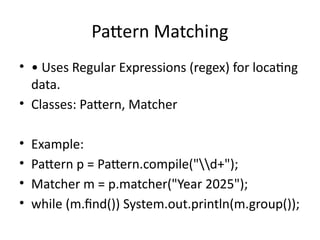
Pattern Matching
• •Uses Regular Expressions (regex) for locating
data.
• Classes: Pattern, Matcher
• Example:
• Pattern p = Pattern.compile("d+");
• Matcher m = p.matcher("Year 2025");
• while (m.find()) System.out.println(m.group());
16.
Practical Example: Reading&
Writing Mixed Data
• Example:
• FileOutputStream fos = new
FileOutputStream("example.txt");
• ObjectOutputStream oos = new
ObjectOutputStream(fos);
• oos.writeObject("Java Streams");
• oos.close();
17.
Best Practices
• •Always close streams (use try-with-
resources).
• • Use Buffered streams for performance.
• • Handle serialization carefully.
• • Prefer java.time API over Date.
18.
Summary
• • Streams= continuous data flow.
• • Byte & Character streams handle data
differently.
• • RandomAccessFile for file manipulation.
• • Formatting & Parsing enhance globalization.
• • Regex helps locate and validate data.
19.
Real-World Applications
• FileUploads & Downloads
• Data Logging
• Network Communication
• Object Storage
• Text Analysis and Tokenizing


![The java.io.Console Class
• Reads text securely from the console.
• Ideal for passwords (without echoing input).
• Example:
• Console con = System.console();
• String username = con.readLine("Enter
username: ");
• char[] pwd = con.readPassword("Enter
password: ");](https://image.slidesharecdn.com/unitivjava-260106050048-76de789d/85/Unit-IV-java-pptx-java-Programming-8-320.jpg)