I/O (Input andOutput) - is used to process the input and produce the
output.
Input is input is the data that we give to the program through the
keyboard and Output is the data what we receive from the program in
the form of result.
java.io package - contains all the classes required for input and output
operations
Java Output
In Java, you can simply use
System.out.println(); or
System.out.print(); or
System.out.printf();
//example to output a line.
class example
{
public static void main(String[ ] args)
{
System.out.println(“Hello.");
}
}
Output:
Hello
Java Input
We can take input from keyboard using the
1. Scanner class.
2. BufferedReader
In order to use the object of Scanner, we need to import java.util.Scanner package.
Example: Get Integer Input From the User
import java.util.Scanner;
class example
{
public static void main(String[] args)
{
Scanner input = new Scanner(System.in);
System.out.print("Enter an integer: ");
int number = input.nextInt();
System.out.println("You entered " + number);
input.close(); // closing the scanner object
}
}
Output:
Enter an integer: 23
You entered 23
6.
Stream
Stream represents flowof data or the sequence of data. Java uses the concept of a stream
to make I/O operation fast. In Java, a stream is a path along which the data flows
To give input we use the input stream(is used to read data from the source)
To give output we use the output stream( is used to write data to the destination.)
Example: System.out.println("Hello, World!");
Here we have used System.out to print a string.
System.out is a type of output stream.
Similarly, there are input streams to take input. System.in
Types of Streams:
[A] Depending on the type of operations, streams divided into two primary classes:
1. Input Stream: These streams are used to read data that must be taken as an input from a source array or file or any peripheral device. For
eg. System.in, FileInputStream, BufferedInputStream etc.
2. Output Stream: These streams are used to write data as outputs into an array or file or any output peripheral device. For eg. System.out,
System.err, FileOutputStream, BufferedOutputStream etc.
3 standard or default streams that Java has to provide which are also most common in use:
1) System.in: This is the standard input stream that is used to read characters from the keyboard or any other standard input device.
2) System.out: This is the standard output stream that is used to produce the result of a program on an output device like the computer screen.
Here is a list of the various print functions that we use to output statements:
print(): This method prints the text on the console and the cursor remains at the end of the text at the console. The next printing takes
place from just here.
Syntax: System.out.print(parameter);
7.
println(): It printsthe text on the console and the cursor moves to the start of the next line at the console. The next
printing takes place from the next line.
Syntax:System.out.println(parameter);
printf(): This is the easiest of all methods as this is similar to printf in C. Note that System.out.print() and
System.out.println() take a single argument, but printf() may take multiple arguments. This is used to format the
output in Java.
Syntax: System.out.printf(parameter1, parameter2…..);
3) System.err: This is "standard" error output stream that is used to output all the error data that a program might throw,
on a computer screen or any standard output device.
System.err works like System.out except it is normally only used to output error texts. This stream also uses all the 3
above-mentioned functions to output the error data:
print()
println()
printf()
Example:
System.err.println("File opening failed:");
File/Data Format
There are two fundamentally different ways to store data.
1. Text format
A text file stores data in the form of alphabets, digits and other special symbols by
storing their ASCII values and are in a human readable format. For example, any file with a
.txt, .c, etc extension.
2. Binary format.
a binary file contains a sequence or a collection of bytes which are not in a human
readable format. For example, files with .exe, .mp3, etc extension. For handling such binary
files we need a specific type of software to open it.
For .mp3 files = any media player(like vlc player)
8.
Types of Streams:
[B]Depending on the type of File or Based on the data they handle, streams divided into two primary classes:
1. ByteStream: These handle data in bytes (8 bits) i.e., the byte stream classes read/write data of 8 bits. Using these you can
store characters, videos, audios, images etc. If the data items are made available in binary format, we have to use the Byte
stream classes.
2. CharacterStream: These handle data in 16 bit Unicode. Using these you can read and write text data only. If data items are
available in text format, we have to use the Character stream classes to process the input and output.
List of various Classes under Character Stream and Bytestream
9.
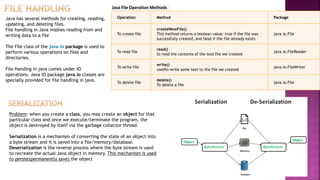
Java has severalmethods for creating, reading,
updating, and deleting files.
File handling in Java implies reading from and
writing data to a file
The File class of the java.io package is used to
perform various operations on files and
directories.
File Handing in java comes under IO
operations. Java IO package java.io classes are
specially provided for file handling in java.
Operation Method Package
To create file
createNewFile()
This method returns a boolean value: true if the file was
successfully created, and false if the file already exists
java.io.File
To read file
read()
to read the contents of the text file we created
java.io.FileReader
To write file
write()
usedto write some text to the file we created
java.io.FileWriter
To delete file
delete()
To delete a file
java.io.File
Java File Operation Methods
Problem: when you create a class, you may create an object for that
particular class and once we execute/terminate the program, the
object is destroyed by itself via the garbage collector thread.
Serialization is a mechanism of converting the state of an object into
a byte stream and it is saved into a file/memory/database.
Deserialization is the reverse process where the byte stream is used
to recreate the actual Java object in memory. This mechanism is used
to persist(permanently save) the object
10.
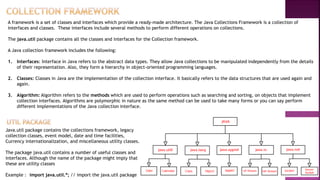
A framework isa set of classes and interfaces which provide a ready-made architecture. The Java Collections Framework is a collection of
interfaces and classes. These interfaces include several methods to perform different operations on collections.
The java.util package contains all the classes and interfaces for the Collection framework.
A Java collection framework includes the following:
1. Interfaces: Interface in Java refers to the abstract data types. They allow Java collections to be manipulated independently from the details
of their representation. Also, they form a hierarchy in object-oriented programming languages.
2. Classes: Classes in Java are the implementation of the collection interface. It basically refers to the data structures that are used again and
again.
3. Algorithm: Algorithm refers to the methods which are used to perform operations such as searching and sorting, on objects that implement
collection interfaces. Algorithms are polymorphic in nature as the same method can be used to take many forms or you can say perform
different implementations of the Java collection interface.
Java.util package contains the collections framework, legacy
collection classes, event model, date and time facilities,
Currency internationalization, and miscellaneous utility classes.
The package java.util contains a number of useful classes and
interfaces. Although the name of the package might imply that
these are utility classes
Example : import java.util.*; // import the java.util package
12.
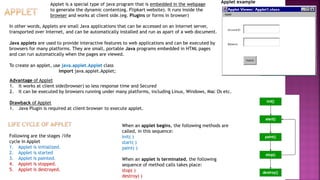
In other words,Applets are small Java applications that can be accessed on an Internet server,
transported over Internet, and can be automatically installed and run as apart of a web document.
Java applets are used to provide interactive features to web applications and can be executed by
browsers for many platforms. They are small, portable Java programs embedded in HTML pages
and can run automatically when the pages are viewed.
To create an applet, use java.applet.Applet class
import java.applet.Applet;
Advantage of Applet
1. It works at client side(browser) so less response time and Secured
2. It can be executed by browsers running under many platforms, including Linux, Windows, Mac Os etc.
Drawback of Applet
1. Java Plugin is required at client browser to execute applet.
Applet example
Applet is a special type of java program that is embedded in the webpage
to generate the dynamic content(eg. Flipkart website). It runs inside the
browser and works at client side.(eg. Plugins or forms in browser)
Following are the stages /life
cycle in Applet
1. Applet is initialized.
2. Applet is started
3. Applet is painted.
4. Applet is stopped.
5. Applet is destroyed.
When an applet begins, the following methods are
called, in this sequence:
init( )
start( )
paint( )
When an applet is terminated, the following
sequence of method calls takes place:
stop( )
destroy( )
13.
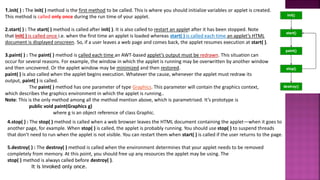
1.init( ) :The init( ) method is the first method to be called. This is where you should initialize variables or applet is created.
This method is called only once during the run time of your applet.
2.start( ) : The start( ) method is called after init( ). It is also called to restart an applet after it has been stopped. Note
that init( ) is called once i.e. when the first time an applet is loaded whereas start( ) is called each time an applet’s HTML
document is displayed onscreen. So, if a user leaves a web page and comes back, the applet resumes execution at start( ).
3.paint( ) : The paint( ) method is called each time an AWT-based applet’s output must be redrawn. This situation can
occur for several reasons. For example, the window in which the applet is running may be overwritten by another window
and then uncovered. Or the applet window may be minimized and then restored.
paint( ) is also called when the applet begins execution. Whatever the cause, whenever the applet must redraw its
output, paint( ) is called.
The paint( ) method has one parameter of type Graphics. This parameter will contain the graphics context,
which describes the graphics environment in which the applet is running..
Note: This is the only method among all the method mention above, which is parametrised. It’s prototype is
public void paint(Graphics g)
where g is an object reference of class Graphic.
4.stop( ) : The stop( ) method is called when a web browser leaves the HTML document containing the applet—when it goes to
another page, for example. When stop( ) is called, the applet is probably running. You should use stop( ) to suspend threads
that don’t need to run when the applet is not visible. You can restart them when start( ) is called if the user returns to the page.
5.destroy( ) : The destroy( ) method is called when the environment determines that your applet needs to be removed
completely from memory. At this point, you should free up any resources the applet may be using. The
stop( ) method is always called before destroy( ).
It is invoked only once.
14.
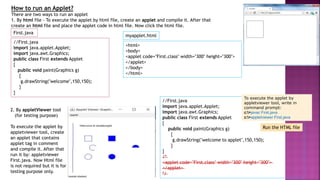
How to runan Applet?
There are two ways to run an applet
1. By html file - To execute the applet by html file, create an applet and compile it. After that
create an html file and place the applet code in html file. Now click the html file.
//First.java
import java.applet.Applet;
import java.awt.Graphics;
public class First extends Applet
{
public void paint(Graphics g)
{
g.drawString("welcome",150,150);
}
}
<html>
<body>
<applet code="First.class" width="300" height="300">
</applet>
</body>
</html>
First.java
myapplet.html
2. By appletViewer tool
(for testing purpose)
To execute the applet by
appletviewer tool, create
an applet that contains
applet tag in comment
and compile it. After that
run it by: appletviewer
First.java. Now Html file
is not required but it is for
testing purpose only.
Run the HTML file
//First.java
import java.applet.Applet;
import java.awt.Graphics;
public class First extends Applet
{
public void paint(Graphics g)
{
g.drawString("welcome to applet",150,150);
}
}
/*
<applet code="First.class" width="300" height="300">
</applet>
*/
To execute the applet by
appletviewer tool, write in
command prompt:
c:>javac First.java
c:>appletviewer First.java
15.
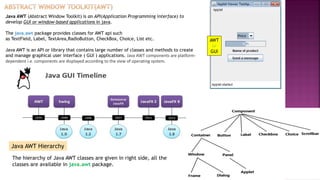
Java AWT (AbstractWindow Toolkit) is an API(Application Programming interface) to
develop GUI or window-based applications in java.
The java.awt package provides classes for AWT api such
as TextField, Label, TextArea,RadioButton, CheckBox, Choice, List etc.
Java AWT is an API or library that contains large number of classes and methods to create
and manage graphical user interface ( GUI ) applications. Java AWT components are platform-
dependent i.e. components are displayed according to the view of operating system.
AWT
or
GUI
Java AWT Hierarchy
The hierarchy of Java AWT classes are given in right side, all the
classes are available in java.awt package.
16.
Containers and ComponentsAWT Component Classes
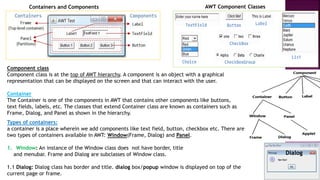
Component class
Component class is at the top of AWT hierarchy. A component is an object with a graphical
representation that can be displayed on the screen and that can interact with the user.
Container
The Container is one of the components in AWT that contains other components like buttons,
text fields, labels, etc. The classes that extend Container class are known as containers such as
Frame, Dialog, and Panel as shown in the hierarchy.
Types of containers:
a container is a place wherein we add components like text field, button, checkbox etc. There are
two types of containers available in AWT: Window(Frame, Dialog) and Panel.
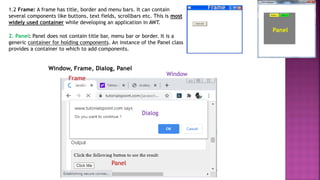
1. Window: An instance of the Window class does not have border, title
and menubar. Frame and Dialog are subclasses of Window class.
1.1 Dialog: Dialog class has border and title. dialog box/popup window is displayed on top of the
current page or frame.
Dialog
17.
Panel
2. Panel: Paneldoes not contain title bar, menu bar or border. It is a
generic container for holding components. An instance of the Panel class
provides a container to which to add components.
1.2 Frame: A frame has title, border and menu bars. It can contain
several components like buttons, text fields, scrollbars etc. This is most
widely used container while developing an application in AWT.
Frame
Window, Frame, Dialog, Panel
Window
Frame
Dialog
Panel
18.
Java AWT Hierarchyor Components of AWT
The hierarchy of Java AWT classes or AWT
components are given below. All the classes are
available in java.awt package.
Container - The Container is a component in AWT that can contain another components like buttons,
textfields, labels etc. The classes that extends Container class are known as container such as Frame,
Dialog and Panel.
It is basically a screen where the where the components are placed at their specific locations. Thus it contains
and controls the layout of components.
There are four types of containers in Java AWT:
1.Window
2.Panel
3.Frame
4.Dialog
.
Window
The window is the container
that have no borders and menu
bars. You must use frame,
dialog or another window for
creating a window. We need to
create an instance of Window
class to create this container.
Panel
The Panel is the container that
doesn't contain title bar, border or
menu bar. It is generic container
for holding the components. It can
have other components like
button, text field etc. An instance
of Panel class creates a container,
in which we can add components.
Frame
The Frame is the container that contain
title bar and border and can have menu
bars. It can have other components like
button, text field, scrollbar etc. Frame is
most widely used container while
developing an AWT application
Components - All the elements like the button,
text fields, scroll bars, etc. are called components.
In Java AWT, there are classes for each
component as shown in above diagram. In order
to place every component in a particular position
on a screen, we need to add them to a container.
OR
“Draw any 1
diagram”
19.
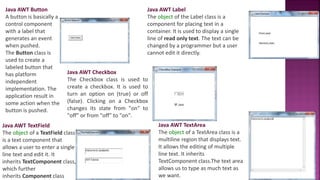
Java AWT Button
Abutton is basically a
control component
with a label that
generates an event
when pushed.
The Button class is
used to create a
labeled button that
has platform
independent
implementation. The
application result in
some action when the
button is pushed.
Java AWT Label
The object of the Label class is a
component for placing text in a
container. It is used to display a single
line of read only text. The text can be
changed by a programmer but a user
cannot edit it directly.
Java AWT TextField
The object of a TextField class
is a text component that
allows a user to enter a single
line text and edit it. It
inherits TextComponent class,
which further
inherits Component class
Java AWT TextArea
The object of a TextArea class is a
multiline region that displays text.
It allows the editing of multiple
line text. It inherits
TextComponent class.The text area
allows us to type as much text as
we want.
Java AWT Checkbox
The Checkbox class is used to
create a checkbox. It is used to
turn an option on (true) or off
(false). Clicking on a Checkbox
changes its state from "on" to
"off" or from "off" to "on".
20.
An event canbe defined as changing the state of an object or behavior by performing actions. Actions can
be a button click, cursor movement, keypress through keyboard or page scrolling, etc.
The java.awt.event package can be used to provide various event classes.
Classification of Events
•Foreground Events
•Background Events
1. Foreground Events
Foreground events are the events that require user interaction to generate, i.e., foreground events are generated due to interaction by the user
on components in Graphic User Interface (GUI). Interactions are nothing but clicking on a button, scrolling the scroll bar, cursor moments, etc.
2. Background Events
Events that don’t require interactions of users to generate are known as background events. Examples of these events are operating system
failures/interrupts, operation completion, etc.
Event Handling
It is a mechanism to control the events and to decide what should happen after an
event occur. To handle the events, Java follows the Delegation Event model.
Delegation Event model - It has Sources and Listeners.
•Source: Events are generated from the source.
There are various sources like buttons, checkboxes,
list, menu-item, choice, scrollbar, text components,
windows, etc., to generate events.
•Listeners: Listeners are used for
handling the events generated from
the source. Each of these listeners
represents interfaces that are
responsible for handling events.
To perform Event Handling, we need
to register the source with the listener.
21.
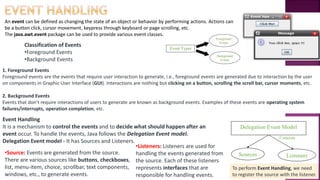
Event Sources :An event source that generates an event is
mostly an AWT component. In Java java.awt.Component
specifies the components that may or may not generate events.
These components classes are the subclass of the above class.
These event sources may be the button, combobox, textbox etc.
Event Classes : Event Classes in Java are the classes defined for
almost all the components that may generate events. These events
classes are named by giving the specific name such as for the
component source button the event class is ActionEvent. Following are
the list of Event Classes :
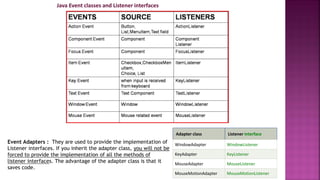
ActionEvent : Button, TextField, List, Menu
WindowEvent : Frame
ItemEvent : Checkbox, List
AdjustmentEvent : Scrollbar
MouseEvent : Mouse
KeyEvent : Keyboard
Event Listeners :
These are interfaces of Java that provides
various methods that can be used in different
implemented classes. The job of event listeners
interfaces involves listening for events and
then processing them appropriately when they
take place. Listeners listens the event
generated by a component. In Java almost all
components has its own listener that handles
the event generated by the component. For
example, there is a Listener named
ActionListener handles the events generated
from button, textfield, list, menus.
Event handling in Java comprises
four types of classes or event handlers.
1. Event Sources
2. Event classes
3. Event Listeners
4. Event Adapters
Event handling mechanism
22.
Java Event classesand Listener interfaces
Event Adapters : They are used to provide the implementation of
Listener interfaces. If you inherit the adapter class, you will not be
forced to provide the implementation of all the methods of
listener interfaces. The advantage of the adapter class is that it
saves code.
Adapter class Listener interface
WindowAdapter WindowListener
KeyAdapter KeyListener
MouseAdapter MouseListener
MouseMotionAdapter MouseMotionListener


![I/O (Input and Output) - is used to process the input and produce the
output.
Input is input is the data that we give to the program through the
keyboard and Output is the data what we receive from the program in
the form of result.
java.io package - contains all the classes required for input and output
operations
Java Output
In Java, you can simply use
System.out.println(); or
System.out.print(); or
System.out.printf();
//example to output a line.
class example
{
public static void main(String[ ] args)
{
System.out.println(“Hello.");
}
}
Output:
Hello
Java Input
We can take input from keyboard using the
1. Scanner class.
2. BufferedReader
In order to use the object of Scanner, we need to import java.util.Scanner package.
Example: Get Integer Input From the User
import java.util.Scanner;
class example
{
public static void main(String[] args)
{
Scanner input = new Scanner(System.in);
System.out.print("Enter an integer: ");
int number = input.nextInt();
System.out.println("You entered " + number);
input.close(); // closing the scanner object
}
}
Output:
Enter an integer: 23
You entered 23](https://image.slidesharecdn.com/java4-250607043900-679ccb4b/85/JAVA-4-pdfdhfvksfvhsjfbjhdjhbjshjshjvcjdbh-5-320.jpg)
![Stream
Stream represents flow of data or the sequence of data. Java uses the concept of a stream
to make I/O operation fast. In Java, a stream is a path along which the data flows
To give input we use the input stream(is used to read data from the source)
To give output we use the output stream( is used to write data to the destination.)
Example: System.out.println("Hello, World!");
Here we have used System.out to print a string.
System.out is a type of output stream.
Similarly, there are input streams to take input. System.in
Types of Streams:
[A] Depending on the type of operations, streams divided into two primary classes:
1. Input Stream: These streams are used to read data that must be taken as an input from a source array or file or any peripheral device. For
eg. System.in, FileInputStream, BufferedInputStream etc.
2. Output Stream: These streams are used to write data as outputs into an array or file or any output peripheral device. For eg. System.out,
System.err, FileOutputStream, BufferedOutputStream etc.
3 standard or default streams that Java has to provide which are also most common in use:
1) System.in: This is the standard input stream that is used to read characters from the keyboard or any other standard input device.
2) System.out: This is the standard output stream that is used to produce the result of a program on an output device like the computer screen.
Here is a list of the various print functions that we use to output statements:
print(): This method prints the text on the console and the cursor remains at the end of the text at the console. The next printing takes
place from just here.
Syntax: System.out.print(parameter);](https://image.slidesharecdn.com/java4-250607043900-679ccb4b/85/JAVA-4-pdfdhfvksfvhsjfbjhdjhbjshjshjvcjdbh-6-320.jpg)
![Types of Streams:
[B] Depending on the type of File or Based on the data they handle, streams divided into two primary classes:
1. ByteStream: These handle data in bytes (8 bits) i.e., the byte stream classes read/write data of 8 bits. Using these you can
store characters, videos, audios, images etc. If the data items are made available in binary format, we have to use the Byte
stream classes.
2. CharacterStream: These handle data in 16 bit Unicode. Using these you can read and write text data only. If data items are
available in text format, we have to use the Character stream classes to process the input and output.
List of various Classes under Character Stream and Bytestream](https://image.slidesharecdn.com/java4-250607043900-679ccb4b/85/JAVA-4-pdfdhfvksfvhsjfbjhdjhbjshjshjvcjdbh-8-320.jpg)