Java Development: A
ComprehensiveGuide
Welcome to this comprehensive guide on Java development. Over the
next few cards, we will explore the fundamental aspects of Java, from
setting up your development environment to building a simple
application. This presentation aims to provide a clear and concise
overview, ensuring you grasp the core concepts and best practices
essential for a successful Java journey.
by 13 69
2.
Setting Up YourJava Environment
JDK (Java Development Kit)
The JDK is the essential foundation, providing the
Java Runtime Environment (JRE), compilers, and
debuggers. It's crucial for writing and executing Java
applications efficiently. Download the latest stable
version for optimal performance and security.
IDE (Integrated Development
Environment)
Choose between powerful IDEs like IntelliJ IDEA or
Eclipse. These tools offer features such as intelligent
code completion, debugging, and project
management, significantly enhancing developer
productivity and simplifying complex tasks.
Setting up your Java development environment correctly is the first step towards building robust applications. Begin by
installing the Java Development Kit (JDK), which includes all the necessary tools. Next, select an Integrated Development
Environment (IDE) like IntelliJ IDEA or Eclipse. These IDEs provide a rich set of features that streamline coding, debugging,
and project management, making your development process smooth and efficient.
3.
Core Java Concepts:Data Types, Operators,
Control Flow
1 Data Types
Java supports primitive data
types like int, char, boolean,
and double, as well as reference
types for objects. Understanding
these is crucial for effective
memory management and data
manipulation.
2 Operators
Java uses various operators for
arithmetic, assignment,
comparison, and logical
operations. Mastering these
allows for complex calculations
and conditional logic within your
code.
3 Control Flow
Control flow statements like if-
else, for, while, and switch
dictate the order in which code
executes. They are fundamental
for implementing decision-
making and repetitive tasks in
your programs.
Understanding core Java concepts is vital for writing effective code. Data types define the kind of values variables can hold,
while operators perform specific actions on these values. Control flow statements, such as conditional loops and branching,
determine the execution order of your program, enabling dynamic and responsive applications. A strong grasp of these
fundamentals lays the groundwork for more advanced Java programming.
4.
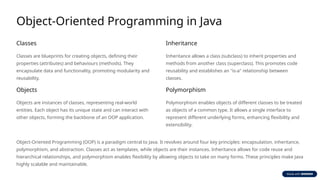
Object-Oriented Programming inJava
Classes
Classes are blueprints for creating objects, defining their
properties (attributes) and behaviours (methods). They
encapsulate data and functionality, promoting modularity and
reusability.
Objects
Objects are instances of classes, representing real-world
entities. Each object has its unique state and can interact with
other objects, forming the backbone of an OOP application.
Inheritance
Inheritance allows a class (subclass) to inherit properties and
methods from another class (superclass). This promotes code
reusability and establishes an "is-a" relationship between
classes.
Polymorphism
Polymorphism enables objects of different classes to be treated
as objects of a common type. It allows a single interface to
represent different underlying forms, enhancing flexibility and
extensibility.
Object-Oriented Programming (OOP) is a paradigm central to Java. It revolves around four key principles: encapsulation, inheritance,
polymorphism, and abstraction. Classes act as templates, while objects are their instances. Inheritance allows for code reuse and
hierarchical relationships, and polymorphism enables flexibility by allowing objects to take on many forms. These principles make Java
highly scalable and maintainable.
5.
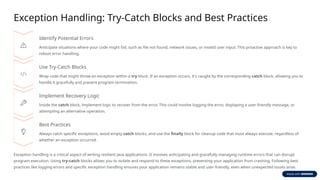
Exception Handling: Try-CatchBlocks and Best Practices
Identify Potential Errors
Anticipate situations where your code might fail, such as file not found, network issues, or invalid user input. This proactive approach is key to
robust error handling.
Use Try-Catch Blocks
Wrap code that might throw an exception within a try block. If an exception occurs, it's caught by the corresponding catch block, allowing you to
handle it gracefully and prevent program termination.
Implement Recovery Logic
Inside the catch block, implement logic to recover from the error. This could involve logging the error, displaying a user-friendly message, or
attempting an alternative operation.
Best Practices
Always catch specific exceptions, avoid empty catch blocks, and use the finally block for cleanup code that must always execute, regardless of
whether an exception occurred.
Exception handling is a critical aspect of writing resilient Java applications. It involves anticipating and gracefully managing runtime errors that can disrupt
program execution. Using try-catch blocks allows you to isolate and respond to these exceptions, preventing your application from crashing. Following best
practices like logging errors and specific exception handling ensures your application remains stable and user-friendly, even when unexpected issues arise.
6.
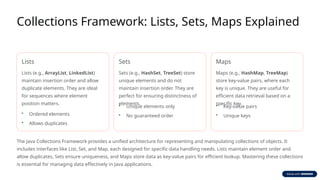
Collections Framework: Lists,Sets, Maps Explained
Lists
Lists (e.g., ArrayList, LinkedList)
maintain insertion order and allow
duplicate elements. They are ideal
for sequences where element
position matters.
• Ordered elements
• Allows duplicates
Sets
Sets (e.g., HashSet, TreeSet) store
unique elements and do not
maintain insertion order. They are
perfect for ensuring distinctness of
elements.
• Unique elements only
• No guaranteed order
Maps
Maps (e.g., HashMap, TreeMap)
store key-value pairs, where each
key is unique. They are useful for
efficient data retrieval based on a
specific key.
• Key-value pairs
• Unique keys
The Java Collections Framework provides a unified architecture for representing and manipulating collections of objects. It
includes interfaces like List, Set, and Map, each designed for specific data handling needs. Lists maintain element order and
allow duplicates, Sets ensure uniqueness, and Maps store data as key-value pairs for efficient lookup. Mastering these collections
is essential for managing data effectively in Java applications.
7.
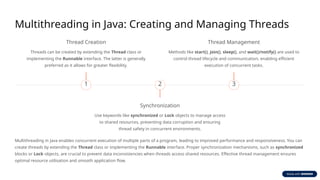
Multithreading in Java:Creating and Managing Threads
1
Thread Creation
Threads can be created by extending the Thread class or
implementing the Runnable interface. The latter is generally
preferred as it allows for greater flexibility.
2
Synchronization
Use keywords like synchronized or Lock objects to manage access
to shared resources, preventing data corruption and ensuring
thread safety in concurrent environments.
3
Thread Management
Methods like start(), join(), sleep(), and wait()/notify() are used to
control thread lifecycle and communication, enabling efficient
execution of concurrent tasks.
Multithreading in Java enables concurrent execution of multiple parts of a program, leading to improved performance and responsiveness. You can
create threads by extending the Thread class or implementing the Runnable interface. Proper synchronization mechanisms, such as synchronized
blocks or Lock objects, are crucial to prevent data inconsistencies when threads access shared resources. Effective thread management ensures
optimal resource utilisation and smooth application flow.
8.
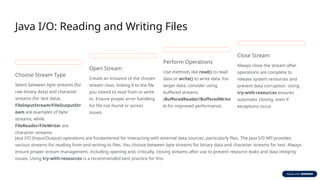
Java I/O: Readingand Writing Files
Choose Stream Type
Select between byte streams (for
raw binary data) and character
streams (for text data).
FileInputStream/FileOutputStr
eam are examples of byte
streams, while
FileReader/FileWriter are
character streams.
Open Stream
Create an instance of the chosen
stream class, linking it to the file
you intend to read from or write
to. Ensure proper error handling
for file not found or access
issues.
Perform Operations
Use methods like read() to read
data or write() to write data. For
larger data, consider using
buffered streams
(BufferedReader/BufferedWrite
r) for improved performance.
Close Stream
Always close the stream after
operations are complete to
release system resources and
prevent data corruption. Using
try-with-resources ensures
automatic closing, even if
exceptions occur.
Java I/O (Input/Output) operations are fundamental for interacting with external data sources, particularly files. The Java I/O API provides
various streams for reading from and writing to files. You choose between byte streams for binary data and character streams for text. Always
ensure proper stream management, including opening and, critically, closing streams after use to prevent resource leaks and data integrity
issues. Using try-with-resources is a recommended best practice for this.
9.
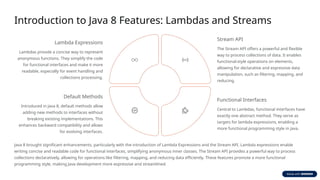
Introduction to Java8 Features: Lambdas and Streams
Lambda Expressions
Lambdas provide a concise way to represent
anonymous functions. They simplify the code
for functional interfaces and make it more
readable, especially for event handling and
collections processing.
Stream API
The Stream API offers a powerful and flexible
way to process collections of data. It enables
functional-style operations on elements,
allowing for declarative and expressive data
manipulation, such as filtering, mapping, and
reducing.
Functional Interfaces
Central to Lambdas, functional interfaces have
exactly one abstract method. They serve as
targets for lambda expressions, enabling a
more functional programming style in Java.
Default Methods
Introduced in Java 8, default methods allow
adding new methods to interfaces without
breaking existing implementations. This
enhances backward compatibility and allows
for evolving interfaces.
Java 8 brought significant enhancements, particularly with the introduction of Lambda Expressions and the Stream API. Lambda expressions enable
writing concise and readable code for functional interfaces, simplifying anonymous inner classes. The Stream API provides a powerful way to process
collections declaratively, allowing for operations like filtering, mapping, and reducing data efficiently. These features promote a more functional
programming style, making Java development more expressive and streamlined.
10.
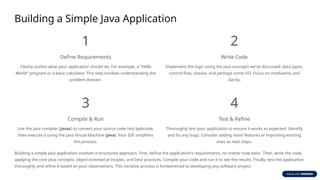
Building a SimpleJava Application
1
Define Requirements
Clearly outline what your application should do. For example, a "Hello
World" program or a basic calculator. This step involves understanding the
problem domain.
2
Write Code
Implement the logic using the Java concepts we've discussed: data types,
control flow, classes, and perhaps some I/O. Focus on modularity and
clarity.
3
Compile & Run
Use the Java compiler (javac) to convert your source code into bytecode,
then execute it using the Java Virtual Machine (java). Your IDE simplifies
this process.
4
Test & Refine
Thoroughly test your application to ensure it works as expected. Identify
and fix any bugs. Consider adding more features or improving existing
ones as next steps.
Building a simple Java application involves a structured approach. First, define the application's requirements, no matter how basic. Then, write the code,
applying the core Java concepts, object-oriented principles, and best practices. Compile your code and run it to see the results. Finally, test the application
thoroughly and refine it based on your observations. This iterative process is fundamental to developing any software project.