DKM COLLEGE FOR WOMEN(AUTONOMOUS), VELLORE
DEPARTMENT OF COMPUTER SCIENCE AND APPLICATIONS
Prepared by-Bhuvaneswari R, ( Asst.Professor Department of Computer Science and Applications)
UNIT III – MULTIPLEXING AND SWITCHING
Multiplexing - Types of Multiplexing - Multiplexing Application - Telephone system - Project 802 - Ethernet -
Token Bus - Token Ring - Circuit Switching - Packet Switching - Message switching - Connection Oriented and
Connectionless services.
MULTIPLEXING
 Multiplexing is a technique used to combine and send the multiple data streams over a single
medium.
 The process of combining the data streams is known as multiplexing and hardware used for
multiplexing is known as a multiplexer.
 Multiplexing is achieved by using a device called Multiplexer (MUX) that combines n input lines to
generate a single output line. Multiplexing follows many-to-one, i.e., n input lines and one output
line.
 Demultiplexing is achieved by using a device called Demultiplexer (DEMUX) available at the receiving
end.
 DEMUX separates a signal into its component signals (one input and n outputs). Therefore, we can
say that demultiplexing follows the one-to-many approach.
Concept of Multiplexing
o The 'n' input lines are transmitted through a multiplexer and multiplexer combines the signals to
form a composite signal.
o The composite signal is passed through a Demultiplexer and demultiplexer separates a signal to
component signals and transfers them to their respective destinations.
Advantages of Multiplexing:
o More than one signal can be sent over a single medium.
o The bandwidth of a medium can be utilized effectively.
Types of Multiplexing
DKM COLLEGE FOR WOMEN(AUTONOMOUS), VELLORE
DEPARTMENT OF COMPUTER SCIENCE AND APPLICATIONS
Prepared by-Bhuvaneswari R, ( Asst.Professor Department of Computer Science and Applications)
Frequency-division Multiplexing (FDM)
o It is an analog technique.
o Frequency Division Multiplexing is a technique in which the available bandwidth of a single
transmission medium is subdivided into several channels.
o In the above diagram, a single transmission medium is subdivided into several frequency channels,
and each frequency channel is given to different devices. Device 1 has a frequency channel of range
from 1 to 5.
o The input signals are translated into frequency bands by using modulation techniques, and they are
combined by a multiplexer to form a composite signal.
o The main aim of the FDM is to subdivide the available bandwidth into different frequency channels
and allocate them to different devices.
o Using the modulation technique, the input signals are transmitted into frequency bands and then
combined to form a composite signal.
o The carriers which are used for modulating the signals are known as sub-carriers. They are
represented as f1,f2..fn.
o FDM is mainly used in radio broadcasts and TV networks.
Advantages Of FDM:
DKM COLLEGE FOR WOMEN(AUTONOMOUS), VELLORE
DEPARTMENT OF COMPUTER SCIENCE AND APPLICATIONS
Prepared by-Bhuvaneswari R, ( Asst.Professor Department of Computer Science and Applications)
o FDM is used for analog signals.
o FDM process is very simple and easy modulation.
o A Large number of signals can be sent through an FDM simultaneously.
o It does not require any synchronization between sender and receiver.
Disadvantages Of FDM:
o FDM technique is used only when low-speed channels are required.
o It suffers the problem of crosstalk.
o A Large number of modulators are required.
o It requires a high bandwidth channel.
Applications Of FDM:
o FDM is commonly used in TV networks.
o It is used in FM and AM broadcasting. Each FM radio station has different frequencies, and they are
multiplexed to form a composite signal. The multiplexed signal is transmitted in the air.
Wavelength Division Multiplexing (WDM)
o Wavelength Division Multiplexing is same as FDM except that the optical signals are transmitted
through the fibre optic cable.
o WDM is used on fibre optics to increase the capacity of a single fibre.
o It is used to utilize the high data rate capability of fibre optic cable.
o It is an analog multiplexing technique.
o Optical signals from different source are combined to form a wider band of light with the help of
multiplexer.
o At the receiving end, demultiplexer separates the signals to transmit them to their respective
destinations.
o Multiplexing and Demultiplexing can be achieved by using a prism.Prism can perform a role of
multiplexer by combining the various optical signals to form a composite signal, and the composite
signal is transmitted through a fibre optical cable.
o Prism also performs a reverse operation, i.e., demultiplexing the signal.
DKM COLLEGE FOR WOMEN(AUTONOMOUS), VELLORE
DEPARTMENT OF COMPUTER SCIENCE AND APPLICATIONS
Prepared by-Bhuvaneswari R, ( Asst.Professor Department of Computer Science and Applications)
o
Advantages of WDM:
 Easier to reconfigure.
 Full duplex transmission is possible.
 It provides higher bandwidth.
 Optical component are similar and more reliable.
 High security.
 This could be the best approach as it is simple to implement.
Disadvantages of WDM:
 Signals cannot be very close
 Lightwave carrying while using WDM are limited to 2 point circuit
 Cost of the system increases with the addition of optical components
 Difficulty in wavelength tuning
 Inefficiency in BW utilization
 Difficulty in a cascaded topology
Time Division Multiplexing
o It is a digital technique.
o In Frequency Division Multiplexing Technique, all signals operate at the same time with different
frequency, but in case of Time Division Multiplexing technique, all signals operate at the same
frequency with different time.
o In Time Division Multiplexing technique, the total time available in the channel is distributed among
different users. Therefore, each user is allocated with different time interval known as a Time slot at
which data is to be transmitted by the sender.
o A user takes control of the channel for a fixed amount of time.
o In Time Division Multiplexing technique, data is not transmitted simultaneously rather the data is
transmitted one-by-one.
o In TDM, the signal is transmitted in the form of frames. Frames contain a cycle of time slots in which
each frame contains one or more slots dedicated to each user.
DKM COLLEGE FOR WOMEN(AUTONOMOUS), VELLORE
DEPARTMENT OF COMPUTER SCIENCE AND APPLICATIONS
Prepared by-Bhuvaneswari R, ( Asst.Professor Department of Computer Science and Applications)
o It can be used to multiplex both digital and analog signals but mainly used to multiplex digital signals.
There are two types of TDM:
o Synchronous TDM
o Asynchronous TDM
Synchronous TDM
o A Synchronous TDM is a technique in which time slot is preassigned to every device.
o In Synchronous TDM, each device is given some time slot irrespective of the fact that the device
contains the data or not.
o If the device does not have any data, then the slot will remain empty.
o In Synchronous TDM, signals are sent in the form of frames. Time slots are organized in the form of
frames. If a device does not have data for a particular time slot, then the empty slot will be
transmitted.
o The most popular Synchronous TDM are T-1 multiplexing, ISDN multiplexing, and SONET
multiplexing.
o If there are n devices, then there are n slots.
Concept Of Synchronous TDM
In the below figure, the Synchronous TDM technique is implemented. Each device is allocated with some
time slot. The time slots are transmitted irrespective of whether the sender has data to send or not.
DKM COLLEGE FOR WOMEN(AUTONOMOUS), VELLORE
DEPARTMENT OF COMPUTER SCIENCE AND APPLICATIONS
Prepared by-Bhuvaneswari R, ( Asst.Professor Department of Computer Science and Applications)
Disadvantages Of Synchronous TDM:
o The capacity of the channel is not fully utilized as the empty slots are also transmitted which is having
no data. In the above figure, the first frame is completely filled, but in the last two frames, some slots
are empty. Therefore, we can say that the capacity of the channel is not utilized efficiently.
o The speed of the transmission medium should be greater than the total speed of the input lines. An
alternative approach to the Synchronous TDM is Asynchronous Time Division Multiplexing.
Difference between Synchronous TDM and Asynchronous TDM :
S.NOSynchronous Transmission Asynchronous Transmission
1.
In Synchronous transmission, Data is
sent in form of blocks or frames.
In asynchronous transmission, Data is sent in form of
byte or character.
2. Synchronous transmission is fast. Asynchronous transmission is slow.
3. Synchronous transmission is costly. Asynchronous transmission is economical.
4.
In Synchronous transmission, time
interval of transmission is constant.
In asynchronous transmission, time interval of
transmission is not constant, it is random.
5.
In Synchronous transmission, There is no
gap present between data.
In asynchronous transmission, There is present gap
between data.
6.
Efficient use of transmission line is done
in synchronous transmission.
While in asynchronous transmission, transmission line
remains empty during gap in character transmission.
7.
Synchronous transmission needs
precisely synchronized clocks for the
information of new bytes.
Asynchronous transmission have no need of
synchronized clocks as parity bit is used in this
transmission for information of new bytes.
DKM COLLEGE FOR WOMEN(AUTONOMOUS), VELLORE
DEPARTMENT OF COMPUTER SCIENCE AND APPLICATIONS
Prepared by-Bhuvaneswari R, ( Asst.Professor Department of Computer Science and Applications)
DATA TRANSMISSION
 Data transmission between two devices will be handled in network layer.
 Both Connection-oriented service and Connection-less service are used for the connection
establishment between two or more than two devices.
 These type of services are offered by network layer.
Connection-oriented service
 It is related to the telephone system.
 It provide guaranteed data transmission
 It includes the connection establishment and connection termination.
 In connection-oriented service, Handshake method is used to establish the connection between
sender and receiver.
 Packets follow same path to reach destination.
What is a TCP?
 This protocol is used in connection oriented services
 TCP (Transmission Control Protocol) is a connection-oriented protocol that allows communication
between two or more computer devices by establishing connections in the same or different
networks.
 It is the most important protocol that uses internet protocol to transfer the data from one end to
another. Hence, it is sometimes referred to as TCP/IP.
 It ensures that the connection is established and maintained until the data packet is transferring
between the sender and receiver is complete.
Connection-less service
 it is related to the postal system.
 It does not include any connection establishment and connection termination. Connection-less
Service does not give the guarantee of reliability.
 In this, Packets do not follow same path to reach destination.
DKM COLLEGE FOR WOMEN(AUTONOMOUS), VELLORE
DEPARTMENT OF COMPUTER SCIENCE AND APPLICATIONS
Prepared by-Bhuvaneswari R, ( Asst.Professor Department of Computer Science and Applications)
What is UDP?
 This protocol is used in connectionless services
 The UDP (User Datagram Protocol) is a connectionless protocol that allows communication between
two or more devices without establishing any connection.
 In this protocol, a sender sends the data packets to the receiver that holds the destination address.
 A UDP does not ensure to deliver the data packetsto the correct destination, and it does not generate
any acknowledgment about the sender's data.
 Similarly, it does not acknowledge the receiver about the data. Hence, it is an unreliable protocol.
Difference between Connection-oriented and Connection-less Services:
S.NOConnection-oriented Service Connection-less Service
1.
Connection-oriented service is related to
the telephone system.
Connection-less service is related to the
postal system.
2.
Connection-oriented service is preferred by
long and steady communication.
Connection-less Service is preferred by
bursty communication.
3. Connection-oriented Service is necessary. Connection-less Service is not compulsory.
4. Connection-oriented Service is feasible. Connection-less Service is not feasible.
5.
In connection-oriented Service, Congestion
is not possible.
In connection-less Service, Congestion is
possible.
6.
Connection-oriented Service gives the
guarantee of reliability.
Connection-less Service does not give the
guarantee of reliability.
DKM COLLEGE FOR WOMEN(AUTONOMOUS), VELLORE
DEPARTMENT OF COMPUTER SCIENCE AND APPLICATIONS
Prepared by-Bhuvaneswari R, ( Asst.Professor Department of Computer Science and Applications)
7.
In connection-oriented Service, Packets
follow the same route.
In connection-less Service, Packets do not
follow the same route.
8.
Connection-oriented Services requires a
bandwidth of high range.
Connection-less Service requires a
bandwidth of low range.
9.
It creates a virtual path between the sender
and the receiver.
It does not create any virtual connection or
path between the sender and the receiver.
TOKEN RING (802.5) and token bus (802.4)
Token Ring
 Token ring (IEEE 802.5) is a communication protocol in a local area network (LAN)
 where all stations are connected in a ring topology and pass one or more tokens for channel
acquisition.
 A token is a special frame of 3 bytes that circulates along the ring of stations.
 A station can send data frames only if it holds a token.
 The tokens are released on successful receipt of the data frame.
Token Passing Mechanism in Token Ring
 If a station has a frame to transmit when it receives a token, it sends the frame and then passes the
token to the next station.
 otherwise it simply passes the token to the next station.
 Passing the token means receiving the token from the preceding station and transmitting to the
successor station.
 The data flow is unidirectional in the direction of the token passing.
 In order that tokens are not circulated infinitely, they are removed from the network once their
purpose is completed.
This is shown in the following diagram −
DKM COLLEGE FOR WOMEN(AUTONOMOUS), VELLORE
DEPARTMENT OF COMPUTER SCIENCE AND APPLICATIONS
Prepared by-Bhuvaneswari R, ( Asst.Professor Department of Computer Science and Applications)
Token Bus
 Token Bus (IEEE 802.4) is a standard for implementing token ring over virtual ring in LANs.
 The physical media has a bus or a tree topology and uses coaxial cables.
 A virtual ring is created with the nodes/stations and the token is passed from one node to the next
in a sequence along this virtual ring.
 Each node knows the address of its preceding station and its succeeding station.
 A station can only transmit data when it has the token.
 The working principle of token bus is similar to Token Ring.
Token Passing Mechanism in Token Bus
 A token is a small message that circulates among the stations of a computer network providing
permission to the stations for transmission.
 If a station has data to transmit when it receives a token, it sends the data and then passes the token
to the next station.
 otherwise, it simply passes the token to the next station.
This is depicted in the following diagram –
DKM COLLEGE FOR WOMEN(AUTONOMOUS), VELLORE
DEPARTMENT OF COMPUTER SCIENCE AND APPLICATIONS
Prepared by-Bhuvaneswari R, ( Asst.Professor Department of Computer Science and Applications)
Differences between Token Ring and Token Bus
S.NO TOKEN BUS Network TOKEN RING Network
1.
In the token bus network the token is passed
along a virtual ring.
While in the token ring network the token is
passed over a physical ring.
2.
The token bus network is simply designed for
the large factories.
While the token ring network is designed for
the offices.
3.
The token bus network is defined by the IEEE
802.4 standard.
While the token ring network is defined by
the IEEE 802.5 standard.
4. Token bus network provides better bandwidth.
While the token ring network does not
provide better bandwidth as compared to
token bus.
5. In token bus network, Bus topology is used.
While in token ring network, Star topology is
used.
6.
The maximum time it takes to reach the last
station in a token bus network cannot be
calculated.
While the maximum time to reach the last
station in the token ring network can be
calculated.
Switching techniques
 In large networks, there can be multiple paths from sender to receiver. The switching technique will
decide the best route for data transmission.
 Switching technique is used to connect the systems for making one-to-one communication.
Classification Of Switching Techniques
DKM COLLEGE FOR WOMEN(AUTONOMOUS), VELLORE
DEPARTMENT OF COMPUTER SCIENCE AND APPLICATIONS
Prepared by-Bhuvaneswari R, ( Asst.Professor Department of Computer Science and Applications)
Circuit Switching
o Circuit switching is a switching technique that establishes a dedicated path between sender and
receiver.
o In the Circuit Switching Technique, once the connection is established then the dedicated path will
remain to exist until the connection is terminated.
o Circuit switching in a network operates in a similar way as the telephone works.
o A complete end-to-end path must exist before the communication takes place.
o In case of circuit switching technique, when any user wants to send the data, voice, video, a request
signal is sent to the receiver then the receiver sends back the acknowledgment to ensure the
availability of the dedicated path. After receiving the acknowledgment, dedicated path transfers the
data.
o Circuit switching is used in public telephone network. It is used for voice transmission.
o Fixed data can be transferred at a time in circuit switching technology.
Communication through circuit switching has 3 phases:
o Circuit establishment
o Data transfer
o Circuit Disconnect
Advantages of Circuit Switching:
1. Establishment of a dedicated channel
2. Improves data transmission rate
3. Improves data loss
4. Improves delay in the data flow
DKM COLLEGE FOR WOMEN(AUTONOMOUS), VELLORE
DEPARTMENT OF COMPUTER SCIENCE AND APPLICATIONS
Prepared by-Bhuvaneswari R, ( Asst.Professor Department of Computer Science and Applications)
Disadvantages of Circuit Switching:
 Establishing a dedicated channel sometimes takes a very long duration of time.
 The amount of bandwidth required is more for establishing a dedicated channel.
 Even if a channel is free, it cannot be used to transmit any other data from any other source.
Packet Switching
o The packet switching is a switching technique in which the message is sent in one go, but it is divided
into smaller pieces, and they are sent individually.
o The message splits into smaller pieces known as packets and packets are given a unique number to
identify their order at the receiving end.
o Every packet contains some information in its headers such as source address, destination address
and sequence number.
o Packets will travel across the network, taking the shortest path as possible.
o All the packets are reassembled at the receiving end in correct order.
o If any packet is missing or corrupted, then the message will be sent to resend the message.
o If the correct order of the packets is reached, then the acknowledgment message will be sent.
Types of packet switching:
1. Datagram switching.
This type of packet switching technique consists of multiple data packets, each data packet is individually
routed, means every single data packet contains complete routing information in its header section (source
address, a destination address, total number of data packets, sequence number) i.e. which routes to follow
to reach the destination. When these data packets traverse from different routes then there is a high chance
of packet loss or damage depending on the route and out-of-order delivery is possible which depends on
DKM COLLEGE FOR WOMEN(AUTONOMOUS), VELLORE
DEPARTMENT OF COMPUTER SCIENCE AND APPLICATIONS
Prepared by-Bhuvaneswari R, ( Asst.Professor Department of Computer Science and Applications)
the fluctuating loads on the network's nodes (adapters, switches, and routers)at the moment, so this kind of
packet switching technique is also known as Connectionless Packet Switching.
2. Virtual Circuit switching.
In this type of packet switching the data-packets are first assembled and then sequentially numbered. Now
they are ready to travel across a predefined route, sequentially. The information about the address is not
required here, because all the data packets are sent in sequence. This technique is also known
as Connection-Oriented Packet Switching
Advantages of Packet Switching
 Highly efficient
 Faster
 Much improved fault tolerance
 Cost-effective
 Digital
 Reliable
Message Switching
o Message Switching is a switching technique in which a message is transferred as a complete unit and
routed through intermediate nodes at which it is stored and forwarded.
o In Message Switching technique, there is no establishment of a dedicated path between the sender
and receiver.
o The destination address is appended to the message. Message Switching provides a dynamic routing
as the message is routed through the intermediate nodes based on the information available in the
message.
o Message switches are programmed in such a way so that they can provide the most efficient routes.
o Each and every node stores the entire message and then forward it to the next node. This type of
network is known as store and forward network.
o Message switching treats each message as an independent entity.
DKM COLLEGE FOR WOMEN(AUTONOMOUS), VELLORE
DEPARTMENT OF COMPUTER SCIENCE AND APPLICATIONS
Prepared by-Bhuvaneswari R, ( Asst.Professor Department of Computer Science and Applications)
Advantages Of Message Switching
o Data channels are shared among the communicating devices that improve the efficiency of using
available bandwidth.
o Traffic congestion can be reduced because the message is temporarily stored in the nodes.
o Message priority can be used to manage the network.
o The size of the message which is sent over the network can be varied. Therefore, it supports the data
of unlimited size.
Disadvantages Of Message Switching
o The message switches must be equipped with sufficient storage to enable them to store the
messages until the message is forwarded.
o The Long delay can occur due to the storing and forwarding facility provided by the message
switching technique.
Telephone system
Introduction to Telephone Network
 Telephone Network is used to provide voice communication.
 Telephone Network uses Circuit Switching.
 Originally, the entire network was referred to as a plain old telephone system (POTS) which uses
analog signals.
 With the advancement of technology, i.e. in the computer era, there comes a feature to carry data
in addition to voice.
 Today’s network is both analogous and digital.
Components of Telephone Network
There are three major components of the telephone network:
1. Local loops
2. Trunks
3. Switching Offices
 There are various levels of switching offices such as end offices, tandem offices, and regional
offices.
 The entire telephone network is as shown in the following figure:
DKM COLLEGE FOR WOMEN(AUTONOMOUS), VELLORE
DEPARTMENT OF COMPUTER SCIENCE AND APPLICATIONS
Prepared by-Bhuvaneswari R, ( Asst.Professor Department of Computer Science and Applications)
A telephone system
Local Loops:
 Local Loops are the twisted pair cables that are used to connect a subscriber telephone to the
nearest end office or local central office.
 For voice purposes, its bandwidth is 4000 Hz.
 It is very interesting to examine the telephone number that is associated with each local loop.
 The office is defined by the first three digits and the local loop number is defined by the next four
digits defines.
Trunks:
 It is a type of transmission medium used to handle the communication between offices. Through
multiplexing, trunks can handle hundreds or thousands of connections.
 Mainly transmission is performed through optical fibers or satellite links.
Switching Offices:
 As there is a permanent physical link between any two subscribers.
 To avoid this, the telephone company uses switches that are located in switching offices.
 A switch is able to connect various loops or trunks and allows a connection between different
subscribes.
DKM COLLEGE FOR WOMEN(AUTONOMOUS), VELLORE
DEPARTMENT OF COMPUTER SCIENCE AND APPLICATIONS
Prepared by-Bhuvaneswari R, ( Asst.Professor Department of Computer Science and Applications)
Advantages of Telephone Network:
 It is a circuit-switched network.
 There is no transmission delay as any receiver can be selected.
 It is cheap in price because it is a widely spread network.
Disadvantages of Telephone Network:
 It requires a large time for connection.
 It has a low transmission speed.
Applications of Telephone Network:
 It helps to connect people.
 It is used by business organizations to advertise their products.
 It is also used around the world for recreational purposes.
IEEE STANDARDS
Introduction
 The institute of electrical and electronic Engineers (IEEE) publishes several widely accepted
LANrecommended standards.
 These standards, collectively known as IEEE 802.
 Various IEEE 802 standards are as
o IEEE 802.1 High Level Interface
o IEEE 802.2 Logical Link Control(LLC)
o IEEE 802.3 Ethernet
o IEEE 802.4 Token Bus
o IEEE 802.5 Token Ring
o IEEE 802.6 Metropolitan Area Networks
o IEEE 802.7 Broadband LANs
o IEEE 802.8 Fiber Optic LANS
DKM COLLEGE FOR WOMEN(AUTONOMOUS), VELLORE
DEPARTMENT OF COMPUTER SCIENCE AND APPLICATIONS
Prepared by-Bhuvaneswari R, ( Asst.Professor Department of Computer Science and Applications)
o IEEE 802.9 Integrated Data and Voice Network
o IEEE 802.10 Security
o IEEE 802.11 Wireless Network
ETHERNET(802.3)
The original Ethernet was created in 1976 at Xerox's Palo Alto Research Center (PARC).
History of Ethernet:
 Xerox performed initial development of Ethernet and was joined by the Digital Equipment
Corporation (Digital) and Intel to define the Ethernet 1 specification in 1980.
 The same group subsequently released the Ethernet 2 specification in 1984.
 The Ethernet specification describes a CSMA/CD LAN.
 The IEEE 802.3 subcommittee adopted Ethernet as its model for its CSMA/CD LAN specification. As
a result, Ethernet 2 and IEEE 802.3 are identical in the way they use the physical medium.
However, the two specifications differ in their descriptions of the data link layer.
 These differences do not prohibit manufacturers from developing network interface cards that
support the common physical layer, and software that recognizes the differences between the
two data links.
Generations of Ethernet:
Ethernet has gone through four generations:
o Standard Ethernet (lot Mbps): The most commonly installed Ethernet systems are called 10BASE-T
and provide transmission speeds up to 10 Mbps. Devices are connected to the cable and compete
for access using a Carrier Sense Multiple Access with Collision Detection (CSMA/CD) protocol.
o Fast Ethernet (100 Mbps): Fast Ethernet or 100BASE-T provides transmission speeds up to 100
megabits per second and is typically used for LAN backbone systems, supporting workstations with
10BASE-T cards. The 100BASE-T standard consists of five different component specifications. These
include the Media Access Control (MAC) layer, the Media Independent Interface (MII), and the three
physical layers, (100 BASE-TX, 100BASET4, and 100BASE-FX).
o Gigabit Ethernet (l Gbps): Gigabit Ethernet provides an even higher level of backbone support at
1000 megabits per second (1 gigabit or 1 billion bits per second). Used mostly for backbones, the first
IEEE standard (802.3z) for Gigabit Ethernet (GigE) was defined in 1997 for use over multimode optical
fiber. 802.3z provides full-duplex operation from switch to end station or to another switch and half-
duplex using CSMA/CD in a shared environment.
DKM COLLEGE FOR WOMEN(AUTONOMOUS), VELLORE
DEPARTMENT OF COMPUTER SCIENCE AND APPLICATIONS
Prepared by-Bhuvaneswari R, ( Asst.Professor Department of Computer Science and Applications)
o Ten-Gigabit Ethernet (l0 Gbps), as shown in Figure 1.1. : 10 Gigabit Ethernet is an upcoming Ethernet
technology that transmits at 10 Gbps. 10 Gigabit Ethernet enables a familiar network technology to
be used in LAN, MAN and WAN architectures. However the CSMA/CD method for gaining access to
the physical medium is not employed and half duplex operation is not supported. 10 Gigabit Ethernet
uses multimode optical fiber up to 300 meters and single mode fiber up to 40 kilometers.
Advantages of Ethernet
1. It is very reliable.
2. Ethernet network makes use of firewalls for the security of the data.
3. Data is transmitted and received at very high speed.
4. It is very easy to use the wired network.
Disadvantages of Ethernet
1. The wired Ethernet network is used only for short distances.
2. • The mobility is limited.
3. • Its maintenance is difficult.
4. • Ethernet cables, hubs, switches, routers increase the cost of installation.
STANDARD ETHERNET
The most commonly installed Ethernet systems are called 10BASE-T and provide transmission speeds up to
10 Mbps. Devices are connected to the cable and compete for access using a Carrier Sense Multiple Access
with Collision Detection (CSMA/CD) protocol.
MAC Sublayer:
In Standard Ethernet, the MAC sub layer governs the operation of the access method. It also frames data
received from the upper layer and passes them to the physical layer.
Frame Format:
 The Ethernet frame contains seven fields: preamble, SFD, DA, SA, length or type of protocol data
unit (PDU), upper-layer data, and the CRC
 The format of the MAC frame is shown in below Figure
DKM COLLEGE FOR WOMEN(AUTONOMOUS), VELLORE
DEPARTMENT OF COMPUTER SCIENCE AND APPLICATIONS
Prepared by-Bhuvaneswari R, ( Asst.Professor Department of Computer Science and Applications)
Preamble
 The first field of the 802.3 frame contains 7 bytes (56 bits) of alternating Os and 1s that alerts the
receiving system to the coming frame and enables it to synchronize its input timing.
 The pattern provides only an alert and a timing pulse.
 The 56-bit pattern allows the stations to miss some bits at the beginning of the frame.
Start frame delimiter (SFD).
 The second field (l byte: 10101011) signals the beginning of the frame.
 The SFD warns the station or stations that this is the last chance for synchronization.
 The last 2 bits is 11 and alerts the receiver that the next field is the destination address.
Destination address (DA).
 The DA field is 6 bytes and contains the physical address of the destination station or stations to
receive the packet.
Source address (SA).
 The SA field is also 6 bytes and contains the physical address of the sender of the packet.
Length or type.
 This field is defined as a type field or length field. The original Ethernet used this field as the type
field to define the upper-layer protocol using the MAC frame.
 The IEEE standard used it as the length field to define the number of bytes in the data field.
 Both uses are common today.
Data.
 This field carries data encapsulated from the upper-layer protocols. It is a minimum of 46 and a
maximum of 1500 bytes.
CRC
 The last field contains error detection information, in this case a CRC-32
Frame Length:
 Ethernet has imposed restrictions on both the minimum and maximum lengths of a frame.
 The minimum length restriction is required for the correct operation of CSMA/CD.
 An Ethernet frame needs to have a minimum length of 512 bits or 64 bytes.
 The standard defines the maximum length of a frame 1518 bytes.
 Frame length: Minimum: 64 bytes (512 bits) Maximum: 1518 bytes (12,144 bits)
DKM COLLEGE FOR WOMEN(AUTONOMOUS), VELLORE
DEPARTMENT OF COMPUTER SCIENCE AND APPLICATIONS
Prepared by-Bhuvaneswari R, ( Asst.Professor Department of Computer Science and Applications)
10Base5: Thick Ethernet:
 The first implementation is called 10Base5, thick Ethernet, or Thicknet.
 10Base5 was the first Ethernet specification to use a bus topology with an external transceiver
(transmitter/receiver) connected via a tap to a thick coaxial cable.
 The transceiver is responsible for transmitting, receiving, and detecting collisions.
 The transceiver is connected to the station via a transceiver cable that provides separate paths for
sending and receiving.
 This means that collision can only happen in the coaxial cable.
 The maximum length of the coaxial cable must not exceed 500 m
10Base2: Thin Ethernet:
 The second implementation is called 10Base2, thin Ethernet, or Cheapernet.
 10Base2 also uses a bus topology, but the cable is much thinner and more flexible.
 The cable can be bent to pass very close to the stations.
 In this case, the transceiver is normally part of the network interface card (NIC), which is installed
inside the station.

DKM COLLEGE FOR WOMEN(AUTONOMOUS), VELLORE
DEPARTMENT OF COMPUTER SCIENCE AND APPLICATIONS
Prepared by-Bhuvaneswari R, ( Asst.Professor Department of Computer Science and Applications)
10Base-T: Twisted-Pair Ethernet:
 1OBase-T uses a physical star topology.
 Two pairs of twisted cable create two paths (one for sending and one for receiving) between the
station and the hub. Any collision here happens in the hub.
 Compared to 10Base5 or 10Base2, we can see that the hub actually replaces the coaxial cable as far
as a collision is concerned.
 The maximum length of the twisted cable here is defined as 100 m, to minimize the effect of
attenuation in the twisted cable.
10Base-F: Fiber Ethernet:
 Although there are several types of optical fiber 10-Mbps Ethernet, the most common is called
10Base-F.
 10Base-F uses a star topology to connect stations to a hub.
 The stations are connected to the hub using two fiber-optic cables.
FAST ETHERNET:
 Fast Ethernet was designed to compete with LAN protocols such as FDDI or Fiber Channel.
 IEEE created Fast Ethernet under the name 802.3u.
 Fast Ethernet is backward-compatible with Standard Ethernet, but it can transmit data 10 times
faster at a rate of 100 Mbps.
Goals of Fast Ethernet:
 Upgrade the data rate to 100 Mbps.
 Make it compatible with Standard Ethernet.
 Keep the same 48-bit address.
 Keep the same frame format.
 Keep the same minimum and maximum frame lengths.
Autonegotiation:
 A new feature added to Fast Ethernet is called autonegotiation
DKM COLLEGE FOR WOMEN(AUTONOMOUS), VELLORE
DEPARTMENT OF COMPUTER SCIENCE AND APPLICATIONS
Prepared by-Bhuvaneswari R, ( Asst.Professor Department of Computer Science and Applications)
 It allows a station or a hub a range of capabilities.
 Autonegotiation allows two devices to negotiate the mode or data rate of operation.
It was designed particularly for the following purposes:
1. To allow incompatible devices to connect to one another. For example, a device with a maximum
capacity of 10 Mbps can communicate with a device with a 100 Mbps capacity (but can work at a
lower rate).
2. To allow one device to have multiple capabilities.
3. To allow a station to check a hub's capabilities
Topology:
 Fast Ethernet is designed to connect two or more stations together.
 If there are only two stations, they can be connected point-to-point.
 Three or more stations need to be connected in a star topology with a hub or a switch at the center
Fast Ethernet implementations:
100Base-TX:
 It uses two pairs of twisted-pair cable (either category 5 UTP or STP(Shielded twisted pair).
 For this implementation, the MLT-3(Multi Level Transmit) scheme was selected since it has good
bandwidth performance.
 4B/5B block coding is used to provide bit synchronization by preventing the occurrence of a long
sequence of 0s and 1s.
 This creates a data rate of 125 Mbps, which is fed into MLT-3 for encoding.
100Base-FX:
 Uses two pairs of fiber-optic cables.
 Optical fiber can easily handle high bandwidth requirements by using simple encoding schemes’
 Uses NRZ-I(Non-Return-to-Zero Inverted) encoding scheme ( bit synchronization problem.)
 To overcome this problem, 4B/5B block coding is used.
 A 100Base-TX network can provide a data rate of 100 Mbps, but it requires the use of category 5
UTP or STP cable. It is cost effective.
DKM COLLEGE FOR WOMEN(AUTONOMOUS), VELLORE
DEPARTMENT OF COMPUTER SCIENCE AND APPLICATIONS
Prepared by-Bhuvaneswari R, ( Asst.Professor Department of Computer Science and Applications)
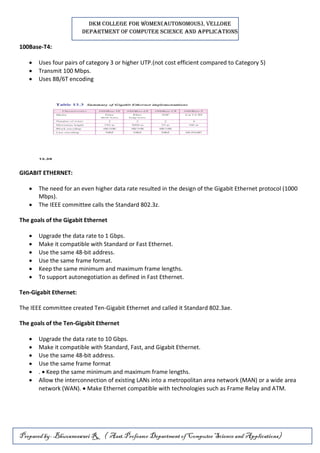
100Base-T4:
 Uses four pairs of category 3 or higher UTP.(not cost efficient compared to Category 5)
 Transmit 100 Mbps.
 Uses 8B/6T encoding
GIGABIT ETHERNET:
 The need for an even higher data rate resulted in the design of the Gigabit Ethernet protocol (1000
Mbps).
 The IEEE committee calls the Standard 802.3z.
The goals of the Gigabit Ethernet
 Upgrade the data rate to 1 Gbps.
 Make it compatible with Standard or Fast Ethernet.
 Use the same 48-bit address.
 Use the same frame format.
 Keep the same minimum and maximum frame lengths.
 To support autonegotiation as defined in Fast Ethernet.
Ten-Gigabit Ethernet:
The IEEE committee created Ten-Gigabit Ethernet and called it Standard 802.3ae.
The goals of the Ten-Gigabit Ethernet
 Upgrade the data rate to 10 Gbps.
 Make it compatible with Standard, Fast, and Gigabit Ethernet.
 Use the same 48-bit address.
 Use the same frame format
 .  Keep the same minimum and maximum frame lengths.
 Allow the interconnection of existing LANs into a metropolitan area network (MAN) or a wide area
network (WAN).  Make Ethernet compatible with technologies such as Frame Relay and ATM.

UNIT III_DCN.pdf

  • 1.
    DKM COLLEGE FORWOMEN(AUTONOMOUS), VELLORE DEPARTMENT OF COMPUTER SCIENCE AND APPLICATIONS Prepared by-Bhuvaneswari R, ( Asst.Professor Department of Computer Science and Applications) UNIT III – MULTIPLEXING AND SWITCHING Multiplexing - Types of Multiplexing - Multiplexing Application - Telephone system - Project 802 - Ethernet - Token Bus - Token Ring - Circuit Switching - Packet Switching - Message switching - Connection Oriented and Connectionless services. MULTIPLEXING  Multiplexing is a technique used to combine and send the multiple data streams over a single medium.  The process of combining the data streams is known as multiplexing and hardware used for multiplexing is known as a multiplexer.  Multiplexing is achieved by using a device called Multiplexer (MUX) that combines n input lines to generate a single output line. Multiplexing follows many-to-one, i.e., n input lines and one output line.  Demultiplexing is achieved by using a device called Demultiplexer (DEMUX) available at the receiving end.  DEMUX separates a signal into its component signals (one input and n outputs). Therefore, we can say that demultiplexing follows the one-to-many approach. Concept of Multiplexing o The 'n' input lines are transmitted through a multiplexer and multiplexer combines the signals to form a composite signal. o The composite signal is passed through a Demultiplexer and demultiplexer separates a signal to component signals and transfers them to their respective destinations. Advantages of Multiplexing: o More than one signal can be sent over a single medium. o The bandwidth of a medium can be utilized effectively. Types of Multiplexing
  • 2.
    DKM COLLEGE FORWOMEN(AUTONOMOUS), VELLORE DEPARTMENT OF COMPUTER SCIENCE AND APPLICATIONS Prepared by-Bhuvaneswari R, ( Asst.Professor Department of Computer Science and Applications) Frequency-division Multiplexing (FDM) o It is an analog technique. o Frequency Division Multiplexing is a technique in which the available bandwidth of a single transmission medium is subdivided into several channels. o In the above diagram, a single transmission medium is subdivided into several frequency channels, and each frequency channel is given to different devices. Device 1 has a frequency channel of range from 1 to 5. o The input signals are translated into frequency bands by using modulation techniques, and they are combined by a multiplexer to form a composite signal. o The main aim of the FDM is to subdivide the available bandwidth into different frequency channels and allocate them to different devices. o Using the modulation technique, the input signals are transmitted into frequency bands and then combined to form a composite signal. o The carriers which are used for modulating the signals are known as sub-carriers. They are represented as f1,f2..fn. o FDM is mainly used in radio broadcasts and TV networks. Advantages Of FDM:
  • 3.
    DKM COLLEGE FORWOMEN(AUTONOMOUS), VELLORE DEPARTMENT OF COMPUTER SCIENCE AND APPLICATIONS Prepared by-Bhuvaneswari R, ( Asst.Professor Department of Computer Science and Applications) o FDM is used for analog signals. o FDM process is very simple and easy modulation. o A Large number of signals can be sent through an FDM simultaneously. o It does not require any synchronization between sender and receiver. Disadvantages Of FDM: o FDM technique is used only when low-speed channels are required. o It suffers the problem of crosstalk. o A Large number of modulators are required. o It requires a high bandwidth channel. Applications Of FDM: o FDM is commonly used in TV networks. o It is used in FM and AM broadcasting. Each FM radio station has different frequencies, and they are multiplexed to form a composite signal. The multiplexed signal is transmitted in the air. Wavelength Division Multiplexing (WDM) o Wavelength Division Multiplexing is same as FDM except that the optical signals are transmitted through the fibre optic cable. o WDM is used on fibre optics to increase the capacity of a single fibre. o It is used to utilize the high data rate capability of fibre optic cable. o It is an analog multiplexing technique. o Optical signals from different source are combined to form a wider band of light with the help of multiplexer. o At the receiving end, demultiplexer separates the signals to transmit them to their respective destinations. o Multiplexing and Demultiplexing can be achieved by using a prism.Prism can perform a role of multiplexer by combining the various optical signals to form a composite signal, and the composite signal is transmitted through a fibre optical cable. o Prism also performs a reverse operation, i.e., demultiplexing the signal.
  • 4.
    DKM COLLEGE FORWOMEN(AUTONOMOUS), VELLORE DEPARTMENT OF COMPUTER SCIENCE AND APPLICATIONS Prepared by-Bhuvaneswari R, ( Asst.Professor Department of Computer Science and Applications) o Advantages of WDM:  Easier to reconfigure.  Full duplex transmission is possible.  It provides higher bandwidth.  Optical component are similar and more reliable.  High security.  This could be the best approach as it is simple to implement. Disadvantages of WDM:  Signals cannot be very close  Lightwave carrying while using WDM are limited to 2 point circuit  Cost of the system increases with the addition of optical components  Difficulty in wavelength tuning  Inefficiency in BW utilization  Difficulty in a cascaded topology Time Division Multiplexing o It is a digital technique. o In Frequency Division Multiplexing Technique, all signals operate at the same time with different frequency, but in case of Time Division Multiplexing technique, all signals operate at the same frequency with different time. o In Time Division Multiplexing technique, the total time available in the channel is distributed among different users. Therefore, each user is allocated with different time interval known as a Time slot at which data is to be transmitted by the sender. o A user takes control of the channel for a fixed amount of time. o In Time Division Multiplexing technique, data is not transmitted simultaneously rather the data is transmitted one-by-one. o In TDM, the signal is transmitted in the form of frames. Frames contain a cycle of time slots in which each frame contains one or more slots dedicated to each user.
  • 5.
    DKM COLLEGE FORWOMEN(AUTONOMOUS), VELLORE DEPARTMENT OF COMPUTER SCIENCE AND APPLICATIONS Prepared by-Bhuvaneswari R, ( Asst.Professor Department of Computer Science and Applications) o It can be used to multiplex both digital and analog signals but mainly used to multiplex digital signals. There are two types of TDM: o Synchronous TDM o Asynchronous TDM Synchronous TDM o A Synchronous TDM is a technique in which time slot is preassigned to every device. o In Synchronous TDM, each device is given some time slot irrespective of the fact that the device contains the data or not. o If the device does not have any data, then the slot will remain empty. o In Synchronous TDM, signals are sent in the form of frames. Time slots are organized in the form of frames. If a device does not have data for a particular time slot, then the empty slot will be transmitted. o The most popular Synchronous TDM are T-1 multiplexing, ISDN multiplexing, and SONET multiplexing. o If there are n devices, then there are n slots. Concept Of Synchronous TDM In the below figure, the Synchronous TDM technique is implemented. Each device is allocated with some time slot. The time slots are transmitted irrespective of whether the sender has data to send or not.
  • 6.
    DKM COLLEGE FORWOMEN(AUTONOMOUS), VELLORE DEPARTMENT OF COMPUTER SCIENCE AND APPLICATIONS Prepared by-Bhuvaneswari R, ( Asst.Professor Department of Computer Science and Applications) Disadvantages Of Synchronous TDM: o The capacity of the channel is not fully utilized as the empty slots are also transmitted which is having no data. In the above figure, the first frame is completely filled, but in the last two frames, some slots are empty. Therefore, we can say that the capacity of the channel is not utilized efficiently. o The speed of the transmission medium should be greater than the total speed of the input lines. An alternative approach to the Synchronous TDM is Asynchronous Time Division Multiplexing. Difference between Synchronous TDM and Asynchronous TDM : S.NOSynchronous Transmission Asynchronous Transmission 1. In Synchronous transmission, Data is sent in form of blocks or frames. In asynchronous transmission, Data is sent in form of byte or character. 2. Synchronous transmission is fast. Asynchronous transmission is slow. 3. Synchronous transmission is costly. Asynchronous transmission is economical. 4. In Synchronous transmission, time interval of transmission is constant. In asynchronous transmission, time interval of transmission is not constant, it is random. 5. In Synchronous transmission, There is no gap present between data. In asynchronous transmission, There is present gap between data. 6. Efficient use of transmission line is done in synchronous transmission. While in asynchronous transmission, transmission line remains empty during gap in character transmission. 7. Synchronous transmission needs precisely synchronized clocks for the information of new bytes. Asynchronous transmission have no need of synchronized clocks as parity bit is used in this transmission for information of new bytes.
  • 7.
    DKM COLLEGE FORWOMEN(AUTONOMOUS), VELLORE DEPARTMENT OF COMPUTER SCIENCE AND APPLICATIONS Prepared by-Bhuvaneswari R, ( Asst.Professor Department of Computer Science and Applications) DATA TRANSMISSION  Data transmission between two devices will be handled in network layer.  Both Connection-oriented service and Connection-less service are used for the connection establishment between two or more than two devices.  These type of services are offered by network layer. Connection-oriented service  It is related to the telephone system.  It provide guaranteed data transmission  It includes the connection establishment and connection termination.  In connection-oriented service, Handshake method is used to establish the connection between sender and receiver.  Packets follow same path to reach destination. What is a TCP?  This protocol is used in connection oriented services  TCP (Transmission Control Protocol) is a connection-oriented protocol that allows communication between two or more computer devices by establishing connections in the same or different networks.  It is the most important protocol that uses internet protocol to transfer the data from one end to another. Hence, it is sometimes referred to as TCP/IP.  It ensures that the connection is established and maintained until the data packet is transferring between the sender and receiver is complete. Connection-less service  it is related to the postal system.  It does not include any connection establishment and connection termination. Connection-less Service does not give the guarantee of reliability.  In this, Packets do not follow same path to reach destination.
  • 8.
    DKM COLLEGE FORWOMEN(AUTONOMOUS), VELLORE DEPARTMENT OF COMPUTER SCIENCE AND APPLICATIONS Prepared by-Bhuvaneswari R, ( Asst.Professor Department of Computer Science and Applications) What is UDP?  This protocol is used in connectionless services  The UDP (User Datagram Protocol) is a connectionless protocol that allows communication between two or more devices without establishing any connection.  In this protocol, a sender sends the data packets to the receiver that holds the destination address.  A UDP does not ensure to deliver the data packetsto the correct destination, and it does not generate any acknowledgment about the sender's data.  Similarly, it does not acknowledge the receiver about the data. Hence, it is an unreliable protocol. Difference between Connection-oriented and Connection-less Services: S.NOConnection-oriented Service Connection-less Service 1. Connection-oriented service is related to the telephone system. Connection-less service is related to the postal system. 2. Connection-oriented service is preferred by long and steady communication. Connection-less Service is preferred by bursty communication. 3. Connection-oriented Service is necessary. Connection-less Service is not compulsory. 4. Connection-oriented Service is feasible. Connection-less Service is not feasible. 5. In connection-oriented Service, Congestion is not possible. In connection-less Service, Congestion is possible. 6. Connection-oriented Service gives the guarantee of reliability. Connection-less Service does not give the guarantee of reliability.
  • 9.
    DKM COLLEGE FORWOMEN(AUTONOMOUS), VELLORE DEPARTMENT OF COMPUTER SCIENCE AND APPLICATIONS Prepared by-Bhuvaneswari R, ( Asst.Professor Department of Computer Science and Applications) 7. In connection-oriented Service, Packets follow the same route. In connection-less Service, Packets do not follow the same route. 8. Connection-oriented Services requires a bandwidth of high range. Connection-less Service requires a bandwidth of low range. 9. It creates a virtual path between the sender and the receiver. It does not create any virtual connection or path between the sender and the receiver. TOKEN RING (802.5) and token bus (802.4) Token Ring  Token ring (IEEE 802.5) is a communication protocol in a local area network (LAN)  where all stations are connected in a ring topology and pass one or more tokens for channel acquisition.  A token is a special frame of 3 bytes that circulates along the ring of stations.  A station can send data frames only if it holds a token.  The tokens are released on successful receipt of the data frame. Token Passing Mechanism in Token Ring  If a station has a frame to transmit when it receives a token, it sends the frame and then passes the token to the next station.  otherwise it simply passes the token to the next station.  Passing the token means receiving the token from the preceding station and transmitting to the successor station.  The data flow is unidirectional in the direction of the token passing.  In order that tokens are not circulated infinitely, they are removed from the network once their purpose is completed. This is shown in the following diagram −
  • 10.
    DKM COLLEGE FORWOMEN(AUTONOMOUS), VELLORE DEPARTMENT OF COMPUTER SCIENCE AND APPLICATIONS Prepared by-Bhuvaneswari R, ( Asst.Professor Department of Computer Science and Applications) Token Bus  Token Bus (IEEE 802.4) is a standard for implementing token ring over virtual ring in LANs.  The physical media has a bus or a tree topology and uses coaxial cables.  A virtual ring is created with the nodes/stations and the token is passed from one node to the next in a sequence along this virtual ring.  Each node knows the address of its preceding station and its succeeding station.  A station can only transmit data when it has the token.  The working principle of token bus is similar to Token Ring. Token Passing Mechanism in Token Bus  A token is a small message that circulates among the stations of a computer network providing permission to the stations for transmission.  If a station has data to transmit when it receives a token, it sends the data and then passes the token to the next station.  otherwise, it simply passes the token to the next station. This is depicted in the following diagram –
  • 11.
    DKM COLLEGE FORWOMEN(AUTONOMOUS), VELLORE DEPARTMENT OF COMPUTER SCIENCE AND APPLICATIONS Prepared by-Bhuvaneswari R, ( Asst.Professor Department of Computer Science and Applications) Differences between Token Ring and Token Bus S.NO TOKEN BUS Network TOKEN RING Network 1. In the token bus network the token is passed along a virtual ring. While in the token ring network the token is passed over a physical ring. 2. The token bus network is simply designed for the large factories. While the token ring network is designed for the offices. 3. The token bus network is defined by the IEEE 802.4 standard. While the token ring network is defined by the IEEE 802.5 standard. 4. Token bus network provides better bandwidth. While the token ring network does not provide better bandwidth as compared to token bus. 5. In token bus network, Bus topology is used. While in token ring network, Star topology is used. 6. The maximum time it takes to reach the last station in a token bus network cannot be calculated. While the maximum time to reach the last station in the token ring network can be calculated. Switching techniques  In large networks, there can be multiple paths from sender to receiver. The switching technique will decide the best route for data transmission.  Switching technique is used to connect the systems for making one-to-one communication. Classification Of Switching Techniques
  • 12.
    DKM COLLEGE FORWOMEN(AUTONOMOUS), VELLORE DEPARTMENT OF COMPUTER SCIENCE AND APPLICATIONS Prepared by-Bhuvaneswari R, ( Asst.Professor Department of Computer Science and Applications) Circuit Switching o Circuit switching is a switching technique that establishes a dedicated path between sender and receiver. o In the Circuit Switching Technique, once the connection is established then the dedicated path will remain to exist until the connection is terminated. o Circuit switching in a network operates in a similar way as the telephone works. o A complete end-to-end path must exist before the communication takes place. o In case of circuit switching technique, when any user wants to send the data, voice, video, a request signal is sent to the receiver then the receiver sends back the acknowledgment to ensure the availability of the dedicated path. After receiving the acknowledgment, dedicated path transfers the data. o Circuit switching is used in public telephone network. It is used for voice transmission. o Fixed data can be transferred at a time in circuit switching technology. Communication through circuit switching has 3 phases: o Circuit establishment o Data transfer o Circuit Disconnect Advantages of Circuit Switching: 1. Establishment of a dedicated channel 2. Improves data transmission rate 3. Improves data loss 4. Improves delay in the data flow
  • 13.
    DKM COLLEGE FORWOMEN(AUTONOMOUS), VELLORE DEPARTMENT OF COMPUTER SCIENCE AND APPLICATIONS Prepared by-Bhuvaneswari R, ( Asst.Professor Department of Computer Science and Applications) Disadvantages of Circuit Switching:  Establishing a dedicated channel sometimes takes a very long duration of time.  The amount of bandwidth required is more for establishing a dedicated channel.  Even if a channel is free, it cannot be used to transmit any other data from any other source. Packet Switching o The packet switching is a switching technique in which the message is sent in one go, but it is divided into smaller pieces, and they are sent individually. o The message splits into smaller pieces known as packets and packets are given a unique number to identify their order at the receiving end. o Every packet contains some information in its headers such as source address, destination address and sequence number. o Packets will travel across the network, taking the shortest path as possible. o All the packets are reassembled at the receiving end in correct order. o If any packet is missing or corrupted, then the message will be sent to resend the message. o If the correct order of the packets is reached, then the acknowledgment message will be sent. Types of packet switching: 1. Datagram switching. This type of packet switching technique consists of multiple data packets, each data packet is individually routed, means every single data packet contains complete routing information in its header section (source address, a destination address, total number of data packets, sequence number) i.e. which routes to follow to reach the destination. When these data packets traverse from different routes then there is a high chance of packet loss or damage depending on the route and out-of-order delivery is possible which depends on
  • 14.
    DKM COLLEGE FORWOMEN(AUTONOMOUS), VELLORE DEPARTMENT OF COMPUTER SCIENCE AND APPLICATIONS Prepared by-Bhuvaneswari R, ( Asst.Professor Department of Computer Science and Applications) the fluctuating loads on the network's nodes (adapters, switches, and routers)at the moment, so this kind of packet switching technique is also known as Connectionless Packet Switching. 2. Virtual Circuit switching. In this type of packet switching the data-packets are first assembled and then sequentially numbered. Now they are ready to travel across a predefined route, sequentially. The information about the address is not required here, because all the data packets are sent in sequence. This technique is also known as Connection-Oriented Packet Switching Advantages of Packet Switching  Highly efficient  Faster  Much improved fault tolerance  Cost-effective  Digital  Reliable Message Switching o Message Switching is a switching technique in which a message is transferred as a complete unit and routed through intermediate nodes at which it is stored and forwarded. o In Message Switching technique, there is no establishment of a dedicated path between the sender and receiver. o The destination address is appended to the message. Message Switching provides a dynamic routing as the message is routed through the intermediate nodes based on the information available in the message. o Message switches are programmed in such a way so that they can provide the most efficient routes. o Each and every node stores the entire message and then forward it to the next node. This type of network is known as store and forward network. o Message switching treats each message as an independent entity.
  • 15.
    DKM COLLEGE FORWOMEN(AUTONOMOUS), VELLORE DEPARTMENT OF COMPUTER SCIENCE AND APPLICATIONS Prepared by-Bhuvaneswari R, ( Asst.Professor Department of Computer Science and Applications) Advantages Of Message Switching o Data channels are shared among the communicating devices that improve the efficiency of using available bandwidth. o Traffic congestion can be reduced because the message is temporarily stored in the nodes. o Message priority can be used to manage the network. o The size of the message which is sent over the network can be varied. Therefore, it supports the data of unlimited size. Disadvantages Of Message Switching o The message switches must be equipped with sufficient storage to enable them to store the messages until the message is forwarded. o The Long delay can occur due to the storing and forwarding facility provided by the message switching technique. Telephone system Introduction to Telephone Network  Telephone Network is used to provide voice communication.  Telephone Network uses Circuit Switching.  Originally, the entire network was referred to as a plain old telephone system (POTS) which uses analog signals.  With the advancement of technology, i.e. in the computer era, there comes a feature to carry data in addition to voice.  Today’s network is both analogous and digital. Components of Telephone Network There are three major components of the telephone network: 1. Local loops 2. Trunks 3. Switching Offices  There are various levels of switching offices such as end offices, tandem offices, and regional offices.  The entire telephone network is as shown in the following figure:
  • 16.
    DKM COLLEGE FORWOMEN(AUTONOMOUS), VELLORE DEPARTMENT OF COMPUTER SCIENCE AND APPLICATIONS Prepared by-Bhuvaneswari R, ( Asst.Professor Department of Computer Science and Applications) A telephone system Local Loops:  Local Loops are the twisted pair cables that are used to connect a subscriber telephone to the nearest end office or local central office.  For voice purposes, its bandwidth is 4000 Hz.  It is very interesting to examine the telephone number that is associated with each local loop.  The office is defined by the first three digits and the local loop number is defined by the next four digits defines. Trunks:  It is a type of transmission medium used to handle the communication between offices. Through multiplexing, trunks can handle hundreds or thousands of connections.  Mainly transmission is performed through optical fibers or satellite links. Switching Offices:  As there is a permanent physical link between any two subscribers.  To avoid this, the telephone company uses switches that are located in switching offices.  A switch is able to connect various loops or trunks and allows a connection between different subscribes.
  • 17.
    DKM COLLEGE FORWOMEN(AUTONOMOUS), VELLORE DEPARTMENT OF COMPUTER SCIENCE AND APPLICATIONS Prepared by-Bhuvaneswari R, ( Asst.Professor Department of Computer Science and Applications) Advantages of Telephone Network:  It is a circuit-switched network.  There is no transmission delay as any receiver can be selected.  It is cheap in price because it is a widely spread network. Disadvantages of Telephone Network:  It requires a large time for connection.  It has a low transmission speed. Applications of Telephone Network:  It helps to connect people.  It is used by business organizations to advertise their products.  It is also used around the world for recreational purposes. IEEE STANDARDS Introduction  The institute of electrical and electronic Engineers (IEEE) publishes several widely accepted LANrecommended standards.  These standards, collectively known as IEEE 802.  Various IEEE 802 standards are as o IEEE 802.1 High Level Interface o IEEE 802.2 Logical Link Control(LLC) o IEEE 802.3 Ethernet o IEEE 802.4 Token Bus o IEEE 802.5 Token Ring o IEEE 802.6 Metropolitan Area Networks o IEEE 802.7 Broadband LANs o IEEE 802.8 Fiber Optic LANS
  • 18.
    DKM COLLEGE FORWOMEN(AUTONOMOUS), VELLORE DEPARTMENT OF COMPUTER SCIENCE AND APPLICATIONS Prepared by-Bhuvaneswari R, ( Asst.Professor Department of Computer Science and Applications) o IEEE 802.9 Integrated Data and Voice Network o IEEE 802.10 Security o IEEE 802.11 Wireless Network ETHERNET(802.3) The original Ethernet was created in 1976 at Xerox's Palo Alto Research Center (PARC). History of Ethernet:  Xerox performed initial development of Ethernet and was joined by the Digital Equipment Corporation (Digital) and Intel to define the Ethernet 1 specification in 1980.  The same group subsequently released the Ethernet 2 specification in 1984.  The Ethernet specification describes a CSMA/CD LAN.  The IEEE 802.3 subcommittee adopted Ethernet as its model for its CSMA/CD LAN specification. As a result, Ethernet 2 and IEEE 802.3 are identical in the way they use the physical medium. However, the two specifications differ in their descriptions of the data link layer.  These differences do not prohibit manufacturers from developing network interface cards that support the common physical layer, and software that recognizes the differences between the two data links. Generations of Ethernet: Ethernet has gone through four generations: o Standard Ethernet (lot Mbps): The most commonly installed Ethernet systems are called 10BASE-T and provide transmission speeds up to 10 Mbps. Devices are connected to the cable and compete for access using a Carrier Sense Multiple Access with Collision Detection (CSMA/CD) protocol. o Fast Ethernet (100 Mbps): Fast Ethernet or 100BASE-T provides transmission speeds up to 100 megabits per second and is typically used for LAN backbone systems, supporting workstations with 10BASE-T cards. The 100BASE-T standard consists of five different component specifications. These include the Media Access Control (MAC) layer, the Media Independent Interface (MII), and the three physical layers, (100 BASE-TX, 100BASET4, and 100BASE-FX). o Gigabit Ethernet (l Gbps): Gigabit Ethernet provides an even higher level of backbone support at 1000 megabits per second (1 gigabit or 1 billion bits per second). Used mostly for backbones, the first IEEE standard (802.3z) for Gigabit Ethernet (GigE) was defined in 1997 for use over multimode optical fiber. 802.3z provides full-duplex operation from switch to end station or to another switch and half- duplex using CSMA/CD in a shared environment.
  • 19.
    DKM COLLEGE FORWOMEN(AUTONOMOUS), VELLORE DEPARTMENT OF COMPUTER SCIENCE AND APPLICATIONS Prepared by-Bhuvaneswari R, ( Asst.Professor Department of Computer Science and Applications) o Ten-Gigabit Ethernet (l0 Gbps), as shown in Figure 1.1. : 10 Gigabit Ethernet is an upcoming Ethernet technology that transmits at 10 Gbps. 10 Gigabit Ethernet enables a familiar network technology to be used in LAN, MAN and WAN architectures. However the CSMA/CD method for gaining access to the physical medium is not employed and half duplex operation is not supported. 10 Gigabit Ethernet uses multimode optical fiber up to 300 meters and single mode fiber up to 40 kilometers. Advantages of Ethernet 1. It is very reliable. 2. Ethernet network makes use of firewalls for the security of the data. 3. Data is transmitted and received at very high speed. 4. It is very easy to use the wired network. Disadvantages of Ethernet 1. The wired Ethernet network is used only for short distances. 2. • The mobility is limited. 3. • Its maintenance is difficult. 4. • Ethernet cables, hubs, switches, routers increase the cost of installation. STANDARD ETHERNET The most commonly installed Ethernet systems are called 10BASE-T and provide transmission speeds up to 10 Mbps. Devices are connected to the cable and compete for access using a Carrier Sense Multiple Access with Collision Detection (CSMA/CD) protocol. MAC Sublayer: In Standard Ethernet, the MAC sub layer governs the operation of the access method. It also frames data received from the upper layer and passes them to the physical layer. Frame Format:  The Ethernet frame contains seven fields: preamble, SFD, DA, SA, length or type of protocol data unit (PDU), upper-layer data, and the CRC  The format of the MAC frame is shown in below Figure
  • 20.
    DKM COLLEGE FORWOMEN(AUTONOMOUS), VELLORE DEPARTMENT OF COMPUTER SCIENCE AND APPLICATIONS Prepared by-Bhuvaneswari R, ( Asst.Professor Department of Computer Science and Applications) Preamble  The first field of the 802.3 frame contains 7 bytes (56 bits) of alternating Os and 1s that alerts the receiving system to the coming frame and enables it to synchronize its input timing.  The pattern provides only an alert and a timing pulse.  The 56-bit pattern allows the stations to miss some bits at the beginning of the frame. Start frame delimiter (SFD).  The second field (l byte: 10101011) signals the beginning of the frame.  The SFD warns the station or stations that this is the last chance for synchronization.  The last 2 bits is 11 and alerts the receiver that the next field is the destination address. Destination address (DA).  The DA field is 6 bytes and contains the physical address of the destination station or stations to receive the packet. Source address (SA).  The SA field is also 6 bytes and contains the physical address of the sender of the packet. Length or type.  This field is defined as a type field or length field. The original Ethernet used this field as the type field to define the upper-layer protocol using the MAC frame.  The IEEE standard used it as the length field to define the number of bytes in the data field.  Both uses are common today. Data.  This field carries data encapsulated from the upper-layer protocols. It is a minimum of 46 and a maximum of 1500 bytes. CRC  The last field contains error detection information, in this case a CRC-32 Frame Length:  Ethernet has imposed restrictions on both the minimum and maximum lengths of a frame.  The minimum length restriction is required for the correct operation of CSMA/CD.  An Ethernet frame needs to have a minimum length of 512 bits or 64 bytes.  The standard defines the maximum length of a frame 1518 bytes.  Frame length: Minimum: 64 bytes (512 bits) Maximum: 1518 bytes (12,144 bits)
  • 21.
    DKM COLLEGE FORWOMEN(AUTONOMOUS), VELLORE DEPARTMENT OF COMPUTER SCIENCE AND APPLICATIONS Prepared by-Bhuvaneswari R, ( Asst.Professor Department of Computer Science and Applications) 10Base5: Thick Ethernet:  The first implementation is called 10Base5, thick Ethernet, or Thicknet.  10Base5 was the first Ethernet specification to use a bus topology with an external transceiver (transmitter/receiver) connected via a tap to a thick coaxial cable.  The transceiver is responsible for transmitting, receiving, and detecting collisions.  The transceiver is connected to the station via a transceiver cable that provides separate paths for sending and receiving.  This means that collision can only happen in the coaxial cable.  The maximum length of the coaxial cable must not exceed 500 m 10Base2: Thin Ethernet:  The second implementation is called 10Base2, thin Ethernet, or Cheapernet.  10Base2 also uses a bus topology, but the cable is much thinner and more flexible.  The cable can be bent to pass very close to the stations.  In this case, the transceiver is normally part of the network interface card (NIC), which is installed inside the station. 
  • 22.
    DKM COLLEGE FORWOMEN(AUTONOMOUS), VELLORE DEPARTMENT OF COMPUTER SCIENCE AND APPLICATIONS Prepared by-Bhuvaneswari R, ( Asst.Professor Department of Computer Science and Applications) 10Base-T: Twisted-Pair Ethernet:  1OBase-T uses a physical star topology.  Two pairs of twisted cable create two paths (one for sending and one for receiving) between the station and the hub. Any collision here happens in the hub.  Compared to 10Base5 or 10Base2, we can see that the hub actually replaces the coaxial cable as far as a collision is concerned.  The maximum length of the twisted cable here is defined as 100 m, to minimize the effect of attenuation in the twisted cable. 10Base-F: Fiber Ethernet:  Although there are several types of optical fiber 10-Mbps Ethernet, the most common is called 10Base-F.  10Base-F uses a star topology to connect stations to a hub.  The stations are connected to the hub using two fiber-optic cables. FAST ETHERNET:  Fast Ethernet was designed to compete with LAN protocols such as FDDI or Fiber Channel.  IEEE created Fast Ethernet under the name 802.3u.  Fast Ethernet is backward-compatible with Standard Ethernet, but it can transmit data 10 times faster at a rate of 100 Mbps. Goals of Fast Ethernet:  Upgrade the data rate to 100 Mbps.  Make it compatible with Standard Ethernet.  Keep the same 48-bit address.  Keep the same frame format.  Keep the same minimum and maximum frame lengths. Autonegotiation:  A new feature added to Fast Ethernet is called autonegotiation
  • 23.
    DKM COLLEGE FORWOMEN(AUTONOMOUS), VELLORE DEPARTMENT OF COMPUTER SCIENCE AND APPLICATIONS Prepared by-Bhuvaneswari R, ( Asst.Professor Department of Computer Science and Applications)  It allows a station or a hub a range of capabilities.  Autonegotiation allows two devices to negotiate the mode or data rate of operation. It was designed particularly for the following purposes: 1. To allow incompatible devices to connect to one another. For example, a device with a maximum capacity of 10 Mbps can communicate with a device with a 100 Mbps capacity (but can work at a lower rate). 2. To allow one device to have multiple capabilities. 3. To allow a station to check a hub's capabilities Topology:  Fast Ethernet is designed to connect two or more stations together.  If there are only two stations, they can be connected point-to-point.  Three or more stations need to be connected in a star topology with a hub or a switch at the center Fast Ethernet implementations: 100Base-TX:  It uses two pairs of twisted-pair cable (either category 5 UTP or STP(Shielded twisted pair).  For this implementation, the MLT-3(Multi Level Transmit) scheme was selected since it has good bandwidth performance.  4B/5B block coding is used to provide bit synchronization by preventing the occurrence of a long sequence of 0s and 1s.  This creates a data rate of 125 Mbps, which is fed into MLT-3 for encoding. 100Base-FX:  Uses two pairs of fiber-optic cables.  Optical fiber can easily handle high bandwidth requirements by using simple encoding schemes’  Uses NRZ-I(Non-Return-to-Zero Inverted) encoding scheme ( bit synchronization problem.)  To overcome this problem, 4B/5B block coding is used.  A 100Base-TX network can provide a data rate of 100 Mbps, but it requires the use of category 5 UTP or STP cable. It is cost effective.
  • 24.
    DKM COLLEGE FORWOMEN(AUTONOMOUS), VELLORE DEPARTMENT OF COMPUTER SCIENCE AND APPLICATIONS Prepared by-Bhuvaneswari R, ( Asst.Professor Department of Computer Science and Applications) 100Base-T4:  Uses four pairs of category 3 or higher UTP.(not cost efficient compared to Category 5)  Transmit 100 Mbps.  Uses 8B/6T encoding GIGABIT ETHERNET:  The need for an even higher data rate resulted in the design of the Gigabit Ethernet protocol (1000 Mbps).  The IEEE committee calls the Standard 802.3z. The goals of the Gigabit Ethernet  Upgrade the data rate to 1 Gbps.  Make it compatible with Standard or Fast Ethernet.  Use the same 48-bit address.  Use the same frame format.  Keep the same minimum and maximum frame lengths.  To support autonegotiation as defined in Fast Ethernet. Ten-Gigabit Ethernet: The IEEE committee created Ten-Gigabit Ethernet and called it Standard 802.3ae. The goals of the Ten-Gigabit Ethernet  Upgrade the data rate to 10 Gbps.  Make it compatible with Standard, Fast, and Gigabit Ethernet.  Use the same 48-bit address.  Use the same frame format  .  Keep the same minimum and maximum frame lengths.  Allow the interconnection of existing LANs into a metropolitan area network (MAN) or a wide area network (WAN).  Make Ethernet compatible with technologies such as Frame Relay and ATM.