UNIT - 5
INTERFACING APPLICATIONS
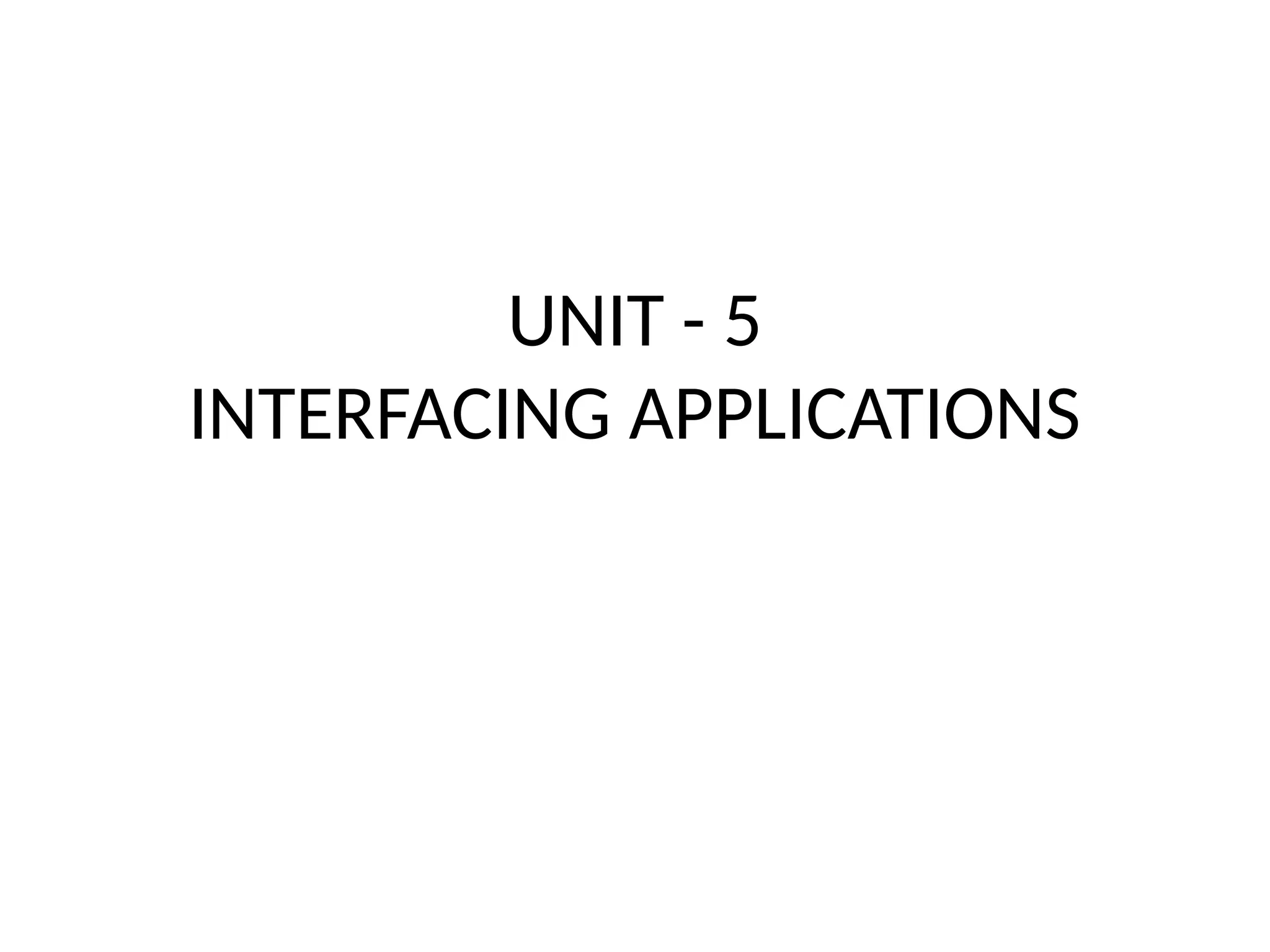
GROUPWARE
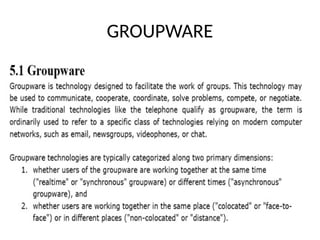
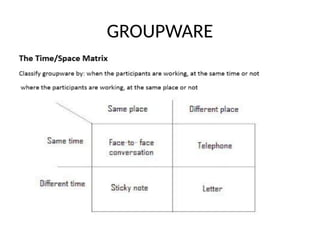
GROUPWARE
HYPERTEXT, MULTIMEDIA AND THE WORLD
WIDE WEB
• Understanding Hyper text
• What is the hyper?- it includes rich contents:
graphics, audio, video, computation, and
interaction
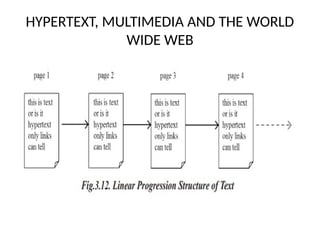
• The traditional texts share a common linear
nature.
• This linearity is partly because of the nature of the
media used
• Text imposes strict linear progression on reader
HYPERTEXT, MULTIMEDIA AND THE WORLD
WIDE WEB
HYPERTEXT, MULTIMEDIA AND THE WORLD
WIDE WEB
Issues/Finding things in Hyper text
• Lost in Hyperspace
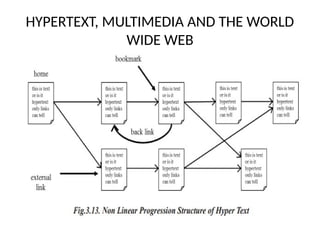
• Even though the non-linear structure of
hypertext is very powerful, it can also be
confusing.
• It is easy to lose track of where you are, a
problem that has been called ‘lost in hyperspace’.
• There are two elements to this feeling of
‘lostness’.
Cognitive and related to content
• The reader can browse the text in any order.
Each page or node has to be written virtually
independently, but, of course, in reality it
cannot be written entirely without any
assumption of prior knowledge.
• Once the reader encounters fragmentary
information, it cannot be properly integrated,
leading to confusion about the topic.
Navigation and Structure
• The hypertext may have a hierarchical or other
structure, the user may navigate by hyperlinks that
move across this main structure.
• It is easy to lose track of where you are and where you
have been.
• The solution to the former issue is to design the
information better.
• The solution to the latter is to give users better ways
of understanding where they are and of navigating in
the hypertext.
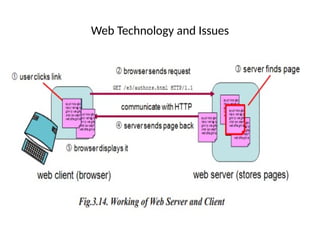
Web Technology and Issues
• The web consists of a set of protocols built on top of the
internet that, in theory, allow multimedia documents to be
created and read from any connected computer in the world.
• The web supports hypertext, graphics, sound and movies,
and, to structure and describe the information, uses a
language called HTML (hypertext markup language) or in
some cases, XML (extensible markup language).
• HTML is a markup language that allows hypertext links,
images, sounds and movies to be embedded into text, and it
provides some facilities for describing how these
components are laid out
Web Technology and Issues
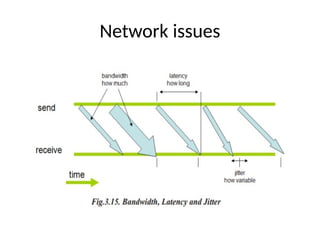
Network issues
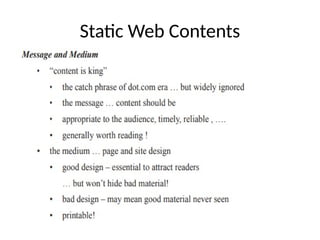
Static Web Contents
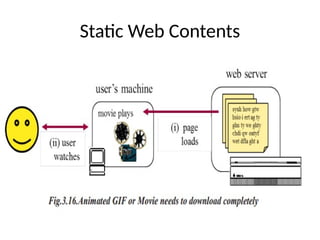
Static Web Contents
Dynamic Web Contents
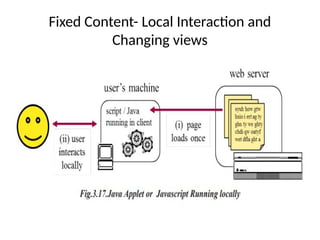
• In the early days, the web was simply a collection
of (largely text) pages linked together.
• The material was static or slowly changing and
much of it authored and updated by hand.
• As HCI researchers and designers, we can neither
ignore nor uncritically accept new technology in
the web.
• The active web is here, our job is to understand it
and to learn how to use it appropriately
Fixed Content- Local Interaction and
Changing views
Other interaction models
• The PIE model was the inspiration for a wide variety of different
models.
• Some of these are similar, but take a slightly different
standpoint.
• For example, one model has results only available at some states.
• This actually corresponds to the intuition that a printed
document is only available when you invoke the print function,
or that an updated file is only available in the file system when
you ask the editor to save.
• However, that model also only had the display available at some
states – less intuitive
CONTINUOUS BEHAVIOR
• Although many of the systems and interfaces studied in
rich media and in novel interfaces embody continuous
real-time interaction, there are few models of this in the
HCI literature.
• Possibly this is because of the conceptual dominance of
discrete models.
• At a low level, computer systems are clearly discrete with
step-by-step programs and users’ actions being converted
into streams of events.
• Even apparently smooth actions like dragging a mouse are
treated as a series of individual ‘mouse has moved’ events.
Dealing with the mouse
• The PIE model is very asymmetric between input and output. Some
sorts of output are difficult to deal with, for example a beep used
when something goes wrong.
• This is not clear in the formalism itself, but if we look at the
principles, it is obvious that the display is expected to be persistent.
• If you go away and have a cup of tea, the display is still there when
you get back.
• The beep is not. On the input side, mouse movement is not easy:
one can regard each movement as being a command in C, but this
is unnatural.
• Certainly, the user would not be conscious of each pixel movement!
Formal aspects of status–event analysis
• Probably the earliest continuous time models in the formal user
interface literature are the variants of status–event analysis [94,102] of
which the variant of the PIE model above is a simple example.
• Status–event analysis (S–E) distinguishes events that occur at specific
moments of time from status phenomena that have (typically
changing) values over a period of time.
• Examples of events include keystrokes, beeps, and the stroke of
midnight in the story of Cinderella.
• Examples of status phenomena include the current computer display,
the location of the mouse pointer, the internal state of the computer
and the weather.
• We will discuss status–event analysis in more detail in Chapter 18;
here we will just look at the more formal aspects.
THANK YOU

UNIT - 5 INTERFACE APPLIATIONS GROUP WARE SYSTEMS

  • 1.
  • 2.
  • 3.
  • 9.
    HYPERTEXT, MULTIMEDIA ANDTHE WORLD WIDE WEB • Understanding Hyper text • What is the hyper?- it includes rich contents: graphics, audio, video, computation, and interaction • The traditional texts share a common linear nature. • This linearity is partly because of the nature of the media used • Text imposes strict linear progression on reader
  • 10.
    HYPERTEXT, MULTIMEDIA ANDTHE WORLD WIDE WEB
  • 11.
    HYPERTEXT, MULTIMEDIA ANDTHE WORLD WIDE WEB
  • 12.
    Issues/Finding things inHyper text • Lost in Hyperspace • Even though the non-linear structure of hypertext is very powerful, it can also be confusing. • It is easy to lose track of where you are, a problem that has been called ‘lost in hyperspace’. • There are two elements to this feeling of ‘lostness’.
  • 13.
    Cognitive and relatedto content • The reader can browse the text in any order. Each page or node has to be written virtually independently, but, of course, in reality it cannot be written entirely without any assumption of prior knowledge. • Once the reader encounters fragmentary information, it cannot be properly integrated, leading to confusion about the topic.
  • 14.
    Navigation and Structure •The hypertext may have a hierarchical or other structure, the user may navigate by hyperlinks that move across this main structure. • It is easy to lose track of where you are and where you have been. • The solution to the former issue is to design the information better. • The solution to the latter is to give users better ways of understanding where they are and of navigating in the hypertext.
  • 15.
    Web Technology andIssues • The web consists of a set of protocols built on top of the internet that, in theory, allow multimedia documents to be created and read from any connected computer in the world. • The web supports hypertext, graphics, sound and movies, and, to structure and describe the information, uses a language called HTML (hypertext markup language) or in some cases, XML (extensible markup language). • HTML is a markup language that allows hypertext links, images, sounds and movies to be embedded into text, and it provides some facilities for describing how these components are laid out
  • 16.
  • 17.
  • 18.
  • 19.
  • 20.
    Dynamic Web Contents •In the early days, the web was simply a collection of (largely text) pages linked together. • The material was static or slowly changing and much of it authored and updated by hand. • As HCI researchers and designers, we can neither ignore nor uncritically accept new technology in the web. • The active web is here, our job is to understand it and to learn how to use it appropriately
  • 21.
    Fixed Content- LocalInteraction and Changing views
  • 22.
    Other interaction models •The PIE model was the inspiration for a wide variety of different models. • Some of these are similar, but take a slightly different standpoint. • For example, one model has results only available at some states. • This actually corresponds to the intuition that a printed document is only available when you invoke the print function, or that an updated file is only available in the file system when you ask the editor to save. • However, that model also only had the display available at some states – less intuitive
  • 23.
    CONTINUOUS BEHAVIOR • Althoughmany of the systems and interfaces studied in rich media and in novel interfaces embody continuous real-time interaction, there are few models of this in the HCI literature. • Possibly this is because of the conceptual dominance of discrete models. • At a low level, computer systems are clearly discrete with step-by-step programs and users’ actions being converted into streams of events. • Even apparently smooth actions like dragging a mouse are treated as a series of individual ‘mouse has moved’ events.
  • 24.
    Dealing with themouse • The PIE model is very asymmetric between input and output. Some sorts of output are difficult to deal with, for example a beep used when something goes wrong. • This is not clear in the formalism itself, but if we look at the principles, it is obvious that the display is expected to be persistent. • If you go away and have a cup of tea, the display is still there when you get back. • The beep is not. On the input side, mouse movement is not easy: one can regard each movement as being a command in C, but this is unnatural. • Certainly, the user would not be conscious of each pixel movement!
  • 25.
    Formal aspects ofstatus–event analysis • Probably the earliest continuous time models in the formal user interface literature are the variants of status–event analysis [94,102] of which the variant of the PIE model above is a simple example. • Status–event analysis (S–E) distinguishes events that occur at specific moments of time from status phenomena that have (typically changing) values over a period of time. • Examples of events include keystrokes, beeps, and the stroke of midnight in the story of Cinderella. • Examples of status phenomena include the current computer display, the location of the mouse pointer, the internal state of the computer and the weather. • We will discuss status–event analysis in more detail in Chapter 18; here we will just look at the more formal aspects.
  • 26.