UNIT II
Real Time Operating Systems
RTOS
• A real-time operating system (RTOS) is an OS
that guarantees real-time applications a
certain capability within a specified deadline.
RTOSes are designed for critical systems and
for devices like microcontrollers that are
timing-specific. RTOS processing time
requirements are measured in milliseconds.
Structure of Embedded Real-time
System
In an embedded real-time system, different components of system are
naturally widely distributed. Hard and soft both real-time embedded
systems have same structure. The structure of a real- time system
includes various hardware and software devices embedded in such way
that specific tasks can be performed in time constraints allowed.
Following diagram represents the structure of Embedded Real-time
Operating System basics Types of operating systems Task, process and threads
Multiprocessing and Multitasking Task scheduling How to choose an RTOS.
Operating System basics
RTOS for Embedded System Design
Now let us consider theArchitecture of OS:
General Purpose OS contains different services for handling
Preparedby Prof. Anand H. D., Dept. of ECE, Dr.AIT, Bengaluru-56 4
Operating System basics Types of operating systems Task, process and threads
Multiprocessing and Multitasking Task scheduling How to choose an RTOS.
Operating System basics
RTOS for Embedded System Design
Now let us consider theArchitecture of OS:
General Purpose OS contains different services for handling
Primary Memory Management:
Refers to volatile memory RAM, where processes are loaded
and variables and shared data associated with process are
stored.
The Memory Management Unit (MMU) of the kernel is
responsible for
•Keeping track of which part of memory area is currently used
by which process.
•Allocating and de-allocating memory space on need basis
(Dynamic MemoryAllocation)
Preparedby Prof. Anand H. D., Dept. of ECE, Dr.AIT, Bengaluru-56 4
Operating System basics Types of operating systems Task, process and threads
Multiprocessing and Multitasking Task scheduling How to choose an RTOS.
Operating System basics
Now let us consider theArchitecture of OS:
General Purpose OS contains different services for handling
Primary Memory Management:
Refers to volatile memory RAM, where processes are loaded
and variables and shared data associated with process are
stored.
The Memory Management Unit (MMU) of the kernel is
responsible for
•Keeping track of which part of memory area is currently used
by which process.
•Allocating and de-allocating memory space on need basis
(Dynamic Memory Allocation)
Process Management:
•Deals with managing the processes/tasks.
•By setting up the memory space for the process, loading the
process’s code into the memory space, allocating system
resources, scheduling and managing execution of process,
setting up and managing the Process Control Block (PCB),
Inter-process Communication and synchronization, process
termination/deletion etc.
RTOS for Embedded System Design
Preparedby Prof. Anand H. D., Dept. of ECE, Dr.AIT, Bengaluru-56 4
Operating System basics Types of operating systems Task, process and threads
Multiprocessing and Multitasking Task scheduling How to choose an RTOS.
Operating System basics
RTOS for Embedded System Design
Time Management:
Deals with at what time which process needs to be scheduled.
Till what duration processes needs to be executed.
After what time a process needs to be preempted.
Preparedby Prof. Anand H. D., Dept. of ECE, Dr.AIT, Bengaluru-56 4
Operating System basics Types of operating systems Task, process and threads
Multiprocessing and Multitasking Task scheduling How to choose an RTOS.
Operating System basics
Time Management:
Deals with at what time which process needs to be scheduled.
Till what duration processes needs to be executed.
After what time a process needs to be preempted.
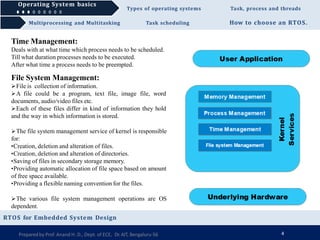
File System Management:
File is collection of information.
A file could be a program, text file, image file, word
documents, audio/video files etc.
Each of these files differ in kind of information they hold
and the way in which information is stored.
The file system management service of kernel is responsible
for:
•Creation, deletion and alteration of files.
•Creation, deletion and alteration of directories.
•Saving of files in secondary storage memory.
•Providing automatic allocation of file space based on amount
of free space available.
•Providing a flexible naming convention for the files.
The various file system management operations are OS
dependent.
RTOS for Embedded System Design
Preparedby Prof. Anand H. D., Dept. of ECE, Dr.AIT, Bengaluru-56 4
Operating System basics Types of operating systems Task, process and threads
How to choose an RTOS.
Operating System basics
RTOS for Embedded System Design
Multiprocessing and Multitasking Task scheduling
I/O System Management:
Kernel is responsible for routing the I/O request coming from different
user applications to the appropriate I/O devices of the system
In a well structured OS direct access of I/O devices is not allowed and
access to them is provided through a Application Programming
Interfaces (API) exposed by kernel.
Kernel maintains a list of I/O devices of the system. This list may be
available well in advance at the time of building the kernel or in cases
Kernels dynamically updates the list and where the new device is
installed.
The service ‘Device Manager’ is responsible handling all I/O device
related operations.
The kernel talks to I/O devices through a set of low level system calls,
which are implemented in a service called device drivers. These drivers
are specific to a device or a class of devices.
The device manager is responsible for :
•Loading & unloading of device drivers.
• Exchanging information and the system specific controls to and from
the device.
Preparedby Prof. Anand H. D., Dept. of ECE, Dr.AIT, Bengaluru-56 4
Operating System basics Types of operating systems Task, process and threads
Multiprocessing and Multitasking Task scheduling How to choose an RTOS.
Operating System basics
RTOS for Embedded System Design
The Operating System Architecture
Preparedby Prof. Anand H. D., Dept. of ECE, Dr.AIT, Bengaluru-56 4
Operating System basics Types of operating systems Task, process and threads
Multiprocessing and Multitasking Task scheduling How to choose an RTOS.
Operating System basics
Secondary Storage Management:
Deals with management of secondary storage devices.
Secondary memory is used as a backup medium for program
and data since the main memory is volatile.
In most of the systems the secondary storage is in the for of
disks (Hard disks).
The secondary storage management services of kernel deals
with : Disk Storage allocation.
Disk Scheduling .
Free disk space management
Preparedby Prof. Anand H. D., Dept. of ECE, Dr.AIT, Bengaluru-56 5
Protection System:
Most of the modern OS are deigned in such a way that they
support multiple users with different levels of access permissions .
Protection deals with implementing the security polices to
restrict the access to both user and system resources by different
applications or processes or users.
In multiuser OS, one user may not be allowed to view or modify
complete portion of another user’s data or profile details.
Also some applications may not be granted permissions to make
use of certain system resources.
Interrupt Handler:
Kernel provides handler mechanism for all external/internal interrupts generated by the system.
These are some of the services offered by kernel of an OS.
Depending on type of OS, a kernel may contain lesser/more number of services/components.
In addition to above mentioned services many OS offer a no. of add-on services to kernel, Network communication, network
management, user-interface graphics, timer services, error handler, database management etc.
RTOS for Embedded System Design
Operating System basics Types of operating systems Task, process and threads
Multiprocessing and Multitasking Task scheduling How to choose an RTOS.
Operating System basics
Kernel Space Vs User Space:
The applications/services are classified into : User applications and Kernel applications
The program code corresponding to kernel applications/services are kept in contiguous area of primary memory and
is protected from unauthorized access by user programs/applications—Kernel Space
All user programs are loaded to a specific area of primary memory and this memory area is referred as User space.
The portioning of memory into Kernel space and user space is purely OS dependent.
In OS with virtual memory support, the user applications are loaded into corresponding virtual memory space
with demand paging technique — the entire code for user application need not be loaded into main memory at once;
instead user application is divided into different pages and these pages are loaded into and out of main memory area
on a need basis – Swapping.
Swapping happens between main memory and secondary storage memory.
Each process run in its own virtual memory space and are not allowed accessing the memory space corresponding
to another processes unless explicitly requested by the process.
Most of the OS keep the kernel application code in main memory and it is not swapped out into the secondary
memory.
RTOS for Embedded System Design
Preparedby Prof. Anand H. D., Dept. of ECE, Dr.AIT, Bengaluru-56 6
Operating System basics Types of operating systems Task, process and threads
Multiprocessing and Multitasking Task scheduling How to choose an RTOS.
Operating System basics
Monolithic Kernel and Microkernel:
Monolithic Kernel
In monolithic kernel architecture, all kernel services run in
the kernel space.
All kernel modules run in same memory space under a
single kernel thread.
Tight internal integration of kernel modules allows the
effective utilization of the low level features of the
underlying system.
Major drawback is that any error or failure in any one of
the kernel modules leads to the crashing of entire kernel
applications.
LINUX, MS-DOS, SOLARIS are examples of monolithic
kernel OS.
The Monolithic kernel Model
RTOS for Embedded System Design
Preparedby Prof. Anand H. D., Dept. of ECE, Dr.AIT, Bengaluru-56 7
Operating System basics Types of operating systems Task, process and threads
How to choose an RTOS.
Operating System basics
RTOS for Embedded System Design
Multiprocessing and Multitasking Task scheduling
Microkernel
Incorporates only essential set of OS services into the
kernel and rest of OS services are implemented in programs
known as Servers which run in user space.
Provides a highly modular design and OS-neutral
abstraction to the kernel.
Memory management, process management, time system
and interrupt handlers are essential services which forms the
part of microkernel.
Mach, QNX, MINIX3 are examples of microkernel OS.
Offers 2 benefits:
•Robustness: server programs can be reconfigured &
restarted, chances of corruption are ideally zero.
•Configurability: any server application can be changed
without restarting the entire system—dynamically
configurable
The Microkernel Model
Preparedby Prof. Anand H. D., Dept. of ECE, Dr.AIT, Bengaluru-56 8
Operating System basics Types of operating systems Task, process and threads
Multiprocessing and Multitasking Task scheduling How to choose an RTOS.
Operating System basics Types of operating systems
RTOS for Embedded System Design
Depending on kernel and kernel services, purpose and type of computing systems where OS is deployed and
responsiveness to applications, OSs are classified into 2 types:
General Purpose Operating System (GPOS)
Real-Time Operating System (RTOS)
Preparedby Prof. Anand H. D., Dept. of ECE, Dr.AIT, Bengaluru-56 9
General Purpose Operating System (GPOS)
Deployed in general computing systems.
Kernel is more generalized and it contains all kinds of
services required for executing generic applications.
Often non-deterministic in behavior, there services can
inject random delays into application software and may
cause slow responsiveness of an application at unexpected
times.
They are often deployed in general computing systems
where deterministic behavior is not important.
Personal computers/desktop system is typical example of
a system where GPOS is deployed.
Windows XP/MS-DOS etc. are examples of GPOSs.
Real-Time Operating System (RTOS)
Real-time implies deterministic timing behavior.
Means OS services consumes only known and expected
amounts of time regardless the number of services.
RTOS implements policies and rules concerning time-
critical allocation of system resources.
RTOS decides which application should run in which
order and how much time must be allocated for each
application.
Predictable performance is hallmark of RTOS. This is
achievable by consistent application of policies and rules.
Windows CE, QNX, VxWorks, MicroC/OS-II etc. are
examples of RTOS
Operating System basics Types of operating systems Task, process and threads
Multiprocessing and Multitasking Task scheduling How to choose an RTOS.
Operating System basics Types of operating systems
RTOS for Embedded System Design
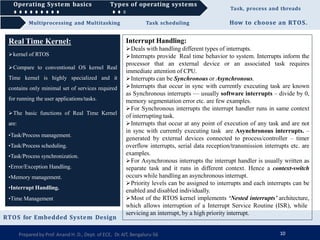
Real Time Kernel:
kernel of RTOS
Compare to conventional OS kernel Real
Time kernel is highly specialized and it
contains only minimal set of services required
for running the user applications/tasks.
The basic functions of Real Time Kernel
are:
•Task/Process management.
•Task/Process scheduling.
•Task/Process synchronization.
•Error/Exception Handling.
•Memory management.
•Interrupt Handling.
•Time Management
Preparedby Prof. Anand H. D., Dept. of ECE, Dr.AIT, Bengaluru-56 10
Operating System basics Types of operating systems Task, process and threads
Multiprocessing and Multitasking Task scheduling How to choose an RTOS.
Operating System basics Types of operating systems
RTOS for Embedded System Design
Real Time Kernel:
kernel of RTOS
Compare to conventional OS kernel Real
Time kernel is highly specialized and it
contains only minimal set of services required
for running the user applications/tasks.
The basic functions of Real Time Kernel
are:
•Task/Process management.
•Task/Process scheduling.
•Task/Process synchronization.
•Error/Exception Handling.
•Memory management.
•Interrupt Handling.
•Time Management
Task/Process management:
Deals with setting up the memory space for the tasks, loading the task’s code
into the memory space, allocating system resources, setting up a Task Control
Block (TCB) for the task, termination and deletion.
TCB is used to hold information corresponding to task which includes:
Preparedby Prof. Anand H. D., Dept. of ECE, Dr.AIT, Bengaluru-56 10
Implementation of TCB is kernel dependent.
Task management service uses TCB of a task in following way:
•Creates a TCB for a task on creating a task.
•Delete/remove TCB of task when task is terminated/deleted
•Reads TCB to get the state of task.
•Update TCB with updated parameters on need basis.
•Modify TCB to change task priority dynamically.
•Task ID •Task state
•Task type •Task Priority
•Task context pointer •Task memory pointers
•Task system resource pointers •Task pointers.
Operating System basics Types of operating systems Task, process and threads
Multiprocessing and Multitasking Task scheduling How to choose an RTOS.
Operating System basics Types of operating systems
RTOS for Embedded System Design
Real Time Kernel:
kernel of RTOS
Compare to conventional OS kernel Real
Time kernel is highly specialized and it
contains only minimal set of services required
for running the user applications/tasks.
The basic functions of Real Time Kernel
are:
•Task/Process management.
•Task/Process scheduling.
•Task/Process synchronization.
•Error/Exception Handling.
•Memory management.
•Interrupt Handling.
•Time Management
Task/Process management:
Deals with setting up the memory space for the tasks, loading the task’s code
into the memory space, allocating system resources, setting up a Task Control
Block (TCB) for the task, termination and deletion.
TCB is used to hold information corresponding to task which includes:
Preparedby Prof. Anand H. D., Dept. of ECE, Dr.AIT, Bengaluru-56 10
Implementation of TCB is kernel dependent.
Task management service uses TCB of a task in following way:
•Creates a TCB for a task on creating a task.
•Delete/remove TCB of task when task is terminated/deleted
•Reads TCB to get the state of task.
•Update TCB with updated parameters on need basis.
•Modify TCB to change task priority dynamically.
Task/Process scheduling:
Deals with sharing CPU among various tasks/processes.
Akernel service called ‘Scheduler’handles task scheduling.
Scheduler is nothing but an algorithm implementation which performs the
efficient and optimal scheduling of task to provide a deterministic behavior.
•Task ID •Task state
•Task type •Task Priority
•Task context pointer •Task memory pointers
•Task system resource pointers •Task pointers.
Operating System basics Types of operating systems Task, process and threads
Multiprocessing and Multitasking Task scheduling How to choose an RTOS.
Operating System basics Types of operating systems
RTOS for Embedded System Design
Real Time Kernel:
kernel of RTOS
Compare to conventional OS kernel Real
Time kernel is highly specialized and it
contains only minimal set of services required
for running the user applications/tasks.
The basic functions of Real Time Kernel
are:
•Task/Process management.
•Task/Process scheduling.
•Task/Process synchronization.
•Error/Exception Handling.
•Memory management.
•Interrupt Handling.
•Time Management
Preparedby Prof. Anand H. D., Dept. of ECE, Dr.AIT, Bengaluru-56 10
Task/Process synchronization:
Deals with the synchronization of concurrent access of resources, which is shared
across multiple tasks and communication between various tasks.
Operating System basics Types of operating systems Task, process and threads
Multiprocessing and Multitasking Task scheduling How to choose an RTOS.
Operating System basics Types of operating systems
RTOS for Embedded System Design
Real Time Kernel:
kernel of RTOS
Compare to conventional OS kernel Real
Time kernel is highly specialized and it
contains only minimal set of services required
for running the user applications/tasks.
The basic functions of Real Time Kernel
are:
•Task/Process management.
•Task/Process scheduling.
•Task/Process synchronization.
•Error/Exception Handling.
•Memory management.
•Interrupt Handling.
•Time Management
Preparedby Prof. Anand H. D., Dept. of ECE, Dr.AIT, Bengaluru-56 10
Task/Process synchronization:
Deals with the synchronization of concurrent access of resources, which is shared
across multiple tasks and communication between various tasks.
Error/Exception Handling:
Deals with registering and handling the errors occurred/exceptions raised during
execution of tasks.
Insufficient memory, timeouts, deadlocks, deadline missing, bus error, divide by
zero, unknown instruction execution etc. are examples of errors/exceptions.
Errors/Exceptions can occur at kernel level services or at task level. Deadlock is an
kernel level error whereas timeout is an example for task level.
The OS kernel gives the information in the form of System Call (API).
Watchdog timer will be used for handling timeouts.
Operating System basics Types of operating systems Task, process and threads
Multiprocessing and Multitasking Task scheduling How to choose an RTOS.
Operating System basics Types of operating systems
RTOS for Embedded System Design
Real Time Kernel:
kernel of RTOS
Compare to conventional OS kernel Real
Time kernel is highly specialized and it
contains only minimal set of services required
for running the user applications/tasks.
The basic functions of Real Time Kernel
are:
•Task/Process management.
•Task/Process scheduling.
•Task/Process synchronization.
•Error/Exception Handling.
•Memory management.
•Interrupt Handling.
•Time Management
Task/Process synchronization:
Deals with the synchronization of concurrent access of resources, which is shared
across multiple tasks and communication between various tasks.
Error/Exception Handling:
Deals with registering and handling the errors occurred/exceptions raised during
execution of tasks.
Insufficient memory, timeouts, deadlocks, deadline missing, bus error, divide by
zero, unknown instruction execution etc. are examples of errors/exceptions.
Errors/Exceptions can occur at kernel level services or at task level. Deadlock is an
kernel level error whereas timeout is an example for task level.
The OS kernel gives the information in the form of System Call (API).
Watchdog timer will be used for handling timeouts.
Memory Management:
Compare to GPOS, memory management of RTOS is slightly different.
Memory allocation time increases depending upon the block of memory needs to
be allocated and state of allocated memory.
RTOS makes use of ‘block’ based memory allocation technique instead of usual
dynamic memory allocation used by GPOS.
RTOS kernel uses blocks of fixed size of dynamic memory and block is allocated
to a task on need basis. The blocks are stored in ‘free buffer queues’.
To achieve predictable timing and avoid timing overhead, RTOS allows task to
access any memory blocks without any memory protection.
Few RTOS kernels implement Virtual Memory concept of memory allocation if
system supports secondary memory storage.
Preparedby Prof. Anand H. D., Dept. of ECE, Dr.AIT, Bengaluru-56 10
Operating System basics Types of operating systems Task, process and threads
Multiprocessing and Multitasking Task scheduling How to choose an RTOS.
Operating System basics Types of operating systems
RTOS for Embedded System Design
Real Time Kernel:
kernel of RTOS
Compare to conventional OS kernel Real
Time kernel is highly specialized and it
contains only minimal set of services required
for running the user applications/tasks.
The basic functions of Real Time Kernel
are:
•Task/Process management.
•Task/Process scheduling.
•Task/Process synchronization.
•Error/Exception Handling.
•Memory management.
•Interrupt Handling.
•Time Management
Interrupt Handling:
Deals with handling different types of interrupts.
Interrupts provide Real time behavior to system. Interrupts inform the
processor that an external device or an associated task requires
immediate attention of CPU.
Interrupts can be Synchronous or Asynchronous.
Interrupts that occur in sync with currently executing task are known
as Synchronous interrupts — usually software interrupts – divide by 0,
memory segmentation error etc. are few examples.
For Synchronous interrupts the interrupt handler runs in same context
of interrupting task.
Interrupts that occur at any point of execution of any task and are not
in sync with currently executing task are Asynchronous interrupts. –
generated by external devices connected to process/controller – timer
overflow interrupts, serial data reception/transmission interrupts etc. are
examples.
For Asynchronous interrupts the interrupt handler is usually written as
separate task and it runs in different context. Hence a context-switch
occurs while handling an asynchronous interrupt.
Priority levels can be assigned to interrupts and each interrupts can be
enabled and disabled individually.
Most of the RTOS kernel implements ‘Nested interrupts’ architecture,
which allows interruption of a Interrupt Service Routine (ISR), while
Preparedby Prof. Anand H. D., Dept. of ECE, Dr.AIT, Bengaluru-56 10
servicing an interrupt, by a high priority interrupt.
Operating System basics Types of operating systems Task, process and threads
Multiprocessing and Multitasking Task scheduling How to choose an RTOS.
Operating System basics Types of operating systems
RTOS for Embedded System Design
Real Time Kernel:
kernel of RTOS
Compare to conventional OS kernel Real
Time kernel is highly specialized and it
contains only minimal set of services required
for running the user applications/tasks.
The basic functions of Real Time Kernel
are:
•Task/Process management.
•Task/Process scheduling.
•Task/Process synchronization.
•Error/Exception Handling.
•Memory management.
•Interrupt Handling.
•Time Management
Time Management:
Accurate time management is essential for providing precise time
reference to all applications.
The time reference to kernel is provided by a high resolution Real-
Time-Clock (RTC) hardware chip.
The hardware time is programmed to interrupt the processor/controller
at a fixed interval. This is referred as ‘timer tick’. Usually varies in µsec.
If timer tick interval is 1 µsec, system time register will reset in
If timer tick interval is 1 millisecond, system time register will reset in
This timer tick can be utilized for:
•Save the current context.
•Increment the timer register by one.
•Update the timers implemented in kernel.
•Activate the periodic tasks, which are in idle state.
•Invoke the scheduler and schedule the tasks again based on scheduling
algorithm.
•Delete all terminated tasks and associated data structures (TCBs).
•Load the context for first task in the ready queue.
Preparedby Prof. Anand H. D., Dept. of ECE, Dr.AIT, Bengaluru-56 10
Operating System basics Types of operating systems Task, process and threads
Multiprocessing and Multitasking Task scheduling How to choose an RTOS.
Operating System basics Types of operating systems
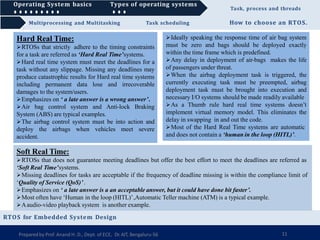
Soft Real Time:
RTOSs that does not guarantee meeting deadlines but offer the best effort to meet the deadlines are referred as
‘Soft Real Time’systems.
Missing deadlines for tasks are acceptable if the frequency of deadline missing is within the compliance limit of
‘Quality of Service (QoS)’.
Emphasizes on ‘ a late answer is a an acceptable answer, but it could have done bit faster’.
Most often have ‘Human in the loop (HITL)’,Automatic Teller machine (ATM) is a typical example.
Aaudio-video playback system is another example.
RTOS for Embedded System Design
Hard Real Time:
RTOSs that strictly adhere to the timing constraints
for a task are referred as ‘Hard Real Time’systems.
Hard real time system must meet the deadlines for a
task without any slippage. Missing any deadlines may
produce catastrophic results for Hard real time systems
including permanent data lose and irrecoverable
damages to the system/users.
Emphasizes on ‘ a late answer is a wrong answer’.
Air bag control system and Anti-lock Braking
System (ABS) are typical examples.
The airbag control system must be into action and
deploy the airbags when vehicles meet severe
accident.
Preparedby Prof. Anand H. D., Dept. of ECE, Dr.AIT, Bengaluru-56 11
Ideally speaking the response time of air bag system
must be zero and bags should be deployed exactly
within the time frame which is predefined.
Any delay in deployment of air-bags makes the life
of passengers under threat.
When the airbag deployment task is triggered, the
currently executing task must be preempted, airbag
deployment task must be brought into execution and
necessary I/O systems should be made readily available
As a Thumb rule hard real time systems doesn’t
implement virtual memory model. This eliminates the
delay in swapping in and out the code.
Most of the Hard Real Time systems are automatic
and does not contain a ‘human in the loop (HITL)’.
Operating System basics Types of operating systems Task, process and threads
Multiprocessing and Multitasking Task scheduling How to choose an RTOS.
Operating System basics Types of operating systems Task, process and threads
RTOS for Embedded System Design
In OS context a ‘task’ is defined as the program in execution and the related information maintained by the OS
for the program.
Atask is also known as ‘job’in OS context.
Aprogram or part of it in execution is also called a ‘Process’
The terms ‘task’, ‘job’ and ‘process’ refer to the same entity in the OS context and most often they are used
interchangeably.
Process:
Also known as an instance of program in execution.
Multiple instances of the same program can execute simultaneously.
A process requires various system resources like CPU for executing the process, memory for storing the code
corresponding to the process and associated variables, I/O devices for information exchange etc.
Aprocess is sequential in execution.
Preparedby Prof. Anand H. D., Dept. of ECE, Dr.AIT, Bengaluru-56 12
Operating System basics Types of operating systems Task, process and threads
Multiprocessing and Multitasking Task scheduling How to choose an RTOS.
Operating System basics Types of operating systems Task, process and threads
RTOS for Embedded System Design
Structure of a Process
Preparedby Prof. Anand H. D., Dept. of ECE, Dr.AIT, Bengaluru-56 13
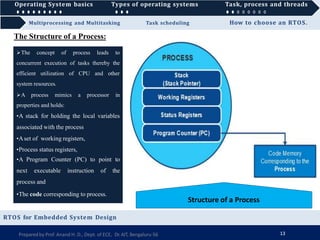
The Structure of a Process:
The concept of process leads to
concurrent execution of tasks thereby the
efficient utilization of CPU and other
system resources.
A process mimics a processor in
properties and holds:
•A stack for holding the local variables
associated with the process
•Aset of working registers,
•Process status registers,
•A Program Counter (PC) to point to
next executable instruction of the
process and
•The code corresponding to process.
Operating System basics Types of operating systems Task, process and threads
Multiprocessing and Multitasking Task scheduling How to choose an RTOS.
Operating System basics Types of operating systems Task, process and threads
RTOS for Embedded System Design
Structure of a Process
Preparedby Prof. Anand H. D., Dept. of ECE, Dr.AIT, Bengaluru-56 13
The Structure of a Process:
The concept of process leads to
concurrent execution of tasks thereby the
efficient utilization of CPU and other
system resources.
A process mimics a processor in
properties and holds:
•A stack for holding the local variables
associated with the process
•Aset of working registers,
•Process status registers,
•A Program Counter (PC) to point to
next executable instruction of the
process and
•The code corresponding to process.
Operating System basics Types of operating systems Task, process and threads
Multiprocessing and Multitasking Task scheduling How to choose an RTOS.
Operating System basics Types of operating systems Task, process and threads
RTOS for Embedded System Design
Structure of a Process
Preparedby Prof. Anand H. D., Dept. of ECE, Dr.AIT, Bengaluru-56 13
The Structure of a Process:
The concept of process leads to
concurrent execution of tasks thereby the
efficient utilization of CPU and other
system resources.
A process mimics a processor in
properties and holds:
•A stack for holding the local variables
associated with the process
•Aset of working registers,
•Process status registers,
•A Program Counter (PC) to point to
next executable instruction of the
process and
•The code corresponding to process.
Operating System basics Types of operating systems Task, process and threads
Multiprocessing and Multitasking Task scheduling How to choose an RTOS.
Operating System basics Types of operating systems Task, process and threads
RTOS for Embedded System Design
Structure of a Process
Preparedby Prof. Anand H. D., Dept. of ECE, Dr.AIT, Bengaluru-56 13
The Structure of a Process:
The concept of process leads to
concurrent execution of tasks thereby the
efficient utilization of CPU and other
system resources.
A process mimics a processor in
properties and holds:
•A stack for holding the local variables
associated with the process
•Aset of working registers,
•Process status registers,
•A Program Counter (PC) to point to
next executable instruction of the
process and
•The code corresponding to process.
Operating System basics Types of operating systems Task, process and threads
Multiprocessing and Multitasking Task scheduling How to choose an RTOS.
Operating System basics Types of operating systems Task, process and threads
RTOS for Embedded System Design
Structure of a Process
The Structure of a Process:
The concept of process leads to
concurrent execution of tasks thereby the
efficient utilization of CPU and other
system resources.
A process mimics a processor in
properties and holds:
•A stack for holding the local variables
associated with the process
•Aset of working registers,
•Process status registers,
•A Program Counter (PC) to point to
next executable instruction of the
process and
•The code corresponding to process.
Preparedby Prof. Anand H. D., Dept. of ECE, Dr.AIT, Bengaluru-56 13
Operating System basics Types of operating systems Task, process and threads
Multiprocessing and Multitasking Task scheduling How to choose an RTOS.
Operating System basics Types of operating systems Task, process and threads
RTOS for Embedded System Design
The concept of process leads to
concurrent execution of tasks thereby the
efficient utilization of CPU and other
system resources.
A process mimics a processor in
properties and holds:
•A stack for holding the local variables
associated with the process
•Aset of working registers,
•Process status registers,
•A Program Counter (PC) to point to
next executable instruction of the
process and
•The code corresponding to process.
Structure of a Process
Preparedby Prof. Anand H. D., Dept. of ECE, Dr.AIT, Bengaluru-56 13
The Structure of a Process:
Operating System basics Types of operating systems Task, process and threads
How to choose an RTOS.
Operating System basics Types of operating systems Task, process and threads
RTOS for Embedded System Design
A process which inherits all properties of CPU can be considered as a
virtual processor, awaiting its turn to have its properties switched into
physical processor.
When process gets it turn, its registers and the PC register maps to
physical registers of CPU.
On loading a process into main memory, a specific area of memory
is allocated for the process.
Memory organization of a Process
Multiprocessing and Multitasking Task scheduling
Memory Organization of a Process:
Preparedby Prof. Anand H. D., Dept. of ECE, Dr.AIT, Bengaluru-56 14
Operating System basics Types of operating systems Task, process and threads
How to choose an RTOS.
Operating System basics Types of operating systems Task, process and threads
RTOS for Embedded System Design
Multiprocessing and Multitasking Task scheduling
Memory Organization of a Process:
A process which inherits all properties of CPU can be considered as a
virtual processor, awaiting its turn to have its properties switched into
physical processor.
When process gets it turn, its registers and the PC register maps to
physical registers of CPU.
On loading a process into main memory, a specific area of memory is
allocated for the process.
The memory occupied by process is segregated into 3 regions:
•Code Memory – contains the program code corresponding to process.
Memory organization of a Process
Preparedby Prof. Anand H. D., Dept. of ECE, Dr.AIT, Bengaluru-56 14
Operating System basics Types of operating systems Task, process and threads
How to choose an RTOS.
Operating System basics Types of operating systems Task, process and threads
RTOS for Embedded System Design
Multiprocessing and Multitasking Task scheduling
Memory Organization of a Process:
A process which inherits all properties of CPU can be considered as a
virtual processor, awaiting its turn to have its properties switched into
physical processor.
When process gets it turn, its registers and the PC register maps to
physical registers of CPU.
On loading a process into main memory, a specific area of memory is
allocated for the process.
The memory occupied by process is segregated into 3 regions:
•Code Memory – contains the program code corresponding to process.
•Data Memory – holds all global data for the process.
Memory organization of a Process
Preparedby Prof. Anand H. D., Dept. of ECE, Dr.AIT, Bengaluru-56 14
Operating System basics Types of operating systems Task, process and threads
How to choose an RTOS.
Operating System basics Types of operating systems Task, process and threads
RTOS for Embedded System Design
Multiprocessing and Multitasking Task scheduling
Memory Organization of a Process:
A process which inherits all properties of CPU can be considered as a
virtual processor, awaiting its turn to have its properties switched into
physical processor.
When process gets it turn, its registers and the PC register maps to
physical registers of CPU.
On loading a process into main memory, a specific area of memory is
allocated for the process.
The memory occupied by process is segregated into 3 regions:
•Code Memory – contains the program code corresponding to process.
•Data Memory – holds all global data for the process.
•Stack Memory—holds all temporary data such as variables local to the
process.
Memory organization of a Process
Preparedby Prof. Anand H. D., Dept. of ECE, Dr.AIT, Bengaluru-56 14
Operating System basics Types of operating systems Task, process and threads
How to choose an RTOS.
Operating System basics Types of operating systems Task, process and threads
RTOS for Embedded System Design
Multiprocessing and Multitasking Task scheduling
Memory Organization of a Process:
A process which inherits all properties of CPU can be considered as a
virtual processor, awaiting its turn to have its properties switched into
physical processor.
When process gets it turn, its registers and the PC register maps to
physical registers of CPU.
On loading a process into main memory, a specific area of memory is
allocated for the process.
The memory occupied by process is segregated into 3 regions:
•Code Memory – contains the program code corresponding to process.
•Data Memory – holds all global data for the process.
•Stack Memory—holds all temporary data such as variables local to the
process.
Memory organization of a Process
Preparedby Prof. Anand H. D., Dept. of ECE, Dr.AIT, Bengaluru-56 14
Operating System basics Types of operating systems Task, process and threads
How to choose an RTOS.
Operating System basics Types of operating systems Task, process and threads
RTOS for Embedded System Design
Multiprocessing and Multitasking Task scheduling
Memory Organization of a Process:
A process which inherits all properties of CPU can be considered as a
virtual processor, awaiting its turn to have its properties switched into
physical processor.
When process gets it turn, its registers and the PC register maps to
physical registers of CPU.
On loading a process into main memory, a specific area of memory is
allocated for the process.
The memory occupied by process is segregated into 3 regions:
•Code Memory – contains the program code corresponding to process.
•Data Memory – holds all global data for the process.
•Stack Memory—holds all temporary data such as variables local to the
process.
Stack memory starts at the highest address from allocated memory
and grows downwards.
Say if allocated memory area for process is 2048-2100, the stack
memory starts at address 2100 and grows downwards. Memory organization of a Process
Preparedby Prof. Anand H. D., Dept. of ECE, Dr.AIT, Bengaluru-56 14
Operating System basics Types of operating systems Task, process and threads
How to choose an RTOS.
Operating System basics Types of operating systems Task, process and threads
RTOS for Embedded System Design
Multiprocessing and Multitasking Task scheduling
Process States and State Transition:
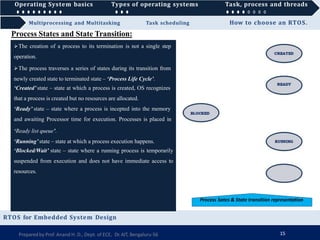
The creation of a process to its termination is not a single step
operation.
The process traverses a series of states during its transition from
newly created state to terminated state – ‘Process Life Cycle’.
Process Sates & State transition representation
Preparedby Prof. Anand H. D., Dept. of ECE, Dr.AIT, Bengaluru-56 15
Operating System basics Types of operating systems Task, process and threads
How to choose an RTOS.
Operating System basics Types of operating systems Task, process and threads
RTOS for Embedded System Design
Multiprocessing and Multitasking Task scheduling
Process States and State Transition:
The creation of a process to its termination is not a single step
operation.
The process traverses a series of states during its transition from
newly created state to terminated state – ‘Process Life Cycle’.
‘Created’ state – state at which a process is created, OS recognizes
that a process is created but no resources are allocated.
Process Sates & State transition representation
Preparedby Prof. Anand H. D., Dept. of ECE, Dr.AIT, Bengaluru-56 15
Operating System basics Types of operating systems Task, process and threads
How to choose an RTOS.
Operating System basics Types of operating systems Task, process and threads
RTOS for Embedded System Design
Multiprocessing and Multitasking Task scheduling
Process States and State Transition:
The creation of a process to its termination is not a single step
operation.
The process traverses a series of states during its transition from
newly created state to terminated state – ‘Process Life Cycle’.
‘Created’ state – state at which a process is created, OS recognizes
that a process is created but no resources are allocated.
‘Ready’ state – state where a process is incepted into the memory
and awaiting Processor time for execution. Processes is placed in
‘Ready list queue’.
Process Sates & State transition representation
Preparedby Prof. Anand H. D., Dept. of ECE, Dr.AIT, Bengaluru-56 15
Operating System basics Types of operating systems Task, process and threads
How to choose an RTOS.
Operating System basics Types of operating systems Task, process and threads
RTOS for Embedded System Design
Multiprocessing and Multitasking Task scheduling
Process States and State Transition:
The creation of a process to its termination is not a single step
operation.
The process traverses a series of states during its transition from
newly created state to terminated state – ‘Process Life Cycle’.
‘Created’ state – state at which a process is created, OS recognizes
that a process is created but no resources are allocated.
‘Ready’ state – state where a process is incepted into the memory
and awaiting Processor time for execution. Processes is placed in
‘Ready list queue’.
‘Running’state – state at which a process execution happens.
Process Sates & State transition representation
Preparedby Prof. Anand H. D., Dept. of ECE, Dr.AIT, Bengaluru-56 15
Operating System basics Types of operating systems Task, process and threads
How to choose an RTOS.
Operating System basics Types of operating systems Task, process and threads
RTOS for Embedded System Design
Multiprocessing and Multitasking Task scheduling
Process States and State Transition:
The creation of a process to its termination is not a single step
operation.
The process traverses a series of states during its transition from
newly created state to terminated state – ‘Process Life Cycle’.
‘Created’ state – state at which a process is created, OS recognizes
that a process is created but no resources are allocated.
‘Ready’ state – state where a process is incepted into the memory
and awaiting Processor time for execution. Processes is placed in
‘Ready list queue’.
‘Running’state – state at which a process execution happens.
‘Blocked/Wait’ state – state where a running process is temporarily
suspended from execution and does not have immediate access to
resources.
Process Sates & State transition representation
Preparedby Prof. Anand H. D., Dept. of ECE, Dr.AIT, Bengaluru-56 15
Operating System basics Types of operating systems Task, process and threads
How to choose an RTOS.
Operating System basics Types of operating systems Task, process and threads
RTOS for Embedded System Design
Multiprocessing and Multitasking Task scheduling
Process States and State Transition:
The creation of a process to its termination is not a single step
operation.
The process traverses a series of states during its transition from
newly created state to terminated state – ‘Process Life Cycle’.
‘Created’ state – state at which a process is created, OS recognizes
that a process is created but no resources are allocated.
‘Ready’ state – state where a process is incepted into the memory
and awaiting Processor time for execution. Processes is placed in
‘Ready list queue’.
‘Running’state – state at which a process execution happens.
‘Blocked/Wait’ state – state where a running process is temporarily
suspended from execution and does not have immediate access to
resources.
‘Completed’state – state where process completes its execution.
Process Sates & State transition representation
Preparedby Prof. Anand H. D., Dept. of ECE, Dr.AIT, Bengaluru-56 15
Operating System basics Types of operating systems Task, process and threads
How to choose an RTOS.
Operating System basics Types of operating systems Task, process and threads
RTOS for Embedded System Design
Multiprocessing and Multitasking Task scheduling
Process States and State Transition:
The creation of a process to its termination is not a single step
operation.
The process traverses a series of states during its transition from
newly created state to terminated state – ‘Process Life Cycle’.
‘Created’ state – state at which a process is created, OS recognizes
that a process is created but no resources are allocated.
‘Ready’ state – state where a process is incepted into the memory
and awaiting Processor time for execution. Processes is placed in
‘Ready list queue’.
‘Running’state – state at which a process execution happens.
‘Blocked/Wait’ state – state where a running process is temporarily
suspended from execution and does not have immediate access to
resources.
‘Completed’state – state where process completes its execution.
Transistion of a process from one state to another is called as
‘State Transistion’
Process Sates & State transition representation
Preparedby Prof. Anand H. D., Dept. of ECE, Dr.AIT, Bengaluru-56 15
Operating System basics Types of operating systems Task, process and threads
How to choose an RTOS.
Operating System basics Types of operating systems Task, process and threads
RTOS for Embedded System Design
The creation of a process to its termination is not a single step
operation.
The process traverses a series of states during its transition from
newly created state to terminated state – ‘Process Life Cycle’.
‘Created’ state – state at which a process is created, OS recognizes
that a process is created but no resources are allocated.
‘Ready’ state – state where a process is incepted into the memory
and awaiting Processor time for execution. Processes is placed in
‘Ready list queue’.
‘Running’state – state at which a process execution happens.
‘Blocked/Wait’ state – state where a running process is temporarily
suspended from execution and does not have immediate access to
resources.
‘Completed’state – state where process completes its execution.
Transistion of a process from one state to another is called as
‘State Transistion’
Process Sates & State transition representation
Multiprocessing and Multitasking Task scheduling
Process States and State Transition:
Preparedby Prof. Anand H. D., Dept. of ECE, Dr.AIT, Bengaluru-56 15
Operating System basics Types of operating systems Task, process and threads
How to choose an RTOS.
Operating System basics Types of operating systems Task, process and threads
RTOS for Embedded System Design
Multiprocessing and Multitasking Task scheduling
Process States and State Transition:
The creation of a process to its termination is not a single step
operation.
The process traverses a series of states during its transition from
newly created state to terminated state – ‘Process Life Cycle’.
‘Created’ state – state at which a process is created, OS recognizes
that a process is created but no resources are allocated.
‘Ready’ state – state where a process is incepted into the memory
and awaiting Processor time for execution. Processes is placed in
‘Ready list queue’.
‘Running’state – state at which a process execution happens.
‘Blocked/Wait’ state – state where a running process is temporarily
suspended from execution and does not have immediate access to
resources.
‘Completed’state – state where process completes its execution.
Transistion of a process from one state to another is called as
‘State Transistion’
Process Sates & State transition representation
Preparedby Prof. Anand H. D., Dept. of ECE, Dr.AIT, Bengaluru-56 15
Operating System basics Types of operating systems Task, process and threads
How to choose an RTOS.
Operating System basics Types of operating systems Task, process and threads
RTOS for Embedded System Design
Multiprocessing and Multitasking Task scheduling
Process States and State Transition:
The creation of a process to its termination is not a single step
operation.
The process traverses a series of states during its transition from
newly created state to terminated state – ‘Process Life Cycle’.
‘Created’ state – state at which a process is created, OS recognizes
that a process is created but no resources are allocated.
‘Ready’ state – state where a process is incepted into the memory
and awaiting Processor time for execution. Processes is placed in
‘Ready list queue’.
‘Running’state – state at which a process execution happens.
‘Blocked/Wait’ state – state where a running process is temporarily
suspended from execution and does not have immediate access to
resources.
‘Completed’state – state where process completes its execution.
Transistion of a process from one state to another is called as
‘State Transistion’
Process Sates & State transition representation
Preparedby Prof. Anand H. D., Dept. of ECE, Dr.AIT, Bengaluru-56 15
Operating System basics Types of operating systems Task, process and threads
How to choose an RTOS.
Operating System basics Types of operating systems Task, process and threads
RTOS for Embedded System Design
Multiprocessing and Multitasking Task scheduling
Process States and State Transition:
The creation of a process to its termination is not a single step
operation.
The process traverses a series of states during its transition from
newly created state to terminated state – ‘Process Life Cycle’.
‘Created’ state – state at which a process is created, OS recognizes
that a process is created but no resources are allocated.
‘Ready’ state – state where a process is incepted into the memory
and awaiting Processor time for execution. Processes is placed in
‘Ready list queue’.
‘Running’state – state at which a process execution happens.
‘Blocked/Wait’ state – state where a running process is temporarily
suspended from execution and does not have immediate access to
resources.
‘Completed’state – state where process completes its execution.
Transistion of a process from one state to another is called as
‘State Transistion’
Process Sates & State transition representation
Preparedby Prof. Anand H. D., Dept. of ECE, Dr.AIT, Bengaluru-56 15
Operating System basics Types of operating systems Task, process and threads
How to choose an RTOS.
Operating System basics Types of operating systems Task, process and threads
RTOS for Embedded System Design
Multiprocessing and Multitasking Task scheduling
Process States and State Transition:
The creation of a process to its termination is not a single step
operation.
The process traverses a series of states during its transition from
newly created state to terminated state – ‘Process Life Cycle’.
‘Created’ state – state at which a process is created, OS recognizes
that a process is created but no resources are allocated.
‘Ready’ state – state where a process is incepted into the memory
and awaiting Processor time for execution. Processes is placed in
‘Ready list queue’.
‘Running’state – state at which a process execution happens.
‘Blocked/Wait’ state – state where a running process is temporarily
suspended from execution and does not have immediate access to
resources.
‘Completed’state – state where process completes its execution.
Transistion of a process from one state to another is called as
‘State Transistion’
Process Sates & State transition representation
Preparedby Prof. Anand H. D., Dept. of ECE, Dr.AIT, Bengaluru-56 15
Operating System basics Types of operating systems Task, process and threads
Task scheduling How to choose an RTOS.
Operating System basics Types of operating systems Task, process and threads
RTOS for Embedded System Design
Multiprocessing and Multitasking
Threads:
A thread is the primitive that can execute
code.
A thread is a single sequential flow of
control within a process.
Thread is also known as light weighted
process.
A process can have many threads of
execution.
Preparedby Prof. Anand H. D., Dept. of ECE, Dr.AIT, Bengaluru-56 16
Operating System basics Types of operating systems Task, process and threads
Task scheduling How to choose an RTOS.
Operating System basics Types of operating systems Task, process and threads
RTOS for Embedded System Design
Multiprocessing and Multitasking
Threads:
A thread is the primitive that can execute
code.
A thread is a single sequential flow of
control within a process.
Thread is also known as light weighted
process.
A process can have many threads of
execution.
Different threads, which are part of a
process, share the same address space (same
code, data and heap memory area).
Memory Organization of a process & its associated threads
Preparedby Prof. Anand H. D., Dept. of ECE, Dr.AIT, Bengaluru-56 16
Operating System basics Types of operating systems Task, process and threads
Task scheduling How to choose an RTOS.
Operating System basics Types of operating systems Task, process and threads
RTOS for Embedded System Design
Multiprocessing and Multitasking
Threads:
A thread is the primitive that can execute
code.
A thread is a single sequential flow of
control within a process.
Thread is also known as light weighted
process.
A process can have many threads of
execution.
Different threads, which are part of a
process, share the same address space (same
code, data and heap memory area).
Memory Organization of a process & its associated threads
Preparedby Prof. Anand H. D., Dept. of ECE, Dr.AIT, Bengaluru-56 16
Operating System basics Types of operating systems Task, process and threads
Task scheduling How to choose an RTOS.
Operating System basics Types of operating systems Task, process and threads
RTOS for Embedded System Design
Multiprocessing and Multitasking
Threads:
A thread is the primitive that can execute
code.
A thread is a single sequential flow of
control within a process.
Thread is also known as light weighted
process.
A process can have many threads of
execution.
Different threads, which are part of a
process, share the same address space (same
code, data and heap memory area).
Memory Organization of a process & its associated threads
Preparedby Prof. Anand H. D., Dept. of ECE, Dr.AIT, Bengaluru-56 16
Operating System basics Types of operating systems Task, process and threads
Task scheduling How to choose an RTOS.
Operating System basics Types of operating systems Task, process and threads
RTOS for Embedded System Design
Multiprocessing and Multitasking
Threads:
A thread is the primitive that can execute
code.
A thread is a single sequential flow of
control within a process.
Thread is also known as light weighted
process.
A process can have many threads of
execution.
Different threads, which are part of a
process, share the same address space (same
code, data and heap memory area).
Threads maintain there own thread status—
CPU register values, PC and stack. Memory Organization of a process & its associated threads
Preparedby Prof. Anand H. D., Dept. of ECE, Dr.AIT, Bengaluru-56 16
Operating System basics Types of operating systems Task, process and threads
Task scheduling How to choose an RTOS.
Operating System basics Types of operating systems Task, process and threads
RTOS for Embedded System Design
Multiprocessing and Multitasking
Threads:
A thread is the primitive that can execute
code.
A thread is a single sequential flow of
control within a process.
Thread is also known as light weighted
process.
A process can have many threads of
execution.
Different threads, which are part of a
process, share the same address space (same
code, data and heap memory area).
Threads maintain there own thread status—
CPU register values, PC and stack. Memory Organization of a process & its associated threads
Preparedby Prof. Anand H. D., Dept. of ECE, Dr.AIT, Bengaluru-56 16
Operating System basics Types of operating systems Task, process and threads
Task scheduling How to choose an RTOS.
Operating System basics Types of operating systems Task, process and threads
RTOS for Embedded System Design
Multiprocessing and Multitasking
Threads:
A thread is the primitive that can execute
code.
A thread is a single sequential flow of
control within a process.
Thread is also known as light weighted
process.
A process can have many threads of
execution.
Different threads, which are part of a
process, share the same address space (same
code, data and heap memory area).
Threads maintain there own thread status—
CPU register values, PC and stack. Memory Organization of a process & its associated threads
Preparedby Prof. Anand H. D., Dept. of ECE, Dr.AIT, Bengaluru-56 16
Operating System basics Types of operating systems Task, process and threads
Task scheduling How to choose an RTOS.
Operating System basics Types of operating systems Task, process and threads
RTOS for Embedded System Design
Multiprocessing and Multitasking
Threads:
A thread is the primitive that can execute
code.
A thread is a single sequential flow of
control within a process.
Thread is also known as light weighted
process.
A process can have many threads of
execution.
Different threads, which are part of a
process, share the same address space (same
code, data and heap memory area).
Threads maintain there own thread status—
CPU register values, PC and stack. Memory Organization of a process & its associated threads
Preparedby Prof. Anand H. D., Dept. of ECE, Dr.AIT, Bengaluru-56 16
Operating System basics Types of operating systems Task, process and threads
Multiprocessing and Multitasking Task scheduling How to choose an RTOS.
Operating System basics Types of operating systems Task, process and threads
RTOS for Embedded System Design
A process/thread in a embedded application may be a
complex or lengthy one and it may contain various sub-
operations like getting input from I/O devices
connected to processor, performing some internal
calculations /operations, updating some I/O devices etc.
If all these sub-operations are executed in sequence,
the CPU utilization may not be efficient.
Instead of this single sequential execution of the
whole process, if task/process is split into different
threads carrying out the different sub-functionalities of
the process, the CPU can be effectively utilized.
Threads corresponding to I/O operations enter wait
state, while other threads which do not require I/O can
be switched to execution.
Preparedby Prof. Anand H. D., Dept. of ECE, Dr.AIT, Bengaluru-56 17
The concept of Multithreading:
Operating System basics Types of operating systems Task, process and threads
Multiprocessing and Multitasking Task scheduling How to choose an RTOS.
Operating System basics Types of operating systems Task, process and threads
RTOS for Embedded System Design
If the process is split into multiple threads, which
executes a portion of the process, there will be a main
thread and rest of them will be created within main
thread.
Use of multiple threads to execute a process results in
following advantages:
Better Memory Utilization: multiple threads of
same process share address space for data memory,
also reduces inter thread communication since variables
will be shared.
Speedy execution: since process splits into different
threads, when one thread enters wait state other thread
can be scheduled.
Efficient CPU Utilization: CPU is engaged all time
Process with multi-threads
The concept of Multithreading:
Preparedby Prof. Anand H. D., Dept. of ECE, Dr.AIT, Bengaluru-56 17
Operating System basics Types of operating systems Task, process and threads
Multiprocessing and Multitasking Task scheduling How to choose an RTOS.
Operating System basics Types of operating systems Task, process and threads
RTOS for Embedded System Design
If the process is split into multiple threads, which
executes a portion of the process, there will be a main
thread and rest of them will be created within main
thread.
Use of multiple threads to execute a process results in
following advantages:
Better Memory Utilization: multiple threads of
same process share address space for data memory,
also reduces inter thread communication since variables
will be shared.
Speedy execution: since process splits into different
threads, when one thread enters wait state other thread
can be scheduled.
Efficient CPU Utilization: CPU is engaged all time
Process with multi-threads
Preparedby Prof. Anand H. D., Dept. of ECE, Dr.AIT, Bengaluru-56 17
The concept of Multithreading:
Operating System basics Types of operating systems Task, process and threads
Multiprocessing and Multitasking Task scheduling How to choose an RTOS.
Operating System basics Types of operating systems Task, process and threads
RTOS for Embedded System Design
If the process is split into multiple threads, which
executes a portion of the process, there will be a main
thread and rest of them will be created within main
thread.
Use of multiple threads to execute a process results in
following advantages:
Better Memory Utilization: multiple threads of
same process share address space for data memory,
also reduces inter thread communication since variables
will be shared.
Speedy execution: since process splits into different
threads, when one thread enters wait state other thread
can be scheduled.
Efficient CPU Utilization: CPU is engaged all time
Process with multi-threads
Preparedby Prof. Anand H. D., Dept. of ECE, Dr.AIT, Bengaluru-56 17
The concept of Multithreading:
Operating System basics Types of operating systems Task, process and threads
Multiprocessing and Multitasking Task scheduling How to choose an RTOS.
Operating System basics Types of operating systems Task, process and threads
RTOS for Embedded System Design
If the process is split into multiple threads, which
executes a portion of the process, there will be a main
thread and rest of them will be created within main
thread.
Use of multiple threads to execute a process results in
following advantages:
Better Memory Utilization: multiple threads of
same process share address space for data memory,
also reduces inter thread communication since variables
will be shared.
Speedy execution: since process splits into different
threads, when one thread enters wait state other thread
can be scheduled.
Efficient CPU Utilization: CPU is engaged all time
Process with multi-threads
Preparedby Prof. Anand H. D., Dept. of ECE, Dr.AIT, Bengaluru-56 17
The concept of Multithreading:
Operating System basics Types of operating systems Task, process and threads
Multiprocessing and Multitasking Task scheduling How to choose an RTOS.
Operating System basics Types of operating systems Task, process and threads
RTOS for Embedded System Design
If the process is split into multiple threads, which
executes a portion of the process, there will be a main
thread and rest of them will be created within main
thread.
Use of multiple threads to execute a process results in
following advantages:
Better Memory Utilization: multiple threads of
same process share address space for data memory,
also reduces inter thread communication since variables
will be shared.
Speedy execution: since process splits into different
threads, when one thread enters wait state other thread
can be scheduled.
Efficient CPU Utilization: CPU is engaged all time
Process with multi-threads
Preparedby Prof. Anand H. D., Dept. of ECE, Dr.AIT, Bengaluru-56 17
The concept of Multithreading:
Operating System basics Types of operating systems Task, process and threads
Multiprocessing and Multitasking Task scheduling How to choose an RTOS.
Operating System basics Types of operating systems Task, process and threads
RTOS for Embedded System Design
If the process is split into multiple threads, which
executes a portion of the process, there will be a main
thread and rest of them will be created within main
thread.
Use of multiple threads to execute a process results in
following advantages:
Better Memory Utilization: multiple threads of
same process share address space for data memory,
also reduces inter thread communication since variables
will be shared.
Speedy execution: since process splits into different
threads, when one thread enters wait state other thread
can be scheduled.
Efficient CPU Utilization: CPU is engaged all time
Process with multi-threads
Preparedby Prof. Anand H. D., Dept. of ECE, Dr.AIT, Bengaluru-56 17
The concept of Multithreading:
Operating System basics Types of operating systems Task, process and threads
Multiprocessing and Multitasking Task scheduling How to choose an RTOS.
Operating System basics Types of operating systems Task, process and threads
The above primitive is used for creating new thread for running the function start_function.
Here pthread_t is the handle to newly created thread and pthread_attr_t is data type for holding thread attributes.
Start_function is the function, the thread is going to execute, arguments is the arguments for start_function
On successful creation of a Pthread, Pthread_create() associates the TCB corresponding to the newly created thread to
variable of type Pthread_t
RTOS for Embedded System Design
Thread Standard:
Thread standard deals with different standards available for thread creation and management.
These standards utilize OS for thread creation and management. It is a set of thread class libraries.
The commonly available thread class libraries are POSIX threads, Win32 Threads, Java Threads etc.
POSIX Threads:
Stands for Portable Operating System Interface.
POSIX. 4 standard deals with real time extensions and POSIX.4a standard deals with thread extensions.
The POSIX standard library for thread creation and management is ‘Pthreads’.
The Pthreads library defines the set of POSIX thread creation and management functions in ‘C’language.
Preparedby Prof. Anand H. D., Dept. of ECE, Dr.AIT, Bengaluru-56 18
int pthread_create(pthread_t *new_thread_ID, const pthread_attr_t *attribute,
void * (*start function) (void *), void *arguments;
Operating System basics Types of operating systems Task, process and threads
Multiprocessing and Multitasking Task scheduling How to choose an RTOS.
Operating System basics Types of operating systems Task, process and threads
RTOS for Embedded System Design
int pthread_join (pthread_t new_thread, void *, *thread_status);
Preparedby Prof. Anand H. D., Dept. of ECE, Dr.AIT, Bengaluru-56 19
The above primitive blocks the current thread and waits until the completion of the thread pointed by it.
All POSIX thread calls return an integer.
Areturn value of zero indicates the success of the call. It is always good to check the return value of each call.
Example:
Write a multithread appliction to print “Hello I’m in main thread” from the main thread and “Hello I’m in new
thread” 5 times each, using pthread_create() and pthread_join() POSIX primitives.
#include <pthread.h>
#include <stdlib.h>
#include <stdio.h>
Void *new_thread (void *thread_args)
{
int i,j;
for (j=0;j<5;j++)
{
printf( “Hello I’m in new threadn”);
for (i=0;i<10000;i++)
}
return NULL;
}
Operating System basics Types of operating systems Task, process and threads
Multiprocessing and Multitasking Task scheduling How to choose an RTOS.
Operating System basics Types of operating systems Task, process and threads
RTOS for Embedded System Design
if (pthread_join(tcb, NULL))
{
printf(“Error in thread joiningn”);
return -1;
}
return 1;
}
Preparedby Prof. Anand H. D., Dept. of ECE, Dr.AIT, Bengaluru-56 20
int main (void)
{
int i,j;
pthread_t tcb;
If (pthread_create(&tcb, NULL, new-thread ,NULL))
{
printf(“Error in creating new threadn”);
return -1;
}
for (j=0;j<5;j++)
{
printf( “Hello I’m in main threadn”);
for (i=0;i<10000;i++)
}
Termination of thread can happen in different ways:
•Natural termination—threads completes executions and returns
back to main thread through simple return or by executing
pthread_exit().
•Forced termination—by calling pthread_cancel() or termination
of main thread with exit or exec function.
Exiting with pthread_exit() will not perform a cleanup.
Calling pthread_join() at the end of main thread is best way to
achieve synchronization and cleanup.
Operating System basics Types of operating systems Task, process and threads
Multiprocessing and Multitasking Task scheduling How to choose an RTOS.
Operating System basics Types of operating systems Task, process and threads
RTOS for Embedded System Design
Thread
Thread is a single unit of execution and is part of
process.
Process
Process is a program in execution and contains one or
more threads.
Thread does not have its own data memory and
heap memory. It shares the data memory and
heap memory with other threads of same process.
Thread cannot live independently: it lives within
the process.
Process has its own code memory, data memory and stack
memory
Process contains at least one thread
There can be multiple threads in a process. The
first thread calls the main function and occupies
the start of stack memory of the process.
Threads are very inexpensive to create.
Threads within a Process shares data, code and heap
memory. Each thread holds separate memory area for
stack.(Share the total stack memory of process)
Process are very expensive to create as they involve many
OS overhead.
Context switching is inexpensive. and fast Context switching is complex and involves lot of OS
overhead and comparatively slower.
If a Thread expires, its stack is reclaimed by the
process.
If a process dies, the resources allocated to it reclaimed by
OS and all associated threads of the process also dies.
Preparedby Prof. Anand H. D., Dept. of ECE, Dr.AIT, Bengaluru-56 21
Multiprocessing and Multitasking Task scheduling How to choose an RTOS.
Operating System basics
Types of operating systems
Task, process and threads
Multiprocessing and Multitasking sounds alike.
In OS context Multiprocessing describes the ability to execute multiple process simultaneously.
Systems that are capable of performing multiprocessing, are known as multiprocessor systems.
Multiprocessor systems posses multiple processors (CPUs) and can execute multiple processes simultaneously.
The ability of OS multiple programs in memory, which are ready for execution is referred as
Multiprogramming.
In uniprocessor system, it is not possible to execute multiple process simultaneously.
However with uniprocessor system it is possible to achieve some degree of pseudo parallelism in the execution
of multiple processes by switching the execution among different processes.
The ability of the processor to hold multiple processes in memory and switch the processor from executing one
process to another process is known as multitasking.
Multitasking creates the illusion of multiple tasks executing in parallel.
Ina multitasking environment when task/process switching happens, the virtual processor (task/process) gets its
properties converted into that of physical processor. This is controlled by scheduler of OS kernel.
Whenever a CPE switching happens, the current context of execution should be saved to retrieve it at a later
stage when CPU switches to process which was interrupted due to execution switching.
This context saving and later retrieval is essential for resuming exactly from the point where it was interrupted.
Act of switching CPU among the processes or changing current execution context— ‘Context switching’
Act of saving the current context details(Registers, memory, system resource, execution time etc.)— ‘Context
saving’
Process of retrieving the saved context details for a process, which is going to resume its execution— ‘Context
retrieval’
RTOS for Embedded System Design
Multiprocessing and Multitasking
Preparedby Prof. Anand H. D., Dept. of ECE, Dr.AIT, Bengaluru-56 22
Multiprocessing and Multitasking Task scheduling How to choose an RTOS.
Operating System basics
Types of operating systems
Task, process and threads
Multiprocessing and Multitasking
Multitasking involves ‘Context Switching’, ‘Context Saving’and ‘Context Retrieving’.
Process
Time
RTOS for Embedded System Design
Preparedby Prof. Anand H. D., Dept. of ECE, Dr.AIT, Bengaluru-56 23
Multiprocessing and Multitasking Task scheduling How to choose an RTOS.
Operating System basics
Types of operating systems
Task, process and threads
Time
RTOS for Embedded System Design
Multiprocessing and Multitasking
Multitasking involves ‘Context Switching’, ‘Context Saving’and ‘Context Retrieving’.
Process
Preparedby Prof. Anand H. D., Dept. of ECE, Dr.AIT, Bengaluru-56 23
Process 1
running
idle
Multiprocessing and Multitasking Task scheduling How to choose an RTOS.
Operating System basics
Types of operating systems
Task, process and threads
Time
RTOS for Embedded System Design
Multiprocessing and Multitasking
Multitasking involves ‘Context Switching’, ‘Context Saving’and ‘Context Retrieving’.
Process
Preparedby Prof. Anand H. D., Dept. of ECE, Dr.AIT, Bengaluru-56 23
Process 1
running
idle
Multiprocessing and Multitasking Task scheduling How to choose an RTOS.
Operating System basics
Types of operating systems
Task, process and threads
Time
RTOS for Embedded System Design
Multiprocessing and Multitasking
Multitasking involves ‘Context Switching’, ‘Context Saving’and ‘Context Retrieving’.
Process
Preparedby Prof. Anand H. D., Dept. of ECE, Dr.AIT, Bengaluru-56 23
Process 2
Process 1
running
idle
Multiprocessing and Multitasking Task scheduling How to choose an RTOS.
Operating System basics
Types of operating systems
Task, process and threads
Time
RTOS for Embedded System Design
Multiprocessing and Multitasking
Multitasking involves ‘Context Switching’, ‘Context Saving’and ‘Context Retrieving’.
Process
Preparedby Prof. Anand H. D., Dept. of ECE, Dr.AIT, Bengaluru-56 23
Process 2
Process 1
running
idle
Multiprocessing and Multitasking Task scheduling How to choose an RTOS.
Operating System basics
Types of operating systems
Task, process and threads
Time
RTOS for Embedded System Design
Multiprocessing and Multitasking
Multitasking involves ‘Context Switching’, ‘Context Saving’and ‘Context Retrieving’.
Process
Preparedby Prof. Anand H. D., Dept. of ECE, Dr.AIT, Bengaluru-56 23
Process 2
Process 1
running
idle
Multiprocessing and Multitasking Task scheduling How to choose an RTOS.
Operating System basics
Types of operating systems
Task, process and threads
Time
RTOS for Embedded System Design
Multiprocessing and Multitasking
Multitasking involves ‘Context Switching’, ‘Context Saving’and ‘Context Retrieving’.
Process
Preparedby Prof. Anand H. D., Dept. of ECE, Dr.AIT, Bengaluru-56 23
Process 2
Process 1
running
idle
Multiprocessing and Multitasking Task scheduling How to choose an RTOS.
Operating System basics
Types of operating systems
Task, process and threads
Time
RTOS for Embedded System Design
Multiprocessing and Multitasking
Multitasking involves ‘Context Switching’, ‘Context Saving’and ‘Context Retrieving’.
Process
Preparedby Prof. Anand H. D., Dept. of ECE, Dr.AIT, Bengaluru-56 23
Process 2
Process 1
running
idle
Multiprocessing and Multitasking Task scheduling How to choose an RTOS.
Operating System basics
Types of operating systems
Task, process and threads
Time
RTOS for Embedded System Design
Multiprocessing and Multitasking
Multitasking involves ‘Context Switching’, ‘Context Saving’and ‘Context Retrieving’.
Process
Preparedby Prof. Anand H. D., Dept. of ECE, Dr.AIT, Bengaluru-56 23
Process 2
Process 1
running
idle
Multiprocessing and Multitasking Task scheduling How to choose an RTOS.
Operating System basics
Types of operating systems
Task, process and threads
Time
RTOS for Embedded System Design
Multiprocessing and Multitasking
Multitasking involves ‘Context Switching’, ‘Context Saving’and ‘Context Retrieving’.
Process
Preparedby Prof. Anand H. D., Dept. of ECE, Dr.AIT, Bengaluru-56 23
Process 2
Process 1
running
idle
Multiprocessing and Multitasking Task scheduling How to choose an RTOS.
Operating System basics
Types of operating systems
Task, process and threads
Time
RTOS for Embedded System Design
Multiprocessing and Multitasking
Multitasking involves ‘Context Switching’, ‘Context Saving’and ‘Context Retrieving’.
Process
Preparedby Prof. Anand H. D., Dept. of ECE, Dr.AIT, Bengaluru-56 23
Process 2
Process 1
running
idle
Multiprocessing and Multitasking Task scheduling How to choose an RTOS.
Operating System basics
Types of operating systems
Task, process and threads
Time
RTOS for Embedded System Design
Multiprocessing and Multitasking
Multitasking involves ‘Context Switching’, ‘Context Saving’and ‘Context Retrieving’.
Process
Process 2
Process 1
running
idle
Preparedby Prof. Anand H. D., Dept. of ECE, Dr.AIT, Bengaluru-56 23
Most primitive form of multitasking, in which a task/process gets a chance to execute only when currently
executing voluntarily relinquishes the CPU.
Any task/process can hold CPU as much time as it wants.
This name because, this type of implementation involves mercy of tasks each other for getting CPU time for
execution.
If tasks are non-cooperative, the other tasks have to wait for a long time to get the CPU.
Multiprocessing and Multitasking Task scheduling How to choose an RTOS.
Operating System basics
Types of operating systems
Task, process and threads
RTOS for Embedded System Design
Multiprocessing and Multitasking
Types of Multitasking:
Co-operative Multitasking:
Preemptive Multitasking:
Non-Preemptive Multitasking:
Ensures that every task/process gets a chance to execute.
When and how much time a process gets is dependent on the implementation of preemptive scheduling.
The currently running task/process is preempted to give a chance to other tasks/processes to execute.
Preemption of task may be based on time slots or task/process priority.
The task/process to which CPU is currently allocated is allocated to execute until it terminates or enters
‘Blocked/wait’state, waiting for I/O or system resource.
In cooperative multitasking process/task will not relinquish CPU when it enters s ‘Blocked/wait’state.
Where as in Non-preemptive multitasking currently executing process/task relinquish CPU when it waits for an
I/O or system resource or an event to occur.
Preparedby Prof. Anand H. D., Dept. of ECE, Dr.AIT, Bengaluru-56 24
Task scheduling How to choose an RTOS.
Operating System basics
Types of operating systems
Task, process and threads
Task scheduling
MultM
ip
ur
lo
tic
pe
ro
sc
se
in
ss
g
in
a
gna
d
nd
MM
uu
lt
lt
ii
tta
as
sk
ki
in
ng
g
There should be some mechanism in place to share the CPU among the different tasks and to decide which
process/task is to be executed at a given point of time.
Determining which task/process is to be executed at given point if time is known as Task Scheduling.
Task scheduling forms the basis for multitasking.
Scheduling polices form the guidelines for determining which task is to be executed when.
The scheduling polices are run in an algorithm by the OS kernel as a service.
The kernel service/application which implements scheduling algorithm, is known as Scheduler.
The process scheduling decision may take place under 4 scenarios, when a process switches its state to:
•Ready’State from ‘Running’State — Scenario 1
•‘Blocked/Wait’State from ‘Running’State — Scenario 2
•‘Ready’State from ‘Blocked/Wait’State — Scenario 3
•‘Completed’State — Scenario 4
Scenario 1:Aprocess switches to ‘Ready’ state from ‘Running’state when its preempted.— Preemptive Scheduling.
Scheduling in Scenario 2 can be either preemptive or non-preemptive.
Scenario 3: When a high priority process in Blocked/Wait Ready state , the scheduler picks it for execution if
scheduling policy is priority based preemptive.
Scheduling under Scenario 4 can be preemptive, non-preemptive or cooperative scheduling.
RTOS for Embedded System Design
Preparedby Prof. Anand H. D., Dept. of ECE, Dr.AIT, Bengaluru-56 25
Task scheduling How to choose an RTOS.
Operating System basics
Types of operating systems
Task, process and threads
Task scheduling
MultM
ip
ur
lo
tic
pe
ro
sc
se
in
ss
g
in
a
gna
d
nd
MM
uu
lt
lt
ii
tta
as
sk
ki
in
ng
g
The selection of a scheduling criterion/algorithm should consider the following factors:
CPU Utilization: should be high. It is the direct measure of how much percentage of CPU is being utilized.
Throughput: indicates no. of processes executed per unit time. It should always be higher.
Turnaround time: It is the amount of time taken by a process for completing its execution.
It includes time spent by process for waiting for the main memory, time spent in the ready queue, time
spent on completing I/O operations and time spent in execution.
Waiting Time: It is the amount of time spent by process in ‘Ready’ queue waiting to get CPU, should be minimal.
Response Time: time elapsed between submission of process and the first response, should be as least as possible.
Therefore a good scheduling algorithm should have high CPU utilization, minimum TurnAround Time
(TAT), maximum throughput and least response time.
The OS maintains various queues in connection with CPU scheduling and a process passes through these queues
during the course of admittance to execution completion.
•Job queue: contains all processes in the system.
•Ready queue: contains all processes which are ready for execution and waiting for CPU. Empty when no
process is ready for running.
•Device queue contains a processes, which are waiting for an I/O device
RTOS for Embedded System Design
Preparedby Prof. Anand H. D., Dept. of ECE, Dr.AIT, Bengaluru-56 26
Task scheduling How to choose an RTOS.
RTOS for Embedded System Design
Operating System basics
Types of operating systems
Task, process and threads
Task scheduling
MultM
ip
ur
lo
tic
pe
ro
sc
se
in
ss
g
in
a
gna
d
nd
MM
uu
lt
lt
ii
tta
as
sk
ki
in
ng
g
Now let us consider an diagrammatic representation that shows transition of Process through various queues:
Illustration of Process transition through various queues
Preparedby Prof. Anand H. D., Dept. of ECE, Dr.AIT, Bengaluru-56 27
Task scheduling How to choose an RTOS.
RTOS for Embedded System Design
Operating System basics
Types of operating systems
Task, process and threads
Task scheduling
MultM
ip
ur
lo
tic
pe
ro
sc
se
in
ss
g
in
a
gna
d
nd
MM
uu
lt
lt
ii
tta
as
sk
ki
in
ng
g
Now let us consider an diagrammatic representation that shows transition of Process through various queues:
Illustration of Process transition through various queues
Preparedby Prof. Anand H. D., Dept. of ECE, Dr.AIT, Bengaluru-56 27
Task scheduling How to choose an RTOS.
RTOS for Embedded System Design
Operating System basics
Types of operating systems
Task, process and threads
Task scheduling
MultM
ip
ur
lo
tic
pe
ro
sc
se
in
ss
g
in
a
gna
d
nd
MM
uu
lt
lt
ii
tta
as
sk
ki
in
ng
g
Now let us consider an diagrammatic representation that shows transition of Process through various queues:
Illustration of Process transition through various queues
Preparedby Prof. Anand H. D., Dept. of ECE, Dr.AIT, Bengaluru-56 27
Task scheduling How to choose an RTOS.
RTOS for Embedded System Design
Operating System basics
Types of operating systems
Task, process and threads
Task scheduling
MultM
ip
ur
lo
tic
pe
ro
sc
se
in
ss
g
in
a
gna
d
nd
MM
uu
lt
lt
ii
tta
as
sk
ki
in
ng
g
Now let us consider an diagrammatic representation that shows transition of Process through various queues:
Illustration of Process transition through various queues
Preparedby Prof. Anand H. D., Dept. of ECE, Dr.AIT, Bengaluru-56 27
Task scheduling How to choose an RTOS.
RTOS for Embedded System Design
Operating System basics
Types of operating systems
Task, process and threads
Task scheduling
MultM
ip
ur
lo
tic
pe
ro
sc
se
in
ss
g
in
a
gna
d
nd
MM
uu
lt
lt
ii
tta
as
sk
ki
in
ng
g
Now let us consider an diagrammatic representation that shows transition of Process through various queues:
Illustration of Process transition through various queues
Preparedby Prof. Anand H. D., Dept. of ECE, Dr.AIT, Bengaluru-56 27
Task scheduling How to choose an RTOS.
RTOS for Embedded System Design
Operating System basics
Types of operating systems
Task, process and threads
Task scheduling
MultM
ip
ur
lo
tic
pe
ro
sc
se
in
ss
g
in
a
gna
d
nd
MM
uu
lt
lt
ii
tta
as
sk
ki
in
ng
g
Now let us consider an diagrammatic representation that shows transition of Process through various queues:
Illustration of Process transition through various queues
Preparedby Prof. Anand H. D., Dept. of ECE, Dr.AIT, Bengaluru-56 27
Task scheduling How to choose an RTOS.
RTOS for Embedded System Design
Operating System basics
Types of operating systems
Task, process and threads
Task scheduling
MultM
ip
ur
lo
tic
pe
ro
sc
se
in
ss
g
in
a
gna
d
nd
MM
uu
lt
lt
ii
tta
as
sk
ki
in
ng
g
Now let us consider an diagrammatic representation that shows transition of Process through various queues:
Illustration of Process transition through various queues
Preparedby Prof. Anand H. D., Dept. of ECE, Dr.AIT, Bengaluru-56 27
Task scheduling How to choose an RTOS.
RTOS for Embedded System Design
Operating System basics
Types of operating systems
Task, process and threads
Task scheduling
MultM
ip
ur
lo
tic
pe
ro
sc
se
in
ss
g
in
a
gna
d
nd
MM
uu
lt
lt
ii
tta
as
sk
ki
in
ng
g
Now let us consider an diagrammatic representation that shows transition of Process through various queues:
Illustration of Process transition through various queues
Preparedby Prof. Anand H. D., Dept. of ECE, Dr.AIT, Bengaluru-56 27
Task scheduling How to choose an RTOS.
RTOS for Embedded System Design
Operating System basics
Types of operating systems
Task, process and threads
Task scheduling
MultM
ip
ur
lo
tic
pe
ro
sc
se
in
ss
g
in
a
gna
d
nd
MM
uu
lt
lt
ii
tta
as
sk
ki
in
ng
g
Now let us consider an diagrammatic representation that shows transition of Process through various queues:
Illustration of Process transition through various queues
Preparedby Prof. Anand H. D., Dept. of ECE, Dr.AIT, Bengaluru-56 27
Task scheduling How to choose an RTOS.
RTOS for Embedded System Design
Operating System basics
Types of operating systems
Task, process and threads
Task scheduling
MultM
ip
ur
lo
tic
pe
ro
sc
se
in
ss
g
in
a
gna
d
nd
MM
uu
lt
lt
ii
tta
as
sk
ki
in
ng
g
Now let us consider an diagrammatic representation that shows transition of Process through various queues:
Illustration of Process transition through various queues
Preparedby Prof. Anand H. D., Dept. of ECE, Dr.AIT, Bengaluru-56 27
Task scheduling How to choose an RTOS.
Operating System basics
Types of operating systems
Task, process and threads
Task scheduling
MultM
ip
ur
lo
tic
pe
ro
sc
se
in
ss
g
in
a
gna
d
nd
MM
uu
lt
lt
ii
tta
as
sk
ki
in
ng
g
Non-Preemptive Scheduling:
Non-Preemptive Scheduling is employed in systems, which implement non-preemptive multitasking model.
The currently executing task/process is allowed to run until it terminates or enters the Block/Wait state waiting for
an I/O or system resource.
The various types of non-preemptive scheduling adopted in task/process scheduling are:
First Come First Served (FCFS)/FIFO Scheduling
Last Come First Served (LCFS)/LIFO Scheduling
Shortest Job First (SJF) Scheduling
Priority Based Scheduling
First Come First Served (FCFS)/FIFO Scheduling:
Allocates CPU time to the process based on order in which they enter the ‘Ready’queue.
Example is Ticket reservation system where people need to stand in a queue and the first person in the queue is
serviced first.
The first entered process is serviced first, also called as First In First Out (FIFO) scheduling.
RTOS for Embedded System Design
Preparedby Prof. Anand H. D., Dept. of ECE, Dr.AIT, Bengaluru-56 28
Task scheduling How to choose an RTOS.
RTOS for Embedded System Design
Operating System basics
Types of operating systems
Task, process and threads
Task scheduling
MultM
ip
ur
lo
tic
pe
ro
sc
se
in
ss
g
in
a
gna
d
nd
MM
uu
lt
lt
ii
tta
as
sk
ki
in
ng
g
Example 1:
Three processes with process IDs P1,P2 and P3 with estimated completion time 10,5,7 milliseconds respectively enters the ready queue
together in the order P1,P2,P3. Calculate the waiting time and Turn Around Time(TAT) for each process and the average waiting time
and average TurnAround Time(Assuming there is no I/O waiting for the Processes.)
The sequence of execution of the processes by CPU is represented as
P1 P2 P3
0 10 15 22
10 5 7
Assuming the CPU is readily available at the time of arrival of
P1, P1 starts execution without any waiting in ‘Ready’ queue.
Hence the waiting time of Process, P1 will be zero. Therefore,
waiting time of Process, P1 = 0ms (P1 starts execution first)
waiting time of Process, P2 = 10ms (P2 starts execution after completion of P1 )
waiting time of Process, P3 = 15ms (P3 starts execution after completion of P1 and P2)
Therefore, Average waiting time = (waiting time of (P1+P2+P3) / 3)
(0 + 10 +15) / 3 = 25/3 = 8.33 milliseconds
Turn Around Time of Process, P1 = 10ms (time spent in Ready Queue + Execution Time)
Turn Around Time of Process, P2 = 15ms (time spent in Ready Queue + Execution Time)
TurnAround Time of Process, P3 = 22ms (time spent in Ready Queue + Execution Time)
Therefore, Average TurnAround Time = (Turn Around Time of (P1+P2+P3) / 3)
(10 + 15 +22) / 3 = 47/3 = 15.66 milliseconds
Average Execution Time = (Execution Time of (P1+P2+P3) / 3)
(10 + 5 +7) / 3 = 22/3 = 7.33 milliseconds
Preparedby Prof. Anand H. D., Dept. of ECE, Dr.AIT, Bengaluru-56 29
Average TurnAround Time = Average waiting time + Average Execution Time
8.33 + 7.33 = 15.66 milliseconds
Task scheduling How to choose an RTOS.
RTOS for Embedded System Design
Operating System basics
Types of operating systems
Task, process and threads
Task scheduling
MultM
ip
ur
lo
tic
pe
ro
sc
se
in
ss
g
in
a
gna
d
nd
MM
uu
lt
lt
ii
tta
as
sk
ki
in
ng
g
Example 2:
Three processes with process IDs P1,P2 and P3 with estimated completion time 10,5,7 milliseconds respectively enters the ready queue
together in the order P2,P1,P3. Calculate the waiting time and Turn Around Time(TAT) for each process and the average waiting time
and average TurnAround Time(Assuming there is no I/O waiting for the Processes.)
The sequence of execution of the processes by CPU is represented as
P2 P1 P3
0 5 15 22
5 10 7
Assuming the CPU is readily available at the time of arrival of
P2, P2 starts execution without any waiting in ‘Ready’ queue.
Hence the waiting time of Process, P2 will be zero. Therefore,
waiting time of Process, P2 = 0ms (P2 starts execution first)
waiting time of Process, P1 = 5ms (P1 starts execution after completion of P2 )
waiting time of Process, P3 = 15ms (P3 starts execution after completion of P2 and P1)
Therefore, Average waiting time = (waiting time of (P2+P1+P3) / 3)
(0 + 5 +15) / 3 = 20/3 = 6.66 milliseconds
Turn Around Time of Process, P2 = 5ms (time spent in Ready Queue + Execution Time)
Turn Around Time of Process, P1 = 15ms (time spent in Ready Queue + Execution Time)
TurnAround Time of Process, P3 = 22ms (time spent in Ready Queue + Execution Time)
Therefore, Average TurnAround Time = (Turn Around Time of (P2+P1+P3) / 3)
(5 + 15 +22) / 3 = 42/3 = 14 milliseconds
Average Execution Time = (Execution Time of (P2+P1+P3) / 3)
(5 + 10 +7) / 3 = 22/3 = 7.33 milliseconds
Preparedby Prof. Anand H. D., Dept. of ECE, Dr.AIT, Bengaluru-56 30
Average TurnAround Time = Average waiting time + Average Execution Time
6.66 + 7.33 = 14 milliseconds
Task scheduling How to choose an RTOS.
Operating System basics
Types of operating systems
Task, process and threads
Task scheduling
MultM
ip
ur
lo
tic
pe
ro
sc
se
in
ss
g
in
a
gna
d
nd
MM
uu
lt
lt
ii
tta
as
sk
ki
in
ng
g
Analysis:
The Average Waiting Time and Average Turn Around Time depends upon order in which the processes enter
the ‘Ready’queue.
The Average Waiting Time and Average Turn Around Time improves if the process with shortest execution
time is scheduled first.
Major Drawbacks are:
It favors monopoly of process. Aprocess, which does not contain any I/O operation continues it execution till it
finishes. If the task/process contains I/O operation, the CPU is relinquished by the process.
In general FCFS algorithm favors CPU bound processes and I/O bound processes must wait until completion of
CPU bound processes, if currently executing process is a CPU bound Process.
This leads to poor device utilization.Average waiting Time is not minimal for FCFS scheduling algorithm.
Last Come First Served (LCFS)/LIFO Scheduling:
Also allocates CPU time to the process based on order in which they enter the ‘Ready’queue.
The Last entered process is serviced first, also called as Last In First Out (LIFO) scheduling where the the process,
which is put last into ‘Ready’queue is serviced first.
RTOS for Embedded System Design
Preparedby Prof. Anand H. D., Dept. of ECE, Dr.AIT, Bengaluru-56 31
Task scheduling How to choose an RTOS.
Operating System basics
Types of operating systems
Task, process and threads
Task scheduling
MultM
ip
ur
lo
tic
pe
ro
sc
se
in
ss
g
in
a
gna
d
nd
MM
uu
lt
lt
ii
tta
as
sk
ki
in
ng
g
Example 1:Three processes with process IDs P1,P2 and P3 with estimated completion time 10,5,7 milliseconds respectively enters the
ready queue together in the order P1,P2,P3 (Assume only P1 is present in ‘Ready’ queue when the scheduler picks it up and P2, P3
entered ‘Ready’ queue after that ). Now a new process, P4 with estimated completion time 6 ms enters the ‘Ready’ queue after 5ms of
scheduling P1. Calculate the waiting time and Turn Around Time(TAT) for each process and the average waiting time and average
TurnAround Time(Assuming there is no I/O bound Processes.)
Initially there is only P1 available in the ready queue and the
scheduling sequence will be P1, P3, P2.
P4 enters the queue during execution of P1and becomes the last
process to enter the ‘Ready’ queue. Now the order of execution
changes to P1, P4, P3, P2 and can be represented as:
0
10 7
waiting time of Process, P1 = 0ms (P1 starts execution first)
waiting time of Process, P4 = 5ms (P4 starts execution after completion of P1 but P4
arrived after 5ms of execution of P1, (10-5=5))
waiting time of Process, P3 = 16ms (P3 starts execution after completion of P1 and P4)
waiting time of Process, P2 = 23ms (P2 starts execution after completion of P1, P4 & P3)
Therefore, Average waiting time = (waiting time of (P1+P4+P3+P2) / 4)
(0 + 5 +16 + 23) / 4 =44/4 = 11 milliseconds
Turn Around Time of Process, P1 = 10ms (time spent in Ready Queue + Execution Time)
Turn Around Time of Process, P4 = 11ms (time spent in Ready Queue + Execution Time)
Turn Around Time of Process, P3 = 23ms (time spent in Ready Queue + Execution Time)
TurnAround Time of Process, P2 = 28ms (time spent in Ready Queue + Execution Time)
Therefore, Average TurnAround Time = (TurnAround Time of (P1+P4+P3 + P2) / 4)
(10 + 11+23+28) / 4 = 72/4 = 18 milliseconds
RTOS for Embedded System Design
P1 P4 P3 P2
10 16 23 28
6 5
Preparedby Prof. Anand H. D., Dept. of ECE, Dr.AIT, Bengaluru-56 32
Task scheduling How to choose an RTOS.
RTOS for Embedded System Design
Operating System basics
Types of operating systems
Task, process and threads
Task scheduling
MultM
ip
ur
lo
tic
pe
ro
sc
se
in
ss
g
in
a
gna
d
nd
MM
uu
lt
lt
ii
tta
as
sk
ki
in
ng
g
Shortest Job First (SJF) Scheduling:
Sorts the ‘Ready’ queue each time the ready queue relinquishes the CPU to pick the process with the shortest
estimated completion / run time.
The process with shortest estimated run time is scheduled first, followed by next shortest Process and so on.
Preparedby Prof. Anand H. D., Dept. of ECE, Dr.AIT, Bengaluru-56 33
Task scheduling How to choose an RTOS.
From this example, it is clear that Average waiting time and Average Turn Around Time is much improved for SJF scheduling
for same processes compare to FCFS scheduling.
RTOS for Embedded System Design
Operating System basics
Types of operating systems
Task, process and threads
Task scheduling
MultM
ip
ur
lo
tic
pe
ro
sc
se
in
ss
g
in
a
gna
d
nd
MM
uu
lt
lt
ii
tta
as
sk
ki
in
ng
g
Example 1:
Three processes with process IDs P1,P2 and P3 with estimated completion time 10,5,7 milliseconds respectively enters the ready queue
together in the order P1,P2,P3. Calculate the waiting time and Turn Around Time(TAT) for each process and the average waiting time
and average TurnAround Time(Assuming there is no I/O waiting for the Processes.) in SJF algorithm.
The scheduler sorts the ‘Ready’ queue based on the shortest estimated
completion time and schedules the process with the least estimated
completion time first and next least one as second and so on..The order
in which the processes are scheduled for execution is represented as :
P2 P3 P1
0 5 12 22
5 7 10
Preparedby Prof. Anand H. D., Dept. of ECE, Dr.AIT, Bengaluru-56 34
The waiting time for all processes is given by:
waiting time of Process, P2 = 0 ms (P2 starts execution first)
waiting time of Process, P3 = 5 ms (P3 starts execution after completion of P2 )
waiting time of Process, P1 = 12 ms (P3 starts execution after completion of P2 and P3)
Therefore, Average waiting time = (waiting time of (P2+P3+P1) / 3)
(0 + 5 +12) / 3 = 17/3 = 5.66 milliseconds
Turn Around Time of Process, P2= 5ms (time spent in Ready Queue + Execution Time)
Turn Around Time of Process, P3 = 12ms (time spent in Ready Queue + Execution Time)
TurnAround Time of Process, P1 = 22ms (time spent in Ready Queue + Execution Time)
Therefore, Average TurnAround Time = (Turn Around Time of (P1+P2+P3) / 3)
(5 + 12 +22) / 3 = 39/3 = 13 milliseconds
Task scheduling How to choose an RTOS.
Operating System basics
Types of operating systems
Task, process and threads
Task scheduling
MultM
ip
ur
lo
tic
pe
ro
sc
se
in
ss
g
in
a
gna
d
nd
MM
uu
lt
lt
ii
tta
as
sk
ki
in
ng
g
Example 2:
Calculate the waiting time and Turn Around Time(TAT) for each process and the average waiting time and average Turn Around
Time(Assuming there is no I/O waiting for the Processes.) in SJF algorithm, if a new process, P4 with estimated completion time 2 ms
enters the ‘Ready’ queue after 2 ms of execution of process, P2.
At the beginning there are only 3 processes(P,1.P2,P3) in the ‘Ready’
queue, SJF scheduler picks up P2 process as it has least execution
estimated time.
Now process P4 with estimated completion time 2 ms enters the
‘Ready’ queue after 2 ms of start of execution of P2, since its Non-
preemptive scheduling and P2 does not contain I/O operation, P2
continues execution till its completion.
After that the ‘Ready’ queue is re-sorted in the order P2, P4, P3 & P1.
waiting time of Process, P2 = 0ms (P2 starts execution first)
waiting time of Process,P4 = 3ms (P4 starts execution after completion of P1 but P4
arrived after 2ms of execution of P2, (5-2=3ms))
waiting time of Process, P3 = 7ms (P3 starts execution after completion of P2 and P4)
waiting time of Process, P1 = 14ms (P1 starts execution after completion of P2, P4 & P3)
Therefore, Average waiting time = (waiting time of (P2+P4+P3+P1) / 4)
(0 + 3 + 7 + 14) / 4 =24/4 = 6 milliseconds
Turn Around Time of Process, P2 = 5ms (time spent in Ready Queue + Execution Time)
Turn Around Time of Process, P4 = 5ms (time spent in Ready Queue + Execution Time)
Turn Around Time of Process, P3 = 14ms (time spent in Ready Queue + Execution Time)
TurnAround Time of Process, P1 = 24ms (time spent in Ready Queue + Execution Time)
Therefore, Average TurnAround Time = (TurnAround Time of (P2+P4+P3 + P1) / 4)
(5+ 5+14+24) / 4 = 48/4 = 12 milliseconds
RTOS for Embedded System Design
14
P4
0 24
P1
P2 P3
5 7
10
5
Preparedby Prof. Anand H. D., Dept. of ECE, Dr.AIT, Bengaluru-56 35
7
2
Task scheduling How to choose an RTOS.
Operating System basics
Types of operating systems
Task, process and threads
Task scheduling
MultM
ip
ur
lo
tic
pe
ro
sc
se
in
ss
g
in
a
gna
d
nd
MM
uu
lt
lt
ii
tta
as
sk
ki
in
ng
g
Analysis:
The Average Waiting Time and Average Turn Around Time minimal for SJF scheduling and so it is optimal
compared to other non-preemptive scheduling.
Major Drawbacks are:
A process whose estimated execution completion time high may not get a chance to execute if more and more
processes with least estimated execution time enters the ‘Ready’ queue before the process with longest estimated
execution time started its execution — Starvation.
It is difficult to know in advance the next shortest Process in the ‘Ready’ queue for scheduling since new
process with different estimated execution time keep entering the ‘Ready’queue at any point of time.
Priority Based Scheduling:
Priority based non-preemptive scheduling ensures that a process with high priority is serviced at the earliest
compared to other low priority processes in the ‘Ready’queue.
Priority of a task/process can be indicated through various mechanisms.
SJF algorithm can be viewed as a priority based scheduling where process is prioritized in the order of time required
to complete the task.
Priority can be 0 to maximum priority supported by the OS.
RTOS for Embedded System Design
Preparedby Prof. Anand H. D., Dept. of ECE, Dr.AIT, Bengaluru-56 36
Task scheduling How to choose an RTOS.
RTOS for Embedded System Design
Operating System basics
Types of operating systems
Task, process and threads
Task scheduling
MultM
ip
ur
lo
tic
pe
ro
sc
se
in
ss
g
in
a
gna
d
nd
MM
uu
lt
lt
ii
tta
as
sk
ki
in
ng
g
Example 1:
Three processes with process IDs P1,P2 and P3 with estimated completion time 10,5,7 milliseconds and priority 0,3,2( 0-highest and 3
lowest priority) respectively enters the ready queue together. Calculate the waiting time and Turn Around Time(TAT) for each process
and the average waiting time and average Turn Around Time(Assuming there is no I/O waiting for the Processes.) in Priority based
scheduling.
The scheduler sorts the ‘Ready’ queue based on priority and schedules
the process with highest priority(P1) first and next high priority process
(P3) as second and so on. The order in which the processes are
scheduled for execution is represented as :
P1 P3 P2
0 10 17 22
10 7 5
Preparedby Prof. Anand H. D., Dept. of ECE, Dr.AIT, Bengaluru-56 37
The waiting time for all processes is given by:
waiting time of Process, P1 = 0 ms (P2 starts execution first)
waiting time of Process, P3 = 10 ms (P3 starts execution after completion of P1)
waiting time of Process, P2 = 17 ms (P3 starts execution after completion of P1 and P3)
Therefore, Average waiting time = (waiting time of (P1+P3+P2) / 3)
(0 + 10 +17) / 3 = 27/3 = 9 milliseconds
Turn Around Time of Process, P1= 10ms (time spent in Ready Queue + Execution Time)
Turn Around Time of Process, P3 = 17ms (time spent in Ready Queue + Execution Time)
TurnAround Time of Process, P2 = 22ms (time spent in Ready Queue + Execution Time)
Therefore, Average TurnAround Time = (Turn Around Time of (P1+P3+P2) / 3)
(10 + 17 +22) / 3 = 49/3 = 16.33 milliseconds
Task scheduling How to choose an RTOS.
Operating System basics
Types of operating systems
Task, process and threads
Task scheduling
MultM
ip
ur
lo
tic
pe
ro
sc
se
in
ss
g
in
a
gna
d
nd
MM
uu
lt
lt
ii
tta
as
sk
ki
in
ng
g
Example 2:
Calculate the waiting time and Turn Around Time(TAT) for each process and the average waiting time and average Turn Around
Time(Assuming there is no I/O waiting for the Processes.) in Priority Based Scheduling, if a new process, P4 with estimated completion
time 6 ms and priority 1enters the ‘Ready’ queue after 5 ms of execution of process, P1.
At the beginning there are only 3 processes(P,1.P2,P3) in the ‘Ready’
queue, Scheduler picks up P1 process as it has highest Priority.
Now process P4 with estimated completion time 6ms enters the
‘Ready’ queue after 5ms of start of execution of P1, since its Non-
preemptive scheduling and P1 does not contain I/O operation, P1
continues execution till its completion.
After that the ‘Ready’ queue is re-sorted in the order P1, P4, P3 & P2.
waiting time of Process, P1 = 0ms (P2 starts execution first)
waiting time of Process,P4 = 5ms (P4 starts execution after completion of P1 but P4
arrived after 2ms of execution of P2, (10-5=5ms))
waiting time of Process, P3 = 16ms (P3 starts execution after completion of P2 and P4)
waiting time of Process, P2 = 23ms (P1 starts execution after completion of P2, P4 & P3)
Therefore, Average waiting time = (waiting time of (P1+P4+P3+P2) / 4)
(0 + 5 + 16 + 23) / 4 =44/4 = 11 milliseconds
Turn Around Time of Process, P2 =10ms (time spent in Ready Queue + Execution Time)
Turn Around Time of Process, P4 = 11ms (time spent in Ready Queue + Execution Time)
Turn Around Time of Process, P3 = 23ms (time spent in Ready Queue + Execution Time)
TurnAround Time of Process, P1 = 28ms (time spent in Ready Queue + Execution Time)
Therefore, Average TurnAround Time = (TurnAround Time of (P1+P4+P3 + P2) / 4)
(10+11+23+28) / 4 = 72/4 = 18 milliseconds
RTOS for Embedded System Design
0
P1 P4 P3 P2
10 16 23 28
10 6 7 5
Preparedby Prof. Anand H. D., Dept. of ECE, Dr.AIT, Bengaluru-56 38
Task scheduling How to choose an RTOS.
Preemptive Scheduling:
Preemptive Scheduling is employed in systems, which implement preemptive multitasking model.
Every task/process in the ‘Ready’queue gets a chance to execute.
When and how often each process gets a chance to execute is dependent on type of preemptive scheduling
algorithm used for scheduling tasks/processes.
The scheduler can preempt the currently executing task/process and select another task/process from ‘Ready’queue
for execution.
The task which is preempted by the scheduler goes to ‘Ready’queue, this act without the process requesting for it –
‘Preemption’
The Preemptive scheduling can be implemented in different approaches. The two important approaches being Time-
Based Preemption and Priority Based Preemption.
The various types of Preemptive scheduling adopted in task/process scheduling are:
Preemptive Shortest Job First (SJF)/shortest Remaining Time(SRT) Scheduling
Round Robin (RR) Scheduling
Priority Based Scheduling
RTOS for Embedded System Design
Operating System basics
Types of operating systems
Task, process and threads
Task scheduling
MultM
ip
ur
lo
tic
pe
ro
sc
se
in
ss
g
in
a
gna
d
nd
MM
uu
lt
lt
ii
tta
as
sk
ki
in
ng
g
Preparedby Prof. Anand H. D., Dept. of ECE, Dr.AIT, Bengaluru-56 39
Task scheduling How to choose an RTOS.
RTOS for Embedded System Design
Operating System basics
Types of operating systems
Task, process and threads
Task scheduling
MultM
ip
ur
lo
tic
pe
ro
sc
se
in
ss
g
in
a
gna
d
nd
MM
uu
lt
lt
ii
tta
as
sk
ki
in
ng
g
Preemptive SJF Scheduling/Shortest Remaining Time(SRT):
Sorts the ‘Ready’queue when a new process enters the ‘Ready’queue and checks whether the execution time of the
new process is shorter than the remaining of the total estimated time for the currently executing process.
If the execution time of the new process is less, the currently executed process is preempted and new process is
scheduled for execution.
Thus preemptive SJF scheduling always compares the execution time of the new process entering the ‘Ready’
queue with the remaining time for completion of the currently executing process and schedules the process with
shortest remaining time for execution. – Shortest Remaining First Scheduling.
Preparedby Prof. Anand H. D., Dept. of ECE, Dr.AIT, Bengaluru-56 40
Task scheduling How to choose an RTOS.
Operating System basics
Types of operating systems
Task, process and threads
Task scheduling
MultM
ip
ur
lo
tic
pe
ro
sc
se
in
ss
g
in
a
gna
d
nd
MM
uu
lt
lt
ii
tta
as
sk
ki
in
ng
g
Example 1:
Calculate the waiting time and Turn Around Time(TAT) for each process and the average waiting time and average Turn Around
Time(Assuming there is no I/O waiting for the Processes.) in Preemptive SJF algorithm, if a new process, P4 with estimated
completion time 2 ms enters the ‘Ready’ queue after 2 ms of execution of process, P2.
At the beginning there are only 3 processes(P,1.P2,P3) in the ‘Ready’
queue, SJF scheduler picks up P2 process as it has least execution
estimated time.
waiting time of Process, P2 = 0ms + (4-2)ms = 2ms (P2 starts execution first but interrupted by P4 and has to
wait till P4 completes execution )
waiting time of Process,P4 = 0ms (P4 is scheduled as soon as it enters the ‘Ready’ queue
waiting time of Process, P3 = 7ms (P3 starts execution after completion of P2 and P4)
waiting time of Process, P1 = 14ms (P1 starts execution after completion of P2, P4 & P3)
Therefore, Average waiting time = (waiting time of (P2+P4+P3+P1) / 4)
(2 + 0 + 7 + 14) / 4 =23/4 = 5.75 milliseconds
Turn Around Time of Process, P2 = 7ms (time spent in Ready Queue + Execution Time)
Turn Around Time of Process, P4 = 2ms (time spent in Ready Queue + Execution Time)
Turn Around Time of Process, P3 = 14ms (time spent in Ready Queue + Execution Time)
TurnAround Time of Process, P1 = 24ms (time spent in Ready Queue + Execution Time)
Therefore, Average TurnAround Time = (TurnAround Time of (P2+P4+P3 + P1) / 4)
(7+ 2+14+24) / 4 = 47/4 = 11.75 milliseconds
RTOS for Embedded System Design
7 14
0 24
P2 P3 P1
10
7
3
2
P4 P2
4
2
2
Average waiting time for Non-
Preemptive SJF = 6ms
Average TurnAround time for Non-
Preemptive SJF = 12ms
Preparedby Prof. Anand H. D., Dept. of ECE, Dr.AIT, Bengaluru-56 41
Now process P4 with estimated completion time 2 ms enters the
‘Ready’ queue after 2 ms of start of execution of P2, since its
Preemptive scheduling and P2 has remain execution completion time
3ms and P4 execution completion time 2ms, P4 will be scheduled.
Task scheduling How to choose an RTOS.
RTOS for Embedded System Design
Operating System basics
Types of operating systems
Task, process and threads
Task scheduling
MultM
ip
ur
lo
tic
pe
ro
sc
se
in
ss
g
in
a
gna
d
nd
MM
uu
lt
lt
ii
tta
as
sk
ki
in
ng
g
Round Robin (RR)Scheduling:
“Equal chance to all”.
Each process in the ‘Ready’ queue is executed for a
redefined time slot.
The execution starts with picking first process in the
‘Ready’ queue, it is executed for pre-defined time and
Round Robin Scheduling
Preparedby Prof. Anand H. D., Dept. of ECE, Dr.AIT, Bengaluru-56 42
when the pre-defined elapses or the process
completes(before the pre-defined time), the next process
in the ‘Ready’ queue is selected for execution. This is
repeated for all the process in the ‘Ready’queue.
Once each process in the ‘Ready’queue is executed for
pre-defined time period, the scheduler comes back and
picks the first process in the ‘Ready’ queue again for
execution. The sequence is repeated.
Task scheduling How to choose an RTOS.
RTOS for Embedded System Design
Operating System basics
Types of operating systems
Task, process and threads
Task scheduling
MultM
ip
ur
lo
tic
pe
ro
sc
se
in
ss
g
in
a
gna
d
nd
MM
uu
lt
lt
ii
tta
as
sk
ki
in
ng
g
Round Robin (RR)Scheduling:
“Equal chance to all”.
Each process in the ‘Ready’ queue is executed for a
redefined time slot.
The execution starts with picking first process in the
‘Ready’ queue, it is executed for pre-defined time and
Round Robin Scheduling
when the pre-defined elapses or the process
completes(before the pre-defined time), the next process
in the ‘Ready’ queue is selected for execution. This is
repeated for all the process in the ‘Ready’queue.
Once each process in the ‘Ready’queue is executed for
pre-defined time period, the scheduler comes back and
picks the first process in the ‘Ready’ queue again for
execution. The sequence is repeated.
Preparedby Prof. Anand H. D., Dept. of ECE, Dr.AIT, Bengaluru-56 42
Task scheduling How to choose an RTOS.
RTOS for Embedded System Design
Operating System basics
Types of operating systems
Task, process and threads
Task scheduling
MultM
ip
ur
lo
tic
pe
ro
sc
se
in
ss
g
in
a
gna
d
nd
MM
uu
lt
lt
ii
tta
as
sk
ki
in
ng
g
Round Robin (RR)Scheduling:
Round Robin Scheduling
It is similar to FCFS scheduling and only difference is that
a time slice based preemption is added to switch execution
between the processes in the ‘Ready’queue.
The ‘Ready’ queue can be considered as a circular queue
in which scheduler picks up first process and moves to the
next till the end of the queue and comes back to the
beginning of the queue to pick up the first process.
The time slice is provided by time tick feature of the time
management unit of OS kernel. Time slice is kernel
dependent and it varies in order of a few microseconds to
milliseconds.
Certain OS kernels allow the time slice as user
configurable.
Preparedby Prof. Anand H. D., Dept. of ECE, Dr.AIT, Bengaluru-56 43
Task scheduling How to choose an RTOS.
RTOS for Embedded System Design
Operating System basics
Types of operating systems
Task, process and threads
Task scheduling
MultM
ip
ur
lo
tic
pe
ro
sc
se
in
ss
g
in
a
gna
d
nd
MM
uu
lt
lt
ii
tta
as
sk
ki
in
ng
g
It is similar to FCFS scheduling and only difference is that
a time slice based preemption is added to switch execution
between the processes in the ‘Ready’queue.
The ‘Ready’ queue can be considered as a circular queue
in which scheduler picks up first process and moves to the
next till the end of the queue and comes back to the
beginning of the queue to pick up the first process.
The time slice is provided by time tick feature of the time
management unit of OS kernel. Time slice is kernel
dependent and it varies in order of a few microseconds to
milliseconds.
Certain OS kernels allow the time slice as user
configurable.
Round Robin (RR)Scheduling:
Round Robin Scheduling
Preparedby Prof. Anand H. D., Dept. of ECE, Dr.AIT, Bengaluru-56 43
Task scheduling How to choose an RTOS.
RTOS for Embedded System Design
Operating System basics
Types of operating systems
Task, process and threads
Task scheduling
MultM
ip
ur
lo
tic
pe
ro
sc
se
in
ss
g
in
a
gna
d
nd
MM
uu
lt
lt
ii
tta
as
sk
ki
in
ng
g
Round Robin (RR)Scheduling:
Round Robin Scheduling
Round Robin Scheduling ensures that every process
gets a fixed amount of CPU time for execution.
When the process gets the fixed amount of CPU time is
determined by FCFS policy.
If a process terminates before the elapse of time slice,
the process releases the CPU voluntarily and the next
process in the queue is scheduled for execution by the
scheduler.
RR scheduling with interrupts is a good choice for
designing Real Time Embedded systems.
RR can also be used as technique for resolving the
priority in scheduling among the tasks with same level of
priority.
Preparedby Prof. Anand H. D., Dept. of ECE, Dr.AIT, Bengaluru-56 44
Task scheduling How to choose an RTOS.
RTOS for Embedded System Design
Operating System basics
Types of operating systems
Task, process and threads
Task scheduling
MultM
ip
ur
lo
tic
pe
ro
sc
se
in
ss
g
in
a
gna
d
nd
MM
uu
lt
lt
ii
tta
as
sk
ki
in
ng
g
Round Robin Scheduling ensures that every process
gets a fixed amount of CPU time for execution.
When the process gets the fixed amount of CPU time is
determined by FCFS policy.
If a process terminates before the elapse of time slice,
the process releases the CPU voluntarily and the next
process in the queue is scheduled for execution by the
scheduler.
RR scheduling with interrupts is a good choice for
designing Real Time Embedded systems.
RR can also be used as technique for resolving the
priority in scheduling among the tasks with same level of
priority.
Round Robin (RR)Scheduling:
Round Robin Scheduling
Preparedby Prof. Anand H. D., Dept. of ECE, Dr.AIT, Bengaluru-56 44
Task scheduling How to choose an RTOS.
Operating System basics
Types of operating systems
Task, process and threads
Task scheduling
MultM
ip
ur
lo
tic
pe
ro
sc
se
in
ss
g
in
a
gna
d
nd
MM
uu
lt
lt
ii
tta
as
sk
ki
in
ng
g
Example 1:
Three processes with process IDs P1,P2 and P3 with estimated completion time 6,4,2 milliseconds respectively enters the ready queue
together in order P1, P2, P3. Calculate the waiting time and Turn Around Time(TAT) for each process and the average waiting time
and average TurnAround Time(Assuming there is no I/O waiting for the Processes.) in Round Robin scheduling with time slice 2ms.
The scheduler sorts the ‘Ready’ queue and picks up process, P1 first
and executes it for 2ms. When time slice expires, next process, P2 is
scheduled for execution. The time slice expires after 2ms of execution
of P2. Then P2 is preempted and P3 is scheduled. After 2ms of
execution time slice expires, also P3 completes its execution. Then the
first process is scheduled again and so on. The order in which the
processes are scheduled for execution is represented as :
The waiting time for all processes is given by:
0
waiting time of Process, P1 = 6 ms (P1 starts execution first(0ms) & then waits for 2 time slices(4ms) & later 1 time slice(2ms))
waiting time of Process, P2 = 6 ms (P2 starts execution after completion 1 time slice(2ms) and later 2 time slices(4ms))
waiting time of Process, P3 = 4 ms (P2 starts execution after completion 2 time slice(4ms))
Therefore, Average waiting time = (waiting time of (P1+P2+P3) / 3)
(6 + 6 +4) / 3 = 16/3 = 5.33 milliseconds
Turn Around Time of Process, P1= 12ms (time spent in Ready Queue + Execution Time)
Turn Around Time of Process, P2 = 10ms (time spent in Ready Queue + Execution Time)
TurnAround Time of Process, P3 = 6ms (time spent in Ready Queue + Execution Time)
Therefore, Average TurnAround Time = (Turn Around Time of (P1+P2+P3) / 3)
(12 + 10 +6) / 3 = 28/3 = 9.33 milliseconds
RR scheduling involves lot of overhead in maintaining the time slice information for every process which is currently being executed.
RTOS for Embedded System Design
P1 P2 P3 P1 P2 P1
Preparedby Prof. Anand H. D., Dept. of ECE, Dr.AIT, Bengaluru-56 45
2 4 6 8 10 12
2 2 2 2 2 2
Task scheduling How to choose an RTOS.
RTOS for Embedded System Design
Operating System basics
Types of operating systems
Task, process and threads
Task scheduling
MultM
ip
ur
lo
tic
pe
ro
sc
se
in
ss
g
in
a
gna
d
nd
MM
uu
lt
lt
ii
tta
as
sk
ki
in
ng
g
Priority Based Scheduling:
In Priority based Preemptive scheduling, any high priority process entering the ‘Ready’ queue is immediately
scheduled for execution whereas in non-preemptive scheduling any high priority process entering the ‘Ready’ queue
is scheduled only after completion of currently executing task or voluntarily relinquishes the CPU.
Priority of a task/process is indicated is same way as that of the mechanisms adopted for non-preemptive
multitasking.
Preparedby Prof. Anand H. D., Dept. of ECE, Dr.AIT, Bengaluru-56 46
Task scheduling How to choose an RTOS.
Operating System basics
Types of operating systems
Task, process and threads
Task scheduling
MultM
ip
ur
lo
tic
pe
ro
sc
se
in
ss
g
in
a
gna
d
nd
MM
uu
lt
lt
ii
tta
as
sk
ki
in
ng
g
Example 1:
Three processes with process IDs P1,P2 and P3 with estimated completion time 10,5,7 milliseconds and priority 1,3,2( 0-highest and 3 lowest
priority) respectively enters the ready queue together. Calculate the waiting time and Turn Around Time(TAT) for each process and the
average waiting time and average Turn Around Time(Assuming there is no I/O waiting for the Processes.) in Priority Based Scheduling, if
a new process, P4 with estimated completion time 6 ms and priority 0enters the ‘Ready’ queue after 5 ms of execution of process, P1.
At the beginning there are only 3 processes(P,1.P2,P3) in the ‘Ready’
queue, Scheduler picks up P1 process as it has highest Priority. Now
process P4 with estimated completion time 6ms and priority 0 enters
the ‘Ready’ queue after 5ms of start of execution of P1, since its
preemptive scheduling and P4 has higher priority over P1, P1will be
preempted an d P4 will be scheduled. After P4 completes its execution
P1(Process with highest priority) will be scheduled and so on.
waiting time of Process, P1 = 6ms (P1 starts execution first but later preempted and waits 6ms for P4 to complete)
waiting time of Process,P4 = 0ms (P4 starts execution, immediately after entering the ‘Ready queue)
waiting time of Process, P3 = 16ms (P3 starts execution after completion of P1 and P4)
waiting time of Process, P2 = 23ms (P2 starts execution after completion of P1, P4 & P3)
Therefore, Average waiting time = (waiting time of (P1+P4+P3+P2) / 4)
(6 + 0 + 16 + 23) / 4 =45/4 = 11.25 milliseconds
Turn Around Time of Process, P1 =16ms (time spent in Ready Queue + Execution Time)
Turn Around Time of Process, P4 = 06ms (time spent in Ready Queue + Execution Time)
Turn Around Time of Process, P3 = 23ms (time spent in Ready Queue + Execution Time)
TurnAround Time of Process, P2 = 28ms (time spent in Ready Queue + Execution Time)
Therefore, Average TurnAround Time = (TurnAround Time of (P1+P4+P3 + P2) / 4)
(16+6+23+28) / 4 = 73/4 = 18.25 milliseconds
RTOS for Embedded System Design
0 28
5 6
11
P1 P4
Preparedby Prof. Anand H. D., Dept. of ECE, Dr.AIT, Bengaluru-56 47
5
P1 P3 P2
16 23
5 7 5
Task scheduling How to choose an RTOS.
RTOS for Embedded System Design
Operating System basics
Types of operating systems
Task, process and threads
Task scheduling
MultM
ip
ur
lo
tic
pe
ro
sc
se
in
ss
g
in
a
gna
d
nd
MM
uu
lt
lt
ii
tta
as
sk
ki
in
ng
g
Analysis:
Preemptive Priority based Scheduling is adopted in systems which demand ‘Real time’behavior.
Major Drawbacks are:
Suffers Starvation and this can be come over by Aging.
Preparedby Prof. Anand H. D., Dept. of ECE, Dr.AIT, Bengaluru-56 48
Task scheduling How to choose an RTOS.
RTOS for Embedded System Design
Task scheduling
MultM
ip
ur
lo
tic
pe
ro
sc
se
in
ss
g
in
a
gna
d
nd
MM
uu
lt
lt
ii
tta
as
sk
ki
in
ng
g How to choose an RTOS
Operating System basics
Types of operating systems
Task, process and threads
It is OS kernel dependent.
Certain OSs may provide bunch of options whereas others provide very limited options.
Certain kernels implement policies for avoiding priority inversion issues in resource sharing.
Preparedby Prof. Anand H. D., Dept. of ECE, Dr.AIT, Bengaluru-56 49
Functional Requirements:
1. Processor Support:
it is necessary that all RTOS’s support all kinds of Processor architecture.
OS requires ROM memory for holding OD files and it is normally stored in non-volatile memory like FLASH.
OS also requires working memory RAM for loading the OS services.
Since embedded systems are memory constrained, it is essential to evaluate the minimal ROM and RAM
requirements for the OS under consideration.
it is mandatory that OS for all embedded system are to be Real-time as all Embedded Systems are Real time in
behavior.
2. Memory Requirements:
3. Real time capabilities:
5. Inter-Process Communication and Synchronization:
4. Kernel and interrupt latency:
The kernel of OS may disable interrupts while executing certain services and it may lead to interrupt latency.
For embedded system whose response requirement are high, this latency must be minimal.
Task scheduling How to choose an RTOS.
RTOS for Embedded System Design
Task scheduling
MultM
ip
ur
lo
tic
pe
ro
sc
se
in
ss
g
in
a
gna
d
nd
MM
uu
lt
lt
ii
tta
as
sk
ki
in
ng
g How to choose an RTOS
Operating System basics
Types of operating systems
Task, process and threads
Functional Requirements: contd.
6. Modularization Support:
Preparedby Prof. Anand H. D., Dept. of ECE, Dr.AIT, Bengaluru-56 50
Most of the OSs provides a bunch of features.
At times all of these features of OS may not be necessary for an embedded product for its functioning.
It is very useful if OS supports modularization where in the developer can choose the essential modules and
recompile the OS image for functioning.
Windows CE is an example for highly modular OS.
the OS kernel may provide stack implementation and driver support for bunch of communication interfaces and
networking.
Ensure that OS under consideration provides support for all interfaces required by the embedded product.
Certain OS include the run time libraries required for running applications written in languages like Java and C#.
AJava Virtual Machine (JVM) customized for OS is essential for running java applications.
Similarly .NET Compact Framework (.NETCF) is required for running Microsoft .NET applications on top of
OS.
OS may include these as built-in components, if not check the availability of the same from third party vendor
for the OS under consideration.
7. Support for Networking and communication:
8. Development Language Support:
Task scheduling How to choose an RTOS.
RTOS for Embedded System Design
Task scheduling How to choose an RTOS
Operating System basics
Types of operating systems
Task, process and threads
MultM
ip
ur
lo
tic
pe
ro
sc
se
in
ss
g
in
a
gna
d
nd
MM
uu
lt
lt
ii
tta
as
sk
ki
in
ng
g
Non-Functional Requirements:
1. Custom developed or off the shelf
Depending on OS requirement, it is possible to go for the complete development of an OS suiting embedded system needs or use an
off the shelf, readily available OS, which is either commercial product or open source product, which is in close match with OS
requirements.
Sometimes it may be possible to build the required features by customizing an Open Source OS.
The decision on which to select is purely dependent on the development cost, licensing fees for OS, development time and
availability of skilled resource.
the total cost for developing or buying OS and maintaining it in terms of commercial product and custom build needs to be evaluated
before taking decision on selection of OS
Availability of development and debugging tools is a critical decision making factor in the selection of an OS for embedded design
Certain OS may be superior in performance, but availability of tools for supporting development may be limited.
Explore the different tools available for OS under consideration.
2. Cost:
3. Development and Debugging Tools ability:
How easy it is to use a commercial RTOS
4. Ease of use:
For commercial embedded RTOS, in the form of e-mail, on-call services etc. for bug fixes, critical patch updates and support for
production issues etc. should be thoroughly analyzed.
5. After sales:
Preparedby Prof. Anand H. D., Dept. of ECE, Dr.AIT, Bengaluru-56 51
Task scheduling How to choose an RTOS.
RTOS for Embedded System Design
Task scheduling
MultM
ip
ur
lo
tic
pe
ro
sc
se
in
ss
g
in
a
gna
d
nd
MM
uu
lt
lt
ii
tta
as
sk
ki
in
ng
g How to choose an RTOS
Operating System basics
Types of operating systems
Task, process and threads
Reference
Preparedby Prof. Anand H. D., Dept. of ECE, Dr.AIT, Bengaluru-56 52
Shibu K to Embedded
Systems”,
V, “Introduction
First Edition, Tata McGraw Hill
Education Private Limited, 2009

UNIT 2.pptx

  • 1.
    UNIT II Real TimeOperating Systems
  • 2.
    RTOS • A real-timeoperating system (RTOS) is an OS that guarantees real-time applications a certain capability within a specified deadline. RTOSes are designed for critical systems and for devices like microcontrollers that are timing-specific. RTOS processing time requirements are measured in milliseconds.
  • 3.
    Structure of EmbeddedReal-time System In an embedded real-time system, different components of system are naturally widely distributed. Hard and soft both real-time embedded systems have same structure. The structure of a real- time system includes various hardware and software devices embedded in such way that specific tasks can be performed in time constraints allowed. Following diagram represents the structure of Embedded Real-time
  • 4.
    Operating System basicsTypes of operating systems Task, process and threads Multiprocessing and Multitasking Task scheduling How to choose an RTOS. Operating System basics RTOS for Embedded System Design Now let us consider theArchitecture of OS: General Purpose OS contains different services for handling Preparedby Prof. Anand H. D., Dept. of ECE, Dr.AIT, Bengaluru-56 4
  • 5.
    Operating System basicsTypes of operating systems Task, process and threads Multiprocessing and Multitasking Task scheduling How to choose an RTOS. Operating System basics RTOS for Embedded System Design Now let us consider theArchitecture of OS: General Purpose OS contains different services for handling Primary Memory Management: Refers to volatile memory RAM, where processes are loaded and variables and shared data associated with process are stored. The Memory Management Unit (MMU) of the kernel is responsible for •Keeping track of which part of memory area is currently used by which process. •Allocating and de-allocating memory space on need basis (Dynamic MemoryAllocation) Preparedby Prof. Anand H. D., Dept. of ECE, Dr.AIT, Bengaluru-56 4
  • 6.
    Operating System basicsTypes of operating systems Task, process and threads Multiprocessing and Multitasking Task scheduling How to choose an RTOS. Operating System basics Now let us consider theArchitecture of OS: General Purpose OS contains different services for handling Primary Memory Management: Refers to volatile memory RAM, where processes are loaded and variables and shared data associated with process are stored. The Memory Management Unit (MMU) of the kernel is responsible for •Keeping track of which part of memory area is currently used by which process. •Allocating and de-allocating memory space on need basis (Dynamic Memory Allocation) Process Management: •Deals with managing the processes/tasks. •By setting up the memory space for the process, loading the process’s code into the memory space, allocating system resources, scheduling and managing execution of process, setting up and managing the Process Control Block (PCB), Inter-process Communication and synchronization, process termination/deletion etc. RTOS for Embedded System Design Preparedby Prof. Anand H. D., Dept. of ECE, Dr.AIT, Bengaluru-56 4
  • 7.
    Operating System basicsTypes of operating systems Task, process and threads Multiprocessing and Multitasking Task scheduling How to choose an RTOS. Operating System basics RTOS for Embedded System Design Time Management: Deals with at what time which process needs to be scheduled. Till what duration processes needs to be executed. After what time a process needs to be preempted. Preparedby Prof. Anand H. D., Dept. of ECE, Dr.AIT, Bengaluru-56 4
  • 8.
    Operating System basicsTypes of operating systems Task, process and threads Multiprocessing and Multitasking Task scheduling How to choose an RTOS. Operating System basics Time Management: Deals with at what time which process needs to be scheduled. Till what duration processes needs to be executed. After what time a process needs to be preempted. File System Management: File is collection of information. A file could be a program, text file, image file, word documents, audio/video files etc. Each of these files differ in kind of information they hold and the way in which information is stored. The file system management service of kernel is responsible for: •Creation, deletion and alteration of files. •Creation, deletion and alteration of directories. •Saving of files in secondary storage memory. •Providing automatic allocation of file space based on amount of free space available. •Providing a flexible naming convention for the files. The various file system management operations are OS dependent. RTOS for Embedded System Design Preparedby Prof. Anand H. D., Dept. of ECE, Dr.AIT, Bengaluru-56 4
  • 9.
    Operating System basicsTypes of operating systems Task, process and threads How to choose an RTOS. Operating System basics RTOS for Embedded System Design Multiprocessing and Multitasking Task scheduling I/O System Management: Kernel is responsible for routing the I/O request coming from different user applications to the appropriate I/O devices of the system In a well structured OS direct access of I/O devices is not allowed and access to them is provided through a Application Programming Interfaces (API) exposed by kernel. Kernel maintains a list of I/O devices of the system. This list may be available well in advance at the time of building the kernel or in cases Kernels dynamically updates the list and where the new device is installed. The service ‘Device Manager’ is responsible handling all I/O device related operations. The kernel talks to I/O devices through a set of low level system calls, which are implemented in a service called device drivers. These drivers are specific to a device or a class of devices. The device manager is responsible for : •Loading & unloading of device drivers. • Exchanging information and the system specific controls to and from the device. Preparedby Prof. Anand H. D., Dept. of ECE, Dr.AIT, Bengaluru-56 4
  • 10.
    Operating System basicsTypes of operating systems Task, process and threads Multiprocessing and Multitasking Task scheduling How to choose an RTOS. Operating System basics RTOS for Embedded System Design The Operating System Architecture Preparedby Prof. Anand H. D., Dept. of ECE, Dr.AIT, Bengaluru-56 4
  • 11.
    Operating System basicsTypes of operating systems Task, process and threads Multiprocessing and Multitasking Task scheduling How to choose an RTOS. Operating System basics Secondary Storage Management: Deals with management of secondary storage devices. Secondary memory is used as a backup medium for program and data since the main memory is volatile. In most of the systems the secondary storage is in the for of disks (Hard disks). The secondary storage management services of kernel deals with : Disk Storage allocation. Disk Scheduling . Free disk space management Preparedby Prof. Anand H. D., Dept. of ECE, Dr.AIT, Bengaluru-56 5 Protection System: Most of the modern OS are deigned in such a way that they support multiple users with different levels of access permissions . Protection deals with implementing the security polices to restrict the access to both user and system resources by different applications or processes or users. In multiuser OS, one user may not be allowed to view or modify complete portion of another user’s data or profile details. Also some applications may not be granted permissions to make use of certain system resources. Interrupt Handler: Kernel provides handler mechanism for all external/internal interrupts generated by the system. These are some of the services offered by kernel of an OS. Depending on type of OS, a kernel may contain lesser/more number of services/components. In addition to above mentioned services many OS offer a no. of add-on services to kernel, Network communication, network management, user-interface graphics, timer services, error handler, database management etc. RTOS for Embedded System Design
  • 12.
    Operating System basicsTypes of operating systems Task, process and threads Multiprocessing and Multitasking Task scheduling How to choose an RTOS. Operating System basics Kernel Space Vs User Space: The applications/services are classified into : User applications and Kernel applications The program code corresponding to kernel applications/services are kept in contiguous area of primary memory and is protected from unauthorized access by user programs/applications—Kernel Space All user programs are loaded to a specific area of primary memory and this memory area is referred as User space. The portioning of memory into Kernel space and user space is purely OS dependent. In OS with virtual memory support, the user applications are loaded into corresponding virtual memory space with demand paging technique — the entire code for user application need not be loaded into main memory at once; instead user application is divided into different pages and these pages are loaded into and out of main memory area on a need basis – Swapping. Swapping happens between main memory and secondary storage memory. Each process run in its own virtual memory space and are not allowed accessing the memory space corresponding to another processes unless explicitly requested by the process. Most of the OS keep the kernel application code in main memory and it is not swapped out into the secondary memory. RTOS for Embedded System Design Preparedby Prof. Anand H. D., Dept. of ECE, Dr.AIT, Bengaluru-56 6
  • 13.
    Operating System basicsTypes of operating systems Task, process and threads Multiprocessing and Multitasking Task scheduling How to choose an RTOS. Operating System basics Monolithic Kernel and Microkernel: Monolithic Kernel In monolithic kernel architecture, all kernel services run in the kernel space. All kernel modules run in same memory space under a single kernel thread. Tight internal integration of kernel modules allows the effective utilization of the low level features of the underlying system. Major drawback is that any error or failure in any one of the kernel modules leads to the crashing of entire kernel applications. LINUX, MS-DOS, SOLARIS are examples of monolithic kernel OS. The Monolithic kernel Model RTOS for Embedded System Design Preparedby Prof. Anand H. D., Dept. of ECE, Dr.AIT, Bengaluru-56 7
  • 14.
    Operating System basicsTypes of operating systems Task, process and threads How to choose an RTOS. Operating System basics RTOS for Embedded System Design Multiprocessing and Multitasking Task scheduling Microkernel Incorporates only essential set of OS services into the kernel and rest of OS services are implemented in programs known as Servers which run in user space. Provides a highly modular design and OS-neutral abstraction to the kernel. Memory management, process management, time system and interrupt handlers are essential services which forms the part of microkernel. Mach, QNX, MINIX3 are examples of microkernel OS. Offers 2 benefits: •Robustness: server programs can be reconfigured & restarted, chances of corruption are ideally zero. •Configurability: any server application can be changed without restarting the entire system—dynamically configurable The Microkernel Model Preparedby Prof. Anand H. D., Dept. of ECE, Dr.AIT, Bengaluru-56 8
  • 15.
    Operating System basicsTypes of operating systems Task, process and threads Multiprocessing and Multitasking Task scheduling How to choose an RTOS. Operating System basics Types of operating systems RTOS for Embedded System Design Depending on kernel and kernel services, purpose and type of computing systems where OS is deployed and responsiveness to applications, OSs are classified into 2 types: General Purpose Operating System (GPOS) Real-Time Operating System (RTOS) Preparedby Prof. Anand H. D., Dept. of ECE, Dr.AIT, Bengaluru-56 9 General Purpose Operating System (GPOS) Deployed in general computing systems. Kernel is more generalized and it contains all kinds of services required for executing generic applications. Often non-deterministic in behavior, there services can inject random delays into application software and may cause slow responsiveness of an application at unexpected times. They are often deployed in general computing systems where deterministic behavior is not important. Personal computers/desktop system is typical example of a system where GPOS is deployed. Windows XP/MS-DOS etc. are examples of GPOSs. Real-Time Operating System (RTOS) Real-time implies deterministic timing behavior. Means OS services consumes only known and expected amounts of time regardless the number of services. RTOS implements policies and rules concerning time- critical allocation of system resources. RTOS decides which application should run in which order and how much time must be allocated for each application. Predictable performance is hallmark of RTOS. This is achievable by consistent application of policies and rules. Windows CE, QNX, VxWorks, MicroC/OS-II etc. are examples of RTOS
  • 16.
    Operating System basicsTypes of operating systems Task, process and threads Multiprocessing and Multitasking Task scheduling How to choose an RTOS. Operating System basics Types of operating systems RTOS for Embedded System Design Real Time Kernel: kernel of RTOS Compare to conventional OS kernel Real Time kernel is highly specialized and it contains only minimal set of services required for running the user applications/tasks. The basic functions of Real Time Kernel are: •Task/Process management. •Task/Process scheduling. •Task/Process synchronization. •Error/Exception Handling. •Memory management. •Interrupt Handling. •Time Management Preparedby Prof. Anand H. D., Dept. of ECE, Dr.AIT, Bengaluru-56 10
  • 17.
    Operating System basicsTypes of operating systems Task, process and threads Multiprocessing and Multitasking Task scheduling How to choose an RTOS. Operating System basics Types of operating systems RTOS for Embedded System Design Real Time Kernel: kernel of RTOS Compare to conventional OS kernel Real Time kernel is highly specialized and it contains only minimal set of services required for running the user applications/tasks. The basic functions of Real Time Kernel are: •Task/Process management. •Task/Process scheduling. •Task/Process synchronization. •Error/Exception Handling. •Memory management. •Interrupt Handling. •Time Management Task/Process management: Deals with setting up the memory space for the tasks, loading the task’s code into the memory space, allocating system resources, setting up a Task Control Block (TCB) for the task, termination and deletion. TCB is used to hold information corresponding to task which includes: Preparedby Prof. Anand H. D., Dept. of ECE, Dr.AIT, Bengaluru-56 10 Implementation of TCB is kernel dependent. Task management service uses TCB of a task in following way: •Creates a TCB for a task on creating a task. •Delete/remove TCB of task when task is terminated/deleted •Reads TCB to get the state of task. •Update TCB with updated parameters on need basis. •Modify TCB to change task priority dynamically. •Task ID •Task state •Task type •Task Priority •Task context pointer •Task memory pointers •Task system resource pointers •Task pointers.
  • 18.
    Operating System basicsTypes of operating systems Task, process and threads Multiprocessing and Multitasking Task scheduling How to choose an RTOS. Operating System basics Types of operating systems RTOS for Embedded System Design Real Time Kernel: kernel of RTOS Compare to conventional OS kernel Real Time kernel is highly specialized and it contains only minimal set of services required for running the user applications/tasks. The basic functions of Real Time Kernel are: •Task/Process management. •Task/Process scheduling. •Task/Process synchronization. •Error/Exception Handling. •Memory management. •Interrupt Handling. •Time Management Task/Process management: Deals with setting up the memory space for the tasks, loading the task’s code into the memory space, allocating system resources, setting up a Task Control Block (TCB) for the task, termination and deletion. TCB is used to hold information corresponding to task which includes: Preparedby Prof. Anand H. D., Dept. of ECE, Dr.AIT, Bengaluru-56 10 Implementation of TCB is kernel dependent. Task management service uses TCB of a task in following way: •Creates a TCB for a task on creating a task. •Delete/remove TCB of task when task is terminated/deleted •Reads TCB to get the state of task. •Update TCB with updated parameters on need basis. •Modify TCB to change task priority dynamically. Task/Process scheduling: Deals with sharing CPU among various tasks/processes. Akernel service called ‘Scheduler’handles task scheduling. Scheduler is nothing but an algorithm implementation which performs the efficient and optimal scheduling of task to provide a deterministic behavior. •Task ID •Task state •Task type •Task Priority •Task context pointer •Task memory pointers •Task system resource pointers •Task pointers.
  • 19.
    Operating System basicsTypes of operating systems Task, process and threads Multiprocessing and Multitasking Task scheduling How to choose an RTOS. Operating System basics Types of operating systems RTOS for Embedded System Design Real Time Kernel: kernel of RTOS Compare to conventional OS kernel Real Time kernel is highly specialized and it contains only minimal set of services required for running the user applications/tasks. The basic functions of Real Time Kernel are: •Task/Process management. •Task/Process scheduling. •Task/Process synchronization. •Error/Exception Handling. •Memory management. •Interrupt Handling. •Time Management Preparedby Prof. Anand H. D., Dept. of ECE, Dr.AIT, Bengaluru-56 10 Task/Process synchronization: Deals with the synchronization of concurrent access of resources, which is shared across multiple tasks and communication between various tasks.
  • 20.
    Operating System basicsTypes of operating systems Task, process and threads Multiprocessing and Multitasking Task scheduling How to choose an RTOS. Operating System basics Types of operating systems RTOS for Embedded System Design Real Time Kernel: kernel of RTOS Compare to conventional OS kernel Real Time kernel is highly specialized and it contains only minimal set of services required for running the user applications/tasks. The basic functions of Real Time Kernel are: •Task/Process management. •Task/Process scheduling. •Task/Process synchronization. •Error/Exception Handling. •Memory management. •Interrupt Handling. •Time Management Preparedby Prof. Anand H. D., Dept. of ECE, Dr.AIT, Bengaluru-56 10 Task/Process synchronization: Deals with the synchronization of concurrent access of resources, which is shared across multiple tasks and communication between various tasks. Error/Exception Handling: Deals with registering and handling the errors occurred/exceptions raised during execution of tasks. Insufficient memory, timeouts, deadlocks, deadline missing, bus error, divide by zero, unknown instruction execution etc. are examples of errors/exceptions. Errors/Exceptions can occur at kernel level services or at task level. Deadlock is an kernel level error whereas timeout is an example for task level. The OS kernel gives the information in the form of System Call (API). Watchdog timer will be used for handling timeouts.
  • 21.
    Operating System basicsTypes of operating systems Task, process and threads Multiprocessing and Multitasking Task scheduling How to choose an RTOS. Operating System basics Types of operating systems RTOS for Embedded System Design Real Time Kernel: kernel of RTOS Compare to conventional OS kernel Real Time kernel is highly specialized and it contains only minimal set of services required for running the user applications/tasks. The basic functions of Real Time Kernel are: •Task/Process management. •Task/Process scheduling. •Task/Process synchronization. •Error/Exception Handling. •Memory management. •Interrupt Handling. •Time Management Task/Process synchronization: Deals with the synchronization of concurrent access of resources, which is shared across multiple tasks and communication between various tasks. Error/Exception Handling: Deals with registering and handling the errors occurred/exceptions raised during execution of tasks. Insufficient memory, timeouts, deadlocks, deadline missing, bus error, divide by zero, unknown instruction execution etc. are examples of errors/exceptions. Errors/Exceptions can occur at kernel level services or at task level. Deadlock is an kernel level error whereas timeout is an example for task level. The OS kernel gives the information in the form of System Call (API). Watchdog timer will be used for handling timeouts. Memory Management: Compare to GPOS, memory management of RTOS is slightly different. Memory allocation time increases depending upon the block of memory needs to be allocated and state of allocated memory. RTOS makes use of ‘block’ based memory allocation technique instead of usual dynamic memory allocation used by GPOS. RTOS kernel uses blocks of fixed size of dynamic memory and block is allocated to a task on need basis. The blocks are stored in ‘free buffer queues’. To achieve predictable timing and avoid timing overhead, RTOS allows task to access any memory blocks without any memory protection. Few RTOS kernels implement Virtual Memory concept of memory allocation if system supports secondary memory storage. Preparedby Prof. Anand H. D., Dept. of ECE, Dr.AIT, Bengaluru-56 10
  • 22.
    Operating System basicsTypes of operating systems Task, process and threads Multiprocessing and Multitasking Task scheduling How to choose an RTOS. Operating System basics Types of operating systems RTOS for Embedded System Design Real Time Kernel: kernel of RTOS Compare to conventional OS kernel Real Time kernel is highly specialized and it contains only minimal set of services required for running the user applications/tasks. The basic functions of Real Time Kernel are: •Task/Process management. •Task/Process scheduling. •Task/Process synchronization. •Error/Exception Handling. •Memory management. •Interrupt Handling. •Time Management Interrupt Handling: Deals with handling different types of interrupts. Interrupts provide Real time behavior to system. Interrupts inform the processor that an external device or an associated task requires immediate attention of CPU. Interrupts can be Synchronous or Asynchronous. Interrupts that occur in sync with currently executing task are known as Synchronous interrupts — usually software interrupts – divide by 0, memory segmentation error etc. are few examples. For Synchronous interrupts the interrupt handler runs in same context of interrupting task. Interrupts that occur at any point of execution of any task and are not in sync with currently executing task are Asynchronous interrupts. – generated by external devices connected to process/controller – timer overflow interrupts, serial data reception/transmission interrupts etc. are examples. For Asynchronous interrupts the interrupt handler is usually written as separate task and it runs in different context. Hence a context-switch occurs while handling an asynchronous interrupt. Priority levels can be assigned to interrupts and each interrupts can be enabled and disabled individually. Most of the RTOS kernel implements ‘Nested interrupts’ architecture, which allows interruption of a Interrupt Service Routine (ISR), while Preparedby Prof. Anand H. D., Dept. of ECE, Dr.AIT, Bengaluru-56 10 servicing an interrupt, by a high priority interrupt.
  • 23.
    Operating System basicsTypes of operating systems Task, process and threads Multiprocessing and Multitasking Task scheduling How to choose an RTOS. Operating System basics Types of operating systems RTOS for Embedded System Design Real Time Kernel: kernel of RTOS Compare to conventional OS kernel Real Time kernel is highly specialized and it contains only minimal set of services required for running the user applications/tasks. The basic functions of Real Time Kernel are: •Task/Process management. •Task/Process scheduling. •Task/Process synchronization. •Error/Exception Handling. •Memory management. •Interrupt Handling. •Time Management Time Management: Accurate time management is essential for providing precise time reference to all applications. The time reference to kernel is provided by a high resolution Real- Time-Clock (RTC) hardware chip. The hardware time is programmed to interrupt the processor/controller at a fixed interval. This is referred as ‘timer tick’. Usually varies in µsec. If timer tick interval is 1 µsec, system time register will reset in If timer tick interval is 1 millisecond, system time register will reset in This timer tick can be utilized for: •Save the current context. •Increment the timer register by one. •Update the timers implemented in kernel. •Activate the periodic tasks, which are in idle state. •Invoke the scheduler and schedule the tasks again based on scheduling algorithm. •Delete all terminated tasks and associated data structures (TCBs). •Load the context for first task in the ready queue. Preparedby Prof. Anand H. D., Dept. of ECE, Dr.AIT, Bengaluru-56 10
  • 24.
    Operating System basicsTypes of operating systems Task, process and threads Multiprocessing and Multitasking Task scheduling How to choose an RTOS. Operating System basics Types of operating systems Soft Real Time: RTOSs that does not guarantee meeting deadlines but offer the best effort to meet the deadlines are referred as ‘Soft Real Time’systems. Missing deadlines for tasks are acceptable if the frequency of deadline missing is within the compliance limit of ‘Quality of Service (QoS)’. Emphasizes on ‘ a late answer is a an acceptable answer, but it could have done bit faster’. Most often have ‘Human in the loop (HITL)’,Automatic Teller machine (ATM) is a typical example. Aaudio-video playback system is another example. RTOS for Embedded System Design Hard Real Time: RTOSs that strictly adhere to the timing constraints for a task are referred as ‘Hard Real Time’systems. Hard real time system must meet the deadlines for a task without any slippage. Missing any deadlines may produce catastrophic results for Hard real time systems including permanent data lose and irrecoverable damages to the system/users. Emphasizes on ‘ a late answer is a wrong answer’. Air bag control system and Anti-lock Braking System (ABS) are typical examples. The airbag control system must be into action and deploy the airbags when vehicles meet severe accident. Preparedby Prof. Anand H. D., Dept. of ECE, Dr.AIT, Bengaluru-56 11 Ideally speaking the response time of air bag system must be zero and bags should be deployed exactly within the time frame which is predefined. Any delay in deployment of air-bags makes the life of passengers under threat. When the airbag deployment task is triggered, the currently executing task must be preempted, airbag deployment task must be brought into execution and necessary I/O systems should be made readily available As a Thumb rule hard real time systems doesn’t implement virtual memory model. This eliminates the delay in swapping in and out the code. Most of the Hard Real Time systems are automatic and does not contain a ‘human in the loop (HITL)’.
  • 25.
    Operating System basicsTypes of operating systems Task, process and threads Multiprocessing and Multitasking Task scheduling How to choose an RTOS. Operating System basics Types of operating systems Task, process and threads RTOS for Embedded System Design In OS context a ‘task’ is defined as the program in execution and the related information maintained by the OS for the program. Atask is also known as ‘job’in OS context. Aprogram or part of it in execution is also called a ‘Process’ The terms ‘task’, ‘job’ and ‘process’ refer to the same entity in the OS context and most often they are used interchangeably. Process: Also known as an instance of program in execution. Multiple instances of the same program can execute simultaneously. A process requires various system resources like CPU for executing the process, memory for storing the code corresponding to the process and associated variables, I/O devices for information exchange etc. Aprocess is sequential in execution. Preparedby Prof. Anand H. D., Dept. of ECE, Dr.AIT, Bengaluru-56 12
  • 26.
    Operating System basicsTypes of operating systems Task, process and threads Multiprocessing and Multitasking Task scheduling How to choose an RTOS. Operating System basics Types of operating systems Task, process and threads RTOS for Embedded System Design Structure of a Process Preparedby Prof. Anand H. D., Dept. of ECE, Dr.AIT, Bengaluru-56 13 The Structure of a Process: The concept of process leads to concurrent execution of tasks thereby the efficient utilization of CPU and other system resources. A process mimics a processor in properties and holds: •A stack for holding the local variables associated with the process •Aset of working registers, •Process status registers, •A Program Counter (PC) to point to next executable instruction of the process and •The code corresponding to process.
  • 27.
    Operating System basicsTypes of operating systems Task, process and threads Multiprocessing and Multitasking Task scheduling How to choose an RTOS. Operating System basics Types of operating systems Task, process and threads RTOS for Embedded System Design Structure of a Process Preparedby Prof. Anand H. D., Dept. of ECE, Dr.AIT, Bengaluru-56 13 The Structure of a Process: The concept of process leads to concurrent execution of tasks thereby the efficient utilization of CPU and other system resources. A process mimics a processor in properties and holds: •A stack for holding the local variables associated with the process •Aset of working registers, •Process status registers, •A Program Counter (PC) to point to next executable instruction of the process and •The code corresponding to process.
  • 28.
    Operating System basicsTypes of operating systems Task, process and threads Multiprocessing and Multitasking Task scheduling How to choose an RTOS. Operating System basics Types of operating systems Task, process and threads RTOS for Embedded System Design Structure of a Process Preparedby Prof. Anand H. D., Dept. of ECE, Dr.AIT, Bengaluru-56 13 The Structure of a Process: The concept of process leads to concurrent execution of tasks thereby the efficient utilization of CPU and other system resources. A process mimics a processor in properties and holds: •A stack for holding the local variables associated with the process •Aset of working registers, •Process status registers, •A Program Counter (PC) to point to next executable instruction of the process and •The code corresponding to process.
  • 29.
    Operating System basicsTypes of operating systems Task, process and threads Multiprocessing and Multitasking Task scheduling How to choose an RTOS. Operating System basics Types of operating systems Task, process and threads RTOS for Embedded System Design Structure of a Process Preparedby Prof. Anand H. D., Dept. of ECE, Dr.AIT, Bengaluru-56 13 The Structure of a Process: The concept of process leads to concurrent execution of tasks thereby the efficient utilization of CPU and other system resources. A process mimics a processor in properties and holds: •A stack for holding the local variables associated with the process •Aset of working registers, •Process status registers, •A Program Counter (PC) to point to next executable instruction of the process and •The code corresponding to process.
  • 30.
    Operating System basicsTypes of operating systems Task, process and threads Multiprocessing and Multitasking Task scheduling How to choose an RTOS. Operating System basics Types of operating systems Task, process and threads RTOS for Embedded System Design Structure of a Process The Structure of a Process: The concept of process leads to concurrent execution of tasks thereby the efficient utilization of CPU and other system resources. A process mimics a processor in properties and holds: •A stack for holding the local variables associated with the process •Aset of working registers, •Process status registers, •A Program Counter (PC) to point to next executable instruction of the process and •The code corresponding to process. Preparedby Prof. Anand H. D., Dept. of ECE, Dr.AIT, Bengaluru-56 13
  • 31.
    Operating System basicsTypes of operating systems Task, process and threads Multiprocessing and Multitasking Task scheduling How to choose an RTOS. Operating System basics Types of operating systems Task, process and threads RTOS for Embedded System Design The concept of process leads to concurrent execution of tasks thereby the efficient utilization of CPU and other system resources. A process mimics a processor in properties and holds: •A stack for holding the local variables associated with the process •Aset of working registers, •Process status registers, •A Program Counter (PC) to point to next executable instruction of the process and •The code corresponding to process. Structure of a Process Preparedby Prof. Anand H. D., Dept. of ECE, Dr.AIT, Bengaluru-56 13 The Structure of a Process:
  • 32.
    Operating System basicsTypes of operating systems Task, process and threads How to choose an RTOS. Operating System basics Types of operating systems Task, process and threads RTOS for Embedded System Design A process which inherits all properties of CPU can be considered as a virtual processor, awaiting its turn to have its properties switched into physical processor. When process gets it turn, its registers and the PC register maps to physical registers of CPU. On loading a process into main memory, a specific area of memory is allocated for the process. Memory organization of a Process Multiprocessing and Multitasking Task scheduling Memory Organization of a Process: Preparedby Prof. Anand H. D., Dept. of ECE, Dr.AIT, Bengaluru-56 14
  • 33.
    Operating System basicsTypes of operating systems Task, process and threads How to choose an RTOS. Operating System basics Types of operating systems Task, process and threads RTOS for Embedded System Design Multiprocessing and Multitasking Task scheduling Memory Organization of a Process: A process which inherits all properties of CPU can be considered as a virtual processor, awaiting its turn to have its properties switched into physical processor. When process gets it turn, its registers and the PC register maps to physical registers of CPU. On loading a process into main memory, a specific area of memory is allocated for the process. The memory occupied by process is segregated into 3 regions: •Code Memory – contains the program code corresponding to process. Memory organization of a Process Preparedby Prof. Anand H. D., Dept. of ECE, Dr.AIT, Bengaluru-56 14
  • 34.
    Operating System basicsTypes of operating systems Task, process and threads How to choose an RTOS. Operating System basics Types of operating systems Task, process and threads RTOS for Embedded System Design Multiprocessing and Multitasking Task scheduling Memory Organization of a Process: A process which inherits all properties of CPU can be considered as a virtual processor, awaiting its turn to have its properties switched into physical processor. When process gets it turn, its registers and the PC register maps to physical registers of CPU. On loading a process into main memory, a specific area of memory is allocated for the process. The memory occupied by process is segregated into 3 regions: •Code Memory – contains the program code corresponding to process. •Data Memory – holds all global data for the process. Memory organization of a Process Preparedby Prof. Anand H. D., Dept. of ECE, Dr.AIT, Bengaluru-56 14
  • 35.
    Operating System basicsTypes of operating systems Task, process and threads How to choose an RTOS. Operating System basics Types of operating systems Task, process and threads RTOS for Embedded System Design Multiprocessing and Multitasking Task scheduling Memory Organization of a Process: A process which inherits all properties of CPU can be considered as a virtual processor, awaiting its turn to have its properties switched into physical processor. When process gets it turn, its registers and the PC register maps to physical registers of CPU. On loading a process into main memory, a specific area of memory is allocated for the process. The memory occupied by process is segregated into 3 regions: •Code Memory – contains the program code corresponding to process. •Data Memory – holds all global data for the process. •Stack Memory—holds all temporary data such as variables local to the process. Memory organization of a Process Preparedby Prof. Anand H. D., Dept. of ECE, Dr.AIT, Bengaluru-56 14
  • 36.
    Operating System basicsTypes of operating systems Task, process and threads How to choose an RTOS. Operating System basics Types of operating systems Task, process and threads RTOS for Embedded System Design Multiprocessing and Multitasking Task scheduling Memory Organization of a Process: A process which inherits all properties of CPU can be considered as a virtual processor, awaiting its turn to have its properties switched into physical processor. When process gets it turn, its registers and the PC register maps to physical registers of CPU. On loading a process into main memory, a specific area of memory is allocated for the process. The memory occupied by process is segregated into 3 regions: •Code Memory – contains the program code corresponding to process. •Data Memory – holds all global data for the process. •Stack Memory—holds all temporary data such as variables local to the process. Memory organization of a Process Preparedby Prof. Anand H. D., Dept. of ECE, Dr.AIT, Bengaluru-56 14
  • 37.
    Operating System basicsTypes of operating systems Task, process and threads How to choose an RTOS. Operating System basics Types of operating systems Task, process and threads RTOS for Embedded System Design Multiprocessing and Multitasking Task scheduling Memory Organization of a Process: A process which inherits all properties of CPU can be considered as a virtual processor, awaiting its turn to have its properties switched into physical processor. When process gets it turn, its registers and the PC register maps to physical registers of CPU. On loading a process into main memory, a specific area of memory is allocated for the process. The memory occupied by process is segregated into 3 regions: •Code Memory – contains the program code corresponding to process. •Data Memory – holds all global data for the process. •Stack Memory—holds all temporary data such as variables local to the process. Stack memory starts at the highest address from allocated memory and grows downwards. Say if allocated memory area for process is 2048-2100, the stack memory starts at address 2100 and grows downwards. Memory organization of a Process Preparedby Prof. Anand H. D., Dept. of ECE, Dr.AIT, Bengaluru-56 14
  • 38.
    Operating System basicsTypes of operating systems Task, process and threads How to choose an RTOS. Operating System basics Types of operating systems Task, process and threads RTOS for Embedded System Design Multiprocessing and Multitasking Task scheduling Process States and State Transition: The creation of a process to its termination is not a single step operation. The process traverses a series of states during its transition from newly created state to terminated state – ‘Process Life Cycle’. Process Sates & State transition representation Preparedby Prof. Anand H. D., Dept. of ECE, Dr.AIT, Bengaluru-56 15
  • 39.
    Operating System basicsTypes of operating systems Task, process and threads How to choose an RTOS. Operating System basics Types of operating systems Task, process and threads RTOS for Embedded System Design Multiprocessing and Multitasking Task scheduling Process States and State Transition: The creation of a process to its termination is not a single step operation. The process traverses a series of states during its transition from newly created state to terminated state – ‘Process Life Cycle’. ‘Created’ state – state at which a process is created, OS recognizes that a process is created but no resources are allocated. Process Sates & State transition representation Preparedby Prof. Anand H. D., Dept. of ECE, Dr.AIT, Bengaluru-56 15
  • 40.
    Operating System basicsTypes of operating systems Task, process and threads How to choose an RTOS. Operating System basics Types of operating systems Task, process and threads RTOS for Embedded System Design Multiprocessing and Multitasking Task scheduling Process States and State Transition: The creation of a process to its termination is not a single step operation. The process traverses a series of states during its transition from newly created state to terminated state – ‘Process Life Cycle’. ‘Created’ state – state at which a process is created, OS recognizes that a process is created but no resources are allocated. ‘Ready’ state – state where a process is incepted into the memory and awaiting Processor time for execution. Processes is placed in ‘Ready list queue’. Process Sates & State transition representation Preparedby Prof. Anand H. D., Dept. of ECE, Dr.AIT, Bengaluru-56 15
  • 41.
    Operating System basicsTypes of operating systems Task, process and threads How to choose an RTOS. Operating System basics Types of operating systems Task, process and threads RTOS for Embedded System Design Multiprocessing and Multitasking Task scheduling Process States and State Transition: The creation of a process to its termination is not a single step operation. The process traverses a series of states during its transition from newly created state to terminated state – ‘Process Life Cycle’. ‘Created’ state – state at which a process is created, OS recognizes that a process is created but no resources are allocated. ‘Ready’ state – state where a process is incepted into the memory and awaiting Processor time for execution. Processes is placed in ‘Ready list queue’. ‘Running’state – state at which a process execution happens. Process Sates & State transition representation Preparedby Prof. Anand H. D., Dept. of ECE, Dr.AIT, Bengaluru-56 15
  • 42.
    Operating System basicsTypes of operating systems Task, process and threads How to choose an RTOS. Operating System basics Types of operating systems Task, process and threads RTOS for Embedded System Design Multiprocessing and Multitasking Task scheduling Process States and State Transition: The creation of a process to its termination is not a single step operation. The process traverses a series of states during its transition from newly created state to terminated state – ‘Process Life Cycle’. ‘Created’ state – state at which a process is created, OS recognizes that a process is created but no resources are allocated. ‘Ready’ state – state where a process is incepted into the memory and awaiting Processor time for execution. Processes is placed in ‘Ready list queue’. ‘Running’state – state at which a process execution happens. ‘Blocked/Wait’ state – state where a running process is temporarily suspended from execution and does not have immediate access to resources. Process Sates & State transition representation Preparedby Prof. Anand H. D., Dept. of ECE, Dr.AIT, Bengaluru-56 15
  • 43.
    Operating System basicsTypes of operating systems Task, process and threads How to choose an RTOS. Operating System basics Types of operating systems Task, process and threads RTOS for Embedded System Design Multiprocessing and Multitasking Task scheduling Process States and State Transition: The creation of a process to its termination is not a single step operation. The process traverses a series of states during its transition from newly created state to terminated state – ‘Process Life Cycle’. ‘Created’ state – state at which a process is created, OS recognizes that a process is created but no resources are allocated. ‘Ready’ state – state where a process is incepted into the memory and awaiting Processor time for execution. Processes is placed in ‘Ready list queue’. ‘Running’state – state at which a process execution happens. ‘Blocked/Wait’ state – state where a running process is temporarily suspended from execution and does not have immediate access to resources. ‘Completed’state – state where process completes its execution. Process Sates & State transition representation Preparedby Prof. Anand H. D., Dept. of ECE, Dr.AIT, Bengaluru-56 15
  • 44.
    Operating System basicsTypes of operating systems Task, process and threads How to choose an RTOS. Operating System basics Types of operating systems Task, process and threads RTOS for Embedded System Design Multiprocessing and Multitasking Task scheduling Process States and State Transition: The creation of a process to its termination is not a single step operation. The process traverses a series of states during its transition from newly created state to terminated state – ‘Process Life Cycle’. ‘Created’ state – state at which a process is created, OS recognizes that a process is created but no resources are allocated. ‘Ready’ state – state where a process is incepted into the memory and awaiting Processor time for execution. Processes is placed in ‘Ready list queue’. ‘Running’state – state at which a process execution happens. ‘Blocked/Wait’ state – state where a running process is temporarily suspended from execution and does not have immediate access to resources. ‘Completed’state – state where process completes its execution. Transistion of a process from one state to another is called as ‘State Transistion’ Process Sates & State transition representation Preparedby Prof. Anand H. D., Dept. of ECE, Dr.AIT, Bengaluru-56 15
  • 45.
    Operating System basicsTypes of operating systems Task, process and threads How to choose an RTOS. Operating System basics Types of operating systems Task, process and threads RTOS for Embedded System Design The creation of a process to its termination is not a single step operation. The process traverses a series of states during its transition from newly created state to terminated state – ‘Process Life Cycle’. ‘Created’ state – state at which a process is created, OS recognizes that a process is created but no resources are allocated. ‘Ready’ state – state where a process is incepted into the memory and awaiting Processor time for execution. Processes is placed in ‘Ready list queue’. ‘Running’state – state at which a process execution happens. ‘Blocked/Wait’ state – state where a running process is temporarily suspended from execution and does not have immediate access to resources. ‘Completed’state – state where process completes its execution. Transistion of a process from one state to another is called as ‘State Transistion’ Process Sates & State transition representation Multiprocessing and Multitasking Task scheduling Process States and State Transition: Preparedby Prof. Anand H. D., Dept. of ECE, Dr.AIT, Bengaluru-56 15
  • 46.
    Operating System basicsTypes of operating systems Task, process and threads How to choose an RTOS. Operating System basics Types of operating systems Task, process and threads RTOS for Embedded System Design Multiprocessing and Multitasking Task scheduling Process States and State Transition: The creation of a process to its termination is not a single step operation. The process traverses a series of states during its transition from newly created state to terminated state – ‘Process Life Cycle’. ‘Created’ state – state at which a process is created, OS recognizes that a process is created but no resources are allocated. ‘Ready’ state – state where a process is incepted into the memory and awaiting Processor time for execution. Processes is placed in ‘Ready list queue’. ‘Running’state – state at which a process execution happens. ‘Blocked/Wait’ state – state where a running process is temporarily suspended from execution and does not have immediate access to resources. ‘Completed’state – state where process completes its execution. Transistion of a process from one state to another is called as ‘State Transistion’ Process Sates & State transition representation Preparedby Prof. Anand H. D., Dept. of ECE, Dr.AIT, Bengaluru-56 15
  • 47.
    Operating System basicsTypes of operating systems Task, process and threads How to choose an RTOS. Operating System basics Types of operating systems Task, process and threads RTOS for Embedded System Design Multiprocessing and Multitasking Task scheduling Process States and State Transition: The creation of a process to its termination is not a single step operation. The process traverses a series of states during its transition from newly created state to terminated state – ‘Process Life Cycle’. ‘Created’ state – state at which a process is created, OS recognizes that a process is created but no resources are allocated. ‘Ready’ state – state where a process is incepted into the memory and awaiting Processor time for execution. Processes is placed in ‘Ready list queue’. ‘Running’state – state at which a process execution happens. ‘Blocked/Wait’ state – state where a running process is temporarily suspended from execution and does not have immediate access to resources. ‘Completed’state – state where process completes its execution. Transistion of a process from one state to another is called as ‘State Transistion’ Process Sates & State transition representation Preparedby Prof. Anand H. D., Dept. of ECE, Dr.AIT, Bengaluru-56 15
  • 48.
    Operating System basicsTypes of operating systems Task, process and threads How to choose an RTOS. Operating System basics Types of operating systems Task, process and threads RTOS for Embedded System Design Multiprocessing and Multitasking Task scheduling Process States and State Transition: The creation of a process to its termination is not a single step operation. The process traverses a series of states during its transition from newly created state to terminated state – ‘Process Life Cycle’. ‘Created’ state – state at which a process is created, OS recognizes that a process is created but no resources are allocated. ‘Ready’ state – state where a process is incepted into the memory and awaiting Processor time for execution. Processes is placed in ‘Ready list queue’. ‘Running’state – state at which a process execution happens. ‘Blocked/Wait’ state – state where a running process is temporarily suspended from execution and does not have immediate access to resources. ‘Completed’state – state where process completes its execution. Transistion of a process from one state to another is called as ‘State Transistion’ Process Sates & State transition representation Preparedby Prof. Anand H. D., Dept. of ECE, Dr.AIT, Bengaluru-56 15
  • 49.
    Operating System basicsTypes of operating systems Task, process and threads How to choose an RTOS. Operating System basics Types of operating systems Task, process and threads RTOS for Embedded System Design Multiprocessing and Multitasking Task scheduling Process States and State Transition: The creation of a process to its termination is not a single step operation. The process traverses a series of states during its transition from newly created state to terminated state – ‘Process Life Cycle’. ‘Created’ state – state at which a process is created, OS recognizes that a process is created but no resources are allocated. ‘Ready’ state – state where a process is incepted into the memory and awaiting Processor time for execution. Processes is placed in ‘Ready list queue’. ‘Running’state – state at which a process execution happens. ‘Blocked/Wait’ state – state where a running process is temporarily suspended from execution and does not have immediate access to resources. ‘Completed’state – state where process completes its execution. Transistion of a process from one state to another is called as ‘State Transistion’ Process Sates & State transition representation Preparedby Prof. Anand H. D., Dept. of ECE, Dr.AIT, Bengaluru-56 15
  • 50.
    Operating System basicsTypes of operating systems Task, process and threads Task scheduling How to choose an RTOS. Operating System basics Types of operating systems Task, process and threads RTOS for Embedded System Design Multiprocessing and Multitasking Threads: A thread is the primitive that can execute code. A thread is a single sequential flow of control within a process. Thread is also known as light weighted process. A process can have many threads of execution. Preparedby Prof. Anand H. D., Dept. of ECE, Dr.AIT, Bengaluru-56 16
  • 51.
    Operating System basicsTypes of operating systems Task, process and threads Task scheduling How to choose an RTOS. Operating System basics Types of operating systems Task, process and threads RTOS for Embedded System Design Multiprocessing and Multitasking Threads: A thread is the primitive that can execute code. A thread is a single sequential flow of control within a process. Thread is also known as light weighted process. A process can have many threads of execution. Different threads, which are part of a process, share the same address space (same code, data and heap memory area). Memory Organization of a process & its associated threads Preparedby Prof. Anand H. D., Dept. of ECE, Dr.AIT, Bengaluru-56 16
  • 52.
    Operating System basicsTypes of operating systems Task, process and threads Task scheduling How to choose an RTOS. Operating System basics Types of operating systems Task, process and threads RTOS for Embedded System Design Multiprocessing and Multitasking Threads: A thread is the primitive that can execute code. A thread is a single sequential flow of control within a process. Thread is also known as light weighted process. A process can have many threads of execution. Different threads, which are part of a process, share the same address space (same code, data and heap memory area). Memory Organization of a process & its associated threads Preparedby Prof. Anand H. D., Dept. of ECE, Dr.AIT, Bengaluru-56 16
  • 53.
    Operating System basicsTypes of operating systems Task, process and threads Task scheduling How to choose an RTOS. Operating System basics Types of operating systems Task, process and threads RTOS for Embedded System Design Multiprocessing and Multitasking Threads: A thread is the primitive that can execute code. A thread is a single sequential flow of control within a process. Thread is also known as light weighted process. A process can have many threads of execution. Different threads, which are part of a process, share the same address space (same code, data and heap memory area). Memory Organization of a process & its associated threads Preparedby Prof. Anand H. D., Dept. of ECE, Dr.AIT, Bengaluru-56 16
  • 54.
    Operating System basicsTypes of operating systems Task, process and threads Task scheduling How to choose an RTOS. Operating System basics Types of operating systems Task, process and threads RTOS for Embedded System Design Multiprocessing and Multitasking Threads: A thread is the primitive that can execute code. A thread is a single sequential flow of control within a process. Thread is also known as light weighted process. A process can have many threads of execution. Different threads, which are part of a process, share the same address space (same code, data and heap memory area). Threads maintain there own thread status— CPU register values, PC and stack. Memory Organization of a process & its associated threads Preparedby Prof. Anand H. D., Dept. of ECE, Dr.AIT, Bengaluru-56 16
  • 55.
    Operating System basicsTypes of operating systems Task, process and threads Task scheduling How to choose an RTOS. Operating System basics Types of operating systems Task, process and threads RTOS for Embedded System Design Multiprocessing and Multitasking Threads: A thread is the primitive that can execute code. A thread is a single sequential flow of control within a process. Thread is also known as light weighted process. A process can have many threads of execution. Different threads, which are part of a process, share the same address space (same code, data and heap memory area). Threads maintain there own thread status— CPU register values, PC and stack. Memory Organization of a process & its associated threads Preparedby Prof. Anand H. D., Dept. of ECE, Dr.AIT, Bengaluru-56 16
  • 56.
    Operating System basicsTypes of operating systems Task, process and threads Task scheduling How to choose an RTOS. Operating System basics Types of operating systems Task, process and threads RTOS for Embedded System Design Multiprocessing and Multitasking Threads: A thread is the primitive that can execute code. A thread is a single sequential flow of control within a process. Thread is also known as light weighted process. A process can have many threads of execution. Different threads, which are part of a process, share the same address space (same code, data and heap memory area). Threads maintain there own thread status— CPU register values, PC and stack. Memory Organization of a process & its associated threads Preparedby Prof. Anand H. D., Dept. of ECE, Dr.AIT, Bengaluru-56 16
  • 57.
    Operating System basicsTypes of operating systems Task, process and threads Task scheduling How to choose an RTOS. Operating System basics Types of operating systems Task, process and threads RTOS for Embedded System Design Multiprocessing and Multitasking Threads: A thread is the primitive that can execute code. A thread is a single sequential flow of control within a process. Thread is also known as light weighted process. A process can have many threads of execution. Different threads, which are part of a process, share the same address space (same code, data and heap memory area). Threads maintain there own thread status— CPU register values, PC and stack. Memory Organization of a process & its associated threads Preparedby Prof. Anand H. D., Dept. of ECE, Dr.AIT, Bengaluru-56 16
  • 58.
    Operating System basicsTypes of operating systems Task, process and threads Multiprocessing and Multitasking Task scheduling How to choose an RTOS. Operating System basics Types of operating systems Task, process and threads RTOS for Embedded System Design A process/thread in a embedded application may be a complex or lengthy one and it may contain various sub- operations like getting input from I/O devices connected to processor, performing some internal calculations /operations, updating some I/O devices etc. If all these sub-operations are executed in sequence, the CPU utilization may not be efficient. Instead of this single sequential execution of the whole process, if task/process is split into different threads carrying out the different sub-functionalities of the process, the CPU can be effectively utilized. Threads corresponding to I/O operations enter wait state, while other threads which do not require I/O can be switched to execution. Preparedby Prof. Anand H. D., Dept. of ECE, Dr.AIT, Bengaluru-56 17 The concept of Multithreading:
  • 59.
    Operating System basicsTypes of operating systems Task, process and threads Multiprocessing and Multitasking Task scheduling How to choose an RTOS. Operating System basics Types of operating systems Task, process and threads RTOS for Embedded System Design If the process is split into multiple threads, which executes a portion of the process, there will be a main thread and rest of them will be created within main thread. Use of multiple threads to execute a process results in following advantages: Better Memory Utilization: multiple threads of same process share address space for data memory, also reduces inter thread communication since variables will be shared. Speedy execution: since process splits into different threads, when one thread enters wait state other thread can be scheduled. Efficient CPU Utilization: CPU is engaged all time Process with multi-threads The concept of Multithreading: Preparedby Prof. Anand H. D., Dept. of ECE, Dr.AIT, Bengaluru-56 17
  • 60.
    Operating System basicsTypes of operating systems Task, process and threads Multiprocessing and Multitasking Task scheduling How to choose an RTOS. Operating System basics Types of operating systems Task, process and threads RTOS for Embedded System Design If the process is split into multiple threads, which executes a portion of the process, there will be a main thread and rest of them will be created within main thread. Use of multiple threads to execute a process results in following advantages: Better Memory Utilization: multiple threads of same process share address space for data memory, also reduces inter thread communication since variables will be shared. Speedy execution: since process splits into different threads, when one thread enters wait state other thread can be scheduled. Efficient CPU Utilization: CPU is engaged all time Process with multi-threads Preparedby Prof. Anand H. D., Dept. of ECE, Dr.AIT, Bengaluru-56 17 The concept of Multithreading:
  • 61.
    Operating System basicsTypes of operating systems Task, process and threads Multiprocessing and Multitasking Task scheduling How to choose an RTOS. Operating System basics Types of operating systems Task, process and threads RTOS for Embedded System Design If the process is split into multiple threads, which executes a portion of the process, there will be a main thread and rest of them will be created within main thread. Use of multiple threads to execute a process results in following advantages: Better Memory Utilization: multiple threads of same process share address space for data memory, also reduces inter thread communication since variables will be shared. Speedy execution: since process splits into different threads, when one thread enters wait state other thread can be scheduled. Efficient CPU Utilization: CPU is engaged all time Process with multi-threads Preparedby Prof. Anand H. D., Dept. of ECE, Dr.AIT, Bengaluru-56 17 The concept of Multithreading:
  • 62.
    Operating System basicsTypes of operating systems Task, process and threads Multiprocessing and Multitasking Task scheduling How to choose an RTOS. Operating System basics Types of operating systems Task, process and threads RTOS for Embedded System Design If the process is split into multiple threads, which executes a portion of the process, there will be a main thread and rest of them will be created within main thread. Use of multiple threads to execute a process results in following advantages: Better Memory Utilization: multiple threads of same process share address space for data memory, also reduces inter thread communication since variables will be shared. Speedy execution: since process splits into different threads, when one thread enters wait state other thread can be scheduled. Efficient CPU Utilization: CPU is engaged all time Process with multi-threads Preparedby Prof. Anand H. D., Dept. of ECE, Dr.AIT, Bengaluru-56 17 The concept of Multithreading:
  • 63.
    Operating System basicsTypes of operating systems Task, process and threads Multiprocessing and Multitasking Task scheduling How to choose an RTOS. Operating System basics Types of operating systems Task, process and threads RTOS for Embedded System Design If the process is split into multiple threads, which executes a portion of the process, there will be a main thread and rest of them will be created within main thread. Use of multiple threads to execute a process results in following advantages: Better Memory Utilization: multiple threads of same process share address space for data memory, also reduces inter thread communication since variables will be shared. Speedy execution: since process splits into different threads, when one thread enters wait state other thread can be scheduled. Efficient CPU Utilization: CPU is engaged all time Process with multi-threads Preparedby Prof. Anand H. D., Dept. of ECE, Dr.AIT, Bengaluru-56 17 The concept of Multithreading:
  • 64.
    Operating System basicsTypes of operating systems Task, process and threads Multiprocessing and Multitasking Task scheduling How to choose an RTOS. Operating System basics Types of operating systems Task, process and threads RTOS for Embedded System Design If the process is split into multiple threads, which executes a portion of the process, there will be a main thread and rest of them will be created within main thread. Use of multiple threads to execute a process results in following advantages: Better Memory Utilization: multiple threads of same process share address space for data memory, also reduces inter thread communication since variables will be shared. Speedy execution: since process splits into different threads, when one thread enters wait state other thread can be scheduled. Efficient CPU Utilization: CPU is engaged all time Process with multi-threads Preparedby Prof. Anand H. D., Dept. of ECE, Dr.AIT, Bengaluru-56 17 The concept of Multithreading:
  • 65.
    Operating System basicsTypes of operating systems Task, process and threads Multiprocessing and Multitasking Task scheduling How to choose an RTOS. Operating System basics Types of operating systems Task, process and threads The above primitive is used for creating new thread for running the function start_function. Here pthread_t is the handle to newly created thread and pthread_attr_t is data type for holding thread attributes. Start_function is the function, the thread is going to execute, arguments is the arguments for start_function On successful creation of a Pthread, Pthread_create() associates the TCB corresponding to the newly created thread to variable of type Pthread_t RTOS for Embedded System Design Thread Standard: Thread standard deals with different standards available for thread creation and management. These standards utilize OS for thread creation and management. It is a set of thread class libraries. The commonly available thread class libraries are POSIX threads, Win32 Threads, Java Threads etc. POSIX Threads: Stands for Portable Operating System Interface. POSIX. 4 standard deals with real time extensions and POSIX.4a standard deals with thread extensions. The POSIX standard library for thread creation and management is ‘Pthreads’. The Pthreads library defines the set of POSIX thread creation and management functions in ‘C’language. Preparedby Prof. Anand H. D., Dept. of ECE, Dr.AIT, Bengaluru-56 18 int pthread_create(pthread_t *new_thread_ID, const pthread_attr_t *attribute, void * (*start function) (void *), void *arguments;
  • 66.
    Operating System basicsTypes of operating systems Task, process and threads Multiprocessing and Multitasking Task scheduling How to choose an RTOS. Operating System basics Types of operating systems Task, process and threads RTOS for Embedded System Design int pthread_join (pthread_t new_thread, void *, *thread_status); Preparedby Prof. Anand H. D., Dept. of ECE, Dr.AIT, Bengaluru-56 19 The above primitive blocks the current thread and waits until the completion of the thread pointed by it. All POSIX thread calls return an integer. Areturn value of zero indicates the success of the call. It is always good to check the return value of each call. Example: Write a multithread appliction to print “Hello I’m in main thread” from the main thread and “Hello I’m in new thread” 5 times each, using pthread_create() and pthread_join() POSIX primitives. #include <pthread.h> #include <stdlib.h> #include <stdio.h> Void *new_thread (void *thread_args) { int i,j; for (j=0;j<5;j++) { printf( “Hello I’m in new threadn”); for (i=0;i<10000;i++) } return NULL; }
  • 67.
    Operating System basicsTypes of operating systems Task, process and threads Multiprocessing and Multitasking Task scheduling How to choose an RTOS. Operating System basics Types of operating systems Task, process and threads RTOS for Embedded System Design if (pthread_join(tcb, NULL)) { printf(“Error in thread joiningn”); return -1; } return 1; } Preparedby Prof. Anand H. D., Dept. of ECE, Dr.AIT, Bengaluru-56 20 int main (void) { int i,j; pthread_t tcb; If (pthread_create(&tcb, NULL, new-thread ,NULL)) { printf(“Error in creating new threadn”); return -1; } for (j=0;j<5;j++) { printf( “Hello I’m in main threadn”); for (i=0;i<10000;i++) } Termination of thread can happen in different ways: •Natural termination—threads completes executions and returns back to main thread through simple return or by executing pthread_exit(). •Forced termination—by calling pthread_cancel() or termination of main thread with exit or exec function. Exiting with pthread_exit() will not perform a cleanup. Calling pthread_join() at the end of main thread is best way to achieve synchronization and cleanup.
  • 68.
    Operating System basicsTypes of operating systems Task, process and threads Multiprocessing and Multitasking Task scheduling How to choose an RTOS. Operating System basics Types of operating systems Task, process and threads RTOS for Embedded System Design Thread Thread is a single unit of execution and is part of process. Process Process is a program in execution and contains one or more threads. Thread does not have its own data memory and heap memory. It shares the data memory and heap memory with other threads of same process. Thread cannot live independently: it lives within the process. Process has its own code memory, data memory and stack memory Process contains at least one thread There can be multiple threads in a process. The first thread calls the main function and occupies the start of stack memory of the process. Threads are very inexpensive to create. Threads within a Process shares data, code and heap memory. Each thread holds separate memory area for stack.(Share the total stack memory of process) Process are very expensive to create as they involve many OS overhead. Context switching is inexpensive. and fast Context switching is complex and involves lot of OS overhead and comparatively slower. If a Thread expires, its stack is reclaimed by the process. If a process dies, the resources allocated to it reclaimed by OS and all associated threads of the process also dies. Preparedby Prof. Anand H. D., Dept. of ECE, Dr.AIT, Bengaluru-56 21
  • 69.
    Multiprocessing and MultitaskingTask scheduling How to choose an RTOS. Operating System basics Operating System basics Types of operating systems Types of operating systems Task, process and threads Task, process and threads Multiprocessing and Multitasking sounds alike. In OS context Multiprocessing describes the ability to execute multiple process simultaneously. Systems that are capable of performing multiprocessing, are known as multiprocessor systems. Multiprocessor systems posses multiple processors (CPUs) and can execute multiple processes simultaneously. The ability of OS multiple programs in memory, which are ready for execution is referred as Multiprogramming. In uniprocessor system, it is not possible to execute multiple process simultaneously. However with uniprocessor system it is possible to achieve some degree of pseudo parallelism in the execution of multiple processes by switching the execution among different processes. The ability of the processor to hold multiple processes in memory and switch the processor from executing one process to another process is known as multitasking. Multitasking creates the illusion of multiple tasks executing in parallel. Ina multitasking environment when task/process switching happens, the virtual processor (task/process) gets its properties converted into that of physical processor. This is controlled by scheduler of OS kernel. Whenever a CPE switching happens, the current context of execution should be saved to retrieve it at a later stage when CPU switches to process which was interrupted due to execution switching. This context saving and later retrieval is essential for resuming exactly from the point where it was interrupted. Act of switching CPU among the processes or changing current execution context— ‘Context switching’ Act of saving the current context details(Registers, memory, system resource, execution time etc.)— ‘Context saving’ Process of retrieving the saved context details for a process, which is going to resume its execution— ‘Context retrieval’ RTOS for Embedded System Design Multiprocessing and Multitasking Preparedby Prof. Anand H. D., Dept. of ECE, Dr.AIT, Bengaluru-56 22
  • 70.
    Multiprocessing and MultitaskingTask scheduling How to choose an RTOS. Operating System basics Operating System basics Types of operating systems Types of operating systems Task, process and threads Task, process and threads Multiprocessing and Multitasking Multitasking involves ‘Context Switching’, ‘Context Saving’and ‘Context Retrieving’. Process Time RTOS for Embedded System Design Preparedby Prof. Anand H. D., Dept. of ECE, Dr.AIT, Bengaluru-56 23
  • 71.
    Multiprocessing and MultitaskingTask scheduling How to choose an RTOS. Operating System basics Operating System basics Types of operating systems Types of operating systems Task, process and threads Task, process and threads Time RTOS for Embedded System Design Multiprocessing and Multitasking Multitasking involves ‘Context Switching’, ‘Context Saving’and ‘Context Retrieving’. Process Preparedby Prof. Anand H. D., Dept. of ECE, Dr.AIT, Bengaluru-56 23 Process 1 running idle
  • 72.
    Multiprocessing and MultitaskingTask scheduling How to choose an RTOS. Operating System basics Operating System basics Types of operating systems Types of operating systems Task, process and threads Task, process and threads Time RTOS for Embedded System Design Multiprocessing and Multitasking Multitasking involves ‘Context Switching’, ‘Context Saving’and ‘Context Retrieving’. Process Preparedby Prof. Anand H. D., Dept. of ECE, Dr.AIT, Bengaluru-56 23 Process 1 running idle
  • 73.
    Multiprocessing and MultitaskingTask scheduling How to choose an RTOS. Operating System basics Operating System basics Types of operating systems Types of operating systems Task, process and threads Task, process and threads Time RTOS for Embedded System Design Multiprocessing and Multitasking Multitasking involves ‘Context Switching’, ‘Context Saving’and ‘Context Retrieving’. Process Preparedby Prof. Anand H. D., Dept. of ECE, Dr.AIT, Bengaluru-56 23 Process 2 Process 1 running idle
  • 74.
    Multiprocessing and MultitaskingTask scheduling How to choose an RTOS. Operating System basics Operating System basics Types of operating systems Types of operating systems Task, process and threads Task, process and threads Time RTOS for Embedded System Design Multiprocessing and Multitasking Multitasking involves ‘Context Switching’, ‘Context Saving’and ‘Context Retrieving’. Process Preparedby Prof. Anand H. D., Dept. of ECE, Dr.AIT, Bengaluru-56 23 Process 2 Process 1 running idle
  • 75.
    Multiprocessing and MultitaskingTask scheduling How to choose an RTOS. Operating System basics Operating System basics Types of operating systems Types of operating systems Task, process and threads Task, process and threads Time RTOS for Embedded System Design Multiprocessing and Multitasking Multitasking involves ‘Context Switching’, ‘Context Saving’and ‘Context Retrieving’. Process Preparedby Prof. Anand H. D., Dept. of ECE, Dr.AIT, Bengaluru-56 23 Process 2 Process 1 running idle
  • 76.
    Multiprocessing and MultitaskingTask scheduling How to choose an RTOS. Operating System basics Operating System basics Types of operating systems Types of operating systems Task, process and threads Task, process and threads Time RTOS for Embedded System Design Multiprocessing and Multitasking Multitasking involves ‘Context Switching’, ‘Context Saving’and ‘Context Retrieving’. Process Preparedby Prof. Anand H. D., Dept. of ECE, Dr.AIT, Bengaluru-56 23 Process 2 Process 1 running idle
  • 77.
    Multiprocessing and MultitaskingTask scheduling How to choose an RTOS. Operating System basics Operating System basics Types of operating systems Types of operating systems Task, process and threads Task, process and threads Time RTOS for Embedded System Design Multiprocessing and Multitasking Multitasking involves ‘Context Switching’, ‘Context Saving’and ‘Context Retrieving’. Process Preparedby Prof. Anand H. D., Dept. of ECE, Dr.AIT, Bengaluru-56 23 Process 2 Process 1 running idle
  • 78.
    Multiprocessing and MultitaskingTask scheduling How to choose an RTOS. Operating System basics Operating System basics Types of operating systems Types of operating systems Task, process and threads Task, process and threads Time RTOS for Embedded System Design Multiprocessing and Multitasking Multitasking involves ‘Context Switching’, ‘Context Saving’and ‘Context Retrieving’. Process Preparedby Prof. Anand H. D., Dept. of ECE, Dr.AIT, Bengaluru-56 23 Process 2 Process 1 running idle
  • 79.
    Multiprocessing and MultitaskingTask scheduling How to choose an RTOS. Operating System basics Operating System basics Types of operating systems Types of operating systems Task, process and threads Task, process and threads Time RTOS for Embedded System Design Multiprocessing and Multitasking Multitasking involves ‘Context Switching’, ‘Context Saving’and ‘Context Retrieving’. Process Preparedby Prof. Anand H. D., Dept. of ECE, Dr.AIT, Bengaluru-56 23 Process 2 Process 1 running idle
  • 80.
    Multiprocessing and MultitaskingTask scheduling How to choose an RTOS. Operating System basics Operating System basics Types of operating systems Types of operating systems Task, process and threads Task, process and threads Time RTOS for Embedded System Design Multiprocessing and Multitasking Multitasking involves ‘Context Switching’, ‘Context Saving’and ‘Context Retrieving’. Process Preparedby Prof. Anand H. D., Dept. of ECE, Dr.AIT, Bengaluru-56 23 Process 2 Process 1 running idle
  • 81.
    Multiprocessing and MultitaskingTask scheduling How to choose an RTOS. Operating System basics Operating System basics Types of operating systems Types of operating systems Task, process and threads Task, process and threads Time RTOS for Embedded System Design Multiprocessing and Multitasking Multitasking involves ‘Context Switching’, ‘Context Saving’and ‘Context Retrieving’. Process Process 2 Process 1 running idle Preparedby Prof. Anand H. D., Dept. of ECE, Dr.AIT, Bengaluru-56 23
  • 82.
    Most primitive formof multitasking, in which a task/process gets a chance to execute only when currently executing voluntarily relinquishes the CPU. Any task/process can hold CPU as much time as it wants. This name because, this type of implementation involves mercy of tasks each other for getting CPU time for execution. If tasks are non-cooperative, the other tasks have to wait for a long time to get the CPU. Multiprocessing and Multitasking Task scheduling How to choose an RTOS. Operating System basics Operating System basics Types of operating systems Types of operating systems Task, process and threads Task, process and threads RTOS for Embedded System Design Multiprocessing and Multitasking Types of Multitasking: Co-operative Multitasking: Preemptive Multitasking: Non-Preemptive Multitasking: Ensures that every task/process gets a chance to execute. When and how much time a process gets is dependent on the implementation of preemptive scheduling. The currently running task/process is preempted to give a chance to other tasks/processes to execute. Preemption of task may be based on time slots or task/process priority. The task/process to which CPU is currently allocated is allocated to execute until it terminates or enters ‘Blocked/wait’state, waiting for I/O or system resource. In cooperative multitasking process/task will not relinquish CPU when it enters s ‘Blocked/wait’state. Where as in Non-preemptive multitasking currently executing process/task relinquish CPU when it waits for an I/O or system resource or an event to occur. Preparedby Prof. Anand H. D., Dept. of ECE, Dr.AIT, Bengaluru-56 24
  • 83.
    Task scheduling Howto choose an RTOS. Operating System basics Operating System basics Types of operating systems Types of operating systems Task, process and threads Task, process and threads Task scheduling MultM ip ur lo tic pe ro sc se in ss g in a gna d nd MM uu lt lt ii tta as sk ki in ng g There should be some mechanism in place to share the CPU among the different tasks and to decide which process/task is to be executed at a given point of time. Determining which task/process is to be executed at given point if time is known as Task Scheduling. Task scheduling forms the basis for multitasking. Scheduling polices form the guidelines for determining which task is to be executed when. The scheduling polices are run in an algorithm by the OS kernel as a service. The kernel service/application which implements scheduling algorithm, is known as Scheduler. The process scheduling decision may take place under 4 scenarios, when a process switches its state to: •Ready’State from ‘Running’State — Scenario 1 •‘Blocked/Wait’State from ‘Running’State — Scenario 2 •‘Ready’State from ‘Blocked/Wait’State — Scenario 3 •‘Completed’State — Scenario 4 Scenario 1:Aprocess switches to ‘Ready’ state from ‘Running’state when its preempted.— Preemptive Scheduling. Scheduling in Scenario 2 can be either preemptive or non-preemptive. Scenario 3: When a high priority process in Blocked/Wait Ready state , the scheduler picks it for execution if scheduling policy is priority based preemptive. Scheduling under Scenario 4 can be preemptive, non-preemptive or cooperative scheduling. RTOS for Embedded System Design Preparedby Prof. Anand H. D., Dept. of ECE, Dr.AIT, Bengaluru-56 25
  • 84.
    Task scheduling Howto choose an RTOS. Operating System basics Operating System basics Types of operating systems Types of operating systems Task, process and threads Task, process and threads Task scheduling MultM ip ur lo tic pe ro sc se in ss g in a gna d nd MM uu lt lt ii tta as sk ki in ng g The selection of a scheduling criterion/algorithm should consider the following factors: CPU Utilization: should be high. It is the direct measure of how much percentage of CPU is being utilized. Throughput: indicates no. of processes executed per unit time. It should always be higher. Turnaround time: It is the amount of time taken by a process for completing its execution. It includes time spent by process for waiting for the main memory, time spent in the ready queue, time spent on completing I/O operations and time spent in execution. Waiting Time: It is the amount of time spent by process in ‘Ready’ queue waiting to get CPU, should be minimal. Response Time: time elapsed between submission of process and the first response, should be as least as possible. Therefore a good scheduling algorithm should have high CPU utilization, minimum TurnAround Time (TAT), maximum throughput and least response time. The OS maintains various queues in connection with CPU scheduling and a process passes through these queues during the course of admittance to execution completion. •Job queue: contains all processes in the system. •Ready queue: contains all processes which are ready for execution and waiting for CPU. Empty when no process is ready for running. •Device queue contains a processes, which are waiting for an I/O device RTOS for Embedded System Design Preparedby Prof. Anand H. D., Dept. of ECE, Dr.AIT, Bengaluru-56 26
  • 85.
    Task scheduling Howto choose an RTOS. RTOS for Embedded System Design Operating System basics Operating System basics Types of operating systems Types of operating systems Task, process and threads Task, process and threads Task scheduling MultM ip ur lo tic pe ro sc se in ss g in a gna d nd MM uu lt lt ii tta as sk ki in ng g Now let us consider an diagrammatic representation that shows transition of Process through various queues: Illustration of Process transition through various queues Preparedby Prof. Anand H. D., Dept. of ECE, Dr.AIT, Bengaluru-56 27
  • 86.
    Task scheduling Howto choose an RTOS. RTOS for Embedded System Design Operating System basics Operating System basics Types of operating systems Types of operating systems Task, process and threads Task, process and threads Task scheduling MultM ip ur lo tic pe ro sc se in ss g in a gna d nd MM uu lt lt ii tta as sk ki in ng g Now let us consider an diagrammatic representation that shows transition of Process through various queues: Illustration of Process transition through various queues Preparedby Prof. Anand H. D., Dept. of ECE, Dr.AIT, Bengaluru-56 27
  • 87.
    Task scheduling Howto choose an RTOS. RTOS for Embedded System Design Operating System basics Operating System basics Types of operating systems Types of operating systems Task, process and threads Task, process and threads Task scheduling MultM ip ur lo tic pe ro sc se in ss g in a gna d nd MM uu lt lt ii tta as sk ki in ng g Now let us consider an diagrammatic representation that shows transition of Process through various queues: Illustration of Process transition through various queues Preparedby Prof. Anand H. D., Dept. of ECE, Dr.AIT, Bengaluru-56 27
  • 88.
    Task scheduling Howto choose an RTOS. RTOS for Embedded System Design Operating System basics Operating System basics Types of operating systems Types of operating systems Task, process and threads Task, process and threads Task scheduling MultM ip ur lo tic pe ro sc se in ss g in a gna d nd MM uu lt lt ii tta as sk ki in ng g Now let us consider an diagrammatic representation that shows transition of Process through various queues: Illustration of Process transition through various queues Preparedby Prof. Anand H. D., Dept. of ECE, Dr.AIT, Bengaluru-56 27
  • 89.
    Task scheduling Howto choose an RTOS. RTOS for Embedded System Design Operating System basics Operating System basics Types of operating systems Types of operating systems Task, process and threads Task, process and threads Task scheduling MultM ip ur lo tic pe ro sc se in ss g in a gna d nd MM uu lt lt ii tta as sk ki in ng g Now let us consider an diagrammatic representation that shows transition of Process through various queues: Illustration of Process transition through various queues Preparedby Prof. Anand H. D., Dept. of ECE, Dr.AIT, Bengaluru-56 27
  • 90.
    Task scheduling Howto choose an RTOS. RTOS for Embedded System Design Operating System basics Operating System basics Types of operating systems Types of operating systems Task, process and threads Task, process and threads Task scheduling MultM ip ur lo tic pe ro sc se in ss g in a gna d nd MM uu lt lt ii tta as sk ki in ng g Now let us consider an diagrammatic representation that shows transition of Process through various queues: Illustration of Process transition through various queues Preparedby Prof. Anand H. D., Dept. of ECE, Dr.AIT, Bengaluru-56 27
  • 91.
    Task scheduling Howto choose an RTOS. RTOS for Embedded System Design Operating System basics Operating System basics Types of operating systems Types of operating systems Task, process and threads Task, process and threads Task scheduling MultM ip ur lo tic pe ro sc se in ss g in a gna d nd MM uu lt lt ii tta as sk ki in ng g Now let us consider an diagrammatic representation that shows transition of Process through various queues: Illustration of Process transition through various queues Preparedby Prof. Anand H. D., Dept. of ECE, Dr.AIT, Bengaluru-56 27
  • 92.
    Task scheduling Howto choose an RTOS. RTOS for Embedded System Design Operating System basics Operating System basics Types of operating systems Types of operating systems Task, process and threads Task, process and threads Task scheduling MultM ip ur lo tic pe ro sc se in ss g in a gna d nd MM uu lt lt ii tta as sk ki in ng g Now let us consider an diagrammatic representation that shows transition of Process through various queues: Illustration of Process transition through various queues Preparedby Prof. Anand H. D., Dept. of ECE, Dr.AIT, Bengaluru-56 27
  • 93.
    Task scheduling Howto choose an RTOS. RTOS for Embedded System Design Operating System basics Operating System basics Types of operating systems Types of operating systems Task, process and threads Task, process and threads Task scheduling MultM ip ur lo tic pe ro sc se in ss g in a gna d nd MM uu lt lt ii tta as sk ki in ng g Now let us consider an diagrammatic representation that shows transition of Process through various queues: Illustration of Process transition through various queues Preparedby Prof. Anand H. D., Dept. of ECE, Dr.AIT, Bengaluru-56 27
  • 94.
    Task scheduling Howto choose an RTOS. RTOS for Embedded System Design Operating System basics Operating System basics Types of operating systems Types of operating systems Task, process and threads Task, process and threads Task scheduling MultM ip ur lo tic pe ro sc se in ss g in a gna d nd MM uu lt lt ii tta as sk ki in ng g Now let us consider an diagrammatic representation that shows transition of Process through various queues: Illustration of Process transition through various queues Preparedby Prof. Anand H. D., Dept. of ECE, Dr.AIT, Bengaluru-56 27
  • 95.
    Task scheduling Howto choose an RTOS. Operating System basics Operating System basics Types of operating systems Types of operating systems Task, process and threads Task, process and threads Task scheduling MultM ip ur lo tic pe ro sc se in ss g in a gna d nd MM uu lt lt ii tta as sk ki in ng g Non-Preemptive Scheduling: Non-Preemptive Scheduling is employed in systems, which implement non-preemptive multitasking model. The currently executing task/process is allowed to run until it terminates or enters the Block/Wait state waiting for an I/O or system resource. The various types of non-preemptive scheduling adopted in task/process scheduling are: First Come First Served (FCFS)/FIFO Scheduling Last Come First Served (LCFS)/LIFO Scheduling Shortest Job First (SJF) Scheduling Priority Based Scheduling First Come First Served (FCFS)/FIFO Scheduling: Allocates CPU time to the process based on order in which they enter the ‘Ready’queue. Example is Ticket reservation system where people need to stand in a queue and the first person in the queue is serviced first. The first entered process is serviced first, also called as First In First Out (FIFO) scheduling. RTOS for Embedded System Design Preparedby Prof. Anand H. D., Dept. of ECE, Dr.AIT, Bengaluru-56 28
  • 96.
    Task scheduling Howto choose an RTOS. RTOS for Embedded System Design Operating System basics Operating System basics Types of operating systems Types of operating systems Task, process and threads Task, process and threads Task scheduling MultM ip ur lo tic pe ro sc se in ss g in a gna d nd MM uu lt lt ii tta as sk ki in ng g Example 1: Three processes with process IDs P1,P2 and P3 with estimated completion time 10,5,7 milliseconds respectively enters the ready queue together in the order P1,P2,P3. Calculate the waiting time and Turn Around Time(TAT) for each process and the average waiting time and average TurnAround Time(Assuming there is no I/O waiting for the Processes.) The sequence of execution of the processes by CPU is represented as P1 P2 P3 0 10 15 22 10 5 7 Assuming the CPU is readily available at the time of arrival of P1, P1 starts execution without any waiting in ‘Ready’ queue. Hence the waiting time of Process, P1 will be zero. Therefore, waiting time of Process, P1 = 0ms (P1 starts execution first) waiting time of Process, P2 = 10ms (P2 starts execution after completion of P1 ) waiting time of Process, P3 = 15ms (P3 starts execution after completion of P1 and P2) Therefore, Average waiting time = (waiting time of (P1+P2+P3) / 3) (0 + 10 +15) / 3 = 25/3 = 8.33 milliseconds Turn Around Time of Process, P1 = 10ms (time spent in Ready Queue + Execution Time) Turn Around Time of Process, P2 = 15ms (time spent in Ready Queue + Execution Time) TurnAround Time of Process, P3 = 22ms (time spent in Ready Queue + Execution Time) Therefore, Average TurnAround Time = (Turn Around Time of (P1+P2+P3) / 3) (10 + 15 +22) / 3 = 47/3 = 15.66 milliseconds Average Execution Time = (Execution Time of (P1+P2+P3) / 3) (10 + 5 +7) / 3 = 22/3 = 7.33 milliseconds Preparedby Prof. Anand H. D., Dept. of ECE, Dr.AIT, Bengaluru-56 29 Average TurnAround Time = Average waiting time + Average Execution Time 8.33 + 7.33 = 15.66 milliseconds
  • 97.
    Task scheduling Howto choose an RTOS. RTOS for Embedded System Design Operating System basics Operating System basics Types of operating systems Types of operating systems Task, process and threads Task, process and threads Task scheduling MultM ip ur lo tic pe ro sc se in ss g in a gna d nd MM uu lt lt ii tta as sk ki in ng g Example 2: Three processes with process IDs P1,P2 and P3 with estimated completion time 10,5,7 milliseconds respectively enters the ready queue together in the order P2,P1,P3. Calculate the waiting time and Turn Around Time(TAT) for each process and the average waiting time and average TurnAround Time(Assuming there is no I/O waiting for the Processes.) The sequence of execution of the processes by CPU is represented as P2 P1 P3 0 5 15 22 5 10 7 Assuming the CPU is readily available at the time of arrival of P2, P2 starts execution without any waiting in ‘Ready’ queue. Hence the waiting time of Process, P2 will be zero. Therefore, waiting time of Process, P2 = 0ms (P2 starts execution first) waiting time of Process, P1 = 5ms (P1 starts execution after completion of P2 ) waiting time of Process, P3 = 15ms (P3 starts execution after completion of P2 and P1) Therefore, Average waiting time = (waiting time of (P2+P1+P3) / 3) (0 + 5 +15) / 3 = 20/3 = 6.66 milliseconds Turn Around Time of Process, P2 = 5ms (time spent in Ready Queue + Execution Time) Turn Around Time of Process, P1 = 15ms (time spent in Ready Queue + Execution Time) TurnAround Time of Process, P3 = 22ms (time spent in Ready Queue + Execution Time) Therefore, Average TurnAround Time = (Turn Around Time of (P2+P1+P3) / 3) (5 + 15 +22) / 3 = 42/3 = 14 milliseconds Average Execution Time = (Execution Time of (P2+P1+P3) / 3) (5 + 10 +7) / 3 = 22/3 = 7.33 milliseconds Preparedby Prof. Anand H. D., Dept. of ECE, Dr.AIT, Bengaluru-56 30 Average TurnAround Time = Average waiting time + Average Execution Time 6.66 + 7.33 = 14 milliseconds
  • 98.
    Task scheduling Howto choose an RTOS. Operating System basics Operating System basics Types of operating systems Types of operating systems Task, process and threads Task, process and threads Task scheduling MultM ip ur lo tic pe ro sc se in ss g in a gna d nd MM uu lt lt ii tta as sk ki in ng g Analysis: The Average Waiting Time and Average Turn Around Time depends upon order in which the processes enter the ‘Ready’queue. The Average Waiting Time and Average Turn Around Time improves if the process with shortest execution time is scheduled first. Major Drawbacks are: It favors monopoly of process. Aprocess, which does not contain any I/O operation continues it execution till it finishes. If the task/process contains I/O operation, the CPU is relinquished by the process. In general FCFS algorithm favors CPU bound processes and I/O bound processes must wait until completion of CPU bound processes, if currently executing process is a CPU bound Process. This leads to poor device utilization.Average waiting Time is not minimal for FCFS scheduling algorithm. Last Come First Served (LCFS)/LIFO Scheduling: Also allocates CPU time to the process based on order in which they enter the ‘Ready’queue. The Last entered process is serviced first, also called as Last In First Out (LIFO) scheduling where the the process, which is put last into ‘Ready’queue is serviced first. RTOS for Embedded System Design Preparedby Prof. Anand H. D., Dept. of ECE, Dr.AIT, Bengaluru-56 31
  • 99.
    Task scheduling Howto choose an RTOS. Operating System basics Operating System basics Types of operating systems Types of operating systems Task, process and threads Task, process and threads Task scheduling MultM ip ur lo tic pe ro sc se in ss g in a gna d nd MM uu lt lt ii tta as sk ki in ng g Example 1:Three processes with process IDs P1,P2 and P3 with estimated completion time 10,5,7 milliseconds respectively enters the ready queue together in the order P1,P2,P3 (Assume only P1 is present in ‘Ready’ queue when the scheduler picks it up and P2, P3 entered ‘Ready’ queue after that ). Now a new process, P4 with estimated completion time 6 ms enters the ‘Ready’ queue after 5ms of scheduling P1. Calculate the waiting time and Turn Around Time(TAT) for each process and the average waiting time and average TurnAround Time(Assuming there is no I/O bound Processes.) Initially there is only P1 available in the ready queue and the scheduling sequence will be P1, P3, P2. P4 enters the queue during execution of P1and becomes the last process to enter the ‘Ready’ queue. Now the order of execution changes to P1, P4, P3, P2 and can be represented as: 0 10 7 waiting time of Process, P1 = 0ms (P1 starts execution first) waiting time of Process, P4 = 5ms (P4 starts execution after completion of P1 but P4 arrived after 5ms of execution of P1, (10-5=5)) waiting time of Process, P3 = 16ms (P3 starts execution after completion of P1 and P4) waiting time of Process, P2 = 23ms (P2 starts execution after completion of P1, P4 & P3) Therefore, Average waiting time = (waiting time of (P1+P4+P3+P2) / 4) (0 + 5 +16 + 23) / 4 =44/4 = 11 milliseconds Turn Around Time of Process, P1 = 10ms (time spent in Ready Queue + Execution Time) Turn Around Time of Process, P4 = 11ms (time spent in Ready Queue + Execution Time) Turn Around Time of Process, P3 = 23ms (time spent in Ready Queue + Execution Time) TurnAround Time of Process, P2 = 28ms (time spent in Ready Queue + Execution Time) Therefore, Average TurnAround Time = (TurnAround Time of (P1+P4+P3 + P2) / 4) (10 + 11+23+28) / 4 = 72/4 = 18 milliseconds RTOS for Embedded System Design P1 P4 P3 P2 10 16 23 28 6 5 Preparedby Prof. Anand H. D., Dept. of ECE, Dr.AIT, Bengaluru-56 32
  • 100.
    Task scheduling Howto choose an RTOS. RTOS for Embedded System Design Operating System basics Operating System basics Types of operating systems Types of operating systems Task, process and threads Task, process and threads Task scheduling MultM ip ur lo tic pe ro sc se in ss g in a gna d nd MM uu lt lt ii tta as sk ki in ng g Shortest Job First (SJF) Scheduling: Sorts the ‘Ready’ queue each time the ready queue relinquishes the CPU to pick the process with the shortest estimated completion / run time. The process with shortest estimated run time is scheduled first, followed by next shortest Process and so on. Preparedby Prof. Anand H. D., Dept. of ECE, Dr.AIT, Bengaluru-56 33
  • 101.
    Task scheduling Howto choose an RTOS. From this example, it is clear that Average waiting time and Average Turn Around Time is much improved for SJF scheduling for same processes compare to FCFS scheduling. RTOS for Embedded System Design Operating System basics Operating System basics Types of operating systems Types of operating systems Task, process and threads Task, process and threads Task scheduling MultM ip ur lo tic pe ro sc se in ss g in a gna d nd MM uu lt lt ii tta as sk ki in ng g Example 1: Three processes with process IDs P1,P2 and P3 with estimated completion time 10,5,7 milliseconds respectively enters the ready queue together in the order P1,P2,P3. Calculate the waiting time and Turn Around Time(TAT) for each process and the average waiting time and average TurnAround Time(Assuming there is no I/O waiting for the Processes.) in SJF algorithm. The scheduler sorts the ‘Ready’ queue based on the shortest estimated completion time and schedules the process with the least estimated completion time first and next least one as second and so on..The order in which the processes are scheduled for execution is represented as : P2 P3 P1 0 5 12 22 5 7 10 Preparedby Prof. Anand H. D., Dept. of ECE, Dr.AIT, Bengaluru-56 34 The waiting time for all processes is given by: waiting time of Process, P2 = 0 ms (P2 starts execution first) waiting time of Process, P3 = 5 ms (P3 starts execution after completion of P2 ) waiting time of Process, P1 = 12 ms (P3 starts execution after completion of P2 and P3) Therefore, Average waiting time = (waiting time of (P2+P3+P1) / 3) (0 + 5 +12) / 3 = 17/3 = 5.66 milliseconds Turn Around Time of Process, P2= 5ms (time spent in Ready Queue + Execution Time) Turn Around Time of Process, P3 = 12ms (time spent in Ready Queue + Execution Time) TurnAround Time of Process, P1 = 22ms (time spent in Ready Queue + Execution Time) Therefore, Average TurnAround Time = (Turn Around Time of (P1+P2+P3) / 3) (5 + 12 +22) / 3 = 39/3 = 13 milliseconds
  • 102.
    Task scheduling Howto choose an RTOS. Operating System basics Operating System basics Types of operating systems Types of operating systems Task, process and threads Task, process and threads Task scheduling MultM ip ur lo tic pe ro sc se in ss g in a gna d nd MM uu lt lt ii tta as sk ki in ng g Example 2: Calculate the waiting time and Turn Around Time(TAT) for each process and the average waiting time and average Turn Around Time(Assuming there is no I/O waiting for the Processes.) in SJF algorithm, if a new process, P4 with estimated completion time 2 ms enters the ‘Ready’ queue after 2 ms of execution of process, P2. At the beginning there are only 3 processes(P,1.P2,P3) in the ‘Ready’ queue, SJF scheduler picks up P2 process as it has least execution estimated time. Now process P4 with estimated completion time 2 ms enters the ‘Ready’ queue after 2 ms of start of execution of P2, since its Non- preemptive scheduling and P2 does not contain I/O operation, P2 continues execution till its completion. After that the ‘Ready’ queue is re-sorted in the order P2, P4, P3 & P1. waiting time of Process, P2 = 0ms (P2 starts execution first) waiting time of Process,P4 = 3ms (P4 starts execution after completion of P1 but P4 arrived after 2ms of execution of P2, (5-2=3ms)) waiting time of Process, P3 = 7ms (P3 starts execution after completion of P2 and P4) waiting time of Process, P1 = 14ms (P1 starts execution after completion of P2, P4 & P3) Therefore, Average waiting time = (waiting time of (P2+P4+P3+P1) / 4) (0 + 3 + 7 + 14) / 4 =24/4 = 6 milliseconds Turn Around Time of Process, P2 = 5ms (time spent in Ready Queue + Execution Time) Turn Around Time of Process, P4 = 5ms (time spent in Ready Queue + Execution Time) Turn Around Time of Process, P3 = 14ms (time spent in Ready Queue + Execution Time) TurnAround Time of Process, P1 = 24ms (time spent in Ready Queue + Execution Time) Therefore, Average TurnAround Time = (TurnAround Time of (P2+P4+P3 + P1) / 4) (5+ 5+14+24) / 4 = 48/4 = 12 milliseconds RTOS for Embedded System Design 14 P4 0 24 P1 P2 P3 5 7 10 5 Preparedby Prof. Anand H. D., Dept. of ECE, Dr.AIT, Bengaluru-56 35 7 2
  • 103.
    Task scheduling Howto choose an RTOS. Operating System basics Operating System basics Types of operating systems Types of operating systems Task, process and threads Task, process and threads Task scheduling MultM ip ur lo tic pe ro sc se in ss g in a gna d nd MM uu lt lt ii tta as sk ki in ng g Analysis: The Average Waiting Time and Average Turn Around Time minimal for SJF scheduling and so it is optimal compared to other non-preemptive scheduling. Major Drawbacks are: A process whose estimated execution completion time high may not get a chance to execute if more and more processes with least estimated execution time enters the ‘Ready’ queue before the process with longest estimated execution time started its execution — Starvation. It is difficult to know in advance the next shortest Process in the ‘Ready’ queue for scheduling since new process with different estimated execution time keep entering the ‘Ready’queue at any point of time. Priority Based Scheduling: Priority based non-preemptive scheduling ensures that a process with high priority is serviced at the earliest compared to other low priority processes in the ‘Ready’queue. Priority of a task/process can be indicated through various mechanisms. SJF algorithm can be viewed as a priority based scheduling where process is prioritized in the order of time required to complete the task. Priority can be 0 to maximum priority supported by the OS. RTOS for Embedded System Design Preparedby Prof. Anand H. D., Dept. of ECE, Dr.AIT, Bengaluru-56 36
  • 104.
    Task scheduling Howto choose an RTOS. RTOS for Embedded System Design Operating System basics Operating System basics Types of operating systems Types of operating systems Task, process and threads Task, process and threads Task scheduling MultM ip ur lo tic pe ro sc se in ss g in a gna d nd MM uu lt lt ii tta as sk ki in ng g Example 1: Three processes with process IDs P1,P2 and P3 with estimated completion time 10,5,7 milliseconds and priority 0,3,2( 0-highest and 3 lowest priority) respectively enters the ready queue together. Calculate the waiting time and Turn Around Time(TAT) for each process and the average waiting time and average Turn Around Time(Assuming there is no I/O waiting for the Processes.) in Priority based scheduling. The scheduler sorts the ‘Ready’ queue based on priority and schedules the process with highest priority(P1) first and next high priority process (P3) as second and so on. The order in which the processes are scheduled for execution is represented as : P1 P3 P2 0 10 17 22 10 7 5 Preparedby Prof. Anand H. D., Dept. of ECE, Dr.AIT, Bengaluru-56 37 The waiting time for all processes is given by: waiting time of Process, P1 = 0 ms (P2 starts execution first) waiting time of Process, P3 = 10 ms (P3 starts execution after completion of P1) waiting time of Process, P2 = 17 ms (P3 starts execution after completion of P1 and P3) Therefore, Average waiting time = (waiting time of (P1+P3+P2) / 3) (0 + 10 +17) / 3 = 27/3 = 9 milliseconds Turn Around Time of Process, P1= 10ms (time spent in Ready Queue + Execution Time) Turn Around Time of Process, P3 = 17ms (time spent in Ready Queue + Execution Time) TurnAround Time of Process, P2 = 22ms (time spent in Ready Queue + Execution Time) Therefore, Average TurnAround Time = (Turn Around Time of (P1+P3+P2) / 3) (10 + 17 +22) / 3 = 49/3 = 16.33 milliseconds
  • 105.
    Task scheduling Howto choose an RTOS. Operating System basics Operating System basics Types of operating systems Types of operating systems Task, process and threads Task, process and threads Task scheduling MultM ip ur lo tic pe ro sc se in ss g in a gna d nd MM uu lt lt ii tta as sk ki in ng g Example 2: Calculate the waiting time and Turn Around Time(TAT) for each process and the average waiting time and average Turn Around Time(Assuming there is no I/O waiting for the Processes.) in Priority Based Scheduling, if a new process, P4 with estimated completion time 6 ms and priority 1enters the ‘Ready’ queue after 5 ms of execution of process, P1. At the beginning there are only 3 processes(P,1.P2,P3) in the ‘Ready’ queue, Scheduler picks up P1 process as it has highest Priority. Now process P4 with estimated completion time 6ms enters the ‘Ready’ queue after 5ms of start of execution of P1, since its Non- preemptive scheduling and P1 does not contain I/O operation, P1 continues execution till its completion. After that the ‘Ready’ queue is re-sorted in the order P1, P4, P3 & P2. waiting time of Process, P1 = 0ms (P2 starts execution first) waiting time of Process,P4 = 5ms (P4 starts execution after completion of P1 but P4 arrived after 2ms of execution of P2, (10-5=5ms)) waiting time of Process, P3 = 16ms (P3 starts execution after completion of P2 and P4) waiting time of Process, P2 = 23ms (P1 starts execution after completion of P2, P4 & P3) Therefore, Average waiting time = (waiting time of (P1+P4+P3+P2) / 4) (0 + 5 + 16 + 23) / 4 =44/4 = 11 milliseconds Turn Around Time of Process, P2 =10ms (time spent in Ready Queue + Execution Time) Turn Around Time of Process, P4 = 11ms (time spent in Ready Queue + Execution Time) Turn Around Time of Process, P3 = 23ms (time spent in Ready Queue + Execution Time) TurnAround Time of Process, P1 = 28ms (time spent in Ready Queue + Execution Time) Therefore, Average TurnAround Time = (TurnAround Time of (P1+P4+P3 + P2) / 4) (10+11+23+28) / 4 = 72/4 = 18 milliseconds RTOS for Embedded System Design 0 P1 P4 P3 P2 10 16 23 28 10 6 7 5 Preparedby Prof. Anand H. D., Dept. of ECE, Dr.AIT, Bengaluru-56 38
  • 106.
    Task scheduling Howto choose an RTOS. Preemptive Scheduling: Preemptive Scheduling is employed in systems, which implement preemptive multitasking model. Every task/process in the ‘Ready’queue gets a chance to execute. When and how often each process gets a chance to execute is dependent on type of preemptive scheduling algorithm used for scheduling tasks/processes. The scheduler can preempt the currently executing task/process and select another task/process from ‘Ready’queue for execution. The task which is preempted by the scheduler goes to ‘Ready’queue, this act without the process requesting for it – ‘Preemption’ The Preemptive scheduling can be implemented in different approaches. The two important approaches being Time- Based Preemption and Priority Based Preemption. The various types of Preemptive scheduling adopted in task/process scheduling are: Preemptive Shortest Job First (SJF)/shortest Remaining Time(SRT) Scheduling Round Robin (RR) Scheduling Priority Based Scheduling RTOS for Embedded System Design Operating System basics Operating System basics Types of operating systems Types of operating systems Task, process and threads Task, process and threads Task scheduling MultM ip ur lo tic pe ro sc se in ss g in a gna d nd MM uu lt lt ii tta as sk ki in ng g Preparedby Prof. Anand H. D., Dept. of ECE, Dr.AIT, Bengaluru-56 39
  • 107.
    Task scheduling Howto choose an RTOS. RTOS for Embedded System Design Operating System basics Operating System basics Types of operating systems Types of operating systems Task, process and threads Task, process and threads Task scheduling MultM ip ur lo tic pe ro sc se in ss g in a gna d nd MM uu lt lt ii tta as sk ki in ng g Preemptive SJF Scheduling/Shortest Remaining Time(SRT): Sorts the ‘Ready’queue when a new process enters the ‘Ready’queue and checks whether the execution time of the new process is shorter than the remaining of the total estimated time for the currently executing process. If the execution time of the new process is less, the currently executed process is preempted and new process is scheduled for execution. Thus preemptive SJF scheduling always compares the execution time of the new process entering the ‘Ready’ queue with the remaining time for completion of the currently executing process and schedules the process with shortest remaining time for execution. – Shortest Remaining First Scheduling. Preparedby Prof. Anand H. D., Dept. of ECE, Dr.AIT, Bengaluru-56 40
  • 108.
    Task scheduling Howto choose an RTOS. Operating System basics Operating System basics Types of operating systems Types of operating systems Task, process and threads Task, process and threads Task scheduling MultM ip ur lo tic pe ro sc se in ss g in a gna d nd MM uu lt lt ii tta as sk ki in ng g Example 1: Calculate the waiting time and Turn Around Time(TAT) for each process and the average waiting time and average Turn Around Time(Assuming there is no I/O waiting for the Processes.) in Preemptive SJF algorithm, if a new process, P4 with estimated completion time 2 ms enters the ‘Ready’ queue after 2 ms of execution of process, P2. At the beginning there are only 3 processes(P,1.P2,P3) in the ‘Ready’ queue, SJF scheduler picks up P2 process as it has least execution estimated time. waiting time of Process, P2 = 0ms + (4-2)ms = 2ms (P2 starts execution first but interrupted by P4 and has to wait till P4 completes execution ) waiting time of Process,P4 = 0ms (P4 is scheduled as soon as it enters the ‘Ready’ queue waiting time of Process, P3 = 7ms (P3 starts execution after completion of P2 and P4) waiting time of Process, P1 = 14ms (P1 starts execution after completion of P2, P4 & P3) Therefore, Average waiting time = (waiting time of (P2+P4+P3+P1) / 4) (2 + 0 + 7 + 14) / 4 =23/4 = 5.75 milliseconds Turn Around Time of Process, P2 = 7ms (time spent in Ready Queue + Execution Time) Turn Around Time of Process, P4 = 2ms (time spent in Ready Queue + Execution Time) Turn Around Time of Process, P3 = 14ms (time spent in Ready Queue + Execution Time) TurnAround Time of Process, P1 = 24ms (time spent in Ready Queue + Execution Time) Therefore, Average TurnAround Time = (TurnAround Time of (P2+P4+P3 + P1) / 4) (7+ 2+14+24) / 4 = 47/4 = 11.75 milliseconds RTOS for Embedded System Design 7 14 0 24 P2 P3 P1 10 7 3 2 P4 P2 4 2 2 Average waiting time for Non- Preemptive SJF = 6ms Average TurnAround time for Non- Preemptive SJF = 12ms Preparedby Prof. Anand H. D., Dept. of ECE, Dr.AIT, Bengaluru-56 41 Now process P4 with estimated completion time 2 ms enters the ‘Ready’ queue after 2 ms of start of execution of P2, since its Preemptive scheduling and P2 has remain execution completion time 3ms and P4 execution completion time 2ms, P4 will be scheduled.
  • 109.
    Task scheduling Howto choose an RTOS. RTOS for Embedded System Design Operating System basics Operating System basics Types of operating systems Types of operating systems Task, process and threads Task, process and threads Task scheduling MultM ip ur lo tic pe ro sc se in ss g in a gna d nd MM uu lt lt ii tta as sk ki in ng g Round Robin (RR)Scheduling: “Equal chance to all”. Each process in the ‘Ready’ queue is executed for a redefined time slot. The execution starts with picking first process in the ‘Ready’ queue, it is executed for pre-defined time and Round Robin Scheduling Preparedby Prof. Anand H. D., Dept. of ECE, Dr.AIT, Bengaluru-56 42 when the pre-defined elapses or the process completes(before the pre-defined time), the next process in the ‘Ready’ queue is selected for execution. This is repeated for all the process in the ‘Ready’queue. Once each process in the ‘Ready’queue is executed for pre-defined time period, the scheduler comes back and picks the first process in the ‘Ready’ queue again for execution. The sequence is repeated.
  • 110.
    Task scheduling Howto choose an RTOS. RTOS for Embedded System Design Operating System basics Operating System basics Types of operating systems Types of operating systems Task, process and threads Task, process and threads Task scheduling MultM ip ur lo tic pe ro sc se in ss g in a gna d nd MM uu lt lt ii tta as sk ki in ng g Round Robin (RR)Scheduling: “Equal chance to all”. Each process in the ‘Ready’ queue is executed for a redefined time slot. The execution starts with picking first process in the ‘Ready’ queue, it is executed for pre-defined time and Round Robin Scheduling when the pre-defined elapses or the process completes(before the pre-defined time), the next process in the ‘Ready’ queue is selected for execution. This is repeated for all the process in the ‘Ready’queue. Once each process in the ‘Ready’queue is executed for pre-defined time period, the scheduler comes back and picks the first process in the ‘Ready’ queue again for execution. The sequence is repeated. Preparedby Prof. Anand H. D., Dept. of ECE, Dr.AIT, Bengaluru-56 42
  • 111.
    Task scheduling Howto choose an RTOS. RTOS for Embedded System Design Operating System basics Operating System basics Types of operating systems Types of operating systems Task, process and threads Task, process and threads Task scheduling MultM ip ur lo tic pe ro sc se in ss g in a gna d nd MM uu lt lt ii tta as sk ki in ng g Round Robin (RR)Scheduling: Round Robin Scheduling It is similar to FCFS scheduling and only difference is that a time slice based preemption is added to switch execution between the processes in the ‘Ready’queue. The ‘Ready’ queue can be considered as a circular queue in which scheduler picks up first process and moves to the next till the end of the queue and comes back to the beginning of the queue to pick up the first process. The time slice is provided by time tick feature of the time management unit of OS kernel. Time slice is kernel dependent and it varies in order of a few microseconds to milliseconds. Certain OS kernels allow the time slice as user configurable. Preparedby Prof. Anand H. D., Dept. of ECE, Dr.AIT, Bengaluru-56 43
  • 112.
    Task scheduling Howto choose an RTOS. RTOS for Embedded System Design Operating System basics Operating System basics Types of operating systems Types of operating systems Task, process and threads Task, process and threads Task scheduling MultM ip ur lo tic pe ro sc se in ss g in a gna d nd MM uu lt lt ii tta as sk ki in ng g It is similar to FCFS scheduling and only difference is that a time slice based preemption is added to switch execution between the processes in the ‘Ready’queue. The ‘Ready’ queue can be considered as a circular queue in which scheduler picks up first process and moves to the next till the end of the queue and comes back to the beginning of the queue to pick up the first process. The time slice is provided by time tick feature of the time management unit of OS kernel. Time slice is kernel dependent and it varies in order of a few microseconds to milliseconds. Certain OS kernels allow the time slice as user configurable. Round Robin (RR)Scheduling: Round Robin Scheduling Preparedby Prof. Anand H. D., Dept. of ECE, Dr.AIT, Bengaluru-56 43
  • 113.
    Task scheduling Howto choose an RTOS. RTOS for Embedded System Design Operating System basics Operating System basics Types of operating systems Types of operating systems Task, process and threads Task, process and threads Task scheduling MultM ip ur lo tic pe ro sc se in ss g in a gna d nd MM uu lt lt ii tta as sk ki in ng g Round Robin (RR)Scheduling: Round Robin Scheduling Round Robin Scheduling ensures that every process gets a fixed amount of CPU time for execution. When the process gets the fixed amount of CPU time is determined by FCFS policy. If a process terminates before the elapse of time slice, the process releases the CPU voluntarily and the next process in the queue is scheduled for execution by the scheduler. RR scheduling with interrupts is a good choice for designing Real Time Embedded systems. RR can also be used as technique for resolving the priority in scheduling among the tasks with same level of priority. Preparedby Prof. Anand H. D., Dept. of ECE, Dr.AIT, Bengaluru-56 44
  • 114.
    Task scheduling Howto choose an RTOS. RTOS for Embedded System Design Operating System basics Operating System basics Types of operating systems Types of operating systems Task, process and threads Task, process and threads Task scheduling MultM ip ur lo tic pe ro sc se in ss g in a gna d nd MM uu lt lt ii tta as sk ki in ng g Round Robin Scheduling ensures that every process gets a fixed amount of CPU time for execution. When the process gets the fixed amount of CPU time is determined by FCFS policy. If a process terminates before the elapse of time slice, the process releases the CPU voluntarily and the next process in the queue is scheduled for execution by the scheduler. RR scheduling with interrupts is a good choice for designing Real Time Embedded systems. RR can also be used as technique for resolving the priority in scheduling among the tasks with same level of priority. Round Robin (RR)Scheduling: Round Robin Scheduling Preparedby Prof. Anand H. D., Dept. of ECE, Dr.AIT, Bengaluru-56 44
  • 115.
    Task scheduling Howto choose an RTOS. Operating System basics Operating System basics Types of operating systems Types of operating systems Task, process and threads Task, process and threads Task scheduling MultM ip ur lo tic pe ro sc se in ss g in a gna d nd MM uu lt lt ii tta as sk ki in ng g Example 1: Three processes with process IDs P1,P2 and P3 with estimated completion time 6,4,2 milliseconds respectively enters the ready queue together in order P1, P2, P3. Calculate the waiting time and Turn Around Time(TAT) for each process and the average waiting time and average TurnAround Time(Assuming there is no I/O waiting for the Processes.) in Round Robin scheduling with time slice 2ms. The scheduler sorts the ‘Ready’ queue and picks up process, P1 first and executes it for 2ms. When time slice expires, next process, P2 is scheduled for execution. The time slice expires after 2ms of execution of P2. Then P2 is preempted and P3 is scheduled. After 2ms of execution time slice expires, also P3 completes its execution. Then the first process is scheduled again and so on. The order in which the processes are scheduled for execution is represented as : The waiting time for all processes is given by: 0 waiting time of Process, P1 = 6 ms (P1 starts execution first(0ms) & then waits for 2 time slices(4ms) & later 1 time slice(2ms)) waiting time of Process, P2 = 6 ms (P2 starts execution after completion 1 time slice(2ms) and later 2 time slices(4ms)) waiting time of Process, P3 = 4 ms (P2 starts execution after completion 2 time slice(4ms)) Therefore, Average waiting time = (waiting time of (P1+P2+P3) / 3) (6 + 6 +4) / 3 = 16/3 = 5.33 milliseconds Turn Around Time of Process, P1= 12ms (time spent in Ready Queue + Execution Time) Turn Around Time of Process, P2 = 10ms (time spent in Ready Queue + Execution Time) TurnAround Time of Process, P3 = 6ms (time spent in Ready Queue + Execution Time) Therefore, Average TurnAround Time = (Turn Around Time of (P1+P2+P3) / 3) (12 + 10 +6) / 3 = 28/3 = 9.33 milliseconds RR scheduling involves lot of overhead in maintaining the time slice information for every process which is currently being executed. RTOS for Embedded System Design P1 P2 P3 P1 P2 P1 Preparedby Prof. Anand H. D., Dept. of ECE, Dr.AIT, Bengaluru-56 45 2 4 6 8 10 12 2 2 2 2 2 2
  • 116.
    Task scheduling Howto choose an RTOS. RTOS for Embedded System Design Operating System basics Operating System basics Types of operating systems Types of operating systems Task, process and threads Task, process and threads Task scheduling MultM ip ur lo tic pe ro sc se in ss g in a gna d nd MM uu lt lt ii tta as sk ki in ng g Priority Based Scheduling: In Priority based Preemptive scheduling, any high priority process entering the ‘Ready’ queue is immediately scheduled for execution whereas in non-preemptive scheduling any high priority process entering the ‘Ready’ queue is scheduled only after completion of currently executing task or voluntarily relinquishes the CPU. Priority of a task/process is indicated is same way as that of the mechanisms adopted for non-preemptive multitasking. Preparedby Prof. Anand H. D., Dept. of ECE, Dr.AIT, Bengaluru-56 46
  • 117.
    Task scheduling Howto choose an RTOS. Operating System basics Operating System basics Types of operating systems Types of operating systems Task, process and threads Task, process and threads Task scheduling MultM ip ur lo tic pe ro sc se in ss g in a gna d nd MM uu lt lt ii tta as sk ki in ng g Example 1: Three processes with process IDs P1,P2 and P3 with estimated completion time 10,5,7 milliseconds and priority 1,3,2( 0-highest and 3 lowest priority) respectively enters the ready queue together. Calculate the waiting time and Turn Around Time(TAT) for each process and the average waiting time and average Turn Around Time(Assuming there is no I/O waiting for the Processes.) in Priority Based Scheduling, if a new process, P4 with estimated completion time 6 ms and priority 0enters the ‘Ready’ queue after 5 ms of execution of process, P1. At the beginning there are only 3 processes(P,1.P2,P3) in the ‘Ready’ queue, Scheduler picks up P1 process as it has highest Priority. Now process P4 with estimated completion time 6ms and priority 0 enters the ‘Ready’ queue after 5ms of start of execution of P1, since its preemptive scheduling and P4 has higher priority over P1, P1will be preempted an d P4 will be scheduled. After P4 completes its execution P1(Process with highest priority) will be scheduled and so on. waiting time of Process, P1 = 6ms (P1 starts execution first but later preempted and waits 6ms for P4 to complete) waiting time of Process,P4 = 0ms (P4 starts execution, immediately after entering the ‘Ready queue) waiting time of Process, P3 = 16ms (P3 starts execution after completion of P1 and P4) waiting time of Process, P2 = 23ms (P2 starts execution after completion of P1, P4 & P3) Therefore, Average waiting time = (waiting time of (P1+P4+P3+P2) / 4) (6 + 0 + 16 + 23) / 4 =45/4 = 11.25 milliseconds Turn Around Time of Process, P1 =16ms (time spent in Ready Queue + Execution Time) Turn Around Time of Process, P4 = 06ms (time spent in Ready Queue + Execution Time) Turn Around Time of Process, P3 = 23ms (time spent in Ready Queue + Execution Time) TurnAround Time of Process, P2 = 28ms (time spent in Ready Queue + Execution Time) Therefore, Average TurnAround Time = (TurnAround Time of (P1+P4+P3 + P2) / 4) (16+6+23+28) / 4 = 73/4 = 18.25 milliseconds RTOS for Embedded System Design 0 28 5 6 11 P1 P4 Preparedby Prof. Anand H. D., Dept. of ECE, Dr.AIT, Bengaluru-56 47 5 P1 P3 P2 16 23 5 7 5
  • 118.
    Task scheduling Howto choose an RTOS. RTOS for Embedded System Design Operating System basics Operating System basics Types of operating systems Types of operating systems Task, process and threads Task, process and threads Task scheduling MultM ip ur lo tic pe ro sc se in ss g in a gna d nd MM uu lt lt ii tta as sk ki in ng g Analysis: Preemptive Priority based Scheduling is adopted in systems which demand ‘Real time’behavior. Major Drawbacks are: Suffers Starvation and this can be come over by Aging. Preparedby Prof. Anand H. D., Dept. of ECE, Dr.AIT, Bengaluru-56 48
  • 119.
    Task scheduling Howto choose an RTOS. RTOS for Embedded System Design Task scheduling MultM ip ur lo tic pe ro sc se in ss g in a gna d nd MM uu lt lt ii tta as sk ki in ng g How to choose an RTOS Operating System basics Operating System basics Types of operating systems Types of operating systems Task, process and threads Task, process and threads It is OS kernel dependent. Certain OSs may provide bunch of options whereas others provide very limited options. Certain kernels implement policies for avoiding priority inversion issues in resource sharing. Preparedby Prof. Anand H. D., Dept. of ECE, Dr.AIT, Bengaluru-56 49 Functional Requirements: 1. Processor Support: it is necessary that all RTOS’s support all kinds of Processor architecture. OS requires ROM memory for holding OD files and it is normally stored in non-volatile memory like FLASH. OS also requires working memory RAM for loading the OS services. Since embedded systems are memory constrained, it is essential to evaluate the minimal ROM and RAM requirements for the OS under consideration. it is mandatory that OS for all embedded system are to be Real-time as all Embedded Systems are Real time in behavior. 2. Memory Requirements: 3. Real time capabilities: 5. Inter-Process Communication and Synchronization: 4. Kernel and interrupt latency: The kernel of OS may disable interrupts while executing certain services and it may lead to interrupt latency. For embedded system whose response requirement are high, this latency must be minimal.
  • 120.
    Task scheduling Howto choose an RTOS. RTOS for Embedded System Design Task scheduling MultM ip ur lo tic pe ro sc se in ss g in a gna d nd MM uu lt lt ii tta as sk ki in ng g How to choose an RTOS Operating System basics Operating System basics Types of operating systems Types of operating systems Task, process and threads Task, process and threads Functional Requirements: contd. 6. Modularization Support: Preparedby Prof. Anand H. D., Dept. of ECE, Dr.AIT, Bengaluru-56 50 Most of the OSs provides a bunch of features. At times all of these features of OS may not be necessary for an embedded product for its functioning. It is very useful if OS supports modularization where in the developer can choose the essential modules and recompile the OS image for functioning. Windows CE is an example for highly modular OS. the OS kernel may provide stack implementation and driver support for bunch of communication interfaces and networking. Ensure that OS under consideration provides support for all interfaces required by the embedded product. Certain OS include the run time libraries required for running applications written in languages like Java and C#. AJava Virtual Machine (JVM) customized for OS is essential for running java applications. Similarly .NET Compact Framework (.NETCF) is required for running Microsoft .NET applications on top of OS. OS may include these as built-in components, if not check the availability of the same from third party vendor for the OS under consideration. 7. Support for Networking and communication: 8. Development Language Support:
  • 121.
    Task scheduling Howto choose an RTOS. RTOS for Embedded System Design Task scheduling How to choose an RTOS Operating System basics Operating System basics Types of operating systems Types of operating systems Task, process and threads Task, process and threads MultM ip ur lo tic pe ro sc se in ss g in a gna d nd MM uu lt lt ii tta as sk ki in ng g Non-Functional Requirements: 1. Custom developed or off the shelf Depending on OS requirement, it is possible to go for the complete development of an OS suiting embedded system needs or use an off the shelf, readily available OS, which is either commercial product or open source product, which is in close match with OS requirements. Sometimes it may be possible to build the required features by customizing an Open Source OS. The decision on which to select is purely dependent on the development cost, licensing fees for OS, development time and availability of skilled resource. the total cost for developing or buying OS and maintaining it in terms of commercial product and custom build needs to be evaluated before taking decision on selection of OS Availability of development and debugging tools is a critical decision making factor in the selection of an OS for embedded design Certain OS may be superior in performance, but availability of tools for supporting development may be limited. Explore the different tools available for OS under consideration. 2. Cost: 3. Development and Debugging Tools ability: How easy it is to use a commercial RTOS 4. Ease of use: For commercial embedded RTOS, in the form of e-mail, on-call services etc. for bug fixes, critical patch updates and support for production issues etc. should be thoroughly analyzed. 5. After sales: Preparedby Prof. Anand H. D., Dept. of ECE, Dr.AIT, Bengaluru-56 51
  • 122.
    Task scheduling Howto choose an RTOS. RTOS for Embedded System Design Task scheduling MultM ip ur lo tic pe ro sc se in ss g in a gna d nd MM uu lt lt ii tta as sk ki in ng g How to choose an RTOS Operating System basics Operating System basics Types of operating systems Types of operating systems Task, process and threads Task, process and threads Reference Preparedby Prof. Anand H. D., Dept. of ECE, Dr.AIT, Bengaluru-56 52 Shibu K to Embedded Systems”, V, “Introduction First Edition, Tata McGraw Hill Education Private Limited, 2009