Authorization: RBAC, Authorization bypassing:-
Parameter tampering, Forceful browsing, Rendering
based Authorization, Client side validation attacks,
Insecure direct object reference, Login without SQL
RBAC
• Access control
-Access is the ability of an individual user or application to perform a
specific task, such as view, create or modify a resource (e.g. topics)
• Principal
-The identity of a user or software requesting permission to perform
a specific action on a specific resource.
• User principal
-A single identity tied to a specific user or piece of software.
• Group principal
-A shared identity that groups together a list of user principals and/or
other group principals.
RBAC
• Role
-A set of permissions that allow principals to perform particular operations.
• Resource
-A resource can be an Apache Kafka® topic, consumer group,
transactionalID, cluster, Schema Registry, ksqlDB, and any other Confluent
Platform component.
• Role binding
-A principal-role-resource combination that allows a principal to perform
operations on a resource or set of resources as defined by the role.
• Role-based access control (RBAC)
-With RBAC, permissions are associated with roles, and users or groups are
assigned to appropriate roles.
Authorization using Role-Based Access
Control
• Role-based access control (RBAC) is a method for controlling system
access based on roles assigned to users within an organization.
• RBAC is defined around predefined roles and the privileges associated
with those roles (also known as role bindings).
• Roles are a collection of permissions that you can bind to a resource;
this binding allows the privileges associated with that role to be
performed on that resource.
• You must grant the role to a principal at the time you bind a resource
to the role.
• you can manage who has access to specific Confluent Platform resources,
and the actions a user can perform within that resource.
• RBAC leverages the Confluent Platform meta service to configure and
manage your RBAC implementation from a centralized configuration
context, thereby simplifying access management across Confluent
Platform resources.
• Like ACLs, RBAC uses principals, so you can associate whatever principal a
client is using with an RBAC role, which is authorized by the Confluent
Server Authorizer to communicate with both RBAC and ACLs..
• However, if you intend to continue using ACLs, we recommend that you
migrate to centralized ACLs which store ACL information in MDS, just like
role bindings.
Authorization using Role-Based Access
Control
Role-Based Access Control benefits
• Manage security access across the Confluent Platform (Kafka, ksqlDB,
Connect, Schema Registry, Confluent Control Center)
• Manage authorization at scale.
• Centrally manage authentication and authorization for multiple
clusters
Role-Based Access Control working
RBAC and ACLs
• RBAC serves as an additional authorization enforcement layer on top
of ACLs and does not change the way ACLs are created or managed.
• When considering whether to use RBAC or ACLs for access control, it
is suggested you use RBAC as the default
• ACLs may make more sense. For example, you could use RBAC to
allow access for a group of users, but an ACL to deny access for a
particular member of that group.
RBAC and ACLs
• Without RBAC, you cannot use ACLs
• RBAC provides the ability to offer Confluent Control Center
users granular access to resources
• RBAC provides a consistent authentication and authorization
mechanism for users access
• Prior to RBAC, the creation and management of ACLs could be difficult
to manage and maintain
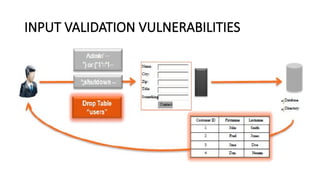
INPUT VALIDATION VULNERABILITIES
Impact
• Subversion of application-specific business rules .
• Server-side code injection such as SQL injection, XML injection and LDAP
injection.
• Execution of malicious code due to input, causing a buffer overflow or similar
condition.
• Information disclosure, such as created by path manipulation or
canonicalization.
• Denial of service caused by unconstrained or poorly formatted input.
Vulnerabilities
• Failure to validate user input on the server.
• Inconsistent validation between client-side and server-side validation.
INPUT VALIDATION VULNERABILITIES
Countermeasures
• Constrain input on the server: Use vigorous white-list style checking on
any user input that is provided by the client.
• Validate input on the server: Assume input is malicious until proven
otherwise. Even if the input is coming from a client that does validation,
do not accept the input until it has been validated by the server. Client-
side validation is for usability; server side validation is for security.
• Use whitelists for input validation: Malicious input comes in many forms.
Guard against as many of them as possible by using an inclusion list of
known good inputs, and reject everything else.
key vulnerabilities to applications
• SQL Injection.
• Cross Site Scripting.
• Broken Authentication and Session Management.
• Insecure Direct Object References.
• Cross Site Request Forgery.
• Security Misconfiguration.
• Insecure Cryptographic Storage.
• Failure to restrict URL Access.
Forceful Browsing
• Forced browsing is an attack where the aim is to enumerate and access
resources that are not referenced by the application, but are still
accessible
• An attacker can use Brute Force techniques to search for unlinked
contents in the domain directory
• This attack is performed manually when the application index directories
and pages are based on number generation or predictable values, or using
automated tools for common files and directory names.
• This attack is also known as Predictable Resource Location, File
Enumeration, Directory Enumeration, and Resource Enumeration.
Forceful Browsing
• Example:- 1
Example:- 2
http://www.vulnerablebank.com/transfer-money.asp?
From_account=12345678&To_account=87654321&amount=100
Parameter tampering
• Parameter tampering is a simple attack targeting the application
business logic.
• takes advantage of the fact that many programmers rely on hidden or
fixed fields (such as a hidden tag in a form or a parameter in a URL)
• Attackers can easily modify these parameters to bypass the security
mechanisms that rely on them.
• Web and webserver-Parameters are passed through the use of URL
query strings, form fields and cookies.
Parameter tampering
• tampering is changing parameters in form fields.
• When a user makes selections on an HTML page, they are usually
stored as form field values and sent to the Web application as an
HTTP request.
• These values can be pre-selected (combo box, check box, radio
button, etc.), free text or hidden. All of these values can be
manipulated by an attacker.
• In most cases this is as simple as saving the page, editing the HTML
and reloading the page in the Web browser.
Parameter tampering
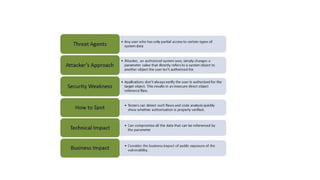
Insecure direct object reference
• A direct object reference is likely to occur when a developer exposes a
reference to an internal implementation object, such as a file,
directory, or database key without any validation mechanism which
allows attackers to manipulate these references to access
unauthorized data
• Threat Agents, Attack Vectors, Security Weakness, Technical Impact
and Business Impacts of this flaw
Example- idor
Login without SSL
Background…
• Hyper Text Transfer Protocol
• Based on Request-Response Model
• Static Web Page
• Dynamic Web Page
• Active web page
Web
Brows
er
Web
Server
GET /files/new/image1 HTTP/1.1
Accept: image/gif
Accept: image/jpeg
HTTP /1.1 200 OK
Date: Tue, 19-06-02 15:58:10 GMT
Server: MyServer
Content-length: 3010
… (Actual data for the image)
HTTP Request
HTTP Response
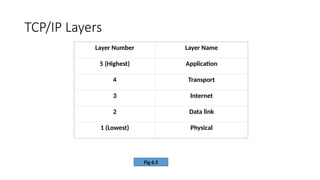
TCP/IP Layers
Fig 6.5
Layer Number Layer Name
5 (Highest) Application
4 Transport
3 Internet
2 Data link
1 (Lowest) Physical
Data Exchange using TCP/IP Layers
Fig 6.8
X
L5 data
H4
010101010100010101010010
Transmission medium
L5 data
H3
L4 data
H2
L3 data
Y
L5 data
H4
010101010100010101010010
L5 data
H3
L4 data
H2
L3 data
Application
Transport
Internet
Data link
Physical
Secure Socket Layer (SSL)
• World’s most widely used security mechanism on the Internet
• Secures communication between a client and a server
• Located between the Application and Transport Layers of TCP/IP
protocol suite
Position of SSL in TCP/IP
Application Layer
Transport Layer
Internet Layer
Data Link Layer
Physical Layer
SSL Layer
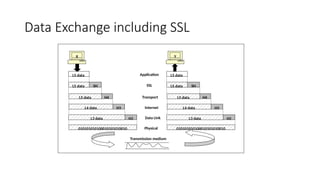
Data Exchange including SSL
X
L5 data
010101010100010101010010
Transmission medium
H4
L5 data
H3
L4 data
Application
Transport
Internet
Physical
L5 data SSL
SH
H2
L3 data Data Link
Y
L5 data
010101010100010101010010
H4
L5 data
H3
L4 data
L5 data SH
H2
L3 data
SSL Sub-Protocols
• Handshake Protocol
• Record Protocol
• Alert Protocol
SSL Handshake Message Format
Type Length Content
1 byte 3 bytes 1 or more bytes
SSL Handshake Messages
Message Type Parameters
Hello request None
Client hello Version, Random number, Session id, Cipher suite, Compression
method
Server hello Version, Random number, Session id, Cipher suite, Compression
method
Certificate Chain of X.509V3 certificates
Server key exchange Parameters, signature
Certificate request Type, authorities
Server hello done None
Certificate verify Signature
Client key exchange Parameters, signature
Finished Hash value
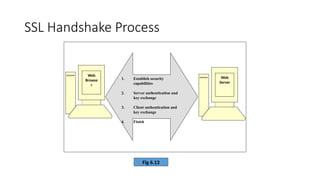
SSL Handshake Process
Fig 6.13
Web
Browse
r
Web
Server
1. Establish security
capabilities
2. Server authentication and
key exchange
3. Client authentication and
key exchange
4. Finish
SSL Handshake – Phase 1
Web
Brows
er
Web
Server
Step 1: Client hello
Step 2: Server hello
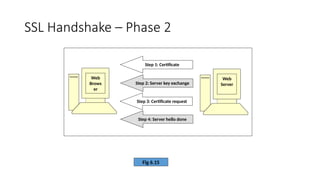
SSL Handshake – Phase 2
Fig 6.15
Web
Brows
er
Web
Server
Step 1: Certificate
Step 2: Server key exchange
Step 3: Certificate request
Step 4: Server hello done
SSL Handshake – Phase 3
Web
Browser
Web
Server
Step
1:
Certificate
Step
2:
Client
key
exchange
Step
3:
Certificate
verify
SSL Handshake – Phase 4
Web
Browse
r
Web
Server
Step 3: Change cipher specs
Step 4: Finished
1. Change cipher specs
2. Finished
SSL Record Protocol
Application data
Fragmentation
Compression
Addition of MAC
Encryption
Append header
Time Stamping Protocol (TSP)
• Digital version of a notary service
• Prove that a document existed at a specific date and time
• Time Stamping Authority (TSA) is used
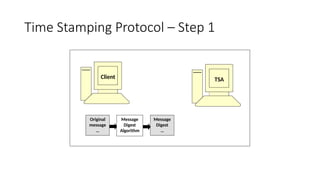
Time Stamping Protocol – Step 1
Client TSA
Original
message
…
Message
Digest
Algorithm
Message
Digest
…
Time Stamping Protocol – Step 2
Client
TSA
Step
2:
Time
Stamping
Request
Message
Digest
…
Time Stamping Protocol – Step 3
Client TSA
Step 3: Time Stamping Response
…
…
…
SSL versus SET
Issue SSL SET
Main aim Exchange of data in an encrypted
form
E-commerce related payment
mechanism
Certification Two parties exchange certificates All the involved parties must be
certified by a trusted third party
Authentication Mechanisms in place, but not
very strong
Strong mechanisms for
authenticating all the parties
involved
Risk of merchant fraud Possible, since customer gives
financial data to merchant
Unlikely, since customer gives
financial data to payment
gateway
Risk of customer fraud Possible, no mechanisms exist if
a customer refuses to pay later
Customer has to digitally sign
payment instructions
Action in case of customer fraud Merchant is liable Payment gateway is liable
Practical usage High Low at the moment, expected to
grow
Login without SSL
• Man in the middle attacks
• Data leaks
• Phishing attacks
• Your site will be distrusted by browsers
• Noncompliance issues
• Brand and reputational damage

unit 2_Authentication & Authorization vulnerabilities_4.pptx

  • 1.
    Authorization: RBAC, Authorizationbypassing:- Parameter tampering, Forceful browsing, Rendering based Authorization, Client side validation attacks, Insecure direct object reference, Login without SQL
  • 2.
    RBAC • Access control -Accessis the ability of an individual user or application to perform a specific task, such as view, create or modify a resource (e.g. topics) • Principal -The identity of a user or software requesting permission to perform a specific action on a specific resource. • User principal -A single identity tied to a specific user or piece of software. • Group principal -A shared identity that groups together a list of user principals and/or other group principals.
  • 3.
    RBAC • Role -A setof permissions that allow principals to perform particular operations. • Resource -A resource can be an Apache Kafka® topic, consumer group, transactionalID, cluster, Schema Registry, ksqlDB, and any other Confluent Platform component. • Role binding -A principal-role-resource combination that allows a principal to perform operations on a resource or set of resources as defined by the role. • Role-based access control (RBAC) -With RBAC, permissions are associated with roles, and users or groups are assigned to appropriate roles.
  • 4.
    Authorization using Role-BasedAccess Control • Role-based access control (RBAC) is a method for controlling system access based on roles assigned to users within an organization. • RBAC is defined around predefined roles and the privileges associated with those roles (also known as role bindings). • Roles are a collection of permissions that you can bind to a resource; this binding allows the privileges associated with that role to be performed on that resource. • You must grant the role to a principal at the time you bind a resource to the role.
  • 5.
    • you canmanage who has access to specific Confluent Platform resources, and the actions a user can perform within that resource. • RBAC leverages the Confluent Platform meta service to configure and manage your RBAC implementation from a centralized configuration context, thereby simplifying access management across Confluent Platform resources. • Like ACLs, RBAC uses principals, so you can associate whatever principal a client is using with an RBAC role, which is authorized by the Confluent Server Authorizer to communicate with both RBAC and ACLs.. • However, if you intend to continue using ACLs, we recommend that you migrate to centralized ACLs which store ACL information in MDS, just like role bindings. Authorization using Role-Based Access Control
  • 6.
    Role-Based Access Controlbenefits • Manage security access across the Confluent Platform (Kafka, ksqlDB, Connect, Schema Registry, Confluent Control Center) • Manage authorization at scale. • Centrally manage authentication and authorization for multiple clusters
  • 7.
  • 8.
    RBAC and ACLs •RBAC serves as an additional authorization enforcement layer on top of ACLs and does not change the way ACLs are created or managed. • When considering whether to use RBAC or ACLs for access control, it is suggested you use RBAC as the default • ACLs may make more sense. For example, you could use RBAC to allow access for a group of users, but an ACL to deny access for a particular member of that group.
  • 9.
    RBAC and ACLs •Without RBAC, you cannot use ACLs • RBAC provides the ability to offer Confluent Control Center users granular access to resources • RBAC provides a consistent authentication and authorization mechanism for users access • Prior to RBAC, the creation and management of ACLs could be difficult to manage and maintain
  • 10.
  • 11.
    INPUT VALIDATION VULNERABILITIES Impact •Subversion of application-specific business rules . • Server-side code injection such as SQL injection, XML injection and LDAP injection. • Execution of malicious code due to input, causing a buffer overflow or similar condition. • Information disclosure, such as created by path manipulation or canonicalization. • Denial of service caused by unconstrained or poorly formatted input. Vulnerabilities • Failure to validate user input on the server. • Inconsistent validation between client-side and server-side validation.
  • 12.
    INPUT VALIDATION VULNERABILITIES Countermeasures •Constrain input on the server: Use vigorous white-list style checking on any user input that is provided by the client. • Validate input on the server: Assume input is malicious until proven otherwise. Even if the input is coming from a client that does validation, do not accept the input until it has been validated by the server. Client- side validation is for usability; server side validation is for security. • Use whitelists for input validation: Malicious input comes in many forms. Guard against as many of them as possible by using an inclusion list of known good inputs, and reject everything else.
  • 13.
    key vulnerabilities toapplications • SQL Injection. • Cross Site Scripting. • Broken Authentication and Session Management. • Insecure Direct Object References. • Cross Site Request Forgery. • Security Misconfiguration. • Insecure Cryptographic Storage. • Failure to restrict URL Access.
  • 14.
    Forceful Browsing • Forcedbrowsing is an attack where the aim is to enumerate and access resources that are not referenced by the application, but are still accessible • An attacker can use Brute Force techniques to search for unlinked contents in the domain directory • This attack is performed manually when the application index directories and pages are based on number generation or predictable values, or using automated tools for common files and directory names. • This attack is also known as Predictable Resource Location, File Enumeration, Directory Enumeration, and Resource Enumeration.
  • 16.
    Forceful Browsing • Example:-1 Example:- 2 http://www.vulnerablebank.com/transfer-money.asp? From_account=12345678&To_account=87654321&amount=100
  • 17.
    Parameter tampering • Parametertampering is a simple attack targeting the application business logic. • takes advantage of the fact that many programmers rely on hidden or fixed fields (such as a hidden tag in a form or a parameter in a URL) • Attackers can easily modify these parameters to bypass the security mechanisms that rely on them. • Web and webserver-Parameters are passed through the use of URL query strings, form fields and cookies.
  • 18.
    Parameter tampering • tamperingis changing parameters in form fields. • When a user makes selections on an HTML page, they are usually stored as form field values and sent to the Web application as an HTTP request. • These values can be pre-selected (combo box, check box, radio button, etc.), free text or hidden. All of these values can be manipulated by an attacker. • In most cases this is as simple as saving the page, editing the HTML and reloading the page in the Web browser.
  • 19.
  • 20.
    Insecure direct objectreference • A direct object reference is likely to occur when a developer exposes a reference to an internal implementation object, such as a file, directory, or database key without any validation mechanism which allows attackers to manipulate these references to access unauthorized data • Threat Agents, Attack Vectors, Security Weakness, Technical Impact and Business Impacts of this flaw
  • 22.
  • 23.
  • 24.
    Background… • Hyper TextTransfer Protocol • Based on Request-Response Model • Static Web Page • Dynamic Web Page • Active web page Web Brows er Web Server GET /files/new/image1 HTTP/1.1 Accept: image/gif Accept: image/jpeg HTTP /1.1 200 OK Date: Tue, 19-06-02 15:58:10 GMT Server: MyServer Content-length: 3010 … (Actual data for the image) HTTP Request HTTP Response
  • 25.
    TCP/IP Layers Fig 6.5 LayerNumber Layer Name 5 (Highest) Application 4 Transport 3 Internet 2 Data link 1 (Lowest) Physical
  • 26.
    Data Exchange usingTCP/IP Layers Fig 6.8 X L5 data H4 010101010100010101010010 Transmission medium L5 data H3 L4 data H2 L3 data Y L5 data H4 010101010100010101010010 L5 data H3 L4 data H2 L3 data Application Transport Internet Data link Physical
  • 27.
    Secure Socket Layer(SSL) • World’s most widely used security mechanism on the Internet • Secures communication between a client and a server • Located between the Application and Transport Layers of TCP/IP protocol suite
  • 28.
    Position of SSLin TCP/IP Application Layer Transport Layer Internet Layer Data Link Layer Physical Layer SSL Layer
  • 29.
    Data Exchange includingSSL X L5 data 010101010100010101010010 Transmission medium H4 L5 data H3 L4 data Application Transport Internet Physical L5 data SSL SH H2 L3 data Data Link Y L5 data 010101010100010101010010 H4 L5 data H3 L4 data L5 data SH H2 L3 data
  • 30.
    SSL Sub-Protocols • HandshakeProtocol • Record Protocol • Alert Protocol
  • 31.
    SSL Handshake MessageFormat Type Length Content 1 byte 3 bytes 1 or more bytes
  • 32.
    SSL Handshake Messages MessageType Parameters Hello request None Client hello Version, Random number, Session id, Cipher suite, Compression method Server hello Version, Random number, Session id, Cipher suite, Compression method Certificate Chain of X.509V3 certificates Server key exchange Parameters, signature Certificate request Type, authorities Server hello done None Certificate verify Signature Client key exchange Parameters, signature Finished Hash value
  • 33.
    SSL Handshake Process Fig6.13 Web Browse r Web Server 1. Establish security capabilities 2. Server authentication and key exchange 3. Client authentication and key exchange 4. Finish
  • 34.
    SSL Handshake –Phase 1 Web Brows er Web Server Step 1: Client hello Step 2: Server hello
  • 35.
    SSL Handshake –Phase 2 Fig 6.15 Web Brows er Web Server Step 1: Certificate Step 2: Server key exchange Step 3: Certificate request Step 4: Server hello done
  • 36.
    SSL Handshake –Phase 3 Web Browser Web Server Step 1: Certificate Step 2: Client key exchange Step 3: Certificate verify
  • 37.
    SSL Handshake –Phase 4 Web Browse r Web Server Step 3: Change cipher specs Step 4: Finished 1. Change cipher specs 2. Finished
  • 38.
    SSL Record Protocol Applicationdata Fragmentation Compression Addition of MAC Encryption Append header
  • 39.
    Time Stamping Protocol(TSP) • Digital version of a notary service • Prove that a document existed at a specific date and time • Time Stamping Authority (TSA) is used
  • 40.
    Time Stamping Protocol– Step 1 Client TSA Original message … Message Digest Algorithm Message Digest …
  • 41.
    Time Stamping Protocol– Step 2 Client TSA Step 2: Time Stamping Request Message Digest …
  • 42.
    Time Stamping Protocol– Step 3 Client TSA Step 3: Time Stamping Response … … …
  • 43.
    SSL versus SET IssueSSL SET Main aim Exchange of data in an encrypted form E-commerce related payment mechanism Certification Two parties exchange certificates All the involved parties must be certified by a trusted third party Authentication Mechanisms in place, but not very strong Strong mechanisms for authenticating all the parties involved Risk of merchant fraud Possible, since customer gives financial data to merchant Unlikely, since customer gives financial data to payment gateway Risk of customer fraud Possible, no mechanisms exist if a customer refuses to pay later Customer has to digitally sign payment instructions Action in case of customer fraud Merchant is liable Payment gateway is liable Practical usage High Low at the moment, expected to grow
  • 44.
    Login without SSL •Man in the middle attacks • Data leaks • Phishing attacks • Your site will be distrusted by browsers • Noncompliance issues • Brand and reputational damage