CS8591 – Computer
Networks
14.08.2020
Dr.S.Selvakanmani,
Assistant Professor II,
Department of Computer Science &
Engineering
Velammal Institute of Technology,
Chennai
www.selvakanmani.blogspot.com
2
Internet Connection might be instable…
Stay online…!!!!
3
Attend the Class with a notebook and pen..!
Install “Google meet” app in your mobile..!
Unit II
DATA-LINK LAYER & MEDIA ACCESS 9
Introduction – Link-Layer Addressing – DLC Services –
Data-Link Layer Protocols – HDLC – PPP – Media
Access Control – Wired LANs: Ethernet – Wireless LANs
– Introduction – IEEE 802.11, Bluetooth – Connecting
Devices.
4
CO2 - Build wired/wireless LAN and configure the networking
devices for a required scenario.
Recap
• ARP
• RARP
• Connection Vs Connectionless services
• DLC services – Framing
5
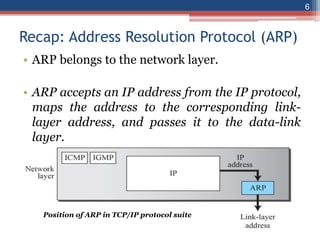
Recap: Address Resolution Protocol (ARP)
• ARP belongs to the network layer.
• ARP accepts an IP address from the IP protocol,
maps the address to the corresponding link-
layer address, and passes it to the data-link
layer.
Position of ARP in TCP/IP protocol suite
6
Recap: Reverse Address Resolution Protocol (RARP)
• RARP finds the logical address for a machine
that only knows its physical address.
• This often encountered on thin-client
workstations. No disk, so when machine is
booted, it needs to know its IP address
• RARP requests are broadcast, RARP replies are
unicast.
7
Recap: Framing
• A frame is a group of bits.
• Framing means organizing the bits into a
frame that are carried by the physical
layer.
• Framing separates a message from other
messages by adding sender-address &
destination-address.
• The destination address defines where the
packet is to go; the sender address helps the
recipient acknowledge the receipt
• Two types of frames
8
Type of Frame Size
1) Fixed-Size Framing
• There is no need for defining boundaries of
frames; the size itself can be used as a delimiter.
• For example: ATM WAN uses frames of fixed
size called cells.
2) Variable-Size Framing
• We need to define the end of the frame and the
beginning of the next frame.
• Two approaches are used:
1) Character-oriented approach
2) Bit-oriented approach
9
Character-Oriented Framing
• Data to be carried are 8-bit characters from a
coding system such as ASCII.
• The header and the trailer are also
multiples of 8 bits.
1) Header carries the source and destination-
addresses and other control information.
2) Trailer carries error-detection or error-
correction redundant bits.
• To separate one frame from the next frame, an
8- bit (I-byte) flag is added at the
beginning and the end of a frame.
• The flag signals the start or end of a frame.
10
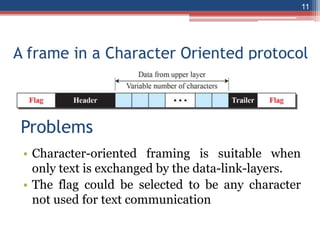
A frame in a Character Oriented protocol
• Character-oriented framing is suitable when
only text is exchanged by the data-link-layers.
• The flag could be selected to be any character
not used for text communication
11
Problems
Problems in Character - Oriented
• However, if we send other type of information
(say audio/video), then any pattern used for the
flag can also be part of the information.
• If the flag-pattern appears in the data-section,
the receiver might think that it has reached the
end of the frame.
• Solution: A byte-stuffing is used.
• (Byte stuffing ->character stuffing)
• Byte Stuffing: In byte stuffing, a special byte is
added to the data-section of the frame when
there is a character with the same pattern as the
flag.
12
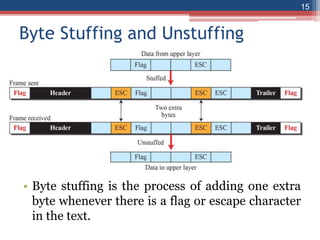
Byte Stuffing
• The data-section is stuffed with an extra byte.
This byte is called the escape character (ESC),
which has a predefined bit pattern.
• When a receiver encounters the ESC character,
the receiver
→ removes ESC character from the data-section
and
→ treats the next character as data, not a
delimiting flag.
13
14
Byte Stuffing and Unstuffing
• Byte stuffing is the process of adding one extra
byte whenever there is a flag or escape character
in the text.
15
Bit Oriented Approach
• The data-section of a frame is a sequence of bits
to be interpreted by the upper layer as text,
audio, video, and so on.
• However, in addition to headers and trailers, we
need a delimiter to separate one frame from the
other.
• Most protocols use a special 8-bit pattern flag
01111110 as the delimiter to define the
beginning and the end of the frame
16
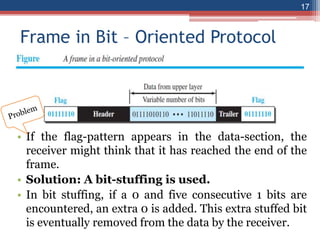
Frame in Bit – Oriented Protocol
• If the flag-pattern appears in the data-section, the
receiver might think that it has reached the end of the
frame.
• Solution: A bit-stuffing is used.
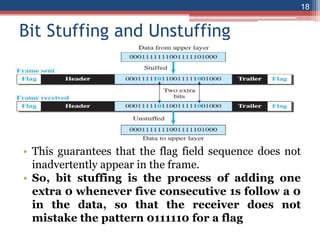
• In bit stuffing, if a 0 and five consecutive 1 bits are
encountered, an extra 0 is added. This extra stuffed bit
is eventually removed from the data by the receiver.
17
Bit Stuffing and Unstuffing
• This guarantees that the flag field sequence does not
inadvertently appear in the frame.
• So, bit stuffing is the process of adding one
extra 0 whenever five consecutive 1s follow a 0
in the data, so that the receiver does not
mistake the pattern 0111110 for a flag
18
Flow Control and Error Control
• One of the responsibilities of the DLC sublayer is
flow and error control at the data-link layer.
Flow Control
• Whenever an entity produces data and another
entity consumes them, there should be a balance
between production and consumption rates.
• If the data are produced faster than they can be
consumed, the consumer can be overwhelmed
and may need to discard some dat.
• We need to prevent losing the data at the
consumer site.
19
Flow control @ DLL
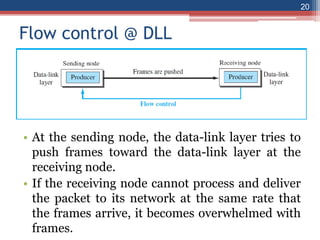
• At the sending node, the data-link layer tries to
push frames toward the data-link layer at the
receiving node.
• If the receiving node cannot process and deliver
the packet to its network at the same rate that
the frames arrive, it becomes overwhelmed with
frames.
20
Flow control @ DLL
• Here, flow control can be feedback from the
receiving node to the sending node to stop or
slow down pushing frames.
Buffers
• Flow control can be implemented by using buffer.
• A buffer is a set of memory locations that can hold
packets at the sender and receiver.
• Normally, two buffers can be used.
• 1) First buffer at the sender.
• 2) Second buffer at the receiver.
21
Flow Control & Error Control
• The flow control communication can occur by
sending signals from the consumer to the
producer.
• When the buffer of the receiver is full, it informs
the sender to stop pushing frames.
Error Control
• Error-control includes both error-detection and
error-correction.
• Error-control allows the receiver to inform the
sender of any frames lost/damaged in
transmission.
22
Error Control
• A CRC is
→ added to the frame header by the sender and
→ checked by the receiver.
• At the data-link layer, error control is normally
implemented using one of the following two
methods.
1)First method: If the frame is corrupted, it
is discarded;
▫ If the frame is not corrupted, the packet is
delivered to the network layer.
• This method is used mostly in wired LANs such
as Ethernet.
23
Error Control
2)Second method: If the frame is corrupted, it
is discarded;
▫ If the frame is not corrupted, an acknowledgment is
sent to the sender.
• Acknowledgment is used for the purpose of both flow
and error control.
Combination of Flow and Error Control
• The acknowledgment that is sent for flow control can also
be used for error control to tell the sender the packet has
arrived uncorrupted.
• The lack of acknowledgment means that there is a problem
in the sent frame.
• A frame that carries an acknowledgment is normally called
an ACK to distinguish it from the data frame.
24
2.4 Data link layer Protocols
• A protocol in data communications is the set of
rules or specifications used to implement one or
more layers of the OSI model.
• Data link protocols are sets of specifications
used to implement the data link layer.
• Traditionally four protocols have been defined
for the data-link layer to deal with flow and error
control: Simple, Stop-and-Wait, Go-Back- N,
and Selective-Repeat.
25
Finite State Machine (FSM)
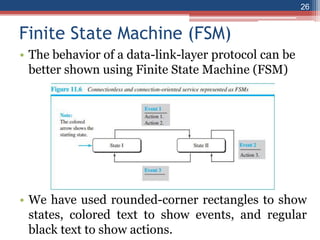
• The behavior of a data-link-layer protocol can be
better shown using Finite State Machine (FSM)
• We have used rounded-corner rectangles to show
states, colored text to show events, and regular
black text to show actions.
26
Finite State Machine (FSM)
• An FSM is thought of as a machine with a finite
number of states.
• The machine is always in one of the states until
an event occurs.
• Each event is associated with two reactions:
defining the list of actions to be performed and
determining the next state (which can be the
same as the current state).
• One of the states must be defined as the initial
state, the state in which the machine starts when
it turns on.
27
Simple Protocol
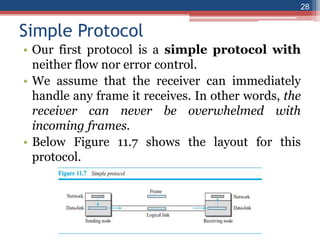
• Our first protocol is a simple protocol with
neither flow nor error control.
• We assume that the receiver can immediately
handle any frame it receives. In other words, the
receiver can never be overwhelmed with
incoming frames.
• Below Figure 11.7 shows the layout for this
protocol.
28
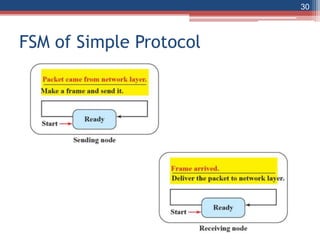
FSM of Simple Protocol
• The sender site should not send a frame until its network
layer has a message to send.
• The receiver site cannot deliver a message to its network
layer until a frame arrives.
• We can show these requirements using two FSMs. Each
FSM has only one state, the ready state.
• The sending machine remains in the ready state until a
request comes from the network layer.
• When this event occurs, the sending machine
encapsulates the message in a frame and sends it to the
receiving machine.
• The receiving machine remains in the ready state until a
frame arrives from the sending machine.
29
FSM of Simple Protocol
30
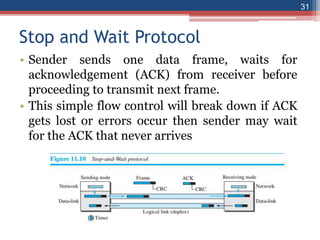
Stop and Wait Protocol
• Sender sends one data frame, waits for
acknowledgement (ACK) from receiver before
proceeding to transmit next frame.
• This simple flow control will break down if ACK
gets lost or errors occur then sender may wait
for the ACK that never arrives
31
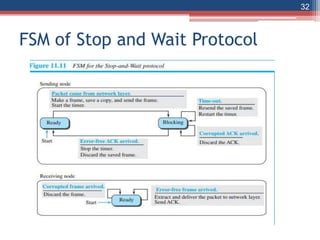
FSM of Stop and Wait Protocol
32
Reference Links
33
https://www.youtube.com/watch?v=3WPrKiBp4cs
NPTEL:
https://www.youtube.com/watch?v=bhU2nRF36q4
37
38

Unit 2 ppt 3.ppt

  • 1.
    CS8591 – Computer Networks 14.08.2020 Dr.S.Selvakanmani, AssistantProfessor II, Department of Computer Science & Engineering Velammal Institute of Technology, Chennai www.selvakanmani.blogspot.com
  • 2.
  • 3.
    Internet Connection mightbe instable… Stay online…!!!! 3 Attend the Class with a notebook and pen..! Install “Google meet” app in your mobile..!
  • 4.
    Unit II DATA-LINK LAYER& MEDIA ACCESS 9 Introduction – Link-Layer Addressing – DLC Services – Data-Link Layer Protocols – HDLC – PPP – Media Access Control – Wired LANs: Ethernet – Wireless LANs – Introduction – IEEE 802.11, Bluetooth – Connecting Devices. 4 CO2 - Build wired/wireless LAN and configure the networking devices for a required scenario.
  • 5.
    Recap • ARP • RARP •Connection Vs Connectionless services • DLC services – Framing 5
  • 6.
    Recap: Address ResolutionProtocol (ARP) • ARP belongs to the network layer. • ARP accepts an IP address from the IP protocol, maps the address to the corresponding link- layer address, and passes it to the data-link layer. Position of ARP in TCP/IP protocol suite 6
  • 7.
    Recap: Reverse AddressResolution Protocol (RARP) • RARP finds the logical address for a machine that only knows its physical address. • This often encountered on thin-client workstations. No disk, so when machine is booted, it needs to know its IP address • RARP requests are broadcast, RARP replies are unicast. 7
  • 8.
    Recap: Framing • Aframe is a group of bits. • Framing means organizing the bits into a frame that are carried by the physical layer. • Framing separates a message from other messages by adding sender-address & destination-address. • The destination address defines where the packet is to go; the sender address helps the recipient acknowledge the receipt • Two types of frames 8
  • 9.
    Type of FrameSize 1) Fixed-Size Framing • There is no need for defining boundaries of frames; the size itself can be used as a delimiter. • For example: ATM WAN uses frames of fixed size called cells. 2) Variable-Size Framing • We need to define the end of the frame and the beginning of the next frame. • Two approaches are used: 1) Character-oriented approach 2) Bit-oriented approach 9
  • 10.
    Character-Oriented Framing • Datato be carried are 8-bit characters from a coding system such as ASCII. • The header and the trailer are also multiples of 8 bits. 1) Header carries the source and destination- addresses and other control information. 2) Trailer carries error-detection or error- correction redundant bits. • To separate one frame from the next frame, an 8- bit (I-byte) flag is added at the beginning and the end of a frame. • The flag signals the start or end of a frame. 10
  • 11.
    A frame ina Character Oriented protocol • Character-oriented framing is suitable when only text is exchanged by the data-link-layers. • The flag could be selected to be any character not used for text communication 11 Problems
  • 12.
    Problems in Character- Oriented • However, if we send other type of information (say audio/video), then any pattern used for the flag can also be part of the information. • If the flag-pattern appears in the data-section, the receiver might think that it has reached the end of the frame. • Solution: A byte-stuffing is used. • (Byte stuffing ->character stuffing) • Byte Stuffing: In byte stuffing, a special byte is added to the data-section of the frame when there is a character with the same pattern as the flag. 12
  • 13.
    Byte Stuffing • Thedata-section is stuffed with an extra byte. This byte is called the escape character (ESC), which has a predefined bit pattern. • When a receiver encounters the ESC character, the receiver → removes ESC character from the data-section and → treats the next character as data, not a delimiting flag. 13
  • 14.
  • 15.
    Byte Stuffing andUnstuffing • Byte stuffing is the process of adding one extra byte whenever there is a flag or escape character in the text. 15
  • 16.
    Bit Oriented Approach •The data-section of a frame is a sequence of bits to be interpreted by the upper layer as text, audio, video, and so on. • However, in addition to headers and trailers, we need a delimiter to separate one frame from the other. • Most protocols use a special 8-bit pattern flag 01111110 as the delimiter to define the beginning and the end of the frame 16
  • 17.
    Frame in Bit– Oriented Protocol • If the flag-pattern appears in the data-section, the receiver might think that it has reached the end of the frame. • Solution: A bit-stuffing is used. • In bit stuffing, if a 0 and five consecutive 1 bits are encountered, an extra 0 is added. This extra stuffed bit is eventually removed from the data by the receiver. 17
  • 18.
    Bit Stuffing andUnstuffing • This guarantees that the flag field sequence does not inadvertently appear in the frame. • So, bit stuffing is the process of adding one extra 0 whenever five consecutive 1s follow a 0 in the data, so that the receiver does not mistake the pattern 0111110 for a flag 18
  • 19.
    Flow Control andError Control • One of the responsibilities of the DLC sublayer is flow and error control at the data-link layer. Flow Control • Whenever an entity produces data and another entity consumes them, there should be a balance between production and consumption rates. • If the data are produced faster than they can be consumed, the consumer can be overwhelmed and may need to discard some dat. • We need to prevent losing the data at the consumer site. 19
  • 20.
    Flow control @DLL • At the sending node, the data-link layer tries to push frames toward the data-link layer at the receiving node. • If the receiving node cannot process and deliver the packet to its network at the same rate that the frames arrive, it becomes overwhelmed with frames. 20
  • 21.
    Flow control @DLL • Here, flow control can be feedback from the receiving node to the sending node to stop or slow down pushing frames. Buffers • Flow control can be implemented by using buffer. • A buffer is a set of memory locations that can hold packets at the sender and receiver. • Normally, two buffers can be used. • 1) First buffer at the sender. • 2) Second buffer at the receiver. 21
  • 22.
    Flow Control &Error Control • The flow control communication can occur by sending signals from the consumer to the producer. • When the buffer of the receiver is full, it informs the sender to stop pushing frames. Error Control • Error-control includes both error-detection and error-correction. • Error-control allows the receiver to inform the sender of any frames lost/damaged in transmission. 22
  • 23.
    Error Control • ACRC is → added to the frame header by the sender and → checked by the receiver. • At the data-link layer, error control is normally implemented using one of the following two methods. 1)First method: If the frame is corrupted, it is discarded; ▫ If the frame is not corrupted, the packet is delivered to the network layer. • This method is used mostly in wired LANs such as Ethernet. 23
  • 24.
    Error Control 2)Second method:If the frame is corrupted, it is discarded; ▫ If the frame is not corrupted, an acknowledgment is sent to the sender. • Acknowledgment is used for the purpose of both flow and error control. Combination of Flow and Error Control • The acknowledgment that is sent for flow control can also be used for error control to tell the sender the packet has arrived uncorrupted. • The lack of acknowledgment means that there is a problem in the sent frame. • A frame that carries an acknowledgment is normally called an ACK to distinguish it from the data frame. 24
  • 25.
    2.4 Data linklayer Protocols • A protocol in data communications is the set of rules or specifications used to implement one or more layers of the OSI model. • Data link protocols are sets of specifications used to implement the data link layer. • Traditionally four protocols have been defined for the data-link layer to deal with flow and error control: Simple, Stop-and-Wait, Go-Back- N, and Selective-Repeat. 25
  • 26.
    Finite State Machine(FSM) • The behavior of a data-link-layer protocol can be better shown using Finite State Machine (FSM) • We have used rounded-corner rectangles to show states, colored text to show events, and regular black text to show actions. 26
  • 27.
    Finite State Machine(FSM) • An FSM is thought of as a machine with a finite number of states. • The machine is always in one of the states until an event occurs. • Each event is associated with two reactions: defining the list of actions to be performed and determining the next state (which can be the same as the current state). • One of the states must be defined as the initial state, the state in which the machine starts when it turns on. 27
  • 28.
    Simple Protocol • Ourfirst protocol is a simple protocol with neither flow nor error control. • We assume that the receiver can immediately handle any frame it receives. In other words, the receiver can never be overwhelmed with incoming frames. • Below Figure 11.7 shows the layout for this protocol. 28
  • 29.
    FSM of SimpleProtocol • The sender site should not send a frame until its network layer has a message to send. • The receiver site cannot deliver a message to its network layer until a frame arrives. • We can show these requirements using two FSMs. Each FSM has only one state, the ready state. • The sending machine remains in the ready state until a request comes from the network layer. • When this event occurs, the sending machine encapsulates the message in a frame and sends it to the receiving machine. • The receiving machine remains in the ready state until a frame arrives from the sending machine. 29
  • 30.
    FSM of SimpleProtocol 30
  • 31.
    Stop and WaitProtocol • Sender sends one data frame, waits for acknowledgement (ACK) from receiver before proceeding to transmit next frame. • This simple flow control will break down if ACK gets lost or errors occur then sender may wait for the ACK that never arrives 31
  • 32.
    FSM of Stopand Wait Protocol 32
  • 33.
  • 34.
  • 35.