Unit_1
Introduction to Computers
and Programming
Sonam Singh
What is a Computer?
 ‱ A computer is an electronic device that
processes data and converts it into useful
information.
 ‱ It performs four main functions: Input,
Processing, Storage, and Output.
Basic Functions of a Computer
 1. Input: Data entered into the computer.
 2. Processing: Data manipulation and decision-
making.
 3. Storage: Saving data and instructions.
 4. Output: Displaying results.
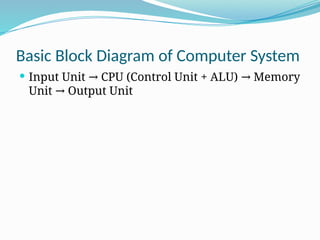
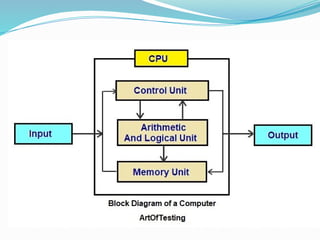
Basic Block Diagram of Computer System
 Input Unit CPU (Control Unit + ALU) Memory
→ →
Unit Output Unit
→
Input Unit
 ‱ Takes data and instructions from the user.
 ‱ Converts it into a form that the computer can
understand.
 ‱ Devices: Keyboard, Mouse, Scanner, etc.
Central Processing Unit (CPU)
 ‱ Brain of the Computer
 ‱ Consists of:
 - Control Unit (CU): Directs operations of the
computer.
 - Arithmetic Logic Unit (ALU): Performs
calculations and logical comparisons.
Memory Unit
 ‱ Temporarily stores data and instructions.
 ‱ Two main types:
 - Primary Memory (RAM, ROM)
 - Secondary Storage (Hard Disk, SSD)
Output Unit
 ‱ Converts processed data into a human-readable
form.
 ‱ Devices: Monitor, Printer, Speaker, etc.
Storage Devices
 ‱ Used for long-term data storage.
 ‱ Examples:
 - Hard Disk Drive (HDD)
 - Solid State Drive (SSD)
 - USB Flash Drive
Concept of Hardware
 ‱ Physical parts of the computer.
 ‱ Examples:
 - Monitor, Keyboard, CPU, Printer, Mouse
 ‱ Tangible and visible
Concept of Software
 ‱ Set of instructions used to operate computers
and perform tasks.
 ‱ Types:
 - System Software (e.g., Operating System)
 - Application Software (e.g., MS Word, Web
Browser)
Difference: Hardware vs Software
 Hardware:
 - Tangible, Physical components
 - Can be touched
 Software:
 - Intangible, Logical components
 - Cannot be touched
Types of Software & Computer Languages
 Concepts of Machine Level, Assembly Level, and
High-Level Languages
 Your Name / Institution / Date
Types of Software
 Software is categorized into:
 1. System Software
 2. Application Software
 3. Utility Software
 4. Programming Software
System Software
 ‱ Controls the hardware and basic system
operations.
 ‱ Examples: Operating System (Windows, Linux),
Device Drivers
Application Software
 ‱ Designed for end-users to perform specific
tasks.
 ‱ Examples: MS Word, Excel, Web Browsers,
Games
Utility Software
 ‱ Provides additional functionality to the OS.
 ‱ Examples: Antivirus, Disk Cleanup, File
Compression Tools
Programming Software
 ‱ Used to write, test, and debug programs.
 ‱ Examples: Text Editors, Compilers, Debuggers,
IDEs
Introduction to Computer Languages
 ‱ Used to write instructions for a computer to
perform specific tasks.
 ‱ Types:
 1. Machine Level Language
 2. Assembly Level Language
 3. High-Level Language
Machine Level Language
 ‱ Lowest-level language (binary: 0s and 1s)
 ‱ Directly understood by the computer.
 ‱ Very fast but hard to understand and write.
Assembly Level Language
 ‱ Uses mnemonic codes (e.g., ADD, SUB)
 ‱ Easier than machine language but still
hardware-specific.
 ‱ Requires an assembler to convert to machine
code.
High-Level Language
 ‱ Human-readable languages (e.g., Python, Java,
C++)
 ‱ Easy to learn, write, and debug.
 ‱ Requires a compiler or interpreter.
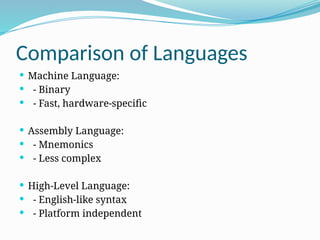
Comparison of Languages
 Machine Language:
 - Binary
 - Fast, hardware-specific
 Assembly Language:
 - Mnemonics
 - Less complex
 High-Level Language:
 - English-like syntax
 - Platform independent
Compiler
 Understanding Compiler in Programming
 Your Name / Institution / Date
What is a Compiler?
 ‱ A compiler is a program that converts high-
level source code into machine code (binary).
 ‱ It translates the entire code at once before
execution.
Functions of a Compiler
 1. Lexical Analysis
 2. Syntax Analysis
 3. Semantic Analysis
 4. Optimization
 5. Code Generation
 6. Error Handling
Lexical Analysis
 ‱ Breaks code into tokens.
 ‱ Removes comments and whitespace.
 ‱ Checks for valid identifiers.
Syntax Analysis
 ‱ Checks grammatical structure.
 ‱ Constructs syntax tree.
 ‱ Ensures code follows language rules.
Semantic Analysis
 ‱ Validates meaning of statements.
 ‱ Checks type compatibility and undeclared
variables.
Optimization
 ‱ Improves code efficiency.
 ‱ Reduces resource usage.
 ‱ Maintains program behavior.
Code Generation
 ‱ Converts optimized intermediate code into
machine code.
 ‱ Generates object code for execution.
Error Handling
 ‱ Detects and reports errors.
 ‱ Types: Syntax errors, Semantic errors, Runtime
errors
Compiler vs Interpreter
 Compiler:
 ‱ Translates full program before execution.
 ‱ Faster execution after compilation.
 Interpreter:
 ‱ Translates and runs code line by line.
 ‱ Easier debugging, slower execution.
Examples of Compilers
 ‱ GCC (GNU Compiler Collection)
 ‱ Clang
 ‱ Java Compiler (javac)
 ‱ Microsoft Visual C++ Compiler
Flowcharts and Algorithms
 Comprehensive Overview
 Your Name / Institution / Date
What is an Algorithm?
 ‱ An algorithm is a finite set of well-defined steps
to solve a particular problem.
 ‱ It is independent of programming languages.
 ‱ Must be: Clear, Finite, and Effective.
Characteristics of a Good Algorithm
 1. Input: Zero or more inputs.
 2. Output: At least one output.
 3. Definiteness: Clear and unambiguous steps.
 4. Finiteness: Must terminate after a finite
number of steps.
 5. Effectiveness: Basic, executable instructions.
Importance of Algorithms
 ‱ Forms the foundation of computer
programming.
 ‱ Helps in efficient problem-solving.
 ‱ Enables code reusability and optimization.
 ‱ Used in searching, sorting, encryption, AI, etc.
Types of Algorithms
 1. Search Algorithms (e.g., Binary Search)
 2. Sort Algorithms (e.g., Quick Sort, Merge Sort)
 3. Recursion Algorithms
 4. Dynamic Programming
 5. Greedy Algorithms
 6. Brute Force Algorithms
What is a Flowchart?
 ‱ A flowchart is a graphical representation of an
algorithm.
 ‱ It shows the sequence of operations in a
process.
 ‱ Uses standard symbols to depict different
actions.
Importance of Flowcharts
 ‱ Visual representation of the process.
 ‱ Easy to understand and analyze logic.
 ‱ Helps in debugging and documentation.
 ‱ Useful for communication among team
members.
Flowchart Symbols
 ‱ Terminator: Start/End - Oval
 ‱ Process: Operation - Rectangle
 ‱ Decision: Yes/No - Diamond
 ‱ Input/Output: Parallelogram
 ‱ Arrows: Show flow direction
Rules for Creating Flowcharts
 ‱ Flow should be top to bottom or left to right.
 ‱ Use correct symbols.
 ‱ Keep it clear and uncluttered.
 ‱ Use connectors to avoid crossing lines.
Flowchart vs Algorithm
 Algorithm:
 ‱ Text-based step-by-step instructions.
 ‱ Better for precise representation.
 Flowchart:
 ‱ Diagrammatic representation.
 ‱ Easier for visualization and understanding.
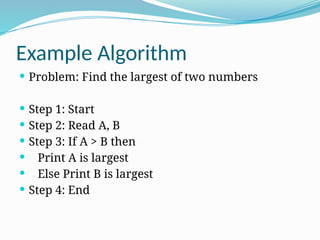
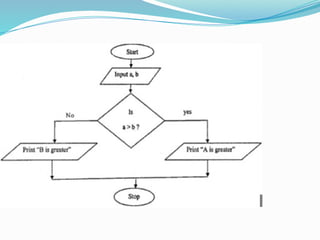
Example Algorithm
 Problem: Find the largest of two numbers
 Step 1: Start
 Step 2: Read A, B
 Step 3: If A > B then
 Print A is largest
 Else Print B is largest
 Step 4: End
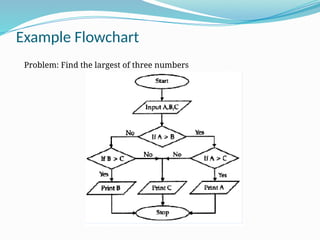
Example Flowchart
Problem: Find the largest of three numbers
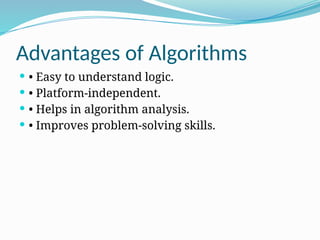
Advantages of Algorithms
 ‱ Easy to understand logic.
 ‱ Platform-independent.
 ‱ Helps in algorithm analysis.
 ‱ Improves problem-solving skills.
Advantages of Flowcharts
 ‱ Simplifies complex logic.
 ‱ Helps in planning and designing programs.
 ‱ Identifies errors in logic easily.
 ‱ Documentation tool.
Limitations of Flowcharts
 ‱ Complex to modify.
 ‱ Tedious for large programs.
 ‱ Requires drawing tools/software.
 ‱ Can become confusing if not properly
organized.
Summary
 ‱ Algorithms and flowcharts are essential tools in
programming and logic design.
 ‱ Algorithms define the logic; flowcharts
visualize it.
 ‱ Both improve clarity, efficiency, and problem-
solving.
ThankYou

This is a presentation for c programming language

  • 1.
    Unit_1 Introduction to Computers andProgramming Sonam Singh
  • 2.
    What is aComputer?  ‱ A computer is an electronic device that processes data and converts it into useful information.  ‱ It performs four main functions: Input, Processing, Storage, and Output.
  • 3.
    Basic Functions ofa Computer  1. Input: Data entered into the computer.  2. Processing: Data manipulation and decision- making.  3. Storage: Saving data and instructions.  4. Output: Displaying results.
  • 4.
    Basic Block Diagramof Computer System  Input Unit CPU (Control Unit + ALU) Memory → → Unit Output Unit →
  • 6.
    Input Unit  ‱Takes data and instructions from the user.  ‱ Converts it into a form that the computer can understand.  ‱ Devices: Keyboard, Mouse, Scanner, etc.
  • 7.
    Central Processing Unit(CPU)  ‱ Brain of the Computer  ‱ Consists of:  - Control Unit (CU): Directs operations of the computer.  - Arithmetic Logic Unit (ALU): Performs calculations and logical comparisons.
  • 8.
    Memory Unit  ‱Temporarily stores data and instructions.  ‱ Two main types:  - Primary Memory (RAM, ROM)  - Secondary Storage (Hard Disk, SSD)
  • 9.
    Output Unit  ‱Converts processed data into a human-readable form.  ‱ Devices: Monitor, Printer, Speaker, etc.
  • 10.
    Storage Devices  ‱Used for long-term data storage.  ‱ Examples:  - Hard Disk Drive (HDD)  - Solid State Drive (SSD)  - USB Flash Drive
  • 11.
    Concept of Hardware ï‚—â€ą Physical parts of the computer.  ‱ Examples:  - Monitor, Keyboard, CPU, Printer, Mouse  ‱ Tangible and visible
  • 12.
    Concept of Software ï‚—â€ą Set of instructions used to operate computers and perform tasks.  ‱ Types:  - System Software (e.g., Operating System)  - Application Software (e.g., MS Word, Web Browser)
  • 13.
    Difference: Hardware vsSoftware  Hardware:  - Tangible, Physical components  - Can be touched  Software:  - Intangible, Logical components  - Cannot be touched
  • 14.
    Types of Software& Computer Languages  Concepts of Machine Level, Assembly Level, and High-Level Languages  Your Name / Institution / Date
  • 15.
    Types of Software Software is categorized into:  1. System Software  2. Application Software  3. Utility Software  4. Programming Software
  • 16.
    System Software  ‱Controls the hardware and basic system operations.  ‱ Examples: Operating System (Windows, Linux), Device Drivers
  • 17.
    Application Software  ‱Designed for end-users to perform specific tasks.  ‱ Examples: MS Word, Excel, Web Browsers, Games
  • 18.
    Utility Software  ‱Provides additional functionality to the OS.  ‱ Examples: Antivirus, Disk Cleanup, File Compression Tools
  • 19.
    Programming Software  ‱Used to write, test, and debug programs.  ‱ Examples: Text Editors, Compilers, Debuggers, IDEs
  • 20.
    Introduction to ComputerLanguages  ‱ Used to write instructions for a computer to perform specific tasks.  ‱ Types:  1. Machine Level Language  2. Assembly Level Language  3. High-Level Language
  • 21.
    Machine Level Language ï‚—â€ą Lowest-level language (binary: 0s and 1s)  ‱ Directly understood by the computer.  ‱ Very fast but hard to understand and write.
  • 22.
    Assembly Level Language ï‚—â€ą Uses mnemonic codes (e.g., ADD, SUB)  ‱ Easier than machine language but still hardware-specific.  ‱ Requires an assembler to convert to machine code.
  • 23.
    High-Level Language  ‱Human-readable languages (e.g., Python, Java, C++)  ‱ Easy to learn, write, and debug.  ‱ Requires a compiler or interpreter.
  • 24.
    Comparison of Languages Machine Language:  - Binary  - Fast, hardware-specific  Assembly Language:  - Mnemonics  - Less complex  High-Level Language:  - English-like syntax  - Platform independent
  • 25.
    Compiler  Understanding Compilerin Programming  Your Name / Institution / Date
  • 26.
    What is aCompiler?  ‱ A compiler is a program that converts high- level source code into machine code (binary).  ‱ It translates the entire code at once before execution.
  • 27.
    Functions of aCompiler  1. Lexical Analysis  2. Syntax Analysis  3. Semantic Analysis  4. Optimization  5. Code Generation  6. Error Handling
  • 28.
    Lexical Analysis  ‱Breaks code into tokens.  ‱ Removes comments and whitespace.  ‱ Checks for valid identifiers.
  • 29.
    Syntax Analysis  ‱Checks grammatical structure.  ‱ Constructs syntax tree.  ‱ Ensures code follows language rules.
  • 30.
    Semantic Analysis  ‱Validates meaning of statements.  ‱ Checks type compatibility and undeclared variables.
  • 31.
    Optimization  ‱ Improvescode efficiency.  ‱ Reduces resource usage.  ‱ Maintains program behavior.
  • 32.
    Code Generation  ‱Converts optimized intermediate code into machine code.  ‱ Generates object code for execution.
  • 33.
    Error Handling  ‱Detects and reports errors.  ‱ Types: Syntax errors, Semantic errors, Runtime errors
  • 34.
    Compiler vs Interpreter Compiler:  ‱ Translates full program before execution.  ‱ Faster execution after compilation.  Interpreter:  ‱ Translates and runs code line by line.  ‱ Easier debugging, slower execution.
  • 35.
    Examples of Compilers ï‚—â€ą GCC (GNU Compiler Collection)  ‱ Clang  ‱ Java Compiler (javac)  ‱ Microsoft Visual C++ Compiler
  • 36.
    Flowcharts and Algorithms Comprehensive Overview  Your Name / Institution / Date
  • 37.
    What is anAlgorithm?  ‱ An algorithm is a finite set of well-defined steps to solve a particular problem.  ‱ It is independent of programming languages.  ‱ Must be: Clear, Finite, and Effective.
  • 38.
    Characteristics of aGood Algorithm  1. Input: Zero or more inputs.  2. Output: At least one output.  3. Definiteness: Clear and unambiguous steps.  4. Finiteness: Must terminate after a finite number of steps.  5. Effectiveness: Basic, executable instructions.
  • 39.
    Importance of Algorithms ï‚—â€ą Forms the foundation of computer programming.  ‱ Helps in efficient problem-solving.  ‱ Enables code reusability and optimization.  ‱ Used in searching, sorting, encryption, AI, etc.
  • 40.
    Types of Algorithms 1. Search Algorithms (e.g., Binary Search)  2. Sort Algorithms (e.g., Quick Sort, Merge Sort)  3. Recursion Algorithms  4. Dynamic Programming  5. Greedy Algorithms  6. Brute Force Algorithms
  • 41.
    What is aFlowchart?  ‱ A flowchart is a graphical representation of an algorithm.  ‱ It shows the sequence of operations in a process.  ‱ Uses standard symbols to depict different actions.
  • 42.
    Importance of Flowcharts ï‚—â€ą Visual representation of the process.  ‱ Easy to understand and analyze logic.  ‱ Helps in debugging and documentation.  ‱ Useful for communication among team members.
  • 43.
    Flowchart Symbols  ‱Terminator: Start/End - Oval  ‱ Process: Operation - Rectangle  ‱ Decision: Yes/No - Diamond  ‱ Input/Output: Parallelogram  ‱ Arrows: Show flow direction
  • 44.
    Rules for CreatingFlowcharts  ‱ Flow should be top to bottom or left to right.  ‱ Use correct symbols.  ‱ Keep it clear and uncluttered.  ‱ Use connectors to avoid crossing lines.
  • 45.
    Flowchart vs Algorithm Algorithm:  ‱ Text-based step-by-step instructions.  ‱ Better for precise representation.  Flowchart:  ‱ Diagrammatic representation.  ‱ Easier for visualization and understanding.
  • 46.
    Example Algorithm  Problem:Find the largest of two numbers  Step 1: Start  Step 2: Read A, B  Step 3: If A > B then  Print A is largest  Else Print B is largest  Step 4: End
  • 48.
    Example Flowchart Problem: Findthe largest of three numbers
  • 49.
    Advantages of Algorithms ï‚—â€ą Easy to understand logic.  ‱ Platform-independent.  ‱ Helps in algorithm analysis.  ‱ Improves problem-solving skills.
  • 50.
    Advantages of Flowcharts ï‚—â€ą Simplifies complex logic.  ‱ Helps in planning and designing programs.  ‱ Identifies errors in logic easily.  ‱ Documentation tool.
  • 51.
    Limitations of Flowcharts ï‚—â€ą Complex to modify.  ‱ Tedious for large programs.  ‱ Requires drawing tools/software.  ‱ Can become confusing if not properly organized.
  • 52.
    Summary  ‱ Algorithmsand flowcharts are essential tools in programming and logic design.  ‱ Algorithms define the logic; flowcharts visualize it.  ‱ Both improve clarity, efficiency, and problem- solving.
  • 53.