How To Create a SmartArt
Graphic in Word
Mr ANDY
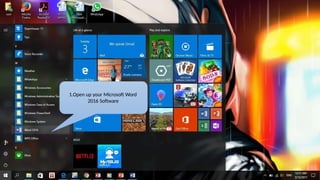
1.Open up your Microsoft Word
2016 Software
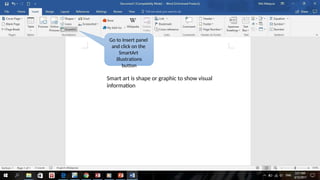
Go to Insert panel
and click on the
SmartArt
illustrations
button
Smart art is shape or graphic to show visual
information
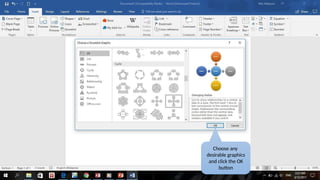
Choose any
desirable graphics
and click the OK
button
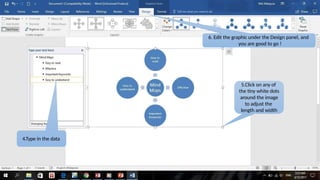
4.Type in the data
6. Edit the graphic under the Design panel, and
you are good to go !
5.Click on any of
the tiny white dots
around the image
to adjust the
length and width
OFFICE 2010
Microsoft®
Word 2010
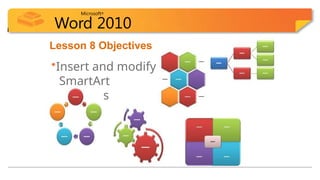
Lesson 8 Objectives
•Insert and modify
SmartArt
diagrams
Microsoft®
Word 2010
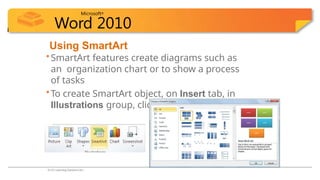
Using SmartArt
•SmartArt features create diagrams such as
an organization chart or to show a process
of tasks
•To create SmartArt object, on Insert tab, in
Illustrations group, click SmartArt
© CCI Learning Solutions Inc.
Microsoft®
Word 2010
Using SmartArt
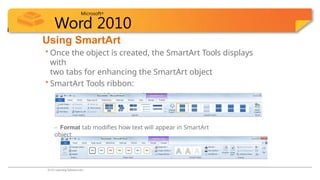
• Once the object is created, the SmartArt Tools displays
with
two tabs for enhancing the SmartArt object
• SmartArt Tools ribbon:
– Design tab modifies design of SmartArt object
– Format tab modifies how text will appear in SmartArt
object
© CCI Learning Solutions Inc.
Microsoft®
Word 2010
Using SmartArt
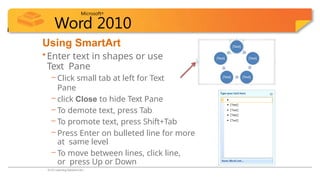
•Enter text in shapes or use
Text Pane
– Click small tab at left for Text
Pane
– click Close to hide Text Pane
– To demote text, press Tab
– To promote text, press Shift+Tab
– Press Enter on bulleted line for more
at same level
– To move between lines, click line,
or press Up or Down
© CCI Learning Solutions Inc.

Unit 1 Create smart art in word app.pptx

  • 1.
    How To Createa SmartArt Graphic in Word Mr ANDY
  • 2.
    1.Open up yourMicrosoft Word 2016 Software
  • 3.
    Go to Insertpanel and click on the SmartArt illustrations button Smart art is shape or graphic to show visual information
  • 4.
  • 5.
    4.Type in thedata 6. Edit the graphic under the Design panel, and you are good to go ! 5.Click on any of the tiny white dots around the image to adjust the length and width
  • 6.
  • 7.
    Microsoft® Word 2010 Lesson 8Objectives •Insert and modify SmartArt diagrams
  • 8.
    Microsoft® Word 2010 Using SmartArt •SmartArtfeatures create diagrams such as an organization chart or to show a process of tasks •To create SmartArt object, on Insert tab, in Illustrations group, click SmartArt © CCI Learning Solutions Inc.
  • 9.
    Microsoft® Word 2010 Using SmartArt •Once the object is created, the SmartArt Tools displays with two tabs for enhancing the SmartArt object • SmartArt Tools ribbon: – Design tab modifies design of SmartArt object – Format tab modifies how text will appear in SmartArt object © CCI Learning Solutions Inc.
  • 10.
    Microsoft® Word 2010 Using SmartArt •Entertext in shapes or use Text Pane – Click small tab at left for Text Pane – click Close to hide Text Pane – To demote text, press Tab – To promote text, press Shift+Tab – Press Enter on bulleted line for more at same level – To move between lines, click line, or press Up or Down © CCI Learning Solutions Inc.