C-PROGRAMMING &
DATA STRUCTURES
(21A050302)
J.MADHURI
CSE DEPARTMENT
2
C-PROGRAMMING & DATA STRUCTURES
(21A050302)
Unit-I:
Computer Fundamentals, Algorithm, Flowchart.
Introduction to C Language: Characteristics,
Identifiers, Constants, Data types, Keywords, Basic I/O
statements, Structure of a C program.
Operators and Expressions: Operators classification,
Assignment operator, Arithmetic operators, Relational
and Logical operators, Increment and decrement
operators, Conditional operator, Bitwise operators,
Operator precedence and associativity, Type casting.
Statements: Simple and compound statements,
Control statements – Selection, Loop and Branch
control statements.
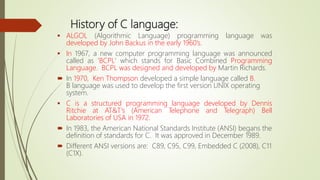
History of C language:
 ALGOL (Algorithmic Language) programming language was
developed by John Backus in the early 1960’s.
 In 1967, a new computer programming language was announced
called as 'BCPL' which stands for Basic Combined Programming
Language. BCPL was designed and developed by Martin Richards.
 In 1970, Ken Thompson developed a simple language called B.
B language was used to develop the first version UNIX operating
system.
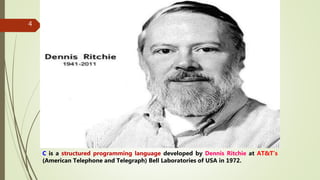
 C is a structured programming language developed by Dennis
Ritchie at AT&T’s (American Telephone and Telegraph) Bell
Laboratories of USA in 1972.
 In 1983, the American National Standards Institute (ANSI) begans the
definition of standards for C. It was approved in December 1989.
 Different ANSI versions are: C89, C95, C99, Embedded C (2008), C11
(C1X).
4
C is a structured programming language developed by Dennis Ritchie at AT&T’s
(American Telephone and Telegraph) Bell Laboratories of USA in 1972.
CHARACTERISTICS OF C LANGUAGE
 C is a structured programming language.
 C is a middle-level language.
 C is a case-sensitive language.
 C supports the concept of dynamic memory allocation.
 C is a robust language.
 C is a core language.
Applications
 Operating system
 Video games
 Artificial intelligence
 Computer Networks etc..
8
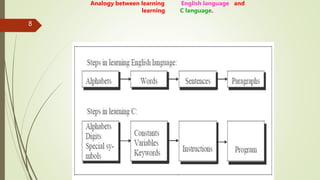
Analogy between learning English language and
learning C language.
9
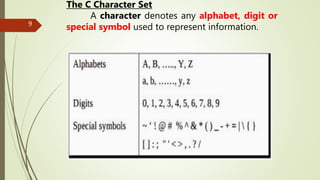
The C Character Set
A character denotes any alphabet, digit or
special symbol used to represent information.
KEYWORDS
 The words which are predefined by the system
compiler are called as keywords.
 Keywords are also known as ”Reserved Words”.
 All keywords must be in lower case characters.
 Total 32 keywords are available in C language.
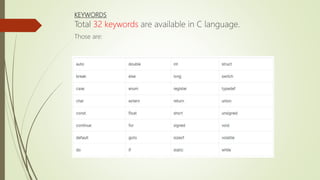
KEYWORDS
Total 32 keywords are available in C language.
Those are:
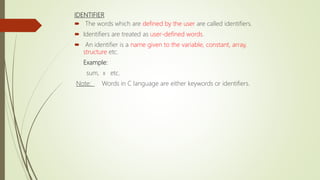
IDENTIFIER
 The words which are defined by the user are called identifiers.
 Identifiers are treated as user-defined words.
 An identifier is a name given to the variable, constant, array,
structure etc.
Example:
sum, x etc.
Note: Words in C language are either keywords or identifiers.
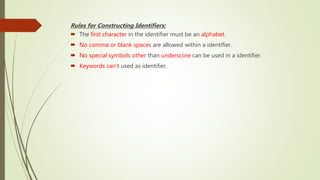
Rules for Constructing Identifiers:
 The first character in the identifier must be an alphabet.
 No comma or blank spaces are allowed within a identifier.
 No special symbols other than underscore can be used in a identifier.
 Keywords can’t used as identifier.
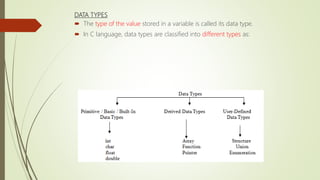
DATA TYPES
 The type of the value stored in a variable is called its data type.
 In C language, data types are classified into different types as:
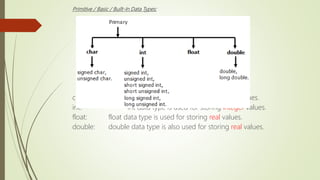
Primitive / Basic / Built-In Data Types:
char: char data type is used for storing character values.
int: int data type is used for storing integer values.
float: float data type is used for storing real values.
double: double data type is also used for storing real values.
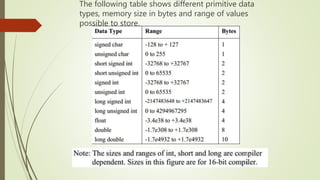
The following table shows different primitive data
types, memory size in bytes and range of values
possible to store.
VARIABLES
Variable represents memory location to store a value.
Variable is a quantity that can change during the program execution.
Declaration of Variables:
 All variables must be declared before they are using in the program.
 The declaration statement begins with data type followed by the name
of the variables.
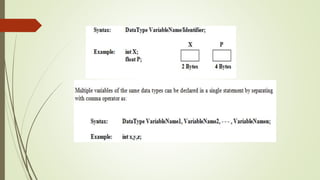
The general format of declaring variables is:
Rules for Constructing Variable Names:
A variable name may contain either an alphabets or digits or underscore
special symbol(_).
 The first character in the variable name must be an alphabet.
 No comma or blank spaces are allowed within a variable name.
 Keywords cannot use as variable names.
Initialization of Variables:
Initialization means assigning a value to the
Initialization can be done in two different ways.
Those are:
1. Direct Initialization.
2. Through Program Execution.
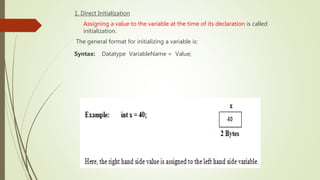
1. Direct Initialization
Assigning a value to the variable at the time of its declaration is called
initialization.
The general format for initializing a variable is:
Syntax: Datatype VariableName = Value;
2. Through Program Function:
scanf() library function is used to store value to a variable through
program execution.
Note:
When variables are declared with its appropriate data types, compiler
allocates sufficient amount of memory for the variables.
LIBRARY FUNCTIONS
Library functions can also be called as predefined functions or built in
functions.
Functions which are predefined by the system compiler are known as
library functions.
 Functions can be accessed anywhere within the program simply by
writing the function name followed by a list of arguments enclosed in
parenthesis.
 empty parenthesis are provided if a function do not require any
arguments.
Some of the library functions are:
1. scanf():
It is a input library function which is used to provide
values to variables through program execution.
2. printf() :
It is an output library function which is used to display the
output of a program.
3. sqrt():
It is a mathematical library function which is used to caluclate
square root of a given no.
Examples:
1. printf(“Hello”);
2. clrscr();
3. sqrt(9);
4. Pow(3,2)
HEADER FILES
 C language contains a large no of header files.
 Header files are used to execute the library functions.
 #include statement is used to provide Header files in the program.
SYNTAX:
#include<HeaderFileName>
Or
#include “HeaderFileName”
Some of the header files are:
1. stdio.h :
It is a header file which is used to execute input & output
library functions.
2. Math.h :
It is a header file which is used to execute mathematical
library functions.
3. Conio.h :
It is a header file which is used to execute clrscr() library
functions.
Example:
#include<stdio.h>
or
#include”stdio.h”
READING DATA FROM KEYBOARD(scanf () lnput library function)
scanf() is an input statement.
scanf() library function is used to provide values to the variables as
input data through the keyboard.
Scanf() function contains two arguents. Those are :
1. Control string.
2. Address of variable.
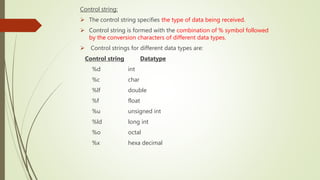
Control string:
 The control string specifies the type of data being received.
 Control string is formed with the combination of % symbol followed
by the conversion characters of different data types.
 Control strings for different data types are:
Control string Datatype
%d int
%c char
%lf double
%f float
%u unsigned int
%ld long int
%o octal
%x hexa decimal
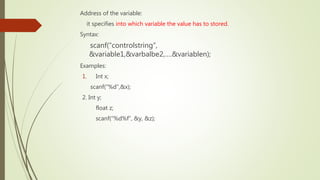
Address of the variable:
it specifies into which variable the value has to stored.
Syntax:
scanf(“controlstring”,
&variable1,&varbalbe2,
.&variablen);
Examples:
1. Int x;
scanf(“%d”,&x);
2. Int y;
float z;
scanf(“%d%f”, &y, &z);
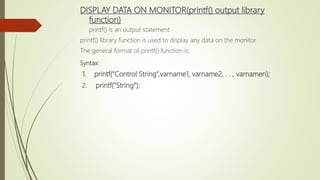
DISPLAY DATA ON MONITOR(printf() output library
function)
printf() is an output statement.
printf() library function is used to display any data on the monitor.
The general format of printf() function is:
Syntax:
1. printf(“Control String”,varname1, varname2, . . , varnamen);
2. printf(“String”);
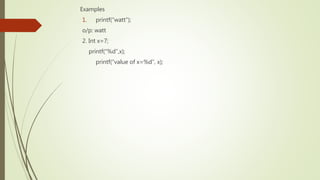
Examples
1. printf(“watt”);
o/p: watt
2. Int x=7;
printf(“%d”,x);
printf(“value of x=%d”, x);
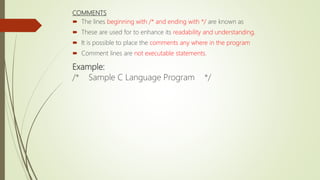
COMMENTS
 The lines beginning with /* and ending with */ are known as
 These are used for to enhance its readability and understanding.
 It is possible to place the comments any where in the program
 Comment lines are not executable statements.
Example:
/* Sample C Language Program */
Constants:
A constant is a quantity that does not change during the program
execution.
C language supports 2 types of constants as: 1. Numeric 2.
Numerical Constants:
Integer Constants
Real Constants
Character Constants:
Single Character Constant
String Constants
Integer Constants:
It refers to the sequence of digits.
There are three types of integers namely,
Decimal Integers, Octal Integers and Hexa-Decimal Integers.
Decimal Integers: consists 0 to 9.
Example: 23 -67 +678
Octal Integers: consists 0 to 7 with a leading 0.
Example: 075 0123
Hexa-Decimal Integers: consists 0 to 9, A to F with a leading 0X.
Example: 0X79 0XA76E
Rules for Constructing Integer Constants:
 An integer constant must have at least one digit.
 It must not have a decimal point.
 It could be either positive or negative. Default sign is positive.
 The comma or blank spaces are not allowed within an integer
constant
Real Constants
‱ Real constants are also known as “Floating Point
constants”.
‱ Real constant contains fractional part
‱ It could be written in two forms:
Fractional form and
Exponential form.
‱ Fractional form: The whole number followed by
point and fractional part.
‱ Exponential form: The whole number followed by
exponent (or) mantissa.
Ex. 98e54, 3e7
Rules for constructing Real constants:
A real constant must have at least one digit.
It must have a decimal point.
It could be either positive or negative. Default sign
positive.
No commas or blanks are allowed within a real
Single Character Constant:
 Character constant contains a single character enclosed within a
of single quotation marks.
 The character may be alphabet, digit and special symbol.
Example: ‘A’ ‘9’ ‘#’
 The maximum length of a character constant can be only 1
String constant:
The collection of characters placed in between double quotation marks is called
string constant.
Example:
“Welcome”
“ Programing”
“cse5sections”
Constant can be represented in 2 different ways in C. Those are:
1. Symbolic Constants.
2. Constant variable.
SYMBOLIC CONSTANTS
#define statement is used for defining symbolic constants.
Syntax:
#define symbolicname constantvalue
Example:
#define PI 3.14159
Constant variable
 the keyword const is placed before the variable to declare the
variables as constant varaibles .
Syntax:
const datatype variablename = Value;
Example:
const int x = 10;
Strings:
 A string is defined as a collection of characters.
 The characters may be any combination of letters, digits, special
symbols and blank spaces.
 In C language, a character array itself treated as a string.
Example:
HELLO
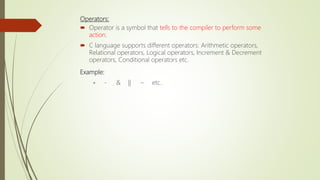
Operators:
 Operator is a symbol that tells to the compiler to perform some
action.
 C language supports different operators: Arithmetic operators,
Relational operators, Logical operators, Increment & Decrement
operators, Conditional operators etc.
Example:
+ - & || ~ etc.
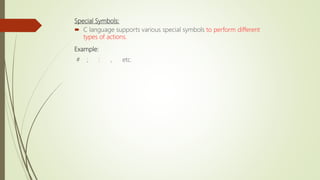
Special Symbols:
 C language supports various special symbols to perform different
types of actions.
Example:
# ; : , etc.
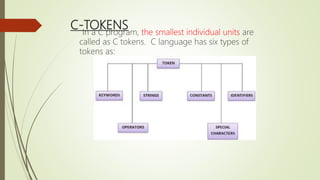
C-TOKENS
In a C program, the smallest individual units are
called as C tokens. C language has six types of
tokens as:
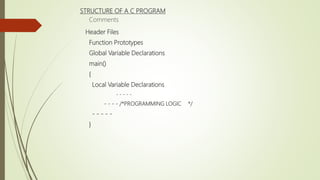
STRUCTURE OF A C PROGRAM
Comments
Header Files
Function Prototypes
Global Variable Declarations
main()
{
Local Variable Declarations
- - - - -
- - - - /*PROGRAMMING LOGIC */
- - - - -
}
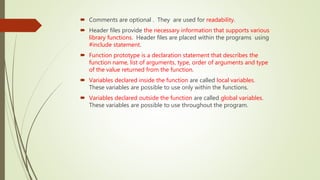
 Comments are optional . They are used for readability.
 Header files provide the necessary information that supports various
library functions. Header files are placed within the programs using
#include statement.
 Function prototype is a declaration statement that describes the
function name, list of arguments, type, order of arguments and type
of the value returned from the function.
 Variables declared inside the function are called local variables.
These variables are possible to use only within the functions.
 Variables declared outside the function are called global variables.
These variables are possible to use throughout the program.
 main() is a special function used by the C system to tell the compiler
that where the program execution starts.
 Every C program must have exactly one main function.
 Left curly brace ‘{‘ and Right curly brace ‘}’ indicates opening and ending
of the function implementation.
 All the statements between these two braces form as the function body.
Example:
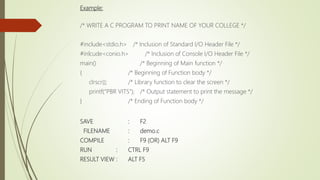
/* WRITE A C PROGRAM TO PRINT NAME OF YOUR COLLEGE */
#include<stdio.h> /* Inclusion of Standard I/O Header File */
#inlcude<conio.h> /* Inclusion of Console I/O Header File */
main() /* Beginning of Main function */
{ /* Beginning of Function body */
clrscr(); /* Library function to clear the screen */
printf(“PBR VITS”); /* Output statement to print the message */
} /* Ending of Function body */
SAVE : F2
FILENAME : demo.c
COMPILE : F9 (OR) ALT F9
RUN : CTRL F9
RESULT VIEW : ALT F5
Operators & Expression:
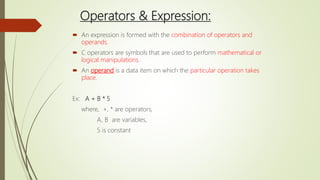
 An expression is formed with the combination of operators and
operands.
 C operators are symbols that are used to perform mathematical or
logical manipulations.
 An operand is a data item on which the particular operation takes
place.
Ex: A + B * 5
where, +, * are operators,
A, B are variables,
5 is constant
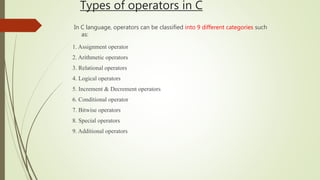
Types of operators in C
In C language, operators can be classified into 9 different categories such
as:
1. Assignment operator
2. Arithmetic operators
3. Relational operators
4. Logical operators
5. Increment & Decrement operators
6. Conditional operator
7. Bitwise operators
8. Special operators
9. Additional operators
Assignment Operators
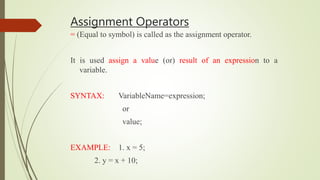
= (Equal to symbol) is called as the assignment operator.
It is used assign a value (or) result of an expression to a
variable.
SYNTAX: VariableName=expression;
or
value;
EXAMPLE: 1. x = 5;
2. y = x + 10;
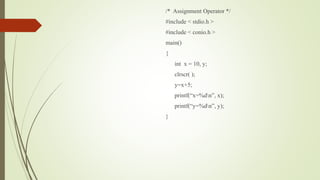
/* Assignment Operator */
#include < stdio.h >
#include < conio.h >
main()
{
int x = 10, y;
clrscr( );
y=x+5;
printf(“x=%dn”, x);
printf(“y=%dn”, y);
}
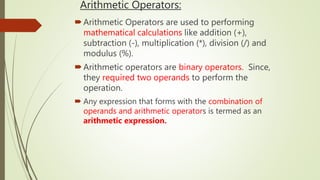
Arithmetic Operators:
Arithmetic Operators are used to performing
mathematical calculations like addition (+),
subtraction (-), multiplication (*), division (/) and
modulus (%).
Arithmetic operators are binary operators. Since,
they required two operands to perform the
operation.
 Any expression that forms with the combination of
operands and arithmetic operators is termed as an
arithmetic expression.
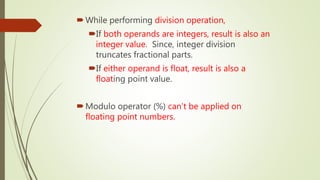
While performing division operation,
If both operands are integers, result is also an
integer value. Since, integer division
truncates fractional parts.
If either operand is float, result is also a
floating point value.
Modulo operator (%) can’t be applied on
floating point numbers.
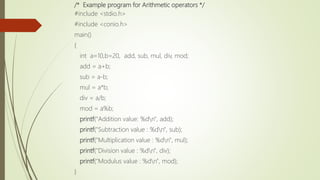
/* Example program for Arithmetic operators */
#include <stdio.h>
#include <conio.h>
main()
{
int a=10,b=20, add, sub, mul, div, mod;
add = a+b;
sub = a-b;
mul = a*b;
div = a/b;
mod = a%b;
printf("Addition value: %dn", add);
printf("Subtraction value : %dn", sub);
printf("Multiplication value : %dn", mul);
printf("Division value : %dn", div);
printf("Modulus value : %dn", mod);
}
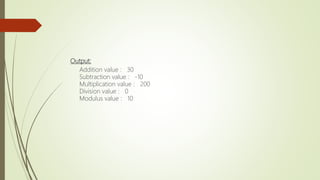
Output:
Addition value : 30
Subtraction value : -10
Multiplication value : 200
Division value : 0
Modulus value : 10
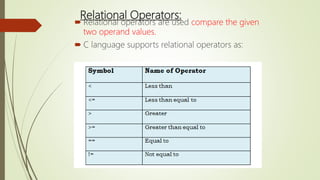
Relational Operators:
 Relational operators are used compare the given
two operand values.
 C language supports relational operators as:
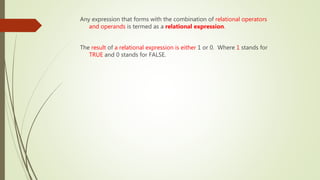
Any expression that forms with the combination of relational operators
and operands is termed as a relational expression.
The result of a relational expression is either 1 or 0. Where 1 stands for
TRUE and 0 stands for FALSE.
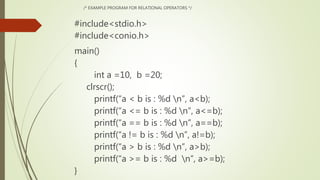
/* EXAMPLE PROGRAM FOR RELATIONAL OPERATORS */
#include<stdio.h>
#include<conio.h>
main()
{
int a =10, b =20;
clrscr();
printf(“a < b is : %d n”, a<b);
printf(“a <= b is : %d n”, a<=b);
printf(“a == b is : %d n”, a==b);
printf(“a != b is : %d n”, a!=b);
printf(“a > b is : %d n”, a>b);
printf(“a >= b is : %d n”, a>=b);
}
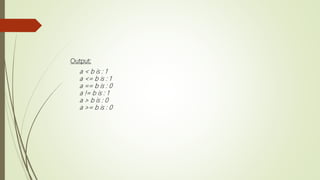
Output:
a < b is : 1
a <= b is : 1
a == b is : 0
a != b is : 1
a > b is : 0
a >= b is : 0
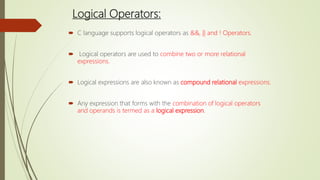
Logical Operators:
 C language supports logical operators as &&, || and ! Operators.
 Logical operators are used to combine two or more relational
expressions.
 Logical expressions are also known as compound relational expressions.
 Any expression that forms with the combination of logical operators
and operands is termed as a logical expression.
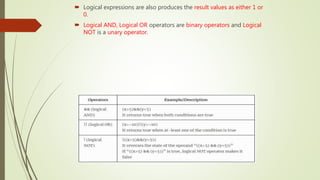
 Logical expressions are also produces the result values as either 1 or
0.
 Logical AND, Logical OR operators are binary operators and Logical
NOT is a unary operator.
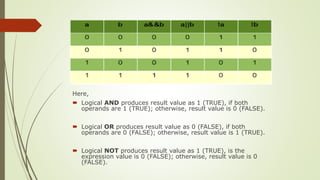
Here,
 Logical AND produces result value as 1 (TRUE), if both
operands are 1 (TRUE); otherwise, result value is 0 (FALSE).
 Logical OR produces result value as 0 (FALSE), if both
operands are 0 (FALSE); otherwise, result value is 1 (TRUE).
 Logical NOT produces result value as 1 (TRUE), is the
expression value is 0 (FALSE); otherwise, result value is 0
(FALSE).
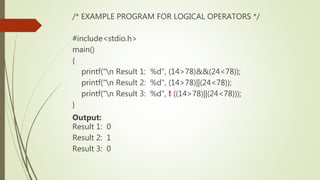
/* EXAMPLE PROGRAM FOR LOGICAL OPERATORS */
#include<stdio.h>
main()
{
printf("n Result 1: %d", (14>78)&&(24<78));
printf("n Result 2: %d", (14>78)||(24<78));
printf("n Result 3: %d", ! ((14>78)||(24<78)));
}
Output:
Result 1: 0
Result 2: 1
Result 3: 0
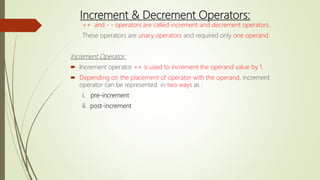
Increment & Decrement Operators:
++ and - - operators are called increment and decrement operators.
These operators are unary operators and required only one operand.
Increment Operator:
 Increment operator ++ is used to increment the operand value by 1.
 Depending on the placement of operator with the operand, increment
operator can be represented in two ways as :
i. pre-increment
ii. post-increment
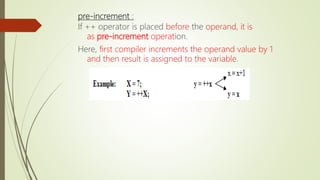
pre-increment :
If ++ operator is placed before the operand, it is
as pre-increment operation.
Here, first compiler increments the operand value by 1
and then result is assigned to the variable.
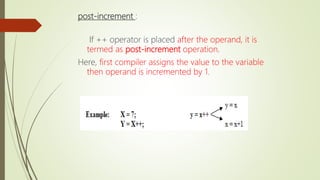
post-increment :
If ++ operator is placed after the operand, it is
termed as post-increment operation.
Here, first compiler assigns the value to the variable
then operand is incremented by 1.
Decrement Operator:
 Decrement operator -- is used to decrement the operand value by 1.
 Depending on the placement of operator with the operand, decrement
operator can be utilized in two ways as :
i. pre-decrement
ii. post-decrement.
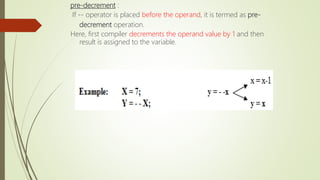
pre-decrement :
If -- operator is placed before the operand, it is termed as pre-
decrement operation.
Here, first compiler decrements the operand value by 1 and then
result is assigned to the variable.
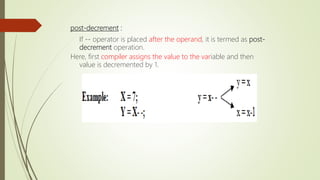
post-decrement :
If -- operator is placed after the operand, it is termed as post-
decrement operation.
Here, first compiler assigns the value to the variable and then
value is decremented by 1.
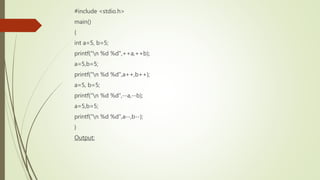
#include <stdio.h>
main()
{
int a=5, b=5;
printf("n %d %d",++a,++b);
a=5,b=5;
printf("n %d %d",a++,b++);
a=5, b=5;
printf("n %d %d“,--a,--b);
a=5,b=5;
printf("n %d %d",a--,b--);
}
Output:
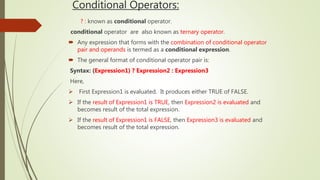
Conditional Operators:
? : known as conditional operator.
conditional operator are also known as ternary operator.
 Any expression that forms with the combination of conditional operator
pair and operands is termed as a conditional expression.
 The general format of conditional operator pair is:
Syntax: (Expression1) ? Expression2 : Expression3
Here,
 First Expression1 is evaluated. It produces either TRUE of FALSE.
 If the result of Expression1 is TRUE, then Expression2 is evaluated and
becomes result of the total expression.
 If the result of Expression1 is FALSE, then Expression3 is evaluated and
becomes result of the total expression.
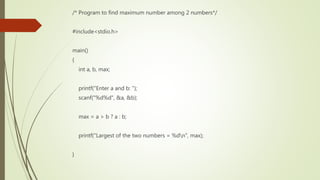
/* Program to find maximum number among 2 numbers*/
#include<stdio.h>
main()
{
int a, b, max;
printf("Enter a and b: ");
scanf("%d%d", &a, &b);
max = a > b ? a : b;
printf("Largest of the two numbers = %dn", max);
}
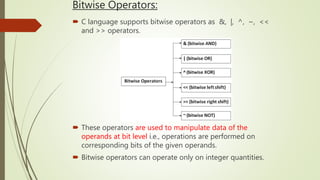
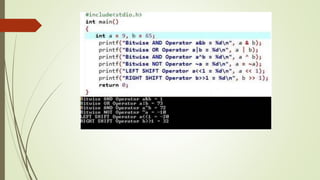
Bitwise Operators:
 C language supports bitwise operators as &, |, ^, ~, <<
and >> operators.
 These operators are used to manipulate data of the
operands at bit level i.e., operations are performed on
corresponding bits of the given operands.
 Bitwise operators can operate only on integer quantities.
Bitwise Operators:
 C Bitwise operators are classified into two types as:
I. Bitwise Logical Operators
II. Shift Operators
i) Bitwise Logical Operators
Bitwise AND (&), Bitwise OR (|), Bitwise Exclusive-OR
(^) and One’s complement (~) operators are known
as bitwise logical operators.
Bitwise AND, Bitwise OR and Bitwise Exclusive-OR are
binary operators.
One’s complement is an unary operator.
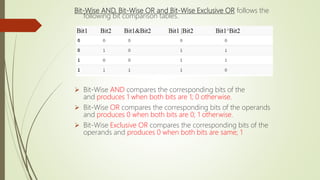
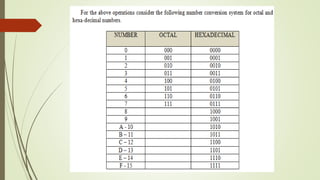
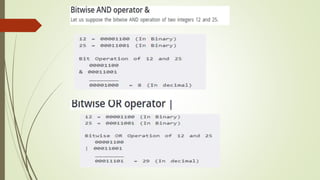
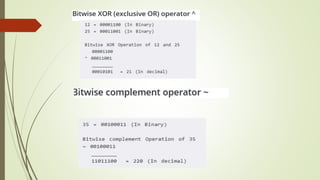
Bit-Wise AND, Bit-Wise OR and Bit-Wise Exclusive OR follows the
following bit comparison tables.
 Bit-Wise AND compares the corresponding bits of the
and produces 1 when both bits are 1; 0 otherwise.
 Bit-Wise OR compares the corresponding bits of the operands
and produces 0 when both bits are 0; 1 otherwise.
 Bit-Wise Exclusive OR compares the corresponding bits of the
operands and produces 0 when both bits are same; 1
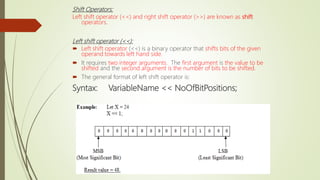
Shift Operators:
Left shift operator (<<) and right shift operator (>>) are known as shift
operators.
Left shift operator (<<):
 Left shift operator (<<) is a binary operator that shifts bits of the given
operand towards left hand side.
 It requires two integer arguments. The first argument is the value to be
shifted and the second argument is the number of bits to be shifted.
 The general format of left shift operator is:
Syntax: VariableName << NoOfBitPositions;
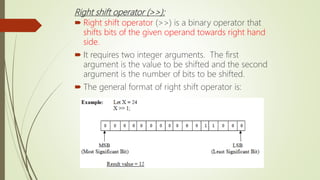
Right shift operator (>>):
 Right shift operator (>>) is a binary operator that
shifts bits of the given operand towards right hand
side.
 It requires two integer arguments. The first
argument is the value to be shifted and the second
argument is the number of bits to be shifted.
 The general format of right shift operator is:
Syntax: VariableName >> NoOfBitPositions;
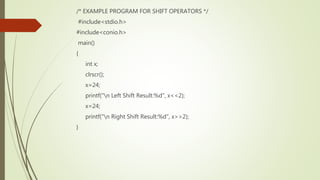
/* EXAMPLE PROGRAM FOR SHIFT OPERATORS */
#include<stdio.h>
#include<conio.h>
main()
{
int x;
clrscr();
x=24;
printf("n Left Shift Result:%d", x<<2);
x=24;
printf("n Right Shift Result:%d", x>>2);
}
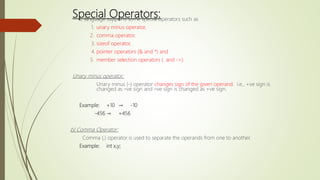
Special Operators:
C language supports some special operators such as
1. unary minus operator,
2. comma operator,
3. sizeof operator,
4. pointer operators (& and *) and
5. member selection operators (. and ->).
Unary minus operator:
Unary minus (-) operator changes sign of the given operand. i.e., +ve sign is
changed as –ve sign and –ve sign is changed as +ve sign.
Example: +10 → -10
-456 → +456
b) Comma Operator:
Comma (,) operator is used to separate the operands from one to another.
Example: int x,y;
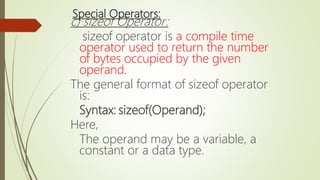
Special Operators:
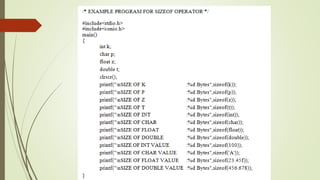
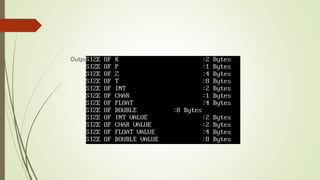
c) sizeof Operator:
sizeof operator is a compile time
operator used to return the number
of bytes occupied by the given
operand.
The general format of sizeof operator
is:
Syntax: sizeof(Operand);
Here,
The operand may be a variable, a
constant or a data type.
Output:
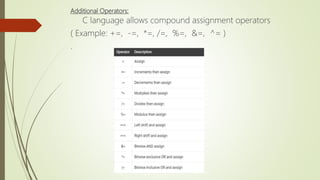
Additional Operators:
C language allows compound assignment operators
( Example: +=, -=, *=, /=, %=, &=, ^= )
.
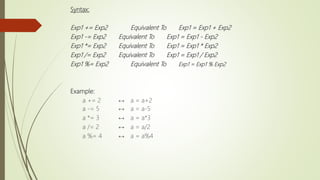
Syntax:
Exp1 += Exp2 Equivalent To Exp1 = Exp1 + Exp2
Exp1 -= Exp2 Equivalent To Exp1 = Exp1 - Exp2
Exp1 *= Exp2 Equivalent To Exp1 = Exp1 * Exp2
Exp1 /= Exp2 Equivalent To Exp1 = Exp1 / Exp2
Exp1 %= Exp2 Equivalent To Exp1 = Exp1 % Exp2
Example:
a += 2 ↔ a = a+2
a -= 5 ↔ a = a-5
a *= 3 ↔ a = a*3
a /= 2 ↔ a = a/2
a %= 4 ↔ a = a%4
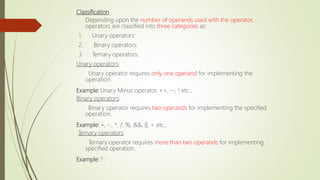
Classification
Depending upon the number of operands used with the operator,
operators are classified into three categories as:
1. Unary operators:
2. Binary operators:
3. Ternary operators:
Unary operators:
Unary operator requires only one operand for implementing the
operation.
Example: Unary Minus operator, ++, --, ! etc.,
Binary operators:
Binary operator requires two operands for implementing the specified
operation.
Example: +, - , *, /, %, &&, ||, < etc.,
Ternary operators:
Ternary operator requires more than two operands for implementing
specified operation.
Example: ? :
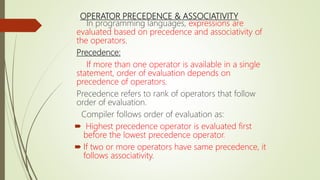
OPERATOR PRECEDENCE & ASSOCIATIVITY
In programming languages, expressions are
evaluated based on precedence and associativity of
the operators.
Precedence:
If more than one operator is available in a single
statement, order of evaluation depends on
precedence of operators.
Precedence refers to rank of operators that follow
order of evaluation.
Compiler follows order of evaluation as:
 Highest precedence operator is evaluated first
before the lowest precedence operator.
 If two or more operators have same precedence, it
follows associativity.
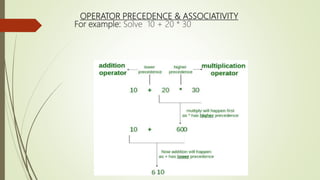
OPERATOR PRECEDENCE & ASSOCIATIVITY
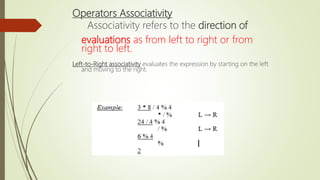
For example: Solve 10 + 20 * 30
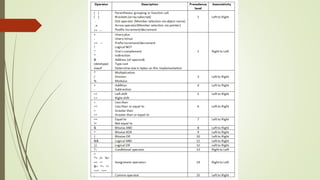
Operators Associativity
Associativity refers to the direction of
evaluations as from left to right or from
right to left.
Left-to-Right associativity evaluates the expression by starting on the left
and moving to the right.
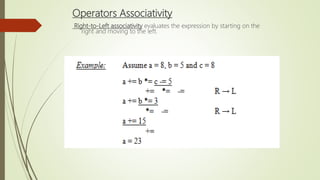
Operators Associativity
Right-to-Left associativity evaluates the expression by starting on the
right and moving to the left.
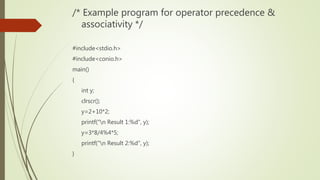
/* Example program for operator precedence &
associativity */
#include<stdio.h>
#include<conio.h>
main()
{
int y;
clrscr();
y=2+10*2;
printf("n Result 1:%d", y);
y=3*8/4%4*5;
printf("n Result 2:%d", y);
}
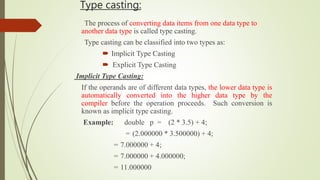
Type casting:
The process of converting data items from one data type to
another data type is called type casting.
Type casting can be classified into two types as:
 Implicit Type Casting
 Explicit Type Casting
Implicit Type Casting:
If the operands are of different data types, the lower data type is
automatically converted into the higher data type by the
compiler before the operation proceeds. Such conversion is
known as implicit type casting.
Example: double p = (2 * 3.5) + 4;
= (2.000000 * 3.500000) + 4;
= 7.000000 + 4;
= 7.000000 + 4.000000;
= 11.000000
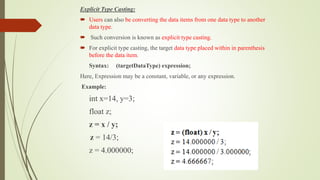
Explicit Type Casting:
 Users can also be converting the data items from one data type to another
data type.
 Such conversion is known as explicit type casting.
 For explicit type casting, the target data type placed within in parenthesis
before the data item.
Syntax: (targetDataType) expression;
Here, Expression may be a constant, variable, or any expression.
Example:
int x=14, y=3;
float z;
z = x / y;
z = 14/3;
z = 4.000000;
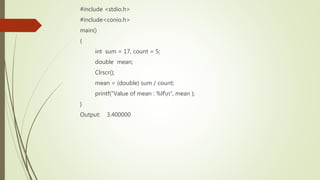
#include <stdio.h>
#include<conio.h>
main()
{
int sum = 17, count = 5;
double mean;
Clrscr();
mean = (double) sum / count;
printf("Value of mean : %lfn", mean );
}
Output: 3.400000
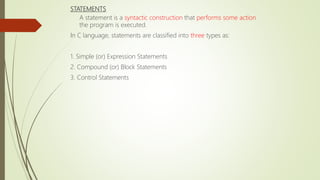
STATEMENTS
A statement is a syntactic construction that performs some action
the program is executed.
In C language, statements are classified into three types as:
1. Simple (or) Expression Statements
2. Compound (or) Block Statements
3. Control Statements
Simple (or) Expression Statements
A simple statement is a single statement that ended with a semicolon.
Example: int x, y;
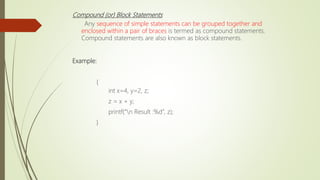
Compound (or) Block Statements
Any sequence of simple statements can be grouped together and
enclosed within a pair of braces is termed as compound statements.
Compound statements are also known as block statements.
Example:
{
int x=4, y=2, z;
z = x + y;
printf(“n Result :%d”, z);
}
Control Statements
 Generally, C program is a set of statements which is normally
in sequential order from top to bottom.
 control statements are used for :
1. To skip one or more statements based on condition.
2. To execute the same statements repeatedly based on certain
3. sometimes control is necessary to change from one location to
another location.
 In C language, control statements are classified into three categories
Selection (or) Decision Control Statements
Loop (or) Iterative Control Statements
Branch (or) Jump Control Statements
Selection (or) Decision Control Statements
 Selection control statements are used to skip one or more statements
depending on the outcome of the logical test (condition).
 Selection control statements are also known as decision control
statements.
 C language supports decision control statements as:
Two-way selection statements:
i) if statement
ii) if-else statement
Multi-way selection statements:
i) Nested if-else statement
ii) else-if ladder statement
iii) switch statement
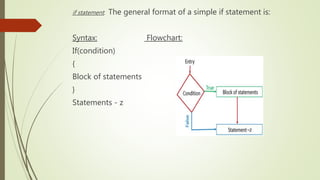
if statement: The general format of a simple if statement is:
Syntax: Flowchart:
If(condition)
{
Block of statements
}
Statements - z
if statement:
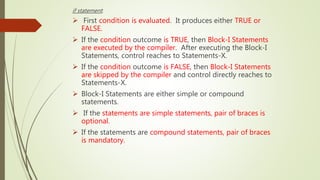
 First condition is evaluated. It produces either TRUE or
FALSE.
 If the condition outcome is TRUE, then Block-I Statements
are executed by the compiler. After executing the Block-I
Statements, control reaches to Statements-X.
 If the condition outcome is FALSE, then Block-I Statements
are skipped by the compiler and control directly reaches to
Statements-X.
 Block-I Statements are either simple or compound
statements.
 If the statements are simple statements, pair of braces is
optional.
 If the statements are compound statements, pair of braces
is mandatory.
if statement:
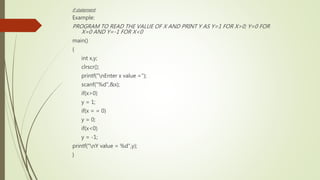
Example:
PROGRAM TO READ THE VALUE OF X AND PRINT Y AS Y=1 FOR X>0; Y=0 FOR
X=0 AND Y=-1 FOR X<0
main()
{
int x,y;
clrscr();
printf("nEnter x value =");
scanf("%d",&x);
if(x>0)
y = 1;
if(x = = 0)
y = 0;
if(x<0)
y = -1;
printf("nY value = %d",y);
}
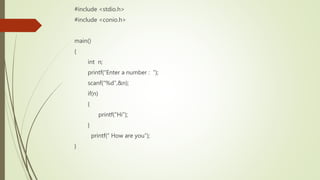
#include <stdio.h>
#include <conio.h>
main()
{
int n;
printf(“Enter a number : ”);
scanf(“%d”,&n);
if(n)
{
printf(“Hi”);
}
printf(“ How are you”);
}
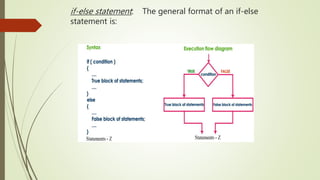
if-else statement: The general format of an if-else
statement is:
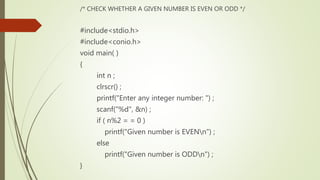
/* CHECK WHETHER A GIVEN NUMBER IS EVEN OR ODD */
#include<stdio.h>
#include<conio.h>
void main( )
{
int n ;
clrscr() ;
printf("Enter any integer number: ") ;
scanf("%d", &n) ;
if ( n%2 = = 0 )
printf("Given number is EVENn") ;
else
printf("Given number is ODDn") ;
}
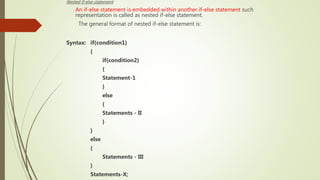
Nested if-else statement:
An if-else statement is embedded within another if-else statement such
representation is called as nested if-else statement.
The general format of nested if-else statement is:
Syntax: if(condition1)
{
if(condition2)
{
Statement-1
}
else
{
Statements - II
}
}
else
{
Statements - III
}
Statements-X;
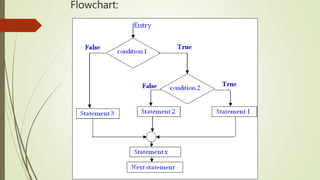
Flowchart:
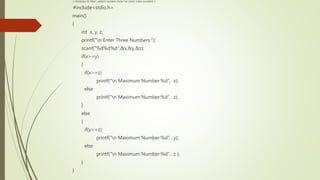
/* PROGRAM TO PRINT LARGEST NUMBER FROM THE GIVEN THREE NUMBERS */
#include<stdio.h>
main()
{
int x, y, z;
printf("n Enter Three Numbers:");
scanf("%d%d%d",&x,&y,&z);
if(x>=y)
{
if(x>=z)
printf("n Maximum Number:%d", x);
else
printf("n Maximum Number:%d", z);
}
else
{
if(y>=z)
printf("n Maximum Number:%d", y);
else
printf("n Maximum Number:%d", z );
}
}
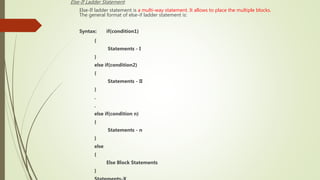
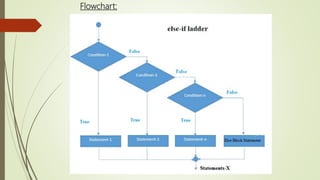
Else-If Ladder Statement:
Else-If ladder statement is a multi-way statement. It allows to place the multiple blocks.
The general format of else-if ladder statement is:
Syntax: if(condition1)
{
Statements - I
}
else if(condition2)
{
Statements - II
}
.
.
else if(condition n)
{
Statements - n
}
else
{
Else Block Statements
}
Flowchart:
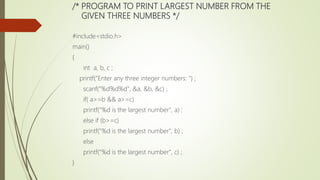
/* PROGRAM TO PRINT LARGEST NUMBER FROM THE
GIVEN THREE NUMBERS */
#include<stdio.h>
main()
{
int a, b, c ;
printf("Enter any three integer numbers: ") ;
scanf("%d%d%d", &a, &b, &c) ;
if( a>=b && a>=c)
printf("%d is the largest number", a) ;
else if (b>=c)
printf("%d is the largest number", b) ;
else
printf("%d is the largest number", c) ;
}
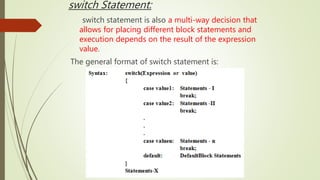
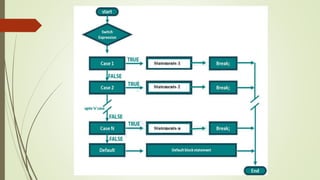
switch Statement:
switch statement is also a multi-way decision that
allows for placing different block statements and
execution depends on the result of the expression
value.
The general format of switch statement is:
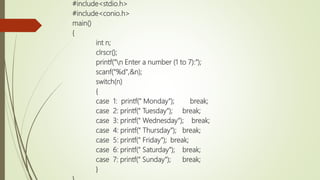
#include<stdio.h>
#include<conio.h>
main()
{
int n;
clrscr();
printf("n Enter a number (1 to 7):");
scanf("%d",&n);
switch(n)
{
case 1: printf(" Monday"); break;
case 2: printf(" Tuesday"); break;
case 3: printf(" Wednesday"); break;
case 4: printf(" Thursday"); break;
case 5: printf(" Friday"); break;
case 6: printf(" Saturday"); break;
case 7: printf(" Sunday"); break;
}
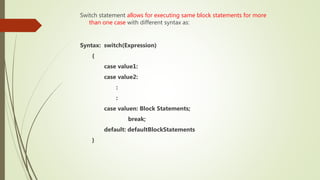
Switch statement allows for executing same block statements for more
than one case with different syntax as:
Syntax: switch(Expression)
{
case value1:
case value2:
:
:
case valuen: Block Statements;
break;
default: defaultBlockStatements
}
Loop (or) Iterative control statements:
Loop:
A loop is a sequence of instructions that is continuously repeated until a
certain condition is reached. Loop is also known as iteration.
Types of Loops:
A loop can be either a pre-test loop or a post-test loop.
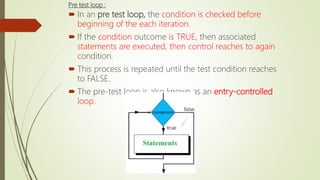
Pre test loop :
 In an pre test loop, the condition is checked before
beginning of the each iteration.
 If the condition outcome is TRUE, then associated
statements are executed, then control reaches to again
condition.
 This process is repeated until the test condition reaches
to FALSE.
 The pre-test loop is also known as an entry-controlled
loop.
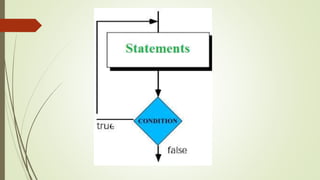
Post test loop:
 In a post-test loop, first statements are executed, then condition is
evaluated.
 If the outcome of the condition is TRUE, then again same statements
are executed; if the outcome of the test condition is FALSE, then the
loop terminates.
 The post-test loop is also known as an exit-controlled loop.
Loop Control statements
Loop control statements are used for repetitive execution of
statements based on the outcome of a logical test.
C language supports three loop control statements as:
 while statement
 do-while statement
 for statement
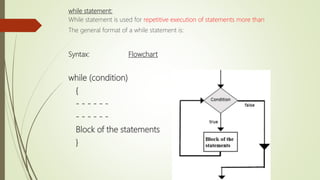
while statement:
While statement is used for repetitive execution of statements more than
The general format of a while statement is:
Syntax: Flowchart
while (condition)
{
- - - - - -
- - - - - -
Block of the statements
}
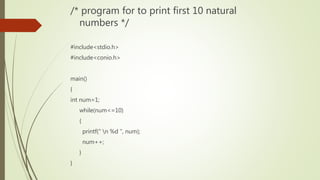
/* program for to print first 10 natural
numbers */
#include<stdio.h>
#include<conio.h>
main()
{
int num=1;
while(num<=10)
{
printf(" n %d ", num);
num++;
}
}
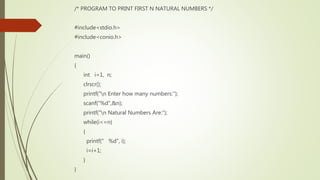
/* PROGRAM TO PRINT FIRST N NATURAL NUMBERS */
#include<stdio.h>
#include<conio.h>
main()
{
int i=1, n;
clrscr();
printf("n Enter how many numbers:");
scanf("%d",&n);
printf("n Natural Numbers Are:");
while(i<=n)
{
printf(" %d", i);
i=i+1;
}
}
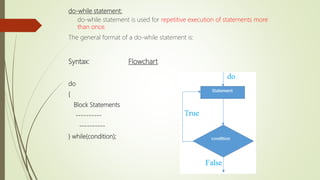
do-while statement:
do-while statement is used for repetitive execution of statements more
than once.
The general format of a do-while statement is:
Syntax: Flowchart
do
{
Block Statements
----------
----------
} while(condition);
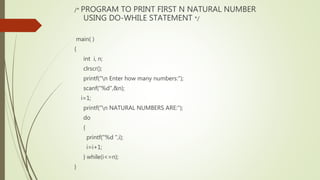
/* PROGRAM TO PRINT FIRST N NATURAL NUMBER
USING DO-WHILE STATEMENT */
main( )
{
int i, n;
clrscr();
printf("n Enter how many numbers:");
scanf("%d",&n);
i=1;
printf("n NATURAL NUMBERS ARE:");
do
{
printf("%d ",i);
i=i+1;
} while(i<=n);
}
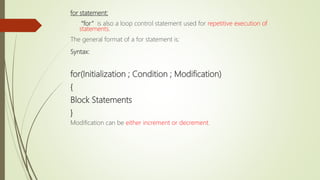
for statement:
“for” is also a loop control statement used for repetitive execution of
statements.
The general format of a for statement is:
Syntax:
for(Initialization ; Condition ; Modification)
{
Block Statements
}
Modification can be either increment or decrement.
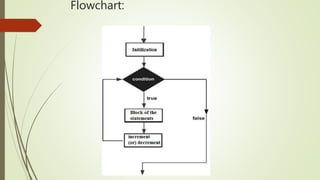
Flowchart:
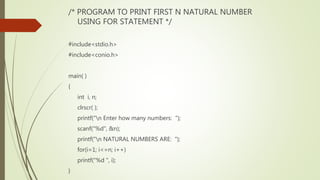
/* PROGRAM TO PRINT FIRST N NATURAL NUMBER
USING FOR STATEMENT */
#include<stdio.h>
#include<conio.h>
main( )
{
int i, n;
clrscr( );
printf("n Enter how many numbers: ");
scanf("%d", &n);
printf("n NATURAL NUMBERS ARE: ");
for(i=1; i<=n; i++)
printf("%d ", i);
}
Features of for loop:
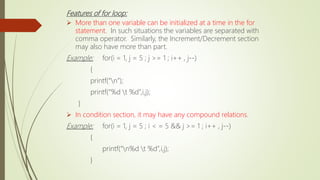
 More than one variable can be initialized at a time in the for
statement. In such situations the variables are separated with
comma operator. Similarly, the Increment/Decrement section
may also have more than part.
Example: for(i = 1, j = 5 ; j >= 1 ; i++ , j--)
{
printf(“n”);
printf(“%d t %d”,i,j);
}
 In condition section, it may have any compound relations.
Example: for(i = 1, j = 5 ; i < = 5 && j >= 1 ; i++ , j--)
{
printf(“n%d t %d”,i,j);
}
Features of for loop:
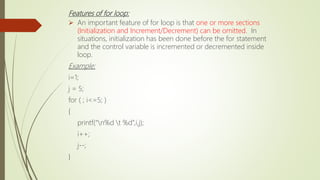
 An important feature of for loop is that one or more sections
(Initialization and Increment/Decrement) can be omitted. In
situations, initialization has been done before the for statement
and the control variable is incremented or decremented inside
loop.
Example:
i=1;
j = 5;
for ( ; i<=5; )
{
printf(“n%d t %d”,i,j);
i++;
j--;
}
Nested Loops:
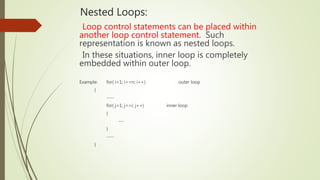
Loop control statements can be placed within
another loop control statement. Such
representation is known as nested loops.
In these situations, inner loop is completely
embedded within outer loop.
Example: for( i=1; i<=n; i++) outer loop
{
----
for( j=1; j<=i; j++) inner loop
{
---
}
----
}
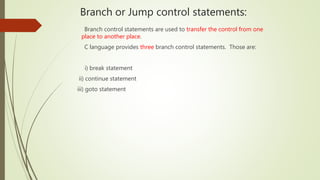
Branch or Jump control statements:
Branch control statements are used to transfer the control from one
place to another place.
C language provides three branch control statements. Those are:
i) break statement
ii) continue statement
iii) goto statement
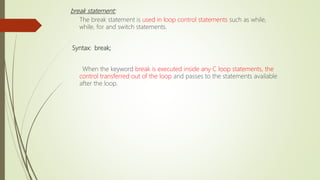
break statement:
The break statement is used in loop control statements such as while,
while, for and switch statements.
Syntax: break;
When the keyword break is executed inside any C loop statements, the
control transferred out of the loop and passes to the statements available
after the loop.
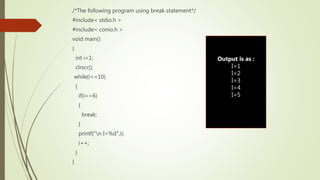
/*The following program using break statement*/
#include< stdio.h >
#include< conio.h >
void main()
{
int i=1;
clrscr();
while(i<=10)
{
if(i==6)
{
break;
}
printf("n I=%d",i);
i++;
}
}
Output is as :
I=1
I=2
I=3
I=4
I=5
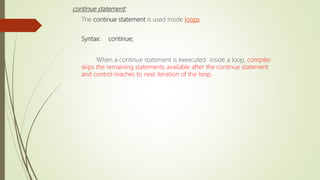
continue statement:
The continue statement is used inside loops.
Syntax: continue;
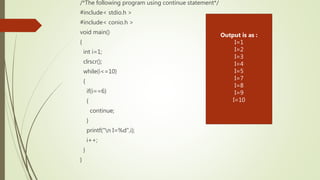
When a continue statement is exexcuted inside a loop, compiler
skips the remaining statements available after the continue statement
and control reaches to next iteration of the loop.
/*The following program using continue statement*/
#include< stdio.h >
#include< conio.h >
void main()
{
int i=1;
clrscr();
while(i<=10)
{
if(i==6)
{
continue;
}
printf("n I=%d",i);
i++;
}
}
Output is as :
I=1
I=2
I=3
I=4
I=5
I=7
I=8
I=9
I=10
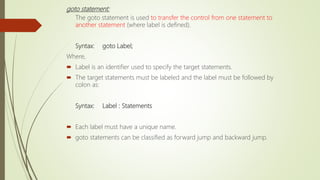
goto statement:
The goto statement is used to transfer the control from one statement to
another statement (where label is defined).
Syntax: goto Label;
Where,
 Label is an identifier used to specify the target statements.
 The target statements must be labeled and the label must be followed by
colon as:
Syntax: Label : Statements
 Each label must have a unique name.
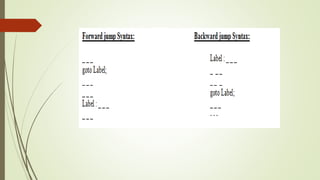
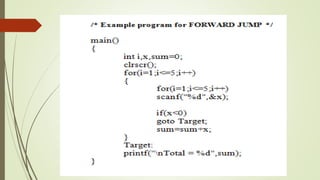
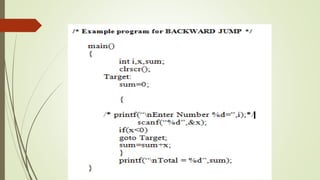
 goto statements can be classified as forward jump and backward jump.
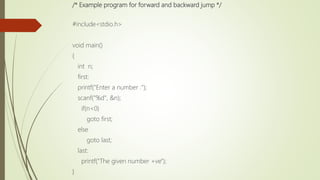
/* Example program for forward and backward jump */
#include<stdio.h>
void main()
{
int n;
first:
printf("Enter a number :");
scanf("%d", &n);
if(n<0)
goto first;
else
goto last;
last:
printf("The given number +ve");
}
Additional Statements
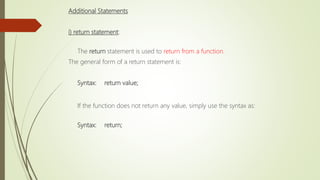
i) return statement:
The return statement is used to return from a function.
The general form of a return statement is:
Syntax: return value;
If the function does not return any value, simply use the syntax as:
Syntax: return;
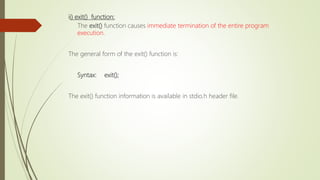
ii) exit() function:
The exit() function causes immediate termination of the entire program
execution.
The general form of the exit() function is:
Syntax: exit();
The exit() function information is available in stdio.h header file.

unit 1 cpds.pptx

  • 1.
  • 2.
    2 C-PROGRAMMING & DATASTRUCTURES (21A050302) Unit-I: Computer Fundamentals, Algorithm, Flowchart. Introduction to C Language: Characteristics, Identifiers, Constants, Data types, Keywords, Basic I/O statements, Structure of a C program. Operators and Expressions: Operators classification, Assignment operator, Arithmetic operators, Relational and Logical operators, Increment and decrement operators, Conditional operator, Bitwise operators, Operator precedence and associativity, Type casting. Statements: Simple and compound statements, Control statements – Selection, Loop and Branch control statements.
  • 3.
    History of Clanguage:  ALGOL (Algorithmic Language) programming language was developed by John Backus in the early 1960’s.  In 1967, a new computer programming language was announced called as 'BCPL' which stands for Basic Combined Programming Language. BCPL was designed and developed by Martin Richards.  In 1970, Ken Thompson developed a simple language called B. B language was used to develop the first version UNIX operating system.  C is a structured programming language developed by Dennis Ritchie at AT&T’s (American Telephone and Telegraph) Bell Laboratories of USA in 1972.  In 1983, the American National Standards Institute (ANSI) begans the definition of standards for C. It was approved in December 1989.  Different ANSI versions are: C89, C95, C99, Embedded C (2008), C11 (C1X).
  • 4.
    4 C is astructured programming language developed by Dennis Ritchie at AT&T’s (American Telephone and Telegraph) Bell Laboratories of USA in 1972.
  • 5.
    CHARACTERISTICS OF CLANGUAGE  C is a structured programming language.  C is a middle-level language.  C is a case-sensitive language.  C supports the concept of dynamic memory allocation.  C is a robust language.  C is a core language.
  • 6.
    Applications  Operating system Video games  Artificial intelligence  Computer Networks etc..
  • 7.
    8 Analogy between learningEnglish language and learning C language.
  • 8.
    9 The C CharacterSet A character denotes any alphabet, digit or special symbol used to represent information.
  • 9.
    KEYWORDS  The wordswhich are predefined by the system compiler are called as keywords.  Keywords are also known as ”Reserved Words”.  All keywords must be in lower case characters.  Total 32 keywords are available in C language.
  • 10.
    KEYWORDS Total 32 keywordsare available in C language. Those are:
  • 11.
    IDENTIFIER  The wordswhich are defined by the user are called identifiers.  Identifiers are treated as user-defined words.  An identifier is a name given to the variable, constant, array, structure etc. Example: sum, x etc. Note: Words in C language are either keywords or identifiers.
  • 12.
    Rules for ConstructingIdentifiers:  The first character in the identifier must be an alphabet.  No comma or blank spaces are allowed within a identifier.  No special symbols other than underscore can be used in a identifier.  Keywords can’t used as identifier.
  • 13.
    DATA TYPES  Thetype of the value stored in a variable is called its data type.  In C language, data types are classified into different types as:
  • 14.
    Primitive / Basic/ Built-In Data Types: char: char data type is used for storing character values. int: int data type is used for storing integer values. float: float data type is used for storing real values. double: double data type is also used for storing real values.
  • 15.
    The following tableshows different primitive data types, memory size in bytes and range of values possible to store.
  • 16.
    VARIABLES Variable represents memorylocation to store a value. Variable is a quantity that can change during the program execution. Declaration of Variables:  All variables must be declared before they are using in the program.  The declaration statement begins with data type followed by the name of the variables. The general format of declaring variables is:
  • 18.
    Rules for ConstructingVariable Names: A variable name may contain either an alphabets or digits or underscore special symbol(_).  The first character in the variable name must be an alphabet.  No comma or blank spaces are allowed within a variable name.  Keywords cannot use as variable names.
  • 19.
    Initialization of Variables: Initializationmeans assigning a value to the Initialization can be done in two different ways. Those are: 1. Direct Initialization. 2. Through Program Execution.
  • 20.
    1. Direct Initialization Assigninga value to the variable at the time of its declaration is called initialization. The general format for initializing a variable is: Syntax: Datatype VariableName = Value;
  • 21.
    2. Through ProgramFunction: scanf() library function is used to store value to a variable through program execution. Note: When variables are declared with its appropriate data types, compiler allocates sufficient amount of memory for the variables.
  • 22.
    LIBRARY FUNCTIONS Library functionscan also be called as predefined functions or built in functions. Functions which are predefined by the system compiler are known as library functions.  Functions can be accessed anywhere within the program simply by writing the function name followed by a list of arguments enclosed in parenthesis.  empty parenthesis are provided if a function do not require any arguments.
  • 23.
    Some of thelibrary functions are: 1. scanf(): It is a input library function which is used to provide values to variables through program execution. 2. printf() : It is an output library function which is used to display the output of a program. 3. sqrt(): It is a mathematical library function which is used to caluclate square root of a given no. Examples: 1. printf(“Hello”); 2. clrscr(); 3. sqrt(9); 4. Pow(3,2)
  • 24.
    HEADER FILES  Clanguage contains a large no of header files.  Header files are used to execute the library functions.  #include statement is used to provide Header files in the program. SYNTAX: #include<HeaderFileName> Or #include “HeaderFileName”
  • 25.
    Some of theheader files are: 1. stdio.h : It is a header file which is used to execute input & output library functions. 2. Math.h : It is a header file which is used to execute mathematical library functions. 3. Conio.h : It is a header file which is used to execute clrscr() library functions. Example: #include<stdio.h> or #include”stdio.h”
  • 26.
    READING DATA FROMKEYBOARD(scanf () lnput library function) scanf() is an input statement. scanf() library function is used to provide values to the variables as input data through the keyboard. Scanf() function contains two arguents. Those are : 1. Control string. 2. Address of variable.
  • 27.
    Control string:  Thecontrol string specifies the type of data being received.  Control string is formed with the combination of % symbol followed by the conversion characters of different data types.  Control strings for different data types are: Control string Datatype %d int %c char %lf double %f float %u unsigned int %ld long int %o octal %x hexa decimal
  • 28.
    Address of thevariable: it specifies into which variable the value has to stored. Syntax: scanf(“controlstring”, &variable1,&varbalbe2,
.&variablen); Examples: 1. Int x; scanf(“%d”,&x); 2. Int y; float z; scanf(“%d%f”, &y, &z);
  • 29.
    DISPLAY DATA ONMONITOR(printf() output library function) printf() is an output statement. printf() library function is used to display any data on the monitor. The general format of printf() function is: Syntax: 1. printf(“Control String”,varname1, varname2, . . , varnamen); 2. printf(“String”);
  • 30.
    Examples 1. printf(“watt”); o/p: watt 2.Int x=7; printf(“%d”,x); printf(“value of x=%d”, x);
  • 31.
    COMMENTS  The linesbeginning with /* and ending with */ are known as  These are used for to enhance its readability and understanding.  It is possible to place the comments any where in the program  Comment lines are not executable statements. Example: /* Sample C Language Program */
  • 32.
    Constants: A constant isa quantity that does not change during the program execution. C language supports 2 types of constants as: 1. Numeric 2. Numerical Constants: Integer Constants Real Constants Character Constants: Single Character Constant String Constants
  • 33.
    Integer Constants: It refersto the sequence of digits. There are three types of integers namely, Decimal Integers, Octal Integers and Hexa-Decimal Integers. Decimal Integers: consists 0 to 9. Example: 23 -67 +678 Octal Integers: consists 0 to 7 with a leading 0. Example: 075 0123 Hexa-Decimal Integers: consists 0 to 9, A to F with a leading 0X. Example: 0X79 0XA76E Rules for Constructing Integer Constants:  An integer constant must have at least one digit.  It must not have a decimal point.  It could be either positive or negative. Default sign is positive.  The comma or blank spaces are not allowed within an integer constant
  • 34.
    Real Constants ‱ Realconstants are also known as “Floating Point constants”. ‱ Real constant contains fractional part ‱ It could be written in two forms: Fractional form and Exponential form. ‱ Fractional form: The whole number followed by point and fractional part. ‱ Exponential form: The whole number followed by exponent (or) mantissa. Ex. 98e54, 3e7 Rules for constructing Real constants: A real constant must have at least one digit. It must have a decimal point. It could be either positive or negative. Default sign positive. No commas or blanks are allowed within a real
  • 35.
    Single Character Constant: Character constant contains a single character enclosed within a of single quotation marks.  The character may be alphabet, digit and special symbol. Example: ‘A’ ‘9’ ‘#’  The maximum length of a character constant can be only 1
  • 36.
    String constant: The collectionof characters placed in between double quotation marks is called string constant. Example: “Welcome” “ Programing” “cse5sections”
  • 37.
    Constant can berepresented in 2 different ways in C. Those are: 1. Symbolic Constants. 2. Constant variable. SYMBOLIC CONSTANTS #define statement is used for defining symbolic constants. Syntax: #define symbolicname constantvalue Example: #define PI 3.14159
  • 38.
    Constant variable  thekeyword const is placed before the variable to declare the variables as constant varaibles . Syntax: const datatype variablename = Value; Example: const int x = 10;
  • 39.
    Strings:  A stringis defined as a collection of characters.  The characters may be any combination of letters, digits, special symbols and blank spaces.  In C language, a character array itself treated as a string. Example: HELLO
  • 40.
    Operators:  Operator isa symbol that tells to the compiler to perform some action.  C language supports different operators: Arithmetic operators, Relational operators, Logical operators, Increment & Decrement operators, Conditional operators etc. Example: + - & || ~ etc.
  • 41.
    Special Symbols:  Clanguage supports various special symbols to perform different types of actions. Example: # ; : , etc.
  • 42.
    C-TOKENS In a Cprogram, the smallest individual units are called as C tokens. C language has six types of tokens as:
  • 43.
    STRUCTURE OF AC PROGRAM Comments Header Files Function Prototypes Global Variable Declarations main() { Local Variable Declarations - - - - - - - - - /*PROGRAMMING LOGIC */ - - - - - }
  • 44.
     Comments areoptional . They are used for readability.  Header files provide the necessary information that supports various library functions. Header files are placed within the programs using #include statement.  Function prototype is a declaration statement that describes the function name, list of arguments, type, order of arguments and type of the value returned from the function.  Variables declared inside the function are called local variables. These variables are possible to use only within the functions.  Variables declared outside the function are called global variables. These variables are possible to use throughout the program.
  • 45.
     main() isa special function used by the C system to tell the compiler that where the program execution starts.  Every C program must have exactly one main function.  Left curly brace ‘{‘ and Right curly brace ‘}’ indicates opening and ending of the function implementation.  All the statements between these two braces form as the function body.
  • 46.
    Example: /* WRITE AC PROGRAM TO PRINT NAME OF YOUR COLLEGE */ #include<stdio.h> /* Inclusion of Standard I/O Header File */ #inlcude<conio.h> /* Inclusion of Console I/O Header File */ main() /* Beginning of Main function */ { /* Beginning of Function body */ clrscr(); /* Library function to clear the screen */ printf(“PBR VITS”); /* Output statement to print the message */ } /* Ending of Function body */ SAVE : F2 FILENAME : demo.c COMPILE : F9 (OR) ALT F9 RUN : CTRL F9 RESULT VIEW : ALT F5
  • 47.
    Operators & Expression: An expression is formed with the combination of operators and operands.  C operators are symbols that are used to perform mathematical or logical manipulations.  An operand is a data item on which the particular operation takes place. Ex: A + B * 5 where, +, * are operators, A, B are variables, 5 is constant
  • 48.
    Types of operatorsin C In C language, operators can be classified into 9 different categories such as: 1. Assignment operator 2. Arithmetic operators 3. Relational operators 4. Logical operators 5. Increment & Decrement operators 6. Conditional operator 7. Bitwise operators 8. Special operators 9. Additional operators
  • 49.
    Assignment Operators = (Equalto symbol) is called as the assignment operator. It is used assign a value (or) result of an expression to a variable. SYNTAX: VariableName=expression; or value; EXAMPLE: 1. x = 5; 2. y = x + 10;
  • 50.
    /* Assignment Operator*/ #include < stdio.h > #include < conio.h > main() { int x = 10, y; clrscr( ); y=x+5; printf(“x=%dn”, x); printf(“y=%dn”, y); }
  • 51.
    Arithmetic Operators: Arithmetic Operatorsare used to performing mathematical calculations like addition (+), subtraction (-), multiplication (*), division (/) and modulus (%). Arithmetic operators are binary operators. Since, they required two operands to perform the operation.  Any expression that forms with the combination of operands and arithmetic operators is termed as an arithmetic expression.
  • 52.
    While performing divisionoperation, If both operands are integers, result is also an integer value. Since, integer division truncates fractional parts. If either operand is float, result is also a floating point value. Modulo operator (%) can’t be applied on floating point numbers.
  • 53.
    /* Example programfor Arithmetic operators */ #include <stdio.h> #include <conio.h> main() { int a=10,b=20, add, sub, mul, div, mod; add = a+b; sub = a-b; mul = a*b; div = a/b; mod = a%b; printf("Addition value: %dn", add); printf("Subtraction value : %dn", sub); printf("Multiplication value : %dn", mul); printf("Division value : %dn", div); printf("Modulus value : %dn", mod); }
  • 54.
    Output: Addition value :30 Subtraction value : -10 Multiplication value : 200 Division value : 0 Modulus value : 10
  • 55.
    Relational Operators:  Relationaloperators are used compare the given two operand values.  C language supports relational operators as:
  • 56.
    Any expression thatforms with the combination of relational operators and operands is termed as a relational expression. The result of a relational expression is either 1 or 0. Where 1 stands for TRUE and 0 stands for FALSE.
  • 57.
    /* EXAMPLE PROGRAMFOR RELATIONAL OPERATORS */ #include<stdio.h> #include<conio.h> main() { int a =10, b =20; clrscr(); printf(“a < b is : %d n”, a<b); printf(“a <= b is : %d n”, a<=b); printf(“a == b is : %d n”, a==b); printf(“a != b is : %d n”, a!=b); printf(“a > b is : %d n”, a>b); printf(“a >= b is : %d n”, a>=b); }
  • 58.
    Output: a < bis : 1 a <= b is : 1 a == b is : 0 a != b is : 1 a > b is : 0 a >= b is : 0
  • 59.
    Logical Operators:  Clanguage supports logical operators as &&, || and ! Operators.  Logical operators are used to combine two or more relational expressions.  Logical expressions are also known as compound relational expressions.  Any expression that forms with the combination of logical operators and operands is termed as a logical expression.
  • 60.
     Logical expressionsare also produces the result values as either 1 or 0.  Logical AND, Logical OR operators are binary operators and Logical NOT is a unary operator.
  • 61.
    Here,  Logical ANDproduces result value as 1 (TRUE), if both operands are 1 (TRUE); otherwise, result value is 0 (FALSE).  Logical OR produces result value as 0 (FALSE), if both operands are 0 (FALSE); otherwise, result value is 1 (TRUE).  Logical NOT produces result value as 1 (TRUE), is the expression value is 0 (FALSE); otherwise, result value is 0 (FALSE).
  • 62.
    /* EXAMPLE PROGRAMFOR LOGICAL OPERATORS */ #include<stdio.h> main() { printf("n Result 1: %d", (14>78)&&(24<78)); printf("n Result 2: %d", (14>78)||(24<78)); printf("n Result 3: %d", ! ((14>78)||(24<78))); } Output: Result 1: 0 Result 2: 1 Result 3: 0
  • 63.
    Increment & DecrementOperators: ++ and - - operators are called increment and decrement operators. These operators are unary operators and required only one operand. Increment Operator:  Increment operator ++ is used to increment the operand value by 1.  Depending on the placement of operator with the operand, increment operator can be represented in two ways as : i. pre-increment ii. post-increment
  • 64.
    pre-increment : If ++operator is placed before the operand, it is as pre-increment operation. Here, first compiler increments the operand value by 1 and then result is assigned to the variable.
  • 65.
    post-increment : If ++operator is placed after the operand, it is termed as post-increment operation. Here, first compiler assigns the value to the variable then operand is incremented by 1.
  • 66.
    Decrement Operator:  Decrementoperator -- is used to decrement the operand value by 1.  Depending on the placement of operator with the operand, decrement operator can be utilized in two ways as : i. pre-decrement ii. post-decrement.
  • 67.
    pre-decrement : If --operator is placed before the operand, it is termed as pre- decrement operation. Here, first compiler decrements the operand value by 1 and then result is assigned to the variable.
  • 68.
    post-decrement : If --operator is placed after the operand, it is termed as post- decrement operation. Here, first compiler assigns the value to the variable and then value is decremented by 1.
  • 69.
    #include <stdio.h> main() { int a=5,b=5; printf("n %d %d",++a,++b); a=5,b=5; printf("n %d %d",a++,b++); a=5, b=5; printf("n %d %d“,--a,--b); a=5,b=5; printf("n %d %d",a--,b--); } Output:
  • 70.
    Conditional Operators: ? :known as conditional operator. conditional operator are also known as ternary operator.  Any expression that forms with the combination of conditional operator pair and operands is termed as a conditional expression.  The general format of conditional operator pair is: Syntax: (Expression1) ? Expression2 : Expression3 Here,  First Expression1 is evaluated. It produces either TRUE of FALSE.  If the result of Expression1 is TRUE, then Expression2 is evaluated and becomes result of the total expression.  If the result of Expression1 is FALSE, then Expression3 is evaluated and becomes result of the total expression.
  • 71.
    /* Program tofind maximum number among 2 numbers*/ #include<stdio.h> main() { int a, b, max; printf("Enter a and b: "); scanf("%d%d", &a, &b); max = a > b ? a : b; printf("Largest of the two numbers = %dn", max); }
  • 72.
    Bitwise Operators:  Clanguage supports bitwise operators as &, |, ^, ~, << and >> operators.  These operators are used to manipulate data of the operands at bit level i.e., operations are performed on corresponding bits of the given operands.  Bitwise operators can operate only on integer quantities.
  • 73.
    Bitwise Operators:  CBitwise operators are classified into two types as: I. Bitwise Logical Operators II. Shift Operators i) Bitwise Logical Operators Bitwise AND (&), Bitwise OR (|), Bitwise Exclusive-OR (^) and One’s complement (~) operators are known as bitwise logical operators. Bitwise AND, Bitwise OR and Bitwise Exclusive-OR are binary operators. One’s complement is an unary operator.
  • 74.
    Bit-Wise AND, Bit-WiseOR and Bit-Wise Exclusive OR follows the following bit comparison tables.  Bit-Wise AND compares the corresponding bits of the and produces 1 when both bits are 1; 0 otherwise.  Bit-Wise OR compares the corresponding bits of the operands and produces 0 when both bits are 0; 1 otherwise.  Bit-Wise Exclusive OR compares the corresponding bits of the operands and produces 0 when both bits are same; 1
  • 78.
    Shift Operators: Left shiftoperator (<<) and right shift operator (>>) are known as shift operators. Left shift operator (<<):  Left shift operator (<<) is a binary operator that shifts bits of the given operand towards left hand side.  It requires two integer arguments. The first argument is the value to be shifted and the second argument is the number of bits to be shifted.  The general format of left shift operator is: Syntax: VariableName << NoOfBitPositions;
  • 79.
    Right shift operator(>>):  Right shift operator (>>) is a binary operator that shifts bits of the given operand towards right hand side.  It requires two integer arguments. The first argument is the value to be shifted and the second argument is the number of bits to be shifted.  The general format of right shift operator is: Syntax: VariableName >> NoOfBitPositions;
  • 80.
    /* EXAMPLE PROGRAMFOR SHIFT OPERATORS */ #include<stdio.h> #include<conio.h> main() { int x; clrscr(); x=24; printf("n Left Shift Result:%d", x<<2); x=24; printf("n Right Shift Result:%d", x>>2); }
  • 82.
    Special Operators: C languagesupports some special operators such as 1. unary minus operator, 2. comma operator, 3. sizeof operator, 4. pointer operators (& and *) and 5. member selection operators (. and ->). Unary minus operator: Unary minus (-) operator changes sign of the given operand. i.e., +ve sign is changed as –ve sign and –ve sign is changed as +ve sign. Example: +10 → -10 -456 → +456 b) Comma Operator: Comma (,) operator is used to separate the operands from one to another. Example: int x,y;
  • 83.
    Special Operators: c) sizeofOperator: sizeof operator is a compile time operator used to return the number of bytes occupied by the given operand. The general format of sizeof operator is: Syntax: sizeof(Operand); Here, The operand may be a variable, a constant or a data type.
  • 85.
  • 86.
    Additional Operators: C languageallows compound assignment operators ( Example: +=, -=, *=, /=, %=, &=, ^= ) .
  • 87.
    Syntax: Exp1 += Exp2Equivalent To Exp1 = Exp1 + Exp2 Exp1 -= Exp2 Equivalent To Exp1 = Exp1 - Exp2 Exp1 *= Exp2 Equivalent To Exp1 = Exp1 * Exp2 Exp1 /= Exp2 Equivalent To Exp1 = Exp1 / Exp2 Exp1 %= Exp2 Equivalent To Exp1 = Exp1 % Exp2 Example: a += 2 ↔ a = a+2 a -= 5 ↔ a = a-5 a *= 3 ↔ a = a*3 a /= 2 ↔ a = a/2 a %= 4 ↔ a = a%4
  • 88.
    Classification Depending upon thenumber of operands used with the operator, operators are classified into three categories as: 1. Unary operators: 2. Binary operators: 3. Ternary operators: Unary operators: Unary operator requires only one operand for implementing the operation. Example: Unary Minus operator, ++, --, ! etc., Binary operators: Binary operator requires two operands for implementing the specified operation. Example: +, - , *, /, %, &&, ||, < etc., Ternary operators: Ternary operator requires more than two operands for implementing specified operation. Example: ? :
  • 89.
    OPERATOR PRECEDENCE &ASSOCIATIVITY In programming languages, expressions are evaluated based on precedence and associativity of the operators. Precedence: If more than one operator is available in a single statement, order of evaluation depends on precedence of operators. Precedence refers to rank of operators that follow order of evaluation. Compiler follows order of evaluation as:  Highest precedence operator is evaluated first before the lowest precedence operator.  If two or more operators have same precedence, it follows associativity.
  • 91.
    OPERATOR PRECEDENCE &ASSOCIATIVITY For example: Solve 10 + 20 * 30
  • 92.
    Operators Associativity Associativity refersto the direction of evaluations as from left to right or from right to left. Left-to-Right associativity evaluates the expression by starting on the left and moving to the right.
  • 93.
    Operators Associativity Right-to-Left associativityevaluates the expression by starting on the right and moving to the left.
  • 94.
    /* Example programfor operator precedence & associativity */ #include<stdio.h> #include<conio.h> main() { int y; clrscr(); y=2+10*2; printf("n Result 1:%d", y); y=3*8/4%4*5; printf("n Result 2:%d", y); }
  • 95.
    Type casting: The processof converting data items from one data type to another data type is called type casting. Type casting can be classified into two types as:  Implicit Type Casting  Explicit Type Casting Implicit Type Casting: If the operands are of different data types, the lower data type is automatically converted into the higher data type by the compiler before the operation proceeds. Such conversion is known as implicit type casting. Example: double p = (2 * 3.5) + 4; = (2.000000 * 3.500000) + 4; = 7.000000 + 4; = 7.000000 + 4.000000; = 11.000000
  • 96.
    Explicit Type Casting: Users can also be converting the data items from one data type to another data type.  Such conversion is known as explicit type casting.  For explicit type casting, the target data type placed within in parenthesis before the data item. Syntax: (targetDataType) expression; Here, Expression may be a constant, variable, or any expression. Example: int x=14, y=3; float z; z = x / y; z = 14/3; z = 4.000000;
  • 97.
    #include <stdio.h> #include<conio.h> main() { int sum= 17, count = 5; double mean; Clrscr(); mean = (double) sum / count; printf("Value of mean : %lfn", mean ); } Output: 3.400000
  • 98.
    STATEMENTS A statement isa syntactic construction that performs some action the program is executed. In C language, statements are classified into three types as: 1. Simple (or) Expression Statements 2. Compound (or) Block Statements 3. Control Statements
  • 99.
    Simple (or) ExpressionStatements A simple statement is a single statement that ended with a semicolon. Example: int x, y;
  • 100.
    Compound (or) BlockStatements Any sequence of simple statements can be grouped together and enclosed within a pair of braces is termed as compound statements. Compound statements are also known as block statements. Example: { int x=4, y=2, z; z = x + y; printf(“n Result :%d”, z); }
  • 101.
    Control Statements  Generally,C program is a set of statements which is normally in sequential order from top to bottom.  control statements are used for : 1. To skip one or more statements based on condition. 2. To execute the same statements repeatedly based on certain 3. sometimes control is necessary to change from one location to another location.  In C language, control statements are classified into three categories Selection (or) Decision Control Statements Loop (or) Iterative Control Statements Branch (or) Jump Control Statements
  • 102.
    Selection (or) DecisionControl Statements  Selection control statements are used to skip one or more statements depending on the outcome of the logical test (condition).  Selection control statements are also known as decision control statements.  C language supports decision control statements as: Two-way selection statements: i) if statement ii) if-else statement Multi-way selection statements: i) Nested if-else statement ii) else-if ladder statement iii) switch statement
  • 103.
    if statement: Thegeneral format of a simple if statement is: Syntax: Flowchart: If(condition) { Block of statements } Statements - z
  • 104.
    if statement:  Firstcondition is evaluated. It produces either TRUE or FALSE.  If the condition outcome is TRUE, then Block-I Statements are executed by the compiler. After executing the Block-I Statements, control reaches to Statements-X.  If the condition outcome is FALSE, then Block-I Statements are skipped by the compiler and control directly reaches to Statements-X.  Block-I Statements are either simple or compound statements.  If the statements are simple statements, pair of braces is optional.  If the statements are compound statements, pair of braces is mandatory.
  • 105.
    if statement: Example: PROGRAM TOREAD THE VALUE OF X AND PRINT Y AS Y=1 FOR X>0; Y=0 FOR X=0 AND Y=-1 FOR X<0 main() { int x,y; clrscr(); printf("nEnter x value ="); scanf("%d",&x); if(x>0) y = 1; if(x = = 0) y = 0; if(x<0) y = -1; printf("nY value = %d",y); }
  • 106.
    #include <stdio.h> #include <conio.h> main() { intn; printf(“Enter a number : ”); scanf(“%d”,&n); if(n) { printf(“Hi”); } printf(“ How are you”); }
  • 107.
    if-else statement: Thegeneral format of an if-else statement is:
  • 108.
    /* CHECK WHETHERA GIVEN NUMBER IS EVEN OR ODD */ #include<stdio.h> #include<conio.h> void main( ) { int n ; clrscr() ; printf("Enter any integer number: ") ; scanf("%d", &n) ; if ( n%2 = = 0 ) printf("Given number is EVENn") ; else printf("Given number is ODDn") ; }
  • 109.
    Nested if-else statement: Anif-else statement is embedded within another if-else statement such representation is called as nested if-else statement. The general format of nested if-else statement is: Syntax: if(condition1) { if(condition2) { Statement-1 } else { Statements - II } } else { Statements - III } Statements-X;
  • 110.
  • 111.
    /* PROGRAM TOPRINT LARGEST NUMBER FROM THE GIVEN THREE NUMBERS */ #include<stdio.h> main() { int x, y, z; printf("n Enter Three Numbers:"); scanf("%d%d%d",&x,&y,&z); if(x>=y) { if(x>=z) printf("n Maximum Number:%d", x); else printf("n Maximum Number:%d", z); } else { if(y>=z) printf("n Maximum Number:%d", y); else printf("n Maximum Number:%d", z ); } }
  • 112.
    Else-If Ladder Statement: Else-Ifladder statement is a multi-way statement. It allows to place the multiple blocks. The general format of else-if ladder statement is: Syntax: if(condition1) { Statements - I } else if(condition2) { Statements - II } . . else if(condition n) { Statements - n } else { Else Block Statements }
  • 113.
  • 114.
    /* PROGRAM TOPRINT LARGEST NUMBER FROM THE GIVEN THREE NUMBERS */ #include<stdio.h> main() { int a, b, c ; printf("Enter any three integer numbers: ") ; scanf("%d%d%d", &a, &b, &c) ; if( a>=b && a>=c) printf("%d is the largest number", a) ; else if (b>=c) printf("%d is the largest number", b) ; else printf("%d is the largest number", c) ; }
  • 115.
    switch Statement: switch statementis also a multi-way decision that allows for placing different block statements and execution depends on the result of the expression value. The general format of switch statement is:
  • 117.
    #include<stdio.h> #include<conio.h> main() { int n; clrscr(); printf("n Entera number (1 to 7):"); scanf("%d",&n); switch(n) { case 1: printf(" Monday"); break; case 2: printf(" Tuesday"); break; case 3: printf(" Wednesday"); break; case 4: printf(" Thursday"); break; case 5: printf(" Friday"); break; case 6: printf(" Saturday"); break; case 7: printf(" Sunday"); break; }
  • 118.
    Switch statement allowsfor executing same block statements for more than one case with different syntax as: Syntax: switch(Expression) { case value1: case value2: : : case valuen: Block Statements; break; default: defaultBlockStatements }
  • 120.
    Loop (or) Iterativecontrol statements: Loop: A loop is a sequence of instructions that is continuously repeated until a certain condition is reached. Loop is also known as iteration. Types of Loops: A loop can be either a pre-test loop or a post-test loop.
  • 121.
    Pre test loop:  In an pre test loop, the condition is checked before beginning of the each iteration.  If the condition outcome is TRUE, then associated statements are executed, then control reaches to again condition.  This process is repeated until the test condition reaches to FALSE.  The pre-test loop is also known as an entry-controlled loop.
  • 122.
    Post test loop: In a post-test loop, first statements are executed, then condition is evaluated.  If the outcome of the condition is TRUE, then again same statements are executed; if the outcome of the test condition is FALSE, then the loop terminates.  The post-test loop is also known as an exit-controlled loop.
  • 124.
    Loop Control statements Loopcontrol statements are used for repetitive execution of statements based on the outcome of a logical test. C language supports three loop control statements as:  while statement  do-while statement  for statement
  • 125.
    while statement: While statementis used for repetitive execution of statements more than The general format of a while statement is: Syntax: Flowchart while (condition) { - - - - - - - - - - - - Block of the statements }
  • 126.
    /* program forto print first 10 natural numbers */ #include<stdio.h> #include<conio.h> main() { int num=1; while(num<=10) { printf(" n %d ", num); num++; } }
  • 127.
    /* PROGRAM TOPRINT FIRST N NATURAL NUMBERS */ #include<stdio.h> #include<conio.h> main() { int i=1, n; clrscr(); printf("n Enter how many numbers:"); scanf("%d",&n); printf("n Natural Numbers Are:"); while(i<=n) { printf(" %d", i); i=i+1; } }
  • 128.
    do-while statement: do-while statementis used for repetitive execution of statements more than once. The general format of a do-while statement is: Syntax: Flowchart do { Block Statements ---------- ---------- } while(condition);
  • 129.
    /* PROGRAM TOPRINT FIRST N NATURAL NUMBER USING DO-WHILE STATEMENT */ main( ) { int i, n; clrscr(); printf("n Enter how many numbers:"); scanf("%d",&n); i=1; printf("n NATURAL NUMBERS ARE:"); do { printf("%d ",i); i=i+1; } while(i<=n); }
  • 130.
    for statement: “for” isalso a loop control statement used for repetitive execution of statements. The general format of a for statement is: Syntax: for(Initialization ; Condition ; Modification) { Block Statements } Modification can be either increment or decrement.
  • 131.
  • 132.
    /* PROGRAM TOPRINT FIRST N NATURAL NUMBER USING FOR STATEMENT */ #include<stdio.h> #include<conio.h> main( ) { int i, n; clrscr( ); printf("n Enter how many numbers: "); scanf("%d", &n); printf("n NATURAL NUMBERS ARE: "); for(i=1; i<=n; i++) printf("%d ", i); }
  • 133.
    Features of forloop:  More than one variable can be initialized at a time in the for statement. In such situations the variables are separated with comma operator. Similarly, the Increment/Decrement section may also have more than part. Example: for(i = 1, j = 5 ; j >= 1 ; i++ , j--) { printf(“n”); printf(“%d t %d”,i,j); }  In condition section, it may have any compound relations. Example: for(i = 1, j = 5 ; i < = 5 && j >= 1 ; i++ , j--) { printf(“n%d t %d”,i,j); }
  • 134.
    Features of forloop:  An important feature of for loop is that one or more sections (Initialization and Increment/Decrement) can be omitted. In situations, initialization has been done before the for statement and the control variable is incremented or decremented inside loop. Example: i=1; j = 5; for ( ; i<=5; ) { printf(“n%d t %d”,i,j); i++; j--; }
  • 135.
    Nested Loops: Loop controlstatements can be placed within another loop control statement. Such representation is known as nested loops. In these situations, inner loop is completely embedded within outer loop. Example: for( i=1; i<=n; i++) outer loop { ---- for( j=1; j<=i; j++) inner loop { --- } ---- }
  • 136.
    Branch or Jumpcontrol statements: Branch control statements are used to transfer the control from one place to another place. C language provides three branch control statements. Those are: i) break statement ii) continue statement iii) goto statement
  • 137.
    break statement: The breakstatement is used in loop control statements such as while, while, for and switch statements. Syntax: break; When the keyword break is executed inside any C loop statements, the control transferred out of the loop and passes to the statements available after the loop.
  • 138.
    /*The following programusing break statement*/ #include< stdio.h > #include< conio.h > void main() { int i=1; clrscr(); while(i<=10) { if(i==6) { break; } printf("n I=%d",i); i++; } } Output is as : I=1 I=2 I=3 I=4 I=5
  • 139.
    continue statement: The continuestatement is used inside loops. Syntax: continue; When a continue statement is exexcuted inside a loop, compiler skips the remaining statements available after the continue statement and control reaches to next iteration of the loop.
  • 140.
    /*The following programusing continue statement*/ #include< stdio.h > #include< conio.h > void main() { int i=1; clrscr(); while(i<=10) { if(i==6) { continue; } printf("n I=%d",i); i++; } } Output is as : I=1 I=2 I=3 I=4 I=5 I=7 I=8 I=9 I=10
  • 141.
    goto statement: The gotostatement is used to transfer the control from one statement to another statement (where label is defined). Syntax: goto Label; Where,  Label is an identifier used to specify the target statements.  The target statements must be labeled and the label must be followed by colon as: Syntax: Label : Statements  Each label must have a unique name.  goto statements can be classified as forward jump and backward jump.
  • 143.
    /* Example programfor forward and backward jump */ #include<stdio.h> void main() { int n; first: printf("Enter a number :"); scanf("%d", &n); if(n<0) goto first; else goto last; last: printf("The given number +ve"); }
  • 146.
    Additional Statements i) returnstatement: The return statement is used to return from a function. The general form of a return statement is: Syntax: return value; If the function does not return any value, simply use the syntax as: Syntax: return;
  • 147.
    ii) exit() function: Theexit() function causes immediate termination of the entire program execution. The general form of the exit() function is: Syntax: exit(); The exit() function information is available in stdio.h header file.