INTRODUCTION TO
‘C’ LANGUAGE
1
Prof.Anuja Nair
Assistant Professor
Computer Science & Engineering Department
Institute of Technology
Nirma University
2.
History
• C isa general-purpose, high-level language that was originally
developed by Dennis M. Ritchie to develop the UNIX operating
system at Bell Labs.
• C was originally first implemented on the DEC PDP-11 computer in
1972.
• C is a successor of B language which was introduced around the
early 1970s.
• The language was formalized in 1989 by the American National
Standard Institute (ANSI).
• The UNIX OS was totally written in C.
• Today's most popular Linux OS and RDBMS MySQL have been
written in C.
2
3.
Features of ‘C’
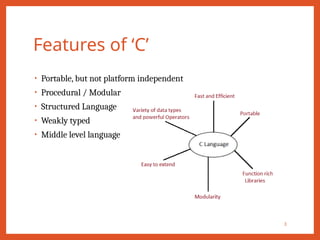
•Portable, but not platform independent
• Procedural / Modular
• Structured Language
• Weakly typed
• Middle level language
3
4.
Character Set
• Everylanguage has its own character set.
• ‘C’ language has its own character set.
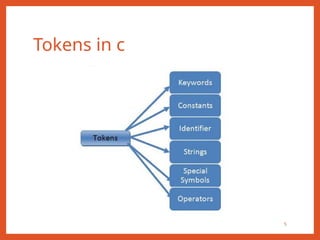
• ‘C’ program basically consists of keywords, identifiers, constants,
operators and some special symbols.
• The characters that can be used in a ‘C’ program are Alphabets (A –
Z and a – z), Digits (0 – 9), Special characters (~ ! @ # $ % ^ & * ( )
[ ] { } ; : ‘ “ , . < > / ? |) and White space characters (Space, Tab,
New Line, Form feed etc).
4
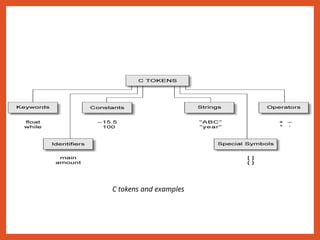
Tokens in C
6
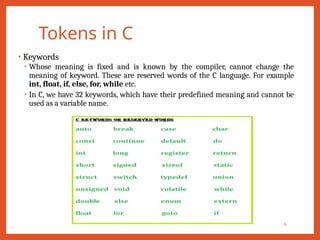
•Keywords
• Whose meaning is fixed and is known by the compiler, cannot change the
meaning of keyword. These are reserved words of the C language. For example
int, float, if, else, for, while etc.
• In C, we have 32 keywords, which have their predefined meaning and cannot be
used as a variable name.
7.
Tokens in C
7
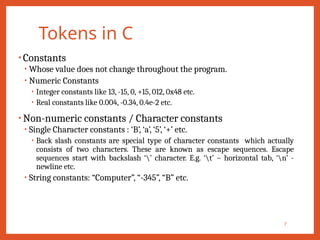
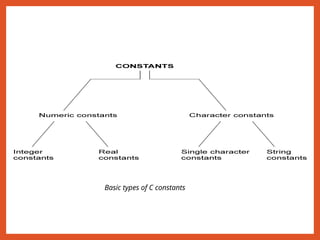
•Constants
• Whose value does not change throughout the program.
• Numeric Constants
• Integer constants like 13, -15, 0, +15, 012, 0x48 etc.
• Real constants like 0.004, -0.34, 0.4e-2 etc.
• Non-numeric constants / Character constants
• Single Character constants : ‘B’, ‘a’, ‘5’, ‘+’ etc.
• Back slash constants are special type of character constants which actually
consists of two characters. These are known as escape sequences. Escape
sequences start with backslash ‘’ character. E.g. ‘t’ – horizontal tab, ‘n’ -
newline etc.
• String constants: “Computer”, “-345”, “B” etc.
Tokens in C
9
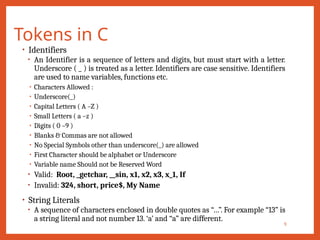
•Identifiers
• An Identifier is a sequence of letters and digits, but must start with a letter.
Underscore ( _ ) is treated as a letter. Identifiers are case sensitive. Identifiers
are used to name variables, functions etc.
• Characters Allowed :
• Underscore(_)
• Capital Letters ( A –Z )
• Small Letters ( a –z )
• Digits ( 0 –9 )
• Blanks & Commas are not allowed
• No Special Symbols other than underscore(_) are allowed
• First Character should be alphabet or Underscore
• Variable name Should not be Reserved Word
• Valid: Root, _getchar, __sin, x1, x2, x3, x_1, If
• Invalid: 324, short, price$, My Name
• String Literals
• A sequence of characters enclosed in double quotes as “…”. For example “13” is
a string literal and not number 13. ‘a’ and “a” are different.
10.
Tokens in C
10
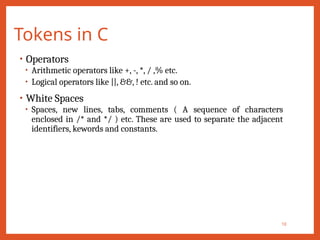
•Operators
• Arithmetic operators like +, -, *, / ,% etc.
• Logical operators like ||, &&, ! etc. and so on.
• White Spaces
• Spaces, new lines, tabs, comments ( A sequence of characters
enclosed in /* and */ ) etc. These are used to separate the adjacent
identifiers, kewords and constants.
11.
Escape Sequences
11
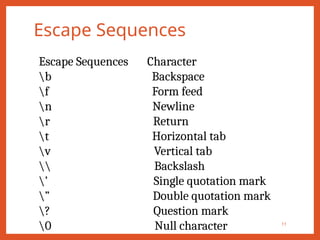
Escape SequencesCharacter
b Backspace
f Form feed
n Newline
r Return
t Horizontal tab
v Vertical tab
Backslash
’ Single quotation mark
” Double quotation mark
? Question mark
0 Null character
A Simple CProgram:
Printing a Line of Text
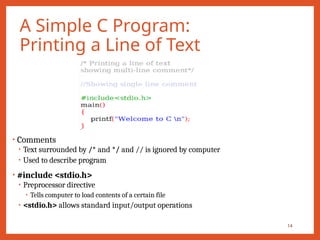
• Comments
• Text surrounded by /* and */ and // is ignored by computer
• Used to describe program
• #include <stdio.h>
• Preprocessor directive
• Tells computer to load contents of a certain file
• <stdio.h> allows standard input/output operations
14
15.
A Simple CProgram:
Printing a Line of Text
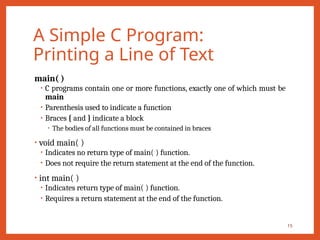
main( )
• C programs contain one or more functions, exactly one of which must be
main
• Parenthesis used to indicate a function
• Braces { and } indicate a block
• The bodies of all functions must be contained in braces
• void main( )
• Indicates no return type of main( ) function.
• Does not require the return statement at the end of the function.
• int main( )
• Indicates return type of main( ) function.
• Requires a return statement at the end of the function.
15
16.
A Simple CProgram:
Printing a Line of Text
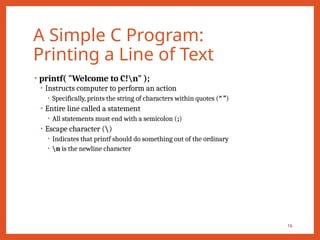
• printf( "Welcome to C!n" );
• Instructs computer to perform an action
• Specifically, prints the string of characters within quotes (“ ”)
• Entire line called a statement
• All statements must end with a semicolon (;)
• Escape character ()
• Indicates that printf should do something out of the ordinary
• n is the newline character
16
17.
A Simple CProgram:
Printing a Line of Text
• Right brace }
• Indicates end of main has been reached
• Linker
• When a function is called, linker locates it in the library
• Inserts it into program
• If function name is misspelled, the linker will produce an error because it
will not be able to find function in the library
17
Variables
• A variableis defined as a meaningful name given to a data storage
location in computer memory.
• When using a variable, we actually refer to address of the memory
where data is stored.
• Naming a Variable
• Must be a valid identifier.
• Must not be a keyword
• Names are case sensitive.
• Variables are identified by only first 32 characters.
• Library commonly uses names beginning with _.
• Naming Styles: Uppercase style and Underscore style
• lowerLimit lower_limit
• incomeTax income_tax
19
Declarations
• Declaring aVariable
• Each variable used must be declared.
• A form of a declaration statement is
data-type var1, var2,…;
• Declaration announces the data type of a variable and allocates
appropriate memory location. No initial value (like 0 for integers) should
be assumed.
• It is possible to assign an initial value to a variable in the declaration itself.
data-type var = expression;
• Declaration and Initialization Examples
int sum = 10;
char letter = ‘a’;
float marks = 78.5;
21
22.
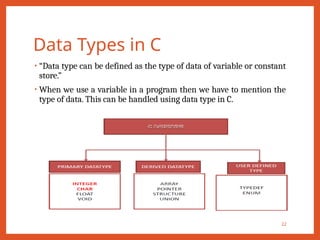
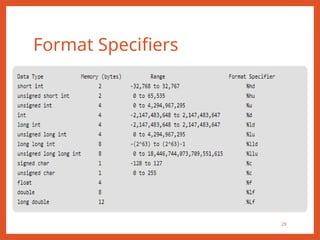
Data Types inC
• “Data type can be defined as the type of data of variable or constant
store.”
• When we use a variable in a program then we have to mention the
type of data. This can be handled using data type in C.
22
23.
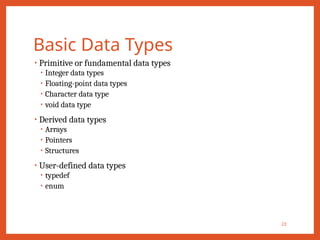
Basic Data Types
23
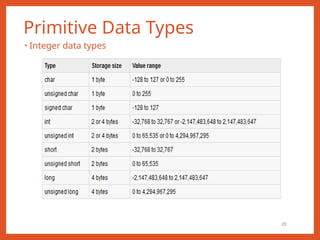
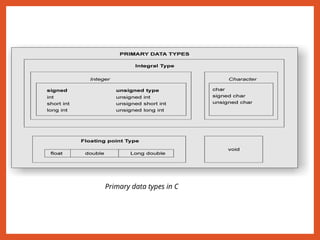
•Primitive or fundamental data types
• Integer data types
• Floating-point data types
• Character data type
• void data type
• Derived data types
• Arrays
• Pointers
• Structures
• User-defined data types
• typedef
• enum
24.
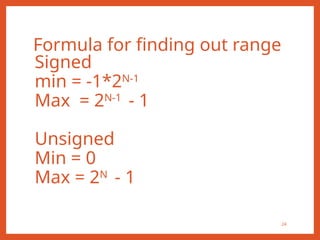
Formula for findingout range
24
Signed
min = -1*2N-1
Max = 2N-1
- 1
Unsigned
Min = 0
Max = 2N
- 1
25.
Primitive Data Types
25
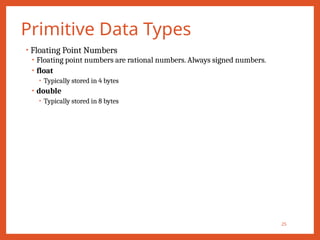
•Floating Point Numbers
• Floating point numbers are rational numbers. Always signed numbers.
• float
• Typically stored in 4 bytes
• double
• Typically stored in 8 bytes
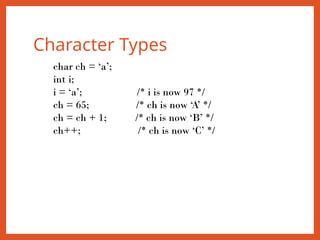
Character Types
char ch= ‘a’;
int i;
i = ‘a’; /* i is now 97 */
ch = 65; /* ch is now ‘A’ */
ch = ch + 1; /* ch is now ‘B’ */
ch++; /* ch is now ‘C’ */
28.
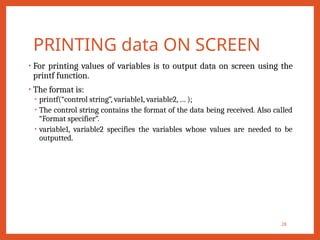
PRINTING data ONSCREEN
• For printing values of variables is to output data on screen using the
printf function.
• The format is:
• printf(“control string”, variable1, variable2, … );
• The control string contains the format of the data being received. Also called
“Format specifier”.
• variable1, variable2 specifies the variables whose values are needed to be
outputted.
28
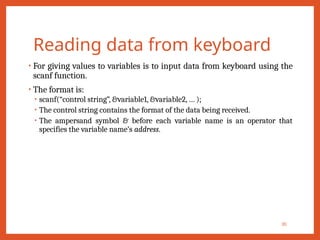
Reading data fromkeyboard
• For giving values to variables is to input data from keyboard using the
scanf function.
• The format is:
• scanf(“control string”, &variable1, &variable2, … );
• The control string contains the format of the data being received.
• The ampersand symbol & before each variable name is an operator that
specifies the variable name’s address.
30
31.
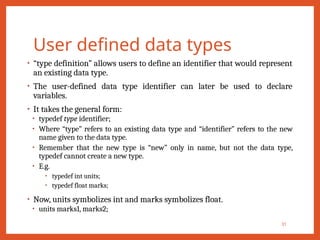
User defined datatypes
• “type definition” allows users to define an identifier that would represent
an existing data type.
• The user-defined data type identifier can later be used to declare
variables.
• It takes the general form:
• typedef type identifier;
• Where “type” refers to an existing data type and “identifier” refers to the new
name given to the data type.
• Remember that the new type is “new” only in name, but not the data type,
typedef cannot create a new type.
• E.g.
• typedef int units;
• typedef float marks;
• Now, units symbolizes int and marks symbolizes float.
• units marks1, marks2;
31
32.
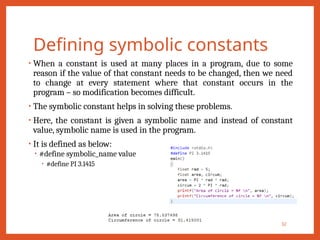
Defining symbolic constants
•When a constant is used at many places in a program, due to some
reason if the value of that constant needs to be changed, then we need
to change at every statement where that constant occurs in the
program – so modification becomes difficult.
• The symbolic constant helps in solving these problems.
• Here, the constant is given a symbolic name and instead of constant
value, symbolic name is used in the program.
• It is defined as below:
• #define symbolic_name value
• #define PI 3.1415
32
33.
User defined datatypes
• Enumerated data type
• We can define more than one integer symbolic constants.
• Syntax:
• enum identifier (value1, value2, … , value n);
• Example:
• enum day {sun, mon, tue, wed, thu, fri, sat};
• Here, enum is a keyword, day is a data type defined and the possible values
are as specified in brackets. So any variable declared of day type can have
values which we have specified within brackets.
• We can declare variable of enum type as
• enum day today;
• We can assign value to variable as
• today = sun;
• The compiler automatically assigns integer digits beginning with 0 to all
enumerated constants. For the above example, sun = 0, mon = 1, … and sat = 6.
33
34.
Type Conversions
34
• Typecasting or type conversions is a way to convert a variable from one data type
to another data type.
• Whenever an expression involves two different types of operands, ‘C’ language
applies the type conversion rules to evaluate an expression.
• At a time only one operator under consideration is taken.
• If the operands are of different type, then the operand with a lower type is
upgraded to the higher type and then the operation is performed.
• Types:
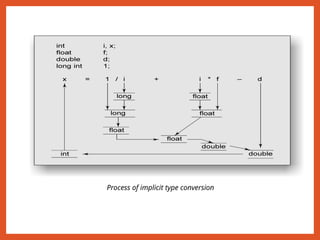
• Automatic type conversion (Implicit casting)
• Explicit type conversion : Also called type casting.
35.
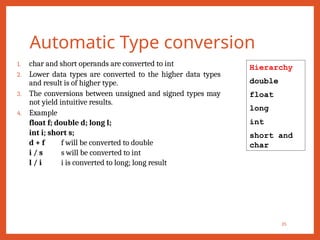
Automatic Type conversion
35
1.char and short operands are converted to int
2. Lower data types are converted to the higher data types
and result is of higher type.
3. The conversions between unsigned and signed types may
not yield intuitive results.
4. Example
float f; double d; long l;
int i; short s;
d + f f will be converted to double
i / s s will be converted to int
l / i i is converted to long; long result
Hierarchy
double
float
long
int
short and
char
Automatic Type conversion
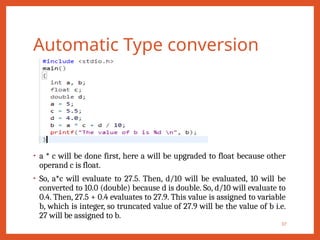
•a * c will be done first, here a will be upgraded to float because other
operand c is float.
• So, a*c will evaluate to 27.5. Then, d/10 will be evaluated, 10 will be
converted to 10.0 (double) because d is double. So, d/10 will evaluate to
0.4. Then, 27.5 + 0.4 evaluates to 27.9. This value is assigned to variable
b, which is integer, so truncated value of 27.9 will be the value of b i.e.
27 will be assigned to b.
37
Integer promotion
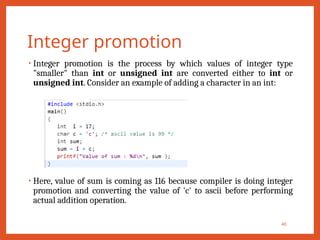
• Integerpromotion is the process by which values of integer type
"smaller" than int or unsigned int are converted either to int or
unsigned int. Consider an example of adding a character in an int:
• Here, value of sum is coming as 116 because compiler is doing integer
promotion and converting the value of 'c' to ascii before performing
actual addition operation.
40
41.
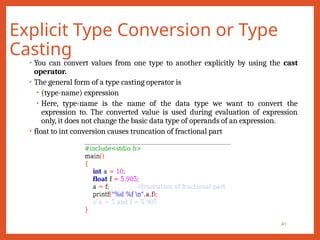
Explicit Type Conversionor Type
Casting
41
• You can convert values from one type to another explicitly by using the cast
operator.
• The general form of a type casting operator is
• (type-name) expression
• Here, type-name is the name of the data type we want to convert the
expression to. The converted value is used during evaluation of expression
only, it does not change the basic data type of operands of an expression.
• float to int conversion causes truncation of fractional part
42.
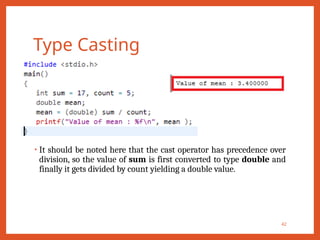
Type Casting
• Itshould be noted here that the cast operator has precedence over
division, so the value of sum is first converted to type double and
finally it gets divided by count yielding a double value.
42
43.
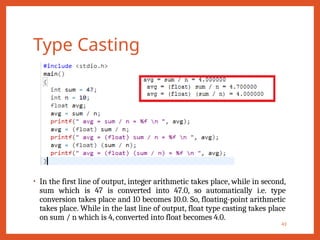
Type Casting
• Inthe first line of output, integer arithmetic takes place, while in second,
sum which is 47 is converted into 47.0, so automatically i.e. type
conversion takes place and 10 becomes 10.0. So, floating-point arithmetic
takes place. While in the last line of output, float type casting takes place
on sum / n which is 4, converted into float becomes 4.0.
43

![Character Set
• Every language has its own character set.
• ‘C’ language has its own character set.
• ‘C’ program basically consists of keywords, identifiers, constants,
operators and some special symbols.
• The characters that can be used in a ‘C’ program are Alphabets (A –
Z and a – z), Digits (0 – 9), Special characters (~ ! @ # $ % ^ & * ( )
[ ] { } ; : ‘ “ , . < > / ? |) and White space characters (Space, Tab,
New Line, Form feed etc).
4](https://image.slidesharecdn.com/2-250221072514-04dd9ed4/85/2-Introduction-to-C-Language-1-pptx-4-320.jpg)