Understanding
 SharePoint Content Types


                 Benjamin Niaulin
Online Webinar        SharePoint Geek
Description
  A Simple way of explaining what a SharePoint Content
  Type is by imagining us grouping Columns used in your list
  or library together, which we plan to reuse often. For
  example, if I know I will often need the columns
  “Title, Assigned To, Status, Due Date” together when
  working with “Tasks”, then I will group together into a “Task”
  Content Type. If you want to read more before you attend
  the session, check out this article that covers the difference
  between Columns, Site Columns and Content Types.


@bniaulin                                               Share-gate.com
Who is this guy talking?
 Benjamin Niaulin
   Speaker, Trainer, Consultant, SCRUM Master
   Blog
  bniaulin.wordpress.com
   Website
  share-gate.com
   Email
  benjamin.niaulin@share-gate.com
   TWITTER!: @bniaulin


 @bniaulin                                      Share-gate.com
Today
   Recap of columns and site columns
   What is a Content Type?
   Create a Content Type
   Using Content Types
   Understand existing Content Types


@bniaulin                              Share-gate.com
LET’S RECAP
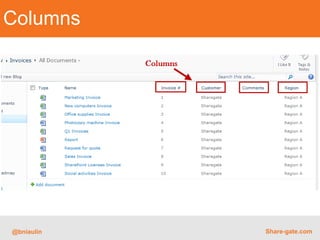
Columns


@bniaulin   Share-gate.com
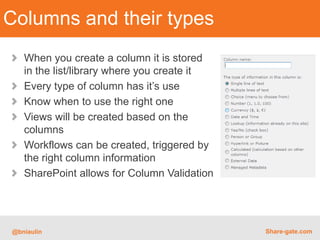
Columns and their types
   When you create a column it is stored
   in the list/library where you create it
   Every type of column has it’s use
   Know when to use the right one
   Views will be created based on the
   columns
   Workflows can be created, triggered by
   the right column information
   SharePoint allows for Column Validation


@bniaulin                                    Share-gate.com
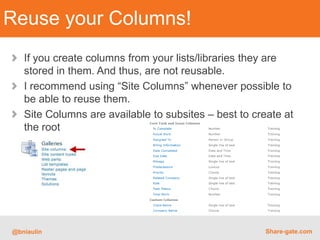
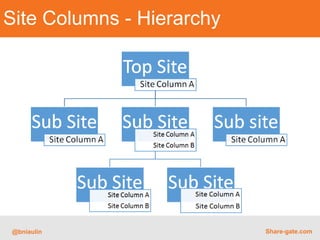
Reuse your Columns!
   If you create columns from your lists/libraries they are
   stored in them. And thus, are not reusable.
   I recommend using “Site Columns” whenever possible to
   be able to reuse them.
   Site Columns are available to subsites – best to create at
   the root


@bniaulin                                              Share-gate.com
Site Columns - Hierarchy


@bniaulin                  Share-gate.com
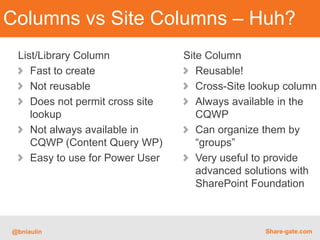
Columns vs Site Columns – Huh?
 List/Library Column             Site Column
    Fast to create                  Reusable!
    Not reusable                    Cross-Site lookup column
    Does not permit cross site      Always available in the
    lookup                          CQWP
    Not always available in         Can organize them by
    CQWP (Content Query WP)         “groups”
    Easy to use for Power User      Very useful to provide
                                    advanced solutions with
                                    SharePoint Foundation


@bniaulin                                        Share-gate.com
WHAT IS A
     CONTENT TYPE
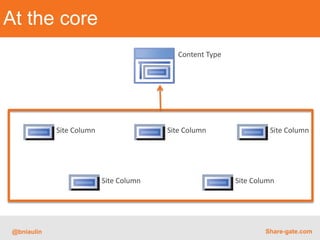
At the core
                                            Content Type


             Site Column                 Site Column                Site Column


                           Site Column                     Site Column


 @bniaulin                                                         Share-gate.com
What’s a Content Type?
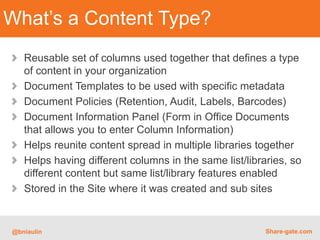
   Reusable set of columns used together that defines a type
   of content in your organization
   Document Templates to be used with specific metadata
   Document Policies (Retention, Audit, Labels, Barcodes)
   Document Information Panel (Form in Office Documents
   that allows you to enter Column Information)
   Helps reunite content spread in multiple libraries together
   Helps having different columns in the same list/libraries, so
   different content but same list/library features enabled
   Stored in the Site where it was created and sub sites


@bniaulin                                               Share-gate.com
DEMO
CREATE
     A CONTENT TYPE
How to create a Content Type
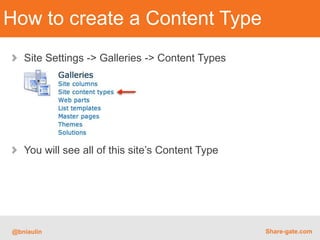
   Site Settings -> Galleries -> Content Types


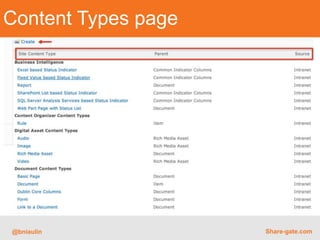
   You will see all of this site’s Content Type


@bniaulin                                         Share-gate.com
Content Types page


@bniaulin            Share-gate.com
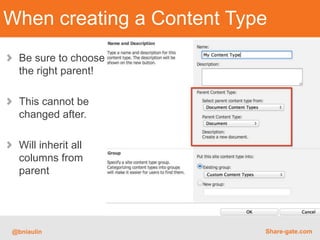
When creating a Content Type
  Be sure to choose
  the right parent!

  This cannot be
  changed after.

  Will inherit all
  columns from
  parent


@bniaulin                  Share-gate.com
DEMO
USING IT NOW!
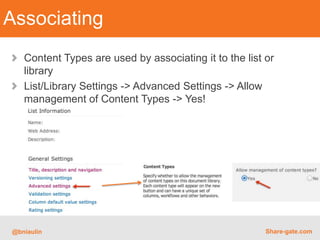
Associating
   Content Types are used by associating it to the list or
   library
   List/Library Settings -> Advanced Settings -> Allow
   management of Content Types -> Yes!


@bniaulin                                               Share-gate.com
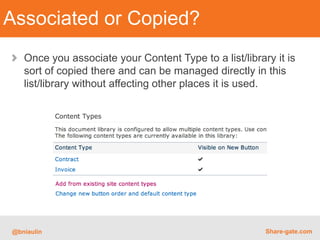
Associated or Copied?
   Once you associate your Content Type to a list/library it is
   sort of copied there and can be managed directly in this
   list/library without affecting other places it is used.


@bniaulin                                               Share-gate.com
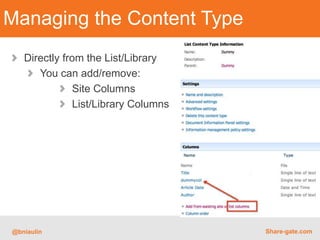
Managing the Content Type
   Directly from the List/Library
      You can add/remove:
              Site Columns
              List/Library Columns


@bniaulin                            Share-gate.com
DEMO
UNDERSTAND
EXISTING CONTENT
TYPES
It’s a secret…
    EVERYTHING is using a Content Type
      Publishing Pages
      Documents
      Tasks

    Let’s browse existing ones live…


 @bniaulin                               Share-gate.com
THANK YOU!
KEEP IN TOUCH ON TWITTER @BNIAULIN


            Benjamin Niaulin


@bniaulin                            Share-gate.com

Understanding SharePoint Content Types

  • 1.
    Understanding SharePoint ContentTypes Benjamin Niaulin Online Webinar SharePoint Geek
  • 2.
    Description ASimple way of explaining what a SharePoint Content Type is by imagining us grouping Columns used in your list or library together, which we plan to reuse often. For example, if I know I will often need the columns “Title, Assigned To, Status, Due Date” together when working with “Tasks”, then I will group together into a “Task” Content Type. If you want to read more before you attend the session, check out this article that covers the difference between Columns, Site Columns and Content Types. @bniaulin Share-gate.com
  • 3.
    Who is thisguy talking? Benjamin Niaulin Speaker, Trainer, Consultant, SCRUM Master Blog bniaulin.wordpress.com Website share-gate.com Email benjamin.niaulin@share-gate.com TWITTER!: @bniaulin @bniaulin Share-gate.com
  • 4.
    Today Recap of columns and site columns What is a Content Type? Create a Content Type Using Content Types Understand existing Content Types @bniaulin Share-gate.com
  • 5.
  • 6.
    Columns @bniaulin Share-gate.com
  • 7.
    Columns and theirtypes When you create a column it is stored in the list/library where you create it Every type of column has it’s use Know when to use the right one Views will be created based on the columns Workflows can be created, triggered by the right column information SharePoint allows for Column Validation @bniaulin Share-gate.com
  • 8.
    Reuse your Columns! If you create columns from your lists/libraries they are stored in them. And thus, are not reusable. I recommend using “Site Columns” whenever possible to be able to reuse them. Site Columns are available to subsites – best to create at the root @bniaulin Share-gate.com
  • 9.
    Site Columns -Hierarchy @bniaulin Share-gate.com
  • 10.
    Columns vs SiteColumns – Huh? List/Library Column Site Column Fast to create Reusable! Not reusable Cross-Site lookup column Does not permit cross site Always available in the lookup CQWP Not always available in Can organize them by CQWP (Content Query WP) “groups” Easy to use for Power User Very useful to provide advanced solutions with SharePoint Foundation @bniaulin Share-gate.com
  • 11.
    WHAT IS A CONTENT TYPE
  • 12.
    At the core Content Type Site Column Site Column Site Column Site Column Site Column @bniaulin Share-gate.com
  • 13.
    What’s a ContentType? Reusable set of columns used together that defines a type of content in your organization Document Templates to be used with specific metadata Document Policies (Retention, Audit, Labels, Barcodes) Document Information Panel (Form in Office Documents that allows you to enter Column Information) Helps reunite content spread in multiple libraries together Helps having different columns in the same list/libraries, so different content but same list/library features enabled Stored in the Site where it was created and sub sites @bniaulin Share-gate.com
  • 14.
  • 15.
    CREATE A CONTENT TYPE
  • 16.
    How to createa Content Type Site Settings -> Galleries -> Content Types You will see all of this site’s Content Type @bniaulin Share-gate.com
  • 17.
  • 18.
    When creating aContent Type Be sure to choose the right parent! This cannot be changed after. Will inherit all columns from parent @bniaulin Share-gate.com
  • 19.
  • 20.
  • 21.
    Associating Content Types are used by associating it to the list or library List/Library Settings -> Advanced Settings -> Allow management of Content Types -> Yes! @bniaulin Share-gate.com
  • 22.
    Associated or Copied? Once you associate your Content Type to a list/library it is sort of copied there and can be managed directly in this list/library without affecting other places it is used. @bniaulin Share-gate.com
  • 23.
    Managing the ContentType Directly from the List/Library You can add/remove: Site Columns List/Library Columns @bniaulin Share-gate.com
  • 24.
  • 25.
  • 26.
    It’s a secret… EVERYTHING is using a Content Type Publishing Pages Documents Tasks Let’s browse existing ones live… @bniaulin Share-gate.com
  • 27.
    THANK YOU! KEEP INTOUCH ON TWITTER @BNIAULIN Benjamin Niaulin @bniaulin Share-gate.com