06 Feb 2013
What & Why
 On 04FEB13, the PTS-FR began to auto-populate PRD
  applications.
 As a result, the look of the results page (under
  Reports, Command PTS Summary) has changed.
The New Look


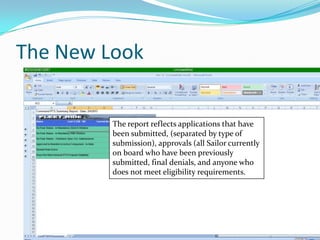
         The report reflects applications that have
         been submitted, (separated by type of
         submission), approvals (all Sailor currently
         on board who have been previously
         submitted, final denials, and anyone who
         does not meet eligibility requirements.
No Final Status (SEAOS)
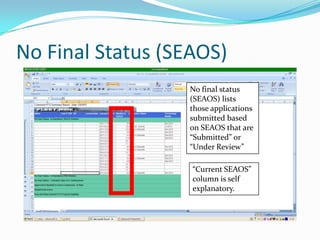
                  No final status
                  (SEAOS) lists
                  those applications
                  submitted based
                  on SEAOS that are
                  “Submitted” or
                  “Under Review”

                   “Current SEAOS”
                   column is self
                   explanatory.
Months to SEAOS
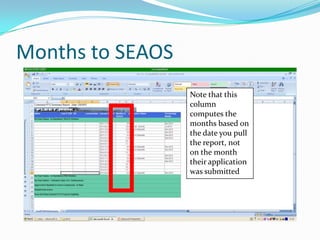
                  Note that this
                  column
                  computes the
                  months based on
                  the date you pull
                  the report, not
                  on the month
                  their application
                  was submitted
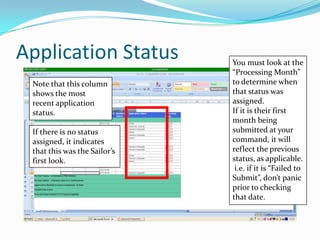
Application Status            You must look at the
                              “Processing Month”
 Note that this column        to determine when
 shows the most               that status was
 recent application           assigned.
 status.                      If it is their first
                              month being
 If there is no status        submitted at your
 assigned, it indicates       command, it will
 that this was the Sailor’s   reflect the previous
 first look.                  status, as applicable.
                               i.e. if it is “Failed to
                              Submit”, don’t panic
                              prior to checking
                              that date.
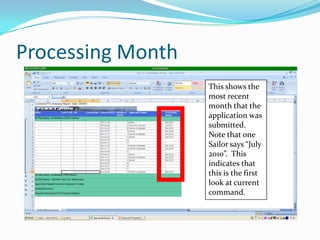
Processing Month
                   This shows the
                   most recent
                   month that the
                   application was
                   submitted.
                   Note that one
                   Sailor says “July
                   2010”. This
                   indicates that
                   this is the first
                   look at current
                   command.
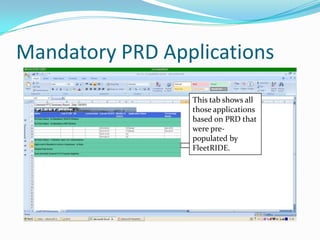
Mandatory PRD Applications
                 This tab shows all
                 those applications
                 based on PRD that
                 were pre-
                 populated by
                 FleetRIDE.
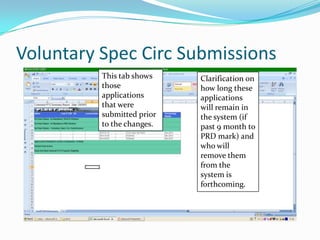
Voluntary Spec Circ Submissions
          This tab shows    Clarification on
          those             how long these
          applications      applications
          that were         will remain in
          submitted prior   the system (if
          to the changes.   past 9 month to
                            PRD mark) and
                            who will
                            remove them
                            from the
                            system is
                            forthcoming.
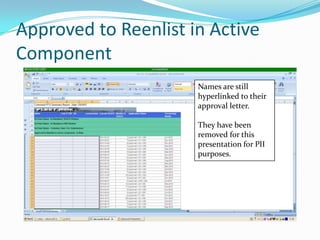
Approved to Reenlist in Active
Component
                      Names are still
                      hyperlinked to their
                      approval letter.

                      They have been
                      removed for this
                      presentation for PII
                      purposes.
Other Approvals
 Separate tabs are created for the following:
    Conversions in AC
    Conversions to FTS
    Approvals for SELRES (in rate and conversions)
    Tentative approvals pending documentation
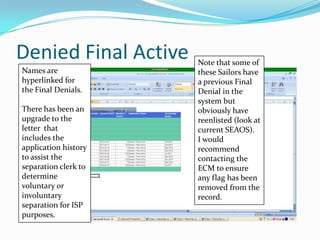
Denied Final Active   Note that some of
Names are             these Sailors have
hyperlinked for       a previous Final
the Final Denials.    Denial in the
                      system but
There has been an     obviously have
upgrade to the        reenlisted (look at
letter that           current SEAOS).
includes the          I would
application history   recommend
to assist the         contacting the
separation clerk to   ECM to ensure
determine             any flag has been
voluntary or          removed from the
involuntary           record.
separation for ISP
purposes.
Does Not Meet Eligibility
 This tab includes months to SEAOS as well as the
 Sailor’s current SEAOS.
Other Clarifications Requested
 The following questions have been forwarded up to
 TYCOM level:
   What will the status be for a PRD submission if the
    Sailor is not approved in the three month period
    allotted?
   Who will be responsible for changing that status, i.e.
    ECM, FleetRIDE help desk, CCC?
Other Info
 If a Sailor does not pre-populate in the PTS browser for
  any reason, contact the FleetRIDE help desk.
 If a Sailor would like to do a special program requiring
  OBLISERV past current SEAOS, the detailer will
  decide if they are going to give the orders to the Sailor
  or if they will waive the OBLISERV requirements.

Understanding pts results

  • 1.
  • 2.
    What & Why On 04FEB13, the PTS-FR began to auto-populate PRD applications.  As a result, the look of the results page (under Reports, Command PTS Summary) has changed.
  • 3.
    The New Look The report reflects applications that have been submitted, (separated by type of submission), approvals (all Sailor currently on board who have been previously submitted, final denials, and anyone who does not meet eligibility requirements.
  • 4.
    No Final Status(SEAOS) No final status (SEAOS) lists those applications submitted based on SEAOS that are “Submitted” or “Under Review” “Current SEAOS” column is self explanatory.
  • 5.
    Months to SEAOS Note that this column computes the months based on the date you pull the report, not on the month their application was submitted
  • 6.
    Application Status You must look at the “Processing Month” Note that this column to determine when shows the most that status was recent application assigned. status. If it is their first month being If there is no status submitted at your assigned, it indicates command, it will that this was the Sailor’s reflect the previous first look. status, as applicable. i.e. if it is “Failed to Submit”, don’t panic prior to checking that date.
  • 7.
    Processing Month This shows the most recent month that the application was submitted. Note that one Sailor says “July 2010”. This indicates that this is the first look at current command.
  • 8.
    Mandatory PRD Applications This tab shows all those applications based on PRD that were pre- populated by FleetRIDE.
  • 9.
    Voluntary Spec CircSubmissions This tab shows Clarification on those how long these applications applications that were will remain in submitted prior the system (if to the changes. past 9 month to PRD mark) and who will remove them from the system is forthcoming.
  • 10.
    Approved to Reenlistin Active Component Names are still hyperlinked to their approval letter. They have been removed for this presentation for PII purposes.
  • 11.
    Other Approvals  Separatetabs are created for the following:  Conversions in AC  Conversions to FTS  Approvals for SELRES (in rate and conversions)  Tentative approvals pending documentation
  • 12.
    Denied Final Active Note that some of Names are these Sailors have hyperlinked for a previous Final the Final Denials. Denial in the system but There has been an obviously have upgrade to the reenlisted (look at letter that current SEAOS). includes the I would application history recommend to assist the contacting the separation clerk to ECM to ensure determine any flag has been voluntary or removed from the involuntary record. separation for ISP purposes.
  • 13.
    Does Not MeetEligibility  This tab includes months to SEAOS as well as the Sailor’s current SEAOS.
  • 14.
    Other Clarifications Requested The following questions have been forwarded up to TYCOM level:  What will the status be for a PRD submission if the Sailor is not approved in the three month period allotted?  Who will be responsible for changing that status, i.e. ECM, FleetRIDE help desk, CCC?
  • 15.
    Other Info  Ifa Sailor does not pre-populate in the PTS browser for any reason, contact the FleetRIDE help desk.  If a Sailor would like to do a special program requiring OBLISERV past current SEAOS, the detailer will decide if they are going to give the orders to the Sailor or if they will waive the OBLISERV requirements.