Maxim Naidenov , SAP
July 20, 2017
UI5 Supportability
Tools Explained
UI5 Supportability Reloaded
2
 UI5 Support Tools Explained
 Get to know the UI5 Support Assistant
Agenda
UI5 Support Tools
4
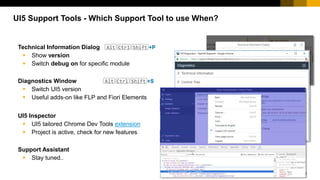
Technical Information Dialog Alt Ctrl Shift +P
 Show version
 Switch debug on for specific module
Diagnostics Window Alt Ctrl Shift +S
 Switch UI5 version
 Useful adds-on like FLP and Fiori Elements
UI5 Inspector
 UI5 tailored Chrome Dev Tools extension
 Project is active, check for new features
Support Assistant
 Stay tuned..
UI5 Support Tools - Which Support Tool to use When?
5
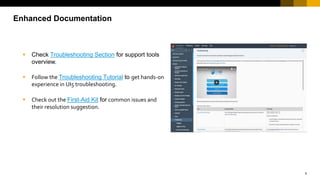
 Check Troubleshooting Section for support tools
overview.
 Follow the Troubleshooting Tutorial to get hands-on
experience in UI5 troubleshooting.
 Check out the First-Aid Kit for common issues and
their resolution suggestion.
Enhanced Documentation
UI5 Support Assistant
7
 Ensure guidelines and best practices are
followed
 Check / report any UI5 application for
consistency
 Assist support and troubleshooting
 … in automated manner
The Need?
8
 Analyze the web application for well known
problems.
 Sourcing from our expert knowledge materialized in
the Support Rules
 That reveals the Issues and provides Resolution
suggestions
 With easy UI and enabled for Automation
The Solution – UI5 Support Assistant
9
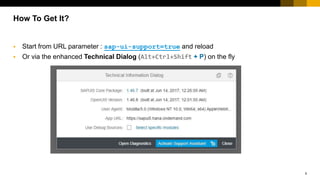
 Start from URL parameter : sap-ui-support=true and reload
 Or via the enhanced Technical Dialog (Alt+Ctrl+Shift + P) on the fly
How To Get It?
10
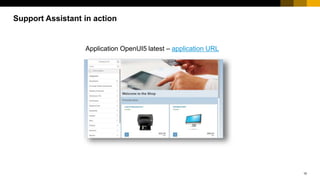
Application OpenUI5 latest – application URL
Support Assistant in action
SUPPORT RULES
12
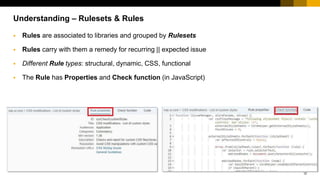
 Rules are associated to libraries and grouped by Rulesets
 Rules carry with them a remedy for recurring || expected issue
 Different Rule types: structural, dynamic, CSS, functional
 The Rule has Properties and Check function (in JavaScript)
Understanding – Rulesets & Rules
13
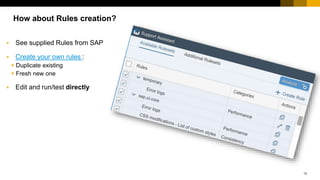
 See supplied Rules from SAP
 Create your own rules :
 Duplicate existing
 Fresh new one
 Edit and run/test directly
How about Rules creation?
14
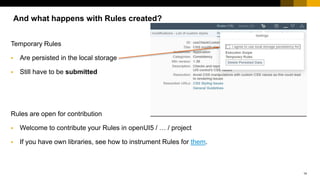
Temporary Rules
 Are persisted in the local storage
 Still have to be submitted
Rules are open for contribution
 Welcome to contribute your Rules in openUI5 / … / project
 If you have own libraries, see how to instrument Rules for them.
And what happens with Rules created?
15
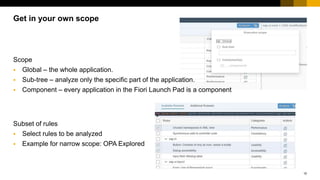
Scope
 Global – the whole application.
 Sub-tree – analyze only the specific part of the application.
 Component – every application in the Fiori Launch Pad is a component
Subset of rules
 Select rules to be analyzed
 Example for narrow scope: OPA Explored
Get in your own scope
16
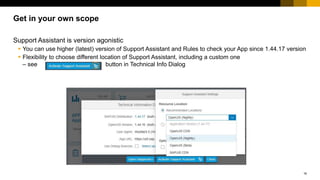
Get in your own scope
Support Assistant is version agonistic
 You can use higher (latest) version of Support Assistant and Rules to check your App since 1.44.17 version
 Flexibility to choose different location of Support Assistant, including a custom one
– see button in Technical Info Dialog
ISSUES
18
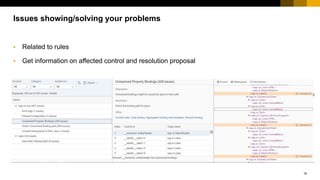
 Related to rules
 Get information on affected control and resolution proposal
Issues showing/solving your problems
REPORT
20
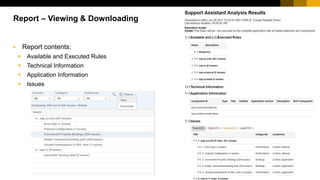
 Report contents:
 Available and Executed Rules
 Technical Information
 Application Information
 Issues
Report – Viewing & Downloading
AUTOMATION
22
Automation
Automation API
 Configure and execute SA checks via dedicated
JavaScript API
 Can be used in any JavaScript test environment, docu
link
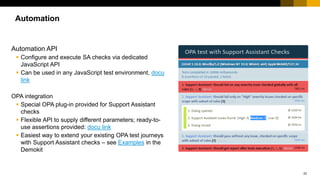
OPA integration
 Special OPA plug-in provided for Support Assistant
checks
 Flexible API to supply different parameters; ready-to-
use assertions provided: docu link
 Easiest way to extend your existing OPA test journeys
with Support Assistant checks – see Examples in the
Demokit
Thank you.
Contact information:
Maxim Naidenov
maxim.naidenov@sap.com
You are welcome to give feedback for this session
in the UI5con Event App

UI5 supportability tools explained

  • 1.
    Maxim Naidenov ,SAP July 20, 2017 UI5 Supportability Tools Explained UI5 Supportability Reloaded UI5 Supportability Reloaded
  • 2.
    2  UI5 SupportTools Explained  Get to know the UI5 Support Assistant Agenda
  • 3.
  • 4.
    4 Technical Information DialogAlt Ctrl Shift +P  Show version  Switch debug on for specific module Diagnostics Window Alt Ctrl Shift +S  Switch UI5 version  Useful adds-on like FLP and Fiori Elements UI5 Inspector  UI5 tailored Chrome Dev Tools extension  Project is active, check for new features Support Assistant  Stay tuned.. UI5 Support Tools - Which Support Tool to use When?
  • 5.
    5  Check TroubleshootingSection for support tools overview.  Follow the Troubleshooting Tutorial to get hands-on experience in UI5 troubleshooting.  Check out the First-Aid Kit for common issues and their resolution suggestion. Enhanced Documentation
  • 6.
  • 7.
    7  Ensure guidelinesand best practices are followed  Check / report any UI5 application for consistency  Assist support and troubleshooting  … in automated manner The Need?
  • 8.
    8  Analyze theweb application for well known problems.  Sourcing from our expert knowledge materialized in the Support Rules  That reveals the Issues and provides Resolution suggestions  With easy UI and enabled for Automation The Solution – UI5 Support Assistant
  • 9.
    9  Start fromURL parameter : sap-ui-support=true and reload  Or via the enhanced Technical Dialog (Alt+Ctrl+Shift + P) on the fly How To Get It?
  • 10.
    10 Application OpenUI5 latest– application URL Support Assistant in action
  • 11.
  • 12.
    12  Rules areassociated to libraries and grouped by Rulesets  Rules carry with them a remedy for recurring || expected issue  Different Rule types: structural, dynamic, CSS, functional  The Rule has Properties and Check function (in JavaScript) Understanding – Rulesets & Rules
  • 13.
    13  See suppliedRules from SAP  Create your own rules :  Duplicate existing  Fresh new one  Edit and run/test directly How about Rules creation?
  • 14.
    14 Temporary Rules  Arepersisted in the local storage  Still have to be submitted Rules are open for contribution  Welcome to contribute your Rules in openUI5 / … / project  If you have own libraries, see how to instrument Rules for them. And what happens with Rules created?
  • 15.
    15 Scope  Global –the whole application.  Sub-tree – analyze only the specific part of the application.  Component – every application in the Fiori Launch Pad is a component Subset of rules  Select rules to be analyzed  Example for narrow scope: OPA Explored Get in your own scope
  • 16.
    16 Get in yourown scope Support Assistant is version agonistic  You can use higher (latest) version of Support Assistant and Rules to check your App since 1.44.17 version  Flexibility to choose different location of Support Assistant, including a custom one – see button in Technical Info Dialog
  • 17.
  • 18.
    18  Related torules  Get information on affected control and resolution proposal Issues showing/solving your problems
  • 19.
  • 20.
    20  Report contents: Available and Executed Rules  Technical Information  Application Information  Issues Report – Viewing & Downloading
  • 21.
  • 22.
    22 Automation Automation API  Configureand execute SA checks via dedicated JavaScript API  Can be used in any JavaScript test environment, docu link OPA integration  Special OPA plug-in provided for Support Assistant checks  Flexible API to supply different parameters; ready-to- use assertions provided: docu link  Easiest way to extend your existing OPA test journeys with Support Assistant checks – see Examples in the Demokit
  • 23.
    Thank you. Contact information: MaximNaidenov maxim.naidenov@sap.com You are welcome to give feedback for this session in the UI5con Event App

Editor's Notes

  • #5 Both tools have a lot of features, I will show only the two most interesting in my opinion. Options+control+shift+P on Mac Technical dialog - https://openui5nightly.hana.ondemand.com/test-resources/sap/m/demokit/cart/webapp/index.html Diagnostics - https://sapui5.hana.ondemand.com/test-resources/sap/ui/demoapps/demokit/rta/fiori-elements/test/index.html#masterDetail-display
  • #6 New demokit, documentation UI is completely reworked A lot of new content Your feedback matters, please use the comments