UI/UX Tips & Guidelines
Visual guidelines, best practices and core values
Prepared by : MRD
ACCESSIBILITY
Build your product suitable
for all users, including
those with limited
possibilities.
Keep minimal contrast ratio
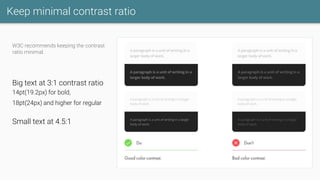
W3C recommends keeping the contrast
ratio minimal.
Big text at 3:1 contrast ratio
14pt(19.2px) for bold,
18pt(24px) and higher for regular
Small text at 4.5:1
Consistent alignment
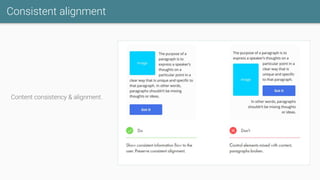
Content consistency & alignment.
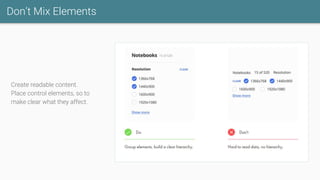
Don’t Mix Elements
Create readable content.
Place control elements, so to
make clear what they affect.
COLORS
Consistent color usage
boosts the brand
recognition and conveys
the right mood.
It helps to guide users
through the interface and
highlight important areas.
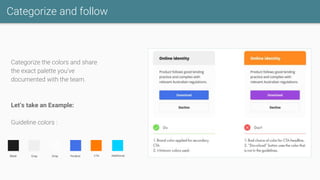
Categorize and follow
Categorize the colors and share
the exact palette you’ve
documented with the team.
Let’s take an Example:
Guideline colors :
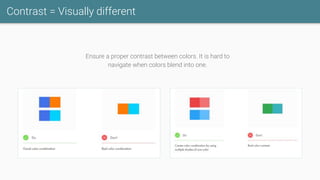
Contrast = Visually different
Ensure a proper contrast between colors. It is hard to
navigate when colors blend into one.
How to Choose Colors
To choose website Primary and Complementary colors:
https://material.io/design/color/the-color-system.html#tools-for-picking-colors
For Social media colors:
https://www.materialui.co/socialcolors
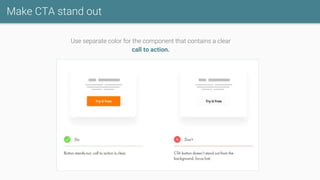
Make CTA stand out
Use separate color for the component that contains a clear
call to action.
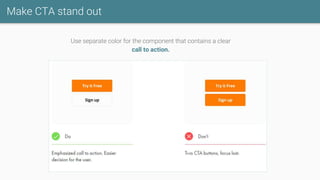
Make CTA stand out
Use separate color for the component that contains a clear
call to action.
COMPONENT
S
The components are our
LEGO blocks.
They bring composition,
inheritance and unlimited
overrides from
engineering to design.
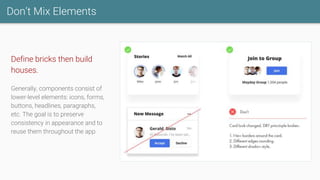
Don’t Mix Elements
Define bricks then build
houses.
Generally, components consist of
lower-level elements: icons, forms,
buttons, headlines, paragraphs,
etc. The goal is to preserve
consistency in appearance and to
reuse them throughout the app.
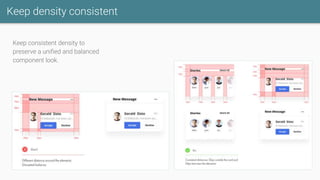
Keep density consistent
Keep consistent density to
preserve a unified and balanced
component look.
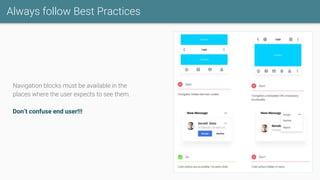
Always follow Best Practices
Navigation blocks must be available in the
places where the user expects to see them.
Don’t confuse end user!!!
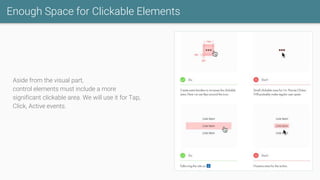
Enough Space for Clickable Elements
Aside from the visual part,
control elements must include a more
significant clickable area. We will use it for Tap,
Click, Active events.
ICONS Basic application icons
used in forms,components
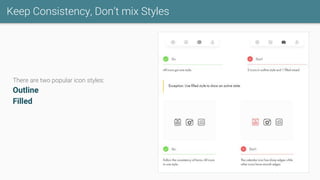
Keep Consistency, Don’t mix Styles
There are two popular icon styles:
Outline
Filled
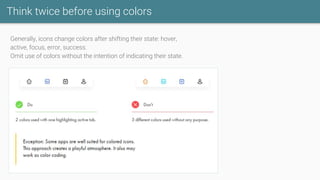
Think twice before using colors
Generally, icons change colors after shifting their state: hover,
active, focus, error, success.
Omit use of colors without the intention of indicating their state.
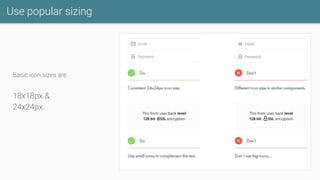
Use popular sizing
Basic icon sizes are
18x18px &
24x24px.
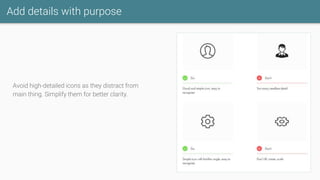
Add details with purpose
Avoid high-detailed icons as they distract from
main thing. Simplify them for better clarity.
TYPOGRAPHY
Main application part that
communicates with the
user.
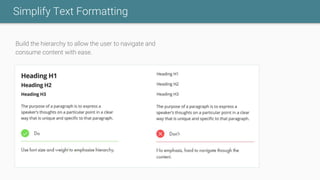
Simplify Text Formatting
Build the hierarchy to allow the user to navigate and
consume content with ease.
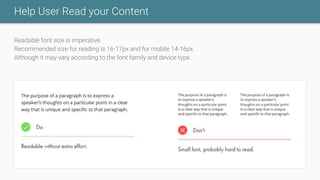
Help User Read your Content
Readable font size is imperative.
Recommended size for reading is 16-17px and for mobile 14-16px.
Although it may vary according to the font family and device type.
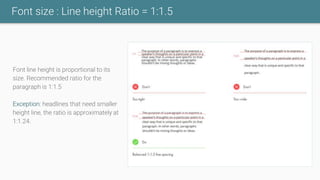
Font size : Line height Ratio = 1:1.5
Font line height is proportional to its
size. Recommended ratio for the
paragraph is 1:1.5
Exception: headlines that need smaller
height line, the ratio is approximately at
1:1.24.
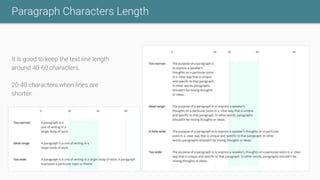
Paragraph Characters Length
It is good to keep the text line length
around 40-60 characters.
20-40 characters when lines are
shorter.
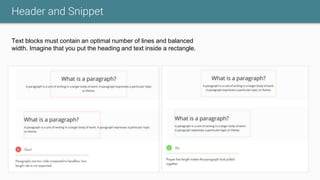
Header and Snippet
Text blocks must contain an optimal number of lines and balanced
width. Imagine that you put the heading and text inside a rectangle.
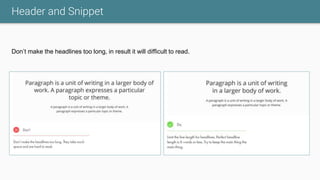
Header and Snippet
Don’t make the headlines too long, in result it will difficult to read.
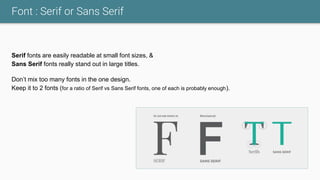
Font : Serif or Sans Serif
Serif fonts are easily readable at small font sizes, &
Sans Serif fonts really stand out in large titles.
Don’t mix too many fonts in the one design.
Keep it to 2 fonts (for a ratio of Serif vs Sans Serif fonts, one of each is probably enough).
LESS IS MORE
Starting a design with too
many colors, fonts, layout
are not a smart move.
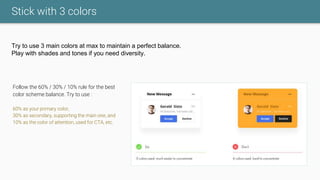
Stick with 3 colors
Try to use 3 main colors at max to maintain a perfect balance.
Play with shades and tones if you need diversity.
Follow the 60% / 30% / 10% rule for the best
color scheme balance. Try to use :
60% as your primary color,
30% as secondary, supporting the main one, and
10% as the color of attention, used for CTA, etc.
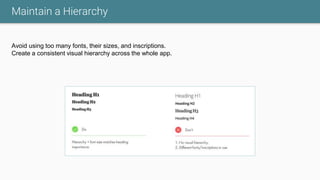
Maintain a Hierarchy
Avoid using too many fonts, their sizes, and inscriptions.
Create a consistent visual hierarchy across the whole app.
Thank you

UI UX Tips and Guidelines

  • 1.
    UI/UX Tips &Guidelines Visual guidelines, best practices and core values Prepared by : MRD
  • 2.
    ACCESSIBILITY Build your productsuitable for all users, including those with limited possibilities.
  • 3.
    Keep minimal contrastratio W3C recommends keeping the contrast ratio minimal. Big text at 3:1 contrast ratio 14pt(19.2px) for bold, 18pt(24px) and higher for regular Small text at 4.5:1
  • 4.
  • 5.
    Don’t Mix Elements Createreadable content. Place control elements, so to make clear what they affect.
  • 6.
    COLORS Consistent color usage booststhe brand recognition and conveys the right mood. It helps to guide users through the interface and highlight important areas.
  • 7.
    Categorize and follow Categorizethe colors and share the exact palette you’ve documented with the team. Let’s take an Example: Guideline colors :
  • 8.
    Contrast = Visuallydifferent Ensure a proper contrast between colors. It is hard to navigate when colors blend into one.
  • 9.
    How to ChooseColors To choose website Primary and Complementary colors: https://material.io/design/color/the-color-system.html#tools-for-picking-colors For Social media colors: https://www.materialui.co/socialcolors
  • 10.
    Make CTA standout Use separate color for the component that contains a clear call to action.
  • 11.
    Make CTA standout Use separate color for the component that contains a clear call to action.
  • 12.
    COMPONENT S The components areour LEGO blocks. They bring composition, inheritance and unlimited overrides from engineering to design.
  • 13.
    Don’t Mix Elements Definebricks then build houses. Generally, components consist of lower-level elements: icons, forms, buttons, headlines, paragraphs, etc. The goal is to preserve consistency in appearance and to reuse them throughout the app.
  • 14.
    Keep density consistent Keepconsistent density to preserve a unified and balanced component look.
  • 15.
    Always follow BestPractices Navigation blocks must be available in the places where the user expects to see them. Don’t confuse end user!!!
  • 16.
    Enough Space forClickable Elements Aside from the visual part, control elements must include a more significant clickable area. We will use it for Tap, Click, Active events.
  • 17.
    ICONS Basic applicationicons used in forms,components
  • 18.
    Keep Consistency, Don’tmix Styles There are two popular icon styles: Outline Filled
  • 19.
    Think twice beforeusing colors Generally, icons change colors after shifting their state: hover, active, focus, error, success. Omit use of colors without the intention of indicating their state.
  • 20.
    Use popular sizing Basicicon sizes are 18x18px & 24x24px.
  • 21.
    Add details withpurpose Avoid high-detailed icons as they distract from main thing. Simplify them for better clarity.
  • 22.
    TYPOGRAPHY Main application partthat communicates with the user.
  • 23.
    Simplify Text Formatting Buildthe hierarchy to allow the user to navigate and consume content with ease.
  • 24.
    Help User Readyour Content Readable font size is imperative. Recommended size for reading is 16-17px and for mobile 14-16px. Although it may vary according to the font family and device type.
  • 25.
    Font size :Line height Ratio = 1:1.5 Font line height is proportional to its size. Recommended ratio for the paragraph is 1:1.5 Exception: headlines that need smaller height line, the ratio is approximately at 1:1.24.
  • 26.
    Paragraph Characters Length Itis good to keep the text line length around 40-60 characters. 20-40 characters when lines are shorter.
  • 27.
    Header and Snippet Textblocks must contain an optimal number of lines and balanced width. Imagine that you put the heading and text inside a rectangle.
  • 28.
    Header and Snippet Don’tmake the headlines too long, in result it will difficult to read.
  • 29.
    Font : Serifor Sans Serif Serif fonts are easily readable at small font sizes, & Sans Serif fonts really stand out in large titles. Don’t mix too many fonts in the one design. Keep it to 2 fonts (for a ratio of Serif vs Sans Serif fonts, one of each is probably enough).
  • 30.
    LESS IS MORE Startinga design with too many colors, fonts, layout are not a smart move.
  • 31.
    Stick with 3colors Try to use 3 main colors at max to maintain a perfect balance. Play with shades and tones if you need diversity. Follow the 60% / 30% / 10% rule for the best color scheme balance. Try to use : 60% as your primary color, 30% as secondary, supporting the main one, and 10% as the color of attention, used for CTA, etc.
  • 32.
    Maintain a Hierarchy Avoidusing too many fonts, their sizes, and inscriptions. Create a consistent visual hierarchy across the whole app.
  • 33.