


MongoDB
Management
Pain Relief
Michael Lynn
Sr. Solutions Architect, MongoDB
@mlynn, @phillyMUG
michael.lynn@mongodb.com
OpsManager
OpsManager
Goals
● Ops Manager, Cloud Manager, Atlas
○ What are they?
○ How do they differ?
○ Why do I need them?
● Ansible
○ What is it and how can I use these tools to relieve some
pain in my life?
00:00:01
Show of
Hands
● Who’s Here?
○ DevOps/Ops?
○ Site Reliability?
○ Engineer?
○ DBA?
○ Developer?
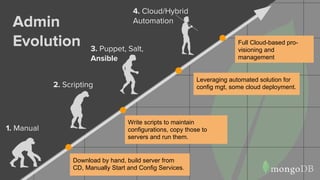
Admin
Evolution 3. Puppet, Salt,
Ansible
Leveraging automated solution for
config mgt, some cloud deployment.
1. Manual
Download by hand, build server from
CD, Manually Start and Config Services.
2. Scripting
Write scripts to maintain
configurations, copy those to
servers and run them.
4. Cloud/Hybrid
Automation
Full Cloud-based pro-
visioning and
management
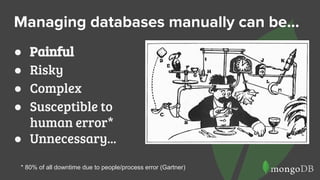
Managing databases manually can be...
● Painful
● Risky
● Complex
● Susceptible to
human error*
● Unnecessary...
* 80% of all downtime due to people/process error (Gartner)
What’s involved in managing MongoDB?
● Provision / Deploy
● Install/Upgrade Binaries
● Configure Database
● Administer Database
Deploying 42
42
Upgrading 35
70
Maintaining 23
100
Play Top 3 Things DBA’s Hate to Do Manually?
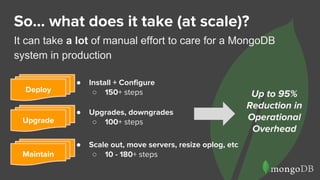
So… what does it take (at scale)?
It can take a lot of manual effort to care for a MongoDB
system in production
● Install + Configure
○ 150+ steps
● Scale out, move servers, resize oplog, etc
○ 10 - 180+ steps
● Upgrades, downgrades
○ 100+ stepsUpgrade
Deploy
Maintain
Up to 95%
Reduction in
Operational
Overhead
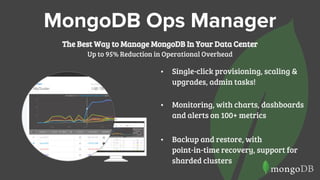
• Single-click provisioning, scaling &
upgrades, admin tasks!
• Monitoring, with charts, dashboards
and alerts on 100+ metrics
• Backup and restore, with
point-in-time recovery, support for
sharded clusters
MongoDB Ops Manager
The Best Way to Manage MongoDB In Your Data Center
Up to 95% Reduction in Operational Overhead
1
2
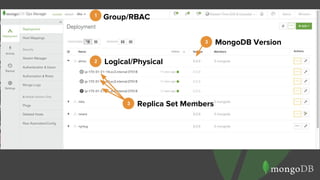
Group/RBAC
Logical/Physical
3 Replica Set Members
3 MongoDB Version
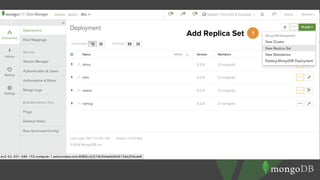
1Add Replica Set
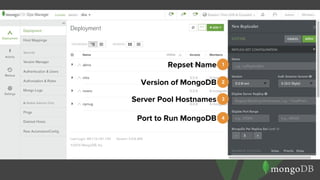
1Repset Name
2Version of MongoDB
3Server Pool Hostnames
4Port to Run MongoDB
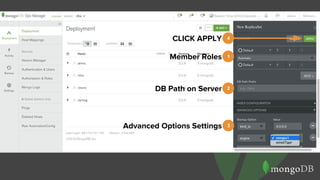
1Member Roles
2DB Path on Server
3Advanced Options Settings
4CLICK APPLY
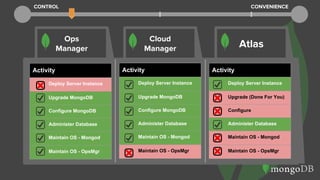
Activity
Deploy Server Instance
Upgrade (Done For You)
Configure
Administer Database
Maintain OS - Mongod
Maintain OS - OpsMgr
Activity
Deploy Server Instance
Upgrade MongoDB
Configure MongoDB
Administer Database
Maintain OS - Mongod
Maintain OS - OpsMgr
Activity
Deploy Server Instance
Upgrade MongoDB
Configure MongoDB
Administer Database
Maintain OS - Mongod
Maintain OS - OpsMgr
Ops
Manager
Cloud
Manager Atlas
CONTROL CONVENIENCE
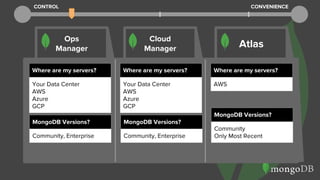
Ops
Manager
Cloud
Manager Atlas
Where are my servers?
AWS
Where are my servers?
Your Data Center
AWS
Azure
GCP
Where are my servers?
Your Data Center
AWS
Azure
GCP
MongoDB Versions?
Community
Only Most Recent
MongoDB Versions?
Community, Enterprise
MongoDB Versions?
Community, Enterprise
CONTROL CONVENIENCE
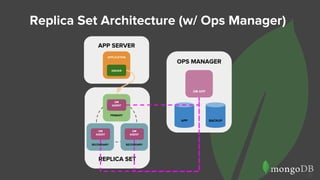
Replica Set Architecture (w/ Ops Manager)
15
APP SERVER
APPLICATION
DRIVER
OPS MANAGER
OM APP
APP BACKUP
REPLICA SET
PRIMARY
SECONDARY SECONDARY
OM
AGENT
OM
AGENT
OM
AGENT
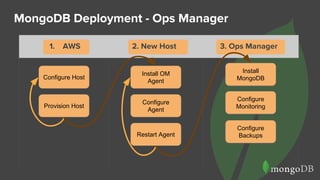
MongoDB Deployment - Ops Manager
Configure Host
Provision Host
Configure
Agent
1. AWS 2. New Host 3. Ops Manager
Install OM
Agent
Restart Agent
Install
MongoDB
Configure
Monitoring
Configure
Backups
Configure Host
Provision Host
Configure
Agent
Install OM
Agent
Restart Agent
Install
MongoDB
Configure
Monitoring
Configure
Backups
2. New Host 3. Ops Manager1. AWS
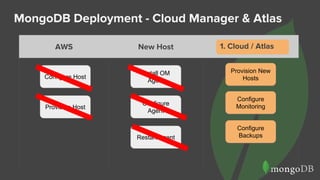
MongoDB Deployment - Cloud Manager & Atlas
Configure Host
Provision Host
Configure
Agent
Install OM
Agent
Restart Agent
Provision New
Hosts
Configure
Monitoring
Configure
Backups
AWS New Host Ops Manager
Provision New
Hosts
Configure
Monitoring
Configure
Backups
1. Cloud / Atlas
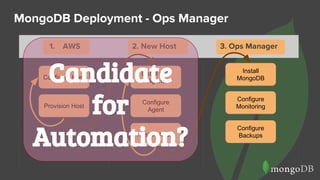
MongoDB Deployment - Ops Manager
Configure Host
Provision Host
Configure
Agent
1. AWS 2. New Host 3. Ops Manager
Install OW
Agent
Restart Agent
Install
MongoDB
Configure
Monitoring
Configure
Backups
Configure Host
Provision Host
Configure
Agent
Install OW
Agent
Restart Agent
Install
MongoDB
Configure
Monitoring
Configure
Backups
2. New Host 3. Ops Manager1. AWS
Candidate
for
Automation?
20
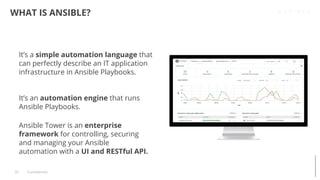
WHAT IS ANSIBLE?
Confidential
It’s a simple automation language that
can perfectly describe an IT application
infrastructure in Ansible Playbooks.
It’s an automation engine that runs
Ansible Playbooks.
Ansible Tower is an enterprise
framework for controlling, securing
and managing your Ansible
automation with a UI and RESTful API.
21
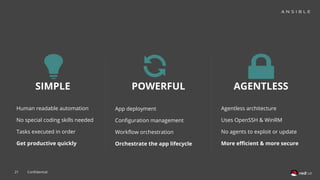
SIMPLE POWERFUL AGENTLESS
App deployment
Configuration management
Workflow orchestration
Orchestrate the app lifecycle
Human readable automation
No special coding skills needed
Tasks executed in order
Get productive quickly
Agentless architecture
Uses OpenSSH & WinRM
No agents to exploit or update
More efficient & more secure
Confidential
22
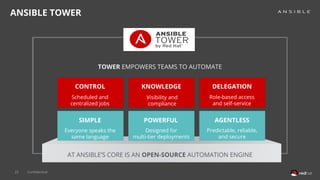
ANSIBLE TOWER
CONTROL
SIMPLE POWERFUL AGENTLESS
KNOWLEDGE DELEGATION
TOWER EMPOWERS TEAMS TO AUTOMATE
AT ANSIBLE’S CORE IS AN OPEN-SOURCE AUTOMATION ENGINE
Scheduled and
centralized jobs
Visibility and
compliance
Role-based access
and self-service
Everyone speaks the
same language
Designed for
multi-tier deployments
Predictable, reliable,
and secure
Confidential
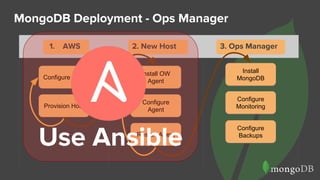
MongoDB Deployment - Ops Manager
Configure Host
Provision Host
Configure
Agent
1. AWS 2. New Host 3. Ops Manager
Install OW
Agent
Restart Agent
Install
MongoDB
Configure
Monitoring
Configure
Backups
Configure Host
Provision Host
Configure
Agent
Install OW
Agent
Restart Agent
Install
MongoDB
Configure
Monitoring
Configure
Backups
2. New Host 3. Ops Manager1. AWS
Use Ansible
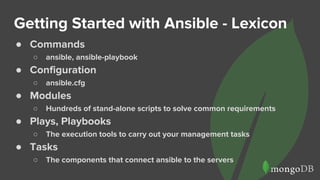
Getting Started with Ansible - Lexicon
● Commands
○ ansible, ansible-playbook
● Configuration
○ ansible.cfg
● Modules
○ Hundreds of stand-alone scripts to solve common requirements
● Plays, Playbooks
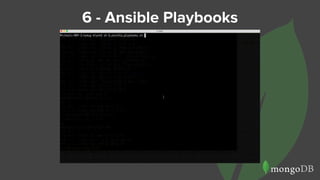
○ The execution tools to carry out your management tasks
● Tasks
○ The components that connect ansible to the servers
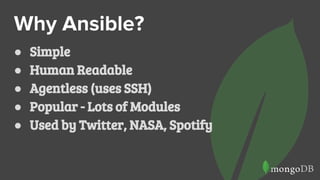
Why Ansible?
● Simple
● Human Readable
● Agentless (uses SSH)
● Popular - Lots of Modules
● Used by Twitter, NASA, Spotify
Getting Started with Ansible
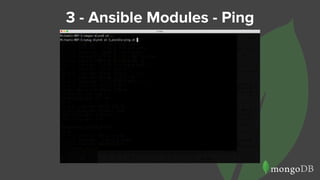
ansible -m ping -i ansible-hosts
opsManager
Here I’m telling ansible to use the ping module
against the opsManager group in my
ansible-hosts file.
Demo of Ansible
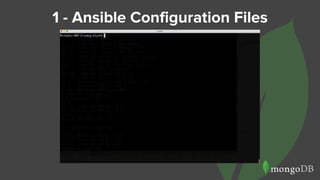
1 - Ansible Configuration Files
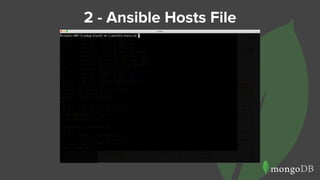
2 - Ansible Hosts File
3 - Ansible Modules - Ping
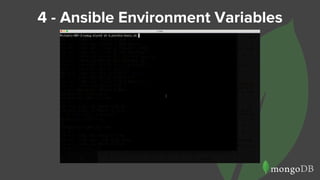
4 - Ansible Environment Variables
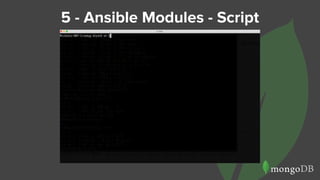
5 - Ansible Modules - Script
6 - Ansible Playbooks
7 - Deploying O/M in Playbooks
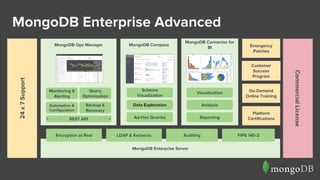
MongoDB Enterprise Server
MongoDB Enterprise Advanced24x7Support
CommercialLicense
Platform
Certifications
Emergency
Patches
On-Demand
Online Training
Customer
Success
Program
MongoDB CompassMongoDB Ops Manager
Monitoring &
Alerting
Query
Optimization
Backup &
Recovery
Automation &
Configuration
Schema
Visualization
Data Exploration
Ad-Hoc Queries
MongoDB Connector for
BI
Visualization
Analysis
Reporting
LDAP & Kerberos Auditing FIPS 140-2Encryption at Rest
REST API
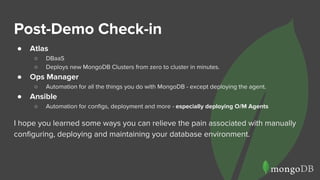
Post-Demo Check-in
● Atlas
○ DBaaS
○ Deploys new MongoDB Clusters from zero to cluster in minutes.
● Ops Manager
○ Automation for all the things you do with MongoDB - except deploying the agent.
● Ansible
○ Automation for configs, deployment and more - especially deploying O/M Agents
I hope you learned some ways you can relieve the pain associated with manually
configuring, deploying and maintaining your database environment.
Questions?
Get These Scripts and Slides:
http://github.com/mrlynn/ansible-demo
BONUS
SLIDES!
● Slides probably
not used in the
presentation.
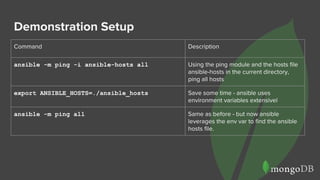
Demonstration Setup
Command Description
ansible -m ping -i ansible-hosts all Using the ping module and the hosts file
ansible-hosts in the current directory,
ping all hosts
export ANSIBLE_HOSTS=./ansible_hosts Save some time - ansible uses
environment variables extensivel
ansible -m ping all Same as before - but now ansible
leverages the env var to find the ansible
hosts file.
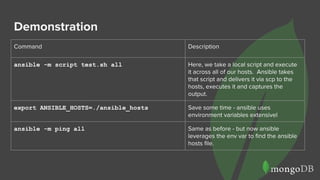
Demonstration
Command Description
ansible -m script test.sh all Here, we take a local script and execute
it across all of our hosts. Ansible takes
that script and delivers it via scp to the
hosts, executes it and captures the
output.
export ANSIBLE_HOSTS=./ansible_hosts Save some time - ansible uses
environment variables extensivel
ansible -m ping all Same as before - but now ansible
leverages the env var to find the ansible
hosts file.
Appendix A - /etc/ansible/hosts sample
[opsManager]
ec2-54-93-114-205.eu-central-1.compute.amazonaws.com ansible_user=ec2-user
[amlReplicaSet]
ec2-54-93-79-122.eu-central-1.compute.amazonaws.com ansible_user=ec2-user
ec2-54-93-176-246.eu-central-1.compute.amazonaws.com ansible_user=ec2-user
ec2-54-93-207-148.eu-central-1.compute.amazonaws.com ansible_user=ec2-user
[amlReplicaSet:vars]
opsmanagerurl=http://ec2-54-93-114-205.eu-central-1.compute.amazonaws.com:8080
opsmanager=ec2-54-93-114-205.eu-central-1.compute.amazonaws.com
Appendix B - ansible.cfg
[defaults]
host_key_checking = False
private_key_file = PATH/TO/AWS/KEY.FILE
[ssh_connection]
control_path = %(directory)s/%%C
Appendix A: Setup
Setup Step 1 - Configure Keys
Michaels-MBP-3:setup mlynn$ cat ansible.cfg
[defaults]
host_key_checking = False
private_key_file = /Users/mlynn/.ssh/michael.lynn.pem
● Create or identify your AWS key.
● Locate the ansible.cfg file in the setup directory
of this repo.
● Modify ansible.cfg to point to your AWS Key.
Setup Step 1 - EC2 Hosts
Start with:
- 1 running m3.xlarge - Ops
Manager
- 3 running t2.small - Replica Set
Members
Take note of the Public DNS - add these
to ansible-hosts as shown here.
[opsManager]
ec2-107-23-40-226.compute-1.amazonaws.com ansible_user=ec2-user
[ReplicaSet]
ec2-54-159-211-126.compute-1.amazonaws.com ansible_user=ec2-user
ec2-54-84-243-170.compute-1.amazonaws.com ansible_user=ec2-user
ec2-52-90-15-175.compute-1.amazonaws.com ansible_user=ec2-user
[ReplicaSet:vars]
opsmanagerurl=http://ec2-107-23-40-226.compute-1.amazonaws.com:8080
opsmanager=ec2-107-23-40-226.compute-1.amazonaws.com
Setup Step 2 - Install OpsManager Package
Start with:
- 1 running m3.xlarge - Ops
Manager
- 3 running t2.small - Replica Set
Members
Take note of the Public DNS - add these
to ansible-hosts as shown here.
[opsManager]
ec2-54-209-123-125.compute-1.amazonaws.com ansible_user=ec2-user
[ReplicaSet]
ec2-107-23-249-134.compute-1.amazonaws.com ansible_user=ec2-user
ec2-174-129-139-203.compute-1.amazonaws.com ansible_user=ec2-user
ec2-52-91-79-187.compute-1.amazonaws.com ansible_user=ec2-user
[ReplicaSet:vars]
opsmanagerurl=http://ec2-54-209-123-125.compute-1.amazonaws.com:8080
opsmanager=ec2-54-209-123-125.compute-1.amazonaws.com

MongoDB Management & Ansible

  • 1.
    MongoDB Management Pain Relief Michael Lynn Sr.Solutions Architect, MongoDB @mlynn, @phillyMUG michael.lynn@mongodb.com OpsManager OpsManager
  • 2.
    Goals ● Ops Manager,Cloud Manager, Atlas ○ What are they? ○ How do they differ? ○ Why do I need them? ● Ansible ○ What is it and how can I use these tools to relieve some pain in my life? 00:00:01
  • 3.
    Show of Hands ● Who’sHere? ○ DevOps/Ops? ○ Site Reliability? ○ Engineer? ○ DBA? ○ Developer?
  • 4.
    Admin Evolution 3. Puppet,Salt, Ansible Leveraging automated solution for config mgt, some cloud deployment. 1. Manual Download by hand, build server from CD, Manually Start and Config Services. 2. Scripting Write scripts to maintain configurations, copy those to servers and run them. 4. Cloud/Hybrid Automation Full Cloud-based pro- visioning and management
  • 5.
    Managing databases manuallycan be... ● Painful ● Risky ● Complex ● Susceptible to human error* ● Unnecessary... * 80% of all downtime due to people/process error (Gartner)
  • 6.
    What’s involved inmanaging MongoDB? ● Provision / Deploy ● Install/Upgrade Binaries ● Configure Database ● Administer Database Deploying 42 42 Upgrading 35 70 Maintaining 23 100 Play Top 3 Things DBA’s Hate to Do Manually?
  • 7.
    So… what doesit take (at scale)? It can take a lot of manual effort to care for a MongoDB system in production ● Install + Configure ○ 150+ steps ● Scale out, move servers, resize oplog, etc ○ 10 - 180+ steps ● Upgrades, downgrades ○ 100+ stepsUpgrade Deploy Maintain Up to 95% Reduction in Operational Overhead
  • 8.
    • Single-click provisioning,scaling & upgrades, admin tasks! • Monitoring, with charts, dashboards and alerts on 100+ metrics • Backup and restore, with point-in-time recovery, support for sharded clusters MongoDB Ops Manager The Best Way to Manage MongoDB In Your Data Center Up to 95% Reduction in Operational Overhead
  • 9.
  • 10.
  • 11.
    1Repset Name 2Version ofMongoDB 3Server Pool Hostnames 4Port to Run MongoDB
  • 12.
    1Member Roles 2DB Pathon Server 3Advanced Options Settings 4CLICK APPLY
  • 13.
    Activity Deploy Server Instance Upgrade(Done For You) Configure Administer Database Maintain OS - Mongod Maintain OS - OpsMgr Activity Deploy Server Instance Upgrade MongoDB Configure MongoDB Administer Database Maintain OS - Mongod Maintain OS - OpsMgr Activity Deploy Server Instance Upgrade MongoDB Configure MongoDB Administer Database Maintain OS - Mongod Maintain OS - OpsMgr Ops Manager Cloud Manager Atlas CONTROL CONVENIENCE
  • 14.
    Ops Manager Cloud Manager Atlas Where aremy servers? AWS Where are my servers? Your Data Center AWS Azure GCP Where are my servers? Your Data Center AWS Azure GCP MongoDB Versions? Community Only Most Recent MongoDB Versions? Community, Enterprise MongoDB Versions? Community, Enterprise CONTROL CONVENIENCE
  • 15.
    Replica Set Architecture(w/ Ops Manager) 15 APP SERVER APPLICATION DRIVER OPS MANAGER OM APP APP BACKUP REPLICA SET PRIMARY SECONDARY SECONDARY OM AGENT OM AGENT OM AGENT
  • 16.
    MongoDB Deployment -Ops Manager Configure Host Provision Host Configure Agent 1. AWS 2. New Host 3. Ops Manager Install OM Agent Restart Agent Install MongoDB Configure Monitoring Configure Backups Configure Host Provision Host Configure Agent Install OM Agent Restart Agent Install MongoDB Configure Monitoring Configure Backups 2. New Host 3. Ops Manager1. AWS
  • 17.
    MongoDB Deployment -Cloud Manager & Atlas Configure Host Provision Host Configure Agent Install OM Agent Restart Agent Provision New Hosts Configure Monitoring Configure Backups AWS New Host Ops Manager Provision New Hosts Configure Monitoring Configure Backups 1. Cloud / Atlas
  • 18.
    MongoDB Deployment -Ops Manager Configure Host Provision Host Configure Agent 1. AWS 2. New Host 3. Ops Manager Install OW Agent Restart Agent Install MongoDB Configure Monitoring Configure Backups Configure Host Provision Host Configure Agent Install OW Agent Restart Agent Install MongoDB Configure Monitoring Configure Backups 2. New Host 3. Ops Manager1. AWS Candidate for Automation?
  • 20.
    20 WHAT IS ANSIBLE? Confidential It’sa simple automation language that can perfectly describe an IT application infrastructure in Ansible Playbooks. It’s an automation engine that runs Ansible Playbooks. Ansible Tower is an enterprise framework for controlling, securing and managing your Ansible automation with a UI and RESTful API.
  • 21.
    21 SIMPLE POWERFUL AGENTLESS Appdeployment Configuration management Workflow orchestration Orchestrate the app lifecycle Human readable automation No special coding skills needed Tasks executed in order Get productive quickly Agentless architecture Uses OpenSSH & WinRM No agents to exploit or update More efficient & more secure Confidential
  • 22.
    22 ANSIBLE TOWER CONTROL SIMPLE POWERFULAGENTLESS KNOWLEDGE DELEGATION TOWER EMPOWERS TEAMS TO AUTOMATE AT ANSIBLE’S CORE IS AN OPEN-SOURCE AUTOMATION ENGINE Scheduled and centralized jobs Visibility and compliance Role-based access and self-service Everyone speaks the same language Designed for multi-tier deployments Predictable, reliable, and secure Confidential
  • 23.
    MongoDB Deployment -Ops Manager Configure Host Provision Host Configure Agent 1. AWS 2. New Host 3. Ops Manager Install OW Agent Restart Agent Install MongoDB Configure Monitoring Configure Backups Configure Host Provision Host Configure Agent Install OW Agent Restart Agent Install MongoDB Configure Monitoring Configure Backups 2. New Host 3. Ops Manager1. AWS Use Ansible
  • 24.
    Getting Started withAnsible - Lexicon ● Commands ○ ansible, ansible-playbook ● Configuration ○ ansible.cfg ● Modules ○ Hundreds of stand-alone scripts to solve common requirements ● Plays, Playbooks ○ The execution tools to carry out your management tasks ● Tasks ○ The components that connect ansible to the servers
  • 25.
    Why Ansible? ● Simple ●Human Readable ● Agentless (uses SSH) ● Popular - Lots of Modules ● Used by Twitter, NASA, Spotify
  • 26.
    Getting Started withAnsible ansible -m ping -i ansible-hosts opsManager Here I’m telling ansible to use the ping module against the opsManager group in my ansible-hosts file.
  • 27.
  • 28.
    1 - AnsibleConfiguration Files
  • 29.
    2 - AnsibleHosts File
  • 30.
    3 - AnsibleModules - Ping
  • 31.
    4 - AnsibleEnvironment Variables
  • 32.
    5 - AnsibleModules - Script
  • 33.
    6 - AnsiblePlaybooks
  • 34.
    7 - DeployingO/M in Playbooks
  • 35.
    MongoDB Enterprise Server MongoDBEnterprise Advanced24x7Support CommercialLicense Platform Certifications Emergency Patches On-Demand Online Training Customer Success Program MongoDB CompassMongoDB Ops Manager Monitoring & Alerting Query Optimization Backup & Recovery Automation & Configuration Schema Visualization Data Exploration Ad-Hoc Queries MongoDB Connector for BI Visualization Analysis Reporting LDAP & Kerberos Auditing FIPS 140-2Encryption at Rest REST API
  • 36.
    Post-Demo Check-in ● Atlas ○DBaaS ○ Deploys new MongoDB Clusters from zero to cluster in minutes. ● Ops Manager ○ Automation for all the things you do with MongoDB - except deploying the agent. ● Ansible ○ Automation for configs, deployment and more - especially deploying O/M Agents I hope you learned some ways you can relieve the pain associated with manually configuring, deploying and maintaining your database environment.
  • 37.
    Questions? Get These Scriptsand Slides: http://github.com/mrlynn/ansible-demo
  • 38.
    BONUS SLIDES! ● Slides probably notused in the presentation.
  • 39.
    Demonstration Setup Command Description ansible-m ping -i ansible-hosts all Using the ping module and the hosts file ansible-hosts in the current directory, ping all hosts export ANSIBLE_HOSTS=./ansible_hosts Save some time - ansible uses environment variables extensivel ansible -m ping all Same as before - but now ansible leverages the env var to find the ansible hosts file.
  • 40.
    Demonstration Command Description ansible -mscript test.sh all Here, we take a local script and execute it across all of our hosts. Ansible takes that script and delivers it via scp to the hosts, executes it and captures the output. export ANSIBLE_HOSTS=./ansible_hosts Save some time - ansible uses environment variables extensivel ansible -m ping all Same as before - but now ansible leverages the env var to find the ansible hosts file.
  • 41.
    Appendix A -/etc/ansible/hosts sample [opsManager] ec2-54-93-114-205.eu-central-1.compute.amazonaws.com ansible_user=ec2-user [amlReplicaSet] ec2-54-93-79-122.eu-central-1.compute.amazonaws.com ansible_user=ec2-user ec2-54-93-176-246.eu-central-1.compute.amazonaws.com ansible_user=ec2-user ec2-54-93-207-148.eu-central-1.compute.amazonaws.com ansible_user=ec2-user [amlReplicaSet:vars] opsmanagerurl=http://ec2-54-93-114-205.eu-central-1.compute.amazonaws.com:8080 opsmanager=ec2-54-93-114-205.eu-central-1.compute.amazonaws.com
  • 42.
    Appendix B -ansible.cfg [defaults] host_key_checking = False private_key_file = PATH/TO/AWS/KEY.FILE [ssh_connection] control_path = %(directory)s/%%C
  • 43.
  • 44.
    Setup Step 1- Configure Keys Michaels-MBP-3:setup mlynn$ cat ansible.cfg [defaults] host_key_checking = False private_key_file = /Users/mlynn/.ssh/michael.lynn.pem ● Create or identify your AWS key. ● Locate the ansible.cfg file in the setup directory of this repo. ● Modify ansible.cfg to point to your AWS Key.
  • 45.
    Setup Step 1- EC2 Hosts Start with: - 1 running m3.xlarge - Ops Manager - 3 running t2.small - Replica Set Members Take note of the Public DNS - add these to ansible-hosts as shown here. [opsManager] ec2-107-23-40-226.compute-1.amazonaws.com ansible_user=ec2-user [ReplicaSet] ec2-54-159-211-126.compute-1.amazonaws.com ansible_user=ec2-user ec2-54-84-243-170.compute-1.amazonaws.com ansible_user=ec2-user ec2-52-90-15-175.compute-1.amazonaws.com ansible_user=ec2-user [ReplicaSet:vars] opsmanagerurl=http://ec2-107-23-40-226.compute-1.amazonaws.com:8080 opsmanager=ec2-107-23-40-226.compute-1.amazonaws.com
  • 46.
    Setup Step 2- Install OpsManager Package Start with: - 1 running m3.xlarge - Ops Manager - 3 running t2.small - Replica Set Members Take note of the Public DNS - add these to ansible-hosts as shown here. [opsManager] ec2-54-209-123-125.compute-1.amazonaws.com ansible_user=ec2-user [ReplicaSet] ec2-107-23-249-134.compute-1.amazonaws.com ansible_user=ec2-user ec2-174-129-139-203.compute-1.amazonaws.com ansible_user=ec2-user ec2-52-91-79-187.compute-1.amazonaws.com ansible_user=ec2-user [ReplicaSet:vars] opsmanagerurl=http://ec2-54-209-123-125.compute-1.amazonaws.com:8080 opsmanager=ec2-54-209-123-125.compute-1.amazonaws.com