Area & Process:
Project Leader:
Start Date:
End Date:
CONCERN: DESCRIBE THE ISSUE
UNDERSTAND: IDENTIFY THE CAUSE OF THIS ISSUE
COUNTERMEASURE: DESCRIBE THE SOLUTION
RESULTS: SHOW THAT THE ISSUE IS RESOLVED
SIGN-OFF: RECOGNIZE THE TEAMS EFFORTS
LOCATE: IDENTIFY THE SOURCE OF THE ISSUE
Sign-off Date:
Process Owner:
Project Leader:
Lean Practitioner: Process Improvement Report
Describe the process issue and it’s
impact.
Show, using a simple process flow map
where the issue arises.
Identify the most likely causes of the issue.
Describe the solution that the team has
identified
What evidence is there to show that
the solution has worked?
Area & Process: Engineering – Material ordering
Project Leader: Joe Bloggs
Start Date: : 01/2/2018
End Date: 28/2/2018
CONCERN: DESCRIBE THE ISSUE
UNDERSTAND: IDENTIFY THE CAUSE OF THIS ISSUE
COUNTERMEASURE: DESCRIBE THE SOLUTION
RESULTS: SHOW THAT THE ISSUE IS RESOLVED
SIGN-OFF: RECOGNIZE THE TEAMS EFFORTS
LOCATE: IDENTIFY THE SOURCE OF THE ISSUE
Sign-off Date: 30/04/2018
Process Owner: Ann Other
Project Leader: Joe Bloggs
Lean Practitioner: Process Improvement Report
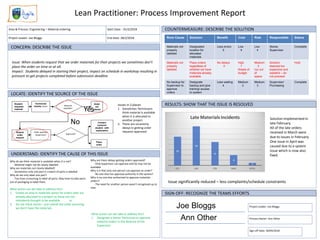
Issue: When students request that we order materials for their projects we sometimes don’t
place the order on time or at all.
Impact: Students delayed in starting their project, impact on schedule in workshop resulting in
pressure to get projects completed before submission deadline
Root Cause Solution Benefit Cost Risk Responsible Status
Materials not
properly
labelled
Designated
location for
allocated
materials
Less errors
5
Low
4
Low
4
Stores
Supervisor
Complete
Materials not
properly
labelled
Place orders
regardless of
whether we have
materials already
available
No delays
5
High
1
Waste of
budget
Medium
3
run out
of
space
Solution
deemed too
expensive and
wasteful – do
not proceed
Hold
No backup for
Supervisor to
approve
orders
Designate
backup and give
training/ access
to system
Less waiting
4
Medium
3
Medium
3
Supervisor/
Purchasing
Complete
Issue significantly reduced – less complaints/schedule constraints
Solution implemented in
late February.
All of the late orders
received in March were
due to issues in February.
One issue in April was
caused due to a system
issue which is now also
fixed.
Why do we think material is available when it is not?
- Material might not be clearly labelled
Why are materials not clearly labelled?
- Sometimes only one part in a batch of parts is labelled
Why do we only label one part?
- Too time consuming to label all parts. May have to take parts
out of packaging to label them.
What action can we take to address this?
1. Create an area in materials stores for orders with are
already allocated to a project so these are not
mistakenly thought to be available or
2. Do not check stores – just submit the order assuming
we don’t have the materials
Why are there delays getting orders approved?
- Only Supervisor can approve and he may not be
available
Why is it that only one person can approve an order?
- No one else has approval authority in the system?
Why is no one else authorised to approve materials
orders?
- The need for another person wasn’t recognised up to
now
What action can we take to address this?
1. Designate a Senior Technician to approve
material orders in the absence of the
Supervisor
Issues in 2 places
1. Sometimes Technicians
think material is available
when it is allocated to
another project
2. There are occasionly
delays in getting order
requests approved
Student
requests
material
Technician
checks stores Material
available?
Order
not
placed
Submit
order
request
Order approval
(Supervisor) Approved?
Contact
Lecturer/
student with
explanation
Place
order
Yes
No
Joe Bloggs
Ann Other
Area & Process:
Project Leader:
Start Date:
End Date:
CONCERN: DESCRIBE THE ISSUE
UNDERSTAND: IDENTIFY THE CAUSE OF THIS ISSUE
COUNTERMEASURE: DESCRIBE THE SOLUTION
RESULTS: SHOW THAT THE ISSUE IS RESOLVED
SIGN-OFF: RECOGNIZE THE TEAMS EFFORTS
LOCATE: IDENTIFY THE SOURCE OF THE ISSUE
Sign-off Date:
Process Owner:
Project Leader:
Lean Practitioner: Process Improvement Report
Team Action Tracker
ACTION DESCRIPTION RESPONSIBLE TARGET DATE STATUS
Lean Practitioner projects can be delivered by teams of 2-4 people. If you are delivering your project as part of a team please
complete this action tracker to demonstrate what each team member contributed to the project.
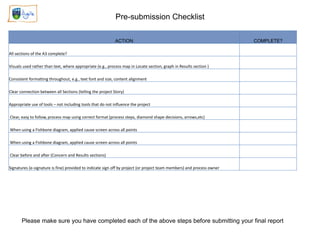
Pre-submission Checklist
ACTION COMPLETE?
All sections of the A3 complete?
Visuals used rather than text, where appropriate (e.g., process map in Locate section, graph in Results section )
Consistent formatting throughout, e.g., text font and size, content alignment
Clear connection between all Sections (telling the project Story)
Appropriate use of tools – not including tools that do not influence the project
Clear, easy to follow, process map using correct format (process steps, diamond shape decisions, arrows,etc)
When using a Fishbone diagram, applied cause screen across all points
Clear before and after (Concern and Results sections)
Signatures (e-signature is fine) provided to indicate sign off by project (or project team members) and process owner
Please make sure you have completed each of the above steps before submitting your final report

UCD Agile A3 Lean Practitioner report.pptx

  • 1.
    Area & Process: ProjectLeader: Start Date: End Date: CONCERN: DESCRIBE THE ISSUE UNDERSTAND: IDENTIFY THE CAUSE OF THIS ISSUE COUNTERMEASURE: DESCRIBE THE SOLUTION RESULTS: SHOW THAT THE ISSUE IS RESOLVED SIGN-OFF: RECOGNIZE THE TEAMS EFFORTS LOCATE: IDENTIFY THE SOURCE OF THE ISSUE Sign-off Date: Process Owner: Project Leader: Lean Practitioner: Process Improvement Report Describe the process issue and it’s impact. Show, using a simple process flow map where the issue arises. Identify the most likely causes of the issue. Describe the solution that the team has identified What evidence is there to show that the solution has worked?
  • 2.
    Area & Process:Engineering – Material ordering Project Leader: Joe Bloggs Start Date: : 01/2/2018 End Date: 28/2/2018 CONCERN: DESCRIBE THE ISSUE UNDERSTAND: IDENTIFY THE CAUSE OF THIS ISSUE COUNTERMEASURE: DESCRIBE THE SOLUTION RESULTS: SHOW THAT THE ISSUE IS RESOLVED SIGN-OFF: RECOGNIZE THE TEAMS EFFORTS LOCATE: IDENTIFY THE SOURCE OF THE ISSUE Sign-off Date: 30/04/2018 Process Owner: Ann Other Project Leader: Joe Bloggs Lean Practitioner: Process Improvement Report Issue: When students request that we order materials for their projects we sometimes don’t place the order on time or at all. Impact: Students delayed in starting their project, impact on schedule in workshop resulting in pressure to get projects completed before submission deadline Root Cause Solution Benefit Cost Risk Responsible Status Materials not properly labelled Designated location for allocated materials Less errors 5 Low 4 Low 4 Stores Supervisor Complete Materials not properly labelled Place orders regardless of whether we have materials already available No delays 5 High 1 Waste of budget Medium 3 run out of space Solution deemed too expensive and wasteful – do not proceed Hold No backup for Supervisor to approve orders Designate backup and give training/ access to system Less waiting 4 Medium 3 Medium 3 Supervisor/ Purchasing Complete Issue significantly reduced – less complaints/schedule constraints Solution implemented in late February. All of the late orders received in March were due to issues in February. One issue in April was caused due to a system issue which is now also fixed. Why do we think material is available when it is not? - Material might not be clearly labelled Why are materials not clearly labelled? - Sometimes only one part in a batch of parts is labelled Why do we only label one part? - Too time consuming to label all parts. May have to take parts out of packaging to label them. What action can we take to address this? 1. Create an area in materials stores for orders with are already allocated to a project so these are not mistakenly thought to be available or 2. Do not check stores – just submit the order assuming we don’t have the materials Why are there delays getting orders approved? - Only Supervisor can approve and he may not be available Why is it that only one person can approve an order? - No one else has approval authority in the system? Why is no one else authorised to approve materials orders? - The need for another person wasn’t recognised up to now What action can we take to address this? 1. Designate a Senior Technician to approve material orders in the absence of the Supervisor Issues in 2 places 1. Sometimes Technicians think material is available when it is allocated to another project 2. There are occasionly delays in getting order requests approved Student requests material Technician checks stores Material available? Order not placed Submit order request Order approval (Supervisor) Approved? Contact Lecturer/ student with explanation Place order Yes No Joe Bloggs Ann Other
  • 3.
    Area & Process: ProjectLeader: Start Date: End Date: CONCERN: DESCRIBE THE ISSUE UNDERSTAND: IDENTIFY THE CAUSE OF THIS ISSUE COUNTERMEASURE: DESCRIBE THE SOLUTION RESULTS: SHOW THAT THE ISSUE IS RESOLVED SIGN-OFF: RECOGNIZE THE TEAMS EFFORTS LOCATE: IDENTIFY THE SOURCE OF THE ISSUE Sign-off Date: Process Owner: Project Leader: Lean Practitioner: Process Improvement Report
  • 4.
    Team Action Tracker ACTIONDESCRIPTION RESPONSIBLE TARGET DATE STATUS Lean Practitioner projects can be delivered by teams of 2-4 people. If you are delivering your project as part of a team please complete this action tracker to demonstrate what each team member contributed to the project.
  • 5.
    Pre-submission Checklist ACTION COMPLETE? Allsections of the A3 complete? Visuals used rather than text, where appropriate (e.g., process map in Locate section, graph in Results section ) Consistent formatting throughout, e.g., text font and size, content alignment Clear connection between all Sections (telling the project Story) Appropriate use of tools – not including tools that do not influence the project Clear, easy to follow, process map using correct format (process steps, diamond shape decisions, arrows,etc) When using a Fishbone diagram, applied cause screen across all points When using a Fishbone diagram, applied cause screen across all points Clear before and after (Concern and Results sections) Signatures (e-signature is fine) provided to indicate sign off by project (or project team members) and process owner Please make sure you have completed each of the above steps before submitting your final report