TYPESCRIPT
THE NEXT FRONTIER
It’s JavaScript…
Yep, its TypeScript
It’s a script…?
What isTypeScript and why should we use it?
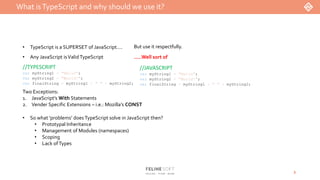
• TypeScript is a SUPERSET of JavaScript…. But use it respectfully.
• Any JavaScript isValid TypeScript
//JAVASCRIPT
var myString1 = "Hello";
var myString2 = "World!";
var finalString = myString1 + " " + myString2;
//TYPESCRIPT
var myString1 = "Hello";
var myString2 = "World!";
var finalString = myString1 + " " + myString2;
Two Exceptions:
1. JavaScript’s With Statements
2. Vender Specific Extensions – i.e.: Mozilla’s CONST
…..Well sort of
• So what ‘problems’ does TypeScript solve in JavaScript then?
• Prototypal Inheritance
• Management of Modules (namespaces)
• Scoping
• Lack ofTypes
3
What isTypeScript and why should we use it?
4
var FelineSoft;
(function (FelineSoft) {
var Employee = (function () {
function Employee(options) {
this.firstName = options.firstName;
this.lastName = options.lastName;
this.payType = options.payType;
this.payRate = options.payRate;
this.title = options.title || "";
}
Employee.prototype.calculatePay = function (hoursWorked) {
if (this.payType === PayType.Hourly) {
var pay = new Pay();
return pay.calculatePay(hoursWorked, this.payRate);
}
else {
return this.payRate;
}
};
Employee.prototype.fireThem = function () {
return this.firstName + " " + this.lastName + ", you are FIRED!";
};
return Employee;
})();
FelineSoft.Employee = Employee;
var Pay = (function () {
function Pay() { }
Pay.prototype.calculatePay = function (hours, poundsPerHour) {
return hours * poundsPerHour; };
return Pay;
})();
var PayType;
(function (PayType) {
PayType[PayType["Hourly"] = 0] = "Hourly";
PayType[PayType["Salary"] = 1] = "Salary";
})(PayType || (PayType = {}));
})(FelineSoft || (FelineSoft = {}));
namespace FelineSoft {
export class Employee {
private firstName: string;
private lastName: string;
private payType: PayType;
private payRate: number;
private title: string;
constructor(options: IEmployeOptions) {
this.firstName = options.firstName;
this.lastName = options.lastName;
this.payType = options.payType;
this.payRate = options.payRate;
this.title = options.title || "";
}
calculatePay(hoursWorked: number): number {
if (this.payType === PayType.Hourly) {
const pay = new Pay();
return pay.calculatePay(hoursWorked, this.payRate);
}
else { return this.payRate; }
}
fireThem(): string {
return this.firstName + " " + this.lastName + ", you are FIRED!";
}
}
class Pay {
calculatePay(hours: number, poundsPerHour: number): number {
return hours * poundsPerHour;
}
}
enum PayType {
Hourly = 0,
Salary = 1
}
// DOES NOT CONVERT TO JAVASCRIPT
export interface IEmployeOptions {
firstName: string;
lastName: string;
payType: PayType;
payRate: number;
title?: string;
}
}
TypeScript andVisual Studio
5
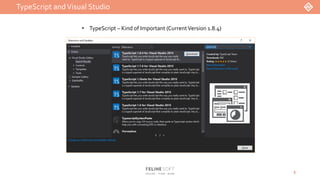
• TypeScript – Kind of Important (CurrentVersion 1.8.4)
TypeScript andVisual Studio
6
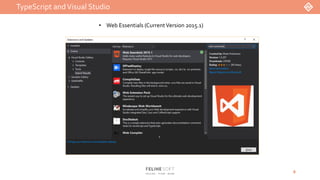
• Web Essentials (CurrentVersion 2015.1)
TypeScript andVisual Studio
7
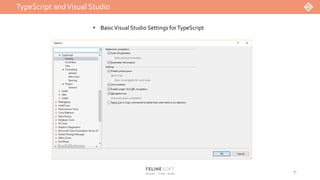
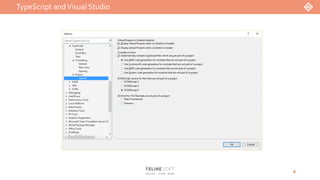
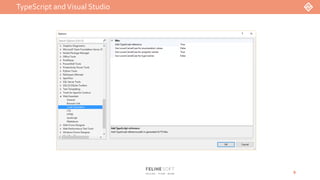
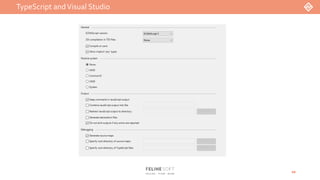
• BasicVisual Studio Settings forTypeScript
TypeScript andVisual Studio
8
TypeScript andVisual Studio
9
TypeScript andVisual Studio
10
TheTypeScript Basics
11
Variables
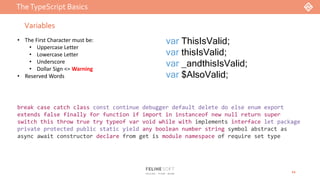
• The First Character must be:
• Uppercase Letter
• Lowercase Letter
• Underscore
• Dollar Sign <= Warning
• Reserved Words
var ThisIsValid;
var thisIsValid;
var _andthisIsValid;
var $AlsoValid;
break case catch class const continue debugger default delete do else enum export
extends false finally for function if import in instanceof new null return super
switch this throw true try typeof var void while with implements interface let package
private protected public static yield any boolean number string symbol abstract as
async await constructor declare from get is module namespace of require set type
TheTypeScript Basics
12
Types
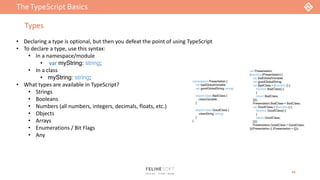
namespace Presentation {
var badGlobalVariable;
var goodGlobalString: string;
export class BadClass {
classVariable;
}
export class GoodClass {
classString: string;
}
}
var Presentation;
(function (Presentation) {
var badGlobalVariable;
var goodGlobalString;
var BadClass = (function () {
function BadClass() {
}
return BadClass;
})();
Presentation.BadClass = BadClass;
var GoodClass = (function () {
function GoodClass() {
}
return GoodClass;
})();
Presentation.GoodClass = GoodClass;
})(Presentation || (Presentation = {}));
• Declaring a type is optional, but then you defeat the point of using TypeScript
• To declare a type, use this syntax:
• In a namespace/module
• var myString: string;
• In a class
• myString: string;
• What types are available in TypeScript?
• Strings
• Booleans
• Numbers (all numbers, integers, decimals, floats, etc.)
• Objects
• Arrays
• Enumerations / Bit Flags
• Any
TheTypeScript Basics
13
Operations
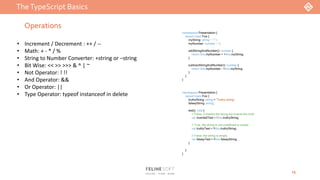
• Increment / Decrement : ++ / --
• Math: + - * / %
• String to Number Converter: +string or –string
• Bit Wise: << >> >>> & ^ | ~
• Not Operator: ! !!
• And Operator: &&
• Or Operator: ||
• Type Operator: typeof instanceof in delete
namespace Presentation {
export class Foo {
myString: string = "1";
myNumber: number = 1;
addStringAndNumber(): number {
return this.myNumber + +this.myString;
}
subtractStringAndNumber(): number {
return this.myNumber - +this.myString;
}
}
}
namespace Presentation {
export class Foo {
truthyString: string = 'Truthy string';
falseyString: string;
test(): void {
// False, it checks the string but inverts the truth
var invertedTest = !this.truthyString;
// True, the string is not undefined or empty
var truthyTest = !!this.truthyString;
// False, the string is empty
var falseyTest = !!this.falseyString;
}
}
}
TheTypeScript Basics
14
Functions
• Functions are just Methods
• Inside a class, just the name
• Outside a class, you must include the keyword ‘function’
• Parameters
• Optional Parameters
• Default Parameters
• Rest Parameters
• Overloads
• Arrow Functions
• Return Values
namespace Presentation {
export class Foo {
myClassMethod(): void {
//DO SOMETHING
}
}
function myGlobalFunction(): void {
//DO SOMETHING
}
}
namespace Presentation {
export class Foo {
getString(): string {
return "Hello World!";
}
getNumber(): number {
return 1;
}
getNothing(): void {
// HA HA HA, nothing to return
}
}
}
namespace Presentation {
export class Foo {
getAverage(a: string, b: string, c: string): string;
getAverage(a: number, b: number, c: number): string;
getAverage(a: any, b: any, c: any): string {
var total = parseInt(a, 10) + parseInt(b, 10) + parseInt(c, 10);
var average = total / 3;
return `The average is ${average}`;
}
}
}
namespace Presentation {
export class Foo {
methodWithOptionalParams(param?: string): void {
//DO SOMETHING
}
methodWithDefaultParams(param: string = "default"): void {
//DO SOMETHING
}
methodWithRestParams(...param: string[]): void {
//DO SOMETHING
}
}
}
TheTypeScript Basics
15
NameSpaces
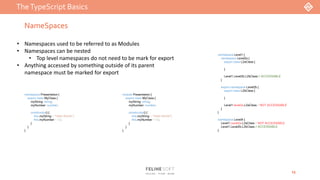
• Namespaces used to be referred to as Modules
• Namespaces can be nested
• Top level namespaces do not need to be mark for export
• Anything accessed by something outside of its parent
namespace must be marked for export
namespace Presentation {
export class MyClass {
myString: string;
myNumber: number;
constructor() {
this.myString = "Hello World!";
this.myNumber = 42;
}
}
}
namespace Level1 {
namespace Level2a {
export class L2aClass {
}
Level1.Level2b.L2bClass // ACCESSABLE
}
export namespace Level2b {
export class L2bClass {
}
Level1.level2a.L2aClass // NOT ACCESSABLE
}
}
namespace LevelA {
Level1.Level2a.L2aClass // NOT ACCESSABLE
Level1.Level2b.L2bClass // ACCESSABLE
}
module Presentation {
export class MyClass {
myString: string;
myNumber: number;
constructor() {
this.myString = "Hello World!";
this.myNumber = 42;
}
}
}
TheTypeScript Basics
16
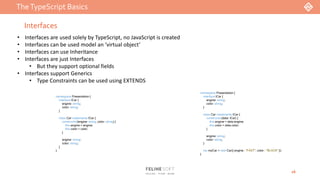
Interfaces
• Interfaces are used solely by TypeScript, no JavaScript is created
• Interfaces can be used model an ‘virtual object’
• Interfaces can use Inheritance
• Interfaces are just Interfaces
• But they support optional fields
• Interfaces support Generics
• Type Constraints can be used using EXTENDS
namespace Presentation {
interface ICar {
engine: string;
color: string;
}
class Car implements ICar {
constructor(engine: string, color: string) {
this.engine = engine;
this.color = color;
}
engine: string;
color: string;
}
}
namespace Presentation {
interface ICar {
engine: string;
color: string;
}
class Car implements ICar {
constructor(data: ICar) {
this.engine = data.engine;
this.color = data.color;
}
engine: string;
color: string;
}
var myCar = new Car({ engine : "FAST", color : "BLACK" });
}
TheTypeScript Basics
17
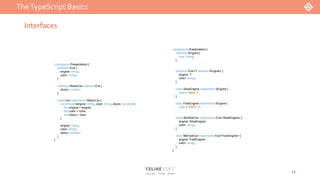
Interfaces
namespace Presentation {
interface IEngine {
type: string;
}
interface ICar<T extends IEngine> {
engine: T;
color: string;
}
class SlowEngine implements IEngine {
type = "slow :(";
}
class FastEngine implements IEngine {
type = "FAST :)";
}
class MySlowCar implements ICar<SlowEngine> {
engine: SlowEngine;
color: string;
}
class MyFastCar implements ICar<FastEngine> {
engine: FastEngine;
color: string;
}
}
namespace Presentation {
interface ICar {
engine: string;
color: string;
}
interface IBasicCar extends ICar {
doors: number;
}
class Car implements IBasicCar {
constructor(engine: string, color: string, doors: number) {
this.engine = engine;
this.color = color;
this.doors = doors;
}
engine: string;
color: string;
doors: number;
}
}
TheTypeScript Basics
18
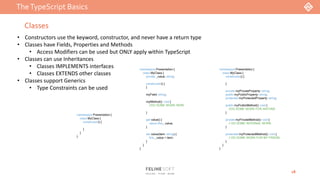
Classes
• Constructors use the keyword, constructor, and never have a return type
• Classes have Fields, Properties and Methods
• Access Modifiers can be used but ONLY apply within TypeScript
• Classes can use Inheritances
• Classes IMPLEMENTS interfaces
• Classes EXTENDS other classes
• Classes support Generics
• Type Constraints can be used
namespace Presentation {
class MyClass {
constructor() {
}
}
}
namespace Presentation {
class MyClass {
private _value: string;
constructor() {
}
myField: string;
myMethod(): void {
//DO SOME WORK HERE
}
get value() {
return this._value;
}
set value(item: string) {
this._value = item;
}
}
}
namespace Presentation {
class MyClass {
constructor() {
}
private myPrivateProperty: string;
public myPublicProperty: string;
protected myProtectedProperty: string;
public myPublicMethod(): void {
//DO SOME WORK FOR ANYONE
}
private myPrivateMethod(): void {
// DO SOME INTERNAL WORK
}
protected myProtectedMethod(): void {
// DO SOME WORK FOR MY FRIEND
}
}
}
TheTypeScript Basics
19
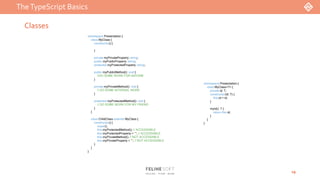
Classes
namespace Presentation {
class MyClass<T> {
private id: T;
constructor(id: T) {
this.id = id;
}
myId(): T {
return this.id;
}
}
}
namespace Presentation {
class MyClass {
constructor() {
}
private myPrivateProperty: string;
public myPublicProperty: string;
protected myProtectedProperty: string;
public myPublicMethod(): void {
//DO SOME WORK FOR ANYONE
}
private myPrivateMethod(): void {
// DO SOME INTERNAL WORK
}
protected myProtectedMethod(): void {
// DO SOME WORK FOR MY FRIEND
}
}
class ChildClass extends MyClass {
constructor() {
super();
this.myProtectedMethod(); // ACCESSABLE
this.myProtectedProperty = ""; // ACCESSABLE
this.myPrivateMethod(); // NOT ACCESSABLE
this.myPrivateProperty = ""; // NOT ACCESSABLE
}
}
}
TypeScript:The Advance Stuff 
20
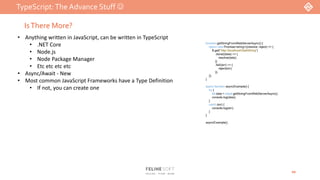
IsThere More?
• Anything written in JavaScript, can be written in TypeScript
• .NET Core
• Node.js
• Node Package Manager
• Etc etc etc etc
• Async/Await - New
• Most common JavaScript Frameworks have a Type Definition
• If not, you can create one
function getStringFromWebServerAsync() {
return new Promise<string>((resolve, reject) => {
$.get("http://localhost/GetAString")
.done((data) => {
resolve(data);
})
.fail((err) => {
reject(err);
});
});
}
async function asyncExample() {
try {
let data = await getStringFromWebServerAsync();
console.log(data);
}
catch (err) {
console.log(err);
}
}
asyncExample();
Links
21
• https://en.wikipedia.org/wiki/TypeScript
• http://www.typescriptlang.org/
• http://vswebessentials.com/
• https://github.com/DefinitelyTyped/DefinitelyTyped
Code Demo

TypeScript Presentation - Jason Haffey

  • 1.
  • 2.
    It’s JavaScript… Yep, itsTypeScript It’s a script…?
  • 3.
    What isTypeScript andwhy should we use it? • TypeScript is a SUPERSET of JavaScript…. But use it respectfully. • Any JavaScript isValid TypeScript //JAVASCRIPT var myString1 = "Hello"; var myString2 = "World!"; var finalString = myString1 + " " + myString2; //TYPESCRIPT var myString1 = "Hello"; var myString2 = "World!"; var finalString = myString1 + " " + myString2; Two Exceptions: 1. JavaScript’s With Statements 2. Vender Specific Extensions – i.e.: Mozilla’s CONST …..Well sort of • So what ‘problems’ does TypeScript solve in JavaScript then? • Prototypal Inheritance • Management of Modules (namespaces) • Scoping • Lack ofTypes 3
  • 4.
    What isTypeScript andwhy should we use it? 4 var FelineSoft; (function (FelineSoft) { var Employee = (function () { function Employee(options) { this.firstName = options.firstName; this.lastName = options.lastName; this.payType = options.payType; this.payRate = options.payRate; this.title = options.title || ""; } Employee.prototype.calculatePay = function (hoursWorked) { if (this.payType === PayType.Hourly) { var pay = new Pay(); return pay.calculatePay(hoursWorked, this.payRate); } else { return this.payRate; } }; Employee.prototype.fireThem = function () { return this.firstName + " " + this.lastName + ", you are FIRED!"; }; return Employee; })(); FelineSoft.Employee = Employee; var Pay = (function () { function Pay() { } Pay.prototype.calculatePay = function (hours, poundsPerHour) { return hours * poundsPerHour; }; return Pay; })(); var PayType; (function (PayType) { PayType[PayType["Hourly"] = 0] = "Hourly"; PayType[PayType["Salary"] = 1] = "Salary"; })(PayType || (PayType = {})); })(FelineSoft || (FelineSoft = {})); namespace FelineSoft { export class Employee { private firstName: string; private lastName: string; private payType: PayType; private payRate: number; private title: string; constructor(options: IEmployeOptions) { this.firstName = options.firstName; this.lastName = options.lastName; this.payType = options.payType; this.payRate = options.payRate; this.title = options.title || ""; } calculatePay(hoursWorked: number): number { if (this.payType === PayType.Hourly) { const pay = new Pay(); return pay.calculatePay(hoursWorked, this.payRate); } else { return this.payRate; } } fireThem(): string { return this.firstName + " " + this.lastName + ", you are FIRED!"; } } class Pay { calculatePay(hours: number, poundsPerHour: number): number { return hours * poundsPerHour; } } enum PayType { Hourly = 0, Salary = 1 } // DOES NOT CONVERT TO JAVASCRIPT export interface IEmployeOptions { firstName: string; lastName: string; payType: PayType; payRate: number; title?: string; } }
  • 5.
    TypeScript andVisual Studio 5 •TypeScript – Kind of Important (CurrentVersion 1.8.4)
  • 6.
    TypeScript andVisual Studio 6 •Web Essentials (CurrentVersion 2015.1)
  • 7.
    TypeScript andVisual Studio 7 •BasicVisual Studio Settings forTypeScript
  • 8.
  • 9.
  • 10.
  • 11.
    TheTypeScript Basics 11 Variables • TheFirst Character must be: • Uppercase Letter • Lowercase Letter • Underscore • Dollar Sign <= Warning • Reserved Words var ThisIsValid; var thisIsValid; var _andthisIsValid; var $AlsoValid; break case catch class const continue debugger default delete do else enum export extends false finally for function if import in instanceof new null return super switch this throw true try typeof var void while with implements interface let package private protected public static yield any boolean number string symbol abstract as async await constructor declare from get is module namespace of require set type
  • 12.
    TheTypeScript Basics 12 Types namespace Presentation{ var badGlobalVariable; var goodGlobalString: string; export class BadClass { classVariable; } export class GoodClass { classString: string; } } var Presentation; (function (Presentation) { var badGlobalVariable; var goodGlobalString; var BadClass = (function () { function BadClass() { } return BadClass; })(); Presentation.BadClass = BadClass; var GoodClass = (function () { function GoodClass() { } return GoodClass; })(); Presentation.GoodClass = GoodClass; })(Presentation || (Presentation = {})); • Declaring a type is optional, but then you defeat the point of using TypeScript • To declare a type, use this syntax: • In a namespace/module • var myString: string; • In a class • myString: string; • What types are available in TypeScript? • Strings • Booleans • Numbers (all numbers, integers, decimals, floats, etc.) • Objects • Arrays • Enumerations / Bit Flags • Any
  • 13.
    TheTypeScript Basics 13 Operations • Increment/ Decrement : ++ / -- • Math: + - * / % • String to Number Converter: +string or –string • Bit Wise: << >> >>> & ^ | ~ • Not Operator: ! !! • And Operator: && • Or Operator: || • Type Operator: typeof instanceof in delete namespace Presentation { export class Foo { myString: string = "1"; myNumber: number = 1; addStringAndNumber(): number { return this.myNumber + +this.myString; } subtractStringAndNumber(): number { return this.myNumber - +this.myString; } } } namespace Presentation { export class Foo { truthyString: string = 'Truthy string'; falseyString: string; test(): void { // False, it checks the string but inverts the truth var invertedTest = !this.truthyString; // True, the string is not undefined or empty var truthyTest = !!this.truthyString; // False, the string is empty var falseyTest = !!this.falseyString; } } }
  • 14.
    TheTypeScript Basics 14 Functions • Functionsare just Methods • Inside a class, just the name • Outside a class, you must include the keyword ‘function’ • Parameters • Optional Parameters • Default Parameters • Rest Parameters • Overloads • Arrow Functions • Return Values namespace Presentation { export class Foo { myClassMethod(): void { //DO SOMETHING } } function myGlobalFunction(): void { //DO SOMETHING } } namespace Presentation { export class Foo { getString(): string { return "Hello World!"; } getNumber(): number { return 1; } getNothing(): void { // HA HA HA, nothing to return } } } namespace Presentation { export class Foo { getAverage(a: string, b: string, c: string): string; getAverage(a: number, b: number, c: number): string; getAverage(a: any, b: any, c: any): string { var total = parseInt(a, 10) + parseInt(b, 10) + parseInt(c, 10); var average = total / 3; return `The average is ${average}`; } } } namespace Presentation { export class Foo { methodWithOptionalParams(param?: string): void { //DO SOMETHING } methodWithDefaultParams(param: string = "default"): void { //DO SOMETHING } methodWithRestParams(...param: string[]): void { //DO SOMETHING } } }
  • 15.
    TheTypeScript Basics 15 NameSpaces • Namespacesused to be referred to as Modules • Namespaces can be nested • Top level namespaces do not need to be mark for export • Anything accessed by something outside of its parent namespace must be marked for export namespace Presentation { export class MyClass { myString: string; myNumber: number; constructor() { this.myString = "Hello World!"; this.myNumber = 42; } } } namespace Level1 { namespace Level2a { export class L2aClass { } Level1.Level2b.L2bClass // ACCESSABLE } export namespace Level2b { export class L2bClass { } Level1.level2a.L2aClass // NOT ACCESSABLE } } namespace LevelA { Level1.Level2a.L2aClass // NOT ACCESSABLE Level1.Level2b.L2bClass // ACCESSABLE } module Presentation { export class MyClass { myString: string; myNumber: number; constructor() { this.myString = "Hello World!"; this.myNumber = 42; } } }
  • 16.
    TheTypeScript Basics 16 Interfaces • Interfacesare used solely by TypeScript, no JavaScript is created • Interfaces can be used model an ‘virtual object’ • Interfaces can use Inheritance • Interfaces are just Interfaces • But they support optional fields • Interfaces support Generics • Type Constraints can be used using EXTENDS namespace Presentation { interface ICar { engine: string; color: string; } class Car implements ICar { constructor(engine: string, color: string) { this.engine = engine; this.color = color; } engine: string; color: string; } } namespace Presentation { interface ICar { engine: string; color: string; } class Car implements ICar { constructor(data: ICar) { this.engine = data.engine; this.color = data.color; } engine: string; color: string; } var myCar = new Car({ engine : "FAST", color : "BLACK" }); }
  • 17.
    TheTypeScript Basics 17 Interfaces namespace Presentation{ interface IEngine { type: string; } interface ICar<T extends IEngine> { engine: T; color: string; } class SlowEngine implements IEngine { type = "slow :("; } class FastEngine implements IEngine { type = "FAST :)"; } class MySlowCar implements ICar<SlowEngine> { engine: SlowEngine; color: string; } class MyFastCar implements ICar<FastEngine> { engine: FastEngine; color: string; } } namespace Presentation { interface ICar { engine: string; color: string; } interface IBasicCar extends ICar { doors: number; } class Car implements IBasicCar { constructor(engine: string, color: string, doors: number) { this.engine = engine; this.color = color; this.doors = doors; } engine: string; color: string; doors: number; } }
  • 18.
    TheTypeScript Basics 18 Classes • Constructorsuse the keyword, constructor, and never have a return type • Classes have Fields, Properties and Methods • Access Modifiers can be used but ONLY apply within TypeScript • Classes can use Inheritances • Classes IMPLEMENTS interfaces • Classes EXTENDS other classes • Classes support Generics • Type Constraints can be used namespace Presentation { class MyClass { constructor() { } } } namespace Presentation { class MyClass { private _value: string; constructor() { } myField: string; myMethod(): void { //DO SOME WORK HERE } get value() { return this._value; } set value(item: string) { this._value = item; } } } namespace Presentation { class MyClass { constructor() { } private myPrivateProperty: string; public myPublicProperty: string; protected myProtectedProperty: string; public myPublicMethod(): void { //DO SOME WORK FOR ANYONE } private myPrivateMethod(): void { // DO SOME INTERNAL WORK } protected myProtectedMethod(): void { // DO SOME WORK FOR MY FRIEND } } }
  • 19.
    TheTypeScript Basics 19 Classes namespace Presentation{ class MyClass<T> { private id: T; constructor(id: T) { this.id = id; } myId(): T { return this.id; } } } namespace Presentation { class MyClass { constructor() { } private myPrivateProperty: string; public myPublicProperty: string; protected myProtectedProperty: string; public myPublicMethod(): void { //DO SOME WORK FOR ANYONE } private myPrivateMethod(): void { // DO SOME INTERNAL WORK } protected myProtectedMethod(): void { // DO SOME WORK FOR MY FRIEND } } class ChildClass extends MyClass { constructor() { super(); this.myProtectedMethod(); // ACCESSABLE this.myProtectedProperty = ""; // ACCESSABLE this.myPrivateMethod(); // NOT ACCESSABLE this.myPrivateProperty = ""; // NOT ACCESSABLE } } }
  • 20.
    TypeScript:The Advance Stuff 20 IsThere More? • Anything written in JavaScript, can be written in TypeScript • .NET Core • Node.js • Node Package Manager • Etc etc etc etc • Async/Await - New • Most common JavaScript Frameworks have a Type Definition • If not, you can create one function getStringFromWebServerAsync() { return new Promise<string>((resolve, reject) => { $.get("http://localhost/GetAString") .done((data) => { resolve(data); }) .fail((err) => { reject(err); }); }); } async function asyncExample() { try { let data = await getStringFromWebServerAsync(); console.log(data); } catch (err) { console.log(err); } } asyncExample();
  • 21.
    Links 21 • https://en.wikipedia.org/wiki/TypeScript • http://www.typescriptlang.org/ •http://vswebessentials.com/ • https://github.com/DefinitelyTyped/DefinitelyTyped
  • 22.

Editor's Notes

  • #2 Welcome Ask who feels comfortable in JS Ask who has heard of TS? Ask who has used TS?
  • #3 What is TypeScript? TS is a free and open source programming language developed and maintained by MS First made public in October of 2012 with version 0.8 Current Version is 1.8.2 Language Features Type Annotations / Compile-Time Type Checking Type Interfaces Type erasure Interfaces Enumerated Type Mixins Generics Scoping Namespaces Tuples Awaits Classes Modules “Arrow” syntax (Anonymous functions) Optional parameters and default parameters IDE/Editor Support VS 2012 has a plug-in available VS 2013 and above TS support is built in Additional Support/Plug-ins ReSharper 8.1 NetBeans IDE Eclipse IDE Sublime
  • #4 TypeScript is a Superset of JavaScript which means anything you can do in JavaScript you can do in TypeScript, BUT that would defeat the purpose of using TS This means any JS you write is valid TS With 2 exceptions JS With Statements do not transfer over Its like a C# Using Statement from what I understand But Even JS suggests not using it Any Vender Specific Extensions Example is Mozilla’s CONST Syntax There are things called Type Definitions which we will get too later What Problems, if any, does TS solve in JS? Making your code Type Strict….sort of (explain) Continues on next slide
  • #6 Extensions – Tools > Extensions and Updates TypeScript (Required) Web Essentials (optional) VS TS Settings – Tools > Options OR Quick Search > Typescript Text Editor > TypeScript General – Enable virtual space Project – Display Virtual Projects > Display VP when Solution is loaded | Optional Display VP when no Solution is loaded Project – Compile on Save > Use AMD Project – ECMAScript Version > Use ECMAScript 6 Web Essentials > Code Generation Add TypeScript Reference > TRUE Project Properties – TypeScript Build ALL OF IT!
  • #7 Extensions – Tools > Extensions and Updates TypeScript (Required) Web Essentials (optional) VS TS Settings – Tools > Options OR Quick Search > Typescript Text Editor > TypeScript General – Enable virtual space Project – Display Virtual Projects > Display VP when Solution is loaded | Optional Display VP when no Solution is loaded Project – Compile on Save > Use AMD Project – ECMAScript Version > Use ECMAScript 6 Web Essentials > Code Generation Add TypeScript Reference > TRUE Project Properties – TypeScript Build ALL OF IT!
  • #8 Extensions – Tools > Extensions and Updates TypeScript (Required) Web Essentials (optional) VS TS Settings – Tools > Options OR Quick Search > Typescript Text Editor > TypeScript General – Enable virtual space Project – Display Virtual Projects > Display VP when Solution is loaded | Optional Display VP when no Solution is loaded Project – Compile on Save > Use AMD Project – ECMAScript Version > Use ECMAScript 6 Web Essentials > Code Generation Add TypeScript Reference > TRUE Project Properties – TypeScript Build ALL OF IT!
  • #9 Extensions – Tools > Extensions and Updates TypeScript (Required) Web Essentials (optional) VS TS Settings – Tools > Options OR Quick Search > Typescript Text Editor > TypeScript General – Enable virtual space Project – Display Virtual Projects > Display VP when Solution is loaded | Optional Display VP when no Solution is loaded Project – Compile on Save > Use AMD Project – ECMAScript Version > Use ECMAScript 6 Web Essentials > Code Generation Add TypeScript Reference > TRUE Project Properties – TypeScript Build ALL OF IT!
  • #10 Extensions – Tools > Extensions and Updates TypeScript (Required) Web Essentials (optional) VS TS Settings – Tools > Options OR Quick Search > Typescript Text Editor > TypeScript General – Enable virtual space Project – Display Virtual Projects > Display VP when Solution is loaded | Optional Display VP when no Solution is loaded Project – Compile on Save > Use AMD Project – ECMAScript Version > Use ECMAScript 6 Web Essentials > Code Generation Add TypeScript Reference > TRUE Project Properties – TypeScript Build ALL OF IT!
  • #11 Extensions – Tools > Extensions and Updates TypeScript (Required) Web Essentials (optional) VS TS Settings – Tools > Options OR Quick Search > Typescript Text Editor > TypeScript General – Enable virtual space Project – Display Virtual Projects > Display VP when Solution is loaded | Optional Display VP when no Solution is loaded Project – Compile on Save > Use AMD Project – ECMAScript Version > Use ECMAScript 6 Web Essentials > Code Generation Add TypeScript Reference > TRUE Project Properties – TypeScript Build ALL OF IT!
  • #12 Variables must start with…. Using $ to start your variables can cause confusion with other JavaScript Frameworks…do not use them Reserved Words – There will be a test at the end
  • #13 Types Declaring Types is optional – NEVER DO IT! How to declare a type Left is TypeScript – Right is JavaScript output Available Types Primitives Arrays Enum/BitFlag Any – EXPLAIN AND DISCOURAGE!!!! Type Assertions!!!! Other Types Void Type – Used to show the absenense of value and used with a function return (come back to soon) Null Type – is a literal value…NULL Undefined Type – denotes that the variable is not available / not initialized
  • #14 Operations Increment/Decrement (same as C#) Math Operations (same as C#) String to Number Converter – Explain Bit Wise: << Left Shift >> Right Shift >>> Zero Fill Right Shift & AND | OR ^ XOR ~ NOT Logical Operations ! NOT !! NOT Converter – Explain (as best as possible) && AND || OR Type Operators Will cover in Classes
  • #15 Functions Parameters Rest is 0 or more Arrow Functions we will cover in a little bit Point of all this? TS keeps track of all the types and helps you write the code correctly. We will see this in the Demo
  • #16 Namespaces NS used to be called Modules and can still be called that NS can be nested Nested Namespace must be marked as Export if you plan to use them outside of parent namespace
  • #17 Interfaces No JS is generated from Interfaces Virtual Objects are ‘place holders’
  • #19 Classes Constructor verses class name Fields/Properties/Methods Access Modifiers Inheritance