


// twitter cards 101
// tom edwards
svp, digital strategy & innovation
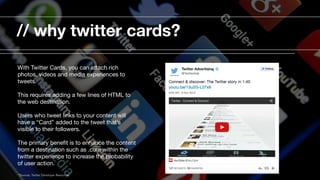
// why twitter cards?
With Twitter Cards, you can attach rich
photos, videos and media experiences to
tweets. 

This requires adding a few lines of HTML to
the web destination. 

Users who tweet links to your content will
have a “Card” added to the tweet that’s
visible to their followers.

The primary benefit is to enhance the content
from a destination such as .com within the
twitter experience to increase the probability
of user action.
*Sources: Twitter Developer Resources
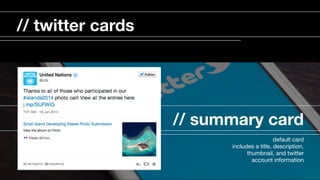
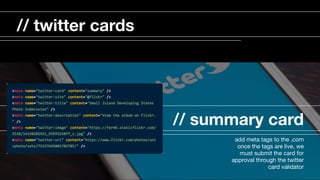
// summary card
default card

includes a title, description,
thumbnail, and twitter
account information

// twitter cards
// summary card
add meta tags to the .com

once the tags are live, we
must submit the card for
approval through the twitter
card validator

// twitter cards
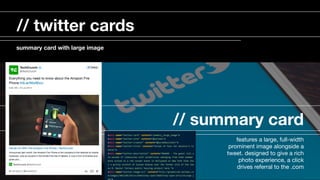
// summary card
features a large, full-width
prominent image alongside a
tweet. designed to give a rich
photo experience, a click
drives referral to the .com

// twitter cards
summary card with large image
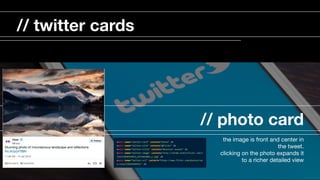
// photo card
the image is front and center in
the tweet. 

clicking on the photo expands it
to a richer detailed view

// twitter cards
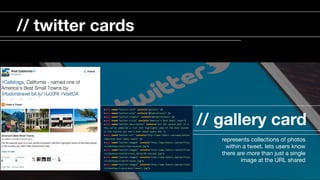
// gallery card
represents collections of photos
within a tweet. lets users know
there are more than just a single
image at the URL shared 

// twitter cards
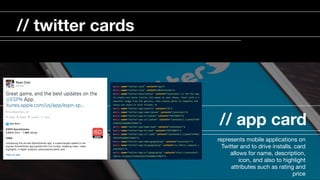
// app card
represents mobile applications on
Twitter and to drive installs. card
allows for name, description,
icon, and also to highlight
attributes such as rating and
price

// twitter cards
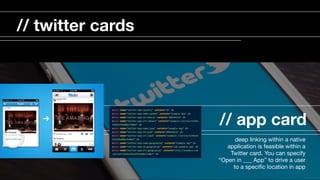
// app card
deep linking within a native
application is feasible within a
Twitter card. You can specify
“Open in ___ App” to drive a user
to a specific location in app

// twitter cards
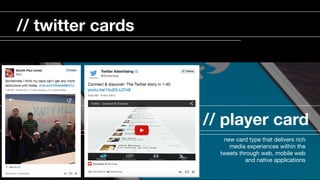
// player card
new card type that delivers rich
media experiences within the
tweets through web, mobile web
and native applications

// twitter cards
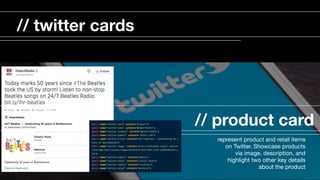
// product card
represent product and retail items
on Twitter. Showcase products
via image, description, and
highlight two other key details
about the product

// twitter cards
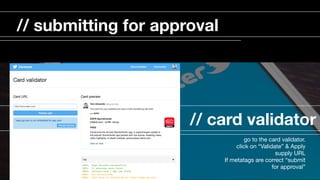
// card validator
go to the card validator. 

click on “Validate” & Apply

supply URL 

If metatags are correct “submit
for approval” 

// submitting for approval
// card analytics
your snapshot

change over time

card types

sources 

links, influencers, devices 

// analytics
// social cms
some social cms systems already
support varying levels and types
of twitter cards. 

// cms integration

Twitter Cards 101

  • 1.
  • 2.
    // tom edwards svp,digital strategy & innovation
  • 3.
    // why twittercards? With Twitter Cards, you can attach rich photos, videos and media experiences to tweets. This requires adding a few lines of HTML to the web destination. Users who tweet links to your content will have a “Card” added to the tweet that’s visible to their followers. The primary benefit is to enhance the content from a destination such as .com within the twitter experience to increase the probability of user action. *Sources: Twitter Developer Resources
  • 4.
    // summary card defaultcard includes a title, description, thumbnail, and twitter account information // twitter cards
  • 5.
    // summary card addmeta tags to the .com once the tags are live, we must submit the card for approval through the twitter card validator // twitter cards
  • 6.
    // summary card featuresa large, full-width prominent image alongside a tweet. designed to give a rich photo experience, a click drives referral to the .com // twitter cards summary card with large image
  • 7.
    // photo card theimage is front and center in the tweet. clicking on the photo expands it to a richer detailed view // twitter cards
  • 8.
    // gallery card representscollections of photos within a tweet. lets users know there are more than just a single image at the URL shared // twitter cards
  • 9.
    // app card representsmobile applications on Twitter and to drive installs. card allows for name, description, icon, and also to highlight attributes such as rating and price // twitter cards
  • 10.
    // app card deeplinking within a native application is feasible within a Twitter card. You can specify “Open in ___ App” to drive a user to a specific location in app // twitter cards
  • 11.
    // player card newcard type that delivers rich media experiences within the tweets through web, mobile web and native applications // twitter cards
  • 12.
    // product card representproduct and retail items on Twitter. Showcase products via image, description, and highlight two other key details about the product // twitter cards
  • 13.
    // card validator goto the card validator. click on “Validate” & Apply supply URL If metatags are correct “submit for approval” // submitting for approval
  • 14.
    // card analytics yoursnapshot change over time card types sources links, influencers, devices // analytics
  • 15.
    // social cms somesocial cms systems already support varying levels and types of twitter cards. // cms integration