No
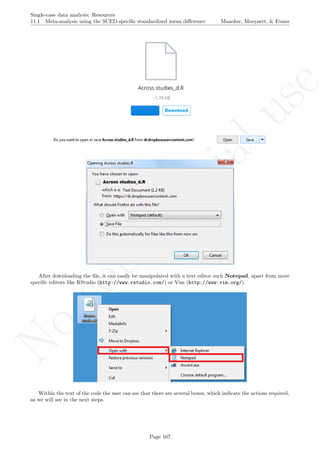
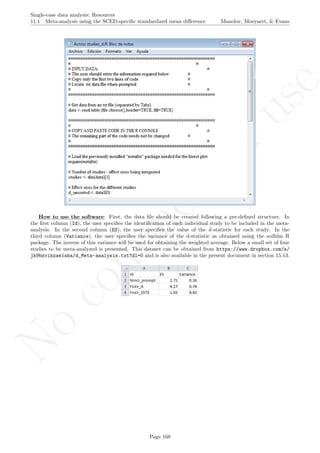
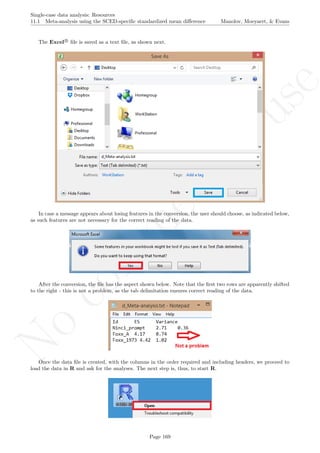
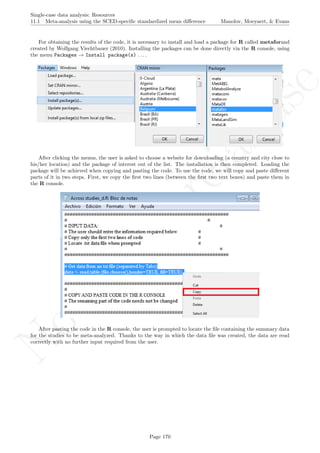
com
m
ercialuse
Single-case data analysis
Software resources for applied researchers
Rumen Manolov, Mariola Moeyaert & Jonathan J. Evans
Affiliations at the time of creation of the document:
Rumen Manolov:
Department of Behavioural Sciences Methods, University of Barcelona, Spain;
ESADE Business School, Ramon Llull University, Spain.
Mariola Moeyaert:
Faculty of Psychology and Educational Sciences, KU Leuven - University of Leuven, Belgium;
Center of Advanced Study in Education, City University of New York, NY, USA.
Jonathan J. Evans:
Institute of Health and Wellbeing, University of Glasgow, Scotland, UK.
The preset tutorial is focused on the software implementations (main based on the freely available R) of
analytical techniques created or adapted for data gathered using single-case designs. Step-by-step guidance is
provided regarding how to obtain and use the software and how to interpret its result, although the interested
reader is referred to the original articles for more information.
(This tutorial does not express the opinions of the primary authors of these articles.)
No
com
m
ercialuse
Speak to me with tenderness
Speak to me with gracefulness
Speak to me with happiness and love
Everything you do for me
Everything I do for you
The way you see the world
No
com
m
ercialuse
Initial publication of portions of this tutorial
Initial version:
Rumen Manolov and Jonathan J. Evans. Supplementary material for the article “Single-case experimental de-
signs: Reflections on conduct and analysis” (http://www.tandfonline.com/eprint/mNvW7GJ3IQtb5hcPiDWw/
full) from Special Issue ”Single-Case Experimental Design Methodology” in Neuropsychological Rehabilitation
(Year 2014; Vol. 24, Issues 3-4; pages 634-660).
Chapters 6.8 and 6.10:
Rumen Manolov and Lucien Rochat. Supplementary material for the article “Further developments in sum-
marising and meta-analysing single-case data: An illustration with neurobehavioural interventions in acquired
brain injury” (http://www.tandfonline.com/eprint/eXWqs5nQ4ECzgyHWmQKE/full) published in Neuropsy-
chological Rehabilitation (Year 2015; Vol. 25, Issue 5; pages 637-662).
Chapter 11.1:
Rumen Manolov and Antonio Solanas. R code developed for the Appendix of the article “Quantifying dif-
ferences between conditions in single-case designs: Possible analysis and meta-analysis” to be published in
Developmental Neurorehabilitation in 2016 (doi: 10.3109/17518423.2015.100688).
No
com
m
ercialuse
Single-case data analysis: Resources
CONTENTS Manolov, Moeyaert, & Evans
Contents
1 Aim, scope and structure of the document 2
2 Getting started with R and R-Commander 3
2.1 Installing and loading . . . . . . . . . . . . . . . . . . . . . . . . . . . . . . . . . . . . . . . . . . 3
2.2 Working with datasets . . . . . . . . . . . . . . . . . . . . . . . . . . . . . . . . . . . . . . . . . . 5
2.3 Working with R code . . . . . . . . . . . . . . . . . . . . . . . . . . . . . . . . . . . . . . . . . . . 8
3 Tools for visual analysis 14
3.1 Visual analysis with the SCDA package . . . . . . . . . . . . . . . . . . . . . . . . . . . . . . . . 15
3.2 Using standard deviation bands as visual aids . . . . . . . . . . . . . . . . . . . . . . . . . . . . . 19
3.3 Estimating and projecting baseline trend . . . . . . . . . . . . . . . . . . . . . . . . . . . . . . . . 22

3.4 Graph rotation for controlling for baseline trend . . . . . . . . . . . . . . . . . . . . . . . . . . . 26
4 Nonoverlap indices 35
4.1 Percentage of nonoverlapping data . . . . . . . . . . . . . . . . . . . . . . . . . . . . . . . . . . . 35
4.2 Percentage of data points exceeding the median . . . . . . . . . . . . . . . . . . . . . . . . . . . . 38
4.3 Pairwise data overlap . . . . . . . . . . . . . . . . . . . . . . . . . . . . . . . . . . . . . . . . . . . 41
4.4 Nonoverlap of all pairs . . . . . . . . . . . . . . . . . . . . . . . . . . . . . . . . . . . . . . . . . . 44
4.5 Improvement rate difference . . . . . . . . . . . . . . . . . . . . . . . . . . . . . . . . . . . . . . . 46
4.6 Tau-U . . . . . . . . . . . . . . . . . . . . . . . . . . . . . . . . . . . . . . . . . . . . . . . . . . . 48
4.7 Percentage of data points exceeding median trend . . . . . . . . . . . . . . . . . . . . . . . . . . . 53
4.8 Percentage of nonoverlapping corrected data . . . . . . . . . . . . . . . . . . . . . . . . . . . . . . 56
5 Percentage indices not quantifying overlap 59
5.1 Percentage of zero data . . . . . . . . . . . . . . . . . . . . . . . . . . . . . . . . . . . . . . . . . 59
5.2 Percentage reduction data and Mean baseline reduction . . . . . . . . . . . . . . . . . . . . . . . 62
6 Unstandardized indices and their standardized versions 65
6.1 Ordinary least squares regression analysis . . . . . . . . . . . . . . . . . . . . . . . . . . . . . . . 65
6.2 Piecewise regression analysis . . . . . . . . . . . . . . . . . . . . . . . . . . . . . . . . . . . . . . . 68
6.3 Generalized least squares regression analysis . . . . . . . . . . . . . . . . . . . . . . . . . . . . . . 74
6.4 Classical mean difference indices . . . . . . . . . . . . . . . . . . . . . . . . . . . . . . . . . . . . 80
6.5 SCED-specific mean difference indices: HPS d . . . . . . . . . . . . . . . . . . . . . . . . . . . . . 84
6.6 Design-comparable effect size: PHS d . . . . . . . . . . . . . . . . . . . . . . . . . . . . . . . . . . 90
6.7 Mean phase difference . . . . . . . . . . . . . . . . . . . . . . . . . . . . . . . . . . . . . . . . . . 98
6.8 Mean phase difference - percentage and standardized versions . . . . . . . . . . . . . . . . . . . . 101
6.9 Slope and level change . . . . . . . . . . . . . . . . . . . . . . . . . . . . . . . . . . . . . . . . . . 112
6.10 Slope and level change - percentage and standardized versions . . . . . . . . . . . . . . . . . . . . 115
7 Randomization tests 125
7.1 Randomization tests with the SCDA package . . . . . . . . . . . . . . . . . . . . . . . . . . . . . 125
7.2 Randomization tests with ExPRT . . . . . . . . . . . . . . . . . . . . . . . . . . . . . . . . . . . . 139
8 Simulation modelling analysis 144
9 Maximal reference approach 148
9.1 Individual study analysis: Estimating probabilities . . . . . . . . . . . . . . . . . . . . . . . . . . 148
9.2 Integration of several studies: Combining probabilities . . . . . . . . . . . . . . . . . . . . . . . . 151
10 Application of two-level multilevel models for analysing data 154
11 Integrating results of several studies 166
11.1 Meta-analysis using the SCED-specific standardized mean difference . . . . . . . . . . . . . . . . 166
11.2 Meta-analysis using the MPD and SLC . . . . . . . . . . . . . . . . . . . . . . . . . . . . . . . . 174
11.3 Application of three-level multilevel models for meta-analysing data . . . . . . . . . . . . . . . . 181
11.4 Integrating results combining probabilities . . . . . . . . . . . . . . . . . . . . . . . . . . . . . . . 193
12 References 196
13 Appendix A: Some additional information about R 202
Page
No
com
m
ercialuse
14 Appendix B: Some additional information about R-Commander 207
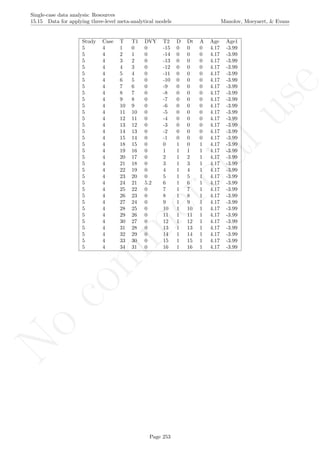
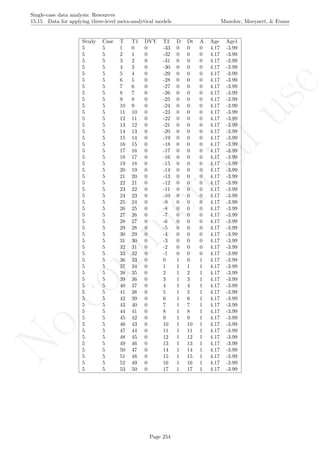
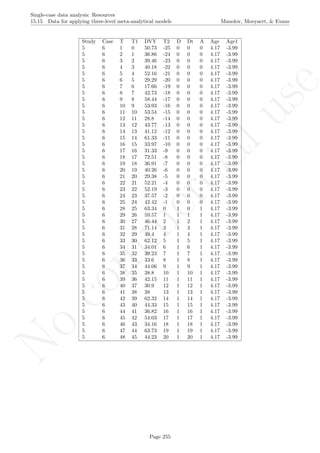
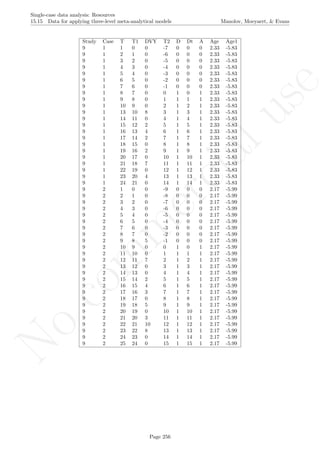
15 Appendix C: Datasets used in the tutorial 213
15.1 Dataset for the visual analysis with SCDA and for several quantitative analytical options . . . . 213
15.2 Data for using the R code for Tau-U . . . . . . . . . . . . . . . . . . . . . . . . . . . . . . . . . . 214
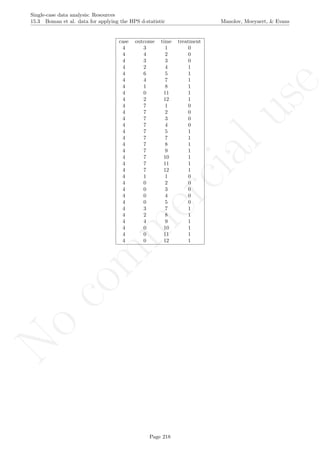
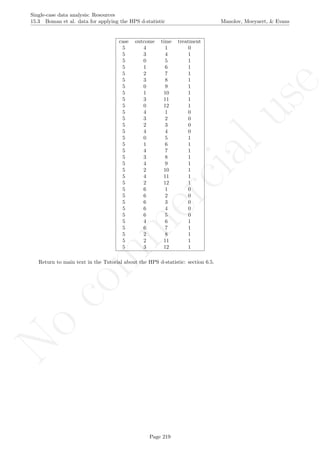
15.3 Boman et al. data for applying the HPS d-statistic . . . . . . . . . . . . . . . . . . . . . . . . . . 215
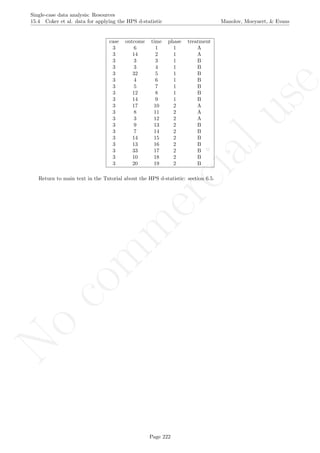
15.4 Coker et al. data for applying the HPS d-statistic . . . . . . . . . . . . . . . . . . . . . . . . . . . 220
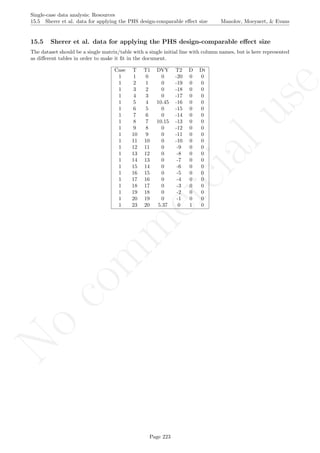
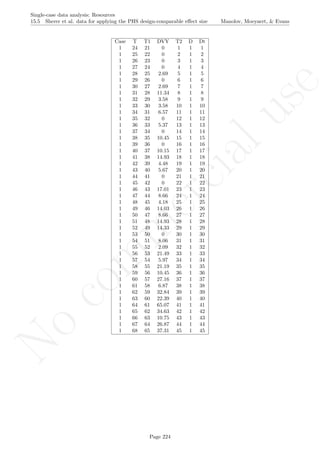
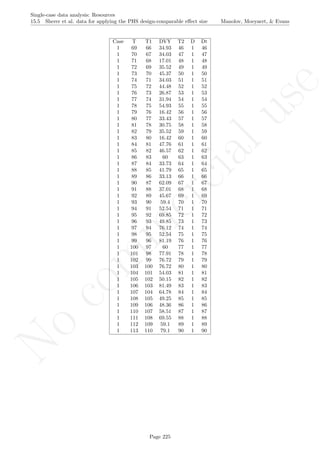
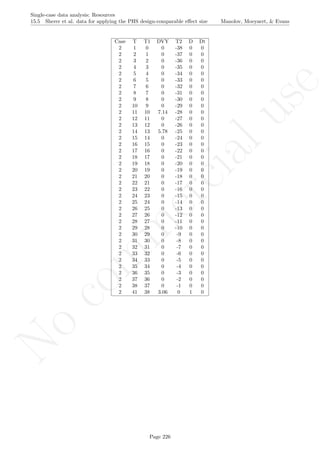
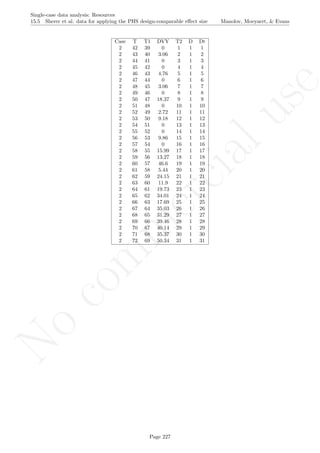
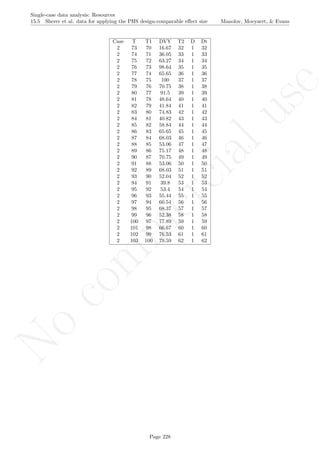
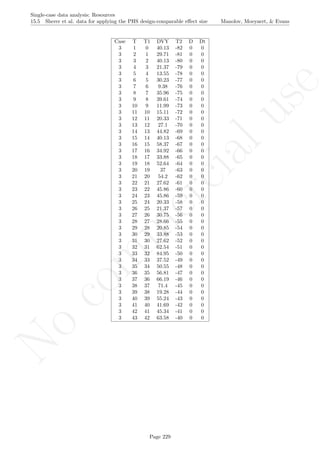
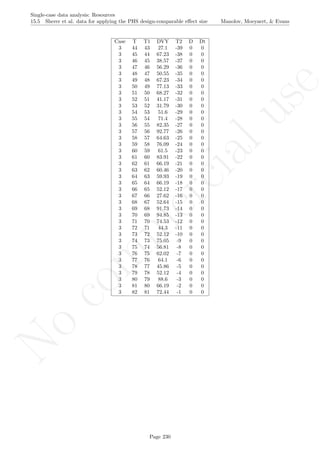
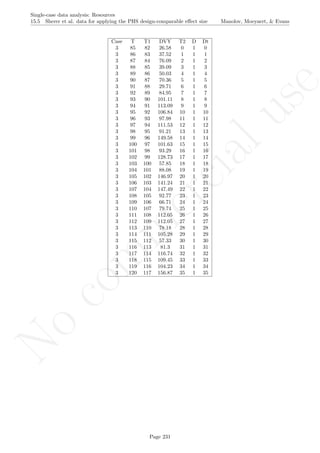
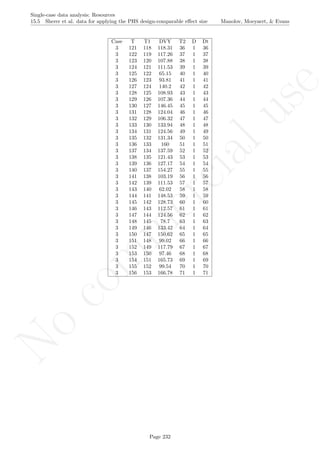
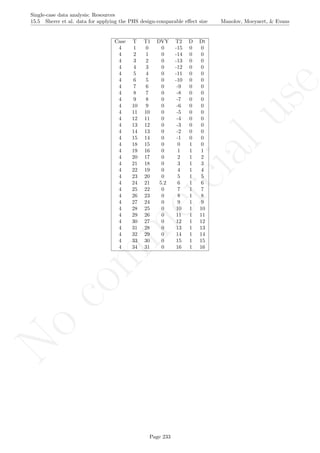
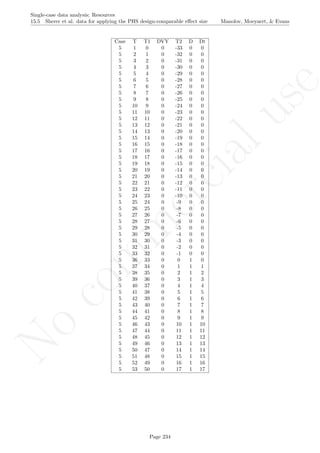
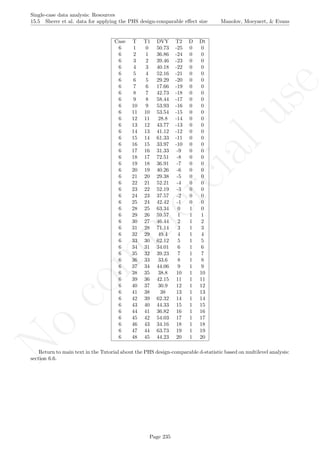
15.5 Sherer et al. data for applying the PHS design-comparable effect size . . . . . . . . . . . . . . . . 223
15.6 Data for carrying out Piecewise regression . . . . . . . . . . . . . . . . . . . . . . . . . . . . . . . 236
15.7 Data for illustrating the use of the plug-in for SLC . . . . . . . . . . . . . . . . . . . . . . . . . . 237
15.8 Matchett and Burns dataset for the extended MPD and SLC . . . . . . . . . . . . . . . . . . . . 238
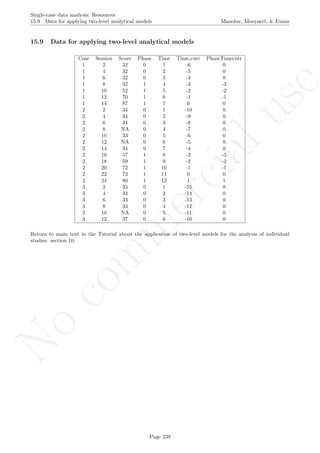
15.9 Data for applying two-level analytical models . . . . . . . . . . . . . . . . . . . . . . . . . . . . . 239
15.10Winkens et al. dataset for illustrating a randomization test on an AB design with SCDA . . . . 240
15.11Multiple baseline dataset for a randomization test with SCDA . . . . . . . . . . . . . . . . . . . . 241
15.12AB design dataset for applying simulation modeling analysis . . . . . . . . . . . . . . . . . . . . 242
15.13Data for illustrating the HPS d statistic meta-analysis . . . . . . . . . . . . . . . . . . . . . . . . 243
15.14Data for illustrating meta-analysis with MPD and SLC . . . . . . . . . . . . . . . . . . . . . . . 244
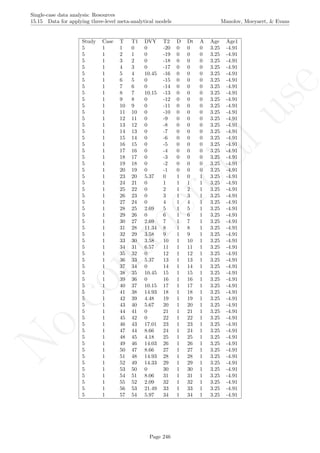
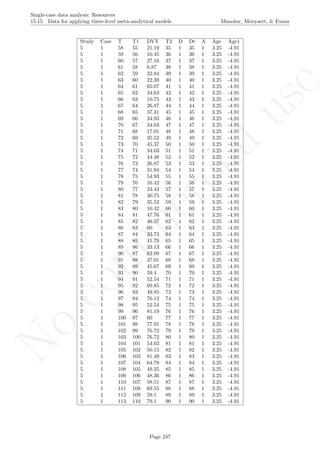
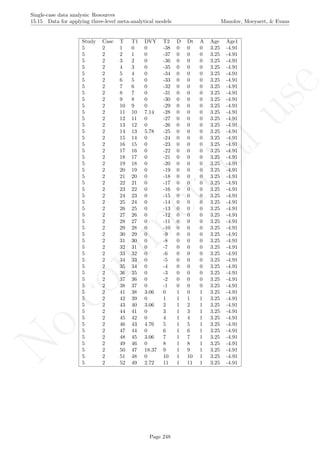
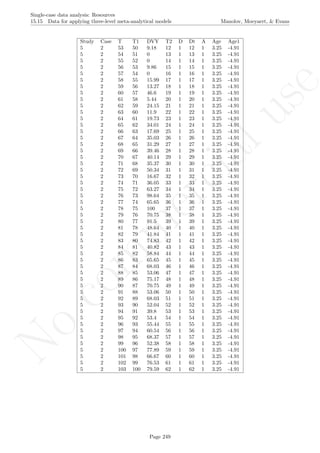
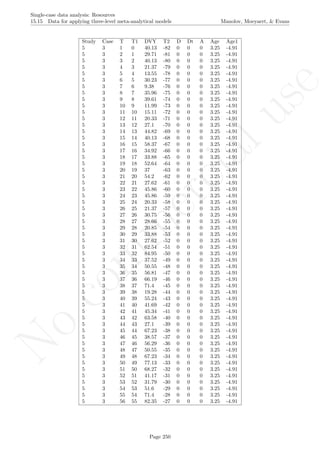
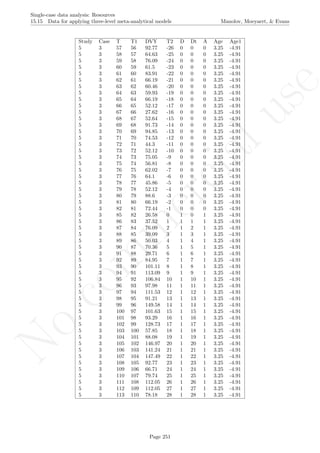
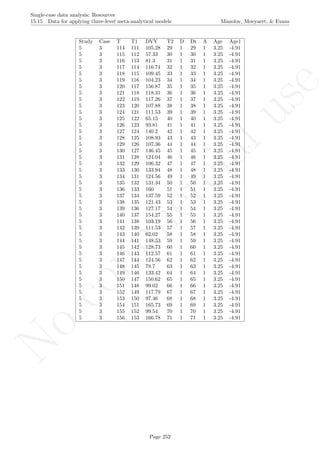
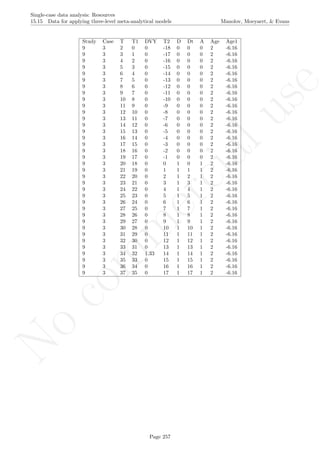
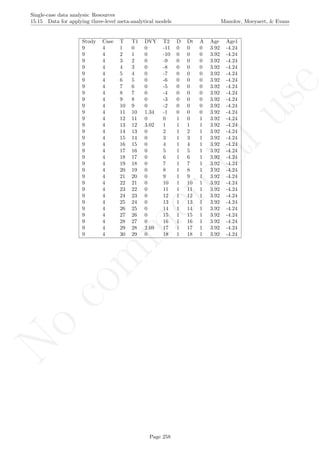
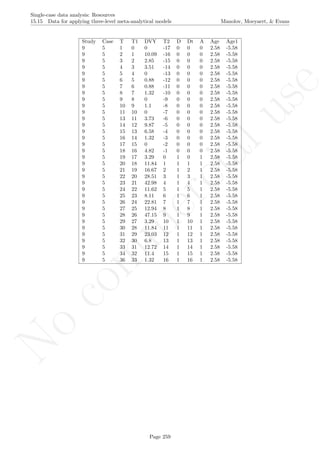
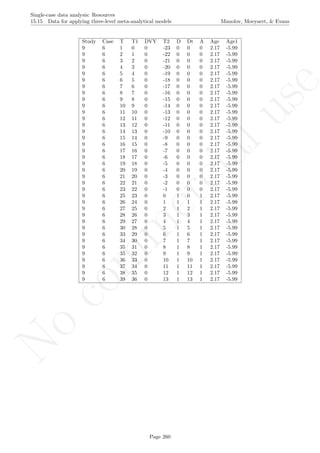
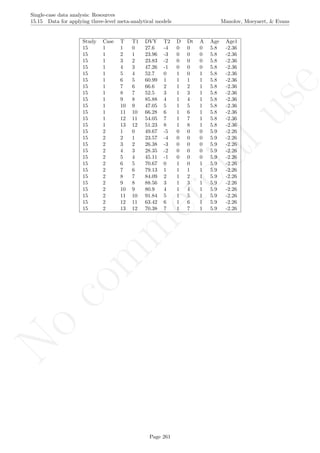
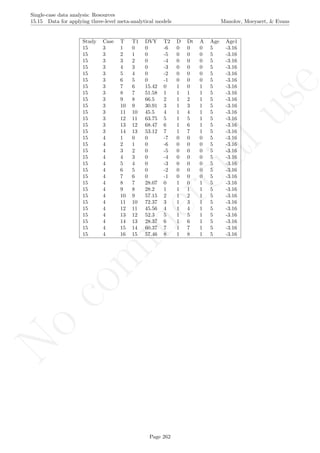
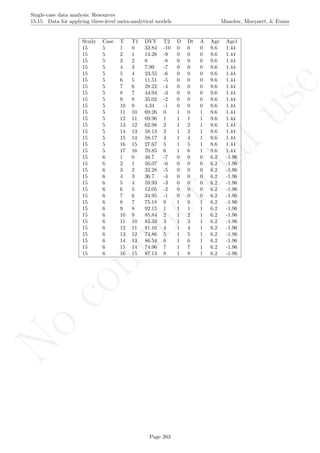
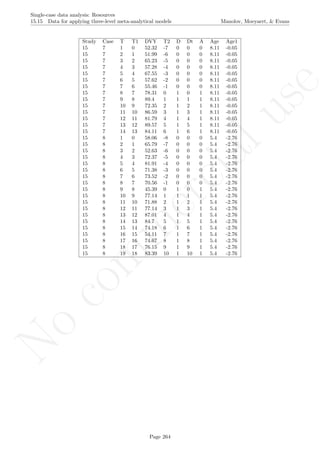
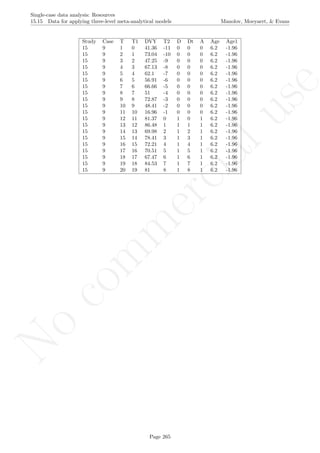
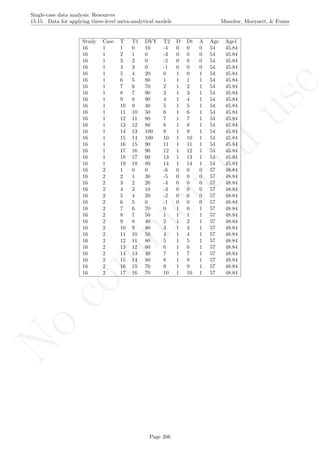
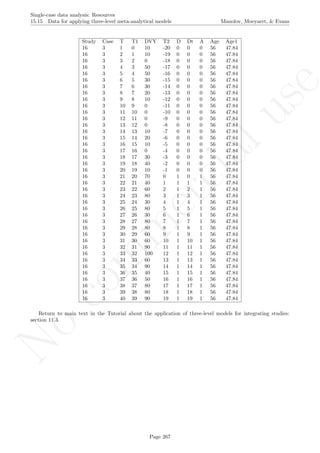
15.15Data for applying three-level meta-analytical models . . . . . . . . . . . . . . . . . . . . . . . . . 245
15.16Data for combining probabilities . . . . . . . . . . . . . . . . . . . . . . . . . . . . . . . . . . . . 268
16 Appendix D: R code created by the authors of the tutorial 269
16.1 How to use this code . . . . . . . . . . . . . . . . . . . . . . . . . . . . . . . . . . . . . . . . . . . 269
16.2 Standard deviation bands . . . . . . . . . . . . . . . . . . . . . . . . . . . . . . . . . . . . . . . . 270
16.3 Estimating and projecting baseline trend . . . . . . . . . . . . . . . . . . . . . . . . . . . . . . . . 273
16.4 Graph rotation for controlling for baseline trend . . . . . . . . . . . . . . . . . . . . . . . . . . . 278
16.5 Pairwise data overlap . . . . . . . . . . . . . . . . . . . . . . . . . . . . . . . . . . . . . . . . . . . 283
16.6 Percentage of data points exceeding median trend . . . . . . . . . . . . . . . . . . . . . . . . . . . 286
16.7 Percentage of nonoverlapping corrected data . . . . . . . . . . . . . . . . . . . . . . . . . . . . . . 290
16.8 Percentage of zero data . . . . . . . . . . . . . . . . . . . . . . . . . . . . . . . . . . . . . . . . . 293
16.9 Percentage change index . . . . . . . . . . . . . . . . . . . . . . . . . . . . . . . . . . . . . . . . . 295
16.10Ordinary least squares regression analysis . . . . . . . . . . . . . . . . . . . . . . . . . . . . . . . 298
16.11Piecewise regression analysis . . . . . . . . . . . . . . . . . . . . . . . . . . . . . . . . . . . . . . . 301
16.12Generalized least squares regression analysis . . . . . . . . . . . . . . . . . . . . . . . . . . . . . . 306
16.13Mean phase difference - original version (2013) . . . . . . . . . . . . . . . . . . . . . . . . . . . . 313
16.14Mean phase difference - percentage version (2015) . . . . . . . . . . . . . . . . . . . . . . . . . . . 316
16.15Mean phase difference - standardized version (2015) . . . . . . . . . . . . . . . . . . . . . . . . . 324
16.16Slope and level change - original version (2010) . . . . . . . . . . . . . . . . . . . . . . . . . . . . 331
16.17Slope and level change - percentage version (2015) . . . . . . . . . . . . . . . . . . . . . . . . . . 335
16.18Slope and level change - standardized version (2015) . . . . . . . . . . . . . . . . . . . . . . . . . 344
16.19Maximal reference approach: Estimating probabilities . . . . . . . . . . . . . . . . . . . . . . . . 352
16.20Maximal reference approach: Combining probabilities . . . . . . . . . . . . . . . . . . . . . . . . 376
16.21Two-level models for data analysis . . . . . . . . . . . . . . . . . . . . . . . . . . . . . . . . . . . 378
16.22Meta-analysis using the SCED-specific standardized mean difference . . . . . . . . . . . . . . . . 388
16.23Meta-analysis using the MPD and SLC . . . . . . . . . . . . . . . . . . . . . . . . . . . . . . . . 391
16.24Three-level model for meta-analysis . . . . . . . . . . . . . . . . . . . . . . . . . . . . . . . . . . . 394
No
com
m
ercialuse
Single-case data analysis: Resources
1.0 Aim, scope and structure of the document Manolov, Moeyaert, & Evans
1 Aim, scope and structure of the document
The present document was conceived as a brief guide to resources that practitioners and applied researchers can
use when they are facing the task of analysing single-case experimental designs (SCED) data. The document
should only be considered as a pointer rather than a detailed manual, and therefore we recommend that the
original works of the proponents of the different analytical options are consulted and read in conjunction with
this guide. Several additional comments are needed. First, this document is not intended to be comprehensive
guide and not all possible analytical techniques are included. Rather we have focussed on procedures that
can be implemented in either widely available software such as Excel R
or, in most cases, the open source R
platform. Second, the document is intended to be provisional and will hopefully be extended with more tech-
niques and software implementations in time. Third, the illustrations of the analytical tools mainly include the
simplest design structure AB, given that most proposals were made in this context. However, some techniques
(d-statistic, randomization test, multilevel models) are applicable to more appropriate design structures (e.g.,
ABAB and multiple baseline) and the illustrations focus on such designs to make that broader applicability
clear. Fourth, with the step-by-step descriptions provided we do not suggest that these steps are the only way
to run the analyses. Finally, any potential errors in the use of the software should be attributed to the first
author of this document (R. Manolov) and not necessarily to the authors/proponents of the procedures or to
the creators of the software. Therefore, feedback from authors, proponents, or software creators is welcome in
order to improve subsequent versions of this document.
For each of the analytical alternatives, the corresponding section includes the following information:
• Name of the technique
• Authors/proponents of the technique and suggested readings
• Software that can be used and its author
• How the software can be obtained
• How the analysis can be run to obtain the results
• How to interpret the results.
We have worked with Windows as operative system. It is possible to experience some issues with: (a)
R-Commander (not expected for the code), when using Mac OS; (b) R packages (not expected for the code),
due to uneven updates of R, R-Commander, and the packages, when using either Windows or Mac. Finally,
we encourage practitioners and applied researchers to work with the software themselves in conjunction with
consulting the suggested readings both for running the analyses and interpreting the results.
Page 2
No
com
m
ercialuse
Single-case data analysis: Resources
2.0 Getting started with R and R-Commander Manolov, Moeyaert, & Evans
2 Getting started with R and R-Commander
2.1 Installing and loading
Most of the analytical techniques can currently be applied using the open source platform R and its package
called Rcmdr, which is an abbreviation for R-Commander. More information about R is available in section
13 of the present document and also in John Verzani’s material at http://cran.r-project.org/doc/contrib/
Verzani-SimpleR.pdf. More information about R-Commander is available in section 14 of the present docu-
ment and also in the plug-in’s creator John Fox material at http://socserv.socsci.mcmaster.ca/jfox/Misc/
Rcmdr/Getting-Started-with-the-Rcmdr.pdf). R can be downloaded from: http://cran.r-project.org.
Page 3
No
com
m
ercialuse
Single-case data analysis: Resources
2.1 Installing and loading Manolov, Moeyaert, & Evans
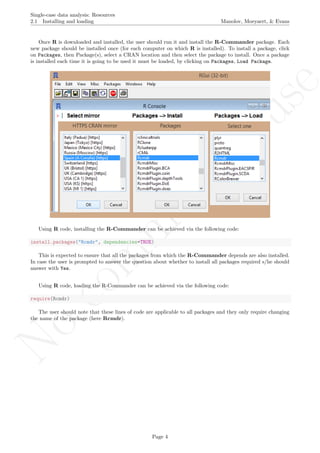
Once R is downloaded and installed, the user should run it and install the R-Commander package. Each
new package should be installed once (for each computer on which R is installed). To install a package, click
on Packages, then Package(s), select a CRAN location and then select the package to install. Once a package
is installed each time it is going to be used it must be loaded, by clicking on Packages, Load Package.
Using R code, installing the R-Commander can be achieved via the following code:
install.packages("Rcmdr", dependencies=TRUE)
This is expected to ensure that all the packages from which the R-Commander depends are also installed.
In case the user is prompted to answer the question about whether to install all packages required s/he should
answer with Yes.
Using R code, loading the R-Commander can be achieved via the following code:
require(Rcmdr)
The user should note that these lines of code are applicable to all packages and they only require changing
the name of the package (here Rcmdr).
Page 4
No
com
m
ercialuse
Single-case data analysis: Resources
2.2 Working with datasets Manolov, Moeyaert, & Evans
2.2 Working with datasets
Before we illustrate how R and its packages can be used for SCED data analysis, it is necessary to discuss
some specific issues regarding the input of data. First, given that the software described in this tutorial has
been created by several different authors, the way the data are organized and the type of file in which the data
are to be stored is not exactly the same for all analytical techniques. This is why the user is guided regarding
the creation and loading of data files. Second, the SCDA plug-in (see section Visual analysis with the SCDA
package), the scdhlm package (see section 6.5), and the R code for Tau-U require loading the data, but it is
not very easy to manipulate complex data structures directly in R or in R-Commander. For that purpose,
we recommend users to create their files using a program similar to Excel R
and then saving the file in the
appropriate way (keeping the format and leaving out any incompatible features, e.g., multiple worksheets). An
example is shown below:
Third, most R codes described here require that the user enter the data before copying the code and pasting
in the R console. Data are entered within brackets ( ) and separated by commas ,
code_data <- c(4,7,5,6,8,10,9,7,9)
The user will also be asked to specify the number of baseline measurements included in the dataset. This
can be done entering the corresponding number after the <- sign
n_a <- 4
Finally, in some cases it may be necessary to specify further instructions that the code is designed to interpret,
such as the aim of the intervention. This is done entering the instruction within quotation marks " " after the
<- sign, as shown below.
aim <- "increase"
Page 5
No
com
m
ercialuse
Single-case data analysis: Resources
2.2 Working with datasets Manolov, Moeyaert, & Evans
Along the examples of R code the user will also see that for loading data in R directly, without the use of
R-Commander, we use R code. For instance, for the data to be used by the SCDA plug-in (section 3.1), the
data files are not supposed to include headers (column names) and the separators between columns are blank
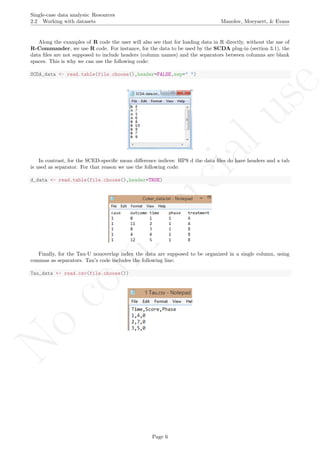
spaces. This is why we can use the following code:
SCDA_data <- read.table(file.choose(),header=FALSE,sep=" ")
In contrast, for the SCED-specific mean difference indices: HPS d the data files do have headers and a tab
is used as separator. For that reason we use the following code:
d_data <- read.table(file.choose(),header=TRUE)
Finally, for the Tau-U nonoverlap index the data are supposed to be organized in a single column, using
commas as separators. Tau’s code includes the following line:
Tau_data <- read.csv(file.choose())
Page 6
No
com
m
ercialuse
Single-case data analysis: Resources
2.2 Working with datasets Manolov, Moeyaert, & Evans
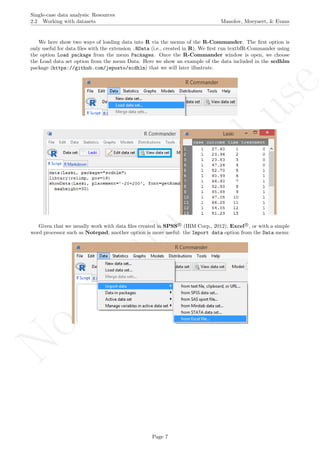
We here show two ways of loading data into R via the menus of the R-Commander. The first option is
only useful for data files with the extension .RData (i.e., created in R). We first run textbfR-Commander using
the option Load package from the menu Packages. Once the R-Commander window is open, we choose
the Load data set option from the menu Data. Here we show an example of the data included in the scdhlm
package (https://github.com/jepusto/scdhlm) that we will later illustrate.
Given that we usually work with data files created in SPSS R
(IBM Corp., 2012), Excel R
, or with a simple
word processor such as Notepad, another option is more useful: the Import data option from the Data menu:
Page 7
No
com
m
ercialuse
Single-case data analysis: Resources
2.3 Working with R code Manolov, Moeyaert, & Evans
2.3 Working with R code
In the following chapters the user will see that we recommend opening the R code files with a common program
such as Notepad, as these are simple text files and we consider that Notepad (or similar) is the most straight-
forward option. Nevertheless, other more specialized ways of dealing with the code exist: we here mention only
two - text editors that recognize code and RStudio, which not only recognizes but also executes code and
allows obtaining numerical and graphical results, as well as opening help documentation.
If the file is opened via Notepad, its appearance of an excerpt of the code is as follows:
The steps to be followed for using the code are:
1. introduce the necessary modifications - for instance, enter the measurements separated by commas or
locate the data file after a window pops up
2. select all the code
3. use the Copy option
4. open R
5. paste all the code in the R console
Page 8
No
com
m
ercialuse
Single-case data analysis: Resources
2.3 Working with R code Manolov, Moeyaert, & Evans
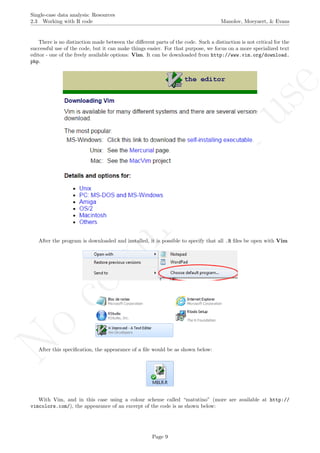
There is no distinction made between the different parts of the code. Such a distinction is not critical for the
successful use of the code, but it can make things easier. For that purpose, we focus on a more specialized text
editor - one of the freely available options: Vim. It can be downloaded from http://www.vim.org/download.
php.
After the program is downloaded and installed, it is possible to specify that all .R files be open with Vim
After this specification, the appearance of a file would be as shown below:
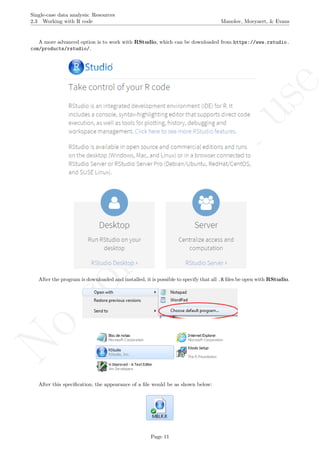
With Vim, and in this case using a colour scheme called “matutino” (more are available at http://
vimcolors.com/), the appearance of an excerpt of the code is as shown below:
Page 9
No
com
m
ercialuse
Single-case data analysis: Resources
2.3 Working with R code Manolov, Moeyaert, & Evans
It can be seen that the text, preceded by the number or hash sign #, is marked in blue. In this way it is
separated from the code itself, marked in black (except for numbers, categories in quotation marks and recog-
nised functions). Moreover, this colour scheme marks further numbers, values in brackets and labels with a
font colour. This makes easier identify the parts that user has to modify: the values in brackets after score
<- c, the number of baseline phase measurements after n a <- and the purpose of the intervention after aim <-.
In any case, working with the code is the same with Notepad and with Vim and it entails the same 5 steps
presented above.
Page 10
No
com
m
ercialuse
Single-case data analysis: Resources
2.3 Working with R code Manolov, Moeyaert, & Evans
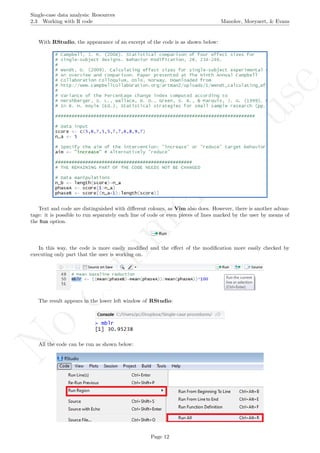
A more advanced option is to work with RStudio, which can be downloaded from https://www.rstudio.
com/products/rstudio/.
After the program is downloaded and installed, it is possible to specify that all .R files be open with RStudio.
After this specification, the appearance of a file would be as shown below:
Page 11
No
com
m
ercialuse
Single-case data analysis: Resources
2.3 Working with R code Manolov, Moeyaert, & Evans
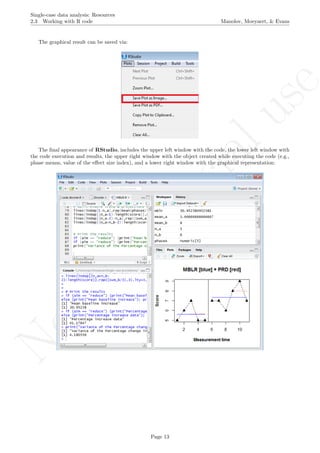
With RStudio, the appearance of an excerpt of the code is as shown below:
Text and code are distinguished with different colours, as Vim also does. However, there is another advan-
tage: it is possible to run separately each line of code or even pieces of lines marked by the user by means of
the Run option.
In this way, the code is more easily modified and the effect of the modification more easily checked by
executing only part that the user is working on.
The result appears in the lower left window of RStudio:
All the code can be run as shown below:
Page 12
No
com
m
ercialuse
Single-case data analysis: Resources
2.3 Working with R code Manolov, Moeyaert, & Evans
The graphical result can be saved via:
The final appearance of RStudio, includes the upper left window with the code, the lower left window with
the code execution and results, the upper right window with the object created while executing the code (e.g.,
phase means, value of the effect size index), and a lower right window with the graphical representation:
Page 13
No
com
m
ercialuse
Single-case data analysis: Resources
3.0 Tools for visual analysis Manolov, Moeyaert, & Evans
3 Tools for visual analysis
In this section we will review two options using the R platform, but the interested reader can also check the
training protocol for visual analysis available at www.singlecase.org (developed by Swoboda, Kratochwill,
Horner, Levin, and Albin; copyright of the site: Hoselton and Horner).
Page 14
No
com
m
ercialuse
Single-case data analysis: Resources
3.1 Visual analysis with the SCDA package Manolov, Moeyaert, & Evans
3.1 Visual analysis with the SCDA package
Name of the technique: Visual analysis with the SCDA package
Authors and suggested readings: Visual analysis is described in the What Works Clearinghouse techni-
cal documentation about SCED (Kratochwill et al., 2010) as well as major SCED methodology textbooks and
specifically in Gast and Spriggs (2010) . The use of the SCDA plug-in for visual analysis is explained in Bult´e
and Onghena (2012).
Software that can be used and its author: The SCDA is a plug-in for R-Commander and was devel-
oped as part of the doctoral dissertation of Isis Bult´e (Bult´e & Onghena, 2013) and is currently maintained by
Bart Michiels (bart.michiels at ppw.kuleuven.be) from KU Leuven, Belgium.
How to obtain the software: The SCDA (version 1.1) is available at the R website http://cran.
r-project.org/web/packages/RcmdrPlugin.SCDA/index.html and can also be installed directly from the
R console.
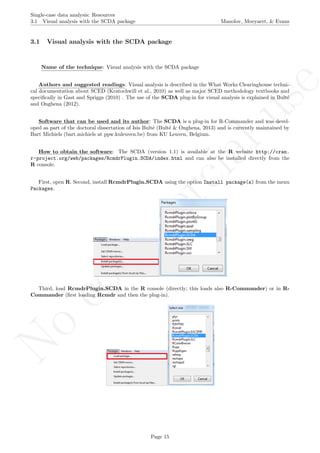
First, open R. Second, install RcmdrPlugin.SCDA using the option Install package(s) from the menu
Packages.
Third, load RcmdrPlugin.SCDA in the R console (directly; this loads also R-Commander) or in R-
Commander (first loading Rcmdr and then the plug-in).
Page 15
No
com
m
ercialuse
Single-case data analysis: Resources
3.1 Visual analysis with the SCDA package Manolov, Moeyaert, & Evans
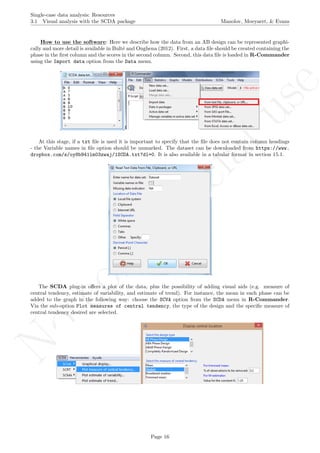
How to use the software: Here we describe how the data from an AB design can be represented graphi-
cally and more detail is available in Bult´e and Onghena (2012). First, a data file should be created containing the
phase in the first column and the scores in the second column. Second, this data file is loaded in R-Commander
using the Import data option from the Data menu.
At this stage, if a txt file is used it is important to specify that the file does not contain column headings
- the Variable names in file option should be unmarked. The dataset can be downloaded from https://www.
dropbox.com/s/oy8b941lm03zwaj/1SCDA.txt?dl=0. It is also available in a tabular format in section 15.1.
The SCDA plug-in offers a plot of the data, plus the possibility of adding visual aids (e.g. measure of
central tendency, estimate of variability, and estimate of trend). For instance, the mean in each phase can be
added to the graph in the following way: choose the SCVA option from the SCDA menu in R-Commander.
Via the sub-option Plot measures of central tendency, the type of the design and the specific measure of
central tendency desired are selected.
Page 16
No
com
m
ercialuse
Single-case data analysis: Resources
3.1 Visual analysis with the SCDA package Manolov, Moeyaert, & Evans
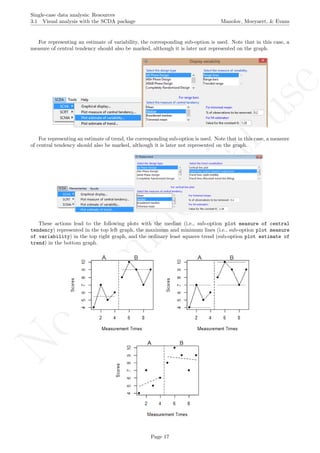
For representing an estimate of variability, the corresponding sub-option is used. Note that in this case, a
measure of central tendency should also be marked, although it is later not represented on the graph.
For representing an estimate of trend, the corresponding sub-option is used. Note that in this case, a measure
of central tendency should also be marked, although it is later not represented on the graph.
These actions lead to the following plots with the median (i.e., sub-option plot measure of central
tendency) represented in the top left graph, the maximum and minimum lines (i.e., sub-option plot measure
of variability) in the top right graph, and the ordinary least squares trend (sub-option plot estimate of
trend) in the bottom graph.
Page 17
No
com
m
ercialuse
Single-case data analysis: Resources
3.1 Visual analysis with the SCDA package Manolov, Moeyaert, & Evans
How to interpret the results: The upper left plot suggests a change in level, whereas the upper right plot
indicates that the amount of data variability is similar across phase and also that overlap is minimal. The lower
plot shows that there is a certain change in slope (from increasing to decreasing), although the measurements
are not very well represented by the trend lines, due to data variability.
An estimate of central tendency such as the median can be especially useful when using the Percentage of
data points exceeding the median as a quantification, as it would make easier the joint use of visual analysis
and this index. An estimate of trend can be relevant when the researcher suspects that a change in slope has
taken place and is willing to further explore this option. Such an option can also be explored projecting the
baseline trend as described in section 3.3. Finally, it is also possible to represent estimates of variability, such
as range lines, which are especially relevant when using the Percentage of nonoverlapping data that uses as a
reference the best (minimal or maximal) baseline measurement.
Page 18
No
com
m
ercialuse
Single-case data analysis: Resources
3.2 Using standard deviation bands as visual aids Manolov, Moeyaert, & Evans
3.2 Using standard deviation bands as visual aids
Name of the technique: Using standard deviation bands as visual aids
Authors and suggested readings: The use of standard deviation bands arises from statistical process
control (Hansen & Gare, 1987), which has been extensively applied in industry when controlling the quality
of products. The graphical representations are known as Shewhart charts and their use has also been recom-
mended for single-case data (Callahan & Barisa, 2005). Pfadt and Wheeler (1995) review the following rulkes
indicating that the scores in the intervention phase are different than expected by baseline phase variability:
(a) a single point that falls outside the three standard deviations (SD) control limits; (b) two of three points
that fall on the same side of, and more than two-SD limits away from, the central line; (c) at least four out of
five successive points fall on the same side of, and more than one SD unit away from, the central line; (d) at
least eight consecutive values or 12 of 14 successive points fall on the same side of the central line.
We recommend using this tool as a visual (not statistical) aid when baseline data shown no clear trend.
When trend is present, researchers can use the visual aid described in the next section (i.e., estimating and
projecting baseline trend). In constrast, a related statistical tool with appropriate Type I error rates has been
suggested by Fisher, Kelley, and Lomas (2003).
Software that can be used and its author: Statistical process control has been incorporated in the R
package called qcc (http://cran.r-project.org/web/packages/qcc/index.html, for further detail check
http://stat.unipg.it/~luca/Rnews_2004-1-pag11-17.pdf). Here we will focus on the R code created by
R. Manolov, as it is specific to single-case data and more intuitive.
How to obtain the software: The R code for constructing the standard deviations bands is available at
https://dl.dropboxusercontent.com/s/elhy454ldf8pij6/SD_band.R and also in this document in section
16.2.
When the URL is open, the R code appears (or can be downloaded via https://www.dropbox.com/s/
elhy454ldf8pij6/SD_band.R?dl=0). It is a text file that can be copied in a word processor such as Notepad,
given that it is important to change the input data before pasting the code in R. Only the part of the code
marked below in blue has to be changed, that is, the user has to input the scores for both phases and specify
the number of baseline phase measurements. A further modification refers to the rule (multiplication factor for
the standard deviation) for building the limits; this modification is optional, not compulsory.
Page 19
No
com
m
ercialuse
Single-case data analysis: Resources
3.2 Using standard deviation bands as visual aids Manolov, Moeyaert, & Evans
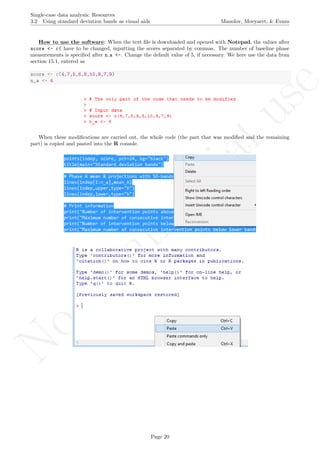
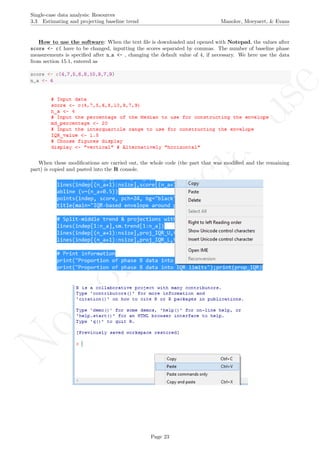
How to use the software: When the text file is downloaded and opened with Notepad, the values after
score <- c( have to be changed, inputting the scores separated by commas. The number of baseline phase
measurements is specified after n a <-. Change the default value of 5, if necessary. We here use the data from
section 15.1, entered as
score <- c(4,7,5,6,8,10,9,7,9)
n_a <- 4
When these modifications are carried out, the whole code (the part that was modified and the remaining
part) is copied and pasted into the R console.
Page 20
No
com
m
ercialuse
Single-case data analysis: Resources
3.2 Using standard deviation bands as visual aids Manolov, Moeyaert, & Evans
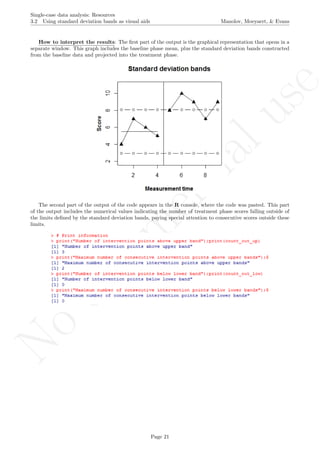
How to interpret the results: The first part of the output is the graphical representation that opens in a
separate window. This graph includes the baseline phase mean, plus the standard deviation bands constructed
from the baseline data and projected into the treatment phase.
The second part of the output of the code appears in the R console, where the code was pasted. This part
of the output includes the numerical values indicating the number of treatment phase scores falling outside of
the limits defined by the standard deviation bands, paying special attention to consecutive scores outside these
limits.
Page 21
No
com
m
ercialuse
Single-case data analysis: Resources
3.3 Estimating and projecting baseline trend Manolov, Moeyaert, & Evans
3.3 Estimating and projecting baseline trend
Name of the technique: Estimating and projecting baseline trend
Authors and suggested readings: Estimating trend in the baseline phase and projecting it into the sub-
sequent treatment phase is an inherent part of visual analysis (Gast Spriggs, 2010; Kratochwill et al., 2010).
For the tool presented here trend is estimated using the split-middle technique (Miller, 1985). The stability
of the baseline trend across conditions is assessed using the 80%-20% formula described in Gast and Spriggs
(2010) and also on the basis of the interquartile range, IQR (Tukey, 1977). The idea is that if the treatment
phase scores do not fall within the limits of the projected baseline trend a change in the behaviour has taken
place (Manolov, Sierra, Solanas, & Botella, 2014).
Software that can be used and its author: The R code reviewed here was created by R. Manolov.
How to obtain the software: The R code for estimating and projecting baseline trend is available at
https://dl.dropboxusercontent.com/s/5z9p5362bwlbj7d/ProjectTrend.R and also in this document in
section 16.3.
When the URL is open, the R code appears (or can be downloaded via https://www.dropbox.com/s/
5z9p5362bwlbj7d/ProjectTrend.R?dl=0). It is a text file that can be opened with a word processor such as
Notepad. Only the part of the code marked below in blue has to be changed, that is, the user has to input the
scores for both phases and specify the number of baseline phase measurements. Further modifications regarding
the way in which trend stability is assessed are also possible as the text marked below in green shows. Note
that these modifications are optional and not compulsory.
Page 22
No
com
m
ercialuse
Single-case data analysis: Resources
3.3 Estimating and projecting baseline trend Manolov, Moeyaert, & Evans
How to use the software: When the text file is downloaded and opened with Notepad, the values after
score <- c( have to be changed, inputting the scores separated by commas. The number of baseline phase
measurements is specified after n a <- , changing the default value of 4, if necessary. We here use the data
from section 15.1, entered as
score <- c(4,7,5,6,8,10,9,7,9)
n_a <- 4
When these modifications are carried out, the whole code (the part that was modified and the remaining
part) is copied and pasted into the R console.
Page 23
No
com
m
ercialuse
Single-case data analysis: Resources
3.3 Estimating and projecting baseline trend Manolov, Moeyaert, & Evans
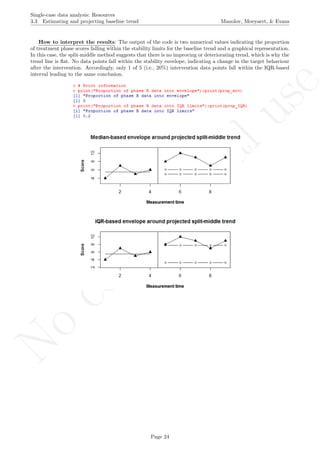
How to interpret the results: The output of the code is two numerical values indicating the proportion
of treatment phase scores falling within the stability limits for the baseline trend and a graphical representation.
In this case, the split-middle method suggests that there is no improving or deteriorating trend, which is why the
trend line is flat. No data points fall within the stability envelope, indicating a change in the target behaviour
after the intervention. Accordingly, only 1 of 5 (i.e., 20%) intervention data points fall within the IQR-based
interval leading to the same conclusion.
Page 24
No
com
m
ercialuse
Single-case data analysis: Resources
3.3 Estimating and projecting baseline trend Manolov, Moeyaert, & Evans
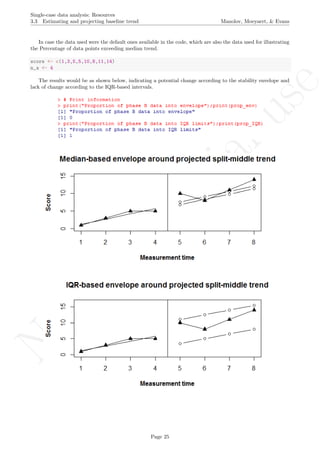
In case the data used were the default ones available in the code, which are also the data used for illustrating
the Percentage of data points exceeding median trend.
score <- c(1,3,5,5,10,8,11,14)
n_a <- 4
The results would be as shown below, indicating a potential change according to the stability envelope and
lack of change according to the IQR-based intervals.
Page 25
No
com
m
ercialuse
Single-case data analysis: Resources
3.4 Graph rotation for controlling for baseline trend Manolov, Moeyaert, & Evans
3.4 Graph rotation for controlling for baseline trend
Name of the technique: Graph rotation for controlling for baseline trend
Authors and suggested readings: The graph rotation technique was proposed by Parker, Vannest, and
Davis (2014) as a means for dealing with baseline trend ad as an alternative to regression based procedures
(e.g., Allison & Gorman, 1993). The technique involves the following steps:
1. Split the baseline into two parts (bi-split attributed to Koenig) or into three parts (tri-split attributed
to Tukey - in the code referred here the tri-split is used, AS Parker et al. state that a simulation study
showed that this method outperformed the bi-split (Johnstone & Velleman, 1985);
2. obtain the medians (Y-axis) in the first and third segments, as well as the middle points (X-axis) of this
segments;
3. draw a trend line connecting the identified points in the first and third segments;
4. decide whether to shift this trend line according to the median of the second segment - in the code referred
here, a comparison between shifting and not shifting is performed automatically and the trend fitted is
the one that is closer to a split of the data in which 50% of the measurements is above and 50% below
the trend line;
5. extend redrawn line to the last intervention phase point;
6. re-draw the vertical line separating the two phases so that angle with redrawn trend is perpendicular to
the fitted trend line;
7. rotate graph so that the fitted trend line is now horizontal;
8. perform visual analysis or retrieve the data - regarding the latter option, it can be performed using PlotDig-
itizer (http://plotdigitizer.sourceforge.net/) (as free options) or using the commercial UnGraph
(http://www.biosoft.com/w/ungraph.htm), about which evidence is available (Shadish et al., 2009);
9. further analysis can be performed - for instance, Parker and colleagues (2014) suggest using nonoverlap
measures, such as the Nonoverlap of all pairs.
Note that the tri-split used here makes possible fitting linear trend. It is not to be confused with the pos-
sibility to use running medians - another proposal by John Tukey - which is described in Bult´e and Onghena
(2012) and can also be performed using the SCDA plug-in presented in section 3.1.
Software that can be used and its author: The R code reviewed here was created by R. Manolov.
How to obtain the software: The R code for estimating baseline trend according to Tukey’s tri-split and
for rotating the graph according to this trend is available at https://www.dropbox.com/s/jxfoik5twkwc1q4/
GROT.R?dl=0 and also in this document in section 16.4.
When the URL is open, the R code appears can be downloaded. It is a text file that can be opened with a
word processor such as Notepad. Only the part of the code marked below in blue has to be changed, that is,
the user has to input the scores for both phases and specify the number of baseline phase measurements.
Page 26
No
com
m
ercialuse
Single-case data analysis: Resources
3.4 Graph rotation for controlling for baseline trend Manolov, Moeyaert, & Evans
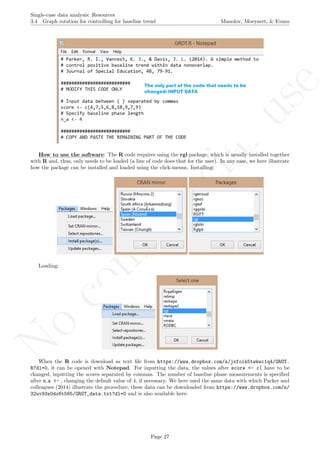
How to use the software: The R code requires using the rgl package, which is usually installed together
with R and, thus, only needs to be loaded (a line of code does that for the user). In any case, we here illustrate
how the package can be installed and loaded using the click-menus. Installing:
Loading:
When the R code is download as text file from https://www.dropbox.com/s/jxfoik5twkwc1q4/GROT.
R?dl=0, it can be opened with Notepad. For inputting the data, the values after score <- c( have to be
changed, inputting the scores separated by commas. The number of baseline phase measurements is specified
after n a <- , changing the default value of 4, if necessary. We here used the same data with which Parker and
colleagues (2014) illustrate the procedure; these data can be downloaded from https://www.dropbox.com/s/
32uv93z0do6t565/GROT_data.txt?dl=0 and is also available here:
Page 27
No
com
m
ercialuse
Single-case data analysis: Resources
3.4 Graph rotation for controlling for baseline trend Manolov, Moeyaert, & Evans
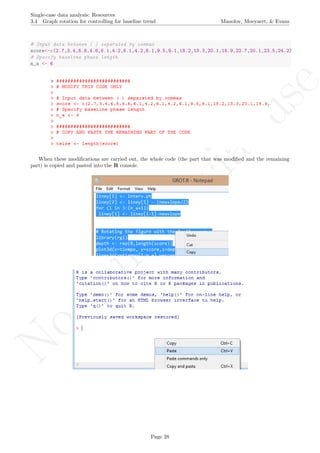
# Input data between ( ) separated by commas
score<-c(2.7,3.4,6.8,4.6,6.1,4.2,6.1,4.2,6.1,9.5,9.1,18.2,13.3,20.1,18.9,22.7,20.1,23.5,24.2)
# Specify baseline phase length
n_a <- 6
When these modifications are carried out, the whole code (the part that was modified and the remaining
part) is copied and pasted into the R console.
Page 28
No
com
m
ercialuse
Single-case data analysis: Resources
3.4 Graph rotation for controlling for baseline trend Manolov, Moeyaert, & Evans
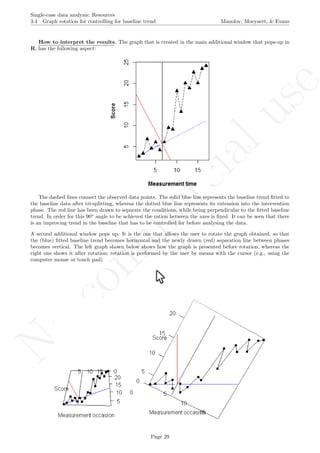
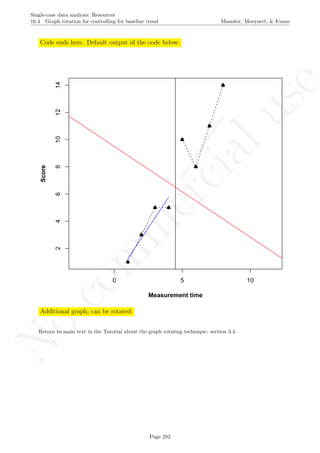
How to interpret the results: The graph that is created in the main additional window that pops-up in
R, has the following aspect:
The dashed lines connect the observed data points. The solid blue line represents the baseline trend fitted to
the baseline data after tri-splitting, whereas the dotted blue line represents its extension into the intervention
phase. The red line has been drawn to separate the conditions, while being perpendicular to the fitted baseline
trend. In order for this 90o
angle to be achieved the ration between the axes is fixed. It can be seen that there
is an improving trend in the baseline that has to be controlled for before analysing the data.
A second additional window pops up. It is the one that allows the user to rotate the graph obtained, so that
the (blue) fitted baseline trend becomes horizontal and the newly drawn (red) separation line between phases
becomes vertical. The left graph shown below shows how the graph is presented before rotation, whereas the
right one shows it after rotation; rotation is performed by the user by means with the cursor (e.g., using the
computer mouse or touch pad)
Page 29
No
com
m
ercialuse
Single-case data analysis: Resources
3.4 Graph rotation for controlling for baseline trend Manolov, Moeyaert, & Evans
With the graph obtained after rotation, visual analysis can be performed directly or quantitative analyses
can be carried out after retrieving the values from the graph, as shown below.
How to perform further manipulation with the data: First, the graph has to be saved. The ”print
screen” (PrtScr) option of the keyboard can be used. In certain keyboard, a combination of keys may be
required (e.g., pressing Fn and PrtScr simultaneously, if both are coloured in blue).
Second, the image can be pasted in any application, such as Paint.
Third, the relevant part of the image is copied and saved as a separate file.
Page 30
No
com
m
ercialuse
Single-case data analysis: Resources
3.4 Graph rotation for controlling for baseline trend Manolov, Moeyaert, & Evans
Fourth, Plot Digitizer (http://plotdigitizer.sourceforge.net/) can be installed and used clicking on
the executable file .
After running the program, the .jpg file is located and opened.
Page 31
No
com
m
ercialuse
Single-case data analysis: Resources
3.4 Graph rotation for controlling for baseline trend Manolov, Moeyaert, & Evans
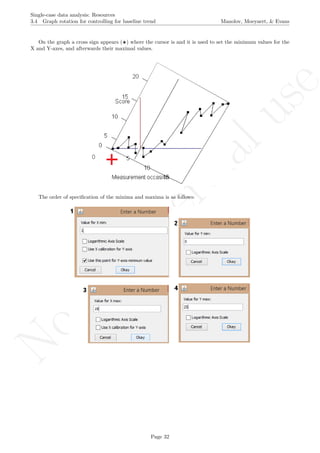
On the graph a cross sign appears ( ) where the cursor is and it is used to set the minimum values for the
X and Y-axes, and afterwards their maximal values.
The order of specification of the minima and maxima is as follows:
Page 32
No
com
m
ercialuse
Single-case data analysis: Resources
3.4 Graph rotation for controlling for baseline trend Manolov, Moeyaert, & Evans
The latter two specifications are based on the information about the number of measurements and the
maximal score obtained. Given that rotating the graph is similar to transforming the data, the exact maximal
value of the Y-axis is not critical (especially in terms of nonoverlap), given that the relative distance between
the measurements is maintained.
# Number of measurements
length(score)
## [1] 19
# Maximal value needed for rescaling
max(score)
## [1] 24.2
A name is given to the axes.
The user needs to click with the on each of the data points in order to retrieve the data and then click
Page 33
No
com
m
ercialuse
Single-case data analysis: Resources
3.4 Graph rotation for controlling for baseline trend Manolov, Moeyaert, & Evans
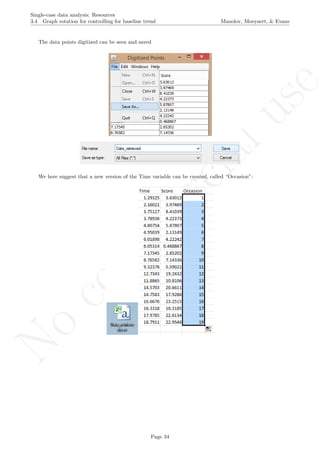
The data points digitized can be seen and saved
We here suggest that a new version of the Time variable can be created, called “Occasion”:
Page 34
No
com
m
ercialuse
Single-case data analysis: Resources
4.0 Nonoverlap indices Manolov, Moeyaert, & Evans
4 Nonoverlap indices
4.1 Percentage of nonoverlapping data
Name of the technique: Percentage of nonoverlapping data (PND)
Authors and suggested readings: The PND was proposed by Scruggs, Mastropieri, and Casto (1987);
a recent review of its strengths and limitations is offered by Scruggs and Mastropieri (2013) and Campbell (2013).
Software that can be used: The PND is implemented in the SCDA plug-in for R Commander (Bult´e
& Onghena, 2013).
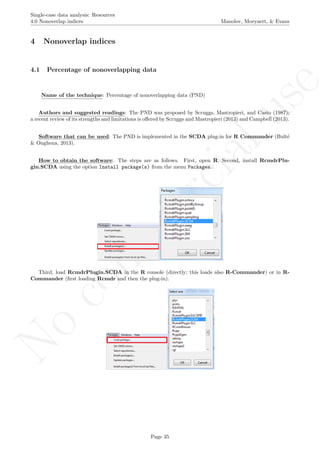
How to obtain the software: The steps are as follows. First, open R. Second, install RcmdrPlu-
gin.SCDA using the option Install package(s) from the menu Packages.
Third, load RcmdrPlugin.SCDA in the R console (directly; this loads also R-Commander) or in R-
Commander (first loading Rcmdr and then the plug-in).
Page 35
No
com
m
ercialuse
Single-case data analysis: Resources
4.1 Percentage of nonoverlapping data Manolov, Moeyaert, & Evans
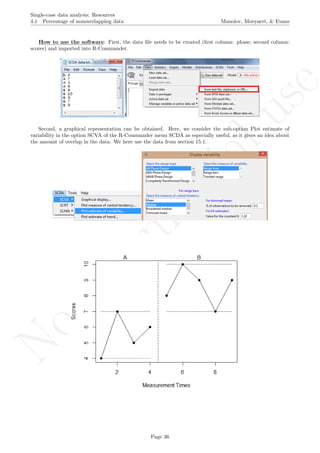
How to use the software: First, the data file needs to be created (first column: phase; second column:
scores) and imported into R-Commander.
Second, a graphical representation can be obtained. Here, we consider the sub-option Plot estimate of
variability in the option SCVA of the R-Commander menu SCDA as especially useful, as it gives an idea about
the amount of overlap in the data. We here use the data from section 15.1.
Page 36
No
com
m
ercialuse
Single-case data analysis: Resources
4.1 Percentage of nonoverlapping data Manolov, Moeyaert, & Evans
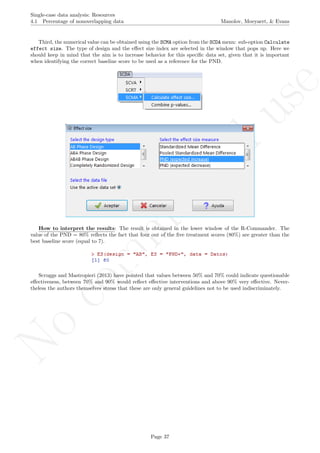
Third, the numerical value can be obtained using the SCMA option from the SCDA menu: sub-option Calculate
effect size. The type of design and the effect size index are selected in the window that pops up. Here we
should keep in mind that the aim is to increase behavior for this specific data set, given that it is important
when identifying the correct baseline score to be used as a reference for the PND.
How to interpret the results: The result is obtained in the lower window of the R-Commander. The
value of the PND = 80% reflects the fact that four out of the five treatment scores (80%) are greater than the
best baseline score (equal to 7).
Scruggs and Mastropieri (2013) have pointed that values between 50% and 70% could indicate questionable
effectiveness, between 70% and 90% would reflect effective interventions and above 90% very effective. Never-
theless the authors themselves stress that these are only general guidelines not to be used indiscriminately.
Page 37
No
com
m
ercialuse
Single-case data analysis: Resources
4.2 Percentage of data points exceeding the median Manolov, Moeyaert, & Evans
4.2 Percentage of data points exceeding the median
Name of the technique: Percentage of data points exceeding the median (PEM)
Authors and suggested readings: The PEM was proposed by Ma (2006) and tested by Parker and
Hagan-Burke (2007). PEM was suggested in order to avoid relying on a single baseline measurement, as the
Percentage of nonoverlapping data does.
Software that can be used: The PEM is implemented in the SCDA plug-in for R-Commander (Bult´e
& Onghena, 2012, 2013).
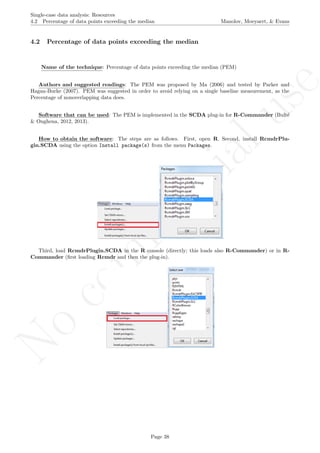
How to obtain the software: The steps are as follows. First, open R. Second, install RcmdrPlu-
gin.SCDA using the option Install package(s) from the menu Packages.
Third, load RcmdrPlugin.SCDA in the R console (directly; this loads also R-Commander) or in R-
Commander (first loading Rcmdr and then the plug-in).
Page 38
No
com
m
ercialuse
Single-case data analysis: Resources
4.2 Percentage of data points exceeding the median Manolov, Moeyaert, & Evans
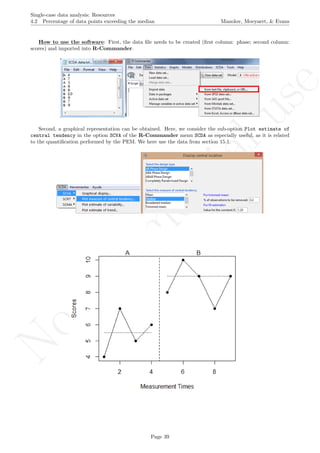
How to use the software: First, the data file needs to be created (first column: phase; second column:
scores) and imported into R-Commander.
Second, a graphical representation can be obtained. Here, we consider the sub-option Plot estimate of
central tendency in the option SCVA of the R-Commander menu SCDA as especially useful, as it is related
to the quantification performed by the PEM. We here use the data from section 15.1.
Page 39
No
com
m
ercialuse
Single-case data analysis: Resources
4.2 Percentage of data points exceeding the median Manolov, Moeyaert, & Evans
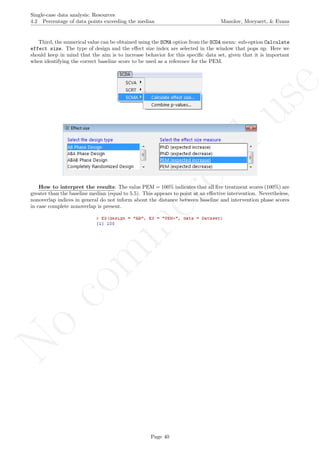
Third, the numerical value can be obtained using the SCMA option from the SCDA menu: sub-option Calculate
effect size. The type of design and the effect size index are selected in the window that pops up. Here we
should keep in mind that the aim is to increase behavior for this specific data set, given that it is important
when identifying the correct baseline score to be used as a reference for the PEM.
How to interpret the results: The value PEM = 100% indicates that all five treatment scores (100%) are
greater than the baseline median (equal to 5.5). This appears to point at an effective intervention. Nevertheless,
nonoverlap indices in general do not inform about the distance between baseline and intervention phase scores
in case complete nonoverlap is present.
Page 40
No
com
m
ercialuse
Single-case data analysis: Resources
4.3 Pairwise data overlap Manolov, Moeyaert, & Evans
4.3 Pairwise data overlap
Name of the technique: Pairwise data overlap (PDO)
Authors and suggested readings: The PDO was discussed by Wolery, Busick, Reichow, and Barton
(2010) who attribute it to Parker and Vannest from an unpublished paper from 2007 with the same name.
Actually PDO is very similar to the Nonoverlap of all pairs proposed by Parker and Vannest (2009), with the
difference being that (a) it quantifies overlap instead of nonoverlap; (b) overlap is tallied without taking ties
into account; and (d) the proportion of overlapping pairs out of the total compared is squared.
Software that can be used: The first author of this tutorial (R. Manolov) has developed R code that can
be used to implement the index.
How to obtain the software: The R code can be downloaded via https://www.dropbox.com/s/jd8a6vl0nv4v7dt/
PDO2.R?dl=0 and it is also available in this document in section 16.5. It is a text file that can be opened with
a word processor such as Notepad. Only the part of the code marked below in blue has to be changed.
How to use the software: When the text file is downloaded and opened with Notepad, the scores are
inputted after score <- c( separating them by commas. The number of data points corresponding to the
baseline are specified after n a <-. Note that it is important to specify whether the aim is to increase behaviour
(the default option) or to reduce it, with the text written after aim <- within quotation marks. We here use
the data from section 15.1 aiming an increase, using the following specification
score <- c(4,7,5,6,8,10,9,7,9)
n_a <- 4
aim <- "increase"
Page 41
No
com
m
ercialuse
Single-case data analysis: Resources
4.3 Pairwise data overlap Manolov, Moeyaert, & Evans
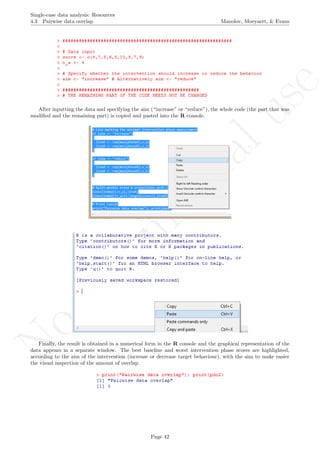
After inputting the data and specifying the aim (“increase” or “reduce”), the whole code (the part that was
modified and the remaining part) is copied and pasted into the R console.
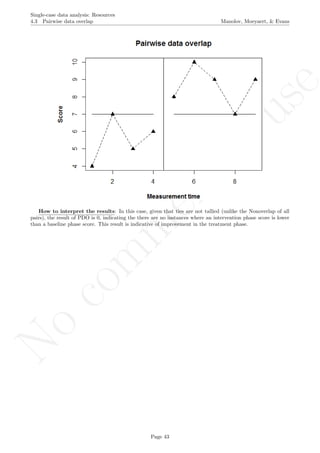
Finally, the result is obtained in a numerical form in the R console and the graphical representation of the
data appears in a separate window. The best baseline and worst intervention phase scores are highlighted,
according to the aim of the intervention (increase or decrease target behaviour), with the aim to make easier
the visual inspection of the amount of overlap.
Page 42
No
com
m
ercialuse
Single-case data analysis: Resources
4.3 Pairwise data overlap Manolov, Moeyaert, & Evans
How to interpret the results: In this case, given that ties are not tallied (unlike the Nonoverlap of all
pairs), the result of PDO is 0, indicating the there are no instances where an intervention phase score is lower
than a baseline phase score. This result is indicative of improvement in the treatment phase.
Page 43
No
com
m
ercialuse
Single-case data analysis: Resources
4.4 Nonoverlap of all pairs Manolov, Moeyaert, & Evans
4.4 Nonoverlap of all pairs
Name of the technique: Nonoverlap of all pairs (NAP)
Authors and suggested readings: The NAP was proposed by Parker and Vannest (2009) as a potential
improvement over the PND. The authors offer the details for this procedure.
Software that can be used: The NAP can be obtained via a web-based calculator available at
http://www.singlecaseresearch.org (Vannest, Parker, & Gonen, 2011).
How to obtain the software: The URL is typed and the NAP Calculator option is selected from the
Calculators menu. It is also available directly at http://www.singlecaseresearch.org/calculators/nap.
Page 44
No
com
m
ercialuse
Single-case data analysis: Resources
4.4 Nonoverlap of all pairs Manolov, Moeyaert, & Evans
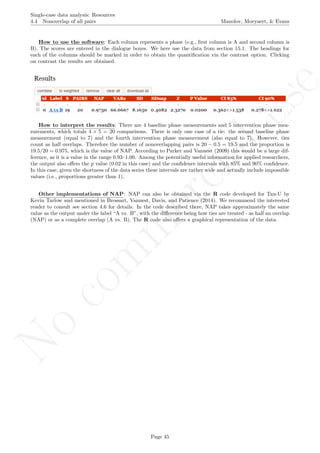
How to use the software: Each column represents a phase (e.g., first column is A and second column is
B). The scores are entered in the dialogue boxes. We here use the data from section 15.1. The headings for
each of the columns should be marked in order to obtain the quantification via the contrast option. Clicking
on contrast the results are obtained.
How to interpret the results: There are 4 baseline phase measurements and 5 intervention phase mea-
surements, which totals 4 × 5 = 20 comparisons. There is only one case of a tie: the second baseline phase
measurement (equal to 7) and the fourth intervention phase measurement (also equal to 7). However, ties
count as half overlaps. Therefore the number of nonoverlapping pairs is 20 − 0.5 = 19.5 and the proportion is
19.5/20 = 0.975, which is the value of NAP. According to Parker and Vannest (2009) this would be a large dif-
ference, as it is a value in the range 0.93–1.00. Among the potentially useful information for applied researchers,
the output also offers the p value (0.02 in this case) and the confidence intervals with 85% and 90% confidence.
In this case, given the shortness of the data series these intervals are rather wide and actually include impossible
values (i.e., proportions greater than 1).
Other implementations of NAP: NAP can also be obtained via the R code developed for Tau-U by
Kevin Tarlow and mentioned in Brossart, Vannest, Davis, and Patience (2014). We recommend the interested
reader to consult see section 4.6 for details. In the code described there, NAP takes approximately the same
value as the output under the label “A vs. B”, with the difference being how ties are treated - as half an overlap
(NAP) or as a complete overlap (A vs. B). The R code also offers a graphical representation of the data.
Page 45
No
com
m
ercialuse
Single-case data analysis: Resources
4.5 Improvement rate difference Manolov, Moeyaert, & Evans
4.5 Improvement rate difference
Name of the technique: Improvement rate difference (IRD)
Authors and suggested readings: The IRD was proposed by Parker, Vannest, and Brown (2009) as
a potential improvement over the Percentage of nonoverlapping data. The authors offer the details for this
procedure, but in short it can be said that the number of improved baseline measurements (e.g., greater than
intervention phase measurements when the aim is to increase target behaviour) is subtracted from the number
of improved treatment phase measurements (e.g., greater than baseline phase measurements when the aim is to
increase target behaviour). Thus it can be thought of as the difference between two percentages.
Software that can be used: The IRD can be obtained via a web-based calculator available at http:
//www.singlecaseresearch.org (Vannest, Parker, & Gonen, 2011). Specific R code is available from Kevin
Tarlow at http://www.ktarlow.com/stats/R/IRD.R.
How to obtain the software: The URL is typed and the IRD Calculator option is selected from the
Calculators menu. It is also available directly at http://www.singlecaseresearch.org/calculators/ird.
Page 46
No
com
m
ercialuse
Single-case data analysis: Resources
4.5 Improvement rate difference Manolov, Moeyaert, & Evans
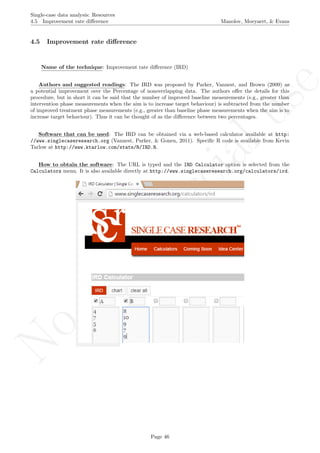
How to use the software:Each column represents a phase (e.g., first column is A and second column is
B). The scores are entered in the dialogue boxes. We here use the data from section 15.1. The headings for each
of the columns should be marked in order to obtain the quantification clicking the IRD option. The results are
presented below.
How to interpret the results: From the data it can be seen that there is only one tie (the value of 7)
but it is not counted as an improvement for the baseline phase and, thus, the improvement rate for baseline
is 0/4 = 0%. For the intervention phase, there are 4 scores that are greater than all other baseline scores and
1 that is not, thus, 4/5 = 80%. The IRD is 80% - 0% = 80%. The IRD can also be computed considering
the smallest amount of data points that need to be removed in order to achieve lack of overlap. In this case,
removing the fourth intervention phase measurement (equal to 7) would achieve this. In the present example,
eliminating the second baseline phase measurement (equal to 7) would have the same effect. The IRD value of
80% is between percentiles 50 (0.718) and 75 (0.898) from the field test reported by Parker et al. (2009) and
thus could be interpreted as a small effect.
Page 47
No
com
m
ercialuse
Single-case data analysis: Resources
4.6 Tau-U Manolov, Moeyaert, & Evans
4.6 Tau-U
Name of the technique: Tau-U
Authors and suggested readings: Tau-U was proposed by Parker, Vannest, Davis, and Sauber (2011).
The review and discussion by Brossart, Vannest, Davis, and Patience (2014) is also recommended to fully un-
derstand the procedure.
Software that can be used: The Tau-U can be calculated using the online calculator available at
http://www.singlecaseresearch.org/calculators/tau-u (see also the demo video at http://www.youtube.
com/watch?v=ElZqq_XqPxc). However, its proponents also suggest using the R code developed by Kevin Tarlow.
How to obtain the software: The R code for computing Tau-U is available from the following URLs:
https://dl.dropboxusercontent.com/u/2842869/Tau_U.R and http://www.ktarlow.com/stats/R/Tau.R.
When the URL is open, the R code appears (or can be downloaded clicking the right button of the mouse
and selecting Save As.). Once downloaded, it is a text file that can be opened with a word processor such as
Notepad or saved. The file contains instruction for working with it and we recommend consulting them.
Page 48
No
com
m
ercialuse
Single-case data analysis: Resources
4.6 Tau-U Manolov, Moeyaert, & Evans
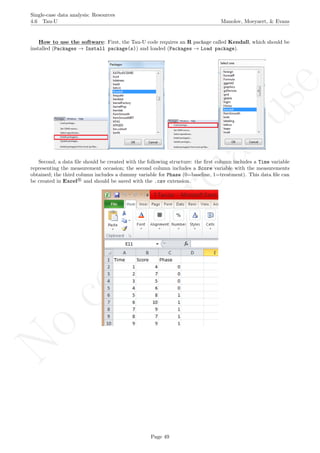
How to use the software: First, the Tau-U code requires an R package called Kendall, which should be
installed (Packages → Install package(s)) and loaded (Packages → Load package).
Second, a data file should be created with the following structure: the first column includes a Time variable
representing the measurement occasion; the second column includes a Score variable with the measurements
obtained; the third column includes a dummy variable for Phase (0=baseline, 1=treatment). This data file can
be created in Excel R
and should be saved with the .csv extension.
Page 49
No
com
m
ercialuse
Single-case data analysis: Resources
4.6 Tau-U Manolov, Moeyaert, & Evans
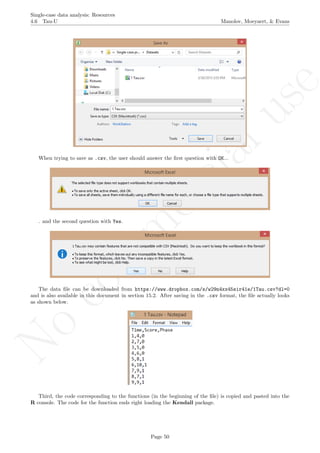
When trying to save as .csv, the user should answer the first question with OK...
. and the second question with Yes.
The data file can be downloaded from https://www.dropbox.com/s/w29n4xx45sir41e/1Tau.csv?dl=0
and is also available in this document in section 15.2. After saving in the .csv format, the file actually looks
as shown below.
Third, the code corresponding to the functions (in the beginning of the file) is copied and pasted into the
R console. The code for the function ends right loading the Kendall package.
Page 50
No
com
m
ercialuse
Single-case data analysis: Resources
4.6 Tau-U Manolov, Moeyaert, & Evans
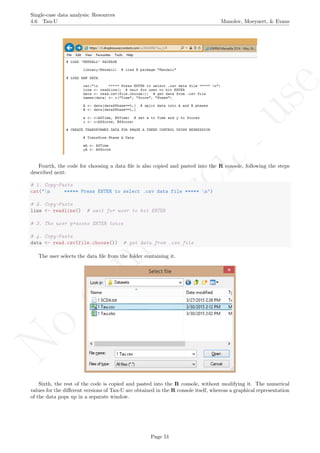
Fourth, the code for choosing a data file is also copied and pasted into the R console, following the steps
described next:
# 1. Copy-Paste
cat("n ***** Press ENTER to select .csv data file ***** n")
# 2. Copy-Paste
line <- readline() # wait for user to hit ENTER
# 3. The user presses ENTER twice
# 4. Copy-Paste
data <- read.csv(file.choose()) # get data from .csv file
The user selects the data file from the folder containing it.
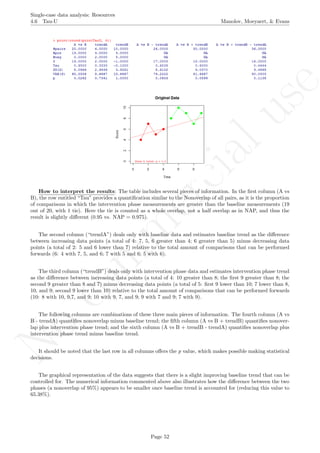
Sixth, the rest of the code is copied and pasted into the R console, without modifying it. The numerical
values for the different versions of Tau-U are obtained in the R console itself, whereas a graphical representation
of the data pops up in a separate window.
Page 51
No
com
m
ercialuse
Single-case data analysis: Resources
4.6 Tau-U Manolov, Moeyaert, & Evans
How to interpret the results: The table includes several pieces of information. In the first column (A vs
B), the row entitled “Tau” provides a quantification similar to the Nonoverlap of all pairs, as it is the proportion
of comparisons in which the intervention phase measurements are greater than the baseline measurements (19
out of 20, with 1 tie). Here the tie is counted as a whole overlap, not a half overlap as in NAP, and thus the
result is slightly different (0.95 vs. NAP = 0.975).
The second column (“trendA”) deals only with baseline data and estimates baseline trend as the difference
between increasing data points (a total of 4: 7, 5, 6 greater than 4; 6 greater than 5) minus decreasing data
points (a total of 2: 5 and 6 lower than 7) relative to the total amount of comparisons that can be performed
forwards (6: 4 with 7, 5, and 6; 7 with 5 and 6; 5 with 6).
The third column (“trendB”) deals only with intervention phase data and estimates intervention phase trend
as the difference between increasing data points (a total of 4: 10 greater than 8; the first 9 greater than 8; the
second 9 greater than 8 and 7) minus decreasing data points (a total of 5: first 9 lower than 10; 7 lower than 8,
10, and 9; second 9 lower than 10) relative to the total amount of comparisons that can be performed forwards
(10: 8 with 10, 9,7, and 9; 10 with 9, 7, and 9; 9 with 7 and 9; 7 with 9).
The following columns are combinations of these three main pieces of information. The fourth column (A vs
B - trendA) quantifies nonoverlap minus baseline trend; the fifth column (A vs B + trendB) quantifies nonover-
lap plus intervention phase trend; and the sixth column (A vs B + trendB - trendA) quantifies nonoverlap plus
intervention phase trend minus baseline trend.
It should be noted that the last row in all columns offers the p value, which makes possible making statistical
decisions.
The graphical representation of the data suggests that there is a slight improving baseline trend that can be
controlled for. The numerical information commented above also illustrates how the difference between the two
phases (a nonoverlap of 95%) appears to be smaller once baseline trend is accounted for (reducing this value to
65.38%).
Page 52
No
com
m
ercialuse
Single-case data analysis: Resources
4.7 Percentage of data points exceeding median trend Manolov, Moeyaert, & Evans
4.7 Percentage of data points exceeding median trend
Percentage of data points exceeding median trend (PEM-T)
Authors and suggested readings: The PEM-T was discussed by Wolery, Busick, Reichow, and Barton
(2010). It can be thought of as a version of the Percentage of data points exceeding the median (Ma, 2006),
but for the case in which the baseline data are not stable and thus the median is not a suitable indicator.
Software that can be used: The first author of this tutorial (R. Manolov) has developed R code that
can be used to implement the index.
How to obtain the software: The R code can be downloaded via the following URL:
https://www.dropbox.com/s/rlk3nwfoya7rm3h/PEM-T.R?dl=0 and it is also available in this document in
section 16.6. It is a text file that can be opened with a word processor such as Notepad. Only the part of the
code marked below in blue has to be changed.
How to use the software: When the text file is downloaded and opened with Notepad, the scores are
inputted after score <- c( separating them by commas. The number of data points corresponding to the
baseline are specified after n a <-. Note that it is important to specify whether the aim is to increase behaviour
(the default option) or to reduce it, with the text written after aim <- within quotation marks, as shown next.
# Enter the number of measurements separated by commas
score <- c(1,3,5,5,10,8,11,14)
# Specify the baseline phase length
n_a <- 4
# Specify the aim of the intervention with respect to the target behavior
aim <- "increase"
Page 53
No
com
m
ercialuse
Single-case data analysis: Resources
4.7 Percentage of data points exceeding median trend Manolov, Moeyaert, & Evans
After inputting the data and specifying the aim (“increase” or “reduce”), the whole code (the part that was
modified and the remaining part) is copied and pasted into theR console.
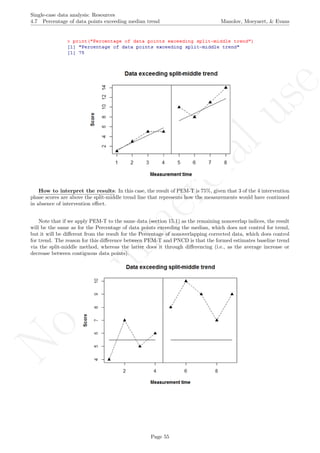
Finally, the result is obtained in a numerical form in the R console and the graphical representation of the
data appears in a separate window. The split-middle trend fitted to the baseline and its extension into the
intervention phase are depicted with a continuous line, with the aim to make easier the visual inspection of
improvement over the trend.
Page 54
No
com
m
ercialuse
Single-case data analysis: Resources
4.7 Percentage of data points exceeding median trend Manolov, Moeyaert, & Evans
How to interpret the results: In this case, the result of PEM-T is 75%, given that 3 of the 4 intervention
phase scores are above the split-middle trend line that represents how the measurements would have continued
in absence of intervention effect.
Note that if we apply PEM-T to the same data (section 15.1) as the remaining nonoverlap indices, the result
will be the same as for the Percentage of data points exceeding the median, which does not control for trend,
but it will be different from the result for the Percentage of nonoverlapping corrected data, which does control
for trend. The reason for this difference between PEM-T and PNCD is that the formed estimates baseline trend
via the split-middle method, whereas the latter does it through differencing (i.e., as the average increase or
decrease between contiguous data points).
Page 55
No
com
m
ercialuse
Single-case data analysis: Resources
4.8 Percentage of nonoverlapping corrected data Manolov, Moeyaert, & Evans
4.8 Percentage of nonoverlapping corrected data
Percentage of nonoverlapping corrected data (PNCD)
4.8b Authors and suggested readings: The PNCD was proposed by Manolov and Solanas (2009) as a potential
improvement over the Percentage of nonoverlapping data. The authors offer the details for this procedure. The
procedure for controlling baseline trend is the same as for the Slope and level change procedure.
Software that can be used: The PNCD can be calculated using R code created by the first author of
this tutorial (R. Manolov).
How to obtain the software: The R code for estimating and projecting baseline trend is available at
https://dl.dropboxusercontent.com/s/8revawnfrnrttkz/PNCD.R and in the present document in section
16.7. When the URL is open, the R code appears (or can be downloaded via https://www.dropbox.com/s/
8revawnfrnrttkz/PNCD.R?dl=0). It is a text file that can be opened with a word processor such as Notepad.
Only the part of the code marked below in blue has to be changed.
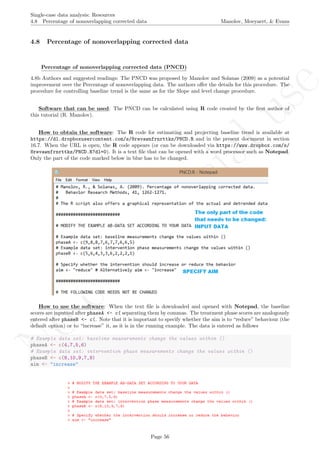
How to use the software: When the text file is downloaded and opened with Notepad, the baseline
scores are inputted after phaseA <- c( separating them by commas. The treatment phase scores are analogously
entered after phaseB <- c(. Note that it is important to specify whether the aim is to “reduce” behaviour (the
default option) or to “increase” it, as it is in the running example. The data is entered as follows
# Example data set: baseline measurements change the values within ()
phaseA <- c(4,7,5,6)
# Example data set: intervention phase measurements change the values within ()
phaseB <- c(8,10,9,7,9)
aim <- "increase"
Page 56
No
com
m
ercialuse
Single-case data analysis: Resources
4.8 Percentage of nonoverlapping corrected data Manolov, Moeyaert, & Evans
After inputting the data and specifying the aim (“increase” or “reduce”), the whole code (the part that was
modified and the remaining part) is copied and pasted into the R console.
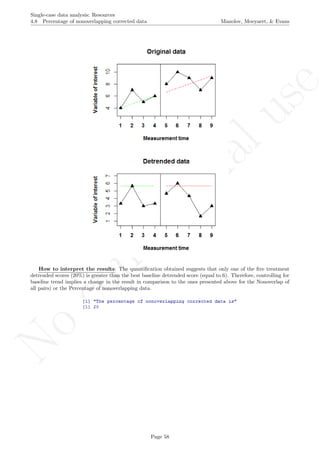
The result of running the code is a graphical representation of the original and detrended data, as well as
the value of the PNCD.
Page 57
No
com
m
ercialuse
Single-case data analysis: Resources
4.8 Percentage of nonoverlapping corrected data Manolov, Moeyaert, & Evans
How to interpret the results: The quantification obtained suggests that only one of the five treatment
detrended scores (20%) is greater than the best baseline detrended score (equal to 6). Therefore, controlling for
baseline trend implies a change in the result in comparison to the ones presented above for the Nonoverlap of
all pairs) or the Percentage of nonoverlapping data.
Page 58
No
com
m
ercialuse
Single-case data analysis: Resources
5.0 Percentage indices not quantifying overlap Manolov, Moeyaert, & Evans
5 Percentage indices not quantifying overlap
5.1 Percentage of zero data
Name of the technique: Percentage zero data (PZD)
Authors and suggested readings: The PZD was discussed by Wolery, Busick, Reichow, and Barton
(2010). It is used as a complement to the Percentage of nonoverlapping data, given the need to avoid a baseline
reaching floor level (i.e., 0) yielding a PND equal to 0, which may not always represent treatment effect correctly.
Such use is illustrated by the meta-analysis performed by Wehmeyer et al. (2006). The PZD is thus appropriate
when the aim is to reduce behavior to zero.
Software that can be used: The first author of this tutorial (R. Manolov) has developed R code that
can be used to implement the index.
How to obtain the software: The R code can be downloaded via https://www.dropbox.com/s/k57dj32gyit934g/
PZD.R?dl=0 and is also available in the present document in section 16.8. It is a text file that can be opened
with a word processor such as Notepad. Only the part of the code marked below in blue has to be changed.
How to use the software: When the text file is downloaded and opened with Notepad, the scores are
inputted after score <- c( separating them by commas. The number of data points corresponding to the
baseline are specified after n a <-.
The data to be used here is entered as follows
# Enter the number of measurements separated by commas
score <- c(9,8,8,7,6,3,2,0,0,1,0)
# Specify the baseline phase length
n_a <- 4
Page 59
No
com
m
ercialuse
Single-case data analysis: Resources
5.1 Percentage of zero data Manolov, Moeyaert, & Evans
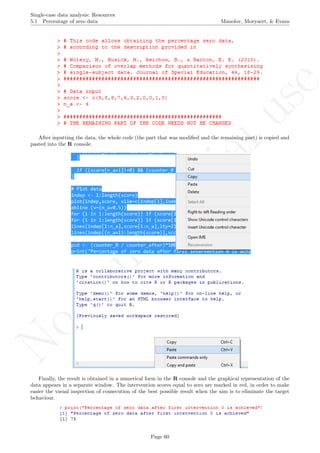
After inputting the data, the whole code (the part that was modified and the remaining part) is copied and
pasted into the R console.
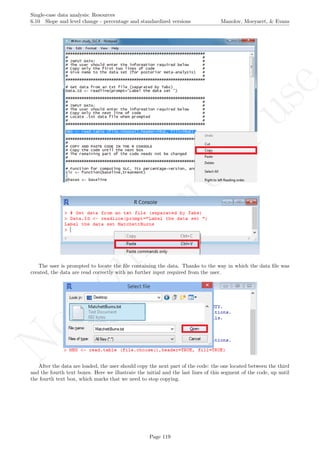
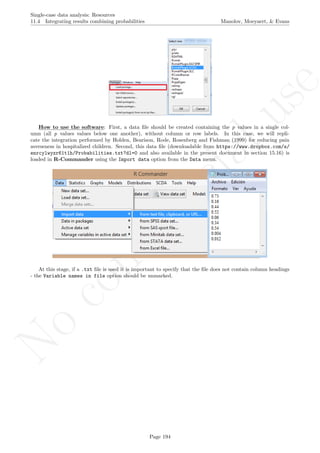
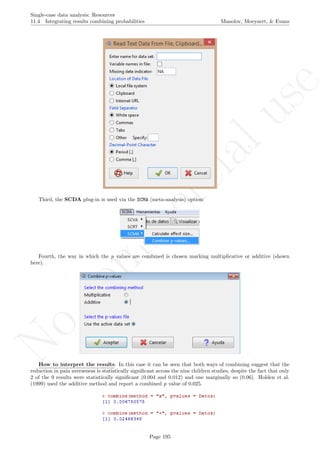
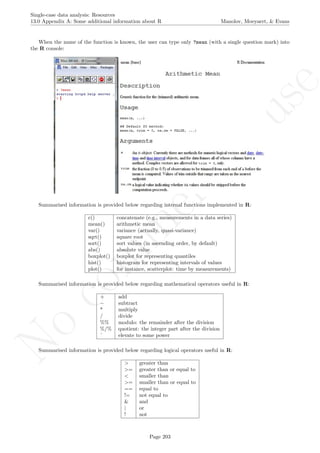
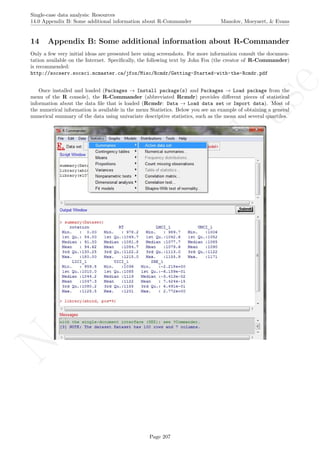
Finally, the result is obtained in a numerical form in the R console and the graphical representation of the
data appears in a separate window. The intervention scores equal to zero are marked in red, in order to make
easier the visual inspection of consecution of the best possible result when the aim is to eliminate the target
behaviour.
Page 60
No
com
m
ercialuse
Single-case data analysis: Resources
5.1 Percentage of zero data Manolov, Moeyaert, & Evans
How to interpret the results: In this case, the result of PZD is 75%, given that 3 of the 4 intervention
phase scores are above the split-middle trend line that represents how the measurements would have continued
in absence of intervention effect. A downward trend is clearly visible in the graphical representation indicating
a progressive effect of the intervention. In case such an effect is considered desirable and an immediate abrupt
change was not sought for the result can be interpreted as suggesting an effective intervention.
Page 61
No
com
m
ercialuse
Single-case data analysis: Resources
5.2 Percentage reduction data and Mean baseline reduction Manolov, Moeyaert, & Evans
5.2 Percentage reduction data and Mean baseline reduction
Name of the technique: Percentage reduction data (PRD) and Mean baseline reduction (MBLR).
Authors and suggested readings: The percentage reduction data was described by Wendt (2009), who
attributes it Campbell (2004), as a quantification of the difference between the average of the last three baseline
measurements and the last three intervention phase measurements (relative to the average of last three baseline
measurements). It is referred to as “Percentage change index” by Hershberger, Wallace, Green, and Marquis
(1999), who also provide a formula for estimating the index variance. Campbell (2004) himself uses an index
called Mean baseline reduction, in which the quantification is carried out using all measurements and not only
the last three in each phase. We here provide code for both of the mean baseline reduction and percentage
reductiondata in order to compare their results. Despite their names, the indices are also applicable to situations
in which an increase in the target behaviour is intended.
Software that can be used: The first author of this tutorial (R. Manolov) has developed R code that
can be used to implement the indices.
How to obtain the software: The R code can be downloaded via https://www.dropbox.com/s/wt1qu6g7j2ln764/
MBLR.R?dl=0 and is also available in the present document in section 16.9. It is a text file that can be opened
with a word processor such as Notepad. Only the part of the code marked below in blue has to be changed.
How to use the software: When the text file is downloaded and opened with Notepad, the scores are
inputted after score <- c( separating them by commas. The number of data points corresponding to the
baseline are specified after n a <-. It is important to specify whether the aim is to increase or reduce behaviour,
with the text written after aim <- within quotation marks, as shown:
# Enter the number of measurements separated by commas
score <- c(4,7,5,6,8,10,9,7,9)
# Specify the baseline phase length
n_a <- 4
# Specify the aim of the intervention with respect to the target behavior
aim <- "increase"
Page 62
No
com
m
ercialuse
Single-case data analysis: Resources
5.2 Percentage reduction data and Mean baseline reduction Manolov, Moeyaert, & Evans
After inputting the data and specifying the aim (“increase” or “reduce”), the whole code (the part that was
modified and the remaining part) is copied and pasted into the R console.
Finally, the result is obtained in a numerical form in the R console and the graphical representation of the
data appears in a separate window.
Page 63
No
com
m
ercialuse
Single-case data analysis: Resources
5.2 Percentage reduction data and Mean baseline reduction Manolov, Moeyaert, & Evans
How to interpret the results: Given that the user could specify the aim of the intervention, the results
are presented in terms of increase if the aim was to increase target behaviour and in terms of reduction if that
was the aim. In this case, the aim was to increase behaviour and the results are positive. It should be noted
that the difference is greater when considering all measurements (MBLR - an increase of 56% of the baseline
level) than when focussing only on the last three (PDR - an increase of 39% with respect to the final baseline
measurements).
Regarding the graphical representation, the means for the whole phases are marked with a blue continuous
line, whereas the means for the last three points in each condition are marked with a red dotted line.
Given that for PRD the variance can be estimated using Hershberger et al.’s (1999) formula V ar(PRD) =
1
s2
A
× (
s2
A+s2
B
3 + ¯xA−¯xB
2 ), we present this result here, as it is also provided by the code.
The inverse of the variance of the index can be used as weight when integrating meta-analytically the results
of several AB-comparisons (see section 11.2 for the corresponding R code).
Page 64
No
com
m
ercialuse
Single-case data analysis: Resources
6.0 Unstandardized indices and their standardized versions Manolov, Moeyaert, & Evans
6 Unstandardized indices and their standardized versions
6.1 Ordinary least squares regression analysis
Name of the technique: Ordinary least squares (OLS) regression analysis
Authors and suggested readings: OLS regression analysis is a classical statistical technique. The bases
for modelling single-case data via regression can be consulted in Huitema and McKean (2000), although the
discussion in Moeyaert, Ugille, Ferron, Beretvas, and Van Sen Noortgate (2014) about multilevel models is also
applicable (i.e., multilevel analysis is an extension of the single-level OLS). Further information is provided by
Gorsuch (1983) and Swaminathan, Rogers, Horner, Sugai, and Smolkowski (2014) and Swaminathan, Rogers,
and Horner (2014). In the current section we focus on the unstandardized difference between conditions as
presented by Swaminathan and colleagues and referred to as δAB. It is the results of the difference between
intercept and slopes of two regression lines, one fitted to each of the phases using the time variable (1, 2, .,
nA and 1, 2, ., nB, for baseline and intervention phase, respectively) as a predictor. Standardizing is achieved
by dividing the raw difference by the pooled standard deviation of the residuals from the two separate regressions.
Software that can be used: Regression analysis with the appropriate variables representing the phase,
time, and the interaction between the two can be applied using conventional statistical packages such as SPSS R
(IBM Corp., 2012), apart from using the R-Commander. However, although the main results of OLS regres-
sion can easily be obtained with these menu-driven options, the unstandardized and standardized differences
require further computation. For that purpose the first author of this document (R. Manolov) has developed R
code carrying out the regression analysis and providing the quantification.
How to obtain the software: The R code for computing the OLS-based unstandardized difference is
available at https://www.dropbox.com/s/v0see3bto1henod/OLS.R?dl=0 and is available in the present doc-
ument in section 16.10. It is a text file that can be opened with a word processor such as Notepad. Only the
part of the code marked below in blue has to be changed.
Page 65
No
com
m
ercialuse
Single-case data analysis: Resources
6.1 Ordinary least squares regression analysis Manolov, Moeyaert, & Evans
How to use the software: When the text file is downloaded and opened with Notepad, the scores are
inputted after score <- c( separating them by commas. The number of data points corresponding to the
baseline are specified after n a <-, as shown:
# Enter the number of measurements separated by commas
score <- c(4,7,5,6,8,10,9,7,9)
# Specify the baseline phase length
n_a <- 4
After inputting the data, the whole code (the part that was modified and the remaining part) is copied and
pasted into the R console.
Page 66
No
com
m
ercialuse
Single-case data analysis: Resources
6.1 Ordinary least squares regression analysis Manolov, Moeyaert, & Evans
How to interpret the results: The output is presented in numerical form in the R console. Given that
the frequency of behaviours is measured the result is also expressed in number of behaviours, with the difference
between the two conditions being equal to 0.9. This summary measure is the results of taking into account the
difference in intercept of the two regression lines (4.5 and 8.9, for baseline and intervention phase, respectively)
and the difference in slope (0.4 and −0.1, for baseline and intervention phase, respectively), with the latter also
paying attention to phase lengths.
Regarding the standardized version, it provides the information in terms of standard deviations and not
in the original measurement units of the target behaviour. In this case, the result is a difference of 0.77
standard deviations. It might be tempting to interpret a standardized difference according to Cohen’s (1992)
benchmarks, but such practice may not be justified (Parker et al., 2005). Thus, whether this difference is small
or large remains to be assessed by each professional.
The numerical result accompanied by a graphical representation of the data, the regression lines, and the
values for intercept and slope. This plot pops up as a separate window in R.
Page 67
No
com
m
ercialuse
Single-case data analysis: Resources
6.2 Piecewise regression analysis Manolov, Moeyaert, & Evans
6.2 Piecewise regression analysis
Name of the technique: Piecewise regression analysis
Authors and suggested readings: The piecewise regression approach, suggested by Center, Skiba, and
Casey (1985-1986), allows estimating simultaneously the initial baseline level (at the start of the baseline con-
dition), the trend during the baseline level, and the changes in level and slope due to the intervention. In
order to get estimates of these 4 parameters of interest, attention should be paid to parameterization of the
model (and centring of the time variables) as this determines the interpretation of the coefficients. This is
discussed in detail in Moeyaert, Ugille, Ferron, Beretvas, and Van den Noortgate (2014). Also, autocorrelation
and heterogeneous within-case variability can be modelled (Moeyaert et al., 2014). In the current section we
focus on the unstandardized estimates of the initial baseline level, the trend during the baseline, the immediate
treatment effect, the treatment effect on the time trend, and the within-case residual variance estimate. We
acknowledge that within one study, multiple cases can be involved and as a consequence standardization is
needed in order to make a fair comparison of the results across cases. Standardization for continuous outcomes
was proposed by Van den Noortgate and Onghena (2008) and validated using computer-intensive simulation
studies by Moeyaert, Ugille, Ferron, Beretvas, and Van Den Noortgate (2013). The standardization method
they recommend requires dividing the raw scores by the estimated within-case residual standard deviation ob-
tained by conducting a piecewise regression equation per case. The within-case residual standard deviation
reflects the difference in how the dependent variable is measured (and thus dividing the original raw scores by
this variability provides a method of standardizing the scores).
Software that can be used: Regression analysis with the appropriate variables representing the phase,
time, and the interaction between phase and centred time can be applied using conventional statistical packages
such as SPSS R
(IBM Corp., 2012), apart from using the R-Commander. However, the R code for simple
OLS regression needed an adaptation and therefore code has been developed by M. Moeyaert and R. Manolov.
How to obtain the software: The R code for computing the piecewise regression equation coefficients is
available at https://www.dropbox.com/s/bt9lni2n2s0rv7l/Piecewise.R?dl=0 and in the present document
in section 16.11. Despite its extension .R, it is a text file that can be opened with a word processor such as
Notepad.
How to use the software: A data file should be created with the following structure: the first column
includes a Time variable representing the measurement occasion; the second column includes a Score variable
with the measurements obtained; the third column includes a dummy variable for Phase (0=baseline, 1=treat-
ment), the fourth column represent the recoded Time1 variable (Time = 0 at the start of the baseline phase),
the fifth column represent the recoded Time2 variable (Time = 0 at the start of the treatment phase).
Before we proceed with the code a comment on design matrices, in general, and centring, in particular, is
necessary. In order to estimate both changes in level (i.e., is there an immediate treatment effect?) and treat-
ment effect on the slope, we add centred time variables. How you centre depends on your research interested
and how you define the “treatment effect”. For instance, if we centre time in the interaction effect around
the first observation of the treatment phase, then we are interested in the immediate treatment effect (i.e., the
change in outcome score between the first measurement of the treatment phase and the projected value of the
last measurement of the baseline phase). If we centre time in the interaction around the fourth observation in
the treatment phase, than the treatment effect refers to the change in outcome score between the fourth mea-
surement occasion of the treatment phase and the projected last measurement occasion of the baseline phase.
More detail about design matrix specification is available in Moeyaert, Ugille, Ferron, Beretvas, and Van Den
Noortgate (2014).
Page 68
No
com
m
ercialuse
Single-case data analysis: Resources
6.2 Piecewise regression analysis Manolov, Moeyaert, & Evans
This data file can be created in Excel R
and should be saved as a tab-delimited file with the .txt extension.
When trying to save as .txt, the user should answer Yes when following window pops up:
Page 69
No
com
m
ercialuse
Single-case data analysis: Resources
6.2 Piecewise regression analysis Manolov, Moeyaert, & Evans
The data file can be downloaded from https://www.dropbox.com/s/tvqx0r4qe6oi685/Piecewise.txt?
dl=0 and data are also available in this document in section 15.6. After saving in the .txt format, the file
actually looks as shown below.
The data can be loaded into R using the R-Commander (by first installing and loading the package
Rcmdr).
Page 70
No
com
m
ercialuse
Single-case data analysis: Resources
6.2 Piecewise regression analysis Manolov, Moeyaert, & Evans
Alternatively the data file can be located with the following command
Piecewise <- read.table(file.choose(),header=TRUE)
The code is copied and pasted into the R console, without modifying it.
The main window provides the numerical values for the initial baseline level (Intercept), the trend during the
baseline (Time1), the immediate treatment effect (Phase) and the change in slope (Phasetime2); whereasagraphicalrepresenta
Page 71
No
com
m
ercialuse
Single-case data analysis: Resources
6.2 Piecewise regression analysis Manolov, Moeyaert, & Evans
How to interpret the results: The output is presented in numerical form in the R console. The depen-
dent variable is the frequency of behaviours. The immediate treatment effect of the intervention (defined as the
difference between the first outcome score in the treatment and the last outcome score in the baseline) equals
2.3. This means that the treatment induced immediately an increase in the number of behaviours.
The change between the baseline trend and the trend during the intervention equals −0.5. As a consequence,
the number of behaviours gradually decreases across time during the intervention phase (whereas there was a
positive trend during the baseline phase).
Regarding the standardized version, it provides the information in terms of within-case residual standard
deviation and not in the original measurement units of the target behaviour. This is to make the output
comparable across cases. In this case, this result is an immediate treatment effect of 1.67 within-case residual
standard deviations and a change in trend of −0.37 within-case residual standard deviations.
The numerical result accompanied by a graphical representation of the data, the regression (red) lines, and
the values for intercept and slope. The b0 value represents the estimated initial baseline level. The b1 value
is baseline trend (i.e., the average increase or decrease in the behaviour per measurement occasion during the
baseline). The b2 value is the immediate effect, that is, the comparison between the projection of the baseline
trend and the predicted first intervention phase data point. The b3 value is the intervention phase slope (b4)
minus the baseline trend (b1). Note that the abscissa axis represents the variable
tt Time1, but in the analysis the interaction between Phase and Time2 is also used. This plot pops up as a
separate window in R.
Page 72
No
com
m
ercialuse
Single-case data analysis: Resources
6.2 Piecewise regression analysis Manolov, Moeyaert, & Evans
In addition to the analysis of the raw single-case data, the code allows standardizing the data. The stan-
dardized outcome scores are obtained by dividing each raw outcome score by the estimated within-case residual
obtained by conducting a piecewise regression analysis. More detail about this standardization method is de-
scribed in Van den Noortgate and Onghena (2008).
The standardized outcome scores are displayed in two different ways. On the one hand, they are printed in
the R console, right before presenting the main results.
On the other hand, a file named “Standardized data.txt” is saved in the default working folder for R, usually
My Documents or equivalent. This is achieved with the following line included in the code:
write.table(Piecewise_std, "Standardized_data.txt", sep="t", row.names=FALSE)
The resulting newly created file has the aspect shown below. Note that the same procedure for standardizing
data can be use before applying multilevel models for summarizing results across cases within a study or across
studies, in case of variables measured in different units.
Page 73
No
com
m
ercialuse
Single-case data analysis: Resources
6.3 Generalized least squares regression analysis Manolov, Moeyaert, & Evans
6.3 Generalized least squares regression analysis
Name of the technique: Generalized least squares (GLS) regression analysis
Authors and suggested readings: GLS regression analysis is a classical statistical technique and an ex-
tension of ordinary least squares in order to deal with data that do not meet the assumptions of the latter. The
bases for modelling single-case data via regression can be consulted in Huitema and McKean (2000), although
the discussion in Moeyaert, Ugille, Ferron, Beretvas, and Van Den Noortgate (2014) about multilevel models
is also applicable. Gorsuch (1983) was among the first authors to suggest how regression analysis can deal
with autocorrelation and in his proposal the result is expressed as an R2
value. Swaminathan, Rogers, Horner,
Sugai, and Smolkowski (2014) and Swaminathan, Rogers, and Horner (2014) have proposed a GLS procedure
for obtaining the unstandardized difference between two conditions. Standardizing is achieved by dividing the
raw difference by the pooled standard deviation of the residuals from the two separate regressions. In this case,
the residual is either based on the regressions with original or with transformed data.
In the current section we deal with two different options. Both of them are based on Swaminathan and
colleagues’ proposal for fitting separately two regression lines to the baseline and intervention phase conditions,
with the time variable (1, 2, . . . , nA and 1, 2, . . . , nB, for baseline and intervention phase, respectively) as a
predictor. In both of them the results quantifies the difference between intercept and slopes of the two regres-
sion lines. However, in the first one, autocorrelation is dealt with according to Gorsuch’s (1983) autoregressive
analysis - the residuals are tested for autocorrelation using Durbin and Watson’s (1951, 1971) test and the data
are transformed only if this test yields statistically significant results. In the second one, the data are trans-
formed directly according to the Cochran-Orcutt estimate of the autocorrelation in the residuals, as suggested
by Swaminathan, Rogers, Horner, Sugai, and Smolkowski (2014). In both case, the transformation is performed
as detailed in the two papers by Swaminathan and colleagues, already referenced.
Software that can be used: Although OLS regression analysis with the appropriate variables represent-
ing the phase, time, and the interaction between the two can be applied using conventional statistical packages
such as SPSS R
(IBM Corp., 2012), apart from using the R-Commander, GLS regression is less straightfor-
ward, especially in the need to deal with autocorrelation. For that purpose the first author of this document
(R. Manolov) has developed R code carrying out the GLS regression analysis and providing the quantification.
How to obtain the software: The R code for computing the GLS-based unstandardized and standardized
differences is available at https://www.dropbox.com/s/dni9qq5pqi3pc23/GLS.R?dl=0 and also in the present
document in section 16.12. It is a text file that can be opened with a word processor such as Notepad. Only
the part of the code marked below in blue has to be changed. The code requires using the lmtest package from
R and, therefore, it has to be installed and afterwards loaded. Installing can be achieved using the Install
Package(s) option from the Packages menu.
Page 74
No
com
m
ercialuse
Single-case data analysis: Resources
6.3 Generalized least squares regression analysis Manolov, Moeyaert, & Evans
How to use the software: When the text file is downloaded and opened with Notepad, the scores are
inputted after score <- c( separating them by commas. The number of data points corresponding to the
baseline are specified after n a <-. In order to choose how to handle autocorrelation, the user can specify whether
to transform data only if autocorrelation is statistically significant (transform <- "ifsig") or do it direcly
using the Cochran-Orcutt procedure (transform <- "directly"). Note that the code require(lmtest) loads
the previously installed package called lmtest.
For instance, using the “ifsig” specification and illustrating the text that appears when the lmtest package
is loaded:
# Data input
score <- c(4,3,3,8,3, 5,6,7,7,6)
n_a <- 5
# Choose how to deal with autocorrelation
# "directly" - uses the Cochran-Orcutt estimation and transforms data
# prior to using them as in Generalized least squares by Swaminathan et al.
# "ifsig" - uses Durbin-Watson test and only if the transforms data,
# as in Autoregressive analysis by Gorsuch (1983)
transform <- "ifsig"
# Load the necessary package
require(lmtest)
Page 75
No
com
m
ercialuse
Single-case data analysis: Resources
6.3 Generalized least squares regression analysis Manolov, Moeyaert, & Evans
Alternatively, using the “directly” specification:
# Data input
score <- c(4,3,3,8,3, 5,6,7,7,6)
n_a <- 5
# Choose how to deal with autocorrelation
# "directly" - uses the Cochran-Orcutt estimation and transforms data
# prior to using them as in Generalized least squares by Swaminathan et al.
# "ifsig" - uses Durbin-Watson test and only if the transforms data,
# as in Autoregressive analysis by Gorsuch (1983)
transform <- "directly"
# Load the necessary package
require(lmtest)
After inputting the data and choosing the procedure, the whole code (the part that was modified and the
remaining part) is copied and pasted into the R console.
Page 76
No
com
m
ercialuse
Single-case data analysis: Resources
6.3 Generalized least squares regression analysis Manolov, Moeyaert, & Evans
Page 77
No
com
m
ercialuse
Single-case data analysis: Resources
6.3 Generalized least squares regression analysis Manolov, Moeyaert, & Evans
How to interpret the results: Using the “ifsig” specification the unstandardized numerical output that
appears in the R console is as follows:
We are informed that the data have been transformed due to the presence of autocorrelation in the residuals
and that a decrease of approximately 1.65 behaviours has taken place.
The standardized version yields the following result:
We are informed that the data have been transformed due to the presence of autocorrelation in the residuals
and that a decrease of approximately 1.29 standard deviations has taken place. These numerical results are
accompanied by graphical representations that appear in a separate window:
Given that the data have been transformed, two graphs are presented: for the original data and for the
transformed data - we get to see that actually only the intervention phase data have been transformed. After
the transformation the positive trend has been turned into negative, suggesting no improvement in the behaviour.
As there are few measurements with considerable baseline data variability, this result should be interpreted with
caution, especially considering the visual impression.
Page 78
No
com
m
ercialuse
Single-case data analysis: Resources
6.3 Generalized least squares regression analysis Manolov, Moeyaert, & Evans
Using the “directly” specification the unstandardized numerical output that appears in the R console is as
follows:
We are informed that the data have been transformed due to the presence of autocorrelation in the residuals
and that an increase of approximately 2.9 behaviours has taken place.
The standardized version yields the following result:
We are informed that the data have been transformed due to the presence of autocorrelation in the residuals
and that an increase of approximately 1.9 standard deviations has taken place. These numerical results are
accompanied by graphical representations that appear in a separate window:
For the “directly” option there are always two graphical representations: one for the original and one for the
transformed data. We see that after the transformation the increasing trends are more pronounced, but still
similar across phases, with a slightly increased difference in intercept.
Applied researchers are advised to use autocorrelation estimation and data transformation with caution: when
there is evidence that autocorrelation can be presented and when the data series are long enough to allow for
more precise estimation.
Page 79
No
com
m
ercialuse
Single-case data analysis: Resources
6.4 Classical mean difference indices Manolov, Moeyaert, & Evans
6.4 Classical mean difference indices
Name of the technique: Classical mean difference indices.
Authors and suggested readings: The most commonly used index in between-group studies, for quan-
tifying the strength of relationship between a dichotomous and a quantitative variable is Cohen’s (1992) d,
generally using the pooled standard deviation in the denominator. Glass’ ∆ (Glass, McGaw, & Smith, 1981)
is an alternative index using the control group variability in the denominator. These indices have also been
discussed in the single-case designs context - a discussion on their applicability can be found in Beretvas and
Chung (2008). Regarding the unstandardized version, it is just the raw mean difference between the conditions
and it is suitable when the mean can be considered an appropriate summary of the measurements (e.g., when
the data are not excessively variable and do not present trends) and when the behaviour is measured in clinically
meaningful terms.
Software that can be used: These two classical standardized indices are implemented in the SCMA option
of SCDA plug-in for R-Commander (Bult´e & Onghena, 2012, 2013). The same plug-in offers the possibility
to compute raw mean differences via the SCRT option.
How to obtain the software: The steps are as described above for the visual analysis and for obtaining
the Percentage of nonoverlapping data. First, open R.
Second, install RcmdrPlugin.SCDA using the option Install package(s) from the menu Packages.
Third, load RcmdrPlugin.SCDA in the R console (directly; this loads also R-Commander) or in R-
Commander (first loading Rcmdr and then the plug-in).
Page 80
No
com
m
ercialuse
Single-case data analysis: Resources
6.4 Classical mean difference indices Manolov, Moeyaert, & Evans
How to use the software: First, the data file needs to be created (first column: phase; second column:
scores) and imported into R-Commander.
At this stage, if a .txt file is used it is important to specify that the file does not contain column headings
- the Variable names in file option should be unmarked. The dataset can be downloaded from https://www.
dropbox.com/s/oy8b941lm03zwaj/1SCDA.txt?dl=0. It is also available in a tabular format in section 15.1.
Second, a raw mean difference can be obtained via the Analyze your data sub-option of the SCRT option
of the SCDA menu.
Page 81
No
com
m
ercialuse
Single-case data analysis: Resources
6.4 Classical mean difference indices Manolov, Moeyaert, & Evans
The type of design and type of index are selected in the window that pops up. Among the options we chose
B phase mean minus A phase mean, given that an increase in the behaviour is expected. It is also possible to
compute the mean difference the other way around or to obtain an absolute mean difference.
The raw mean difference is printed in the output (bottom) window of the R-Commander:
Third, the standardized mean difference can be obtained via the Calculate effect size sub-option of the
SCMA option of the SCDA menu. The type of design and type of index are selected in the window that pops up.
When the “Pooled standardized mean difference” is chosen, the result is Cohen’s d.
When the “Standardized mean difference” is chosen, the result is Glass’ ∆.
Page 82
No
com
m
ercialuse
Single-case data analysis: Resources
6.4 Classical mean difference indices Manolov, Moeyaert, & Evans
How to interpret the results: First of all, it has to be mentioned that the two standardized mean dif-
ferences presented in the current section were not specifically created for single-case data. Nevertheless, they
could be preferred over the SCED-specific mean difference indices: HPS d in case the researcher is willing to
obtain a quantification for each comparison between a pair of conditions, given that the latter offers an overall
quantification across several comparisons and several participants.
Second, both Cohen’s d and Glass’ ∆ can be used when there is no improving baseline trend. Moreover, given
that Cohen’s d takes into account the variability in the intervention phase, it is to be used only when the
intervention data show no trend, as it can be confounded with variability.
Third, the values obtained in the current example suggest a large treatment effect, given that the differences
between conditions are greater than two standard deviations. An increase of 3 behaviours after the intervention,
as shown by the raw mean difference, could also suggest effectiveness, but it depends on the behaviour being
measured and on the aims of the treatment.
Finally, the researcher should be cautious when interpreting standardized mean difference indices using Co-
hen’s (1992) criteria, as discussed in Parker et al. (2005) and Beretvas and Chung (2008)
Page 83
No
com
m
ercialuse
Single-case data analysis: Resources
6.5 SCED-specific mean difference indices: HPS d Manolov, Moeyaert, & Evans
6.5 SCED-specific mean difference indices: HPS d
Name of the technique:SCED-specific mean difference indices (alternatively, HPS d-statistic).
Authors and suggested readings: Hedges, Pustejovsky, and Shadish (2012, 2013) developed a standard-
ized mean difference index specifically designed for SCED data, with the aim of making it comparable to Cohen’s
d. The standard deviation takes into account both within-participant and between-participants variability. A
less mathematical discussion is provided by Shadish et al. (2014).
In contrast with the standardized mean differences borrowed from between-groups designs (section 6.4), the
indices included in this require datasets with several participants so that within-case and between-cases variances
can be computed. This is why we will use two new datasets. The first of them corresponds to the ABAB design
used by Coker, Lebkicher, Harris, and Snape (2009) and it can be downloaded from https://www.dropbox.
com/s/ueu8i5uyiir0ild/Coker_data.txt?dl=0 and is also available in the present document in section 15.4.
The second one to the multiple-baseline design used by Boman, Bartfai, Borell, Tham, and Hemmingsson (2010)
and it can be downloaded from https://www.dropbox.com/s/mou9rvx2prwgfrz/Boman_data.txt?dl=0 and
is also available in the present document in section 15.3. We have included two different data sets, given that
the way the data should be organized is different for the different design structures.
Software that can be used: Macros for SPSS R
have been developed and are available from William
Shadish’s website http://faculty.ucmerced.edu/wshadish/software/software-meta-analysis-single-case-design.
However, here we focus once again on the open source R and the code and scdhlm package available at
http://blogs.edb.utexas.edu/pusto/software/ (James Pustejovsky’s web page) and at https://github.
com/jepusto/scdhlm.
How to obtain the software:
Page 84
No
com
m
ercialuse
Single-case data analysis: Resources
6.5 SCED-specific mean difference indices: HPS d Manolov, Moeyaert, & Evans
The steps are different from the ones followed using other R packages (SCDA, Kendall, lmtest), given
that the scdhlm package is ot available from the CRAN website. First, download the R package source from
the website mentioned above. Second, type the following code in the R console (alternatively used the sequence
Packages Install package(s) from local zip files with the zip file instead of the .tar.gz file):
install.packages(file.choose(), repos = NULL, type = "source")
Third, select the scdhlm 0.2.tar.gz file from where it was downloaded to.
Fourth, load scdhlm in the R console. The Packages Load package sequence should be followed for each
of them separately. The same effect is achieved via the following code:
require(scdhlm)
Page 85
No
com
m
ercialuse
Single-case data analysis: Resources
6.5 SCED-specific mean difference indices: HPS d Manolov, Moeyaert, & Evans
How to use the software: Information can be obtained using the code
??scdhlm
The help documents and the included data sets illustrate the way in which the data should be organised,
how the functions should be called, and what the different pieces of output refer to.
Regarding the structure of the data file for a replicated ABAB design, as the one used by Coker et al. (2009),
the necessary columns are as follows: case - specify an identifier for each of the m replications of the ABAB
design with number 1, 2, . . . , m; outcome - the measurements obtained; time - the measurement occasions for
each ABAB design; phase - the order of the comparison in the ABAB design (first or second, or kth in an
(AB)k
design); and treatment - indicates whether the condition is baseline (A) or treatment (B).
Regarding the structure of the data file for a multiple-baseline design we present below the example Boman
et al.’s (2010) data with the columns as follows: case - specify an identifier for each of the m tiers in the design
with numbers 1, 2, . . . , m; outcome - the measurements obtained; time - the measurement occasions for each
tier; and treatment - indicates whether the condition is baseline (0) or treatment (1).
Page 86
No
com
m
ercialuse
Single-case data analysis: Resources
6.5 SCED-specific mean difference indices: HPS d Manolov, Moeyaert, & Evans
Second, the following two lines of code are pasted into the R console in order to read the data and obtain the
results for the replicated ABAB design and Coker et al.’s (2009) data. Actually, this code would work for any
replicated ABAB data, given that Coker is only a name given to the dataset in order to identify the necessary
columns include measurements and measurement occasions, phases, comparisons and cases. In case the user
wants to identify his/her data set s/he can do so changing Coker for any other meaningful name, but, strictly
speaking it is not necessary.
Coker <- read.table(file.choose(),header=TRUE)
effect_size_ABk(Coker$outcome, Coker$treatment,Coker$case,Coker$phase, Coker$time)
Third, the results are obtained after the second line of code is executed. We offer a description of the main
pieces of output. It should be noted that an unstandardized version of the index is also available, apart from
the standardized versions.
Page 87
No
com
m
ercialuse
Single-case data analysis: Resources
6.5 SCED-specific mean difference indices: HPS d Manolov, Moeyaert, & Evans
For obtaining the results for the multiple-baseline design, it is also necessary to paste two lines of code are
pasted into the R console. Once again, this code would work for any replicated multiple-baseline design data,
given that Boman being only a name given to the dataset in order to identify the necessary columns include
measurements and measurement occasions, phases, comparisons and cases. In case the user wants to identify
his/her data set s/he can do so changing Boman for any other meaningful name, but, strictly speaking it is not
necessary.
Boman <- read.table(file.choose(),header=TRUE)
effect_size_MB(Boman$outcome, Boman$treatment, Boman$case, Boman$time)
Page 88
No
com
m
ercialuse
Single-case data analysis: Resources
6.5 SCED-specific mean difference indices: HPS d Manolov, Moeyaert, & Evans
The results are obtained after the second line of code is executed. We offer a description of the main pieces
of output.
How to interpret the results: Regarding the Coker et al. (2009) data, the value of the standardized
mean difference adjusted for small sample bias (0.29: an increase of 0.29 standard deviations) indicates a small
effect. In this case, we are using Cohen’s (1992) benchmarks, given that Hedges and colleagues (2012, 2013)
state that this index is comparable to the between-groups version. The raw index (3.3) suggests that on average
there are three more motor behaviours after the intervention.
For the Boman et al. (2010) data there is a medium effect: a reduction 0.66 standard deviations. The raw
index (−1.6) suggests an average reduction of more than one and a half events missed by the person with the
memory problems.
If we looked to the variance indicators, we could see that the d-statistic for the Boman et al. data with have a
greater weight than the one for the Coker et al. data, given the smaller variance.
Page 89
No
com
m
ercialuse
Single-case data analysis: Resources
6.6 Design-comparable effect size: PHS d Manolov, Moeyaert, & Evans
6.6 Design-comparable effect size: PHS d
Name of the technique:Design-comparable effect size (alternatively, PHS d-statistic).
Authors and suggested readings: Pustejovsky, Hedges, and Shadish (2014) developed an effect size in-
dex specifically designed for SCED data, with the aim of making it comparable to Cohen’s d. The standard
deviation takes into account both within-participant and between-participants variability. In comparison to
the proposals by Hedges, Pustejovsky, and Shadish (2012; 2013) (section 6.5) this index enables taking baseline
trend into account and also to model across-participants variability in the treatment effect and in baseline trend,
given that the effect size is based on the Application of two-level multilevel models for analysing data.
Software that can be used: The scdhlm package available at James Pustejovsky’s web page http:
//blogs.edb.utexas.edu/pusto/software/ and at https://github.com/jepusto/scdhlm can be used for
performing the analysis.
How to obtain the software:
The steps are different from the ones followed using other R packages (SCDA, Kendall, lmtest), given
that the scdhlm package is ot available from the CRAN website. First, download the R package source from
the website mentioned above. Second, type the following code in the R console (alternatively used the sequence
Packages Install package(s) from local zip files with the zip file instead of the .tar.gz file):
install.packages(file.choose(), repos = NULL, type = "source")
Page 90
No
com
m
ercialuse
Single-case data analysis: Resources
6.6 Design-comparable effect size: PHS d Manolov, Moeyaert, & Evans
Third, select the scdhlm 0.2.tar.gz file from where it was downloaded to.
Fourth, load scdhlm in the R console. The Packages Load package sequence should be followed for each
of them separately. The same effect is achieved via the following code:
require(scdhlm)
Page 91
No
com
m
ercialuse
Single-case data analysis: Resources
6.6 Design-comparable effect size: PHS d Manolov, Moeyaert, & Evans
How to use the software - MB1: Information can be obtained using the code
??scdhlm
The help documents and the included data sets illustrate the way in which the data should be organised,
how the functions should be called, and what the different pieces of output refer to.
Regarding the structure of the data file for a multiple-baseline design we present below the example - the data
gathered by Shrerer and Schreibman (2005). The data file can be downloaded from https://www.dropbox.
com/s/tcjqjfyyqbv27yw/JSP_Sherer.txt?dl=0 (it is also available in the current document in section 15.5)
Page 92
No
com
m
ercialuse
Single-case data analysis: Resources
6.6 Design-comparable effect size: PHS d Manolov, Moeyaert, & Evans
and contains the same structure as the file for the Application of three-level multilevel models for meta-analysing
data. The data are organised in the following way: a) the first column is an identifier for each different case -
the variable Case; b) the variable T (for time) refers to the measurement occasion; c) the variable T1 refers to
time centred around the first measurement occasion, which is thus equal to 0, with the following measurement
occasion taking the values of 1, 2, 3, . . ., until nA + nB − 1, where nA and nB are the lengths of the baseline
and treatment phases, respectively; d) the variable T2 refers to time centred around the first intervention
phase measurement occasion, which is thus equal to 0; in this way the last baseline measurement occasion is
denoted by −1, the penultimate by −2, and so forth down to −nA, whereas the intervention phase measurement
occasions take the numbers 0, 1, 2, 3, . . . up to nB − 1; e) the variable DVY is the score of the dependent variable:
the percentage of appropriate and/or spontaneous speech behaviours in this case; f) D is the dummy variable
distinguishing between baseline phase (0) and treatment phase (1); g) Dt is a variable that represents the
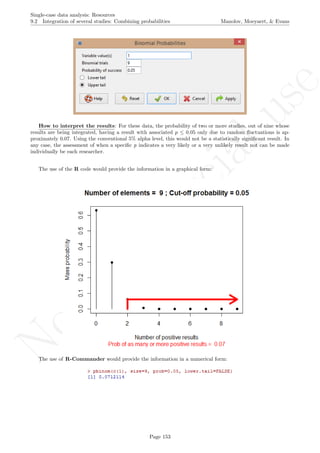
interaction between D and T2 and it is used for modelling change in slope.
Second, the following line of code is pasted into the R console in order to read the data.
Sherer <- read.table(file.choose(),header=TRUE)
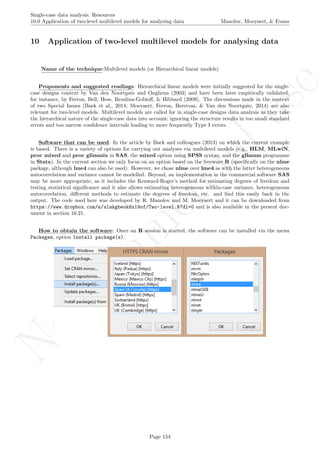
Page 93
No
com
m
ercialuse
Single-case data analysis: Resources
6.6 Design-comparable effect size: PHS d Manolov, Moeyaert, & Evans
Third, the results for the model including varying intercept, fixed treatment effect, and not modelling trend
(referred to as model MB1 in Pustejovsky et al., 2014)
Sherer.MB1 <- lme(fixed = DVY ~ D,
random = ~ 1 | Case,
correlation = corAR1(0, ~ T | Case),
data = Sherer)
summary(Sherer.MB1)
We offer a description of the output of a multilevel analysis when dealing with the Application of two-level
multilevel models for analysing data and we here present only the results of the analysis.
Fourth, the g REML() function is called, given that it is the one that allows obtaining the value of the effect
size index:
g_REML(Sherer.MB1, p_const = c(0,1), r_const = c(1,0,1), returnModel=FALSE)
This function requires that the results for the multilevel analysis be stored in an object, here called
Sherer.MB1, and also specifying the vector for the fixed effects after p const= and the vector for the ran-
dom effects after r const =. Pustejovsky et al. (2014) offer details about this specification on page 377 of
their article. The first value in the fixed effects vector is the intercept (γ00) and the second one the treat-
ment effect ((γ10). The first value in the random effects vector is the within-case (residual) variance (σ2
),
the second is the first-order autocorrelation parameter (φ), and the third is the random across-cases variation
in the intercept (τ2
0 ). The values used here (0,1 and 1,0,1) are the ones suggested by the authors of the technique.
There are many additional specifications that can be made using this function and they are explained in the
help documentation. We would like to mention explicitly only the design matrix() function, which helps cre-
ating a design matrix (see Moeyaert, Ugille et al., 2014 and the documentation accessed typing ?design matrix
in the R console after loading the scdhlm package with the require(scdhlm) statement) containing a linear
trend, a treatment effect, and a trend-by-treatment interaction.
Page 94
No
com
m
ercialuse
Single-case data analysis: Resources
6.6 Design-comparable effect size: PHS d Manolov, Moeyaert, & Evans
The results of applying the g REML() function are presented below, with annotations on the main pieces of
information (more details are available in the help documentation accessed by typing ?g REML in the R console).
How to interpret the results (MB1): In this case, we can see that the unadjusted effect size (0.75) is
close to the value that would be referred to as large, if Cohen’s benchmarks were used. The small-sample cor-
rection does not affect greatly the value: adjusted value equal to 0.71, given that the amount of measurements
available per participant is quite large. The numerator of the effect size for this simple model is equal to the
estimate of the average difference between conditions: 28.96, which represents the increase in the percentage of
intervals with appropriate communication after the intervention. The estimated variance (0.04) can be used for
meta-analyzing the results of studies obtained using this effect size, as described in section 11.1. Finally, taking
autocorrelation into account seems to be important considering the high estimate obtained for this data set: 0.70.
Page 95
No
com
m
ercialuse
Single-case data analysis: Resources
6.6 Design-comparable effect size: PHS d Manolov, Moeyaert, & Evans
How to use the software (MB4): As an alternative to step 3, a different model can be specified allowing
for varying intercept, fixed treatment effect, and varying trend (referred to as model MB4 in Pustejovsky et al.,
2014).
Sherer.MB4 <- lme(fixed = DVY ~ T + D + Dt,
random = ~ T | Case,
correlation = corAR1(0, ~ T | Case),
data = Sherer)
summary(Sherer.MB4)
In this case, the fourth step - the use of the g REML() function for obtaining the value of the effect size index
- would require some more specifications.
Sherer.MB4_g <- g_REML(Sherer.MB4, p_const = c(0,1,0,16), r_const = c(1,0,1,256,32))
summary(Sherer.MB4_g)

The object containing the results from the multilevel analysis is now called Sherer.MB4. The first value in
the fixed effects vector is the intercept (γ00), the second one is the immediate change in level with introducing
the intervention (γ10), the second is the linear change in outcome per measurement occasion not related to the
intervention (γ20), and the fourth is the additional change in the outcome per measurement occasion (γ30), due
Page 96
No
com
m
ercialuse
Single-case data analysis: Resources
6.6 Design-comparable effect size: PHS d Manolov, Moeyaert, & Evans
to the intervention. Regarding the specific values, the first three (0,1,0) are specified here as suggested by the
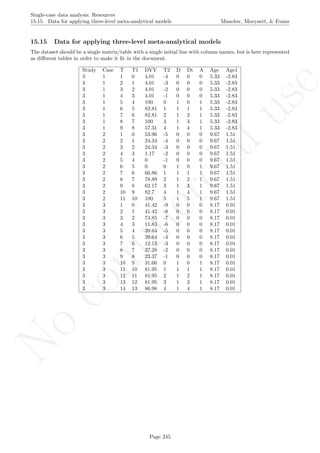
authors. The fourth value in the vector is the difference B − A, where A represents the measurement occasion
after which the intervention would be introduced in a hypothetical between-subjects experiment and B is a
later (or final) measurement occasion when the participants are to be compared. In this case, given that the
shortest baseline has 15 data points (i.e., all 6 cases in the Sherer and Schreibman data have at least 15 baseline
measurements), we set A = 15. Given that the shortest series length was nA + nB = 31, we set B = 31 and
thus B − A = 16. It is also possible to set B − A to be the maximum intervention phase length.
The first value in the random effects vector is the within-case (residual) variance (σ2
), the second is the
first-order autocorrelation parameter (φ), the third is the random across-cases variation in the intercept (τ2
02),
the fourth is the random across-cases variation in the trend (τ2
2 ), defined as (B − C)2
, and the fifth one is the
covariation between intercept and trend (τ20), defined as 2×(B −C). The first three values used here (1,0,1) are
the ones suggested by the authors of the technique. Regarding the fourth value C, the point in which the time
variable is centered, was defined as 15, given that it is the last possible measurement occasion which is still in the
baseline phase for all six participants. Thus, (B −C)2
= (31−15)2
= 162 = 256 and 2×(B −C) = 2×16 = 32.
A suggestion made by the author (James Pustejovsky, personal communication, June 24, 2015) is to set B = C
as it makes the specification easier (less variance components are involved) and it does not affect the effect size
estimate.
The results of applying the g REML() function are presented below, with annotations on the main pieces of
information (more details are available in the help documentation accessed by typing ?g REML in the R console).
How to interpret the results (MB4): First of all, it should be noted that the results are somewhat
better organized using the summary() function. Second, it can be seen that taking trend into account and
allowing it to vary across individuals has led to reducing the autocorrelation estimate (from 0.70 in MB1
to 0.27 here). Third, the numerator (an increase of 8.6%, as the outcome is measured in percentages) here
includes both immediate change in level and additional change per measurement occasion, taking into account
that the between-cases comparison is made considering the values specified for A (15th baseline measurement
occasion) and B (16 measurement occasions after the intervention is introduced). Fourth, we can see that there
is practically no trend on average (0.35, but keep in mind the lengthy baselines) and no variation in trend across
individuals (0.04) and thus the model MB4 could be simplified. Fifth, the size of the additional treatment effect
per measurement occasion (0.52) should not be considered very small, taking into account that the data series
for each participant are very long. (There is a total of 495 measurements for the six participants.) Finally, the
effect size adjusted for small-sample bias is 0.20, whereas the unadjusted value is equal to 0.33.
Page 97
No
com
m
ercialuse
Single-case data analysis: Resources
6.7 Mean phase difference Manolov, Moeyaert, & Evans
6.7 Mean phase difference
Name of the technique:Mean phase difference (MPD)
Authors and suggested readings: The MPD was proposed and tested by Manolov and Solanas (2013a).
The authors offer the details for this procedure. A critical review of the technique is provided by Swaminathan,
Rogers, Horner, Sugai, and Smolkowski (2014). Two modified versions, by Manolov and Rochat (2015), are
described also in this document in section 6.8.
Software that can be used: The MPD can be implemented via an R code developed by R. Manolov.
How to obtain the software: The R code for computing MPD is available at https://www.dropbox.
com/s/nky75oh40f1gbwh/MPD.R?dl=0 and in the present document in section 16.13.
When the URL is open, the R code can be downloaded. It is a text file that can be opened with a word
processor such as Notepad. Only the part of the code marked below in blue has to be changed, that is, the
user has to input the scores for the baseline and treatment phases separately.
How to use the software: When the text file is downloaded and opened with Notepad, the baseline
scores are inputted after baseline <- c( separating them by commas. The treatment phase scores are analo-
gously entered after treatment <- c(. Here we use the data available in section 15.1.
baseline <- c(4,7,5,6)
treatment <- c(8,10,9,7,9)
Page 98
No
com
m
ercialuse
Single-case data analysis: Resources
6.7 Mean phase difference Manolov, Moeyaert, & Evans
After inputting the data, the whole code (the part that was modified and the remaining part) is copied and
pasted into the R console.
Page 99
No
com
m
ercialuse
Single-case data analysis: Resources
6.7 Mean phase difference Manolov, Moeyaert, & Evans
How to interpret the results: The result of is the numerical value of the MPD is printed in the R
console. A graphical representation of the original data and also the projected treatment data when continuing
the baseline trend is also offered in a separate window. In this case, it can be seen that if the actually
obtained intervention phase measurements are compared with the prediction made from projecting baseline
trend (estimated through differencing), the difference between the two conditions is less than one behaviour,
provided that the measurement is a frequency of behaviour.
Page 100
No
com
m
ercialuse
Single-case data analysis: Resources
6.8 Mean phase difference - percentage and standardized versions Manolov, Moeyaert, & Evans
6.8 Mean phase difference - percentage and standardized versions
Name of the technique: Mean phase difference (MPD-P): percentage version
Authors and suggested readings: The MPD-P was proposed and tested by Manolov and Rochat (2015).
The authors offer the details for this procedure, which modifies the Mean phase difference fitting the baseline
trend in a different way and transforming the result into a percentage. Moreover, this indicator is applicable to
designs that include several AB-comparisons offering both separate estimates and an overall one. The combina-
tion of the individual AB-comparisons is achieved via a weighted average, in which the weight is directly related
to the amount of measurements and inversely related to the variability of effects (i.e., similar to Hershberger et
al.’s [1999] replication effect quantification proposed as a moderator).
Software that can be used: The MPD-P can be implemented via an R code developed by R. Manolov.
How to obtain the software (percentage version): The R code for applying the MPD (percent) at
the within-studies level is available at https://www.dropbox.com/s/ll25c9hbprro5gz/Within-study_MPD_
percent.R and also in the present document in section 16.14.
After downloading the file, it can easily be manipulated with a text editor such Notepad, apart from more
specific editors like RStudio (http://www.rstudio.com/) or Vim (http://www.vim.org/).
Page 101
No
com
m
ercialuse
Single-case data analysis: Resources
6.8 Mean phase difference - percentage and standardized versions Manolov, Moeyaert, & Evans
Within the text of the code the user can see that there are several boxes, which indicate the actions required,
as we will see in the next steps.
How to use the software (data entry and graphs): First, the data file should be created following a
pre-defined structure. In the first column (Tier), the user specifies and distinguishes between the tiers or
baselines of the multiple-baseline design. In the second column (Id), a significant name is given to the tier to
enhance its identification. In the third column (Time), the user specifies the measurement occasion (e.g., day,
week, session) for each tier, with integers between 1 and the total number of data points for the tier. Note
that the different tiers can have different lengths. In the fourth column (Phase), the user distinguishes between
the initial baseline phase (assigned a value of 0) and the subsequent intervention phase (assigned 1), for each
of the tiers. In the first column (Score), the user enters the measurements obtained in the study, for each
measurement occasion and for each tier.
Below an excerpt of the Matchett and Burns (2005) data can be seen, with the remaining data also entered,
but not displayed here. (The data can be obtained from https://www.dropbox.com/s/lwrlqps6x0j339y/
MatchettBurns.txt?dl=0 and is also available in the present document in section 15.8).
Page 102
No
com
m
ercialuse
Single-case data analysis: Resources
6.8 Mean phase difference - percentage and standardized versions Manolov, Moeyaert, & Evans
As the example shows, we suggest using Excel R
as a platform for creating the data file, as it is well known
and widely available (open source versions of Excel R
also exist). However, in order to improve the readability
of the data file by R, we recommend converting the Excel R
file into a simpler text file delimited by tabulations.
This can be achieved using the Save As option and choosing the appropriate file format.
In case a message appears about losing features in the conversion, the user should choose, as indicated below,
as such features are not necessary for the correct reading of the data.
After the conversion, the file has the aspect shown below. Note that the lack of matching between column
headers and column values is not a problem, as the tab delimitation ensures correct reading of the data.
Page 103
No
com
m
ercialuse
Single-case data analysis: Resources
6.8 Mean phase difference - percentage and standardized versions Manolov, Moeyaert, & Evans
Once the data file is created, with the columns in the order required and including headers, we proceed to
load the data in R and ask for the analyses. The next step is, thus, to start R.
To use the code, we will copy and paste different parts of it in several steps. First, we copy the first two
lines (between the first two text boxes) and paste them in the R console.
After pasting these first two lines, the user is prompted to give a name to the data set. Here, we wrote
“MatchettBurns”.
Page 104
No
com
m
ercialuse
Single-case data analysis: Resources
6.8 Mean phase difference - percentage and standardized versions Manolov, Moeyaert, & Evans
The reader is adverted that each new copy-paste operation is marked by text boxes, which indicate the limits
of the code that has to be copied and pasted and also the actions required. Now we move to the code between
the second and the third text boxes: we copy the next line of code from the file containing it and paste it into
the R console.
Page 105
No
com
m
ercialuse
Single-case data analysis: Resources
6.8 Mean phase difference - percentage and standardized versions Manolov, Moeyaert, & Evans
The user is prompted to locate the file containing the data. Thanks to the way in which the data file was
created, the data are read correctly with no further input required from the user.
After the data are loaded, the user should copy the next part of the code: the one located between the third
and the fourth text boxes. Here we illustrate the initial and the last lines of this segment of the code, up until
the fourth text box, which marks that we need to stop copying.
Page 106
No
com
m
ercialuse
Single-case data analysis: Resources
6.8 Mean phase difference - percentage and standardized versions Manolov, Moeyaert, & Evans
The code is pasted into the R console.
This segment of the code performs part of the calculations required for applying the MPD to the multiple-
baseline data, but, at that point, we only get the graphical output presented below.
Page 107
No
com
m
ercialuse
Single-case data analysis: Resources
6.8 Mean phase difference - percentage and standardized versions Manolov, Moeyaert, & Evans
This first output of the code offers a graphical representation of the data, with all three tiers of the multiple-
baseline design. Apart from the data points, we see the baseline trend lines fitted in every tier.
How to interpret the results: This visual representation enables the researcher to assess to what extent
the baseline trend fitted matched the actually obtained data. The better the match, the more appropriate the
reference for evaluating the behavioural change, as the baseline trend is projected into the intervention phase
and compared with the real measurements obtained after the intervention has been introduced. Moreover, (the
inverse of) the amount of variability around the fitted baseline is used, together with tier length, when defining
the weight of each tier. These weights are then used for obtaining a weighted average, i.e., a single quantification
for the whole multiple-baseline design.
How to use the software (numerical results): After obtaining and, if desired, saving the first graphical
output, the user copies the rest of the code, until the end of the data file.
Page 108
No
com
m
ercialuse
Single-case data analysis: Resources
6.8 Mean phase difference - percentage and standardized versions Manolov, Moeyaert, & Evans
This segment of the code is then pasted into the R console for obtaining the rest of the graphical output
and also the numerical results.
How to interpret the results:The numerical output obtained is expressed in two different metrics. The
first table includes the raw measures that represent the average difference between the projected baseline trend
and the actual intervention phase measurements. This quantification is obtained for each tier separately and as
a weighted average for the whole multiple-baseline design. The metric is the originally used one in the article
(for Matchett & Burns, 2009: words read correctly).
The second table includes the percentage-version of the MPD, which represents the average relative increase
of each intervention measurement with respect to the predicted data point according to the projected baseline
trend. The separate quantifications for each tier and the weighted average are accompanied by the weight of
this latter result for meta-analysis, as described later in this document.
Page 109
No
com
m
ercialuse
Single-case data analysis: Resources
6.8 Mean phase difference - percentage and standardized versions Manolov, Moeyaert, & Evans
The second graphical output of the code has two parts. To the left, we have one-dimensional scatterplots
with the MPDs (above) and MPD-converted-to-percentage (below) obtained for each tier and the weighted
average marked with a plus sign. With these graphs the researcher can assess visually the variability in the
values across tiers and also to see which tiers influence more (and are better represented by) the weighted
average. To the right, we have two-dimensional scatterplots with the MPD values (raw above and percentage
below) against the weights assigned to them. With this graphical representation, the researcher can assess
whether the weight is related to the effect size in the sense that it can be evaluated whether smaller (or greater)
effects have received greater weights.
Page 110
No
com
m
ercialuse
Single-case data analysis: Resources
6.8 Mean phase difference - percentage and standardized versions Manolov, Moeyaert, & Evans
How to use the MPD (standardized version: MPD-S): The use of the code for the MPD version
standardized using the baseline phase standard deviation and employing tier length as a weight is identical
to the one described here. The R code can be found at https://www.dropbox.com/s/g3btwdogh30biiv/
Within-study_MPD_std.R and is also available in the present document in section 16.15. Note that the weight
for the weighted average combining AB-comparisons is only the amount of measurements, unlike MPD-P. A
more advanced user can specify the weight as desired.
Output of MPD-S: In the following we present the output of MPD-S. Note that the information referring
to the raw estimates is identical to the one presented before, whereas the standardized version of the values is
the new information.
Page 111
No
com
m
ercialuse
Single-case data analysis: Resources
6.9 Slope and level change Manolov, Moeyaert, & Evans
6.9 Slope and level change
Name of the technique:: Slope and level change (SLC)
Authors and suggested readings: The SLC was proposed and tested by Solanas, Manolov and Onghena
(2010). The authors offer the details for this procedure. The SLC has been extended and the extension is also
described in the tutorial.
Software that can be used: The SLC can be implemented via an R code developed by R. Manolov. It
can also be applied using a plug-in for R-Commander developed by R. Manolov and David Leiva.
How to obtain the software (code): The R code for computing SLC is available at https://www.
dropbox.com/s/ltlyowy2ds5h3oi/SLC.R?dl=0 and also in the present document in section 16.16.
The R code is a text file that can be opened with a word processor such as Notepad. Only the part of
the code marked below in blue has to be changed, that is, the user has to input the scores for both phases and
specify the number of baseline phase measurements.
How to use the software: When the text file is downloaded and opened with Notepad, the scores for
both phase are inputted after info <- c( separating them by commas. The number of baseline phase mea-
surements is specified after n a <-. We here use the data available in section 15.1
info <- c(4,7,5,6,8,10,9,7,9)
n_a <- 4
After inputting the data, the whole code (the part that was modified and the remaining part) is copied and
pasted into the R console.
Page 112
No
com
m
ercialuse
Single-case data analysis: Resources
6.9 Slope and level change Manolov, Moeyaert, & Evans
The result of running the code is a graphical representation of the original and detrended data, as well as
the value of the SLC.
Page 113
No
com
m
ercialuse
Single-case data analysis: Resources
6.9 Slope and level change Manolov, Moeyaert, & Evans
How interpret the results: The similarity between the graphical representations of original and de-
trended data suggest that the baseline trend is not very pronounced. Actually the value obtained is 0.67 -
that is, an average improvement between successive measurement occasions of a little more than half a behav-
ior. Correcting for this improving trend makes the result more conservative. The slope change estimate (−0.42)
indicates after the data correction the intervention phase measurements showing a downward trend. The net
level change estimate (0.93) indicates an average increase of approximately one behaviour between the two
conditions, taking into account that the frequency of behaviour was measured. The fact that the slope change
and the net level change indicators are in opposite directions suggests that the amount of difference between
the conditions, once baseline trend is accounted for, is small. Nevertheless, researchers sould be cautious when
estimating baseline trend from few measurement occasions, as in the current example.
Page 114
No
com
m
ercialuse
Single-case data analysis: Resources
6.10 Slope and level change - percentage and standardized versions Manolov, Moeyaert, & Evans
6.10 Slope and level change - percentage and standardized versions
Name of the technique: Slope and level change - percentage version (SLC-P)
Authors and suggested readings: The SLC-P was proposed by Manolov and Rochat (2015) as an ex-
tension of the Slope and level change procedure (Solanas, Manolov, & Onghena, 2010). The authors offer the
details for this procedure. Moreover, this indicator is applicable to designs that include several AB-comparisons
offering both separate estimates and an overall one. The combination of the individual AB-comparisons is
achieved via a weighted average, in which the weight is directly related to the amount of measurements and
inversely related to the variability of effects (i.e., similar to Hershberger et al.’s [1999] replication effect quan-
tification proposed as a moderator).
Software that can be used: The SLC-P can be implemented via an R code developed by R. Manolov.
How to obtain the software (percentage version): The R code for applying the SLC (percent) at
the within-studies level is available at https://www.dropbox.com/s/o0ukt01bf6h3trs/Within-study_SLC_
percent.R and also in the present document in section 16.17.
After downloading the file, it can easily be manipulated with a text editor such Notepad, apart from more
specific editors like RStudio (http://www.rstudio.com/) or Vim (http://www.vim.org/).
Page 115
No
com
m
ercialuse
Single-case data analysis: Resources
6.10 Slope and level change - percentage and standardized versions Manolov, Moeyaert, & Evans
Within the text of the code the user can see that there are several boxes, which indicate the actions required,
as we will see in the next steps.
How to use the software (data entry graphs): First, the data file should be created following a pre-
defined structure. In the first column (Tier), the user specifies and distinguishes between the tiers or baselines
of the multiple-baseline design. In the second column (Id), a significant name is given to the tier to enhance its
identification. In the third column (Time), the user specifies the measurement occasion (e.g., day, week, session)
for each tier, with integers between 1 and the total number of data points for the tier. Note that the different
tiers can have different lengths. In the fourth column (Phase), the user distinguishes between the initial baseline
phase (assigned a value of 0) and the subsequent intervention phase (assigned 1), for each of the tiers. In the
first column (Score), the user enters the measurements obtained in the study, for each measurement occasion
and for each tier.
Below an excerpt of the Matchett and Burns (2005) data can be seen, with the remaining data also entered,
but not displayed here. (The data can be obtained from https://www.dropbox.com/s/lwrlqps6x0j339y/
MatchettBurns.txt?dl=0 and is also available in the present document in section 15.8).
Page 116
No
com
m
ercialuse
Single-case data analysis: Resources
6.10 Slope and level change - percentage and standardized versions Manolov, Moeyaert, & Evans
As the example shows, we suggest using Excel R
as a platform for creating the data file, as it is well known
and widely available (open source versions of Excel R
also exist). However, in order to improve the readability
of the data file by R, we recommend converting the Excel R
file into a simpler text file delimited by tabulations.
This can be achieved using the Save As option and choosing the appropriate file format.
In case a message appears about losing features in the conversion, the user should choose, as indicated below,
as such features are not necessary for the correct reading of the data.
After the conversion, the file has the aspect shown below. Note that the lack of matching between column
headers and column values is not a problem, as the tab delimitation ensures correct reading of the data.
Once the data file is created, with the columns in the order required and including headers, we proceed to
load the data in R and ask for the analyses. The next step is, thus, to start R.
Page 117
No
com
m
ercialuse
Single-case data analysis: Resources
6.10 Slope and level change - percentage and standardized versions Manolov, Moeyaert, & Evans
To use the code, we will copy and paste different parts of it in several steps. First, we copy the first two
lines (between the first two text boxes) and paste them in the R console.
After pasting these first two lines, the user is prompted to give a name to the data set. Here, we wrote
“MatchettBurns”.
The reader is adverted that each new copy-paste operation is marked by text boxes, which indicate the limits
of the code that has to be copied and pasted and also the actions required. Now we move to the code between
the second and the third text boxes: we copy the next line of code from the file containing it and paste it into
the R console.
Page 118
No
com
m
ercialuse
Single-case data analysis: Resources
6.10 Slope and level change - percentage and standardized versions Manolov, Moeyaert, & Evans
The user is prompted to locate the file containing the data. Thanks to the way in which the data file was
created, the data are read correctly with no further input required from the user.
After the data are loaded, the user should copy the next part of the code: the one located between the third
and the fourth text boxes. Here we illustrate the initial and the last lines of this segment of the code, up until
the fourth text box, which marks that we need to stop copying.
Page 119
No
com
m
ercialuse
Single-case data analysis: Resources
6.10 Slope and level change - percentage and standardized versions Manolov, Moeyaert, & Evans
The code is pasted into the R console.
This segment of the code performs part of the calculations required for applying the SLC to the multiple-
baseline data, but, at that point, we only get the graphical output presented below.
Page 120
No
com
m
ercialuse
Single-case data analysis: Resources
6.10 Slope and level change - percentage and standardized versions Manolov, Moeyaert, & Evans
This first output of the code offers a graphical representation of the data, with all three tiers of the multiple-
baseline design. Apart from the data points, we see the baseline trend lines fitted in every tier.
How to interpret this part of the output: This visual representation enables the researcher to assess
to what extent the baseline trend fitted matched the actually obtained data. The better the match, the more
appropriate the reference for evaluating the behavioural change, as the baseline trend is projected into the inter-
vention phase and compared with the real measurements obtained after the intervention has been introduced.
Moreover, (the inverse of) the amount of variability around the fitted baseline is used, together with tier length,
when defining the weight of each tier. These weights are then used for obtaining a weighted average, i.e., a
single quantification for the whole multiple-baseline design.
How to use the software (numerical results): After obtaining and, if desired, saving the first graphical
output, the user copies the rest of the code, until the end of the data file.
Page 121
No
com
m
ercialuse
Single-case data analysis: Resources
6.10 Slope and level change - percentage and standardized versions Manolov, Moeyaert, & Evans
This segment of the code is then pasted into the R console for obtaining the rest of the graphical output
and also the numerical results.
How to interpret the output: The numerical output obtained is expressed in two different metrics. The
first table includes the raw measures that represent the change in slope and change in level, after controlling for
baseline linear trend. These quantifications are obtained for each tier separately and as a weighted average for
the whole multiple-baseline design. The metric is the originally used one in the article (for Matchett & Burns,
2009: words read correctly). The slope change estimate represents the average increase, per measurement time,
in number of words read correctly after the intervention - i.e., it quantifies a progressive change. The net level
change represents the average difference between the intervention and baseline phases, after taking into account
the change in slope.
The second table includes the percentage-versions of the SLC. The percentage slope change estimate repre-
sents the average relative increase of intervention phase slope as compared to the baseline slope. The percentage
level change estimate represents the average relative increase of the intervention level as compared to the baseline
level, after controlling for baseline and treatment linear slopes.
Page 122
No
com
m
ercialuse
Single-case data analysis: Resources
6.10 Slope and level change - percentage and standardized versions Manolov, Moeyaert, & Evans
The second graphical output of the code has two parts. To the left, we have one-dimensional scatterplots with
the SLC slope change and level change estimates (upper two graphs) and SLC-converted-to-percentages (lower
two graphs) obtained for each tier and the weighted average marked with a plus sign. With these graphs the
researcher can assess visually the variability in the values across tiers and also to see which tiers influence more
(and are better represented by) the weighted average. To the right, we have two-dimensional scatterplots with
the SLC values (raw above and percentage below) against the weights assigned to them. With this graphical
representation, the researcher can assess whether the weight is related to the effect size in the sense that it can
be evaluated whether smaller (or greater) effects have received greater weights.
Page 123
No
com
m
ercialuse
Single-case data analysis: Resources
6.10 Slope and level change - percentage and standardized versions Manolov, Moeyaert, & Evans
How to use the SLC (standardized version: SLC-S): The use of the code for the SLC version stan-
dardized using the baseline phase standard deviation and employing tier length as a weight is identical to the one
described here. The R code can be found at https://www.dropbox.com/s/74lr9j2keclrec0/Within-study_
SLC_std.R and it is also available in the present document in section 16.18. Note that the weight for the
weighted average combining AB-comparisons is only the amount of measurements, unlike SLC-P.
Output of SLC-S: In the following we present the output of SLC-S. Note that the information referring
to the raw estimates is identical to the one presented before, whereas the standardized version of the values is
the new information.
Page 124
No
com
m
ercialuse
Single-case data analysis: Resources
7.0 Randomization tests Manolov, Moeyaert, & Evans
7 Randomization tests
7.1 Randomization tests with the SCDA package
Name of the technique: Randomization tests (including randomization in the design).
Authors and suggested readings: randomization tests are described in detail (and also in the SCED
context) by Edgington and Onghena (2007) and Heyvaert and Onghena (2014a, 2014b).
Software that can be used: An R package called SCRT is available for different design structures (Bult´e
& Onghena, 2008; 2009). It can be downloaded from the R website http://cran.r-project.org/web/
packages/SCRT/index.html or as specified below. randomization tests are also implemented in the SCDA
plug-in for R-Commander (Bult´e & Onghena, 2012, 2013).
How to obtain the software: The steps are as follows. First, open R.
Second, install RcmdrPlugin.SCDA using the option Install package(s) from the menu Packages.
Third, load RcmdrPlugin.SCDA in the R console (directly; this loads also R-Commander) or in R-
Commander (first loading Rcmdr and then the plug-in).
Page 125
No
com
m
ercialuse
Single-case data analysis: Resources
7.1 Randomization tests with the SCDA package Manolov, Moeyaert, & Evans
How to use the software (AB example): First, the data file needs to be created (first column: phase;
second column: scores) and imported into R-Commander. In this case we the data reported by Winkens,
Ponds, Pouwels-van den Nieuwenhof, Eilander, and van Heugten (2014), as they actually incorporate ran-
domization in the AB design and use a randomization test. The data can be downloaded from https:
//www.dropbox.com/s/52y28u4gxj9rsjm/Winkens_data.txt?dl=0 and in the present document in section
15.10. We provide an excerpt of the data below in order to illustrate the data structure. The graphical repre-
sentation contains all the data.
First, it has to be noted that the SCDA menu has the option to help the researcher Design your experiment
in the SCRT option. Selecting the number of observations and the minimum number of observations desired per
phase, the program provides the number of possible random assignments.
Page 126
No
com
m
ercialuse
Single-case data analysis: Resources
7.1 Randomization tests with the SCDA package Manolov, Moeyaert, & Evans
Moreover, the SCDA makes the random selection of an intervention start point for the AB design we are
working with (via the Choose 1 possible assignment sub-option).
The screenshot below shows the actual bipartition, with 9 measurements in the baseline phase and 36 in the
treatment phase. However, the output could be different each time the user selects randomly a start point for
the intervention.
Second, we will focus on the Analyze your data option and all three sub-options. For that purpose, it is
necessary to import the data, paying special attention to unclicking the Variable names in file option.
Page 127
No
com
m
ercialuse
Single-case data analysis: Resources
7.1 Randomization tests with the SCDA package Manolov, Moeyaert, & Evans
Afterwards, the SCDA plug-in is used.
For obtaining the value of the Observed test statistic it is only necessary to specify the design and type
of test statistic to use. For instance, in the Winkens et al. (2014) study the objective was to reduce behaviour,
thus, the phase B mean was subtracted from the phase A mean in order to obtain a positive difference.
Page 128
No
com
m
ercialuse
Single-case data analysis: Resources
7.1 Randomization tests with the SCDA package Manolov, Moeyaert, & Evans
The result obtained is 0.611, marking an average reduction of more than half an aggressive behaviour after
the intervention.
Constructing the Randomization distribution entails obtaining the value of the same test statistic for all
possible bipartitions of the data. Considering the minimum number of observations per phase (5), there are 36
possible values, among which is the actually obtained one.
Page 129
No
com
m
ercialuse
Single-case data analysis: Resources
7.1 Randomization tests with the SCDA package Manolov, Moeyaert, & Evans
In the results it can already be seen that the observed test statistic is the largest value. Finally, we can
obtain the p value associated with the observed test statistic.
How interpret the results: The observed test statistic (0.611) is the largest of all 36 values in the ran-
domization distribution. Given that this value is one of the possibility under the null hypothesis that all data
bipartitions are equally likely in case the intervention is ineffective, the p values is equal to 1/36 = 0.0278. It
is interesting to mention that in this case the statistical significance of the result contrasts with the conclusion
of Winkens and colleagues (2014), as these authors also considered the fact that after the intervention the
behaviour become more unpredictable (as illustrated by the increased range), despite the average decrease in
verbal aggressive behaviours.
Page 130
No
com
m
ercialuse
Single-case data analysis: Resources
7.1 Randomization tests with the SCDA package Manolov, Moeyaert, & Evans
How to use the software (multiple-baseline example): First, the data file needs to be created (first
column: phase for tier 1; second column: scores for tier 1; third column: phase for tier 2; fourth column: scores
for tier 3; and so forth) and imported into R-Commander. The data for the multiple-baseline example can
be downloaded from https://www.dropbox.com/s/qqno8ccf414zokw/2SCDA.txt?dl=0 and are also available
in the present document in section 15.11. The data belong they belong to a fictitious study intending to reduce
target behavior. The data and their graphical representation are presented below.
First, it has to be noted that the SCDA menu has the option to help the researcher Design your experiment
in the SCRT option.
Selecting the type of design being multiple-baseline, there is nothing else left to specify.
Page 131
No
com
m
ercialuse
Single-case data analysis: Resources
7.1 Randomization tests with the SCDA package Manolov, Moeyaert, & Evans
However, a new window pops up and we need to locate a file in which the possible intervention start points
are specified.
This file has the following aspect: there is one line containing the possible intervention start points for each
of the three tiers. Note that there is not overlap between these points, because the aim in a multiple-baseline
design is that the intervention be introduced in a staggered way in order to control for threats to internal
validity. A file with the starting points is only necessary for multiple-baseline designs. The example can be
downloaded from https://www.dropbox.com/s/pjfnvdfb235fyhv/2SCDA_pts.txt?dl=0 and is also available
in the present document in section 15.11.
As a result we see that there are 384 possible combinations of intervention start points, taking into account
the fact that the individuals are also randomly assigned to the three baselines.
The SCDA plug-in can also be used to select at random one of these 384 option. via the Choose 1 possible
assignment sub-option.
Page 132
No
com
m
ercialuse
Single-case data analysis: Resources
7.1 Randomization tests with the SCDA package Manolov, Moeyaert, & Evans
We need to point once again to the data file with the starting points, before one of the 384 possibilities is
selected.
The screenshot below shows the actual random intervention start points: after five baseline measurements for
the first individual, after 10 baseline measurements for the second individual and after 15 baseline measurements
for the third individual. However, the output could be different each time the user selects randomly a start
point for the intervention.
Second, we will focus on the Analyze your data option and all three sub-options. For that purpose, it is
necessary to import the data, paying special attention to unclicking the Variable names in file option.
Page 133
No
com
m
ercialuse
Single-case data analysis: Resources
7.1 Randomization tests with the SCDA package Manolov, Moeyaert, & Evans
Afterwards, the SCDA plug-in is used.
Page 134
No
com
m
ercialuse
Single-case data analysis: Resources
7.1 Randomization tests with the SCDA package Manolov, Moeyaert, & Evans
For obtaining the value of the Observed test statistic it is only necessary to specify the design and type of
test statistic to use. In the running fictitious example the objective was to reduce behaviour, thus, the phase B
mean was subtracted from the phase A mean in order to obtain a positive difference
The result obtained is 2.889, marking an average reduction of almost three behaviours after the intervention.
Constructing the Randomization distribution entails obtaining the value of the same test statistic for all
possible bipartitions of the three series (and all possible ways of assigning three individuals to three tiers), one
of which is the actually obtained one.
We need to locate once again the file with the possible intervention starting points.
Page 135
No
com
m
ercialuse
Single-case data analysis: Resources
7.1 Randomization tests with the SCDA package Manolov, Moeyaert, & Evans
The complete systematic randomization distribution consists of 384 values. However, it is also possible to
choose randomly a large number of all possible randomizations - this is a time-efficient option when it is difficult
for the software to go systematically through all possible randomizations. It may seem like a paradox, but the
software is faster performing 1000 random selections of all possible randomizations that listing systematically
all 384.
The excerpt of the results shown above suggests that the observed test statistic is among the largest ones: it
is number 951 in the distribution sorted in ascending order. Thus there are 50 values as large as or larger than
the observed test statistic in this distribution. We would expect the p value from a Monte Carlo randomization
distribution to be somewhere in the vicinity of 50/1000 = .05. In order to obtain the p value associated with
the observed test statistic, we use the corresponding option.
Page 136
No
com
m
ercialuse
Single-case data analysis: Resources
7.1 Randomization tests with the SCDA package Manolov, Moeyaert, & Evans
We need to locate once again the file with the possible intervention starting points.
How to interpret the results (multiple-baseline example): In this case, given that we are illustrating
the Monte Carlo option for selecting randomly some of the possible randomizations, the p value obtained by
each user may be slightly different. We here obtained a results that is just above the conventional 5% nominal
alpha, which would suggest not rejecting the null hypothesis that the treatment was ineffective.
It can be seen that with 1000 randomizations the previously presented list which suggested p = .05 and the
current result are very similar. Nevertheless, in this case the small difference would imply making a different
statistical decision. It is up to the user to decide whether a new Monte Carlo randomization distribution is war-
ranted for gaining further evidence about the likelihood of the observed test statistic under the null hypothesis
that all possible bipartitions of the series are equally likely.
Another option is to be patient and wait for the results of a systematic randomization distribution, which in
this case suggest that the observed test statistic is statistically significant, as it is number 366th in 384 values
sorted in ascending order - there are 18 values larger than it plus one value equal (the observed test statistic
itself). Thus the p value is 19/384 .049.
Page 137
No
com
m
ercialuse
Single-case data analysis: Resources
7.1 Randomization tests with the SCDA package Manolov, Moeyaert, & Evans
Finally, it has to be stressed that the result for the systematic and the Monte Carlo randomization distri-
butions are very similar, which means that the Monte Carlo option is a good approximation.
Page 138
No
com
m
ercialuse
Single-case data analysis: Resources
7.2 Randomization tests with ExPRT Manolov, Moeyaert, & Evans
7.2 Randomization tests with ExPRT
Name of the technique: Randomization tests (including randomization in the design).
Authors and suggested readings: Further developments on randomization tests have been authored by
Levin, Ferron, and Kratochwill (2012) and Levin, Lall, and Kratochwill (2011). These developments are among
the ones included in the software detailed below. More information is available in Levin, Evmenova and Gafurov
(2014).
Software that can be used: A macro for Excel R
called ExPRT and developed by Boris Gafurov and
Joel Levin is available at the following website http://code.google.com/p/exprt/.
How to obtain the software: The software is obtained via the Download ExPRT link, as shown below.
Page 139
No
com
m
ercialuse
Single-case data analysis: Resources
7.2 Randomization tests with ExPRT Manolov, Moeyaert, & Evans
How to use the software: For using relatively complex programs (with many options), such as ExPRT,
we recommend that applied researchers consult the manual available in the Download section of the website. In
this case, it is especially relevant to become familiar with what each column of each Excel R
worksheet should
contain. Moreover, it is necessary to distinguish between the columns where user input is required and the
columns that provide information (i.e., that should not be modified). Here we provide a simple example with
an AB designs, but for more complex design structures the manual and the corresponding articles have to be
read in depth.
In the current case, we will work with the AB data by Winkens et al. (2014) (available from https:
//www.dropbox.com/s/52y28u4gxj9rsjm/Winkens_data.txt?dl=0 and in the present document in section
15.10) and thus the ExPRT 2.0 AB design.xlsm file will be used. First, the worksheet called randomizer
can be used to choose at random one of the possible random assignments. After inputting the first possible
intervention point and the number of possible intervention points, clicking on the Randomize button leads to
obtaining the measurement time at which the intervention should be introduced: in the Winkens at al. (2014)
study it was at the 10th observation when the intervention was introduced. This can also be accomplished using
the SCDA plug-in, as described in section 7.1.
Page 140
No
com
m
ercialuse
Single-case data analysis: Resources
7.2 Randomization tests with ExPRT Manolov, Moeyaert, & Evans
Second, to obtain the result, data should be inputted in the worksheet called data. In this worksheet,
the admissible intervention start points are marked in yellow: in the running example, all measurement times
between the 6th and 41st, both inclusive. In the current cae we are working with a slightly modified version of
the Winkens et al. (2014)
Third, in the worksheet called intervention, the user specifies the characteristics of the analysis, namely,
whether the null hypothesis is one-tailed (e.g., an improvement in the behavior is only expressed as a reduction
during the intervention phase), how the test statistic should be defined, the nominal statistical significance level
alpha.
The information on how to fill in the columns of this worksheet can be found in the manual, where detailed
information is provided (as illustrated next).
Page 141
No
com
m
ercialuse
Single-case data analysis: Resources
7.2 Randomization tests with ExPRT Manolov, Moeyaert, & Evans
Fourth, the numerical result is obtained by clicking at the button Run (column T), while the graphical
representation of the data is provided after clicking the button Plot (column U).
Page 142
No
com
m
ercialuse
Single-case data analysis: Resources
7.2 Randomization tests with ExPRT Manolov, Moeyaert, & Evans
How to interpret the results: The p value is presented and categorised as statistically significant or not,
according to the nominal alpha. In this case, the p value is lower than the risk we are willing to assume and
thus the null hypothesis of no intervention effect is rejected. The rank of the observed statistic is also provided.
Additionally, the plot offers the means of each phase. Note that the effect size provided in the plot is a stan-
dardized rather than a raw mean difference - the raw one is equal to −0.611.
Fifth, in the worksheet called output more detailed information is provided. For each possible random
assignment, defined by each possible intervention start point (here from 6 to 41), the user is presented the means
of each phase, the mean difference, and the rank of this difference according to whether the aim is to increase
or reduce behaviour. In the example below, it can be seen that the actual intervention start point leads to the
largest negative difference between conditions. Additionally, we see that for the 38th measurement occasion
as a possible intervention start point the difference is the second largest, whereas for the 9th measurement
occasion as a possible intervention start point the difference is the third largest. Thus, as it was obtained by
the SCDA package, the p value arises from the fact that the observed test statistic is largest one in the set of
36 pseudostatistics for all 36 possible random assignments.
Page 143
No
com
m
ercialuse
Single-case data analysis: Resources
8.0 Simulation modelling analysis Manolov, Moeyaert, & Evans
8 Simulation modelling analysis
Name of the technique:Simulation modelling analysis (SMA)
Authors and suggested readings: The SMA was presented by Borckardt and colleagues (2008). Further
discussion and additional illustration is provided by Borckardt and Nash (2014).
Software that can be used: Open source software is available for implementing the SMA. The program
is stand-alone and can be downloaded at http://clinicalresearcher.org/software.htm. The software and
the user’s guide are credited to Jeffrey Borckardt.
How to obtain the software: The software can be obtained from the website for two different operating
systems.
Page 144
No
com
m
ercialuse
Single-case data analysis: Resources
8.0 Simulation modelling analysis Manolov, Moeyaert, & Evans
We also recommend downloading and consulting the “User’s guide” in order to become familiar with the
different tests that can be carried out.
How to use the software:First, the data are entered: scores in the Var1(DV) column and the dummy
variable representing the condition in the Var2(PHASE) column. Another (and easier) option is to have a tab-
delimited data file with the data organised in two columns (scores first, phase labels next using 0 for baseline
and 1 for the intervention phase). This file can be loaded into the software via the Tab-Delim Text sub-option
of the Open option of the File menu, as shown below for the Winkens et al. (2014) data. These example data
can be downloaded from https://www.dropbox.com/s/0hj7kmouzhvx769/Winkens_data_SMA.txt?dl=0 and
are also available in the present document in section 15.12.
Alternatively, only the scores may be loaded and the partition of the data into phases can be done by clicking
on the graphical representation. Different aspects can be presented on the graph - in the example below we
chose phase means to be depicted, apart from the scores in each measurement occasion.
Page 145
No
com
m
ercialuse
Single-case data analysis: Resources
8.0 Simulation modelling analysis Manolov, Moeyaert, & Evans
The SMA uses Pearson’s correlation coefficient (actually, the point biserial correlation) for measuring the
outcome. The statistical significance of the value obtained can be tested via bootstrap (Efron & Tibshirani,
1993) through the Pearson-r option of the Analyses menu.
How to interpret the results: The result suggests a negative correlation (i.e., a decrease in the behaviour
after the intervention), but the intensity of this correlation is rather low (close to 0.1, which is usually an indi-
cation of a weak effect). The results is also not statistically significant according to the bootstrap-based test,
with p = .211, which is greater than the usual nominal alpha of .05.
The statistical significance can also be obtained via Monte Carlo simulation methods, as shown below, using
the Simulation test option of the Analyses menu.
Page 146
No
com
m
ercialuse
Single-case data analysis: Resources
8.0 Simulation modelling analysis Manolov, Moeyaert, & Evans
The user can choose what kind of test to perform (e.g., for level or slope change), whether to use an overall
estimation of autocorrelation or separate estimations for each phase, the number of simulated data samples
with the same size and the same autocorrelation as estimated, etc. Here, we chose to use the phase vector for
carrying out the statistical test and thus we are testing for level change.
The results are presented in the Statistical output window. Information is provided about the characteristics
of the actual data (i.e., phase means) and about the 5000 simulated data sets. The final row includes the estimate
of the Pearson’s r ( −0.124) for the sample and its statistical significance according to the simulation test (here
p = 0.4542). Note that given that the p value is obtained through simulation, the user should expect to obtain
a similar (but not exactly the same) p value each time that the test is run on the same data.
Page 147
No
com
m
ercialuse
Single-case data analysis: Resources
9.0 Maximal reference approach Manolov, Moeyaert, & Evans
9 Maximal reference approach
9.1 Individual study analysis: Estimating probabilities
Name of the technique: Maximal reference approach: Estimating probabilities in individual studies
Authors and suggested readings: The Maximal reference approach is a procedure aided to help assess
the magnitude of effect by assigning (via Monte Carlo methods) probabilities to the effects observed (expressed
as Percentage of nonoverlapping data, Nonoverlap of all pairs, standardized mean difference using baseline or
pooled standard deviation in the denominator, Mean phase difference, or Slope and level change); these prob-
abilities are then converted into labels: no effect, small, medium, large, very large effect. The procedure was
proposed by Manolov and Solanas (2012) and it has been subsequently tested (Manolov & Solanas, 2013b;
Manolov, Jamieson, Evans, & Sierra, 2015). In this latter study, it is proposed to use the average autocorrela-
tion estimate from Shadish and Sullivan’s (2011) review according to the type of design, instead of estimating
autocorrelation or assuming a value without an empirical basis.
Software that can be used and its author: The R code for obtaining the quantification of effect and
the associated label was developed in the context of the study by Manolov et al. (2015), where a description of
its characteristics is available.
How to obtain the software: The R code is available at https://www.dropbox.com/s/56tqnhj4mng2wrq/
Probabilities.R?dl=0 and also in the present document in section 16.19
.
Page 148
No
com
m
ercialuse
Single-case data analysis: Resources
9.1 Individual study analysis: Estimating probabilities Manolov, Moeyaert, & Evans
How to use the software: The code allows obtaining one of the abovementioned quantifications and the
corresponding label assigned by the Maximal reference approach for a comparison between two phases: a base-
line and an intervention phase.
First, the user has to enter the data between the parenthesis in the line score <-(), specifying also the
number of baseline phase measurements after n a <-. Second, it is important to choosen whether the two-phase
comparison is part of an AB, ABAB, or a multiple-baseline design (after design <-), which has effect on the
degree of autocorrelation used. Third, the aim of the intervention is specified after aim <-: to “increase” or
“reduce” the target behaviour. Finally, the quantification is chosen from the list and specified after procedure
<-.
After all the necessary information is provided, the user selects the whole code and copies it.
Page 149
No
com
m
ercialuse
Single-case data analysis: Resources
9.1 Individual study analysis: Estimating probabilities Manolov, Moeyaert, & Evans
Next, the code is pasted into the R console.
How to interpret the results: As a result, the quantification and the label are obtained. In this case,
using the Percentage of nonoverlapping data as an index, there is only one (of five) intervention phase value
equal to or smaller than the highest baseline measurement, which lead to a PND = 80%. According to the
Maximal reference approach, the value obtained has a probability of ≤ 0.05 of being observed only by chance
in case the intervention was not effective.
Page 150
No
com
m
ercialuse
Single-case data analysis: Resources
9.2 Integration of several studies: Combining probabilities Manolov, Moeyaert, & Evans
9.2 Integration of several studies: Combining probabilities
Name of the technique: Maximal reference approach: Integrating the probabilities assigned to several
studies via the binomial model
Authors and suggested readings: The Maximal reference approach is a procedure aided to help assess
the magnitude of effect by assigning (via Monte Carlo methods) probabilities to the effects observed. These
probabilities can then be integrated as part of a research synthesis, by means of the binomial distribution, as
described in Manolov and Solanas (2012).
Software that can be used and its author: The R code for applying the binomial model to a count of
studies in which the probability is at or below a level predefined by the researcher was developed by R. Manolov.
This same code can be used for the analysis of individual studies in which the behavior of interest is mea-
sured in a binary way (i.e., present v s. absent) on each measurement occasion. In such a study, the baseline
phase data would be used to estimate the probability of a positive result: the number of positive results in the
baseline (i.e., the number of measurement occasions on which the behavior of interest is present) divided by
the total number of measurement occasions in the baseline. Afterwards, the number of positive results in the
intervention phase is tallied. Finally, the R code can be used to obtain the probability of as many or more
positive results in the intervention phase in case the baseline probability remained the same. Therefore, a low
probability (e.g., p ≤ 0.05) would indicate that it is unlikely that the baseline modelo for the behavior remains
unchanged in the intervention phase - this can be used as an indicator of a behavioral change.
How to obtain the software: The R code is available at https://www.dropbox.com/s/rz01x5z6bu8q5ze/
Binomial.R?dl=0 and also in the present document in section 16.20
How to use the software: First, the user has to enter the probability that is considered a cut-off for the
meta-analytical integration (or the baseline-estimated probability) in prob <-. Second, the number of studies,
whose results are being integrated, is specified in total <- (in an individual-study analysis: this is the number
of measurements in the intervention phase). Third, the number of studies with positive results (or intervention
phase measurements with behavior present) is specified after positive <-. These specifications are shown
below:
# For meta-analytic integration: Probability for which the test is performed
# For individual study analysis: Proportion of positive results in baseline
prob <- 0.05
# For meta-analytic integration: Number of studies
# For individual study analysis: Number of measurements in the intervention phase
total <- 9
# For meta-analytic integration: Number of studies presenting "such a low probability"
# For individual study analysis: Number of positive results in the intervetion phase
positive <- 2
Here we use the same data as in section Integrating results combining probabilities. These data are available
in section 15.16, but have been converted to a count of the number of studies for which p ≤ 0.05. In this case
there are 2 such studies: the penultimate and last ones in the list of nine studies. After the specification, the
rest of the code is copied and pasted in the R console.
Page 151
No
com
m
ercialuse
Single-case data analysis: Resources
9.2 Integration of several studies: Combining probabilities Manolov, Moeyaert, & Evans
Alternatively, it is possible, to use the R-Commander for obtaining the probability. How to install and load
R-Commander is explained in section 6.4. The binomial model can be accessed via the menu Distributions,
as shown:
It is necessary to keep in mind the fact that the probability of as many or more positive results is provided
via the survival function, Prob(X > k), and therefore, given that we are here interested in the probability of
two or more positive results, the necessary specification is Prob(X > 1). This is the reason why, the value of
the variable specified is 1 and not 2.
Page 152
No
com
m
ercialuse
Single-case data analysis: Resources
9.2 Integration of several studies: Combining probabilities Manolov, Moeyaert, & Evans
How to interpret the results: For these data, the probability of two or more studies, out of nine whose
results are being integrated, having a result with associated p ≤ 0.05 only due to random fluctuations is ap-
proximately 0.07. Using the conventional 5% alpha level, this would not be a statistically significant result. In
any case, the assessment of when a specific p indicates a very likely or a very unlikely result not can be made
individually be each researcher.
The use of the R code would provide the information in a graphical form:
The use of R-Commander would provide the information in a numerical form:
Page 153
No
com
m
ercialuse
Single-case data analysis: Resources
10.0 Application of two-level multilevel models for analysing data Manolov, Moeyaert, & Evans
10 Application of two-level multilevel models for analysing data
Name of the technique:Multilevel models (or Hierarchical linear models)
Proponents and suggested readings: Hierarchical linear models were initially suggested for the single-
case designs context by Van den Noortgate and Onghena (2003) and have been later empirically validated,
for instance, by Ferron, Bell, Hess, Rendina-Gobioff, & Hibbard (2009). The discussions made in the context
of two Special Issues (Baek et al., 2014; Moeyaert, Ferron, Beretvas, & Van den Noortgate, 2014) are also
relevant for two-level models. Multilevel models are called for in single-case designs data analysis as they take
the hierarchical nature of the single-case data into account; ignoring the structure results in too small standard
errors and too narrow confidence intervals leading to more frequently Type I errors.
Software that can be used: In the article by Baek and colleagues (2013) on which the current example
is based. There is a variety of options for carrying out analyses via multilevel models (e.g., HLM, MLwiN,
proc mixed and proc glimmix in SAS, the mixed option using SPSS syntax, and the gllamm programme
in Stata). In the current section we only focus on an option based on the freeware R (specifically on the nlme
package, although lme4 can also be used). However, we chose nlme over lme4 as with the latter heterogeneous
autocorrelation and variance cannot be modelled. Beyond, an implementation in the commercial software SAS
may be more appropriate, as it includes the Kenward-Roger’s method for estimating degrees of freedom and
testing statistical significance and it also allows estimating heterogeneous within-case variance, heterogeneous
autocorrelation, different methods to estimate the degrees of freedom, etc. and find this easily back in the
output. The code used here was developed by R. Manolov and M. Moeyaert and it can be downloaded from
https://www.dropbox.com/s/slakgbeok8x19of/Two-level.R?dl=0 and is also available in the present doc-
ument in section 16.21.
How to obtain the software: Once an R session is started, the software can be installed via the menu
Packages, option Install package(s).
Page 154
No
com
m
ercialuse
Single-case data analysis: Resources
10.0 Application of two-level multilevel models for analysing data Manolov, Moeyaert, & Evans
While installing takes place only once for each package, any package should be loaded when each new R
session is started using the option Load package from the menu Packages.
How to use the software: To illustrate the use of the nlme package, we will focus on the data set analysed
by Baek et al. (2014) and published by Jokel, Rochon, and Anderson (2010). This dataset can be downloaded
from https://www.dropbox.com/s/2yla99epxqufnm7/Two-level%20data.txt?dl=0 and is also available in
the present document in section 15.9. For the ones who prefer using the —SAS code for two-level models
detailed information is provided in Moyaert, Ferron, Beretvas, and Van Den Noortgate (2014).
We digitized the data via Plot Digitizer 2.6.3 (http://plotdigitizer.sourceforge.net) focusing only
on the first two phases in each tier. One explanation for the differences in the results obtained here and in
the aforementioned article may be due to the fact that here we use the R package nlme, whereas Baek and
colleagues used SAS proc mixed [SAS Institute Inc., 1998] and Kenward-Roger estimate of degrees of free-
dom (unlike the nlme package). SAS proc mixed potentially handles missing data differently, which can
potentially affect the estimation of autocorrelation). Thus, the equivalence across programs is an issue yet to be
solved and it needs to be kept in mind when results are obtained with different software. Another explanation
for differences in the results may be due to the fact that we digitized the data ourselves, which does not ensure
that that the scores retrieved by Baek et al. (2014) are exactly the same.
Page 155
No
com
m
ercialuse
Single-case data analysis: Resources
10.0 Application of two-level multilevel models for analysing data Manolov, Moeyaert, & Evans
It is possible to use the R-Commander package for loading the data, after typing the following code in the
R console (for more information about R-Commander see the subsection entitled Installing and loading:
install.packages("Rcmdr", dependencies=TRUE)
require(Rcmdr)
The data can be loaded via R-Commander:
It is also possible to load the nlme package and import the data using R code:
require(nlme)
Jokel <- read.table(file.choose(),header=TRUE)
The data were organised in the following way: a) there should be an identifier for each different tier (partic-
ipant, context, behaviour) - here we used the variable List for that purpose; b) the variable Session refers to
the measurement occasion; c) Percent or, more generally named, Score is the score or outcome measurement;
d) Phase is the dummy variable distinguishing between baseline phase (0) and treatment phase (1); e) regarding
the modelling of the measurement occasion the critical variable is not Time, but rather Time cntr, which is
the version of Time centred at the 4th measurement occasion in the intervention phase, as Baek et al. (2014)
did. The interaction term PhaseTimecntr is also created by multiplying Phase and Time cntr to model change
in slope. In the following screenshots, the model and the results are presented, with explanations following below.
Page 156
No
com
m
ercialuse
Single-case data analysis: Resources
10.0 Application of two-level multilevel models for analysing data Manolov, Moeyaert, & Evans
The line of code is as follows:
Baek.Model <- lme(Percent~1+Phase+PhaseTimecntr,
random=~Phase+PhaseTimecntr|List,data=Jokel,
correlation=corAR1(form=~1|List),
control=list(opt="optim"),na.action="na.omit")
Below we have used colours to identify the different parts of the code.
The model used takes into account the visual impression that there is no baseline trend and thus neither
Time nor Time cntr are included in the model, which is specified using the lme function of the nlme package.
However, there might be a change in level (modelled with the Phase variable) and a change in slope (modelled
with the PhaseTimecntr variable). Actually, we did expect a trend in the treatment phase and therefore we
added an estimator for the chance in trend between baseline and treatment phase which is captured by Phase-
Timecntr (Time cntr is only used as an intermediate step to calculate PhaseTimecntr = Phase × Timecntr).
Phase and PhaseTimecntr are marked in red in the code presented above. The change in level and in slope, as
well as the intercept, are allowed to vary randomly across the three lists (—List specification), which is why
Phase and PhaseTimecntr also appear after the random= code. Actually, as the reader might have noted,
the intercept (1) is not explicitly included after the random=, but it is rather automatically included by the
function. This is why we obtain an estimated for the variance of the intercept across lists (standard deviation
equal to 2.25). The random part of the model is marked above in green. The error structure is specified to be
first-order autoregressive (as Baek et al. did) and lag-one autocorrelation is estimated from the data via the
correlation=corAR1() part of the code (marked in blue), which also flects the fact that the measurements
are nested within lists (form∼1—List). This line of code specifying the model can be typed into the R console
or the upper window of the R-Commander (clicking on Submit).
How to interpret the results: The estimates obtained for the fixed effects (Intercept = average initial
baseline level across the 3 behaviours; Phase = because of the way the data are centred the estimate of phase does
not refer to the average chance in level immediate after the intervention (as is common); it rather represents
the change between the outcome score at the fourth measurement occasion of the treatment phase and the
projected last measure of the treatment phase; PhaseTimecntr = average increase in percentage correct at the
4th measurement occasion in the intervention phase) are very close to the ones reported by Baek et al. (2014).
The statistical significance for the fixed effect of interest (change in level and change in slope) can be obtained
via the Wald test dividing the estimate by its standard deviation and referring to a t distribution with J −P −1
degrees of freedom (J = number of measurements; P = number of predictors), according to Hox (2002). In the
nlme package, this information is obtained via the function summary().
Page 157
No
com
m
ercialuse
Single-case data analysis: Resources
10.0 Application of two-level multilevel models for analysing data Manolov, Moeyaert, & Evans
For the random effects (variances of Intercept, Phase, and PhaseTimecntr), the results are also reasonably
similar (after squaring the standard deviation values provided by R in order to obtain the variances). In
order to explore whether modelling variability in the change in level and in the change in slope between the
lists is useful from a statistical perspective, we can compare the full model (Baek.Model) with the models
not allowing for variation in the change in level (Baek.NoVarPhase) and for variation in the change in slope
(Baek.NoVarSlope). The latter two models are created updating the portion of the code refers to random effects
(random=) excluding the effects whose statistical significance is being tested. The comparison is performed
using the anova function, which actually carries out a chi-square test on the -2 log likelihood values for the
models being compared.
Baek.NoVarSlope <- update(Baek.Model, random=~Phase|List)
anova(Baek.Model,Baek.NoVarSlope)
Baek.NoVarPhase <- update(Baek.Model, random=~PhaseTimecntr|List)
anova(Baek.Model,Baek.NoVarPhase)
These results indicate that incorporating these random effects is useful in reducing unexplained variability
as in both cases the p values are lower than .05. We can check the amount of reduction of residual variability
using the following code:
VarCorr(Baek.Model)
VarCorr(Baek.NoVarSlope)
VarCorr(Baek.NoVarPhase)
Page 158
No
com
m
ercialuse
Single-case data analysis: Resources
10.0 Application of two-level multilevel models for analysing data Manolov, Moeyaert, & Evans
Allowing for the treatment effect on trend to vary across lists implies the following reduction: 68.892−9.038
68.892 =
59.854
68.892 86.88%. Allowing for the average treatment effect to vary across lists implies the following reduction:
65.079−9.038
65.079 = 56.041
65.079 86.11%.
Apart from the numerical results, it is also possible to obtain a graphical representation of the data and of
the model fitted. In the following we present the R code for plotting all data on the same graph, distinguishing
the different cases/tiers with different colours. In order for the code presented below to be used for any dataset,
we now refer to the model as Multilevel.Model instead of Baek.Model and rename the dataset itself from
Jokel to Dataset. We also rename the dependent variable from Percent to the more general Score, as well
as changing List to Case when distinguishing the different cases. Finally, we also continue working only with
the complete rows (i.e., not taking missing data into account).
Multilevel.Model <- Baek.Model
Dataset <- Jokel[complete.cases(Jokel),]
names(Dataset)[names(Dataset)=="Percent"] <- "Score"
names(Dataset)[names(Dataset)=="List"] <- "Case"
From here on, the remaining code can be used by all researchers and is not specific to the dataset used in
the current example. The following two lines of code save the fitted values, according to the model used. The
user has only to change the name of
fit <- fitted(Multilevel.Model)
Dataset <- cbind(Dataset,fit)
The following piece of code is used for assigning colours to the different cases/tiers and it has been created
to handle 3 to 10 cases per study, although it can easily be modified.
tiers <- max(Dataset$Case)
lengths <- c(0,tiers)
for (i in 1:tiers)
lengths[i] <- length(Dataset$Time[Dataset$Case==i])
# Create a vector with the colours to be used
if (tiers == 3) cols <- c("red","green","blue")
if (tiers == 4) cols <- c("red","green","blue","black")
if (tiers == 5) cols <- c("red","green","blue","black",
"grey")
if (tiers == 6) cols <- c("red","green","blue","black",
"grey","orange")
if (tiers == 7) cols <- c("red","green","blue","black",
"grey","orange","violet")
if (tiers == 8) cols <- c("red","green","blue","black",
"grey","orange","violet","yellow")
if (tiers == 9) cols <- c("red","green","blue","black",
"grey","orange","violet","yellow","brown")
if (tiers == 10) cols <- c("red","green","blue","black",
"grey","orange","violet","yellow","brown","pink")
Page 159
No
com
m
ercialuse
Single-case data analysis: Resources
10.0 Application of two-level multilevel models for analysing data Manolov, Moeyaert, & Evans
# Create a column with the colors
colors <- rep("col",length(Dataset$Time))
colors[1:lengths[1]] <- cols[1]
sum <- lengths[1]
for (i in 2:tiers)
{
colors[(sum+1):(sum+lengths[i])] <- cols[i]
sum <- sum + lengths[i]
}
Dataset <- cbind(Dataset,colors)
Finally, the numerical values of the coefficients estimated for each case and their graphical representation is
obtained copy-pasting in the R console the following lines of code:
# Print the values of the coefficients estimated
coefficients(Baek.Model)
# Represent the results graphically
plot(Score[Case==1]~Time[Case==1], data=Dataset,
xlab="Time", ylab="Score",
xlim=c(1,max(Dataset$Time)),
ylim=c(min(Dataset$Score),max(Dataset$Score)))
for (i in 1:tiers)
{
points(Score[Case==i]~Time[Case==i], col=cols[i],data=Dataset)
lines(Dataset$Time[Dataset$Case==i],Dataset$fit[Dataset$Case==i],col=cols[i])
}
The graph shows the slightly different intercepts and flat (no trend being modelled) baseline levels. More-
over, the different slopes in the intervention phases are made evident. The amount of across-cases variability
Page 160
No
com
m
ercialuse
Single-case data analysis: Resources
10.0 Application of two-level multilevel models for analysing data Manolov, Moeyaert, & Evans
in intercepts, change in level and in slope can also be assessed via a caterpillar plot, representing the average
estimate and the estimates for each case, along with their confidence intervals.
For obtaining the caterpillar plot we will use another R package that incorporates multilevel models: lme4.
To install and load this package the usual options can be used
Alternatively, it can be achieved via the following code:
install.packages("lme4")
require(lme4)
With the following line, we run the same model as with the nlme package, but without specifying autocor-
relation. Note that the random part of the model is specified in ( ), and it is specified that the effects chosen
by vary randomly do so across cases: —Case.
Model.lme4 <- lmer(Score~1+Phase+PhaseTimecntr +
(1+Phase+PhaseTimecntr|Case), data=Dataset)
Finally, in order to obtain the caterpillar plot, the lattice package is used. It is already installed with R and
has to be loaded in the session by clicking (shown below) or using code.
Page 161
No
com
m
ercialuse
Single-case data analysis: Resources
10.0 Application of two-level multilevel models for analysing data Manolov, Moeyaert, & Evans
install.packages("lattice") # In case the package has not been installed
require(lattice) # Load
qqmath(ranef(Model.lme4, condVar=TRUE), strip=TRUE)$Case
The caterpillar plot shows that there is considerable variability in all three effects around the estimated
averages. Actually, only the intercept and change in level estimates for the second tier are well represented by
the averages, as their confidence intervals include the average estimates across cases. The values represented in
the caterpillar plot can be reconstructed from the results.
Model.lme4
coefficients(Model.lme4)
coefficients(Model.lme4)$Case[,1] - 34.12
coefficients(Model.lme4)$Case[,2] - 40.92
coefficients(Model.lme4)$Case[,3] - 9.39
In case in your version of R, the previous code does not work, you should try:
Model.lme4
fixef(Model.lme4)
ranef(Model.lme4)
Page 162
No
com
m
ercialuse
Single-case data analysis: Resources
10.0 Application of two-level multilevel models for analysing data Manolov, Moeyaert, & Evans
It can be seen that the values represented in the caterpillar plot are actually the differences between the
averages (fixed effects) and the estimates for each case. If the user is willing to obtain this differences s/he will
have to substitute the values 34.12, 40.92, and 9.39, but the estimates obtained for his/her data.
With the code for obtaining the main graphical representation with the actual data and the model fitted,
we can obtain the representation of several alternative models, as shown below. First, the null model (upper
left panel) only takes into account the overall average for all cases. Second, the random intercept and random
change in level model is presented in the upper right panel and given that it appears to be a model with fixed
effects (there is no evident variation across cases), will be explored with a caterpillar plot later. Third, the
model represented in the lower left panel models only general trend (no treatment effect) with the possibility
of different intercepts for the different cases. Fourth, the lower right panel represents a model that allows for
variation in baseline trend and in the effect of intervention on trend.
Page 163
No
com
m
ercialuse
Single-case data analysis: Resources
10.0 Application of two-level multilevel models for analysing data Manolov, Moeyaert, & Evans
The caterpillar plot for the random intercept and random change in level model and the estimates obtained
using the coefficients() function (for the models fitted with nlme and lme4) further illustrates that there
is practically no variation in these effects across cases.
Additional resources: Given that the use of code is more intensive for the multilevel models and for
the nlme package, we include some additional information here. In the present section we focused on the use
of the R package nlme developed by Jose Pinheiro and colleagues (2013). We recommend a text by Paul
Bliese (2013) as a guide for working with this package, with sections 3.6 and 4 being especially relevant - see
https://cran.r-project.org/doc/contrib/Bliese_Multilevel.pdf.
Page 164
No
com
m
ercialuse
Single-case data analysis: Resources
10.0 Application of two-level multilevel models for analysing data Manolov, Moeyaert, & Evans
Moreover, with relatively more complex packages such as the nlme it is always possible to obtain information
via the Manual (http://cran.r-project.org/web/packages/nlme/nlme.pdf) or typing ??nlme into the R
console.
Page 165
No
com
m
ercialuse
Single-case data analysis: Resources
11.0 Integrating results of several studies Manolov, Moeyaert, & Evans
11 Integrating results of several studies
11.1 Meta-analysis using the SCED-specific standardized mean difference
Name of the technique: Meta-analysis using the SCED-specific standardized mean difference
Proponents and suggested readings: Meta-analysis is a statistical procedure for integrating quantita-
tively the results of several studies. Among the readings to consulted we should mention Hedges and Olkin
(1985), Hunter and Schimdt (2004), and Cooper, Hedges, and Valentine, (2009). Specifically for single-case de-
signs, several Special Issues have dedicated papers, for instance, Journal of Behavioral Education (2012: Volume
21, Issue 3), Journal of School Psychology (2014: Volume 52, Issue 2) and Neuropsychological Rehabilitation
(2014: Volume 24, Issues 3-4).
Actually the code presented here can be used for any effect size index for which the variance can be estimated
and the inverse variance can be used as a weight. For that reason, the present chapter is equally applicable to
the Percentage change index (see section 5.2), using the variance formula provided by Hershberger et al. (1999).
Software that can be used: There are several options for carrying out meta-analysis of group studies,
such as Comprehensive meta-analysis (http://www.meta-analysis.com/index.php) and metafor (http://
cran.r-project.org/web/packages/metafor/index.html), rmeta (http://cran.r-project.org/web/packages/
rmeta/index.html), and meta (http://cran.r-project.org/web/packages/meta/index.html) packages for
R. There appears to be no specific software for the meta-analysis of single-case data. In the current section we
focus on the way in which the SCED-specific mean difference indices: HPS d values can be integrated quan-
titatively. For this latter statistic, Shadish, Hedges, and Pustejovsky (2014) offer R code in the Appendix of
their article. Their code also uses the metafor package and offers the possibility (a) to obtain a funnel plot
(together with an application of the trim and fill method; Duval & Tweedie, 2000) useful for assessing the
potential presence of publication bias; and (b) to carry out a moderator analysis. We do not reproduce the
code of Shadish et al. (2014) as the rights for the content are not ours. Nevertheless, the interested reader is
encouraged to consult the article referenced.
How to obtain the software: The R code for applying the d-statistics (Hedges, Pustejovsky, & Shadish,
2012; 2013) at the across-studies level is available at https://www.dropbox.com/s/41gc9mrrt3jw93u/Across%
20studies_d.R?dl=0 and also in the present document in section 16.22. This code was developed for an illus-
tration paper (Manolov & Solanas, 2015).
The d-statistics themselves can be implemented in R using the code from James Pustejovsky’s blog:
http://blogs.edb.utexas.edu/pusto/software/ in the section scdhlm, which is the name of the package.
(This code needs to be installed first as a package in R and, afterwards, loaded in the R session. For in-
stance, if the code is downloaded as a compressed (.zip) file from https://www.box.com/shared/static/
f63nfpiebs8s1uxdwgfh.zip, installation is performed in R via the menu Packages → Install package(s)
from local zip files.)
The code for performing meta-analysis using the d-statistic as effect size measure and its inverse variance
as a weight for each study is obtained from the first URL provided in this section.
Page 166
No
com
m
ercialuse
Single-case data analysis: Resources
11.1 Meta-analysis using the SCED-specific standardized mean difference Manolov, Moeyaert, & Evans
After downloading the file, it can easily be manipulated with a text editor such Notepad, apart from more
specific editors like RStudio (http://www.rstudio.com/) or Vim (http://www.vim.org/).
Within the text of the code the user can see that there are several boxes, which indicate the actions required,
as we will see in the next steps.
Page 167
No
com
m
ercialuse
Single-case data analysis: Resources
11.1 Meta-analysis using the SCED-specific standardized mean difference Manolov, Moeyaert, & Evans
How to use the software: First, the data file should be created following a pre-defined structure. In
the first column (Id), the user specifies the identification of each individual study to be included in the meta-
analysis. In the second column (ES), the user specifies the value of the d-statistic for each study. In the
third column (Variance), the user specifies the variance of the d-statistic as obtained using the scdhlm R
package. The inverse of this variance will be used for obtaining the weighted average. Below a small set of four
studies to be meta-analyzed is presented. This dataset can be obtained from https://www.dropbox.com/s/
jk9bzvikzae1aha/d_Meta-analysis.txt?dl=0 and is also available in the present document in section 15.13.
Page 168
No
com
m
ercialuse
Single-case data analysis: Resources
11.1 Meta-analysis using the SCED-specific standardized mean difference Manolov, Moeyaert, & Evans
The Excel R
file is saved as a text file, as shown next.
In case a message appears about losing features in the conversion, the user should choose, as indicated below,
as such features are not necessary for the correct reading of the data.
After the conversion, the file has the aspect shown below. Note that the first two rows are apparently shifted
to the right - this is not a problem, as the tab delimitation ensures correct reading of the data.
Once the data file is created, with the columns in the order required and including headers, we proceed to
load the data in R and ask for the analyses. The next step is, thus, to start R.
Page 169
No
com
m
ercialuse
Single-case data analysis: Resources
11.1 Meta-analysis using the SCED-specific standardized mean difference Manolov, Moeyaert, & Evans
For obtaining the results of the code, it is necessary to install and load a package for R called metaforand
created by Wolfgang Viechtbauer (2010). Installing the packages can be done directly via the R console, using
the menu Packages → Install package(s) . . . .
After clicking the menus, the user is asked to choose a website for downloading (a country and city close to
his/her location) and the package of interest out of the list. The installation is then completed. Loading the
package will be achieved when copying and pasting the code. To use the code, we will copy and paste different
parts of it in two steps. First, we copy the first two lines (between the first two text boxes) and paste them in
the R console.
After pasting the code in the R console, the user is prompted to locate the file containing the summary data
for the studies to be meta-analyzed. Thanks to the way in which the data file was created, the data are read
correctly with no further input required from the user.
Page 170
No
com
m
ercialuse
Single-case data analysis: Resources
11.1 Meta-analysis using the SCED-specific standardized mean difference Manolov, Moeyaert, & Evans
The reader is adverted that each new copy-paste operation is marked by text boxes, which indicate the limits
of the code that has to be copied and pasted and also the actions required. Now we move to the remaining part
of the code: we copy the next lines up to the end of the file and paste it into the R console. .
Page 171
No
com
m
ercialuse
Single-case data analysis: Resources
11.1 Meta-analysis using the SCED-specific standardized mean difference Manolov, Moeyaert, & Evans
How to interpret the output: After pasting the code in the R console, it leads to the output of the
meta-analysis. This output is presented in a graphical form using a standard forest plot, where each study is
represented by its identification (i.e., id) and its effect size (ES), marked by the location of the square box and
also presented numerically (e.g., 4.17 for Foxx A). The size of the square box corresponds to the weight of the
study and the error bars represent 95% confidence intervals. The researcher should note that the effect sizes
of the individual studies are sorted according to their distance from the zero difference between baseline and
intervention conditions. The weighted average (3.57) is represented by a diamond, the location of which marks
its value. The horizontal extension of this diamond is its 95% confidence interval ranging here from 2.41 to 4.74
- not including zero can be interpreted in terms of statistical significance at the 0.05 level.
Moreover, numerical results are also obtained in the main R console:
Tau-squared (here τ2
= 0.42) is the variance of the true effect sizes, expressed in their original metric, only
being squared. Therefore, to remove the squared term, tau can be interpreted.
I2
is the proportion of true heterogeneity to the total variability observed in the effects (i.e., including
sampling variability). If we use the values 25%, 50%, and 75% as criteria for small, moderate, and large het-
erogeneity, the one observed here (39.23%) is closer to moderate than to small.
Page 172
No
com
m
ercialuse
Single-case data analysis: Resources
11.1 Meta-analysis using the SCED-specific standardized mean difference Manolov, Moeyaert, & Evans
The Q statistic is a weighted sum of squared deviations of the effect sizes from the average effect size.
Comparing its value to the degrees of freedom (number of studies minus 1: k − 1) a statistical test is performed
using the chi-square distribution. In this case, with p = 0.208, the null hypothesis of no heterogeneity cannot
be rejected and thus the heterogeneity observed is ot statistically significant.
These heterogeneity statistics are computed in random effects meta-analytical models such as the one used
here, where not all of the variation observed in the effects is assumed to be random error. Random effects models
allow for inference to studies that differ from the ones included in the meta-analysis in several characteristics,
not only the exact people participating.
Finally, the same results that we saw visually are represented numerically: weighted average and confidence
intervals around, apart from standard error of the weighted average (0.59) and the associated p value (< 0.001).
Page 173
No
com
m
ercialuse
Single-case data analysis: Resources
11.2 Meta-analysis using the MPD and SLC Manolov, Moeyaert, & Evans
11.2 Meta-analysis using the MPD and SLC
Name of the technique: Meta-analysis using the Mean phase difference and the Slope and level change
procedures
Authors and suggested readings: This proposal was made by Manolov and Rochat (2015) and it con-
sists in obtaining a weighted average of the new versions of the MPD (section 6.8) and SLC (section 6.10),
where the weight is either the series length or the series length and the inverse of the within-study variability
of effects. Actually, the code presented here can be used for any quantification that compares two phases and
any weight chosen by the user, as these pieces of information are part of the data file. It is also possible to use
an unweighted mean by assigning the same weight to all outcomes.
Software that can be used: The R code was developed by R. Manolov in the context of the abovemen-
tioned study.
How to obtain the software: The R code for applying either of the procedures (MPD or SLC, in either
percentage or standardized version, or actually any set of studies for which effect sizes and weights have already
been obtained) at the across-studies level is available at https://www.dropbox.com/s/wtboruzughbjg19/
Across%20studies.R and in the present document in section 16.23.
After downloading the file, it can easily be manipulated with a text editor such Notepad, apart from more
specific editors like RStudio (http://www.rstudio.com/) or Vim (http://www.vim.org/).
Page 174
No
com
m
ercialuse
Single-case data analysis: Resources
11.2 Meta-analysis using the MPD and SLC Manolov, Moeyaert, & Evans
Within the text of the code the user can see that there are several boxes, which indicate the actions required,
as we will see in the next steps.
Page 175
No
com
m
ercialuse
Single-case data analysis: Resources
11.2 Meta-analysis using the MPD and SLC Manolov, Moeyaert, & Evans
How to use the software: First, the data file should be created following a pre-defined structure. In the
first column (Id), the user specifies the identification of each individual study to be included in the meta-analysis.
In the second column (ES), the user specifies the effect size for each study, keeping with the recommendation
to have only one effect size per study. In the third column (weight), the user specifies the weight of this effect
size, which will be used for obtaining the weighted average. In subsequent columns (marked with Tier), the
user specifies the different outcomes obtained within each study. These columns are created on the basis that
SCED multiple-baseline studies are included in the meta-analysis, but actually, for the meta-analysis, it does
not matter where the different outcomes come from or if there is more one outcome within each study or not
(all the necessary information is already available in the weights).
Below a fictitious set of seven studies to be meta-analyzed is presented (it can be obtained from https://www.
dropbox.com/s/htb9fmrb0v6oi57/Meta-analysis.txt?dl=0 and is also available in the present document in
section 15.14). The reader should note that the order of the columns is exactly the same as in the numerical
output of the R code for MPD and SLC presented above. Therefore, in order to construct a data file for meta-
analysis, the user is only required to copy and paste the results of each analysis carried out for each individual
study.
As the example shows, we suggest using Excel R
as a platform for creating the data file, as it is well known
and widely available (open source versions of Excel R
also exist). However, in order to improve the readability
of the data file by R, we recommend converting the Excel R
file into a simpler text file delimited by tabulations.
This can be achieved using the Save As option and choosing the appropriate file format.
Page 176
No
com
m
ercialuse
Single-case data analysis: Resources
11.2 Meta-analysis using the MPD and SLC Manolov, Moeyaert, & Evans
In case a message appears about losing features in the conversion, the user should choose, as indicated below,
as such features are not necessary for the correct reading of the data.
After the conversion, the file has the aspect shown below. Note that the apparently shifted to the right third
row (second study) is not a problem, as the tab delimitation ensures correct reading of the data.
Once the data file is created, with the columns in the order required and including headers, we proceed to
load the data in R and ask for the analyses. The next step is, thus, to start R.
For obtaining the results of the code, it is necessary to install and load a package for R called metafor and
created by Wolfgang Viechtbauer (2010). Installing the packages can be done directly via the R console, using
the menu Packages → Install package(s) . . .
After clicking the menus, the user is asked to choose a website for downloading (a country and city close to
his/her location) and the package of interest out of the list. The installation is then completed. Loading the
package will be achieved when copying and pasting the code. To use the code, we will copy and paste different
parts of it in several steps. First, we copy the first two lines (between the first two text boxes) and paste them
in the R console.
Page 177
No
com
m
ercialuse
Single-case data analysis: Resources
11.2 Meta-analysis using the MPD and SLC Manolov, Moeyaert, & Evans
After pasting the code in the R console, the user is prompted to locate the file containing the summary data
for the studies to be meta-analyzed. Thanks to the way in which the data file was created, the data are read
correctly with no further input required from the user.
The reader is adverted that each new copy-paste operation is marked by text boxes, which indicate the limits
of the code that has to be copied and pasted and also the actions required. Now we move to the remaining part
of the code: we copy the next lines up to the end of the file.
Page 178
No
com
m
ercialuse
Single-case data analysis: Resources
11.2 Meta-analysis using the MPD and SLC Manolov, Moeyaert, & Evans
This code is pasted into the R console.
Page 179
No
com
m
ercialuse
Single-case data analysis: Resources
11.2 Meta-analysis using the MPD and SLC Manolov, Moeyaert, & Evans
How to interpret the output: After pasting the code in the R console, it leads to the output of the
meta-analysis. This output is presented in a graphical form using a modified version of the commonly used for-
est plot. Just like a regular forest plot, each study is represented by its identification and its effect size, marked
by the location of the square box and also presented numerically (i.e., 1.5 for Hibbs, 2.00 for Jones and so forth).
The size of the square box corresponds to the weight of the study, as in a normal forest plot, but the error bars
do not represent confidence intervals; they rather represent the range of effect sizes observed within-each study
(e.g., across the different tiers of a multiple-baseline design). If there is only one outcome within a study, there
“is no range”, but only a box. The researcher should note that the effect sizes of the individual studies are
sorted according to their distance from the zero difference between baseline and intervention conditions.
For the weighted average there are also similarities and differences with a regular forest plot. This weighted
average is represented by a diamond, the location of which marks its value. Nonetheless, the horizontal extension
of this diamond is not its confidence interval. It rather represents, once again, the range of the individual-study
effect sizes that contributed to the weighted average.
Page 180
No
com
m
ercialuse
Single-case data analysis: Resources
11.3 Application of three-level multilevel models for meta-analysing data Manolov, Moeyaert, & Evans
11.3 Application of three-level multilevel models for meta-analysing data
Name of the technique: Multilevel models (or Hierarchical linear models)
Proponents and suggested readings: Hierarchical linear models were initially suggested for the SCED
context by Van den Noortage and Onghena (2003, 2008) and have been later empirically validated, for instance,
by Owens and Ferron, and Moeyaert, Ugille, Ferron, Beretvas, and Van Den Noortgate (2013a, 2013b). An
application by Davis et al. (2013) is also recommended, apart from the discussion made in the context of the
Special Issue (Baek et al., 2014; Moeyaert, Ferron, Beretvas, and Van Den Noortgate (2014). Multilevel models
are called for in single-case designs data meta-analysis, as they take into account the nested structure of the
data and model the dependencies that this nested structure entails.
In the present section we deal with the application of multilevel models to unstandardized data measured
in the same measurement units (here, percentages). However, the same procedure can be followed after data
in different measurement units are standardized according to the proposal of Van den Noortgate and Onghena
(2008), described when dealing with Piecewise regression. The single-case data are standardized prior to apply-
ing the multilevel model.
Software that can be used: There are several options for carrying out analyses via multilevel models
(e.g., HLM, MLwiN, WinBUGS, proc mixed and proc glimmix in SAS, the mixed option using SPSS
syntax, and the gllamm programme in Stata) , but in the current section we only focus on an option based
on the freeware R (specifically on the nlme package, although lme4 can also be used), although an implemen-
tation in the commercial software SAS may be more appropriate, as it includes the Kenward-Roger’s method
for estimating degrees of freedom and testing statistical significance and it also allows estimating heterogeneous
within-case variance, heterogeneous autocorrelation, different methods to estimate the degrees of freedom, etc.
and find this easily back in the output.
The code used here was developed by R. Manolov and M. Moeyaert and it can be downloaded from
https://www.dropbox.com/s/qamahg4o1cu3sf8/Three-level.R?dl=0 and is also available in the present doc-
ument in section 16.24.
How to obtain the software: Once an R session is started, the software can be installed via the menu
Packages, option Install package(s).
Page 181
No
com
m
ercialuse
Single-case data analysis: Resources
11.3 Application of three-level multilevel models for meta-analysing data Manolov, Moeyaert, & Evans
While installing takes place only once for each package, any package should be loaded when each new R
session is started using the option Load package from the menu Packages.
How to use the software& How to interpret the result: To illustrate the use of the nlme package,
we will focus on the data set analysed by Moeyaert, Ferron, Beretvas, and Van Den Noortgate (2014) and pub-
lished by Laski, Charlop, and Schreibman (1988) LeBlanc, Geiger, Sautter, and Sidener (2007), Schreibman,
Stahmer, Barlett, and Dufek (2009), Shrerer and Schreibman (2005), Thorp, Stahmer, and Schreibman (1995),
selecting only the data dealing with appropriate and/or spontaneous speech behaviours. In this case the purpose
is to combine data across several single-case studies and therefore we need to take a three-level structure into
account, that is, measurements are nested within cases and cases in turn are nested within studies. Using the
nlme package, we can take this nested structure into account. In contrast, we previously described the case in
which a two-level model (section ??) is used for analyse the data within a single study.
The data are organised in the following way: a) there should be an identified for each different study -
here we used the variable Study in the first column [see an extract of the data table after this explanation];
b) there should also be an identifier for each different case - the variable Case in the second column; c) the
variable T (for time) refers to the measurement occasion; d) the variable T1 refers to time centred around
the first measurement occasion, which is thus equal to 0, with the following measurement occasion taking
the values of 1, 2, 3, ..., until nA + nB − 1, where nA and nB are the lengths of the baseline and treatment
phases, respectively; e) the variable T2 refers to time centred around the first intervention phase measurement
occasion, which is thus equal to 0; in this way the last baseline measurement occasion is denoted by −1,
the penultimate by −2, and so forth down to −nA, whereas the intervention phase measurement occasions
take the numbers 0, 1, 2, 3, ... up to nB − 1; f) the variable DVY is the score of the dependent variable:
the percentage of appropriate and/or spontaneous speech behaviours in this case; g) D is the dummy variable
distinguishing between baseline phase (0) and treatment phase (1); h) Dt is a variable that represents the
interaction between D and T2 and it is used for modelling change in slope; i) Age is a second-level predictor
representing the age of the participants (i.e., the Cases); j) Age1 is the same predictor centred at the average age
of all participants; this centring is performed in order to make the intercept more meaningful, so that it represents
the expected score (percentage of appropriate and/or spontaneous speech behaviours) for the average-aged
individual rather than for individuals with age equal to zero, which would be less meaningful. The dataset can
be downloaded from https://www.dropbox.com/s/e2u3edykupt8nzi/Three-level%20data.txt?dl=0 and in
the present document in section 15.15.
Page 182
No
com
m
ercialuse
Single-case data analysis: Resources
11.3 Application of three-level multilevel models for meta-analysing data Manolov, Moeyaert, & Evans
The data can be loaded via R-Commander:
Page 183
No
com
m
ercialuse
Single-case data analysis: Resources
11.3 Application of three-level multilevel models for meta-analysing data Manolov, Moeyaert, & Evans
It is also possible to import the data using R code:
JSP <- read.table(file.choose(),header=TRUE)
In the following screenshots, the model and the results are presented, with explanations following below.
The first model tested by Moeyaert, Ferron, Beretvas, and Van Den Noortgate (2014) is one that contains, as
fixed effects, estimates only for the average baseline level (i.e., the Intercept) and the average effect of the
intervention, understood as the change in level (modelled via the D variable). The variation, between cases and
between studies, in the baseline level and the change in level due to the introduction of the intervention is also
modelled in the random part of the model.
First the code is provided so that user can copy and paste it. Afterwards, the aspect of the code from
the Vim editor is also shown in order to illustrate aother way in which the different parts of the code can be
marked, including this time the explanations of the different lines after the sign.
require(nlme)
JSP <- read.table(file.choose(),header=TRUE)
Page 184
No
com
m
ercialuse
Single-case data analysis: Resources
11.3 Application of three-level multilevel models for meta-analysing data Manolov, Moeyaert, & Evans
Model.1 <- lme(DVY~1+D,
random=~1+D|Study/Case,
data=JSP, control=list(opt="optim"))
summary(Model.1)
VarCorr(Model.1)
coef(Model.1)
intervals(Model.1)
As it can be seen, each part of the code is preceded by an explanation of what the code does. If the package
is already loaded, it is not necessary to use the require() function. When the read.table() function is used
the user has to locate the file. Regarding running the model, note that all the code is actually a single line,
which can look like divided in several lines according to the text editor. The function summary() provides the
results presented below.
Page 185
No
com
m
ercialuse
Single-case data analysis: Resources
11.3 Application of three-level multilevel models for meta-analysing data Manolov, Moeyaert, & Evans
This output mainly informs that the average baseline level is 18.81% (as the data are expressed in percent-
ages) and the average increase in level with the introduction of the intervention is 31.64%. As in this output
the variability is presented in terms of standard deviations, for obtaining the variances the VarCorr() function
is used.
From this output, it is possible to compute the covariance between baseline level and treatment effect via
the following multiplication 0.781 × 11.30317 × 19.30167 = 154.90007 (Moeyaert, Ferron, Beretvas, & Van Den
Noortgate, 2014, report 144.26).
It is also possible to obtain the estimates for each individual, given that we have allowed for different
estimates between cases and between studies, specifying both the intercept (using the number 1) and the
phase dummy variable (D) as random effects at the second and third level of the three-level model.
Page 186
No
com
m
ercialuse
Single-case data analysis: Resources
11.3 Application of three-level multilevel models for meta-analysing data Manolov, Moeyaert, & Evans
From this output we can see that there is actually a lot of variability in the estimates of average baseline
level and average treatment effect, something which was already evident in high variances presented above.
(As a side note, simulation studies have shown that between-case and between-case variance estimates can be
biased, especially when there are a small number of studies are combined, although this is more problematic
for standardized data than for unstandardized raw data. Thus, variance estimates need to be interpreted with
caution).
Finally, the confidence intervals obtained with the intervals() function show that all the fixed effects
estimates are statistically significantly different from zero. Additionally, we get the information that the range
of plausible population values for the average change in level is between 13.36 to 49.92.
Page 187
No
com
m
ercialuse
Single-case data analysis: Resources
11.3 Application of three-level multilevel models for meta-analysing data Manolov, Moeyaert, & Evans
The second model tested by Moeyaert et al. (2014) incorporates the possibility to model heterogeneous
variance across the difference phases, as baselines are expected to be less variable than intervention phase mea-
surements. This option is incorporated into the code using the specification weights = varIdent(form =∼1
| D). It is also possible to model another typical aspect of single-case data: lag-one autocorrelation. Autocor-
relation can be modelled as homogeneous across phases via correlation=corAR1(form=∼1|Study/Case), or
heterogeneous via correlation=corAR1(form=∼1|Study/Case/D).
Once again, we first provide the code only, so that users can copy it and paste it into the R console and
then we show the Vim-view of the code, including explanations of each line.
Model.2 <- lme(DVY~1+D,
random=~1+D|Study/Case,
correlation=corAR1(form=~1|Study/Case/D),
weights = varIdent(form = ~1 | D), data=JSP,
control=list(opt="optim"))
summary(Model.2)
VarCorr(Model.2)
anova(Model.1,Model.2)
Regarding running the model, note that all the code is actually a single line, although it is split into several
lines in this representation. Nevertheless, the text editor reads it as a single line, as long as no new line (Enter
key is used). The function summary() provides the results presented below.
Page 188
No
com
m
ercialuse
Single-case data analysis: Resources
11.3 Application of three-level multilevel models for meta-analysing data Manolov, Moeyaert, & Evans
The output presented above includes the estimates of random effects, autocorrelation, and variance in the
two phases. Although autocorrelation is modelled as heterogeneous a single estimate is presented: phi equal to
0.62, suggesting that it is potentially important to take autocorrelation into account. Regarding heterogeneous
variance, the output suggest that for baseline (D = 0) the residual standard deviation is 15.08 multiplied by 1,
whereas for the intervention phases (D = 1) it is 15.08 multiplied by 1.59 = 23.98. For obtaining the variances,
these values should be squared, as when the VarCorr() function is used: 227.40 and 575.04.
The output presented below shows the estimates for the average baseline level across cases and across studies
(Intercept, equal to 17.79) and the average change in level across cases and across studies after the intervention
(D equal to 33.59).
The output of the VarCorr() function is presented here in order to alter the users that the residual variance
for the intervention phase measurements (D = 1) needs to be multiplied by 1.592
in order to get the variance
estimate. Moreover, the results are provided in scientific notation: 2.27e+02 means 2.27 multiplied by 102,
which is equal to 227.
Page 189
No
com
m
ercialuse
Single-case data analysis: Resources
11.3 Application of three-level multilevel models for meta-analysing data Manolov, Moeyaert, & Evans
Using the anova() function it is possible to compare statistically whether modelling heterogeneous variance
and (heterogeneous) autocorrelation improves the fit to the data, that is, whether residual (unexplained) variance
is statistically significantly reduced. The results shown below suggest that this is the case, given that the null
hypothesis of no difference is rejected and both the Akaike Information Criterion (AIC) and the more stringent
Bayesian Information Criterion (BIC) are reduced.
The third model tested by Moeyaert et al. (2014) incorporates time as a predictor. In this case, it is
incorporated in such a way as to make possible the estimation of the change in slope. For that purpose the Dt
variable is used, which represents the interaction (multiplication) between the dummy phase variable D and the
time variable centred around the first intervention phase measurement occasion (T2). It should be noted that,
if D*T2 (the interaction between the two variables) was used instead of Dt (which is a separate variable), the
model would have also provided an estimate for T2, which is not necessary. Dt is therefore included both in the
fixed part DVY∼1+D+Dt and in the random part random=∼1+D+Dt|Study/Case.
Once again, we first provide the code only, so that users can copy it and paste it into the R console and
then we show the Vim-view of the code, including explanations of each line.
Model.3 <-lme(DVY~1+D+Dt,
random=~1+D+Dt|Study/Case,
correlation=corAR1(form=~1|Study/Case/D),
weights = varIdent(form = ~1 | D),
data=JSP, control=list(opt="optim"))
summary(Model.3)
VarCorr(Model.3)
Regarding running the model, note that all the code is actually a single line, although it is split into several
lines in this representation. Nevertheless, the text editor reads it as a single line, as long as no new line (Enter
key is used). The function summary() provides the results presented below.
Page 190
No
com
m
ercialuse
Single-case data analysis: Resources
11.3 Application of three-level multilevel models for meta-analysing data Manolov, Moeyaert, & Evans
It can be seen that the average trend across cases and across studies during treatment is 1.22, which
is statistically significantly different from zero. In this case it is not possible to use the anova() function
for comparing models (as Model.2 and Model.3), as they incorporate different variables in the fixed part.
Nevertheless, we can check the relative reduction in variance indicating how much the fit to the data is improved
(and how much more variability of the measurements is explained).
The residual variance in Model.2 was 227 for the baseline and 227 × 1.592
575. The residual variance in
Model.3 is 149 for the baseline and 149×1.412
296. Therefore, the relative reduction in unexplained baseline
variability is (227 − 149)/227 = 34% and the for the treatment phase variability it is (575 − 296)/575 = 49%.
Thus, modelling the change in slope is important for explaining the variability in the data.
The fourth and final model tested by Moeyaert, Ferron, Beretvas, and Van den Noortgate (2014) incorpo-
rates a predictor at the case-level (i.e., level 2): age. The authors choose not using the original values of age,
but to centre it on the average age of all participants. It is modelled in this way, as they expected that the
overall average baseline level is dependent on the age. In contrast, they did not evaluate whether the overall
average treatment effect and the overall average treatment effect on the slope is dependent on age (otherwise
we needed to include more interaction effects).
Page 191
No
com
m
ercialuse
Single-case data analysis: Resources
11.3 Application of three-level multilevel models for meta-analysing data Manolov, Moeyaert, & Evans
As usual, centring makes the intercepts more easily interpretable, as mentioned when presenting the data.
Age1 is included in the fixed part DVY∼1+D+Dt+Age1.
Once again, we first provide the code only, so that users can copy it and paste it into the R console and
then we show the Vim-view of the code, including explanations of each line.
Model.4 <-lme(DVY~1+D+Dt+Age1,
random=~1+D+Dt|Study/Case,
correlation=corAR1(form=~1|Study/Case/D),
weights = varIdent(form = ~1 | D),
data=JSP, control=list(opt="optim"))
summary(Model.4)
VarCorr(Model.4)
Regarding running the model, note that all the code is actually a single line, although it is split into several
lines in this representation. Nevertheless, the text editor reads it as a single line, as long as no new line (Enter
key is used). In what follows we present only the results for the fixed effects as provided by the function
summary().
The average effect of age is not statistically significant. Using the VarCorr() function we can see that
unexplained baseline variance has not been reduced. It can be checked that the same is the case for the
unexplained treatment phase variance, as the residual variance is still 149 × 1.412
296. Therefore age does
not seem to be useful predictor for these data.
For further discussion on these results, the interested reader is referred to Moeyaert et al. (2014). It should
be noted that these authors use proc mixed in SAS instead of R and thus some differences in the results may
take place.
Page 192
No
com
m
ercialuse
Single-case data analysis: Resources
11.4 Integrating results combining probabilities Manolov, Moeyaert, & Evans
11.4 Integrating results combining probabilities
Name of the technique: Integrating results combining probabilities
Authors and suggested readings: Integrating the results of studies using statistical procedures that
yield p values (e.g., randomization tests, simulation modelling analysis) is a classical approach reviewed and
commented on by several authors, for instance, Jones and Fiske (1957), Rosenthal (1978), Sturbe (1985), and
Becker (1987). We will deal here with the Fisher method (referred to as “multiplicative” by Edgington, 1972a)
and Edgington’s (1972a) proposal that here called the “additive method” (not to be confused with the normal
curve method by Edgington, 1972b), as both are included in SCDA plug-in (see also Bult´e and Onghena,
2013). The probabilities to be combined may arise, for instance, from Randomization tests or from Simulation
modelling analysis.
The use of the binomial test for combining probabilities from several studies following the Maximal reference
approach, as described in Manolov and Solanas (2012), is illustrated in section 9.2.
Software that can be used: For the multiplicative and the additive methods we will use the SCDA
plug-in for R-Commander (Butl´e & Onghena, 2012, 2013). For the binomial approach we will use the R-
Commander package itself.
How to obtain the software: The SCDA (version 1.1) is available at the R website http://cran.
r-project.org/web/packages/RcmdrPlugin.SCDA/index.html and can also be installed directly from the
R console.
First, open R.
Second, install RcmdrPlugin.SCDA using the option Install package(s) from the menu Packages.
Third, load RcmdrPlugin.SCDA in the R console (directly; this loads also R-Commander) or in R-
Commander (first loading Rcmdr and then the plug-in).
Page 193
No
com
m
ercialuse
Single-case data analysis: Resources
11.4 Integrating results combining probabilities Manolov, Moeyaert, & Evans
How to use the software: First, a data file should be created containing the p values in a single col-
umn (all p values values below one another), without column or row labels. In this case, we will repli-
cate the integration performed by Holden, Bearison, Rode, Rosenberg and Fishman (1999) for reducing pain
averseness in hospitalized children. Second, this data file (downloadable from https://www.dropbox.com/s/
enrcylwyzr61t1h/Probabilities.txt?dl=0 and also available in the present document in section 15.16) is
loaded in R-Commander using the Import data option from the Data menu.
At this stage, if a .txt file is used it is important to specify that the file does not contain column headings
- the Variable names in file option should be unmarked.
Page 194
No
com
m
ercialuse
Single-case data analysis: Resources
11.4 Integrating results combining probabilities Manolov, Moeyaert, & Evans
Third, the SCDA plug-in is used via the SCMA (meta-analysis) option:
Fourth, the way in which the p values are combined is chosen marking multiplicative or additive (shown
here).
How to interpret the results: In this case it can be seen that both ways of combining suggest that the
reduction in pain averseness is statistically significant across the nine children studies, despite the fact that only
2 of the 9 results were statistically significant (0.004 and 0.012) and one marginally so (0.06). Holden et al.
(1999) used the additive method and report a combined p value of 0.025.
Page 195
No
com
m
ercialuse
Single-case data analysis: Resources
12.0 References Manolov, Moeyaert, & Evans
12 References
Baek, E., Moeyaert, M., Petit-Bois, M., Beretvas, S. N., Van de Noortgate, W., & Ferron, J. (2014). The
use of multilevel analysis for integrating single-case experimental design results within a study and across stud-
ies. Neuropsychological Rehabilitation, 24, 590-606.
Becker, B. J. (1987). Applying tests of combined significance in meta-analysis. Psychological Bulletin, 102,
164 -171.
Beretvas, S. N., & Chung, H. (2008). A review of meta-analyses of single-subject experimental designs:
Methodological issues and practice. Evidence-Based Communication Assessment and Intervention, 2, 129-141.
Bliese, P. (2013). Multilevel modeling in R (2.5): A brief introduction to R, the multilevel package and the
nlme package. Retrieved from http://cran.r-project.org/doc/contrib/Bliese_Multilevel.pdf
Boman, I.-L., Bartfai, A., Borell, L., Tham, K., & Hemmingsson, H. (2010).Support in everyday activities
with a home-based electronic memory aid for persons with memory impairments. Disability and Rehabilitation:
Assistive Technology, 5, 339-350.
Borckardt, J. J., & Nash, M. R. (2014). Simulation modelling analysis for small sets of single-subject data
collected over time. Neuropsychological Rehabilitation, 24, 492-506.
Borckardt, J. J., Nash, M. R., Murphy, M. D., Moore, M., Shaw, D., & O’Neil, P. (2008). Clinical practice
as natural laboratory for psychotherapy research: A guide to case-based time-series analysis. American Psy-
chologist, 63, 77-95.
Brossart, D. F., Vannest, K., Davis, J., & Patience, M. (2014). Incorporating nonoverlap indices with vi-
sual analysis for quantifying intervention effectiveness in single-case experimental designs. Neuropsychological
Rehabilitation, 24, 464-491.
Bult´e, I. (2013). Being grateful for small mercies: The analysis of single-case data. Unpublished doctoral
dissertation. KU Leuven, Belgium.
Bult´e, I., & Onghena, P. (2008). An R package for single-case randomization tests. Behavior Research
Methods, 40, 467-478.
Bult´e, I., & Onghena, P. (2009). Randomization tests for multiple-baseline designs: An extension of the
SCRT-R package. Behavior Research Methods, 41, 477-485.
Bult´e, I., & Onghena, P. (2012). When the truth hits you between the eyes: A software tool for the visual
analysis of single-case experimental data. Methodology, 8, 104-114.
Bult´e, I., & Onghena, P. (2013). The single-case data analysis package: Analysing single-case experiments
with R software. Journal of Modern Applied Statistical Methods, 12, 450-478.
Callahan, C. D., & Barisa, M. T. (2005). Statistical process control and rehabilitation outcome: The single-
subject design reconsidered. Rehabilitation Psychology, 50, 24-33.
Campbell, J. M. (2004). Statistical comparison of four effect sizes for single-subject designs. Behavior Mod-
ification, 28, 234-246.
Campbell, J. M. (2013). Commentary on PND at 25. Remedial and Special Education, 34, 20-25.
Cohen, J. (1992). A power primer. Psychological Bulletin, 112, 155-159.
Coker, P., Lebkicher, C., Harris, L., & Snape, J. (2009). The effects of constraint-induced movement therapy
for a child less than one year of age. NeuroRehabilitation, 24, 199-208.
Page 196
No
com
m
ercialuse
Single-case data analysis: Resources
12.0 References Manolov, Moeyaert, & Evans
Cooper, H., Hedges, L. V., & Valentine, J. C. (Eds.) (2009). The handbook of research synthesis and meta-
analysis (2nd ed.). New York, NY: Russell Sage.
Davis, D. H., Gagn´e, P., Fredrick, L. D., Alberto, P. A., Waugh, R. E., & Haard¨orfer, R. (2013). Augmenting
visual analysis in single-case research with hierarchical linear modeling. Behavior Modification, 37, 62-89.
de Vries, R. M., & Morey, R. D. (2013). Bayesian hypothesis testing for single-subject designs. Psychological
Methods, 18, 165-185.
Durbin, J., & Watson, G. S. (1951). Testing for serial correlation in least squares regression. II. Biometrika,
38, 159-177.
Durbin, J., & Watson, G. S. (1971). Testing for serial correlation in least squares regression. III. Biometrika,
58, 1-19.
Duval, S., & Tweedie, R. (2000). Trim and fill: A simple funnel-plot-based method of testing and adjusting
for publication bias in meta-analysis. Biometrics, 56, 455-463.
Edgington, E. S. (1972a). An additive method for combining probability values from independent experi-
ments. Journal of Psychology, 80, 351-363.
Edgington, E. S. (1972b). A normal curve method for combining probability values from independent ex-
periments. Journal of Psychology, 82, 85-89.
Edgington, E. S., & Onghena, P. (2007). Randomization tests (4th ed.). London, UK: Chapman Hall/CRC.
Efron, B., & Tibshirani R. J. (1993). An introduction to the bootstrap. London, UK: Chapman Hall/CRC.
Ferron, J. M., Bell, B. A., Hess, M. R., Rendina-Gobioff, G., & Hibbard, S. T. (2009). Making treatment
effect inferences from multiple-baseline data: The utility of multilevel modeling approaches. Behavior Research
Methods, 41, 372-384.
Fisher, W. W., Kelley, M. E., & Lomas, J. E. (2003). Visual aids and structured criteria for improving
visual inspection and interpretation of single-case designs. Journal of Applied Behavior Analysis, 36, 387-406.
Gast, D. L., & Spriggs, A. D. (2010). Visual analysis of graphic data. In D. L. Gast (Ed.), Single subject
research methodology in behavioral sciences(pp. 199-233). London, UK: Routledge.
Glass, G. V., McGaw, B., & Smith, M. L. (1981). Meta-analysis in social research. Beverly Hills, CA: Sage.
Gorsuch, R. L. (1983). Three methods for analyzing limited time-series (N of 1) data. Behavioral Assess-
ment, 5, 141-154.
Hansen, B. L. & Ghare, P. M. (1987). Quality control and application. New Delhi: Prentice-Hall.
Hedges, L. V., & Olkin, I. (1985). Statistical methods for meta-analysis. New York, NY: Academic Press.
Hedges, L. V., Pustejovsky, J. E., & Shadish, W. R. (2012). A standardized mean difference effect size for
single case designs. Research Synthesis Methods, 3, 224-239.
Hedges, L. V., Pustejovsky, J. E., & Shadish, W. R. (2013). A standardized mean difference effect size for
multiple baseline designs across individuals. Research Synthesis Methods, 4, 324-341.
Hershberger, S. L., Wallace, D. D., Green, S. B., & Marquis, J. G. (1999). Meta-analysis of single-case data.
In R. H. Hoyle (Ed.), Statistical strategies for small sample research (pp. 107-132). London, UK: Sage.
Heyvaert, M., & Onghena, P. (2014a). Analysis of single-case data: Randomisation tests for measures of
effect size. Neuropsychological Rehabilitation, 24, 507-527.
Page 197
No
com
m
ercialuse
Single-case data analysis: Resources
12.0 References Manolov, Moeyaert, & Evans
Heyvaert, M., & Onghena, P. (2014b). Randomization tests for single-case experiments: State of the art,
state of the science, and state of the application. Journal of Contextual Behavioral Science, 3, 51-64.
Holden, G., Bearison, D. J., Rode, D. C., Rosenberg, G., & Fishman, M. (1999). Evaluating the effects of
a virtual environment (STARBRIGHT world) with hospitalized children. Research on Social Work Practice, 9,
365-382.
Hox, J. (2002). Multilevel analysis: Techniques and applications. London, UK: Lawrence Erlbaum.
Huitema, B. E., & McKean, J. W. (2000). Design specification issues in time-series intervention models.
Educational and Psychological Measurement, 60, 38-58.
Hunter, J. E., & Schmidt, F. L. (2004). Methods of meta-analysis: Correcting error and bias in research
findings (2nd ed.). Thousand Oaks,CA: Sage.
IBM Corp. (2012). IBM SPSS Statistics for Windows, Version 21.0. Armonk, NY: IBM Corp.
Jokel, R., Rochon, E., & Anderson, N. D. (2010). Errorless learning of computer-generated words in a
patient with semantic dementia. Neuropsychological Rehabilitation, 20, 16-41.
Johnstone, I., & Velleman, P. F. (1985). Efficient scores, variance decompositions, and Monte Carlo swin-
dles. Journal of the American Statistical Association, 80, 851-862.
Jones, L. V., & Fiske, D. W. (1953). Models for testing the significance of combined results. Psychological
Bulletin, 50, 375-382.
Kratochwill, T. R., Hitchcock, J., Horner, R. H., Levin, J. R., Odom, S. L., Rindskopf, D. M., & Shadish,
W. R. (2010). Single-case designs technical documentation. Retrieved from What Works Clearinghouse website:
http://ies.ed.gov/ncee/wwc/pdf/reference_resources/wwc_scd.pdf.
Kratochwill, T. R., & Levin, J. R. (2010). Enhancing the scientific credibility of single-case intervention
research: Randomization to the rescue. Psychological Methods, 15, 124-144.
Laski, K. E., Charlop, M. H., & Schreibman, L. (1988). Training parents to use the natural language
paradigm to increase their autistic children’s speech. Journal of Applied Behavior Analysis, 21, 391-400.
LeBlanc, L. A., Geiger, K. B., Sautter, R. A., & Sidener, T. M. (2007). Using the natural language paradigm
(NLP) to increase vocalizations of older adults with cognitive impairments. Research in Developmental Disabil-
ities, 28, 437-444.
Levin, J. R., Evmenova, A. S., & Gafurov, B. S. (2014). The single-case data-analysis ExPRT (Excel Pack-
age of Randomization Tests). In T. R. Kratochwill & J. R. Levin (Eds.), Single-case intervention research:
Methodological and statistical advances (pp. 185-219). Washington, DC: American Psychological Association.
Levin, J. R., Ferron, J. M., & Kratochwill, T. R. (2012). Nonparametric statistical tests for single-case
systematic and randomized ABAB.AB and alternating treatment intervention designs: New developments, new
directions. Journal of School Psychology, 50, 599-624.
Levin, J. R., Lall, V. F., & Kratochwill, T. R. (2011). Extensions of a versatile randomization test for
assessing single-case intervention effects. Journal of School Psychology, 49, 55-79.
Ma, H. H. (2006). An alternative method for quantitative synthesis of single-subject research: Percentage
of data points exceeding the median. Behavior Modification, 30, 598-617.
Manolov, R., & Rochat, L. (2015). Further developments in summarizing and meta-analyzing single-case
data: An illustration with neurobehavioural interventions in acquired brain injury. Neuropsychological Rehabil-
itation, 25, 637-662.
Page 198
No
com
m
ercialuse
Single-case data analysis: Resources
12.0 References Manolov, Moeyaert, & Evans
Manolov, R., Sierra, V., Solanas, A., & Botella, J. (2014). Assessing functional relations in single-case
designs: Quantitative proposals in the context of the evidence-based movement. Behavior Modification, 38,
878-913.
Manolov, R., & Solanas, A. (2009). Percentage of nonoverlapping corrected data. Behavior Research Meth-
ods, 41, 1262-1271.
Manolov, R., & Solanas, A. (2012). Assigning and combining probabilities in single-case studies. Psycho-
logical Methods, 17, 495-509.
Manolov, R., & Solanas, A. (2013a). A comparison of mean phase difference and generalized least squares
for analyzing single-case data. Journal of School Psychology, 51, 201-215.
Manolov, R., & Solanas, A. (2013b). Assigning and combining probabilities in single-case studies: A second
study. Behavior Research Methods, 45, 1024-1035.
Manolov, R., Jamieson, M., Evans, J. J., & Sierra, V. (2015). Probability and visual aids for assessing
intervention effectiveness in single-case designs: A field test. Behavior Modification, 39, 691-720.
Manolov, R., & Solanas, A. (in press). Quantifying differences between conditions in single-case designs:
Analysis and possibilities for meta-analysis. Developmental Neurorehabilitation.
Miller, M. J. (1985). Analyzing client change graphically. Journal of Counseling and Development, 63,
491-494.
Moeyaert, M., Ferron, J., Beretvas, S., & Van Den Noortgate, W. (2014). From a single-level analysis to a
multilevel analysis of since-case experimental designs. Journal of School Psychology, 52, 191-211.
Moeyaert, M., Ugille, M., Ferron, J., Beretvas, S., & Van Den Noortgate, W. (2013). Three-level analysis
of single-case experimental data: Empirical validation. Journal of Experimental Education, 82, 1-21.
Moeyaert, M., Ugille, M., Ferron, J., Beretvas, S., & Van Den Noortgate, W. (2013). The three-level synthe-
sis of standardized single-subject experimental data: A Monte Carlo simulation study. Multivariate Behavioral
Research, 48, 719-748.
Moeyaert, M., Ugille, M., Ferron, J., Beretvas, S. N., & Van Den Noortgate, W. (2014). The influence of
the design matrix on treatment effect estimates in the quantitative analyses of single-case experimental designs
research. Behavior Modification, 38, 665-704.
Parker, R. I., Brossart, D. F., Vannest, K. J., Long, J. R., Garcia De-Alba, R., Baugh, F. G., & Sullivan, J.
R. (2005). Effect sizes in single case research: How large is large? School Psychology Review, 34, 116-132.
Parker, R. I., & Hagan-Burke, S. (2007). Median-based overlap analysis for single case data: A second study.
Behavior Modification, 31, 919-936.
Parker, R. I., & Vannest, K. J. (2009). An improved effect size for single-case research: Nonoverlap of all
pairs. Behavior Therapy, 40, 357-367.
Parker, R. I., Vannest, K. J., & Brown, L. (2009). The improvement rate difference for single-case research.
Exceptional Children, 75, 135-150.
Parker, R. I., Vannest, K. J., & Davis, J. L. (2014). A simple method to control positive baseline trend
within data nonoverlap. Journal of Special Education, 48, 79-91.
Parker, R. I., Vannest, K. J., Davis, J. L., & Sauber, S. B. (2011). Combining nonoverlap and trend for
single-case research: Tau-U. Behavior Therapy, 42, 284-299.
Pfadt, A., & Wheeler, D. J. (1995). Using statistical process control to make data-based clinical decisions.
Journal of Applied Behavior Analysis, 28, 349-370.
Page 199
No
com
m
ercialuse
Single-case data analysis: Resources
12.0 References Manolov, Moeyaert, & Evans
Pinheiro, J., Bates, D., DebRoy, S., Sarkar, D., & the R Development Core Team (2013). nlme: Linear and
nonlinear mixed effects models. R package version 3.1-113. Documentation: http://cran.r-project.org/
web/packages/nlme/nlme.pdf
Pustejovsky, J. E., Hedges, L. V., & Shadish, W. R. (2014). Design-comparable effect sizes in multiple
baseline designs: A general modeling framework. Journal of Educational and Behavioral Statistics, 39, 368-393.
Rogers, H. J. & Swaminathan, H. (2007). A computer program for the statistical analysis of single subject
designs. Storrs, CT: University of Connecticut, Measurement, Evaluation, and Assessment Program.
Rosenthal, R. (1978). Combining results of independent studies. Psychological Bulletin, 85, 185-193.
Rindskopf, D. (2014). Bayesian analysis of data from single case designs. Neuropsychological Rehabilitation,
24, 572-589.
SAS Institute Inc. (2008). SAS/STAT R 9.2 User’s Guide. Cary, NC: SAS Institute Inc.
Schreibman, L., Stahmer, A. C., Barlett, V. C., & Dufek, S. (2009). Brief report: toward refinement of
a predictive behavioral profile for treatment outcome in children with autism. Research in Autism Spectrum
Disorders, 3, 163-172.
Scruggs, T. E., & Mastropieri, M. A. (2013). PND at 25: Past, present, and future trends in summarizing
single-subject research. Remedial and Special Education, 34, 9-19.
Scruggs, T. E., Mastropieri, M. A., & Casto, G. (1987). The quantitative synthesis of single-subject research:
Methodology and validation. Remedial and Special Education, 8, 24-33.
Shadish, W. R., Brasil, I. C., Illingworth, D. A., White, K. D., Galindo, R., Nagler, E. D., & Rindskopf, D.
M. (2009). Using UnGraph to extract data from image files: verification of reliability and validity. Behavior
Research Methods, 41, 177-83.
Shadish, W. R., Hedges, L. V., & Pustejovsky, J. E. (2014). Analysis and meta-analysis of single-case designs
with a standardized mean difference statistic: A primer and applications. Journal of School Psychology, 52,
123-147.
Shadish, W. R., Hedges, L. V., Pustejovsky, J. E., Boyajian, J. G., Sullivan, K. J., Andrade, A, & Barrien-
tos, J. L. (2014). A d-statistic for single-case designs that is equivalent to the usual between-groups d-statistic.
Neuropsychological Rehabilitation, 24, 528-553.
Shadish, W. R., Kyse, E. N., & Rindskopf, D. M. (2013). Analyzing data from single-case designs using mul-
tilevel models: New applications and some agenda items for future research. Psychological Methods, 18, 385-405.
Shadish, W. R., & Sullivan, K. J. (2011). Characteristics of single-case designs used to assess intervention
effects in 2008. Behavior Research Methods, 43, 971-980.
Shrerer, M. R., & Schreibman, L. (2005). Individual behavioral profiles and predictors of treatment effec-
tiveness for children with autism. Journal of Consulting and Clinical Psychology, 73, 525-538.
Solanas, A., Manolov, R., & Onghena, P. (2010). Estimating slope and level change in N=1 designs. Be-
havior Modification, 34, 195-218.
Solmi, F., & Onghena, P. (2014). Combining p-values in replicated single-case experiments with multivariate
outcome. Neuropsychological Rehabilitation, 24, 607-633.
Strube, M. J. (1985). Combining and comparing significance levels from nonindependent hypothesis tests.
Psychological Bulletin, 97, 334-341.
Swaminathan, H., Rogers, H. J., & Horner, R. H. (2014). An effect size measure and Bayesian analysis of
Page 200
No
com
m
ercialuse
Single-case data analysis: Resources
12.0 References Manolov, Moeyaert, & Evans
single-case designs. Journal of School Psychology, 52, 213-230.
Swaminathan, H., Rogers, H. J., Horner, R., Sugai, G., & Smolkowski, K. (2014). Regression models for the
analysis of single case designs. Neuropsychological Rehabilitation, 24, 554-571.
Thorp, D. M., Stahmer, A. C., & Schreibman, L. (1995). The effects of sociodramatic play training on
children with autism. Journal of Autism and Developmental Disorders, 25, 265-282.
Tukey, J. W. (1977). Exploratory data analysis. London, UK: Addison-Wesley.
Vannest, K. J., Parker, R. I., & Gonen, O. (2011). Single Case Research: web based calculators for SCR
analysis. (Version 1.0) [Web-based application]. College Station, TX: Texas A&M University. Retrieved Friday
12th July 2013. Available from singlecaseresearch.org
Van Den Noortgate, W., & Onghena, P. (2003). Hierarchical linear models for the quantitative integration
of effect sizes in single-case research. Behavior Research Methods, Instruments, & Computers, 35, 1-10.
Van den Noortgate, W., & Onghena, P. (2008). A multilevel meta-analysis of single-subject experimental
design studies. Evidence Based Communication Assessment and Intervention, 2, 142-151.
Wehmeyer, M. L., Palmer, S. B., Smith, S. J., Parent, W., Davies, D. K., & Stock, S. (2006). Technology use
by people with intellectual and developmental disabilities to support employment activities: A single-subject
design meta-analysis. Journal of Vocational Rehabilitation, 24, 81-86.
Wendt, O. (2009). Calculating effect sizes for single-subject experimental designs: An overview and compari-
son. Paper presented at The Ninth Annual Campbell Collaboration Colloquium, Oslo, Norway. Retrieved June
29, 2015 from http://www.campbellcollaboration.org/artman2/uploads/1/Wendt_calculating_effect_
sizes.pdf
Winkens, I., Ponds, R., Pouwels-van den Nieuwenhof, C., Eilander, H., & van Heugten, C. (2014). Using
single-case experimental design methodology to evaluate the effects of the ABC method for nursing staff on
verbal aggressive behaviour after acquired brain injury. Neuropsychological Rehabilitation, 24, 349-364.
Wolery, M., Busick, M., Reichow, B., & Barton, E. E. (2010). Comparison of overlap methods for quantita-
tively synthesizing single-subject data. Journal of Special Education, 44, 18-29.
Page 201
No
com
m
ercialuse
Single-case data analysis: Resources
13.0 Appendix A: Some additional information about R Manolov, Moeyaert, & Evans
13 Appendix A: Some additional information about R
Only a few very initial ideas are presented here using screenshots. For more information consult the docu-
mentation available on the Internet. Specifically, the following text by John Verzani is recommended: http:
//cran.r-project.org/doc/contrib/Verzani-SimpleR.pdf.
One of the easiest ways to learn something about R is to use the Help menu:
For instance, when looking for how an internal function (such as the one computing the mean is called or
used and the information it provides), the user can type help.search("mean") or ??mean into the R console.
The following window will open.
Page 202
No
com
m
ercialuse
Single-case data analysis: Resources
13.0 Appendix A: Some additional information about R Manolov, Moeyaert, & Evans
When the name of the function is known, the user can type only ?mean (with a single question mark) into
the R console:
Summarised information is provided below regarding internal functions implemented in R:
c() concatenate (e.g., measurements in a data series)
mean() arithmetic mean
var() variance (actually, quasi-variance)
sqrt() square root
sort() sort values (in ascending order, by default)
abs() absolute value
boxplot() boxplot for representing quantiles
hist() histogram for representing intervals of values
plot() for instance, scatterplot: time by measurements)
Summarised information is provided below regarding mathematical operators useful in R:
+ add
− subtract
* multiply
/ divide
%% modulo: the remainder after the division
%/% quotient: the integer part after the division
ˆ elevate to some power
Summarised information is provided below regarding logical operators useful in R:
> greater than
>= greater than or equal to
< smaller than
>= smaller than or equal to
== equal to
!= not equal to
& and
| or
! not
Page 203
No
com
m
ercialuse
Single-case data analysis: Resources
13.0 Appendix A: Some additional information about R Manolov, Moeyaert, & Evans
First, see an example of how different types of arrays (i.e., vectors, two- and three-dimensional matrices) are
defined:
# Assign values to an array: one-dimensional vector
v <- array(c(1,2,3,4,5,6),dim=c(6))
v
## [1] 1 2 3 4 5 6
# Assign values to an array: two-dimensional matrix
m <- array(c(1,2,3,4,5,6),dim=c(2,4))
m
## [,1] [,2] [,3] [,4]
## [1,] 1 3 5 1
## [2,] 2 4 6 2
# Assign values to an array: three-dimensional array
a <- array(c(1,2,3,4,5,6,7,8),dim=c(2,1,3))
a
## , , 1
##
## [,1]
## [1,] 1
## [2,] 2
##
## , , 2
##
## [,1]
## [1,] 3
## [2,] 4
##
## , , 3
##
## [,1]
## [1,] 5
## [2,] 6
Operations can be carried out with the whole vector (e.g., adding 1 to all values) or with different parts of a
vector. These different segments are selected according to the positions that the values have within the vector.
For instance, the second value in the vector x is 7, whereas the segment containing the first and second values
consists of the scalars 2 and 7.
# Create a vector
x <- c(1,6,9)
# Add a constant to all values in the vector
x <- x + 1
x
## [1] 2 7 10
# A scalar within the vector
x[2]
## [1] 7
# A subvector within the vector
x[1:2]
## [1] 2 7
Page 204
No
com
m
ercialuse
Single-case data analysis: Resources
13.0 Appendix A: Some additional information about R Manolov, Moeyaert, & Evans
Regarding data input, in R it is possible to open and read a data file (using the function read.table) or to
enter the data manually, creating a data.frame (called here “data1”) consisting of several variables (here only
two: ”studies” and ”grades”). It is possible to work with one of the variables of the data frame or even with a
single value of a variable.
# Manual entry
studies <- c("Humanities", "Humanities", "Sciences", "Sciences")
grades <- c(5,9,7,7)
data1 <- data.frame(studies,grades)
data1
## studies grades
## 1 Humanities 5
## 2 Humanities 9
## 3 Sciences 7
## 4 Sciences 7
# Read an already created data file
data2 <- read.table("C:/Users/WorkStation/Dropbox/data2.txt",header=TRUE)
data2
## studies grades
## 1 Humanities 5
## 2 Humanities 9
## 3 Sciences 7
## 4 Sciences 7
# Refer to one variable within the data set using £
data1$grades
## [1] 5 9 7 7
# Refer to one variable within the data set, when its location is known
data1[2,2]
## [1] 9
Regarding, some of the most useful aspects of programming (loops and conditional statements), an example
is provided below. The code provided computes the average grade for students that have studied Humanities
only (mean h), by first computing the sum h and then dividing it by ppts h (the number of students from this
are). For iteration or looping, the internal function for() is used for reading all the grades, although other
options from the apply family can also be used. For selecting only students of Humanities the conditional
function if() is used.
# Set the counters to zero
sum_h <- 0
ppts_h <- 0
for (i in 1:length(data1$studies))
if(data1$studies[i]=="Humanities")
{
sum_h <- sum_h + data1$grades[i]
ppts_h <- ppts_h + 1
}
#Obtain the mean on the basis of the sum and the number of values (participants)
sum_h
## [1] 14
ppts_h
## [1] 2
Page 205
No
com
m
ercialuse
Single-case data analysis: Resources
13.0 Appendix A: Some additional information about R Manolov, Moeyaert, & Evans
mean_h <- sum_h/ppts_h
mean_h
## [1] 7
Regarding user-created functions, below is provided information on how to use a function called “moda”
yielding the modal value of a variable. Such a function needs to be available in the workspace, that is, pasted
into the R console before calling it. Calling itself requires using the function name and the arguments in
parenthesis needed for the function to operate with (here: the array including the values of the variable).
# Enter the data
data3 <- c(1,2,2,3)
# Define the function: this makes it availabe in the workspace
moda <- function(X){
if (is.numeric(X))
moda <- as.numeric(names(table(X))[which(table(X)==max(table(X)))]) else
moda <- names(table(X))[which(table(X)==max(table(X)))]
list(moda=moda,frequency.table=table(X))
}
# Call the user-defined function using the name of the vector with the data
moda(data3)
## $moda
## [1] 2
##
## $frequency.table
## X
## 1 2 3
## 1 2 1
The second example of calling user-defined functions refers to a function called V.Cramer and yielding
a quantification (in terms of Cram´er’s V ) of the strength of relation between to categorical variables. The
arguments required when calling the function are, therefore, two arrays containing the categories of the variables.
# Enter the data
studies <- c("Sciences", "Sciences", "Humanities", "Humanities")
FinalGrades <- c("Excellent", "Excellent", "Excellent", "Very good")
# Define the function: this makes it availabe in the workspace
V.Cramer <- function(X,Y){
tabla <- xtabs(~X+Y)
Cramer <- sqrt(as.numeric(chisq.test(tabla,correct=FALSE)$statistic/
(sum(tabla)*min(dim(tabla)-1))) )
return(V.Cramer=Cramer)
}
# Call the user-defined function using the name of the vector with the data
V.Cramer(studies,FinalGrades)
## [1] 0.5773503
Page 206
No
com
m
ercialuse
Single-case data analysis: Resources
14.0 Appendix B: Some additional information about R-Commander Manolov, Moeyaert, & Evans
14 Appendix B: Some additional information about R-Commander
Only a few very initial ideas are presented here using screenshots. For more information consult the documen-
tation available on the Internet. Specifically, the following text by John Fox (the creator of R-Commander)
is recommended:
http://socserv.socsci.mcmaster.ca/jfox/Misc/Rcmdr/Getting-Started-with-the-Rcmdr.pdf
Once installed and loaded (Packages → Install package(s) and Packages → Load package from the
menu of the R console), the R-Commander (abbreviated Rcmdr) provides different pieces of statistical
information about the data file that is loaded (Rcmdr: Data → Load data set or Import data). Most of
the numerical information is available in the menu Statistics. Below you see an example of obtaining a general
numerical summary of the data using univariate descriptive statistics, such as the mean and several quartiles.
Page 207
No
com
m
ercialuse
Single-case data analysis: Resources
14.0 Appendix B: Some additional information about R-Commander Manolov, Moeyaert, & Evans
These quantifications can also be obtained via the Numerical summaries sub-option. It is also possible to
organise the results according to the values of a categorical variable (i.e., as if splitting the data file).
Page 208
No
com
m
ercialuse
Single-case data analysis: Resources
14.0 Appendix B: Some additional information about R-Commander Manolov, Moeyaert, & Evans
Specific analysis for categorical data can be performed using the Frequency distributions sub-option,
obtaining frequencies and percentages.
Bivariate analyses can be carried out for two categorical variables, using the Contingency tables options,
creating the table manually (Enter and analyse two-way table).
Page 209
No
com
m
ercialuse
Single-case data analysis: Resources
14.0 Appendix B: Some additional information about R-Commander Manolov, Moeyaert, & Evans
Bivariate analyses can be carried out for two categorical variables, using the Contingency tables options,
generating the table automatically (Two-way table).
Bivariate analyses can be carried out for two quantitative variables, using the Correlation matrix sub-
option.
Page 210
No
com
m
ercialuse
Single-case data analysis: Resources
14.0 Appendix B: Some additional information about R-Commander Manolov, Moeyaert, & Evans
Regression analyses can be carried out using the Fit models option of the Statistics menu, whereas
the corresponding model validation requires using the Models menu, which gets activated after running the
regression analysis.
Graphical representations of the data can be obtained through the Graphs menu:
Page 211
No
com
m
ercialuse
Single-case data analysis: Resources
14.0 Appendix B: Some additional information about R-Commander Manolov, Moeyaert, & Evans
There is also information about probability Distributions, which can help finding the p value associated
with the value of a statistic without the need to consult statistical tables.
Finally, plug-ins for R-Commander (such as the SCDA) can be loaded using the Tools menu.
Page 212
No
com
m
ercialuse
Single-case data analysis: Resources
15.0 Appendix C: Datasets used in the tutorial Manolov, Moeyaert, & Evans
15 Appendix C: Datasets used in the tutorial
15.1 Dataset for the visual analysis with SCDA and for several quantitative ana-
lytical options
A 4
A 7
A 5
A 6
B 8
B 10
B 9
B 7
B 9
Return to main text in the Tutorial about the application of visual analysis via the SCDA plug-in for
R-Commander: section 3.1
Return to main text in the Tutorial about the Standard deviations band: section 3.2.
Return to main text in the Tutorial about Projecting split-middle trend: section 3.3.
Return to main text in the Tutorial about the Percentage of nonoverlapping data: section 4.1.
Return to main text in the Tutorial about the Percentage of data points exceeding the median: section 4.2.
Return to main text in the Tutorial about the Percentage of data overlap: section 4.3.
Return to main text in the Tutorial about the Nonoverlap of all pairs: section 4.4.
Return to main text in the Tutorial about the Improvement rate difference: section 4.5.
Return to main text in the Tutorial about the Percentage of data points exceeding median trend: section 4.7.
Return to main text in the Tutorial about the classical standardized mean difference indices: section 6.4.
Return to main text in the Tutorial about the Mean phase difference: section 6.7.
Return to main text in the Tutorial about the Slope and level change: section 6.9.
Page 213
No
com
m
ercialuse
Single-case data analysis: Resources
15.2 Data for using the R code for Tau-U Manolov, Moeyaert, & Evans
15.2 Data for using the R code for Tau-U
Time,Score,Phase
1,4,0
2,7,0
3,5,0
4,6,0
5,8,1
6,10,1
7,9,1
8,7,1
9,9,1
Return to main text in the Tutorial about Tau: section 4.6.
Page 214
No
com
m
ercialuse
Single-case data analysis: Resources
15.3 Boman et al. data for applying the HPS d-statistic Manolov, Moeyaert, & Evans
15.3 Boman et al. data for applying the HPS d-statistic
The dataset should be a single matrix/table with a single initial line with column names, but is here represented
as different tables in order to make it fit in the document.
case outcome time treatment
1 4 1 0
1 4 2 0
1 2 3 0
1 1 4 1
1 0 5 1
1 3 7 1
1 1 9 1
1 0 10 1
1 0 11 1
1 0 12 1
1 4 1 0
1 7 2 0
1 3 3 0
1 5 4 0
1 3 5 0
1 6 7 1
1 2 9 1
1 1 10 1
1 0 11 1
1 0 12 1
1 5 4 0
1 1 5 0
1 4 7 0
1 3 9 0
1 1 10 1
1 0 11 1
1 1 12 1
Page 215
No
com
m
ercialuse
Single-case data analysis: Resources
15.3 Boman et al. data for applying the HPS d-statistic Manolov, Moeyaert, & Evans
case outcome time treatment
2 2 1 0
2 1 2 0
2 2 3 0
2 0 4 1
2 0 5 1
2 0 6 1
2 1 7 1
2 0 8 1
2 0 9 1
2 0 11 1
2 0 12 1
2 2 1 0
2 2 2 0
2 4 3 0
2 3 4 0
2 2 5 0
2 3 6 0
2 0 7 1
2 6 8 1
2 2 9 1
2 0 11 1
2 1 12 1
2 0 1 0
2 0 2 0
2 2 3 0
2 4 4 0
2 3 5 0
2 1 6 0
2 2 7 0
2 0 8 0
2 1 9 0
2 1 11 1
2 0 12 1
Page 216
No
com
m
ercialuse
Single-case data analysis: Resources
15.3 Boman et al. data for applying the HPS d-statistic Manolov, Moeyaert, & Evans
case outcome time treatment
3 0 1 0
3 0 2 0
3 0 3 0
3 3 4 1
3 0 5 1
3 0 6 1
3 1 7 1
3 0 8 1
3 0 9 1
3 0 10 1
3 0 11 1
3 0 12 1
3 7 1 0
3 7 2 0
3 7 3 0
3 7 4 0
3 4 5 1
3 7 6 1
3 7 7 1
3 7 8 1
3 5 9 1
3 4 10 1
3 3 11 1
3 5 12 1
3 6 1 0
3 5 2 0
3 5 3 0
3 3 4 0
3 4 5 0
3 0 6 1
3 0 7 1
3 0 8 1
3 0 9 1
3 0 10 1
3 0 11 1
3 0 12 1
Page 217
No
com
m
ercialuse
Single-case data analysis: Resources
15.3 Boman et al. data for applying the HPS d-statistic Manolov, Moeyaert, & Evans
case outcome time treatment
4 3 1 0
4 4 2 0
4 3 3 0
4 2 4 1
4 6 5 1
4 4 7 1
4 1 8 1
4 0 11 1
4 2 12 1
4 7 1 0
4 7 2 0
4 7 3 0
4 7 4 0
4 7 5 1
4 7 7 1
4 7 8 1
4 7 9 1
4 7 10 1
4 7 11 1
4 7 12 1
4 1 1 0
4 0 2 0
4 0 3 0
4 0 4 0
4 0 5 0
4 3 7 1
4 2 8 1
4 4 9 1
4 0 10 1
4 0 11 1
4 0 12 1
Page 218
No
com
m
ercialuse
Single-case data analysis: Resources
15.3 Boman et al. data for applying the HPS d-statistic Manolov, Moeyaert, & Evans
case outcome time treatment
5 4 1 0
5 3 4 1
5 0 5 1
5 1 6 1
5 2 7 1
5 3 8 1
5 0 9 1
5 1 10 1
5 3 11 1
5 0 12 1
5 4 1 0
5 3 2 0
5 2 3 0
5 4 4 0
5 0 5 1
5 1 6 1
5 4 7 1
5 3 8 1
5 4 9 1
5 2 10 1
5 4 11 1
5 2 12 1
5 6 1 0
5 6 2 0
5 6 3 0
5 6 4 0
5 6 5 0
5 4 6 1
5 6 7 1
5 2 8 1
5 2 11 1
5 3 12 1
Return to main text in the Tutorial about the HPS d-statistic: section 6.5.
Page 219
No
com
m
ercialuse
Single-case data analysis: Resources
15.4 Coker et al. data for applying the HPS d-statistic Manolov, Moeyaert, & Evans
15.4 Coker et al. data for applying the HPS d-statistic
The dataset should ba single matrix/table with a single initial line with column names, but is here represented
as different tables in order to make it fit in the document.
case outcome time phase treatment
1 0 1 1 A
1 11 2 1 A
1 8 3 1 B
1 4 4 1 B
1 12 5 1 B
1 23 6 1 B
1 16 7 1 B
1 12 8 1 B
1 29 9 1 B
1 50 10 2 A
1 42 11 2 A
1 1 12 2 A
1 13 13 2 B
1 3 14 2 B
1 34 15 2 B
1 20 16 2 B
1 45 17 2 B
1 10 18 2 B
1 17 19 2 B
Page 220
No
com
m
ercialuse
Single-case data analysis: Resources
15.4 Coker et al. data for applying the HPS d-statistic Manolov, Moeyaert, & Evans
case outcome time phase treatment
2 6 1 1 A
2 22 2 1 A
2 9 3 1 B
2 9 4 1 B
2 11 5 1 B
2 21 6 1 B
2 37 7 1 B
2 22 8 1 B
2 13 9 1 B
2 11 10 2 A
2 14 11 2 A
2 19 12 2 A
2 28 13 2 B
2 17 14 2 B
2 31 15 2 B
2 31 16 2 B
2 24 17 2 B
2 40 18 2 B
2 15 19 2 B
Page 221
No
com
m
ercialuse
Single-case data analysis: Resources
15.4 Coker et al. data for applying the HPS d-statistic Manolov, Moeyaert, & Evans
case outcome time phase treatment
3 6 1 1 A
3 14 2 1 A
3 3 3 1 B
3 3 4 1 B
3 32 5 1 B
3 4 6 1 B
3 5 7 1 B
3 12 8 1 B
3 14 9 1 B
3 17 10 2 A
3 8 11 2 A
3 3 12 2 A
3 9 13 2 B
3 7 14 2 B
3 14 15 2 B
3 13 16 2 B
3 33 17 2 B
3 10 18 2 B
3 20 19 2 B
Return to main text in the Tutorial about the HPS d-statistic: section 6.5.
Page 222
No
com
m
ercialuse
Single-case data analysis: Resources
15.5 Sherer et al. data for applying the PHS design-comparable effect size Manolov, Moeyaert, & Evans
15.5 Sherer et al. data for applying the PHS design-comparable effect size
The dataset should be a single matrix/table with a single initial line with column names, but is here represented
as different tables in order to make it fit in the document.
Case T T1 DVY T2 D Dt
1 1 0 0 -20 0 0
1 2 1 0 -19 0 0
1 3 2 0 -18 0 0
1 4 3 0 -17 0 0
1 5 4 10.45 -16 0 0
1 6 5 0 -15 0 0
1 7 6 0 -14 0 0
1 8 7 10.15 -13 0 0
1 9 8 0 -12 0 0
1 10 9 0 -11 0 0
1 11 10 0 -10 0 0
1 12 11 0 -9 0 0
1 13 12 0 -8 0 0
1 14 13 0 -7 0 0
1 15 14 0 -6 0 0
1 16 15 0 -5 0 0
1 17 16 0 -4 0 0
1 18 17 0 -3 0 0
1 19 18 0 -2 0 0
1 20 19 0 -1 0 0
1 23 20 5.37 0 1 0
Page 223
No
com
m
ercialuse
Single-case data analysis: Resources
15.5 Sherer et al. data for applying the PHS design-comparable effect size Manolov, Moeyaert, & Evans
Case T T1 DVY T2 D Dt
1 24 21 0 1 1 1
1 25 22 0 2 1 2
1 26 23 0 3 1 3
1 27 24 0 4 1 4
1 28 25 2.69 5 1 5
1 29 26 0 6 1 6
1 30 27 2.69 7 1 7
1 31 28 11.34 8 1 8
1 32 29 3.58 9 1 9
1 33 30 3.58 10 1 10
1 34 31 6.57 11 1 11
1 35 32 0 12 1 12
1 36 33 5.37 13 1 13
1 37 34 0 14 1 14
1 38 35 10.45 15 1 15
1 39 36 0 16 1 16
1 40 37 10.15 17 1 17
1 41 38 14.93 18 1 18
1 42 39 4.48 19 1 19
1 43 40 5.67 20 1 20
1 44 41 0 21 1 21
1 45 42 0 22 1 22
1 46 43 17.01 23 1 23
1 47 44 8.66 24 1 24
1 48 45 4.18 25 1 25
1 49 46 14.03 26 1 26
1 50 47 8.66 27 1 27
1 51 48 14.93 28 1 28
1 52 49 14.33 29 1 29
1 53 50 0 30 1 30
1 54 51 8.06 31 1 31
1 55 52 2.09 32 1 32
1 56 53 21.49 33 1 33
1 57 54 5.97 34 1 34
1 58 55 21.19 35 1 35
1 59 56 10.45 36 1 36
1 60 57 27.16 37 1 37
1 61 58 6.87 38 1 38
1 62 59 32.84 39 1 39
1 63 60 22.39 40 1 40
1 64 61 65.07 41 1 41
1 65 62 34.63 42 1 42
1 66 63 10.75 43 1 43
1 67 64 26.87 44 1 44
1 68 65 37.31 45 1 45
Page 224
No
com
m
ercialuse
Single-case data analysis: Resources
15.5 Sherer et al. data for applying the PHS design-comparable effect size Manolov, Moeyaert, & Evans
Case T T1 DVY T2 D Dt
1 69 66 34.93 46 1 46
1 70 67 34.03 47 1 47
1 71 68 17.01 48 1 48
1 72 69 35.52 49 1 49
1 73 70 45.37 50 1 50
1 74 71 34.03 51 1 51
1 75 72 44.48 52 1 52
1 76 73 26.87 53 1 53
1 77 74 31.94 54 1 54
1 78 75 54.93 55 1 55
1 79 76 16.42 56 1 56
1 80 77 33.43 57 1 57
1 81 78 30.75 58 1 58
1 82 79 35.52 59 1 59
1 83 80 16.42 60 1 60
1 84 81 47.76 61 1 61
1 85 82 46.57 62 1 62
1 86 83 60 63 1 63
1 87 84 33.73 64 1 64
1 88 85 41.79 65 1 65
1 89 86 33.13 66 1 66
1 90 87 62.09 67 1 67
1 91 88 37.01 68 1 68
1 92 89 45.67 69 1 69
1 93 90 59.4 70 1 70
1 94 91 52.54 71 1 71
1 95 92 69.85 72 1 72
1 96 93 49.85 73 1 73
1 97 94 76.12 74 1 74
1 98 95 52.54 75 1 75
1 99 96 81.19 76 1 76
1 100 97 60 77 1 77
1 101 98 77.91 78 1 78
1 102 99 76.72 79 1 79
1 103 100 76.72 80 1 80
1 104 101 54.03 81 1 81
1 105 102 50.15 82 1 82
1 106 103 81.49 83 1 83
1 107 104 64.78 84 1 84
1 108 105 49.25 85 1 85
1 109 106 48.36 86 1 86
1 110 107 58.51 87 1 87
1 111 108 69.55 88 1 88
1 112 109 59.1 89 1 89
1 113 110 79.1 90 1 90
Page 225
No
com
m
ercialuse
Single-case data analysis: Resources
15.5 Sherer et al. data for applying the PHS design-comparable effect size Manolov, Moeyaert, & Evans
Case T T1 DVY T2 D Dt
2 1 0 0 -38 0 0
2 2 1 0 -37 0 0
2 3 2 0 -36 0 0
2 4 3 0 -35 0 0
2 5 4 0 -34 0 0
2 6 5 0 -33 0 0
2 7 6 0 -32 0 0
2 8 7 0 -31 0 0
2 9 8 0 -30 0 0
2 10 9 0 -29 0 0
2 11 10 7.14 -28 0 0
2 12 11 0 -27 0 0
2 13 12 0 -26 0 0
2 14 13 5.78 -25 0 0
2 15 14 0 -24 0 0
2 16 15 0 -23 0 0
2 17 16 0 -22 0 0
2 18 17 0 -21 0 0
2 19 18 0 -20 0 0
2 20 19 0 -19 0 0
2 21 20 0 -18 0 0
2 22 21 0 -17 0 0
2 23 22 0 -16 0 0
2 24 23 0 -15 0 0
2 25 24 0 -14 0 0
2 26 25 0 -13 0 0
2 27 26 0 -12 0 0
2 28 27 0 -11 0 0
2 29 28 0 -10 0 0
2 30 29 0 -9 0 0
2 31 30 0 -8 0 0
2 32 31 0 -7 0 0
2 33 32 0 -6 0 0
2 34 33 0 -5 0 0
2 35 34 0 -4 0 0
2 36 35 0 -3 0 0
2 37 36 0 -2 0 0
2 38 37 0 -1 0 0
2 41 38 3.06 0 1 0
Page 226
No
com
m
ercialuse
Single-case data analysis: Resources
15.5 Sherer et al. data for applying the PHS design-comparable effect size Manolov, Moeyaert, & Evans
Case T T1 DVY T2 D Dt
2 42 39 0 1 1 1
2 43 40 3.06 2 1 2
2 44 41 0 3 1 3
2 45 42 0 4 1 4
2 46 43 4.76 5 1 5
2 47 44 0 6 1 6
2 48 45 3.06 7 1 7
2 49 46 0 8 1 8
2 50 47 18.37 9 1 9
2 51 48 0 10 1 10
2 52 49 2.72 11 1 11
2 53 50 9.18 12 1 12
2 54 51 0 13 1 13
2 55 52 0 14 1 14
2 56 53 9.86 15 1 15
2 57 54 0 16 1 16
2 58 55 15.99 17 1 17
2 59 56 13.27 18 1 18
2 60 57 46.6 19 1 19
2 61 58 5.44 20 1 20
2 62 59 24.15 21 1 21
2 63 60 11.9 22 1 22
2 64 61 19.73 23 1 23
2 65 62 34.01 24 1 24
2 66 63 17.69 25 1 25
2 67 64 35.03 26 1 26
2 68 65 31.29 27 1 27
2 69 66 39.46 28 1 28
2 70 67 40.14 29 1 29
2 71 68 35.37 30 1 30
2 72 69 50.34 31 1 31
Page 227
No
com
m
ercialuse
Single-case data analysis: Resources
15.5 Sherer et al. data for applying the PHS design-comparable effect size Manolov, Moeyaert, & Evans
Case T T1 DVY T2 D Dt
2 73 70 16.67 32 1 32
2 74 71 36.05 33 1 33
2 75 72 63.27 34 1 34
2 76 73 98.64 35 1 35
2 77 74 65.65 36 1 36
2 78 75 100 37 1 37
2 79 76 70.75 38 1 38
2 80 77 91.5 39 1 39
2 81 78 48.64 40 1 40
2 82 79 41.84 41 1 41
2 83 80 74.83 42 1 42
2 84 81 40.82 43 1 43
2 85 82 58.84 44 1 44
2 86 83 65.65 45 1 45
2 87 84 68.03 46 1 46
2 88 85 53.06 47 1 47
2 89 86 75.17 48 1 48
2 90 87 70.75 49 1 49
2 91 88 53.06 50 1 50
2 92 89 68.03 51 1 51
2 93 90 52.04 52 1 52
2 94 91 39.8 53 1 53
2 95 92 53.4 54 1 54
2 96 93 55.44 55 1 55
2 97 94 60.54 56 1 56
2 98 95 68.37 57 1 57
2 99 96 52.38 58 1 58
2 100 97 77.89 59 1 59
2 101 98 66.67 60 1 60
2 102 99 76.53 61 1 61
2 103 100 79.59 62 1 62
Page 228
No
com
m
ercialuse
Single-case data analysis: Resources
15.5 Sherer et al. data for applying the PHS design-comparable effect size Manolov, Moeyaert, & Evans
Case T T1 DVY T2 D Dt
3 1 0 40.13 -82 0 0
3 2 1 29.71 -81 0 0
3 3 2 40.13 -80 0 0
3 4 3 21.37 -79 0 0
3 5 4 13.55 -78 0 0
3 6 5 30.23 -77 0 0
3 7 6 9.38 -76 0 0
3 8 7 35.96 -75 0 0
3 9 8 39.61 -74 0 0
3 10 9 11.99 -73 0 0
3 11 10 15.11 -72 0 0
3 12 11 20.33 -71 0 0
3 13 12 27.1 -70 0 0
3 14 13 44.82 -69 0 0
3 15 14 40.13 -68 0 0
3 16 15 58.37 -67 0 0
3 17 16 34.92 -66 0 0
3 18 17 33.88 -65 0 0
3 19 18 52.64 -64 0 0
3 20 19 37 -63 0 0
3 21 20 54.2 -62 0 0
3 22 21 27.62 -61 0 0
3 23 22 45.86 -60 0 0
3 24 23 45.86 -59 0 0
3 25 24 20.33 -58 0 0
3 26 25 21.37 -57 0 0
3 27 26 30.75 -56 0 0
3 28 27 28.66 -55 0 0
3 29 28 20.85 -54 0 0
3 30 29 33.88 -53 0 0
3 31 30 27.62 -52 0 0
3 32 31 62.54 -51 0 0
3 33 32 84.95 -50 0 0
3 34 33 37.52 -49 0 0
3 35 34 50.55 -48 0 0
3 36 35 56.81 -47 0 0
3 37 36 66.19 -46 0 0
3 38 37 71.4 -45 0 0
3 39 38 19.28 -44 0 0
3 40 39 55.24 -43 0 0
3 41 40 41.69 -42 0 0
3 42 41 45.34 -41 0 0
3 43 42 63.58 -40 0 0
Page 229
No
com
m
ercialuse
Single-case data analysis: Resources
15.5 Sherer et al. data for applying the PHS design-comparable effect size Manolov, Moeyaert, & Evans
Case T T1 DVY T2 D Dt
3 44 43 27.1 -39 0 0
3 45 44 67.23 -38 0 0
3 46 45 38.57 -37 0 0
3 47 46 56.29 -36 0 0
3 48 47 50.55 -35 0 0
3 49 48 67.23 -34 0 0
3 50 49 77.13 -33 0 0
3 51 50 68.27 -32 0 0
3 52 51 41.17 -31 0 0
3 53 52 31.79 -30 0 0
3 54 53 51.6 -29 0 0
3 55 54 71.4 -28 0 0
3 56 55 82.35 -27 0 0
3 57 56 92.77 -26 0 0
3 58 57 64.63 -25 0 0
3 59 58 76.09 -24 0 0
3 60 59 61.5 -23 0 0
3 61 60 83.91 -22 0 0
3 62 61 66.19 -21 0 0
3 63 62 60.46 -20 0 0
3 64 63 59.93 -19 0 0
3 65 64 66.19 -18 0 0
3 66 65 52.12 -17 0 0
3 67 66 27.62 -16 0 0
3 68 67 52.64 -15 0 0
3 69 68 91.73 -14 0 0
3 70 69 94.85 -13 0 0
3 71 70 74.53 -12 0 0
3 72 71 44.3 -11 0 0
3 73 72 52.12 -10 0 0
3 74 73 75.05 -9 0 0
3 75 74 56.81 -8 0 0
3 76 75 62.02 -7 0 0
3 77 76 64.1 -6 0 0
3 78 77 45.86 -5 0 0
3 79 78 52.12 -4 0 0
3 80 79 88.6 -3 0 0
3 81 80 66.19 -2 0 0
3 82 81 72.44 -1 0 0
Page 230
No
com
m
ercialuse
Single-case data analysis: Resources
15.5 Sherer et al. data for applying the PHS design-comparable effect size Manolov, Moeyaert, & Evans
Case T T1 DVY T2 D Dt
3 85 82 26.58 0 1 0
3 86 83 37.52 1 1 1
3 87 84 76.09 2 1 2
3 88 85 39.09 3 1 3
3 89 86 50.03 4 1 4
3 90 87 70.36 5 1 5
3 91 88 29.71 6 1 6
3 92 89 84.95 7 1 7
3 93 90 101.11 8 1 8
3 94 91 113.09 9 1 9
3 95 92 106.84 10 1 10
3 96 93 97.98 11 1 11
3 97 94 111.53 12 1 12
3 98 95 91.21 13 1 13
3 99 96 149.58 14 1 14
3 100 97 101.63 15 1 15
3 101 98 93.29 16 1 16
3 102 99 128.73 17 1 17
3 103 100 57.85 18 1 18
3 104 101 88.08 19 1 19
3 105 102 146.97 20 1 20
3 106 103 141.24 21 1 21
3 107 104 147.49 22 1 22
3 108 105 92.77 23 1 23
3 109 106 66.71 24 1 24
3 110 107 79.74 25 1 25
3 111 108 112.05 26 1 26
3 112 109 112.05 27 1 27
3 113 110 78.18 28 1 28
3 114 111 105.28 29 1 29
3 115 112 57.33 30 1 30
3 116 113 81.3 31 1 31
3 117 114 116.74 32 1 32
3 118 115 109.45 33 1 33
3 119 116 104.23 34 1 34
3 120 117 156.87 35 1 35
Page 231
No
com
m
ercialuse
Single-case data analysis: Resources
15.5 Sherer et al. data for applying the PHS design-comparable effect size Manolov, Moeyaert, & Evans
Case T T1 DVY T2 D Dt
3 121 118 118.31 36 1 36
3 122 119 117.26 37 1 37
3 123 120 107.88 38 1 38
3 124 121 111.53 39 1 39
3 125 122 65.15 40 1 40
3 126 123 93.81 41 1 41
3 127 124 140.2 42 1 42
3 128 125 108.93 43 1 43
3 129 126 107.36 44 1 44
3 130 127 146.45 45 1 45
3 131 128 124.04 46 1 46
3 132 129 106.32 47 1 47
3 133 130 133.94 48 1 48
3 134 131 124.56 49 1 49
3 135 132 131.34 50 1 50
3 136 133 160 51 1 51
3 137 134 137.59 52 1 52
3 138 135 121.43 53 1 53
3 139 136 127.17 54 1 54
3 140 137 154.27 55 1 55
3 141 138 103.19 56 1 56
3 142 139 111.53 57 1 57
3 143 140 62.02 58 1 58
3 144 141 148.53 59 1 59
3 145 142 128.73 60 1 60
3 146 143 112.57 61 1 61
3 147 144 124.56 62 1 62
3 148 145 78.7 63 1 63
3 149 146 133.42 64 1 64
3 150 147 150.62 65 1 65
3 151 148 99.02 66 1 66
3 152 149 117.79 67 1 67
3 153 150 97.46 68 1 68
3 154 151 165.73 69 1 69
3 155 152 99.54 70 1 70
3 156 153 166.78 71 1 71
Page 232
No
com
m
ercialuse
Single-case data analysis: Resources
15.5 Sherer et al. data for applying the PHS design-comparable effect size Manolov, Moeyaert, & Evans
Case T T1 DVY T2 D Dt
4 1 0 0 -15 0 0
4 2 1 0 -14 0 0
4 3 2 0 -13 0 0
4 4 3 0 -12 0 0
4 5 4 0 -11 0 0
4 6 5 0 -10 0 0
4 7 6 0 -9 0 0
4 8 7 0 -8 0 0
4 9 8 0 -7 0 0
4 10 9 0 -6 0 0
4 11 10 0 -5 0 0
4 12 11 0 -4 0 0
4 13 12 0 -3 0 0
4 14 13 0 -2 0 0
4 15 14 0 -1 0 0
4 18 15 0 0 1 0
4 19 16 0 1 1 1
4 20 17 0 2 1 2
4 21 18 0 3 1 3
4 22 19 0 4 1 4
4 23 20 0 5 1 5
4 24 21 5.2 6 1 6
4 25 22 0 7 1 7
4 26 23 0 8 1 8
4 27 24 0 9 1 9
4 28 25 0 10 1 10
4 29 26 0 11 1 11
4 30 27 0 12 1 12
4 31 28 0 13 1 13
4 32 29 0 14 1 14
4 33 30 0 15 1 15
4 34 31 0 16 1 16
Page 233
No
com
m
ercialuse
Single-case data analysis: Resources
15.5 Sherer et al. data for applying the PHS design-comparable effect size Manolov, Moeyaert, & Evans
Case T T1 DVY T2 D Dt
5 1 0 0 -33 0 0
5 2 1 0 -32 0 0
5 3 2 0 -31 0 0
5 4 3 0 -30 0 0
5 5 4 0 -29 0 0
5 6 5 0 -28 0 0
5 7 6 0 -27 0 0
5 8 7 0 -26 0 0
5 9 8 0 -25 0 0
5 10 9 0 -24 0 0
5 11 10 0 -23 0 0
5 12 11 0 -22 0 0
5 13 12 0 -21 0 0
5 14 13 0 -20 0 0
5 15 14 0 -19 0 0
5 16 15 0 -18 0 0
5 17 16 0 -17 0 0
5 18 17 0 -16 0 0
5 19 18 0 -15 0 0
5 20 19 0 -14 0 0
5 21 20 0 -13 0 0
5 22 21 0 -12 0 0
5 23 22 0 -11 0 0
5 24 23 0 -10 0 0
5 25 24 0 -9 0 0
5 26 25 0 -8 0 0
5 27 26 0 -7 0 0
5 28 27 0 -6 0 0
5 29 28 0 -5 0 0
5 30 29 0 -4 0 0
5 31 30 0 -3 0 0
5 32 31 0 -2 0 0
5 33 32 0 -1 0 0
5 36 33 0 0 1 0
5 37 34 0 1 1 1
5 38 35 0 2 1 2
5 39 36 0 3 1 3
5 40 37 0 4 1 4
5 41 38 0 5 1 5
5 42 39 0 6 1 6
5 43 40 0 7 1 7
5 44 41 0 8 1 8
5 45 42 0 9 1 9
5 46 43 0 10 1 10
5 47 44 0 11 1 11
5 48 45 0 12 1 12
5 49 46 0 13 1 13
5 50 47 0 14 1 14
5 51 48 0 15 1 15
5 52 49 0 16 1 16
5 53 50 0 17 1 17
Page 234
No
com
m
ercialuse
Single-case data analysis: Resources
15.5 Sherer et al. data for applying the PHS design-comparable effect size Manolov, Moeyaert, & Evans
Case T T1 DVY T2 D Dt
6 1 0 50.73 -25 0 0
6 2 1 36.86 -24 0 0
6 3 2 39.46 -23 0 0
6 4 3 40.18 -22 0 0
6 5 4 52.16 -21 0 0
6 6 5 29.29 -20 0 0
6 7 6 17.66 -19 0 0
6 8 7 42.73 -18 0 0
6 9 8 58.44 -17 0 0
6 10 9 53.93 -16 0 0
6 11 10 53.54 -15 0 0
6 12 11 28.8 -14 0 0
6 13 12 43.77 -13 0 0
6 14 13 41.12 -12 0 0
6 15 14 61.33 -11 0 0
6 16 15 33.97 -10 0 0
6 17 16 31.33 -9 0 0
6 18 17 72.51 -8 0 0
6 19 18 36.91 -7 0 0
6 20 19 40.26 -6 0 0
6 21 20 29.38 -5 0 0
6 22 21 52.21 -4 0 0
6 23 22 52.19 -3 0 0
6 24 23 37.57 -2 0 0
6 25 24 42.42 -1 0 0
6 28 25 63.34 0 1 0
6 29 26 59.57 1 1 1
6 30 27 46.44 2 1 2
6 31 28 71.14 3 1 3
6 32 29 49.4 4 1 4
6 33 30 62.12 5 1 5
6 34 31 34.01 6 1 6
6 35 32 39.23 7 1 7
6 36 33 33.6 8 1 8
6 37 34 44.06 9 1 9
6 38 35 38.8 10 1 10
6 39 36 42.15 11 1 11
6 40 37 30.9 12 1 12
6 41 38 38 13 1 13
6 42 39 62.32 14 1 14
6 43 40 44.33 15 1 15
6 44 41 36.82 16 1 16
6 45 42 54.03 17 1 17
6 46 43 34.16 18 1 18
6 47 44 63.73 19 1 19
6 48 45 44.23 20 1 20
Return to main text in the Tutorial about the PHS design-comparable d-statistic based on multilevel analysis:
section 6.6.
Page 235
No
com
m
ercialuse
Single-case data analysis: Resources
15.6 Data for carrying out Piecewise regression Manolov, Moeyaert, & Evans
15.6 Data for carrying out Piecewise regression
Time Score Phase Time1 Time2 Phase time2
1 4 0 0 -4 0
2 7 0 1 -3 0
3 5 0 2 -2 0
4 6 0 3 -1 0
5 8 1 4 0 0
6 10 1 5 1 1
7 9 1 6 2 2
8 7 1 7 3 3
9 9 1 8 4 4
Return to main text in the Tutorial about Piecewise regression: section 6.2.
Page 236
No
com
m
ercialuse
Single-case data analysis: Resources
15.7 Data for illustrating the use of the plug-in for SLC Manolov, Moeyaert, & Evans
15.7 Data for illustrating the use of the plug-in for SLC
4 7 5 6 8 10 9 7 9
Return to main text in the Tutorial about the Slope and level change: section 6.9.
Page 237
No
com
m
ercialuse
Single-case data analysis: Resources
15.8 Matchett and Burns dataset for the extended MPD and SLC Manolov, Moeyaert, & Evans
15.8 Matchett and Burns dataset for the extended MPD and SLC
Tier Id Time Phase Score
1 First100w 1 0 48
1 First100w 2 0 50
1 First100w 3 0 47
1 First100w 4 1 48
1 First100w 5 1 57
1 First100w 6 1 55
1 First100w 7 1 63
1 First100w 8 1 60
1 First100w 9 1 67
2 Second100w 1 0 23
2 Second100w 2 0 19
2 Second100w 3 0 19
2 Second100w 4 0 23
2 Second100w 5 0 26
2 Second100w 6 0 20
2 Second100w 7 1 37
2 Second100w 8 1 35
2 Second100w 9 1 52
2 Second100w 10 1 54
2 Second100w 11 1 59
3 Third100w 1 0 41
3 Third100w 2 0 43
3 Third100w 3 0 42
3 Third100w 4 0 38
3 Third100w 5 0 42
3 Third100w 6 0 41
3 Third100w 7 0 32
3 Third100w 8 1 51
3 Third100w 9 1 56
3 Third100w 10 1 54
3 Third100w 11 1 47
3 Third100w 12 1 57
Return to main text in the Tutorial about the modified and extended versions of the Mean phase difference:
section 6.8.
Return to main text in the Tutorial about the extended versions of the Slope and level change: section 6.10.
Page 238
No
com
m
ercialuse
Single-case data analysis: Resources
15.9 Data for applying two-level analytical models Manolov, Moeyaert, & Evans
15.9 Data for applying two-level analytical models
Case Session Score Phase Time Time cntr PhaseTimecntr
1 2 32 0 1 -6 0
1 4 32 0 2 -5 0
1 6 32 0 3 -4 0
1 8 32 1 4 -3 -3
1 10 52 1 5 -2 -2
1 12 70 1 6 -1 -1
1 14 87 1 7 0 0
2 2 34 0 1 -10 0
2 4 34 0 2 -9 0
2 6 34 0 3 -8 0
2 8 NA 0 4 -7 0
2 10 33 0 5 -6 0
2 12 NA 0 6 -5 0
2 14 34 0 7 -4 0
2 16 57 1 8 -3 -3
2 18 59 1 9 -2 -2
2 20 72 1 10 -1 -1
2 22 73 1 11 0 0
2 24 80 1 12 1 1
3 2 33 0 1 -15 0
3 4 33 0 2 -14 0
3 6 33 0 3 -13 0
3 8 33 0 4 -12 0
3 10 NA 0 5 -11 0
3 12 37 0 6 -10 0
Return to main text in the Tutorial about the application of two-level models for the analysis of individual
studies: section 10.
Page 239
No
com
m
ercialuse
Single-case data analysis: Resources
15.10 Winkens et al. dataset for illustrating a randomization test on an AB design with SCDAManolov, Moeyaert, & Evans
15.10 Winkens et al. dataset for illustrating a randomization test on an AB design
with SCDA
A 5
A 3
A 2
A 3
A 2
A 3
A 3
A 4
A 4
B 0
B 0
B 0
B 4
B 4
B 4
B 0
B 3
B 5
B 3
B 1
B 1
B 3
B 3
B 2
B 4
B 3
B 2
B 0
B 2
B 2
B 5
B 4
B 7
B 5
B 1
B 0
B 8
B 1
B 1
B 4
B 2
B 2
B 3
B 4
B 1
Return to main text in the Tutorial about randomization tests using the SCDA plug-in for R-Commander:
section 7.1.
Page 240
No
com
m
ercialuse
Single-case data analysis: Resources
15.11 Multiple baseline dataset for a randomization test with SCDA Manolov, Moeyaert, & Evans
15.11 Multiple baseline dataset for a randomization test with SCDA
Data: Measurements
A 5 A 5 A 5
A 5 A 5 A 5
A 6 A 6 A 6
A 5 A 5 A 5
A 6 A 6 A 6
B 4 A 7 A 7
B 4 A 7 A 7
B 5 A 8 A 8
B 4 A 7 A 7
B 5 A 6 A 8
B 5 B 5 A 9
B 3 B 6 A 8
B 4 B 4 A 8
B 3 B 3 A 7
B 3 B 3 A 3
B 6 B 6 B 6
B 2 B 2 B 2
B 2 B 2 B 2
B 2 B 2 B 2
B 1 B 1 B 1
Data: Possible intervention start points
4 5 6 7
9 10 11 12
14 15 16 17
Return to main text in the Tutorial about randomization tests using the SCDA plug-in for R-Commander:
section 7.1.
Page 241
No
com
m
ercialuse
Single-case data analysis: Resources
15.12 AB design dataset for applying simulation modeling analysis Manolov, Moeyaert, & Evans
15.12 AB design dataset for applying simulation modeling analysis
5 0
3 0
2 0
3 0
2 0
3 0
3 0
4 0
4 0
0 1
0 1
0 1
4 1
4 1
4 1
0 1
3 1
5 1
3 1
1 1
1 1
3 1
3 1
2 1
4 1
3 1
2 1
0 1
2 1
2 1
5 1
4 1
7 1
5 1
1 1
0 1
8 1
1 1
1 1
4 1
2 1
2 1
3 1
4 1
1 1
Return to main text in the Tutorial about Simulation modeling analysis: section 8.
Page 242
No
com
m
ercialuse
Single-case data analysis: Resources
15.13 Data for illustrating the HPS d statistic meta-analysis Manolov, Moeyaert, & Evans
15.13 Data for illustrating the HPS d statistic meta-analysis
Id ES Variance
Ninci prompt 2.71 0.36
Foxx A 4.17 0.74
Foxx 1973 4.42 1.02
Return to main text in the Tutorial about meta-analysis using the d-statistic: section 11.1.
Page 243
No
com
m
ercialuse
Single-case data analysis: Resources
15.14 Data for illustrating meta-analysis with MPD and SLC Manolov, Moeyaert, & Evans
15.14 Data for illustrating meta-analysis with MPD and SLC
Id ES weight Tier1 Tier2 Tier3 Tier4 Tier5
Jones 2 3 1 2 3
Phillips 3 3.6 2 2 5 6
Mario 6 4 4 6 6 6
Alma 7 2 3 5 7
P´erez 2.2 2.5 1 1 3 3 4
Hibbs 1.5 1 -1 1 3
Petrov 3.1 1.7 2 4 6 6 3
Return to main text in the Tutorial about meta-analysis using the Mean phase difference or the Slope and level
change: section 11.2.
Page 244
No
com
m
ercialuse
Single-case data analysis: Resources
15.15 Data for applying three-level meta-analytical models Manolov, Moeyaert, & Evans
15.15 Data for applying three-level meta-analytical models
The dataset should be a single matrix/table with a single initial line with column names, but is here represented
as different tables in order to make it fit in the document.
Study Case T T1 DVY T2 D Dt A Age Age1
3 1 1 0 4.01 -4 0 0 0 5.33 -2.83
3 1 2 1 4.01 -3 0 0 0 5.33 -2.83
3 1 3 2 4.01 -2 0 0 0 5.33 -2.83
3 1 4 3 4.01 -1 0 0 0 5.33 -2.83
3 1 5 4 100 0 1 0 1 5.33 -2.83
3 1 6 5 82.81 1 1 1 1 5.33 -2.83
3 1 7 6 82.81 2 1 2 1 5.33 -2.83
3 1 8 7 100 3 1 3 1 5.33 -2.83
3 1 9 8 57.31 4 1 4 1 5.33 -2.83
3 2 1 0 53.96 -5 0 0 0 9.67 1.51
3 2 2 1 24.34 -4 0 0 0 9.67 1.51
3 2 3 2 24.34 -3 0 0 0 9.67 1.51
3 2 4 3 1.17 -2 0 0 0 9.67 1.51
3 2 5 4 0 -1 0 0 0 9.67 1.51
3 2 6 5 0 0 1 0 1 9.67 1.51
3 2 7 6 66.86 1 1 1 1 9.67 1.51
3 2 8 7 78.89 2 1 2 1 9.67 1.51
3 2 9 8 62.17 3 1 3 1 9.67 1.51
3 2 10 9 82.7 4 1 4 1 9.67 1.51
3 2 11 10 100 5 1 5 1 9.67 1.51
3 3 1 0 41.42 -9 0 0 0 8.17 0.01
3 3 2 1 41.42 -8 0 0 0 8.17 0.01
3 3 3 2 74.85 -7 0 0 0 8.17 0.01
3 3 4 3 11.83 -6 0 0 0 8.17 0.01
3 3 5 4 39.64 -5 0 0 0 8.17 0.01
3 3 6 5 39.64 -4 0 0 0 8.17 0.01
3 3 7 6 12.13 -3 0 0 0 8.17 0.01
3 3 8 7 37.28 -2 0 0 0 8.17 0.01
3 3 9 8 23.37 -1 0 0 0 8.17 0.01
3 3 10 9 31.66 0 1 0 1 8.17 0.01
3 3 11 10 81.95 1 1 1 1 8.17 0.01
3 3 12 11 81.95 2 1 2 1 8.17 0.01
3 3 13 12 81.95 3 1 3 1 8.17 0.01
3 3 14 13 86.98 4 1 4 1 8.17 0.01
Page 245
No
com
m
ercialuse
Single-case data analysis: Resources
15.15 Data for applying three-level meta-analytical models Manolov, Moeyaert, & Evans
Study Case T T1 DVY T2 D Dt A Age Age1
5 1 1 0 0 -20 0 0 0 3.25 -4.91
5 1 2 1 0 -19 0 0 0 3.25 -4.91
5 1 3 2 0 -18 0 0 0 3.25 -4.91
5 1 4 3 0 -17 0 0 0 3.25 -4.91
5 1 5 4 10.45 -16 0 0 0 3.25 -4.91
5 1 6 5 0 -15 0 0 0 3.25 -4.91
5 1 7 6 0 -14 0 0 0 3.25 -4.91
5 1 8 7 10.15 -13 0 0 0 3.25 -4.91
5 1 9 8 0 -12 0 0 0 3.25 -4.91
5 1 10 9 0 -11 0 0 0 3.25 -4.91
5 1 11 10 0 -10 0 0 0 3.25 -4.91
5 1 12 11 0 -9 0 0 0 3.25 -4.91
5 1 13 12 0 -8 0 0 0 3.25 -4.91
5 1 14 13 0 -7 0 0 0 3.25 -4.91
5 1 15 14 0 -6 0 0 0 3.25 -4.91
5 1 16 15 0 -5 0 0 0 3.25 -4.91
5 1 17 16 0 -4 0 0 0 3.25 -4.91
5 1 18 17 0 -3 0 0 0 3.25 -4.91
5 1 19 18 0 -2 0 0 0 3.25 -4.91
5 1 20 19 0 -1 0 0 0 3.25 -4.91
5 1 23 20 5.37 0 1 0 1 3.25 -4.91
5 1 24 21 0 1 1 1 1 3.25 -4.91
5 1 25 22 0 2 1 2 1 3.25 -4.91
5 1 26 23 0 3 1 3 1 3.25 -4.91
5 1 27 24 0 4 1 4 1 3.25 -4.91
5 1 28 25 2.69 5 1 5 1 3.25 -4.91
5 1 29 26 0 6 1 6 1 3.25 -4.91
5 1 30 27 2.69 7 1 7 1 3.25 -4.91
5 1 31 28 11.34 8 1 8 1 3.25 -4.91
5 1 32 29 3.58 9 1 9 1 3.25 -4.91
5 1 33 30 3.58 10 1 10 1 3.25 -4.91
5 1 34 31 6.57 11 1 11 1 3.25 -4.91
5 1 35 32 0 12 1 12 1 3.25 -4.91
5 1 36 33 5.37 13 1 13 1 3.25 -4.91
5 1 37 34 0 14 1 14 1 3.25 -4.91
5 1 38 35 10.45 15 1 15 1 3.25 -4.91
5 1 39 36 0 16 1 16 1 3.25 -4.91
5 1 40 37 10.15 17 1 17 1 3.25 -4.91
5 1 41 38 14.93 18 1 18 1 3.25 -4.91
5 1 42 39 4.48 19 1 19 1 3.25 -4.91
5 1 43 40 5.67 20 1 20 1 3.25 -4.91
5 1 44 41 0 21 1 21 1 3.25 -4.91
5 1 45 42 0 22 1 22 1 3.25 -4.91
5 1 46 43 17.01 23 1 23 1 3.25 -4.91
5 1 47 44 8.66 24 1 24 1 3.25 -4.91
5 1 48 45 4.18 25 1 25 1 3.25 -4.91
5 1 49 46 14.03 26 1 26 1 3.25 -4.91
5 1 50 47 8.66 27 1 27 1 3.25 -4.91
5 1 51 48 14.93 28 1 28 1 3.25 -4.91
5 1 52 49 14.33 29 1 29 1 3.25 -4.91
5 1 53 50 0 30 1 30 1 3.25 -4.91
5 1 54 51 8.06 31 1 31 1 3.25 -4.91
5 1 55 52 2.09 32 1 32 1 3.25 -4.91
5 1 56 53 21.49 33 1 33 1 3.25 -4.91
5 1 57 54 5.97 34 1 34 1 3.25 -4.91
Page 246
No
com
m
ercialuse
Single-case data analysis: Resources
15.15 Data for applying three-level meta-analytical models Manolov, Moeyaert, & Evans
Study Case T T1 DVY T2 D Dt A Age Age1
5 1 58 55 21.19 35 1 35 1 3.25 -4.91
5 1 59 56 10.45 36 1 36 1 3.25 -4.91
5 1 60 57 27.16 37 1 37 1 3.25 -4.91
5 1 61 58 6.87 38 1 38 1 3.25 -4.91
5 1 62 59 32.84 39 1 39 1 3.25 -4.91
5 1 63 60 22.39 40 1 40 1 3.25 -4.91
5 1 64 61 65.07 41 1 41 1 3.25 -4.91
5 1 65 62 34.63 42 1 42 1 3.25 -4.91
5 1 66 63 10.75 43 1 43 1 3.25 -4.91
5 1 67 64 26.87 44 1 44 1 3.25 -4.91
5 1 68 65 37.31 45 1 45 1 3.25 -4.91
5 1 69 66 34.93 46 1 46 1 3.25 -4.91
5 1 70 67 34.03 47 1 47 1 3.25 -4.91
5 1 71 68 17.01 48 1 48 1 3.25 -4.91
5 1 72 69 35.52 49 1 49 1 3.25 -4.91
5 1 73 70 45.37 50 1 50 1 3.25 -4.91
5 1 74 71 34.03 51 1 51 1 3.25 -4.91
5 1 75 72 44.48 52 1 52 1 3.25 -4.91
5 1 76 73 26.87 53 1 53 1 3.25 -4.91
5 1 77 74 31.94 54 1 54 1 3.25 -4.91
5 1 78 75 54.93 55 1 55 1 3.25 -4.91
5 1 79 76 16.42 56 1 56 1 3.25 -4.91
5 1 80 77 33.43 57 1 57 1 3.25 -4.91
5 1 81 78 30.75 58 1 58 1 3.25 -4.91
5 1 82 79 35.52 59 1 59 1 3.25 -4.91
5 1 83 80 16.42 60 1 60 1 3.25 -4.91
5 1 84 81 47.76 61 1 61 1 3.25 -4.91
5 1 85 82 46.57 62 1 62 1 3.25 -4.91
5 1 86 83 60 63 1 63 1 3.25 -4.91
5 1 87 84 33.73 64 1 64 1 3.25 -4.91
5 1 88 85 41.79 65 1 65 1 3.25 -4.91
5 1 89 86 33.13 66 1 66 1 3.25 -4.91
5 1 90 87 62.09 67 1 67 1 3.25 -4.91
5 1 91 88 37.01 68 1 68 1 3.25 -4.91
5 1 92 89 45.67 69 1 69 1 3.25 -4.91
5 1 93 90 59.4 70 1 70 1 3.25 -4.91
5 1 94 91 52.54 71 1 71 1 3.25 -4.91
5 1 95 92 69.85 72 1 72 1 3.25 -4.91
5 1 96 93 49.85 73 1 73 1 3.25 -4.91
5 1 97 94 76.12 74 1 74 1 3.25 -4.91
5 1 98 95 52.54 75 1 75 1 3.25 -4.91
5 1 99 96 81.19 76 1 76 1 3.25 -4.91
5 1 100 97 60 77 1 77 1 3.25 -4.91
5 1 101 98 77.91 78 1 78 1 3.25 -4.91
5 1 102 99 76.72 79 1 79 1 3.25 -4.91
5 1 103 100 76.72 80 1 80 1 3.25 -4.91
5 1 104 101 54.03 81 1 81 1 3.25 -4.91
5 1 105 102 50.15 82 1 82 1 3.25 -4.91
5 1 106 103 81.49 83 1 83 1 3.25 -4.91
5 1 107 104 64.78 84 1 84 1 3.25 -4.91
5 1 108 105 49.25 85 1 85 1 3.25 -4.91
5 1 109 106 48.36 86 1 86 1 3.25 -4.91
5 1 110 107 58.51 87 1 87 1 3.25 -4.91
5 1 111 108 69.55 88 1 88 1 3.25 -4.91
5 1 112 109 59.1 89 1 89 1 3.25 -4.91
5 1 113 110 79.1 90 1 90 1 3.25 -4.91
Page 247
No
com
m
ercialuse
Single-case data analysis: Resources
15.15 Data for applying three-level meta-analytical models Manolov, Moeyaert, & Evans
Study Case T T1 DVY T2 D Dt A Age Age1
5 2 1 0 0 -38 0 0 0 3.25 -4.91
5 2 2 1 0 -37 0 0 0 3.25 -4.91
5 2 3 2 0 -36 0 0 0 3.25 -4.91
5 2 4 3 0 -35 0 0 0 3.25 -4.91
5 2 5 4 0 -34 0 0 0 3.25 -4.91
5 2 6 5 0 -33 0 0 0 3.25 -4.91
5 2 7 6 0 -32 0 0 0 3.25 -4.91
5 2 8 7 0 -31 0 0 0 3.25 -4.91
5 2 9 8 0 -30 0 0 0 3.25 -4.91
5 2 10 9 0 -29 0 0 0 3.25 -4.91
5 2 11 10 7.14 -28 0 0 0 3.25 -4.91
5 2 12 11 0 -27 0 0 0 3.25 -4.91
5 2 13 12 0 -26 0 0 0 3.25 -4.91
5 2 14 13 5.78 -25 0 0 0 3.25 -4.91
5 2 15 14 0 -24 0 0 0 3.25 -4.91
5 2 16 15 0 -23 0 0 0 3.25 -4.91
5 2 17 16 0 -22 0 0 0 3.25 -4.91
5 2 18 17 0 -21 0 0 0 3.25 -4.91
5 2 19 18 0 -20 0 0 0 3.25 -4.91
5 2 20 19 0 -19 0 0 0 3.25 -4.91
5 2 21 20 0 -18 0 0 0 3.25 -4.91
5 2 22 21 0 -17 0 0 0 3.25 -4.91
5 2 23 22 0 -16 0 0 0 3.25 -4.91
5 2 24 23 0 -15 0 0 0 3.25 -4.91
5 2 25 24 0 -14 0 0 0 3.25 -4.91
5 2 26 25 0 -13 0 0 0 3.25 -4.91
5 2 27 26 0 -12 0 0 0 3.25 -4.91
5 2 28 27 0 -11 0 0 0 3.25 -4.91
5 2 29 28 0 -10 0 0 0 3.25 -4.91
5 2 30 29 0 -9 0 0 0 3.25 -4.91
5 2 31 30 0 -8 0 0 0 3.25 -4.91
5 2 32 31 0 -7 0 0 0 3.25 -4.91
5 2 33 32 0 -6 0 0 0 3.25 -4.91
5 2 34 33 0 -5 0 0 0 3.25 -4.91
5 2 35 34 0 -4 0 0 0 3.25 -4.91
5 2 36 35 0 -3 0 0 0 3.25 -4.91
5 2 37 36 0 -2 0 0 0 3.25 -4.91
5 2 38 37 0 -1 0 0 0 3.25 -4.91
5 2 41 38 3.06 0 1 0 1 3.25 -4.91
5 2 42 39 0 1 1 1 1 3.25 -4.91
5 2 43 40 3.06 2 1 2 1 3.25 -4.91
5 2 44 41 0 3 1 3 1 3.25 -4.91
5 2 45 42 0 4 1 4 1 3.25 -4.91
5 2 46 43 4.76 5 1 5 1 3.25 -4.91
5 2 47 44 0 6 1 6 1 3.25 -4.91
5 2 48 45 3.06 7 1 7 1 3.25 -4.91
5 2 49 46 0 8 1 8 1 3.25 -4.91
5 2 50 47 18.37 9 1 9 1 3.25 -4.91
5 2 51 48 0 10 1 10 1 3.25 -4.91
5 2 52 49 2.72 11 1 11 1 3.25 -4.91
Page 248
No
com
m
ercialuse
Single-case data analysis: Resources
15.15 Data for applying three-level meta-analytical models Manolov, Moeyaert, & Evans
Study Case T T1 DVY T2 D Dt A Age Age1
5 2 53 50 9.18 12 1 12 1 3.25 -4.91
5 2 54 51 0 13 1 13 1 3.25 -4.91
5 2 55 52 0 14 1 14 1 3.25 -4.91
5 2 56 53 9.86 15 1 15 1 3.25 -4.91
5 2 57 54 0 16 1 16 1 3.25 -4.91
5 2 58 55 15.99 17 1 17 1 3.25 -4.91
5 2 59 56 13.27 18 1 18 1 3.25 -4.91
5 2 60 57 46.6 19 1 19 1 3.25 -4.91
5 2 61 58 5.44 20 1 20 1 3.25 -4.91
5 2 62 59 24.15 21 1 21 1 3.25 -4.91
5 2 63 60 11.9 22 1 22 1 3.25 -4.91
5 2 64 61 19.73 23 1 23 1 3.25 -4.91
5 2 65 62 34.01 24 1 24 1 3.25 -4.91
5 2 66 63 17.69 25 1 25 1 3.25 -4.91
5 2 67 64 35.03 26 1 26 1 3.25 -4.91
5 2 68 65 31.29 27 1 27 1 3.25 -4.91
5 2 69 66 39.46 28 1 28 1 3.25 -4.91
5 2 70 67 40.14 29 1 29 1 3.25 -4.91
5 2 71 68 35.37 30 1 30 1 3.25 -4.91
5 2 72 69 50.34 31 1 31 1 3.25 -4.91
5 2 73 70 16.67 32 1 32 1 3.25 -4.91
5 2 74 71 36.05 33 1 33 1 3.25 -4.91
5 2 75 72 63.27 34 1 34 1 3.25 -4.91
5 2 76 73 98.64 35 1 35 1 3.25 -4.91
5 2 77 74 65.65 36 1 36 1 3.25 -4.91
5 2 78 75 100 37 1 37 1 3.25 -4.91
5 2 79 76 70.75 38 1 38 1 3.25 -4.91
5 2 80 77 91.5 39 1 39 1 3.25 -4.91
5 2 81 78 48.64 40 1 40 1 3.25 -4.91
5 2 82 79 41.84 41 1 41 1 3.25 -4.91
5 2 83 80 74.83 42 1 42 1 3.25 -4.91
5 2 84 81 40.82 43 1 43 1 3.25 -4.91
5 2 85 82 58.84 44 1 44 1 3.25 -4.91
5 2 86 83 65.65 45 1 45 1 3.25 -4.91
5 2 87 84 68.03 46 1 46 1 3.25 -4.91
5 2 88 85 53.06 47 1 47 1 3.25 -4.91
5 2 89 86 75.17 48 1 48 1 3.25 -4.91
5 2 90 87 70.75 49 1 49 1 3.25 -4.91
5 2 91 88 53.06 50 1 50 1 3.25 -4.91
5 2 92 89 68.03 51 1 51 1 3.25 -4.91
5 2 93 90 52.04 52 1 52 1 3.25 -4.91
5 2 94 91 39.8 53 1 53 1 3.25 -4.91
5 2 95 92 53.4 54 1 54 1 3.25 -4.91
5 2 96 93 55.44 55 1 55 1 3.25 -4.91
5 2 97 94 60.54 56 1 56 1 3.25 -4.91
5 2 98 95 68.37 57 1 57 1 3.25 -4.91
5 2 99 96 52.38 58 1 58 1 3.25 -4.91
5 2 100 97 77.89 59 1 59 1 3.25 -4.91
5 2 101 98 66.67 60 1 60 1 3.25 -4.91
5 2 102 99 76.53 61 1 61 1 3.25 -4.91
5 2 103 100 79.59 62 1 62 1 3.25 -4.91
Page 249
No
com
m
ercialuse
Single-case data analysis: Resources
15.15 Data for applying three-level meta-analytical models Manolov, Moeyaert, & Evans
Study Case T T1 DVY T2 D Dt A Age Age1
5 3 1 0 40.13 -82 0 0 0 3.25 -4.91
5 3 2 1 29.71 -81 0 0 0 3.25 -4.91
5 3 3 2 40.13 -80 0 0 0 3.25 -4.91
5 3 4 3 21.37 -79 0 0 0 3.25 -4.91
5 3 5 4 13.55 -78 0 0 0 3.25 -4.91
5 3 6 5 30.23 -77 0 0 0 3.25 -4.91
5 3 7 6 9.38 -76 0 0 0 3.25 -4.91
5 3 8 7 35.96 -75 0 0 0 3.25 -4.91
5 3 9 8 39.61 -74 0 0 0 3.25 -4.91
5 3 10 9 11.99 -73 0 0 0 3.25 -4.91
5 3 11 10 15.11 -72 0 0 0 3.25 -4.91
5 3 12 11 20.33 -71 0 0 0 3.25 -4.91
5 3 13 12 27.1 -70 0 0 0 3.25 -4.91
5 3 14 13 44.82 -69 0 0 0 3.25 -4.91
5 3 15 14 40.13 -68 0 0 0 3.25 -4.91
5 3 16 15 58.37 -67 0 0 0 3.25 -4.91
5 3 17 16 34.92 -66 0 0 0 3.25 -4.91
5 3 18 17 33.88 -65 0 0 0 3.25 -4.91
5 3 19 18 52.64 -64 0 0 0 3.25 -4.91
5 3 20 19 37 -63 0 0 0 3.25 -4.91
5 3 21 20 54.2 -62 0 0 0 3.25 -4.91
5 3 22 21 27.62 -61 0 0 0 3.25 -4.91
5 3 23 22 45.86 -60 0 0 0 3.25 -4.91
5 3 24 23 45.86 -59 0 0 0 3.25 -4.91
5 3 25 24 20.33 -58 0 0 0 3.25 -4.91
5 3 26 25 21.37 -57 0 0 0 3.25 -4.91
5 3 27 26 30.75 -56 0 0 0 3.25 -4.91
5 3 28 27 28.66 -55 0 0 0 3.25 -4.91
5 3 29 28 20.85 -54 0 0 0 3.25 -4.91
5 3 30 29 33.88 -53 0 0 0 3.25 -4.91
5 3 31 30 27.62 -52 0 0 0 3.25 -4.91
5 3 32 31 62.54 -51 0 0 0 3.25 -4.91
5 3 33 32 84.95 -50 0 0 0 3.25 -4.91
5 3 34 33 37.52 -49 0 0 0 3.25 -4.91
5 3 35 34 50.55 -48 0 0 0 3.25 -4.91
5 3 36 35 56.81 -47 0 0 0 3.25 -4.91
5 3 37 36 66.19 -46 0 0 0 3.25 -4.91
5 3 38 37 71.4 -45 0 0 0 3.25 -4.91
5 3 39 38 19.28 -44 0 0 0 3.25 -4.91
5 3 40 39 55.24 -43 0 0 0 3.25 -4.91
5 3 41 40 41.69 -42 0 0 0 3.25 -4.91
5 3 42 41 45.34 -41 0 0 0 3.25 -4.91
5 3 43 42 63.58 -40 0 0 0 3.25 -4.91
5 3 44 43 27.1 -39 0 0 0 3.25 -4.91
5 3 45 44 67.23 -38 0 0 0 3.25 -4.91
5 3 46 45 38.57 -37 0 0 0 3.25 -4.91
5 3 47 46 56.29 -36 0 0 0 3.25 -4.91
5 3 48 47 50.55 -35 0 0 0 3.25 -4.91
5 3 49 48 67.23 -34 0 0 0 3.25 -4.91
5 3 50 49 77.13 -33 0 0 0 3.25 -4.91
5 3 51 50 68.27 -32 0 0 0 3.25 -4.91
5 3 52 51 41.17 -31 0 0 0 3.25 -4.91
5 3 53 52 31.79 -30 0 0 0 3.25 -4.91
5 3 54 53 51.6 -29 0 0 0 3.25 -4.91
5 3 55 54 71.4 -28 0 0 0 3.25 -4.91
5 3 56 55 82.35 -27 0 0 0 3.25 -4.91
Page 250
No
com
m
ercialuse
Single-case data analysis: Resources
15.15 Data for applying three-level meta-analytical models Manolov, Moeyaert, & Evans
Study Case T T1 DVY T2 D Dt A Age Age1
5 3 57 56 92.77 -26 0 0 0 3.25 -4.91
5 3 58 57 64.63 -25 0 0 0 3.25 -4.91
5 3 59 58 76.09 -24 0 0 0 3.25 -4.91
5 3 60 59 61.5 -23 0 0 0 3.25 -4.91
5 3 61 60 83.91 -22 0 0 0 3.25 -4.91
5 3 62 61 66.19 -21 0 0 0 3.25 -4.91
5 3 63 62 60.46 -20 0 0 0 3.25 -4.91
5 3 64 63 59.93 -19 0 0 0 3.25 -4.91
5 3 65 64 66.19 -18 0 0 0 3.25 -4.91
5 3 66 65 52.12 -17 0 0 0 3.25 -4.91
5 3 67 66 27.62 -16 0 0 0 3.25 -4.91
5 3 68 67 52.64 -15 0 0 0 3.25 -4.91
5 3 69 68 91.73 -14 0 0 0 3.25 -4.91
5 3 70 69 94.85 -13 0 0 0 3.25 -4.91
5 3 71 70 74.53 -12 0 0 0 3.25 -4.91
5 3 72 71 44.3 -11 0 0 0 3.25 -4.91
5 3 73 72 52.12 -10 0 0 0 3.25 -4.91
5 3 74 73 75.05 -9 0 0 0 3.25 -4.91
5 3 75 74 56.81 -8 0 0 0 3.25 -4.91
5 3 76 75 62.02 -7 0 0 0 3.25 -4.91
5 3 77 76 64.1 -6 0 0 0 3.25 -4.91
5 3 78 77 45.86 -5 0 0 0 3.25 -4.91
5 3 79 78 52.12 -4 0 0 0 3.25 -4.91
5 3 80 79 88.6 -3 0 0 0 3.25 -4.91
5 3 81 80 66.19 -2 0 0 0 3.25 -4.91
5 3 82 81 72.44 -1 0 0 0 3.25 -4.91
5 3 85 82 26.58 0 1 0 1 3.25 -4.91
5 3 86 83 37.52 1 1 1 1 3.25 -4.91
5 3 87 84 76.09 2 1 2 1 3.25 -4.91
5 3 88 85 39.09 3 1 3 1 3.25 -4.91
5 3 89 86 50.03 4 1 4 1 3.25 -4.91
5 3 90 87 70.36 5 1 5 1 3.25 -4.91
5 3 91 88 29.71 6 1 6 1 3.25 -4.91
5 3 92 89 84.95 7 1 7 1 3.25 -4.91
5 3 93 90 101.11 8 1 8 1 3.25 -4.91
5 3 94 91 113.09 9 1 9 1 3.25 -4.91
5 3 95 92 106.84 10 1 10 1 3.25 -4.91
5 3 96 93 97.98 11 1 11 1 3.25 -4.91
5 3 97 94 111.53 12 1 12 1 3.25 -4.91
5 3 98 95 91.21 13 1 13 1 3.25 -4.91
5 3 99 96 149.58 14 1 14 1 3.25 -4.91
5 3 100 97 101.63 15 1 15 1 3.25 -4.91
5 3 101 98 93.29 16 1 16 1 3.25 -4.91
5 3 102 99 128.73 17 1 17 1 3.25 -4.91
5 3 103 100 57.85 18 1 18 1 3.25 -4.91
5 3 104 101 88.08 19 1 19 1 3.25 -4.91
5 3 105 102 146.97 20 1 20 1 3.25 -4.91
5 3 106 103 141.24 21 1 21 1 3.25 -4.91
5 3 107 104 147.49 22 1 22 1 3.25 -4.91
5 3 108 105 92.77 23 1 23 1 3.25 -4.91
5 3 109 106 66.71 24 1 24 1 3.25 -4.91
5 3 110 107 79.74 25 1 25 1 3.25 -4.91
5 3 111 108 112.05 26 1 26 1 3.25 -4.91
5 3 112 109 112.05 27 1 27 1 3.25 -4.91
5 3 113 110 78.18 28 1 28 1 3.25 -4.91
Page 251
No
com
m
ercialuse
Single-case data analysis: Resources
15.15 Data for applying three-level meta-analytical models Manolov, Moeyaert, & Evans
Study Case T T1 DVY T2 D Dt A Age Age1
5 3 114 111 105.28 29 1 29 1 3.25 -4.91
5 3 115 112 57.33 30 1 30 1 3.25 -4.91
5 3 116 113 81.3 31 1 31 1 3.25 -4.91
5 3 117 114 116.74 32 1 32 1 3.25 -4.91
5 3 118 115 109.45 33 1 33 1 3.25 -4.91
5 3 119 116 104.23 34 1 34 1 3.25 -4.91
5 3 120 117 156.87 35 1 35 1 3.25 -4.91
5 3 121 118 118.31 36 1 36 1 3.25 -4.91
5 3 122 119 117.26 37 1 37 1 3.25 -4.91
5 3 123 120 107.88 38 1 38 1 3.25 -4.91
5 3 124 121 111.53 39 1 39 1 3.25 -4.91
5 3 125 122 65.15 40 1 40 1 3.25 -4.91
5 3 126 123 93.81 41 1 41 1 3.25 -4.91
5 3 127 124 140.2 42 1 42 1 3.25 -4.91
5 3 128 125 108.93 43 1 43 1 3.25 -4.91
5 3 129 126 107.36 44 1 44 1 3.25 -4.91
5 3 130 127 146.45 45 1 45 1 3.25 -4.91
5 3 131 128 124.04 46 1 46 1 3.25 -4.91
5 3 132 129 106.32 47 1 47 1 3.25 -4.91
5 3 133 130 133.94 48 1 48 1 3.25 -4.91
5 3 134 131 124.56 49 1 49 1 3.25 -4.91
5 3 135 132 131.34 50 1 50 1 3.25 -4.91
5 3 136 133 160 51 1 51 1 3.25 -4.91
5 3 137 134 137.59 52 1 52 1 3.25 -4.91
5 3 138 135 121.43 53 1 53 1 3.25 -4.91
5 3 139 136 127.17 54 1 54 1 3.25 -4.91
5 3 140 137 154.27 55 1 55 1 3.25 -4.91
5 3 141 138 103.19 56 1 56 1 3.25 -4.91
5 3 142 139 111.53 57 1 57 1 3.25 -4.91
5 3 143 140 62.02 58 1 58 1 3.25 -4.91
5 3 144 141 148.53 59 1 59 1 3.25 -4.91
5 3 145 142 128.73 60 1 60 1 3.25 -4.91
5 3 146 143 112.57 61 1 61 1 3.25 -4.91
5 3 147 144 124.56 62 1 62 1 3.25 -4.91
5 3 148 145 78.7 63 1 63 1 3.25 -4.91
5 3 149 146 133.42 64 1 64 1 3.25 -4.91
5 3 150 147 150.62 65 1 65 1 3.25 -4.91
5 3 151 148 99.02 66 1 66 1 3.25 -4.91
5 3 152 149 117.79 67 1 67 1 3.25 -4.91
5 3 153 150 97.46 68 1 68 1 3.25 -4.91
5 3 154 151 165.73 69 1 69 1 3.25 -4.91
5 3 155 152 99.54 70 1 70 1 3.25 -4.91
5 3 156 153 166.78 71 1 71 1 3.25 -4.91
Page 252
No
com
m
ercialuse
Single-case data analysis: Resources
15.15 Data for applying three-level meta-analytical models Manolov, Moeyaert, & Evans
Study Case T T1 DVY T2 D Dt A Age Age1
5 4 1 0 0 -15 0 0 0 4.17 -3.99
5 4 2 1 0 -14 0 0 0 4.17 -3.99
5 4 3 2 0 -13 0 0 0 4.17 -3.99
5 4 4 3 0 -12 0 0 0 4.17 -3.99
5 4 5 4 0 -11 0 0 0 4.17 -3.99
5 4 6 5 0 -10 0 0 0 4.17 -3.99
5 4 7 6 0 -9 0 0 0 4.17 -3.99
5 4 8 7 0 -8 0 0 0 4.17 -3.99
5 4 9 8 0 -7 0 0 0 4.17 -3.99
5 4 10 9 0 -6 0 0 0 4.17 -3.99
5 4 11 10 0 -5 0 0 0 4.17 -3.99
5 4 12 11 0 -4 0 0 0 4.17 -3.99
5 4 13 12 0 -3 0 0 0 4.17 -3.99
5 4 14 13 0 -2 0 0 0 4.17 -3.99
5 4 15 14 0 -1 0 0 0 4.17 -3.99
5 4 18 15 0 0 1 0 1 4.17 -3.99
5 4 19 16 0 1 1 1 1 4.17 -3.99
5 4 20 17 0 2 1 2 1 4.17 -3.99
5 4 21 18 0 3 1 3 1 4.17 -3.99
5 4 22 19 0 4 1 4 1 4.17 -3.99
5 4 23 20 0 5 1 5 1 4.17 -3.99
5 4 24 21 5.2 6 1 6 1 4.17 -3.99
5 4 25 22 0 7 1 7 1 4.17 -3.99
5 4 26 23 0 8 1 8 1 4.17 -3.99
5 4 27 24 0 9 1 9 1 4.17 -3.99
5 4 28 25 0 10 1 10 1 4.17 -3.99
5 4 29 26 0 11 1 11 1 4.17 -3.99
5 4 30 27 0 12 1 12 1 4.17 -3.99
5 4 31 28 0 13 1 13 1 4.17 -3.99
5 4 32 29 0 14 1 14 1 4.17 -3.99
5 4 33 30 0 15 1 15 1 4.17 -3.99
5 4 34 31 0 16 1 16 1 4.17 -3.99
Page 253
No
com
m
ercialuse
Single-case data analysis: Resources
15.15 Data for applying three-level meta-analytical models Manolov, Moeyaert, & Evans
Study Case T T1 DVY T2 D Dt A Age Age1
5 5 1 0 0 -33 0 0 0 4.17 -3.99
5 5 2 1 0 -32 0 0 0 4.17 -3.99
5 5 3 2 0 -31 0 0 0 4.17 -3.99
5 5 4 3 0 -30 0 0 0 4.17 -3.99
5 5 5 4 0 -29 0 0 0 4.17 -3.99
5 5 6 5 0 -28 0 0 0 4.17 -3.99
5 5 7 6 0 -27 0 0 0 4.17 -3.99
5 5 8 7 0 -26 0 0 0 4.17 -3.99
5 5 9 8 0 -25 0 0 0 4.17 -3.99
5 5 10 9 0 -24 0 0 0 4.17 -3.99
5 5 11 10 0 -23 0 0 0 4.17 -3.99
5 5 12 11 0 -22 0 0 0 4.17 -3.99
5 5 13 12 0 -21 0 0 0 4.17 -3.99
5 5 14 13 0 -20 0 0 0 4.17 -3.99
5 5 15 14 0 -19 0 0 0 4.17 -3.99
5 5 16 15 0 -18 0 0 0 4.17 -3.99
5 5 17 16 0 -17 0 0 0 4.17 -3.99
5 5 18 17 0 -16 0 0 0 4.17 -3.99
5 5 19 18 0 -15 0 0 0 4.17 -3.99
5 5 20 19 0 -14 0 0 0 4.17 -3.99
5 5 21 20 0 -13 0 0 0 4.17 -3.99
5 5 22 21 0 -12 0 0 0 4.17 -3.99
5 5 23 22 0 -11 0 0 0 4.17 -3.99
5 5 24 23 0 -10 0 0 0 4.17 -3.99
5 5 25 24 0 -9 0 0 0 4.17 -3.99
5 5 26 25 0 -8 0 0 0 4.17 -3.99
5 5 27 26 0 -7 0 0 0 4.17 -3.99
5 5 28 27 0 -6 0 0 0 4.17 -3.99
5 5 29 28 0 -5 0 0 0 4.17 -3.99
5 5 30 29 0 -4 0 0 0 4.17 -3.99
5 5 31 30 0 -3 0 0 0 4.17 -3.99
5 5 32 31 0 -2 0 0 0 4.17 -3.99
5 5 33 32 0 -1 0 0 0 4.17 -3.99
5 5 36 33 0 0 1 0 1 4.17 -3.99
5 5 37 34 0 1 1 1 1 4.17 -3.99
5 5 38 35 0 2 1 2 1 4.17 -3.99
5 5 39 36 0 3 1 3 1 4.17 -3.99
5 5 40 37 0 4 1 4 1 4.17 -3.99
5 5 41 38 0 5 1 5 1 4.17 -3.99
5 5 42 39 0 6 1 6 1 4.17 -3.99
5 5 43 40 0 7 1 7 1 4.17 -3.99
5 5 44 41 0 8 1 8 1 4.17 -3.99
5 5 45 42 0 9 1 9 1 4.17 -3.99
5 5 46 43 0 10 1 10 1 4.17 -3.99
5 5 47 44 0 11 1 11 1 4.17 -3.99
5 5 48 45 0 12 1 12 1 4.17 -3.99
5 5 49 46 0 13 1 13 1 4.17 -3.99
5 5 50 47 0 14 1 14 1 4.17 -3.99
5 5 51 48 0 15 1 15 1 4.17 -3.99
5 5 52 49 0 16 1 16 1 4.17 -3.99
5 5 53 50 0 17 1 17 1 4.17 -3.99
Page 254
No
com
m
ercialuse
Single-case data analysis: Resources
15.15 Data for applying three-level meta-analytical models Manolov, Moeyaert, & Evans
Study Case T T1 DVY T2 D Dt A Age Age1
5 6 1 0 50.73 -25 0 0 0 4.17 -3.99
5 6 2 1 36.86 -24 0 0 0 4.17 -3.99
5 6 3 2 39.46 -23 0 0 0 4.17 -3.99
5 6 4 3 40.18 -22 0 0 0 4.17 -3.99
5 6 5 4 52.16 -21 0 0 0 4.17 -3.99
5 6 6 5 29.29 -20 0 0 0 4.17 -3.99
5 6 7 6 17.66 -19 0 0 0 4.17 -3.99
5 6 8 7 42.73 -18 0 0 0 4.17 -3.99
5 6 9 8 58.44 -17 0 0 0 4.17 -3.99
5 6 10 9 53.93 -16 0 0 0 4.17 -3.99
5 6 11 10 53.54 -15 0 0 0 4.17 -3.99
5 6 12 11 28.8 -14 0 0 0 4.17 -3.99
5 6 13 12 43.77 -13 0 0 0 4.17 -3.99
5 6 14 13 41.12 -12 0 0 0 4.17 -3.99
5 6 15 14 61.33 -11 0 0 0 4.17 -3.99
5 6 16 15 33.97 -10 0 0 0 4.17 -3.99
5 6 17 16 31.33 -9 0 0 0 4.17 -3.99
5 6 18 17 72.51 -8 0 0 0 4.17 -3.99
5 6 19 18 36.91 -7 0 0 0 4.17 -3.99
5 6 20 19 40.26 -6 0 0 0 4.17 -3.99
5 6 21 20 29.38 -5 0 0 0 4.17 -3.99
5 6 22 21 52.21 -4 0 0 0 4.17 -3.99
5 6 23 22 52.19 -3 0 0 0 4.17 -3.99
5 6 24 23 37.57 -2 0 0 0 4.17 -3.99
5 6 25 24 42.42 -1 0 0 0 4.17 -3.99
5 6 28 25 63.34 0 1 0 1 4.17 -3.99
5 6 29 26 59.57 1 1 1 1 4.17 -3.99
5 6 30 27 46.44 2 1 2 1 4.17 -3.99
5 6 31 28 71.14 3 1 3 1 4.17 -3.99
5 6 32 29 49.4 4 1 4 1 4.17 -3.99
5 6 33 30 62.12 5 1 5 1 4.17 -3.99
5 6 34 31 34.01 6 1 6 1 4.17 -3.99
5 6 35 32 39.23 7 1 7 1 4.17 -3.99
5 6 36 33 33.6 8 1 8 1 4.17 -3.99
5 6 37 34 44.06 9 1 9 1 4.17 -3.99
5 6 38 35 38.8 10 1 10 1 4.17 -3.99
5 6 39 36 42.15 11 1 11 1 4.17 -3.99
5 6 40 37 30.9 12 1 12 1 4.17 -3.99
5 6 41 38 38 13 1 13 1 4.17 -3.99
5 6 42 39 62.32 14 1 14 1 4.17 -3.99
5 6 43 40 44.33 15 1 15 1 4.17 -3.99
5 6 44 41 36.82 16 1 16 1 4.17 -3.99
5 6 45 42 54.03 17 1 17 1 4.17 -3.99
5 6 46 43 34.16 18 1 18 1 4.17 -3.99
5 6 47 44 63.73 19 1 19 1 4.17 -3.99
5 6 48 45 44.23 20 1 20 1 4.17 -3.99
Page 255
No
com
m
ercialuse
Single-case data analysis: Resources
15.15 Data for applying three-level meta-analytical models Manolov, Moeyaert, & Evans
Study Case T T1 DVY T2 D Dt A Age Age1
9 1 1 0 0 -7 0 0 0 2.33 -5.83
9 1 2 1 0 -6 0 0 0 2.33 -5.83
9 1 3 2 0 -5 0 0 0 2.33 -5.83
9 1 4 3 0 -4 0 0 0 2.33 -5.83
9 1 5 4 0 -3 0 0 0 2.33 -5.83
9 1 6 5 0 -2 0 0 0 2.33 -5.83
9 1 7 6 0 -1 0 0 0 2.33 -5.83
9 1 8 7 0 0 1 0 1 2.33 -5.83
9 1 9 8 0 1 1 1 1 2.33 -5.83
9 1 10 9 0 2 1 2 1 2.33 -5.83
9 1 13 10 8 3 1 3 1 2.33 -5.83
9 1 14 11 0 4 1 4 1 2.33 -5.83
9 1 15 12 2 5 1 5 1 2.33 -5.83
9 1 16 13 4 6 1 6 1 2.33 -5.83
9 1 17 14 2 7 1 7 1 2.33 -5.83
9 1 18 15 0 8 1 8 1 2.33 -5.83
9 1 19 16 2 9 1 9 1 2.33 -5.83
9 1 20 17 0 10 1 10 1 2.33 -5.83
9 1 21 18 7 11 1 11 1 2.33 -5.83
9 1 22 19 0 12 1 12 1 2.33 -5.83
9 1 23 20 4 13 1 13 1 2.33 -5.83
9 1 24 21 0 14 1 14 1 2.33 -5.83
9 2 1 0 0 -9 0 0 0 2.17 -5.99
9 2 2 1 0 -8 0 0 0 2.17 -5.99
9 2 3 2 0 -7 0 0 0 2.17 -5.99
9 2 4 3 0 -6 0 0 0 2.17 -5.99
9 2 5 4 0 -5 0 0 0 2.17 -5.99
9 2 6 5 0 -4 0 0 0 2.17 -5.99
9 2 7 6 0 -3 0 0 0 2.17 -5.99
9 2 8 7 0 -2 0 0 0 2.17 -5.99
9 2 9 8 5 -1 0 0 0 2.17 -5.99
9 2 10 9 0 0 1 0 1 2.17 -5.99
9 2 11 10 0 1 1 1 1 2.17 -5.99
9 2 12 11 7 2 1 2 1 2.17 -5.99
9 2 13 12 0 3 1 3 1 2.17 -5.99
9 2 14 13 0 4 1 4 1 2.17 -5.99
9 2 15 14 2 5 1 5 1 2.17 -5.99
9 2 16 15 4 6 1 6 1 2.17 -5.99
9 2 17 16 3 7 1 7 1 2.17 -5.99
9 2 18 17 0 8 1 8 1 2.17 -5.99
9 2 19 18 5 9 1 9 1 2.17 -5.99
9 2 20 19 0 10 1 10 1 2.17 -5.99
9 2 21 20 3 11 1 11 1 2.17 -5.99
9 2 22 21 10 12 1 12 1 2.17 -5.99
9 2 23 22 8 13 1 13 1 2.17 -5.99
9 2 24 23 0 14 1 14 1 2.17 -5.99
9 2 25 24 0 15 1 15 1 2.17 -5.99
Page 256
No
com
m
ercialuse
Single-case data analysis: Resources
15.15 Data for applying three-level meta-analytical models Manolov, Moeyaert, & Evans
Study Case T T1 DVY T2 D Dt A Age Age1
9 3 2 0 0 -18 0 0 0 2 -6.16
9 3 3 1 0 -17 0 0 0 2 -6.16
9 3 4 2 0 -16 0 0 0 2 -6.16
9 3 5 3 0 -15 0 0 0 2 -6.16
9 3 6 4 0 -14 0 0 0 2 -6.16
9 3 7 5 0 -13 0 0 0 2 -6.16
9 3 8 6 0 -12 0 0 0 2 -6.16
9 3 9 7 0 -11 0 0 0 2 -6.16
9 3 10 8 0 -10 0 0 0 2 -6.16
9 3 11 9 0 -9 0 0 0 2 -6.16
9 3 12 10 0 -8 0 0 0 2 -6.16
9 3 13 11 0 -7 0 0 0 2 -6.16
9 3 14 12 0 -6 0 0 0 2 -6.16
9 3 15 13 0 -5 0 0 0 2 -6.16
9 3 16 14 0 -4 0 0 0 2 -6.16
9 3 17 15 0 -3 0 0 0 2 -6.16
9 3 18 16 0 -2 0 0 0 2 -6.16
9 3 19 17 0 -1 0 0 0 2 -6.16
9 3 20 18 0 0 1 0 1 2 -6.16
9 3 21 19 0 1 1 1 1 2 -6.16
9 3 22 20 0 2 1 2 1 2 -6.16
9 3 23 21 0 3 1 3 1 2 -6.16
9 3 24 22 0 4 1 4 1 2 -6.16
9 3 25 23 0 5 1 5 1 2 -6.16
9 3 26 24 0 6 1 6 1 2 -6.16
9 3 27 25 0 7 1 7 1 2 -6.16
9 3 28 26 0 8 1 8 1 2 -6.16
9 3 29 27 0 9 1 9 1 2 -6.16
9 3 30 28 0 10 1 10 1 2 -6.16
9 3 31 29 0 11 1 11 1 2 -6.16
9 3 32 30 0 12 1 12 1 2 -6.16
9 3 33 31 0 13 1 13 1 2 -6.16
9 3 34 32 1.33 14 1 14 1 2 -6.16
9 3 35 33 0 15 1 15 1 2 -6.16
9 3 36 34 0 16 1 16 1 2 -6.16
9 3 37 35 0 17 1 17 1 2 -6.16
Page 257
No
com
m
ercialuse
Single-case data analysis: Resources
15.15 Data for applying three-level meta-analytical models Manolov, Moeyaert, & Evans
Study Case T T1 DVY T2 D Dt A Age Age1
9 4 1 0 0 -11 0 0 0 3.92 -4.24
9 4 2 1 0 -10 0 0 0 3.92 -4.24
9 4 3 2 0 -9 0 0 0 3.92 -4.24
9 4 4 3 0 -8 0 0 0 3.92 -4.24
9 4 5 4 0 -7 0 0 0 3.92 -4.24
9 4 6 5 0 -6 0 0 0 3.92 -4.24
9 4 7 6 0 -5 0 0 0 3.92 -4.24
9 4 8 7 0 -4 0 0 0 3.92 -4.24
9 4 9 8 0 -3 0 0 0 3.92 -4.24
9 4 10 9 0 -2 0 0 0 3.92 -4.24
9 4 11 10 1.34 -1 0 0 0 3.92 -4.24
9 4 12 11 0 0 1 0 1 3.92 -4.24
9 4 13 12 3.02 1 1 1 1 3.92 -4.24
9 4 14 13 0 2 1 2 1 3.92 -4.24
9 4 15 14 0 3 1 3 1 3.92 -4.24
9 4 16 15 0 4 1 4 1 3.92 -4.24
9 4 17 16 0 5 1 5 1 3.92 -4.24
9 4 18 17 0 6 1 6 1 3.92 -4.24
9 4 19 18 0 7 1 7 1 3.92 -4.24
9 4 20 19 0 8 1 8 1 3.92 -4.24
9 4 21 20 0 9 1 9 1 3.92 -4.24
9 4 22 21 0 10 1 10 1 3.92 -4.24
9 4 23 22 0 11 1 11 1 3.92 -4.24
9 4 24 23 0 12 1 12 1 3.92 -4.24
9 4 25 24 0 13 1 13 1 3.92 -4.24
9 4 26 25 0 14 1 14 1 3.92 -4.24
9 4 27 26 0 15 1 15 1 3.92 -4.24
9 4 28 27 0 16 1 16 1 3.92 -4.24
9 4 29 28 2.69 17 1 17 1 3.92 -4.24
9 4 30 29 0 18 1 18 1 3.92 -4.24
Page 258
No
com
m
ercialuse
Single-case data analysis: Resources
15.15 Data for applying three-level meta-analytical models Manolov, Moeyaert, & Evans
Study Case T T1 DVY T2 D Dt A Age Age1
9 5 1 0 0 -17 0 0 0 2.58 -5.58
9 5 2 1 10.09 -16 0 0 0 2.58 -5.58
9 5 3 2 2.85 -15 0 0 0 2.58 -5.58
9 5 4 3 3.51 -14 0 0 0 2.58 -5.58
9 5 5 4 0 -13 0 0 0 2.58 -5.58
9 5 6 5 0.88 -12 0 0 0 2.58 -5.58
9 5 7 6 0.88 -11 0 0 0 2.58 -5.58
9 5 8 7 1.32 -10 0 0 0 2.58 -5.58
9 5 9 8 0 -9 0 0 0 2.58 -5.58
9 5 10 9 1.1 -8 0 0 0 2.58 -5.58
9 5 11 10 0 -7 0 0 0 2.58 -5.58
9 5 13 11 3.73 -6 0 0 0 2.58 -5.58
9 5 14 12 9.87 -5 0 0 0 2.58 -5.58
9 5 15 13 6.58 -4 0 0 0 2.58 -5.58
9 5 16 14 1.32 -3 0 0 0 2.58 -5.58
9 5 17 15 0 -2 0 0 0 2.58 -5.58
9 5 18 16 4.82 -1 0 0 0 2.58 -5.58
9 5 19 17 3.29 0 1 0 1 2.58 -5.58
9 5 20 18 11.84 1 1 1 1 2.58 -5.58
9 5 21 19 16.67 2 1 2 1 2.58 -5.58
9 5 22 20 28.51 3 1 3 1 2.58 -5.58
9 5 23 21 42.98 4 1 4 1 2.58 -5.58
9 5 24 22 11.62 5 1 5 1 2.58 -5.58
9 5 25 23 8.11 6 1 6 1 2.58 -5.58
9 5 26 24 22.81 7 1 7 1 2.58 -5.58
9 5 27 25 12.94 8 1 8 1 2.58 -5.58
9 5 28 26 47.15 9 1 9 1 2.58 -5.58
9 5 29 27 3.29 10 1 10 1 2.58 -5.58
9 5 30 28 11.84 11 1 11 1 2.58 -5.58
9 5 31 29 23.03 12 1 12 1 2.58 -5.58
9 5 32 30 6.8 13 1 13 1 2.58 -5.58
9 5 33 31 12.72 14 1 14 1 2.58 -5.58
9 5 34 32 11.4 15 1 15 1 2.58 -5.58
9 5 36 33 1.32 16 1 16 1 2.58 -5.58
Page 259
No
com
m
ercialuse
Single-case data analysis: Resources
15.15 Data for applying three-level meta-analytical models Manolov, Moeyaert, & Evans
Study Case T T1 DVY T2 D Dt A Age Age1
9 6 1 0 0 -23 0 0 0 2.17 -5.99
9 6 2 1 0 -22 0 0 0 2.17 -5.99
9 6 3 2 0 -21 0 0 0 2.17 -5.99
9 6 4 3 0 -20 0 0 0 2.17 -5.99
9 6 5 4 0 -19 0 0 0 2.17 -5.99
9 6 6 5 0 -18 0 0 0 2.17 -5.99
9 6 7 6 0 -17 0 0 0 2.17 -5.99
9 6 8 7 0 -16 0 0 0 2.17 -5.99
9 6 9 8 0 -15 0 0 0 2.17 -5.99
9 6 10 9 0 -14 0 0 0 2.17 -5.99
9 6 11 10 0 -13 0 0 0 2.17 -5.99
9 6 12 11 0 -12 0 0 0 2.17 -5.99
9 6 13 12 0 -11 0 0 0 2.17 -5.99
9 6 14 13 0 -10 0 0 0 2.17 -5.99
9 6 15 14 0 -9 0 0 0 2.17 -5.99
9 6 16 15 0 -8 0 0 0 2.17 -5.99
9 6 17 16 0 -7 0 0 0 2.17 -5.99
9 6 18 17 0 -6 0 0 0 2.17 -5.99
9 6 19 18 0 -5 0 0 0 2.17 -5.99
9 6 20 19 0 -4 0 0 0 2.17 -5.99
9 6 21 20 0 -3 0 0 0 2.17 -5.99
9 6 22 21 0 -2 0 0 0 2.17 -5.99
9 6 23 22 0 -1 0 0 0 2.17 -5.99
9 6 25 23 0 0 1 0 1 2.17 -5.99
9 6 26 24 0 1 1 1 1 2.17 -5.99
9 6 27 25 0 2 1 2 1 2.17 -5.99
9 6 28 26 0 3 1 3 1 2.17 -5.99
9 6 29 27 0 4 1 4 1 2.17 -5.99
9 6 30 28 0 5 1 5 1 2.17 -5.99
9 6 33 29 0 6 1 6 1 2.17 -5.99
9 6 34 30 0 7 1 7 1 2.17 -5.99
9 6 35 31 0 8 1 8 1 2.17 -5.99
9 6 35 32 0 9 1 9 1 2.17 -5.99
9 6 36 33 0 10 1 10 1 2.17 -5.99
9 6 37 34 0 11 1 11 1 2.17 -5.99
9 6 38 35 0 12 1 12 1 2.17 -5.99
9 6 39 36 0 13 1 13 1 2.17 -5.99
Page 260
No
com
m
ercialuse
Single-case data analysis: Resources
15.15 Data for applying three-level meta-analytical models Manolov, Moeyaert, & Evans
Study Case T T1 DVY T2 D Dt A Age Age1
15 1 1 0 27.6 -4 0 0 0 5.8 -2.36
15 1 2 1 23.96 -3 0 0 0 5.8 -2.36
15 1 3 2 23.83 -2 0 0 0 5.8 -2.36
15 1 4 3 47.26 -1 0 0 0 5.8 -2.36
15 1 5 4 52.7 0 1 0 1 5.8 -2.36
15 1 6 5 60.99 1 1 1 1 5.8 -2.36
15 1 7 6 66.6 2 1 2 1 5.8 -2.36
15 1 8 7 52.5 3 1 3 1 5.8 -2.36
15 1 9 8 85.88 4 1 4 1 5.8 -2.36
15 1 10 9 47.05 5 1 5 1 5.8 -2.36
15 1 11 10 66.28 6 1 6 1 5.8 -2.36
15 1 12 11 54.05 7 1 7 1 5.8 -2.36
15 1 13 12 51.23 8 1 8 1 5.8 -2.36
15 2 1 0 49.67 -5 0 0 0 5.9 -2.26
15 2 2 1 23.57 -4 0 0 0 5.9 -2.26
15 2 3 2 26.38 -3 0 0 0 5.9 -2.26
15 2 4 3 28.35 -2 0 0 0 5.9 -2.26
15 2 5 4 45.11 -1 0 0 0 5.9 -2.26
15 2 6 5 70.67 0 1 0 1 5.9 -2.26
15 2 7 6 79.13 1 1 1 1 5.9 -2.26
15 2 8 7 84.09 2 1 2 1 5.9 -2.26
15 2 9 8 88.56 3 1 3 1 5.9 -2.26
15 2 10 9 80.9 4 1 4 1 5.9 -2.26
15 2 11 10 91.84 5 1 5 1 5.9 -2.26
15 2 12 11 63.42 6 1 6 1 5.9 -2.26
15 2 13 12 70.38 7 1 7 1 5.9 -2.26
Page 261
No
com
m
ercialuse
Single-case data analysis: Resources
15.15 Data for applying three-level meta-analytical models Manolov, Moeyaert, & Evans
Study Case T T1 DVY T2 D Dt A Age Age1
15 3 1 0 0 -6 0 0 0 5 -3.16
15 3 2 1 0 -5 0 0 0 5 -3.16
15 3 3 2 0 -4 0 0 0 5 -3.16
15 3 4 3 0 -3 0 0 0 5 -3.16
15 3 5 4 0 -2 0 0 0 5 -3.16
15 3 6 5 0 -1 0 0 0 5 -3.16
15 3 7 6 15.42 0 1 0 1 5 -3.16
15 3 8 7 51.58 1 1 1 1 5 -3.16
15 3 9 8 66.5 2 1 2 1 5 -3.16
15 3 10 9 30.91 3 1 3 1 5 -3.16
15 3 11 10 45.5 4 1 4 1 5 -3.16
15 3 12 11 63.75 5 1 5 1 5 -3.16
15 3 13 12 68.47 6 1 6 1 5 -3.16
15 3 14 13 53.12 7 1 7 1 5 -3.16
15 4 1 0 0 -7 0 0 0 5 -3.16
15 4 2 1 0 -6 0 0 0 5 -3.16
15 4 3 2 0 -5 0 0 0 5 -3.16
15 4 4 3 0 -4 0 0 0 5 -3.16
15 4 5 4 0 -3 0 0 0 5 -3.16
15 4 6 5 0 -2 0 0 0 5 -3.16
15 4 7 6 0 -1 0 0 0 5 -3.16
15 4 8 7 28.07 0 1 0 1 5 -3.16
15 4 9 8 28.2 1 1 1 1 5 -3.16
15 4 10 9 57.15 2 1 2 1 5 -3.16
15 4 11 10 72.37 3 1 3 1 5 -3.16
15 4 12 11 45.56 4 1 4 1 5 -3.16
15 4 13 12 52.3 5 1 5 1 5 -3.16
15 4 14 13 28.37 6 1 6 1 5 -3.16
15 4 15 14 60.37 7 1 7 1 5 -3.16
15 4 16 15 57.46 8 1 8 1 5 -3.16
Page 262
No
com
m
ercialuse
Single-case data analysis: Resources
15.15 Data for applying three-level meta-analytical models Manolov, Moeyaert, & Evans
Study Case T T1 DVY T2 D Dt A Age Age1
15 5 1 0 32.84 -10 0 0 0 9.6 1.44
15 5 2 1 14.26 -9 0 0 0 9.6 1.44
15 5 3 2 0 -8 0 0 0 9.6 1.44
15 5 4 3 7.99 -7 0 0 0 9.6 1.44
15 5 5 4 23.55 -6 0 0 0 9.6 1.44
15 5 6 5 11.51 -5 0 0 0 9.6 1.44
15 5 7 6 28.22 -4 0 0 0 9.6 1.44
15 5 8 7 44.94 -3 0 0 0 9.6 1.44
15 5 9 8 35.02 -2 0 0 0 9.6 1.44
15 5 10 9 4.34 -1 0 0 0 9.6 1.44
15 5 11 10 69.26 0 1 0 1 9.6 1.44
15 5 12 11 69.96 1 1 1 1 9.6 1.44
15 5 13 12 62.98 2 1 2 1 9.6 1.44
15 5 14 13 58.13 3 1 3 1 9.6 1.44
15 5 15 14 58.17 4 1 4 1 9.6 1.44
15 5 16 15 27.67 5 1 5 1 9.6 1.44
15 5 17 16 70.85 6 1 6 1 9.6 1.44
15 6 1 0 46.7 -7 0 0 0 6.2 -1.96
15 6 2 1 56.07 -6 0 0 0 6.2 -1.96
15 6 3 2 32.28 -5 0 0 0 6.2 -1.96
15 6 4 3 36.7 -4 0 0 0 6.2 -1.96
15 6 5 4 59.93 -3 0 0 0 6.2 -1.96
15 6 6 5 12.05 -2 0 0 0 6.2 -1.96
15 6 7 6 34.95 -1 0 0 0 6.2 -1.96
15 6 8 7 75.18 0 1 0 1 6.2 -1.96
15 6 9 8 92.15 1 1 1 1 6.2 -1.96
15 6 10 9 85.84 2 1 2 1 6.2 -1.96
15 6 11 10 83.33 3 1 3 1 6.2 -1.96
15 6 12 11 81.16 4 1 4 1 6.2 -1.96
15 6 13 12 74.86 5 1 5 1 6.2 -1.96
15 6 14 13 86.54 6 1 6 1 6.2 -1.96
15 6 15 14 74.96 7 1 7 1 6.2 -1.96
15 6 16 15 87.13 8 1 8 1 6.2 -1.96
Page 263
No
com
m
ercialuse
Single-case data analysis: Resources
15.15 Data for applying three-level meta-analytical models Manolov, Moeyaert, & Evans
Study Case T T1 DVY T2 D Dt A Age Age1
15 7 1 0 52.32 -7 0 0 0 8.11 -0.05
15 7 2 1 51.99 -6 0 0 0 8.11 -0.05
15 7 3 2 65.23 -5 0 0 0 8.11 -0.05
15 7 4 3 57.28 -4 0 0 0 8.11 -0.05
15 7 5 4 67.55 -3 0 0 0 8.11 -0.05
15 7 6 5 57.62 -2 0 0 0 8.11 -0.05
15 7 7 6 55.46 -1 0 0 0 8.11 -0.05
15 7 8 7 78.31 0 1 0 1 8.11 -0.05
15 7 9 8 89.4 1 1 1 1 8.11 -0.05
15 7 10 9 72.35 2 1 2 1 8.11 -0.05
15 7 11 10 86.59 3 1 3 1 8.11 -0.05
15 7 12 11 81.79 4 1 4 1 8.11 -0.05
15 7 13 12 89.57 5 1 5 1 8.11 -0.05
15 7 14 13 84.11 6 1 6 1 8.11 -0.05
15 8 1 0 58.06 -8 0 0 0 5.4 -2.76
15 8 2 1 65.79 -7 0 0 0 5.4 -2.76
15 8 3 2 52.63 -6 0 0 0 5.4 -2.76
15 8 4 3 72.37 -5 0 0 0 5.4 -2.76
15 8 5 4 81.91 -4 0 0 0 5.4 -2.76
15 8 6 5 71.38 -3 0 0 0 5.4 -2.76
15 8 7 6 73.52 -2 0 0 0 5.4 -2.76
15 8 8 7 70.56 -1 0 0 0 5.4 -2.76
15 8 9 8 45.39 0 1 0 1 5.4 -2.76
15 8 10 9 77.14 1 1 1 1 5.4 -2.76
15 8 11 10 71.88 2 1 2 1 5.4 -2.76
15 8 12 11 77.14 3 1 3 1 5.4 -2.76
15 8 13 12 87.01 4 1 4 1 5.4 -2.76
15 8 14 13 84.7 5 1 5 1 5.4 -2.76
15 8 15 14 74.18 6 1 6 1 5.4 -2.76
15 8 16 15 54.11 7 1 7 1 5.4 -2.76
15 8 17 16 74.67 8 1 8 1 5.4 -2.76
15 8 18 17 76.15 9 1 9 1 5.4 -2.76
15 8 19 18 83.39 10 1 10 1 5.4 -2.76
Page 264
No
com
m
ercialuse
Single-case data analysis: Resources
15.15 Data for applying three-level meta-analytical models Manolov, Moeyaert, & Evans
Study Case T T1 DVY T2 D Dt A Age Age1
15 9 1 0 41.36 -11 0 0 0 6.2 -1.96
15 9 2 1 73.04 -10 0 0 0 6.2 -1.96
15 9 3 2 47.25 -9 0 0 0 6.2 -1.96
15 9 4 3 67.13 -8 0 0 0 6.2 -1.96
15 9 5 4 62.1 -7 0 0 0 6.2 -1.96
15 9 6 5 56.91 -6 0 0 0 6.2 -1.96
15 9 7 6 66.66 -5 0 0 0 6.2 -1.96
15 9 8 7 51 -4 0 0 0 6.2 -1.96
15 9 9 8 72.87 -3 0 0 0 6.2 -1.96
15 9 10 9 48.41 -2 0 0 0 6.2 -1.96
15 9 11 10 16.96 -1 0 0 0 6.2 -1.96
15 9 12 11 81.37 0 1 0 1 6.2 -1.96
15 9 13 12 86.48 1 1 1 1 6.2 -1.96
15 9 14 13 69.98 2 1 2 1 6.2 -1.96
15 9 15 14 78.41 3 1 3 1 6.2 -1.96
15 9 16 15 72.21 4 1 4 1 6.2 -1.96
15 9 17 16 70.51 5 1 5 1 6.2 -1.96
15 9 18 17 67.47 6 1 6 1 6.2 -1.96
15 9 19 18 84.53 7 1 7 1 6.2 -1.96
15 9 20 19 81 8 1 8 1 6.2 -1.96
Page 265
No
com
m
ercialuse
Single-case data analysis: Resources
15.15 Data for applying three-level meta-analytical models Manolov, Moeyaert, & Evans
Study Case T T1 DVY T2 D Dt A Age Age1
16 1 1 0 10 -4 0 0 0 54 45.84
16 1 2 1 0 -3 0 0 0 54 45.84
16 1 3 2 0 -2 0 0 0 54 45.84
16 1 4 3 0 -1 0 0 0 54 45.84
16 1 5 4 20 0 1 0 1 54 45.84
16 1 6 5 80 1 1 1 1 54 45.84
16 1 7 6 70 2 1 2 1 54 45.84
16 1 8 7 90 3 1 3 1 54 45.84
16 1 9 8 90 4 1 4 1 54 45.84
16 1 10 9 40 5 1 5 1 54 45.84
16 1 11 10 50 6 1 6 1 54 45.84
16 1 12 11 80 7 1 7 1 54 45.84
16 1 13 12 80 8 1 8 1 54 45.84
16 1 14 13 100 9 1 9 1 54 45.84
16 1 15 14 100 10 1 10 1 54 45.84
16 1 16 15 90 11 1 11 1 54 45.84
16 1 17 16 90 12 1 12 1 54 45.84
16 1 18 17 60 13 1 13 1 54 45.84
16 1 19 18 80 14 1 14 1 54 45.84
16 2 1 0 0 -6 0 0 0 57 48.84
16 2 2 1 30 -5 0 0 0 57 48.84
16 2 3 2 20 -4 0 0 0 57 48.84
16 2 4 3 10 -3 0 0 0 57 48.84
16 2 5 4 20 -2 0 0 0 57 48.84
16 2 6 5 0 -1 0 0 0 57 48.84
16 2 7 6 70 0 1 0 1 57 48.84
16 2 8 7 50 1 1 1 1 57 48.84
16 2 9 8 40 2 1 2 1 57 48.84
16 2 10 9 80 3 1 3 1 57 48.84
16 2 11 10 50 4 1 4 1 57 48.84
16 2 12 11 80 5 1 5 1 57 48.84
16 2 13 12 60 6 1 6 1 57 48.84
16 2 14 13 40 7 1 7 1 57 48.84
16 2 15 14 80 8 1 8 1 57 48.84
16 2 16 15 70 9 1 9 1 57 48.84
16 2 17 16 70 10 1 10 1 57 48.84
Page 266
No
com
m
ercialuse
Single-case data analysis: Resources
15.15 Data for applying three-level meta-analytical models Manolov, Moeyaert, & Evans
Study Case T T1 DVY T2 D Dt A Age Age1
16 3 1 0 10 -20 0 0 0 56 47.84
16 3 2 1 10 -19 0 0 0 56 47.84
16 3 3 2 0 -18 0 0 0 56 47.84
16 3 4 3 50 -17 0 0 0 56 47.84
16 3 5 4 50 -16 0 0 0 56 47.84
16 3 6 5 30 -15 0 0 0 56 47.84
16 3 7 6 30 -14 0 0 0 56 47.84
16 3 8 7 20 -13 0 0 0 56 47.84
16 3 9 8 10 -12 0 0 0 56 47.84
16 3 10 9 0 -11 0 0 0 56 47.84
16 3 11 10 0 -10 0 0 0 56 47.84
16 3 12 11 0 -9 0 0 0 56 47.84
16 3 13 12 0 -8 0 0 0 56 47.84
16 3 14 13 10 -7 0 0 0 56 47.84
16 3 15 14 20 -6 0 0 0 56 47.84
16 3 16 15 10 -5 0 0 0 56 47.84
16 3 17 16 0 -4 0 0 0 56 47.84
16 3 18 17 30 -3 0 0 0 56 47.84
16 3 19 18 40 -2 0 0 0 56 47.84
16 3 20 19 10 -1 0 0 0 56 47.84
16 3 21 20 70 0 1 0 1 56 47.84
16 3 22 21 40 1 1 1 1 56 47.84
16 3 23 22 60 2 1 2 1 56 47.84
16 3 24 23 80 3 1 3 1 56 47.84
16 3 25 24 30 4 1 4 1 56 47.84
16 3 26 25 80 5 1 5 1 56 47.84
16 3 27 26 30 6 1 6 1 56 47.84
16 3 28 27 80 7 1 7 1 56 47.84
16 3 29 28 80 8 1 8 1 56 47.84
16 3 30 29 60 9 1 9 1 56 47.84
16 3 31 30 60 10 1 10 1 56 47.84
16 3 32 31 90 11 1 11 1 56 47.84
16 3 33 32 100 12 1 12 1 56 47.84
16 3 34 33 60 13 1 13 1 56 47.84
16 3 35 34 90 14 1 14 1 56 47.84
16 3 36 35 40 15 1 15 1 56 47.84
16 3 37 36 50 16 1 16 1 56 47.84
16 3 38 37 80 17 1 17 1 56 47.84
16 3 39 38 80 18 1 18 1 56 47.84
16 3 40 39 90 19 1 19 1 56 47.84
Return to main text in the Tutorial about the application of three-level models for integrating studies:
section 11.3.
Page 267
No
com
m
ercialuse
Single-case data analysis: Resources
15.16 Data for combining probabilities Manolov, Moeyaert, & Evans
15.16 Data for combining probabilities
0.73
0.16
0.44
0.52
0.06
0.34
0.54
0.004
0.012
Return to main text in the Tutorial about integrating studies via combining probabilities via the SCDA
plug-in for R-Commander: section 11.4.
Return to main text in the Tutorial about integrating studies via combining probabilities following the
Maximal reference approach: section 9.2.
Page 268
No
com
m
ercialuse
Single-case data analysis: Resources
16.0 Appendix D: R code created by the authors of the tutorial Manolov, Moeyaert, & Evans
16 Appendix D: R code created by the authors of the tutorial
16.1 How to use this code
The current document includes only R code for single-case experimental designs data analysis created by Ru-
men Manolov. More analytical options, developed and implemented by other authors are commented on in the
tutorial entitled “Single-case data analysis: Software resources for applied researchers” (available at the Re-
searchGate (https://www.researchgate.net/profile/Rumen_Manolov) and Academia pages (https://ub.
academia.edu/RumenManolov)), where the use of the SCDA plug-in for R-Commander and the scdhlm
package for R are illustrated, among other software alternatives.
The code presented here requires entring the data: the colored boxed indicate where this data input should
be done, replacing the values in red, according to the measurements that each researcher is working with. The
rest of the code should be copied and pasted until the end of the code or until a yellow line is reached, according
to the specific code.
The authors of the different analytical techniques are specified in the tutorial entitled “Single-case data
analysis: Software resources for applied researchers”, which also includes the appropriate references.
Explanations about the use and interpretation of the indices and graphs are provided in the tutorial entitled
“Single-case data analysis: Software resources for applied researchers”.
Here only R code is included, as an alternative to the Dropbox URLs.
Page 269
No
com
m
ercialuse
Single-case data analysis: Resources
16.2 Standard deviation bands Manolov, Moeyaert, & Evans
16.2 Standard deviation bands
After inputting the data actually obtained, the rest of the code is only copied and pasted.
# Input data: values in () separated by commas
# n_a denotes number of baseline phase measurements
score <- c(4,7,5,6,8,10,9,7,9)
n_a <- 4
# Input the standard deviations' rule for creating the bands
SD_value <- 2
# Copy and paste the rest of the code in the R console
# Objects needed for the calculations
size <- length(score)
phaseA <- score[1:n_a]
phaseB <- score[(n_a+1):nsize]
mean_A <- rep(mean(phaseA),n_a)
# Construct bands
band <- sd(phaseA)*SD_value
upper_band <- mean(phaseA) + band
lower_band <- mean(phaseA) - band
# As vectors
upper <- rep(upper_band,nsize)
lower <- rep(lower_band,nsize)
# Counters
count_out_up <- 0
count_out_low <- 0
consec_out_up <- 0
consec_out_low <- 0
greatest_low <- 0
greatest_up <- 0
# Count
for (i in 1:length(phaseB))
{
# Count below
if (phaseB[i] < lower[n_a+i])
{ count_out_low <- count_out_low + 1;
consec_out_low <- consec_out_low + 1} else
{ if(greatest_low < consec_out_low) greatest_low <-
+ consec_out_low;
consec_out_low <- 0; }
if (greatest_low < consec_out_low) greatest_low <-
+ consec_out_low
# Count above
if (phaseB[i] > upper[n_a+i])
{ count_out_up <- count_out_up + 1;
Page 270
No
com
m
ercialuse
Single-case data analysis: Resources
16.2 Standard deviation bands Manolov, Moeyaert, & Evans
consec_out_up <- consec_out_up + 1} else
{ if(greatest_up < consec_out_up) greatest_up <-
+ consec_out_up;
consec_out_up <- 0}
if (greatest_up < consec_out_up) greatest_up <-
+ consec_out_up
}
#############################
# Construct the plot with the SD bands
indep <- 1:nsize
# Plot limits
minimal <- min(min(score),min(lower))
maximal <- max(max(score),max(upper))
# Plot data
plot(indep,score, xlim=c(indep[1],indep[length(indep)]),
ylim=c((minimal-1),(maximal+1)), xlab="Measurement time",
ylab="Score", font.lab=2)
lines(indep[1:n_a],score[1:n_a])
lines(indep[(n_a+1):nsize],score[(n_a+1):nsize])
abline (v=(n_a+0.5))
points(indep, score, pch=24, bg="black")
title(main="Standard deviation bands")
# Phase A mean & projections with SD-bands
lines(indep[1:n_a],mean_A)
lines(indep,upper,type="b")
lines(indep,lower,type="b")
# Print information
print("Number of intervention points above upper band");
print(count_out_up)
print("Maximum number of consecutive intervention points
above upper bands");
print(greatest_up)
print("Number of intervention points below lower band");
print(count_out_low)
print("Maximum number of consecutive intervention points
below lower bands");
print(greatest_low)
Page 271
No
com
m
ercialuse
Single-case data analysis: Resources
16.2 Standard deviation bands Manolov, Moeyaert, & Evans
Code ends here. Default output of the code below:
2 4 6 8
246810
Measurement time
Score
Standard deviation bands
## [1] "Number of intervention points above upper band"
## [1] 3
## [1] "Maximum number of consecutive intervention points n above upper bands"
## [1] 2
## [1] "Number of intervention points below lower band"
## [1] 0
## [1] "Maximum number of consecutive intervention points n below lower bands"
## [1] 0
Return to main text in the Tutorial about the Standard deviations band: section 3.2.
Page 272
No
com
m
ercialuse
Single-case data analysis: Resources
16.3 Estimating and projecting baseline trend Manolov, Moeyaert, & Evans
16.3 Estimating and projecting baseline trend
After inputting the data actually obtained and specifying the rules for constructing the intervals, the rest of
the code is only copied and pasted.
# Input data: values in () separated by commas
# n_a denotes number of baseline phase measurements
score <- c(1,3,5,5,10,8,11,14)
n_a <- 4
# Input the % of the Median to use for constructing the envelope
md_percentage <- 20
# Input the interquartile range to use for constructing the envelope
IQR_value <- 1.5
# Choose figures' display
display<- 'vertical' # Alternatively 'horizontal'
# Copy and paste the rest of the code in the R console
# Objects needed for the calculations
md_addsub <- md_percentage/200
nsize <- length(score)
indep <- 1:nsize
# Construct phase vectors
a1 <- score[1:n_a]
b1 <- score[(n_a+1):nsize]
##############################
# Split-middle method
# Divide the phase into two parts of equal size:
# even number of measuments
if (length(a1)%%2==0)
{
part1 <- 1:(length(a1)/2)
part1 <- a1[1:(length(a1)/2)]
part2 <- ((length(a1)/2)+1):length(a1)
part2 <- a1[((length(a1)/2)+1):length(a1)]
}
# Divide the phase into two parts of equal size:
# odd number of measurements
Page 273
No
com
m
ercialuse
Single-case data analysis: Resources
16.3 Estimating and projecting baseline trend Manolov, Moeyaert, & Evans
if (length(a1)%%2==1)
{
part1 <- 1:((length(a1)-1)/2)
part1 <- a1[1:((length(a1)-1)/2)]
part2 <- (((length(a1)+1)/2)+1):length(a1)
part2 <- a1[(((length(a1)+1)/2)+1):length(a1)]
}
# Obtain the median in each section
median1 <- median(part1)
median2 <- median(part2)
# Obtain the midpoint in each section
midp1 <- (length(part1)+1)/2
if (length(a1)%%2==0) midp2 <- length(part1) + (length(part2)+1)/2
if (length(a1)%%2==1) midp2 <- length(part1) + 1 + (length(part2)+1)/2
# Obtain the values of the split-middle trend: "regla de 3"
slope <- (median2-median1)/(midp2-midp1)
sm.trend <- 1:length(a1)
# Whole number function
is.wholenumber <-
function(x, tol = .Machine$double.eps^0.5)
+ abs(x - round(x)) < tol
if (!is.wholenumber(midp1))
{
sm.trend[midp1-0.5] <- median1 - (slope/2)
for (i in 1:length(part1))
if ((midp1-0.5 - i) >= 1) sm.trend[(midp1-0.5 - i)] <-
+ sm.trend[(midp1-0.5-i + 1)] - slope
for (i in (midp1+0.5):length(sm.trend))
sm.trend[i] <- sm.trend[i-1] + slope
}
if (is.wholenumber(midp1))
{
sm.trend[midp1] <- median1
for (i in 1:length(part1))
if ((midp1 - i) >= 1) sm.trend[(midp1 - i)] <-
+ sm.trend[(midp1-i + 1)] - slope
for (i in (midp1+1):length(sm.trend))
sm.trend[i] <- sm.trend[i-1] + slope
}
# Consutructing envelopes
# Construct envelope 20% median (Gast & Spriggs, 2010)
envelope <- median(a1)*md_addsub
upper_env <- 1:length(a1)
upper_env <- sm.trend + envelope
lower_env <- 1:length(a1)
lower_env <- sm.trend - envelope
# Construct envelope 1.5 IQR (add to median)
tukey.eda <- IQR_value*IQR(a1)
upper_IQR <- 1:length(a1)
Page 274
No
com
m
ercialuse
Single-case data analysis: Resources
16.3 Estimating and projecting baseline trend Manolov, Moeyaert, & Evans
upper_IQR <- sm.trend + tukey.eda
lower_IQR <- 1:length(a1)
lower_IQR <- sm.trend - tukey.eda
# Project split middle trend and envelope
projected <- 1:length(b1)
proj_env_U <- 1:length(b1)
proj_env_L <- 1:length(b1)
proj_IQR_U <- 1:length(b1)
proj_IQR_L <- 1:length(b1)
projected[1] <- sm.trend[length(sm.trend)]+slope
proj_env_U[1] <- upper_env[length(upper_env)]+slope
proj_env_L[1] <- lower_env[length(lower_env)]+slope
proj_IQR_U[1] <- upper_IQR[length(upper_IQR)]+slope
proj_IQR_L[1] <- lower_IQR[length(lower_IQR)]+slope
for (i in 2:length(b1))
{
projected[i] <- projected[i-1]+slope
proj_env_U[i] <- proj_env_U[i-1]+slope
proj_env_L[i] <- proj_env_L[i-1]+slope
proj_IQR_U[i] <- proj_IQR_U[i-1]+slope
proj_IQR_L[i] <- proj_IQR_L[i-1]+slope
}
# Count the number of values within the envelope
in_env <-0
in_IQR <- 0
for (i in 1:length(b1))
{
if ( (b1[i] >= proj_env_L[i]) && (b1[i] <= proj_env_U[i]) )
in_env <- in_env + 1
if ( (b1[i] >= proj_IQR_L[i]) && (b1[i] <= proj_IQR_U[i]) )
in_IQR <- in_IQR + 1
}
prop_env <- in_env/length(b1)
prop_IQR <- in_IQR/length(b1)
##############################
# Construct the plot with the median-based envelope
if (display=="vertical") {rows <- 2; cols <- 1} else
+ {rows <- 1; cols <- 2}
minimal1 <- min(min(score),min(proj_env_L))
maximal1 <- max(max(score),max(proj_env_U))
par(mfrow=c(rows,cols))
# Plot data
plot(indep,score, xlim=c(indep[1],indep[length(indep)]),
ylim=c((minimal1-1),(maximal1+1)), xlab="Measurement time",
ylab="Score", font.lab=2)
lines(indep[1:n_a],score[1:n_a])
Page 275
No
com
m
ercialuse
Single-case data analysis: Resources
16.3 Estimating and projecting baseline trend Manolov, Moeyaert, & Evans
lines(indep[(n_a+1):nsize],score[(n_a+1):nsize])
abline (v=(n_a+0.5))
points(indep, score, pch=24, bg="black")
title(main="Md-based envelope around projected SM trend")
# Split-middle trend & projections with limits
lines(indep[1:n_a],sm.trend[1:n_a])
lines(indep[(n_a+1):nsize],proj_env_U,type="b")
lines(indep[(n_a+1):nsize],proj_env_L,type="b")
# Construct the plot with the IQR-based envelope
minimal2 <- min(min(score),min(proj_IQR_L))
maximal2 <- max(max(score),max(proj_IQR_U))
# Plot data
plot(indep,score, xlim=c(indep[1],indep[length(indep)]),
ylim=c((minimal2-1),(maximal2+1)), xlab="Measurement time",
ylab="Score", font.lab=2)
lines(indep[1:n_a],score[1:n_a])
lines(indep[(n_a+1):nsize],score[(n_a+1):nsize])
abline (v=(n_a+0.5))
points(indep, score, pch=24, bg="black")
title(main="IQR-based envelope around projected SM trend")
# Split-middle trend & projections with limits
lines(indep[1:n_a],sm.trend[1:n_a])
lines(indep[(n_a+1):nsize],proj_IQR_U,type="b")
lines(indep[(n_a+1):nsize],proj_IQR_L,type="b")
# Print information
print("Proportion of phase B data into envelope");
print(prop_env)
print("Proportion of phase B data into IQR limits");
print(prop_IQR)
Page 276
No
com
m
ercialuse
Single-case data analysis: Resources
16.3 Estimating and projecting baseline trend Manolov, Moeyaert, & Evans
Code ends here. Default output of the code below:
1 2 3 4 5 6 7 8
051015
Measurement time
Score
Median−based envelope around projected split−middle trend
1 2 3 4 5 6 7 8
051015
Measurement time
Score
IQR−based envelope around projected split−middle trend
## [1] "Proportion of phase B data into envelope"
## [1] 0
## [1] "Proportion of phase B data into IQR limits"
## [1] 1
Return to main text in the Tutorial about Projecting trend:section 3.3.
Page 277
No
com
m
ercialuse
Single-case data analysis: Resources
16.4 Graph rotation for controlling for baseline trend Manolov, Moeyaert, & Evans
16.4 Graph rotation for controlling for baseline trend
After inputting the data actually obtained, the rest of the code is only copied and pasted.
This code requires that the rgl package for R (which it loads). In case it has not been previously installed,
this is achieved in the R console via the following code:
install.packages('rgl')
Once the package is installed, the rest of the code is used, as follows:
# Input data: values in () separated by commas
# n_a denotes number of baseline phase measurements
score <- c(1,3,5,5,10,8,11,14)
n_a <- 4
# Copy and paste the rest of the code in the R console
nsize <- length(score)
tiempo <- 1:nsize
# Construct phase vectors
a1 <- score[1:n_a]
b1 <- score[(n_a+1):nsize]
if (n_a%%3==0)
{
tiempoA <- 1:n_a
corte1 <- quantile(tiempoA,0.33)
corte2 <- quantile(tiempoA,0.66)
final1 <- trunc(corte1)
final2 <- trunc(corte2)
part1.md <- median(score[1:final1])
length.p1 <- final1
times1 <- 1:final1
midp1 <- median(times1)
part2.md <- median(score[(final1+1):final2])
times2 <- (final1+1):final2
midp2 <- median(times2)
part3.md <- median(score[(final2+1):n_a])
times3 <- (final2+1):n_a
midp3 <- median(times3)
}
if (n_a%%3==1)
{
tiempoA <- 1:n_a
corte1 <- quantile(tiempoA,0.33)
corte2 <- quantile(tiempoA,0.66)
final1 <- trunc(corte1)
final2 <- trunc(corte2)
part1.md <- median(score[1:(final1+1)])
length.p1 <- final1+1
Page 278
No
com
m
ercialuse
Single-case data analysis: Resources
16.4 Graph rotation for controlling for baseline trend Manolov, Moeyaert, & Evans
times1 <- 1:(final1+1)
midp1 <- median(times1)
part2.md <- median(score[(final1+1):(final2+1)])
times2 <- (final1+1):(final2+1)
midp2 <- median(times2)
part3.md <- median(score[(final2+1):n_a])
times3 <- (final2+1):n_a
midp3 <- median(times3)
}
if (n_a%%3==2)
{
tiempoA <- 1:n_a
corte1 <- quantile(tiempoA,0.33)
corte2 <- quantile(tiempoA,0.66)
final1 <- trunc(corte1)
final2 <- trunc(corte2)
part1.md <- median(score[1:final1])
length.p1 <- final1
times1 <- 1:final1
midp1 <- median(times1)
part2.md <- median(score[(final1+1):final2])
times2 <- (final1+1):final2
midp2 <- median(times2)
part3.md <- median(score[(final2+1):n_a])
times3 <- (final2+1):n_a
midp3 <- median(times3)
}
# Obtain the values of the split-middle trend: "regla de 3"
slope <- (part3.md-part1.md)/(midp3-midp1)
sm.trend <- 1:length(a1)
# Whole number function
is.wholenumber <-
function(x, tol = .Machine$double.eps^0.5)
+ abs(x - round(x)) < tol
if (!is.wholenumber(midp1))
{
sm.trend[midp1-0.5] <- part1.md - (slope/2)
for (i in 1:length.p1)
if ((midp1-0.5 - i) >= 1) sm.trend[(midp1-0.5 - i)] <-
+ sm.trend[(midp1-0.5-i + 1)] - slope
for (i in (midp1+0.5):length(sm.trend))
sm.trend[i] <- sm.trend[i-1] + slope
}
if (is.wholenumber(midp1))
{
sm.trend[midp1] <- part1.md
for (i in 1:length.p1)
if ((midp1 - i) >= 1) sm.trend[(midp1 - i)] <-
+ sm.trend[(midp1-i + 1)] - slope
for (i in (midp1+1):length(sm.trend))
sm.trend[i] <- sm.trend[i-1] + slope
}
# Using the middle part: shifting the trend line
Page 279
No
com
m
ercialuse
Single-case data analysis: Resources
16.4 Graph rotation for controlling for baseline trend Manolov, Moeyaert, & Evans
sm.trend.shifted <- 1:length(a1)
midX <- midp2
midY <- part2.md
if (is.wholenumber(midX))
{
sm.trend.shifted[midX] <- midY
for (i in (midX-1):1) sm.trend.shifted[i] <-
+ sm.trend.shifted[i+1] - slope
for (i in (midX+1):n_a) sm.trend.shifted[i] <-
+ sm.trend.shifted[i-1] + slope
}
if (!is.wholenumber(midX))
{
sm.trend.shifted[midX-0.5] <- midY-(0.5*slope)
sm.trend.shifted[midX+0.5] <- midY+(0.5*slope)
for (i in (midX-1.5):1) sm.trend.shifted[i] <-
+ sm.trend.shifted[i+1] - slope
for (i in (midX+1.5):n_a) sm.trend.shifted[i] <-
+ sm.trend.shifted[i-1] + slope
}
# Choosing which trend line to use: shifted or not
# according to which one is closer to 50-50 split
if ( abs(sum(a1 < sm.trend)/n_a - 0.5) <=
+ abs(sum(a1 < sm.trend.shifted)/n_a) )
fitted <- sm.trend
if ( abs(sum(a1 < sm.trend)/n_a - 0.5) >
+ abs(sum(a1 < sm.trend.shifted)/n_a) )
fitted <- sm.trend.shifted
# Project split middle trend
sm.trendB <- rep(0,length(b1))
sm.trendB[1] <- fitted[n_a] + slope
for (i in 2:length(b1))
sm.trendB[i] <- sm.trendB[i-1] + slope
##################################################
# Plot data
plot(tiempo,score, xlim=c(tiempo[1],tiempo[nsize]),
xlab="Measurement time", ylab="Score", font.lab=2,asp=TRUE)
lines(tiempo[1:n_a],score[1:n_a],lty=2)
lines(tiempo[(n_a+1):nsize],score[(n_a+1):nsize],lty=2)
abline (v=(n_a+0.5))
points(tiempo, score, pch=24, bg="black")
# Split-middle trend & projections with limits
lines(tiempo[1:n_a],sm.trend, col="blue")
lines(tiempo[(n_a+1):nsize],sm.trendB, col="blue",
lty="dotted")
interv.pt <- sm.trend[n_a] + slope/2
newslope <- (-1/slope)
y1 <- fitted[1]
x1 <- 1
y2 <- fitted[n_a]
x2 <- n_a
y3 <- interv.pt
Page 280
No
com
m
ercialuse
Single-case data analysis: Resources
16.4 Graph rotation for controlling for baseline trend Manolov, Moeyaert, & Evans
x3 <- n_a + 0.5
m <- (y1-y2)/(x1-x2)
if (slope!=0) newslope <- (-1/m) else newslope <- 0
ycut <- -(newslope)*x3 + y3
if (slope!=0) abline(a=ycut,b=newslope, col="red") else
abline(v=n_a+0.5,col="red")
linex <- rep(0,n_a+1)
linex[1] <- n_a+0.5
linex[2:(n_a+1)] <- n_a:1
liney <- rep(0,n_a+1)
liney[1] <- interv.pt
liney[2] <- liney[1] - (newslope/2)
for (i in 3:(n_a+1))
liney[i] <- liney[i-1]-newslope
# Rotating the figure with the "rgl" pacakge
library(rgl)
depth <- rep(0,length(score))
plot3d(x=tiempo, y=score,z=depth,xlab="Measurement occasion",
zlab="0", ylab="Score",size=6, asp="iso")
lines3d(x=tiempo[1:n_a],y=score[1:n_a],z=0,lty=2)
lines3d(x=tiempo[(n_a+1):nsize],y=score[(n_a+1):nsize],z=0,lty=2)
lines3d(x=n_a+0.5, y=min(score):max(score),z=0)
if (slope!=0) lines3d(x=linex, y=liney,z=0, col="red") else
lines3d(x=n_a+0.5, y=min(score):max(score),z=0,col="red")
lines3d(x=tiempo[1:n_a],y=sm.trend, z=0, col="blue")
lines3d(x=tiempo[(n_a+1):nsize],y=sm.trendB, z=0, col="blue")
Page 281
No
com
m
ercialuse
Single-case data analysis: Resources
16.4 Graph rotation for controlling for baseline trend Manolov, Moeyaert, & Evans
Code ends here. Default output of the code below:
0 5 10
2468101214
Measurement time
Score
Additional graph; can be rotated:
Return to main text in the Tutorial about the graph rotating technique: section 3.4.
Page 282
No
com
m
ercialuse
Single-case data analysis: Resources
16.5 Pairwise data overlap Manolov, Moeyaert, & Evans
16.5 Pairwise data overlap
After inputting the data actually obtained and specifying the aim of the intervention with respect to the target
behavior, the rest of the code is only copied and pasted.
# Input data: values in () separated by commas
# n_a denotes number of baseline phase measurements
score <- c(5,6,7,5,5,7,7,6,8,9,7)
n_a <- 5
# Specify whether the aim is to increase or reduce the behavior
aim<- 'increase' # Alternatively 'reduce'
# Copy and paste the rest of the code in the R console
# Data manipulations
n_b <- length(score)-n_a
phaseA <- score[1:n_a]
phaseB <- score[(n_a+1):length(score)]
nsize <- length(score)
# Compute overlaps
complete <- 0
half <- 0
if (aim == "increase")
{
for (iter1 in 1:n_a)
for (iter2 in 1:n_b)
{if (phaseA[iter1] > phaseB[iter2]) complete <- complete + 1;
if (phaseA[iter1] == phaseB[iter2]) half <- half + 1}
}
if (aim == "reduce")
{
for (iter1 in 1:n_a)
for (iter2 in 1:n_b)
{if (phaseA[iter1] < phaseB[iter2]) complete <- complete + 1;
if (phaseA[iter1] == phaseB[iter2]) half <- half + 1}
}
comparisons <- n_a*n_b
pdo2 <- (complete/comparisons)**2
# Plot data
indep <- 1:length(score)
plot(indep,score, xlim=c(indep[1],indep[length(indep)]),
xlab="Measurement time", ylab="Score", font.lab=2)
abline (v=(n_a+0.5))
points(indep, score, pch=24, bg="black")
lines(indep[1:n_a],score[1:n_a],lty=2)
lines(indep[(n_a+1):nsize],score[(n_a+1):nsize],lty=2)
Page 283
No
com
m
ercialuse
Single-case data analysis: Resources
16.5 Pairwise data overlap Manolov, Moeyaert, & Evans
title(main="Pairwise data overlap")
# Line marking the minimal intervention phase measurement
if (aim == "increase")
{
lineA <- rep(max(phaseA),n_a)
lineB <- rep(min(phaseB),n_b)
}
if (aim == "reduce")
{
lineA <- rep(min(phaseA),n_a)
lineB <- rep(max(phaseB),n_b)
}
# Add lines
lines(indep[1:n_a],lineA)
lines(indep[(n_a+1):length(score)],lineB)
# Print result
print("Pairwise data overlap"); print(pdo2)
Page 284
No
com
m
ercialuse
Single-case data analysis: Resources
16.5 Pairwise data overlap Manolov, Moeyaert, & Evans
Code ends here. Default output of the code below:
2 4 6 8 10
56789
Measurement time
Score
Pairwise data overlap
## [1] "Pairwise data overlap"
## [1] 0.001111111
Return to main text in the Tutorial about the Pairwise data overlap: section 4.3.
Page 285
No
com
m
ercialuse
Single-case data analysis: Resources
16.6 Percentage of data points exceeding median trend Manolov, Moeyaert, & Evans
16.6 Percentage of data points exceeding median trend
After inputting the data actually obtained and specifying the aim of the intervention with respect to the target
behavior, the rest of the code is only copied and pasted.
# Input data: values in () separated by commas
# n_a denotes number of baseline phase measurements
score <- c(1,3,5,5,10,8,11,14)
n_a <- 4
# Specify whether the aim is to increase or reduce the behavior
aim<- 'increase' # Alternatively 'reduce'
# Copy and paste the rest of the code in the R console
# Objects needed for the calculations
nsize <- length(score)
indep <- 1:nsize
# Construct phase vectors
a1 <- score[1:n_a]
b1 <- score[(n_a+1):nsize]
##############################
# Split-middle method
# Divide the phase into two parts of equal size:
# even number of measm
if (length(a1)%%2==0)
{
part1 <- 1:(length(a1)/2)
part1 <- a1[1:(length(a1)/2)]
part2 <- ((length(a1)/2)+1):length(a1)
part2 <- a1[((length(a1)/2)+1):length(a1)]
}
# Divide the phase into two parts of equal size:
# odd number of measm
if (length(a1)%%2==1)
{
part1 <- 1:((length(a1)-1)/2)
part1 <- a1[1:((length(a1)-1)/2)]
part2 <- (((length(a1)+1)/2)+1):length(a1)
part2 <- a1[(((length(a1)+1)/2)+1):length(a1)]
}
# Obtain the median in each section
median1 <- median(part1)
median2 <- median(part2)
Page 286
No
com
m
ercialuse
Single-case data analysis: Resources
16.6 Percentage of data points exceeding median trend Manolov, Moeyaert, & Evans
# Obtain the midpoint in each section
midp1 <- (length(part1)+1)/2
if (length(a1)%%2==0) midp2 <-
+ length(part1) + (length(part2)+1)/2
if (length(a1)%%2==1) midp2 <-
+ length(part1) + 1 + (length(part2)+1)/2
# Obtain the values of the split-middle trend: "regla de 3"
slope <- (median2-median1)/(midp2-midp1)
sm.trend <- 1:length(a1)
# Whole number function
is.wholenumber <-
function(x, tol = .Machine$double.eps^0.5)
+ abs(x - round(x)) < tol
if (!is.wholenumber(midp1))
{
sm.trend[midp1-0.5] <- median1 - (slope/2)
for (i in 1:length(part1))
if ((midp1-0.5 - i) >= 1) sm.trend[(midp1-0.5 - i)] <-
+ sm.trend[(midp1-0.5-i + 1)] - slope
for (i in (midp1+0.5):length(sm.trend))
sm.trend[i] <- sm.trend[i-1] + slope
}
if (is.wholenumber(midp1))
{
sm.trend[midp1] <- median1
for (i in 1:length(part1))
if ((midp1 - i) >= 1) sm.trend[(midp1 - i)] <-
+ sm.trend[(midp1-i + 1)] - slope
for (i in (midp1+1):length(sm.trend))
sm.trend[i] <- sm.trend[i-1] + slope
}
# Project split middle trend
projected <- 1:length(b1)
projected[1] <- sm.trend[length(sm.trend)]+slope
for (i in 2:length(b1))
projected[i] <- projected[i-1]+slope
# Counter the number of intervention points beyond
# (above or below according to aim) trend line
counter <- 0
for (i in 1:length(b1))
{
if ((aim == "increase") && (b1[i] > projected[i]))
counter <- counter + 1
if ((aim == "reduce") && (b1[i] < projected[i]))
counter <- counter + 1
}
pem_t <- (counter/length(b1))*100
# Plot data
plot(indep,score, xlim=c(indep[1],indep[length(indep)]),
Page 287
No
com
m
ercialuse
Single-case data analysis: Resources
16.6 Percentage of data points exceeding median trend Manolov, Moeyaert, & Evans
xlab="Measurement time", ylab="Score", font.lab=2)
lines(indep[1:n_a],score[1:n_a],lty=2)
lines(indep[(n_a+1):nsize],score[(n_a+1):nsize],lty=2)
abline (v=(n_a+0.5))
points(indep, score, pch=24, bg="black")
title(main="Data exceeding split-middle trend")
# Split-middle trend
lines(indep[1:n_a],sm.trend[1:n_a])
lines(indep[(n_a+1):nsize],projected[1:(nsize-n_a)])
# Print information
print("Percentage of data points exceeding split-middle trend");
print(pem_t)
Page 288
No
com
m
ercialuse
Single-case data analysis: Resources
16.6 Percentage of data points exceeding median trend Manolov, Moeyaert, & Evans
Code ends here. Default output of the code below:
1 2 3 4 5 6 7 8
2468101214
Measurement time
Score
Data exceeding split−middle trend
## [1] "Percentage of data points exceeding split-middle trend"
## [1] 75
Return to main text in the Tutorial about the Percentage of data points exceeding median trend: section
4.7.
Page 289
No
com
m
ercialuse
Single-case data analysis: Resources
16.7 Percentage of nonoverlapping corrected data Manolov, Moeyaert, & Evans
16.7 Percentage of nonoverlapping corrected data
After inputting the data actually obtained and specifying the aim of the intervention with respect to the target
behavior, the rest of the code is only copied and pasted.
# Input data: values in () separated by commas
phaseA <- c(9,8,8,7,6,7,7,6,6,5)
phaseB <- c(5,6,4,3,3,6,2,2,2,1)
# Specify whether the aim is to increase or reduce the behavior
aim<- 'increase' # Alternatively 'reduce'
# Copy and paste the rest of the code in the R console
n_a <- length(phaseA)
n_b <- length(phaseB)
# Data correction: phase A
phaseAdiff <- c(1:(n_a-1))
for (iter1 in 1:(n_a-1))
phaseAdiff[iter1] <- phaseA[iter1+1] - phaseA[iter1]
phaseAcorr <- c(1:n_a)
for (iter2 in 1:n_a)
phaseAcorr[iter2] <- phaseA[iter2] - mean(phaseAdiff)*iter2
# Data correction: phase B
phaseBcorr <- c(1:n_b)
for (iter3 in 1:n_b)
phaseBcorr[iter3] <- phaseB[iter3] - mean(phaseAdiff)*(iter3+n_a)
#################################################
# Represent graphically actual and detrended data
A_pred <- rep(0,n_a)
A_pred[1] <- phaseA[1]
for (i in 2:n_a)
A_pred[i] <- A_pred[i-1]+mean(phaseAdiff)
B_pred <- rep(0,n_b)
B_pred[1] <- A_pred[n_a] + mean(phaseAdiff)
for (i in 2:n_b)
B_pred[i] <- B_pred[i-1]+mean(phaseAdiff)
if (aim=="increase") reference <- max(phaseAcorr)
if (aim=="reduce") reference <- min(phaseAcorr)
slength <- n_a + n_b
info <- c(phaseA,phaseB)
time <- c(1:slength)
par(mfrow=c(2,1))
Page 290
No
com
m
ercialuse
Single-case data analysis: Resources
16.7 Percentage of nonoverlapping corrected data Manolov, Moeyaert, & Evans
plot(time,info, xlim=c(1,slength), ylim=c((min(info)-1),(max(info)+1)),
xlab="Measurement time", ylab="Variable of interest", font.lab=2)
abline(v=(n_a+0.5))
lines(time[1:n_a],info[1:n_a])
lines(time[1:n_a],A_pred[1:n_a],lty="dashed",col="green")
lines(time[(n_a+1):slength],info[(n_a+1):slength])
lines(time[(n_a+1):slength],B_pred,lty="dashed",col="red")
axis(side=1, at=seq(0,slength,1),labels=TRUE, font=2)
#axis(side=2, at=seq((min(info)-1),(max(info)+1),2),labels=TRUE, font=2)
points(time, info, pch=24, bg="black")
title (main="Original data")
transf <- c(phaseAcorr,phaseBcorr)
plot(time,transf, xlim=c(1,slength), ylim=c((min(transf)-1),(max(transf)+1)),
xlab="Measurement time", ylab="Variable of interest", font.lab=2)
abline(v=(n_a+0.5))
lines(time[1:n_a],transf[1:n_a])
lines(time[1:n_a],rep(reference,n_a),lty="dashed",col="green")
lines(time[(n_a+1):slength],rep(reference,n_b),lty="dashed",col="red")
lines(time[(n_a+1):slength],transf[(n_a+1):slength])
axis(side=1, at=seq(0,slength,1),labels=TRUE, font=2)
#axis(side=2, at=seq((min(transf)-1),(max(transf)+1),2),labels=TRUE, font=2)
points(time, transf, pch=24, bg="black")
title (main="Detrended data")
#####################################################
# PERFORM THE CALCULATIONS AND PRINT THE RESULT
# PND on corrected data: Aim to increase
if (aim == "increase")
{
countcorr <- 0
for (iter4 in 1:n_b)
if (phaseBcorr[iter4] > max(phaseAcorr))
+ countcorr <- countcorr+1
pndcorr <- (countcorr/n_b)*100
print ("The percent of nonoverlapping corrected data is");
print(pndcorr)
}
# PND on corrected data: Aim to reduce
if (aim == "reduce")
{
countcorr <- 0
for (iter4 in 1:n_b)
if (phaseBcorr[iter4] < min(phaseAcorr))
+ countcorr <- countcorr+1
pndcorr <- (countcorr/n_b)*100
print ("The percent of nonoverlapping corrected data is");
print(pndcorr)
}
Page 291
No
com
m
ercialuse
Single-case data analysis: Resources
16.7 Percentage of nonoverlapping corrected data Manolov, Moeyaert, & Evans
Code ends here. Default output of the code below:
5 10 15 20
0246810
Measurement time
Variableofinterest
1 2 3 4 5 6 7 8 9 11 13 15 17 19
Original data
5 10 15 20
791113
Measurement time
Variableofinterest
1 2 3 4 5 6 7 8 9 11 13 15 17 19
Detrended data
## [1] "The percent of nonoverlapping corrected data is"
## [1] 0
Return to main text in the Tutorial about the Percentage of nonoverlapping corrected data: section 4.8.
Page 292
No
com
m
ercialuse
Single-case data analysis: Resources
16.8 Percentage of zero data Manolov, Moeyaert, & Evans
16.8 Percentage of zero data
After inputting the data actually obtained, the rest of the code is only copied and pasted.
# Input data: values in () separated by commas
# n_a denotes number of baseline phase measurements
score <- c(7,5,6,7,5,4,0,1,0,2)
n_a <- 5
# Copy and paste the rest of the code in the R console
# Data manipulations
n_b <- length(score)-n_a
phaseA <- score[1:n_a]
phaseB <- score[(n_a+1):length(score)]
# PZD
counter_0 <- 0
counter_after <- 0
for (i in 1:n_b)
{
if (score[n_a+i]==0)
{
counter_0 <- counter_0 + 1
counter_after <- counter_after + 1
}
if ((score[n_a+i]!=0) && (counter_0 !=0))
counter_after <- counter_after + 1
}
# Plot data
indep <- 1:length(score)
plot(indep,score, xlim=c(indep[1],indep[length(indep)]),
xlab="Measurement time", ylab="Score", font.lab=2)
abline (v=(n_a+0.5))
for (i in 1:length(score)) if (score[i] == 0)
points(indep[i], score[i], pch=16, col="red")
for (i in 1:length(score)) if (score[i] != 0)
points(indep[i], score[i], pch=24, bg="black")
lines(indep[1:n_a],score[1:n_a],lty=2)
lines(indep[(n_a+1):length(score)],
score[(n_a+1):length(score)],lty=2)
pzd <- (counter_0 / counter_after)*100
print("Percentage of zero data after first
intervention 0 is achieved"); print(pzd)
Page 293
No
com
m
ercialuse
Single-case data analysis: Resources
16.8 Percentage of zero data Manolov, Moeyaert, & Evans
Code ends here. Default output of the code below:
2 4 6 8 10
01234567
Measurement time
Score
## [1] "Percentage of zero data after first intervention 0 is achieved"
## [1] 50
Return to main text in the Tutorial about the Percentage Zero Data: 5.1.
Page 294
No
com
m
ercialuse
Single-case data analysis: Resources
16.9 Percentage change index Manolov, Moeyaert, & Evans
16.9 Percentage change index
Percentage change index is the general name for the two indices included in the code. They have also been
called Percentage reduction data (when focusing on the last three measurements for each phase) and Mean
baseline reduction (when using all data).
After inputting the data actually obtained, the rest of the code is only copied and pasted.
# Input data: values in () separated by commas
# n_a denotes number of baseline phase measurements
score <- c(5,6,7,5,5,7,7,6,8,9,7)
n_a <- 5
# Specify whether the aim is to increase or reduce the behavior
aim<- 'increase' # Alternatively 'reduce'
# Copy and paste the rest of the code in the R console
# Data manipulations
n_b <- length(score)-n_a
phaseA <- score[1:n_a]
phaseB <- score[(n_a+1):length(score)]
# Mean baseline reduction
mblr <- ((mean(phaseB)-mean(phaseA))/mean(phaseA))*100
# Percentage reduction data
sum_a <- 0
for (i in (n_a-2):n_a)
sum_a <- sum_a + phaseA[i]
sum_b <- 0
for (i in (n_b-2):n_b)
sum_b <- sum_b + phaseB[i]
prd <- ((sum_b/3 - sum_a/3)/(sum_a/3))*100
# Compute the variance of PRD
mean_a <- sum_a/3
mean_b <- sum_b/3
var_prd <- ( ((var(phaseA)+var(phaseB))/3) +
+ ((mean_a-mean_b)^2/2) )/ var(phaseA)
# Graphical representation
# Plot data
indep <- 1:length(score)
plot(indep,score, xlim=c(indep[1],indep[length(indep)]),
xlab="Measurement time", ylab="Score", font.lab=2)
lines(indep[1:n_a],score[1:n_a],lty=2)
lines(indep[(n_a+1):length(score)],
score[(n_a+1):length(score)],lty=2)
abline (v=(n_a+0.5))
points(indep, score, pch=24, bg="black")
Page 295
No
com
m
ercialuse
Single-case data analysis: Resources
16.9 Percentage change index Manolov, Moeyaert, & Evans
title(main="MBLR [blue] + PRD [red]")
# Add lines
lines(indep[1:n_a],rep(mean(phaseA),n_a),col="blue")
lines(indep[(n_a+1):length(score)],
rep(mean(phaseB),n_b),col="blue")
lines(indep[(n_a-2):n_a],rep((sum_a/3),3),
col="red",lwd=3,lty="dashed")
lines(indep[(n_a+n_b-2):length(score)],
rep((sum_b/3),3),col="red",lwd=3)
# Print the results
if (aim == "reduce") {print("Mean baseline reduction");
print(mblr)} else {print("Mean baseline increase");
print(mblr)}
if (aim == "reduce") {print("Percentage reduction data");
print(prd)} else {print("Percentage increase data");
print(prd)}
print("Variance of the Percentage change index = ");
print(var_prd)
Page 296
No
com
m
ercialuse
Single-case data analysis: Resources
16.9 Percentage change index Manolov, Moeyaert, & Evans
Code ends here. Default output of the code below:
2 4 6 8 10
56789
Measurement time
Score
MBLR [blue] + PRD [red]
## [1] "Mean baseline increase"
## [1] 30.95238
## [1] "Percentage increase data"
## [1] 41.17647
## [1] "Variance of the Percentage change index = "
## [1] 4.180556
Return to main text in the Tutorial about the Percentage change index (Percentage reduction data and
Mean baseline reduction): section 5.2.
Page 297
No
com
m
ercialuse
Single-case data analysis: Resources
16.10 Ordinary least squares regression analysis Manolov, Moeyaert, & Evans
16.10 Ordinary least squares regression analysis
Only the descriptive information (i.e., coefficient estimates) of the OLS regression is used here, not the inferential
information (i.e., statistical significance of these estimates).
After inputting the data actually obtained, the rest of the code is only copied and pasted.
# Input data: values in () separated by commas
# n_a denotes number of baseline phase measurements
score <- c(4,3,3,8,3,5,6,7,7,6)
n_a <- 5
# Copy and paste the rest of the code in the R console
# Create necessary objects
nsize <- length(score)
n_b <- nsize - n_a
phaseA <- score[1:n_a]
phaseB <- score[(n_a+1):nsize]
time_A <- 1:n_a
time_B <- 1:n_b
# Phase A: regressor = time
reg_A <- lm(phaseA ~ time_A)
# Phase B: regressor = time
reg_B <- lm(phaseB ~ time_B)
# Plot data
indep <- 1:length(score)
plot(indep,score, xlim=c(indep[1],indep[length(indep)]),
ylim=c(min(score),max(score)+1/10*max(score)),
xlab="Measurement time", ylab="Score", font.lab=2)
lines(indep[1:n_a],score[1:n_a],lty=2)
lines(indep[(n_a+1):length(score)],
score[(n_a+1):length(score)],lty=2)
abline (v=(n_a+0.5))
points(indep, score, pch=24, bg="black")
title(main="OLS regression lines fitted separately")
lines(indep[1:n_a],reg_A$fitted,col="red")
lines(indep[(n_a+1):length(score)],reg_B$fitted,col="blue")
text(0.8,(max(score)+1/10*max(score)),
paste("b0=",round(reg_A$coefficients[[1]],digits=2),"; ",
"b1=",round(reg_A$coefficients[[2]],digits=2)),
pos=4,cex=0.8,col="red")
text(n_a+0.8,(max(score)+1/10*max(score)),
paste("b0=",round(reg_B$coefficients[[1]],digits=2),"; ",
"b1=",round(reg_B$coefficients[[2]],digits=2)),
pos=4,cex=0.8,col="blue")
# Compute values
dAB <- reg_B$coefficients[[1]] - reg_A$coefficients[[1]] +
(reg_B$coefficients[[2]]-reg_A$coefficients[[2]])*
((n_a+1+n_a + n_b)/2)
res <- sqrt( ((n_a-1)*var(reg_A$residuals) +
(n_b-1)*var(reg_B$residuals)) / (n_a+n_b-2))
dAB_std <- dAB/res
Page 298
No
com
m
ercialuse
Single-case data analysis: Resources
16.10 Ordinary least squares regression analysis Manolov, Moeyaert, & Evans
# Print results
print("OLS unstandardized difference"); print(dAB)
print("OLS standardized difference"); print(dAB_std)
Page 299
No
com
m
ercialuse
Single-case data analysis: Resources
16.10 Ordinary least squares regression analysis Manolov, Moeyaert, & Evans
Code ends here. Default output of the code below:
2 4 6 8 10
3456789
Measurement time
Score
OLS regression lines fitted separately
b0= 3.3 ; b1= 0.3 b0= 5.3 ; b1= 0.3
## [1] "OLS unstandardized difference"
## [1] 2
## [1] "OLS standardized difference"
## [1] 1.271283
Return to main text in the Tutorial about the Ordinary least squares effect size: section 6.1.
Page 300
No
com
m
ercialuse
Single-case data analysis: Resources
16.11 Piecewise regression analysis Manolov, Moeyaert, & Evans
16.11 Piecewise regression analysis
Only the descriptive information (i.e., coefficient estimates) of the Piecewise regression is used here, not the
inferential information (i.e., statistical significance of these estimates).
After inputting the data actually obtained, the rest of the code is only copied and pasted.
Code for analysis created by Mariola Moeyaert; code for the graphical representation created by Rumen
Manolov.
# Input data: copy-paste line and load/locate the data matrix
Piecewise <- read.table(file.choose(), header=TRUE)
Data matrix aspect as shown below:
## Time Score Phase Time1 Time2 Phase_time2
## 1 4 0 0 -4 0
## 2 7 0 1 -3 0
## 3 5 0 2 -2 0
## 4 6 0 3 -1 0
## 5 8 1 4 0 0
## 6 10 1 5 1 1
## 7 9 1 6 2 2
## 8 7 1 7 3 3
## 9 9 1 8 4 4
# Copy and paste the rest of the code in the R console
# Create necessary objects
nsize <- nrow(Piecewise)
n_a <- 0
for (i in 1:nsize)
if (Piecewise$Phase[i]==0) n_a <- n_a + 1
n_b <- nsize - n_a
phaseA <- Piecewise$Score[1:n_a]
phaseB <- Piecewise$Score[(n_a+1):nsize]
time_A <- 1:n_a
time_B <- 1:n_b
# Unstandardized
# Piecewise regression
reg <- lm(Score ~ Time1 + Phase + Phase_time2, Piecewise)
summary(reg)
res <- sqrt(deviance(reg)/df.residual(reg))
# Compute unstandardized effect sizes
Chance_Level <- reg$coefficients[[3]]
Chance_Slope <- reg$coefficients[[4]]
# Compute standardized effect sizes
Chance_Level_s = reg$coefficients[[3]]/res;
Chance_Slope_s = reg$coefficients[[4]]/res;
# Standardize the results
baseline.scores_std <- rep(0,n_a)
Page 301
No
com
m
ercialuse
Single-case data analysis: Resources
16.11 Piecewise regression analysis Manolov, Moeyaert, & Evans
intervention.scores_std <- rep(0,n_b)
for (i in 1:n_a)
baseline.scores_std[i] <- Piecewise$Score[i]/res
for (i in 1:n_b)
intervention.scores_std[i] <- Piecewise$Score[n_a+i]/res
scores_std <- rep(0,nsize)
for (i in 1:nsize)
scores_std[i] <- Piecewise$Score[i]/res
Piecewise_std <- cbind(Piecewise,scores_std)
# Plot data
indep <- 1:nsize
proj <- reg$coefficients[[1]]+reg$coefficients[[2]]*
+ Piecewise$Time1[n_a+1]
plot(indep,Piecewise$Score, xlim=c(indep[1],indep[nsize]),
xlab="Time1", ylab="Score", font.lab=2,xaxt="n")
axis(side=1, at=seq(1,nsize,1),labels=Piecewise$Time1, font=2)
lines(indep[1:n_a],Piecewise$Score[1:n_a],lty=2)
lines(indep[(n_a+1):length(Piecewise$Score)],
Piecewise$Score[(n_a+1):length(Piecewise$Score)],lty=2)
abline (v=(n_a+0.5))
points(indep, Piecewise$Score, pch=24, bg="black")
title(main="Piecewise regression: Unstandardized effects")
lines(indep[1:(n_a+1)],c(reg$fitted[1:n_a],proj),col="red")
lines(indep[(n_a+1):length(Piecewise$Score)],
reg$fitted[(n_a+1):length(Piecewise$Score)],col="red")
text(1,reg$coefficients[[1]],paste(round(reg$coefficients[[1]],
digits=2)),col="blue")
if (n_a%%2 == 0) middle <- n_a/2
if (n_a%%2 == 1) middle <- (n_a+1)/2
lines(indep[middle:(middle+1)],rep(reg$fitted[middle],2),
col="darkgreen")
lines(rep(indep[middle+1],2),reg$fitted[middle:(middle+1)],
col="darkgreen",lwd=4)
text((middle+1.5),(reg$fitted[middle]+0.5*(reg$coefficients[[2]])),
paste(round(reg$coefficients[[2]],digits=2)),col="darkgreen")
if (n_b%%2 == 0) middleB <- n_a + n_b/2
if (n_b%%2 == 1) middleB <- n_a + (n_b+1)/2
lines(indep[middleB:(middleB+1)],rep(reg$fitted[middleB],2),
col="darkgreen")
lines(rep(indep[middleB+1],2),reg$fitted[middleB:(middleB+1)],
col="darkgreen",lwd=4)
lines(indep[middleB:(middleB+1)],
c(reg$fitted[middleB],(reg$fitted[middleB]+(reg$coefficients[[2]]))),
col="green")
lines(rep(indep[middleB+1],2),
c((reg$fitted[middleB]+ (reg$coefficients[[2]])),reg$fitted[middleB]),
col="green",lwd=4)
text((middleB+1.5),
(reg$fitted[middleB]+(reg$coefficients[[2]])),
paste(round(reg$coefficients[[4]],digits=2)),col="red")
text((middleB+1.5),
(reg$fitted[middleB]+0.5*(reg$coefficients[[4]])),
paste(round((reg$coefficients[[4]]+reg$coefficients[[2]]),
digits=2)),col="darkgreen")
lines(rep(indep[n_a+1],2),c(proj,reg$fitted[n_a+1]),col="blue",lwd=4)
Page 302
No
com
m
ercialuse
Single-case data analysis: Resources
16.11 Piecewise regression analysis Manolov, Moeyaert, & Evans
text((n_a+1.5),(proj+0.5*(reg$fitted[n_a+1]-proj)),
paste(round(reg$coefficients[[3]],digits=2)),col="blue")
# Print standardized data
print("Standardized baseline data");
print(baseline.scores_std)
print("Standardized intervention phase data");
print(intervention.scores_std)
write.table(Piecewise_std, "Standardized_data.txt",
sep="t",row.names=FALSE)
# Print results
print("Piecewise unstandardized immediate treatment effect");
print(Chance_Level)
print("Piecewise unstandardized change in slope");
print(Chance_Slope)
# Print results
print("Piecewise standardized immediate treatment effect");
print(Chance_Level_s)
print("Piecewise standardized change in slope");
print(Chance_Slope_s)
Page 303
No
com
m
ercialuse
Single-case data analysis: Resources
16.11 Piecewise regression analysis Manolov, Moeyaert, & Evans
Code ends here. Default output of the code below:
##
## Call:
## lm(formula = Score ~ Time1 + Phase + Phase_time2, data = Piecewise)
##
## Residuals:
## 1 2 3 4 5 6 7 8 9
## -0.9 1.7 -0.7 -0.1 -0.8 1.3 0.4 -1.5 0.6
##
## Coefficients:
## Estimate Std. Error t value Pr(>|t|)
## (Intercept) 4.9000 1.1411 4.294 0.00776 **
## Time1 0.4000 0.6099 0.656 0.54091
## Phase 2.3000 1.9764 1.164 0.29703
## Phase_time2 -0.5000 0.7470 -0.669 0.53293
## ---
## Signif. codes: 0 '***' 0.001 '**' 0.01 '*' 0.05 '.' 0.1 ' ' 1
##
## Residual standard error: 1.364 on 5 degrees of freedom
## Multiple R-squared: 0.7053,Adjusted R-squared: 0.5285
## F-statistic: 3.988 on 3 and 5 DF, p-value: 0.08529
## [1] " "
Page 304
No
com
m
ercialuse
Single-case data analysis: Resources
16.11 Piecewise regression analysis Manolov, Moeyaert, & Evans
45678910
Time1
Score
0 1 2 3 4 5 6 7 8
Piecewise regression: Unstandardized effects
4.9
0.4
−0.5
−0.1
2.3
## [1] "Standardized baseline data"
## [1] 2.932942 5.132649 3.666178 4.399413
## [1] "Standardized intervention phase data"
## [1] 5.865885 7.332356 6.599120 5.132649 6.599120
## [1] " "
## [1] "Piecewise unstandardized immediate treatment effect"
## [1] 2.3
## [1] "Piecewise unstandardized change in slope"
## [1] -0.5
## [1] " "
## [1] "Piecewise standardized immediate treatment effect"
## [1] 1.686442
## [1] "Piecewise standardized change in slope"
## [1] -0.3666178
Document with standardized data also created:
Return to main text in the Tutorial about the Piecewise regression effect size: section 6.2.
Page 305
No
com
m
ercialuse
Single-case data analysis: Resources
16.12 Generalized least squares regression analysis Manolov, Moeyaert, & Evans
16.12 Generalized least squares regression analysis
Only the descriptive information (i.e., coefficient estimates) of the GLS regression is used here, not the inferential
information (i.e., statistical significance of these estimates). Statistical significance is only tested for the residuals
via the Durbin-Watson test.
After inputting the data actually obtained, the rest of the code is only copied and pasted.
This code requires that the lmtest package for R (which it loads). In case it has not been previously installed,
this is achieved in the R console via the following code:
install.packages('lmtest')
Once the package is installed, the rest of the code is used, as follows:
# Input data: values in () separated by commas
# n_a denotes number of baseline phase measurements
score <- c(4,7,5,6,8,10,9,7,9)
n_a <- 4
# Choose how to deal with autocorrelation
# "directly" - uses the Cochran-Orcutt estimation
# and transforms data prior to using them as in
# Generalized least squares by Swaminathan et al. (2010)
# "ifsig" - uses Durbin-Watson test and only if the
# transforms data, as in Autoregressive analysis by Gorsuch (1983)
transform<- 'ifsig' # Alternatively 'directly'
# Copy and paste the rest of the code in the R console
require(lmtest)
# Create necessary objects
nsize <- length(score)
n_b <- nsize - n_a
phaseA <- score[1:n_a]
phaseB <- score[(n_a+1):nsize]
time_A <- 1:n_a
time_B <- 1:n_b
#####################
if (transform == "directly")
{
transformed <- "transformed"
tiempo <- 1:length(score)
# Whole series regression for checking
# autocorr between residuals
whole1 <- summary( lm (score ~ tiempo))
whole2 <- whole1[[4]]
pred.whole <- rep(0,nsize)
res.whole <- rep(0,nsize)
for (i in 1:nsize)
Page 306
No
com
m
ercialuse
Single-case data analysis: Resources
16.12 Generalized least squares regression analysis Manolov, Moeyaert, & Evans
pred.whole[i] <- whole2[1,1] + whole2[2,1]*tiempo[i]
for (i in 1:nsize)
res.whole[i] <- score[i] - pred.whole[i]
# Estimate autocorrelation
# through regression among residuals
dv <- res.whole[2:nsize]
iv <- res.whole[1:(nsize-1)]
residu1 <- summary(lm(dv ~ 0 + iv)) # No intercept
residu2 <- residu1[[4]]
ac_estimate <- residu2[1,1]
# Create the vectors for each phase: to be used in GLS
phaseA_transf <- rep(0,n_a)
timeA_transf <- rep(0,n_a)
phaseB_transf <- rep(0,n_b)
timeB_transf <- rep(0,n_b)
# Transform data (Y=measurements) (tiempo=TREND predictor)
ytransf <- rep(0,nsize)
trendtrans <- rep(0,nsize)
# Prais-Winston for the first data point
# (in order not to lose any!)
phaseA_transf[1] <- score[1]*sqrt(1-ac_estimate*ac_estimate)
phaseB_transf[1] <- score[n_a+1]*sqrt(1-ac_estimate*ac_estimate)
timeA_transf[1] <- tiempo[1]*sqrt(1-ac_estimate*ac_estimate)
timeB_transf[1] <- tiempo[1]*sqrt(1-ac_estimate*ac_estimate)
# Transform remaining
# Assign values to the phases
for (i in 2:n_a)
{
phaseA_transf[i] <- score[i] - ac_estimate*score[i-1]
timeA_transf[i] <- tiempo[i] - ac_estimate*tiempo[i-1]
}
for (i in 2:n_b)
{
phaseB_transf[i] <- score[n_a+i] - ac_estimate*score[n_a+i-1]
timeB_transf[i] <- tiempo[i] - ac_estimate*tiempo[i-1]
}
# Phase A: regressor = time
reg_A_transf <- lm(phaseA_transf ~ timeA_transf)
# Phase B: regressor = time
reg_B_transf <- lm(phaseB_transf ~ timeB_transf)
dAB <- reg_B_transf$coefficients[[1]] -
+ reg_A_transf$coefficients[[1]] +
+ (reg_B_transf$coefficients[[2]]-
+ reg_A_transf$coefficients[[2]])*((n_a+1+n_a + n_b)/2)
res <- sqrt( ((n_a-1)*var(reg_A_transf$residuals) +
+ (n_b-1)*var(reg_B_transf$residuals)) / (n_a+n_b-2))
dAB_std <- dAB/res
}
#####################
Page 307
No
com
m
ercialuse
Single-case data analysis: Resources
16.12 Generalized least squares regression analysis Manolov, Moeyaert, & Evans
if (transform == "ifsig")
{
# Phase A: regressor = time
reg_A <- lm(phaseA ~ time_A)
# Phase B: regressor = time
reg_B <- lm(phaseB ~ time_B)
# Durbin-Watson test of autocorrelation
DWstat_A <- dwtest(phaseA ~ time_A)
DWstat_B <- dwtest(phaseB ~ time_B)
# Estimate autocorrelation through the DW statistic
autocor_A <- 1-(DWstat_A$statistic/2)
autocor_A
autocor_B <- 1-(DWstat_B$statistic/2)
autocor_B
# Transform or not acc to whether autcorrelation is sig
if (DWstat_A$p.value <= 0.05)
{
transformed <- "transformed"
phaseA_transf <- 1:n_a
phaseB_transf <- 1:n_b
timeA_transf <- 1:n_a
timeB_transf <- 1:n_b
phaseA_transf[1] <- score[1]*sqrt(1-autocor_A[[1]]*
+ autocor_A[[1]])
timeA_transf[1] <- time_A[1]*sqrt(1-autocor_A[[1]]*
+ autocor_A[[1]])
for (i in 2:n_a)
{
phaseA_transf[i] <- score[i] - autocor_A[[1]]*score[i-1]
timeA_transf[i] <- time_A[i] - autocor_A[[1]]*time_A[i-1]
}
phaseB_transf <- phaseB
timeB_transf <- time_B
}
if (DWstat_B$p.value <= 0.05)
{
transformed <- "transformed"
phaseA_transf <- 1:n_a
phaseB_transf <- 1:n_b
timeA_transf <- 1:n_a
timeB_transf <- 1:n_b
phaseA_transf <- phaseA
timeA_transf <- time_A
timeB_transf[1] <- time_B[1]*sqrt(1-autocor_B[[1]]*
+ autocor_B[[1]])
phaseB_transf[1] <- score[n_a+1]*sqrt(1-autocor_B[[1]]*
+ autocor_B[[1]])
for (i in 2:n_b)
{
Page 308
No
com
m
ercialuse
Single-case data analysis: Resources
16.12 Generalized least squares regression analysis Manolov, Moeyaert, & Evans
phaseB_transf[i] <- score[n_a+i] - autocor_B[[1]]*
+ score[n_a+i-1]
timeB_transf[i] <- time_B[i] - autocor_B[[1]]*time_B[i-1]
}
}
if ((DWstat_A$p.value <= 0.05) || (DWstat_B$p.value <= 0.05))
{
ytransf <- c(phaseA_transf,phaseB_transf)
# Phase A: regressor = time
reg_A_transf <- lm(phaseA_transf ~ timeA_transf)
# Phase B: regressor = time
reg_B_transf <- lm(phaseB_transf ~ timeB_transf)
dAB <- reg_B_transf$coefficients[[1]] -
+ reg_A_transf$coefficients[[1]] +
+ (reg_B_transf$coefficients[[2]] -
+ reg_A_transf$coefficients[[2]])*
+ ((n_a+1+n_a + n_b)/2)
res <- sqrt( ((n_a-1)*var(reg_A_transf$residuals) +
+ (n_b-1)*var(reg_B_transf$residuals)) / (n_a+n_b-2))
dAB_std <- dAB/res
}
if ((DWstat_A$p.value > 0.05) && (DWstat_B$p.value > 0.05))
{
transformed <- "original"
# Regression with original data
dAB <- reg_B$coefficients[[1]] - reg_A$coefficients[[1]] +
+ (reg_B$coefficients[[2]]-reg_A$coefficients[[2]])*
+ ((n_a+1+n_a + n_b)/2)
res <- sqrt( ((n_a-1)*var(reg_A$residuals) + (n_b-1)*
+ var(reg_B$residuals)) / (n_a+n_b-2))
dAB_std <- dAB/res
}
}
#################################
# Graphical representation
if (transformed == "original")
{
# Plot data
indep <- 1:length(score)
plot(indep,score, xlim=c(indep[1],indep[length(indep)]),
ylim=c(min(score),max(score)+1/10*max(score)),
xlab="Measurement time", ylab="Score", font.lab=2)
lines(indep[1:n_a],score[1:n_a],lty=2)
lines(indep[(n_a+1):length(score)],
score[(n_a+1):length(score)],lty=2)
abline (v=(n_a+0.5))
points(indep, score, pch=24, bg="black")
title(main="Original data:Regression lines fitted separately")
# Add lines
Page 309
No
com
m
ercialuse
Single-case data analysis: Resources
16.12 Generalized least squares regression analysis Manolov, Moeyaert, & Evans
lines(indep[1:n_a],reg_A$fitted,col="red")
lines(indep[(n_a+1):length(score)],reg_B$fitted,col="blue")
text(0.8,(max(score)+1/10*max(score)),
paste("b0=",round(reg_A$coefficients[[1]],digits=2),"; ",
"b1=",round(reg_A$coefficients[[2]],digits=2)),
pos=4,cex=0.8,col="red")
text(n_a+0.8,(max(score)+1/10*max(score)),
paste("b0=",round(reg_B$coefficients[[1]],digits=2),"; ",
"b1=",round(reg_B$coefficients[[2]],digits=2)),
pos=4,cex=0.8,col="blue")
}
if (transformed == "transformed")
{
par(mfrow=c(1,2))
indep <- 1:length(score)
plot(indep,score, xlim=c(indep[1],indep[length(indep)]),
ylim=c(min(score),max(score)+1/10*max(score)),
xlab="Measurement time", ylab="Score", font.lab=2)
lines(indep[1:n_a],score[1:n_a],lty=2)
lines(indep[(n_a+1):length(score)],
score[(n_a+1):length(score)],lty=2)
abline (v=(n_a+0.5))
points(indep, score, pch=24, bg="black")
title(main="Original data: Regression lines fitted separately")
lines(indep[1:n_a],reg_A$fitted,col="red")
lines(indep[(n_a+1):length(score)],reg_B$fitted,col="blue")
text(0.8,(max(score)+1/10*max(score)),
paste("b0=",round(reg_A$coefficients[[1]],digits=2),"; ",
"b1=",round(reg_A$coefficients[[2]],digits=2)),
pos=4,cex=0.8,col="red")
text(n_a+0.8,(max(score)+1/10*max(score)),
paste("b0=",round(reg_B$coefficients[[1]],digits=2),"; ",
"b1=",round(reg_B$coefficients[[2]],digits=2)),
pos=4,cex=0.8,col="blue")
transfall <- c(phaseA_transf,phaseB_transf)
plot(indep,transfall, xlim=c(indep[1],indep[length(indep)]),
ylim=c(min(transfall),max(transfall)+1/10*max(transfall)),
xlab="Measurement time",ylab="Transformed score", font.lab=2)
lines(indep[1:n_a],phaseA_transf[1:n_a],lty=2)
lines(indep[(n_a+1):length(score)],phaseB_transf[1:n_b],lty=2)
abline (v=(n_a+0.5))
points(indep, ytransf, pch=24, bg="black")
title(main="Transformed data: Regression lines fitted separately")
lines(indep[1:n_a],reg_A_transf$fitted,col="red")
lines(indep[(n_a+1):length(score)],reg_B_transf$fitted,col="blue")
text(0.8,(max(transfall)+1/10*max(transfall)),
paste("b0=",round(reg_A_transf$coefficients[[1]],digits=2),"; ",
"b1=",round(reg_A_transf$coefficients[[2]],digits=2)),
pos=4,cex=0.8,col="red")
text(n_a+0.8,(max(transfall)+1/10*max(transfall)),
paste("b0=",round(reg_B_transf$coefficients[[1]],digits=2),"; ",
"b1=",round(reg_B_transf$coefficients[[2]],digits=2)),
pos=4,cex=0.8,col="blue")
}
# Print results
print(paste("Data: ",transformed))
Page 310
No
com
m
ercialuse
Single-case data analysis: Resources
16.12 Generalized least squares regression analysis Manolov, Moeyaert, & Evans
print("GLS unstandardized difference"); print(dAB)
print("GLS standardized difference"); print(dAB_std)
Page 311
No
com
m
ercialuse
Single-case data analysis: Resources
16.12 Generalized least squares regression analysis Manolov, Moeyaert, & Evans
Code ends here. Default output of the code below:
## Loading required package: lmtest
## Loading required package: zoo
##
## Attaching package: ’zoo’
##
## The following objects are masked from ’package:base’:
##
## as.Date, as.Date.numeric
2 4 6 8
4567891011
Measurement time
Score
Original data:Regression lines fitted separately
b0= 4.5 ; b1= 0.4 b0= 8.9 ; b1= −0.1
## [1] "Data: original"
## [1] "GLS unstandardized difference"
## [1] 0.9
## [1] "GLS standardized difference"
## [1] 0.7808184
Return to main text in the Tutorial about the Generalized least squares regression analysis effect size: section
6.3.
Page 312
No
com
m
ercialuse
Single-case data analysis: Resources
16.13 Mean phase difference - original version (2013) Manolov, Moeyaert, & Evans
16.13 Mean phase difference - original version (2013)
This code refers to the first version of the MPD, as described in the Journal of School Psychology in 2013. This
version projects the estimated baseline trend into the treatment phase, starting from the last baseline phase
measurement. In contrast, the revised version of the MPD, as described in Neuropsychological Rehabilitation in
2015, which projects the estimated baseline trend into the treatment phase, according to the height / intercept
of the baseline phase trend (i.e., starting from the last fitted (not actual) baseline phase measurement occasion.
# Input data: values in () separated by commas
baseline <- c(1,2,3)
treatment <- c(5,6,7)
# Copy and paste the rest of the code in the R console
# Obtain phase length
n_a <- length(baseline)
n_b <- length(treatment)
# Estimate baseline trend
base_diff <- rep(0,(n_a-1))
for (i in 1:(n_a-1))
base_diff[i] <- baseline[i+1] - baseline[i]
trendA <- mean(base_diff)
# Project baseline trend to the treatment phase
treatment_pred <- rep(0,n_b)
for (i in 1:n_b)
treatment_pred[i] <- baseline[1] + trendA*(n_a+i-1)
# PERFORM THE CALCULATIONS
# Compare the predicted and the actually obtained
# treatment data and obtain the average difference
mpd <- mean(treatment-treatment_pred)
#######################
# Represent graphically the actual data
# and the projected treatment data
info <- c(baseline,treatment)
info_pred <- c(baseline,treatment_pred)
minimo <- min(info,info_pred)
maximo <- max(info,info_pred)
time <- c(1:length(info))
plot(time,info, xlim=c(1,length(info)),
ylim=c((minimo-1),(maximo+1)), xlab="Measurement time",
ylab="Behavior of interest", font.lab=2)
abline(v=(n_a+0.5))
lines(time[1:n_a],info[1:n_a])
lines(time[(n_a+1):length(info)],info[(n_a+1):length(info)])
axis(side=1, at=seq(0,length(info),1),labels=TRUE, font=2)
points(time, info, pch=24, bg="black")
points (time, info_pred, pch=19)
points (time, info_pred, pch=1)
lines(time[(n_a+1):length(info)],info_pred[(n_a+1):length(info)],lty="dashed")
title (main="Predicted (circle) vs. actual (triangle) data")
Page 313
No
com
m
ercialuse
Single-case data analysis: Resources
16.13 Mean phase difference - original version (2013) Manolov, Moeyaert, & Evans
title (sub=list(paste("Baseline trend =",
round(trendA,2), ". MPD = ",round(mpd,2)),col="blue"))
################################################
# PRINT THE RESULT
print ("The mean phase difference is"); print(mpd)
Page 314
No
com
m
ercialuse
Single-case data analysis: Resources
16.13 Mean phase difference - original version (2013) Manolov, Moeyaert, & Evans
Code ends here. Default output of the code below:
1 2 3 4 5 6
02468
Measurement time
Behaviorofinterest
1 2 3 4 5 6
Predicted (circle) vs. actual (triangle) data
Baseline trend = 1 . MPD = 1
## [1] "The mean phase difference is"
## [1] 1
Return to main text in the Tutorial about the original version of the Mean phase difference: section 6.7.
Page 315
No
com
m
ercialuse
Single-case data analysis: Resources
16.14 Mean phase difference - percentage version (2015) Manolov, Moeyaert, & Evans
16.14 Mean phase difference - percentage version (2015)
This code refers to the revised version of the MPD, as described in Neuropsychological Rehabilitation in 2015,
which projects the estimated baseline trend into the treatment phase, according to the height / intercept of
the baseline phase trend (i.e., starting from the last fitted (not actual) baseline phase measurement occasion.
In contrast, the first version of the MPD, as described in the Journal of School Psychology in 2013, projects
the estimated baseline trend into the treatment phase, starting from the last baseline phase measurement.
Moreover, the revised version includes the possibility to integrate the results of several two-phase comparisons
and converts the raw difference between projected and actual treatment phase measurements into a relative one
expressed as a percentage with respect to the actual treatment data.
# Give name to the dataset
Data.Id <- readline(prompt="Label the data set ")
## Label the data set
# Input data: copy-paste line and load
# /locate the data matrix
MBD <- read.table (file.choose(),header=TRUE, fill=TRUE)
Data matrix aspect as shown below:
## Tier Id Time Phase Score
## 1 First100w 1 0 48
## 1 First100w 2 0 50
## 1 First100w 3 0 47
## 1 First100w 4 1 48
## 1 First100w 5 1 57
## 1 First100w 6 1 55
## 1 First100w 7 1 63
## 1 First100w 8 1 60
## 1 First100w 9 1 67
## 2 Second100w 1 0 23
## 2 Second100w 2 0 19
## 2 Second100w 3 0 19
## 2 Second100w 4 0 23
## 2 Second100w 5 0 26
## 2 Second100w 6 0 20
## 2 Second100w 7 1 37
## 2 Second100w 8 1 35
## 2 Second100w 9 1 52
## 2 Second100w 10 1 54
## 2 Second100w 11 1 59
## 3 Third100w 1 0 41
## 3 Third100w 2 0 43
## 3 Third100w 3 0 42
## 3 Third100w 4 0 38
## 3 Third100w 5 0 42
## 3 Third100w 6 0 41
## 3 Third100w 7 0 32
## 3 Third100w 8 1 51
## 3 Third100w 9 1 56
Page 316
No
com
m
ercialuse
Single-case data analysis: Resources
16.14 Mean phase difference - percentage version (2015) Manolov, Moeyaert, & Evans
## 3 Third100w 10 1 54
## 3 Third100w 11 1 47
## 3 Third100w 12 1 57
# Copy and paste the following code in the R console
# Whole number function
is.wholenumber<- function(x, tol=.Machine$double.eps^0.5) abs(x-round(x)) < tol
# Function for computing MPD, its percentage-version, and mean square error
mpd <- function(baseline,treatment)
{
# Obtain phase length
n_a <- length(baseline)
n_b <- length(treatment)
meanA <- mean(baseline)
# Estimate baseline trend
base_diff <- rep(0,(n_a-1))
for (i in 1:(n_a-1))
base_diff[i] <- baseline[i+1] - baseline[i]
trendA <- mean(base_diff)
# Predict baseline data
baseline_pred <- rep(0,n_a)
midX <- median(c(1:n_a))
midY <- median(baseline)
is.wholenumber <- function(x, tol = .Machine$double.eps^0.5) abs(x - round(x)) < tol
if (is.wholenumber(midX))
{
baseline_pred[midX] <- midY
for (i in (midX-1):1) baseline_pred[i] <- baseline_pred[i+1] - trendA
for (i in (midX+1):n_a) baseline_pred[i] <- baseline_pred[i-1] + trendA
}
if (!is.wholenumber(midX))
{
baseline_pred[midX-0.5] <- midY-(0.5*trendA)
baseline_pred[midX+0.5] <- midY+(0.5*trendA)
for (i in (midX-1.5):1) baseline_pred[i] <- baseline_pred[i+1] - trendA
for (i in (midX+1.5):n_a) baseline_pred[i] <- baseline_pred[i-1] + trendA
}
# Project baseline trend to the treatment phase
treatment_pred <- rep(0,n_b)
treatment_pred[1] <- baseline_pred[n_a] + trendA
for (i in 2:n_b)
treatment_pred[i] <- treatment_pred[i-1]+ trendA
diff_absolute <- rep(0,n_b)
diff_relative <- rep(0,n_b)
for (i in 1:n_b)
{
diff_absolute[i] <- treatment[i]-treatment_pred[i]
Page 317
No
com
m
ercialuse
Single-case data analysis: Resources
16.14 Mean phase difference - percentage version (2015) Manolov, Moeyaert, & Evans
if (treatment_pred[i]!=0) diff_relative[i] <- ((treatment[i]-treatment_pred[i])/abs(treatment_pred[
}
mpd_value <- mean(diff_absolute)
mpd_relative <- mean(diff_relative)
# Compute the residual (MSE): difference between actual and predicted baseline data
residual <- 0
for (i in 1:n_a)
residual <- residual + (baseline[i]-baseline_pred[i])*(baseline[i]-baseline_pred[i])
residual_mse <- residual/n_a
list(mpd_value,residual_mse,mpd_relative,baseline_pred)
}
##########################
# Create the objects necessary for the calculations and the graphs
# Dimensions of the data set
tiers <- max(MBD$Tier)
max.length <- max(MBD$Time)
max.score <- max(MBD$Score)
min.score <- min(MBD$Score)
# Vectors for keeping the main results
# Series lengths per tier
obs <- rep(0,tiers)
# Raw MPD effect sizes per tier
results <- rep(0,tiers)
# Weights per tier
tier.weights_mse <- rep(0,tiers)
tier.weights <- rep(0,tiers)
# Percentage MPD results per tier
stdresults <- rep(0,tiers)
# Obtain the values calling the MPD function
for (i in 1:tiers)
{
tempo <- subset(MBD,Tier==i)
# Number of observations for the tier
obs[i] <- max(tempo$Time)
# Data corresponding to phase A
Atemp <- subset(tempo,Phase==0)
Aphase <- Atemp$Score
# Data corresponding to phase B
Btemp <- subset(tempo,Phase==1)
Bphase <- Btemp$Score
# Obtain the MPD
results[i] <- mpd(Aphase,Bphase)[[1]]
# Obtain the weight for the MPD
tier.weights_mse[i] <- mpd(Aphase,Bphase)[[2]]
if (tier.weights_mse[i] != 0) tier.weights[i] <- obs[i]+1/tier.weights_mse[i]
tier.w.sorted <- sort(tier.weights_mse,decreasing = TRUE)
for (j in 1:tiers) if (tier.w.sorted[j] !=0) tier.w.min <- tier.w.sorted[j]
if (tier.weights_mse[i] == 0) tier.weights[i] <- obs[i]+1/tier.w.min
# Obtain the percentage-version of the MPD
stdresults[i] <- mpd(Aphase,Bphase)[[3]]
Page 318
No
com
m
ercialuse
Single-case data analysis: Resources
16.14 Mean phase difference - percentage version (2015) Manolov, Moeyaert, & Evans
}
# Obtain the weighted average: single effect size per study
one_ES_num <- 0
for (i in 1:tiers)
one_ES_num <- one_ES_num + results[i]*tier.weights[i]
one_ES_den <- sum(tier.weights)
one_ES <- one_ES_num / one_ES_den
# Obtain the percentage-version of the MPD values for each tier
# Obtain the percentage-version of the weighted average
one_stdES_num <- 0
one_stdES_den <- 0
for (i in 1:tiers)
if (stdresults[i]!=Inf)
{
one_stdES_num <- one_stdES_num + stdresults[i]*tier.weights[i]
one_stdES_den <- one_stdES_den + tier.weights[i]
}
one_stdES <- one_stdES_num / one_stdES_den
# Obtain the weight of the single effect size - it's a weight for the meta-analysis
# Weight 1: series length
weight1 <- sum(obs)
variation <- 0
if (tiers == 1) weight2 = 1
if (tiers != 1) {
for (i in 1:tiers)
variation <- variation + (stdresults[i]-one_stdES)*(stdresults[i]-one_stdES)
# Weight two: variability of the outcomes
coefvar <- (sqrt(variation/tiers))/abs(one_stdES)
weight2 <- 1/coefvar
}
# Weight
weight_std <- weight1 + weight2
############
# Graphical representation of the data & the fitted baseline trend
if (tiers%%2==0) rows <- tiers/2 else rows <- (tiers+1)/2
par(mfrow=c(rows,2))
for (i in 1:tiers)
{
tempo <- subset(MBD,Tier==i)
# Number of observations for the tier
obs[i] <- max(tempo$Time)
# Data corresponding to phase A
Atemp <- subset(tempo,Phase==0)
Aphase <- Atemp$Score
# Data corresponding to phase B
Btemp <- subset(tempo,Phase==1)
Page 319
No
com
m
ercialuse
Single-case data analysis: Resources
16.14 Mean phase difference - percentage version (2015) Manolov, Moeyaert, & Evans
Bphase <- Btemp$Score
# Obtain the predicted baseline
Atrend <- mpd(Aphase,Bphase)[[4]]
# Represent graphically
ABphase <- c(Aphase,Bphase)
indep <- 1:length(ABphase)
ymin <- min(min(Atrend),min(ABphase))
ymax <- max(max(Atrend),max(ABphase))
plot(indep,ABphase, xlim=c(1,max.length),
ylim=c(ymin,ymax), xlab=tempo$Id[1], ylab="Score", font.lab=2)
limiter <- length(Aphase)+0.5
abline(v=limiter)
lines(indep[1:length(Aphase)],Atrend[1:length(Aphase)])
points(indep,ABphase, pch=24, bg="black")
}
First part of the code ends here. Default output of the code below:
Page 320
No
com
m
ercialuse
Single-case data analysis: Resources
16.14 Mean phase difference - percentage version (2015) Manolov, Moeyaert, & Evans
2 4 6 8 10 12
50556065
First100w
Score
2 4 6 8 10 12
2030405060
Second100w
Score
2 4 6 8 10 12
3540455055
Third100w
Score
Page 321
No
com
m
ercialuse
Single-case data analysis: Resources
16.14 Mean phase difference - percentage version (2015) Manolov, Moeyaert, & Evans
# Copy and paste the rest of the code in the R console
# Whole number function
# Graphical representation of the raw outcome for each tier
par(mfrow=c(2,2))
stripchart(results,vertical=TRUE,ylab="MPD",main="Variability")
points(one_ES,pch=43, col="red",cex=3)
# Plot: tiers against weights (for each tier in the MBD)
plot(tier.weights,results,ylab="MPD",main="Effect size related to weight?")
abline(h=one_ES,col="red")
# Graphical representation of the percentage outcome for each tier
stripchart(stdresults,vertical=TRUE,ylab="MPD percentage",main="Variability")
points(one_stdES,pch=43, col="red",cex=3)
# Plot: tiers against weights (for each tier in the MBD)
plot(tier.weights,stdresults,ylab="MPD percentage",
main="Effect size related to weight?")
abline(h=one_stdES,col="red")
############
# Organize output: raw results
precols <- tiers+2
pretabla <- 1:(2*precols)
dim(pretabla) <- c(2,precols)
pretabla[1,(1:2)] <- c("Id", "Raw MPD")
for (i in 1:tiers)
pretabla[1,(2+i)] <- paste("Tier",i)
pretabla[2,1] <- Data.Id
pretabla[2,2] <- round(one_ES,digits=3)
for (i in 1:tiers)
pretabla[2,(2+i)] <- round(results[i],digits=3)
# Organize results: Percentage results
columns <- tiers+3
tabla <- 1:(2*columns)
dim(tabla) <- c(2,columns)
tabla[1,(1:3)] <- c("Id", "ES", "weight")
for (i in 1:tiers)
tabla[1,(3+i)] <- paste("Tier",i)
tabla[2,1] <- Data.Id
tabla[2,2] <- round(one_stdES,digits=3)
tabla[2,3] <- round(weight_std,digits=3)
for (i in 1:tiers)
tabla[2,(3+i)] <- round(stdresults[i],digits=3)
# Print both tables
print("Results summary: Raw MPD"); print(pretabla,quote=FALSE)
print("Results summary for meta-analysis"); print(tabla,quote=FALSE)
Second part of the code ends here. Default output of the code below:
Page 322
No
com
m
ercialuse
Single-case data analysis: Resources
16.14 Mean phase difference - percentage version (2015) Manolov, Moeyaert, & Evans
152025
Variability
MPD
+
10.0 10.5 11.0 11.5 12.0
152025
Effect size related to weight?
tier.weights
MPD
4080120160
Variability
MPDpercentage
+
10.0 10.5 11.0 11.5 12.0
4080120160
Effect size related to weight?
tier.weights
MPDpercentage
## [1] "Results summary: Raw MPD"
## [,1] [,2] [,3] [,4] [,5]
## [1,] Id Raw MPD Tier 1 Tier 2 Tier 3
## [2,] 21.298 12.583 29.2 21
## [1] "Results summary for meta-analysis"
## [,1] [,2] [,3] [,4] [,5] [,6]
## [1,] Id ES weight Tier 1 Tier 2 Tier 3
## [2,] 87.816 33.54 27.772 163.297 66.456
Return to main text in the Tutorial about the modified version of the Mean phase difference: section 6.8.
Page 323
No
com
m
ercialuse
Single-case data analysis: Resources
16.15 Mean phase difference - standardized version (2015) Manolov, Moeyaert, & Evans
16.15 Mean phase difference - standardized version (2015)
This code refers to the revised version of the MPD, as described in Neuropsychological Rehabilitation in 2015,
which projects the estimated baseline trend into the treatment phase, according to the height / intercept of the
baseline phase trend (i.e., starting from the last fitted (not actual) baseline phase measurement occasion. In
contrast, the first version of the MPD, as described in the Journal of School Psychology in 2013, projects the
estimated baseline trend into the treatment phase, starting from the last baseline phase measurement. Moreover,
the revised version includes the possibility to integrate the results of several two-phase comparisons and converts
the raw difference between projected and actual treatment phase measurements into a standardized difference
with the denominator being the standard deviation of the baseline phase measurements.
# Give name to the dataset
Data.Id <- readline(prompt="Label the data set ")
## Label the data set
# Input data: copy-paste line and load
# /locate the data matrix
MBD <- read.table (file.choose(),header=TRUE, fill=TRUE)
Data matrix aspect as shown below:
## Tier Id Time Phase Score
## 1 First100w 1 0 48
## 1 First100w 2 0 50
## 1 First100w 3 0 47
## 1 First100w 4 1 48
## 1 First100w 5 1 57
## 1 First100w 6 1 55
## 1 First100w 7 1 63
## 1 First100w 8 1 60
## 1 First100w 9 1 67
## 2 Second100w 1 0 23
## 2 Second100w 2 0 19
## 2 Second100w 3 0 19
## 2 Second100w 4 0 23
## 2 Second100w 5 0 26
## 2 Second100w 6 0 20
## 2 Second100w 7 1 37
## 2 Second100w 8 1 35
## 2 Second100w 9 1 52
## 2 Second100w 10 1 54
## 2 Second100w 11 1 59
## 3 Third100w 1 0 41
## 3 Third100w 2 0 43
## 3 Third100w 3 0 42
## 3 Third100w 4 0 38
## 3 Third100w 5 0 42
## 3 Third100w 6 0 41
## 3 Third100w 7 0 32
## 3 Third100w 8 1 51
## 3 Third100w 9 1 56
Page 324
No
com
m
ercialuse
Single-case data analysis: Resources
16.15 Mean phase difference - standardized version (2015) Manolov, Moeyaert, & Evans
## 3 Third100w 10 1 54
## 3 Third100w 11 1 47
## 3 Third100w 12 1 57
# Copy and paste the following code in the R console
# Whole number function
is.wholenumber<- function(x, tol=.Machine$double.eps^0.5) abs(x-round(x)) < tol
# Function for computing MPD, its standardized-version, and mean square error
mpd <- function(baseline,treatment)
{
# Obtain phase length
n_a <- length(baseline)
n_b <- length(treatment)
meanA <- mean(baseline)
# Estimate baseline trend
base_diff <- rep(0,(n_a-1))
for (i in 1:(n_a-1))
base_diff[i] <- baseline[i+1] - baseline[i]
trendA <- mean(base_diff)
# Predict baseline data
baseline_pred <- rep(0,n_a)
midX <- median(c(1:n_a))
midY <- median(baseline)
is.wholenumber <- function(x, tol = .Machine$double.eps^0.5) abs(x - round(x)) < tol
if (is.wholenumber(midX))
{
baseline_pred[midX] <- midY
for (i in (midX-1):1) baseline_pred[i] <- baseline_pred[i+1] - trendA
for (i in (midX+1):n_a) baseline_pred[i] <- baseline_pred[i-1] + trendA
}
if (!is.wholenumber(midX))
{
baseline_pred[midX-0.5] <- midY-(0.5*trendA)
baseline_pred[midX+0.5] <- midY+(0.5*trendA)
for (i in (midX-1.5):1) baseline_pred[i] <- baseline_pred[i+1] - trendA
for (i in (midX+1.5):n_a) baseline_pred[i] <- baseline_pred[i-1] + trendA
}
# Project baseline trend to the treatment phase
treatment_pred <- rep(0,n_b)
treatment_pred[1] <- baseline_pred[n_a] + trendA
for (i in 2:n_b)
treatment_pred[i] <- treatment_pred[i-1]+ trendA
diff_absolute <- rep(0,n_b)
Page 325
No
com
m
ercialuse
Single-case data analysis: Resources
16.15 Mean phase difference - standardized version (2015) Manolov, Moeyaert, & Evans
for (i in 1:n_b)
{
diff_absolute[i] <- treatment[i]-treatment_pred[i]
}
mpd_value <- mean(diff_absolute)
mpd_relative <- mpd_value/sd(baseline)
list(mpd_value,mpd_relative,baseline_pred)
}
##########################
# Create the objects necessary for the calculations and the graphs
# Dimensions of the data set
tiers <- max(MBD$Tier)
max.length <- max(MBD$Time)
max.score <- max(MBD$Score)
min.score <- min(MBD$Score)
# Vectors for keeping the main results
# Series lengths per tier
obs <- rep(0,tiers)
# Raw MPD effect sizes per tier
results <- rep(0,tiers)
# Weights per tier
tier.weights <- rep(0,tiers)
# Standardized MPD results per tier
stdresults <- rep(0,tiers)
# Obtain the values calling the MPD function
for (i in 1:tiers)
{
tempo <- subset(MBD,Tier==i)
# Number of observations for the tier
obs[i] <- max(tempo$Time)
# Data corresponding to phase A
Atemp <- subset(tempo,Phase==0)
Aphase <- Atemp$Score
# Data corresponding to phase B
Btemp <- subset(tempo,Phase==1)
Bphase <- Btemp$Score
# Obtain the MPD
results[i] <- mpd(Aphase,Bphase)[[1]]
# Obtain the weight for the MPD
tier.weights[i] <- obs[i]
# Obtain the standardized-version of the MPD
stdresults[i] <- mpd(Aphase,Bphase)[[2]]
}
# Obtain the weighted average: single effect size per study
one_ES_num <- 0
for (i in 1:tiers)
one_ES_num <- one_ES_num + results[i]*tier.weights[i]
one_ES_den <- sum(tier.weights)
one_ES <- one_ES_num / one_ES_den
Page 326
No
com
m
ercialuse
Single-case data analysis: Resources
16.15 Mean phase difference - standardized version (2015) Manolov, Moeyaert, & Evans
# Obtain the weight of the single effect size - it's a weight for the meta-analysis
# Weight 1: series length
weight <- sum(obs)
# Obtain the standardized-version of the MPD values for each tier
# Obtain the standardized-version of the weighted average
one_stdES_num <- 0
one_stdES_den <- 0
for (i in 1:tiers)
if (stdresults[i]!=Inf)
{
one_stdES_num<- one_stdES_num + stdresults[i]*tier.weights[i]
one_stdES_den<- one_stdES_den + tier.weights[i]
}
one_stdES <- one_stdES_num / one_stdES_den
############
# Graphical representation of the data & the fitted baseline trend
if (tiers%%2==0) rows <- tiers/2 else rows <- (tiers+1)/2
par(mfrow=c(rows,2))
for (i in 1:tiers)
{
tempo <- subset(MBD,Tier==i)
# Number of observations for the tier
obs[i] <- max(tempo$Time)
# Data corresponding to phase A
Atemp <- subset(tempo,Phase==0)
Aphase <- Atemp$Score
# Data corresponding to phase B
Btemp <- subset(tempo,Phase==1)
Bphase <- Btemp$Score
# Obtain the predicted baseline
Atrend <- mpd(Aphase,Bphase)[[3]]
# Represent graphically
ABphase <- c(Aphase,Bphase)
indep <- 1:length(ABphase)
ymin <- min(min(Atrend),min(ABphase))
ymax <- max(max(Atrend),max(ABphase))
plot(indep,ABphase, xlim=c(1,max.length),
ylim=c(ymin,ymax), xlab=tempo$Id[1], ylab="Score", font.lab=2)
limiter <- length(Aphase)+0.5
abline(v=limiter)
lines(indep[1:length(Aphase)],Atrend[1:length(Aphase)])
points(indep,ABphase, pch=24, bg="black")
}
Page 327
No
com
m
ercialuse
Single-case data analysis: Resources
16.15 Mean phase difference - standardized version (2015) Manolov, Moeyaert, & Evans
First part of the code ends here. Default output of the code below:
2 4 6 8 10 12
50556065
First100w
Score
2 4 6 8 10 12
2030405060
Second100w
Score
2 4 6 8 10 12
3540455055
Third100w
Score
Page 328
No
com
m
ercialuse
Single-case data analysis: Resources
16.15 Mean phase difference - standardized version (2015) Manolov, Moeyaert, & Evans
# Copy and paste the rest of the code in the R console
# Whole number function
# Graphical representation of the raw outcome for each tier
par(mfrow=c(2,2))
stripchart(results,vertical=TRUE,ylab="MPD",main="Variability")
points(one_ES,pch=43, col="red",cex=3)
# Plot: tiers against weights (for each tier in the MBD)
plot(tier.weights,results,ylab="MPD",main="Effect size related to weight?")
abline(h=one_ES,col="red")
# Graphical representation of the standardized outcome for each tier
stripchart(stdresults,vertical=TRUE,ylab="MPD standardized",main="Variability")
points(one_stdES,pch=43, col="red",cex=3)
# Plot: tiers against weights (for each tier in the MBD)
plot(tier.weights,stdresults,ylab="MPD standardized",
main="Effect size related to weight?")
abline(h=one_stdES,col="red")
############
# Organize output: raw results
precols <- tiers+2
pretabla <- 1:(2*precols)
dim(pretabla) <- c(2,precols)
pretabla[1,(1:2)] <- c("Id", "Raw MPD")
for (i in 1:tiers)
pretabla[1,(2+i)] <- paste("Tier",i)
pretabla[2,1] <- Data.Id
pretabla[2,2] <- round(one_ES,digits=3)
for (i in 1:tiers)
pretabla[2,(2+i)] <- round(results[i],digits=3)
# Organize results: Percentage results
columns <- tiers+3
tabla <- 1:(2*columns)
dim(tabla) <- c(2,columns)
tabla[1,(1:3)] <- c("Id", "ES", "weight")
for (i in 1:tiers)
tabla[1,(3+i)] <- paste("Tier",i)
tabla[2,1] <- Data.Id
tabla[2,2] <- round(one_stdES,digits=3)
tabla[2,3] <- round(weight,digits=3)
for (i in 1:tiers)
tabla[2,(3+i)] <- round(stdresults[i],digits=3)
# Print both tables
print("Results summary: Raw MPD"); print(pretabla,quote=FALSE)
print("Results summary for meta-analysis"); print(tabla,quote=FALSE)
Second part of the code ends here. Default output of the code below:
Page 329
No
com
m
ercialuse
Single-case data analysis: Resources
16.15 Mean phase difference - standardized version (2015) Manolov, Moeyaert, & Evans
152025
Variability
MPD
+
9.0 9.5 10.0 11.0 12.0
152025
Effect size related to weight?
tier.weights
MPD
678910
Variability
MPDstandardized
+
9.0 9.5 10.0 11.0 12.0
678910
Effect size related to weight?
tier.weights
MPDstandardized
## [1] "Results summary: Raw MPD"
## [,1] [,2] [,3] [,4] [,5]
## [1,] Id Raw MPD Tier 1 Tier 2 Tier 3
## [2,] 21.452 12.583 29.2 21
## [1] "Results summary for meta-analysis"
## [,1] [,2] [,3] [,4] [,5] [,6]
## [1,] Id ES weight Tier 1 Tier 2 Tier 3
## [2,] 7.965 32 8.238 10.411 5.519
Return to main text in the Tutorial about the modified version of Mean phase difference: section ??.
Page 330
No
com
m
ercialuse
Single-case data analysis: Resources
16.16 Slope and level change - original version (2010) Manolov, Moeyaert, & Evans
16.16 Slope and level change - original version (2010)
This code refers to the origina version of the SLC, as described in Behavior Modification in 2010, comparing, on
the one hand, baseline trend with treatment phase trend and, on the other hand, baseline level with treatment
phase level. The differences are expressed in absolute raw terms (i.e., in the same measurement units as the
target behavior).
# Input data: values in () separated by commas
# n_a denotes number of baseline phase measurements
info <- c(10,9,9,8,7,8,8,7,7,6,4,3,2,1,1,2,1,1,0,0)
n_a <- 10
# Copy and paste the rest of the code in the R console
# Initial data manipulations
slength <- length(info)
n_b <- slength-n_a
phaseA <- info[1:n_a]
phaseB <- info[(n_a+1):slength]
# Estimate phase A trend
phaseAdiff <- c(1:(n_a-1))
for (iter in 1:(n_a-1))
phaseAdiff[iter] <- phaseA[iter+1] - phaseA[iter]
trendA <- mean(phaseAdiff)
# Remove phase A trend from the whole data series
phaseAdet <- c(1:n_a)
for (timeA in 1:n_a)
phaseAdet[timeA] <- phaseA[timeA] - trendA * timeA
phaseBdet <- c(1:n_b)
for (timeB in 1:n_b)
phaseBdet[timeB] <- phaseB[timeB] - trendA * (timeB+n_a)
# Compute the slope change estimate
phaseBdiff <- c(1:(n_b-1))
for (iter in 1:(n_b-1))
phaseBdiff[iter] <- phaseBdet[iter+1] - phaseBdet[iter]
trendB <- mean(phaseBdiff)
# Compute the level change estimate
phaseBddet <- c(1:n_b)
for (timeB in 1:n_b)
phaseBddet[timeB] <- phaseBdet[timeB] - trendB * (timeB-1)
level <- mean(phaseBddet) - mean(phaseAdet)
# Additional calculations for the graph
A_pred <- rep(0,n_a)
A_pred[1] <- info[1]
for (i in 2:n_a)
A_pred[i] <- A_pred[i-1]+trendA
Page 331
No
com
m
ercialuse
Single-case data analysis: Resources
16.16 Slope and level change - original version (2010) Manolov, Moeyaert, & Evans
B_pred <- rep(0,n_b)
B_pred[1] <- A_pred[n_a] + trendA
for (i in 2:n_b)
B_pred[i] <- B_pred[i-1]+trendA
A_pred_det <- rep(phaseAdet[1],n_a)
B_slope <- rep(0,n_b)
B_slope[1] <- phaseBdet[1]
for (i in 2:n_b)
B_slope[i] <- B_slope[i-1]+trendB
######################################################################
# Represent graphically actual and detrended data
time <- c(1:slength)
par(mfrow=c(3,1))
plot(time,info, xlim=c(1,slength), ylim=c((min(info)-1),(max(info)+1)),
xlab="Measurement time", ylab="Variable of interest", font.lab=2)
abline(v=(n_a+0.5))
lines(time[1:n_a],info[1:n_a])
lines(time[1:n_a],A_pred[1:n_a],lty="dashed",col="green")
lines(time[(n_a+1):slength],info[(n_a+1):slength])
lines(time[(n_a+1):slength],B_pred,lty="dashed",col="red")
axis(side=1, at=seq(0,slength,1),labels=TRUE, font=2)
#axis(side=2, at=seq((min(info)-1),(max(info)+1),2),labels=TRUE, font=2)
points(time, info, pch=24, bg="black")
title (main="Original data")
transf <- c(phaseAdet,phaseBdet)
title(sub=list(paste("Baseline trend =", round(trendA,2)),col="darkgreen"))
plot(time,transf, xlim=c(1,slength), ylim=c((min(transf)-1),(max(transf)+1)),
xlab="Measurement time", ylab="Variable of interest", font.lab=2)
abline(v=(n_a+0.5))
lines(time[1:n_a],transf[1:n_a])
lines(time[(n_a+1):slength],transf[(n_a+1):slength])
lines(time[(n_a+1):slength],B_slope,lty="dashed",col="red")
lines(time[1:n_a],A_pred_det[1:n_a],lty="dashed",col="green")
axis(side=1, at=seq(0,slength,1),labels=TRUE, font=2)
#axis(side=2, at=seq((min(transf)-1),(max(transf)+1),2),labels=TRUE, font=2)
points(time, transf, pch=24, bg="black")
title (main="Detrended data")
title (sub=list(paste("Change in slope =", round(trendB,2)),col="red"))
retransf <- c(phaseAdet,phaseBddet)
plot(time,retransf, xlim=c(1,slength), ylim=c((min(retransf)-1),(max(retransf)+1)),
xlab="Measurement time", ylab="Variable of interest", font.lab=2)
abline(v=(n_a+0.5))
lines(time[1:n_a],retransf[1:n_a])
lines(time[1:n_a],rep(mean(phaseAdet),n_a),col="blue",lty="dashed")
lines(time[(n_a+1):slength],retransf[(n_a+1):slength])
lines(time[(n_a+1):slength],rep(mean(phaseBddet),n_b),col="blue",lty="dashed")
axis(side=1, at=seq(0,slength,1),labels=TRUE, font=2)
#axis(side=2, at=seq((min(transf)-1),(max(transf)+1),2),labels=TRUE, font=2)
points(time, retransf, pch=24, bg="black")
title (main="Detrended data with no phase B slope")
title (sub=list(paste("Net change in level =", round(level,2)),col="blue"))
Page 332
No
com
m
ercialuse
Single-case data analysis: Resources
16.16 Slope and level change - original version (2010) Manolov, Moeyaert, & Evans
######################################################################
# PRINT THE RESULT
print ("Baseline trend estimate = "); print(round(trendA,2))
print ("Slope change estimate = "); print(round(trendB,2))
print ("Net level change estimate = "); print(round(level,2))
Page 333
No
com
m
ercialuse
Single-case data analysis: Resources
16.16 Slope and level change - original version (2010) Manolov, Moeyaert, & Evans
Code ends here. Default output of the code below:
5 10 15 20
02468
Measurement time
Variableofinterest
1 2 3 4 5 6 7 8 9 10 11 12 13 14 15 16 17 18 19 20
Original data
Baseline trend = −0.44
5 10 15 20
678911
Measurement time
Variableofinterest
1 2 3 4 5 6 7 8 9 10 11 12 13 14 15 16 17 18 19 20
Detrended data
Change in slope = 0
5 10 15 20
678911
Measurement time
Variableofinterest
1 2 3 4 5 6 7 8 9 10 11 12 13 14 15 16 17 18 19 20
Detrended data with no phase B slope
Net change in level = −1.96
## [1] "Baseline trend estimate = "
## [1] -0.44
## [1] "Slope change estimate = "
## [1] 0
## [1] "Net level change estimate = "
## [1] -1.96
Return to main text in the Tutorial about the original version of the Slope and level change: section 6.9.
Page 334
No
com
m
ercialuse
Single-case data analysis: Resources
16.17 Slope and level change - percentage version (2015) Manolov, Moeyaert, & Evans
16.17 Slope and level change - percentage version (2015)
This code refers to the revised version of the SLC, as described in Neuropsychological Rehabilitation in 2015,
which includes the possibility to integrate the results of several two-phase comparisons and converts the raw
between slopes and levelsinto standardized differences into relative differences expressed as a percentage with
respect to the baseline trend and baseline level, respectively.
# Give name to the dataset
Data.Id <- readline(prompt="Label the data set ")
## Label the data set
# Input data: copy-paste line and load
# /locate the data matrix
MBD <- read.table (file.choose(),header=TRUE, fill=TRUE)
Data matrix aspect as shown below:
## Tier Id Time Phase Score
## 1 First100w 1 0 48
## 1 First100w 2 0 50
## 1 First100w 3 0 47
## 1 First100w 4 1 48
## 1 First100w 5 1 57
## 1 First100w 6 1 55
## 1 First100w 7 1 63
## 1 First100w 8 1 60
## 1 First100w 9 1 67
## 2 Second100w 1 0 23
## 2 Second100w 2 0 19
## 2 Second100w 3 0 19
## 2 Second100w 4 0 23
## 2 Second100w 5 0 26
## 2 Second100w 6 0 20
## 2 Second100w 7 1 37
## 2 Second100w 8 1 35
## 2 Second100w 9 1 52
## 2 Second100w 10 1 54
## 2 Second100w 11 1 59
## 3 Third100w 1 0 41
## 3 Third100w 2 0 43
## 3 Third100w 3 0 42
## 3 Third100w 4 0 38
## 3 Third100w 5 0 42
## 3 Third100w 6 0 41
## 3 Third100w 7 0 32
## 3 Third100w 8 1 51
## 3 Third100w 9 1 56
## 3 Third100w 10 1 54
## 3 Third100w 11 1 47
## 3 Third100w 12 1 57
Page 335
No
com
m
ercialuse
Single-case data analysis: Resources
16.17 Slope and level change - percentage version (2015) Manolov, Moeyaert, & Evans
# Copy and paste the following code in the R console
# Function for computing SLC, its percentage-version, and mean square error
slc <- function(baseline,treatment)
{
phaseA <- baseline
phaseB <- treatment
n_b <- length(phaseB)
n_a <- length(phaseA)
slength <- n_a+n_b
# Estimate phase A trend
phaseAdiff <- c(1:(n_a-1))
for (iter in 1:(n_a-1))
phaseAdiff[iter] <- phaseA[iter+1] - phaseA[iter]
trendA <- mean(phaseAdiff)
# Remove phase A trend from the whole data series
phaseAdet <- c(1:n_a)
for (timeA in 1:n_a)
phaseAdet[timeA] <- phaseA[timeA] - trendA * timeA
phaseBdet <- c(1:n_b)
for (timeB in 1:n_b)
phaseBdet[timeB] <- phaseB[timeB] - trendA * (timeB+n_a)
# Compute the slope change estimate
phaseBdiff <- c(1:(n_b-1))
for (iter in 1:(n_b-1))
phaseBdiff[iter] <- phaseBdet[iter+1] - phaseBdet[iter]
trendB <- mean(phaseBdiff)
# Compute the level change estimate
phaseBddet <- c(1:n_b)
for (timeB in 1:n_b)
phaseBddet[timeB] <- phaseBdet[timeB] - trendB * (timeB-1)
level <- mean(phaseBddet) - mean(phaseAdet)
# Relative index
slope_relative <- (trendB/abs(trendA))*100
level_relative <- (level/mean(phaseAdet))*100
# Predict baseline data
baseline_pred <- rep(0,n_a)
midX <- median(c(1:n_a))
midY <- median(baseline)
is.wholenumber<- function(x, tol=.Machine$double.eps^0.5) abs(x-round(x)) < tol
if (is.wholenumber(midX))
{
baseline_pred[midX] <- midY
for (i in (midX-1):1) baseline_pred[i] <- baseline_pred[i+1] - trendA
for (i in (midX+1):n_a) baseline_pred[i] <- baseline_pred[i-1] + trendA
}
Page 336
No
com
m
ercialuse
Single-case data analysis: Resources
16.17 Slope and level change - percentage version (2015) Manolov, Moeyaert, & Evans
if (!is.wholenumber(midX))
{
baseline_pred[midX-0.5] <- midY-(0.5*trendA)
baseline_pred[midX+0.5] <- midY+(0.5*trendA)
for (i in (midX-1.5):1) baseline_pred[i] <- baseline_pred[i+1] - trendA
for (i in (midX+1.5):n_a) baseline_pred[i] <- baseline_pred[i-1] + trendA
}
# Compute the residual (MSE): difference between actual and predicted baseline data
residual <- 0
for (i in 1:n_a)
residual <- residual + (baseline[i]-baseline_pred[i])*(baseline[i]-baseline_pred[i])
residual_mse <- residual/n_a
list(trendB,level,residual_mse,slope_relative,level_relative,baseline_pred)
}
##########################
# Create the objects necessary for the calculations and the graphs
# Dimensions of the data set
tiers <- max(MBD$Tier)
max.length <- max(MBD$Time)
max.score <- max(MBD$Score)
min.score <- min(MBD$Score)
# Vectors for keeping the main results
# Series lengths per tier
obs <- rep(0,tiers)
# Raw SLC effect sizes per tier
results_sc <- rep(0,tiers)
results_lc <- rep(0,tiers)
# Weights per tier
tier.weights_mse <- rep(0,tiers)
tier.weights <- rep(0,tiers)
# Percentage SLC results per tier
stdresults_sc <- rep(0,tiers)
stdresults_lc <- rep(0,tiers)
# Obtain the values calling the SLC function
for (i in 1:tiers)
{
tempo <- subset(MBD,Tier==i)
# Number of observations for the tier
obs[i] <- max(tempo$Time)
# Data corresponding to phase A
Atemp <- subset(tempo,Phase==0)
Aphase <- Atemp$Score
# Data corresponding to phase B
Btemp <- subset(tempo,Phase==1)
Bphase <- Btemp$Score
# Obtain the SLC
results_sc[i] <- slc(Aphase,Bphase)[[1]]
results_lc[i] <- slc(Aphase,Bphase)[[2]]
Page 337
No
com
m
ercialuse
Single-case data analysis: Resources
16.17 Slope and level change - percentage version (2015) Manolov, Moeyaert, & Evans
# Obtain the weight for the SLC
tier.weights_mse[i] <- slc(Aphase,Bphase)[[3]]
# Obtain the weight for the MPD
if (tier.weights_mse[i] != 0) tier.weights[i] <-
obs[i]+1/tier.weights_mse[i]
tier.w.sorted <- sort(tier.weights_mse,decreasing = TRUE)
for (j in 1:tiers) if (tier.w.sorted[j] !=0)
tier.w.min <- tier.w.sorted[j]
if (tier.weights_mse[i] == 0)
tier.weights[i] <- obs[i]+1/tier.w.min
# Obtain the percentage-version of the SLC
stdresults_sc[i] <- slc(Aphase,Bphase)[[4]]
stdresults_lc[i] <- slc(Aphase,Bphase)[[5]]
}
# Obtain the weighted average: single effect size per study
one_sc_num <- 0
for (i in 1:tiers)
one_sc_num <- one_sc_num + results_sc[i]*tier.weights[i]
one_sc_den <- sum(tier.weights)
one_sc <- one_sc_num / one_sc_den
one_lc_num <- 0
for (i in 1:tiers)
one_lc_num <- one_lc_num + results_lc[i]*tier.weights[i]
one_lc_den <- sum(tier.weights)
one_lc <- one_lc_num / one_lc_den
# Obtain the weight of the single effect size -
# it's a weight for the meta-analysis
# Weight 1: series length
weight1 <- sum(obs)
# Obtain the percentage-version of the SLC values for each tier
# Obtain the percentage-version of the weighted average
one_stdSC_num <- 0
one_stdSC_den <- 0
infs <- 0
for (i in 1:tiers)
if ((abs(stdresults_sc[i]))!=Inf && is.nan(stdresults_sc[i])==FALSE)
{ one_stdSC_num <- one_stdSC_num + stdresults_sc[i]*tier.weights[i]
one_stdSC_den <- one_stdSC_den + tier.weights[i]}
one_stdSC <- one_stdSC_num / one_stdSC_den
one_stdLC_num <- 0
for (i in 1:tiers)
one_stdLC_num <- one_stdLC_num + stdresults_lc[i]*tier.weights[i]
one_stdLC_den <- sum(tier.weights)
one_stdLC <- one_stdLC_num / one_stdLC_den
# Obtain the weight of the single effect size -
# it's a weight for the meta-analysis
# Weight 1: series length
weight1 <- sum(obs)
variation_sc <- 0
if (tiers == 1) weight2_sc = 1
Page 338
No
com
m
ercialuse
Single-case data analysis: Resources
16.17 Slope and level change - percentage version (2015) Manolov, Moeyaert, & Evans
valids_sc <- 0
if (tiers != 1) {
for (i in 1:tiers)
if ((abs(stdresults_sc[i]))!=Inf && is.nan(stdresults_sc[i])==FALSE)
{valids_sc <- valids_sc + 1
variation_sc <- variation_sc + (stdresults_sc[i]-one_stdSC)*
+ (stdresults_sc[i]-one_stdSC)}
# Weight two: variability of the outcomes
coefvar_sc <- (sqrt(variation_sc/valids_sc))/abs(one_stdSC)
weight2_sc <- 1/coefvar_sc
}
# Weight
weight_std_sc <- weight1 + weight2_sc
variation_lc <- 0
if (tiers == 1) weight2_lc = 1
if (tiers != 1) {
for (i in 1:tiers)
variation_lc <- variation_lc + (stdresults_lc[i]-one_stdLC)*
+ (stdresults_lc[i]-one_stdLC)
# Weight two: variability of the outcomes
coefvar_lc <- (sqrt(variation_lc/tiers))/abs(one_stdLC)
weight2_lc <- 1/coefvar_lc
}
# Weight
weight_std_lc <- weight1 + weight2_lc
############
# Graphical representation of the data & the fitted baseline trend
if (tiers%%2==0) rows <- tiers/2 else rows <- (tiers+1)/2
par(mfrow=c(rows,2))
for (i in 1:tiers)
{
tempo <- subset(MBD,Tier==i)
# Number of observations for the tier
obs[i] <- max(tempo$Time)
# Data corresponding to phase A
Atemp <- subset(tempo,Phase==0)
Aphase <- Atemp$Score
# Data corresponding to phase B
Btemp <- subset(tempo,Phase==1)
Bphase <- Btemp$Score
# Obtain the predicted baseline
Atrend <- slc(Aphase,Bphase)[[6]]
# Represent graphically
ABphase <- c(Aphase,Bphase)
indep <- 1:length(ABphase)
ymin <- min(min(Atrend),min(ABphase))
ymax <- max(max(Atrend),max(ABphase))
plot(indep,ABphase, xlim=c(1,max.length), ylim=c(ymin,ymax), xlab=tempo$Id[1], ylab="Score", font.lab
Page 339
No
com
m
ercialuse
Single-case data analysis: Resources
16.17 Slope and level change - percentage version (2015) Manolov, Moeyaert, & Evans
limiter <- length(Aphase)+0.5
abline(v=limiter)
lines(indep[1:length(Aphase)],Atrend[1:length(Aphase)])
points(indep,ABphase, pch=24, bg="black")
}
First part of the code ends here. Default output of the code below:
2 4 6 8 10 12
50556065
First100w
Score
2 4 6 8 10 12
2030405060
Second100w
Score
2 4 6 8 10 12
3540455055
Third100w
Score
Page 340
No
com
m
ercialuse
Single-case data analysis: Resources
16.17 Slope and level change - percentage version (2015) Manolov, Moeyaert, & Evans
# Copy and paste the rest of the code in the R console
# Whole number function
# Graphical representation of the raw outcome for each tier
par(mfrow=c(2,4))
stripchart(results_sc,vertical=TRUE,ylab="Slope change",
main="Variability")
points(one_sc,pch=43, col="red",cex=3)
# Plot: tiers against weights (for each tier in the MBD)
plot(tier.weights,results_sc,ylab="Slope change",
main="Effect size related to weight?")
abline(h=one_sc,col="red")
stripchart(results_lc,vertical=TRUE,ylab="Level change",
main="Variability")
points(one_lc,pch=43, col="red",cex=3)
# Plot: tiers against weights (for each tier in the MBD)
plot(tier.weights,results_lc,ylab="Level change",
main="Effect size related to weight?")
abline(h=one_lc,col="red")
# Graphical representation of the percentage outcome for each tier
stripchart(stdresults_sc,vertical=TRUE,
ylab="SC percentage",main="Variability")
points(one_stdSC,pch=43, col="red",cex=3)
# Plot: tiers against weights (for each tier in the MBD)
plot(tier.weights,stdresults_sc,ylab="SC percentage",
main="Effect size related to weight?")
abline(h=one_stdSC,col="red")
stripchart(stdresults_lc,vertical=TRUE,
ylab="LC percentage",main="Variability")
points(one_stdLC, pch=43, col="red",cex=3)
# Plot: tiers against weights (for each tier in the MBD)
plot(tier.weights,stdresults_lc,
ylab="LC percentage",main="Effect size related to weight?")
abline(h=one_stdLC,col="red")
############
# Organize output: raw results
precols <- tiers+3
pretabla <- 1:(3*precols)
dim(pretabla) <- c(3,precols)
pretabla[1,(1:3)] <- c("Id", "TypeEffect", "Value")
for (i in 1:tiers)
pretabla[1,(3+i)] <- paste("Tier",i)
pretabla[2,1] <- Data.Id
pretabla[2,2] <- "SlopeChange"
pretabla[2,3] <- round(one_sc,digits=3)
for (i in 1:tiers)
pretabla[2,(3+i)] <- round(results_sc[i],digits=3)
pretabla[3,1] <- Data.Id
pretabla[3,2] <- "LevelChange"
pretabla[3,3] <- round(one_lc,digits=3)
for (i in 1:tiers)
pretabla[3,(3+i)] <- round(results_lc[i],digits=3)
Page 341
No
com
m
ercialuse
Single-case data analysis: Resources
16.17 Slope and level change - percentage version (2015) Manolov, Moeyaert, & Evans
# Organize results: Percentage results
columns <- tiers+4
tabla <- 1:(3*columns)
dim(tabla) <- c(3,columns)
tabla[1,(1:4)] <- c("Id", "TypeEffect", "ES", "Weight")
for (i in 1:tiers)
tabla[1,(4+i)] <- paste("Tier",i)
tabla[2,1] <- Data.Id
tabla[2,2] <- "SlopeChange"
tabla[2,3] <- round(one_stdSC,digits=3)
tabla[2,4] <- round(weight_std_sc,digits=3)
for (i in 1:tiers)
tabla[2,(4+i)] <- round(stdresults_sc[i],digits=3)
tabla[3,1] <- Data.Id
tabla[3,2] <- "LevelChange"
tabla[3,3] <- round(one_stdLC,digits=3)
tabla[3,4] <- round(weight_std_lc,digits=3)
for (i in 1:tiers)
tabla[3,(4+i)] <- round(stdresults_lc[i],digits=3)
# Print both tables
print("Results summary: Raw SLC"); print(pretabla,quote=FALSE)
print("Results summary for meta-analysis"); print(tabla,quote=FALSE)
Second part of the code ends here. Default output of the code below:
Page 342
No
com
m
ercialuse
Single-case data analysis: Resources
16.17 Slope and level change - percentage version (2015) Manolov, Moeyaert, & Evans
3.03.54.04.55.05.56.0
Variability
Slopechange
+
10.0 11.0 12.0
3.03.54.04.55.05.56.0
Effect size related to weight?
tier.weights
Slopechange
51015
Variability
Levelchange
+
10.0 11.0 12.0
51015
Effect size related to weight?
tier.weights
Levelchange
2004006008001000
Variability
SCpercentage
+
10.0 11.0 12.0
2004006008001000
Effect size related to weight?
tier.weights
SCpercentage
10203040506070
Variability
LCpercentage
+
10.0 11.0 12.0
10203040506070
Effect size related to weight?
tier.weights
LCpercentage
## [1] "Results summary: Raw SLC"
## [,1] [,2] [,3] [,4] [,5] [,6]
## [1,] Id TypeEffect Value Tier 1 Tier 2 Tier 3
## [2,] SlopeChange 4.43 4.3 6.1 3
## [3,] LevelChange 12.072 1.5 16.833 16.143
## [1] "Results summary for meta-analysis"
## [,1] [,2] [,3] [,4] [,5] [,6] [,7]
## [1,] Id TypeEffect ES Weight Tier 1 Tier 2 Tier 3
## [2,] SlopeChange 670.009 33.89 860 1016.667 200
## [3,] LevelChange 37.79 33.363 3.041 70.827 35.202
Return to main text in the Tutorial about the modified version of the Slope and level change: section 6.10.
Page 343
No
com
m
ercialuse
Single-case data analysis: Resources
16.18 Slope and level change - standardized version (2015) Manolov, Moeyaert, & Evans
16.18 Slope and level change - standardized version (2015)
This code refers to the revised version of the SLC, as described in Neuropsychological Rehabilitation in 2015,
includes the possibility to integrate the results of several two-phase comparisons and converts the raw differences
between slopes and levelsinto standardized differences with the denominator being the standard deviation of
the baseline phase measurements.
# Give name to the dataset
Data.Id <- readline(prompt="Label the data set ")
## Label the data set
# Input data: copy-paste line and load
# /locate the data matrix
MBD <- read.table (file.choose(),header=TRUE, fill=TRUE)
Data matrix aspect as shown below:
## Tier Id Time Phase Score
## 1 First100w 1 0 48
## 1 First100w 2 0 50
## 1 First100w 3 0 47
## 1 First100w 4 1 48
## 1 First100w 5 1 57
## 1 First100w 6 1 55
## 1 First100w 7 1 63
## 1 First100w 8 1 60
## 1 First100w 9 1 67
## 2 Second100w 1 0 23
## 2 Second100w 2 0 19
## 2 Second100w 3 0 19
## 2 Second100w 4 0 23
## 2 Second100w 5 0 26
## 2 Second100w 6 0 20
## 2 Second100w 7 1 37
## 2 Second100w 8 1 35
## 2 Second100w 9 1 52
## 2 Second100w 10 1 54
## 2 Second100w 11 1 59
## 3 Third100w 1 0 41
## 3 Third100w 2 0 43
## 3 Third100w 3 0 42
## 3 Third100w 4 0 38
## 3 Third100w 5 0 42
## 3 Third100w 6 0 41
## 3 Third100w 7 0 32
## 3 Third100w 8 1 51
## 3 Third100w 9 1 56
## 3 Third100w 10 1 54
## 3 Third100w 11 1 47
## 3 Third100w 12 1 57
Page 344
No
com
m
ercialuse
Single-case data analysis: Resources
16.18 Slope and level change - standardized version (2015) Manolov, Moeyaert, & Evans
# Copy and paste the following code in the R console
# Function for computing SLC, its standardized-version, and mean square error
slc <- function(baseline,treatment)
{
phaseA <- baseline
phaseB <- treatment
n_b <- length(phaseB)
n_a <- length(phaseA)
slength <- n_a+n_b
# Estimate phase A trend
phaseAdiff <- c(1:(n_a-1))
for (iter in 1:(n_a-1))
phaseAdiff[iter] <- phaseA[iter+1] - phaseA[iter]
trendA <- mean(phaseAdiff)
# Remove phase A trend from the whole data series
phaseAdet <- c(1:n_a)
for (timeA in 1:n_a)
phaseAdet[timeA] <- phaseA[timeA] - trendA * timeA
phaseBdet <- c(1:n_b)
for (timeB in 1:n_b)
phaseBdet[timeB] <- phaseB[timeB] - trendA * (timeB+n_a)
# Compute the slope change estimate
phaseBdiff <- c(1:(n_b-1))
for (iter in 1:(n_b-1))
phaseBdiff[iter] <- phaseBdet[iter+1] - phaseBdet[iter]
trendB <- mean(phaseBdiff)
# Compute the level change estimate
phaseBddet <- c(1:n_b)
for (timeB in 1:n_b)
phaseBddet[timeB] <- phaseBdet[timeB] - trendB * (timeB-1)
level <- mean(phaseBddet) - mean(phaseAdet)
# Relative index
slope_relative <- trendB/sd(baseline)
level_relative <- level/sd(baseline)
# Predict baseline data
baseline_pred <- rep(0,n_a)
midX <- median(c(1:n_a))
midY <- median(baseline)
is.wholenumber <- function(x, tol = .Machine$double.eps^0.5) abs(x - round(x)) < tol
if (is.wholenumber(midX))
{
baseline_pred[midX] <- midY
for (i in (midX-1):1) baseline_pred[i] <- baseline_pred[i+1] - trendA
for (i in (midX+1):n_a) baseline_pred[i] <- baseline_pred[i-1] + trendA
}
Page 345
No
com
m
ercialuse
Single-case data analysis: Resources
16.18 Slope and level change - standardized version (2015) Manolov, Moeyaert, & Evans
if (!is.wholenumber(midX))
{
baseline_pred[midX-0.5] <- midY-(0.5*trendA)
baseline_pred[midX+0.5] <- midY+(0.5*trendA)
for (i in (midX-1.5):1) baseline_pred[i] <- baseline_pred[i+1] - trendA
for (i in (midX+1.5):n_a) baseline_pred[i] <- baseline_pred[i-1] + trendA
}
list(trendB,level,slope_relative,level_relative,baseline_pred)
}
##########################
# Create the objects necessary for the calculations and the graphs
# Dimensions of the data set
tiers <- max(MBD$Tier)
max.length <- max(MBD$Time)
max.score <- max(MBD$Score)
min.score <- min(MBD$Score)
# Vectors for keeping the main results
# Series lengths per tier
obs <- rep(0,tiers)
# Raw SLC effect sizes per tier
results_sc <- rep(0,tiers)
results_lc <- rep(0,tiers)
# Weights per tier
tier.weights <- rep(0,tiers)
# Percentage SLC results per tier
stdresults_sc <- rep(0,tiers)
stdresults_lc <- rep(0,tiers)
# Obtain the values calling the SLC function
for (i in 1:tiers)
{
tempo <- subset(MBD,Tier==i)
# Number of observations for the tier
obs[i] <- max(tempo$Time)
# Data corresponding to phase A
Atemp <- subset(tempo,Phase==0)
Aphase <- Atemp$Score
# Data corresponding to phase B
Btemp <- subset(tempo,Phase==1)
Bphase <- Btemp$Score
# Obtain the SLC
results_sc[i] <- slc(Aphase,Bphase)[[1]]
results_lc[i] <- slc(Aphase,Bphase)[[2]]
# Obtain the weight for the SLC
tier.weights[i] <- obs[i]
# Obtain the standardized-version of the SLC
stdresults_sc[i] <- slc(Aphase,Bphase)[[3]]
stdresults_lc[i] <- slc(Aphase,Bphase)[[4]]
}
# Obtain the weighted average: single effect size per study
one_sc_num <- 0
for (i in 1:tiers)
Page 346
No
com
m
ercialuse
Single-case data analysis: Resources
16.18 Slope and level change - standardized version (2015) Manolov, Moeyaert, & Evans
one_sc_num <- one_sc_num + results_sc[i]*tier.weights[i]
one_sc_den <- sum(tier.weights)
one_sc <- one_sc_num / one_sc_den
one_lc_num <- 0
for (i in 1:tiers)
one_lc_num <- one_lc_num + results_lc[i]*tier.weights[i]
one_lc_den <- sum(tier.weights)
one_lc <- one_lc_num / one_lc_den
# Obtain the weight of the single effect size - it's a weight for the meta-analysis
# Weight 1: series length
weight <- sum(obs)
# Obtain the standardized-version of the SLC values for each tier
# Obtain the standardized-version of the weighted average
one_stdSC_num <- 0
for (i in 1:tiers)
one_stdSC_num <- one_stdSC_num + stdresults_sc[i]*tier.weights[i]
one_stdSC_den <- sum(tier.weights)
one_stdSC <- one_stdSC_num / one_stdSC_den
one_stdLC_num <- 0
for (i in 1:tiers)
one_stdLC_num <- one_stdLC_num + stdresults_lc[i]*tier.weights[i]
one_stdLC_den <- sum(tier.weights)
one_stdLC <- one_stdLC_num / one_stdLC_den
############
# Graphical representation of the data & the fitted baseline trend
if (tiers%%2==0) rows <- tiers/2 else rows <- (tiers+1)/2
par(mfrow=c(rows,2))
for (i in 1:tiers)
{
tempo <- subset(MBD,Tier==i)
# Number of observations for the tier
obs[i] <- max(tempo$Time)
# Data corresponding to phase A
Atemp <- subset(tempo,Phase==0)
Aphase <- Atemp$Score
# Data corresponding to phase B
Btemp <- subset(tempo,Phase==1)
Bphase <- Btemp$Score
# Obtain the predicted baseline
Atrend <- slc(Aphase,Bphase)[[5]]
# Represent graphically
ABphase <- c(Aphase,Bphase)
indep <- 1:length(ABphase)
ymin <- min(min(Atrend),min(ABphase))
Page 347
No
com
m
ercialuse
Single-case data analysis: Resources
16.18 Slope and level change - standardized version (2015) Manolov, Moeyaert, & Evans
ymax <- max(max(Atrend),max(ABphase))
plot(indep,ABphase, xlim=c(1,max.length), ylim=c(ymin,ymax), xlab=tempo$Id[1], ylab="Score", font.lab
limiter <- length(Aphase)+0.5
abline(v=limiter)
lines(indep[1:length(Aphase)],Atrend[1:length(Aphase)])
points(indep,ABphase, pch=24, bg="black")
}
First part of the code ends here. Default output of the code below:
2 4 6 8 10 12
50556065
First100w
Score
2 4 6 8 10 12
2030405060
Second100w
Score
2 4 6 8 10 12
3540455055
Third100w
Score
Page 348
No
com
m
ercialuse
Single-case data analysis: Resources
16.18 Slope and level change - standardized version (2015) Manolov, Moeyaert, & Evans
# Copy and paste the rest of the code in the R console
# Graphical representation of the raw outcome for each tier
par(mfrow=c(2,4))
stripchart(results_sc,vertical=TRUE,ylab="Slope change",
main="Variability")
points(one_sc,pch=43, col="red",cex=3)
# Plot: tiers against weights (for each tier in the MBD)
plot(tier.weights,results_sc,ylab="Slope change",
main="Effect size related to weight?")
abline(h=one_sc,col="red")
stripchart(results_lc,vertical=TRUE,ylab="Level change",
main="Variability")
points(one_lc,pch=43, col="red",cex=3)
# Plot: tiers against weights (for each tier in the MBD)
plot(tier.weights,results_lc,ylab="Level change",
main="Effect size related to weight?")
abline(h=one_lc,col="red")
# Graphical representation of the standardized outcome for each tier
stripchart(stdresults_sc,vertical=TRUE,ylab="SC standardized",
main="Variability")
points(one_stdSC,pch=43, col="red",cex=3)
# Plot: tiers against weights (for each tier in the MBD)
plot(tier.weights,stdresults_sc,ylab="SC standardized",
main="Effect size related to weight?")
abline(h=one_stdSC,col="red")
stripchart(stdresults_lc,vertical=TRUE,ylab="LC standardized",
main="Variability")
points(one_stdLC, pch=43, col="red",cex=3)
# Plot: tiers against weights (for each tier in the MBD)
plot(tier.weights,stdresults_lc,ylab="LC standardized",
main="Effect size related to weight?")
abline(h=one_stdLC,col="red")
############
# Organize output: raw results
precols <- tiers+3
pretabla <- 1:(3*precols)
dim(pretabla) <- c(3,precols)
pretabla[1,(1:3)] <- c("Id", "TypeEffect", "Value")
for (i in 1:tiers)
pretabla[1,(3+i)] <- paste("Tier",i)
pretabla[2,1] <- Data.Id
pretabla[2,2] <- "SlopeChange"
pretabla[2,3] <- round(one_sc,digits=3)
for (i in 1:tiers)
pretabla[2,(3+i)] <- round(results_sc[i],digits=3)
pretabla[3,1] <- Data.Id
pretabla[3,2] <- "LevelChange"
pretabla[3,3] <- round(one_lc,digits=3)
for (i in 1:tiers)
pretabla[3,(3+i)] <- round(results_lc[i],digits=3)
Page 349
No
com
m
ercialuse
Single-case data analysis: Resources
16.18 Slope and level change - standardized version (2015) Manolov, Moeyaert, & Evans
# Organize results: Percentage results
columns <- tiers+4
tabla <- 1:(3*columns)
dim(tabla) <- c(3,columns)
tabla[1,(1:4)] <- c("Id", "TypeEffect", "ES", "Weight")
for (i in 1:tiers)
tabla[1,(4+i)] <- paste("Tier",i)
tabla[2,1] <- Data.Id
tabla[2,2] <- "SlopeChange"
tabla[2,3] <- round(one_stdSC,digits=3)
tabla[2,4] <- round(weight,digits=3)
for (i in 1:tiers)
tabla[2,(4+i)] <- round(stdresults_sc[i],digits=3)
tabla[3,1] <- Data.Id
tabla[3,2] <- "LevelChange"
tabla[3,3] <- round(one_stdLC,digits=3)
tabla[3,4] <- round(weight,digits=3)
for (i in 1:tiers)
tabla[3,(4+i)] <- round(stdresults_lc[i],digits=3)
# Print both tables
print("Results summary: Raw SLC"); print(pretabla,quote=FALSE)
print("Results summary for meta-analysis"); print(tabla,quote=FALSE)
Second part of the code ends here. Default output of the code below:
Page 350
No
com
m
ercialuse
Single-case data analysis: Resources
16.18 Slope and level change - standardized version (2015) Manolov, Moeyaert, & Evans
3.03.54.04.55.05.56.0
Variability
Slopechange
+
9.0 10.0 11.5
3.03.54.04.55.05.56.0
Effect size related to weight?
tier.weights
Slopechange
51015
Variability
Levelchange
+
9.0 10.0 11.5
51015
Effect size related to weight?
tier.weights
Levelchange
1.01.52.02.5
Variability
SCstandardized
+
9.0 10.0 11.5
1.01.52.02.5
Effect size related to weight?
tier.weights
SCstandardized
123456
Variability
LCstandardized
+
9.0 10.0 11.5
123456
Effect size related to weight?
tier.weights
LCstandardized
## [1] "Results summary: Raw SLC"
## [,1] [,2] [,3] [,4] [,5] [,6]
## [1,] Id TypeEffect Value Tier 1 Tier 2 Tier 3
## [2,] SlopeChange 4.431 4.3 6.1 3
## [3,] LevelChange 12.262 1.5 16.833 16.143
## [1] "Results summary for meta-analysis"
## [,1] [,2] [,3] [,4] [,5] [,6] [,7]
## [1,] Id TypeEffect ES Weight Tier 1 Tier 2 Tier 3
## [2,] SlopeChange 1.835 32 2.815 2.175 0.788
## [3,] LevelChange 3.93 32 0.982 6.002 4.243
Return to main text in the Tutorial about the modified version of the Slope and level change: section 6.10.
Page 351
No
com
m
ercialuse
Single-case data analysis: Resources
16.19 Maximal reference approach: Estimating probabilities Manolov, Moeyaert, & Evans
16.19 Maximal reference approach: Estimating probabilities
# Input data: values in () separated by commas
# n_a denotes number of baseline phase measurements
score <- c(3,1,2,2,2,1,1,3,2,4,5,2,0,3,4,6,3,3,4,4,4,6,4,4,4,3,6)
n_a <- 13
# The AB comparison is part of...
## AB design = "AB"
## Reversal/withdrawal design = "ABAB"
## Multiple-baseline design = "MBD"
design <- "AB"
# What's the aim of the intervention: incerase or reduce behavior of interest?
## Increase target behavior = "increase"
## Decrease target behavior = "reduce"
aim <- "increase"
# Which of the following procedure would you like to use?
## Nonoverlap of all pairs = "NAP"
## Percentage of nonoverlapping data = "PND"
## Standardized mean difference using pooled estimate of standard deviation = "Pooled"
## Standardized mean difference using baseline estimate of standard deviation = "Delta"
## Mean phase difference (standardized version, as in Delta) = "MPD"
## Slope and level change (standardized version, as in Delta) = "SLC"
procedure <- "NAP"
# Copy and paste the remaining code in the R console
# Manipulating the data
# Example data set: baseline measurements
baseline <- score[1:n_a]
# Example data set: intervention phase measurements
treatment <- score[(n_a+1):length(score)]
# THE FOLLOWING CODE NEEDS NOT BE CHANGED
# Obtain phase length
n_a <- length(baseline)
n_b <- length(treatment)
# Autocorrelation values:
# Use ShadishSullivan corrected instead of estimating
if (design == "MBD") phi <- 0.321
if (design == "ABAB") phi <- 0.191
if (design == "AB") phi <- 0.752
Page 352
No
com
m
ercialuse
Single-case data analysis: Resources
16.19 Maximal reference approach: Estimating probabilities Manolov, Moeyaert, & Evans
##########################################
##########################################
# Procedure MPD
if (procedure == "MPD")
{
# Estimate baseline trend
base_diff <- rep(0,(n_a-1))
for (i in 1:(n_a-1))
base_diff[i] <- baseline[i+1] - baseline[i]
trendA <- mean(base_diff)
# Project baseline trend to the treatment phase
treatment_pred <- rep(0,n_b)
for (i in 1:n_b)
treatment_pred[i] <- baseline[1] + trendA*(n_a+i-1)
# PERFORM THE CALCULATIONS
# Compare the predicted and the actually obtained treatment data
# and obtain the average difference
mpd <- mean(treatment-treatment_pred)
mpd_stdzd <- mpd/sd(baseline)
result1 <- paste("Mean phase difference",round(mpd,digits=2))
result2 <- paste("Mean phase difference; standardized",
round(mpd_stdzd,digits=2))
##################################
# Declare the necessary vectors and their size
nsize <- n_a + n_b
iter <- 1000
# Vectors where the values are to be saved
mpd_arr_norm <- rep(0,iter)
mpd_arr_exp <- rep(0,iter)
mpd_arr_unif <- rep(0,iter)
et <- rep(0,nsize)
####################################
# Iterate with Normal
for (iterate in 1:iter)
{
# Generate error term - phase A1
ut <- rnorm(n=nsize,mean=0,sd=1)
et[1] <- ut[1]
for (i in 2:nsize)
et[i] <- phi*et[i-1] + ut[i]
Page 353
No
com
m
ercialuse
Single-case data analysis: Resources
16.19 Maximal reference approach: Estimating probabilities Manolov, Moeyaert, & Evans
# Example data set: baseline measurements
baseline <- et[1:n_a]
# Example data set: intervention phase measurements
# change the values within ()
treatment <- et[(n_a+1):nsize]
# THE FOLLOWING CODE NEEDS NOT BE CHANGED
# Obtain phase length
n_a <- length(baseline)
n_b <- length(treatment)
# Estimate baseline trend
base_diff <- rep(0,(n_a-1))
for (i in 1:(n_a-1))
base_diff[i] <- baseline[i+1] - baseline[i]
trendA <- mean(base_diff)
# Project baseline trend to the treatment phase
treatment_pred <- rep(0,n_b)
for (i in 1:n_b)
treatment_pred[i] <- baseline[1] + trendA*(n_a+i-1)
# PERFORM THE CALCULATIONS
# Compare the predicted and the actually obtained treatment
# data and obtain the average difference
mpd <- mean(treatment-treatment_pred)
mpd_arr_norm[iterate] <- mpd/sd(baseline)
}
#################################
# Iterate with Exponential
for (iterate in 1:iter)
{
# Generate error term - phase A1
ut_temp <- rexp(n=nsize,rate=1)
ut <- ut_temp - 1
et[1] <- ut[1]
for (i in 2:nsize)
et[i] <- phi*et[i-1] + ut[i]
# Example data set: baseline measurements
baseline <- et[1:n_a]
# Example data set:
# intervention phase measurements
treatment <- et[(n_a+1):nsize]
# THE FOLLOWING CODE NEEDS NOT BE CHANGED
# Obtain phase length
n_a <- length(baseline)
n_b <- length(treatment)
# Estimate baseline trend
base_diff <- rep(0,(n_a-1))
Page 354
No
com
m
ercialuse
Single-case data analysis: Resources
16.19 Maximal reference approach: Estimating probabilities Manolov, Moeyaert, & Evans
for (i in 1:(n_a-1))
base_diff[i] <- baseline[i+1] - baseline[i]
trendA <- mean(base_diff)
# Project baseline trend to the treatment phase
treatment_pred <- rep(0,n_b)
for (i in 1:n_b)
treatment_pred[i] <- baseline[1] + trendA*(n_a+i-1)
# PERFORM THE CALCULATIONS
# Compare the predicted and the actually obtained treatment data
# and obtain the average difference
mpd <- mean(treatment-treatment_pred)
mpd_arr_exp[iterate] <- mpd/sd(baseline)
}
##############################
# Iterate with Uniform
for (iterate in 1:iter)
{
# Generate error term - phase A1
ut <- runif(n=nsize,min=-1.7320508075688773,
max=1.7320508075688773)
et[1] <- ut[1]
for (i in 2:nsize)
et[i] <- phi*et[i-1] + ut[i]
# Example data set: baseline measurements
baseline <- et[1:n_a]
# Example data set: intervention phase measurements
treatment <- et[(n_a+1):nsize]
# THE FOLLOWING CODE NEEDS NOT BE CHANGED
# Obtain phase length
n_a <- length(baseline)
n_b <- length(treatment)
# Estimate baseline trend
base_diff <- rep(0,(n_a-1))
for (i in 1:(n_a-1))
base_diff[i] <- baseline[i+1] - baseline[i]
trendA <- mean(base_diff)
# Project baseline trend to the treatment phase
treatment_pred <- rep(0,n_b)
for (i in 1:n_b)
treatment_pred[i] <- baseline[1] + trendA*(n_a+i-1)
# PERFORM THE CALCULATIONS
# Compare the predicted and the actually obtained
# treatment data and obtain the average difference
mpd <- mean(treatment-treatment_pred)
mpd_arr_unif[iterate] <- mpd/sd(baseline)
}
############################
Page 355
No
com
m
ercialuse
Single-case data analysis: Resources
16.19 Maximal reference approach: Estimating probabilities Manolov, Moeyaert, & Evans
mpd_norm_sorted <- sort(mpd_arr_norm)
mpd_exp_sorted <- sort(mpd_arr_exp)
mpd_unif_sorted <- sort(mpd_arr_unif)
# According to the aim
if (aim == "increase")
{
reference.05 <- max(mpd_norm_sorted[950],
mpd_exp_sorted[950],mpd_unif_sorted[950])
reference.10 <- max(mpd_norm_sorted[900],
mpd_exp_sorted[900],mpd_unif_sorted[900])
reference.25 <- max(mpd_norm_sorted[750],
mpd_exp_sorted[750],mpd_unif_sorted[750])
reference.50 <- max(mpd_norm_sorted[500],
mpd_exp_sorted[500],mpd_unif_sorted[500])
# Assess effect
if (mpd_stdzd >= reference.05) result3 <-
"Probability of the effect observed, if actually null: p <= .05"
if ( (mpd_stdzd < reference.05) && (mpd_stdzd >= reference.10) ) result3 <-
"Probability of the effect observed, if actually null: .05 < p <= .10"
if ( (mpd_stdzd < reference.10) && (mpd_stdzd >= reference.25) ) result3 <-
"Probability of the effect observed, if actually null: .10 < p <= .25"
if ( (mpd_stdzd < reference.25) && (mpd_stdzd >= reference.50) ) result3 <-
"Probability of the effect observed, if actually null: .25 < p <= .50"
if (mpd_stdzd < reference.50) result3 <-
"Probability of the effect observed, if actually null: p > .50"
}
if (aim == "reduce")
{
reference.05 <- min(mpd_norm_sorted[50],
mpd_exp_sorted[50],mpd_unif_sorted[50])
reference.10 <- min(mpd_norm_sorted[100],
mpd_exp_sorted[100],mpd_unif_sorted[100])
reference.25 <- min(mpd_norm_sorted[250],
mpd_exp_sorted[250],mpd_unif_sorted[250])
reference.50 <- min(mpd_norm_sorted[500],
mpd_exp_sorted[500],mpd_unif_sorted[500])
# Assess effect
if (mpd_stdzd <= reference.05) result3 <-
"Probability of the effect observed, if actually null: p <= .05"
if ( (mpd_stdzd > reference.05) && (mpd_stdzd <= reference.10) ) result3 <-
"Probability of the effect observed, if actually null: .05 < p <= .10"
if ( (mpd_stdzd > reference.10) && (mpd_stdzd <= reference.25) ) result3 <-
"Probability of the effect observed, if actually null: .10 < p <= .25"
if ( (mpd_stdzd > reference.25) && (mpd_stdzd <= reference.50) ) result3 <-
"Probability of the effect observed, if actually null: .25 < p <= .50"
if (mpd_stdzd > reference.50) result3 <-
"Probability of the effect observed, if actually null: p > .50"
}
}
############################################
Page 356
No
com
m
ercialuse
Single-case data analysis: Resources
16.19 Maximal reference approach: Estimating probabilities Manolov, Moeyaert, & Evans
############################################
# Procedure NAP
if (procedure == "NAP")
{
# Compute index for actual data (example NAP)
# Apply NAP
slength <- n_a + n_b
phaseA <- baseline
phaseB <- treatment
# Compute overlaps
complete <- 0
half <- 0
if (aim == "increase")
{
for (iter1 in 1:n_a)
for (iter2 in 1:n_b)
{if (phaseA[iter1] > phaseB[iter2]) complete <- complete + 1;
if (phaseA[iter1] == phaseB[iter2]) half <- half + 1}
# Compute and print corrected NAP
overlapping <- complete + (half/2)
nap_actual <- ((n_a*n_b - overlapping) / (n_a*n_b))*100
}
if (aim == "reduce")
{
for (iter1 in 1:n_a)
for (iter2 in 1:n_b)
{if (phaseA[iter1] < phaseB[iter2]) complete <- complete + 1;
if (phaseA[iter1] == phaseB[iter2]) half <- half + 1}
# Compute and print corrected NAP
overlapping <- complete + (half/2)
nap_actual <- ((n_a*n_b - overlapping) / (n_a*n_b))*100
}
result1 <-
paste("Overlaps and ties",overlapping)
result2 <-
paste("Nonoverlap of all pairs", round(nap_actual, digits=2))
####################################################
# Declare the necessary vectors and their size
nsize <- n_a + n_b
iter <- 1000
# Vectors where the values are to be saved
nap_arr_norm <- rep(0,iter)
nap_arr_exp <- rep(0,iter)
nap_arr_unif <- rep(0,iter)
et <- rep(0,nsize)
Page 357
No
com
m
ercialuse
Single-case data analysis: Resources
16.19 Maximal reference approach: Estimating probabilities Manolov, Moeyaert, & Evans
###################################################
# Iterate with Normal
for (iterate in 1:iter)
{
# Generate error term - phase A1
ut <- rnorm(n=nsize,mean=0,sd=1)
et[1] <- ut[1]
for (i in 2:nsize)
et[i] <- phi*et[i-1] + ut[i]
# Apply NAP
slength <- length(et)
phaseA <- et[1:n_a]
phaseB <- et[(n_a+1):slength]
# Compute overlaps
complete <- 0
half <- 0
if (aim == "increase")
{
for (iter1 in 1:n_a)
for (iter2 in 1:n_b)
{if (phaseA[iter1] > phaseB[iter2]) complete <- complete + 1;
if (phaseA[iter1] == phaseB[iter2]) half <- half + 1}
# Compute and print corrected NAP
overlap <- complete + (half/2)
nap <- ((n_a*n_b - overlap) / (n_a*n_b))*100
}
if (aim == "reduce")
{
for (iter1 in 1:n_a)
for (iter2 in 1:n_b)
{if (phaseA[iter1] < phaseB[iter2]) complete <- complete + 1;
if (phaseA[iter1] == phaseB[iter2]) half <- half + 1}
# Compute and print corrected NAP
overlap <- complete + (half/2)
nap <- ((n_a*n_b - overlap) / (n_a*n_b))*100
}
overlap <- 0
# Save the p value assigned
nap_arr_norm[iterate] <- nap
}
##########################################
# Iterate with Exponential
for (iterate in 1:iter)
{
# Generate error term - phase A1
ut_temp <- rexp(n=nsize,rate=1)
ut <- ut_temp - 1
et[1] <- ut[1]
for (i in 2:nsize)
et[i] <- phi*et[i-1] + ut[i]
Page 358
No
com
m
ercialuse
Single-case data analysis: Resources
16.19 Maximal reference approach: Estimating probabilities Manolov, Moeyaert, & Evans
# Apply NAP
slength <- length(et)
phaseA <- et[1:n_a]
phaseB <- et[(n_a+1):slength]
# Compute overlaps
complete <- 0
half <- 0
if (aim == "increase")
{
for (iter1 in 1:n_a)
for (iter2 in 1:n_b)
{if (phaseA[iter1] > phaseB[iter2])
complete <- complete + 1;
if (phaseA[iter1] == phaseB[iter2])
half <- half + 1}
# Compute and print corrected NAP
overlap <- complete + (half/2)
nap <- ((n_a*n_b - overlap) / (n_a*n_b))*100
}
if (aim == "reduce")
{
for (iter1 in 1:n_a)
for (iter2 in 1:n_b)
{if (phaseA[iter1] < phaseB[iter2])
complete <- complete + 1;
if (phaseA[iter1] == phaseB[iter2])
half <- half + 1}
# Compute and print corrected NAP
overlap <- complete + (half/2)
nap <- ((n_a*n_b - overlap) / (n_a*n_b))*100
}
overlap <- 0
# Save the p value assigned
nap_arr_exp[iterate] <- nap
}
##################################
# Iterate with Uniform
for (iterate in 1:iter)
{
# Generate error term - phase A1
ut <- runif(n=nsize,min=-1.7320508075688773,
max=1.7320508075688773)
et[1] <- ut[1]
for (i in 2:nsize)
et[i] <- phi*et[i-1] + ut[i]
# Apply NAP
slength <- length(et)
phaseA <- et[1:n_a]
phaseB <- et[(n_a+1):slength]
# Compute overlaps
Page 359
No
com
m
ercialuse
Single-case data analysis: Resources
16.19 Maximal reference approach: Estimating probabilities Manolov, Moeyaert, & Evans
complete <- 0
half <- 0
if (aim == "increase")
{
for (iter1 in 1:n_a)
for (iter2 in 1:n_b)
{if (phaseA[iter1] > phaseB[iter2])
complete <- complete + 1;
if (phaseA[iter1] == phaseB[iter2])
half <- half + 1}
# Compute and print corrected NAP
overlap <- complete + (half/2)
nap <- ((n_a*n_b - overlap) / (n_a*n_b))*100
}
if (aim == "reduce")
{
for (iter1 in 1:n_a)
for (iter2 in 1:n_b)
{if (phaseA[iter1] < phaseB[iter2])
complete <- complete + 1;
if (phaseA[iter1] == phaseB[iter2])
half <- half + 1}
# Compute and print corrected NAP
overlap <- complete + (half/2)
nap <- ((n_a*n_b - overlap) / (n_a*n_b))*100
}
overlap <- 0
# Save the p value assigned
nap_arr_unif[iterate] <- nap
}
##################################################################
nap_norm_sorted <- sort(nap_arr_norm)
nap_exp_sorted <- sort(nap_arr_exp)
nap_unif_sorted <- sort(nap_arr_unif)
reference.05 <- max(nap_norm_sorted[950],
nap_exp_sorted[950],nap_unif_sorted[950])
reference.10 <- max(nap_norm_sorted[900],
nap_exp_sorted[900],nap_unif_sorted[900])
reference.25 <- max(nap_norm_sorted[750],
nap_exp_sorted[750],nap_unif_sorted[750])
reference.50 <- max(nap_norm_sorted[500],
nap_exp_sorted[500],nap_unif_sorted[500])
# Assess effect
if (nap_actual >= reference.05) result3 <-
"Probability of the effect observed, if actually null: p <= .05"
if ( (nap_actual < reference.05) && (nap_actual >= reference.10) ) result3 <-
"Probability of the effect observed, if actually null: .05 < p <= .10"
if ( (nap_actual < reference.10) && (nap_actual >= reference.25) ) result3 <-
"Probability of the effect observed, if actually null: .10 < p <= .25"
if ( (nap_actual < reference.25) && (nap_actual >= reference.50) ) result3 <-
"Probability of the effect observed, if actually null: .25 < p <= .50"
if (nap_actual < reference.50) result3 <-
"Probability of the effect observed, if actually null: p > .50"
Page 360
No
com
m
ercialuse
Single-case data analysis: Resources
16.19 Maximal reference approach: Estimating probabilities Manolov, Moeyaert, & Evans
}
##############################################################
##############################################################
# Procedure PND
if (procedure == "PND")
{
# Data input
phaseA <- baseline
phaseB <- treatment
# PND on original data
counting <- 0
if (aim == "increase")
{
for (iter5 in 1:n_b)
if (phaseB[iter5] > max(phaseA)) counting <- counting+1
pnd <- (counting/n_b)*100
}
if (aim == "reduce")
{
for (iter5 in 1:n_b)
if (phaseB[iter5] < min(phaseA)) counting <- counting+1
pnd <- (counting/n_b)*100
}
result1 <- paste("Overlaps",(n_b-counting))
result2 <- paste("Percentage of nonoverlapping data",
round(pnd, digits=2))
##########################################################
# Declare the necessary vectors and their size
nsize <- n_a + n_b
iter <- 1000
# Vectors where the values are to be saved
pnd_arr_norm <- rep(0,iter)
pnd_arr_exp <- rep(0,iter)
pnd_arr_unif <- rep(0,iter)
et <- rep(0,nsize)
####################################################
# Iterate with Normal
for (iterate in 1:iter)
{
# Generate error term - phase A1
ut <- rnorm(n=nsize,mean=0,sd=1)
et[1] <- ut[1]
Page 361
No
com
m
ercialuse
Single-case data analysis: Resources
16.19 Maximal reference approach: Estimating probabilities Manolov, Moeyaert, & Evans
for (i in 2:nsize)
et[i] <- phi*et[i-1] + ut[i]
# Data input
phaseA <- et[1:n_a]
phaseB <- et[(n_a+1):nsize]
# PND
count <- 0
if (aim == "increase")
{
for (iter5 in 1:n_b)
if (phaseB[iter5] > max(phaseA)) count <- count+1
pnd <- (count/n_b)*100
}
if (aim == "reduce")
{
for (iter5 in 1:n_b)
if (phaseB[iter5] < min(phaseA)) count <- count+1
pnd <- (count/n_b)*100
}
count <- 0
}
#######################################################
# Iterate with Exponential
for (iterate in 1:iter)
{
# Generate error term - phase A1
ut_temp <- rexp(n=nsize,rate=1)
ut <- ut_temp - 1
et[1] <- ut[1]
for (i in 2:nsize)
et[i] <- phi*et[i-1] + ut[i]
# Data input
phaseA <- et[1:n_a]
phaseB <- et[(n_a+1):nsize]
# PND
count <- 0
if (aim == "increase")
{
for (iter5 in 1:n_b)
if (phaseB[iter5] > max(phaseA)) count <- count+1
pnd <- (count/n_b)*100
}
if (aim == "reduce")
{
for (iter5 in 1:n_b)
if (phaseB[iter5] < min(phaseA)) count <- count+1
pnd <- (count/n_b)*100
}
count <- 0
}
Page 362
No
com
m
ercialuse
Single-case data analysis: Resources
16.19 Maximal reference approach: Estimating probabilities Manolov, Moeyaert, & Evans
#######################################################
# Iterate with Uniform
for (iterate in 1:iter)
{
# Generate error term - phase A1
ut <- runif(n=nsize,min=-1.7320508075688773,
max=1.7320508075688773)
et[1] <- ut[1]
for (i in 2:nsize)
et[i] <- phi*et[i-1] + ut[i]
# Data input
phaseA <- et[1:n_a]
phaseB <- et[(n_a+1):nsize]
# PND
count <- 0
if (aim == "increase")
{
for (iter5 in 1:n_b)
if (phaseB[iter5] > max(phaseA)) count <- count+1
pnd <- (count/n_b)*100
}
if (aim == "reduce")
{
for (iter5 in 1:n_b)
if (phaseB[iter5] < min(phaseA)) count <- count+1
pnd <- (count/n_b)*100
}
count <- 0
}
##################################################################
pnd_norm_sorted <- sort(pnd_arr_norm)
pnd_exp_sorted <- sort(pnd_arr_exp)
pnd_unif_sorted <- sort(pnd_arr_unif)
reference.05 <- max(pnd_norm_sorted[950],
pnd_exp_sorted[950],pnd_unif_sorted[950])
reference.10 <- max(pnd_norm_sorted[900],
pnd_exp_sorted[900],pnd_unif_sorted[900])
reference.25 <- max(pnd_norm_sorted[750],
pnd_exp_sorted[750],pnd_unif_sorted[750])
reference.50 <- max(pnd_norm_sorted[500],
pnd_exp_sorted[500],pnd_unif_sorted[500])
# Assess effect
if (pnd >= reference.05) result3 <-
"Probability of the effect observed, if actually null: p <= .05"
if ( (pnd < reference.05) && (pnd >= reference.10) ) result3 <-
"Probability of the effect observed, if actually null: .05 < p <= .10"
if ( (pnd < reference.10) && (pnd >= reference.25) ) result3 <-
"Probability of the effect observed, if actually null: .10 < p <= .25"
if ( (pnd < reference.25) && (pnd >= reference.50) ) result3 <-
"Probability of the effect observed, if actually null: .25 < p <= .50"
Page 363
No
com
m
ercialuse
Single-case data analysis: Resources
16.19 Maximal reference approach: Estimating probabilities Manolov, Moeyaert, & Evans
if (pnd < reference.50) result3 <-
"Probability of the effect observed, if actually null: p > .50"
}
###########################################################################
###########################################################################
# Procedure Pooled
if (procedure == "Pooled")
{
# Data input
Aphase <- baseline
Bphase <- treatment
# Cohen's d on original data
numerator <- mean(Bphase) - mean(Aphase)
denominator <- sqrt ( ( (n_a-1)*var(Aphase) +
(n_b-1)*var(Bphase) )/(n_a+n_b-2) )
pooled <- numerator/denominator
result1 <- paste("Raw mean difference", round(numerator, digits=2))
result2 <- paste("Standardized mean difference; pooled SD",
round(pooled, digits=2))
#################################################################
# Iterate with Normal
for (iterate in 1:iter)
{
# Generate error term - phase A1
ut <- rnorm(n=nsize,mean=0,sd=1)
et[1] <- ut[1]
for (i in 2:nsize)
et[i] <- phi*et[i-1] + ut[i]
# Data input
baseline <- et[1:n_a]
treatment <- et[(n_a+1):nsize]
# Cohen's d on original data
numerator <- mean(treatment) - mean(baseline)
denominator <- sqrt ( ( (n_a-1)*var(Aphase) +
(n_b-1)*var(Bphase) )/(n_a+n_b-2) )
pooled_arr_norm[iterate] <- numerator/denominator
}
##############################################
# Iterate with Exponential
for (iterate in 1:iter)
{
# Generate error term - phase A1
ut_temp <- rexp(n=nsize,rate=1)
ut <- ut_temp - 1
et[1] <- ut[1]
Page 364
No
com
m
ercialuse
Single-case data analysis: Resources
16.19 Maximal reference approach: Estimating probabilities Manolov, Moeyaert, & Evans
for (i in 2:nsize)
et[i] <- phi*et[i-1] + ut[i]
# Data input
baseline <- et[1:n_a]
treatment <- et[(n_a+1):nsize]
# Cohen's d on original data
numerator <- mean(treatment) - mean(baseline)
denominator <- sqrt ( ( (n_a-1)*var(Aphase) +
(n_b-1)*var(Bphase) )/(n_a+n_b-2) )
pooled_arr_exp[iterate] <- numerator/denominator
}
#######################################
# Iterate with Uniform
for (iterate in 1:iter)
{
# Generate error term - phase A1
ut <- runif(n=nsize,min=-1.7320508075688773,
max=1.7320508075688773)
et[1] <- ut[1]
for (i in 2:nsize)
et[i] <- phi*et[i-1] + ut[i]
# Data input
baseline <- et[1:n_a]
treatment <- et[(n_a+1):nsize]
# Cohen's d on original data
numerator <- mean(treatment) - mean(baseline)
denominator <- sqrt ( ( (n_a-1)*var(Aphase) +
(n_b-1)*var(Bphase) )/(n_a+n_b-2) )
pooled_arr_unif[iterate] <- numerator/denominator
}
###################################################
pooled_norm_sorted <- sort(pooled_arr_norm)
pooled_exp_sorted <- sort(pooled_arr_exp)
pooled_unif_sorted <- sort(pooled_arr_unif)
if (aim == "increase")
{
reference.05 <- max(pooled_norm_sorted[950],
pooled_exp_sorted[950],pooled_unif_sorted[950])
reference.10 <- max(pooled_norm_sorted[900],
pooled_exp_sorted[900],pooled_unif_sorted[900])
reference.25 <- max(pooled_norm_sorted[750],
pooled_exp_sorted[750],pooled_unif_sorted[750])
reference.50 <- max(pooled_norm_sorted[500],
pooled_exp_sorted[500],pooled_unif_sorted[500])
# Assess effect
if (pooled >= reference.05) result3 <-
"Probability of the effect observed, if actually null: p <= .05"
if ( (pooled < reference.05) && (pooled >= reference.10) ) result3 <-
Page 365
No
com
m
ercialuse
Single-case data analysis: Resources
16.19 Maximal reference approach: Estimating probabilities Manolov, Moeyaert, & Evans
"Probability of the effect observed, if actually null: .05 < p <= .10"
if ( (pooled < reference.10) && (pooled >= reference.25) ) result3 <-
"Probability of the effect observed, if actually null: .10 < p <= .25"
if ( (pooled < reference.25) && (pooled >= reference.50) ) result3 <-
"Probability of the effect observed, if actually null: .25 < p <= .50"
if (pooled < reference.50) result3 <-
"Probability of the effect observed, if actually null: p > .50"
}
if (aim == "reduce")
{
reference.05 <- max(pooled_norm_sorted[50],
pooled_exp_sorted[50],pooled_unif_sorted[50])
reference.10 <- max(pooled_norm_sorted[100],
pooled_exp_sorted[100],pooled_unif_sorted[100])
reference.25 <- max(pooled_norm_sorted[250],
pooled_exp_sorted[250],pooled_unif_sorted[250])
reference.50 <- max(pooled_norm_sorted[500],
pooled_exp_sorted[500],pooled_unif_sorted[500])
# Assess effect
if (pooled <= reference.05) result3 <-
"Probability of the effect observed, if actually null: p <= .05"
if ( (pooled > reference.05) && (pooled <= reference.10) ) result3 <-
"Probability of the effect observed, if actually null: .05 < p <= .10"
if ( (pooled > reference.10) && (pooled <= reference.25) ) result3 <-
"Probability of the effect observed, if actually null: .10 < p <= .25"
if ( (pooled > reference.25) && (pooled <= reference.50) ) result3 <-
"Probability of the effect observed, if actually null: .25 < p <= .50"
if (pooled > reference.50) result3 <-
"Probability of the effect observed, if actually null: p > .50"
}
}
###################################################
###################################################
# Procedure Delta
if (procedure == "Delta")
{
# Data input
Aphase <- baseline
Bphase <- treatment
# Glass' delta
delta <- (mean(Bphase) - mean(Aphase))/sd(Aphase)
result1 <- paste("Raw mean difference",
round((mean(Bphase) - mean(Aphase)), digits=2))
result2 <- paste("Standardized mean difference; baseline SD",
round(delta, digits=2))
####################################################
Page 366
No
com
m
ercialuse
Single-case data analysis: Resources
16.19 Maximal reference approach: Estimating probabilities Manolov, Moeyaert, & Evans
# Declare the necessary vectors and their size
nsize <- n_a + n_b
iter <- 1000
# Vectors where the values are to be saved
pooled_arr_norm <- rep(0,iter)
pooled_arr_exp <- rep(0,iter)
pooled_arr_unif <- rep(0,iter)
delta_arr_norm <- rep(0,iter)
delta_arr_exp <- rep(0,iter)
delta_arr_unif <- rep(0,iter)
et <- rep(0,nsize)
#####################################################
# Iterate with Normal
for (iterate in 1:iter)
{
# Generate error term - phase A1
ut <- rnorm(n=nsize,mean=0,sd=1)
et[1] <- ut[1]
for (i in 2:nsize)
et[i] <- phi*et[i-1] + ut[i]
# Data input
baseline <- et[1:n_a]
treatment <- et[(n_a+1):nsize]
# Glass' delta
delta <- (mean(Bphase) - mean(Aphase))/sd(Aphase)
}
##############################################
# Iterate with Exponential
for (iterate in 1:iter)
{
# Generate error term - phase A1
ut_temp <- rexp(n=nsize,rate=1)
ut <- ut_temp - 1
et[1] <- ut[1]
for (i in 2:nsize)
et[i] <- phi*et[i-1] + ut[i]
# Data input
baseline <- et[1:n_a]
treatment <- et[(n_a+1):nsize]
# Glass' delta
delta <- (mean(Bphase) - mean(Aphase))/sd(Aphase)
}
#######################################
# Iterate with Uniform
Page 367
No
com
m
ercialuse
Single-case data analysis: Resources
16.19 Maximal reference approach: Estimating probabilities Manolov, Moeyaert, & Evans
for (iterate in 1:iter)
{
# Generate error term - phase A1
ut <- runif(n=nsize,min=-1.7320508075688773,
max=1.7320508075688773)
et[1] <- ut[1]
for (i in 2:nsize)
et[i] <- phi*et[i-1] + ut[i]
# Data input
baseline <- et[1:n_a]
treatment <- et[(n_a+1):nsize]
# Glass' delta
delta <- (mean(Bphase) - mean(Aphase))/sd(Aphase)
}
###################################################
delta_norm_sorted <- sort(delta_arr_norm)
delta_exp_sorted <- sort(delta_arr_exp)
delta_unif_sorted <- sort(delta_arr_unif)
if (aim == "increase")
{
reference.05 <- max(delta_norm_sorted[950],
delta_exp_sorted[950],delta_unif_sorted[950])
reference.10 <- max(delta_norm_sorted[900],
delta_exp_sorted[900],delta_unif_sorted[900])
reference.25 <- max(delta_norm_sorted[750],
delta_exp_sorted[750],delta_unif_sorted[750])
reference.50 <- max(delta_norm_sorted[500],
delta_exp_sorted[500],delta_unif_sorted[500])
# Assess effect
if (delta >= reference.05) result3 <-
"Probability of the effect observed, if actually null: p <= .05"
if ( (delta < reference.05) && (delta >= reference.10) ) result3 <-
"Probability of the effect observed, if actually null: .05 < p <= .10"
if ( (delta < reference.10) && (delta >= reference.25) ) result3 <-
"Probability of the effect observed, if actually null: .10 < p <= .25"
if ( (delta < reference.25) && (delta >= reference.50) ) result3 <-
"Probability of the effect observed, if actually null: .25 < p <= .50"
if (delta < reference.50) result3 <-
"Probability of the effect observed, if actually null: p > .50"
}
if (aim == "reduce")
{
reference.05 <- min(delta_norm_sorted[50],
delta_exp_sorted[50],delta_unif_sorted[50])
reference.10 <- min(delta_norm_sorted[100],
delta_exp_sorted[100],delta_unif_sorted[100])
reference.25 <- min(delta_norm_sorted[250],
delta_exp_sorted[250],delta_unif_sorted[250])
reference.50 <- min(delta_norm_sorted[500],
Page 368
No
com
m
ercialuse
Single-case data analysis: Resources
16.19 Maximal reference approach: Estimating probabilities Manolov, Moeyaert, & Evans
delta_exp_sorted[500],delta_unif_sorted[500])
# Assess effect
if (delta <= reference.05) result3 <-
"Probability of the effect observed, if actually null: p <= .05"
if ( (delta > reference.05) && (delta <= reference.10) ) result3 <-
"Probability of the effect observed, if actually null: .05 < p <= .10"
if ( (delta > reference.10) && (delta <= reference.25) ) result3 <-
"Probability of the effect observed, if actually null: .10 < p <= .25"
if ( (delta > reference.25) && (delta <= reference.50) ) result3 <-
"Probability of the effect observed, if actually null: .25 < p <= .50"
if (delta > reference.50) result3 <-
"Probability of the effect observed, if actually null: p > .50"
}
}
###############################################################
###############################################################
# Procedure SLC
if (procedure == "SLC")
{
##########################
# THE FOLLOWING CODE NEEDS NOT BE CHANGED
# Initial data manipulations
slength <- length(score)
# Estimate phase A trend
baseline_diff <- c(1:(n_a-1))
for (iter in 1:(n_a-1))
baseline_diff[iter] <- baseline[iter+1] - baseline[iter]
baseline_trend <- mean(baseline_diff)
# Remove phase A trend from the whole data series
baseline_det <- c(1:n_a)
for (timeA in 1:n_a)
baseline_det[timeA] <- baseline[timeA] - baseline_trend * timeA
treatment_det <- c(1:n_b)
for (timeB in 1:n_b)
treatment_det[timeB] <- treatment[timeB]-baseline_trend*(timeB+n_a)
# Compute the slope change estimate
treatment_diff <- c(1:(n_b-1))
for (iter in 1:(n_b-1))
treatment_diff[iter] <- treatment_det[iter+1] - treatment_det[iter]
slope_change <- mean(phaseBdiff)
# Compute the level change estimate
treatment_ddet <- c(1:n_b)
for (timeB in 1:n_b)
treatment_ddet[timeB] <- treatment_det[timeB]-slope_change*(timeB-1)
Page 369
No
com
m
ercialuse
Single-case data analysis: Resources
16.19 Maximal reference approach: Estimating probabilities Manolov, Moeyaert, & Evans
level_change <- mean(treatment_ddet) - mean(baseline_det)
# Standardize
SC_stdzd <- slope_change/sd(baseline)
LC_stdzd <- level_change/sd(baseline)
result1 <- paste("SLC slope change",round(slope_change,digits=2),
". ", "SLC net level change",
round(level_change,digits=2))
result2 <- paste("SLC slope change; standardized",
round(SC_stdzd,digits=2),
". ", "SLC net level change; standardized",
round(LC_stdzd,digits=2))
#######################################################################
# Declare the necessary vectors and their size
nsize <- n_a + n_b
iter <- 1000
# Vectors where the values are to be saved
sc_arr_norm <- rep(0,iter)
sc_arr_exp <- rep(0,iter)
sc_arr_unif <- rep(0,iter)
lc_arr_norm <- rep(0,iter)
lc_arr_exp <- rep(0,iter)
lc_arr_unif <- rep(0,iter)
et <- rep(0,nsize)
######################################################
# Iterate with Normal
for (iterate in 1:iter)
{
# Generate error term - phase A1
ut <- rnorm(n=nsize,mean=0,sd=1)
et[1] <- ut[1]
for (i in 2:nsize)
et[i] <- phi*et[i-1] + ut[i]
# Example data set AB data
info <- et
# Initial data manipulations
phaseA <- info[1:n_a]
phaseB <- info[(n_a+1):slength]
# Estimate phase A trend
phaseAdiff <- c(1:(n_a-1))
for (iter in 1:(n_a-1))
phaseAdiff[iter] <- phaseA[iter+1] - phaseA[iter]
trendA <- mean(phaseAdiff)
# Remove phase A trend from the whole data series
phaseAdet <- c(1:n_a)
Page 370
No
com
m
ercialuse
Single-case data analysis: Resources
16.19 Maximal reference approach: Estimating probabilities Manolov, Moeyaert, & Evans
for (timeA in 1:n_a)
phaseAdet[timeA] <- phaseA[timeA] - trendA * timeA
phaseBdet <- c(1:n_b)
for (timeB in 1:n_b)
phaseBdet[timeB] <- phaseB[timeB] - trendA * (timeB+n_a)
# Compute the slope change estimate
phaseBdiff <- c(1:(n_b-1))
for (iter in 1:(n_b-1))
phaseBdiff[iter] <- phaseBdet[iter+1] - phaseBdet[iter]
trendB <- mean(phaseBdiff)
# Compute the level change estimate
phaseBddet <- c(1:n_b)
for (timeB in 1:n_b)
phaseBddet[timeB] <- phaseBdet[timeB] - trendB * (timeB-1)
level <- mean(phaseBddet) - mean(phaseAdet)
# Standardize
sc_arr_norm[iterate] <- trendB/sd(phaseA)
lc_arr_norm[iterate] <- level/sd(phaseA)
}
#################################################################
# Iterate with Exponential
for (iterate in 1:iter)
{
# Generate error term - phase A1
ut_temp <- rexp(n=nsize,rate=1)
ut <- ut_temp - 1
et[1] <- ut[1]
for (i in 2:nsize)
et[i] <- phi*et[i-1] + ut[i]
# Example data set AB data: change the values within ()
info <- et
# Initial data manipulations
phaseA <- info[1:n_a]
phaseB <- info[(n_a+1):slength]
# Estimate phase A trend
phaseAdiff <- c(1:(n_a-1))
for (iter in 1:(n_a-1))
phaseAdiff[iter] <- phaseA[iter+1] - phaseA[iter]
trendA <- mean(phaseAdiff)
# Remove phase A trend from the whole data series
phaseAdet <- c(1:n_a)
for (timeA in 1:n_a)
phaseAdet[timeA] <- phaseA[timeA] - trendA * timeA
phaseBdet <- c(1:n_b)
for (timeB in 1:n_b)
phaseBdet[timeB] <- phaseB[timeB] - trendA * (timeB+n_a)
Page 371
No
com
m
ercialuse
Single-case data analysis: Resources
16.19 Maximal reference approach: Estimating probabilities Manolov, Moeyaert, & Evans
# Compute the slope change estimate
phaseBdiff <- c(1:(n_b-1))
for (iter in 1:(n_b-1))
phaseBdiff[iter] <- phaseBdet[iter+1] - phaseBdet[iter]
trendB <- mean(phaseBdiff)
# Compute the level change estimate
phaseBddet <- c(1:n_b)
for (timeB in 1:n_b)
phaseBddet[timeB] <- phaseBdet[timeB] - trendB * (timeB-1)
level <- mean(phaseBddet) - mean(phaseAdet)
# Standardize
sc_arr_exp[iterate] <- trendB/sd(phaseA)
lc_arr_exp[iterate] <- level/sd(phaseA)
}
#################################################################
# Iterate with Uniform
for (iterate in 1:iter)
{
# Generate error term - phase A1
ut <- runif(n=nsize,min=-1.7320508075688773,
max=1.7320508075688773)
et[1] <- ut[1]
for (i in 2:nsize)
et[i] <- phi*et[i-1] + ut[i]
# Example data set AB data: change the values within ()
info <- et
phaseA <- info[1:n_a]
phaseB <- info[(n_a+1):slength]
# Estimate phase A trend
phaseAdiff <- c(1:(n_a-1))
for (iter in 1:(n_a-1))
phaseAdiff[iter] <- phaseA[iter+1] - phaseA[iter]
trendA <- mean(phaseAdiff)
# Remove phase A trend from the whole data series
phaseAdet <- c(1:n_a)
for (timeA in 1:n_a)
phaseAdet[timeA] <- phaseA[timeA] - trendA * timeA
phaseBdet <- c(1:n_b)
for (timeB in 1:n_b)
phaseBdet[timeB] <- phaseB[timeB] - trendA * (timeB+n_a)
# Compute the slope change estimate
phaseBdiff <- c(1:(n_b-1))
for (iter in 1:(n_b-1))
phaseBdiff[iter] <- phaseBdet[iter+1] - phaseBdet[iter]
trendB <- mean(phaseBdiff)
# Compute the level change estimate
Page 372
No
com
m
ercialuse
Single-case data analysis: Resources
16.19 Maximal reference approach: Estimating probabilities Manolov, Moeyaert, & Evans
phaseBddet <- c(1:n_b)
for (timeB in 1:n_b)
phaseBddet[timeB] <- phaseBdet[timeB] - trendB * (timeB-1)
level <- mean(phaseBddet) - mean(phaseAdet)
# Standardize
sc_arr_unif[iterate] <- trendB/sd(phaseA)
lc_arr_unif[iterate] <- level/sd(phaseA)
}
##################################################
sc_norm_sorted <- sort(sc_arr_norm)
sc_exp_sorted <- sort(sc_arr_exp)
sc_unif_sorted <- sort(sc_arr_unif)
lc_norm_sorted <- sort(lc_arr_norm)
lc_exp_sorted <- sort(lc_arr_exp)
lc_unif_sorted <- sort(lc_arr_unif)
if (aim == "increase")
{
reference.05 <- max(sc_norm_sorted[950],
sc_exp_sorted[950],sc_unif_sorted[950])
reference.10 <- max(sc_norm_sorted[900],
sc_exp_sorted[900],sc_unif_sorted[900])
reference.25 <- max(sc_norm_sorted[750],sc_exp_sorted[750],sc_unif_sorted[750])
reference.50 <- max(sc_norm_sorted[500],
sc_exp_sorted[500],sc_unif_sorted[500])
# Assess effect
if (SC_stdzd >= reference.05) result3a <-
"Probability of the slope change observed, if actually null: p <= .05"
if ( (SC_stdzd < reference.05) && (SC_stdzd >= reference.10) ) result3a <-
"Probability of the slope change observed, if actually null: .05 < p <= .10"
if ( (SC_stdzd < reference.10) && (SC_stdzd >= reference.25) ) result3a <-
"Probability of the slope change observed, if actually null: .10 < p <= .25"
if ( (SC_stdzd < reference.25) && (SC_stdzd >= reference.50) ) result3a <-
"Probability of the slope change observed, if actually null: .25 < p <= .50"
if (SC_stdzd < reference.50) result3a <-
"Probability of the slope change observed, if actually null: p > .50"
reference.05 <- max(lc_norm_sorted[950],
lc_exp_sorted[950],lc_unif_sorted[950])
reference.10 <- max(lc_norm_sorted[900],
lc_exp_sorted[900],lc_unif_sorted[900])
reference.25 <- max(lc_norm_sorted[750],
lc_exp_sorted[750],lc_unif_sorted[750])
reference.50 <- max(lc_norm_sorted[500],
lc_exp_sorted[500],lc_unif_sorted[500])
# Assess effect
if (LC_stdzd >= reference.05) result3b <-
"Probability of the level change observed, if actually null: p <= .05"
if ( (LC_stdzd < reference.05) && (LC_stdzd >= reference.10) ) result3b <-
"Probability of the level change observed, if actually null: .05 < p <= .10"
if ( (LC_stdzd < reference.10) && (LC_stdzd >= reference.25) ) result3b <-
"Probability of the level change observed, if actually null: .10 < p <= .25"
Page 373
No
com
m
ercialuse
Single-case data analysis: Resources
16.19 Maximal reference approach: Estimating probabilities Manolov, Moeyaert, & Evans
if ( (LC_stdzd < reference.25) && (LC_stdzd >= reference.50) ) result3b <-
"Probability of the level change observed, if actually null: .25 < p <= .50"
if (LC_stdzd < reference.50) result3b <-
"Probability of the level change observed, if actually null: p > .50"
}
if (aim == "reduce")
{
reference.05 <- min(sc_norm_sorted[50],
sc_exp_sorted[50],sc_unif_sorted[50])
reference.10 <- min(sc_norm_sorted[100],
sc_exp_sorted[100],sc_unif_sorted[100])
reference.25 <- min(sc_norm_sorted[250],
sc_exp_sorted[250],sc_unif_sorted[250])
reference.50 <- min(sc_norm_sorted[500],
sc_exp_sorted[500],sc_unif_sorted[500])
# Assess effect
if (SC_stdzd <= reference.05) result3a <-
"Probability of the slope change observed, if actually null: p <= .05"
if ( (SC_stdzd > reference.05) && (SC_stdzd <= reference.10) ) result3a <-
"Probability of the slope change observed, if actually null: .05 < p <= .10"
if ( (SC_stdzd > reference.10) && (SC_stdzd <= reference.25) ) result3a <-
"Probability of the slope change observed, if actually null: .10 < p <= .25"
if ( (SC_stdzd > reference.25) && (SC_stdzd <= reference.50) ) result3a <-
"Probability of the slope change observed, if actually null: .25 < p <= .50"
if (SC_stdzd > reference.50) result3a <-
"Probability of the slope change observed, if actually null: p > .50"
reference.05 <- min(lc_norm_sorted[50],lc_exp_sorted[50],lc_unif_sorted[50])
reference.10 <- min(lc_norm_sorted[100],lc_exp_sorted[100],lc_unif_sorted[100])
reference.25 <- min(lc_norm_sorted[250],lc_exp_sorted[250],lc_unif_sorted[250])
reference.50 <- min(lc_norm_sorted[500],lc_exp_sorted[500],lc_unif_sorted[500])
# Assess effect
if (LC_stdzd <= reference.05) result3b <-
"Probability of the level change observed, if actually null: p <= .05"
if ( (LC_stdzd > reference.05) && (LC_stdzd <= reference.10) ) result3b <-
"Probability of the level change observed, if actually null: .05 < p <= .10"
if ( (LC_stdzd > reference.10) && (LC_stdzd <= reference.25) ) result3b <-
"Probability of the level change observed, if actually null: .10 < p <= .25"
if ( (LC_stdzd > reference.25) && (LC_stdzd <= reference.50) ) result3b <-
"Probability of the level change observed, if actually null: .25 < p <= .50"
if (LC_stdzd > reference.50) result3b <-
"Probability of the level change observed, if actually null: p > .50"
}
result3 <- paste(result3a,". ",result3b)
}
#################################################################
print(result1)
print(result2)
print("According to Maximal reference approach:")
print(result3)
Page 374
No
com
m
ercialuse
Single-case data analysis: Resources
16.19 Maximal reference approach: Estimating probabilities Manolov, Moeyaert, & Evans
Code ends here. Default output of the code below:
## [1] "Overlaps and ties 22.5"
## [1] "Nonoverlap of all pairs 87.64"
## [1] "According to Maximal reference approach:"
## [1] "Probability of the effect observed, if actually null: .05 < p <= .10"
Return to main text in the Tutorial about the application of the Maximal reference approach to individual
studies: section 9.1.
Page 375
No
com
m
ercialuse
Single-case data analysis: Resources
16.20 Maximal reference approach: Combining probabilities Manolov, Moeyaert, & Evans
16.20 Maximal reference approach: Combining probabilities
This part of the code makes possible evaluating the probability of getting as many or more ”positive” results,
where ”positive” is a probability value defined by the researcher (e.g., 0.05, 0.10).
First, enter the information required:
# Probability value determined by the researcher
# Total number of studies to be integrated quantitatively
# Number of studies with positive results
# Enter the necessary information
# For meta-analytic integration: Probability for which the test is performed
# For individual study analysis: Proportion of positive results in baseline
prob <- 0.05
# For meta-analytic integration: Number of studies
# For individual study analysis: Number of measurements in the intervention phase
total <- 9
# For meta-analytic integration: Number of studies presenting "such a low probability"
# For individual study analysis: Number of positive results in the intervetion phase
positive <- 2
Second, copy the remaining part of the code and paste it in the R console.
.x <- 0:total
plot(.x, dbinom(.x, size=total, prob=prob), type="h",
xlab="Number of positive results", ylab="Mass probability",
main=paste("Number of elements = ", total, "; Cut-off probability =" , prob))
title(sub=list(paste("Prob of as many or more positive results = ",
round(pbinom((positive-1), size=total, prob=prob, lower.tail=FALSE),2)),
col="red"))
points(.x, dbinom(.x, size=total, prob=prob), pch=16)
y <- 1:6
y[6] <- dbinom(positive, size=total, prob=prob)
for (i in 1:5)
y[i] <- (i-1)*(y[6]/5)
equis <- rep(positive,6)
lines(equis,y,lty="solid",col="red",lwd=5)
ref <- max(dbinom(positive-1, size=total, prob=prob),
dbinom(positive+1, size=total, prob=prob))
arrows(equis,dbinom(positive, size=total, prob=prob),
total,dbinom(positive, size=total, prob=prob),col="red",lwd=5)
Code ends here. Default output of the code below:
# Enter the necessary information
# For meta-analytic integration: Probability for which the test is performed
# For individual study analysis: Proportion of positive results in baseline
prob <- 0.05
# For meta-analytic integration: Number of studies
# For individual study analysis: Number of measurements in the intervention phase
total <- 9
# For meta-analytic integration: Number of studies presenting "such a low probability"
# For individual study analysis: Number of positive results in the intervetion phase
positive <- 2
Page 376
No
com
m
ercialuse
Single-case data analysis: Resources
16.20 Maximal reference approach: Combining probabilities Manolov, Moeyaert, & Evans
.x <- 0:total
plot(.x, dbinom(.x, size=total, prob=prob), type="h",
xlab="Number of positive results", ylab="Mass probability",
main=paste("Number of elements = ", total, "; Cut-off probability =" , prob))
title(sub=list(paste("Prob of as many or more positive results = ",
round(pbinom((positive-1), size=total, prob=prob, lower.tail=FALSE),2)),
col="red"))
points(.x, dbinom(.x, size=total, prob=prob), pch=16)
y <- 1:6
y[6] <- dbinom(positive, size=total, prob=prob)
for (i in 1:5)
y[i] <- (i-1)*(y[6]/5)
equis <- rep(positive,6)
lines(equis,y,lty="solid",col="red",lwd=5)
ref <- max(dbinom(positive-1, size=total, prob=prob),
dbinom(positive+1, size=total, prob=prob))
arrows(equis,dbinom(positive, size=total, prob=prob),
total,dbinom(positive, size=total, prob=prob),col="red",lwd=5)
0 2 4 6 8
0.00.10.20.30.40.50.6
Number of elements = 9 ; Cut−off probability = 0.05
Number of positive results
Massprobability
Prob of as many or more positive results = 0.07
Return to main text in the Tutorial about the application of the Maximal reference approach for combining
studies: section 9.2.
Page 377
No
com
m
ercialuse
Single-case data analysis: Resources
16.21 Two-level models for data analysis Manolov, Moeyaert, & Evans
16.21 Two-level models for data analysis
Different two-level models would require different code, according to the data aspects being modelled (baseline
trend, immediate change due to intervention, effect of intervention on time trend, autocorrelation, heteroge-
neous variance). The present code is just an example of one possible analysis.
This code requires that the nlme, the lme4, and the lattice packages for R (which it loads). In case they
have not been previously installed, this is achieved in the R console via the following code:
install.packages('nlme')
install.packages('lattice')
install.packages('lme4')
Once the package is installed, the rest of the code is used, as follows:
# Input data: copy-paste line and load
# /locate the data matrix
Dataset2 <- read.table(file.choose(),header=TRUE)
Data matrix aspect as shown in the excerpt below:
## Case Session Score Phase Time Time_cntr PhaseTimecntr
## 1 2 32 0 1 -6 0
## 1 4 32 0 2 -5 0
## 1 6 32 0 3 -4 0
## 1 8 32 1 4 -3 -3
## 1 10 52 1 5 -2 -2
## 1 12 70 1 6 -1 -1
## 1 14 87 1 7 0 0
## 2 2 34 0 1 -10 0
## 2 4 34 0 2 -9 0
## 2 6 34 0 3 -8 0
## 2 8 NA 0 4 -7 0
## 2 10 33 0 5 -6 0
## 2 12 NA 0 6 -5 0
## 2 14 34 0 7 -4 0
## 2 16 57 1 8 -3 -3
## 2 18 59 1 9 -2 -2
## 2 20 72 1 10 -1 -1
## 2 22 73 1 11 0 0
## 2 24 80 1 12 1 1
# Specify the model, as desired
# Score = measurement on dependent variable
# Phase = immediate effect
# PhaseTimecetr = intervention effect on trend
# (time centered)
# Load the necessary package
require(nlme)
# Specify the model
Multilevel.Model <- lme(Score~1+Phase+PhaseTimecntr,
random=~Phase+PhaseTimecntr|Case,data=Dataset2,
correlation=corAR1(form=~1|Case),
control=list(opt="optim"),na.action="na.omit")
Page 378
No
com
m
ercialuse
Single-case data analysis: Resources
16.21 Two-level models for data analysis Manolov, Moeyaert, & Evans
# Copy and paste the rest of the code in the R console
Multilevel.NoVarSlope <- update(Multilevel.Model,
random=~Phase|Case)
anova(Multilevel.Model,Multilevel.NoVarSlope)
Multilevel.NoVarPhase <- update(Multilevel.Model,
random=~PhaseTimecntr|Case)
anova(Multilevel.Model,Multilevel.NoVarPhase)
VarCorr(Multilevel.Model)
VarCorr(Multilevel.NoVarSlope)
VarCorr(Multilevel.NoVarPhase)
# Use only the complete cases
Dataset2 <- Dataset2[complete.cases(Dataset2),]
# Rename variables and use only complete cases
fit <- fitted(Multilevel.Model)
Dataset2 <- cbind(Dataset2,fit)
tiers <- max(Dataset2$Case)
lengths <- c(0,tiers)
for (i in 1:tiers)
lengths[i] <- length(Dataset2$Time[Dataset2$Case==i])
# Create a vector with the colours to be used
if (tiers == 3) cols <- c("red","green","blue")
if (tiers == 4) cols <- c("red","green","blue","black")
if (tiers == 5) cols <- c("red","green","blue","black",
+ "grey")
if (tiers == 6) cols <- c("red","green","blue","black",
+ "grey", "orange")
if (tiers == 7) cols <- c("red","green","blue","black",
+ "grey", "orange","violet")
if (tiers == 8) cols <- c("red","green","blue","black",
+ "grey", "orange","violet","yellow")
if (tiers == 9) cols <- c("red","green","blue","black",
+ "grey", "orange","violet","yellow","brown")
if (tiers == 10) cols <- c("red","green","blue","black",
+ "grey", "orange","violet","yellow","brown","pink")
# Create a column with the colors
colors <- rep("col",length(Dataset2$Time))
colors[1:lengths[1]] <- cols[1]
sum <- lengths[1]
for (i in 2:tiers)
{
colors[(sum+1):(sum+lengths[i])] <- cols[i]
sum <- sum + lengths[i]
}
Dataset2 <- cbind(Dataset2,colors)
# Print the values of the coefficients estimated
coefficients(Multilevel.Model)
par(mfrow=c(1,2))
# Represent the results graphically
plot(Score[Case==1]~Time[Case==1], data=Dataset2,
xlab="Time", ylab="Score", xlim=c(1,max(Dataset2$Time)),
Page 379
No
com
m
ercialuse
Single-case data analysis: Resources
16.21 Two-level models for data analysis Manolov, Moeyaert, & Evans
ylim=c(min(Dataset2$Score),max(Dataset2$Score)))
for (i in 1:tiers)
{
points(Score[Case==i]~Time[Case==i], col=cols[i],data=Dataset2)
lines(Dataset2$Time[Dataset2$Case==i],
Dataset2$fit[Dataset2$Case==i], col=cols[i])
}
# Representing the average results
averages <- Multilevel.Model$fitted[,1]
Dataset2 <- cbind(Dataset2,averages)
for (i in 1:tiers)
{
points(Score[Case==i]~Time[Case==i], col=cols[i],data=Dataset2)
lines(Dataset2$Time[Dataset2$Case==i],
Dataset2$averages[Dataset2$Case==i],col="black",lwd=3)
}
title(main="Coloured = individual; Black = average effect")
# Caterpillar plot: variability of random effects
# around average estimates
require(lme4)
# The same model (except for autocorrelation) is
# specified again using the lme4 package
Model.lme4 <- lmer(Score~1+Phase+PhaseTimecntr +
(1+Phase+PhaseTimecntr|Case), data=Dataset2)
require(lattice)
qqmath(ranef(Model.lme4, condVar=TRUE), strip=TRUE)$Case
# Re-construct the values presented in the caterpillar plot
Model.lme4
fixef(Model.lme4)
ranef(Model.lme4)
Page 380
No
com
m
ercialuse
Single-case data analysis: Resources
16.21 Two-level models for data analysis Manolov, Moeyaert, & Evans
Code ends here. Default output of the code below:
## Loading required package: nlme
## Model df AIC BIC logLik Test L.Ratio
## Multilevel.Model 1 11 184.7212 199.3755 -81.36061
## Multilevel.NoVarSlope 2 8 201.8561 212.5138 -92.92806 1 vs 2 23.13492
## p-value
## Multilevel.Model
## Multilevel.NoVarSlope <.0001
## Model df AIC BIC logLik Test L.Ratio
## Multilevel.Model 1 11 184.7212 199.3755 -81.36061
## Multilevel.NoVarPhase 2 8 195.7883 206.4459 -89.89415 1 vs 2 17.06708
## p-value
## Multilevel.Model
## Multilevel.NoVarPhase 7e-04
## Case = pdLogChol(Phase + PhaseTimecntr)
## Variance StdDev Corr
## (Intercept) 5.072680 2.252261 (Intr) Phase
## Phase 200.444085 14.157828 -0.990
## PhaseTimecntr 58.052243 7.619202 -0.889 0.943
## Residual 9.038295 3.006376
## Case = pdLogChol(Phase)
## Variance StdDev Corr
## (Intercept) 5.128449 2.264608 (Intr)
## Phase 61.180167 7.821775 -0.988
## Residual 68.892223 8.300134
## Case = pdLogChol(PhaseTimecntr)
## Variance StdDev Corr
## (Intercept) 8.221978 2.867399 (Intr)
## PhaseTimecntr 17.377203 4.168597 0.968
## Residual 65.079163 8.067166
## (Intercept) Phase PhaseTimecntr
## 1 31.98987 55.39693 18.031106
## 2 33.92898 39.99964 6.179635
## 3 36.41655 27.38969 3.949069
Page 381
No
com
m
ercialuse
Single-case data analysis: Resources
16.21 Two-level models for data analysis Manolov, Moeyaert, & Evans
5 10 15
304050607080
Time
Score
Coloured = individual; Black = average effect
## Loading required package: lme4
## Loading required package: Matrix
##
## Attaching package: ’lme4’
##
## The following object is masked from ’package:nlme’:
##
## lmList
##
## Loading required package: lattice
Page 382
No
com
m
ercialuse
Single-case data analysis: Resources
16.21 Two-level models for data analysis Manolov, Moeyaert, & Evans
CaseStandardnormalquantiles
−1.0
−0.5
0.0
0.5
1.0
−3 −2 −1 0 1 2 3
(Intercept)
−10 0 10 20
Phase
−5 0 5 10
−1.0
−0.5
0.0
0.5
1.0
PhaseTimecntr
## Linear mixed model fit by REML ['lmerMod']
## Formula: Score ~ 1 + Phase + PhaseTimecntr + (1 + Phase + PhaseTimecntr |
## Case)
## Data: Dataset2
## REML criterion at convergence: 162.7101
## Random effects:
## Groups Name Std.Dev. Corr
## Case (Intercept) 2.255
## Phase 14.192 -0.99
## PhaseTimecntr 7.634 -0.89 0.94
## Residual 3.009
## Number of obs: 31, groups: Case, 3
## Fixed Effects:
## (Intercept) Phase PhaseTimecntr
## 34.12 40.92 9.39
## (Intercept) Phase PhaseTimecntr
## 34.115142 40.921401 9.389626
## $Case
Page 383
No
com
m
ercialuse
Single-case data analysis: Resources
16.21 Two-level models for data analysis Manolov, Moeyaert, & Evans
## (Intercept) Phase PhaseTimecntr
## 1 -2.1107519 14.4638898 8.643131
## 2 -0.2013247 -0.9169454 -3.212014
## 3 2.3120766 -13.5469444 -5.431116
Page 384
No
com
m
ercialuse
Single-case data analysis: Resources
16.21 Two-level models for data analysis Manolov, Moeyaert, & Evans
In the following alternative models are presented for the same data.
# Alternative model # 1
# Specify the model
Multilevel.null <- lme(Score~1,
random=~1|Case,data=Dataset2,
control=list(opt="optim"))
# Copy and paste the rest of the code in the R console
fit <- fitted(Multilevel.null)
Dataset2$fit <- fit
par(mfrow=c(2,2))
plot(Score[Case==1]~Time[Case==1], data=Dataset2, xlab="Time",
ylab="Score", xlim=c(1,max(Dataset2$Time)),
ylim=c(min(Dataset2$Score), max(Dataset2$Score)))
for (i in 1:tiers)
{
points(Score[Case==i]~Time[Case==i], col=cols[i],data=Dataset2)
lines(Dataset2$Time[Dataset2$Case==i],
Dataset2$fit[Dataset2$Case==i], col=cols[i])
}
title(main="Null model")
# Alternative model # 2
# Specify the model
Multilevel.phase.random <- lme(Score~1+Phase,
random=~1+Phase|Case,
data=Dataset2,
control=list(opt="optim"))
# Copy and paste the rest of the code in the R console
fit <- fitted(Multilevel.phase.random)
Dataset2$fit <- fit
plot(Score[Case==1]~Time[Case==1], data=Dataset2, xlab="Time",
ylab="Score", xlim=c(1,max(Dataset2$Time)),
ylim=c(min(Dataset2$Score), max(Dataset2$Score)))
for (i in 1:tiers)
{
points(Score[Case==i]~Time[Case==i], col=cols[i],data=Dataset2)
lines(Dataset2$Time[Dataset2$Case==i],
Dataset2$fit[Dataset2$Case==i], col=cols[i])
}
title(main="Random intercept & change in level")
Page 385
No
com
m
ercialuse
Single-case data analysis: Resources
16.21 Two-level models for data analysis Manolov, Moeyaert, & Evans
# Alternative model # 3
# Specify the model
Multilevel.time <- lme(Score~1+Time,random=~1|Case,
data=Dataset2,
control=list(opt="optim"),na.action="na.omit")
# Copy and paste the rest of the code in the R console
fit <- fitted(Multilevel.time)
Dataset2$fit <- fit
plot(Score[Case==1]~Time[Case==1], data=Dataset2, xlab="Time",
ylab="Score", xlim=c(1,max(Dataset2$Time)),
ylim=c(min(Dataset2$Score), max(Dataset2$Score)))
for (i in 1:tiers)
{
points(Score[Case==i]~Time[Case==i], col=cols[i],data=Dataset2)
lines(Dataset2$Time[Dataset2$Case==i],
Dataset2$fit[Dataset2$Case==i], col=cols[i])
}
title(main="Trend & random intercept")
# Alternative model # 4
# Specify the model
Multilevel.sc <- lme(Score~1+Time+PhaseTimecntr,
random=~Time+PhaseTimecntr|Case,data=Dataset2,
control=list(opt="optim"))
# Copy and paste the rest of the code in the R console
fit <- fitted(Multilevel.sc)
Dataset2$fit <- fit
plot(Score[Case==1]~Time[Case==1], data=Dataset2, xlab="Time",
ylab="Score", xlim=c(1,max(Dataset2$Time)),
ylim=c(min(Dataset2$Score), max(Dataset2$Score)))
for (i in 1:tiers)
{
points(Score[Case==i]~Time[Case==i], col=cols[i],
data=Dataset2)
lines(Dataset2$Time[Dataset2$Case==i],
Dataset2$fit[Dataset2$Case==i], col=cols[i])
}
title(main="Random trend & change in trend")
Page 386
No
com
m
ercialuse
Single-case data analysis: Resources
16.21 Two-level models for data analysis Manolov, Moeyaert, & Evans
Alternative models code ends here. Output below:
5 10 15
304050607080
Time
Score
Null model
5 10 15
304050607080
Time
Score
Random intercept & change in level
5 10 15
304050607080
Time
Score
Trend & random intercept
5 10 15
304050607080
Time
Score
Random trend & change in trend
Return to main text in the Tutorial about the application of multilevel analysis of individual studies: section
??.
Page 387
No
com
m
ercialuse
Single-case data analysis: Resources
16.22 Meta-analysis using the SCED-specific standardized mean difference Manolov, Moeyaert, & Evans
16.22 Meta-analysis using the SCED-specific standardized mean difference
This code is applicable to any effect size index for which the inverse variance can be obtained (via knowledge
of the sampling distribution) and can be used as a weight.
This code requires that the metafor package for R (which it loads). In case it has not been previously installed,
this is achieved in the R console via the following code:
install.packages('metafor')
# Input data: copy-paste line and load
# /locate the data matrix
DataD <- read.table(file.choose(),header=TRUE)
Data matrix aspect as shown below:
## Id ES Variance
## Ninci_prompt 2.71 0.36
## Foxx_A 4.17 0.74
## Foxx_1973 4.42 1.02
# Copy and paste the rest of the code in the R console
# Load the previously installed "metafor" package
# needed for the forest plot
require(metafor)
# Number of studies / effect sizes being integrated
studies <- dim(DataD)[1]
# Effect sizes for the different studies
d_unsorted <- DataD$ES
# Study identifiers
etiq <- DataD$Id
# Weights for the different studies
vi_unsorted <- DataD$Variance
vi <- rep(0,length(d_unsorted))
etiqsort <- rep(0,length(d_unsorted))
# Sort the effect sizes
d <- sort(d_unsorted)
orders <- sort(d_unsorted,index.return=T)$ix
for (i in 1:studies)
{
etiqsort[i] <- as.character(etiq[orders[i]])
vi[i] <- vi_unsorted[orders[i]]
}
# Obtain the weighted average
rma(yi=d,vi=vi)
w.average <- rma(yi=d,vi=vi)[[1]]
lower <- rma(yi=d,vi=vi)$ci.lb
upper <- rma(yi=d,vi=vi)$ci.ub
Page 388
No
com
m
ercialuse
Single-case data analysis: Resources
16.22 Meta-analysis using the SCED-specific standardized mean difference Manolov, Moeyaert, & Evans
# Represent the forest plot
forest(d,vi,slab=etiqsort,ylim=c(-2.5,(length(d)+3)))
addpoly.default(w.average,ci.lb=lower,ci.ub=upper,rows=-2,
annotate=TRUE,efac=6)
abline(h=0)
text(w.average, (length(d)+3), "Effect sizes per study",pos=1, cex=1)
text(w.average, -0.05, "Weighted average", pos=1, cex=1)
Code ends here. Default output of the code below:
## Loading required package: metafor
## Loading ’metafor’ package (version 1.9-8). For an overview
## and introduction to the package please type: help(metafor).
##
## Random-Effects Model (k = 3; tau^2 estimator: REML)
##
## tau^2 (estimated amount of total heterogeneity): 0.4227 (SE = 1.0816)
## tau (square root of estimated tau^2 value): 0.6502
## I^2 (total heterogeneity / total variability): 39.23%
## H^2 (total variability / sampling variability): 1.65
##
## Test for Heterogeneity:
## Q(df = 2) = 3.1407, p-val = 0.2080
##
## Model Results:
##
## estimate se zval pval ci.lb ci.ub
## 3.5723 0.5944 6.0103 <.0001 2.4074 4.7372 ***
##
## ---
## Signif. codes: 0 '***' 0.001 '**' 0.01 '*' 0.05 '.' 0.1 ' ' 1
Page 389
No
com
m
ercialuse
Single-case data analysis: Resources
16.22 Meta-analysis using the SCED-specific standardized mean difference Manolov, Moeyaert, & Evans
1.00 3.00 5.00 7.00
Observed Outcome
Foxx_1973
Foxx_A
Ninci_prompt
4.42 [ 2.44 , 6.40 ]
4.17 [ 2.48 , 5.86 ]
2.71 [ 1.53 , 3.89 ]
3.57 [ 2.41 , 4.74 ]
Effect sizes per study
Weighted average
Return to main text in the Tutorial about the meta-analysis using the HPS d-statistic: section 11.1.
Page 390
No
com
m
ercialuse
Single-case data analysis: Resources
16.23 Meta-analysis using the MPD and SLC Manolov, Moeyaert, & Evans
16.23 Meta-analysis using the MPD and SLC
This code is applicable to any effect size index for which the researcher desires to obtain a weighted average,
even if the weight is not the inverse variance of the effect size index. In case inverse variance is not known,
confidence intervals cannot be obtained and the intervals in the modified forest plot represent ranges of values.
This code requires that the metafor package for R (which it loads). In case it has not been previously
installed, this is achieved in the R console via the following code:
install.packages('metafor')
# Input data: copy-paste line and load
# /locate the data matrix
DataMPD <- read.table(file.choose(),header=TRUE,fill=TRUE)
Data matrix aspect as shown below:
## Id ES weight Tier1 Tier2 Tier3 Tier4 Tier5
## Jones 2.0 3.0 1 2 3 NA NA
## Phillips 3.0 3.6 2 2 5 6 NA
## Mario 6.0 4.0 4 6 6 6 NA
## Alma 7.0 2.0 3 5 7 NA NA
## P´erez 2.2 2.5 1 1 3 3 4
## Hibbs 1.5 1.0 -1 1 3 NA NA
## Petrov 3.1 1.7 2 4 6 6 3
# Copy and paste the rest of the code in the R console
# Number of studies being meta-analyzed
studies <- dim(DataMPD)[1]
# Effect sizes for the different studies
es <- DataMPD$ES
# Study identifiers
etiq <- DataMPD$Id
# Weights for the different studies
weight <- DataMPD$weight
w_sorted <- rep(0,length(weight))
# Maximum number of tiers in any of the studies
max.tiers <- dim(DataMPD)[2]-3
# Outcomes obtained for each of the baselines
# in each of the studies
studies.alleffects <- DataMPD[,(4:dim(DataMPD)[2])]
# Obtain the across-studies weighted average
stdES_num <- 0
for (i in 1:studies)
stdES_num <- stdES_num + es[i]*weight[i]
stdES_den <- sum(weight)
stdES <- stdES_num / stdES_den
# Creation of the FOREST PLOT
# Bounds for the confidence interval on the basis of ES-ranges per study
upper <- rep(0,studies)
Page 391
No
com
m
ercialuse
Single-case data analysis: Resources
16.23 Meta-analysis using the MPD and SLC Manolov, Moeyaert, & Evans
lower <- rep(0,studies)
for (i in 1:studies)
{
upper[i] <- suppressWarnings(max(as.numeric(
+ studies.alleffects[i,]),na.rm=TRUE))
lower[i] <- suppressWarnings(min(as.numeric(
+ studies.alleffects[i,]),na.rm=TRUE))
}
# Call the R package required for creating the forest plot
require(metafor)
# Sort the effect sizes and the labels for the studies
es_sorted <- sort(es)
# Sort the labels for the studies according
# to the sorted effect sizes
etiqsort <- rep(0,studies)
orders <- sort(es,index.return=T)$ix
for (i in 1:studies)
etiqsort[i] <- as.character(etiq[orders[i]])
# Sort the min-max boundaries of the ranges for the studies
# according to the sorted effect sizes
up_sort <- rep(0,studies)
low_sort <- rep(0,studies)
for (i in 1:studies)
{
up_sort[i] <- upper[orders[i]]
low_sort[i] <- lower[orders[i]]
w_sorted[i] <- weight[orders[i]]
}
# Size of box according to weight
ave_w <- round(mean(weight),digits=0)
# Obtain the forest plot (ES in ascending order)
forest(es_sorted,ci.lb=low_sort,ci.ub=up_sort,
psize=2*w_sorted/(2*ave_w), ylim=c(-2.5,(studies+3)),
slab=etiqsort)
# Add the weighted average
addpoly.default(stdES,ci.lb=min(es),ci.ub=max(es),
rows=-2,annotate=TRUE,efac=4,cex=1)
# Add lables
leftest <- min(lower)-max(upper)
rightest <- 2*max(upper)
text(leftest, -2, "Weighted average", pos=4, cex=1)
text(leftest, (studies+2), "Study Id", pos=4, cex=1)
text(rightest, (studies+2), "ES per study [Range]",
pos=2, cex=1)
abline(h=0)
Page 392
No
com
m
ercialuse
Single-case data analysis: Resources
16.23 Meta-analysis using the MPD and SLC Manolov, Moeyaert, & Evans
Code ends here. Default output of the code below:
−2.00 2.00 4.00 6.00 8.00
Observed Outcome
Alma
Mario
Petrov
Phillips
Pérez
Jones
Hibbs
7.00 [ 3.00 , 7.00 ]
6.00 [ 4.00 , 6.00 ]
3.10 [ 2.00 , 6.00 ]
3.00 [ 2.00 , 6.00 ]
2.20 [ 1.00 , 4.00 ]
2.00 [ 1.00 , 3.00 ]
1.50 [ −1.00 , 3.00 ]
3.77 [ 1.50 , 7.00 ]Weighted average
Study Id ES per study [Range]
Return to main text in the Tutorial about the meta-analysis using the Mean phase difference or the Slope
and level change: section 11.2.
Page 393
No
com
m
ercialuse
Single-case data analysis: Resources
16.24 Three-level model for meta-analysis Manolov, Moeyaert, & Evans
16.24 Three-level model for meta-analysis
Different three-level models would require different code, according to the data aspects being modelled (baseline
trend, immediate change due to intervention, effect of intervention on time trend, autocorrelation, heteroge-
neous variance, covariates at different levels). The present code is just an example of four possible models.
This code requires that the nlme package for R (which it loads). In case it has not been previously installed,
this is achieved in the R console via the following code:
install.packages('nlme')
install.packages('lattice')
install.packages('lme4')
Once the package is installed, the rest of the code is used, as follows:
# Input data: copy-paste line and load
# /locate the data matrix
Dataset3 <- read.table(file.choose(),header=TRUE)
Data matrix aspect as shown in the excerpt below:
## Study Case T T1 DVY T2 D Dt A Age Age1
## 3 1 1 0 4.01 -4 0 0 0 5.33 -2.83
## 3 1 2 1 4.01 -3 0 0 0 5.33 -2.83
## 3 1 3 2 4.01 -2 0 0 0 5.33 -2.83
## 3 1 4 3 4.01 -1 0 0 0 5.33 -2.83
## 3 1 5 4 100.00 0 1 0 1 5.33 -2.83
## 3 1 6 5 82.81 1 1 1 1 5.33 -2.83
## 3 1 7 6 82.81 2 1 2 1 5.33 -2.83
## 3 1 8 7 100.00 3 1 3 1 5.33 -2.83
## 3 1 9 8 57.31 4 1 4 1 5.33 -2.83
# Specify the model, as desired
# DVY = measurement on dependent variable
# D = dummy variable for phase; immediate effect
# Dt = intervention effect on trend (time centered)
# Run Model 1. Average change in level as a fixed and random effect
# Load the necessary package
require(nlme)
# Specify the model
Model.1 <- lme(DVY~1+D, random=~1+D|Study/Case,
data=Dataset3, control=list(opt="optim"))
# Copy and paste the rest of the code in the R console
# Obtain the output for Model 1
summary(Model.1)
# In case lme4 is loaded, unload to use VarCorr
detach("package:lme4")
# Obtain the variance components
Page 394
No
com
m
ercialuse
Single-case data analysis: Resources
16.24 Three-level model for meta-analysis Manolov, Moeyaert, & Evans
VarCorr(Model.1)
# Obtain the estimated baseline level and
# change in level for each case
coef(Model.1)
# Obtain the confidence intervals for the estimates
# Informs both abput precision and statistical significance
intervals(Model.1)
M1.level.2<-data.frame(coef(Model.1), level=2)
Code for Model 1 ends here. Default output of the code below:
## Linear mixed-effects model fit by REML
## Data: Dataset3
## AIC BIC logLik
## 8187.743 8231.25 -4084.871
##
## Random effects:
## Formula: ~1 + D | Study
## Structure: General positive-definite, Log-Cholesky parametrization
## StdDev Corr
## (Intercept) 11.30317 (Intr)
## D 19.30167 0.781
##
## Formula: ~1 + D | Case %in% Study
## Structure: General positive-definite, Log-Cholesky parametrization
## StdDev Corr
## (Intercept) 17.81069 (Intr)
## D 14.91157 -0.182
## Residual 18.13026
##
## Fixed effects: DVY ~ 1 + D
## Value Std.Error DF t-value p-value
## (Intercept) 18.81801 6.297916 903 2.987974 0.0029
## D 31.63905 9.315584 903 3.396357 0.0007
## Correlation:
## (Intr)
## D 0.532
##
## Standardized Within-Group Residuals:
## Min Q1 Med Q3 Max
## -4.38883437 -0.29274908 -0.02421758 0.36503088 3.41392600
##
## Number of Observations: 931
## Number of Groups:
## Study Case %in% Study
## 5 27
## Variance StdDev Corr
## Study = pdLogChol(1 + D)
## (Intercept) 127.7617 11.30317 (Intr)
## D 372.5544 19.30167 0.781
## Case = pdLogChol(1 + D)
## (Intercept) 317.2208 17.81069 (Intr)
## D 222.3549 14.91157 -0.182
## Residual 328.7065 18.13026
## (Intercept) D
## 3/1 12.878349162 66.2938898
## 3/2 20.937861451 44.8145303
## 3/3 33.981776089 40.4282968
## 5/1 1.910556788 28.2407301
Page 395
No
com
m
ercialuse
Single-case data analysis: Resources
16.24 Three-level model for meta-analysis Manolov, Moeyaert, & Evans
## 5/2 1.119135444 36.9854822
## 5/3 49.968498046 56.1822312
## 5/4 -0.838468123 3.1664840
## 5/5 -0.422106076 2.3922718
## 5/6 41.415148845 6.7482128
## 9/1 0.009326098 2.1927599
## 9/2 0.532902610 2.3238938
## 9/3 -0.109239850 0.5483110
## 9/4 -0.046104222 0.6811297
## 9/5 3.361893514 12.1847058
## 9/6 -0.085993488 0.5544554
## 15/1 28.880708304 31.6478697
## 15/2 34.953017292 42.3777182
## 15/3 4.818400887 43.8848292
## 15/4 4.088130431 43.1857527
## 15/5 21.078235875 38.3582981
## 15/6 39.407670550 41.7792769
## 15/7 53.872118564 29.9046202
## 15/8 61.208614052 14.4302311
## 15/9 51.841159767 26.2042253
## 16/1 10.193555494 63.0545996
## 16/2 14.623522745 48.1476058
## 16/3 16.935427965 50.3902948
## Approximate 95% confidence intervals
##
## Fixed effects:
## lower est. upper
## (Intercept) 6.457755 18.81801 31.17827
## D 13.356333 31.63905 49.92176
## attr(,"label")
## [1] "Fixed effects:"
##
## Random Effects:
## Level: Study
## lower est. upper
## sd((Intercept)) 4.2188182 11.303171 30.2837586
## sd(D) 8.3528764 19.301667 44.6019247
## cor((Intercept),D) -0.8780818 0.781117 0.9980412
## Level: Case
## lower est. upper
## sd((Intercept)) 12.927363 17.8106934 24.5387089
## sd(D) 10.397661 14.9115698 21.3850889
## cor((Intercept),D) -0.579575 -0.1820918 0.2853823
##
## Within-group standard error:
## lower est. upper
## 17.30152 18.13026 18.99870
Page 396
No
com
m
ercialuse
Single-case data analysis: Resources
16.24 Three-level model for meta-analysis Manolov, Moeyaert, & Evans
# Run Model 2. Average change in level, as a fixed and random effect
# Also models: heterogeneous autocorrelation and
# heterogeneous phase variance
# Specify the model
Model.2 <- lme(DVY~1+D, random=~1+D|Study/Case,
correlation= corAR1(form=~1|Study/Case/D),
weights = varIdent(form = ~1 | D),
data=Dataset3, control=list(opt="optim"))
# Copy and paste the rest of the code in the R console
# Obtain the output for Model 2
summary(Model.2)
# Obtain the variance components
VarCorr(Model.2)
# Compare Model.2 to Model.1
anova(Model.1,Model.2)
Code for Model 2 ends here. Default output of the code below:
## Linear mixed-effects model fit by REML
## Data: Dataset3
## AIC BIC logLik
## 7836.761 7889.936 -3907.38
##
## Random effects:
## Formula: ~1 + D | Study
## Structure: General positive-definite, Log-Cholesky parametrization
## StdDev Corr
## (Intercept) 0.4557493 (Intr)
## D 20.6006001 0.983
##
## Formula: ~1 + D | Case %in% Study
## Structure: General positive-definite, Log-Cholesky parametrization
## StdDev Corr
## (Intercept) 19.8390076 (Intr)
## D 0.0740066 -0.013
## Residual 15.0826382
##
## Correlation Structure: AR(1)
## Formula: ~1 | Study/Case/D
## Parameter estimate(s):
## Phi
## 0.6179315
## Variance function:
## Structure: Different standard deviations per stratum
## Formula: ~1 | D
## Parameter estimates:
## 0 1
## 1.000000 1.586095
## Fixed effects: DVY ~ 1 + D
## Value Std.Error DF t-value p-value
## (Intercept) 17.78673 4.150308 903 4.285641 0e+00
## D 33.58329 9.752175 903 3.443672 6e-04
## Correlation:
## (Intr)
Page 397
No
com
m
ercialuse
Single-case data analysis: Resources
16.24 Three-level model for meta-analysis Manolov, Moeyaert, & Evans
## D -0.017
##
## Standardized Within-Group Residuals:
## Min Q1 Med Q3 Max
## -3.06809009 -0.41906459 -0.04891868 0.48506084 3.31643120
##
## Number of Observations: 931
## Number of Groups:
## Study Case %in% Study
## 5 27
## Variance StdDev Corr
## Study = pdLogChol(1 + D)
## (Intercept) 2.077074e-01 0.4557493 (Intr)
## D 4.243847e+02 20.6006001 0.983
## Case = pdLogChol(1 + D)
## (Intercept) 3.935862e+02 19.8390076 (Intr)
## D 5.476977e-03 0.0740066 -0.013
## Residual 2.274860e+02 15.0826382
## Model df AIC BIC logLik Test L.Ratio p-value
## Model.1 1 9 8187.743 8231.250 -4084.871
## Model.2 2 11 7836.761 7889.936 -3907.380 1 vs 2 354.9822 <.0001
Page 398
No
com
m
ercialuse
Single-case data analysis: Resources
16.24 Three-level model for meta-analysis Manolov, Moeyaert, & Evans
# Run Model 3. Average changes in level and in slope (fixed + random)
# Models: heterogeneous autocorrelation + heterogeneous phase variance
# Specify the model
Model.3 <-lme(DVY~1+D+Dt, random=~1+D+Dt|Study/Case,
correlation=corAR1(form=~1|Study/Case/D),
weights = varIdent(form = ~1 | D),
data=Dataset3,control=list(opt="optim"))
# Copy and paste the rest of the code in the R console
# Obtain the the output for Model 3
summary(Model.3)
# Obtain the variance components
VarCorr(Model.3)
Code for Model 3 ends here. Default output of the code below:
## Linear mixed-effects model fit by REML
## Data: Dataset3
## AIC BIC logLik
## 7711.244 7798.239 -3837.622
##
## Random effects:
## Formula: ~1 + D + Dt | Study
## Structure: General positive-definite, Log-Cholesky parametrization
## StdDev Corr
## (Intercept) 11.4846428 (Intr) D
## D 21.6446574 0.626
## Dt 0.6279002 0.809 0.933
##
## Formula: ~1 + D + Dt | Case %in% Study
## Structure: General positive-definite, Log-Cholesky parametrization
## StdDev Corr
## (Intercept) 17.3784760 (Intr) D
## D 9.0526918 -0.082
## Dt 0.3372449 -0.450 0.436
## Residual 12.2070894
##
## Correlation Structure: AR(1)
## Formula: ~1 | Study/Case/D
## Parameter estimate(s):
## Phi
## 0.3307128
## Variance function:
## Structure: Different standard deviations per stratum
## Formula: ~1 | D
## Parameter estimates:
## 0 1
## 1.000000 1.405124
## Fixed effects: DVY ~ 1 + D + Dt
## Value Std.Error DF t-value p-value
## (Intercept) 18.357786 6.310793 902 2.908951 0.0037
## D 23.092945 10.087833 902 2.289188 0.0223
## Dt 1.222705 0.347380 902 3.519796 0.0005
## Correlation:
## (Intr) D
Page 399
No
com
m
ercialuse
Single-case data analysis: Resources
16.24 Three-level model for meta-analysis Manolov, Moeyaert, & Evans
## D 0.463
## Dt 0.494 0.694
##
## Standardized Within-Group Residuals:
## Min Q1 Med Q3 Max
## -3.75896903 -0.36149825 0.00224668 0.32652743 3.78120531
##
## Number of Observations: 931
## Number of Groups:
## Study Case %in% Study
## 5 27
## Variance StdDev Corr
## Study = pdLogChol(1 + D + Dt)
## (Intercept) 131.8970201 11.4846428 (Intr) D
## D 468.4911948 21.6446574 0.626
## Dt 0.3942587 0.6279002 0.809 0.933
## Case = pdLogChol(1 + D + Dt)
## (Intercept) 302.0114280 17.3784760 (Intr) D
## D 81.9512294 9.0526918 -0.082
## Dt 0.1137341 0.3372449 -0.450 0.436
## Residual 149.0130328 12.2070894
Page 400
No
com
m
ercialuse
Single-case data analysis: Resources
16.24 Three-level model for meta-analysis Manolov, Moeyaert, & Evans
# Adding age (level 2 predictor) as a fixed factor
# Run Model 4. Average changes in level and in slope (fixed + random)
# Includes: Age centred on average age as fixed effect
# Models: heterogeneous autocorrelation + heterogeneous phase variance
# Specify the model
Model.4 <-lme(DVY~1+D+Dt+Age1, random=~1+D+Dt|Study/Case,
correlation=corAR1(form=~1|Study/Case/D),
weights = varIdent(form = ~1 | D),
data=Dataset3,control=list(opt="optim"))
# Copy and paste the rest of the code in the R console
# Obtain the the output for Model 4
summary(Model.4)
# Obtain the variance components
VarCorr(Model.4)
Code for Model 4 ends here. Default output of the code below:
## Linear mixed-effects model fit by REML
## Data: Dataset3
## AIC BIC logLik
## 7712.648 7804.455 -3837.324
##
## Random effects:
## Formula: ~1 + D + Dt | Study
## Structure: General positive-definite, Log-Cholesky parametrization
## StdDev Corr
## (Intercept) 14.7324062 (Intr) D
## D 21.4877305 0.897
## Dt 0.5869713 0.967 0.928
##
## Formula: ~1 + D + Dt | Case %in% Study
## Structure: General positive-definite, Log-Cholesky parametrization
## StdDev Corr
## (Intercept) 17.5437127 (Intr) D
## D 9.0528789 -0.090
## Dt 0.3401817 -0.453 0.436
## Residual 12.2095104
##
## Correlation Structure: AR(1)
## Formula: ~1 | Study/Case/D
## Parameter estimate(s):
## Phi
## 0.3310557
## Variance function:
## Structure: Different standard deviations per stratum
## Formula: ~1 | D
## Parameter estimates:
## 0 1
## 1.00000 1.40517
## Fixed effects: DVY ~ 1 + D + Dt + Age1
## Value Std.Error DF t-value p-value
## (Intercept) 21.282696 7.612072 902 2.795914 0.0053
## D 22.963895 10.016705 902 2.292560 0.0221
## Dt 1.177802 0.333546 902 3.531153 0.0004
Page 401
No
com
m
ercialuse
Single-case data analysis: Resources
16.24 Three-level model for meta-analysis Manolov, Moeyaert, & Evans
## Age1 -0.427786 0.284061 21 -1.505963 0.1470
## Correlation:
## (Intr) D Dt
## D 0.731
## Dt 0.633 0.667
## Age1 -0.146 -0.026 -0.046
##
## Standardized Within-Group Residuals:
## Min Q1 Med Q3 Max
## -3.758298417 -0.362850887 -0.004393955 0.325964577 3.779976103
##
## Number of Observations: 931
## Number of Groups:
## Study Case %in% Study
## 5 27
## Variance StdDev Corr
## Study = pdLogChol(1 + D + Dt)
## (Intercept) 217.0437932 14.7324062 (Intr) D
## D 461.7225619 21.4877305 0.897
## Dt 0.3445353 0.5869713 0.967 0.928
## Case = pdLogChol(1 + D + Dt)
## (Intercept) 307.7818537 17.5437127 (Intr) D
## D 81.9546168 9.0528789 -0.090
## Dt 0.1157236 0.3401817 -0.453 0.436
## Residual 149.0721431 12.2095104
Return to main text in the Tutorial about the meta-analysis using multilevel models: section 11.3.
Page 402

Tutorial

  • 1.
    No com m ercialuse Single-case data analysis Softwareresources for applied researchers Rumen Manolov, Mariola Moeyaert & Jonathan J. Evans Affiliations at the time of creation of the document: Rumen Manolov: Department of Behavioural Sciences Methods, University of Barcelona, Spain; ESADE Business School, Ramon Llull University, Spain. Mariola Moeyaert: Faculty of Psychology and Educational Sciences, KU Leuven - University of Leuven, Belgium; Center of Advanced Study in Education, City University of New York, NY, USA. Jonathan J. Evans: Institute of Health and Wellbeing, University of Glasgow, Scotland, UK. The preset tutorial is focused on the software implementations (main based on the freely available R) of analytical techniques created or adapted for data gathered using single-case designs. Step-by-step guidance is provided regarding how to obtain and use the software and how to interpret its result, although the interested reader is referred to the original articles for more information. (This tutorial does not express the opinions of the primary authors of these articles.)
  • 2.
    No com m ercialuse Speak to mewith tenderness Speak to me with gracefulness Speak to me with happiness and love Everything you do for me Everything I do for you The way you see the world
  • 3.
    No com m ercialuse Initial publication ofportions of this tutorial Initial version: Rumen Manolov and Jonathan J. Evans. Supplementary material for the article “Single-case experimental de- signs: Reflections on conduct and analysis” (http://www.tandfonline.com/eprint/mNvW7GJ3IQtb5hcPiDWw/ full) from Special Issue ”Single-Case Experimental Design Methodology” in Neuropsychological Rehabilitation (Year 2014; Vol. 24, Issues 3-4; pages 634-660). Chapters 6.8 and 6.10: Rumen Manolov and Lucien Rochat. Supplementary material for the article “Further developments in sum- marising and meta-analysing single-case data: An illustration with neurobehavioural interventions in acquired brain injury” (http://www.tandfonline.com/eprint/eXWqs5nQ4ECzgyHWmQKE/full) published in Neuropsy- chological Rehabilitation (Year 2015; Vol. 25, Issue 5; pages 637-662). Chapter 11.1: Rumen Manolov and Antonio Solanas. R code developed for the Appendix of the article “Quantifying dif- ferences between conditions in single-case designs: Possible analysis and meta-analysis” to be published in Developmental Neurorehabilitation in 2016 (doi: 10.3109/17518423.2015.100688).
  • 4.
    No com m ercialuse Single-case data analysis:Resources CONTENTS Manolov, Moeyaert, & Evans Contents 1 Aim, scope and structure of the document 2 2 Getting started with R and R-Commander 3 2.1 Installing and loading . . . . . . . . . . . . . . . . . . . . . . . . . . . . . . . . . . . . . . . . . . 3 2.2 Working with datasets . . . . . . . . . . . . . . . . . . . . . . . . . . . . . . . . . . . . . . . . . . 5 2.3 Working with R code . . . . . . . . . . . . . . . . . . . . . . . . . . . . . . . . . . . . . . . . . . . 8 3 Tools for visual analysis 14 3.1 Visual analysis with the SCDA package . . . . . . . . . . . . . . . . . . . . . . . . . . . . . . . . 15 3.2 Using standard deviation bands as visual aids . . . . . . . . . . . . . . . . . . . . . . . . . . . . . 19 3.3 Estimating and projecting baseline trend . . . . . . . . . . . . . . . . . . . . . . . . . . . . . . . . 22 3.4 Graph rotation for controlling for baseline trend . . . . . . . . . . . . . . . . . . . . . . . . . . . 26 4 Nonoverlap indices 35 4.1 Percentage of nonoverlapping data . . . . . . . . . . . . . . . . . . . . . . . . . . . . . . . . . . . 35 4.2 Percentage of data points exceeding the median . . . . . . . . . . . . . . . . . . . . . . . . . . . . 38 4.3 Pairwise data overlap . . . . . . . . . . . . . . . . . . . . . . . . . . . . . . . . . . . . . . . . . . . 41 4.4 Nonoverlap of all pairs . . . . . . . . . . . . . . . . . . . . . . . . . . . . . . . . . . . . . . . . . . 44 4.5 Improvement rate difference . . . . . . . . . . . . . . . . . . . . . . . . . . . . . . . . . . . . . . . 46 4.6 Tau-U . . . . . . . . . . . . . . . . . . . . . . . . . . . . . . . . . . . . . . . . . . . . . . . . . . . 48 4.7 Percentage of data points exceeding median trend . . . . . . . . . . . . . . . . . . . . . . . . . . . 53 4.8 Percentage of nonoverlapping corrected data . . . . . . . . . . . . . . . . . . . . . . . . . . . . . . 56 5 Percentage indices not quantifying overlap 59 5.1 Percentage of zero data . . . . . . . . . . . . . . . . . . . . . . . . . . . . . . . . . . . . . . . . . 59 5.2 Percentage reduction data and Mean baseline reduction . . . . . . . . . . . . . . . . . . . . . . . 62 6 Unstandardized indices and their standardized versions 65 6.1 Ordinary least squares regression analysis . . . . . . . . . . . . . . . . . . . . . . . . . . . . . . . 65 6.2 Piecewise regression analysis . . . . . . . . . . . . . . . . . . . . . . . . . . . . . . . . . . . . . . . 68 6.3 Generalized least squares regression analysis . . . . . . . . . . . . . . . . . . . . . . . . . . . . . . 74 6.4 Classical mean difference indices . . . . . . . . . . . . . . . . . . . . . . . . . . . . . . . . . . . . 80 6.5 SCED-specific mean difference indices: HPS d . . . . . . . . . . . . . . . . . . . . . . . . . . . . . 84 6.6 Design-comparable effect size: PHS d . . . . . . . . . . . . . . . . . . . . . . . . . . . . . . . . . . 90 6.7 Mean phase difference . . . . . . . . . . . . . . . . . . . . . . . . . . . . . . . . . . . . . . . . . . 98 6.8 Mean phase difference - percentage and standardized versions . . . . . . . . . . . . . . . . . . . . 101 6.9 Slope and level change . . . . . . . . . . . . . . . . . . . . . . . . . . . . . . . . . . . . . . . . . . 112 6.10 Slope and level change - percentage and standardized versions . . . . . . . . . . . . . . . . . . . . 115 7 Randomization tests 125 7.1 Randomization tests with the SCDA package . . . . . . . . . . . . . . . . . . . . . . . . . . . . . 125 7.2 Randomization tests with ExPRT . . . . . . . . . . . . . . . . . . . . . . . . . . . . . . . . . . . . 139 8 Simulation modelling analysis 144 9 Maximal reference approach 148 9.1 Individual study analysis: Estimating probabilities . . . . . . . . . . . . . . . . . . . . . . . . . . 148 9.2 Integration of several studies: Combining probabilities . . . . . . . . . . . . . . . . . . . . . . . . 151 10 Application of two-level multilevel models for analysing data 154 11 Integrating results of several studies 166 11.1 Meta-analysis using the SCED-specific standardized mean difference . . . . . . . . . . . . . . . . 166 11.2 Meta-analysis using the MPD and SLC . . . . . . . . . . . . . . . . . . . . . . . . . . . . . . . . 174 11.3 Application of three-level multilevel models for meta-analysing data . . . . . . . . . . . . . . . . 181 11.4 Integrating results combining probabilities . . . . . . . . . . . . . . . . . . . . . . . . . . . . . . . 193 12 References 196 13 Appendix A: Some additional information about R 202 Page
  • 5.
    No com m ercialuse 14 Appendix B:Some additional information about R-Commander 207 15 Appendix C: Datasets used in the tutorial 213 15.1 Dataset for the visual analysis with SCDA and for several quantitative analytical options . . . . 213 15.2 Data for using the R code for Tau-U . . . . . . . . . . . . . . . . . . . . . . . . . . . . . . . . . . 214 15.3 Boman et al. data for applying the HPS d-statistic . . . . . . . . . . . . . . . . . . . . . . . . . . 215 15.4 Coker et al. data for applying the HPS d-statistic . . . . . . . . . . . . . . . . . . . . . . . . . . . 220 15.5 Sherer et al. data for applying the PHS design-comparable effect size . . . . . . . . . . . . . . . . 223 15.6 Data for carrying out Piecewise regression . . . . . . . . . . . . . . . . . . . . . . . . . . . . . . . 236 15.7 Data for illustrating the use of the plug-in for SLC . . . . . . . . . . . . . . . . . . . . . . . . . . 237 15.8 Matchett and Burns dataset for the extended MPD and SLC . . . . . . . . . . . . . . . . . . . . 238 15.9 Data for applying two-level analytical models . . . . . . . . . . . . . . . . . . . . . . . . . . . . . 239 15.10Winkens et al. dataset for illustrating a randomization test on an AB design with SCDA . . . . 240 15.11Multiple baseline dataset for a randomization test with SCDA . . . . . . . . . . . . . . . . . . . . 241 15.12AB design dataset for applying simulation modeling analysis . . . . . . . . . . . . . . . . . . . . 242 15.13Data for illustrating the HPS d statistic meta-analysis . . . . . . . . . . . . . . . . . . . . . . . . 243 15.14Data for illustrating meta-analysis with MPD and SLC . . . . . . . . . . . . . . . . . . . . . . . 244 15.15Data for applying three-level meta-analytical models . . . . . . . . . . . . . . . . . . . . . . . . . 245 15.16Data for combining probabilities . . . . . . . . . . . . . . . . . . . . . . . . . . . . . . . . . . . . 268 16 Appendix D: R code created by the authors of the tutorial 269 16.1 How to use this code . . . . . . . . . . . . . . . . . . . . . . . . . . . . . . . . . . . . . . . . . . . 269 16.2 Standard deviation bands . . . . . . . . . . . . . . . . . . . . . . . . . . . . . . . . . . . . . . . . 270 16.3 Estimating and projecting baseline trend . . . . . . . . . . . . . . . . . . . . . . . . . . . . . . . . 273 16.4 Graph rotation for controlling for baseline trend . . . . . . . . . . . . . . . . . . . . . . . . . . . 278 16.5 Pairwise data overlap . . . . . . . . . . . . . . . . . . . . . . . . . . . . . . . . . . . . . . . . . . . 283 16.6 Percentage of data points exceeding median trend . . . . . . . . . . . . . . . . . . . . . . . . . . . 286 16.7 Percentage of nonoverlapping corrected data . . . . . . . . . . . . . . . . . . . . . . . . . . . . . . 290 16.8 Percentage of zero data . . . . . . . . . . . . . . . . . . . . . . . . . . . . . . . . . . . . . . . . . 293 16.9 Percentage change index . . . . . . . . . . . . . . . . . . . . . . . . . . . . . . . . . . . . . . . . . 295 16.10Ordinary least squares regression analysis . . . . . . . . . . . . . . . . . . . . . . . . . . . . . . . 298 16.11Piecewise regression analysis . . . . . . . . . . . . . . . . . . . . . . . . . . . . . . . . . . . . . . . 301 16.12Generalized least squares regression analysis . . . . . . . . . . . . . . . . . . . . . . . . . . . . . . 306 16.13Mean phase difference - original version (2013) . . . . . . . . . . . . . . . . . . . . . . . . . . . . 313 16.14Mean phase difference - percentage version (2015) . . . . . . . . . . . . . . . . . . . . . . . . . . . 316 16.15Mean phase difference - standardized version (2015) . . . . . . . . . . . . . . . . . . . . . . . . . 324 16.16Slope and level change - original version (2010) . . . . . . . . . . . . . . . . . . . . . . . . . . . . 331 16.17Slope and level change - percentage version (2015) . . . . . . . . . . . . . . . . . . . . . . . . . . 335 16.18Slope and level change - standardized version (2015) . . . . . . . . . . . . . . . . . . . . . . . . . 344 16.19Maximal reference approach: Estimating probabilities . . . . . . . . . . . . . . . . . . . . . . . . 352 16.20Maximal reference approach: Combining probabilities . . . . . . . . . . . . . . . . . . . . . . . . 376 16.21Two-level models for data analysis . . . . . . . . . . . . . . . . . . . . . . . . . . . . . . . . . . . 378 16.22Meta-analysis using the SCED-specific standardized mean difference . . . . . . . . . . . . . . . . 388 16.23Meta-analysis using the MPD and SLC . . . . . . . . . . . . . . . . . . . . . . . . . . . . . . . . 391 16.24Three-level model for meta-analysis . . . . . . . . . . . . . . . . . . . . . . . . . . . . . . . . . . . 394
  • 6.
    No com m ercialuse Single-case data analysis:Resources 1.0 Aim, scope and structure of the document Manolov, Moeyaert, & Evans 1 Aim, scope and structure of the document The present document was conceived as a brief guide to resources that practitioners and applied researchers can use when they are facing the task of analysing single-case experimental designs (SCED) data. The document should only be considered as a pointer rather than a detailed manual, and therefore we recommend that the original works of the proponents of the different analytical options are consulted and read in conjunction with this guide. Several additional comments are needed. First, this document is not intended to be comprehensive guide and not all possible analytical techniques are included. Rather we have focussed on procedures that can be implemented in either widely available software such as Excel R or, in most cases, the open source R platform. Second, the document is intended to be provisional and will hopefully be extended with more tech- niques and software implementations in time. Third, the illustrations of the analytical tools mainly include the simplest design structure AB, given that most proposals were made in this context. However, some techniques (d-statistic, randomization test, multilevel models) are applicable to more appropriate design structures (e.g., ABAB and multiple baseline) and the illustrations focus on such designs to make that broader applicability clear. Fourth, with the step-by-step descriptions provided we do not suggest that these steps are the only way to run the analyses. Finally, any potential errors in the use of the software should be attributed to the first author of this document (R. Manolov) and not necessarily to the authors/proponents of the procedures or to the creators of the software. Therefore, feedback from authors, proponents, or software creators is welcome in order to improve subsequent versions of this document. For each of the analytical alternatives, the corresponding section includes the following information: • Name of the technique • Authors/proponents of the technique and suggested readings • Software that can be used and its author • How the software can be obtained • How the analysis can be run to obtain the results • How to interpret the results. We have worked with Windows as operative system. It is possible to experience some issues with: (a) R-Commander (not expected for the code), when using Mac OS; (b) R packages (not expected for the code), due to uneven updates of R, R-Commander, and the packages, when using either Windows or Mac. Finally, we encourage practitioners and applied researchers to work with the software themselves in conjunction with consulting the suggested readings both for running the analyses and interpreting the results. Page 2
  • 7.
    No com m ercialuse Single-case data analysis:Resources 2.0 Getting started with R and R-Commander Manolov, Moeyaert, & Evans 2 Getting started with R and R-Commander 2.1 Installing and loading Most of the analytical techniques can currently be applied using the open source platform R and its package called Rcmdr, which is an abbreviation for R-Commander. More information about R is available in section 13 of the present document and also in John Verzani’s material at http://cran.r-project.org/doc/contrib/ Verzani-SimpleR.pdf. More information about R-Commander is available in section 14 of the present docu- ment and also in the plug-in’s creator John Fox material at http://socserv.socsci.mcmaster.ca/jfox/Misc/ Rcmdr/Getting-Started-with-the-Rcmdr.pdf). R can be downloaded from: http://cran.r-project.org. Page 3
  • 8.
    No com m ercialuse Single-case data analysis:Resources 2.1 Installing and loading Manolov, Moeyaert, & Evans Once R is downloaded and installed, the user should run it and install the R-Commander package. Each new package should be installed once (for each computer on which R is installed). To install a package, click on Packages, then Package(s), select a CRAN location and then select the package to install. Once a package is installed each time it is going to be used it must be loaded, by clicking on Packages, Load Package. Using R code, installing the R-Commander can be achieved via the following code: install.packages("Rcmdr", dependencies=TRUE) This is expected to ensure that all the packages from which the R-Commander depends are also installed. In case the user is prompted to answer the question about whether to install all packages required s/he should answer with Yes. Using R code, loading the R-Commander can be achieved via the following code: require(Rcmdr) The user should note that these lines of code are applicable to all packages and they only require changing the name of the package (here Rcmdr). Page 4
  • 9.
    No com m ercialuse Single-case data analysis:Resources 2.2 Working with datasets Manolov, Moeyaert, & Evans 2.2 Working with datasets Before we illustrate how R and its packages can be used for SCED data analysis, it is necessary to discuss some specific issues regarding the input of data. First, given that the software described in this tutorial has been created by several different authors, the way the data are organized and the type of file in which the data are to be stored is not exactly the same for all analytical techniques. This is why the user is guided regarding the creation and loading of data files. Second, the SCDA plug-in (see section Visual analysis with the SCDA package), the scdhlm package (see section 6.5), and the R code for Tau-U require loading the data, but it is not very easy to manipulate complex data structures directly in R or in R-Commander. For that purpose, we recommend users to create their files using a program similar to Excel R and then saving the file in the appropriate way (keeping the format and leaving out any incompatible features, e.g., multiple worksheets). An example is shown below: Third, most R codes described here require that the user enter the data before copying the code and pasting in the R console. Data are entered within brackets ( ) and separated by commas , code_data <- c(4,7,5,6,8,10,9,7,9) The user will also be asked to specify the number of baseline measurements included in the dataset. This can be done entering the corresponding number after the <- sign n_a <- 4 Finally, in some cases it may be necessary to specify further instructions that the code is designed to interpret, such as the aim of the intervention. This is done entering the instruction within quotation marks " " after the <- sign, as shown below. aim <- "increase" Page 5
  • 10.
    No com m ercialuse Single-case data analysis:Resources 2.2 Working with datasets Manolov, Moeyaert, & Evans Along the examples of R code the user will also see that for loading data in R directly, without the use of R-Commander, we use R code. For instance, for the data to be used by the SCDA plug-in (section 3.1), the data files are not supposed to include headers (column names) and the separators between columns are blank spaces. This is why we can use the following code: SCDA_data <- read.table(file.choose(),header=FALSE,sep=" ") In contrast, for the SCED-specific mean difference indices: HPS d the data files do have headers and a tab is used as separator. For that reason we use the following code: d_data <- read.table(file.choose(),header=TRUE) Finally, for the Tau-U nonoverlap index the data are supposed to be organized in a single column, using commas as separators. Tau’s code includes the following line: Tau_data <- read.csv(file.choose()) Page 6
  • 11.
    No com m ercialuse Single-case data analysis:Resources 2.2 Working with datasets Manolov, Moeyaert, & Evans We here show two ways of loading data into R via the menus of the R-Commander. The first option is only useful for data files with the extension .RData (i.e., created in R). We first run textbfR-Commander using the option Load package from the menu Packages. Once the R-Commander window is open, we choose the Load data set option from the menu Data. Here we show an example of the data included in the scdhlm package (https://github.com/jepusto/scdhlm) that we will later illustrate. Given that we usually work with data files created in SPSS R (IBM Corp., 2012), Excel R , or with a simple word processor such as Notepad, another option is more useful: the Import data option from the Data menu: Page 7
  • 12.
    No com m ercialuse Single-case data analysis:Resources 2.3 Working with R code Manolov, Moeyaert, & Evans 2.3 Working with R code In the following chapters the user will see that we recommend opening the R code files with a common program such as Notepad, as these are simple text files and we consider that Notepad (or similar) is the most straight- forward option. Nevertheless, other more specialized ways of dealing with the code exist: we here mention only two - text editors that recognize code and RStudio, which not only recognizes but also executes code and allows obtaining numerical and graphical results, as well as opening help documentation. If the file is opened via Notepad, its appearance of an excerpt of the code is as follows: The steps to be followed for using the code are: 1. introduce the necessary modifications - for instance, enter the measurements separated by commas or locate the data file after a window pops up 2. select all the code 3. use the Copy option 4. open R 5. paste all the code in the R console Page 8
  • 13.
    No com m ercialuse Single-case data analysis:Resources 2.3 Working with R code Manolov, Moeyaert, & Evans There is no distinction made between the different parts of the code. Such a distinction is not critical for the successful use of the code, but it can make things easier. For that purpose, we focus on a more specialized text editor - one of the freely available options: Vim. It can be downloaded from http://www.vim.org/download. php. After the program is downloaded and installed, it is possible to specify that all .R files be open with Vim After this specification, the appearance of a file would be as shown below: With Vim, and in this case using a colour scheme called “matutino” (more are available at http:// vimcolors.com/), the appearance of an excerpt of the code is as shown below: Page 9
  • 14.
    No com m ercialuse Single-case data analysis:Resources 2.3 Working with R code Manolov, Moeyaert, & Evans It can be seen that the text, preceded by the number or hash sign #, is marked in blue. In this way it is separated from the code itself, marked in black (except for numbers, categories in quotation marks and recog- nised functions). Moreover, this colour scheme marks further numbers, values in brackets and labels with a font colour. This makes easier identify the parts that user has to modify: the values in brackets after score <- c, the number of baseline phase measurements after n a <- and the purpose of the intervention after aim <-. In any case, working with the code is the same with Notepad and with Vim and it entails the same 5 steps presented above. Page 10
  • 15.
    No com m ercialuse Single-case data analysis:Resources 2.3 Working with R code Manolov, Moeyaert, & Evans A more advanced option is to work with RStudio, which can be downloaded from https://www.rstudio. com/products/rstudio/. After the program is downloaded and installed, it is possible to specify that all .R files be open with RStudio. After this specification, the appearance of a file would be as shown below: Page 11
  • 16.
    No com m ercialuse Single-case data analysis:Resources 2.3 Working with R code Manolov, Moeyaert, & Evans With RStudio, the appearance of an excerpt of the code is as shown below: Text and code are distinguished with different colours, as Vim also does. However, there is another advan- tage: it is possible to run separately each line of code or even pieces of lines marked by the user by means of the Run option. In this way, the code is more easily modified and the effect of the modification more easily checked by executing only part that the user is working on. The result appears in the lower left window of RStudio: All the code can be run as shown below: Page 12
  • 17.
    No com m ercialuse Single-case data analysis:Resources 2.3 Working with R code Manolov, Moeyaert, & Evans The graphical result can be saved via: The final appearance of RStudio, includes the upper left window with the code, the lower left window with the code execution and results, the upper right window with the object created while executing the code (e.g., phase means, value of the effect size index), and a lower right window with the graphical representation: Page 13
  • 18.
    No com m ercialuse Single-case data analysis:Resources 3.0 Tools for visual analysis Manolov, Moeyaert, & Evans 3 Tools for visual analysis In this section we will review two options using the R platform, but the interested reader can also check the training protocol for visual analysis available at www.singlecase.org (developed by Swoboda, Kratochwill, Horner, Levin, and Albin; copyright of the site: Hoselton and Horner). Page 14
  • 19.
    No com m ercialuse Single-case data analysis:Resources 3.1 Visual analysis with the SCDA package Manolov, Moeyaert, & Evans 3.1 Visual analysis with the SCDA package Name of the technique: Visual analysis with the SCDA package Authors and suggested readings: Visual analysis is described in the What Works Clearinghouse techni- cal documentation about SCED (Kratochwill et al., 2010) as well as major SCED methodology textbooks and specifically in Gast and Spriggs (2010) . The use of the SCDA plug-in for visual analysis is explained in Bult´e and Onghena (2012). Software that can be used and its author: The SCDA is a plug-in for R-Commander and was devel- oped as part of the doctoral dissertation of Isis Bult´e (Bult´e & Onghena, 2013) and is currently maintained by Bart Michiels (bart.michiels at ppw.kuleuven.be) from KU Leuven, Belgium. How to obtain the software: The SCDA (version 1.1) is available at the R website http://cran. r-project.org/web/packages/RcmdrPlugin.SCDA/index.html and can also be installed directly from the R console. First, open R. Second, install RcmdrPlugin.SCDA using the option Install package(s) from the menu Packages. Third, load RcmdrPlugin.SCDA in the R console (directly; this loads also R-Commander) or in R- Commander (first loading Rcmdr and then the plug-in). Page 15
  • 20.
    No com m ercialuse Single-case data analysis:Resources 3.1 Visual analysis with the SCDA package Manolov, Moeyaert, & Evans How to use the software: Here we describe how the data from an AB design can be represented graphi- cally and more detail is available in Bult´e and Onghena (2012). First, a data file should be created containing the phase in the first column and the scores in the second column. Second, this data file is loaded in R-Commander using the Import data option from the Data menu. At this stage, if a txt file is used it is important to specify that the file does not contain column headings - the Variable names in file option should be unmarked. The dataset can be downloaded from https://www. dropbox.com/s/oy8b941lm03zwaj/1SCDA.txt?dl=0. It is also available in a tabular format in section 15.1. The SCDA plug-in offers a plot of the data, plus the possibility of adding visual aids (e.g. measure of central tendency, estimate of variability, and estimate of trend). For instance, the mean in each phase can be added to the graph in the following way: choose the SCVA option from the SCDA menu in R-Commander. Via the sub-option Plot measures of central tendency, the type of the design and the specific measure of central tendency desired are selected. Page 16
  • 21.
    No com m ercialuse Single-case data analysis:Resources 3.1 Visual analysis with the SCDA package Manolov, Moeyaert, & Evans For representing an estimate of variability, the corresponding sub-option is used. Note that in this case, a measure of central tendency should also be marked, although it is later not represented on the graph. For representing an estimate of trend, the corresponding sub-option is used. Note that in this case, a measure of central tendency should also be marked, although it is later not represented on the graph. These actions lead to the following plots with the median (i.e., sub-option plot measure of central tendency) represented in the top left graph, the maximum and minimum lines (i.e., sub-option plot measure of variability) in the top right graph, and the ordinary least squares trend (sub-option plot estimate of trend) in the bottom graph. Page 17
  • 22.
    No com m ercialuse Single-case data analysis:Resources 3.1 Visual analysis with the SCDA package Manolov, Moeyaert, & Evans How to interpret the results: The upper left plot suggests a change in level, whereas the upper right plot indicates that the amount of data variability is similar across phase and also that overlap is minimal. The lower plot shows that there is a certain change in slope (from increasing to decreasing), although the measurements are not very well represented by the trend lines, due to data variability. An estimate of central tendency such as the median can be especially useful when using the Percentage of data points exceeding the median as a quantification, as it would make easier the joint use of visual analysis and this index. An estimate of trend can be relevant when the researcher suspects that a change in slope has taken place and is willing to further explore this option. Such an option can also be explored projecting the baseline trend as described in section 3.3. Finally, it is also possible to represent estimates of variability, such as range lines, which are especially relevant when using the Percentage of nonoverlapping data that uses as a reference the best (minimal or maximal) baseline measurement. Page 18
  • 23.
    No com m ercialuse Single-case data analysis:Resources 3.2 Using standard deviation bands as visual aids Manolov, Moeyaert, & Evans 3.2 Using standard deviation bands as visual aids Name of the technique: Using standard deviation bands as visual aids Authors and suggested readings: The use of standard deviation bands arises from statistical process control (Hansen & Gare, 1987), which has been extensively applied in industry when controlling the quality of products. The graphical representations are known as Shewhart charts and their use has also been recom- mended for single-case data (Callahan & Barisa, 2005). Pfadt and Wheeler (1995) review the following rulkes indicating that the scores in the intervention phase are different than expected by baseline phase variability: (a) a single point that falls outside the three standard deviations (SD) control limits; (b) two of three points that fall on the same side of, and more than two-SD limits away from, the central line; (c) at least four out of five successive points fall on the same side of, and more than one SD unit away from, the central line; (d) at least eight consecutive values or 12 of 14 successive points fall on the same side of the central line. We recommend using this tool as a visual (not statistical) aid when baseline data shown no clear trend. When trend is present, researchers can use the visual aid described in the next section (i.e., estimating and projecting baseline trend). In constrast, a related statistical tool with appropriate Type I error rates has been suggested by Fisher, Kelley, and Lomas (2003). Software that can be used and its author: Statistical process control has been incorporated in the R package called qcc (http://cran.r-project.org/web/packages/qcc/index.html, for further detail check http://stat.unipg.it/~luca/Rnews_2004-1-pag11-17.pdf). Here we will focus on the R code created by R. Manolov, as it is specific to single-case data and more intuitive. How to obtain the software: The R code for constructing the standard deviations bands is available at https://dl.dropboxusercontent.com/s/elhy454ldf8pij6/SD_band.R and also in this document in section 16.2. When the URL is open, the R code appears (or can be downloaded via https://www.dropbox.com/s/ elhy454ldf8pij6/SD_band.R?dl=0). It is a text file that can be copied in a word processor such as Notepad, given that it is important to change the input data before pasting the code in R. Only the part of the code marked below in blue has to be changed, that is, the user has to input the scores for both phases and specify the number of baseline phase measurements. A further modification refers to the rule (multiplication factor for the standard deviation) for building the limits; this modification is optional, not compulsory. Page 19
  • 24.
    No com m ercialuse Single-case data analysis:Resources 3.2 Using standard deviation bands as visual aids Manolov, Moeyaert, & Evans How to use the software: When the text file is downloaded and opened with Notepad, the values after score <- c( have to be changed, inputting the scores separated by commas. The number of baseline phase measurements is specified after n a <-. Change the default value of 5, if necessary. We here use the data from section 15.1, entered as score <- c(4,7,5,6,8,10,9,7,9) n_a <- 4 When these modifications are carried out, the whole code (the part that was modified and the remaining part) is copied and pasted into the R console. Page 20
  • 25.
    No com m ercialuse Single-case data analysis:Resources 3.2 Using standard deviation bands as visual aids Manolov, Moeyaert, & Evans How to interpret the results: The first part of the output is the graphical representation that opens in a separate window. This graph includes the baseline phase mean, plus the standard deviation bands constructed from the baseline data and projected into the treatment phase. The second part of the output of the code appears in the R console, where the code was pasted. This part of the output includes the numerical values indicating the number of treatment phase scores falling outside of the limits defined by the standard deviation bands, paying special attention to consecutive scores outside these limits. Page 21
  • 26.
    No com m ercialuse Single-case data analysis:Resources 3.3 Estimating and projecting baseline trend Manolov, Moeyaert, & Evans 3.3 Estimating and projecting baseline trend Name of the technique: Estimating and projecting baseline trend Authors and suggested readings: Estimating trend in the baseline phase and projecting it into the sub- sequent treatment phase is an inherent part of visual analysis (Gast Spriggs, 2010; Kratochwill et al., 2010). For the tool presented here trend is estimated using the split-middle technique (Miller, 1985). The stability of the baseline trend across conditions is assessed using the 80%-20% formula described in Gast and Spriggs (2010) and also on the basis of the interquartile range, IQR (Tukey, 1977). The idea is that if the treatment phase scores do not fall within the limits of the projected baseline trend a change in the behaviour has taken place (Manolov, Sierra, Solanas, & Botella, 2014). Software that can be used and its author: The R code reviewed here was created by R. Manolov. How to obtain the software: The R code for estimating and projecting baseline trend is available at https://dl.dropboxusercontent.com/s/5z9p5362bwlbj7d/ProjectTrend.R and also in this document in section 16.3. When the URL is open, the R code appears (or can be downloaded via https://www.dropbox.com/s/ 5z9p5362bwlbj7d/ProjectTrend.R?dl=0). It is a text file that can be opened with a word processor such as Notepad. Only the part of the code marked below in blue has to be changed, that is, the user has to input the scores for both phases and specify the number of baseline phase measurements. Further modifications regarding the way in which trend stability is assessed are also possible as the text marked below in green shows. Note that these modifications are optional and not compulsory. Page 22
  • 27.
    No com m ercialuse Single-case data analysis:Resources 3.3 Estimating and projecting baseline trend Manolov, Moeyaert, & Evans How to use the software: When the text file is downloaded and opened with Notepad, the values after score <- c( have to be changed, inputting the scores separated by commas. The number of baseline phase measurements is specified after n a <- , changing the default value of 4, if necessary. We here use the data from section 15.1, entered as score <- c(4,7,5,6,8,10,9,7,9) n_a <- 4 When these modifications are carried out, the whole code (the part that was modified and the remaining part) is copied and pasted into the R console. Page 23
  • 28.
    No com m ercialuse Single-case data analysis:Resources 3.3 Estimating and projecting baseline trend Manolov, Moeyaert, & Evans How to interpret the results: The output of the code is two numerical values indicating the proportion of treatment phase scores falling within the stability limits for the baseline trend and a graphical representation. In this case, the split-middle method suggests that there is no improving or deteriorating trend, which is why the trend line is flat. No data points fall within the stability envelope, indicating a change in the target behaviour after the intervention. Accordingly, only 1 of 5 (i.e., 20%) intervention data points fall within the IQR-based interval leading to the same conclusion. Page 24
  • 29.
    No com m ercialuse Single-case data analysis:Resources 3.3 Estimating and projecting baseline trend Manolov, Moeyaert, & Evans In case the data used were the default ones available in the code, which are also the data used for illustrating the Percentage of data points exceeding median trend. score <- c(1,3,5,5,10,8,11,14) n_a <- 4 The results would be as shown below, indicating a potential change according to the stability envelope and lack of change according to the IQR-based intervals. Page 25
  • 30.
    No com m ercialuse Single-case data analysis:Resources 3.4 Graph rotation for controlling for baseline trend Manolov, Moeyaert, & Evans 3.4 Graph rotation for controlling for baseline trend Name of the technique: Graph rotation for controlling for baseline trend Authors and suggested readings: The graph rotation technique was proposed by Parker, Vannest, and Davis (2014) as a means for dealing with baseline trend ad as an alternative to regression based procedures (e.g., Allison & Gorman, 1993). The technique involves the following steps: 1. Split the baseline into two parts (bi-split attributed to Koenig) or into three parts (tri-split attributed to Tukey - in the code referred here the tri-split is used, AS Parker et al. state that a simulation study showed that this method outperformed the bi-split (Johnstone & Velleman, 1985); 2. obtain the medians (Y-axis) in the first and third segments, as well as the middle points (X-axis) of this segments; 3. draw a trend line connecting the identified points in the first and third segments; 4. decide whether to shift this trend line according to the median of the second segment - in the code referred here, a comparison between shifting and not shifting is performed automatically and the trend fitted is the one that is closer to a split of the data in which 50% of the measurements is above and 50% below the trend line; 5. extend redrawn line to the last intervention phase point; 6. re-draw the vertical line separating the two phases so that angle with redrawn trend is perpendicular to the fitted trend line; 7. rotate graph so that the fitted trend line is now horizontal; 8. perform visual analysis or retrieve the data - regarding the latter option, it can be performed using PlotDig- itizer (http://plotdigitizer.sourceforge.net/) (as free options) or using the commercial UnGraph (http://www.biosoft.com/w/ungraph.htm), about which evidence is available (Shadish et al., 2009); 9. further analysis can be performed - for instance, Parker and colleagues (2014) suggest using nonoverlap measures, such as the Nonoverlap of all pairs. Note that the tri-split used here makes possible fitting linear trend. It is not to be confused with the pos- sibility to use running medians - another proposal by John Tukey - which is described in Bult´e and Onghena (2012) and can also be performed using the SCDA plug-in presented in section 3.1. Software that can be used and its author: The R code reviewed here was created by R. Manolov. How to obtain the software: The R code for estimating baseline trend according to Tukey’s tri-split and for rotating the graph according to this trend is available at https://www.dropbox.com/s/jxfoik5twkwc1q4/ GROT.R?dl=0 and also in this document in section 16.4. When the URL is open, the R code appears can be downloaded. It is a text file that can be opened with a word processor such as Notepad. Only the part of the code marked below in blue has to be changed, that is, the user has to input the scores for both phases and specify the number of baseline phase measurements. Page 26
  • 31.
    No com m ercialuse Single-case data analysis:Resources 3.4 Graph rotation for controlling for baseline trend Manolov, Moeyaert, & Evans How to use the software: The R code requires using the rgl package, which is usually installed together with R and, thus, only needs to be loaded (a line of code does that for the user). In any case, we here illustrate how the package can be installed and loaded using the click-menus. Installing: Loading: When the R code is download as text file from https://www.dropbox.com/s/jxfoik5twkwc1q4/GROT. R?dl=0, it can be opened with Notepad. For inputting the data, the values after score <- c( have to be changed, inputting the scores separated by commas. The number of baseline phase measurements is specified after n a <- , changing the default value of 4, if necessary. We here used the same data with which Parker and colleagues (2014) illustrate the procedure; these data can be downloaded from https://www.dropbox.com/s/ 32uv93z0do6t565/GROT_data.txt?dl=0 and is also available here: Page 27
  • 32.
    No com m ercialuse Single-case data analysis:Resources 3.4 Graph rotation for controlling for baseline trend Manolov, Moeyaert, & Evans # Input data between ( ) separated by commas score<-c(2.7,3.4,6.8,4.6,6.1,4.2,6.1,4.2,6.1,9.5,9.1,18.2,13.3,20.1,18.9,22.7,20.1,23.5,24.2) # Specify baseline phase length n_a <- 6 When these modifications are carried out, the whole code (the part that was modified and the remaining part) is copied and pasted into the R console. Page 28
  • 33.
    No com m ercialuse Single-case data analysis:Resources 3.4 Graph rotation for controlling for baseline trend Manolov, Moeyaert, & Evans How to interpret the results: The graph that is created in the main additional window that pops-up in R, has the following aspect: The dashed lines connect the observed data points. The solid blue line represents the baseline trend fitted to the baseline data after tri-splitting, whereas the dotted blue line represents its extension into the intervention phase. The red line has been drawn to separate the conditions, while being perpendicular to the fitted baseline trend. In order for this 90o angle to be achieved the ration between the axes is fixed. It can be seen that there is an improving trend in the baseline that has to be controlled for before analysing the data. A second additional window pops up. It is the one that allows the user to rotate the graph obtained, so that the (blue) fitted baseline trend becomes horizontal and the newly drawn (red) separation line between phases becomes vertical. The left graph shown below shows how the graph is presented before rotation, whereas the right one shows it after rotation; rotation is performed by the user by means with the cursor (e.g., using the computer mouse or touch pad) Page 29
  • 34.
    No com m ercialuse Single-case data analysis:Resources 3.4 Graph rotation for controlling for baseline trend Manolov, Moeyaert, & Evans With the graph obtained after rotation, visual analysis can be performed directly or quantitative analyses can be carried out after retrieving the values from the graph, as shown below. How to perform further manipulation with the data: First, the graph has to be saved. The ”print screen” (PrtScr) option of the keyboard can be used. In certain keyboard, a combination of keys may be required (e.g., pressing Fn and PrtScr simultaneously, if both are coloured in blue). Second, the image can be pasted in any application, such as Paint. Third, the relevant part of the image is copied and saved as a separate file. Page 30
  • 35.
    No com m ercialuse Single-case data analysis:Resources 3.4 Graph rotation for controlling for baseline trend Manolov, Moeyaert, & Evans Fourth, Plot Digitizer (http://plotdigitizer.sourceforge.net/) can be installed and used clicking on the executable file . After running the program, the .jpg file is located and opened. Page 31
  • 36.
    No com m ercialuse Single-case data analysis:Resources 3.4 Graph rotation for controlling for baseline trend Manolov, Moeyaert, & Evans On the graph a cross sign appears ( ) where the cursor is and it is used to set the minimum values for the X and Y-axes, and afterwards their maximal values. The order of specification of the minima and maxima is as follows: Page 32
  • 37.
    No com m ercialuse Single-case data analysis:Resources 3.4 Graph rotation for controlling for baseline trend Manolov, Moeyaert, & Evans The latter two specifications are based on the information about the number of measurements and the maximal score obtained. Given that rotating the graph is similar to transforming the data, the exact maximal value of the Y-axis is not critical (especially in terms of nonoverlap), given that the relative distance between the measurements is maintained. # Number of measurements length(score) ## [1] 19 # Maximal value needed for rescaling max(score) ## [1] 24.2 A name is given to the axes. The user needs to click with the on each of the data points in order to retrieve the data and then click Page 33
  • 38.
    No com m ercialuse Single-case data analysis:Resources 3.4 Graph rotation for controlling for baseline trend Manolov, Moeyaert, & Evans The data points digitized can be seen and saved We here suggest that a new version of the Time variable can be created, called “Occasion”: Page 34
  • 39.
    No com m ercialuse Single-case data analysis:Resources 4.0 Nonoverlap indices Manolov, Moeyaert, & Evans 4 Nonoverlap indices 4.1 Percentage of nonoverlapping data Name of the technique: Percentage of nonoverlapping data (PND) Authors and suggested readings: The PND was proposed by Scruggs, Mastropieri, and Casto (1987); a recent review of its strengths and limitations is offered by Scruggs and Mastropieri (2013) and Campbell (2013). Software that can be used: The PND is implemented in the SCDA plug-in for R Commander (Bult´e & Onghena, 2013). How to obtain the software: The steps are as follows. First, open R. Second, install RcmdrPlu- gin.SCDA using the option Install package(s) from the menu Packages. Third, load RcmdrPlugin.SCDA in the R console (directly; this loads also R-Commander) or in R- Commander (first loading Rcmdr and then the plug-in). Page 35
  • 40.
    No com m ercialuse Single-case data analysis:Resources 4.1 Percentage of nonoverlapping data Manolov, Moeyaert, & Evans How to use the software: First, the data file needs to be created (first column: phase; second column: scores) and imported into R-Commander. Second, a graphical representation can be obtained. Here, we consider the sub-option Plot estimate of variability in the option SCVA of the R-Commander menu SCDA as especially useful, as it gives an idea about the amount of overlap in the data. We here use the data from section 15.1. Page 36
  • 41.
    No com m ercialuse Single-case data analysis:Resources 4.1 Percentage of nonoverlapping data Manolov, Moeyaert, & Evans Third, the numerical value can be obtained using the SCMA option from the SCDA menu: sub-option Calculate effect size. The type of design and the effect size index are selected in the window that pops up. Here we should keep in mind that the aim is to increase behavior for this specific data set, given that it is important when identifying the correct baseline score to be used as a reference for the PND. How to interpret the results: The result is obtained in the lower window of the R-Commander. The value of the PND = 80% reflects the fact that four out of the five treatment scores (80%) are greater than the best baseline score (equal to 7). Scruggs and Mastropieri (2013) have pointed that values between 50% and 70% could indicate questionable effectiveness, between 70% and 90% would reflect effective interventions and above 90% very effective. Never- theless the authors themselves stress that these are only general guidelines not to be used indiscriminately. Page 37
  • 42.
    No com m ercialuse Single-case data analysis:Resources 4.2 Percentage of data points exceeding the median Manolov, Moeyaert, & Evans 4.2 Percentage of data points exceeding the median Name of the technique: Percentage of data points exceeding the median (PEM) Authors and suggested readings: The PEM was proposed by Ma (2006) and tested by Parker and Hagan-Burke (2007). PEM was suggested in order to avoid relying on a single baseline measurement, as the Percentage of nonoverlapping data does. Software that can be used: The PEM is implemented in the SCDA plug-in for R-Commander (Bult´e & Onghena, 2012, 2013). How to obtain the software: The steps are as follows. First, open R. Second, install RcmdrPlu- gin.SCDA using the option Install package(s) from the menu Packages. Third, load RcmdrPlugin.SCDA in the R console (directly; this loads also R-Commander) or in R- Commander (first loading Rcmdr and then the plug-in). Page 38
  • 43.
    No com m ercialuse Single-case data analysis:Resources 4.2 Percentage of data points exceeding the median Manolov, Moeyaert, & Evans How to use the software: First, the data file needs to be created (first column: phase; second column: scores) and imported into R-Commander. Second, a graphical representation can be obtained. Here, we consider the sub-option Plot estimate of central tendency in the option SCVA of the R-Commander menu SCDA as especially useful, as it is related to the quantification performed by the PEM. We here use the data from section 15.1. Page 39
  • 44.
    No com m ercialuse Single-case data analysis:Resources 4.2 Percentage of data points exceeding the median Manolov, Moeyaert, & Evans Third, the numerical value can be obtained using the SCMA option from the SCDA menu: sub-option Calculate effect size. The type of design and the effect size index are selected in the window that pops up. Here we should keep in mind that the aim is to increase behavior for this specific data set, given that it is important when identifying the correct baseline score to be used as a reference for the PEM. How to interpret the results: The value PEM = 100% indicates that all five treatment scores (100%) are greater than the baseline median (equal to 5.5). This appears to point at an effective intervention. Nevertheless, nonoverlap indices in general do not inform about the distance between baseline and intervention phase scores in case complete nonoverlap is present. Page 40
  • 45.
    No com m ercialuse Single-case data analysis:Resources 4.3 Pairwise data overlap Manolov, Moeyaert, & Evans 4.3 Pairwise data overlap Name of the technique: Pairwise data overlap (PDO) Authors and suggested readings: The PDO was discussed by Wolery, Busick, Reichow, and Barton (2010) who attribute it to Parker and Vannest from an unpublished paper from 2007 with the same name. Actually PDO is very similar to the Nonoverlap of all pairs proposed by Parker and Vannest (2009), with the difference being that (a) it quantifies overlap instead of nonoverlap; (b) overlap is tallied without taking ties into account; and (d) the proportion of overlapping pairs out of the total compared is squared. Software that can be used: The first author of this tutorial (R. Manolov) has developed R code that can be used to implement the index. How to obtain the software: The R code can be downloaded via https://www.dropbox.com/s/jd8a6vl0nv4v7dt/ PDO2.R?dl=0 and it is also available in this document in section 16.5. It is a text file that can be opened with a word processor such as Notepad. Only the part of the code marked below in blue has to be changed. How to use the software: When the text file is downloaded and opened with Notepad, the scores are inputted after score <- c( separating them by commas. The number of data points corresponding to the baseline are specified after n a <-. Note that it is important to specify whether the aim is to increase behaviour (the default option) or to reduce it, with the text written after aim <- within quotation marks. We here use the data from section 15.1 aiming an increase, using the following specification score <- c(4,7,5,6,8,10,9,7,9) n_a <- 4 aim <- "increase" Page 41
  • 46.
    No com m ercialuse Single-case data analysis:Resources 4.3 Pairwise data overlap Manolov, Moeyaert, & Evans After inputting the data and specifying the aim (“increase” or “reduce”), the whole code (the part that was modified and the remaining part) is copied and pasted into the R console. Finally, the result is obtained in a numerical form in the R console and the graphical representation of the data appears in a separate window. The best baseline and worst intervention phase scores are highlighted, according to the aim of the intervention (increase or decrease target behaviour), with the aim to make easier the visual inspection of the amount of overlap. Page 42
  • 47.
    No com m ercialuse Single-case data analysis:Resources 4.3 Pairwise data overlap Manolov, Moeyaert, & Evans How to interpret the results: In this case, given that ties are not tallied (unlike the Nonoverlap of all pairs), the result of PDO is 0, indicating the there are no instances where an intervention phase score is lower than a baseline phase score. This result is indicative of improvement in the treatment phase. Page 43
  • 48.
    No com m ercialuse Single-case data analysis:Resources 4.4 Nonoverlap of all pairs Manolov, Moeyaert, & Evans 4.4 Nonoverlap of all pairs Name of the technique: Nonoverlap of all pairs (NAP) Authors and suggested readings: The NAP was proposed by Parker and Vannest (2009) as a potential improvement over the PND. The authors offer the details for this procedure. Software that can be used: The NAP can be obtained via a web-based calculator available at http://www.singlecaseresearch.org (Vannest, Parker, & Gonen, 2011). How to obtain the software: The URL is typed and the NAP Calculator option is selected from the Calculators menu. It is also available directly at http://www.singlecaseresearch.org/calculators/nap. Page 44
  • 49.
    No com m ercialuse Single-case data analysis:Resources 4.4 Nonoverlap of all pairs Manolov, Moeyaert, & Evans How to use the software: Each column represents a phase (e.g., first column is A and second column is B). The scores are entered in the dialogue boxes. We here use the data from section 15.1. The headings for each of the columns should be marked in order to obtain the quantification via the contrast option. Clicking on contrast the results are obtained. How to interpret the results: There are 4 baseline phase measurements and 5 intervention phase mea- surements, which totals 4 × 5 = 20 comparisons. There is only one case of a tie: the second baseline phase measurement (equal to 7) and the fourth intervention phase measurement (also equal to 7). However, ties count as half overlaps. Therefore the number of nonoverlapping pairs is 20 − 0.5 = 19.5 and the proportion is 19.5/20 = 0.975, which is the value of NAP. According to Parker and Vannest (2009) this would be a large dif- ference, as it is a value in the range 0.93–1.00. Among the potentially useful information for applied researchers, the output also offers the p value (0.02 in this case) and the confidence intervals with 85% and 90% confidence. In this case, given the shortness of the data series these intervals are rather wide and actually include impossible values (i.e., proportions greater than 1). Other implementations of NAP: NAP can also be obtained via the R code developed for Tau-U by Kevin Tarlow and mentioned in Brossart, Vannest, Davis, and Patience (2014). We recommend the interested reader to consult see section 4.6 for details. In the code described there, NAP takes approximately the same value as the output under the label “A vs. B”, with the difference being how ties are treated - as half an overlap (NAP) or as a complete overlap (A vs. B). The R code also offers a graphical representation of the data. Page 45
  • 50.
    No com m ercialuse Single-case data analysis:Resources 4.5 Improvement rate difference Manolov, Moeyaert, & Evans 4.5 Improvement rate difference Name of the technique: Improvement rate difference (IRD) Authors and suggested readings: The IRD was proposed by Parker, Vannest, and Brown (2009) as a potential improvement over the Percentage of nonoverlapping data. The authors offer the details for this procedure, but in short it can be said that the number of improved baseline measurements (e.g., greater than intervention phase measurements when the aim is to increase target behaviour) is subtracted from the number of improved treatment phase measurements (e.g., greater than baseline phase measurements when the aim is to increase target behaviour). Thus it can be thought of as the difference between two percentages. Software that can be used: The IRD can be obtained via a web-based calculator available at http: //www.singlecaseresearch.org (Vannest, Parker, & Gonen, 2011). Specific R code is available from Kevin Tarlow at http://www.ktarlow.com/stats/R/IRD.R. How to obtain the software: The URL is typed and the IRD Calculator option is selected from the Calculators menu. It is also available directly at http://www.singlecaseresearch.org/calculators/ird. Page 46
  • 51.
    No com m ercialuse Single-case data analysis:Resources 4.5 Improvement rate difference Manolov, Moeyaert, & Evans How to use the software:Each column represents a phase (e.g., first column is A and second column is B). The scores are entered in the dialogue boxes. We here use the data from section 15.1. The headings for each of the columns should be marked in order to obtain the quantification clicking the IRD option. The results are presented below. How to interpret the results: From the data it can be seen that there is only one tie (the value of 7) but it is not counted as an improvement for the baseline phase and, thus, the improvement rate for baseline is 0/4 = 0%. For the intervention phase, there are 4 scores that are greater than all other baseline scores and 1 that is not, thus, 4/5 = 80%. The IRD is 80% - 0% = 80%. The IRD can also be computed considering the smallest amount of data points that need to be removed in order to achieve lack of overlap. In this case, removing the fourth intervention phase measurement (equal to 7) would achieve this. In the present example, eliminating the second baseline phase measurement (equal to 7) would have the same effect. The IRD value of 80% is between percentiles 50 (0.718) and 75 (0.898) from the field test reported by Parker et al. (2009) and thus could be interpreted as a small effect. Page 47
  • 52.
    No com m ercialuse Single-case data analysis:Resources 4.6 Tau-U Manolov, Moeyaert, & Evans 4.6 Tau-U Name of the technique: Tau-U Authors and suggested readings: Tau-U was proposed by Parker, Vannest, Davis, and Sauber (2011). The review and discussion by Brossart, Vannest, Davis, and Patience (2014) is also recommended to fully un- derstand the procedure. Software that can be used: The Tau-U can be calculated using the online calculator available at http://www.singlecaseresearch.org/calculators/tau-u (see also the demo video at http://www.youtube. com/watch?v=ElZqq_XqPxc). However, its proponents also suggest using the R code developed by Kevin Tarlow. How to obtain the software: The R code for computing Tau-U is available from the following URLs: https://dl.dropboxusercontent.com/u/2842869/Tau_U.R and http://www.ktarlow.com/stats/R/Tau.R. When the URL is open, the R code appears (or can be downloaded clicking the right button of the mouse and selecting Save As.). Once downloaded, it is a text file that can be opened with a word processor such as Notepad or saved. The file contains instruction for working with it and we recommend consulting them. Page 48
  • 53.
    No com m ercialuse Single-case data analysis:Resources 4.6 Tau-U Manolov, Moeyaert, & Evans How to use the software: First, the Tau-U code requires an R package called Kendall, which should be installed (Packages → Install package(s)) and loaded (Packages → Load package). Second, a data file should be created with the following structure: the first column includes a Time variable representing the measurement occasion; the second column includes a Score variable with the measurements obtained; the third column includes a dummy variable for Phase (0=baseline, 1=treatment). This data file can be created in Excel R and should be saved with the .csv extension. Page 49
  • 54.
    No com m ercialuse Single-case data analysis:Resources 4.6 Tau-U Manolov, Moeyaert, & Evans When trying to save as .csv, the user should answer the first question with OK... . and the second question with Yes. The data file can be downloaded from https://www.dropbox.com/s/w29n4xx45sir41e/1Tau.csv?dl=0 and is also available in this document in section 15.2. After saving in the .csv format, the file actually looks as shown below. Third, the code corresponding to the functions (in the beginning of the file) is copied and pasted into the R console. The code for the function ends right loading the Kendall package. Page 50
  • 55.
    No com m ercialuse Single-case data analysis:Resources 4.6 Tau-U Manolov, Moeyaert, & Evans Fourth, the code for choosing a data file is also copied and pasted into the R console, following the steps described next: # 1. Copy-Paste cat("n ***** Press ENTER to select .csv data file ***** n") # 2. Copy-Paste line <- readline() # wait for user to hit ENTER # 3. The user presses ENTER twice # 4. Copy-Paste data <- read.csv(file.choose()) # get data from .csv file The user selects the data file from the folder containing it. Sixth, the rest of the code is copied and pasted into the R console, without modifying it. The numerical values for the different versions of Tau-U are obtained in the R console itself, whereas a graphical representation of the data pops up in a separate window. Page 51
  • 56.
    No com m ercialuse Single-case data analysis:Resources 4.6 Tau-U Manolov, Moeyaert, & Evans How to interpret the results: The table includes several pieces of information. In the first column (A vs B), the row entitled “Tau” provides a quantification similar to the Nonoverlap of all pairs, as it is the proportion of comparisons in which the intervention phase measurements are greater than the baseline measurements (19 out of 20, with 1 tie). Here the tie is counted as a whole overlap, not a half overlap as in NAP, and thus the result is slightly different (0.95 vs. NAP = 0.975). The second column (“trendA”) deals only with baseline data and estimates baseline trend as the difference between increasing data points (a total of 4: 7, 5, 6 greater than 4; 6 greater than 5) minus decreasing data points (a total of 2: 5 and 6 lower than 7) relative to the total amount of comparisons that can be performed forwards (6: 4 with 7, 5, and 6; 7 with 5 and 6; 5 with 6). The third column (“trendB”) deals only with intervention phase data and estimates intervention phase trend as the difference between increasing data points (a total of 4: 10 greater than 8; the first 9 greater than 8; the second 9 greater than 8 and 7) minus decreasing data points (a total of 5: first 9 lower than 10; 7 lower than 8, 10, and 9; second 9 lower than 10) relative to the total amount of comparisons that can be performed forwards (10: 8 with 10, 9,7, and 9; 10 with 9, 7, and 9; 9 with 7 and 9; 7 with 9). The following columns are combinations of these three main pieces of information. The fourth column (A vs B - trendA) quantifies nonoverlap minus baseline trend; the fifth column (A vs B + trendB) quantifies nonover- lap plus intervention phase trend; and the sixth column (A vs B + trendB - trendA) quantifies nonoverlap plus intervention phase trend minus baseline trend. It should be noted that the last row in all columns offers the p value, which makes possible making statistical decisions. The graphical representation of the data suggests that there is a slight improving baseline trend that can be controlled for. The numerical information commented above also illustrates how the difference between the two phases (a nonoverlap of 95%) appears to be smaller once baseline trend is accounted for (reducing this value to 65.38%). Page 52
  • 57.
    No com m ercialuse Single-case data analysis:Resources 4.7 Percentage of data points exceeding median trend Manolov, Moeyaert, & Evans 4.7 Percentage of data points exceeding median trend Percentage of data points exceeding median trend (PEM-T) Authors and suggested readings: The PEM-T was discussed by Wolery, Busick, Reichow, and Barton (2010). It can be thought of as a version of the Percentage of data points exceeding the median (Ma, 2006), but for the case in which the baseline data are not stable and thus the median is not a suitable indicator. Software that can be used: The first author of this tutorial (R. Manolov) has developed R code that can be used to implement the index. How to obtain the software: The R code can be downloaded via the following URL: https://www.dropbox.com/s/rlk3nwfoya7rm3h/PEM-T.R?dl=0 and it is also available in this document in section 16.6. It is a text file that can be opened with a word processor such as Notepad. Only the part of the code marked below in blue has to be changed. How to use the software: When the text file is downloaded and opened with Notepad, the scores are inputted after score <- c( separating them by commas. The number of data points corresponding to the baseline are specified after n a <-. Note that it is important to specify whether the aim is to increase behaviour (the default option) or to reduce it, with the text written after aim <- within quotation marks, as shown next. # Enter the number of measurements separated by commas score <- c(1,3,5,5,10,8,11,14) # Specify the baseline phase length n_a <- 4 # Specify the aim of the intervention with respect to the target behavior aim <- "increase" Page 53
  • 58.
    No com m ercialuse Single-case data analysis:Resources 4.7 Percentage of data points exceeding median trend Manolov, Moeyaert, & Evans After inputting the data and specifying the aim (“increase” or “reduce”), the whole code (the part that was modified and the remaining part) is copied and pasted into theR console. Finally, the result is obtained in a numerical form in the R console and the graphical representation of the data appears in a separate window. The split-middle trend fitted to the baseline and its extension into the intervention phase are depicted with a continuous line, with the aim to make easier the visual inspection of improvement over the trend. Page 54
  • 59.
    No com m ercialuse Single-case data analysis:Resources 4.7 Percentage of data points exceeding median trend Manolov, Moeyaert, & Evans How to interpret the results: In this case, the result of PEM-T is 75%, given that 3 of the 4 intervention phase scores are above the split-middle trend line that represents how the measurements would have continued in absence of intervention effect. Note that if we apply PEM-T to the same data (section 15.1) as the remaining nonoverlap indices, the result will be the same as for the Percentage of data points exceeding the median, which does not control for trend, but it will be different from the result for the Percentage of nonoverlapping corrected data, which does control for trend. The reason for this difference between PEM-T and PNCD is that the formed estimates baseline trend via the split-middle method, whereas the latter does it through differencing (i.e., as the average increase or decrease between contiguous data points). Page 55
  • 60.
    No com m ercialuse Single-case data analysis:Resources 4.8 Percentage of nonoverlapping corrected data Manolov, Moeyaert, & Evans 4.8 Percentage of nonoverlapping corrected data Percentage of nonoverlapping corrected data (PNCD) 4.8b Authors and suggested readings: The PNCD was proposed by Manolov and Solanas (2009) as a potential improvement over the Percentage of nonoverlapping data. The authors offer the details for this procedure. The procedure for controlling baseline trend is the same as for the Slope and level change procedure. Software that can be used: The PNCD can be calculated using R code created by the first author of this tutorial (R. Manolov). How to obtain the software: The R code for estimating and projecting baseline trend is available at https://dl.dropboxusercontent.com/s/8revawnfrnrttkz/PNCD.R and in the present document in section 16.7. When the URL is open, the R code appears (or can be downloaded via https://www.dropbox.com/s/ 8revawnfrnrttkz/PNCD.R?dl=0). It is a text file that can be opened with a word processor such as Notepad. Only the part of the code marked below in blue has to be changed. How to use the software: When the text file is downloaded and opened with Notepad, the baseline scores are inputted after phaseA <- c( separating them by commas. The treatment phase scores are analogously entered after phaseB <- c(. Note that it is important to specify whether the aim is to “reduce” behaviour (the default option) or to “increase” it, as it is in the running example. The data is entered as follows # Example data set: baseline measurements change the values within () phaseA <- c(4,7,5,6) # Example data set: intervention phase measurements change the values within () phaseB <- c(8,10,9,7,9) aim <- "increase" Page 56
  • 61.
    No com m ercialuse Single-case data analysis:Resources 4.8 Percentage of nonoverlapping corrected data Manolov, Moeyaert, & Evans After inputting the data and specifying the aim (“increase” or “reduce”), the whole code (the part that was modified and the remaining part) is copied and pasted into the R console. The result of running the code is a graphical representation of the original and detrended data, as well as the value of the PNCD. Page 57
  • 62.
    No com m ercialuse Single-case data analysis:Resources 4.8 Percentage of nonoverlapping corrected data Manolov, Moeyaert, & Evans How to interpret the results: The quantification obtained suggests that only one of the five treatment detrended scores (20%) is greater than the best baseline detrended score (equal to 6). Therefore, controlling for baseline trend implies a change in the result in comparison to the ones presented above for the Nonoverlap of all pairs) or the Percentage of nonoverlapping data. Page 58
  • 63.
    No com m ercialuse Single-case data analysis:Resources 5.0 Percentage indices not quantifying overlap Manolov, Moeyaert, & Evans 5 Percentage indices not quantifying overlap 5.1 Percentage of zero data Name of the technique: Percentage zero data (PZD) Authors and suggested readings: The PZD was discussed by Wolery, Busick, Reichow, and Barton (2010). It is used as a complement to the Percentage of nonoverlapping data, given the need to avoid a baseline reaching floor level (i.e., 0) yielding a PND equal to 0, which may not always represent treatment effect correctly. Such use is illustrated by the meta-analysis performed by Wehmeyer et al. (2006). The PZD is thus appropriate when the aim is to reduce behavior to zero. Software that can be used: The first author of this tutorial (R. Manolov) has developed R code that can be used to implement the index. How to obtain the software: The R code can be downloaded via https://www.dropbox.com/s/k57dj32gyit934g/ PZD.R?dl=0 and is also available in the present document in section 16.8. It is a text file that can be opened with a word processor such as Notepad. Only the part of the code marked below in blue has to be changed. How to use the software: When the text file is downloaded and opened with Notepad, the scores are inputted after score <- c( separating them by commas. The number of data points corresponding to the baseline are specified after n a <-. The data to be used here is entered as follows # Enter the number of measurements separated by commas score <- c(9,8,8,7,6,3,2,0,0,1,0) # Specify the baseline phase length n_a <- 4 Page 59
  • 64.
    No com m ercialuse Single-case data analysis:Resources 5.1 Percentage of zero data Manolov, Moeyaert, & Evans After inputting the data, the whole code (the part that was modified and the remaining part) is copied and pasted into the R console. Finally, the result is obtained in a numerical form in the R console and the graphical representation of the data appears in a separate window. The intervention scores equal to zero are marked in red, in order to make easier the visual inspection of consecution of the best possible result when the aim is to eliminate the target behaviour. Page 60
  • 65.
    No com m ercialuse Single-case data analysis:Resources 5.1 Percentage of zero data Manolov, Moeyaert, & Evans How to interpret the results: In this case, the result of PZD is 75%, given that 3 of the 4 intervention phase scores are above the split-middle trend line that represents how the measurements would have continued in absence of intervention effect. A downward trend is clearly visible in the graphical representation indicating a progressive effect of the intervention. In case such an effect is considered desirable and an immediate abrupt change was not sought for the result can be interpreted as suggesting an effective intervention. Page 61
  • 66.
    No com m ercialuse Single-case data analysis:Resources 5.2 Percentage reduction data and Mean baseline reduction Manolov, Moeyaert, & Evans 5.2 Percentage reduction data and Mean baseline reduction Name of the technique: Percentage reduction data (PRD) and Mean baseline reduction (MBLR). Authors and suggested readings: The percentage reduction data was described by Wendt (2009), who attributes it Campbell (2004), as a quantification of the difference between the average of the last three baseline measurements and the last three intervention phase measurements (relative to the average of last three baseline measurements). It is referred to as “Percentage change index” by Hershberger, Wallace, Green, and Marquis (1999), who also provide a formula for estimating the index variance. Campbell (2004) himself uses an index called Mean baseline reduction, in which the quantification is carried out using all measurements and not only the last three in each phase. We here provide code for both of the mean baseline reduction and percentage reductiondata in order to compare their results. Despite their names, the indices are also applicable to situations in which an increase in the target behaviour is intended. Software that can be used: The first author of this tutorial (R. Manolov) has developed R code that can be used to implement the indices. How to obtain the software: The R code can be downloaded via https://www.dropbox.com/s/wt1qu6g7j2ln764/ MBLR.R?dl=0 and is also available in the present document in section 16.9. It is a text file that can be opened with a word processor such as Notepad. Only the part of the code marked below in blue has to be changed. How to use the software: When the text file is downloaded and opened with Notepad, the scores are inputted after score <- c( separating them by commas. The number of data points corresponding to the baseline are specified after n a <-. It is important to specify whether the aim is to increase or reduce behaviour, with the text written after aim <- within quotation marks, as shown: # Enter the number of measurements separated by commas score <- c(4,7,5,6,8,10,9,7,9) # Specify the baseline phase length n_a <- 4 # Specify the aim of the intervention with respect to the target behavior aim <- "increase" Page 62
  • 67.
    No com m ercialuse Single-case data analysis:Resources 5.2 Percentage reduction data and Mean baseline reduction Manolov, Moeyaert, & Evans After inputting the data and specifying the aim (“increase” or “reduce”), the whole code (the part that was modified and the remaining part) is copied and pasted into the R console. Finally, the result is obtained in a numerical form in the R console and the graphical representation of the data appears in a separate window. Page 63
  • 68.
    No com m ercialuse Single-case data analysis:Resources 5.2 Percentage reduction data and Mean baseline reduction Manolov, Moeyaert, & Evans How to interpret the results: Given that the user could specify the aim of the intervention, the results are presented in terms of increase if the aim was to increase target behaviour and in terms of reduction if that was the aim. In this case, the aim was to increase behaviour and the results are positive. It should be noted that the difference is greater when considering all measurements (MBLR - an increase of 56% of the baseline level) than when focussing only on the last three (PDR - an increase of 39% with respect to the final baseline measurements). Regarding the graphical representation, the means for the whole phases are marked with a blue continuous line, whereas the means for the last three points in each condition are marked with a red dotted line. Given that for PRD the variance can be estimated using Hershberger et al.’s (1999) formula V ar(PRD) = 1 s2 A × ( s2 A+s2 B 3 + ¯xA−¯xB 2 ), we present this result here, as it is also provided by the code. The inverse of the variance of the index can be used as weight when integrating meta-analytically the results of several AB-comparisons (see section 11.2 for the corresponding R code). Page 64
  • 69.
    No com m ercialuse Single-case data analysis:Resources 6.0 Unstandardized indices and their standardized versions Manolov, Moeyaert, & Evans 6 Unstandardized indices and their standardized versions 6.1 Ordinary least squares regression analysis Name of the technique: Ordinary least squares (OLS) regression analysis Authors and suggested readings: OLS regression analysis is a classical statistical technique. The bases for modelling single-case data via regression can be consulted in Huitema and McKean (2000), although the discussion in Moeyaert, Ugille, Ferron, Beretvas, and Van Sen Noortgate (2014) about multilevel models is also applicable (i.e., multilevel analysis is an extension of the single-level OLS). Further information is provided by Gorsuch (1983) and Swaminathan, Rogers, Horner, Sugai, and Smolkowski (2014) and Swaminathan, Rogers, and Horner (2014). In the current section we focus on the unstandardized difference between conditions as presented by Swaminathan and colleagues and referred to as δAB. It is the results of the difference between intercept and slopes of two regression lines, one fitted to each of the phases using the time variable (1, 2, ., nA and 1, 2, ., nB, for baseline and intervention phase, respectively) as a predictor. Standardizing is achieved by dividing the raw difference by the pooled standard deviation of the residuals from the two separate regressions. Software that can be used: Regression analysis with the appropriate variables representing the phase, time, and the interaction between the two can be applied using conventional statistical packages such as SPSS R (IBM Corp., 2012), apart from using the R-Commander. However, although the main results of OLS regres- sion can easily be obtained with these menu-driven options, the unstandardized and standardized differences require further computation. For that purpose the first author of this document (R. Manolov) has developed R code carrying out the regression analysis and providing the quantification. How to obtain the software: The R code for computing the OLS-based unstandardized difference is available at https://www.dropbox.com/s/v0see3bto1henod/OLS.R?dl=0 and is available in the present doc- ument in section 16.10. It is a text file that can be opened with a word processor such as Notepad. Only the part of the code marked below in blue has to be changed. Page 65
  • 70.
    No com m ercialuse Single-case data analysis:Resources 6.1 Ordinary least squares regression analysis Manolov, Moeyaert, & Evans How to use the software: When the text file is downloaded and opened with Notepad, the scores are inputted after score <- c( separating them by commas. The number of data points corresponding to the baseline are specified after n a <-, as shown: # Enter the number of measurements separated by commas score <- c(4,7,5,6,8,10,9,7,9) # Specify the baseline phase length n_a <- 4 After inputting the data, the whole code (the part that was modified and the remaining part) is copied and pasted into the R console. Page 66
  • 71.
    No com m ercialuse Single-case data analysis:Resources 6.1 Ordinary least squares regression analysis Manolov, Moeyaert, & Evans How to interpret the results: The output is presented in numerical form in the R console. Given that the frequency of behaviours is measured the result is also expressed in number of behaviours, with the difference between the two conditions being equal to 0.9. This summary measure is the results of taking into account the difference in intercept of the two regression lines (4.5 and 8.9, for baseline and intervention phase, respectively) and the difference in slope (0.4 and −0.1, for baseline and intervention phase, respectively), with the latter also paying attention to phase lengths. Regarding the standardized version, it provides the information in terms of standard deviations and not in the original measurement units of the target behaviour. In this case, the result is a difference of 0.77 standard deviations. It might be tempting to interpret a standardized difference according to Cohen’s (1992) benchmarks, but such practice may not be justified (Parker et al., 2005). Thus, whether this difference is small or large remains to be assessed by each professional. The numerical result accompanied by a graphical representation of the data, the regression lines, and the values for intercept and slope. This plot pops up as a separate window in R. Page 67
  • 72.
    No com m ercialuse Single-case data analysis:Resources 6.2 Piecewise regression analysis Manolov, Moeyaert, & Evans 6.2 Piecewise regression analysis Name of the technique: Piecewise regression analysis Authors and suggested readings: The piecewise regression approach, suggested by Center, Skiba, and Casey (1985-1986), allows estimating simultaneously the initial baseline level (at the start of the baseline con- dition), the trend during the baseline level, and the changes in level and slope due to the intervention. In order to get estimates of these 4 parameters of interest, attention should be paid to parameterization of the model (and centring of the time variables) as this determines the interpretation of the coefficients. This is discussed in detail in Moeyaert, Ugille, Ferron, Beretvas, and Van den Noortgate (2014). Also, autocorrelation and heterogeneous within-case variability can be modelled (Moeyaert et al., 2014). In the current section we focus on the unstandardized estimates of the initial baseline level, the trend during the baseline, the immediate treatment effect, the treatment effect on the time trend, and the within-case residual variance estimate. We acknowledge that within one study, multiple cases can be involved and as a consequence standardization is needed in order to make a fair comparison of the results across cases. Standardization for continuous outcomes was proposed by Van den Noortgate and Onghena (2008) and validated using computer-intensive simulation studies by Moeyaert, Ugille, Ferron, Beretvas, and Van Den Noortgate (2013). The standardization method they recommend requires dividing the raw scores by the estimated within-case residual standard deviation ob- tained by conducting a piecewise regression equation per case. The within-case residual standard deviation reflects the difference in how the dependent variable is measured (and thus dividing the original raw scores by this variability provides a method of standardizing the scores). Software that can be used: Regression analysis with the appropriate variables representing the phase, time, and the interaction between phase and centred time can be applied using conventional statistical packages such as SPSS R (IBM Corp., 2012), apart from using the R-Commander. However, the R code for simple OLS regression needed an adaptation and therefore code has been developed by M. Moeyaert and R. Manolov. How to obtain the software: The R code for computing the piecewise regression equation coefficients is available at https://www.dropbox.com/s/bt9lni2n2s0rv7l/Piecewise.R?dl=0 and in the present document in section 16.11. Despite its extension .R, it is a text file that can be opened with a word processor such as Notepad. How to use the software: A data file should be created with the following structure: the first column includes a Time variable representing the measurement occasion; the second column includes a Score variable with the measurements obtained; the third column includes a dummy variable for Phase (0=baseline, 1=treat- ment), the fourth column represent the recoded Time1 variable (Time = 0 at the start of the baseline phase), the fifth column represent the recoded Time2 variable (Time = 0 at the start of the treatment phase). Before we proceed with the code a comment on design matrices, in general, and centring, in particular, is necessary. In order to estimate both changes in level (i.e., is there an immediate treatment effect?) and treat- ment effect on the slope, we add centred time variables. How you centre depends on your research interested and how you define the “treatment effect”. For instance, if we centre time in the interaction effect around the first observation of the treatment phase, then we are interested in the immediate treatment effect (i.e., the change in outcome score between the first measurement of the treatment phase and the projected value of the last measurement of the baseline phase). If we centre time in the interaction around the fourth observation in the treatment phase, than the treatment effect refers to the change in outcome score between the fourth mea- surement occasion of the treatment phase and the projected last measurement occasion of the baseline phase. More detail about design matrix specification is available in Moeyaert, Ugille, Ferron, Beretvas, and Van Den Noortgate (2014). Page 68
  • 73.
    No com m ercialuse Single-case data analysis:Resources 6.2 Piecewise regression analysis Manolov, Moeyaert, & Evans This data file can be created in Excel R and should be saved as a tab-delimited file with the .txt extension. When trying to save as .txt, the user should answer Yes when following window pops up: Page 69
  • 74.
    No com m ercialuse Single-case data analysis:Resources 6.2 Piecewise regression analysis Manolov, Moeyaert, & Evans The data file can be downloaded from https://www.dropbox.com/s/tvqx0r4qe6oi685/Piecewise.txt? dl=0 and data are also available in this document in section 15.6. After saving in the .txt format, the file actually looks as shown below. The data can be loaded into R using the R-Commander (by first installing and loading the package Rcmdr). Page 70
  • 75.
    No com m ercialuse Single-case data analysis:Resources 6.2 Piecewise regression analysis Manolov, Moeyaert, & Evans Alternatively the data file can be located with the following command Piecewise <- read.table(file.choose(),header=TRUE) The code is copied and pasted into the R console, without modifying it. The main window provides the numerical values for the initial baseline level (Intercept), the trend during the baseline (Time1), the immediate treatment effect (Phase) and the change in slope (Phasetime2); whereasagraphicalrepresenta Page 71
  • 76.
    No com m ercialuse Single-case data analysis:Resources 6.2 Piecewise regression analysis Manolov, Moeyaert, & Evans How to interpret the results: The output is presented in numerical form in the R console. The depen- dent variable is the frequency of behaviours. The immediate treatment effect of the intervention (defined as the difference between the first outcome score in the treatment and the last outcome score in the baseline) equals 2.3. This means that the treatment induced immediately an increase in the number of behaviours. The change between the baseline trend and the trend during the intervention equals −0.5. As a consequence, the number of behaviours gradually decreases across time during the intervention phase (whereas there was a positive trend during the baseline phase). Regarding the standardized version, it provides the information in terms of within-case residual standard deviation and not in the original measurement units of the target behaviour. This is to make the output comparable across cases. In this case, this result is an immediate treatment effect of 1.67 within-case residual standard deviations and a change in trend of −0.37 within-case residual standard deviations. The numerical result accompanied by a graphical representation of the data, the regression (red) lines, and the values for intercept and slope. The b0 value represents the estimated initial baseline level. The b1 value is baseline trend (i.e., the average increase or decrease in the behaviour per measurement occasion during the baseline). The b2 value is the immediate effect, that is, the comparison between the projection of the baseline trend and the predicted first intervention phase data point. The b3 value is the intervention phase slope (b4) minus the baseline trend (b1). Note that the abscissa axis represents the variable tt Time1, but in the analysis the interaction between Phase and Time2 is also used. This plot pops up as a separate window in R. Page 72
  • 77.
    No com m ercialuse Single-case data analysis:Resources 6.2 Piecewise regression analysis Manolov, Moeyaert, & Evans In addition to the analysis of the raw single-case data, the code allows standardizing the data. The stan- dardized outcome scores are obtained by dividing each raw outcome score by the estimated within-case residual obtained by conducting a piecewise regression analysis. More detail about this standardization method is de- scribed in Van den Noortgate and Onghena (2008). The standardized outcome scores are displayed in two different ways. On the one hand, they are printed in the R console, right before presenting the main results. On the other hand, a file named “Standardized data.txt” is saved in the default working folder for R, usually My Documents or equivalent. This is achieved with the following line included in the code: write.table(Piecewise_std, "Standardized_data.txt", sep="t", row.names=FALSE) The resulting newly created file has the aspect shown below. Note that the same procedure for standardizing data can be use before applying multilevel models for summarizing results across cases within a study or across studies, in case of variables measured in different units. Page 73
  • 78.
    No com m ercialuse Single-case data analysis:Resources 6.3 Generalized least squares regression analysis Manolov, Moeyaert, & Evans 6.3 Generalized least squares regression analysis Name of the technique: Generalized least squares (GLS) regression analysis Authors and suggested readings: GLS regression analysis is a classical statistical technique and an ex- tension of ordinary least squares in order to deal with data that do not meet the assumptions of the latter. The bases for modelling single-case data via regression can be consulted in Huitema and McKean (2000), although the discussion in Moeyaert, Ugille, Ferron, Beretvas, and Van Den Noortgate (2014) about multilevel models is also applicable. Gorsuch (1983) was among the first authors to suggest how regression analysis can deal with autocorrelation and in his proposal the result is expressed as an R2 value. Swaminathan, Rogers, Horner, Sugai, and Smolkowski (2014) and Swaminathan, Rogers, and Horner (2014) have proposed a GLS procedure for obtaining the unstandardized difference between two conditions. Standardizing is achieved by dividing the raw difference by the pooled standard deviation of the residuals from the two separate regressions. In this case, the residual is either based on the regressions with original or with transformed data. In the current section we deal with two different options. Both of them are based on Swaminathan and colleagues’ proposal for fitting separately two regression lines to the baseline and intervention phase conditions, with the time variable (1, 2, . . . , nA and 1, 2, . . . , nB, for baseline and intervention phase, respectively) as a predictor. In both of them the results quantifies the difference between intercept and slopes of the two regres- sion lines. However, in the first one, autocorrelation is dealt with according to Gorsuch’s (1983) autoregressive analysis - the residuals are tested for autocorrelation using Durbin and Watson’s (1951, 1971) test and the data are transformed only if this test yields statistically significant results. In the second one, the data are trans- formed directly according to the Cochran-Orcutt estimate of the autocorrelation in the residuals, as suggested by Swaminathan, Rogers, Horner, Sugai, and Smolkowski (2014). In both case, the transformation is performed as detailed in the two papers by Swaminathan and colleagues, already referenced. Software that can be used: Although OLS regression analysis with the appropriate variables represent- ing the phase, time, and the interaction between the two can be applied using conventional statistical packages such as SPSS R (IBM Corp., 2012), apart from using the R-Commander, GLS regression is less straightfor- ward, especially in the need to deal with autocorrelation. For that purpose the first author of this document (R. Manolov) has developed R code carrying out the GLS regression analysis and providing the quantification. How to obtain the software: The R code for computing the GLS-based unstandardized and standardized differences is available at https://www.dropbox.com/s/dni9qq5pqi3pc23/GLS.R?dl=0 and also in the present document in section 16.12. It is a text file that can be opened with a word processor such as Notepad. Only the part of the code marked below in blue has to be changed. The code requires using the lmtest package from R and, therefore, it has to be installed and afterwards loaded. Installing can be achieved using the Install Package(s) option from the Packages menu. Page 74
  • 79.
    No com m ercialuse Single-case data analysis:Resources 6.3 Generalized least squares regression analysis Manolov, Moeyaert, & Evans How to use the software: When the text file is downloaded and opened with Notepad, the scores are inputted after score <- c( separating them by commas. The number of data points corresponding to the baseline are specified after n a <-. In order to choose how to handle autocorrelation, the user can specify whether to transform data only if autocorrelation is statistically significant (transform <- "ifsig") or do it direcly using the Cochran-Orcutt procedure (transform <- "directly"). Note that the code require(lmtest) loads the previously installed package called lmtest. For instance, using the “ifsig” specification and illustrating the text that appears when the lmtest package is loaded: # Data input score <- c(4,3,3,8,3, 5,6,7,7,6) n_a <- 5 # Choose how to deal with autocorrelation # "directly" - uses the Cochran-Orcutt estimation and transforms data # prior to using them as in Generalized least squares by Swaminathan et al. # "ifsig" - uses Durbin-Watson test and only if the transforms data, # as in Autoregressive analysis by Gorsuch (1983) transform <- "ifsig" # Load the necessary package require(lmtest) Page 75
  • 80.
    No com m ercialuse Single-case data analysis:Resources 6.3 Generalized least squares regression analysis Manolov, Moeyaert, & Evans Alternatively, using the “directly” specification: # Data input score <- c(4,3,3,8,3, 5,6,7,7,6) n_a <- 5 # Choose how to deal with autocorrelation # "directly" - uses the Cochran-Orcutt estimation and transforms data # prior to using them as in Generalized least squares by Swaminathan et al. # "ifsig" - uses Durbin-Watson test and only if the transforms data, # as in Autoregressive analysis by Gorsuch (1983) transform <- "directly" # Load the necessary package require(lmtest) After inputting the data and choosing the procedure, the whole code (the part that was modified and the remaining part) is copied and pasted into the R console. Page 76
  • 81.
    No com m ercialuse Single-case data analysis:Resources 6.3 Generalized least squares regression analysis Manolov, Moeyaert, & Evans Page 77
  • 82.
    No com m ercialuse Single-case data analysis:Resources 6.3 Generalized least squares regression analysis Manolov, Moeyaert, & Evans How to interpret the results: Using the “ifsig” specification the unstandardized numerical output that appears in the R console is as follows: We are informed that the data have been transformed due to the presence of autocorrelation in the residuals and that a decrease of approximately 1.65 behaviours has taken place. The standardized version yields the following result: We are informed that the data have been transformed due to the presence of autocorrelation in the residuals and that a decrease of approximately 1.29 standard deviations has taken place. These numerical results are accompanied by graphical representations that appear in a separate window: Given that the data have been transformed, two graphs are presented: for the original data and for the transformed data - we get to see that actually only the intervention phase data have been transformed. After the transformation the positive trend has been turned into negative, suggesting no improvement in the behaviour. As there are few measurements with considerable baseline data variability, this result should be interpreted with caution, especially considering the visual impression. Page 78
  • 83.
    No com m ercialuse Single-case data analysis:Resources 6.3 Generalized least squares regression analysis Manolov, Moeyaert, & Evans Using the “directly” specification the unstandardized numerical output that appears in the R console is as follows: We are informed that the data have been transformed due to the presence of autocorrelation in the residuals and that an increase of approximately 2.9 behaviours has taken place. The standardized version yields the following result: We are informed that the data have been transformed due to the presence of autocorrelation in the residuals and that an increase of approximately 1.9 standard deviations has taken place. These numerical results are accompanied by graphical representations that appear in a separate window: For the “directly” option there are always two graphical representations: one for the original and one for the transformed data. We see that after the transformation the increasing trends are more pronounced, but still similar across phases, with a slightly increased difference in intercept. Applied researchers are advised to use autocorrelation estimation and data transformation with caution: when there is evidence that autocorrelation can be presented and when the data series are long enough to allow for more precise estimation. Page 79
  • 84.
    No com m ercialuse Single-case data analysis:Resources 6.4 Classical mean difference indices Manolov, Moeyaert, & Evans 6.4 Classical mean difference indices Name of the technique: Classical mean difference indices. Authors and suggested readings: The most commonly used index in between-group studies, for quan- tifying the strength of relationship between a dichotomous and a quantitative variable is Cohen’s (1992) d, generally using the pooled standard deviation in the denominator. Glass’ ∆ (Glass, McGaw, & Smith, 1981) is an alternative index using the control group variability in the denominator. These indices have also been discussed in the single-case designs context - a discussion on their applicability can be found in Beretvas and Chung (2008). Regarding the unstandardized version, it is just the raw mean difference between the conditions and it is suitable when the mean can be considered an appropriate summary of the measurements (e.g., when the data are not excessively variable and do not present trends) and when the behaviour is measured in clinically meaningful terms. Software that can be used: These two classical standardized indices are implemented in the SCMA option of SCDA plug-in for R-Commander (Bult´e & Onghena, 2012, 2013). The same plug-in offers the possibility to compute raw mean differences via the SCRT option. How to obtain the software: The steps are as described above for the visual analysis and for obtaining the Percentage of nonoverlapping data. First, open R. Second, install RcmdrPlugin.SCDA using the option Install package(s) from the menu Packages. Third, load RcmdrPlugin.SCDA in the R console (directly; this loads also R-Commander) or in R- Commander (first loading Rcmdr and then the plug-in). Page 80
  • 85.
    No com m ercialuse Single-case data analysis:Resources 6.4 Classical mean difference indices Manolov, Moeyaert, & Evans How to use the software: First, the data file needs to be created (first column: phase; second column: scores) and imported into R-Commander. At this stage, if a .txt file is used it is important to specify that the file does not contain column headings - the Variable names in file option should be unmarked. The dataset can be downloaded from https://www. dropbox.com/s/oy8b941lm03zwaj/1SCDA.txt?dl=0. It is also available in a tabular format in section 15.1. Second, a raw mean difference can be obtained via the Analyze your data sub-option of the SCRT option of the SCDA menu. Page 81
  • 86.
    No com m ercialuse Single-case data analysis:Resources 6.4 Classical mean difference indices Manolov, Moeyaert, & Evans The type of design and type of index are selected in the window that pops up. Among the options we chose B phase mean minus A phase mean, given that an increase in the behaviour is expected. It is also possible to compute the mean difference the other way around or to obtain an absolute mean difference. The raw mean difference is printed in the output (bottom) window of the R-Commander: Third, the standardized mean difference can be obtained via the Calculate effect size sub-option of the SCMA option of the SCDA menu. The type of design and type of index are selected in the window that pops up. When the “Pooled standardized mean difference” is chosen, the result is Cohen’s d. When the “Standardized mean difference” is chosen, the result is Glass’ ∆. Page 82
  • 87.
    No com m ercialuse Single-case data analysis:Resources 6.4 Classical mean difference indices Manolov, Moeyaert, & Evans How to interpret the results: First of all, it has to be mentioned that the two standardized mean dif- ferences presented in the current section were not specifically created for single-case data. Nevertheless, they could be preferred over the SCED-specific mean difference indices: HPS d in case the researcher is willing to obtain a quantification for each comparison between a pair of conditions, given that the latter offers an overall quantification across several comparisons and several participants. Second, both Cohen’s d and Glass’ ∆ can be used when there is no improving baseline trend. Moreover, given that Cohen’s d takes into account the variability in the intervention phase, it is to be used only when the intervention data show no trend, as it can be confounded with variability. Third, the values obtained in the current example suggest a large treatment effect, given that the differences between conditions are greater than two standard deviations. An increase of 3 behaviours after the intervention, as shown by the raw mean difference, could also suggest effectiveness, but it depends on the behaviour being measured and on the aims of the treatment. Finally, the researcher should be cautious when interpreting standardized mean difference indices using Co- hen’s (1992) criteria, as discussed in Parker et al. (2005) and Beretvas and Chung (2008) Page 83
  • 88.
    No com m ercialuse Single-case data analysis:Resources 6.5 SCED-specific mean difference indices: HPS d Manolov, Moeyaert, & Evans 6.5 SCED-specific mean difference indices: HPS d Name of the technique:SCED-specific mean difference indices (alternatively, HPS d-statistic). Authors and suggested readings: Hedges, Pustejovsky, and Shadish (2012, 2013) developed a standard- ized mean difference index specifically designed for SCED data, with the aim of making it comparable to Cohen’s d. The standard deviation takes into account both within-participant and between-participants variability. A less mathematical discussion is provided by Shadish et al. (2014). In contrast with the standardized mean differences borrowed from between-groups designs (section 6.4), the indices included in this require datasets with several participants so that within-case and between-cases variances can be computed. This is why we will use two new datasets. The first of them corresponds to the ABAB design used by Coker, Lebkicher, Harris, and Snape (2009) and it can be downloaded from https://www.dropbox. com/s/ueu8i5uyiir0ild/Coker_data.txt?dl=0 and is also available in the present document in section 15.4. The second one to the multiple-baseline design used by Boman, Bartfai, Borell, Tham, and Hemmingsson (2010) and it can be downloaded from https://www.dropbox.com/s/mou9rvx2prwgfrz/Boman_data.txt?dl=0 and is also available in the present document in section 15.3. We have included two different data sets, given that the way the data should be organized is different for the different design structures. Software that can be used: Macros for SPSS R have been developed and are available from William Shadish’s website http://faculty.ucmerced.edu/wshadish/software/software-meta-analysis-single-case-design. However, here we focus once again on the open source R and the code and scdhlm package available at http://blogs.edb.utexas.edu/pusto/software/ (James Pustejovsky’s web page) and at https://github. com/jepusto/scdhlm. How to obtain the software: Page 84
  • 89.
    No com m ercialuse Single-case data analysis:Resources 6.5 SCED-specific mean difference indices: HPS d Manolov, Moeyaert, & Evans The steps are different from the ones followed using other R packages (SCDA, Kendall, lmtest), given that the scdhlm package is ot available from the CRAN website. First, download the R package source from the website mentioned above. Second, type the following code in the R console (alternatively used the sequence Packages Install package(s) from local zip files with the zip file instead of the .tar.gz file): install.packages(file.choose(), repos = NULL, type = "source") Third, select the scdhlm 0.2.tar.gz file from where it was downloaded to. Fourth, load scdhlm in the R console. The Packages Load package sequence should be followed for each of them separately. The same effect is achieved via the following code: require(scdhlm) Page 85
  • 90.
    No com m ercialuse Single-case data analysis:Resources 6.5 SCED-specific mean difference indices: HPS d Manolov, Moeyaert, & Evans How to use the software: Information can be obtained using the code ??scdhlm The help documents and the included data sets illustrate the way in which the data should be organised, how the functions should be called, and what the different pieces of output refer to. Regarding the structure of the data file for a replicated ABAB design, as the one used by Coker et al. (2009), the necessary columns are as follows: case - specify an identifier for each of the m replications of the ABAB design with number 1, 2, . . . , m; outcome - the measurements obtained; time - the measurement occasions for each ABAB design; phase - the order of the comparison in the ABAB design (first or second, or kth in an (AB)k design); and treatment - indicates whether the condition is baseline (A) or treatment (B). Regarding the structure of the data file for a multiple-baseline design we present below the example Boman et al.’s (2010) data with the columns as follows: case - specify an identifier for each of the m tiers in the design with numbers 1, 2, . . . , m; outcome - the measurements obtained; time - the measurement occasions for each tier; and treatment - indicates whether the condition is baseline (0) or treatment (1). Page 86
  • 91.
    No com m ercialuse Single-case data analysis:Resources 6.5 SCED-specific mean difference indices: HPS d Manolov, Moeyaert, & Evans Second, the following two lines of code are pasted into the R console in order to read the data and obtain the results for the replicated ABAB design and Coker et al.’s (2009) data. Actually, this code would work for any replicated ABAB data, given that Coker is only a name given to the dataset in order to identify the necessary columns include measurements and measurement occasions, phases, comparisons and cases. In case the user wants to identify his/her data set s/he can do so changing Coker for any other meaningful name, but, strictly speaking it is not necessary. Coker <- read.table(file.choose(),header=TRUE) effect_size_ABk(Coker$outcome, Coker$treatment,Coker$case,Coker$phase, Coker$time) Third, the results are obtained after the second line of code is executed. We offer a description of the main pieces of output. It should be noted that an unstandardized version of the index is also available, apart from the standardized versions. Page 87
  • 92.
    No com m ercialuse Single-case data analysis:Resources 6.5 SCED-specific mean difference indices: HPS d Manolov, Moeyaert, & Evans For obtaining the results for the multiple-baseline design, it is also necessary to paste two lines of code are pasted into the R console. Once again, this code would work for any replicated multiple-baseline design data, given that Boman being only a name given to the dataset in order to identify the necessary columns include measurements and measurement occasions, phases, comparisons and cases. In case the user wants to identify his/her data set s/he can do so changing Boman for any other meaningful name, but, strictly speaking it is not necessary. Boman <- read.table(file.choose(),header=TRUE) effect_size_MB(Boman$outcome, Boman$treatment, Boman$case, Boman$time) Page 88
  • 93.
    No com m ercialuse Single-case data analysis:Resources 6.5 SCED-specific mean difference indices: HPS d Manolov, Moeyaert, & Evans The results are obtained after the second line of code is executed. We offer a description of the main pieces of output. How to interpret the results: Regarding the Coker et al. (2009) data, the value of the standardized mean difference adjusted for small sample bias (0.29: an increase of 0.29 standard deviations) indicates a small effect. In this case, we are using Cohen’s (1992) benchmarks, given that Hedges and colleagues (2012, 2013) state that this index is comparable to the between-groups version. The raw index (3.3) suggests that on average there are three more motor behaviours after the intervention. For the Boman et al. (2010) data there is a medium effect: a reduction 0.66 standard deviations. The raw index (−1.6) suggests an average reduction of more than one and a half events missed by the person with the memory problems. If we looked to the variance indicators, we could see that the d-statistic for the Boman et al. data with have a greater weight than the one for the Coker et al. data, given the smaller variance. Page 89
  • 94.
    No com m ercialuse Single-case data analysis:Resources 6.6 Design-comparable effect size: PHS d Manolov, Moeyaert, & Evans 6.6 Design-comparable effect size: PHS d Name of the technique:Design-comparable effect size (alternatively, PHS d-statistic). Authors and suggested readings: Pustejovsky, Hedges, and Shadish (2014) developed an effect size in- dex specifically designed for SCED data, with the aim of making it comparable to Cohen’s d. The standard deviation takes into account both within-participant and between-participants variability. In comparison to the proposals by Hedges, Pustejovsky, and Shadish (2012; 2013) (section 6.5) this index enables taking baseline trend into account and also to model across-participants variability in the treatment effect and in baseline trend, given that the effect size is based on the Application of two-level multilevel models for analysing data. Software that can be used: The scdhlm package available at James Pustejovsky’s web page http: //blogs.edb.utexas.edu/pusto/software/ and at https://github.com/jepusto/scdhlm can be used for performing the analysis. How to obtain the software: The steps are different from the ones followed using other R packages (SCDA, Kendall, lmtest), given that the scdhlm package is ot available from the CRAN website. First, download the R package source from the website mentioned above. Second, type the following code in the R console (alternatively used the sequence Packages Install package(s) from local zip files with the zip file instead of the .tar.gz file): install.packages(file.choose(), repos = NULL, type = "source") Page 90
  • 95.
    No com m ercialuse Single-case data analysis:Resources 6.6 Design-comparable effect size: PHS d Manolov, Moeyaert, & Evans Third, select the scdhlm 0.2.tar.gz file from where it was downloaded to. Fourth, load scdhlm in the R console. The Packages Load package sequence should be followed for each of them separately. The same effect is achieved via the following code: require(scdhlm) Page 91
  • 96.
    No com m ercialuse Single-case data analysis:Resources 6.6 Design-comparable effect size: PHS d Manolov, Moeyaert, & Evans How to use the software - MB1: Information can be obtained using the code ??scdhlm The help documents and the included data sets illustrate the way in which the data should be organised, how the functions should be called, and what the different pieces of output refer to. Regarding the structure of the data file for a multiple-baseline design we present below the example - the data gathered by Shrerer and Schreibman (2005). The data file can be downloaded from https://www.dropbox. com/s/tcjqjfyyqbv27yw/JSP_Sherer.txt?dl=0 (it is also available in the current document in section 15.5) Page 92
  • 97.
    No com m ercialuse Single-case data analysis:Resources 6.6 Design-comparable effect size: PHS d Manolov, Moeyaert, & Evans and contains the same structure as the file for the Application of three-level multilevel models for meta-analysing data. The data are organised in the following way: a) the first column is an identifier for each different case - the variable Case; b) the variable T (for time) refers to the measurement occasion; c) the variable T1 refers to time centred around the first measurement occasion, which is thus equal to 0, with the following measurement occasion taking the values of 1, 2, 3, . . ., until nA + nB − 1, where nA and nB are the lengths of the baseline and treatment phases, respectively; d) the variable T2 refers to time centred around the first intervention phase measurement occasion, which is thus equal to 0; in this way the last baseline measurement occasion is denoted by −1, the penultimate by −2, and so forth down to −nA, whereas the intervention phase measurement occasions take the numbers 0, 1, 2, 3, . . . up to nB − 1; e) the variable DVY is the score of the dependent variable: the percentage of appropriate and/or spontaneous speech behaviours in this case; f) D is the dummy variable distinguishing between baseline phase (0) and treatment phase (1); g) Dt is a variable that represents the interaction between D and T2 and it is used for modelling change in slope. Second, the following line of code is pasted into the R console in order to read the data. Sherer <- read.table(file.choose(),header=TRUE) Page 93
  • 98.
    No com m ercialuse Single-case data analysis:Resources 6.6 Design-comparable effect size: PHS d Manolov, Moeyaert, & Evans Third, the results for the model including varying intercept, fixed treatment effect, and not modelling trend (referred to as model MB1 in Pustejovsky et al., 2014) Sherer.MB1 <- lme(fixed = DVY ~ D, random = ~ 1 | Case, correlation = corAR1(0, ~ T | Case), data = Sherer) summary(Sherer.MB1) We offer a description of the output of a multilevel analysis when dealing with the Application of two-level multilevel models for analysing data and we here present only the results of the analysis. Fourth, the g REML() function is called, given that it is the one that allows obtaining the value of the effect size index: g_REML(Sherer.MB1, p_const = c(0,1), r_const = c(1,0,1), returnModel=FALSE) This function requires that the results for the multilevel analysis be stored in an object, here called Sherer.MB1, and also specifying the vector for the fixed effects after p const= and the vector for the ran- dom effects after r const =. Pustejovsky et al. (2014) offer details about this specification on page 377 of their article. The first value in the fixed effects vector is the intercept (γ00) and the second one the treat- ment effect ((γ10). The first value in the random effects vector is the within-case (residual) variance (σ2 ), the second is the first-order autocorrelation parameter (φ), and the third is the random across-cases variation in the intercept (τ2 0 ). The values used here (0,1 and 1,0,1) are the ones suggested by the authors of the technique. There are many additional specifications that can be made using this function and they are explained in the help documentation. We would like to mention explicitly only the design matrix() function, which helps cre- ating a design matrix (see Moeyaert, Ugille et al., 2014 and the documentation accessed typing ?design matrix in the R console after loading the scdhlm package with the require(scdhlm) statement) containing a linear trend, a treatment effect, and a trend-by-treatment interaction. Page 94
  • 99.
    No com m ercialuse Single-case data analysis:Resources 6.6 Design-comparable effect size: PHS d Manolov, Moeyaert, & Evans The results of applying the g REML() function are presented below, with annotations on the main pieces of information (more details are available in the help documentation accessed by typing ?g REML in the R console). How to interpret the results (MB1): In this case, we can see that the unadjusted effect size (0.75) is close to the value that would be referred to as large, if Cohen’s benchmarks were used. The small-sample cor- rection does not affect greatly the value: adjusted value equal to 0.71, given that the amount of measurements available per participant is quite large. The numerator of the effect size for this simple model is equal to the estimate of the average difference between conditions: 28.96, which represents the increase in the percentage of intervals with appropriate communication after the intervention. The estimated variance (0.04) can be used for meta-analyzing the results of studies obtained using this effect size, as described in section 11.1. Finally, taking autocorrelation into account seems to be important considering the high estimate obtained for this data set: 0.70. Page 95
  • 100.
    No com m ercialuse Single-case data analysis:Resources 6.6 Design-comparable effect size: PHS d Manolov, Moeyaert, & Evans How to use the software (MB4): As an alternative to step 3, a different model can be specified allowing for varying intercept, fixed treatment effect, and varying trend (referred to as model MB4 in Pustejovsky et al., 2014). Sherer.MB4 <- lme(fixed = DVY ~ T + D + Dt, random = ~ T | Case, correlation = corAR1(0, ~ T | Case), data = Sherer) summary(Sherer.MB4) In this case, the fourth step - the use of the g REML() function for obtaining the value of the effect size index - would require some more specifications. Sherer.MB4_g <- g_REML(Sherer.MB4, p_const = c(0,1,0,16), r_const = c(1,0,1,256,32)) summary(Sherer.MB4_g) The object containing the results from the multilevel analysis is now called Sherer.MB4. The first value in the fixed effects vector is the intercept (γ00), the second one is the immediate change in level with introducing the intervention (γ10), the second is the linear change in outcome per measurement occasion not related to the intervention (γ20), and the fourth is the additional change in the outcome per measurement occasion (γ30), due Page 96
  • 101.
    No com m ercialuse Single-case data analysis:Resources 6.6 Design-comparable effect size: PHS d Manolov, Moeyaert, & Evans to the intervention. Regarding the specific values, the first three (0,1,0) are specified here as suggested by the authors. The fourth value in the vector is the difference B − A, where A represents the measurement occasion after which the intervention would be introduced in a hypothetical between-subjects experiment and B is a later (or final) measurement occasion when the participants are to be compared. In this case, given that the shortest baseline has 15 data points (i.e., all 6 cases in the Sherer and Schreibman data have at least 15 baseline measurements), we set A = 15. Given that the shortest series length was nA + nB = 31, we set B = 31 and thus B − A = 16. It is also possible to set B − A to be the maximum intervention phase length. The first value in the random effects vector is the within-case (residual) variance (σ2 ), the second is the first-order autocorrelation parameter (φ), the third is the random across-cases variation in the intercept (τ2 02), the fourth is the random across-cases variation in the trend (τ2 2 ), defined as (B − C)2 , and the fifth one is the covariation between intercept and trend (τ20), defined as 2×(B −C). The first three values used here (1,0,1) are the ones suggested by the authors of the technique. Regarding the fourth value C, the point in which the time variable is centered, was defined as 15, given that it is the last possible measurement occasion which is still in the baseline phase for all six participants. Thus, (B −C)2 = (31−15)2 = 162 = 256 and 2×(B −C) = 2×16 = 32. A suggestion made by the author (James Pustejovsky, personal communication, June 24, 2015) is to set B = C as it makes the specification easier (less variance components are involved) and it does not affect the effect size estimate. The results of applying the g REML() function are presented below, with annotations on the main pieces of information (more details are available in the help documentation accessed by typing ?g REML in the R console). How to interpret the results (MB4): First of all, it should be noted that the results are somewhat better organized using the summary() function. Second, it can be seen that taking trend into account and allowing it to vary across individuals has led to reducing the autocorrelation estimate (from 0.70 in MB1 to 0.27 here). Third, the numerator (an increase of 8.6%, as the outcome is measured in percentages) here includes both immediate change in level and additional change per measurement occasion, taking into account that the between-cases comparison is made considering the values specified for A (15th baseline measurement occasion) and B (16 measurement occasions after the intervention is introduced). Fourth, we can see that there is practically no trend on average (0.35, but keep in mind the lengthy baselines) and no variation in trend across individuals (0.04) and thus the model MB4 could be simplified. Fifth, the size of the additional treatment effect per measurement occasion (0.52) should not be considered very small, taking into account that the data series for each participant are very long. (There is a total of 495 measurements for the six participants.) Finally, the effect size adjusted for small-sample bias is 0.20, whereas the unadjusted value is equal to 0.33. Page 97
  • 102.
    No com m ercialuse Single-case data analysis:Resources 6.7 Mean phase difference Manolov, Moeyaert, & Evans 6.7 Mean phase difference Name of the technique:Mean phase difference (MPD) Authors and suggested readings: The MPD was proposed and tested by Manolov and Solanas (2013a). The authors offer the details for this procedure. A critical review of the technique is provided by Swaminathan, Rogers, Horner, Sugai, and Smolkowski (2014). Two modified versions, by Manolov and Rochat (2015), are described also in this document in section 6.8. Software that can be used: The MPD can be implemented via an R code developed by R. Manolov. How to obtain the software: The R code for computing MPD is available at https://www.dropbox. com/s/nky75oh40f1gbwh/MPD.R?dl=0 and in the present document in section 16.13. When the URL is open, the R code can be downloaded. It is a text file that can be opened with a word processor such as Notepad. Only the part of the code marked below in blue has to be changed, that is, the user has to input the scores for the baseline and treatment phases separately. How to use the software: When the text file is downloaded and opened with Notepad, the baseline scores are inputted after baseline <- c( separating them by commas. The treatment phase scores are analo- gously entered after treatment <- c(. Here we use the data available in section 15.1. baseline <- c(4,7,5,6) treatment <- c(8,10,9,7,9) Page 98
  • 103.
    No com m ercialuse Single-case data analysis:Resources 6.7 Mean phase difference Manolov, Moeyaert, & Evans After inputting the data, the whole code (the part that was modified and the remaining part) is copied and pasted into the R console. Page 99
  • 104.
    No com m ercialuse Single-case data analysis:Resources 6.7 Mean phase difference Manolov, Moeyaert, & Evans How to interpret the results: The result of is the numerical value of the MPD is printed in the R console. A graphical representation of the original data and also the projected treatment data when continuing the baseline trend is also offered in a separate window. In this case, it can be seen that if the actually obtained intervention phase measurements are compared with the prediction made from projecting baseline trend (estimated through differencing), the difference between the two conditions is less than one behaviour, provided that the measurement is a frequency of behaviour. Page 100
  • 105.
    No com m ercialuse Single-case data analysis:Resources 6.8 Mean phase difference - percentage and standardized versions Manolov, Moeyaert, & Evans 6.8 Mean phase difference - percentage and standardized versions Name of the technique: Mean phase difference (MPD-P): percentage version Authors and suggested readings: The MPD-P was proposed and tested by Manolov and Rochat (2015). The authors offer the details for this procedure, which modifies the Mean phase difference fitting the baseline trend in a different way and transforming the result into a percentage. Moreover, this indicator is applicable to designs that include several AB-comparisons offering both separate estimates and an overall one. The combina- tion of the individual AB-comparisons is achieved via a weighted average, in which the weight is directly related to the amount of measurements and inversely related to the variability of effects (i.e., similar to Hershberger et al.’s [1999] replication effect quantification proposed as a moderator). Software that can be used: The MPD-P can be implemented via an R code developed by R. Manolov. How to obtain the software (percentage version): The R code for applying the MPD (percent) at the within-studies level is available at https://www.dropbox.com/s/ll25c9hbprro5gz/Within-study_MPD_ percent.R and also in the present document in section 16.14. After downloading the file, it can easily be manipulated with a text editor such Notepad, apart from more specific editors like RStudio (http://www.rstudio.com/) or Vim (http://www.vim.org/). Page 101
  • 106.
    No com m ercialuse Single-case data analysis:Resources 6.8 Mean phase difference - percentage and standardized versions Manolov, Moeyaert, & Evans Within the text of the code the user can see that there are several boxes, which indicate the actions required, as we will see in the next steps. How to use the software (data entry and graphs): First, the data file should be created following a pre-defined structure. In the first column (Tier), the user specifies and distinguishes between the tiers or baselines of the multiple-baseline design. In the second column (Id), a significant name is given to the tier to enhance its identification. In the third column (Time), the user specifies the measurement occasion (e.g., day, week, session) for each tier, with integers between 1 and the total number of data points for the tier. Note that the different tiers can have different lengths. In the fourth column (Phase), the user distinguishes between the initial baseline phase (assigned a value of 0) and the subsequent intervention phase (assigned 1), for each of the tiers. In the first column (Score), the user enters the measurements obtained in the study, for each measurement occasion and for each tier. Below an excerpt of the Matchett and Burns (2005) data can be seen, with the remaining data also entered, but not displayed here. (The data can be obtained from https://www.dropbox.com/s/lwrlqps6x0j339y/ MatchettBurns.txt?dl=0 and is also available in the present document in section 15.8). Page 102
  • 107.
    No com m ercialuse Single-case data analysis:Resources 6.8 Mean phase difference - percentage and standardized versions Manolov, Moeyaert, & Evans As the example shows, we suggest using Excel R as a platform for creating the data file, as it is well known and widely available (open source versions of Excel R also exist). However, in order to improve the readability of the data file by R, we recommend converting the Excel R file into a simpler text file delimited by tabulations. This can be achieved using the Save As option and choosing the appropriate file format. In case a message appears about losing features in the conversion, the user should choose, as indicated below, as such features are not necessary for the correct reading of the data. After the conversion, the file has the aspect shown below. Note that the lack of matching between column headers and column values is not a problem, as the tab delimitation ensures correct reading of the data. Page 103
  • 108.
    No com m ercialuse Single-case data analysis:Resources 6.8 Mean phase difference - percentage and standardized versions Manolov, Moeyaert, & Evans Once the data file is created, with the columns in the order required and including headers, we proceed to load the data in R and ask for the analyses. The next step is, thus, to start R. To use the code, we will copy and paste different parts of it in several steps. First, we copy the first two lines (between the first two text boxes) and paste them in the R console. After pasting these first two lines, the user is prompted to give a name to the data set. Here, we wrote “MatchettBurns”. Page 104
  • 109.
    No com m ercialuse Single-case data analysis:Resources 6.8 Mean phase difference - percentage and standardized versions Manolov, Moeyaert, & Evans The reader is adverted that each new copy-paste operation is marked by text boxes, which indicate the limits of the code that has to be copied and pasted and also the actions required. Now we move to the code between the second and the third text boxes: we copy the next line of code from the file containing it and paste it into the R console. Page 105
  • 110.
    No com m ercialuse Single-case data analysis:Resources 6.8 Mean phase difference - percentage and standardized versions Manolov, Moeyaert, & Evans The user is prompted to locate the file containing the data. Thanks to the way in which the data file was created, the data are read correctly with no further input required from the user. After the data are loaded, the user should copy the next part of the code: the one located between the third and the fourth text boxes. Here we illustrate the initial and the last lines of this segment of the code, up until the fourth text box, which marks that we need to stop copying. Page 106
  • 111.
    No com m ercialuse Single-case data analysis:Resources 6.8 Mean phase difference - percentage and standardized versions Manolov, Moeyaert, & Evans The code is pasted into the R console. This segment of the code performs part of the calculations required for applying the MPD to the multiple- baseline data, but, at that point, we only get the graphical output presented below. Page 107
  • 112.
    No com m ercialuse Single-case data analysis:Resources 6.8 Mean phase difference - percentage and standardized versions Manolov, Moeyaert, & Evans This first output of the code offers a graphical representation of the data, with all three tiers of the multiple- baseline design. Apart from the data points, we see the baseline trend lines fitted in every tier. How to interpret the results: This visual representation enables the researcher to assess to what extent the baseline trend fitted matched the actually obtained data. The better the match, the more appropriate the reference for evaluating the behavioural change, as the baseline trend is projected into the intervention phase and compared with the real measurements obtained after the intervention has been introduced. Moreover, (the inverse of) the amount of variability around the fitted baseline is used, together with tier length, when defining the weight of each tier. These weights are then used for obtaining a weighted average, i.e., a single quantification for the whole multiple-baseline design. How to use the software (numerical results): After obtaining and, if desired, saving the first graphical output, the user copies the rest of the code, until the end of the data file. Page 108
  • 113.
    No com m ercialuse Single-case data analysis:Resources 6.8 Mean phase difference - percentage and standardized versions Manolov, Moeyaert, & Evans This segment of the code is then pasted into the R console for obtaining the rest of the graphical output and also the numerical results. How to interpret the results:The numerical output obtained is expressed in two different metrics. The first table includes the raw measures that represent the average difference between the projected baseline trend and the actual intervention phase measurements. This quantification is obtained for each tier separately and as a weighted average for the whole multiple-baseline design. The metric is the originally used one in the article (for Matchett & Burns, 2009: words read correctly). The second table includes the percentage-version of the MPD, which represents the average relative increase of each intervention measurement with respect to the predicted data point according to the projected baseline trend. The separate quantifications for each tier and the weighted average are accompanied by the weight of this latter result for meta-analysis, as described later in this document. Page 109
  • 114.
    No com m ercialuse Single-case data analysis:Resources 6.8 Mean phase difference - percentage and standardized versions Manolov, Moeyaert, & Evans The second graphical output of the code has two parts. To the left, we have one-dimensional scatterplots with the MPDs (above) and MPD-converted-to-percentage (below) obtained for each tier and the weighted average marked with a plus sign. With these graphs the researcher can assess visually the variability in the values across tiers and also to see which tiers influence more (and are better represented by) the weighted average. To the right, we have two-dimensional scatterplots with the MPD values (raw above and percentage below) against the weights assigned to them. With this graphical representation, the researcher can assess whether the weight is related to the effect size in the sense that it can be evaluated whether smaller (or greater) effects have received greater weights. Page 110
  • 115.
    No com m ercialuse Single-case data analysis:Resources 6.8 Mean phase difference - percentage and standardized versions Manolov, Moeyaert, & Evans How to use the MPD (standardized version: MPD-S): The use of the code for the MPD version standardized using the baseline phase standard deviation and employing tier length as a weight is identical to the one described here. The R code can be found at https://www.dropbox.com/s/g3btwdogh30biiv/ Within-study_MPD_std.R and is also available in the present document in section 16.15. Note that the weight for the weighted average combining AB-comparisons is only the amount of measurements, unlike MPD-P. A more advanced user can specify the weight as desired. Output of MPD-S: In the following we present the output of MPD-S. Note that the information referring to the raw estimates is identical to the one presented before, whereas the standardized version of the values is the new information. Page 111
  • 116.
    No com m ercialuse Single-case data analysis:Resources 6.9 Slope and level change Manolov, Moeyaert, & Evans 6.9 Slope and level change Name of the technique:: Slope and level change (SLC) Authors and suggested readings: The SLC was proposed and tested by Solanas, Manolov and Onghena (2010). The authors offer the details for this procedure. The SLC has been extended and the extension is also described in the tutorial. Software that can be used: The SLC can be implemented via an R code developed by R. Manolov. It can also be applied using a plug-in for R-Commander developed by R. Manolov and David Leiva. How to obtain the software (code): The R code for computing SLC is available at https://www. dropbox.com/s/ltlyowy2ds5h3oi/SLC.R?dl=0 and also in the present document in section 16.16. The R code is a text file that can be opened with a word processor such as Notepad. Only the part of the code marked below in blue has to be changed, that is, the user has to input the scores for both phases and specify the number of baseline phase measurements. How to use the software: When the text file is downloaded and opened with Notepad, the scores for both phase are inputted after info <- c( separating them by commas. The number of baseline phase mea- surements is specified after n a <-. We here use the data available in section 15.1 info <- c(4,7,5,6,8,10,9,7,9) n_a <- 4 After inputting the data, the whole code (the part that was modified and the remaining part) is copied and pasted into the R console. Page 112
  • 117.
    No com m ercialuse Single-case data analysis:Resources 6.9 Slope and level change Manolov, Moeyaert, & Evans The result of running the code is a graphical representation of the original and detrended data, as well as the value of the SLC. Page 113
  • 118.
    No com m ercialuse Single-case data analysis:Resources 6.9 Slope and level change Manolov, Moeyaert, & Evans How interpret the results: The similarity between the graphical representations of original and de- trended data suggest that the baseline trend is not very pronounced. Actually the value obtained is 0.67 - that is, an average improvement between successive measurement occasions of a little more than half a behav- ior. Correcting for this improving trend makes the result more conservative. The slope change estimate (−0.42) indicates after the data correction the intervention phase measurements showing a downward trend. The net level change estimate (0.93) indicates an average increase of approximately one behaviour between the two conditions, taking into account that the frequency of behaviour was measured. The fact that the slope change and the net level change indicators are in opposite directions suggests that the amount of difference between the conditions, once baseline trend is accounted for, is small. Nevertheless, researchers sould be cautious when estimating baseline trend from few measurement occasions, as in the current example. Page 114
  • 119.
    No com m ercialuse Single-case data analysis:Resources 6.10 Slope and level change - percentage and standardized versions Manolov, Moeyaert, & Evans 6.10 Slope and level change - percentage and standardized versions Name of the technique: Slope and level change - percentage version (SLC-P) Authors and suggested readings: The SLC-P was proposed by Manolov and Rochat (2015) as an ex- tension of the Slope and level change procedure (Solanas, Manolov, & Onghena, 2010). The authors offer the details for this procedure. Moreover, this indicator is applicable to designs that include several AB-comparisons offering both separate estimates and an overall one. The combination of the individual AB-comparisons is achieved via a weighted average, in which the weight is directly related to the amount of measurements and inversely related to the variability of effects (i.e., similar to Hershberger et al.’s [1999] replication effect quan- tification proposed as a moderator). Software that can be used: The SLC-P can be implemented via an R code developed by R. Manolov. How to obtain the software (percentage version): The R code for applying the SLC (percent) at the within-studies level is available at https://www.dropbox.com/s/o0ukt01bf6h3trs/Within-study_SLC_ percent.R and also in the present document in section 16.17. After downloading the file, it can easily be manipulated with a text editor such Notepad, apart from more specific editors like RStudio (http://www.rstudio.com/) or Vim (http://www.vim.org/). Page 115
  • 120.
    No com m ercialuse Single-case data analysis:Resources 6.10 Slope and level change - percentage and standardized versions Manolov, Moeyaert, & Evans Within the text of the code the user can see that there are several boxes, which indicate the actions required, as we will see in the next steps. How to use the software (data entry graphs): First, the data file should be created following a pre- defined structure. In the first column (Tier), the user specifies and distinguishes between the tiers or baselines of the multiple-baseline design. In the second column (Id), a significant name is given to the tier to enhance its identification. In the third column (Time), the user specifies the measurement occasion (e.g., day, week, session) for each tier, with integers between 1 and the total number of data points for the tier. Note that the different tiers can have different lengths. In the fourth column (Phase), the user distinguishes between the initial baseline phase (assigned a value of 0) and the subsequent intervention phase (assigned 1), for each of the tiers. In the first column (Score), the user enters the measurements obtained in the study, for each measurement occasion and for each tier. Below an excerpt of the Matchett and Burns (2005) data can be seen, with the remaining data also entered, but not displayed here. (The data can be obtained from https://www.dropbox.com/s/lwrlqps6x0j339y/ MatchettBurns.txt?dl=0 and is also available in the present document in section 15.8). Page 116
  • 121.
    No com m ercialuse Single-case data analysis:Resources 6.10 Slope and level change - percentage and standardized versions Manolov, Moeyaert, & Evans As the example shows, we suggest using Excel R as a platform for creating the data file, as it is well known and widely available (open source versions of Excel R also exist). However, in order to improve the readability of the data file by R, we recommend converting the Excel R file into a simpler text file delimited by tabulations. This can be achieved using the Save As option and choosing the appropriate file format. In case a message appears about losing features in the conversion, the user should choose, as indicated below, as such features are not necessary for the correct reading of the data. After the conversion, the file has the aspect shown below. Note that the lack of matching between column headers and column values is not a problem, as the tab delimitation ensures correct reading of the data. Once the data file is created, with the columns in the order required and including headers, we proceed to load the data in R and ask for the analyses. The next step is, thus, to start R. Page 117
  • 122.
    No com m ercialuse Single-case data analysis:Resources 6.10 Slope and level change - percentage and standardized versions Manolov, Moeyaert, & Evans To use the code, we will copy and paste different parts of it in several steps. First, we copy the first two lines (between the first two text boxes) and paste them in the R console. After pasting these first two lines, the user is prompted to give a name to the data set. Here, we wrote “MatchettBurns”. The reader is adverted that each new copy-paste operation is marked by text boxes, which indicate the limits of the code that has to be copied and pasted and also the actions required. Now we move to the code between the second and the third text boxes: we copy the next line of code from the file containing it and paste it into the R console. Page 118
  • 123.
    No com m ercialuse Single-case data analysis:Resources 6.10 Slope and level change - percentage and standardized versions Manolov, Moeyaert, & Evans The user is prompted to locate the file containing the data. Thanks to the way in which the data file was created, the data are read correctly with no further input required from the user. After the data are loaded, the user should copy the next part of the code: the one located between the third and the fourth text boxes. Here we illustrate the initial and the last lines of this segment of the code, up until the fourth text box, which marks that we need to stop copying. Page 119
  • 124.
    No com m ercialuse Single-case data analysis:Resources 6.10 Slope and level change - percentage and standardized versions Manolov, Moeyaert, & Evans The code is pasted into the R console. This segment of the code performs part of the calculations required for applying the SLC to the multiple- baseline data, but, at that point, we only get the graphical output presented below. Page 120
  • 125.
    No com m ercialuse Single-case data analysis:Resources 6.10 Slope and level change - percentage and standardized versions Manolov, Moeyaert, & Evans This first output of the code offers a graphical representation of the data, with all three tiers of the multiple- baseline design. Apart from the data points, we see the baseline trend lines fitted in every tier. How to interpret this part of the output: This visual representation enables the researcher to assess to what extent the baseline trend fitted matched the actually obtained data. The better the match, the more appropriate the reference for evaluating the behavioural change, as the baseline trend is projected into the inter- vention phase and compared with the real measurements obtained after the intervention has been introduced. Moreover, (the inverse of) the amount of variability around the fitted baseline is used, together with tier length, when defining the weight of each tier. These weights are then used for obtaining a weighted average, i.e., a single quantification for the whole multiple-baseline design. How to use the software (numerical results): After obtaining and, if desired, saving the first graphical output, the user copies the rest of the code, until the end of the data file. Page 121
  • 126.
    No com m ercialuse Single-case data analysis:Resources 6.10 Slope and level change - percentage and standardized versions Manolov, Moeyaert, & Evans This segment of the code is then pasted into the R console for obtaining the rest of the graphical output and also the numerical results. How to interpret the output: The numerical output obtained is expressed in two different metrics. The first table includes the raw measures that represent the change in slope and change in level, after controlling for baseline linear trend. These quantifications are obtained for each tier separately and as a weighted average for the whole multiple-baseline design. The metric is the originally used one in the article (for Matchett & Burns, 2009: words read correctly). The slope change estimate represents the average increase, per measurement time, in number of words read correctly after the intervention - i.e., it quantifies a progressive change. The net level change represents the average difference between the intervention and baseline phases, after taking into account the change in slope. The second table includes the percentage-versions of the SLC. The percentage slope change estimate repre- sents the average relative increase of intervention phase slope as compared to the baseline slope. The percentage level change estimate represents the average relative increase of the intervention level as compared to the baseline level, after controlling for baseline and treatment linear slopes. Page 122
  • 127.
    No com m ercialuse Single-case data analysis:Resources 6.10 Slope and level change - percentage and standardized versions Manolov, Moeyaert, & Evans The second graphical output of the code has two parts. To the left, we have one-dimensional scatterplots with the SLC slope change and level change estimates (upper two graphs) and SLC-converted-to-percentages (lower two graphs) obtained for each tier and the weighted average marked with a plus sign. With these graphs the researcher can assess visually the variability in the values across tiers and also to see which tiers influence more (and are better represented by) the weighted average. To the right, we have two-dimensional scatterplots with the SLC values (raw above and percentage below) against the weights assigned to them. With this graphical representation, the researcher can assess whether the weight is related to the effect size in the sense that it can be evaluated whether smaller (or greater) effects have received greater weights. Page 123
  • 128.
    No com m ercialuse Single-case data analysis:Resources 6.10 Slope and level change - percentage and standardized versions Manolov, Moeyaert, & Evans How to use the SLC (standardized version: SLC-S): The use of the code for the SLC version stan- dardized using the baseline phase standard deviation and employing tier length as a weight is identical to the one described here. The R code can be found at https://www.dropbox.com/s/74lr9j2keclrec0/Within-study_ SLC_std.R and it is also available in the present document in section 16.18. Note that the weight for the weighted average combining AB-comparisons is only the amount of measurements, unlike SLC-P. Output of SLC-S: In the following we present the output of SLC-S. Note that the information referring to the raw estimates is identical to the one presented before, whereas the standardized version of the values is the new information. Page 124
  • 129.
    No com m ercialuse Single-case data analysis:Resources 7.0 Randomization tests Manolov, Moeyaert, & Evans 7 Randomization tests 7.1 Randomization tests with the SCDA package Name of the technique: Randomization tests (including randomization in the design). Authors and suggested readings: randomization tests are described in detail (and also in the SCED context) by Edgington and Onghena (2007) and Heyvaert and Onghena (2014a, 2014b). Software that can be used: An R package called SCRT is available for different design structures (Bult´e & Onghena, 2008; 2009). It can be downloaded from the R website http://cran.r-project.org/web/ packages/SCRT/index.html or as specified below. randomization tests are also implemented in the SCDA plug-in for R-Commander (Bult´e & Onghena, 2012, 2013). How to obtain the software: The steps are as follows. First, open R. Second, install RcmdrPlugin.SCDA using the option Install package(s) from the menu Packages. Third, load RcmdrPlugin.SCDA in the R console (directly; this loads also R-Commander) or in R- Commander (first loading Rcmdr and then the plug-in). Page 125
  • 130.
    No com m ercialuse Single-case data analysis:Resources 7.1 Randomization tests with the SCDA package Manolov, Moeyaert, & Evans How to use the software (AB example): First, the data file needs to be created (first column: phase; second column: scores) and imported into R-Commander. In this case we the data reported by Winkens, Ponds, Pouwels-van den Nieuwenhof, Eilander, and van Heugten (2014), as they actually incorporate ran- domization in the AB design and use a randomization test. The data can be downloaded from https: //www.dropbox.com/s/52y28u4gxj9rsjm/Winkens_data.txt?dl=0 and in the present document in section 15.10. We provide an excerpt of the data below in order to illustrate the data structure. The graphical repre- sentation contains all the data. First, it has to be noted that the SCDA menu has the option to help the researcher Design your experiment in the SCRT option. Selecting the number of observations and the minimum number of observations desired per phase, the program provides the number of possible random assignments. Page 126
  • 131.
    No com m ercialuse Single-case data analysis:Resources 7.1 Randomization tests with the SCDA package Manolov, Moeyaert, & Evans Moreover, the SCDA makes the random selection of an intervention start point for the AB design we are working with (via the Choose 1 possible assignment sub-option). The screenshot below shows the actual bipartition, with 9 measurements in the baseline phase and 36 in the treatment phase. However, the output could be different each time the user selects randomly a start point for the intervention. Second, we will focus on the Analyze your data option and all three sub-options. For that purpose, it is necessary to import the data, paying special attention to unclicking the Variable names in file option. Page 127
  • 132.
    No com m ercialuse Single-case data analysis:Resources 7.1 Randomization tests with the SCDA package Manolov, Moeyaert, & Evans Afterwards, the SCDA plug-in is used. For obtaining the value of the Observed test statistic it is only necessary to specify the design and type of test statistic to use. For instance, in the Winkens et al. (2014) study the objective was to reduce behaviour, thus, the phase B mean was subtracted from the phase A mean in order to obtain a positive difference. Page 128
  • 133.
    No com m ercialuse Single-case data analysis:Resources 7.1 Randomization tests with the SCDA package Manolov, Moeyaert, & Evans The result obtained is 0.611, marking an average reduction of more than half an aggressive behaviour after the intervention. Constructing the Randomization distribution entails obtaining the value of the same test statistic for all possible bipartitions of the data. Considering the minimum number of observations per phase (5), there are 36 possible values, among which is the actually obtained one. Page 129
  • 134.
    No com m ercialuse Single-case data analysis:Resources 7.1 Randomization tests with the SCDA package Manolov, Moeyaert, & Evans In the results it can already be seen that the observed test statistic is the largest value. Finally, we can obtain the p value associated with the observed test statistic. How interpret the results: The observed test statistic (0.611) is the largest of all 36 values in the ran- domization distribution. Given that this value is one of the possibility under the null hypothesis that all data bipartitions are equally likely in case the intervention is ineffective, the p values is equal to 1/36 = 0.0278. It is interesting to mention that in this case the statistical significance of the result contrasts with the conclusion of Winkens and colleagues (2014), as these authors also considered the fact that after the intervention the behaviour become more unpredictable (as illustrated by the increased range), despite the average decrease in verbal aggressive behaviours. Page 130
  • 135.
    No com m ercialuse Single-case data analysis:Resources 7.1 Randomization tests with the SCDA package Manolov, Moeyaert, & Evans How to use the software (multiple-baseline example): First, the data file needs to be created (first column: phase for tier 1; second column: scores for tier 1; third column: phase for tier 2; fourth column: scores for tier 3; and so forth) and imported into R-Commander. The data for the multiple-baseline example can be downloaded from https://www.dropbox.com/s/qqno8ccf414zokw/2SCDA.txt?dl=0 and are also available in the present document in section 15.11. The data belong they belong to a fictitious study intending to reduce target behavior. The data and their graphical representation are presented below. First, it has to be noted that the SCDA menu has the option to help the researcher Design your experiment in the SCRT option. Selecting the type of design being multiple-baseline, there is nothing else left to specify. Page 131
  • 136.
    No com m ercialuse Single-case data analysis:Resources 7.1 Randomization tests with the SCDA package Manolov, Moeyaert, & Evans However, a new window pops up and we need to locate a file in which the possible intervention start points are specified. This file has the following aspect: there is one line containing the possible intervention start points for each of the three tiers. Note that there is not overlap between these points, because the aim in a multiple-baseline design is that the intervention be introduced in a staggered way in order to control for threats to internal validity. A file with the starting points is only necessary for multiple-baseline designs. The example can be downloaded from https://www.dropbox.com/s/pjfnvdfb235fyhv/2SCDA_pts.txt?dl=0 and is also available in the present document in section 15.11. As a result we see that there are 384 possible combinations of intervention start points, taking into account the fact that the individuals are also randomly assigned to the three baselines. The SCDA plug-in can also be used to select at random one of these 384 option. via the Choose 1 possible assignment sub-option. Page 132
  • 137.
    No com m ercialuse Single-case data analysis:Resources 7.1 Randomization tests with the SCDA package Manolov, Moeyaert, & Evans We need to point once again to the data file with the starting points, before one of the 384 possibilities is selected. The screenshot below shows the actual random intervention start points: after five baseline measurements for the first individual, after 10 baseline measurements for the second individual and after 15 baseline measurements for the third individual. However, the output could be different each time the user selects randomly a start point for the intervention. Second, we will focus on the Analyze your data option and all three sub-options. For that purpose, it is necessary to import the data, paying special attention to unclicking the Variable names in file option. Page 133
  • 138.
    No com m ercialuse Single-case data analysis:Resources 7.1 Randomization tests with the SCDA package Manolov, Moeyaert, & Evans Afterwards, the SCDA plug-in is used. Page 134
  • 139.
    No com m ercialuse Single-case data analysis:Resources 7.1 Randomization tests with the SCDA package Manolov, Moeyaert, & Evans For obtaining the value of the Observed test statistic it is only necessary to specify the design and type of test statistic to use. In the running fictitious example the objective was to reduce behaviour, thus, the phase B mean was subtracted from the phase A mean in order to obtain a positive difference The result obtained is 2.889, marking an average reduction of almost three behaviours after the intervention. Constructing the Randomization distribution entails obtaining the value of the same test statistic for all possible bipartitions of the three series (and all possible ways of assigning three individuals to three tiers), one of which is the actually obtained one. We need to locate once again the file with the possible intervention starting points. Page 135
  • 140.
    No com m ercialuse Single-case data analysis:Resources 7.1 Randomization tests with the SCDA package Manolov, Moeyaert, & Evans The complete systematic randomization distribution consists of 384 values. However, it is also possible to choose randomly a large number of all possible randomizations - this is a time-efficient option when it is difficult for the software to go systematically through all possible randomizations. It may seem like a paradox, but the software is faster performing 1000 random selections of all possible randomizations that listing systematically all 384. The excerpt of the results shown above suggests that the observed test statistic is among the largest ones: it is number 951 in the distribution sorted in ascending order. Thus there are 50 values as large as or larger than the observed test statistic in this distribution. We would expect the p value from a Monte Carlo randomization distribution to be somewhere in the vicinity of 50/1000 = .05. In order to obtain the p value associated with the observed test statistic, we use the corresponding option. Page 136
  • 141.
    No com m ercialuse Single-case data analysis:Resources 7.1 Randomization tests with the SCDA package Manolov, Moeyaert, & Evans We need to locate once again the file with the possible intervention starting points. How to interpret the results (multiple-baseline example): In this case, given that we are illustrating the Monte Carlo option for selecting randomly some of the possible randomizations, the p value obtained by each user may be slightly different. We here obtained a results that is just above the conventional 5% nominal alpha, which would suggest not rejecting the null hypothesis that the treatment was ineffective. It can be seen that with 1000 randomizations the previously presented list which suggested p = .05 and the current result are very similar. Nevertheless, in this case the small difference would imply making a different statistical decision. It is up to the user to decide whether a new Monte Carlo randomization distribution is war- ranted for gaining further evidence about the likelihood of the observed test statistic under the null hypothesis that all possible bipartitions of the series are equally likely. Another option is to be patient and wait for the results of a systematic randomization distribution, which in this case suggest that the observed test statistic is statistically significant, as it is number 366th in 384 values sorted in ascending order - there are 18 values larger than it plus one value equal (the observed test statistic itself). Thus the p value is 19/384 .049. Page 137
  • 142.
    No com m ercialuse Single-case data analysis:Resources 7.1 Randomization tests with the SCDA package Manolov, Moeyaert, & Evans Finally, it has to be stressed that the result for the systematic and the Monte Carlo randomization distri- butions are very similar, which means that the Monte Carlo option is a good approximation. Page 138
  • 143.
    No com m ercialuse Single-case data analysis:Resources 7.2 Randomization tests with ExPRT Manolov, Moeyaert, & Evans 7.2 Randomization tests with ExPRT Name of the technique: Randomization tests (including randomization in the design). Authors and suggested readings: Further developments on randomization tests have been authored by Levin, Ferron, and Kratochwill (2012) and Levin, Lall, and Kratochwill (2011). These developments are among the ones included in the software detailed below. More information is available in Levin, Evmenova and Gafurov (2014). Software that can be used: A macro for Excel R called ExPRT and developed by Boris Gafurov and Joel Levin is available at the following website http://code.google.com/p/exprt/. How to obtain the software: The software is obtained via the Download ExPRT link, as shown below. Page 139
  • 144.
    No com m ercialuse Single-case data analysis:Resources 7.2 Randomization tests with ExPRT Manolov, Moeyaert, & Evans How to use the software: For using relatively complex programs (with many options), such as ExPRT, we recommend that applied researchers consult the manual available in the Download section of the website. In this case, it is especially relevant to become familiar with what each column of each Excel R worksheet should contain. Moreover, it is necessary to distinguish between the columns where user input is required and the columns that provide information (i.e., that should not be modified). Here we provide a simple example with an AB designs, but for more complex design structures the manual and the corresponding articles have to be read in depth. In the current case, we will work with the AB data by Winkens et al. (2014) (available from https: //www.dropbox.com/s/52y28u4gxj9rsjm/Winkens_data.txt?dl=0 and in the present document in section 15.10) and thus the ExPRT 2.0 AB design.xlsm file will be used. First, the worksheet called randomizer can be used to choose at random one of the possible random assignments. After inputting the first possible intervention point and the number of possible intervention points, clicking on the Randomize button leads to obtaining the measurement time at which the intervention should be introduced: in the Winkens at al. (2014) study it was at the 10th observation when the intervention was introduced. This can also be accomplished using the SCDA plug-in, as described in section 7.1. Page 140
  • 145.
    No com m ercialuse Single-case data analysis:Resources 7.2 Randomization tests with ExPRT Manolov, Moeyaert, & Evans Second, to obtain the result, data should be inputted in the worksheet called data. In this worksheet, the admissible intervention start points are marked in yellow: in the running example, all measurement times between the 6th and 41st, both inclusive. In the current cae we are working with a slightly modified version of the Winkens et al. (2014) Third, in the worksheet called intervention, the user specifies the characteristics of the analysis, namely, whether the null hypothesis is one-tailed (e.g., an improvement in the behavior is only expressed as a reduction during the intervention phase), how the test statistic should be defined, the nominal statistical significance level alpha. The information on how to fill in the columns of this worksheet can be found in the manual, where detailed information is provided (as illustrated next). Page 141
  • 146.
    No com m ercialuse Single-case data analysis:Resources 7.2 Randomization tests with ExPRT Manolov, Moeyaert, & Evans Fourth, the numerical result is obtained by clicking at the button Run (column T), while the graphical representation of the data is provided after clicking the button Plot (column U). Page 142
  • 147.
    No com m ercialuse Single-case data analysis:Resources 7.2 Randomization tests with ExPRT Manolov, Moeyaert, & Evans How to interpret the results: The p value is presented and categorised as statistically significant or not, according to the nominal alpha. In this case, the p value is lower than the risk we are willing to assume and thus the null hypothesis of no intervention effect is rejected. The rank of the observed statistic is also provided. Additionally, the plot offers the means of each phase. Note that the effect size provided in the plot is a stan- dardized rather than a raw mean difference - the raw one is equal to −0.611. Fifth, in the worksheet called output more detailed information is provided. For each possible random assignment, defined by each possible intervention start point (here from 6 to 41), the user is presented the means of each phase, the mean difference, and the rank of this difference according to whether the aim is to increase or reduce behaviour. In the example below, it can be seen that the actual intervention start point leads to the largest negative difference between conditions. Additionally, we see that for the 38th measurement occasion as a possible intervention start point the difference is the second largest, whereas for the 9th measurement occasion as a possible intervention start point the difference is the third largest. Thus, as it was obtained by the SCDA package, the p value arises from the fact that the observed test statistic is largest one in the set of 36 pseudostatistics for all 36 possible random assignments. Page 143
  • 148.
    No com m ercialuse Single-case data analysis:Resources 8.0 Simulation modelling analysis Manolov, Moeyaert, & Evans 8 Simulation modelling analysis Name of the technique:Simulation modelling analysis (SMA) Authors and suggested readings: The SMA was presented by Borckardt and colleagues (2008). Further discussion and additional illustration is provided by Borckardt and Nash (2014). Software that can be used: Open source software is available for implementing the SMA. The program is stand-alone and can be downloaded at http://clinicalresearcher.org/software.htm. The software and the user’s guide are credited to Jeffrey Borckardt. How to obtain the software: The software can be obtained from the website for two different operating systems. Page 144
  • 149.
    No com m ercialuse Single-case data analysis:Resources 8.0 Simulation modelling analysis Manolov, Moeyaert, & Evans We also recommend downloading and consulting the “User’s guide” in order to become familiar with the different tests that can be carried out. How to use the software:First, the data are entered: scores in the Var1(DV) column and the dummy variable representing the condition in the Var2(PHASE) column. Another (and easier) option is to have a tab- delimited data file with the data organised in two columns (scores first, phase labels next using 0 for baseline and 1 for the intervention phase). This file can be loaded into the software via the Tab-Delim Text sub-option of the Open option of the File menu, as shown below for the Winkens et al. (2014) data. These example data can be downloaded from https://www.dropbox.com/s/0hj7kmouzhvx769/Winkens_data_SMA.txt?dl=0 and are also available in the present document in section 15.12. Alternatively, only the scores may be loaded and the partition of the data into phases can be done by clicking on the graphical representation. Different aspects can be presented on the graph - in the example below we chose phase means to be depicted, apart from the scores in each measurement occasion. Page 145
  • 150.
    No com m ercialuse Single-case data analysis:Resources 8.0 Simulation modelling analysis Manolov, Moeyaert, & Evans The SMA uses Pearson’s correlation coefficient (actually, the point biserial correlation) for measuring the outcome. The statistical significance of the value obtained can be tested via bootstrap (Efron & Tibshirani, 1993) through the Pearson-r option of the Analyses menu. How to interpret the results: The result suggests a negative correlation (i.e., a decrease in the behaviour after the intervention), but the intensity of this correlation is rather low (close to 0.1, which is usually an indi- cation of a weak effect). The results is also not statistically significant according to the bootstrap-based test, with p = .211, which is greater than the usual nominal alpha of .05. The statistical significance can also be obtained via Monte Carlo simulation methods, as shown below, using the Simulation test option of the Analyses menu. Page 146
  • 151.
    No com m ercialuse Single-case data analysis:Resources 8.0 Simulation modelling analysis Manolov, Moeyaert, & Evans The user can choose what kind of test to perform (e.g., for level or slope change), whether to use an overall estimation of autocorrelation or separate estimations for each phase, the number of simulated data samples with the same size and the same autocorrelation as estimated, etc. Here, we chose to use the phase vector for carrying out the statistical test and thus we are testing for level change. The results are presented in the Statistical output window. Information is provided about the characteristics of the actual data (i.e., phase means) and about the 5000 simulated data sets. The final row includes the estimate of the Pearson’s r ( −0.124) for the sample and its statistical significance according to the simulation test (here p = 0.4542). Note that given that the p value is obtained through simulation, the user should expect to obtain a similar (but not exactly the same) p value each time that the test is run on the same data. Page 147
  • 152.
    No com m ercialuse Single-case data analysis:Resources 9.0 Maximal reference approach Manolov, Moeyaert, & Evans 9 Maximal reference approach 9.1 Individual study analysis: Estimating probabilities Name of the technique: Maximal reference approach: Estimating probabilities in individual studies Authors and suggested readings: The Maximal reference approach is a procedure aided to help assess the magnitude of effect by assigning (via Monte Carlo methods) probabilities to the effects observed (expressed as Percentage of nonoverlapping data, Nonoverlap of all pairs, standardized mean difference using baseline or pooled standard deviation in the denominator, Mean phase difference, or Slope and level change); these prob- abilities are then converted into labels: no effect, small, medium, large, very large effect. The procedure was proposed by Manolov and Solanas (2012) and it has been subsequently tested (Manolov & Solanas, 2013b; Manolov, Jamieson, Evans, & Sierra, 2015). In this latter study, it is proposed to use the average autocorrela- tion estimate from Shadish and Sullivan’s (2011) review according to the type of design, instead of estimating autocorrelation or assuming a value without an empirical basis. Software that can be used and its author: The R code for obtaining the quantification of effect and the associated label was developed in the context of the study by Manolov et al. (2015), where a description of its characteristics is available. How to obtain the software: The R code is available at https://www.dropbox.com/s/56tqnhj4mng2wrq/ Probabilities.R?dl=0 and also in the present document in section 16.19 . Page 148
  • 153.
    No com m ercialuse Single-case data analysis:Resources 9.1 Individual study analysis: Estimating probabilities Manolov, Moeyaert, & Evans How to use the software: The code allows obtaining one of the abovementioned quantifications and the corresponding label assigned by the Maximal reference approach for a comparison between two phases: a base- line and an intervention phase. First, the user has to enter the data between the parenthesis in the line score <-(), specifying also the number of baseline phase measurements after n a <-. Second, it is important to choosen whether the two-phase comparison is part of an AB, ABAB, or a multiple-baseline design (after design <-), which has effect on the degree of autocorrelation used. Third, the aim of the intervention is specified after aim <-: to “increase” or “reduce” the target behaviour. Finally, the quantification is chosen from the list and specified after procedure <-. After all the necessary information is provided, the user selects the whole code and copies it. Page 149
  • 154.
    No com m ercialuse Single-case data analysis:Resources 9.1 Individual study analysis: Estimating probabilities Manolov, Moeyaert, & Evans Next, the code is pasted into the R console. How to interpret the results: As a result, the quantification and the label are obtained. In this case, using the Percentage of nonoverlapping data as an index, there is only one (of five) intervention phase value equal to or smaller than the highest baseline measurement, which lead to a PND = 80%. According to the Maximal reference approach, the value obtained has a probability of ≤ 0.05 of being observed only by chance in case the intervention was not effective. Page 150
  • 155.
    No com m ercialuse Single-case data analysis:Resources 9.2 Integration of several studies: Combining probabilities Manolov, Moeyaert, & Evans 9.2 Integration of several studies: Combining probabilities Name of the technique: Maximal reference approach: Integrating the probabilities assigned to several studies via the binomial model Authors and suggested readings: The Maximal reference approach is a procedure aided to help assess the magnitude of effect by assigning (via Monte Carlo methods) probabilities to the effects observed. These probabilities can then be integrated as part of a research synthesis, by means of the binomial distribution, as described in Manolov and Solanas (2012). Software that can be used and its author: The R code for applying the binomial model to a count of studies in which the probability is at or below a level predefined by the researcher was developed by R. Manolov. This same code can be used for the analysis of individual studies in which the behavior of interest is mea- sured in a binary way (i.e., present v s. absent) on each measurement occasion. In such a study, the baseline phase data would be used to estimate the probability of a positive result: the number of positive results in the baseline (i.e., the number of measurement occasions on which the behavior of interest is present) divided by the total number of measurement occasions in the baseline. Afterwards, the number of positive results in the intervention phase is tallied. Finally, the R code can be used to obtain the probability of as many or more positive results in the intervention phase in case the baseline probability remained the same. Therefore, a low probability (e.g., p ≤ 0.05) would indicate that it is unlikely that the baseline modelo for the behavior remains unchanged in the intervention phase - this can be used as an indicator of a behavioral change. How to obtain the software: The R code is available at https://www.dropbox.com/s/rz01x5z6bu8q5ze/ Binomial.R?dl=0 and also in the present document in section 16.20 How to use the software: First, the user has to enter the probability that is considered a cut-off for the meta-analytical integration (or the baseline-estimated probability) in prob <-. Second, the number of studies, whose results are being integrated, is specified in total <- (in an individual-study analysis: this is the number of measurements in the intervention phase). Third, the number of studies with positive results (or intervention phase measurements with behavior present) is specified after positive <-. These specifications are shown below: # For meta-analytic integration: Probability for which the test is performed # For individual study analysis: Proportion of positive results in baseline prob <- 0.05 # For meta-analytic integration: Number of studies # For individual study analysis: Number of measurements in the intervention phase total <- 9 # For meta-analytic integration: Number of studies presenting "such a low probability" # For individual study analysis: Number of positive results in the intervetion phase positive <- 2 Here we use the same data as in section Integrating results combining probabilities. These data are available in section 15.16, but have been converted to a count of the number of studies for which p ≤ 0.05. In this case there are 2 such studies: the penultimate and last ones in the list of nine studies. After the specification, the rest of the code is copied and pasted in the R console. Page 151
  • 156.
    No com m ercialuse Single-case data analysis:Resources 9.2 Integration of several studies: Combining probabilities Manolov, Moeyaert, & Evans Alternatively, it is possible, to use the R-Commander for obtaining the probability. How to install and load R-Commander is explained in section 6.4. The binomial model can be accessed via the menu Distributions, as shown: It is necessary to keep in mind the fact that the probability of as many or more positive results is provided via the survival function, Prob(X > k), and therefore, given that we are here interested in the probability of two or more positive results, the necessary specification is Prob(X > 1). This is the reason why, the value of the variable specified is 1 and not 2. Page 152
  • 157.
    No com m ercialuse Single-case data analysis:Resources 9.2 Integration of several studies: Combining probabilities Manolov, Moeyaert, & Evans How to interpret the results: For these data, the probability of two or more studies, out of nine whose results are being integrated, having a result with associated p ≤ 0.05 only due to random fluctuations is ap- proximately 0.07. Using the conventional 5% alpha level, this would not be a statistically significant result. In any case, the assessment of when a specific p indicates a very likely or a very unlikely result not can be made individually be each researcher. The use of the R code would provide the information in a graphical form: The use of R-Commander would provide the information in a numerical form: Page 153
  • 158.
    No com m ercialuse Single-case data analysis:Resources 10.0 Application of two-level multilevel models for analysing data Manolov, Moeyaert, & Evans 10 Application of two-level multilevel models for analysing data Name of the technique:Multilevel models (or Hierarchical linear models) Proponents and suggested readings: Hierarchical linear models were initially suggested for the single- case designs context by Van den Noortgate and Onghena (2003) and have been later empirically validated, for instance, by Ferron, Bell, Hess, Rendina-Gobioff, & Hibbard (2009). The discussions made in the context of two Special Issues (Baek et al., 2014; Moeyaert, Ferron, Beretvas, & Van den Noortgate, 2014) are also relevant for two-level models. Multilevel models are called for in single-case designs data analysis as they take the hierarchical nature of the single-case data into account; ignoring the structure results in too small standard errors and too narrow confidence intervals leading to more frequently Type I errors. Software that can be used: In the article by Baek and colleagues (2013) on which the current example is based. There is a variety of options for carrying out analyses via multilevel models (e.g., HLM, MLwiN, proc mixed and proc glimmix in SAS, the mixed option using SPSS syntax, and the gllamm programme in Stata). In the current section we only focus on an option based on the freeware R (specifically on the nlme package, although lme4 can also be used). However, we chose nlme over lme4 as with the latter heterogeneous autocorrelation and variance cannot be modelled. Beyond, an implementation in the commercial software SAS may be more appropriate, as it includes the Kenward-Roger’s method for estimating degrees of freedom and testing statistical significance and it also allows estimating heterogeneous within-case variance, heterogeneous autocorrelation, different methods to estimate the degrees of freedom, etc. and find this easily back in the output. The code used here was developed by R. Manolov and M. Moeyaert and it can be downloaded from https://www.dropbox.com/s/slakgbeok8x19of/Two-level.R?dl=0 and is also available in the present doc- ument in section 16.21. How to obtain the software: Once an R session is started, the software can be installed via the menu Packages, option Install package(s). Page 154
  • 159.
    No com m ercialuse Single-case data analysis:Resources 10.0 Application of two-level multilevel models for analysing data Manolov, Moeyaert, & Evans While installing takes place only once for each package, any package should be loaded when each new R session is started using the option Load package from the menu Packages. How to use the software: To illustrate the use of the nlme package, we will focus on the data set analysed by Baek et al. (2014) and published by Jokel, Rochon, and Anderson (2010). This dataset can be downloaded from https://www.dropbox.com/s/2yla99epxqufnm7/Two-level%20data.txt?dl=0 and is also available in the present document in section 15.9. For the ones who prefer using the —SAS code for two-level models detailed information is provided in Moyaert, Ferron, Beretvas, and Van Den Noortgate (2014). We digitized the data via Plot Digitizer 2.6.3 (http://plotdigitizer.sourceforge.net) focusing only on the first two phases in each tier. One explanation for the differences in the results obtained here and in the aforementioned article may be due to the fact that here we use the R package nlme, whereas Baek and colleagues used SAS proc mixed [SAS Institute Inc., 1998] and Kenward-Roger estimate of degrees of free- dom (unlike the nlme package). SAS proc mixed potentially handles missing data differently, which can potentially affect the estimation of autocorrelation). Thus, the equivalence across programs is an issue yet to be solved and it needs to be kept in mind when results are obtained with different software. Another explanation for differences in the results may be due to the fact that we digitized the data ourselves, which does not ensure that that the scores retrieved by Baek et al. (2014) are exactly the same. Page 155
  • 160.
    No com m ercialuse Single-case data analysis:Resources 10.0 Application of two-level multilevel models for analysing data Manolov, Moeyaert, & Evans It is possible to use the R-Commander package for loading the data, after typing the following code in the R console (for more information about R-Commander see the subsection entitled Installing and loading: install.packages("Rcmdr", dependencies=TRUE) require(Rcmdr) The data can be loaded via R-Commander: It is also possible to load the nlme package and import the data using R code: require(nlme) Jokel <- read.table(file.choose(),header=TRUE) The data were organised in the following way: a) there should be an identifier for each different tier (partic- ipant, context, behaviour) - here we used the variable List for that purpose; b) the variable Session refers to the measurement occasion; c) Percent or, more generally named, Score is the score or outcome measurement; d) Phase is the dummy variable distinguishing between baseline phase (0) and treatment phase (1); e) regarding the modelling of the measurement occasion the critical variable is not Time, but rather Time cntr, which is the version of Time centred at the 4th measurement occasion in the intervention phase, as Baek et al. (2014) did. The interaction term PhaseTimecntr is also created by multiplying Phase and Time cntr to model change in slope. In the following screenshots, the model and the results are presented, with explanations following below. Page 156
  • 161.
    No com m ercialuse Single-case data analysis:Resources 10.0 Application of two-level multilevel models for analysing data Manolov, Moeyaert, & Evans The line of code is as follows: Baek.Model <- lme(Percent~1+Phase+PhaseTimecntr, random=~Phase+PhaseTimecntr|List,data=Jokel, correlation=corAR1(form=~1|List), control=list(opt="optim"),na.action="na.omit") Below we have used colours to identify the different parts of the code. The model used takes into account the visual impression that there is no baseline trend and thus neither Time nor Time cntr are included in the model, which is specified using the lme function of the nlme package. However, there might be a change in level (modelled with the Phase variable) and a change in slope (modelled with the PhaseTimecntr variable). Actually, we did expect a trend in the treatment phase and therefore we added an estimator for the chance in trend between baseline and treatment phase which is captured by Phase- Timecntr (Time cntr is only used as an intermediate step to calculate PhaseTimecntr = Phase × Timecntr). Phase and PhaseTimecntr are marked in red in the code presented above. The change in level and in slope, as well as the intercept, are allowed to vary randomly across the three lists (—List specification), which is why Phase and PhaseTimecntr also appear after the random= code. Actually, as the reader might have noted, the intercept (1) is not explicitly included after the random=, but it is rather automatically included by the function. This is why we obtain an estimated for the variance of the intercept across lists (standard deviation equal to 2.25). The random part of the model is marked above in green. The error structure is specified to be first-order autoregressive (as Baek et al. did) and lag-one autocorrelation is estimated from the data via the correlation=corAR1() part of the code (marked in blue), which also flects the fact that the measurements are nested within lists (form∼1—List). This line of code specifying the model can be typed into the R console or the upper window of the R-Commander (clicking on Submit). How to interpret the results: The estimates obtained for the fixed effects (Intercept = average initial baseline level across the 3 behaviours; Phase = because of the way the data are centred the estimate of phase does not refer to the average chance in level immediate after the intervention (as is common); it rather represents the change between the outcome score at the fourth measurement occasion of the treatment phase and the projected last measure of the treatment phase; PhaseTimecntr = average increase in percentage correct at the 4th measurement occasion in the intervention phase) are very close to the ones reported by Baek et al. (2014). The statistical significance for the fixed effect of interest (change in level and change in slope) can be obtained via the Wald test dividing the estimate by its standard deviation and referring to a t distribution with J −P −1 degrees of freedom (J = number of measurements; P = number of predictors), according to Hox (2002). In the nlme package, this information is obtained via the function summary(). Page 157
  • 162.
    No com m ercialuse Single-case data analysis:Resources 10.0 Application of two-level multilevel models for analysing data Manolov, Moeyaert, & Evans For the random effects (variances of Intercept, Phase, and PhaseTimecntr), the results are also reasonably similar (after squaring the standard deviation values provided by R in order to obtain the variances). In order to explore whether modelling variability in the change in level and in the change in slope between the lists is useful from a statistical perspective, we can compare the full model (Baek.Model) with the models not allowing for variation in the change in level (Baek.NoVarPhase) and for variation in the change in slope (Baek.NoVarSlope). The latter two models are created updating the portion of the code refers to random effects (random=) excluding the effects whose statistical significance is being tested. The comparison is performed using the anova function, which actually carries out a chi-square test on the -2 log likelihood values for the models being compared. Baek.NoVarSlope <- update(Baek.Model, random=~Phase|List) anova(Baek.Model,Baek.NoVarSlope) Baek.NoVarPhase <- update(Baek.Model, random=~PhaseTimecntr|List) anova(Baek.Model,Baek.NoVarPhase) These results indicate that incorporating these random effects is useful in reducing unexplained variability as in both cases the p values are lower than .05. We can check the amount of reduction of residual variability using the following code: VarCorr(Baek.Model) VarCorr(Baek.NoVarSlope) VarCorr(Baek.NoVarPhase) Page 158
  • 163.
    No com m ercialuse Single-case data analysis:Resources 10.0 Application of two-level multilevel models for analysing data Manolov, Moeyaert, & Evans Allowing for the treatment effect on trend to vary across lists implies the following reduction: 68.892−9.038 68.892 = 59.854 68.892 86.88%. Allowing for the average treatment effect to vary across lists implies the following reduction: 65.079−9.038 65.079 = 56.041 65.079 86.11%. Apart from the numerical results, it is also possible to obtain a graphical representation of the data and of the model fitted. In the following we present the R code for plotting all data on the same graph, distinguishing the different cases/tiers with different colours. In order for the code presented below to be used for any dataset, we now refer to the model as Multilevel.Model instead of Baek.Model and rename the dataset itself from Jokel to Dataset. We also rename the dependent variable from Percent to the more general Score, as well as changing List to Case when distinguishing the different cases. Finally, we also continue working only with the complete rows (i.e., not taking missing data into account). Multilevel.Model <- Baek.Model Dataset <- Jokel[complete.cases(Jokel),] names(Dataset)[names(Dataset)=="Percent"] <- "Score" names(Dataset)[names(Dataset)=="List"] <- "Case" From here on, the remaining code can be used by all researchers and is not specific to the dataset used in the current example. The following two lines of code save the fitted values, according to the model used. The user has only to change the name of fit <- fitted(Multilevel.Model) Dataset <- cbind(Dataset,fit) The following piece of code is used for assigning colours to the different cases/tiers and it has been created to handle 3 to 10 cases per study, although it can easily be modified. tiers <- max(Dataset$Case) lengths <- c(0,tiers) for (i in 1:tiers) lengths[i] <- length(Dataset$Time[Dataset$Case==i]) # Create a vector with the colours to be used if (tiers == 3) cols <- c("red","green","blue") if (tiers == 4) cols <- c("red","green","blue","black") if (tiers == 5) cols <- c("red","green","blue","black", "grey") if (tiers == 6) cols <- c("red","green","blue","black", "grey","orange") if (tiers == 7) cols <- c("red","green","blue","black", "grey","orange","violet") if (tiers == 8) cols <- c("red","green","blue","black", "grey","orange","violet","yellow") if (tiers == 9) cols <- c("red","green","blue","black", "grey","orange","violet","yellow","brown") if (tiers == 10) cols <- c("red","green","blue","black", "grey","orange","violet","yellow","brown","pink") Page 159
  • 164.
    No com m ercialuse Single-case data analysis:Resources 10.0 Application of two-level multilevel models for analysing data Manolov, Moeyaert, & Evans # Create a column with the colors colors <- rep("col",length(Dataset$Time)) colors[1:lengths[1]] <- cols[1] sum <- lengths[1] for (i in 2:tiers) { colors[(sum+1):(sum+lengths[i])] <- cols[i] sum <- sum + lengths[i] } Dataset <- cbind(Dataset,colors) Finally, the numerical values of the coefficients estimated for each case and their graphical representation is obtained copy-pasting in the R console the following lines of code: # Print the values of the coefficients estimated coefficients(Baek.Model) # Represent the results graphically plot(Score[Case==1]~Time[Case==1], data=Dataset, xlab="Time", ylab="Score", xlim=c(1,max(Dataset$Time)), ylim=c(min(Dataset$Score),max(Dataset$Score))) for (i in 1:tiers) { points(Score[Case==i]~Time[Case==i], col=cols[i],data=Dataset) lines(Dataset$Time[Dataset$Case==i],Dataset$fit[Dataset$Case==i],col=cols[i]) } The graph shows the slightly different intercepts and flat (no trend being modelled) baseline levels. More- over, the different slopes in the intervention phases are made evident. The amount of across-cases variability Page 160
  • 165.
    No com m ercialuse Single-case data analysis:Resources 10.0 Application of two-level multilevel models for analysing data Manolov, Moeyaert, & Evans in intercepts, change in level and in slope can also be assessed via a caterpillar plot, representing the average estimate and the estimates for each case, along with their confidence intervals. For obtaining the caterpillar plot we will use another R package that incorporates multilevel models: lme4. To install and load this package the usual options can be used Alternatively, it can be achieved via the following code: install.packages("lme4") require(lme4) With the following line, we run the same model as with the nlme package, but without specifying autocor- relation. Note that the random part of the model is specified in ( ), and it is specified that the effects chosen by vary randomly do so across cases: —Case. Model.lme4 <- lmer(Score~1+Phase+PhaseTimecntr + (1+Phase+PhaseTimecntr|Case), data=Dataset) Finally, in order to obtain the caterpillar plot, the lattice package is used. It is already installed with R and has to be loaded in the session by clicking (shown below) or using code. Page 161
  • 166.
    No com m ercialuse Single-case data analysis:Resources 10.0 Application of two-level multilevel models for analysing data Manolov, Moeyaert, & Evans install.packages("lattice") # In case the package has not been installed require(lattice) # Load qqmath(ranef(Model.lme4, condVar=TRUE), strip=TRUE)$Case The caterpillar plot shows that there is considerable variability in all three effects around the estimated averages. Actually, only the intercept and change in level estimates for the second tier are well represented by the averages, as their confidence intervals include the average estimates across cases. The values represented in the caterpillar plot can be reconstructed from the results. Model.lme4 coefficients(Model.lme4) coefficients(Model.lme4)$Case[,1] - 34.12 coefficients(Model.lme4)$Case[,2] - 40.92 coefficients(Model.lme4)$Case[,3] - 9.39 In case in your version of R, the previous code does not work, you should try: Model.lme4 fixef(Model.lme4) ranef(Model.lme4) Page 162
  • 167.
    No com m ercialuse Single-case data analysis:Resources 10.0 Application of two-level multilevel models for analysing data Manolov, Moeyaert, & Evans It can be seen that the values represented in the caterpillar plot are actually the differences between the averages (fixed effects) and the estimates for each case. If the user is willing to obtain this differences s/he will have to substitute the values 34.12, 40.92, and 9.39, but the estimates obtained for his/her data. With the code for obtaining the main graphical representation with the actual data and the model fitted, we can obtain the representation of several alternative models, as shown below. First, the null model (upper left panel) only takes into account the overall average for all cases. Second, the random intercept and random change in level model is presented in the upper right panel and given that it appears to be a model with fixed effects (there is no evident variation across cases), will be explored with a caterpillar plot later. Third, the model represented in the lower left panel models only general trend (no treatment effect) with the possibility of different intercepts for the different cases. Fourth, the lower right panel represents a model that allows for variation in baseline trend and in the effect of intervention on trend. Page 163
  • 168.
    No com m ercialuse Single-case data analysis:Resources 10.0 Application of two-level multilevel models for analysing data Manolov, Moeyaert, & Evans The caterpillar plot for the random intercept and random change in level model and the estimates obtained using the coefficients() function (for the models fitted with nlme and lme4) further illustrates that there is practically no variation in these effects across cases. Additional resources: Given that the use of code is more intensive for the multilevel models and for the nlme package, we include some additional information here. In the present section we focused on the use of the R package nlme developed by Jose Pinheiro and colleagues (2013). We recommend a text by Paul Bliese (2013) as a guide for working with this package, with sections 3.6 and 4 being especially relevant - see https://cran.r-project.org/doc/contrib/Bliese_Multilevel.pdf. Page 164
  • 169.
    No com m ercialuse Single-case data analysis:Resources 10.0 Application of two-level multilevel models for analysing data Manolov, Moeyaert, & Evans Moreover, with relatively more complex packages such as the nlme it is always possible to obtain information via the Manual (http://cran.r-project.org/web/packages/nlme/nlme.pdf) or typing ??nlme into the R console. Page 165
  • 170.
    No com m ercialuse Single-case data analysis:Resources 11.0 Integrating results of several studies Manolov, Moeyaert, & Evans 11 Integrating results of several studies 11.1 Meta-analysis using the SCED-specific standardized mean difference Name of the technique: Meta-analysis using the SCED-specific standardized mean difference Proponents and suggested readings: Meta-analysis is a statistical procedure for integrating quantita- tively the results of several studies. Among the readings to consulted we should mention Hedges and Olkin (1985), Hunter and Schimdt (2004), and Cooper, Hedges, and Valentine, (2009). Specifically for single-case de- signs, several Special Issues have dedicated papers, for instance, Journal of Behavioral Education (2012: Volume 21, Issue 3), Journal of School Psychology (2014: Volume 52, Issue 2) and Neuropsychological Rehabilitation (2014: Volume 24, Issues 3-4). Actually the code presented here can be used for any effect size index for which the variance can be estimated and the inverse variance can be used as a weight. For that reason, the present chapter is equally applicable to the Percentage change index (see section 5.2), using the variance formula provided by Hershberger et al. (1999). Software that can be used: There are several options for carrying out meta-analysis of group studies, such as Comprehensive meta-analysis (http://www.meta-analysis.com/index.php) and metafor (http:// cran.r-project.org/web/packages/metafor/index.html), rmeta (http://cran.r-project.org/web/packages/ rmeta/index.html), and meta (http://cran.r-project.org/web/packages/meta/index.html) packages for R. There appears to be no specific software for the meta-analysis of single-case data. In the current section we focus on the way in which the SCED-specific mean difference indices: HPS d values can be integrated quan- titatively. For this latter statistic, Shadish, Hedges, and Pustejovsky (2014) offer R code in the Appendix of their article. Their code also uses the metafor package and offers the possibility (a) to obtain a funnel plot (together with an application of the trim and fill method; Duval & Tweedie, 2000) useful for assessing the potential presence of publication bias; and (b) to carry out a moderator analysis. We do not reproduce the code of Shadish et al. (2014) as the rights for the content are not ours. Nevertheless, the interested reader is encouraged to consult the article referenced. How to obtain the software: The R code for applying the d-statistics (Hedges, Pustejovsky, & Shadish, 2012; 2013) at the across-studies level is available at https://www.dropbox.com/s/41gc9mrrt3jw93u/Across% 20studies_d.R?dl=0 and also in the present document in section 16.22. This code was developed for an illus- tration paper (Manolov & Solanas, 2015). The d-statistics themselves can be implemented in R using the code from James Pustejovsky’s blog: http://blogs.edb.utexas.edu/pusto/software/ in the section scdhlm, which is the name of the package. (This code needs to be installed first as a package in R and, afterwards, loaded in the R session. For in- stance, if the code is downloaded as a compressed (.zip) file from https://www.box.com/shared/static/ f63nfpiebs8s1uxdwgfh.zip, installation is performed in R via the menu Packages → Install package(s) from local zip files.) The code for performing meta-analysis using the d-statistic as effect size measure and its inverse variance as a weight for each study is obtained from the first URL provided in this section. Page 166
  • 171.
    No com m ercialuse Single-case data analysis:Resources 11.1 Meta-analysis using the SCED-specific standardized mean difference Manolov, Moeyaert, & Evans After downloading the file, it can easily be manipulated with a text editor such Notepad, apart from more specific editors like RStudio (http://www.rstudio.com/) or Vim (http://www.vim.org/). Within the text of the code the user can see that there are several boxes, which indicate the actions required, as we will see in the next steps. Page 167
  • 172.
    No com m ercialuse Single-case data analysis:Resources 11.1 Meta-analysis using the SCED-specific standardized mean difference Manolov, Moeyaert, & Evans How to use the software: First, the data file should be created following a pre-defined structure. In the first column (Id), the user specifies the identification of each individual study to be included in the meta- analysis. In the second column (ES), the user specifies the value of the d-statistic for each study. In the third column (Variance), the user specifies the variance of the d-statistic as obtained using the scdhlm R package. The inverse of this variance will be used for obtaining the weighted average. Below a small set of four studies to be meta-analyzed is presented. This dataset can be obtained from https://www.dropbox.com/s/ jk9bzvikzae1aha/d_Meta-analysis.txt?dl=0 and is also available in the present document in section 15.13. Page 168
  • 173.
    No com m ercialuse Single-case data analysis:Resources 11.1 Meta-analysis using the SCED-specific standardized mean difference Manolov, Moeyaert, & Evans The Excel R file is saved as a text file, as shown next. In case a message appears about losing features in the conversion, the user should choose, as indicated below, as such features are not necessary for the correct reading of the data. After the conversion, the file has the aspect shown below. Note that the first two rows are apparently shifted to the right - this is not a problem, as the tab delimitation ensures correct reading of the data. Once the data file is created, with the columns in the order required and including headers, we proceed to load the data in R and ask for the analyses. The next step is, thus, to start R. Page 169
  • 174.
    No com m ercialuse Single-case data analysis:Resources 11.1 Meta-analysis using the SCED-specific standardized mean difference Manolov, Moeyaert, & Evans For obtaining the results of the code, it is necessary to install and load a package for R called metaforand created by Wolfgang Viechtbauer (2010). Installing the packages can be done directly via the R console, using the menu Packages → Install package(s) . . . . After clicking the menus, the user is asked to choose a website for downloading (a country and city close to his/her location) and the package of interest out of the list. The installation is then completed. Loading the package will be achieved when copying and pasting the code. To use the code, we will copy and paste different parts of it in two steps. First, we copy the first two lines (between the first two text boxes) and paste them in the R console. After pasting the code in the R console, the user is prompted to locate the file containing the summary data for the studies to be meta-analyzed. Thanks to the way in which the data file was created, the data are read correctly with no further input required from the user. Page 170
  • 175.
    No com m ercialuse Single-case data analysis:Resources 11.1 Meta-analysis using the SCED-specific standardized mean difference Manolov, Moeyaert, & Evans The reader is adverted that each new copy-paste operation is marked by text boxes, which indicate the limits of the code that has to be copied and pasted and also the actions required. Now we move to the remaining part of the code: we copy the next lines up to the end of the file and paste it into the R console. . Page 171
  • 176.
    No com m ercialuse Single-case data analysis:Resources 11.1 Meta-analysis using the SCED-specific standardized mean difference Manolov, Moeyaert, & Evans How to interpret the output: After pasting the code in the R console, it leads to the output of the meta-analysis. This output is presented in a graphical form using a standard forest plot, where each study is represented by its identification (i.e., id) and its effect size (ES), marked by the location of the square box and also presented numerically (e.g., 4.17 for Foxx A). The size of the square box corresponds to the weight of the study and the error bars represent 95% confidence intervals. The researcher should note that the effect sizes of the individual studies are sorted according to their distance from the zero difference between baseline and intervention conditions. The weighted average (3.57) is represented by a diamond, the location of which marks its value. The horizontal extension of this diamond is its 95% confidence interval ranging here from 2.41 to 4.74 - not including zero can be interpreted in terms of statistical significance at the 0.05 level. Moreover, numerical results are also obtained in the main R console: Tau-squared (here τ2 = 0.42) is the variance of the true effect sizes, expressed in their original metric, only being squared. Therefore, to remove the squared term, tau can be interpreted. I2 is the proportion of true heterogeneity to the total variability observed in the effects (i.e., including sampling variability). If we use the values 25%, 50%, and 75% as criteria for small, moderate, and large het- erogeneity, the one observed here (39.23%) is closer to moderate than to small. Page 172
  • 177.
    No com m ercialuse Single-case data analysis:Resources 11.1 Meta-analysis using the SCED-specific standardized mean difference Manolov, Moeyaert, & Evans The Q statistic is a weighted sum of squared deviations of the effect sizes from the average effect size. Comparing its value to the degrees of freedom (number of studies minus 1: k − 1) a statistical test is performed using the chi-square distribution. In this case, with p = 0.208, the null hypothesis of no heterogeneity cannot be rejected and thus the heterogeneity observed is ot statistically significant. These heterogeneity statistics are computed in random effects meta-analytical models such as the one used here, where not all of the variation observed in the effects is assumed to be random error. Random effects models allow for inference to studies that differ from the ones included in the meta-analysis in several characteristics, not only the exact people participating. Finally, the same results that we saw visually are represented numerically: weighted average and confidence intervals around, apart from standard error of the weighted average (0.59) and the associated p value (< 0.001). Page 173
  • 178.
    No com m ercialuse Single-case data analysis:Resources 11.2 Meta-analysis using the MPD and SLC Manolov, Moeyaert, & Evans 11.2 Meta-analysis using the MPD and SLC Name of the technique: Meta-analysis using the Mean phase difference and the Slope and level change procedures Authors and suggested readings: This proposal was made by Manolov and Rochat (2015) and it con- sists in obtaining a weighted average of the new versions of the MPD (section 6.8) and SLC (section 6.10), where the weight is either the series length or the series length and the inverse of the within-study variability of effects. Actually, the code presented here can be used for any quantification that compares two phases and any weight chosen by the user, as these pieces of information are part of the data file. It is also possible to use an unweighted mean by assigning the same weight to all outcomes. Software that can be used: The R code was developed by R. Manolov in the context of the abovemen- tioned study. How to obtain the software: The R code for applying either of the procedures (MPD or SLC, in either percentage or standardized version, or actually any set of studies for which effect sizes and weights have already been obtained) at the across-studies level is available at https://www.dropbox.com/s/wtboruzughbjg19/ Across%20studies.R and in the present document in section 16.23. After downloading the file, it can easily be manipulated with a text editor such Notepad, apart from more specific editors like RStudio (http://www.rstudio.com/) or Vim (http://www.vim.org/). Page 174
  • 179.
    No com m ercialuse Single-case data analysis:Resources 11.2 Meta-analysis using the MPD and SLC Manolov, Moeyaert, & Evans Within the text of the code the user can see that there are several boxes, which indicate the actions required, as we will see in the next steps. Page 175
  • 180.
    No com m ercialuse Single-case data analysis:Resources 11.2 Meta-analysis using the MPD and SLC Manolov, Moeyaert, & Evans How to use the software: First, the data file should be created following a pre-defined structure. In the first column (Id), the user specifies the identification of each individual study to be included in the meta-analysis. In the second column (ES), the user specifies the effect size for each study, keeping with the recommendation to have only one effect size per study. In the third column (weight), the user specifies the weight of this effect size, which will be used for obtaining the weighted average. In subsequent columns (marked with Tier), the user specifies the different outcomes obtained within each study. These columns are created on the basis that SCED multiple-baseline studies are included in the meta-analysis, but actually, for the meta-analysis, it does not matter where the different outcomes come from or if there is more one outcome within each study or not (all the necessary information is already available in the weights). Below a fictitious set of seven studies to be meta-analyzed is presented (it can be obtained from https://www. dropbox.com/s/htb9fmrb0v6oi57/Meta-analysis.txt?dl=0 and is also available in the present document in section 15.14). The reader should note that the order of the columns is exactly the same as in the numerical output of the R code for MPD and SLC presented above. Therefore, in order to construct a data file for meta- analysis, the user is only required to copy and paste the results of each analysis carried out for each individual study. As the example shows, we suggest using Excel R as a platform for creating the data file, as it is well known and widely available (open source versions of Excel R also exist). However, in order to improve the readability of the data file by R, we recommend converting the Excel R file into a simpler text file delimited by tabulations. This can be achieved using the Save As option and choosing the appropriate file format. Page 176
  • 181.
    No com m ercialuse Single-case data analysis:Resources 11.2 Meta-analysis using the MPD and SLC Manolov, Moeyaert, & Evans In case a message appears about losing features in the conversion, the user should choose, as indicated below, as such features are not necessary for the correct reading of the data. After the conversion, the file has the aspect shown below. Note that the apparently shifted to the right third row (second study) is not a problem, as the tab delimitation ensures correct reading of the data. Once the data file is created, with the columns in the order required and including headers, we proceed to load the data in R and ask for the analyses. The next step is, thus, to start R. For obtaining the results of the code, it is necessary to install and load a package for R called metafor and created by Wolfgang Viechtbauer (2010). Installing the packages can be done directly via the R console, using the menu Packages → Install package(s) . . . After clicking the menus, the user is asked to choose a website for downloading (a country and city close to his/her location) and the package of interest out of the list. The installation is then completed. Loading the package will be achieved when copying and pasting the code. To use the code, we will copy and paste different parts of it in several steps. First, we copy the first two lines (between the first two text boxes) and paste them in the R console. Page 177
  • 182.
    No com m ercialuse Single-case data analysis:Resources 11.2 Meta-analysis using the MPD and SLC Manolov, Moeyaert, & Evans After pasting the code in the R console, the user is prompted to locate the file containing the summary data for the studies to be meta-analyzed. Thanks to the way in which the data file was created, the data are read correctly with no further input required from the user. The reader is adverted that each new copy-paste operation is marked by text boxes, which indicate the limits of the code that has to be copied and pasted and also the actions required. Now we move to the remaining part of the code: we copy the next lines up to the end of the file. Page 178
  • 183.
    No com m ercialuse Single-case data analysis:Resources 11.2 Meta-analysis using the MPD and SLC Manolov, Moeyaert, & Evans This code is pasted into the R console. Page 179
  • 184.
    No com m ercialuse Single-case data analysis:Resources 11.2 Meta-analysis using the MPD and SLC Manolov, Moeyaert, & Evans How to interpret the output: After pasting the code in the R console, it leads to the output of the meta-analysis. This output is presented in a graphical form using a modified version of the commonly used for- est plot. Just like a regular forest plot, each study is represented by its identification and its effect size, marked by the location of the square box and also presented numerically (i.e., 1.5 for Hibbs, 2.00 for Jones and so forth). The size of the square box corresponds to the weight of the study, as in a normal forest plot, but the error bars do not represent confidence intervals; they rather represent the range of effect sizes observed within-each study (e.g., across the different tiers of a multiple-baseline design). If there is only one outcome within a study, there “is no range”, but only a box. The researcher should note that the effect sizes of the individual studies are sorted according to their distance from the zero difference between baseline and intervention conditions. For the weighted average there are also similarities and differences with a regular forest plot. This weighted average is represented by a diamond, the location of which marks its value. Nonetheless, the horizontal extension of this diamond is not its confidence interval. It rather represents, once again, the range of the individual-study effect sizes that contributed to the weighted average. Page 180
  • 185.
    No com m ercialuse Single-case data analysis:Resources 11.3 Application of three-level multilevel models for meta-analysing data Manolov, Moeyaert, & Evans 11.3 Application of three-level multilevel models for meta-analysing data Name of the technique: Multilevel models (or Hierarchical linear models) Proponents and suggested readings: Hierarchical linear models were initially suggested for the SCED context by Van den Noortage and Onghena (2003, 2008) and have been later empirically validated, for instance, by Owens and Ferron, and Moeyaert, Ugille, Ferron, Beretvas, and Van Den Noortgate (2013a, 2013b). An application by Davis et al. (2013) is also recommended, apart from the discussion made in the context of the Special Issue (Baek et al., 2014; Moeyaert, Ferron, Beretvas, and Van Den Noortgate (2014). Multilevel models are called for in single-case designs data meta-analysis, as they take into account the nested structure of the data and model the dependencies that this nested structure entails. In the present section we deal with the application of multilevel models to unstandardized data measured in the same measurement units (here, percentages). However, the same procedure can be followed after data in different measurement units are standardized according to the proposal of Van den Noortgate and Onghena (2008), described when dealing with Piecewise regression. The single-case data are standardized prior to apply- ing the multilevel model. Software that can be used: There are several options for carrying out analyses via multilevel models (e.g., HLM, MLwiN, WinBUGS, proc mixed and proc glimmix in SAS, the mixed option using SPSS syntax, and the gllamm programme in Stata) , but in the current section we only focus on an option based on the freeware R (specifically on the nlme package, although lme4 can also be used), although an implemen- tation in the commercial software SAS may be more appropriate, as it includes the Kenward-Roger’s method for estimating degrees of freedom and testing statistical significance and it also allows estimating heterogeneous within-case variance, heterogeneous autocorrelation, different methods to estimate the degrees of freedom, etc. and find this easily back in the output. The code used here was developed by R. Manolov and M. Moeyaert and it can be downloaded from https://www.dropbox.com/s/qamahg4o1cu3sf8/Three-level.R?dl=0 and is also available in the present doc- ument in section 16.24. How to obtain the software: Once an R session is started, the software can be installed via the menu Packages, option Install package(s). Page 181
  • 186.
    No com m ercialuse Single-case data analysis:Resources 11.3 Application of three-level multilevel models for meta-analysing data Manolov, Moeyaert, & Evans While installing takes place only once for each package, any package should be loaded when each new R session is started using the option Load package from the menu Packages. How to use the software& How to interpret the result: To illustrate the use of the nlme package, we will focus on the data set analysed by Moeyaert, Ferron, Beretvas, and Van Den Noortgate (2014) and pub- lished by Laski, Charlop, and Schreibman (1988) LeBlanc, Geiger, Sautter, and Sidener (2007), Schreibman, Stahmer, Barlett, and Dufek (2009), Shrerer and Schreibman (2005), Thorp, Stahmer, and Schreibman (1995), selecting only the data dealing with appropriate and/or spontaneous speech behaviours. In this case the purpose is to combine data across several single-case studies and therefore we need to take a three-level structure into account, that is, measurements are nested within cases and cases in turn are nested within studies. Using the nlme package, we can take this nested structure into account. In contrast, we previously described the case in which a two-level model (section ??) is used for analyse the data within a single study. The data are organised in the following way: a) there should be an identified for each different study - here we used the variable Study in the first column [see an extract of the data table after this explanation]; b) there should also be an identifier for each different case - the variable Case in the second column; c) the variable T (for time) refers to the measurement occasion; d) the variable T1 refers to time centred around the first measurement occasion, which is thus equal to 0, with the following measurement occasion taking the values of 1, 2, 3, ..., until nA + nB − 1, where nA and nB are the lengths of the baseline and treatment phases, respectively; e) the variable T2 refers to time centred around the first intervention phase measurement occasion, which is thus equal to 0; in this way the last baseline measurement occasion is denoted by −1, the penultimate by −2, and so forth down to −nA, whereas the intervention phase measurement occasions take the numbers 0, 1, 2, 3, ... up to nB − 1; f) the variable DVY is the score of the dependent variable: the percentage of appropriate and/or spontaneous speech behaviours in this case; g) D is the dummy variable distinguishing between baseline phase (0) and treatment phase (1); h) Dt is a variable that represents the interaction between D and T2 and it is used for modelling change in slope; i) Age is a second-level predictor representing the age of the participants (i.e., the Cases); j) Age1 is the same predictor centred at the average age of all participants; this centring is performed in order to make the intercept more meaningful, so that it represents the expected score (percentage of appropriate and/or spontaneous speech behaviours) for the average-aged individual rather than for individuals with age equal to zero, which would be less meaningful. The dataset can be downloaded from https://www.dropbox.com/s/e2u3edykupt8nzi/Three-level%20data.txt?dl=0 and in the present document in section 15.15. Page 182
  • 187.
    No com m ercialuse Single-case data analysis:Resources 11.3 Application of three-level multilevel models for meta-analysing data Manolov, Moeyaert, & Evans The data can be loaded via R-Commander: Page 183
  • 188.
    No com m ercialuse Single-case data analysis:Resources 11.3 Application of three-level multilevel models for meta-analysing data Manolov, Moeyaert, & Evans It is also possible to import the data using R code: JSP <- read.table(file.choose(),header=TRUE) In the following screenshots, the model and the results are presented, with explanations following below. The first model tested by Moeyaert, Ferron, Beretvas, and Van Den Noortgate (2014) is one that contains, as fixed effects, estimates only for the average baseline level (i.e., the Intercept) and the average effect of the intervention, understood as the change in level (modelled via the D variable). The variation, between cases and between studies, in the baseline level and the change in level due to the introduction of the intervention is also modelled in the random part of the model. First the code is provided so that user can copy and paste it. Afterwards, the aspect of the code from the Vim editor is also shown in order to illustrate aother way in which the different parts of the code can be marked, including this time the explanations of the different lines after the sign. require(nlme) JSP <- read.table(file.choose(),header=TRUE) Page 184
  • 189.
    No com m ercialuse Single-case data analysis:Resources 11.3 Application of three-level multilevel models for meta-analysing data Manolov, Moeyaert, & Evans Model.1 <- lme(DVY~1+D, random=~1+D|Study/Case, data=JSP, control=list(opt="optim")) summary(Model.1) VarCorr(Model.1) coef(Model.1) intervals(Model.1) As it can be seen, each part of the code is preceded by an explanation of what the code does. If the package is already loaded, it is not necessary to use the require() function. When the read.table() function is used the user has to locate the file. Regarding running the model, note that all the code is actually a single line, which can look like divided in several lines according to the text editor. The function summary() provides the results presented below. Page 185
  • 190.
    No com m ercialuse Single-case data analysis:Resources 11.3 Application of three-level multilevel models for meta-analysing data Manolov, Moeyaert, & Evans This output mainly informs that the average baseline level is 18.81% (as the data are expressed in percent- ages) and the average increase in level with the introduction of the intervention is 31.64%. As in this output the variability is presented in terms of standard deviations, for obtaining the variances the VarCorr() function is used. From this output, it is possible to compute the covariance between baseline level and treatment effect via the following multiplication 0.781 × 11.30317 × 19.30167 = 154.90007 (Moeyaert, Ferron, Beretvas, & Van Den Noortgate, 2014, report 144.26). It is also possible to obtain the estimates for each individual, given that we have allowed for different estimates between cases and between studies, specifying both the intercept (using the number 1) and the phase dummy variable (D) as random effects at the second and third level of the three-level model. Page 186
  • 191.
    No com m ercialuse Single-case data analysis:Resources 11.3 Application of three-level multilevel models for meta-analysing data Manolov, Moeyaert, & Evans From this output we can see that there is actually a lot of variability in the estimates of average baseline level and average treatment effect, something which was already evident in high variances presented above. (As a side note, simulation studies have shown that between-case and between-case variance estimates can be biased, especially when there are a small number of studies are combined, although this is more problematic for standardized data than for unstandardized raw data. Thus, variance estimates need to be interpreted with caution). Finally, the confidence intervals obtained with the intervals() function show that all the fixed effects estimates are statistically significantly different from zero. Additionally, we get the information that the range of plausible population values for the average change in level is between 13.36 to 49.92. Page 187
  • 192.
    No com m ercialuse Single-case data analysis:Resources 11.3 Application of three-level multilevel models for meta-analysing data Manolov, Moeyaert, & Evans The second model tested by Moeyaert et al. (2014) incorporates the possibility to model heterogeneous variance across the difference phases, as baselines are expected to be less variable than intervention phase mea- surements. This option is incorporated into the code using the specification weights = varIdent(form =∼1 | D). It is also possible to model another typical aspect of single-case data: lag-one autocorrelation. Autocor- relation can be modelled as homogeneous across phases via correlation=corAR1(form=∼1|Study/Case), or heterogeneous via correlation=corAR1(form=∼1|Study/Case/D). Once again, we first provide the code only, so that users can copy it and paste it into the R console and then we show the Vim-view of the code, including explanations of each line. Model.2 <- lme(DVY~1+D, random=~1+D|Study/Case, correlation=corAR1(form=~1|Study/Case/D), weights = varIdent(form = ~1 | D), data=JSP, control=list(opt="optim")) summary(Model.2) VarCorr(Model.2) anova(Model.1,Model.2) Regarding running the model, note that all the code is actually a single line, although it is split into several lines in this representation. Nevertheless, the text editor reads it as a single line, as long as no new line (Enter key is used). The function summary() provides the results presented below. Page 188
  • 193.
    No com m ercialuse Single-case data analysis:Resources 11.3 Application of three-level multilevel models for meta-analysing data Manolov, Moeyaert, & Evans The output presented above includes the estimates of random effects, autocorrelation, and variance in the two phases. Although autocorrelation is modelled as heterogeneous a single estimate is presented: phi equal to 0.62, suggesting that it is potentially important to take autocorrelation into account. Regarding heterogeneous variance, the output suggest that for baseline (D = 0) the residual standard deviation is 15.08 multiplied by 1, whereas for the intervention phases (D = 1) it is 15.08 multiplied by 1.59 = 23.98. For obtaining the variances, these values should be squared, as when the VarCorr() function is used: 227.40 and 575.04. The output presented below shows the estimates for the average baseline level across cases and across studies (Intercept, equal to 17.79) and the average change in level across cases and across studies after the intervention (D equal to 33.59). The output of the VarCorr() function is presented here in order to alter the users that the residual variance for the intervention phase measurements (D = 1) needs to be multiplied by 1.592 in order to get the variance estimate. Moreover, the results are provided in scientific notation: 2.27e+02 means 2.27 multiplied by 102, which is equal to 227. Page 189
  • 194.
    No com m ercialuse Single-case data analysis:Resources 11.3 Application of three-level multilevel models for meta-analysing data Manolov, Moeyaert, & Evans Using the anova() function it is possible to compare statistically whether modelling heterogeneous variance and (heterogeneous) autocorrelation improves the fit to the data, that is, whether residual (unexplained) variance is statistically significantly reduced. The results shown below suggest that this is the case, given that the null hypothesis of no difference is rejected and both the Akaike Information Criterion (AIC) and the more stringent Bayesian Information Criterion (BIC) are reduced. The third model tested by Moeyaert et al. (2014) incorporates time as a predictor. In this case, it is incorporated in such a way as to make possible the estimation of the change in slope. For that purpose the Dt variable is used, which represents the interaction (multiplication) between the dummy phase variable D and the time variable centred around the first intervention phase measurement occasion (T2). It should be noted that, if D*T2 (the interaction between the two variables) was used instead of Dt (which is a separate variable), the model would have also provided an estimate for T2, which is not necessary. Dt is therefore included both in the fixed part DVY∼1+D+Dt and in the random part random=∼1+D+Dt|Study/Case. Once again, we first provide the code only, so that users can copy it and paste it into the R console and then we show the Vim-view of the code, including explanations of each line. Model.3 <-lme(DVY~1+D+Dt, random=~1+D+Dt|Study/Case, correlation=corAR1(form=~1|Study/Case/D), weights = varIdent(form = ~1 | D), data=JSP, control=list(opt="optim")) summary(Model.3) VarCorr(Model.3) Regarding running the model, note that all the code is actually a single line, although it is split into several lines in this representation. Nevertheless, the text editor reads it as a single line, as long as no new line (Enter key is used). The function summary() provides the results presented below. Page 190
  • 195.
    No com m ercialuse Single-case data analysis:Resources 11.3 Application of three-level multilevel models for meta-analysing data Manolov, Moeyaert, & Evans It can be seen that the average trend across cases and across studies during treatment is 1.22, which is statistically significantly different from zero. In this case it is not possible to use the anova() function for comparing models (as Model.2 and Model.3), as they incorporate different variables in the fixed part. Nevertheless, we can check the relative reduction in variance indicating how much the fit to the data is improved (and how much more variability of the measurements is explained). The residual variance in Model.2 was 227 for the baseline and 227 × 1.592 575. The residual variance in Model.3 is 149 for the baseline and 149×1.412 296. Therefore, the relative reduction in unexplained baseline variability is (227 − 149)/227 = 34% and the for the treatment phase variability it is (575 − 296)/575 = 49%. Thus, modelling the change in slope is important for explaining the variability in the data. The fourth and final model tested by Moeyaert, Ferron, Beretvas, and Van den Noortgate (2014) incorpo- rates a predictor at the case-level (i.e., level 2): age. The authors choose not using the original values of age, but to centre it on the average age of all participants. It is modelled in this way, as they expected that the overall average baseline level is dependent on the age. In contrast, they did not evaluate whether the overall average treatment effect and the overall average treatment effect on the slope is dependent on age (otherwise we needed to include more interaction effects). Page 191
  • 196.
    No com m ercialuse Single-case data analysis:Resources 11.3 Application of three-level multilevel models for meta-analysing data Manolov, Moeyaert, & Evans As usual, centring makes the intercepts more easily interpretable, as mentioned when presenting the data. Age1 is included in the fixed part DVY∼1+D+Dt+Age1. Once again, we first provide the code only, so that users can copy it and paste it into the R console and then we show the Vim-view of the code, including explanations of each line. Model.4 <-lme(DVY~1+D+Dt+Age1, random=~1+D+Dt|Study/Case, correlation=corAR1(form=~1|Study/Case/D), weights = varIdent(form = ~1 | D), data=JSP, control=list(opt="optim")) summary(Model.4) VarCorr(Model.4) Regarding running the model, note that all the code is actually a single line, although it is split into several lines in this representation. Nevertheless, the text editor reads it as a single line, as long as no new line (Enter key is used). In what follows we present only the results for the fixed effects as provided by the function summary(). The average effect of age is not statistically significant. Using the VarCorr() function we can see that unexplained baseline variance has not been reduced. It can be checked that the same is the case for the unexplained treatment phase variance, as the residual variance is still 149 × 1.412 296. Therefore age does not seem to be useful predictor for these data. For further discussion on these results, the interested reader is referred to Moeyaert et al. (2014). It should be noted that these authors use proc mixed in SAS instead of R and thus some differences in the results may take place. Page 192
  • 197.
    No com m ercialuse Single-case data analysis:Resources 11.4 Integrating results combining probabilities Manolov, Moeyaert, & Evans 11.4 Integrating results combining probabilities Name of the technique: Integrating results combining probabilities Authors and suggested readings: Integrating the results of studies using statistical procedures that yield p values (e.g., randomization tests, simulation modelling analysis) is a classical approach reviewed and commented on by several authors, for instance, Jones and Fiske (1957), Rosenthal (1978), Sturbe (1985), and Becker (1987). We will deal here with the Fisher method (referred to as “multiplicative” by Edgington, 1972a) and Edgington’s (1972a) proposal that here called the “additive method” (not to be confused with the normal curve method by Edgington, 1972b), as both are included in SCDA plug-in (see also Bult´e and Onghena, 2013). The probabilities to be combined may arise, for instance, from Randomization tests or from Simulation modelling analysis. The use of the binomial test for combining probabilities from several studies following the Maximal reference approach, as described in Manolov and Solanas (2012), is illustrated in section 9.2. Software that can be used: For the multiplicative and the additive methods we will use the SCDA plug-in for R-Commander (Butl´e & Onghena, 2012, 2013). For the binomial approach we will use the R- Commander package itself. How to obtain the software: The SCDA (version 1.1) is available at the R website http://cran. r-project.org/web/packages/RcmdrPlugin.SCDA/index.html and can also be installed directly from the R console. First, open R. Second, install RcmdrPlugin.SCDA using the option Install package(s) from the menu Packages. Third, load RcmdrPlugin.SCDA in the R console (directly; this loads also R-Commander) or in R- Commander (first loading Rcmdr and then the plug-in). Page 193
  • 198.
    No com m ercialuse Single-case data analysis:Resources 11.4 Integrating results combining probabilities Manolov, Moeyaert, & Evans How to use the software: First, a data file should be created containing the p values in a single col- umn (all p values values below one another), without column or row labels. In this case, we will repli- cate the integration performed by Holden, Bearison, Rode, Rosenberg and Fishman (1999) for reducing pain averseness in hospitalized children. Second, this data file (downloadable from https://www.dropbox.com/s/ enrcylwyzr61t1h/Probabilities.txt?dl=0 and also available in the present document in section 15.16) is loaded in R-Commander using the Import data option from the Data menu. At this stage, if a .txt file is used it is important to specify that the file does not contain column headings - the Variable names in file option should be unmarked. Page 194
  • 199.
    No com m ercialuse Single-case data analysis:Resources 11.4 Integrating results combining probabilities Manolov, Moeyaert, & Evans Third, the SCDA plug-in is used via the SCMA (meta-analysis) option: Fourth, the way in which the p values are combined is chosen marking multiplicative or additive (shown here). How to interpret the results: In this case it can be seen that both ways of combining suggest that the reduction in pain averseness is statistically significant across the nine children studies, despite the fact that only 2 of the 9 results were statistically significant (0.004 and 0.012) and one marginally so (0.06). Holden et al. (1999) used the additive method and report a combined p value of 0.025. Page 195
  • 200.
    No com m ercialuse Single-case data analysis:Resources 12.0 References Manolov, Moeyaert, & Evans 12 References Baek, E., Moeyaert, M., Petit-Bois, M., Beretvas, S. N., Van de Noortgate, W., & Ferron, J. (2014). The use of multilevel analysis for integrating single-case experimental design results within a study and across stud- ies. Neuropsychological Rehabilitation, 24, 590-606. Becker, B. J. (1987). Applying tests of combined significance in meta-analysis. Psychological Bulletin, 102, 164 -171. Beretvas, S. N., & Chung, H. (2008). A review of meta-analyses of single-subject experimental designs: Methodological issues and practice. Evidence-Based Communication Assessment and Intervention, 2, 129-141. Bliese, P. (2013). Multilevel modeling in R (2.5): A brief introduction to R, the multilevel package and the nlme package. Retrieved from http://cran.r-project.org/doc/contrib/Bliese_Multilevel.pdf Boman, I.-L., Bartfai, A., Borell, L., Tham, K., & Hemmingsson, H. (2010).Support in everyday activities with a home-based electronic memory aid for persons with memory impairments. Disability and Rehabilitation: Assistive Technology, 5, 339-350. Borckardt, J. J., & Nash, M. R. (2014). Simulation modelling analysis for small sets of single-subject data collected over time. Neuropsychological Rehabilitation, 24, 492-506. Borckardt, J. J., Nash, M. R., Murphy, M. D., Moore, M., Shaw, D., & O’Neil, P. (2008). Clinical practice as natural laboratory for psychotherapy research: A guide to case-based time-series analysis. American Psy- chologist, 63, 77-95. Brossart, D. F., Vannest, K., Davis, J., & Patience, M. (2014). Incorporating nonoverlap indices with vi- sual analysis for quantifying intervention effectiveness in single-case experimental designs. Neuropsychological Rehabilitation, 24, 464-491. Bult´e, I. (2013). Being grateful for small mercies: The analysis of single-case data. Unpublished doctoral dissertation. KU Leuven, Belgium. Bult´e, I., & Onghena, P. (2008). An R package for single-case randomization tests. Behavior Research Methods, 40, 467-478. Bult´e, I., & Onghena, P. (2009). Randomization tests for multiple-baseline designs: An extension of the SCRT-R package. Behavior Research Methods, 41, 477-485. Bult´e, I., & Onghena, P. (2012). When the truth hits you between the eyes: A software tool for the visual analysis of single-case experimental data. Methodology, 8, 104-114. Bult´e, I., & Onghena, P. (2013). The single-case data analysis package: Analysing single-case experiments with R software. Journal of Modern Applied Statistical Methods, 12, 450-478. Callahan, C. D., & Barisa, M. T. (2005). Statistical process control and rehabilitation outcome: The single- subject design reconsidered. Rehabilitation Psychology, 50, 24-33. Campbell, J. M. (2004). Statistical comparison of four effect sizes for single-subject designs. Behavior Mod- ification, 28, 234-246. Campbell, J. M. (2013). Commentary on PND at 25. Remedial and Special Education, 34, 20-25. Cohen, J. (1992). A power primer. Psychological Bulletin, 112, 155-159. Coker, P., Lebkicher, C., Harris, L., & Snape, J. (2009). The effects of constraint-induced movement therapy for a child less than one year of age. NeuroRehabilitation, 24, 199-208. Page 196
  • 201.
    No com m ercialuse Single-case data analysis:Resources 12.0 References Manolov, Moeyaert, & Evans Cooper, H., Hedges, L. V., & Valentine, J. C. (Eds.) (2009). The handbook of research synthesis and meta- analysis (2nd ed.). New York, NY: Russell Sage. Davis, D. H., Gagn´e, P., Fredrick, L. D., Alberto, P. A., Waugh, R. E., & Haard¨orfer, R. (2013). Augmenting visual analysis in single-case research with hierarchical linear modeling. Behavior Modification, 37, 62-89. de Vries, R. M., & Morey, R. D. (2013). Bayesian hypothesis testing for single-subject designs. Psychological Methods, 18, 165-185. Durbin, J., & Watson, G. S. (1951). Testing for serial correlation in least squares regression. II. Biometrika, 38, 159-177. Durbin, J., & Watson, G. S. (1971). Testing for serial correlation in least squares regression. III. Biometrika, 58, 1-19. Duval, S., & Tweedie, R. (2000). Trim and fill: A simple funnel-plot-based method of testing and adjusting for publication bias in meta-analysis. Biometrics, 56, 455-463. Edgington, E. S. (1972a). An additive method for combining probability values from independent experi- ments. Journal of Psychology, 80, 351-363. Edgington, E. S. (1972b). A normal curve method for combining probability values from independent ex- periments. Journal of Psychology, 82, 85-89. Edgington, E. S., & Onghena, P. (2007). Randomization tests (4th ed.). London, UK: Chapman Hall/CRC. Efron, B., & Tibshirani R. J. (1993). An introduction to the bootstrap. London, UK: Chapman Hall/CRC. Ferron, J. M., Bell, B. A., Hess, M. R., Rendina-Gobioff, G., & Hibbard, S. T. (2009). Making treatment effect inferences from multiple-baseline data: The utility of multilevel modeling approaches. Behavior Research Methods, 41, 372-384. Fisher, W. W., Kelley, M. E., & Lomas, J. E. (2003). Visual aids and structured criteria for improving visual inspection and interpretation of single-case designs. Journal of Applied Behavior Analysis, 36, 387-406. Gast, D. L., & Spriggs, A. D. (2010). Visual analysis of graphic data. In D. L. Gast (Ed.), Single subject research methodology in behavioral sciences(pp. 199-233). London, UK: Routledge. Glass, G. V., McGaw, B., & Smith, M. L. (1981). Meta-analysis in social research. Beverly Hills, CA: Sage. Gorsuch, R. L. (1983). Three methods for analyzing limited time-series (N of 1) data. Behavioral Assess- ment, 5, 141-154. Hansen, B. L. & Ghare, P. M. (1987). Quality control and application. New Delhi: Prentice-Hall. Hedges, L. V., & Olkin, I. (1985). Statistical methods for meta-analysis. New York, NY: Academic Press. Hedges, L. V., Pustejovsky, J. E., & Shadish, W. R. (2012). A standardized mean difference effect size for single case designs. Research Synthesis Methods, 3, 224-239. Hedges, L. V., Pustejovsky, J. E., & Shadish, W. R. (2013). A standardized mean difference effect size for multiple baseline designs across individuals. Research Synthesis Methods, 4, 324-341. Hershberger, S. L., Wallace, D. D., Green, S. B., & Marquis, J. G. (1999). Meta-analysis of single-case data. In R. H. Hoyle (Ed.), Statistical strategies for small sample research (pp. 107-132). London, UK: Sage. Heyvaert, M., & Onghena, P. (2014a). Analysis of single-case data: Randomisation tests for measures of effect size. Neuropsychological Rehabilitation, 24, 507-527. Page 197
  • 202.
    No com m ercialuse Single-case data analysis:Resources 12.0 References Manolov, Moeyaert, & Evans Heyvaert, M., & Onghena, P. (2014b). Randomization tests for single-case experiments: State of the art, state of the science, and state of the application. Journal of Contextual Behavioral Science, 3, 51-64. Holden, G., Bearison, D. J., Rode, D. C., Rosenberg, G., & Fishman, M. (1999). Evaluating the effects of a virtual environment (STARBRIGHT world) with hospitalized children. Research on Social Work Practice, 9, 365-382. Hox, J. (2002). Multilevel analysis: Techniques and applications. London, UK: Lawrence Erlbaum. Huitema, B. E., & McKean, J. W. (2000). Design specification issues in time-series intervention models. Educational and Psychological Measurement, 60, 38-58. Hunter, J. E., & Schmidt, F. L. (2004). Methods of meta-analysis: Correcting error and bias in research findings (2nd ed.). Thousand Oaks,CA: Sage. IBM Corp. (2012). IBM SPSS Statistics for Windows, Version 21.0. Armonk, NY: IBM Corp. Jokel, R., Rochon, E., & Anderson, N. D. (2010). Errorless learning of computer-generated words in a patient with semantic dementia. Neuropsychological Rehabilitation, 20, 16-41. Johnstone, I., & Velleman, P. F. (1985). Efficient scores, variance decompositions, and Monte Carlo swin- dles. Journal of the American Statistical Association, 80, 851-862. Jones, L. V., & Fiske, D. W. (1953). Models for testing the significance of combined results. Psychological Bulletin, 50, 375-382. Kratochwill, T. R., Hitchcock, J., Horner, R. H., Levin, J. R., Odom, S. L., Rindskopf, D. M., & Shadish, W. R. (2010). Single-case designs technical documentation. Retrieved from What Works Clearinghouse website: http://ies.ed.gov/ncee/wwc/pdf/reference_resources/wwc_scd.pdf. Kratochwill, T. R., & Levin, J. R. (2010). Enhancing the scientific credibility of single-case intervention research: Randomization to the rescue. Psychological Methods, 15, 124-144. Laski, K. E., Charlop, M. H., & Schreibman, L. (1988). Training parents to use the natural language paradigm to increase their autistic children’s speech. Journal of Applied Behavior Analysis, 21, 391-400. LeBlanc, L. A., Geiger, K. B., Sautter, R. A., & Sidener, T. M. (2007). Using the natural language paradigm (NLP) to increase vocalizations of older adults with cognitive impairments. Research in Developmental Disabil- ities, 28, 437-444. Levin, J. R., Evmenova, A. S., & Gafurov, B. S. (2014). The single-case data-analysis ExPRT (Excel Pack- age of Randomization Tests). In T. R. Kratochwill & J. R. Levin (Eds.), Single-case intervention research: Methodological and statistical advances (pp. 185-219). Washington, DC: American Psychological Association. Levin, J. R., Ferron, J. M., & Kratochwill, T. R. (2012). Nonparametric statistical tests for single-case systematic and randomized ABAB.AB and alternating treatment intervention designs: New developments, new directions. Journal of School Psychology, 50, 599-624. Levin, J. R., Lall, V. F., & Kratochwill, T. R. (2011). Extensions of a versatile randomization test for assessing single-case intervention effects. Journal of School Psychology, 49, 55-79. Ma, H. H. (2006). An alternative method for quantitative synthesis of single-subject research: Percentage of data points exceeding the median. Behavior Modification, 30, 598-617. Manolov, R., & Rochat, L. (2015). Further developments in summarizing and meta-analyzing single-case data: An illustration with neurobehavioural interventions in acquired brain injury. Neuropsychological Rehabil- itation, 25, 637-662. Page 198
  • 203.
    No com m ercialuse Single-case data analysis:Resources 12.0 References Manolov, Moeyaert, & Evans Manolov, R., Sierra, V., Solanas, A., & Botella, J. (2014). Assessing functional relations in single-case designs: Quantitative proposals in the context of the evidence-based movement. Behavior Modification, 38, 878-913. Manolov, R., & Solanas, A. (2009). Percentage of nonoverlapping corrected data. Behavior Research Meth- ods, 41, 1262-1271. Manolov, R., & Solanas, A. (2012). Assigning and combining probabilities in single-case studies. Psycho- logical Methods, 17, 495-509. Manolov, R., & Solanas, A. (2013a). A comparison of mean phase difference and generalized least squares for analyzing single-case data. Journal of School Psychology, 51, 201-215. Manolov, R., & Solanas, A. (2013b). Assigning and combining probabilities in single-case studies: A second study. Behavior Research Methods, 45, 1024-1035. Manolov, R., Jamieson, M., Evans, J. J., & Sierra, V. (2015). Probability and visual aids for assessing intervention effectiveness in single-case designs: A field test. Behavior Modification, 39, 691-720. Manolov, R., & Solanas, A. (in press). Quantifying differences between conditions in single-case designs: Analysis and possibilities for meta-analysis. Developmental Neurorehabilitation. Miller, M. J. (1985). Analyzing client change graphically. Journal of Counseling and Development, 63, 491-494. Moeyaert, M., Ferron, J., Beretvas, S., & Van Den Noortgate, W. (2014). From a single-level analysis to a multilevel analysis of since-case experimental designs. Journal of School Psychology, 52, 191-211. Moeyaert, M., Ugille, M., Ferron, J., Beretvas, S., & Van Den Noortgate, W. (2013). Three-level analysis of single-case experimental data: Empirical validation. Journal of Experimental Education, 82, 1-21. Moeyaert, M., Ugille, M., Ferron, J., Beretvas, S., & Van Den Noortgate, W. (2013). The three-level synthe- sis of standardized single-subject experimental data: A Monte Carlo simulation study. Multivariate Behavioral Research, 48, 719-748. Moeyaert, M., Ugille, M., Ferron, J., Beretvas, S. N., & Van Den Noortgate, W. (2014). The influence of the design matrix on treatment effect estimates in the quantitative analyses of single-case experimental designs research. Behavior Modification, 38, 665-704. Parker, R. I., Brossart, D. F., Vannest, K. J., Long, J. R., Garcia De-Alba, R., Baugh, F. G., & Sullivan, J. R. (2005). Effect sizes in single case research: How large is large? School Psychology Review, 34, 116-132. Parker, R. I., & Hagan-Burke, S. (2007). Median-based overlap analysis for single case data: A second study. Behavior Modification, 31, 919-936. Parker, R. I., & Vannest, K. J. (2009). An improved effect size for single-case research: Nonoverlap of all pairs. Behavior Therapy, 40, 357-367. Parker, R. I., Vannest, K. J., & Brown, L. (2009). The improvement rate difference for single-case research. Exceptional Children, 75, 135-150. Parker, R. I., Vannest, K. J., & Davis, J. L. (2014). A simple method to control positive baseline trend within data nonoverlap. Journal of Special Education, 48, 79-91. Parker, R. I., Vannest, K. J., Davis, J. L., & Sauber, S. B. (2011). Combining nonoverlap and trend for single-case research: Tau-U. Behavior Therapy, 42, 284-299. Pfadt, A., & Wheeler, D. J. (1995). Using statistical process control to make data-based clinical decisions. Journal of Applied Behavior Analysis, 28, 349-370. Page 199
  • 204.
    No com m ercialuse Single-case data analysis:Resources 12.0 References Manolov, Moeyaert, & Evans Pinheiro, J., Bates, D., DebRoy, S., Sarkar, D., & the R Development Core Team (2013). nlme: Linear and nonlinear mixed effects models. R package version 3.1-113. Documentation: http://cran.r-project.org/ web/packages/nlme/nlme.pdf Pustejovsky, J. E., Hedges, L. V., & Shadish, W. R. (2014). Design-comparable effect sizes in multiple baseline designs: A general modeling framework. Journal of Educational and Behavioral Statistics, 39, 368-393. Rogers, H. J. & Swaminathan, H. (2007). A computer program for the statistical analysis of single subject designs. Storrs, CT: University of Connecticut, Measurement, Evaluation, and Assessment Program. Rosenthal, R. (1978). Combining results of independent studies. Psychological Bulletin, 85, 185-193. Rindskopf, D. (2014). Bayesian analysis of data from single case designs. Neuropsychological Rehabilitation, 24, 572-589. SAS Institute Inc. (2008). SAS/STAT R 9.2 User’s Guide. Cary, NC: SAS Institute Inc. Schreibman, L., Stahmer, A. C., Barlett, V. C., & Dufek, S. (2009). Brief report: toward refinement of a predictive behavioral profile for treatment outcome in children with autism. Research in Autism Spectrum Disorders, 3, 163-172. Scruggs, T. E., & Mastropieri, M. A. (2013). PND at 25: Past, present, and future trends in summarizing single-subject research. Remedial and Special Education, 34, 9-19. Scruggs, T. E., Mastropieri, M. A., & Casto, G. (1987). The quantitative synthesis of single-subject research: Methodology and validation. Remedial and Special Education, 8, 24-33. Shadish, W. R., Brasil, I. C., Illingworth, D. A., White, K. D., Galindo, R., Nagler, E. D., & Rindskopf, D. M. (2009). Using UnGraph to extract data from image files: verification of reliability and validity. Behavior Research Methods, 41, 177-83. Shadish, W. R., Hedges, L. V., & Pustejovsky, J. E. (2014). Analysis and meta-analysis of single-case designs with a standardized mean difference statistic: A primer and applications. Journal of School Psychology, 52, 123-147. Shadish, W. R., Hedges, L. V., Pustejovsky, J. E., Boyajian, J. G., Sullivan, K. J., Andrade, A, & Barrien- tos, J. L. (2014). A d-statistic for single-case designs that is equivalent to the usual between-groups d-statistic. Neuropsychological Rehabilitation, 24, 528-553. Shadish, W. R., Kyse, E. N., & Rindskopf, D. M. (2013). Analyzing data from single-case designs using mul- tilevel models: New applications and some agenda items for future research. Psychological Methods, 18, 385-405. Shadish, W. R., & Sullivan, K. J. (2011). Characteristics of single-case designs used to assess intervention effects in 2008. Behavior Research Methods, 43, 971-980. Shrerer, M. R., & Schreibman, L. (2005). Individual behavioral profiles and predictors of treatment effec- tiveness for children with autism. Journal of Consulting and Clinical Psychology, 73, 525-538. Solanas, A., Manolov, R., & Onghena, P. (2010). Estimating slope and level change in N=1 designs. Be- havior Modification, 34, 195-218. Solmi, F., & Onghena, P. (2014). Combining p-values in replicated single-case experiments with multivariate outcome. Neuropsychological Rehabilitation, 24, 607-633. Strube, M. J. (1985). Combining and comparing significance levels from nonindependent hypothesis tests. Psychological Bulletin, 97, 334-341. Swaminathan, H., Rogers, H. J., & Horner, R. H. (2014). An effect size measure and Bayesian analysis of Page 200
  • 205.
    No com m ercialuse Single-case data analysis:Resources 12.0 References Manolov, Moeyaert, & Evans single-case designs. Journal of School Psychology, 52, 213-230. Swaminathan, H., Rogers, H. J., Horner, R., Sugai, G., & Smolkowski, K. (2014). Regression models for the analysis of single case designs. Neuropsychological Rehabilitation, 24, 554-571. Thorp, D. M., Stahmer, A. C., & Schreibman, L. (1995). The effects of sociodramatic play training on children with autism. Journal of Autism and Developmental Disorders, 25, 265-282. Tukey, J. W. (1977). Exploratory data analysis. London, UK: Addison-Wesley. Vannest, K. J., Parker, R. I., & Gonen, O. (2011). Single Case Research: web based calculators for SCR analysis. (Version 1.0) [Web-based application]. College Station, TX: Texas A&M University. Retrieved Friday 12th July 2013. Available from singlecaseresearch.org Van Den Noortgate, W., & Onghena, P. (2003). Hierarchical linear models for the quantitative integration of effect sizes in single-case research. Behavior Research Methods, Instruments, & Computers, 35, 1-10. Van den Noortgate, W., & Onghena, P. (2008). A multilevel meta-analysis of single-subject experimental design studies. Evidence Based Communication Assessment and Intervention, 2, 142-151. Wehmeyer, M. L., Palmer, S. B., Smith, S. J., Parent, W., Davies, D. K., & Stock, S. (2006). Technology use by people with intellectual and developmental disabilities to support employment activities: A single-subject design meta-analysis. Journal of Vocational Rehabilitation, 24, 81-86. Wendt, O. (2009). Calculating effect sizes for single-subject experimental designs: An overview and compari- son. Paper presented at The Ninth Annual Campbell Collaboration Colloquium, Oslo, Norway. Retrieved June 29, 2015 from http://www.campbellcollaboration.org/artman2/uploads/1/Wendt_calculating_effect_ sizes.pdf Winkens, I., Ponds, R., Pouwels-van den Nieuwenhof, C., Eilander, H., & van Heugten, C. (2014). Using single-case experimental design methodology to evaluate the effects of the ABC method for nursing staff on verbal aggressive behaviour after acquired brain injury. Neuropsychological Rehabilitation, 24, 349-364. Wolery, M., Busick, M., Reichow, B., & Barton, E. E. (2010). Comparison of overlap methods for quantita- tively synthesizing single-subject data. Journal of Special Education, 44, 18-29. Page 201
  • 206.
    No com m ercialuse Single-case data analysis:Resources 13.0 Appendix A: Some additional information about R Manolov, Moeyaert, & Evans 13 Appendix A: Some additional information about R Only a few very initial ideas are presented here using screenshots. For more information consult the docu- mentation available on the Internet. Specifically, the following text by John Verzani is recommended: http: //cran.r-project.org/doc/contrib/Verzani-SimpleR.pdf. One of the easiest ways to learn something about R is to use the Help menu: For instance, when looking for how an internal function (such as the one computing the mean is called or used and the information it provides), the user can type help.search("mean") or ??mean into the R console. The following window will open. Page 202
  • 207.
    No com m ercialuse Single-case data analysis:Resources 13.0 Appendix A: Some additional information about R Manolov, Moeyaert, & Evans When the name of the function is known, the user can type only ?mean (with a single question mark) into the R console: Summarised information is provided below regarding internal functions implemented in R: c() concatenate (e.g., measurements in a data series) mean() arithmetic mean var() variance (actually, quasi-variance) sqrt() square root sort() sort values (in ascending order, by default) abs() absolute value boxplot() boxplot for representing quantiles hist() histogram for representing intervals of values plot() for instance, scatterplot: time by measurements) Summarised information is provided below regarding mathematical operators useful in R: + add − subtract * multiply / divide %% modulo: the remainder after the division %/% quotient: the integer part after the division ˆ elevate to some power Summarised information is provided below regarding logical operators useful in R: > greater than >= greater than or equal to < smaller than >= smaller than or equal to == equal to != not equal to & and | or ! not Page 203
  • 208.
    No com m ercialuse Single-case data analysis:Resources 13.0 Appendix A: Some additional information about R Manolov, Moeyaert, & Evans First, see an example of how different types of arrays (i.e., vectors, two- and three-dimensional matrices) are defined: # Assign values to an array: one-dimensional vector v <- array(c(1,2,3,4,5,6),dim=c(6)) v ## [1] 1 2 3 4 5 6 # Assign values to an array: two-dimensional matrix m <- array(c(1,2,3,4,5,6),dim=c(2,4)) m ## [,1] [,2] [,3] [,4] ## [1,] 1 3 5 1 ## [2,] 2 4 6 2 # Assign values to an array: three-dimensional array a <- array(c(1,2,3,4,5,6,7,8),dim=c(2,1,3)) a ## , , 1 ## ## [,1] ## [1,] 1 ## [2,] 2 ## ## , , 2 ## ## [,1] ## [1,] 3 ## [2,] 4 ## ## , , 3 ## ## [,1] ## [1,] 5 ## [2,] 6 Operations can be carried out with the whole vector (e.g., adding 1 to all values) or with different parts of a vector. These different segments are selected according to the positions that the values have within the vector. For instance, the second value in the vector x is 7, whereas the segment containing the first and second values consists of the scalars 2 and 7. # Create a vector x <- c(1,6,9) # Add a constant to all values in the vector x <- x + 1 x ## [1] 2 7 10 # A scalar within the vector x[2] ## [1] 7 # A subvector within the vector x[1:2] ## [1] 2 7 Page 204
  • 209.
    No com m ercialuse Single-case data analysis:Resources 13.0 Appendix A: Some additional information about R Manolov, Moeyaert, & Evans Regarding data input, in R it is possible to open and read a data file (using the function read.table) or to enter the data manually, creating a data.frame (called here “data1”) consisting of several variables (here only two: ”studies” and ”grades”). It is possible to work with one of the variables of the data frame or even with a single value of a variable. # Manual entry studies <- c("Humanities", "Humanities", "Sciences", "Sciences") grades <- c(5,9,7,7) data1 <- data.frame(studies,grades) data1 ## studies grades ## 1 Humanities 5 ## 2 Humanities 9 ## 3 Sciences 7 ## 4 Sciences 7 # Read an already created data file data2 <- read.table("C:/Users/WorkStation/Dropbox/data2.txt",header=TRUE) data2 ## studies grades ## 1 Humanities 5 ## 2 Humanities 9 ## 3 Sciences 7 ## 4 Sciences 7 # Refer to one variable within the data set using £ data1$grades ## [1] 5 9 7 7 # Refer to one variable within the data set, when its location is known data1[2,2] ## [1] 9 Regarding, some of the most useful aspects of programming (loops and conditional statements), an example is provided below. The code provided computes the average grade for students that have studied Humanities only (mean h), by first computing the sum h and then dividing it by ppts h (the number of students from this are). For iteration or looping, the internal function for() is used for reading all the grades, although other options from the apply family can also be used. For selecting only students of Humanities the conditional function if() is used. # Set the counters to zero sum_h <- 0 ppts_h <- 0 for (i in 1:length(data1$studies)) if(data1$studies[i]=="Humanities") { sum_h <- sum_h + data1$grades[i] ppts_h <- ppts_h + 1 } #Obtain the mean on the basis of the sum and the number of values (participants) sum_h ## [1] 14 ppts_h ## [1] 2 Page 205
  • 210.
    No com m ercialuse Single-case data analysis:Resources 13.0 Appendix A: Some additional information about R Manolov, Moeyaert, & Evans mean_h <- sum_h/ppts_h mean_h ## [1] 7 Regarding user-created functions, below is provided information on how to use a function called “moda” yielding the modal value of a variable. Such a function needs to be available in the workspace, that is, pasted into the R console before calling it. Calling itself requires using the function name and the arguments in parenthesis needed for the function to operate with (here: the array including the values of the variable). # Enter the data data3 <- c(1,2,2,3) # Define the function: this makes it availabe in the workspace moda <- function(X){ if (is.numeric(X)) moda <- as.numeric(names(table(X))[which(table(X)==max(table(X)))]) else moda <- names(table(X))[which(table(X)==max(table(X)))] list(moda=moda,frequency.table=table(X)) } # Call the user-defined function using the name of the vector with the data moda(data3) ## $moda ## [1] 2 ## ## $frequency.table ## X ## 1 2 3 ## 1 2 1 The second example of calling user-defined functions refers to a function called V.Cramer and yielding a quantification (in terms of Cram´er’s V ) of the strength of relation between to categorical variables. The arguments required when calling the function are, therefore, two arrays containing the categories of the variables. # Enter the data studies <- c("Sciences", "Sciences", "Humanities", "Humanities") FinalGrades <- c("Excellent", "Excellent", "Excellent", "Very good") # Define the function: this makes it availabe in the workspace V.Cramer <- function(X,Y){ tabla <- xtabs(~X+Y) Cramer <- sqrt(as.numeric(chisq.test(tabla,correct=FALSE)$statistic/ (sum(tabla)*min(dim(tabla)-1))) ) return(V.Cramer=Cramer) } # Call the user-defined function using the name of the vector with the data V.Cramer(studies,FinalGrades) ## [1] 0.5773503 Page 206
  • 211.
    No com m ercialuse Single-case data analysis:Resources 14.0 Appendix B: Some additional information about R-Commander Manolov, Moeyaert, & Evans 14 Appendix B: Some additional information about R-Commander Only a few very initial ideas are presented here using screenshots. For more information consult the documen- tation available on the Internet. Specifically, the following text by John Fox (the creator of R-Commander) is recommended: http://socserv.socsci.mcmaster.ca/jfox/Misc/Rcmdr/Getting-Started-with-the-Rcmdr.pdf Once installed and loaded (Packages → Install package(s) and Packages → Load package from the menu of the R console), the R-Commander (abbreviated Rcmdr) provides different pieces of statistical information about the data file that is loaded (Rcmdr: Data → Load data set or Import data). Most of the numerical information is available in the menu Statistics. Below you see an example of obtaining a general numerical summary of the data using univariate descriptive statistics, such as the mean and several quartiles. Page 207
  • 212.
    No com m ercialuse Single-case data analysis:Resources 14.0 Appendix B: Some additional information about R-Commander Manolov, Moeyaert, & Evans These quantifications can also be obtained via the Numerical summaries sub-option. It is also possible to organise the results according to the values of a categorical variable (i.e., as if splitting the data file). Page 208
  • 213.
    No com m ercialuse Single-case data analysis:Resources 14.0 Appendix B: Some additional information about R-Commander Manolov, Moeyaert, & Evans Specific analysis for categorical data can be performed using the Frequency distributions sub-option, obtaining frequencies and percentages. Bivariate analyses can be carried out for two categorical variables, using the Contingency tables options, creating the table manually (Enter and analyse two-way table). Page 209
  • 214.
    No com m ercialuse Single-case data analysis:Resources 14.0 Appendix B: Some additional information about R-Commander Manolov, Moeyaert, & Evans Bivariate analyses can be carried out for two categorical variables, using the Contingency tables options, generating the table automatically (Two-way table). Bivariate analyses can be carried out for two quantitative variables, using the Correlation matrix sub- option. Page 210
  • 215.
    No com m ercialuse Single-case data analysis:Resources 14.0 Appendix B: Some additional information about R-Commander Manolov, Moeyaert, & Evans Regression analyses can be carried out using the Fit models option of the Statistics menu, whereas the corresponding model validation requires using the Models menu, which gets activated after running the regression analysis. Graphical representations of the data can be obtained through the Graphs menu: Page 211
  • 216.
    No com m ercialuse Single-case data analysis:Resources 14.0 Appendix B: Some additional information about R-Commander Manolov, Moeyaert, & Evans There is also information about probability Distributions, which can help finding the p value associated with the value of a statistic without the need to consult statistical tables. Finally, plug-ins for R-Commander (such as the SCDA) can be loaded using the Tools menu. Page 212
  • 217.
    No com m ercialuse Single-case data analysis:Resources 15.0 Appendix C: Datasets used in the tutorial Manolov, Moeyaert, & Evans 15 Appendix C: Datasets used in the tutorial 15.1 Dataset for the visual analysis with SCDA and for several quantitative ana- lytical options A 4 A 7 A 5 A 6 B 8 B 10 B 9 B 7 B 9 Return to main text in the Tutorial about the application of visual analysis via the SCDA plug-in for R-Commander: section 3.1 Return to main text in the Tutorial about the Standard deviations band: section 3.2. Return to main text in the Tutorial about Projecting split-middle trend: section 3.3. Return to main text in the Tutorial about the Percentage of nonoverlapping data: section 4.1. Return to main text in the Tutorial about the Percentage of data points exceeding the median: section 4.2. Return to main text in the Tutorial about the Percentage of data overlap: section 4.3. Return to main text in the Tutorial about the Nonoverlap of all pairs: section 4.4. Return to main text in the Tutorial about the Improvement rate difference: section 4.5. Return to main text in the Tutorial about the Percentage of data points exceeding median trend: section 4.7. Return to main text in the Tutorial about the classical standardized mean difference indices: section 6.4. Return to main text in the Tutorial about the Mean phase difference: section 6.7. Return to main text in the Tutorial about the Slope and level change: section 6.9. Page 213
  • 218.
    No com m ercialuse Single-case data analysis:Resources 15.2 Data for using the R code for Tau-U Manolov, Moeyaert, & Evans 15.2 Data for using the R code for Tau-U Time,Score,Phase 1,4,0 2,7,0 3,5,0 4,6,0 5,8,1 6,10,1 7,9,1 8,7,1 9,9,1 Return to main text in the Tutorial about Tau: section 4.6. Page 214
  • 219.
    No com m ercialuse Single-case data analysis:Resources 15.3 Boman et al. data for applying the HPS d-statistic Manolov, Moeyaert, & Evans 15.3 Boman et al. data for applying the HPS d-statistic The dataset should be a single matrix/table with a single initial line with column names, but is here represented as different tables in order to make it fit in the document. case outcome time treatment 1 4 1 0 1 4 2 0 1 2 3 0 1 1 4 1 1 0 5 1 1 3 7 1 1 1 9 1 1 0 10 1 1 0 11 1 1 0 12 1 1 4 1 0 1 7 2 0 1 3 3 0 1 5 4 0 1 3 5 0 1 6 7 1 1 2 9 1 1 1 10 1 1 0 11 1 1 0 12 1 1 5 4 0 1 1 5 0 1 4 7 0 1 3 9 0 1 1 10 1 1 0 11 1 1 1 12 1 Page 215
  • 220.
    No com m ercialuse Single-case data analysis:Resources 15.3 Boman et al. data for applying the HPS d-statistic Manolov, Moeyaert, & Evans case outcome time treatment 2 2 1 0 2 1 2 0 2 2 3 0 2 0 4 1 2 0 5 1 2 0 6 1 2 1 7 1 2 0 8 1 2 0 9 1 2 0 11 1 2 0 12 1 2 2 1 0 2 2 2 0 2 4 3 0 2 3 4 0 2 2 5 0 2 3 6 0 2 0 7 1 2 6 8 1 2 2 9 1 2 0 11 1 2 1 12 1 2 0 1 0 2 0 2 0 2 2 3 0 2 4 4 0 2 3 5 0 2 1 6 0 2 2 7 0 2 0 8 0 2 1 9 0 2 1 11 1 2 0 12 1 Page 216
  • 221.
    No com m ercialuse Single-case data analysis:Resources 15.3 Boman et al. data for applying the HPS d-statistic Manolov, Moeyaert, & Evans case outcome time treatment 3 0 1 0 3 0 2 0 3 0 3 0 3 3 4 1 3 0 5 1 3 0 6 1 3 1 7 1 3 0 8 1 3 0 9 1 3 0 10 1 3 0 11 1 3 0 12 1 3 7 1 0 3 7 2 0 3 7 3 0 3 7 4 0 3 4 5 1 3 7 6 1 3 7 7 1 3 7 8 1 3 5 9 1 3 4 10 1 3 3 11 1 3 5 12 1 3 6 1 0 3 5 2 0 3 5 3 0 3 3 4 0 3 4 5 0 3 0 6 1 3 0 7 1 3 0 8 1 3 0 9 1 3 0 10 1 3 0 11 1 3 0 12 1 Page 217
  • 222.
    No com m ercialuse Single-case data analysis:Resources 15.3 Boman et al. data for applying the HPS d-statistic Manolov, Moeyaert, & Evans case outcome time treatment 4 3 1 0 4 4 2 0 4 3 3 0 4 2 4 1 4 6 5 1 4 4 7 1 4 1 8 1 4 0 11 1 4 2 12 1 4 7 1 0 4 7 2 0 4 7 3 0 4 7 4 0 4 7 5 1 4 7 7 1 4 7 8 1 4 7 9 1 4 7 10 1 4 7 11 1 4 7 12 1 4 1 1 0 4 0 2 0 4 0 3 0 4 0 4 0 4 0 5 0 4 3 7 1 4 2 8 1 4 4 9 1 4 0 10 1 4 0 11 1 4 0 12 1 Page 218
  • 223.
    No com m ercialuse Single-case data analysis:Resources 15.3 Boman et al. data for applying the HPS d-statistic Manolov, Moeyaert, & Evans case outcome time treatment 5 4 1 0 5 3 4 1 5 0 5 1 5 1 6 1 5 2 7 1 5 3 8 1 5 0 9 1 5 1 10 1 5 3 11 1 5 0 12 1 5 4 1 0 5 3 2 0 5 2 3 0 5 4 4 0 5 0 5 1 5 1 6 1 5 4 7 1 5 3 8 1 5 4 9 1 5 2 10 1 5 4 11 1 5 2 12 1 5 6 1 0 5 6 2 0 5 6 3 0 5 6 4 0 5 6 5 0 5 4 6 1 5 6 7 1 5 2 8 1 5 2 11 1 5 3 12 1 Return to main text in the Tutorial about the HPS d-statistic: section 6.5. Page 219
  • 224.
    No com m ercialuse Single-case data analysis:Resources 15.4 Coker et al. data for applying the HPS d-statistic Manolov, Moeyaert, & Evans 15.4 Coker et al. data for applying the HPS d-statistic The dataset should ba single matrix/table with a single initial line with column names, but is here represented as different tables in order to make it fit in the document. case outcome time phase treatment 1 0 1 1 A 1 11 2 1 A 1 8 3 1 B 1 4 4 1 B 1 12 5 1 B 1 23 6 1 B 1 16 7 1 B 1 12 8 1 B 1 29 9 1 B 1 50 10 2 A 1 42 11 2 A 1 1 12 2 A 1 13 13 2 B 1 3 14 2 B 1 34 15 2 B 1 20 16 2 B 1 45 17 2 B 1 10 18 2 B 1 17 19 2 B Page 220
  • 225.
    No com m ercialuse Single-case data analysis:Resources 15.4 Coker et al. data for applying the HPS d-statistic Manolov, Moeyaert, & Evans case outcome time phase treatment 2 6 1 1 A 2 22 2 1 A 2 9 3 1 B 2 9 4 1 B 2 11 5 1 B 2 21 6 1 B 2 37 7 1 B 2 22 8 1 B 2 13 9 1 B 2 11 10 2 A 2 14 11 2 A 2 19 12 2 A 2 28 13 2 B 2 17 14 2 B 2 31 15 2 B 2 31 16 2 B 2 24 17 2 B 2 40 18 2 B 2 15 19 2 B Page 221
  • 226.
    No com m ercialuse Single-case data analysis:Resources 15.4 Coker et al. data for applying the HPS d-statistic Manolov, Moeyaert, & Evans case outcome time phase treatment 3 6 1 1 A 3 14 2 1 A 3 3 3 1 B 3 3 4 1 B 3 32 5 1 B 3 4 6 1 B 3 5 7 1 B 3 12 8 1 B 3 14 9 1 B 3 17 10 2 A 3 8 11 2 A 3 3 12 2 A 3 9 13 2 B 3 7 14 2 B 3 14 15 2 B 3 13 16 2 B 3 33 17 2 B 3 10 18 2 B 3 20 19 2 B Return to main text in the Tutorial about the HPS d-statistic: section 6.5. Page 222
  • 227.
    No com m ercialuse Single-case data analysis:Resources 15.5 Sherer et al. data for applying the PHS design-comparable effect size Manolov, Moeyaert, & Evans 15.5 Sherer et al. data for applying the PHS design-comparable effect size The dataset should be a single matrix/table with a single initial line with column names, but is here represented as different tables in order to make it fit in the document. Case T T1 DVY T2 D Dt 1 1 0 0 -20 0 0 1 2 1 0 -19 0 0 1 3 2 0 -18 0 0 1 4 3 0 -17 0 0 1 5 4 10.45 -16 0 0 1 6 5 0 -15 0 0 1 7 6 0 -14 0 0 1 8 7 10.15 -13 0 0 1 9 8 0 -12 0 0 1 10 9 0 -11 0 0 1 11 10 0 -10 0 0 1 12 11 0 -9 0 0 1 13 12 0 -8 0 0 1 14 13 0 -7 0 0 1 15 14 0 -6 0 0 1 16 15 0 -5 0 0 1 17 16 0 -4 0 0 1 18 17 0 -3 0 0 1 19 18 0 -2 0 0 1 20 19 0 -1 0 0 1 23 20 5.37 0 1 0 Page 223
  • 228.
    No com m ercialuse Single-case data analysis:Resources 15.5 Sherer et al. data for applying the PHS design-comparable effect size Manolov, Moeyaert, & Evans Case T T1 DVY T2 D Dt 1 24 21 0 1 1 1 1 25 22 0 2 1 2 1 26 23 0 3 1 3 1 27 24 0 4 1 4 1 28 25 2.69 5 1 5 1 29 26 0 6 1 6 1 30 27 2.69 7 1 7 1 31 28 11.34 8 1 8 1 32 29 3.58 9 1 9 1 33 30 3.58 10 1 10 1 34 31 6.57 11 1 11 1 35 32 0 12 1 12 1 36 33 5.37 13 1 13 1 37 34 0 14 1 14 1 38 35 10.45 15 1 15 1 39 36 0 16 1 16 1 40 37 10.15 17 1 17 1 41 38 14.93 18 1 18 1 42 39 4.48 19 1 19 1 43 40 5.67 20 1 20 1 44 41 0 21 1 21 1 45 42 0 22 1 22 1 46 43 17.01 23 1 23 1 47 44 8.66 24 1 24 1 48 45 4.18 25 1 25 1 49 46 14.03 26 1 26 1 50 47 8.66 27 1 27 1 51 48 14.93 28 1 28 1 52 49 14.33 29 1 29 1 53 50 0 30 1 30 1 54 51 8.06 31 1 31 1 55 52 2.09 32 1 32 1 56 53 21.49 33 1 33 1 57 54 5.97 34 1 34 1 58 55 21.19 35 1 35 1 59 56 10.45 36 1 36 1 60 57 27.16 37 1 37 1 61 58 6.87 38 1 38 1 62 59 32.84 39 1 39 1 63 60 22.39 40 1 40 1 64 61 65.07 41 1 41 1 65 62 34.63 42 1 42 1 66 63 10.75 43 1 43 1 67 64 26.87 44 1 44 1 68 65 37.31 45 1 45 Page 224
  • 229.
    No com m ercialuse Single-case data analysis:Resources 15.5 Sherer et al. data for applying the PHS design-comparable effect size Manolov, Moeyaert, & Evans Case T T1 DVY T2 D Dt 1 69 66 34.93 46 1 46 1 70 67 34.03 47 1 47 1 71 68 17.01 48 1 48 1 72 69 35.52 49 1 49 1 73 70 45.37 50 1 50 1 74 71 34.03 51 1 51 1 75 72 44.48 52 1 52 1 76 73 26.87 53 1 53 1 77 74 31.94 54 1 54 1 78 75 54.93 55 1 55 1 79 76 16.42 56 1 56 1 80 77 33.43 57 1 57 1 81 78 30.75 58 1 58 1 82 79 35.52 59 1 59 1 83 80 16.42 60 1 60 1 84 81 47.76 61 1 61 1 85 82 46.57 62 1 62 1 86 83 60 63 1 63 1 87 84 33.73 64 1 64 1 88 85 41.79 65 1 65 1 89 86 33.13 66 1 66 1 90 87 62.09 67 1 67 1 91 88 37.01 68 1 68 1 92 89 45.67 69 1 69 1 93 90 59.4 70 1 70 1 94 91 52.54 71 1 71 1 95 92 69.85 72 1 72 1 96 93 49.85 73 1 73 1 97 94 76.12 74 1 74 1 98 95 52.54 75 1 75 1 99 96 81.19 76 1 76 1 100 97 60 77 1 77 1 101 98 77.91 78 1 78 1 102 99 76.72 79 1 79 1 103 100 76.72 80 1 80 1 104 101 54.03 81 1 81 1 105 102 50.15 82 1 82 1 106 103 81.49 83 1 83 1 107 104 64.78 84 1 84 1 108 105 49.25 85 1 85 1 109 106 48.36 86 1 86 1 110 107 58.51 87 1 87 1 111 108 69.55 88 1 88 1 112 109 59.1 89 1 89 1 113 110 79.1 90 1 90 Page 225
  • 230.
    No com m ercialuse Single-case data analysis:Resources 15.5 Sherer et al. data for applying the PHS design-comparable effect size Manolov, Moeyaert, & Evans Case T T1 DVY T2 D Dt 2 1 0 0 -38 0 0 2 2 1 0 -37 0 0 2 3 2 0 -36 0 0 2 4 3 0 -35 0 0 2 5 4 0 -34 0 0 2 6 5 0 -33 0 0 2 7 6 0 -32 0 0 2 8 7 0 -31 0 0 2 9 8 0 -30 0 0 2 10 9 0 -29 0 0 2 11 10 7.14 -28 0 0 2 12 11 0 -27 0 0 2 13 12 0 -26 0 0 2 14 13 5.78 -25 0 0 2 15 14 0 -24 0 0 2 16 15 0 -23 0 0 2 17 16 0 -22 0 0 2 18 17 0 -21 0 0 2 19 18 0 -20 0 0 2 20 19 0 -19 0 0 2 21 20 0 -18 0 0 2 22 21 0 -17 0 0 2 23 22 0 -16 0 0 2 24 23 0 -15 0 0 2 25 24 0 -14 0 0 2 26 25 0 -13 0 0 2 27 26 0 -12 0 0 2 28 27 0 -11 0 0 2 29 28 0 -10 0 0 2 30 29 0 -9 0 0 2 31 30 0 -8 0 0 2 32 31 0 -7 0 0 2 33 32 0 -6 0 0 2 34 33 0 -5 0 0 2 35 34 0 -4 0 0 2 36 35 0 -3 0 0 2 37 36 0 -2 0 0 2 38 37 0 -1 0 0 2 41 38 3.06 0 1 0 Page 226
  • 231.
    No com m ercialuse Single-case data analysis:Resources 15.5 Sherer et al. data for applying the PHS design-comparable effect size Manolov, Moeyaert, & Evans Case T T1 DVY T2 D Dt 2 42 39 0 1 1 1 2 43 40 3.06 2 1 2 2 44 41 0 3 1 3 2 45 42 0 4 1 4 2 46 43 4.76 5 1 5 2 47 44 0 6 1 6 2 48 45 3.06 7 1 7 2 49 46 0 8 1 8 2 50 47 18.37 9 1 9 2 51 48 0 10 1 10 2 52 49 2.72 11 1 11 2 53 50 9.18 12 1 12 2 54 51 0 13 1 13 2 55 52 0 14 1 14 2 56 53 9.86 15 1 15 2 57 54 0 16 1 16 2 58 55 15.99 17 1 17 2 59 56 13.27 18 1 18 2 60 57 46.6 19 1 19 2 61 58 5.44 20 1 20 2 62 59 24.15 21 1 21 2 63 60 11.9 22 1 22 2 64 61 19.73 23 1 23 2 65 62 34.01 24 1 24 2 66 63 17.69 25 1 25 2 67 64 35.03 26 1 26 2 68 65 31.29 27 1 27 2 69 66 39.46 28 1 28 2 70 67 40.14 29 1 29 2 71 68 35.37 30 1 30 2 72 69 50.34 31 1 31 Page 227
  • 232.
    No com m ercialuse Single-case data analysis:Resources 15.5 Sherer et al. data for applying the PHS design-comparable effect size Manolov, Moeyaert, & Evans Case T T1 DVY T2 D Dt 2 73 70 16.67 32 1 32 2 74 71 36.05 33 1 33 2 75 72 63.27 34 1 34 2 76 73 98.64 35 1 35 2 77 74 65.65 36 1 36 2 78 75 100 37 1 37 2 79 76 70.75 38 1 38 2 80 77 91.5 39 1 39 2 81 78 48.64 40 1 40 2 82 79 41.84 41 1 41 2 83 80 74.83 42 1 42 2 84 81 40.82 43 1 43 2 85 82 58.84 44 1 44 2 86 83 65.65 45 1 45 2 87 84 68.03 46 1 46 2 88 85 53.06 47 1 47 2 89 86 75.17 48 1 48 2 90 87 70.75 49 1 49 2 91 88 53.06 50 1 50 2 92 89 68.03 51 1 51 2 93 90 52.04 52 1 52 2 94 91 39.8 53 1 53 2 95 92 53.4 54 1 54 2 96 93 55.44 55 1 55 2 97 94 60.54 56 1 56 2 98 95 68.37 57 1 57 2 99 96 52.38 58 1 58 2 100 97 77.89 59 1 59 2 101 98 66.67 60 1 60 2 102 99 76.53 61 1 61 2 103 100 79.59 62 1 62 Page 228
  • 233.
    No com m ercialuse Single-case data analysis:Resources 15.5 Sherer et al. data for applying the PHS design-comparable effect size Manolov, Moeyaert, & Evans Case T T1 DVY T2 D Dt 3 1 0 40.13 -82 0 0 3 2 1 29.71 -81 0 0 3 3 2 40.13 -80 0 0 3 4 3 21.37 -79 0 0 3 5 4 13.55 -78 0 0 3 6 5 30.23 -77 0 0 3 7 6 9.38 -76 0 0 3 8 7 35.96 -75 0 0 3 9 8 39.61 -74 0 0 3 10 9 11.99 -73 0 0 3 11 10 15.11 -72 0 0 3 12 11 20.33 -71 0 0 3 13 12 27.1 -70 0 0 3 14 13 44.82 -69 0 0 3 15 14 40.13 -68 0 0 3 16 15 58.37 -67 0 0 3 17 16 34.92 -66 0 0 3 18 17 33.88 -65 0 0 3 19 18 52.64 -64 0 0 3 20 19 37 -63 0 0 3 21 20 54.2 -62 0 0 3 22 21 27.62 -61 0 0 3 23 22 45.86 -60 0 0 3 24 23 45.86 -59 0 0 3 25 24 20.33 -58 0 0 3 26 25 21.37 -57 0 0 3 27 26 30.75 -56 0 0 3 28 27 28.66 -55 0 0 3 29 28 20.85 -54 0 0 3 30 29 33.88 -53 0 0 3 31 30 27.62 -52 0 0 3 32 31 62.54 -51 0 0 3 33 32 84.95 -50 0 0 3 34 33 37.52 -49 0 0 3 35 34 50.55 -48 0 0 3 36 35 56.81 -47 0 0 3 37 36 66.19 -46 0 0 3 38 37 71.4 -45 0 0 3 39 38 19.28 -44 0 0 3 40 39 55.24 -43 0 0 3 41 40 41.69 -42 0 0 3 42 41 45.34 -41 0 0 3 43 42 63.58 -40 0 0 Page 229
  • 234.
    No com m ercialuse Single-case data analysis:Resources 15.5 Sherer et al. data for applying the PHS design-comparable effect size Manolov, Moeyaert, & Evans Case T T1 DVY T2 D Dt 3 44 43 27.1 -39 0 0 3 45 44 67.23 -38 0 0 3 46 45 38.57 -37 0 0 3 47 46 56.29 -36 0 0 3 48 47 50.55 -35 0 0 3 49 48 67.23 -34 0 0 3 50 49 77.13 -33 0 0 3 51 50 68.27 -32 0 0 3 52 51 41.17 -31 0 0 3 53 52 31.79 -30 0 0 3 54 53 51.6 -29 0 0 3 55 54 71.4 -28 0 0 3 56 55 82.35 -27 0 0 3 57 56 92.77 -26 0 0 3 58 57 64.63 -25 0 0 3 59 58 76.09 -24 0 0 3 60 59 61.5 -23 0 0 3 61 60 83.91 -22 0 0 3 62 61 66.19 -21 0 0 3 63 62 60.46 -20 0 0 3 64 63 59.93 -19 0 0 3 65 64 66.19 -18 0 0 3 66 65 52.12 -17 0 0 3 67 66 27.62 -16 0 0 3 68 67 52.64 -15 0 0 3 69 68 91.73 -14 0 0 3 70 69 94.85 -13 0 0 3 71 70 74.53 -12 0 0 3 72 71 44.3 -11 0 0 3 73 72 52.12 -10 0 0 3 74 73 75.05 -9 0 0 3 75 74 56.81 -8 0 0 3 76 75 62.02 -7 0 0 3 77 76 64.1 -6 0 0 3 78 77 45.86 -5 0 0 3 79 78 52.12 -4 0 0 3 80 79 88.6 -3 0 0 3 81 80 66.19 -2 0 0 3 82 81 72.44 -1 0 0 Page 230
  • 235.
    No com m ercialuse Single-case data analysis:Resources 15.5 Sherer et al. data for applying the PHS design-comparable effect size Manolov, Moeyaert, & Evans Case T T1 DVY T2 D Dt 3 85 82 26.58 0 1 0 3 86 83 37.52 1 1 1 3 87 84 76.09 2 1 2 3 88 85 39.09 3 1 3 3 89 86 50.03 4 1 4 3 90 87 70.36 5 1 5 3 91 88 29.71 6 1 6 3 92 89 84.95 7 1 7 3 93 90 101.11 8 1 8 3 94 91 113.09 9 1 9 3 95 92 106.84 10 1 10 3 96 93 97.98 11 1 11 3 97 94 111.53 12 1 12 3 98 95 91.21 13 1 13 3 99 96 149.58 14 1 14 3 100 97 101.63 15 1 15 3 101 98 93.29 16 1 16 3 102 99 128.73 17 1 17 3 103 100 57.85 18 1 18 3 104 101 88.08 19 1 19 3 105 102 146.97 20 1 20 3 106 103 141.24 21 1 21 3 107 104 147.49 22 1 22 3 108 105 92.77 23 1 23 3 109 106 66.71 24 1 24 3 110 107 79.74 25 1 25 3 111 108 112.05 26 1 26 3 112 109 112.05 27 1 27 3 113 110 78.18 28 1 28 3 114 111 105.28 29 1 29 3 115 112 57.33 30 1 30 3 116 113 81.3 31 1 31 3 117 114 116.74 32 1 32 3 118 115 109.45 33 1 33 3 119 116 104.23 34 1 34 3 120 117 156.87 35 1 35 Page 231
  • 236.
    No com m ercialuse Single-case data analysis:Resources 15.5 Sherer et al. data for applying the PHS design-comparable effect size Manolov, Moeyaert, & Evans Case T T1 DVY T2 D Dt 3 121 118 118.31 36 1 36 3 122 119 117.26 37 1 37 3 123 120 107.88 38 1 38 3 124 121 111.53 39 1 39 3 125 122 65.15 40 1 40 3 126 123 93.81 41 1 41 3 127 124 140.2 42 1 42 3 128 125 108.93 43 1 43 3 129 126 107.36 44 1 44 3 130 127 146.45 45 1 45 3 131 128 124.04 46 1 46 3 132 129 106.32 47 1 47 3 133 130 133.94 48 1 48 3 134 131 124.56 49 1 49 3 135 132 131.34 50 1 50 3 136 133 160 51 1 51 3 137 134 137.59 52 1 52 3 138 135 121.43 53 1 53 3 139 136 127.17 54 1 54 3 140 137 154.27 55 1 55 3 141 138 103.19 56 1 56 3 142 139 111.53 57 1 57 3 143 140 62.02 58 1 58 3 144 141 148.53 59 1 59 3 145 142 128.73 60 1 60 3 146 143 112.57 61 1 61 3 147 144 124.56 62 1 62 3 148 145 78.7 63 1 63 3 149 146 133.42 64 1 64 3 150 147 150.62 65 1 65 3 151 148 99.02 66 1 66 3 152 149 117.79 67 1 67 3 153 150 97.46 68 1 68 3 154 151 165.73 69 1 69 3 155 152 99.54 70 1 70 3 156 153 166.78 71 1 71 Page 232
  • 237.
    No com m ercialuse Single-case data analysis:Resources 15.5 Sherer et al. data for applying the PHS design-comparable effect size Manolov, Moeyaert, & Evans Case T T1 DVY T2 D Dt 4 1 0 0 -15 0 0 4 2 1 0 -14 0 0 4 3 2 0 -13 0 0 4 4 3 0 -12 0 0 4 5 4 0 -11 0 0 4 6 5 0 -10 0 0 4 7 6 0 -9 0 0 4 8 7 0 -8 0 0 4 9 8 0 -7 0 0 4 10 9 0 -6 0 0 4 11 10 0 -5 0 0 4 12 11 0 -4 0 0 4 13 12 0 -3 0 0 4 14 13 0 -2 0 0 4 15 14 0 -1 0 0 4 18 15 0 0 1 0 4 19 16 0 1 1 1 4 20 17 0 2 1 2 4 21 18 0 3 1 3 4 22 19 0 4 1 4 4 23 20 0 5 1 5 4 24 21 5.2 6 1 6 4 25 22 0 7 1 7 4 26 23 0 8 1 8 4 27 24 0 9 1 9 4 28 25 0 10 1 10 4 29 26 0 11 1 11 4 30 27 0 12 1 12 4 31 28 0 13 1 13 4 32 29 0 14 1 14 4 33 30 0 15 1 15 4 34 31 0 16 1 16 Page 233
  • 238.
    No com m ercialuse Single-case data analysis:Resources 15.5 Sherer et al. data for applying the PHS design-comparable effect size Manolov, Moeyaert, & Evans Case T T1 DVY T2 D Dt 5 1 0 0 -33 0 0 5 2 1 0 -32 0 0 5 3 2 0 -31 0 0 5 4 3 0 -30 0 0 5 5 4 0 -29 0 0 5 6 5 0 -28 0 0 5 7 6 0 -27 0 0 5 8 7 0 -26 0 0 5 9 8 0 -25 0 0 5 10 9 0 -24 0 0 5 11 10 0 -23 0 0 5 12 11 0 -22 0 0 5 13 12 0 -21 0 0 5 14 13 0 -20 0 0 5 15 14 0 -19 0 0 5 16 15 0 -18 0 0 5 17 16 0 -17 0 0 5 18 17 0 -16 0 0 5 19 18 0 -15 0 0 5 20 19 0 -14 0 0 5 21 20 0 -13 0 0 5 22 21 0 -12 0 0 5 23 22 0 -11 0 0 5 24 23 0 -10 0 0 5 25 24 0 -9 0 0 5 26 25 0 -8 0 0 5 27 26 0 -7 0 0 5 28 27 0 -6 0 0 5 29 28 0 -5 0 0 5 30 29 0 -4 0 0 5 31 30 0 -3 0 0 5 32 31 0 -2 0 0 5 33 32 0 -1 0 0 5 36 33 0 0 1 0 5 37 34 0 1 1 1 5 38 35 0 2 1 2 5 39 36 0 3 1 3 5 40 37 0 4 1 4 5 41 38 0 5 1 5 5 42 39 0 6 1 6 5 43 40 0 7 1 7 5 44 41 0 8 1 8 5 45 42 0 9 1 9 5 46 43 0 10 1 10 5 47 44 0 11 1 11 5 48 45 0 12 1 12 5 49 46 0 13 1 13 5 50 47 0 14 1 14 5 51 48 0 15 1 15 5 52 49 0 16 1 16 5 53 50 0 17 1 17 Page 234
  • 239.
    No com m ercialuse Single-case data analysis:Resources 15.5 Sherer et al. data for applying the PHS design-comparable effect size Manolov, Moeyaert, & Evans Case T T1 DVY T2 D Dt 6 1 0 50.73 -25 0 0 6 2 1 36.86 -24 0 0 6 3 2 39.46 -23 0 0 6 4 3 40.18 -22 0 0 6 5 4 52.16 -21 0 0 6 6 5 29.29 -20 0 0 6 7 6 17.66 -19 0 0 6 8 7 42.73 -18 0 0 6 9 8 58.44 -17 0 0 6 10 9 53.93 -16 0 0 6 11 10 53.54 -15 0 0 6 12 11 28.8 -14 0 0 6 13 12 43.77 -13 0 0 6 14 13 41.12 -12 0 0 6 15 14 61.33 -11 0 0 6 16 15 33.97 -10 0 0 6 17 16 31.33 -9 0 0 6 18 17 72.51 -8 0 0 6 19 18 36.91 -7 0 0 6 20 19 40.26 -6 0 0 6 21 20 29.38 -5 0 0 6 22 21 52.21 -4 0 0 6 23 22 52.19 -3 0 0 6 24 23 37.57 -2 0 0 6 25 24 42.42 -1 0 0 6 28 25 63.34 0 1 0 6 29 26 59.57 1 1 1 6 30 27 46.44 2 1 2 6 31 28 71.14 3 1 3 6 32 29 49.4 4 1 4 6 33 30 62.12 5 1 5 6 34 31 34.01 6 1 6 6 35 32 39.23 7 1 7 6 36 33 33.6 8 1 8 6 37 34 44.06 9 1 9 6 38 35 38.8 10 1 10 6 39 36 42.15 11 1 11 6 40 37 30.9 12 1 12 6 41 38 38 13 1 13 6 42 39 62.32 14 1 14 6 43 40 44.33 15 1 15 6 44 41 36.82 16 1 16 6 45 42 54.03 17 1 17 6 46 43 34.16 18 1 18 6 47 44 63.73 19 1 19 6 48 45 44.23 20 1 20 Return to main text in the Tutorial about the PHS design-comparable d-statistic based on multilevel analysis: section 6.6. Page 235
  • 240.
    No com m ercialuse Single-case data analysis:Resources 15.6 Data for carrying out Piecewise regression Manolov, Moeyaert, & Evans 15.6 Data for carrying out Piecewise regression Time Score Phase Time1 Time2 Phase time2 1 4 0 0 -4 0 2 7 0 1 -3 0 3 5 0 2 -2 0 4 6 0 3 -1 0 5 8 1 4 0 0 6 10 1 5 1 1 7 9 1 6 2 2 8 7 1 7 3 3 9 9 1 8 4 4 Return to main text in the Tutorial about Piecewise regression: section 6.2. Page 236
  • 241.
    No com m ercialuse Single-case data analysis:Resources 15.7 Data for illustrating the use of the plug-in for SLC Manolov, Moeyaert, & Evans 15.7 Data for illustrating the use of the plug-in for SLC 4 7 5 6 8 10 9 7 9 Return to main text in the Tutorial about the Slope and level change: section 6.9. Page 237
  • 242.
    No com m ercialuse Single-case data analysis:Resources 15.8 Matchett and Burns dataset for the extended MPD and SLC Manolov, Moeyaert, & Evans 15.8 Matchett and Burns dataset for the extended MPD and SLC Tier Id Time Phase Score 1 First100w 1 0 48 1 First100w 2 0 50 1 First100w 3 0 47 1 First100w 4 1 48 1 First100w 5 1 57 1 First100w 6 1 55 1 First100w 7 1 63 1 First100w 8 1 60 1 First100w 9 1 67 2 Second100w 1 0 23 2 Second100w 2 0 19 2 Second100w 3 0 19 2 Second100w 4 0 23 2 Second100w 5 0 26 2 Second100w 6 0 20 2 Second100w 7 1 37 2 Second100w 8 1 35 2 Second100w 9 1 52 2 Second100w 10 1 54 2 Second100w 11 1 59 3 Third100w 1 0 41 3 Third100w 2 0 43 3 Third100w 3 0 42 3 Third100w 4 0 38 3 Third100w 5 0 42 3 Third100w 6 0 41 3 Third100w 7 0 32 3 Third100w 8 1 51 3 Third100w 9 1 56 3 Third100w 10 1 54 3 Third100w 11 1 47 3 Third100w 12 1 57 Return to main text in the Tutorial about the modified and extended versions of the Mean phase difference: section 6.8. Return to main text in the Tutorial about the extended versions of the Slope and level change: section 6.10. Page 238
  • 243.
    No com m ercialuse Single-case data analysis:Resources 15.9 Data for applying two-level analytical models Manolov, Moeyaert, & Evans 15.9 Data for applying two-level analytical models Case Session Score Phase Time Time cntr PhaseTimecntr 1 2 32 0 1 -6 0 1 4 32 0 2 -5 0 1 6 32 0 3 -4 0 1 8 32 1 4 -3 -3 1 10 52 1 5 -2 -2 1 12 70 1 6 -1 -1 1 14 87 1 7 0 0 2 2 34 0 1 -10 0 2 4 34 0 2 -9 0 2 6 34 0 3 -8 0 2 8 NA 0 4 -7 0 2 10 33 0 5 -6 0 2 12 NA 0 6 -5 0 2 14 34 0 7 -4 0 2 16 57 1 8 -3 -3 2 18 59 1 9 -2 -2 2 20 72 1 10 -1 -1 2 22 73 1 11 0 0 2 24 80 1 12 1 1 3 2 33 0 1 -15 0 3 4 33 0 2 -14 0 3 6 33 0 3 -13 0 3 8 33 0 4 -12 0 3 10 NA 0 5 -11 0 3 12 37 0 6 -10 0 Return to main text in the Tutorial about the application of two-level models for the analysis of individual studies: section 10. Page 239
  • 244.
    No com m ercialuse Single-case data analysis:Resources 15.10 Winkens et al. dataset for illustrating a randomization test on an AB design with SCDAManolov, Moeyaert, & Evans 15.10 Winkens et al. dataset for illustrating a randomization test on an AB design with SCDA A 5 A 3 A 2 A 3 A 2 A 3 A 3 A 4 A 4 B 0 B 0 B 0 B 4 B 4 B 4 B 0 B 3 B 5 B 3 B 1 B 1 B 3 B 3 B 2 B 4 B 3 B 2 B 0 B 2 B 2 B 5 B 4 B 7 B 5 B 1 B 0 B 8 B 1 B 1 B 4 B 2 B 2 B 3 B 4 B 1 Return to main text in the Tutorial about randomization tests using the SCDA plug-in for R-Commander: section 7.1. Page 240
  • 245.
    No com m ercialuse Single-case data analysis:Resources 15.11 Multiple baseline dataset for a randomization test with SCDA Manolov, Moeyaert, & Evans 15.11 Multiple baseline dataset for a randomization test with SCDA Data: Measurements A 5 A 5 A 5 A 5 A 5 A 5 A 6 A 6 A 6 A 5 A 5 A 5 A 6 A 6 A 6 B 4 A 7 A 7 B 4 A 7 A 7 B 5 A 8 A 8 B 4 A 7 A 7 B 5 A 6 A 8 B 5 B 5 A 9 B 3 B 6 A 8 B 4 B 4 A 8 B 3 B 3 A 7 B 3 B 3 A 3 B 6 B 6 B 6 B 2 B 2 B 2 B 2 B 2 B 2 B 2 B 2 B 2 B 1 B 1 B 1 Data: Possible intervention start points 4 5 6 7 9 10 11 12 14 15 16 17 Return to main text in the Tutorial about randomization tests using the SCDA plug-in for R-Commander: section 7.1. Page 241
  • 246.
    No com m ercialuse Single-case data analysis:Resources 15.12 AB design dataset for applying simulation modeling analysis Manolov, Moeyaert, & Evans 15.12 AB design dataset for applying simulation modeling analysis 5 0 3 0 2 0 3 0 2 0 3 0 3 0 4 0 4 0 0 1 0 1 0 1 4 1 4 1 4 1 0 1 3 1 5 1 3 1 1 1 1 1 3 1 3 1 2 1 4 1 3 1 2 1 0 1 2 1 2 1 5 1 4 1 7 1 5 1 1 1 0 1 8 1 1 1 1 1 4 1 2 1 2 1 3 1 4 1 1 1 Return to main text in the Tutorial about Simulation modeling analysis: section 8. Page 242
  • 247.
    No com m ercialuse Single-case data analysis:Resources 15.13 Data for illustrating the HPS d statistic meta-analysis Manolov, Moeyaert, & Evans 15.13 Data for illustrating the HPS d statistic meta-analysis Id ES Variance Ninci prompt 2.71 0.36 Foxx A 4.17 0.74 Foxx 1973 4.42 1.02 Return to main text in the Tutorial about meta-analysis using the d-statistic: section 11.1. Page 243
  • 248.
    No com m ercialuse Single-case data analysis:Resources 15.14 Data for illustrating meta-analysis with MPD and SLC Manolov, Moeyaert, & Evans 15.14 Data for illustrating meta-analysis with MPD and SLC Id ES weight Tier1 Tier2 Tier3 Tier4 Tier5 Jones 2 3 1 2 3 Phillips 3 3.6 2 2 5 6 Mario 6 4 4 6 6 6 Alma 7 2 3 5 7 P´erez 2.2 2.5 1 1 3 3 4 Hibbs 1.5 1 -1 1 3 Petrov 3.1 1.7 2 4 6 6 3 Return to main text in the Tutorial about meta-analysis using the Mean phase difference or the Slope and level change: section 11.2. Page 244
  • 249.
    No com m ercialuse Single-case data analysis:Resources 15.15 Data for applying three-level meta-analytical models Manolov, Moeyaert, & Evans 15.15 Data for applying three-level meta-analytical models The dataset should be a single matrix/table with a single initial line with column names, but is here represented as different tables in order to make it fit in the document. Study Case T T1 DVY T2 D Dt A Age Age1 3 1 1 0 4.01 -4 0 0 0 5.33 -2.83 3 1 2 1 4.01 -3 0 0 0 5.33 -2.83 3 1 3 2 4.01 -2 0 0 0 5.33 -2.83 3 1 4 3 4.01 -1 0 0 0 5.33 -2.83 3 1 5 4 100 0 1 0 1 5.33 -2.83 3 1 6 5 82.81 1 1 1 1 5.33 -2.83 3 1 7 6 82.81 2 1 2 1 5.33 -2.83 3 1 8 7 100 3 1 3 1 5.33 -2.83 3 1 9 8 57.31 4 1 4 1 5.33 -2.83 3 2 1 0 53.96 -5 0 0 0 9.67 1.51 3 2 2 1 24.34 -4 0 0 0 9.67 1.51 3 2 3 2 24.34 -3 0 0 0 9.67 1.51 3 2 4 3 1.17 -2 0 0 0 9.67 1.51 3 2 5 4 0 -1 0 0 0 9.67 1.51 3 2 6 5 0 0 1 0 1 9.67 1.51 3 2 7 6 66.86 1 1 1 1 9.67 1.51 3 2 8 7 78.89 2 1 2 1 9.67 1.51 3 2 9 8 62.17 3 1 3 1 9.67 1.51 3 2 10 9 82.7 4 1 4 1 9.67 1.51 3 2 11 10 100 5 1 5 1 9.67 1.51 3 3 1 0 41.42 -9 0 0 0 8.17 0.01 3 3 2 1 41.42 -8 0 0 0 8.17 0.01 3 3 3 2 74.85 -7 0 0 0 8.17 0.01 3 3 4 3 11.83 -6 0 0 0 8.17 0.01 3 3 5 4 39.64 -5 0 0 0 8.17 0.01 3 3 6 5 39.64 -4 0 0 0 8.17 0.01 3 3 7 6 12.13 -3 0 0 0 8.17 0.01 3 3 8 7 37.28 -2 0 0 0 8.17 0.01 3 3 9 8 23.37 -1 0 0 0 8.17 0.01 3 3 10 9 31.66 0 1 0 1 8.17 0.01 3 3 11 10 81.95 1 1 1 1 8.17 0.01 3 3 12 11 81.95 2 1 2 1 8.17 0.01 3 3 13 12 81.95 3 1 3 1 8.17 0.01 3 3 14 13 86.98 4 1 4 1 8.17 0.01 Page 245
  • 250.
    No com m ercialuse Single-case data analysis:Resources 15.15 Data for applying three-level meta-analytical models Manolov, Moeyaert, & Evans Study Case T T1 DVY T2 D Dt A Age Age1 5 1 1 0 0 -20 0 0 0 3.25 -4.91 5 1 2 1 0 -19 0 0 0 3.25 -4.91 5 1 3 2 0 -18 0 0 0 3.25 -4.91 5 1 4 3 0 -17 0 0 0 3.25 -4.91 5 1 5 4 10.45 -16 0 0 0 3.25 -4.91 5 1 6 5 0 -15 0 0 0 3.25 -4.91 5 1 7 6 0 -14 0 0 0 3.25 -4.91 5 1 8 7 10.15 -13 0 0 0 3.25 -4.91 5 1 9 8 0 -12 0 0 0 3.25 -4.91 5 1 10 9 0 -11 0 0 0 3.25 -4.91 5 1 11 10 0 -10 0 0 0 3.25 -4.91 5 1 12 11 0 -9 0 0 0 3.25 -4.91 5 1 13 12 0 -8 0 0 0 3.25 -4.91 5 1 14 13 0 -7 0 0 0 3.25 -4.91 5 1 15 14 0 -6 0 0 0 3.25 -4.91 5 1 16 15 0 -5 0 0 0 3.25 -4.91 5 1 17 16 0 -4 0 0 0 3.25 -4.91 5 1 18 17 0 -3 0 0 0 3.25 -4.91 5 1 19 18 0 -2 0 0 0 3.25 -4.91 5 1 20 19 0 -1 0 0 0 3.25 -4.91 5 1 23 20 5.37 0 1 0 1 3.25 -4.91 5 1 24 21 0 1 1 1 1 3.25 -4.91 5 1 25 22 0 2 1 2 1 3.25 -4.91 5 1 26 23 0 3 1 3 1 3.25 -4.91 5 1 27 24 0 4 1 4 1 3.25 -4.91 5 1 28 25 2.69 5 1 5 1 3.25 -4.91 5 1 29 26 0 6 1 6 1 3.25 -4.91 5 1 30 27 2.69 7 1 7 1 3.25 -4.91 5 1 31 28 11.34 8 1 8 1 3.25 -4.91 5 1 32 29 3.58 9 1 9 1 3.25 -4.91 5 1 33 30 3.58 10 1 10 1 3.25 -4.91 5 1 34 31 6.57 11 1 11 1 3.25 -4.91 5 1 35 32 0 12 1 12 1 3.25 -4.91 5 1 36 33 5.37 13 1 13 1 3.25 -4.91 5 1 37 34 0 14 1 14 1 3.25 -4.91 5 1 38 35 10.45 15 1 15 1 3.25 -4.91 5 1 39 36 0 16 1 16 1 3.25 -4.91 5 1 40 37 10.15 17 1 17 1 3.25 -4.91 5 1 41 38 14.93 18 1 18 1 3.25 -4.91 5 1 42 39 4.48 19 1 19 1 3.25 -4.91 5 1 43 40 5.67 20 1 20 1 3.25 -4.91 5 1 44 41 0 21 1 21 1 3.25 -4.91 5 1 45 42 0 22 1 22 1 3.25 -4.91 5 1 46 43 17.01 23 1 23 1 3.25 -4.91 5 1 47 44 8.66 24 1 24 1 3.25 -4.91 5 1 48 45 4.18 25 1 25 1 3.25 -4.91 5 1 49 46 14.03 26 1 26 1 3.25 -4.91 5 1 50 47 8.66 27 1 27 1 3.25 -4.91 5 1 51 48 14.93 28 1 28 1 3.25 -4.91 5 1 52 49 14.33 29 1 29 1 3.25 -4.91 5 1 53 50 0 30 1 30 1 3.25 -4.91 5 1 54 51 8.06 31 1 31 1 3.25 -4.91 5 1 55 52 2.09 32 1 32 1 3.25 -4.91 5 1 56 53 21.49 33 1 33 1 3.25 -4.91 5 1 57 54 5.97 34 1 34 1 3.25 -4.91 Page 246
  • 251.
    No com m ercialuse Single-case data analysis:Resources 15.15 Data for applying three-level meta-analytical models Manolov, Moeyaert, & Evans Study Case T T1 DVY T2 D Dt A Age Age1 5 1 58 55 21.19 35 1 35 1 3.25 -4.91 5 1 59 56 10.45 36 1 36 1 3.25 -4.91 5 1 60 57 27.16 37 1 37 1 3.25 -4.91 5 1 61 58 6.87 38 1 38 1 3.25 -4.91 5 1 62 59 32.84 39 1 39 1 3.25 -4.91 5 1 63 60 22.39 40 1 40 1 3.25 -4.91 5 1 64 61 65.07 41 1 41 1 3.25 -4.91 5 1 65 62 34.63 42 1 42 1 3.25 -4.91 5 1 66 63 10.75 43 1 43 1 3.25 -4.91 5 1 67 64 26.87 44 1 44 1 3.25 -4.91 5 1 68 65 37.31 45 1 45 1 3.25 -4.91 5 1 69 66 34.93 46 1 46 1 3.25 -4.91 5 1 70 67 34.03 47 1 47 1 3.25 -4.91 5 1 71 68 17.01 48 1 48 1 3.25 -4.91 5 1 72 69 35.52 49 1 49 1 3.25 -4.91 5 1 73 70 45.37 50 1 50 1 3.25 -4.91 5 1 74 71 34.03 51 1 51 1 3.25 -4.91 5 1 75 72 44.48 52 1 52 1 3.25 -4.91 5 1 76 73 26.87 53 1 53 1 3.25 -4.91 5 1 77 74 31.94 54 1 54 1 3.25 -4.91 5 1 78 75 54.93 55 1 55 1 3.25 -4.91 5 1 79 76 16.42 56 1 56 1 3.25 -4.91 5 1 80 77 33.43 57 1 57 1 3.25 -4.91 5 1 81 78 30.75 58 1 58 1 3.25 -4.91 5 1 82 79 35.52 59 1 59 1 3.25 -4.91 5 1 83 80 16.42 60 1 60 1 3.25 -4.91 5 1 84 81 47.76 61 1 61 1 3.25 -4.91 5 1 85 82 46.57 62 1 62 1 3.25 -4.91 5 1 86 83 60 63 1 63 1 3.25 -4.91 5 1 87 84 33.73 64 1 64 1 3.25 -4.91 5 1 88 85 41.79 65 1 65 1 3.25 -4.91 5 1 89 86 33.13 66 1 66 1 3.25 -4.91 5 1 90 87 62.09 67 1 67 1 3.25 -4.91 5 1 91 88 37.01 68 1 68 1 3.25 -4.91 5 1 92 89 45.67 69 1 69 1 3.25 -4.91 5 1 93 90 59.4 70 1 70 1 3.25 -4.91 5 1 94 91 52.54 71 1 71 1 3.25 -4.91 5 1 95 92 69.85 72 1 72 1 3.25 -4.91 5 1 96 93 49.85 73 1 73 1 3.25 -4.91 5 1 97 94 76.12 74 1 74 1 3.25 -4.91 5 1 98 95 52.54 75 1 75 1 3.25 -4.91 5 1 99 96 81.19 76 1 76 1 3.25 -4.91 5 1 100 97 60 77 1 77 1 3.25 -4.91 5 1 101 98 77.91 78 1 78 1 3.25 -4.91 5 1 102 99 76.72 79 1 79 1 3.25 -4.91 5 1 103 100 76.72 80 1 80 1 3.25 -4.91 5 1 104 101 54.03 81 1 81 1 3.25 -4.91 5 1 105 102 50.15 82 1 82 1 3.25 -4.91 5 1 106 103 81.49 83 1 83 1 3.25 -4.91 5 1 107 104 64.78 84 1 84 1 3.25 -4.91 5 1 108 105 49.25 85 1 85 1 3.25 -4.91 5 1 109 106 48.36 86 1 86 1 3.25 -4.91 5 1 110 107 58.51 87 1 87 1 3.25 -4.91 5 1 111 108 69.55 88 1 88 1 3.25 -4.91 5 1 112 109 59.1 89 1 89 1 3.25 -4.91 5 1 113 110 79.1 90 1 90 1 3.25 -4.91 Page 247
  • 252.
    No com m ercialuse Single-case data analysis:Resources 15.15 Data for applying three-level meta-analytical models Manolov, Moeyaert, & Evans Study Case T T1 DVY T2 D Dt A Age Age1 5 2 1 0 0 -38 0 0 0 3.25 -4.91 5 2 2 1 0 -37 0 0 0 3.25 -4.91 5 2 3 2 0 -36 0 0 0 3.25 -4.91 5 2 4 3 0 -35 0 0 0 3.25 -4.91 5 2 5 4 0 -34 0 0 0 3.25 -4.91 5 2 6 5 0 -33 0 0 0 3.25 -4.91 5 2 7 6 0 -32 0 0 0 3.25 -4.91 5 2 8 7 0 -31 0 0 0 3.25 -4.91 5 2 9 8 0 -30 0 0 0 3.25 -4.91 5 2 10 9 0 -29 0 0 0 3.25 -4.91 5 2 11 10 7.14 -28 0 0 0 3.25 -4.91 5 2 12 11 0 -27 0 0 0 3.25 -4.91 5 2 13 12 0 -26 0 0 0 3.25 -4.91 5 2 14 13 5.78 -25 0 0 0 3.25 -4.91 5 2 15 14 0 -24 0 0 0 3.25 -4.91 5 2 16 15 0 -23 0 0 0 3.25 -4.91 5 2 17 16 0 -22 0 0 0 3.25 -4.91 5 2 18 17 0 -21 0 0 0 3.25 -4.91 5 2 19 18 0 -20 0 0 0 3.25 -4.91 5 2 20 19 0 -19 0 0 0 3.25 -4.91 5 2 21 20 0 -18 0 0 0 3.25 -4.91 5 2 22 21 0 -17 0 0 0 3.25 -4.91 5 2 23 22 0 -16 0 0 0 3.25 -4.91 5 2 24 23 0 -15 0 0 0 3.25 -4.91 5 2 25 24 0 -14 0 0 0 3.25 -4.91 5 2 26 25 0 -13 0 0 0 3.25 -4.91 5 2 27 26 0 -12 0 0 0 3.25 -4.91 5 2 28 27 0 -11 0 0 0 3.25 -4.91 5 2 29 28 0 -10 0 0 0 3.25 -4.91 5 2 30 29 0 -9 0 0 0 3.25 -4.91 5 2 31 30 0 -8 0 0 0 3.25 -4.91 5 2 32 31 0 -7 0 0 0 3.25 -4.91 5 2 33 32 0 -6 0 0 0 3.25 -4.91 5 2 34 33 0 -5 0 0 0 3.25 -4.91 5 2 35 34 0 -4 0 0 0 3.25 -4.91 5 2 36 35 0 -3 0 0 0 3.25 -4.91 5 2 37 36 0 -2 0 0 0 3.25 -4.91 5 2 38 37 0 -1 0 0 0 3.25 -4.91 5 2 41 38 3.06 0 1 0 1 3.25 -4.91 5 2 42 39 0 1 1 1 1 3.25 -4.91 5 2 43 40 3.06 2 1 2 1 3.25 -4.91 5 2 44 41 0 3 1 3 1 3.25 -4.91 5 2 45 42 0 4 1 4 1 3.25 -4.91 5 2 46 43 4.76 5 1 5 1 3.25 -4.91 5 2 47 44 0 6 1 6 1 3.25 -4.91 5 2 48 45 3.06 7 1 7 1 3.25 -4.91 5 2 49 46 0 8 1 8 1 3.25 -4.91 5 2 50 47 18.37 9 1 9 1 3.25 -4.91 5 2 51 48 0 10 1 10 1 3.25 -4.91 5 2 52 49 2.72 11 1 11 1 3.25 -4.91 Page 248
  • 253.
    No com m ercialuse Single-case data analysis:Resources 15.15 Data for applying three-level meta-analytical models Manolov, Moeyaert, & Evans Study Case T T1 DVY T2 D Dt A Age Age1 5 2 53 50 9.18 12 1 12 1 3.25 -4.91 5 2 54 51 0 13 1 13 1 3.25 -4.91 5 2 55 52 0 14 1 14 1 3.25 -4.91 5 2 56 53 9.86 15 1 15 1 3.25 -4.91 5 2 57 54 0 16 1 16 1 3.25 -4.91 5 2 58 55 15.99 17 1 17 1 3.25 -4.91 5 2 59 56 13.27 18 1 18 1 3.25 -4.91 5 2 60 57 46.6 19 1 19 1 3.25 -4.91 5 2 61 58 5.44 20 1 20 1 3.25 -4.91 5 2 62 59 24.15 21 1 21 1 3.25 -4.91 5 2 63 60 11.9 22 1 22 1 3.25 -4.91 5 2 64 61 19.73 23 1 23 1 3.25 -4.91 5 2 65 62 34.01 24 1 24 1 3.25 -4.91 5 2 66 63 17.69 25 1 25 1 3.25 -4.91 5 2 67 64 35.03 26 1 26 1 3.25 -4.91 5 2 68 65 31.29 27 1 27 1 3.25 -4.91 5 2 69 66 39.46 28 1 28 1 3.25 -4.91 5 2 70 67 40.14 29 1 29 1 3.25 -4.91 5 2 71 68 35.37 30 1 30 1 3.25 -4.91 5 2 72 69 50.34 31 1 31 1 3.25 -4.91 5 2 73 70 16.67 32 1 32 1 3.25 -4.91 5 2 74 71 36.05 33 1 33 1 3.25 -4.91 5 2 75 72 63.27 34 1 34 1 3.25 -4.91 5 2 76 73 98.64 35 1 35 1 3.25 -4.91 5 2 77 74 65.65 36 1 36 1 3.25 -4.91 5 2 78 75 100 37 1 37 1 3.25 -4.91 5 2 79 76 70.75 38 1 38 1 3.25 -4.91 5 2 80 77 91.5 39 1 39 1 3.25 -4.91 5 2 81 78 48.64 40 1 40 1 3.25 -4.91 5 2 82 79 41.84 41 1 41 1 3.25 -4.91 5 2 83 80 74.83 42 1 42 1 3.25 -4.91 5 2 84 81 40.82 43 1 43 1 3.25 -4.91 5 2 85 82 58.84 44 1 44 1 3.25 -4.91 5 2 86 83 65.65 45 1 45 1 3.25 -4.91 5 2 87 84 68.03 46 1 46 1 3.25 -4.91 5 2 88 85 53.06 47 1 47 1 3.25 -4.91 5 2 89 86 75.17 48 1 48 1 3.25 -4.91 5 2 90 87 70.75 49 1 49 1 3.25 -4.91 5 2 91 88 53.06 50 1 50 1 3.25 -4.91 5 2 92 89 68.03 51 1 51 1 3.25 -4.91 5 2 93 90 52.04 52 1 52 1 3.25 -4.91 5 2 94 91 39.8 53 1 53 1 3.25 -4.91 5 2 95 92 53.4 54 1 54 1 3.25 -4.91 5 2 96 93 55.44 55 1 55 1 3.25 -4.91 5 2 97 94 60.54 56 1 56 1 3.25 -4.91 5 2 98 95 68.37 57 1 57 1 3.25 -4.91 5 2 99 96 52.38 58 1 58 1 3.25 -4.91 5 2 100 97 77.89 59 1 59 1 3.25 -4.91 5 2 101 98 66.67 60 1 60 1 3.25 -4.91 5 2 102 99 76.53 61 1 61 1 3.25 -4.91 5 2 103 100 79.59 62 1 62 1 3.25 -4.91 Page 249
  • 254.
    No com m ercialuse Single-case data analysis:Resources 15.15 Data for applying three-level meta-analytical models Manolov, Moeyaert, & Evans Study Case T T1 DVY T2 D Dt A Age Age1 5 3 1 0 40.13 -82 0 0 0 3.25 -4.91 5 3 2 1 29.71 -81 0 0 0 3.25 -4.91 5 3 3 2 40.13 -80 0 0 0 3.25 -4.91 5 3 4 3 21.37 -79 0 0 0 3.25 -4.91 5 3 5 4 13.55 -78 0 0 0 3.25 -4.91 5 3 6 5 30.23 -77 0 0 0 3.25 -4.91 5 3 7 6 9.38 -76 0 0 0 3.25 -4.91 5 3 8 7 35.96 -75 0 0 0 3.25 -4.91 5 3 9 8 39.61 -74 0 0 0 3.25 -4.91 5 3 10 9 11.99 -73 0 0 0 3.25 -4.91 5 3 11 10 15.11 -72 0 0 0 3.25 -4.91 5 3 12 11 20.33 -71 0 0 0 3.25 -4.91 5 3 13 12 27.1 -70 0 0 0 3.25 -4.91 5 3 14 13 44.82 -69 0 0 0 3.25 -4.91 5 3 15 14 40.13 -68 0 0 0 3.25 -4.91 5 3 16 15 58.37 -67 0 0 0 3.25 -4.91 5 3 17 16 34.92 -66 0 0 0 3.25 -4.91 5 3 18 17 33.88 -65 0 0 0 3.25 -4.91 5 3 19 18 52.64 -64 0 0 0 3.25 -4.91 5 3 20 19 37 -63 0 0 0 3.25 -4.91 5 3 21 20 54.2 -62 0 0 0 3.25 -4.91 5 3 22 21 27.62 -61 0 0 0 3.25 -4.91 5 3 23 22 45.86 -60 0 0 0 3.25 -4.91 5 3 24 23 45.86 -59 0 0 0 3.25 -4.91 5 3 25 24 20.33 -58 0 0 0 3.25 -4.91 5 3 26 25 21.37 -57 0 0 0 3.25 -4.91 5 3 27 26 30.75 -56 0 0 0 3.25 -4.91 5 3 28 27 28.66 -55 0 0 0 3.25 -4.91 5 3 29 28 20.85 -54 0 0 0 3.25 -4.91 5 3 30 29 33.88 -53 0 0 0 3.25 -4.91 5 3 31 30 27.62 -52 0 0 0 3.25 -4.91 5 3 32 31 62.54 -51 0 0 0 3.25 -4.91 5 3 33 32 84.95 -50 0 0 0 3.25 -4.91 5 3 34 33 37.52 -49 0 0 0 3.25 -4.91 5 3 35 34 50.55 -48 0 0 0 3.25 -4.91 5 3 36 35 56.81 -47 0 0 0 3.25 -4.91 5 3 37 36 66.19 -46 0 0 0 3.25 -4.91 5 3 38 37 71.4 -45 0 0 0 3.25 -4.91 5 3 39 38 19.28 -44 0 0 0 3.25 -4.91 5 3 40 39 55.24 -43 0 0 0 3.25 -4.91 5 3 41 40 41.69 -42 0 0 0 3.25 -4.91 5 3 42 41 45.34 -41 0 0 0 3.25 -4.91 5 3 43 42 63.58 -40 0 0 0 3.25 -4.91 5 3 44 43 27.1 -39 0 0 0 3.25 -4.91 5 3 45 44 67.23 -38 0 0 0 3.25 -4.91 5 3 46 45 38.57 -37 0 0 0 3.25 -4.91 5 3 47 46 56.29 -36 0 0 0 3.25 -4.91 5 3 48 47 50.55 -35 0 0 0 3.25 -4.91 5 3 49 48 67.23 -34 0 0 0 3.25 -4.91 5 3 50 49 77.13 -33 0 0 0 3.25 -4.91 5 3 51 50 68.27 -32 0 0 0 3.25 -4.91 5 3 52 51 41.17 -31 0 0 0 3.25 -4.91 5 3 53 52 31.79 -30 0 0 0 3.25 -4.91 5 3 54 53 51.6 -29 0 0 0 3.25 -4.91 5 3 55 54 71.4 -28 0 0 0 3.25 -4.91 5 3 56 55 82.35 -27 0 0 0 3.25 -4.91 Page 250
  • 255.
    No com m ercialuse Single-case data analysis:Resources 15.15 Data for applying three-level meta-analytical models Manolov, Moeyaert, & Evans Study Case T T1 DVY T2 D Dt A Age Age1 5 3 57 56 92.77 -26 0 0 0 3.25 -4.91 5 3 58 57 64.63 -25 0 0 0 3.25 -4.91 5 3 59 58 76.09 -24 0 0 0 3.25 -4.91 5 3 60 59 61.5 -23 0 0 0 3.25 -4.91 5 3 61 60 83.91 -22 0 0 0 3.25 -4.91 5 3 62 61 66.19 -21 0 0 0 3.25 -4.91 5 3 63 62 60.46 -20 0 0 0 3.25 -4.91 5 3 64 63 59.93 -19 0 0 0 3.25 -4.91 5 3 65 64 66.19 -18 0 0 0 3.25 -4.91 5 3 66 65 52.12 -17 0 0 0 3.25 -4.91 5 3 67 66 27.62 -16 0 0 0 3.25 -4.91 5 3 68 67 52.64 -15 0 0 0 3.25 -4.91 5 3 69 68 91.73 -14 0 0 0 3.25 -4.91 5 3 70 69 94.85 -13 0 0 0 3.25 -4.91 5 3 71 70 74.53 -12 0 0 0 3.25 -4.91 5 3 72 71 44.3 -11 0 0 0 3.25 -4.91 5 3 73 72 52.12 -10 0 0 0 3.25 -4.91 5 3 74 73 75.05 -9 0 0 0 3.25 -4.91 5 3 75 74 56.81 -8 0 0 0 3.25 -4.91 5 3 76 75 62.02 -7 0 0 0 3.25 -4.91 5 3 77 76 64.1 -6 0 0 0 3.25 -4.91 5 3 78 77 45.86 -5 0 0 0 3.25 -4.91 5 3 79 78 52.12 -4 0 0 0 3.25 -4.91 5 3 80 79 88.6 -3 0 0 0 3.25 -4.91 5 3 81 80 66.19 -2 0 0 0 3.25 -4.91 5 3 82 81 72.44 -1 0 0 0 3.25 -4.91 5 3 85 82 26.58 0 1 0 1 3.25 -4.91 5 3 86 83 37.52 1 1 1 1 3.25 -4.91 5 3 87 84 76.09 2 1 2 1 3.25 -4.91 5 3 88 85 39.09 3 1 3 1 3.25 -4.91 5 3 89 86 50.03 4 1 4 1 3.25 -4.91 5 3 90 87 70.36 5 1 5 1 3.25 -4.91 5 3 91 88 29.71 6 1 6 1 3.25 -4.91 5 3 92 89 84.95 7 1 7 1 3.25 -4.91 5 3 93 90 101.11 8 1 8 1 3.25 -4.91 5 3 94 91 113.09 9 1 9 1 3.25 -4.91 5 3 95 92 106.84 10 1 10 1 3.25 -4.91 5 3 96 93 97.98 11 1 11 1 3.25 -4.91 5 3 97 94 111.53 12 1 12 1 3.25 -4.91 5 3 98 95 91.21 13 1 13 1 3.25 -4.91 5 3 99 96 149.58 14 1 14 1 3.25 -4.91 5 3 100 97 101.63 15 1 15 1 3.25 -4.91 5 3 101 98 93.29 16 1 16 1 3.25 -4.91 5 3 102 99 128.73 17 1 17 1 3.25 -4.91 5 3 103 100 57.85 18 1 18 1 3.25 -4.91 5 3 104 101 88.08 19 1 19 1 3.25 -4.91 5 3 105 102 146.97 20 1 20 1 3.25 -4.91 5 3 106 103 141.24 21 1 21 1 3.25 -4.91 5 3 107 104 147.49 22 1 22 1 3.25 -4.91 5 3 108 105 92.77 23 1 23 1 3.25 -4.91 5 3 109 106 66.71 24 1 24 1 3.25 -4.91 5 3 110 107 79.74 25 1 25 1 3.25 -4.91 5 3 111 108 112.05 26 1 26 1 3.25 -4.91 5 3 112 109 112.05 27 1 27 1 3.25 -4.91 5 3 113 110 78.18 28 1 28 1 3.25 -4.91 Page 251
  • 256.
    No com m ercialuse Single-case data analysis:Resources 15.15 Data for applying three-level meta-analytical models Manolov, Moeyaert, & Evans Study Case T T1 DVY T2 D Dt A Age Age1 5 3 114 111 105.28 29 1 29 1 3.25 -4.91 5 3 115 112 57.33 30 1 30 1 3.25 -4.91 5 3 116 113 81.3 31 1 31 1 3.25 -4.91 5 3 117 114 116.74 32 1 32 1 3.25 -4.91 5 3 118 115 109.45 33 1 33 1 3.25 -4.91 5 3 119 116 104.23 34 1 34 1 3.25 -4.91 5 3 120 117 156.87 35 1 35 1 3.25 -4.91 5 3 121 118 118.31 36 1 36 1 3.25 -4.91 5 3 122 119 117.26 37 1 37 1 3.25 -4.91 5 3 123 120 107.88 38 1 38 1 3.25 -4.91 5 3 124 121 111.53 39 1 39 1 3.25 -4.91 5 3 125 122 65.15 40 1 40 1 3.25 -4.91 5 3 126 123 93.81 41 1 41 1 3.25 -4.91 5 3 127 124 140.2 42 1 42 1 3.25 -4.91 5 3 128 125 108.93 43 1 43 1 3.25 -4.91 5 3 129 126 107.36 44 1 44 1 3.25 -4.91 5 3 130 127 146.45 45 1 45 1 3.25 -4.91 5 3 131 128 124.04 46 1 46 1 3.25 -4.91 5 3 132 129 106.32 47 1 47 1 3.25 -4.91 5 3 133 130 133.94 48 1 48 1 3.25 -4.91 5 3 134 131 124.56 49 1 49 1 3.25 -4.91 5 3 135 132 131.34 50 1 50 1 3.25 -4.91 5 3 136 133 160 51 1 51 1 3.25 -4.91 5 3 137 134 137.59 52 1 52 1 3.25 -4.91 5 3 138 135 121.43 53 1 53 1 3.25 -4.91 5 3 139 136 127.17 54 1 54 1 3.25 -4.91 5 3 140 137 154.27 55 1 55 1 3.25 -4.91 5 3 141 138 103.19 56 1 56 1 3.25 -4.91 5 3 142 139 111.53 57 1 57 1 3.25 -4.91 5 3 143 140 62.02 58 1 58 1 3.25 -4.91 5 3 144 141 148.53 59 1 59 1 3.25 -4.91 5 3 145 142 128.73 60 1 60 1 3.25 -4.91 5 3 146 143 112.57 61 1 61 1 3.25 -4.91 5 3 147 144 124.56 62 1 62 1 3.25 -4.91 5 3 148 145 78.7 63 1 63 1 3.25 -4.91 5 3 149 146 133.42 64 1 64 1 3.25 -4.91 5 3 150 147 150.62 65 1 65 1 3.25 -4.91 5 3 151 148 99.02 66 1 66 1 3.25 -4.91 5 3 152 149 117.79 67 1 67 1 3.25 -4.91 5 3 153 150 97.46 68 1 68 1 3.25 -4.91 5 3 154 151 165.73 69 1 69 1 3.25 -4.91 5 3 155 152 99.54 70 1 70 1 3.25 -4.91 5 3 156 153 166.78 71 1 71 1 3.25 -4.91 Page 252
  • 257.
    No com m ercialuse Single-case data analysis:Resources 15.15 Data for applying three-level meta-analytical models Manolov, Moeyaert, & Evans Study Case T T1 DVY T2 D Dt A Age Age1 5 4 1 0 0 -15 0 0 0 4.17 -3.99 5 4 2 1 0 -14 0 0 0 4.17 -3.99 5 4 3 2 0 -13 0 0 0 4.17 -3.99 5 4 4 3 0 -12 0 0 0 4.17 -3.99 5 4 5 4 0 -11 0 0 0 4.17 -3.99 5 4 6 5 0 -10 0 0 0 4.17 -3.99 5 4 7 6 0 -9 0 0 0 4.17 -3.99 5 4 8 7 0 -8 0 0 0 4.17 -3.99 5 4 9 8 0 -7 0 0 0 4.17 -3.99 5 4 10 9 0 -6 0 0 0 4.17 -3.99 5 4 11 10 0 -5 0 0 0 4.17 -3.99 5 4 12 11 0 -4 0 0 0 4.17 -3.99 5 4 13 12 0 -3 0 0 0 4.17 -3.99 5 4 14 13 0 -2 0 0 0 4.17 -3.99 5 4 15 14 0 -1 0 0 0 4.17 -3.99 5 4 18 15 0 0 1 0 1 4.17 -3.99 5 4 19 16 0 1 1 1 1 4.17 -3.99 5 4 20 17 0 2 1 2 1 4.17 -3.99 5 4 21 18 0 3 1 3 1 4.17 -3.99 5 4 22 19 0 4 1 4 1 4.17 -3.99 5 4 23 20 0 5 1 5 1 4.17 -3.99 5 4 24 21 5.2 6 1 6 1 4.17 -3.99 5 4 25 22 0 7 1 7 1 4.17 -3.99 5 4 26 23 0 8 1 8 1 4.17 -3.99 5 4 27 24 0 9 1 9 1 4.17 -3.99 5 4 28 25 0 10 1 10 1 4.17 -3.99 5 4 29 26 0 11 1 11 1 4.17 -3.99 5 4 30 27 0 12 1 12 1 4.17 -3.99 5 4 31 28 0 13 1 13 1 4.17 -3.99 5 4 32 29 0 14 1 14 1 4.17 -3.99 5 4 33 30 0 15 1 15 1 4.17 -3.99 5 4 34 31 0 16 1 16 1 4.17 -3.99 Page 253
  • 258.
    No com m ercialuse Single-case data analysis:Resources 15.15 Data for applying three-level meta-analytical models Manolov, Moeyaert, & Evans Study Case T T1 DVY T2 D Dt A Age Age1 5 5 1 0 0 -33 0 0 0 4.17 -3.99 5 5 2 1 0 -32 0 0 0 4.17 -3.99 5 5 3 2 0 -31 0 0 0 4.17 -3.99 5 5 4 3 0 -30 0 0 0 4.17 -3.99 5 5 5 4 0 -29 0 0 0 4.17 -3.99 5 5 6 5 0 -28 0 0 0 4.17 -3.99 5 5 7 6 0 -27 0 0 0 4.17 -3.99 5 5 8 7 0 -26 0 0 0 4.17 -3.99 5 5 9 8 0 -25 0 0 0 4.17 -3.99 5 5 10 9 0 -24 0 0 0 4.17 -3.99 5 5 11 10 0 -23 0 0 0 4.17 -3.99 5 5 12 11 0 -22 0 0 0 4.17 -3.99 5 5 13 12 0 -21 0 0 0 4.17 -3.99 5 5 14 13 0 -20 0 0 0 4.17 -3.99 5 5 15 14 0 -19 0 0 0 4.17 -3.99 5 5 16 15 0 -18 0 0 0 4.17 -3.99 5 5 17 16 0 -17 0 0 0 4.17 -3.99 5 5 18 17 0 -16 0 0 0 4.17 -3.99 5 5 19 18 0 -15 0 0 0 4.17 -3.99 5 5 20 19 0 -14 0 0 0 4.17 -3.99 5 5 21 20 0 -13 0 0 0 4.17 -3.99 5 5 22 21 0 -12 0 0 0 4.17 -3.99 5 5 23 22 0 -11 0 0 0 4.17 -3.99 5 5 24 23 0 -10 0 0 0 4.17 -3.99 5 5 25 24 0 -9 0 0 0 4.17 -3.99 5 5 26 25 0 -8 0 0 0 4.17 -3.99 5 5 27 26 0 -7 0 0 0 4.17 -3.99 5 5 28 27 0 -6 0 0 0 4.17 -3.99 5 5 29 28 0 -5 0 0 0 4.17 -3.99 5 5 30 29 0 -4 0 0 0 4.17 -3.99 5 5 31 30 0 -3 0 0 0 4.17 -3.99 5 5 32 31 0 -2 0 0 0 4.17 -3.99 5 5 33 32 0 -1 0 0 0 4.17 -3.99 5 5 36 33 0 0 1 0 1 4.17 -3.99 5 5 37 34 0 1 1 1 1 4.17 -3.99 5 5 38 35 0 2 1 2 1 4.17 -3.99 5 5 39 36 0 3 1 3 1 4.17 -3.99 5 5 40 37 0 4 1 4 1 4.17 -3.99 5 5 41 38 0 5 1 5 1 4.17 -3.99 5 5 42 39 0 6 1 6 1 4.17 -3.99 5 5 43 40 0 7 1 7 1 4.17 -3.99 5 5 44 41 0 8 1 8 1 4.17 -3.99 5 5 45 42 0 9 1 9 1 4.17 -3.99 5 5 46 43 0 10 1 10 1 4.17 -3.99 5 5 47 44 0 11 1 11 1 4.17 -3.99 5 5 48 45 0 12 1 12 1 4.17 -3.99 5 5 49 46 0 13 1 13 1 4.17 -3.99 5 5 50 47 0 14 1 14 1 4.17 -3.99 5 5 51 48 0 15 1 15 1 4.17 -3.99 5 5 52 49 0 16 1 16 1 4.17 -3.99 5 5 53 50 0 17 1 17 1 4.17 -3.99 Page 254
  • 259.
    No com m ercialuse Single-case data analysis:Resources 15.15 Data for applying three-level meta-analytical models Manolov, Moeyaert, & Evans Study Case T T1 DVY T2 D Dt A Age Age1 5 6 1 0 50.73 -25 0 0 0 4.17 -3.99 5 6 2 1 36.86 -24 0 0 0 4.17 -3.99 5 6 3 2 39.46 -23 0 0 0 4.17 -3.99 5 6 4 3 40.18 -22 0 0 0 4.17 -3.99 5 6 5 4 52.16 -21 0 0 0 4.17 -3.99 5 6 6 5 29.29 -20 0 0 0 4.17 -3.99 5 6 7 6 17.66 -19 0 0 0 4.17 -3.99 5 6 8 7 42.73 -18 0 0 0 4.17 -3.99 5 6 9 8 58.44 -17 0 0 0 4.17 -3.99 5 6 10 9 53.93 -16 0 0 0 4.17 -3.99 5 6 11 10 53.54 -15 0 0 0 4.17 -3.99 5 6 12 11 28.8 -14 0 0 0 4.17 -3.99 5 6 13 12 43.77 -13 0 0 0 4.17 -3.99 5 6 14 13 41.12 -12 0 0 0 4.17 -3.99 5 6 15 14 61.33 -11 0 0 0 4.17 -3.99 5 6 16 15 33.97 -10 0 0 0 4.17 -3.99 5 6 17 16 31.33 -9 0 0 0 4.17 -3.99 5 6 18 17 72.51 -8 0 0 0 4.17 -3.99 5 6 19 18 36.91 -7 0 0 0 4.17 -3.99 5 6 20 19 40.26 -6 0 0 0 4.17 -3.99 5 6 21 20 29.38 -5 0 0 0 4.17 -3.99 5 6 22 21 52.21 -4 0 0 0 4.17 -3.99 5 6 23 22 52.19 -3 0 0 0 4.17 -3.99 5 6 24 23 37.57 -2 0 0 0 4.17 -3.99 5 6 25 24 42.42 -1 0 0 0 4.17 -3.99 5 6 28 25 63.34 0 1 0 1 4.17 -3.99 5 6 29 26 59.57 1 1 1 1 4.17 -3.99 5 6 30 27 46.44 2 1 2 1 4.17 -3.99 5 6 31 28 71.14 3 1 3 1 4.17 -3.99 5 6 32 29 49.4 4 1 4 1 4.17 -3.99 5 6 33 30 62.12 5 1 5 1 4.17 -3.99 5 6 34 31 34.01 6 1 6 1 4.17 -3.99 5 6 35 32 39.23 7 1 7 1 4.17 -3.99 5 6 36 33 33.6 8 1 8 1 4.17 -3.99 5 6 37 34 44.06 9 1 9 1 4.17 -3.99 5 6 38 35 38.8 10 1 10 1 4.17 -3.99 5 6 39 36 42.15 11 1 11 1 4.17 -3.99 5 6 40 37 30.9 12 1 12 1 4.17 -3.99 5 6 41 38 38 13 1 13 1 4.17 -3.99 5 6 42 39 62.32 14 1 14 1 4.17 -3.99 5 6 43 40 44.33 15 1 15 1 4.17 -3.99 5 6 44 41 36.82 16 1 16 1 4.17 -3.99 5 6 45 42 54.03 17 1 17 1 4.17 -3.99 5 6 46 43 34.16 18 1 18 1 4.17 -3.99 5 6 47 44 63.73 19 1 19 1 4.17 -3.99 5 6 48 45 44.23 20 1 20 1 4.17 -3.99 Page 255
  • 260.
    No com m ercialuse Single-case data analysis:Resources 15.15 Data for applying three-level meta-analytical models Manolov, Moeyaert, & Evans Study Case T T1 DVY T2 D Dt A Age Age1 9 1 1 0 0 -7 0 0 0 2.33 -5.83 9 1 2 1 0 -6 0 0 0 2.33 -5.83 9 1 3 2 0 -5 0 0 0 2.33 -5.83 9 1 4 3 0 -4 0 0 0 2.33 -5.83 9 1 5 4 0 -3 0 0 0 2.33 -5.83 9 1 6 5 0 -2 0 0 0 2.33 -5.83 9 1 7 6 0 -1 0 0 0 2.33 -5.83 9 1 8 7 0 0 1 0 1 2.33 -5.83 9 1 9 8 0 1 1 1 1 2.33 -5.83 9 1 10 9 0 2 1 2 1 2.33 -5.83 9 1 13 10 8 3 1 3 1 2.33 -5.83 9 1 14 11 0 4 1 4 1 2.33 -5.83 9 1 15 12 2 5 1 5 1 2.33 -5.83 9 1 16 13 4 6 1 6 1 2.33 -5.83 9 1 17 14 2 7 1 7 1 2.33 -5.83 9 1 18 15 0 8 1 8 1 2.33 -5.83 9 1 19 16 2 9 1 9 1 2.33 -5.83 9 1 20 17 0 10 1 10 1 2.33 -5.83 9 1 21 18 7 11 1 11 1 2.33 -5.83 9 1 22 19 0 12 1 12 1 2.33 -5.83 9 1 23 20 4 13 1 13 1 2.33 -5.83 9 1 24 21 0 14 1 14 1 2.33 -5.83 9 2 1 0 0 -9 0 0 0 2.17 -5.99 9 2 2 1 0 -8 0 0 0 2.17 -5.99 9 2 3 2 0 -7 0 0 0 2.17 -5.99 9 2 4 3 0 -6 0 0 0 2.17 -5.99 9 2 5 4 0 -5 0 0 0 2.17 -5.99 9 2 6 5 0 -4 0 0 0 2.17 -5.99 9 2 7 6 0 -3 0 0 0 2.17 -5.99 9 2 8 7 0 -2 0 0 0 2.17 -5.99 9 2 9 8 5 -1 0 0 0 2.17 -5.99 9 2 10 9 0 0 1 0 1 2.17 -5.99 9 2 11 10 0 1 1 1 1 2.17 -5.99 9 2 12 11 7 2 1 2 1 2.17 -5.99 9 2 13 12 0 3 1 3 1 2.17 -5.99 9 2 14 13 0 4 1 4 1 2.17 -5.99 9 2 15 14 2 5 1 5 1 2.17 -5.99 9 2 16 15 4 6 1 6 1 2.17 -5.99 9 2 17 16 3 7 1 7 1 2.17 -5.99 9 2 18 17 0 8 1 8 1 2.17 -5.99 9 2 19 18 5 9 1 9 1 2.17 -5.99 9 2 20 19 0 10 1 10 1 2.17 -5.99 9 2 21 20 3 11 1 11 1 2.17 -5.99 9 2 22 21 10 12 1 12 1 2.17 -5.99 9 2 23 22 8 13 1 13 1 2.17 -5.99 9 2 24 23 0 14 1 14 1 2.17 -5.99 9 2 25 24 0 15 1 15 1 2.17 -5.99 Page 256
  • 261.
    No com m ercialuse Single-case data analysis:Resources 15.15 Data for applying three-level meta-analytical models Manolov, Moeyaert, & Evans Study Case T T1 DVY T2 D Dt A Age Age1 9 3 2 0 0 -18 0 0 0 2 -6.16 9 3 3 1 0 -17 0 0 0 2 -6.16 9 3 4 2 0 -16 0 0 0 2 -6.16 9 3 5 3 0 -15 0 0 0 2 -6.16 9 3 6 4 0 -14 0 0 0 2 -6.16 9 3 7 5 0 -13 0 0 0 2 -6.16 9 3 8 6 0 -12 0 0 0 2 -6.16 9 3 9 7 0 -11 0 0 0 2 -6.16 9 3 10 8 0 -10 0 0 0 2 -6.16 9 3 11 9 0 -9 0 0 0 2 -6.16 9 3 12 10 0 -8 0 0 0 2 -6.16 9 3 13 11 0 -7 0 0 0 2 -6.16 9 3 14 12 0 -6 0 0 0 2 -6.16 9 3 15 13 0 -5 0 0 0 2 -6.16 9 3 16 14 0 -4 0 0 0 2 -6.16 9 3 17 15 0 -3 0 0 0 2 -6.16 9 3 18 16 0 -2 0 0 0 2 -6.16 9 3 19 17 0 -1 0 0 0 2 -6.16 9 3 20 18 0 0 1 0 1 2 -6.16 9 3 21 19 0 1 1 1 1 2 -6.16 9 3 22 20 0 2 1 2 1 2 -6.16 9 3 23 21 0 3 1 3 1 2 -6.16 9 3 24 22 0 4 1 4 1 2 -6.16 9 3 25 23 0 5 1 5 1 2 -6.16 9 3 26 24 0 6 1 6 1 2 -6.16 9 3 27 25 0 7 1 7 1 2 -6.16 9 3 28 26 0 8 1 8 1 2 -6.16 9 3 29 27 0 9 1 9 1 2 -6.16 9 3 30 28 0 10 1 10 1 2 -6.16 9 3 31 29 0 11 1 11 1 2 -6.16 9 3 32 30 0 12 1 12 1 2 -6.16 9 3 33 31 0 13 1 13 1 2 -6.16 9 3 34 32 1.33 14 1 14 1 2 -6.16 9 3 35 33 0 15 1 15 1 2 -6.16 9 3 36 34 0 16 1 16 1 2 -6.16 9 3 37 35 0 17 1 17 1 2 -6.16 Page 257
  • 262.
    No com m ercialuse Single-case data analysis:Resources 15.15 Data for applying three-level meta-analytical models Manolov, Moeyaert, & Evans Study Case T T1 DVY T2 D Dt A Age Age1 9 4 1 0 0 -11 0 0 0 3.92 -4.24 9 4 2 1 0 -10 0 0 0 3.92 -4.24 9 4 3 2 0 -9 0 0 0 3.92 -4.24 9 4 4 3 0 -8 0 0 0 3.92 -4.24 9 4 5 4 0 -7 0 0 0 3.92 -4.24 9 4 6 5 0 -6 0 0 0 3.92 -4.24 9 4 7 6 0 -5 0 0 0 3.92 -4.24 9 4 8 7 0 -4 0 0 0 3.92 -4.24 9 4 9 8 0 -3 0 0 0 3.92 -4.24 9 4 10 9 0 -2 0 0 0 3.92 -4.24 9 4 11 10 1.34 -1 0 0 0 3.92 -4.24 9 4 12 11 0 0 1 0 1 3.92 -4.24 9 4 13 12 3.02 1 1 1 1 3.92 -4.24 9 4 14 13 0 2 1 2 1 3.92 -4.24 9 4 15 14 0 3 1 3 1 3.92 -4.24 9 4 16 15 0 4 1 4 1 3.92 -4.24 9 4 17 16 0 5 1 5 1 3.92 -4.24 9 4 18 17 0 6 1 6 1 3.92 -4.24 9 4 19 18 0 7 1 7 1 3.92 -4.24 9 4 20 19 0 8 1 8 1 3.92 -4.24 9 4 21 20 0 9 1 9 1 3.92 -4.24 9 4 22 21 0 10 1 10 1 3.92 -4.24 9 4 23 22 0 11 1 11 1 3.92 -4.24 9 4 24 23 0 12 1 12 1 3.92 -4.24 9 4 25 24 0 13 1 13 1 3.92 -4.24 9 4 26 25 0 14 1 14 1 3.92 -4.24 9 4 27 26 0 15 1 15 1 3.92 -4.24 9 4 28 27 0 16 1 16 1 3.92 -4.24 9 4 29 28 2.69 17 1 17 1 3.92 -4.24 9 4 30 29 0 18 1 18 1 3.92 -4.24 Page 258
  • 263.
    No com m ercialuse Single-case data analysis:Resources 15.15 Data for applying three-level meta-analytical models Manolov, Moeyaert, & Evans Study Case T T1 DVY T2 D Dt A Age Age1 9 5 1 0 0 -17 0 0 0 2.58 -5.58 9 5 2 1 10.09 -16 0 0 0 2.58 -5.58 9 5 3 2 2.85 -15 0 0 0 2.58 -5.58 9 5 4 3 3.51 -14 0 0 0 2.58 -5.58 9 5 5 4 0 -13 0 0 0 2.58 -5.58 9 5 6 5 0.88 -12 0 0 0 2.58 -5.58 9 5 7 6 0.88 -11 0 0 0 2.58 -5.58 9 5 8 7 1.32 -10 0 0 0 2.58 -5.58 9 5 9 8 0 -9 0 0 0 2.58 -5.58 9 5 10 9 1.1 -8 0 0 0 2.58 -5.58 9 5 11 10 0 -7 0 0 0 2.58 -5.58 9 5 13 11 3.73 -6 0 0 0 2.58 -5.58 9 5 14 12 9.87 -5 0 0 0 2.58 -5.58 9 5 15 13 6.58 -4 0 0 0 2.58 -5.58 9 5 16 14 1.32 -3 0 0 0 2.58 -5.58 9 5 17 15 0 -2 0 0 0 2.58 -5.58 9 5 18 16 4.82 -1 0 0 0 2.58 -5.58 9 5 19 17 3.29 0 1 0 1 2.58 -5.58 9 5 20 18 11.84 1 1 1 1 2.58 -5.58 9 5 21 19 16.67 2 1 2 1 2.58 -5.58 9 5 22 20 28.51 3 1 3 1 2.58 -5.58 9 5 23 21 42.98 4 1 4 1 2.58 -5.58 9 5 24 22 11.62 5 1 5 1 2.58 -5.58 9 5 25 23 8.11 6 1 6 1 2.58 -5.58 9 5 26 24 22.81 7 1 7 1 2.58 -5.58 9 5 27 25 12.94 8 1 8 1 2.58 -5.58 9 5 28 26 47.15 9 1 9 1 2.58 -5.58 9 5 29 27 3.29 10 1 10 1 2.58 -5.58 9 5 30 28 11.84 11 1 11 1 2.58 -5.58 9 5 31 29 23.03 12 1 12 1 2.58 -5.58 9 5 32 30 6.8 13 1 13 1 2.58 -5.58 9 5 33 31 12.72 14 1 14 1 2.58 -5.58 9 5 34 32 11.4 15 1 15 1 2.58 -5.58 9 5 36 33 1.32 16 1 16 1 2.58 -5.58 Page 259
  • 264.
    No com m ercialuse Single-case data analysis:Resources 15.15 Data for applying three-level meta-analytical models Manolov, Moeyaert, & Evans Study Case T T1 DVY T2 D Dt A Age Age1 9 6 1 0 0 -23 0 0 0 2.17 -5.99 9 6 2 1 0 -22 0 0 0 2.17 -5.99 9 6 3 2 0 -21 0 0 0 2.17 -5.99 9 6 4 3 0 -20 0 0 0 2.17 -5.99 9 6 5 4 0 -19 0 0 0 2.17 -5.99 9 6 6 5 0 -18 0 0 0 2.17 -5.99 9 6 7 6 0 -17 0 0 0 2.17 -5.99 9 6 8 7 0 -16 0 0 0 2.17 -5.99 9 6 9 8 0 -15 0 0 0 2.17 -5.99 9 6 10 9 0 -14 0 0 0 2.17 -5.99 9 6 11 10 0 -13 0 0 0 2.17 -5.99 9 6 12 11 0 -12 0 0 0 2.17 -5.99 9 6 13 12 0 -11 0 0 0 2.17 -5.99 9 6 14 13 0 -10 0 0 0 2.17 -5.99 9 6 15 14 0 -9 0 0 0 2.17 -5.99 9 6 16 15 0 -8 0 0 0 2.17 -5.99 9 6 17 16 0 -7 0 0 0 2.17 -5.99 9 6 18 17 0 -6 0 0 0 2.17 -5.99 9 6 19 18 0 -5 0 0 0 2.17 -5.99 9 6 20 19 0 -4 0 0 0 2.17 -5.99 9 6 21 20 0 -3 0 0 0 2.17 -5.99 9 6 22 21 0 -2 0 0 0 2.17 -5.99 9 6 23 22 0 -1 0 0 0 2.17 -5.99 9 6 25 23 0 0 1 0 1 2.17 -5.99 9 6 26 24 0 1 1 1 1 2.17 -5.99 9 6 27 25 0 2 1 2 1 2.17 -5.99 9 6 28 26 0 3 1 3 1 2.17 -5.99 9 6 29 27 0 4 1 4 1 2.17 -5.99 9 6 30 28 0 5 1 5 1 2.17 -5.99 9 6 33 29 0 6 1 6 1 2.17 -5.99 9 6 34 30 0 7 1 7 1 2.17 -5.99 9 6 35 31 0 8 1 8 1 2.17 -5.99 9 6 35 32 0 9 1 9 1 2.17 -5.99 9 6 36 33 0 10 1 10 1 2.17 -5.99 9 6 37 34 0 11 1 11 1 2.17 -5.99 9 6 38 35 0 12 1 12 1 2.17 -5.99 9 6 39 36 0 13 1 13 1 2.17 -5.99 Page 260
  • 265.
    No com m ercialuse Single-case data analysis:Resources 15.15 Data for applying three-level meta-analytical models Manolov, Moeyaert, & Evans Study Case T T1 DVY T2 D Dt A Age Age1 15 1 1 0 27.6 -4 0 0 0 5.8 -2.36 15 1 2 1 23.96 -3 0 0 0 5.8 -2.36 15 1 3 2 23.83 -2 0 0 0 5.8 -2.36 15 1 4 3 47.26 -1 0 0 0 5.8 -2.36 15 1 5 4 52.7 0 1 0 1 5.8 -2.36 15 1 6 5 60.99 1 1 1 1 5.8 -2.36 15 1 7 6 66.6 2 1 2 1 5.8 -2.36 15 1 8 7 52.5 3 1 3 1 5.8 -2.36 15 1 9 8 85.88 4 1 4 1 5.8 -2.36 15 1 10 9 47.05 5 1 5 1 5.8 -2.36 15 1 11 10 66.28 6 1 6 1 5.8 -2.36 15 1 12 11 54.05 7 1 7 1 5.8 -2.36 15 1 13 12 51.23 8 1 8 1 5.8 -2.36 15 2 1 0 49.67 -5 0 0 0 5.9 -2.26 15 2 2 1 23.57 -4 0 0 0 5.9 -2.26 15 2 3 2 26.38 -3 0 0 0 5.9 -2.26 15 2 4 3 28.35 -2 0 0 0 5.9 -2.26 15 2 5 4 45.11 -1 0 0 0 5.9 -2.26 15 2 6 5 70.67 0 1 0 1 5.9 -2.26 15 2 7 6 79.13 1 1 1 1 5.9 -2.26 15 2 8 7 84.09 2 1 2 1 5.9 -2.26 15 2 9 8 88.56 3 1 3 1 5.9 -2.26 15 2 10 9 80.9 4 1 4 1 5.9 -2.26 15 2 11 10 91.84 5 1 5 1 5.9 -2.26 15 2 12 11 63.42 6 1 6 1 5.9 -2.26 15 2 13 12 70.38 7 1 7 1 5.9 -2.26 Page 261
  • 266.
    No com m ercialuse Single-case data analysis:Resources 15.15 Data for applying three-level meta-analytical models Manolov, Moeyaert, & Evans Study Case T T1 DVY T2 D Dt A Age Age1 15 3 1 0 0 -6 0 0 0 5 -3.16 15 3 2 1 0 -5 0 0 0 5 -3.16 15 3 3 2 0 -4 0 0 0 5 -3.16 15 3 4 3 0 -3 0 0 0 5 -3.16 15 3 5 4 0 -2 0 0 0 5 -3.16 15 3 6 5 0 -1 0 0 0 5 -3.16 15 3 7 6 15.42 0 1 0 1 5 -3.16 15 3 8 7 51.58 1 1 1 1 5 -3.16 15 3 9 8 66.5 2 1 2 1 5 -3.16 15 3 10 9 30.91 3 1 3 1 5 -3.16 15 3 11 10 45.5 4 1 4 1 5 -3.16 15 3 12 11 63.75 5 1 5 1 5 -3.16 15 3 13 12 68.47 6 1 6 1 5 -3.16 15 3 14 13 53.12 7 1 7 1 5 -3.16 15 4 1 0 0 -7 0 0 0 5 -3.16 15 4 2 1 0 -6 0 0 0 5 -3.16 15 4 3 2 0 -5 0 0 0 5 -3.16 15 4 4 3 0 -4 0 0 0 5 -3.16 15 4 5 4 0 -3 0 0 0 5 -3.16 15 4 6 5 0 -2 0 0 0 5 -3.16 15 4 7 6 0 -1 0 0 0 5 -3.16 15 4 8 7 28.07 0 1 0 1 5 -3.16 15 4 9 8 28.2 1 1 1 1 5 -3.16 15 4 10 9 57.15 2 1 2 1 5 -3.16 15 4 11 10 72.37 3 1 3 1 5 -3.16 15 4 12 11 45.56 4 1 4 1 5 -3.16 15 4 13 12 52.3 5 1 5 1 5 -3.16 15 4 14 13 28.37 6 1 6 1 5 -3.16 15 4 15 14 60.37 7 1 7 1 5 -3.16 15 4 16 15 57.46 8 1 8 1 5 -3.16 Page 262
  • 267.
    No com m ercialuse Single-case data analysis:Resources 15.15 Data for applying three-level meta-analytical models Manolov, Moeyaert, & Evans Study Case T T1 DVY T2 D Dt A Age Age1 15 5 1 0 32.84 -10 0 0 0 9.6 1.44 15 5 2 1 14.26 -9 0 0 0 9.6 1.44 15 5 3 2 0 -8 0 0 0 9.6 1.44 15 5 4 3 7.99 -7 0 0 0 9.6 1.44 15 5 5 4 23.55 -6 0 0 0 9.6 1.44 15 5 6 5 11.51 -5 0 0 0 9.6 1.44 15 5 7 6 28.22 -4 0 0 0 9.6 1.44 15 5 8 7 44.94 -3 0 0 0 9.6 1.44 15 5 9 8 35.02 -2 0 0 0 9.6 1.44 15 5 10 9 4.34 -1 0 0 0 9.6 1.44 15 5 11 10 69.26 0 1 0 1 9.6 1.44 15 5 12 11 69.96 1 1 1 1 9.6 1.44 15 5 13 12 62.98 2 1 2 1 9.6 1.44 15 5 14 13 58.13 3 1 3 1 9.6 1.44 15 5 15 14 58.17 4 1 4 1 9.6 1.44 15 5 16 15 27.67 5 1 5 1 9.6 1.44 15 5 17 16 70.85 6 1 6 1 9.6 1.44 15 6 1 0 46.7 -7 0 0 0 6.2 -1.96 15 6 2 1 56.07 -6 0 0 0 6.2 -1.96 15 6 3 2 32.28 -5 0 0 0 6.2 -1.96 15 6 4 3 36.7 -4 0 0 0 6.2 -1.96 15 6 5 4 59.93 -3 0 0 0 6.2 -1.96 15 6 6 5 12.05 -2 0 0 0 6.2 -1.96 15 6 7 6 34.95 -1 0 0 0 6.2 -1.96 15 6 8 7 75.18 0 1 0 1 6.2 -1.96 15 6 9 8 92.15 1 1 1 1 6.2 -1.96 15 6 10 9 85.84 2 1 2 1 6.2 -1.96 15 6 11 10 83.33 3 1 3 1 6.2 -1.96 15 6 12 11 81.16 4 1 4 1 6.2 -1.96 15 6 13 12 74.86 5 1 5 1 6.2 -1.96 15 6 14 13 86.54 6 1 6 1 6.2 -1.96 15 6 15 14 74.96 7 1 7 1 6.2 -1.96 15 6 16 15 87.13 8 1 8 1 6.2 -1.96 Page 263
  • 268.
    No com m ercialuse Single-case data analysis:Resources 15.15 Data for applying three-level meta-analytical models Manolov, Moeyaert, & Evans Study Case T T1 DVY T2 D Dt A Age Age1 15 7 1 0 52.32 -7 0 0 0 8.11 -0.05 15 7 2 1 51.99 -6 0 0 0 8.11 -0.05 15 7 3 2 65.23 -5 0 0 0 8.11 -0.05 15 7 4 3 57.28 -4 0 0 0 8.11 -0.05 15 7 5 4 67.55 -3 0 0 0 8.11 -0.05 15 7 6 5 57.62 -2 0 0 0 8.11 -0.05 15 7 7 6 55.46 -1 0 0 0 8.11 -0.05 15 7 8 7 78.31 0 1 0 1 8.11 -0.05 15 7 9 8 89.4 1 1 1 1 8.11 -0.05 15 7 10 9 72.35 2 1 2 1 8.11 -0.05 15 7 11 10 86.59 3 1 3 1 8.11 -0.05 15 7 12 11 81.79 4 1 4 1 8.11 -0.05 15 7 13 12 89.57 5 1 5 1 8.11 -0.05 15 7 14 13 84.11 6 1 6 1 8.11 -0.05 15 8 1 0 58.06 -8 0 0 0 5.4 -2.76 15 8 2 1 65.79 -7 0 0 0 5.4 -2.76 15 8 3 2 52.63 -6 0 0 0 5.4 -2.76 15 8 4 3 72.37 -5 0 0 0 5.4 -2.76 15 8 5 4 81.91 -4 0 0 0 5.4 -2.76 15 8 6 5 71.38 -3 0 0 0 5.4 -2.76 15 8 7 6 73.52 -2 0 0 0 5.4 -2.76 15 8 8 7 70.56 -1 0 0 0 5.4 -2.76 15 8 9 8 45.39 0 1 0 1 5.4 -2.76 15 8 10 9 77.14 1 1 1 1 5.4 -2.76 15 8 11 10 71.88 2 1 2 1 5.4 -2.76 15 8 12 11 77.14 3 1 3 1 5.4 -2.76 15 8 13 12 87.01 4 1 4 1 5.4 -2.76 15 8 14 13 84.7 5 1 5 1 5.4 -2.76 15 8 15 14 74.18 6 1 6 1 5.4 -2.76 15 8 16 15 54.11 7 1 7 1 5.4 -2.76 15 8 17 16 74.67 8 1 8 1 5.4 -2.76 15 8 18 17 76.15 9 1 9 1 5.4 -2.76 15 8 19 18 83.39 10 1 10 1 5.4 -2.76 Page 264
  • 269.
    No com m ercialuse Single-case data analysis:Resources 15.15 Data for applying three-level meta-analytical models Manolov, Moeyaert, & Evans Study Case T T1 DVY T2 D Dt A Age Age1 15 9 1 0 41.36 -11 0 0 0 6.2 -1.96 15 9 2 1 73.04 -10 0 0 0 6.2 -1.96 15 9 3 2 47.25 -9 0 0 0 6.2 -1.96 15 9 4 3 67.13 -8 0 0 0 6.2 -1.96 15 9 5 4 62.1 -7 0 0 0 6.2 -1.96 15 9 6 5 56.91 -6 0 0 0 6.2 -1.96 15 9 7 6 66.66 -5 0 0 0 6.2 -1.96 15 9 8 7 51 -4 0 0 0 6.2 -1.96 15 9 9 8 72.87 -3 0 0 0 6.2 -1.96 15 9 10 9 48.41 -2 0 0 0 6.2 -1.96 15 9 11 10 16.96 -1 0 0 0 6.2 -1.96 15 9 12 11 81.37 0 1 0 1 6.2 -1.96 15 9 13 12 86.48 1 1 1 1 6.2 -1.96 15 9 14 13 69.98 2 1 2 1 6.2 -1.96 15 9 15 14 78.41 3 1 3 1 6.2 -1.96 15 9 16 15 72.21 4 1 4 1 6.2 -1.96 15 9 17 16 70.51 5 1 5 1 6.2 -1.96 15 9 18 17 67.47 6 1 6 1 6.2 -1.96 15 9 19 18 84.53 7 1 7 1 6.2 -1.96 15 9 20 19 81 8 1 8 1 6.2 -1.96 Page 265
  • 270.
    No com m ercialuse Single-case data analysis:Resources 15.15 Data for applying three-level meta-analytical models Manolov, Moeyaert, & Evans Study Case T T1 DVY T2 D Dt A Age Age1 16 1 1 0 10 -4 0 0 0 54 45.84 16 1 2 1 0 -3 0 0 0 54 45.84 16 1 3 2 0 -2 0 0 0 54 45.84 16 1 4 3 0 -1 0 0 0 54 45.84 16 1 5 4 20 0 1 0 1 54 45.84 16 1 6 5 80 1 1 1 1 54 45.84 16 1 7 6 70 2 1 2 1 54 45.84 16 1 8 7 90 3 1 3 1 54 45.84 16 1 9 8 90 4 1 4 1 54 45.84 16 1 10 9 40 5 1 5 1 54 45.84 16 1 11 10 50 6 1 6 1 54 45.84 16 1 12 11 80 7 1 7 1 54 45.84 16 1 13 12 80 8 1 8 1 54 45.84 16 1 14 13 100 9 1 9 1 54 45.84 16 1 15 14 100 10 1 10 1 54 45.84 16 1 16 15 90 11 1 11 1 54 45.84 16 1 17 16 90 12 1 12 1 54 45.84 16 1 18 17 60 13 1 13 1 54 45.84 16 1 19 18 80 14 1 14 1 54 45.84 16 2 1 0 0 -6 0 0 0 57 48.84 16 2 2 1 30 -5 0 0 0 57 48.84 16 2 3 2 20 -4 0 0 0 57 48.84 16 2 4 3 10 -3 0 0 0 57 48.84 16 2 5 4 20 -2 0 0 0 57 48.84 16 2 6 5 0 -1 0 0 0 57 48.84 16 2 7 6 70 0 1 0 1 57 48.84 16 2 8 7 50 1 1 1 1 57 48.84 16 2 9 8 40 2 1 2 1 57 48.84 16 2 10 9 80 3 1 3 1 57 48.84 16 2 11 10 50 4 1 4 1 57 48.84 16 2 12 11 80 5 1 5 1 57 48.84 16 2 13 12 60 6 1 6 1 57 48.84 16 2 14 13 40 7 1 7 1 57 48.84 16 2 15 14 80 8 1 8 1 57 48.84 16 2 16 15 70 9 1 9 1 57 48.84 16 2 17 16 70 10 1 10 1 57 48.84 Page 266
  • 271.
    No com m ercialuse Single-case data analysis:Resources 15.15 Data for applying three-level meta-analytical models Manolov, Moeyaert, & Evans Study Case T T1 DVY T2 D Dt A Age Age1 16 3 1 0 10 -20 0 0 0 56 47.84 16 3 2 1 10 -19 0 0 0 56 47.84 16 3 3 2 0 -18 0 0 0 56 47.84 16 3 4 3 50 -17 0 0 0 56 47.84 16 3 5 4 50 -16 0 0 0 56 47.84 16 3 6 5 30 -15 0 0 0 56 47.84 16 3 7 6 30 -14 0 0 0 56 47.84 16 3 8 7 20 -13 0 0 0 56 47.84 16 3 9 8 10 -12 0 0 0 56 47.84 16 3 10 9 0 -11 0 0 0 56 47.84 16 3 11 10 0 -10 0 0 0 56 47.84 16 3 12 11 0 -9 0 0 0 56 47.84 16 3 13 12 0 -8 0 0 0 56 47.84 16 3 14 13 10 -7 0 0 0 56 47.84 16 3 15 14 20 -6 0 0 0 56 47.84 16 3 16 15 10 -5 0 0 0 56 47.84 16 3 17 16 0 -4 0 0 0 56 47.84 16 3 18 17 30 -3 0 0 0 56 47.84 16 3 19 18 40 -2 0 0 0 56 47.84 16 3 20 19 10 -1 0 0 0 56 47.84 16 3 21 20 70 0 1 0 1 56 47.84 16 3 22 21 40 1 1 1 1 56 47.84 16 3 23 22 60 2 1 2 1 56 47.84 16 3 24 23 80 3 1 3 1 56 47.84 16 3 25 24 30 4 1 4 1 56 47.84 16 3 26 25 80 5 1 5 1 56 47.84 16 3 27 26 30 6 1 6 1 56 47.84 16 3 28 27 80 7 1 7 1 56 47.84 16 3 29 28 80 8 1 8 1 56 47.84 16 3 30 29 60 9 1 9 1 56 47.84 16 3 31 30 60 10 1 10 1 56 47.84 16 3 32 31 90 11 1 11 1 56 47.84 16 3 33 32 100 12 1 12 1 56 47.84 16 3 34 33 60 13 1 13 1 56 47.84 16 3 35 34 90 14 1 14 1 56 47.84 16 3 36 35 40 15 1 15 1 56 47.84 16 3 37 36 50 16 1 16 1 56 47.84 16 3 38 37 80 17 1 17 1 56 47.84 16 3 39 38 80 18 1 18 1 56 47.84 16 3 40 39 90 19 1 19 1 56 47.84 Return to main text in the Tutorial about the application of three-level models for integrating studies: section 11.3. Page 267
  • 272.
    No com m ercialuse Single-case data analysis:Resources 15.16 Data for combining probabilities Manolov, Moeyaert, & Evans 15.16 Data for combining probabilities 0.73 0.16 0.44 0.52 0.06 0.34 0.54 0.004 0.012 Return to main text in the Tutorial about integrating studies via combining probabilities via the SCDA plug-in for R-Commander: section 11.4. Return to main text in the Tutorial about integrating studies via combining probabilities following the Maximal reference approach: section 9.2. Page 268
  • 273.
    No com m ercialuse Single-case data analysis:Resources 16.0 Appendix D: R code created by the authors of the tutorial Manolov, Moeyaert, & Evans 16 Appendix D: R code created by the authors of the tutorial 16.1 How to use this code The current document includes only R code for single-case experimental designs data analysis created by Ru- men Manolov. More analytical options, developed and implemented by other authors are commented on in the tutorial entitled “Single-case data analysis: Software resources for applied researchers” (available at the Re- searchGate (https://www.researchgate.net/profile/Rumen_Manolov) and Academia pages (https://ub. academia.edu/RumenManolov)), where the use of the SCDA plug-in for R-Commander and the scdhlm package for R are illustrated, among other software alternatives. The code presented here requires entring the data: the colored boxed indicate where this data input should be done, replacing the values in red, according to the measurements that each researcher is working with. The rest of the code should be copied and pasted until the end of the code or until a yellow line is reached, according to the specific code. The authors of the different analytical techniques are specified in the tutorial entitled “Single-case data analysis: Software resources for applied researchers”, which also includes the appropriate references. Explanations about the use and interpretation of the indices and graphs are provided in the tutorial entitled “Single-case data analysis: Software resources for applied researchers”. Here only R code is included, as an alternative to the Dropbox URLs. Page 269
  • 274.
    No com m ercialuse Single-case data analysis:Resources 16.2 Standard deviation bands Manolov, Moeyaert, & Evans 16.2 Standard deviation bands After inputting the data actually obtained, the rest of the code is only copied and pasted. # Input data: values in () separated by commas # n_a denotes number of baseline phase measurements score <- c(4,7,5,6,8,10,9,7,9) n_a <- 4 # Input the standard deviations' rule for creating the bands SD_value <- 2 # Copy and paste the rest of the code in the R console # Objects needed for the calculations size <- length(score) phaseA <- score[1:n_a] phaseB <- score[(n_a+1):nsize] mean_A <- rep(mean(phaseA),n_a) # Construct bands band <- sd(phaseA)*SD_value upper_band <- mean(phaseA) + band lower_band <- mean(phaseA) - band # As vectors upper <- rep(upper_band,nsize) lower <- rep(lower_band,nsize) # Counters count_out_up <- 0 count_out_low <- 0 consec_out_up <- 0 consec_out_low <- 0 greatest_low <- 0 greatest_up <- 0 # Count for (i in 1:length(phaseB)) { # Count below if (phaseB[i] < lower[n_a+i]) { count_out_low <- count_out_low + 1; consec_out_low <- consec_out_low + 1} else { if(greatest_low < consec_out_low) greatest_low <- + consec_out_low; consec_out_low <- 0; } if (greatest_low < consec_out_low) greatest_low <- + consec_out_low # Count above if (phaseB[i] > upper[n_a+i]) { count_out_up <- count_out_up + 1; Page 270
  • 275.
    No com m ercialuse Single-case data analysis:Resources 16.2 Standard deviation bands Manolov, Moeyaert, & Evans consec_out_up <- consec_out_up + 1} else { if(greatest_up < consec_out_up) greatest_up <- + consec_out_up; consec_out_up <- 0} if (greatest_up < consec_out_up) greatest_up <- + consec_out_up } ############################# # Construct the plot with the SD bands indep <- 1:nsize # Plot limits minimal <- min(min(score),min(lower)) maximal <- max(max(score),max(upper)) # Plot data plot(indep,score, xlim=c(indep[1],indep[length(indep)]), ylim=c((minimal-1),(maximal+1)), xlab="Measurement time", ylab="Score", font.lab=2) lines(indep[1:n_a],score[1:n_a]) lines(indep[(n_a+1):nsize],score[(n_a+1):nsize]) abline (v=(n_a+0.5)) points(indep, score, pch=24, bg="black") title(main="Standard deviation bands") # Phase A mean & projections with SD-bands lines(indep[1:n_a],mean_A) lines(indep,upper,type="b") lines(indep,lower,type="b") # Print information print("Number of intervention points above upper band"); print(count_out_up) print("Maximum number of consecutive intervention points above upper bands"); print(greatest_up) print("Number of intervention points below lower band"); print(count_out_low) print("Maximum number of consecutive intervention points below lower bands"); print(greatest_low) Page 271
  • 276.
    No com m ercialuse Single-case data analysis:Resources 16.2 Standard deviation bands Manolov, Moeyaert, & Evans Code ends here. Default output of the code below: 2 4 6 8 246810 Measurement time Score Standard deviation bands ## [1] "Number of intervention points above upper band" ## [1] 3 ## [1] "Maximum number of consecutive intervention points n above upper bands" ## [1] 2 ## [1] "Number of intervention points below lower band" ## [1] 0 ## [1] "Maximum number of consecutive intervention points n below lower bands" ## [1] 0 Return to main text in the Tutorial about the Standard deviations band: section 3.2. Page 272
  • 277.
    No com m ercialuse Single-case data analysis:Resources 16.3 Estimating and projecting baseline trend Manolov, Moeyaert, & Evans 16.3 Estimating and projecting baseline trend After inputting the data actually obtained and specifying the rules for constructing the intervals, the rest of the code is only copied and pasted. # Input data: values in () separated by commas # n_a denotes number of baseline phase measurements score <- c(1,3,5,5,10,8,11,14) n_a <- 4 # Input the % of the Median to use for constructing the envelope md_percentage <- 20 # Input the interquartile range to use for constructing the envelope IQR_value <- 1.5 # Choose figures' display display<- 'vertical' # Alternatively 'horizontal' # Copy and paste the rest of the code in the R console # Objects needed for the calculations md_addsub <- md_percentage/200 nsize <- length(score) indep <- 1:nsize # Construct phase vectors a1 <- score[1:n_a] b1 <- score[(n_a+1):nsize] ############################## # Split-middle method # Divide the phase into two parts of equal size: # even number of measuments if (length(a1)%%2==0) { part1 <- 1:(length(a1)/2) part1 <- a1[1:(length(a1)/2)] part2 <- ((length(a1)/2)+1):length(a1) part2 <- a1[((length(a1)/2)+1):length(a1)] } # Divide the phase into two parts of equal size: # odd number of measurements Page 273
  • 278.
    No com m ercialuse Single-case data analysis:Resources 16.3 Estimating and projecting baseline trend Manolov, Moeyaert, & Evans if (length(a1)%%2==1) { part1 <- 1:((length(a1)-1)/2) part1 <- a1[1:((length(a1)-1)/2)] part2 <- (((length(a1)+1)/2)+1):length(a1) part2 <- a1[(((length(a1)+1)/2)+1):length(a1)] } # Obtain the median in each section median1 <- median(part1) median2 <- median(part2) # Obtain the midpoint in each section midp1 <- (length(part1)+1)/2 if (length(a1)%%2==0) midp2 <- length(part1) + (length(part2)+1)/2 if (length(a1)%%2==1) midp2 <- length(part1) + 1 + (length(part2)+1)/2 # Obtain the values of the split-middle trend: "regla de 3" slope <- (median2-median1)/(midp2-midp1) sm.trend <- 1:length(a1) # Whole number function is.wholenumber <- function(x, tol = .Machine$double.eps^0.5) + abs(x - round(x)) < tol if (!is.wholenumber(midp1)) { sm.trend[midp1-0.5] <- median1 - (slope/2) for (i in 1:length(part1)) if ((midp1-0.5 - i) >= 1) sm.trend[(midp1-0.5 - i)] <- + sm.trend[(midp1-0.5-i + 1)] - slope for (i in (midp1+0.5):length(sm.trend)) sm.trend[i] <- sm.trend[i-1] + slope } if (is.wholenumber(midp1)) { sm.trend[midp1] <- median1 for (i in 1:length(part1)) if ((midp1 - i) >= 1) sm.trend[(midp1 - i)] <- + sm.trend[(midp1-i + 1)] - slope for (i in (midp1+1):length(sm.trend)) sm.trend[i] <- sm.trend[i-1] + slope } # Consutructing envelopes # Construct envelope 20% median (Gast & Spriggs, 2010) envelope <- median(a1)*md_addsub upper_env <- 1:length(a1) upper_env <- sm.trend + envelope lower_env <- 1:length(a1) lower_env <- sm.trend - envelope # Construct envelope 1.5 IQR (add to median) tukey.eda <- IQR_value*IQR(a1) upper_IQR <- 1:length(a1) Page 274
  • 279.
    No com m ercialuse Single-case data analysis:Resources 16.3 Estimating and projecting baseline trend Manolov, Moeyaert, & Evans upper_IQR <- sm.trend + tukey.eda lower_IQR <- 1:length(a1) lower_IQR <- sm.trend - tukey.eda # Project split middle trend and envelope projected <- 1:length(b1) proj_env_U <- 1:length(b1) proj_env_L <- 1:length(b1) proj_IQR_U <- 1:length(b1) proj_IQR_L <- 1:length(b1) projected[1] <- sm.trend[length(sm.trend)]+slope proj_env_U[1] <- upper_env[length(upper_env)]+slope proj_env_L[1] <- lower_env[length(lower_env)]+slope proj_IQR_U[1] <- upper_IQR[length(upper_IQR)]+slope proj_IQR_L[1] <- lower_IQR[length(lower_IQR)]+slope for (i in 2:length(b1)) { projected[i] <- projected[i-1]+slope proj_env_U[i] <- proj_env_U[i-1]+slope proj_env_L[i] <- proj_env_L[i-1]+slope proj_IQR_U[i] <- proj_IQR_U[i-1]+slope proj_IQR_L[i] <- proj_IQR_L[i-1]+slope } # Count the number of values within the envelope in_env <-0 in_IQR <- 0 for (i in 1:length(b1)) { if ( (b1[i] >= proj_env_L[i]) && (b1[i] <= proj_env_U[i]) ) in_env <- in_env + 1 if ( (b1[i] >= proj_IQR_L[i]) && (b1[i] <= proj_IQR_U[i]) ) in_IQR <- in_IQR + 1 } prop_env <- in_env/length(b1) prop_IQR <- in_IQR/length(b1) ############################## # Construct the plot with the median-based envelope if (display=="vertical") {rows <- 2; cols <- 1} else + {rows <- 1; cols <- 2} minimal1 <- min(min(score),min(proj_env_L)) maximal1 <- max(max(score),max(proj_env_U)) par(mfrow=c(rows,cols)) # Plot data plot(indep,score, xlim=c(indep[1],indep[length(indep)]), ylim=c((minimal1-1),(maximal1+1)), xlab="Measurement time", ylab="Score", font.lab=2) lines(indep[1:n_a],score[1:n_a]) Page 275
  • 280.
    No com m ercialuse Single-case data analysis:Resources 16.3 Estimating and projecting baseline trend Manolov, Moeyaert, & Evans lines(indep[(n_a+1):nsize],score[(n_a+1):nsize]) abline (v=(n_a+0.5)) points(indep, score, pch=24, bg="black") title(main="Md-based envelope around projected SM trend") # Split-middle trend & projections with limits lines(indep[1:n_a],sm.trend[1:n_a]) lines(indep[(n_a+1):nsize],proj_env_U,type="b") lines(indep[(n_a+1):nsize],proj_env_L,type="b") # Construct the plot with the IQR-based envelope minimal2 <- min(min(score),min(proj_IQR_L)) maximal2 <- max(max(score),max(proj_IQR_U)) # Plot data plot(indep,score, xlim=c(indep[1],indep[length(indep)]), ylim=c((minimal2-1),(maximal2+1)), xlab="Measurement time", ylab="Score", font.lab=2) lines(indep[1:n_a],score[1:n_a]) lines(indep[(n_a+1):nsize],score[(n_a+1):nsize]) abline (v=(n_a+0.5)) points(indep, score, pch=24, bg="black") title(main="IQR-based envelope around projected SM trend") # Split-middle trend & projections with limits lines(indep[1:n_a],sm.trend[1:n_a]) lines(indep[(n_a+1):nsize],proj_IQR_U,type="b") lines(indep[(n_a+1):nsize],proj_IQR_L,type="b") # Print information print("Proportion of phase B data into envelope"); print(prop_env) print("Proportion of phase B data into IQR limits"); print(prop_IQR) Page 276
  • 281.
    No com m ercialuse Single-case data analysis:Resources 16.3 Estimating and projecting baseline trend Manolov, Moeyaert, & Evans Code ends here. Default output of the code below: 1 2 3 4 5 6 7 8 051015 Measurement time Score Median−based envelope around projected split−middle trend 1 2 3 4 5 6 7 8 051015 Measurement time Score IQR−based envelope around projected split−middle trend ## [1] "Proportion of phase B data into envelope" ## [1] 0 ## [1] "Proportion of phase B data into IQR limits" ## [1] 1 Return to main text in the Tutorial about Projecting trend:section 3.3. Page 277
  • 282.
    No com m ercialuse Single-case data analysis:Resources 16.4 Graph rotation for controlling for baseline trend Manolov, Moeyaert, & Evans 16.4 Graph rotation for controlling for baseline trend After inputting the data actually obtained, the rest of the code is only copied and pasted. This code requires that the rgl package for R (which it loads). In case it has not been previously installed, this is achieved in the R console via the following code: install.packages('rgl') Once the package is installed, the rest of the code is used, as follows: # Input data: values in () separated by commas # n_a denotes number of baseline phase measurements score <- c(1,3,5,5,10,8,11,14) n_a <- 4 # Copy and paste the rest of the code in the R console nsize <- length(score) tiempo <- 1:nsize # Construct phase vectors a1 <- score[1:n_a] b1 <- score[(n_a+1):nsize] if (n_a%%3==0) { tiempoA <- 1:n_a corte1 <- quantile(tiempoA,0.33) corte2 <- quantile(tiempoA,0.66) final1 <- trunc(corte1) final2 <- trunc(corte2) part1.md <- median(score[1:final1]) length.p1 <- final1 times1 <- 1:final1 midp1 <- median(times1) part2.md <- median(score[(final1+1):final2]) times2 <- (final1+1):final2 midp2 <- median(times2) part3.md <- median(score[(final2+1):n_a]) times3 <- (final2+1):n_a midp3 <- median(times3) } if (n_a%%3==1) { tiempoA <- 1:n_a corte1 <- quantile(tiempoA,0.33) corte2 <- quantile(tiempoA,0.66) final1 <- trunc(corte1) final2 <- trunc(corte2) part1.md <- median(score[1:(final1+1)]) length.p1 <- final1+1 Page 278
  • 283.
    No com m ercialuse Single-case data analysis:Resources 16.4 Graph rotation for controlling for baseline trend Manolov, Moeyaert, & Evans times1 <- 1:(final1+1) midp1 <- median(times1) part2.md <- median(score[(final1+1):(final2+1)]) times2 <- (final1+1):(final2+1) midp2 <- median(times2) part3.md <- median(score[(final2+1):n_a]) times3 <- (final2+1):n_a midp3 <- median(times3) } if (n_a%%3==2) { tiempoA <- 1:n_a corte1 <- quantile(tiempoA,0.33) corte2 <- quantile(tiempoA,0.66) final1 <- trunc(corte1) final2 <- trunc(corte2) part1.md <- median(score[1:final1]) length.p1 <- final1 times1 <- 1:final1 midp1 <- median(times1) part2.md <- median(score[(final1+1):final2]) times2 <- (final1+1):final2 midp2 <- median(times2) part3.md <- median(score[(final2+1):n_a]) times3 <- (final2+1):n_a midp3 <- median(times3) } # Obtain the values of the split-middle trend: "regla de 3" slope <- (part3.md-part1.md)/(midp3-midp1) sm.trend <- 1:length(a1) # Whole number function is.wholenumber <- function(x, tol = .Machine$double.eps^0.5) + abs(x - round(x)) < tol if (!is.wholenumber(midp1)) { sm.trend[midp1-0.5] <- part1.md - (slope/2) for (i in 1:length.p1) if ((midp1-0.5 - i) >= 1) sm.trend[(midp1-0.5 - i)] <- + sm.trend[(midp1-0.5-i + 1)] - slope for (i in (midp1+0.5):length(sm.trend)) sm.trend[i] <- sm.trend[i-1] + slope } if (is.wholenumber(midp1)) { sm.trend[midp1] <- part1.md for (i in 1:length.p1) if ((midp1 - i) >= 1) sm.trend[(midp1 - i)] <- + sm.trend[(midp1-i + 1)] - slope for (i in (midp1+1):length(sm.trend)) sm.trend[i] <- sm.trend[i-1] + slope } # Using the middle part: shifting the trend line Page 279
  • 284.
    No com m ercialuse Single-case data analysis:Resources 16.4 Graph rotation for controlling for baseline trend Manolov, Moeyaert, & Evans sm.trend.shifted <- 1:length(a1) midX <- midp2 midY <- part2.md if (is.wholenumber(midX)) { sm.trend.shifted[midX] <- midY for (i in (midX-1):1) sm.trend.shifted[i] <- + sm.trend.shifted[i+1] - slope for (i in (midX+1):n_a) sm.trend.shifted[i] <- + sm.trend.shifted[i-1] + slope } if (!is.wholenumber(midX)) { sm.trend.shifted[midX-0.5] <- midY-(0.5*slope) sm.trend.shifted[midX+0.5] <- midY+(0.5*slope) for (i in (midX-1.5):1) sm.trend.shifted[i] <- + sm.trend.shifted[i+1] - slope for (i in (midX+1.5):n_a) sm.trend.shifted[i] <- + sm.trend.shifted[i-1] + slope } # Choosing which trend line to use: shifted or not # according to which one is closer to 50-50 split if ( abs(sum(a1 < sm.trend)/n_a - 0.5) <= + abs(sum(a1 < sm.trend.shifted)/n_a) ) fitted <- sm.trend if ( abs(sum(a1 < sm.trend)/n_a - 0.5) > + abs(sum(a1 < sm.trend.shifted)/n_a) ) fitted <- sm.trend.shifted # Project split middle trend sm.trendB <- rep(0,length(b1)) sm.trendB[1] <- fitted[n_a] + slope for (i in 2:length(b1)) sm.trendB[i] <- sm.trendB[i-1] + slope ################################################## # Plot data plot(tiempo,score, xlim=c(tiempo[1],tiempo[nsize]), xlab="Measurement time", ylab="Score", font.lab=2,asp=TRUE) lines(tiempo[1:n_a],score[1:n_a],lty=2) lines(tiempo[(n_a+1):nsize],score[(n_a+1):nsize],lty=2) abline (v=(n_a+0.5)) points(tiempo, score, pch=24, bg="black") # Split-middle trend & projections with limits lines(tiempo[1:n_a],sm.trend, col="blue") lines(tiempo[(n_a+1):nsize],sm.trendB, col="blue", lty="dotted") interv.pt <- sm.trend[n_a] + slope/2 newslope <- (-1/slope) y1 <- fitted[1] x1 <- 1 y2 <- fitted[n_a] x2 <- n_a y3 <- interv.pt Page 280
  • 285.
    No com m ercialuse Single-case data analysis:Resources 16.4 Graph rotation for controlling for baseline trend Manolov, Moeyaert, & Evans x3 <- n_a + 0.5 m <- (y1-y2)/(x1-x2) if (slope!=0) newslope <- (-1/m) else newslope <- 0 ycut <- -(newslope)*x3 + y3 if (slope!=0) abline(a=ycut,b=newslope, col="red") else abline(v=n_a+0.5,col="red") linex <- rep(0,n_a+1) linex[1] <- n_a+0.5 linex[2:(n_a+1)] <- n_a:1 liney <- rep(0,n_a+1) liney[1] <- interv.pt liney[2] <- liney[1] - (newslope/2) for (i in 3:(n_a+1)) liney[i] <- liney[i-1]-newslope # Rotating the figure with the "rgl" pacakge library(rgl) depth <- rep(0,length(score)) plot3d(x=tiempo, y=score,z=depth,xlab="Measurement occasion", zlab="0", ylab="Score",size=6, asp="iso") lines3d(x=tiempo[1:n_a],y=score[1:n_a],z=0,lty=2) lines3d(x=tiempo[(n_a+1):nsize],y=score[(n_a+1):nsize],z=0,lty=2) lines3d(x=n_a+0.5, y=min(score):max(score),z=0) if (slope!=0) lines3d(x=linex, y=liney,z=0, col="red") else lines3d(x=n_a+0.5, y=min(score):max(score),z=0,col="red") lines3d(x=tiempo[1:n_a],y=sm.trend, z=0, col="blue") lines3d(x=tiempo[(n_a+1):nsize],y=sm.trendB, z=0, col="blue") Page 281
  • 286.
    No com m ercialuse Single-case data analysis:Resources 16.4 Graph rotation for controlling for baseline trend Manolov, Moeyaert, & Evans Code ends here. Default output of the code below: 0 5 10 2468101214 Measurement time Score Additional graph; can be rotated: Return to main text in the Tutorial about the graph rotating technique: section 3.4. Page 282
  • 287.
    No com m ercialuse Single-case data analysis:Resources 16.5 Pairwise data overlap Manolov, Moeyaert, & Evans 16.5 Pairwise data overlap After inputting the data actually obtained and specifying the aim of the intervention with respect to the target behavior, the rest of the code is only copied and pasted. # Input data: values in () separated by commas # n_a denotes number of baseline phase measurements score <- c(5,6,7,5,5,7,7,6,8,9,7) n_a <- 5 # Specify whether the aim is to increase or reduce the behavior aim<- 'increase' # Alternatively 'reduce' # Copy and paste the rest of the code in the R console # Data manipulations n_b <- length(score)-n_a phaseA <- score[1:n_a] phaseB <- score[(n_a+1):length(score)] nsize <- length(score) # Compute overlaps complete <- 0 half <- 0 if (aim == "increase") { for (iter1 in 1:n_a) for (iter2 in 1:n_b) {if (phaseA[iter1] > phaseB[iter2]) complete <- complete + 1; if (phaseA[iter1] == phaseB[iter2]) half <- half + 1} } if (aim == "reduce") { for (iter1 in 1:n_a) for (iter2 in 1:n_b) {if (phaseA[iter1] < phaseB[iter2]) complete <- complete + 1; if (phaseA[iter1] == phaseB[iter2]) half <- half + 1} } comparisons <- n_a*n_b pdo2 <- (complete/comparisons)**2 # Plot data indep <- 1:length(score) plot(indep,score, xlim=c(indep[1],indep[length(indep)]), xlab="Measurement time", ylab="Score", font.lab=2) abline (v=(n_a+0.5)) points(indep, score, pch=24, bg="black") lines(indep[1:n_a],score[1:n_a],lty=2) lines(indep[(n_a+1):nsize],score[(n_a+1):nsize],lty=2) Page 283
  • 288.
    No com m ercialuse Single-case data analysis:Resources 16.5 Pairwise data overlap Manolov, Moeyaert, & Evans title(main="Pairwise data overlap") # Line marking the minimal intervention phase measurement if (aim == "increase") { lineA <- rep(max(phaseA),n_a) lineB <- rep(min(phaseB),n_b) } if (aim == "reduce") { lineA <- rep(min(phaseA),n_a) lineB <- rep(max(phaseB),n_b) } # Add lines lines(indep[1:n_a],lineA) lines(indep[(n_a+1):length(score)],lineB) # Print result print("Pairwise data overlap"); print(pdo2) Page 284
  • 289.
    No com m ercialuse Single-case data analysis:Resources 16.5 Pairwise data overlap Manolov, Moeyaert, & Evans Code ends here. Default output of the code below: 2 4 6 8 10 56789 Measurement time Score Pairwise data overlap ## [1] "Pairwise data overlap" ## [1] 0.001111111 Return to main text in the Tutorial about the Pairwise data overlap: section 4.3. Page 285
  • 290.
    No com m ercialuse Single-case data analysis:Resources 16.6 Percentage of data points exceeding median trend Manolov, Moeyaert, & Evans 16.6 Percentage of data points exceeding median trend After inputting the data actually obtained and specifying the aim of the intervention with respect to the target behavior, the rest of the code is only copied and pasted. # Input data: values in () separated by commas # n_a denotes number of baseline phase measurements score <- c(1,3,5,5,10,8,11,14) n_a <- 4 # Specify whether the aim is to increase or reduce the behavior aim<- 'increase' # Alternatively 'reduce' # Copy and paste the rest of the code in the R console # Objects needed for the calculations nsize <- length(score) indep <- 1:nsize # Construct phase vectors a1 <- score[1:n_a] b1 <- score[(n_a+1):nsize] ############################## # Split-middle method # Divide the phase into two parts of equal size: # even number of measm if (length(a1)%%2==0) { part1 <- 1:(length(a1)/2) part1 <- a1[1:(length(a1)/2)] part2 <- ((length(a1)/2)+1):length(a1) part2 <- a1[((length(a1)/2)+1):length(a1)] } # Divide the phase into two parts of equal size: # odd number of measm if (length(a1)%%2==1) { part1 <- 1:((length(a1)-1)/2) part1 <- a1[1:((length(a1)-1)/2)] part2 <- (((length(a1)+1)/2)+1):length(a1) part2 <- a1[(((length(a1)+1)/2)+1):length(a1)] } # Obtain the median in each section median1 <- median(part1) median2 <- median(part2) Page 286
  • 291.
    No com m ercialuse Single-case data analysis:Resources 16.6 Percentage of data points exceeding median trend Manolov, Moeyaert, & Evans # Obtain the midpoint in each section midp1 <- (length(part1)+1)/2 if (length(a1)%%2==0) midp2 <- + length(part1) + (length(part2)+1)/2 if (length(a1)%%2==1) midp2 <- + length(part1) + 1 + (length(part2)+1)/2 # Obtain the values of the split-middle trend: "regla de 3" slope <- (median2-median1)/(midp2-midp1) sm.trend <- 1:length(a1) # Whole number function is.wholenumber <- function(x, tol = .Machine$double.eps^0.5) + abs(x - round(x)) < tol if (!is.wholenumber(midp1)) { sm.trend[midp1-0.5] <- median1 - (slope/2) for (i in 1:length(part1)) if ((midp1-0.5 - i) >= 1) sm.trend[(midp1-0.5 - i)] <- + sm.trend[(midp1-0.5-i + 1)] - slope for (i in (midp1+0.5):length(sm.trend)) sm.trend[i] <- sm.trend[i-1] + slope } if (is.wholenumber(midp1)) { sm.trend[midp1] <- median1 for (i in 1:length(part1)) if ((midp1 - i) >= 1) sm.trend[(midp1 - i)] <- + sm.trend[(midp1-i + 1)] - slope for (i in (midp1+1):length(sm.trend)) sm.trend[i] <- sm.trend[i-1] + slope } # Project split middle trend projected <- 1:length(b1) projected[1] <- sm.trend[length(sm.trend)]+slope for (i in 2:length(b1)) projected[i] <- projected[i-1]+slope # Counter the number of intervention points beyond # (above or below according to aim) trend line counter <- 0 for (i in 1:length(b1)) { if ((aim == "increase") && (b1[i] > projected[i])) counter <- counter + 1 if ((aim == "reduce") && (b1[i] < projected[i])) counter <- counter + 1 } pem_t <- (counter/length(b1))*100 # Plot data plot(indep,score, xlim=c(indep[1],indep[length(indep)]), Page 287
  • 292.
    No com m ercialuse Single-case data analysis:Resources 16.6 Percentage of data points exceeding median trend Manolov, Moeyaert, & Evans xlab="Measurement time", ylab="Score", font.lab=2) lines(indep[1:n_a],score[1:n_a],lty=2) lines(indep[(n_a+1):nsize],score[(n_a+1):nsize],lty=2) abline (v=(n_a+0.5)) points(indep, score, pch=24, bg="black") title(main="Data exceeding split-middle trend") # Split-middle trend lines(indep[1:n_a],sm.trend[1:n_a]) lines(indep[(n_a+1):nsize],projected[1:(nsize-n_a)]) # Print information print("Percentage of data points exceeding split-middle trend"); print(pem_t) Page 288
  • 293.
    No com m ercialuse Single-case data analysis:Resources 16.6 Percentage of data points exceeding median trend Manolov, Moeyaert, & Evans Code ends here. Default output of the code below: 1 2 3 4 5 6 7 8 2468101214 Measurement time Score Data exceeding split−middle trend ## [1] "Percentage of data points exceeding split-middle trend" ## [1] 75 Return to main text in the Tutorial about the Percentage of data points exceeding median trend: section 4.7. Page 289
  • 294.
    No com m ercialuse Single-case data analysis:Resources 16.7 Percentage of nonoverlapping corrected data Manolov, Moeyaert, & Evans 16.7 Percentage of nonoverlapping corrected data After inputting the data actually obtained and specifying the aim of the intervention with respect to the target behavior, the rest of the code is only copied and pasted. # Input data: values in () separated by commas phaseA <- c(9,8,8,7,6,7,7,6,6,5) phaseB <- c(5,6,4,3,3,6,2,2,2,1) # Specify whether the aim is to increase or reduce the behavior aim<- 'increase' # Alternatively 'reduce' # Copy and paste the rest of the code in the R console n_a <- length(phaseA) n_b <- length(phaseB) # Data correction: phase A phaseAdiff <- c(1:(n_a-1)) for (iter1 in 1:(n_a-1)) phaseAdiff[iter1] <- phaseA[iter1+1] - phaseA[iter1] phaseAcorr <- c(1:n_a) for (iter2 in 1:n_a) phaseAcorr[iter2] <- phaseA[iter2] - mean(phaseAdiff)*iter2 # Data correction: phase B phaseBcorr <- c(1:n_b) for (iter3 in 1:n_b) phaseBcorr[iter3] <- phaseB[iter3] - mean(phaseAdiff)*(iter3+n_a) ################################################# # Represent graphically actual and detrended data A_pred <- rep(0,n_a) A_pred[1] <- phaseA[1] for (i in 2:n_a) A_pred[i] <- A_pred[i-1]+mean(phaseAdiff) B_pred <- rep(0,n_b) B_pred[1] <- A_pred[n_a] + mean(phaseAdiff) for (i in 2:n_b) B_pred[i] <- B_pred[i-1]+mean(phaseAdiff) if (aim=="increase") reference <- max(phaseAcorr) if (aim=="reduce") reference <- min(phaseAcorr) slength <- n_a + n_b info <- c(phaseA,phaseB) time <- c(1:slength) par(mfrow=c(2,1)) Page 290
  • 295.
    No com m ercialuse Single-case data analysis:Resources 16.7 Percentage of nonoverlapping corrected data Manolov, Moeyaert, & Evans plot(time,info, xlim=c(1,slength), ylim=c((min(info)-1),(max(info)+1)), xlab="Measurement time", ylab="Variable of interest", font.lab=2) abline(v=(n_a+0.5)) lines(time[1:n_a],info[1:n_a]) lines(time[1:n_a],A_pred[1:n_a],lty="dashed",col="green") lines(time[(n_a+1):slength],info[(n_a+1):slength]) lines(time[(n_a+1):slength],B_pred,lty="dashed",col="red") axis(side=1, at=seq(0,slength,1),labels=TRUE, font=2) #axis(side=2, at=seq((min(info)-1),(max(info)+1),2),labels=TRUE, font=2) points(time, info, pch=24, bg="black") title (main="Original data") transf <- c(phaseAcorr,phaseBcorr) plot(time,transf, xlim=c(1,slength), ylim=c((min(transf)-1),(max(transf)+1)), xlab="Measurement time", ylab="Variable of interest", font.lab=2) abline(v=(n_a+0.5)) lines(time[1:n_a],transf[1:n_a]) lines(time[1:n_a],rep(reference,n_a),lty="dashed",col="green") lines(time[(n_a+1):slength],rep(reference,n_b),lty="dashed",col="red") lines(time[(n_a+1):slength],transf[(n_a+1):slength]) axis(side=1, at=seq(0,slength,1),labels=TRUE, font=2) #axis(side=2, at=seq((min(transf)-1),(max(transf)+1),2),labels=TRUE, font=2) points(time, transf, pch=24, bg="black") title (main="Detrended data") ##################################################### # PERFORM THE CALCULATIONS AND PRINT THE RESULT # PND on corrected data: Aim to increase if (aim == "increase") { countcorr <- 0 for (iter4 in 1:n_b) if (phaseBcorr[iter4] > max(phaseAcorr)) + countcorr <- countcorr+1 pndcorr <- (countcorr/n_b)*100 print ("The percent of nonoverlapping corrected data is"); print(pndcorr) } # PND on corrected data: Aim to reduce if (aim == "reduce") { countcorr <- 0 for (iter4 in 1:n_b) if (phaseBcorr[iter4] < min(phaseAcorr)) + countcorr <- countcorr+1 pndcorr <- (countcorr/n_b)*100 print ("The percent of nonoverlapping corrected data is"); print(pndcorr) } Page 291
  • 296.
    No com m ercialuse Single-case data analysis:Resources 16.7 Percentage of nonoverlapping corrected data Manolov, Moeyaert, & Evans Code ends here. Default output of the code below: 5 10 15 20 0246810 Measurement time Variableofinterest 1 2 3 4 5 6 7 8 9 11 13 15 17 19 Original data 5 10 15 20 791113 Measurement time Variableofinterest 1 2 3 4 5 6 7 8 9 11 13 15 17 19 Detrended data ## [1] "The percent of nonoverlapping corrected data is" ## [1] 0 Return to main text in the Tutorial about the Percentage of nonoverlapping corrected data: section 4.8. Page 292
  • 297.
    No com m ercialuse Single-case data analysis:Resources 16.8 Percentage of zero data Manolov, Moeyaert, & Evans 16.8 Percentage of zero data After inputting the data actually obtained, the rest of the code is only copied and pasted. # Input data: values in () separated by commas # n_a denotes number of baseline phase measurements score <- c(7,5,6,7,5,4,0,1,0,2) n_a <- 5 # Copy and paste the rest of the code in the R console # Data manipulations n_b <- length(score)-n_a phaseA <- score[1:n_a] phaseB <- score[(n_a+1):length(score)] # PZD counter_0 <- 0 counter_after <- 0 for (i in 1:n_b) { if (score[n_a+i]==0) { counter_0 <- counter_0 + 1 counter_after <- counter_after + 1 } if ((score[n_a+i]!=0) && (counter_0 !=0)) counter_after <- counter_after + 1 } # Plot data indep <- 1:length(score) plot(indep,score, xlim=c(indep[1],indep[length(indep)]), xlab="Measurement time", ylab="Score", font.lab=2) abline (v=(n_a+0.5)) for (i in 1:length(score)) if (score[i] == 0) points(indep[i], score[i], pch=16, col="red") for (i in 1:length(score)) if (score[i] != 0) points(indep[i], score[i], pch=24, bg="black") lines(indep[1:n_a],score[1:n_a],lty=2) lines(indep[(n_a+1):length(score)], score[(n_a+1):length(score)],lty=2) pzd <- (counter_0 / counter_after)*100 print("Percentage of zero data after first intervention 0 is achieved"); print(pzd) Page 293
  • 298.
    No com m ercialuse Single-case data analysis:Resources 16.8 Percentage of zero data Manolov, Moeyaert, & Evans Code ends here. Default output of the code below: 2 4 6 8 10 01234567 Measurement time Score ## [1] "Percentage of zero data after first intervention 0 is achieved" ## [1] 50 Return to main text in the Tutorial about the Percentage Zero Data: 5.1. Page 294
  • 299.
    No com m ercialuse Single-case data analysis:Resources 16.9 Percentage change index Manolov, Moeyaert, & Evans 16.9 Percentage change index Percentage change index is the general name for the two indices included in the code. They have also been called Percentage reduction data (when focusing on the last three measurements for each phase) and Mean baseline reduction (when using all data). After inputting the data actually obtained, the rest of the code is only copied and pasted. # Input data: values in () separated by commas # n_a denotes number of baseline phase measurements score <- c(5,6,7,5,5,7,7,6,8,9,7) n_a <- 5 # Specify whether the aim is to increase or reduce the behavior aim<- 'increase' # Alternatively 'reduce' # Copy and paste the rest of the code in the R console # Data manipulations n_b <- length(score)-n_a phaseA <- score[1:n_a] phaseB <- score[(n_a+1):length(score)] # Mean baseline reduction mblr <- ((mean(phaseB)-mean(phaseA))/mean(phaseA))*100 # Percentage reduction data sum_a <- 0 for (i in (n_a-2):n_a) sum_a <- sum_a + phaseA[i] sum_b <- 0 for (i in (n_b-2):n_b) sum_b <- sum_b + phaseB[i] prd <- ((sum_b/3 - sum_a/3)/(sum_a/3))*100 # Compute the variance of PRD mean_a <- sum_a/3 mean_b <- sum_b/3 var_prd <- ( ((var(phaseA)+var(phaseB))/3) + + ((mean_a-mean_b)^2/2) )/ var(phaseA) # Graphical representation # Plot data indep <- 1:length(score) plot(indep,score, xlim=c(indep[1],indep[length(indep)]), xlab="Measurement time", ylab="Score", font.lab=2) lines(indep[1:n_a],score[1:n_a],lty=2) lines(indep[(n_a+1):length(score)], score[(n_a+1):length(score)],lty=2) abline (v=(n_a+0.5)) points(indep, score, pch=24, bg="black") Page 295
  • 300.
    No com m ercialuse Single-case data analysis:Resources 16.9 Percentage change index Manolov, Moeyaert, & Evans title(main="MBLR [blue] + PRD [red]") # Add lines lines(indep[1:n_a],rep(mean(phaseA),n_a),col="blue") lines(indep[(n_a+1):length(score)], rep(mean(phaseB),n_b),col="blue") lines(indep[(n_a-2):n_a],rep((sum_a/3),3), col="red",lwd=3,lty="dashed") lines(indep[(n_a+n_b-2):length(score)], rep((sum_b/3),3),col="red",lwd=3) # Print the results if (aim == "reduce") {print("Mean baseline reduction"); print(mblr)} else {print("Mean baseline increase"); print(mblr)} if (aim == "reduce") {print("Percentage reduction data"); print(prd)} else {print("Percentage increase data"); print(prd)} print("Variance of the Percentage change index = "); print(var_prd) Page 296
  • 301.
    No com m ercialuse Single-case data analysis:Resources 16.9 Percentage change index Manolov, Moeyaert, & Evans Code ends here. Default output of the code below: 2 4 6 8 10 56789 Measurement time Score MBLR [blue] + PRD [red] ## [1] "Mean baseline increase" ## [1] 30.95238 ## [1] "Percentage increase data" ## [1] 41.17647 ## [1] "Variance of the Percentage change index = " ## [1] 4.180556 Return to main text in the Tutorial about the Percentage change index (Percentage reduction data and Mean baseline reduction): section 5.2. Page 297
  • 302.
    No com m ercialuse Single-case data analysis:Resources 16.10 Ordinary least squares regression analysis Manolov, Moeyaert, & Evans 16.10 Ordinary least squares regression analysis Only the descriptive information (i.e., coefficient estimates) of the OLS regression is used here, not the inferential information (i.e., statistical significance of these estimates). After inputting the data actually obtained, the rest of the code is only copied and pasted. # Input data: values in () separated by commas # n_a denotes number of baseline phase measurements score <- c(4,3,3,8,3,5,6,7,7,6) n_a <- 5 # Copy and paste the rest of the code in the R console # Create necessary objects nsize <- length(score) n_b <- nsize - n_a phaseA <- score[1:n_a] phaseB <- score[(n_a+1):nsize] time_A <- 1:n_a time_B <- 1:n_b # Phase A: regressor = time reg_A <- lm(phaseA ~ time_A) # Phase B: regressor = time reg_B <- lm(phaseB ~ time_B) # Plot data indep <- 1:length(score) plot(indep,score, xlim=c(indep[1],indep[length(indep)]), ylim=c(min(score),max(score)+1/10*max(score)), xlab="Measurement time", ylab="Score", font.lab=2) lines(indep[1:n_a],score[1:n_a],lty=2) lines(indep[(n_a+1):length(score)], score[(n_a+1):length(score)],lty=2) abline (v=(n_a+0.5)) points(indep, score, pch=24, bg="black") title(main="OLS regression lines fitted separately") lines(indep[1:n_a],reg_A$fitted,col="red") lines(indep[(n_a+1):length(score)],reg_B$fitted,col="blue") text(0.8,(max(score)+1/10*max(score)), paste("b0=",round(reg_A$coefficients[[1]],digits=2),"; ", "b1=",round(reg_A$coefficients[[2]],digits=2)), pos=4,cex=0.8,col="red") text(n_a+0.8,(max(score)+1/10*max(score)), paste("b0=",round(reg_B$coefficients[[1]],digits=2),"; ", "b1=",round(reg_B$coefficients[[2]],digits=2)), pos=4,cex=0.8,col="blue") # Compute values dAB <- reg_B$coefficients[[1]] - reg_A$coefficients[[1]] + (reg_B$coefficients[[2]]-reg_A$coefficients[[2]])* ((n_a+1+n_a + n_b)/2) res <- sqrt( ((n_a-1)*var(reg_A$residuals) + (n_b-1)*var(reg_B$residuals)) / (n_a+n_b-2)) dAB_std <- dAB/res Page 298
  • 303.
    No com m ercialuse Single-case data analysis:Resources 16.10 Ordinary least squares regression analysis Manolov, Moeyaert, & Evans # Print results print("OLS unstandardized difference"); print(dAB) print("OLS standardized difference"); print(dAB_std) Page 299
  • 304.
    No com m ercialuse Single-case data analysis:Resources 16.10 Ordinary least squares regression analysis Manolov, Moeyaert, & Evans Code ends here. Default output of the code below: 2 4 6 8 10 3456789 Measurement time Score OLS regression lines fitted separately b0= 3.3 ; b1= 0.3 b0= 5.3 ; b1= 0.3 ## [1] "OLS unstandardized difference" ## [1] 2 ## [1] "OLS standardized difference" ## [1] 1.271283 Return to main text in the Tutorial about the Ordinary least squares effect size: section 6.1. Page 300
  • 305.
    No com m ercialuse Single-case data analysis:Resources 16.11 Piecewise regression analysis Manolov, Moeyaert, & Evans 16.11 Piecewise regression analysis Only the descriptive information (i.e., coefficient estimates) of the Piecewise regression is used here, not the inferential information (i.e., statistical significance of these estimates). After inputting the data actually obtained, the rest of the code is only copied and pasted. Code for analysis created by Mariola Moeyaert; code for the graphical representation created by Rumen Manolov. # Input data: copy-paste line and load/locate the data matrix Piecewise <- read.table(file.choose(), header=TRUE) Data matrix aspect as shown below: ## Time Score Phase Time1 Time2 Phase_time2 ## 1 4 0 0 -4 0 ## 2 7 0 1 -3 0 ## 3 5 0 2 -2 0 ## 4 6 0 3 -1 0 ## 5 8 1 4 0 0 ## 6 10 1 5 1 1 ## 7 9 1 6 2 2 ## 8 7 1 7 3 3 ## 9 9 1 8 4 4 # Copy and paste the rest of the code in the R console # Create necessary objects nsize <- nrow(Piecewise) n_a <- 0 for (i in 1:nsize) if (Piecewise$Phase[i]==0) n_a <- n_a + 1 n_b <- nsize - n_a phaseA <- Piecewise$Score[1:n_a] phaseB <- Piecewise$Score[(n_a+1):nsize] time_A <- 1:n_a time_B <- 1:n_b # Unstandardized # Piecewise regression reg <- lm(Score ~ Time1 + Phase + Phase_time2, Piecewise) summary(reg) res <- sqrt(deviance(reg)/df.residual(reg)) # Compute unstandardized effect sizes Chance_Level <- reg$coefficients[[3]] Chance_Slope <- reg$coefficients[[4]] # Compute standardized effect sizes Chance_Level_s = reg$coefficients[[3]]/res; Chance_Slope_s = reg$coefficients[[4]]/res; # Standardize the results baseline.scores_std <- rep(0,n_a) Page 301
  • 306.
    No com m ercialuse Single-case data analysis:Resources 16.11 Piecewise regression analysis Manolov, Moeyaert, & Evans intervention.scores_std <- rep(0,n_b) for (i in 1:n_a) baseline.scores_std[i] <- Piecewise$Score[i]/res for (i in 1:n_b) intervention.scores_std[i] <- Piecewise$Score[n_a+i]/res scores_std <- rep(0,nsize) for (i in 1:nsize) scores_std[i] <- Piecewise$Score[i]/res Piecewise_std <- cbind(Piecewise,scores_std) # Plot data indep <- 1:nsize proj <- reg$coefficients[[1]]+reg$coefficients[[2]]* + Piecewise$Time1[n_a+1] plot(indep,Piecewise$Score, xlim=c(indep[1],indep[nsize]), xlab="Time1", ylab="Score", font.lab=2,xaxt="n") axis(side=1, at=seq(1,nsize,1),labels=Piecewise$Time1, font=2) lines(indep[1:n_a],Piecewise$Score[1:n_a],lty=2) lines(indep[(n_a+1):length(Piecewise$Score)], Piecewise$Score[(n_a+1):length(Piecewise$Score)],lty=2) abline (v=(n_a+0.5)) points(indep, Piecewise$Score, pch=24, bg="black") title(main="Piecewise regression: Unstandardized effects") lines(indep[1:(n_a+1)],c(reg$fitted[1:n_a],proj),col="red") lines(indep[(n_a+1):length(Piecewise$Score)], reg$fitted[(n_a+1):length(Piecewise$Score)],col="red") text(1,reg$coefficients[[1]],paste(round(reg$coefficients[[1]], digits=2)),col="blue") if (n_a%%2 == 0) middle <- n_a/2 if (n_a%%2 == 1) middle <- (n_a+1)/2 lines(indep[middle:(middle+1)],rep(reg$fitted[middle],2), col="darkgreen") lines(rep(indep[middle+1],2),reg$fitted[middle:(middle+1)], col="darkgreen",lwd=4) text((middle+1.5),(reg$fitted[middle]+0.5*(reg$coefficients[[2]])), paste(round(reg$coefficients[[2]],digits=2)),col="darkgreen") if (n_b%%2 == 0) middleB <- n_a + n_b/2 if (n_b%%2 == 1) middleB <- n_a + (n_b+1)/2 lines(indep[middleB:(middleB+1)],rep(reg$fitted[middleB],2), col="darkgreen") lines(rep(indep[middleB+1],2),reg$fitted[middleB:(middleB+1)], col="darkgreen",lwd=4) lines(indep[middleB:(middleB+1)], c(reg$fitted[middleB],(reg$fitted[middleB]+(reg$coefficients[[2]]))), col="green") lines(rep(indep[middleB+1],2), c((reg$fitted[middleB]+ (reg$coefficients[[2]])),reg$fitted[middleB]), col="green",lwd=4) text((middleB+1.5), (reg$fitted[middleB]+(reg$coefficients[[2]])), paste(round(reg$coefficients[[4]],digits=2)),col="red") text((middleB+1.5), (reg$fitted[middleB]+0.5*(reg$coefficients[[4]])), paste(round((reg$coefficients[[4]]+reg$coefficients[[2]]), digits=2)),col="darkgreen") lines(rep(indep[n_a+1],2),c(proj,reg$fitted[n_a+1]),col="blue",lwd=4) Page 302
  • 307.
    No com m ercialuse Single-case data analysis:Resources 16.11 Piecewise regression analysis Manolov, Moeyaert, & Evans text((n_a+1.5),(proj+0.5*(reg$fitted[n_a+1]-proj)), paste(round(reg$coefficients[[3]],digits=2)),col="blue") # Print standardized data print("Standardized baseline data"); print(baseline.scores_std) print("Standardized intervention phase data"); print(intervention.scores_std) write.table(Piecewise_std, "Standardized_data.txt", sep="t",row.names=FALSE) # Print results print("Piecewise unstandardized immediate treatment effect"); print(Chance_Level) print("Piecewise unstandardized change in slope"); print(Chance_Slope) # Print results print("Piecewise standardized immediate treatment effect"); print(Chance_Level_s) print("Piecewise standardized change in slope"); print(Chance_Slope_s) Page 303
  • 308.
    No com m ercialuse Single-case data analysis:Resources 16.11 Piecewise regression analysis Manolov, Moeyaert, & Evans Code ends here. Default output of the code below: ## ## Call: ## lm(formula = Score ~ Time1 + Phase + Phase_time2, data = Piecewise) ## ## Residuals: ## 1 2 3 4 5 6 7 8 9 ## -0.9 1.7 -0.7 -0.1 -0.8 1.3 0.4 -1.5 0.6 ## ## Coefficients: ## Estimate Std. Error t value Pr(>|t|) ## (Intercept) 4.9000 1.1411 4.294 0.00776 ** ## Time1 0.4000 0.6099 0.656 0.54091 ## Phase 2.3000 1.9764 1.164 0.29703 ## Phase_time2 -0.5000 0.7470 -0.669 0.53293 ## --- ## Signif. codes: 0 '***' 0.001 '**' 0.01 '*' 0.05 '.' 0.1 ' ' 1 ## ## Residual standard error: 1.364 on 5 degrees of freedom ## Multiple R-squared: 0.7053,Adjusted R-squared: 0.5285 ## F-statistic: 3.988 on 3 and 5 DF, p-value: 0.08529 ## [1] " " Page 304
  • 309.
    No com m ercialuse Single-case data analysis:Resources 16.11 Piecewise regression analysis Manolov, Moeyaert, & Evans 45678910 Time1 Score 0 1 2 3 4 5 6 7 8 Piecewise regression: Unstandardized effects 4.9 0.4 −0.5 −0.1 2.3 ## [1] "Standardized baseline data" ## [1] 2.932942 5.132649 3.666178 4.399413 ## [1] "Standardized intervention phase data" ## [1] 5.865885 7.332356 6.599120 5.132649 6.599120 ## [1] " " ## [1] "Piecewise unstandardized immediate treatment effect" ## [1] 2.3 ## [1] "Piecewise unstandardized change in slope" ## [1] -0.5 ## [1] " " ## [1] "Piecewise standardized immediate treatment effect" ## [1] 1.686442 ## [1] "Piecewise standardized change in slope" ## [1] -0.3666178 Document with standardized data also created: Return to main text in the Tutorial about the Piecewise regression effect size: section 6.2. Page 305
  • 310.
    No com m ercialuse Single-case data analysis:Resources 16.12 Generalized least squares regression analysis Manolov, Moeyaert, & Evans 16.12 Generalized least squares regression analysis Only the descriptive information (i.e., coefficient estimates) of the GLS regression is used here, not the inferential information (i.e., statistical significance of these estimates). Statistical significance is only tested for the residuals via the Durbin-Watson test. After inputting the data actually obtained, the rest of the code is only copied and pasted. This code requires that the lmtest package for R (which it loads). In case it has not been previously installed, this is achieved in the R console via the following code: install.packages('lmtest') Once the package is installed, the rest of the code is used, as follows: # Input data: values in () separated by commas # n_a denotes number of baseline phase measurements score <- c(4,7,5,6,8,10,9,7,9) n_a <- 4 # Choose how to deal with autocorrelation # "directly" - uses the Cochran-Orcutt estimation # and transforms data prior to using them as in # Generalized least squares by Swaminathan et al. (2010) # "ifsig" - uses Durbin-Watson test and only if the # transforms data, as in Autoregressive analysis by Gorsuch (1983) transform<- 'ifsig' # Alternatively 'directly' # Copy and paste the rest of the code in the R console require(lmtest) # Create necessary objects nsize <- length(score) n_b <- nsize - n_a phaseA <- score[1:n_a] phaseB <- score[(n_a+1):nsize] time_A <- 1:n_a time_B <- 1:n_b ##################### if (transform == "directly") { transformed <- "transformed" tiempo <- 1:length(score) # Whole series regression for checking # autocorr between residuals whole1 <- summary( lm (score ~ tiempo)) whole2 <- whole1[[4]] pred.whole <- rep(0,nsize) res.whole <- rep(0,nsize) for (i in 1:nsize) Page 306
  • 311.
    No com m ercialuse Single-case data analysis:Resources 16.12 Generalized least squares regression analysis Manolov, Moeyaert, & Evans pred.whole[i] <- whole2[1,1] + whole2[2,1]*tiempo[i] for (i in 1:nsize) res.whole[i] <- score[i] - pred.whole[i] # Estimate autocorrelation # through regression among residuals dv <- res.whole[2:nsize] iv <- res.whole[1:(nsize-1)] residu1 <- summary(lm(dv ~ 0 + iv)) # No intercept residu2 <- residu1[[4]] ac_estimate <- residu2[1,1] # Create the vectors for each phase: to be used in GLS phaseA_transf <- rep(0,n_a) timeA_transf <- rep(0,n_a) phaseB_transf <- rep(0,n_b) timeB_transf <- rep(0,n_b) # Transform data (Y=measurements) (tiempo=TREND predictor) ytransf <- rep(0,nsize) trendtrans <- rep(0,nsize) # Prais-Winston for the first data point # (in order not to lose any!) phaseA_transf[1] <- score[1]*sqrt(1-ac_estimate*ac_estimate) phaseB_transf[1] <- score[n_a+1]*sqrt(1-ac_estimate*ac_estimate) timeA_transf[1] <- tiempo[1]*sqrt(1-ac_estimate*ac_estimate) timeB_transf[1] <- tiempo[1]*sqrt(1-ac_estimate*ac_estimate) # Transform remaining # Assign values to the phases for (i in 2:n_a) { phaseA_transf[i] <- score[i] - ac_estimate*score[i-1] timeA_transf[i] <- tiempo[i] - ac_estimate*tiempo[i-1] } for (i in 2:n_b) { phaseB_transf[i] <- score[n_a+i] - ac_estimate*score[n_a+i-1] timeB_transf[i] <- tiempo[i] - ac_estimate*tiempo[i-1] } # Phase A: regressor = time reg_A_transf <- lm(phaseA_transf ~ timeA_transf) # Phase B: regressor = time reg_B_transf <- lm(phaseB_transf ~ timeB_transf) dAB <- reg_B_transf$coefficients[[1]] - + reg_A_transf$coefficients[[1]] + + (reg_B_transf$coefficients[[2]]- + reg_A_transf$coefficients[[2]])*((n_a+1+n_a + n_b)/2) res <- sqrt( ((n_a-1)*var(reg_A_transf$residuals) + + (n_b-1)*var(reg_B_transf$residuals)) / (n_a+n_b-2)) dAB_std <- dAB/res } ##################### Page 307
  • 312.
    No com m ercialuse Single-case data analysis:Resources 16.12 Generalized least squares regression analysis Manolov, Moeyaert, & Evans if (transform == "ifsig") { # Phase A: regressor = time reg_A <- lm(phaseA ~ time_A) # Phase B: regressor = time reg_B <- lm(phaseB ~ time_B) # Durbin-Watson test of autocorrelation DWstat_A <- dwtest(phaseA ~ time_A) DWstat_B <- dwtest(phaseB ~ time_B) # Estimate autocorrelation through the DW statistic autocor_A <- 1-(DWstat_A$statistic/2) autocor_A autocor_B <- 1-(DWstat_B$statistic/2) autocor_B # Transform or not acc to whether autcorrelation is sig if (DWstat_A$p.value <= 0.05) { transformed <- "transformed" phaseA_transf <- 1:n_a phaseB_transf <- 1:n_b timeA_transf <- 1:n_a timeB_transf <- 1:n_b phaseA_transf[1] <- score[1]*sqrt(1-autocor_A[[1]]* + autocor_A[[1]]) timeA_transf[1] <- time_A[1]*sqrt(1-autocor_A[[1]]* + autocor_A[[1]]) for (i in 2:n_a) { phaseA_transf[i] <- score[i] - autocor_A[[1]]*score[i-1] timeA_transf[i] <- time_A[i] - autocor_A[[1]]*time_A[i-1] } phaseB_transf <- phaseB timeB_transf <- time_B } if (DWstat_B$p.value <= 0.05) { transformed <- "transformed" phaseA_transf <- 1:n_a phaseB_transf <- 1:n_b timeA_transf <- 1:n_a timeB_transf <- 1:n_b phaseA_transf <- phaseA timeA_transf <- time_A timeB_transf[1] <- time_B[1]*sqrt(1-autocor_B[[1]]* + autocor_B[[1]]) phaseB_transf[1] <- score[n_a+1]*sqrt(1-autocor_B[[1]]* + autocor_B[[1]]) for (i in 2:n_b) { Page 308
  • 313.
    No com m ercialuse Single-case data analysis:Resources 16.12 Generalized least squares regression analysis Manolov, Moeyaert, & Evans phaseB_transf[i] <- score[n_a+i] - autocor_B[[1]]* + score[n_a+i-1] timeB_transf[i] <- time_B[i] - autocor_B[[1]]*time_B[i-1] } } if ((DWstat_A$p.value <= 0.05) || (DWstat_B$p.value <= 0.05)) { ytransf <- c(phaseA_transf,phaseB_transf) # Phase A: regressor = time reg_A_transf <- lm(phaseA_transf ~ timeA_transf) # Phase B: regressor = time reg_B_transf <- lm(phaseB_transf ~ timeB_transf) dAB <- reg_B_transf$coefficients[[1]] - + reg_A_transf$coefficients[[1]] + + (reg_B_transf$coefficients[[2]] - + reg_A_transf$coefficients[[2]])* + ((n_a+1+n_a + n_b)/2) res <- sqrt( ((n_a-1)*var(reg_A_transf$residuals) + + (n_b-1)*var(reg_B_transf$residuals)) / (n_a+n_b-2)) dAB_std <- dAB/res } if ((DWstat_A$p.value > 0.05) && (DWstat_B$p.value > 0.05)) { transformed <- "original" # Regression with original data dAB <- reg_B$coefficients[[1]] - reg_A$coefficients[[1]] + + (reg_B$coefficients[[2]]-reg_A$coefficients[[2]])* + ((n_a+1+n_a + n_b)/2) res <- sqrt( ((n_a-1)*var(reg_A$residuals) + (n_b-1)* + var(reg_B$residuals)) / (n_a+n_b-2)) dAB_std <- dAB/res } } ################################# # Graphical representation if (transformed == "original") { # Plot data indep <- 1:length(score) plot(indep,score, xlim=c(indep[1],indep[length(indep)]), ylim=c(min(score),max(score)+1/10*max(score)), xlab="Measurement time", ylab="Score", font.lab=2) lines(indep[1:n_a],score[1:n_a],lty=2) lines(indep[(n_a+1):length(score)], score[(n_a+1):length(score)],lty=2) abline (v=(n_a+0.5)) points(indep, score, pch=24, bg="black") title(main="Original data:Regression lines fitted separately") # Add lines Page 309
  • 314.
    No com m ercialuse Single-case data analysis:Resources 16.12 Generalized least squares regression analysis Manolov, Moeyaert, & Evans lines(indep[1:n_a],reg_A$fitted,col="red") lines(indep[(n_a+1):length(score)],reg_B$fitted,col="blue") text(0.8,(max(score)+1/10*max(score)), paste("b0=",round(reg_A$coefficients[[1]],digits=2),"; ", "b1=",round(reg_A$coefficients[[2]],digits=2)), pos=4,cex=0.8,col="red") text(n_a+0.8,(max(score)+1/10*max(score)), paste("b0=",round(reg_B$coefficients[[1]],digits=2),"; ", "b1=",round(reg_B$coefficients[[2]],digits=2)), pos=4,cex=0.8,col="blue") } if (transformed == "transformed") { par(mfrow=c(1,2)) indep <- 1:length(score) plot(indep,score, xlim=c(indep[1],indep[length(indep)]), ylim=c(min(score),max(score)+1/10*max(score)), xlab="Measurement time", ylab="Score", font.lab=2) lines(indep[1:n_a],score[1:n_a],lty=2) lines(indep[(n_a+1):length(score)], score[(n_a+1):length(score)],lty=2) abline (v=(n_a+0.5)) points(indep, score, pch=24, bg="black") title(main="Original data: Regression lines fitted separately") lines(indep[1:n_a],reg_A$fitted,col="red") lines(indep[(n_a+1):length(score)],reg_B$fitted,col="blue") text(0.8,(max(score)+1/10*max(score)), paste("b0=",round(reg_A$coefficients[[1]],digits=2),"; ", "b1=",round(reg_A$coefficients[[2]],digits=2)), pos=4,cex=0.8,col="red") text(n_a+0.8,(max(score)+1/10*max(score)), paste("b0=",round(reg_B$coefficients[[1]],digits=2),"; ", "b1=",round(reg_B$coefficients[[2]],digits=2)), pos=4,cex=0.8,col="blue") transfall <- c(phaseA_transf,phaseB_transf) plot(indep,transfall, xlim=c(indep[1],indep[length(indep)]), ylim=c(min(transfall),max(transfall)+1/10*max(transfall)), xlab="Measurement time",ylab="Transformed score", font.lab=2) lines(indep[1:n_a],phaseA_transf[1:n_a],lty=2) lines(indep[(n_a+1):length(score)],phaseB_transf[1:n_b],lty=2) abline (v=(n_a+0.5)) points(indep, ytransf, pch=24, bg="black") title(main="Transformed data: Regression lines fitted separately") lines(indep[1:n_a],reg_A_transf$fitted,col="red") lines(indep[(n_a+1):length(score)],reg_B_transf$fitted,col="blue") text(0.8,(max(transfall)+1/10*max(transfall)), paste("b0=",round(reg_A_transf$coefficients[[1]],digits=2),"; ", "b1=",round(reg_A_transf$coefficients[[2]],digits=2)), pos=4,cex=0.8,col="red") text(n_a+0.8,(max(transfall)+1/10*max(transfall)), paste("b0=",round(reg_B_transf$coefficients[[1]],digits=2),"; ", "b1=",round(reg_B_transf$coefficients[[2]],digits=2)), pos=4,cex=0.8,col="blue") } # Print results print(paste("Data: ",transformed)) Page 310
  • 315.
    No com m ercialuse Single-case data analysis:Resources 16.12 Generalized least squares regression analysis Manolov, Moeyaert, & Evans print("GLS unstandardized difference"); print(dAB) print("GLS standardized difference"); print(dAB_std) Page 311
  • 316.
    No com m ercialuse Single-case data analysis:Resources 16.12 Generalized least squares regression analysis Manolov, Moeyaert, & Evans Code ends here. Default output of the code below: ## Loading required package: lmtest ## Loading required package: zoo ## ## Attaching package: ’zoo’ ## ## The following objects are masked from ’package:base’: ## ## as.Date, as.Date.numeric 2 4 6 8 4567891011 Measurement time Score Original data:Regression lines fitted separately b0= 4.5 ; b1= 0.4 b0= 8.9 ; b1= −0.1 ## [1] "Data: original" ## [1] "GLS unstandardized difference" ## [1] 0.9 ## [1] "GLS standardized difference" ## [1] 0.7808184 Return to main text in the Tutorial about the Generalized least squares regression analysis effect size: section 6.3. Page 312
  • 317.
    No com m ercialuse Single-case data analysis:Resources 16.13 Mean phase difference - original version (2013) Manolov, Moeyaert, & Evans 16.13 Mean phase difference - original version (2013) This code refers to the first version of the MPD, as described in the Journal of School Psychology in 2013. This version projects the estimated baseline trend into the treatment phase, starting from the last baseline phase measurement. In contrast, the revised version of the MPD, as described in Neuropsychological Rehabilitation in 2015, which projects the estimated baseline trend into the treatment phase, according to the height / intercept of the baseline phase trend (i.e., starting from the last fitted (not actual) baseline phase measurement occasion. # Input data: values in () separated by commas baseline <- c(1,2,3) treatment <- c(5,6,7) # Copy and paste the rest of the code in the R console # Obtain phase length n_a <- length(baseline) n_b <- length(treatment) # Estimate baseline trend base_diff <- rep(0,(n_a-1)) for (i in 1:(n_a-1)) base_diff[i] <- baseline[i+1] - baseline[i] trendA <- mean(base_diff) # Project baseline trend to the treatment phase treatment_pred <- rep(0,n_b) for (i in 1:n_b) treatment_pred[i] <- baseline[1] + trendA*(n_a+i-1) # PERFORM THE CALCULATIONS # Compare the predicted and the actually obtained # treatment data and obtain the average difference mpd <- mean(treatment-treatment_pred) ####################### # Represent graphically the actual data # and the projected treatment data info <- c(baseline,treatment) info_pred <- c(baseline,treatment_pred) minimo <- min(info,info_pred) maximo <- max(info,info_pred) time <- c(1:length(info)) plot(time,info, xlim=c(1,length(info)), ylim=c((minimo-1),(maximo+1)), xlab="Measurement time", ylab="Behavior of interest", font.lab=2) abline(v=(n_a+0.5)) lines(time[1:n_a],info[1:n_a]) lines(time[(n_a+1):length(info)],info[(n_a+1):length(info)]) axis(side=1, at=seq(0,length(info),1),labels=TRUE, font=2) points(time, info, pch=24, bg="black") points (time, info_pred, pch=19) points (time, info_pred, pch=1) lines(time[(n_a+1):length(info)],info_pred[(n_a+1):length(info)],lty="dashed") title (main="Predicted (circle) vs. actual (triangle) data") Page 313
  • 318.
    No com m ercialuse Single-case data analysis:Resources 16.13 Mean phase difference - original version (2013) Manolov, Moeyaert, & Evans title (sub=list(paste("Baseline trend =", round(trendA,2), ". MPD = ",round(mpd,2)),col="blue")) ################################################ # PRINT THE RESULT print ("The mean phase difference is"); print(mpd) Page 314
  • 319.
    No com m ercialuse Single-case data analysis:Resources 16.13 Mean phase difference - original version (2013) Manolov, Moeyaert, & Evans Code ends here. Default output of the code below: 1 2 3 4 5 6 02468 Measurement time Behaviorofinterest 1 2 3 4 5 6 Predicted (circle) vs. actual (triangle) data Baseline trend = 1 . MPD = 1 ## [1] "The mean phase difference is" ## [1] 1 Return to main text in the Tutorial about the original version of the Mean phase difference: section 6.7. Page 315
  • 320.
    No com m ercialuse Single-case data analysis:Resources 16.14 Mean phase difference - percentage version (2015) Manolov, Moeyaert, & Evans 16.14 Mean phase difference - percentage version (2015) This code refers to the revised version of the MPD, as described in Neuropsychological Rehabilitation in 2015, which projects the estimated baseline trend into the treatment phase, according to the height / intercept of the baseline phase trend (i.e., starting from the last fitted (not actual) baseline phase measurement occasion. In contrast, the first version of the MPD, as described in the Journal of School Psychology in 2013, projects the estimated baseline trend into the treatment phase, starting from the last baseline phase measurement. Moreover, the revised version includes the possibility to integrate the results of several two-phase comparisons and converts the raw difference between projected and actual treatment phase measurements into a relative one expressed as a percentage with respect to the actual treatment data. # Give name to the dataset Data.Id <- readline(prompt="Label the data set ") ## Label the data set # Input data: copy-paste line and load # /locate the data matrix MBD <- read.table (file.choose(),header=TRUE, fill=TRUE) Data matrix aspect as shown below: ## Tier Id Time Phase Score ## 1 First100w 1 0 48 ## 1 First100w 2 0 50 ## 1 First100w 3 0 47 ## 1 First100w 4 1 48 ## 1 First100w 5 1 57 ## 1 First100w 6 1 55 ## 1 First100w 7 1 63 ## 1 First100w 8 1 60 ## 1 First100w 9 1 67 ## 2 Second100w 1 0 23 ## 2 Second100w 2 0 19 ## 2 Second100w 3 0 19 ## 2 Second100w 4 0 23 ## 2 Second100w 5 0 26 ## 2 Second100w 6 0 20 ## 2 Second100w 7 1 37 ## 2 Second100w 8 1 35 ## 2 Second100w 9 1 52 ## 2 Second100w 10 1 54 ## 2 Second100w 11 1 59 ## 3 Third100w 1 0 41 ## 3 Third100w 2 0 43 ## 3 Third100w 3 0 42 ## 3 Third100w 4 0 38 ## 3 Third100w 5 0 42 ## 3 Third100w 6 0 41 ## 3 Third100w 7 0 32 ## 3 Third100w 8 1 51 ## 3 Third100w 9 1 56 Page 316
  • 321.
    No com m ercialuse Single-case data analysis:Resources 16.14 Mean phase difference - percentage version (2015) Manolov, Moeyaert, & Evans ## 3 Third100w 10 1 54 ## 3 Third100w 11 1 47 ## 3 Third100w 12 1 57 # Copy and paste the following code in the R console # Whole number function is.wholenumber<- function(x, tol=.Machine$double.eps^0.5) abs(x-round(x)) < tol # Function for computing MPD, its percentage-version, and mean square error mpd <- function(baseline,treatment) { # Obtain phase length n_a <- length(baseline) n_b <- length(treatment) meanA <- mean(baseline) # Estimate baseline trend base_diff <- rep(0,(n_a-1)) for (i in 1:(n_a-1)) base_diff[i] <- baseline[i+1] - baseline[i] trendA <- mean(base_diff) # Predict baseline data baseline_pred <- rep(0,n_a) midX <- median(c(1:n_a)) midY <- median(baseline) is.wholenumber <- function(x, tol = .Machine$double.eps^0.5) abs(x - round(x)) < tol if (is.wholenumber(midX)) { baseline_pred[midX] <- midY for (i in (midX-1):1) baseline_pred[i] <- baseline_pred[i+1] - trendA for (i in (midX+1):n_a) baseline_pred[i] <- baseline_pred[i-1] + trendA } if (!is.wholenumber(midX)) { baseline_pred[midX-0.5] <- midY-(0.5*trendA) baseline_pred[midX+0.5] <- midY+(0.5*trendA) for (i in (midX-1.5):1) baseline_pred[i] <- baseline_pred[i+1] - trendA for (i in (midX+1.5):n_a) baseline_pred[i] <- baseline_pred[i-1] + trendA } # Project baseline trend to the treatment phase treatment_pred <- rep(0,n_b) treatment_pred[1] <- baseline_pred[n_a] + trendA for (i in 2:n_b) treatment_pred[i] <- treatment_pred[i-1]+ trendA diff_absolute <- rep(0,n_b) diff_relative <- rep(0,n_b) for (i in 1:n_b) { diff_absolute[i] <- treatment[i]-treatment_pred[i] Page 317
  • 322.
    No com m ercialuse Single-case data analysis:Resources 16.14 Mean phase difference - percentage version (2015) Manolov, Moeyaert, & Evans if (treatment_pred[i]!=0) diff_relative[i] <- ((treatment[i]-treatment_pred[i])/abs(treatment_pred[ } mpd_value <- mean(diff_absolute) mpd_relative <- mean(diff_relative) # Compute the residual (MSE): difference between actual and predicted baseline data residual <- 0 for (i in 1:n_a) residual <- residual + (baseline[i]-baseline_pred[i])*(baseline[i]-baseline_pred[i]) residual_mse <- residual/n_a list(mpd_value,residual_mse,mpd_relative,baseline_pred) } ########################## # Create the objects necessary for the calculations and the graphs # Dimensions of the data set tiers <- max(MBD$Tier) max.length <- max(MBD$Time) max.score <- max(MBD$Score) min.score <- min(MBD$Score) # Vectors for keeping the main results # Series lengths per tier obs <- rep(0,tiers) # Raw MPD effect sizes per tier results <- rep(0,tiers) # Weights per tier tier.weights_mse <- rep(0,tiers) tier.weights <- rep(0,tiers) # Percentage MPD results per tier stdresults <- rep(0,tiers) # Obtain the values calling the MPD function for (i in 1:tiers) { tempo <- subset(MBD,Tier==i) # Number of observations for the tier obs[i] <- max(tempo$Time) # Data corresponding to phase A Atemp <- subset(tempo,Phase==0) Aphase <- Atemp$Score # Data corresponding to phase B Btemp <- subset(tempo,Phase==1) Bphase <- Btemp$Score # Obtain the MPD results[i] <- mpd(Aphase,Bphase)[[1]] # Obtain the weight for the MPD tier.weights_mse[i] <- mpd(Aphase,Bphase)[[2]] if (tier.weights_mse[i] != 0) tier.weights[i] <- obs[i]+1/tier.weights_mse[i] tier.w.sorted <- sort(tier.weights_mse,decreasing = TRUE) for (j in 1:tiers) if (tier.w.sorted[j] !=0) tier.w.min <- tier.w.sorted[j] if (tier.weights_mse[i] == 0) tier.weights[i] <- obs[i]+1/tier.w.min # Obtain the percentage-version of the MPD stdresults[i] <- mpd(Aphase,Bphase)[[3]] Page 318
  • 323.
    No com m ercialuse Single-case data analysis:Resources 16.14 Mean phase difference - percentage version (2015) Manolov, Moeyaert, & Evans } # Obtain the weighted average: single effect size per study one_ES_num <- 0 for (i in 1:tiers) one_ES_num <- one_ES_num + results[i]*tier.weights[i] one_ES_den <- sum(tier.weights) one_ES <- one_ES_num / one_ES_den # Obtain the percentage-version of the MPD values for each tier # Obtain the percentage-version of the weighted average one_stdES_num <- 0 one_stdES_den <- 0 for (i in 1:tiers) if (stdresults[i]!=Inf) { one_stdES_num <- one_stdES_num + stdresults[i]*tier.weights[i] one_stdES_den <- one_stdES_den + tier.weights[i] } one_stdES <- one_stdES_num / one_stdES_den # Obtain the weight of the single effect size - it's a weight for the meta-analysis # Weight 1: series length weight1 <- sum(obs) variation <- 0 if (tiers == 1) weight2 = 1 if (tiers != 1) { for (i in 1:tiers) variation <- variation + (stdresults[i]-one_stdES)*(stdresults[i]-one_stdES) # Weight two: variability of the outcomes coefvar <- (sqrt(variation/tiers))/abs(one_stdES) weight2 <- 1/coefvar } # Weight weight_std <- weight1 + weight2 ############ # Graphical representation of the data & the fitted baseline trend if (tiers%%2==0) rows <- tiers/2 else rows <- (tiers+1)/2 par(mfrow=c(rows,2)) for (i in 1:tiers) { tempo <- subset(MBD,Tier==i) # Number of observations for the tier obs[i] <- max(tempo$Time) # Data corresponding to phase A Atemp <- subset(tempo,Phase==0) Aphase <- Atemp$Score # Data corresponding to phase B Btemp <- subset(tempo,Phase==1) Page 319
  • 324.
    No com m ercialuse Single-case data analysis:Resources 16.14 Mean phase difference - percentage version (2015) Manolov, Moeyaert, & Evans Bphase <- Btemp$Score # Obtain the predicted baseline Atrend <- mpd(Aphase,Bphase)[[4]] # Represent graphically ABphase <- c(Aphase,Bphase) indep <- 1:length(ABphase) ymin <- min(min(Atrend),min(ABphase)) ymax <- max(max(Atrend),max(ABphase)) plot(indep,ABphase, xlim=c(1,max.length), ylim=c(ymin,ymax), xlab=tempo$Id[1], ylab="Score", font.lab=2) limiter <- length(Aphase)+0.5 abline(v=limiter) lines(indep[1:length(Aphase)],Atrend[1:length(Aphase)]) points(indep,ABphase, pch=24, bg="black") } First part of the code ends here. Default output of the code below: Page 320
  • 325.
    No com m ercialuse Single-case data analysis:Resources 16.14 Mean phase difference - percentage version (2015) Manolov, Moeyaert, & Evans 2 4 6 8 10 12 50556065 First100w Score 2 4 6 8 10 12 2030405060 Second100w Score 2 4 6 8 10 12 3540455055 Third100w Score Page 321
  • 326.
    No com m ercialuse Single-case data analysis:Resources 16.14 Mean phase difference - percentage version (2015) Manolov, Moeyaert, & Evans # Copy and paste the rest of the code in the R console # Whole number function # Graphical representation of the raw outcome for each tier par(mfrow=c(2,2)) stripchart(results,vertical=TRUE,ylab="MPD",main="Variability") points(one_ES,pch=43, col="red",cex=3) # Plot: tiers against weights (for each tier in the MBD) plot(tier.weights,results,ylab="MPD",main="Effect size related to weight?") abline(h=one_ES,col="red") # Graphical representation of the percentage outcome for each tier stripchart(stdresults,vertical=TRUE,ylab="MPD percentage",main="Variability") points(one_stdES,pch=43, col="red",cex=3) # Plot: tiers against weights (for each tier in the MBD) plot(tier.weights,stdresults,ylab="MPD percentage", main="Effect size related to weight?") abline(h=one_stdES,col="red") ############ # Organize output: raw results precols <- tiers+2 pretabla <- 1:(2*precols) dim(pretabla) <- c(2,precols) pretabla[1,(1:2)] <- c("Id", "Raw MPD") for (i in 1:tiers) pretabla[1,(2+i)] <- paste("Tier",i) pretabla[2,1] <- Data.Id pretabla[2,2] <- round(one_ES,digits=3) for (i in 1:tiers) pretabla[2,(2+i)] <- round(results[i],digits=3) # Organize results: Percentage results columns <- tiers+3 tabla <- 1:(2*columns) dim(tabla) <- c(2,columns) tabla[1,(1:3)] <- c("Id", "ES", "weight") for (i in 1:tiers) tabla[1,(3+i)] <- paste("Tier",i) tabla[2,1] <- Data.Id tabla[2,2] <- round(one_stdES,digits=3) tabla[2,3] <- round(weight_std,digits=3) for (i in 1:tiers) tabla[2,(3+i)] <- round(stdresults[i],digits=3) # Print both tables print("Results summary: Raw MPD"); print(pretabla,quote=FALSE) print("Results summary for meta-analysis"); print(tabla,quote=FALSE) Second part of the code ends here. Default output of the code below: Page 322
  • 327.
    No com m ercialuse Single-case data analysis:Resources 16.14 Mean phase difference - percentage version (2015) Manolov, Moeyaert, & Evans 152025 Variability MPD + 10.0 10.5 11.0 11.5 12.0 152025 Effect size related to weight? tier.weights MPD 4080120160 Variability MPDpercentage + 10.0 10.5 11.0 11.5 12.0 4080120160 Effect size related to weight? tier.weights MPDpercentage ## [1] "Results summary: Raw MPD" ## [,1] [,2] [,3] [,4] [,5] ## [1,] Id Raw MPD Tier 1 Tier 2 Tier 3 ## [2,] 21.298 12.583 29.2 21 ## [1] "Results summary for meta-analysis" ## [,1] [,2] [,3] [,4] [,5] [,6] ## [1,] Id ES weight Tier 1 Tier 2 Tier 3 ## [2,] 87.816 33.54 27.772 163.297 66.456 Return to main text in the Tutorial about the modified version of the Mean phase difference: section 6.8. Page 323
  • 328.
    No com m ercialuse Single-case data analysis:Resources 16.15 Mean phase difference - standardized version (2015) Manolov, Moeyaert, & Evans 16.15 Mean phase difference - standardized version (2015) This code refers to the revised version of the MPD, as described in Neuropsychological Rehabilitation in 2015, which projects the estimated baseline trend into the treatment phase, according to the height / intercept of the baseline phase trend (i.e., starting from the last fitted (not actual) baseline phase measurement occasion. In contrast, the first version of the MPD, as described in the Journal of School Psychology in 2013, projects the estimated baseline trend into the treatment phase, starting from the last baseline phase measurement. Moreover, the revised version includes the possibility to integrate the results of several two-phase comparisons and converts the raw difference between projected and actual treatment phase measurements into a standardized difference with the denominator being the standard deviation of the baseline phase measurements. # Give name to the dataset Data.Id <- readline(prompt="Label the data set ") ## Label the data set # Input data: copy-paste line and load # /locate the data matrix MBD <- read.table (file.choose(),header=TRUE, fill=TRUE) Data matrix aspect as shown below: ## Tier Id Time Phase Score ## 1 First100w 1 0 48 ## 1 First100w 2 0 50 ## 1 First100w 3 0 47 ## 1 First100w 4 1 48 ## 1 First100w 5 1 57 ## 1 First100w 6 1 55 ## 1 First100w 7 1 63 ## 1 First100w 8 1 60 ## 1 First100w 9 1 67 ## 2 Second100w 1 0 23 ## 2 Second100w 2 0 19 ## 2 Second100w 3 0 19 ## 2 Second100w 4 0 23 ## 2 Second100w 5 0 26 ## 2 Second100w 6 0 20 ## 2 Second100w 7 1 37 ## 2 Second100w 8 1 35 ## 2 Second100w 9 1 52 ## 2 Second100w 10 1 54 ## 2 Second100w 11 1 59 ## 3 Third100w 1 0 41 ## 3 Third100w 2 0 43 ## 3 Third100w 3 0 42 ## 3 Third100w 4 0 38 ## 3 Third100w 5 0 42 ## 3 Third100w 6 0 41 ## 3 Third100w 7 0 32 ## 3 Third100w 8 1 51 ## 3 Third100w 9 1 56 Page 324
  • 329.
    No com m ercialuse Single-case data analysis:Resources 16.15 Mean phase difference - standardized version (2015) Manolov, Moeyaert, & Evans ## 3 Third100w 10 1 54 ## 3 Third100w 11 1 47 ## 3 Third100w 12 1 57 # Copy and paste the following code in the R console # Whole number function # Whole number function is.wholenumber<- function(x, tol=.Machine$double.eps^0.5) abs(x-round(x)) < tol # Function for computing MPD, its standardized-version, and mean square error mpd <- function(baseline,treatment) { # Obtain phase length n_a <- length(baseline) n_b <- length(treatment) meanA <- mean(baseline) # Estimate baseline trend base_diff <- rep(0,(n_a-1)) for (i in 1:(n_a-1)) base_diff[i] <- baseline[i+1] - baseline[i] trendA <- mean(base_diff) # Predict baseline data baseline_pred <- rep(0,n_a) midX <- median(c(1:n_a)) midY <- median(baseline) is.wholenumber <- function(x, tol = .Machine$double.eps^0.5) abs(x - round(x)) < tol if (is.wholenumber(midX)) { baseline_pred[midX] <- midY for (i in (midX-1):1) baseline_pred[i] <- baseline_pred[i+1] - trendA for (i in (midX+1):n_a) baseline_pred[i] <- baseline_pred[i-1] + trendA } if (!is.wholenumber(midX)) { baseline_pred[midX-0.5] <- midY-(0.5*trendA) baseline_pred[midX+0.5] <- midY+(0.5*trendA) for (i in (midX-1.5):1) baseline_pred[i] <- baseline_pred[i+1] - trendA for (i in (midX+1.5):n_a) baseline_pred[i] <- baseline_pred[i-1] + trendA } # Project baseline trend to the treatment phase treatment_pred <- rep(0,n_b) treatment_pred[1] <- baseline_pred[n_a] + trendA for (i in 2:n_b) treatment_pred[i] <- treatment_pred[i-1]+ trendA diff_absolute <- rep(0,n_b) Page 325
  • 330.
    No com m ercialuse Single-case data analysis:Resources 16.15 Mean phase difference - standardized version (2015) Manolov, Moeyaert, & Evans for (i in 1:n_b) { diff_absolute[i] <- treatment[i]-treatment_pred[i] } mpd_value <- mean(diff_absolute) mpd_relative <- mpd_value/sd(baseline) list(mpd_value,mpd_relative,baseline_pred) } ########################## # Create the objects necessary for the calculations and the graphs # Dimensions of the data set tiers <- max(MBD$Tier) max.length <- max(MBD$Time) max.score <- max(MBD$Score) min.score <- min(MBD$Score) # Vectors for keeping the main results # Series lengths per tier obs <- rep(0,tiers) # Raw MPD effect sizes per tier results <- rep(0,tiers) # Weights per tier tier.weights <- rep(0,tiers) # Standardized MPD results per tier stdresults <- rep(0,tiers) # Obtain the values calling the MPD function for (i in 1:tiers) { tempo <- subset(MBD,Tier==i) # Number of observations for the tier obs[i] <- max(tempo$Time) # Data corresponding to phase A Atemp <- subset(tempo,Phase==0) Aphase <- Atemp$Score # Data corresponding to phase B Btemp <- subset(tempo,Phase==1) Bphase <- Btemp$Score # Obtain the MPD results[i] <- mpd(Aphase,Bphase)[[1]] # Obtain the weight for the MPD tier.weights[i] <- obs[i] # Obtain the standardized-version of the MPD stdresults[i] <- mpd(Aphase,Bphase)[[2]] } # Obtain the weighted average: single effect size per study one_ES_num <- 0 for (i in 1:tiers) one_ES_num <- one_ES_num + results[i]*tier.weights[i] one_ES_den <- sum(tier.weights) one_ES <- one_ES_num / one_ES_den Page 326
  • 331.
    No com m ercialuse Single-case data analysis:Resources 16.15 Mean phase difference - standardized version (2015) Manolov, Moeyaert, & Evans # Obtain the weight of the single effect size - it's a weight for the meta-analysis # Weight 1: series length weight <- sum(obs) # Obtain the standardized-version of the MPD values for each tier # Obtain the standardized-version of the weighted average one_stdES_num <- 0 one_stdES_den <- 0 for (i in 1:tiers) if (stdresults[i]!=Inf) { one_stdES_num<- one_stdES_num + stdresults[i]*tier.weights[i] one_stdES_den<- one_stdES_den + tier.weights[i] } one_stdES <- one_stdES_num / one_stdES_den ############ # Graphical representation of the data & the fitted baseline trend if (tiers%%2==0) rows <- tiers/2 else rows <- (tiers+1)/2 par(mfrow=c(rows,2)) for (i in 1:tiers) { tempo <- subset(MBD,Tier==i) # Number of observations for the tier obs[i] <- max(tempo$Time) # Data corresponding to phase A Atemp <- subset(tempo,Phase==0) Aphase <- Atemp$Score # Data corresponding to phase B Btemp <- subset(tempo,Phase==1) Bphase <- Btemp$Score # Obtain the predicted baseline Atrend <- mpd(Aphase,Bphase)[[3]] # Represent graphically ABphase <- c(Aphase,Bphase) indep <- 1:length(ABphase) ymin <- min(min(Atrend),min(ABphase)) ymax <- max(max(Atrend),max(ABphase)) plot(indep,ABphase, xlim=c(1,max.length), ylim=c(ymin,ymax), xlab=tempo$Id[1], ylab="Score", font.lab=2) limiter <- length(Aphase)+0.5 abline(v=limiter) lines(indep[1:length(Aphase)],Atrend[1:length(Aphase)]) points(indep,ABphase, pch=24, bg="black") } Page 327
  • 332.
    No com m ercialuse Single-case data analysis:Resources 16.15 Mean phase difference - standardized version (2015) Manolov, Moeyaert, & Evans First part of the code ends here. Default output of the code below: 2 4 6 8 10 12 50556065 First100w Score 2 4 6 8 10 12 2030405060 Second100w Score 2 4 6 8 10 12 3540455055 Third100w Score Page 328
  • 333.
    No com m ercialuse Single-case data analysis:Resources 16.15 Mean phase difference - standardized version (2015) Manolov, Moeyaert, & Evans # Copy and paste the rest of the code in the R console # Whole number function # Graphical representation of the raw outcome for each tier par(mfrow=c(2,2)) stripchart(results,vertical=TRUE,ylab="MPD",main="Variability") points(one_ES,pch=43, col="red",cex=3) # Plot: tiers against weights (for each tier in the MBD) plot(tier.weights,results,ylab="MPD",main="Effect size related to weight?") abline(h=one_ES,col="red") # Graphical representation of the standardized outcome for each tier stripchart(stdresults,vertical=TRUE,ylab="MPD standardized",main="Variability") points(one_stdES,pch=43, col="red",cex=3) # Plot: tiers against weights (for each tier in the MBD) plot(tier.weights,stdresults,ylab="MPD standardized", main="Effect size related to weight?") abline(h=one_stdES,col="red") ############ # Organize output: raw results precols <- tiers+2 pretabla <- 1:(2*precols) dim(pretabla) <- c(2,precols) pretabla[1,(1:2)] <- c("Id", "Raw MPD") for (i in 1:tiers) pretabla[1,(2+i)] <- paste("Tier",i) pretabla[2,1] <- Data.Id pretabla[2,2] <- round(one_ES,digits=3) for (i in 1:tiers) pretabla[2,(2+i)] <- round(results[i],digits=3) # Organize results: Percentage results columns <- tiers+3 tabla <- 1:(2*columns) dim(tabla) <- c(2,columns) tabla[1,(1:3)] <- c("Id", "ES", "weight") for (i in 1:tiers) tabla[1,(3+i)] <- paste("Tier",i) tabla[2,1] <- Data.Id tabla[2,2] <- round(one_stdES,digits=3) tabla[2,3] <- round(weight,digits=3) for (i in 1:tiers) tabla[2,(3+i)] <- round(stdresults[i],digits=3) # Print both tables print("Results summary: Raw MPD"); print(pretabla,quote=FALSE) print("Results summary for meta-analysis"); print(tabla,quote=FALSE) Second part of the code ends here. Default output of the code below: Page 329
  • 334.
    No com m ercialuse Single-case data analysis:Resources 16.15 Mean phase difference - standardized version (2015) Manolov, Moeyaert, & Evans 152025 Variability MPD + 9.0 9.5 10.0 11.0 12.0 152025 Effect size related to weight? tier.weights MPD 678910 Variability MPDstandardized + 9.0 9.5 10.0 11.0 12.0 678910 Effect size related to weight? tier.weights MPDstandardized ## [1] "Results summary: Raw MPD" ## [,1] [,2] [,3] [,4] [,5] ## [1,] Id Raw MPD Tier 1 Tier 2 Tier 3 ## [2,] 21.452 12.583 29.2 21 ## [1] "Results summary for meta-analysis" ## [,1] [,2] [,3] [,4] [,5] [,6] ## [1,] Id ES weight Tier 1 Tier 2 Tier 3 ## [2,] 7.965 32 8.238 10.411 5.519 Return to main text in the Tutorial about the modified version of Mean phase difference: section ??. Page 330
  • 335.
    No com m ercialuse Single-case data analysis:Resources 16.16 Slope and level change - original version (2010) Manolov, Moeyaert, & Evans 16.16 Slope and level change - original version (2010) This code refers to the origina version of the SLC, as described in Behavior Modification in 2010, comparing, on the one hand, baseline trend with treatment phase trend and, on the other hand, baseline level with treatment phase level. The differences are expressed in absolute raw terms (i.e., in the same measurement units as the target behavior). # Input data: values in () separated by commas # n_a denotes number of baseline phase measurements info <- c(10,9,9,8,7,8,8,7,7,6,4,3,2,1,1,2,1,1,0,0) n_a <- 10 # Copy and paste the rest of the code in the R console # Initial data manipulations slength <- length(info) n_b <- slength-n_a phaseA <- info[1:n_a] phaseB <- info[(n_a+1):slength] # Estimate phase A trend phaseAdiff <- c(1:(n_a-1)) for (iter in 1:(n_a-1)) phaseAdiff[iter] <- phaseA[iter+1] - phaseA[iter] trendA <- mean(phaseAdiff) # Remove phase A trend from the whole data series phaseAdet <- c(1:n_a) for (timeA in 1:n_a) phaseAdet[timeA] <- phaseA[timeA] - trendA * timeA phaseBdet <- c(1:n_b) for (timeB in 1:n_b) phaseBdet[timeB] <- phaseB[timeB] - trendA * (timeB+n_a) # Compute the slope change estimate phaseBdiff <- c(1:(n_b-1)) for (iter in 1:(n_b-1)) phaseBdiff[iter] <- phaseBdet[iter+1] - phaseBdet[iter] trendB <- mean(phaseBdiff) # Compute the level change estimate phaseBddet <- c(1:n_b) for (timeB in 1:n_b) phaseBddet[timeB] <- phaseBdet[timeB] - trendB * (timeB-1) level <- mean(phaseBddet) - mean(phaseAdet) # Additional calculations for the graph A_pred <- rep(0,n_a) A_pred[1] <- info[1] for (i in 2:n_a) A_pred[i] <- A_pred[i-1]+trendA Page 331
  • 336.
    No com m ercialuse Single-case data analysis:Resources 16.16 Slope and level change - original version (2010) Manolov, Moeyaert, & Evans B_pred <- rep(0,n_b) B_pred[1] <- A_pred[n_a] + trendA for (i in 2:n_b) B_pred[i] <- B_pred[i-1]+trendA A_pred_det <- rep(phaseAdet[1],n_a) B_slope <- rep(0,n_b) B_slope[1] <- phaseBdet[1] for (i in 2:n_b) B_slope[i] <- B_slope[i-1]+trendB ###################################################################### # Represent graphically actual and detrended data time <- c(1:slength) par(mfrow=c(3,1)) plot(time,info, xlim=c(1,slength), ylim=c((min(info)-1),(max(info)+1)), xlab="Measurement time", ylab="Variable of interest", font.lab=2) abline(v=(n_a+0.5)) lines(time[1:n_a],info[1:n_a]) lines(time[1:n_a],A_pred[1:n_a],lty="dashed",col="green") lines(time[(n_a+1):slength],info[(n_a+1):slength]) lines(time[(n_a+1):slength],B_pred,lty="dashed",col="red") axis(side=1, at=seq(0,slength,1),labels=TRUE, font=2) #axis(side=2, at=seq((min(info)-1),(max(info)+1),2),labels=TRUE, font=2) points(time, info, pch=24, bg="black") title (main="Original data") transf <- c(phaseAdet,phaseBdet) title(sub=list(paste("Baseline trend =", round(trendA,2)),col="darkgreen")) plot(time,transf, xlim=c(1,slength), ylim=c((min(transf)-1),(max(transf)+1)), xlab="Measurement time", ylab="Variable of interest", font.lab=2) abline(v=(n_a+0.5)) lines(time[1:n_a],transf[1:n_a]) lines(time[(n_a+1):slength],transf[(n_a+1):slength]) lines(time[(n_a+1):slength],B_slope,lty="dashed",col="red") lines(time[1:n_a],A_pred_det[1:n_a],lty="dashed",col="green") axis(side=1, at=seq(0,slength,1),labels=TRUE, font=2) #axis(side=2, at=seq((min(transf)-1),(max(transf)+1),2),labels=TRUE, font=2) points(time, transf, pch=24, bg="black") title (main="Detrended data") title (sub=list(paste("Change in slope =", round(trendB,2)),col="red")) retransf <- c(phaseAdet,phaseBddet) plot(time,retransf, xlim=c(1,slength), ylim=c((min(retransf)-1),(max(retransf)+1)), xlab="Measurement time", ylab="Variable of interest", font.lab=2) abline(v=(n_a+0.5)) lines(time[1:n_a],retransf[1:n_a]) lines(time[1:n_a],rep(mean(phaseAdet),n_a),col="blue",lty="dashed") lines(time[(n_a+1):slength],retransf[(n_a+1):slength]) lines(time[(n_a+1):slength],rep(mean(phaseBddet),n_b),col="blue",lty="dashed") axis(side=1, at=seq(0,slength,1),labels=TRUE, font=2) #axis(side=2, at=seq((min(transf)-1),(max(transf)+1),2),labels=TRUE, font=2) points(time, retransf, pch=24, bg="black") title (main="Detrended data with no phase B slope") title (sub=list(paste("Net change in level =", round(level,2)),col="blue")) Page 332
  • 337.
    No com m ercialuse Single-case data analysis:Resources 16.16 Slope and level change - original version (2010) Manolov, Moeyaert, & Evans ###################################################################### # PRINT THE RESULT print ("Baseline trend estimate = "); print(round(trendA,2)) print ("Slope change estimate = "); print(round(trendB,2)) print ("Net level change estimate = "); print(round(level,2)) Page 333
  • 338.
    No com m ercialuse Single-case data analysis:Resources 16.16 Slope and level change - original version (2010) Manolov, Moeyaert, & Evans Code ends here. Default output of the code below: 5 10 15 20 02468 Measurement time Variableofinterest 1 2 3 4 5 6 7 8 9 10 11 12 13 14 15 16 17 18 19 20 Original data Baseline trend = −0.44 5 10 15 20 678911 Measurement time Variableofinterest 1 2 3 4 5 6 7 8 9 10 11 12 13 14 15 16 17 18 19 20 Detrended data Change in slope = 0 5 10 15 20 678911 Measurement time Variableofinterest 1 2 3 4 5 6 7 8 9 10 11 12 13 14 15 16 17 18 19 20 Detrended data with no phase B slope Net change in level = −1.96 ## [1] "Baseline trend estimate = " ## [1] -0.44 ## [1] "Slope change estimate = " ## [1] 0 ## [1] "Net level change estimate = " ## [1] -1.96 Return to main text in the Tutorial about the original version of the Slope and level change: section 6.9. Page 334
  • 339.
    No com m ercialuse Single-case data analysis:Resources 16.17 Slope and level change - percentage version (2015) Manolov, Moeyaert, & Evans 16.17 Slope and level change - percentage version (2015) This code refers to the revised version of the SLC, as described in Neuropsychological Rehabilitation in 2015, which includes the possibility to integrate the results of several two-phase comparisons and converts the raw between slopes and levelsinto standardized differences into relative differences expressed as a percentage with respect to the baseline trend and baseline level, respectively. # Give name to the dataset Data.Id <- readline(prompt="Label the data set ") ## Label the data set # Input data: copy-paste line and load # /locate the data matrix MBD <- read.table (file.choose(),header=TRUE, fill=TRUE) Data matrix aspect as shown below: ## Tier Id Time Phase Score ## 1 First100w 1 0 48 ## 1 First100w 2 0 50 ## 1 First100w 3 0 47 ## 1 First100w 4 1 48 ## 1 First100w 5 1 57 ## 1 First100w 6 1 55 ## 1 First100w 7 1 63 ## 1 First100w 8 1 60 ## 1 First100w 9 1 67 ## 2 Second100w 1 0 23 ## 2 Second100w 2 0 19 ## 2 Second100w 3 0 19 ## 2 Second100w 4 0 23 ## 2 Second100w 5 0 26 ## 2 Second100w 6 0 20 ## 2 Second100w 7 1 37 ## 2 Second100w 8 1 35 ## 2 Second100w 9 1 52 ## 2 Second100w 10 1 54 ## 2 Second100w 11 1 59 ## 3 Third100w 1 0 41 ## 3 Third100w 2 0 43 ## 3 Third100w 3 0 42 ## 3 Third100w 4 0 38 ## 3 Third100w 5 0 42 ## 3 Third100w 6 0 41 ## 3 Third100w 7 0 32 ## 3 Third100w 8 1 51 ## 3 Third100w 9 1 56 ## 3 Third100w 10 1 54 ## 3 Third100w 11 1 47 ## 3 Third100w 12 1 57 Page 335
  • 340.
    No com m ercialuse Single-case data analysis:Resources 16.17 Slope and level change - percentage version (2015) Manolov, Moeyaert, & Evans # Copy and paste the following code in the R console # Function for computing SLC, its percentage-version, and mean square error slc <- function(baseline,treatment) { phaseA <- baseline phaseB <- treatment n_b <- length(phaseB) n_a <- length(phaseA) slength <- n_a+n_b # Estimate phase A trend phaseAdiff <- c(1:(n_a-1)) for (iter in 1:(n_a-1)) phaseAdiff[iter] <- phaseA[iter+1] - phaseA[iter] trendA <- mean(phaseAdiff) # Remove phase A trend from the whole data series phaseAdet <- c(1:n_a) for (timeA in 1:n_a) phaseAdet[timeA] <- phaseA[timeA] - trendA * timeA phaseBdet <- c(1:n_b) for (timeB in 1:n_b) phaseBdet[timeB] <- phaseB[timeB] - trendA * (timeB+n_a) # Compute the slope change estimate phaseBdiff <- c(1:(n_b-1)) for (iter in 1:(n_b-1)) phaseBdiff[iter] <- phaseBdet[iter+1] - phaseBdet[iter] trendB <- mean(phaseBdiff) # Compute the level change estimate phaseBddet <- c(1:n_b) for (timeB in 1:n_b) phaseBddet[timeB] <- phaseBdet[timeB] - trendB * (timeB-1) level <- mean(phaseBddet) - mean(phaseAdet) # Relative index slope_relative <- (trendB/abs(trendA))*100 level_relative <- (level/mean(phaseAdet))*100 # Predict baseline data baseline_pred <- rep(0,n_a) midX <- median(c(1:n_a)) midY <- median(baseline) is.wholenumber<- function(x, tol=.Machine$double.eps^0.5) abs(x-round(x)) < tol if (is.wholenumber(midX)) { baseline_pred[midX] <- midY for (i in (midX-1):1) baseline_pred[i] <- baseline_pred[i+1] - trendA for (i in (midX+1):n_a) baseline_pred[i] <- baseline_pred[i-1] + trendA } Page 336
  • 341.
    No com m ercialuse Single-case data analysis:Resources 16.17 Slope and level change - percentage version (2015) Manolov, Moeyaert, & Evans if (!is.wholenumber(midX)) { baseline_pred[midX-0.5] <- midY-(0.5*trendA) baseline_pred[midX+0.5] <- midY+(0.5*trendA) for (i in (midX-1.5):1) baseline_pred[i] <- baseline_pred[i+1] - trendA for (i in (midX+1.5):n_a) baseline_pred[i] <- baseline_pred[i-1] + trendA } # Compute the residual (MSE): difference between actual and predicted baseline data residual <- 0 for (i in 1:n_a) residual <- residual + (baseline[i]-baseline_pred[i])*(baseline[i]-baseline_pred[i]) residual_mse <- residual/n_a list(trendB,level,residual_mse,slope_relative,level_relative,baseline_pred) } ########################## # Create the objects necessary for the calculations and the graphs # Dimensions of the data set tiers <- max(MBD$Tier) max.length <- max(MBD$Time) max.score <- max(MBD$Score) min.score <- min(MBD$Score) # Vectors for keeping the main results # Series lengths per tier obs <- rep(0,tiers) # Raw SLC effect sizes per tier results_sc <- rep(0,tiers) results_lc <- rep(0,tiers) # Weights per tier tier.weights_mse <- rep(0,tiers) tier.weights <- rep(0,tiers) # Percentage SLC results per tier stdresults_sc <- rep(0,tiers) stdresults_lc <- rep(0,tiers) # Obtain the values calling the SLC function for (i in 1:tiers) { tempo <- subset(MBD,Tier==i) # Number of observations for the tier obs[i] <- max(tempo$Time) # Data corresponding to phase A Atemp <- subset(tempo,Phase==0) Aphase <- Atemp$Score # Data corresponding to phase B Btemp <- subset(tempo,Phase==1) Bphase <- Btemp$Score # Obtain the SLC results_sc[i] <- slc(Aphase,Bphase)[[1]] results_lc[i] <- slc(Aphase,Bphase)[[2]] Page 337
  • 342.
    No com m ercialuse Single-case data analysis:Resources 16.17 Slope and level change - percentage version (2015) Manolov, Moeyaert, & Evans # Obtain the weight for the SLC tier.weights_mse[i] <- slc(Aphase,Bphase)[[3]] # Obtain the weight for the MPD if (tier.weights_mse[i] != 0) tier.weights[i] <- obs[i]+1/tier.weights_mse[i] tier.w.sorted <- sort(tier.weights_mse,decreasing = TRUE) for (j in 1:tiers) if (tier.w.sorted[j] !=0) tier.w.min <- tier.w.sorted[j] if (tier.weights_mse[i] == 0) tier.weights[i] <- obs[i]+1/tier.w.min # Obtain the percentage-version of the SLC stdresults_sc[i] <- slc(Aphase,Bphase)[[4]] stdresults_lc[i] <- slc(Aphase,Bphase)[[5]] } # Obtain the weighted average: single effect size per study one_sc_num <- 0 for (i in 1:tiers) one_sc_num <- one_sc_num + results_sc[i]*tier.weights[i] one_sc_den <- sum(tier.weights) one_sc <- one_sc_num / one_sc_den one_lc_num <- 0 for (i in 1:tiers) one_lc_num <- one_lc_num + results_lc[i]*tier.weights[i] one_lc_den <- sum(tier.weights) one_lc <- one_lc_num / one_lc_den # Obtain the weight of the single effect size - # it's a weight for the meta-analysis # Weight 1: series length weight1 <- sum(obs) # Obtain the percentage-version of the SLC values for each tier # Obtain the percentage-version of the weighted average one_stdSC_num <- 0 one_stdSC_den <- 0 infs <- 0 for (i in 1:tiers) if ((abs(stdresults_sc[i]))!=Inf && is.nan(stdresults_sc[i])==FALSE) { one_stdSC_num <- one_stdSC_num + stdresults_sc[i]*tier.weights[i] one_stdSC_den <- one_stdSC_den + tier.weights[i]} one_stdSC <- one_stdSC_num / one_stdSC_den one_stdLC_num <- 0 for (i in 1:tiers) one_stdLC_num <- one_stdLC_num + stdresults_lc[i]*tier.weights[i] one_stdLC_den <- sum(tier.weights) one_stdLC <- one_stdLC_num / one_stdLC_den # Obtain the weight of the single effect size - # it's a weight for the meta-analysis # Weight 1: series length weight1 <- sum(obs) variation_sc <- 0 if (tiers == 1) weight2_sc = 1 Page 338
  • 343.
    No com m ercialuse Single-case data analysis:Resources 16.17 Slope and level change - percentage version (2015) Manolov, Moeyaert, & Evans valids_sc <- 0 if (tiers != 1) { for (i in 1:tiers) if ((abs(stdresults_sc[i]))!=Inf && is.nan(stdresults_sc[i])==FALSE) {valids_sc <- valids_sc + 1 variation_sc <- variation_sc + (stdresults_sc[i]-one_stdSC)* + (stdresults_sc[i]-one_stdSC)} # Weight two: variability of the outcomes coefvar_sc <- (sqrt(variation_sc/valids_sc))/abs(one_stdSC) weight2_sc <- 1/coefvar_sc } # Weight weight_std_sc <- weight1 + weight2_sc variation_lc <- 0 if (tiers == 1) weight2_lc = 1 if (tiers != 1) { for (i in 1:tiers) variation_lc <- variation_lc + (stdresults_lc[i]-one_stdLC)* + (stdresults_lc[i]-one_stdLC) # Weight two: variability of the outcomes coefvar_lc <- (sqrt(variation_lc/tiers))/abs(one_stdLC) weight2_lc <- 1/coefvar_lc } # Weight weight_std_lc <- weight1 + weight2_lc ############ # Graphical representation of the data & the fitted baseline trend if (tiers%%2==0) rows <- tiers/2 else rows <- (tiers+1)/2 par(mfrow=c(rows,2)) for (i in 1:tiers) { tempo <- subset(MBD,Tier==i) # Number of observations for the tier obs[i] <- max(tempo$Time) # Data corresponding to phase A Atemp <- subset(tempo,Phase==0) Aphase <- Atemp$Score # Data corresponding to phase B Btemp <- subset(tempo,Phase==1) Bphase <- Btemp$Score # Obtain the predicted baseline Atrend <- slc(Aphase,Bphase)[[6]] # Represent graphically ABphase <- c(Aphase,Bphase) indep <- 1:length(ABphase) ymin <- min(min(Atrend),min(ABphase)) ymax <- max(max(Atrend),max(ABphase)) plot(indep,ABphase, xlim=c(1,max.length), ylim=c(ymin,ymax), xlab=tempo$Id[1], ylab="Score", font.lab Page 339
  • 344.
    No com m ercialuse Single-case data analysis:Resources 16.17 Slope and level change - percentage version (2015) Manolov, Moeyaert, & Evans limiter <- length(Aphase)+0.5 abline(v=limiter) lines(indep[1:length(Aphase)],Atrend[1:length(Aphase)]) points(indep,ABphase, pch=24, bg="black") } First part of the code ends here. Default output of the code below: 2 4 6 8 10 12 50556065 First100w Score 2 4 6 8 10 12 2030405060 Second100w Score 2 4 6 8 10 12 3540455055 Third100w Score Page 340
  • 345.
    No com m ercialuse Single-case data analysis:Resources 16.17 Slope and level change - percentage version (2015) Manolov, Moeyaert, & Evans # Copy and paste the rest of the code in the R console # Whole number function # Graphical representation of the raw outcome for each tier par(mfrow=c(2,4)) stripchart(results_sc,vertical=TRUE,ylab="Slope change", main="Variability") points(one_sc,pch=43, col="red",cex=3) # Plot: tiers against weights (for each tier in the MBD) plot(tier.weights,results_sc,ylab="Slope change", main="Effect size related to weight?") abline(h=one_sc,col="red") stripchart(results_lc,vertical=TRUE,ylab="Level change", main="Variability") points(one_lc,pch=43, col="red",cex=3) # Plot: tiers against weights (for each tier in the MBD) plot(tier.weights,results_lc,ylab="Level change", main="Effect size related to weight?") abline(h=one_lc,col="red") # Graphical representation of the percentage outcome for each tier stripchart(stdresults_sc,vertical=TRUE, ylab="SC percentage",main="Variability") points(one_stdSC,pch=43, col="red",cex=3) # Plot: tiers against weights (for each tier in the MBD) plot(tier.weights,stdresults_sc,ylab="SC percentage", main="Effect size related to weight?") abline(h=one_stdSC,col="red") stripchart(stdresults_lc,vertical=TRUE, ylab="LC percentage",main="Variability") points(one_stdLC, pch=43, col="red",cex=3) # Plot: tiers against weights (for each tier in the MBD) plot(tier.weights,stdresults_lc, ylab="LC percentage",main="Effect size related to weight?") abline(h=one_stdLC,col="red") ############ # Organize output: raw results precols <- tiers+3 pretabla <- 1:(3*precols) dim(pretabla) <- c(3,precols) pretabla[1,(1:3)] <- c("Id", "TypeEffect", "Value") for (i in 1:tiers) pretabla[1,(3+i)] <- paste("Tier",i) pretabla[2,1] <- Data.Id pretabla[2,2] <- "SlopeChange" pretabla[2,3] <- round(one_sc,digits=3) for (i in 1:tiers) pretabla[2,(3+i)] <- round(results_sc[i],digits=3) pretabla[3,1] <- Data.Id pretabla[3,2] <- "LevelChange" pretabla[3,3] <- round(one_lc,digits=3) for (i in 1:tiers) pretabla[3,(3+i)] <- round(results_lc[i],digits=3) Page 341
  • 346.
    No com m ercialuse Single-case data analysis:Resources 16.17 Slope and level change - percentage version (2015) Manolov, Moeyaert, & Evans # Organize results: Percentage results columns <- tiers+4 tabla <- 1:(3*columns) dim(tabla) <- c(3,columns) tabla[1,(1:4)] <- c("Id", "TypeEffect", "ES", "Weight") for (i in 1:tiers) tabla[1,(4+i)] <- paste("Tier",i) tabla[2,1] <- Data.Id tabla[2,2] <- "SlopeChange" tabla[2,3] <- round(one_stdSC,digits=3) tabla[2,4] <- round(weight_std_sc,digits=3) for (i in 1:tiers) tabla[2,(4+i)] <- round(stdresults_sc[i],digits=3) tabla[3,1] <- Data.Id tabla[3,2] <- "LevelChange" tabla[3,3] <- round(one_stdLC,digits=3) tabla[3,4] <- round(weight_std_lc,digits=3) for (i in 1:tiers) tabla[3,(4+i)] <- round(stdresults_lc[i],digits=3) # Print both tables print("Results summary: Raw SLC"); print(pretabla,quote=FALSE) print("Results summary for meta-analysis"); print(tabla,quote=FALSE) Second part of the code ends here. Default output of the code below: Page 342
  • 347.
    No com m ercialuse Single-case data analysis:Resources 16.17 Slope and level change - percentage version (2015) Manolov, Moeyaert, & Evans 3.03.54.04.55.05.56.0 Variability Slopechange + 10.0 11.0 12.0 3.03.54.04.55.05.56.0 Effect size related to weight? tier.weights Slopechange 51015 Variability Levelchange + 10.0 11.0 12.0 51015 Effect size related to weight? tier.weights Levelchange 2004006008001000 Variability SCpercentage + 10.0 11.0 12.0 2004006008001000 Effect size related to weight? tier.weights SCpercentage 10203040506070 Variability LCpercentage + 10.0 11.0 12.0 10203040506070 Effect size related to weight? tier.weights LCpercentage ## [1] "Results summary: Raw SLC" ## [,1] [,2] [,3] [,4] [,5] [,6] ## [1,] Id TypeEffect Value Tier 1 Tier 2 Tier 3 ## [2,] SlopeChange 4.43 4.3 6.1 3 ## [3,] LevelChange 12.072 1.5 16.833 16.143 ## [1] "Results summary for meta-analysis" ## [,1] [,2] [,3] [,4] [,5] [,6] [,7] ## [1,] Id TypeEffect ES Weight Tier 1 Tier 2 Tier 3 ## [2,] SlopeChange 670.009 33.89 860 1016.667 200 ## [3,] LevelChange 37.79 33.363 3.041 70.827 35.202 Return to main text in the Tutorial about the modified version of the Slope and level change: section 6.10. Page 343
  • 348.
    No com m ercialuse Single-case data analysis:Resources 16.18 Slope and level change - standardized version (2015) Manolov, Moeyaert, & Evans 16.18 Slope and level change - standardized version (2015) This code refers to the revised version of the SLC, as described in Neuropsychological Rehabilitation in 2015, includes the possibility to integrate the results of several two-phase comparisons and converts the raw differences between slopes and levelsinto standardized differences with the denominator being the standard deviation of the baseline phase measurements. # Give name to the dataset Data.Id <- readline(prompt="Label the data set ") ## Label the data set # Input data: copy-paste line and load # /locate the data matrix MBD <- read.table (file.choose(),header=TRUE, fill=TRUE) Data matrix aspect as shown below: ## Tier Id Time Phase Score ## 1 First100w 1 0 48 ## 1 First100w 2 0 50 ## 1 First100w 3 0 47 ## 1 First100w 4 1 48 ## 1 First100w 5 1 57 ## 1 First100w 6 1 55 ## 1 First100w 7 1 63 ## 1 First100w 8 1 60 ## 1 First100w 9 1 67 ## 2 Second100w 1 0 23 ## 2 Second100w 2 0 19 ## 2 Second100w 3 0 19 ## 2 Second100w 4 0 23 ## 2 Second100w 5 0 26 ## 2 Second100w 6 0 20 ## 2 Second100w 7 1 37 ## 2 Second100w 8 1 35 ## 2 Second100w 9 1 52 ## 2 Second100w 10 1 54 ## 2 Second100w 11 1 59 ## 3 Third100w 1 0 41 ## 3 Third100w 2 0 43 ## 3 Third100w 3 0 42 ## 3 Third100w 4 0 38 ## 3 Third100w 5 0 42 ## 3 Third100w 6 0 41 ## 3 Third100w 7 0 32 ## 3 Third100w 8 1 51 ## 3 Third100w 9 1 56 ## 3 Third100w 10 1 54 ## 3 Third100w 11 1 47 ## 3 Third100w 12 1 57 Page 344
  • 349.
    No com m ercialuse Single-case data analysis:Resources 16.18 Slope and level change - standardized version (2015) Manolov, Moeyaert, & Evans # Copy and paste the following code in the R console # Function for computing SLC, its standardized-version, and mean square error slc <- function(baseline,treatment) { phaseA <- baseline phaseB <- treatment n_b <- length(phaseB) n_a <- length(phaseA) slength <- n_a+n_b # Estimate phase A trend phaseAdiff <- c(1:(n_a-1)) for (iter in 1:(n_a-1)) phaseAdiff[iter] <- phaseA[iter+1] - phaseA[iter] trendA <- mean(phaseAdiff) # Remove phase A trend from the whole data series phaseAdet <- c(1:n_a) for (timeA in 1:n_a) phaseAdet[timeA] <- phaseA[timeA] - trendA * timeA phaseBdet <- c(1:n_b) for (timeB in 1:n_b) phaseBdet[timeB] <- phaseB[timeB] - trendA * (timeB+n_a) # Compute the slope change estimate phaseBdiff <- c(1:(n_b-1)) for (iter in 1:(n_b-1)) phaseBdiff[iter] <- phaseBdet[iter+1] - phaseBdet[iter] trendB <- mean(phaseBdiff) # Compute the level change estimate phaseBddet <- c(1:n_b) for (timeB in 1:n_b) phaseBddet[timeB] <- phaseBdet[timeB] - trendB * (timeB-1) level <- mean(phaseBddet) - mean(phaseAdet) # Relative index slope_relative <- trendB/sd(baseline) level_relative <- level/sd(baseline) # Predict baseline data baseline_pred <- rep(0,n_a) midX <- median(c(1:n_a)) midY <- median(baseline) is.wholenumber <- function(x, tol = .Machine$double.eps^0.5) abs(x - round(x)) < tol if (is.wholenumber(midX)) { baseline_pred[midX] <- midY for (i in (midX-1):1) baseline_pred[i] <- baseline_pred[i+1] - trendA for (i in (midX+1):n_a) baseline_pred[i] <- baseline_pred[i-1] + trendA } Page 345
  • 350.
    No com m ercialuse Single-case data analysis:Resources 16.18 Slope and level change - standardized version (2015) Manolov, Moeyaert, & Evans if (!is.wholenumber(midX)) { baseline_pred[midX-0.5] <- midY-(0.5*trendA) baseline_pred[midX+0.5] <- midY+(0.5*trendA) for (i in (midX-1.5):1) baseline_pred[i] <- baseline_pred[i+1] - trendA for (i in (midX+1.5):n_a) baseline_pred[i] <- baseline_pred[i-1] + trendA } list(trendB,level,slope_relative,level_relative,baseline_pred) } ########################## # Create the objects necessary for the calculations and the graphs # Dimensions of the data set tiers <- max(MBD$Tier) max.length <- max(MBD$Time) max.score <- max(MBD$Score) min.score <- min(MBD$Score) # Vectors for keeping the main results # Series lengths per tier obs <- rep(0,tiers) # Raw SLC effect sizes per tier results_sc <- rep(0,tiers) results_lc <- rep(0,tiers) # Weights per tier tier.weights <- rep(0,tiers) # Percentage SLC results per tier stdresults_sc <- rep(0,tiers) stdresults_lc <- rep(0,tiers) # Obtain the values calling the SLC function for (i in 1:tiers) { tempo <- subset(MBD,Tier==i) # Number of observations for the tier obs[i] <- max(tempo$Time) # Data corresponding to phase A Atemp <- subset(tempo,Phase==0) Aphase <- Atemp$Score # Data corresponding to phase B Btemp <- subset(tempo,Phase==1) Bphase <- Btemp$Score # Obtain the SLC results_sc[i] <- slc(Aphase,Bphase)[[1]] results_lc[i] <- slc(Aphase,Bphase)[[2]] # Obtain the weight for the SLC tier.weights[i] <- obs[i] # Obtain the standardized-version of the SLC stdresults_sc[i] <- slc(Aphase,Bphase)[[3]] stdresults_lc[i] <- slc(Aphase,Bphase)[[4]] } # Obtain the weighted average: single effect size per study one_sc_num <- 0 for (i in 1:tiers) Page 346
  • 351.
    No com m ercialuse Single-case data analysis:Resources 16.18 Slope and level change - standardized version (2015) Manolov, Moeyaert, & Evans one_sc_num <- one_sc_num + results_sc[i]*tier.weights[i] one_sc_den <- sum(tier.weights) one_sc <- one_sc_num / one_sc_den one_lc_num <- 0 for (i in 1:tiers) one_lc_num <- one_lc_num + results_lc[i]*tier.weights[i] one_lc_den <- sum(tier.weights) one_lc <- one_lc_num / one_lc_den # Obtain the weight of the single effect size - it's a weight for the meta-analysis # Weight 1: series length weight <- sum(obs) # Obtain the standardized-version of the SLC values for each tier # Obtain the standardized-version of the weighted average one_stdSC_num <- 0 for (i in 1:tiers) one_stdSC_num <- one_stdSC_num + stdresults_sc[i]*tier.weights[i] one_stdSC_den <- sum(tier.weights) one_stdSC <- one_stdSC_num / one_stdSC_den one_stdLC_num <- 0 for (i in 1:tiers) one_stdLC_num <- one_stdLC_num + stdresults_lc[i]*tier.weights[i] one_stdLC_den <- sum(tier.weights) one_stdLC <- one_stdLC_num / one_stdLC_den ############ # Graphical representation of the data & the fitted baseline trend if (tiers%%2==0) rows <- tiers/2 else rows <- (tiers+1)/2 par(mfrow=c(rows,2)) for (i in 1:tiers) { tempo <- subset(MBD,Tier==i) # Number of observations for the tier obs[i] <- max(tempo$Time) # Data corresponding to phase A Atemp <- subset(tempo,Phase==0) Aphase <- Atemp$Score # Data corresponding to phase B Btemp <- subset(tempo,Phase==1) Bphase <- Btemp$Score # Obtain the predicted baseline Atrend <- slc(Aphase,Bphase)[[5]] # Represent graphically ABphase <- c(Aphase,Bphase) indep <- 1:length(ABphase) ymin <- min(min(Atrend),min(ABphase)) Page 347
  • 352.
    No com m ercialuse Single-case data analysis:Resources 16.18 Slope and level change - standardized version (2015) Manolov, Moeyaert, & Evans ymax <- max(max(Atrend),max(ABphase)) plot(indep,ABphase, xlim=c(1,max.length), ylim=c(ymin,ymax), xlab=tempo$Id[1], ylab="Score", font.lab limiter <- length(Aphase)+0.5 abline(v=limiter) lines(indep[1:length(Aphase)],Atrend[1:length(Aphase)]) points(indep,ABphase, pch=24, bg="black") } First part of the code ends here. Default output of the code below: 2 4 6 8 10 12 50556065 First100w Score 2 4 6 8 10 12 2030405060 Second100w Score 2 4 6 8 10 12 3540455055 Third100w Score Page 348
  • 353.
    No com m ercialuse Single-case data analysis:Resources 16.18 Slope and level change - standardized version (2015) Manolov, Moeyaert, & Evans # Copy and paste the rest of the code in the R console # Graphical representation of the raw outcome for each tier par(mfrow=c(2,4)) stripchart(results_sc,vertical=TRUE,ylab="Slope change", main="Variability") points(one_sc,pch=43, col="red",cex=3) # Plot: tiers against weights (for each tier in the MBD) plot(tier.weights,results_sc,ylab="Slope change", main="Effect size related to weight?") abline(h=one_sc,col="red") stripchart(results_lc,vertical=TRUE,ylab="Level change", main="Variability") points(one_lc,pch=43, col="red",cex=3) # Plot: tiers against weights (for each tier in the MBD) plot(tier.weights,results_lc,ylab="Level change", main="Effect size related to weight?") abline(h=one_lc,col="red") # Graphical representation of the standardized outcome for each tier stripchart(stdresults_sc,vertical=TRUE,ylab="SC standardized", main="Variability") points(one_stdSC,pch=43, col="red",cex=3) # Plot: tiers against weights (for each tier in the MBD) plot(tier.weights,stdresults_sc,ylab="SC standardized", main="Effect size related to weight?") abline(h=one_stdSC,col="red") stripchart(stdresults_lc,vertical=TRUE,ylab="LC standardized", main="Variability") points(one_stdLC, pch=43, col="red",cex=3) # Plot: tiers against weights (for each tier in the MBD) plot(tier.weights,stdresults_lc,ylab="LC standardized", main="Effect size related to weight?") abline(h=one_stdLC,col="red") ############ # Organize output: raw results precols <- tiers+3 pretabla <- 1:(3*precols) dim(pretabla) <- c(3,precols) pretabla[1,(1:3)] <- c("Id", "TypeEffect", "Value") for (i in 1:tiers) pretabla[1,(3+i)] <- paste("Tier",i) pretabla[2,1] <- Data.Id pretabla[2,2] <- "SlopeChange" pretabla[2,3] <- round(one_sc,digits=3) for (i in 1:tiers) pretabla[2,(3+i)] <- round(results_sc[i],digits=3) pretabla[3,1] <- Data.Id pretabla[3,2] <- "LevelChange" pretabla[3,3] <- round(one_lc,digits=3) for (i in 1:tiers) pretabla[3,(3+i)] <- round(results_lc[i],digits=3) Page 349
  • 354.
    No com m ercialuse Single-case data analysis:Resources 16.18 Slope and level change - standardized version (2015) Manolov, Moeyaert, & Evans # Organize results: Percentage results columns <- tiers+4 tabla <- 1:(3*columns) dim(tabla) <- c(3,columns) tabla[1,(1:4)] <- c("Id", "TypeEffect", "ES", "Weight") for (i in 1:tiers) tabla[1,(4+i)] <- paste("Tier",i) tabla[2,1] <- Data.Id tabla[2,2] <- "SlopeChange" tabla[2,3] <- round(one_stdSC,digits=3) tabla[2,4] <- round(weight,digits=3) for (i in 1:tiers) tabla[2,(4+i)] <- round(stdresults_sc[i],digits=3) tabla[3,1] <- Data.Id tabla[3,2] <- "LevelChange" tabla[3,3] <- round(one_stdLC,digits=3) tabla[3,4] <- round(weight,digits=3) for (i in 1:tiers) tabla[3,(4+i)] <- round(stdresults_lc[i],digits=3) # Print both tables print("Results summary: Raw SLC"); print(pretabla,quote=FALSE) print("Results summary for meta-analysis"); print(tabla,quote=FALSE) Second part of the code ends here. Default output of the code below: Page 350
  • 355.
    No com m ercialuse Single-case data analysis:Resources 16.18 Slope and level change - standardized version (2015) Manolov, Moeyaert, & Evans 3.03.54.04.55.05.56.0 Variability Slopechange + 9.0 10.0 11.5 3.03.54.04.55.05.56.0 Effect size related to weight? tier.weights Slopechange 51015 Variability Levelchange + 9.0 10.0 11.5 51015 Effect size related to weight? tier.weights Levelchange 1.01.52.02.5 Variability SCstandardized + 9.0 10.0 11.5 1.01.52.02.5 Effect size related to weight? tier.weights SCstandardized 123456 Variability LCstandardized + 9.0 10.0 11.5 123456 Effect size related to weight? tier.weights LCstandardized ## [1] "Results summary: Raw SLC" ## [,1] [,2] [,3] [,4] [,5] [,6] ## [1,] Id TypeEffect Value Tier 1 Tier 2 Tier 3 ## [2,] SlopeChange 4.431 4.3 6.1 3 ## [3,] LevelChange 12.262 1.5 16.833 16.143 ## [1] "Results summary for meta-analysis" ## [,1] [,2] [,3] [,4] [,5] [,6] [,7] ## [1,] Id TypeEffect ES Weight Tier 1 Tier 2 Tier 3 ## [2,] SlopeChange 1.835 32 2.815 2.175 0.788 ## [3,] LevelChange 3.93 32 0.982 6.002 4.243 Return to main text in the Tutorial about the modified version of the Slope and level change: section 6.10. Page 351
  • 356.
    No com m ercialuse Single-case data analysis:Resources 16.19 Maximal reference approach: Estimating probabilities Manolov, Moeyaert, & Evans 16.19 Maximal reference approach: Estimating probabilities # Input data: values in () separated by commas # n_a denotes number of baseline phase measurements score <- c(3,1,2,2,2,1,1,3,2,4,5,2,0,3,4,6,3,3,4,4,4,6,4,4,4,3,6) n_a <- 13 # The AB comparison is part of... ## AB design = "AB" ## Reversal/withdrawal design = "ABAB" ## Multiple-baseline design = "MBD" design <- "AB" # What's the aim of the intervention: incerase or reduce behavior of interest? ## Increase target behavior = "increase" ## Decrease target behavior = "reduce" aim <- "increase" # Which of the following procedure would you like to use? ## Nonoverlap of all pairs = "NAP" ## Percentage of nonoverlapping data = "PND" ## Standardized mean difference using pooled estimate of standard deviation = "Pooled" ## Standardized mean difference using baseline estimate of standard deviation = "Delta" ## Mean phase difference (standardized version, as in Delta) = "MPD" ## Slope and level change (standardized version, as in Delta) = "SLC" procedure <- "NAP" # Copy and paste the remaining code in the R console # Manipulating the data # Example data set: baseline measurements baseline <- score[1:n_a] # Example data set: intervention phase measurements treatment <- score[(n_a+1):length(score)] # THE FOLLOWING CODE NEEDS NOT BE CHANGED # Obtain phase length n_a <- length(baseline) n_b <- length(treatment) # Autocorrelation values: # Use ShadishSullivan corrected instead of estimating if (design == "MBD") phi <- 0.321 if (design == "ABAB") phi <- 0.191 if (design == "AB") phi <- 0.752 Page 352
  • 357.
    No com m ercialuse Single-case data analysis:Resources 16.19 Maximal reference approach: Estimating probabilities Manolov, Moeyaert, & Evans ########################################## ########################################## # Procedure MPD if (procedure == "MPD") { # Estimate baseline trend base_diff <- rep(0,(n_a-1)) for (i in 1:(n_a-1)) base_diff[i] <- baseline[i+1] - baseline[i] trendA <- mean(base_diff) # Project baseline trend to the treatment phase treatment_pred <- rep(0,n_b) for (i in 1:n_b) treatment_pred[i] <- baseline[1] + trendA*(n_a+i-1) # PERFORM THE CALCULATIONS # Compare the predicted and the actually obtained treatment data # and obtain the average difference mpd <- mean(treatment-treatment_pred) mpd_stdzd <- mpd/sd(baseline) result1 <- paste("Mean phase difference",round(mpd,digits=2)) result2 <- paste("Mean phase difference; standardized", round(mpd_stdzd,digits=2)) ################################## # Declare the necessary vectors and their size nsize <- n_a + n_b iter <- 1000 # Vectors where the values are to be saved mpd_arr_norm <- rep(0,iter) mpd_arr_exp <- rep(0,iter) mpd_arr_unif <- rep(0,iter) et <- rep(0,nsize) #################################### # Iterate with Normal for (iterate in 1:iter) { # Generate error term - phase A1 ut <- rnorm(n=nsize,mean=0,sd=1) et[1] <- ut[1] for (i in 2:nsize) et[i] <- phi*et[i-1] + ut[i] Page 353
  • 358.
    No com m ercialuse Single-case data analysis:Resources 16.19 Maximal reference approach: Estimating probabilities Manolov, Moeyaert, & Evans # Example data set: baseline measurements baseline <- et[1:n_a] # Example data set: intervention phase measurements # change the values within () treatment <- et[(n_a+1):nsize] # THE FOLLOWING CODE NEEDS NOT BE CHANGED # Obtain phase length n_a <- length(baseline) n_b <- length(treatment) # Estimate baseline trend base_diff <- rep(0,(n_a-1)) for (i in 1:(n_a-1)) base_diff[i] <- baseline[i+1] - baseline[i] trendA <- mean(base_diff) # Project baseline trend to the treatment phase treatment_pred <- rep(0,n_b) for (i in 1:n_b) treatment_pred[i] <- baseline[1] + trendA*(n_a+i-1) # PERFORM THE CALCULATIONS # Compare the predicted and the actually obtained treatment # data and obtain the average difference mpd <- mean(treatment-treatment_pred) mpd_arr_norm[iterate] <- mpd/sd(baseline) } ################################# # Iterate with Exponential for (iterate in 1:iter) { # Generate error term - phase A1 ut_temp <- rexp(n=nsize,rate=1) ut <- ut_temp - 1 et[1] <- ut[1] for (i in 2:nsize) et[i] <- phi*et[i-1] + ut[i] # Example data set: baseline measurements baseline <- et[1:n_a] # Example data set: # intervention phase measurements treatment <- et[(n_a+1):nsize] # THE FOLLOWING CODE NEEDS NOT BE CHANGED # Obtain phase length n_a <- length(baseline) n_b <- length(treatment) # Estimate baseline trend base_diff <- rep(0,(n_a-1)) Page 354
  • 359.
    No com m ercialuse Single-case data analysis:Resources 16.19 Maximal reference approach: Estimating probabilities Manolov, Moeyaert, & Evans for (i in 1:(n_a-1)) base_diff[i] <- baseline[i+1] - baseline[i] trendA <- mean(base_diff) # Project baseline trend to the treatment phase treatment_pred <- rep(0,n_b) for (i in 1:n_b) treatment_pred[i] <- baseline[1] + trendA*(n_a+i-1) # PERFORM THE CALCULATIONS # Compare the predicted and the actually obtained treatment data # and obtain the average difference mpd <- mean(treatment-treatment_pred) mpd_arr_exp[iterate] <- mpd/sd(baseline) } ############################## # Iterate with Uniform for (iterate in 1:iter) { # Generate error term - phase A1 ut <- runif(n=nsize,min=-1.7320508075688773, max=1.7320508075688773) et[1] <- ut[1] for (i in 2:nsize) et[i] <- phi*et[i-1] + ut[i] # Example data set: baseline measurements baseline <- et[1:n_a] # Example data set: intervention phase measurements treatment <- et[(n_a+1):nsize] # THE FOLLOWING CODE NEEDS NOT BE CHANGED # Obtain phase length n_a <- length(baseline) n_b <- length(treatment) # Estimate baseline trend base_diff <- rep(0,(n_a-1)) for (i in 1:(n_a-1)) base_diff[i] <- baseline[i+1] - baseline[i] trendA <- mean(base_diff) # Project baseline trend to the treatment phase treatment_pred <- rep(0,n_b) for (i in 1:n_b) treatment_pred[i] <- baseline[1] + trendA*(n_a+i-1) # PERFORM THE CALCULATIONS # Compare the predicted and the actually obtained # treatment data and obtain the average difference mpd <- mean(treatment-treatment_pred) mpd_arr_unif[iterate] <- mpd/sd(baseline) } ############################ Page 355
  • 360.
    No com m ercialuse Single-case data analysis:Resources 16.19 Maximal reference approach: Estimating probabilities Manolov, Moeyaert, & Evans mpd_norm_sorted <- sort(mpd_arr_norm) mpd_exp_sorted <- sort(mpd_arr_exp) mpd_unif_sorted <- sort(mpd_arr_unif) # According to the aim if (aim == "increase") { reference.05 <- max(mpd_norm_sorted[950], mpd_exp_sorted[950],mpd_unif_sorted[950]) reference.10 <- max(mpd_norm_sorted[900], mpd_exp_sorted[900],mpd_unif_sorted[900]) reference.25 <- max(mpd_norm_sorted[750], mpd_exp_sorted[750],mpd_unif_sorted[750]) reference.50 <- max(mpd_norm_sorted[500], mpd_exp_sorted[500],mpd_unif_sorted[500]) # Assess effect if (mpd_stdzd >= reference.05) result3 <- "Probability of the effect observed, if actually null: p <= .05" if ( (mpd_stdzd < reference.05) && (mpd_stdzd >= reference.10) ) result3 <- "Probability of the effect observed, if actually null: .05 < p <= .10" if ( (mpd_stdzd < reference.10) && (mpd_stdzd >= reference.25) ) result3 <- "Probability of the effect observed, if actually null: .10 < p <= .25" if ( (mpd_stdzd < reference.25) && (mpd_stdzd >= reference.50) ) result3 <- "Probability of the effect observed, if actually null: .25 < p <= .50" if (mpd_stdzd < reference.50) result3 <- "Probability of the effect observed, if actually null: p > .50" } if (aim == "reduce") { reference.05 <- min(mpd_norm_sorted[50], mpd_exp_sorted[50],mpd_unif_sorted[50]) reference.10 <- min(mpd_norm_sorted[100], mpd_exp_sorted[100],mpd_unif_sorted[100]) reference.25 <- min(mpd_norm_sorted[250], mpd_exp_sorted[250],mpd_unif_sorted[250]) reference.50 <- min(mpd_norm_sorted[500], mpd_exp_sorted[500],mpd_unif_sorted[500]) # Assess effect if (mpd_stdzd <= reference.05) result3 <- "Probability of the effect observed, if actually null: p <= .05" if ( (mpd_stdzd > reference.05) && (mpd_stdzd <= reference.10) ) result3 <- "Probability of the effect observed, if actually null: .05 < p <= .10" if ( (mpd_stdzd > reference.10) && (mpd_stdzd <= reference.25) ) result3 <- "Probability of the effect observed, if actually null: .10 < p <= .25" if ( (mpd_stdzd > reference.25) && (mpd_stdzd <= reference.50) ) result3 <- "Probability of the effect observed, if actually null: .25 < p <= .50" if (mpd_stdzd > reference.50) result3 <- "Probability of the effect observed, if actually null: p > .50" } } ############################################ Page 356
  • 361.
    No com m ercialuse Single-case data analysis:Resources 16.19 Maximal reference approach: Estimating probabilities Manolov, Moeyaert, & Evans ############################################ # Procedure NAP if (procedure == "NAP") { # Compute index for actual data (example NAP) # Apply NAP slength <- n_a + n_b phaseA <- baseline phaseB <- treatment # Compute overlaps complete <- 0 half <- 0 if (aim == "increase") { for (iter1 in 1:n_a) for (iter2 in 1:n_b) {if (phaseA[iter1] > phaseB[iter2]) complete <- complete + 1; if (phaseA[iter1] == phaseB[iter2]) half <- half + 1} # Compute and print corrected NAP overlapping <- complete + (half/2) nap_actual <- ((n_a*n_b - overlapping) / (n_a*n_b))*100 } if (aim == "reduce") { for (iter1 in 1:n_a) for (iter2 in 1:n_b) {if (phaseA[iter1] < phaseB[iter2]) complete <- complete + 1; if (phaseA[iter1] == phaseB[iter2]) half <- half + 1} # Compute and print corrected NAP overlapping <- complete + (half/2) nap_actual <- ((n_a*n_b - overlapping) / (n_a*n_b))*100 } result1 <- paste("Overlaps and ties",overlapping) result2 <- paste("Nonoverlap of all pairs", round(nap_actual, digits=2)) #################################################### # Declare the necessary vectors and their size nsize <- n_a + n_b iter <- 1000 # Vectors where the values are to be saved nap_arr_norm <- rep(0,iter) nap_arr_exp <- rep(0,iter) nap_arr_unif <- rep(0,iter) et <- rep(0,nsize) Page 357
  • 362.
    No com m ercialuse Single-case data analysis:Resources 16.19 Maximal reference approach: Estimating probabilities Manolov, Moeyaert, & Evans ################################################### # Iterate with Normal for (iterate in 1:iter) { # Generate error term - phase A1 ut <- rnorm(n=nsize,mean=0,sd=1) et[1] <- ut[1] for (i in 2:nsize) et[i] <- phi*et[i-1] + ut[i] # Apply NAP slength <- length(et) phaseA <- et[1:n_a] phaseB <- et[(n_a+1):slength] # Compute overlaps complete <- 0 half <- 0 if (aim == "increase") { for (iter1 in 1:n_a) for (iter2 in 1:n_b) {if (phaseA[iter1] > phaseB[iter2]) complete <- complete + 1; if (phaseA[iter1] == phaseB[iter2]) half <- half + 1} # Compute and print corrected NAP overlap <- complete + (half/2) nap <- ((n_a*n_b - overlap) / (n_a*n_b))*100 } if (aim == "reduce") { for (iter1 in 1:n_a) for (iter2 in 1:n_b) {if (phaseA[iter1] < phaseB[iter2]) complete <- complete + 1; if (phaseA[iter1] == phaseB[iter2]) half <- half + 1} # Compute and print corrected NAP overlap <- complete + (half/2) nap <- ((n_a*n_b - overlap) / (n_a*n_b))*100 } overlap <- 0 # Save the p value assigned nap_arr_norm[iterate] <- nap } ########################################## # Iterate with Exponential for (iterate in 1:iter) { # Generate error term - phase A1 ut_temp <- rexp(n=nsize,rate=1) ut <- ut_temp - 1 et[1] <- ut[1] for (i in 2:nsize) et[i] <- phi*et[i-1] + ut[i] Page 358
  • 363.
    No com m ercialuse Single-case data analysis:Resources 16.19 Maximal reference approach: Estimating probabilities Manolov, Moeyaert, & Evans # Apply NAP slength <- length(et) phaseA <- et[1:n_a] phaseB <- et[(n_a+1):slength] # Compute overlaps complete <- 0 half <- 0 if (aim == "increase") { for (iter1 in 1:n_a) for (iter2 in 1:n_b) {if (phaseA[iter1] > phaseB[iter2]) complete <- complete + 1; if (phaseA[iter1] == phaseB[iter2]) half <- half + 1} # Compute and print corrected NAP overlap <- complete + (half/2) nap <- ((n_a*n_b - overlap) / (n_a*n_b))*100 } if (aim == "reduce") { for (iter1 in 1:n_a) for (iter2 in 1:n_b) {if (phaseA[iter1] < phaseB[iter2]) complete <- complete + 1; if (phaseA[iter1] == phaseB[iter2]) half <- half + 1} # Compute and print corrected NAP overlap <- complete + (half/2) nap <- ((n_a*n_b - overlap) / (n_a*n_b))*100 } overlap <- 0 # Save the p value assigned nap_arr_exp[iterate] <- nap } ################################## # Iterate with Uniform for (iterate in 1:iter) { # Generate error term - phase A1 ut <- runif(n=nsize,min=-1.7320508075688773, max=1.7320508075688773) et[1] <- ut[1] for (i in 2:nsize) et[i] <- phi*et[i-1] + ut[i] # Apply NAP slength <- length(et) phaseA <- et[1:n_a] phaseB <- et[(n_a+1):slength] # Compute overlaps Page 359
  • 364.
    No com m ercialuse Single-case data analysis:Resources 16.19 Maximal reference approach: Estimating probabilities Manolov, Moeyaert, & Evans complete <- 0 half <- 0 if (aim == "increase") { for (iter1 in 1:n_a) for (iter2 in 1:n_b) {if (phaseA[iter1] > phaseB[iter2]) complete <- complete + 1; if (phaseA[iter1] == phaseB[iter2]) half <- half + 1} # Compute and print corrected NAP overlap <- complete + (half/2) nap <- ((n_a*n_b - overlap) / (n_a*n_b))*100 } if (aim == "reduce") { for (iter1 in 1:n_a) for (iter2 in 1:n_b) {if (phaseA[iter1] < phaseB[iter2]) complete <- complete + 1; if (phaseA[iter1] == phaseB[iter2]) half <- half + 1} # Compute and print corrected NAP overlap <- complete + (half/2) nap <- ((n_a*n_b - overlap) / (n_a*n_b))*100 } overlap <- 0 # Save the p value assigned nap_arr_unif[iterate] <- nap } ################################################################## nap_norm_sorted <- sort(nap_arr_norm) nap_exp_sorted <- sort(nap_arr_exp) nap_unif_sorted <- sort(nap_arr_unif) reference.05 <- max(nap_norm_sorted[950], nap_exp_sorted[950],nap_unif_sorted[950]) reference.10 <- max(nap_norm_sorted[900], nap_exp_sorted[900],nap_unif_sorted[900]) reference.25 <- max(nap_norm_sorted[750], nap_exp_sorted[750],nap_unif_sorted[750]) reference.50 <- max(nap_norm_sorted[500], nap_exp_sorted[500],nap_unif_sorted[500]) # Assess effect if (nap_actual >= reference.05) result3 <- "Probability of the effect observed, if actually null: p <= .05" if ( (nap_actual < reference.05) && (nap_actual >= reference.10) ) result3 <- "Probability of the effect observed, if actually null: .05 < p <= .10" if ( (nap_actual < reference.10) && (nap_actual >= reference.25) ) result3 <- "Probability of the effect observed, if actually null: .10 < p <= .25" if ( (nap_actual < reference.25) && (nap_actual >= reference.50) ) result3 <- "Probability of the effect observed, if actually null: .25 < p <= .50" if (nap_actual < reference.50) result3 <- "Probability of the effect observed, if actually null: p > .50" Page 360
  • 365.
    No com m ercialuse Single-case data analysis:Resources 16.19 Maximal reference approach: Estimating probabilities Manolov, Moeyaert, & Evans } ############################################################## ############################################################## # Procedure PND if (procedure == "PND") { # Data input phaseA <- baseline phaseB <- treatment # PND on original data counting <- 0 if (aim == "increase") { for (iter5 in 1:n_b) if (phaseB[iter5] > max(phaseA)) counting <- counting+1 pnd <- (counting/n_b)*100 } if (aim == "reduce") { for (iter5 in 1:n_b) if (phaseB[iter5] < min(phaseA)) counting <- counting+1 pnd <- (counting/n_b)*100 } result1 <- paste("Overlaps",(n_b-counting)) result2 <- paste("Percentage of nonoverlapping data", round(pnd, digits=2)) ########################################################## # Declare the necessary vectors and their size nsize <- n_a + n_b iter <- 1000 # Vectors where the values are to be saved pnd_arr_norm <- rep(0,iter) pnd_arr_exp <- rep(0,iter) pnd_arr_unif <- rep(0,iter) et <- rep(0,nsize) #################################################### # Iterate with Normal for (iterate in 1:iter) { # Generate error term - phase A1 ut <- rnorm(n=nsize,mean=0,sd=1) et[1] <- ut[1] Page 361
  • 366.
    No com m ercialuse Single-case data analysis:Resources 16.19 Maximal reference approach: Estimating probabilities Manolov, Moeyaert, & Evans for (i in 2:nsize) et[i] <- phi*et[i-1] + ut[i] # Data input phaseA <- et[1:n_a] phaseB <- et[(n_a+1):nsize] # PND count <- 0 if (aim == "increase") { for (iter5 in 1:n_b) if (phaseB[iter5] > max(phaseA)) count <- count+1 pnd <- (count/n_b)*100 } if (aim == "reduce") { for (iter5 in 1:n_b) if (phaseB[iter5] < min(phaseA)) count <- count+1 pnd <- (count/n_b)*100 } count <- 0 } ####################################################### # Iterate with Exponential for (iterate in 1:iter) { # Generate error term - phase A1 ut_temp <- rexp(n=nsize,rate=1) ut <- ut_temp - 1 et[1] <- ut[1] for (i in 2:nsize) et[i] <- phi*et[i-1] + ut[i] # Data input phaseA <- et[1:n_a] phaseB <- et[(n_a+1):nsize] # PND count <- 0 if (aim == "increase") { for (iter5 in 1:n_b) if (phaseB[iter5] > max(phaseA)) count <- count+1 pnd <- (count/n_b)*100 } if (aim == "reduce") { for (iter5 in 1:n_b) if (phaseB[iter5] < min(phaseA)) count <- count+1 pnd <- (count/n_b)*100 } count <- 0 } Page 362
  • 367.
    No com m ercialuse Single-case data analysis:Resources 16.19 Maximal reference approach: Estimating probabilities Manolov, Moeyaert, & Evans ####################################################### # Iterate with Uniform for (iterate in 1:iter) { # Generate error term - phase A1 ut <- runif(n=nsize,min=-1.7320508075688773, max=1.7320508075688773) et[1] <- ut[1] for (i in 2:nsize) et[i] <- phi*et[i-1] + ut[i] # Data input phaseA <- et[1:n_a] phaseB <- et[(n_a+1):nsize] # PND count <- 0 if (aim == "increase") { for (iter5 in 1:n_b) if (phaseB[iter5] > max(phaseA)) count <- count+1 pnd <- (count/n_b)*100 } if (aim == "reduce") { for (iter5 in 1:n_b) if (phaseB[iter5] < min(phaseA)) count <- count+1 pnd <- (count/n_b)*100 } count <- 0 } ################################################################## pnd_norm_sorted <- sort(pnd_arr_norm) pnd_exp_sorted <- sort(pnd_arr_exp) pnd_unif_sorted <- sort(pnd_arr_unif) reference.05 <- max(pnd_norm_sorted[950], pnd_exp_sorted[950],pnd_unif_sorted[950]) reference.10 <- max(pnd_norm_sorted[900], pnd_exp_sorted[900],pnd_unif_sorted[900]) reference.25 <- max(pnd_norm_sorted[750], pnd_exp_sorted[750],pnd_unif_sorted[750]) reference.50 <- max(pnd_norm_sorted[500], pnd_exp_sorted[500],pnd_unif_sorted[500]) # Assess effect if (pnd >= reference.05) result3 <- "Probability of the effect observed, if actually null: p <= .05" if ( (pnd < reference.05) && (pnd >= reference.10) ) result3 <- "Probability of the effect observed, if actually null: .05 < p <= .10" if ( (pnd < reference.10) && (pnd >= reference.25) ) result3 <- "Probability of the effect observed, if actually null: .10 < p <= .25" if ( (pnd < reference.25) && (pnd >= reference.50) ) result3 <- "Probability of the effect observed, if actually null: .25 < p <= .50" Page 363
  • 368.
    No com m ercialuse Single-case data analysis:Resources 16.19 Maximal reference approach: Estimating probabilities Manolov, Moeyaert, & Evans if (pnd < reference.50) result3 <- "Probability of the effect observed, if actually null: p > .50" } ########################################################################### ########################################################################### # Procedure Pooled if (procedure == "Pooled") { # Data input Aphase <- baseline Bphase <- treatment # Cohen's d on original data numerator <- mean(Bphase) - mean(Aphase) denominator <- sqrt ( ( (n_a-1)*var(Aphase) + (n_b-1)*var(Bphase) )/(n_a+n_b-2) ) pooled <- numerator/denominator result1 <- paste("Raw mean difference", round(numerator, digits=2)) result2 <- paste("Standardized mean difference; pooled SD", round(pooled, digits=2)) ################################################################# # Iterate with Normal for (iterate in 1:iter) { # Generate error term - phase A1 ut <- rnorm(n=nsize,mean=0,sd=1) et[1] <- ut[1] for (i in 2:nsize) et[i] <- phi*et[i-1] + ut[i] # Data input baseline <- et[1:n_a] treatment <- et[(n_a+1):nsize] # Cohen's d on original data numerator <- mean(treatment) - mean(baseline) denominator <- sqrt ( ( (n_a-1)*var(Aphase) + (n_b-1)*var(Bphase) )/(n_a+n_b-2) ) pooled_arr_norm[iterate] <- numerator/denominator } ############################################## # Iterate with Exponential for (iterate in 1:iter) { # Generate error term - phase A1 ut_temp <- rexp(n=nsize,rate=1) ut <- ut_temp - 1 et[1] <- ut[1] Page 364
  • 369.
    No com m ercialuse Single-case data analysis:Resources 16.19 Maximal reference approach: Estimating probabilities Manolov, Moeyaert, & Evans for (i in 2:nsize) et[i] <- phi*et[i-1] + ut[i] # Data input baseline <- et[1:n_a] treatment <- et[(n_a+1):nsize] # Cohen's d on original data numerator <- mean(treatment) - mean(baseline) denominator <- sqrt ( ( (n_a-1)*var(Aphase) + (n_b-1)*var(Bphase) )/(n_a+n_b-2) ) pooled_arr_exp[iterate] <- numerator/denominator } ####################################### # Iterate with Uniform for (iterate in 1:iter) { # Generate error term - phase A1 ut <- runif(n=nsize,min=-1.7320508075688773, max=1.7320508075688773) et[1] <- ut[1] for (i in 2:nsize) et[i] <- phi*et[i-1] + ut[i] # Data input baseline <- et[1:n_a] treatment <- et[(n_a+1):nsize] # Cohen's d on original data numerator <- mean(treatment) - mean(baseline) denominator <- sqrt ( ( (n_a-1)*var(Aphase) + (n_b-1)*var(Bphase) )/(n_a+n_b-2) ) pooled_arr_unif[iterate] <- numerator/denominator } ################################################### pooled_norm_sorted <- sort(pooled_arr_norm) pooled_exp_sorted <- sort(pooled_arr_exp) pooled_unif_sorted <- sort(pooled_arr_unif) if (aim == "increase") { reference.05 <- max(pooled_norm_sorted[950], pooled_exp_sorted[950],pooled_unif_sorted[950]) reference.10 <- max(pooled_norm_sorted[900], pooled_exp_sorted[900],pooled_unif_sorted[900]) reference.25 <- max(pooled_norm_sorted[750], pooled_exp_sorted[750],pooled_unif_sorted[750]) reference.50 <- max(pooled_norm_sorted[500], pooled_exp_sorted[500],pooled_unif_sorted[500]) # Assess effect if (pooled >= reference.05) result3 <- "Probability of the effect observed, if actually null: p <= .05" if ( (pooled < reference.05) && (pooled >= reference.10) ) result3 <- Page 365
  • 370.
    No com m ercialuse Single-case data analysis:Resources 16.19 Maximal reference approach: Estimating probabilities Manolov, Moeyaert, & Evans "Probability of the effect observed, if actually null: .05 < p <= .10" if ( (pooled < reference.10) && (pooled >= reference.25) ) result3 <- "Probability of the effect observed, if actually null: .10 < p <= .25" if ( (pooled < reference.25) && (pooled >= reference.50) ) result3 <- "Probability of the effect observed, if actually null: .25 < p <= .50" if (pooled < reference.50) result3 <- "Probability of the effect observed, if actually null: p > .50" } if (aim == "reduce") { reference.05 <- max(pooled_norm_sorted[50], pooled_exp_sorted[50],pooled_unif_sorted[50]) reference.10 <- max(pooled_norm_sorted[100], pooled_exp_sorted[100],pooled_unif_sorted[100]) reference.25 <- max(pooled_norm_sorted[250], pooled_exp_sorted[250],pooled_unif_sorted[250]) reference.50 <- max(pooled_norm_sorted[500], pooled_exp_sorted[500],pooled_unif_sorted[500]) # Assess effect if (pooled <= reference.05) result3 <- "Probability of the effect observed, if actually null: p <= .05" if ( (pooled > reference.05) && (pooled <= reference.10) ) result3 <- "Probability of the effect observed, if actually null: .05 < p <= .10" if ( (pooled > reference.10) && (pooled <= reference.25) ) result3 <- "Probability of the effect observed, if actually null: .10 < p <= .25" if ( (pooled > reference.25) && (pooled <= reference.50) ) result3 <- "Probability of the effect observed, if actually null: .25 < p <= .50" if (pooled > reference.50) result3 <- "Probability of the effect observed, if actually null: p > .50" } } ################################################### ################################################### # Procedure Delta if (procedure == "Delta") { # Data input Aphase <- baseline Bphase <- treatment # Glass' delta delta <- (mean(Bphase) - mean(Aphase))/sd(Aphase) result1 <- paste("Raw mean difference", round((mean(Bphase) - mean(Aphase)), digits=2)) result2 <- paste("Standardized mean difference; baseline SD", round(delta, digits=2)) #################################################### Page 366
  • 371.
    No com m ercialuse Single-case data analysis:Resources 16.19 Maximal reference approach: Estimating probabilities Manolov, Moeyaert, & Evans # Declare the necessary vectors and their size nsize <- n_a + n_b iter <- 1000 # Vectors where the values are to be saved pooled_arr_norm <- rep(0,iter) pooled_arr_exp <- rep(0,iter) pooled_arr_unif <- rep(0,iter) delta_arr_norm <- rep(0,iter) delta_arr_exp <- rep(0,iter) delta_arr_unif <- rep(0,iter) et <- rep(0,nsize) ##################################################### # Iterate with Normal for (iterate in 1:iter) { # Generate error term - phase A1 ut <- rnorm(n=nsize,mean=0,sd=1) et[1] <- ut[1] for (i in 2:nsize) et[i] <- phi*et[i-1] + ut[i] # Data input baseline <- et[1:n_a] treatment <- et[(n_a+1):nsize] # Glass' delta delta <- (mean(Bphase) - mean(Aphase))/sd(Aphase) } ############################################## # Iterate with Exponential for (iterate in 1:iter) { # Generate error term - phase A1 ut_temp <- rexp(n=nsize,rate=1) ut <- ut_temp - 1 et[1] <- ut[1] for (i in 2:nsize) et[i] <- phi*et[i-1] + ut[i] # Data input baseline <- et[1:n_a] treatment <- et[(n_a+1):nsize] # Glass' delta delta <- (mean(Bphase) - mean(Aphase))/sd(Aphase) } ####################################### # Iterate with Uniform Page 367
  • 372.
    No com m ercialuse Single-case data analysis:Resources 16.19 Maximal reference approach: Estimating probabilities Manolov, Moeyaert, & Evans for (iterate in 1:iter) { # Generate error term - phase A1 ut <- runif(n=nsize,min=-1.7320508075688773, max=1.7320508075688773) et[1] <- ut[1] for (i in 2:nsize) et[i] <- phi*et[i-1] + ut[i] # Data input baseline <- et[1:n_a] treatment <- et[(n_a+1):nsize] # Glass' delta delta <- (mean(Bphase) - mean(Aphase))/sd(Aphase) } ################################################### delta_norm_sorted <- sort(delta_arr_norm) delta_exp_sorted <- sort(delta_arr_exp) delta_unif_sorted <- sort(delta_arr_unif) if (aim == "increase") { reference.05 <- max(delta_norm_sorted[950], delta_exp_sorted[950],delta_unif_sorted[950]) reference.10 <- max(delta_norm_sorted[900], delta_exp_sorted[900],delta_unif_sorted[900]) reference.25 <- max(delta_norm_sorted[750], delta_exp_sorted[750],delta_unif_sorted[750]) reference.50 <- max(delta_norm_sorted[500], delta_exp_sorted[500],delta_unif_sorted[500]) # Assess effect if (delta >= reference.05) result3 <- "Probability of the effect observed, if actually null: p <= .05" if ( (delta < reference.05) && (delta >= reference.10) ) result3 <- "Probability of the effect observed, if actually null: .05 < p <= .10" if ( (delta < reference.10) && (delta >= reference.25) ) result3 <- "Probability of the effect observed, if actually null: .10 < p <= .25" if ( (delta < reference.25) && (delta >= reference.50) ) result3 <- "Probability of the effect observed, if actually null: .25 < p <= .50" if (delta < reference.50) result3 <- "Probability of the effect observed, if actually null: p > .50" } if (aim == "reduce") { reference.05 <- min(delta_norm_sorted[50], delta_exp_sorted[50],delta_unif_sorted[50]) reference.10 <- min(delta_norm_sorted[100], delta_exp_sorted[100],delta_unif_sorted[100]) reference.25 <- min(delta_norm_sorted[250], delta_exp_sorted[250],delta_unif_sorted[250]) reference.50 <- min(delta_norm_sorted[500], Page 368
  • 373.
    No com m ercialuse Single-case data analysis:Resources 16.19 Maximal reference approach: Estimating probabilities Manolov, Moeyaert, & Evans delta_exp_sorted[500],delta_unif_sorted[500]) # Assess effect if (delta <= reference.05) result3 <- "Probability of the effect observed, if actually null: p <= .05" if ( (delta > reference.05) && (delta <= reference.10) ) result3 <- "Probability of the effect observed, if actually null: .05 < p <= .10" if ( (delta > reference.10) && (delta <= reference.25) ) result3 <- "Probability of the effect observed, if actually null: .10 < p <= .25" if ( (delta > reference.25) && (delta <= reference.50) ) result3 <- "Probability of the effect observed, if actually null: .25 < p <= .50" if (delta > reference.50) result3 <- "Probability of the effect observed, if actually null: p > .50" } } ############################################################### ############################################################### # Procedure SLC if (procedure == "SLC") { ########################## # THE FOLLOWING CODE NEEDS NOT BE CHANGED # Initial data manipulations slength <- length(score) # Estimate phase A trend baseline_diff <- c(1:(n_a-1)) for (iter in 1:(n_a-1)) baseline_diff[iter] <- baseline[iter+1] - baseline[iter] baseline_trend <- mean(baseline_diff) # Remove phase A trend from the whole data series baseline_det <- c(1:n_a) for (timeA in 1:n_a) baseline_det[timeA] <- baseline[timeA] - baseline_trend * timeA treatment_det <- c(1:n_b) for (timeB in 1:n_b) treatment_det[timeB] <- treatment[timeB]-baseline_trend*(timeB+n_a) # Compute the slope change estimate treatment_diff <- c(1:(n_b-1)) for (iter in 1:(n_b-1)) treatment_diff[iter] <- treatment_det[iter+1] - treatment_det[iter] slope_change <- mean(phaseBdiff) # Compute the level change estimate treatment_ddet <- c(1:n_b) for (timeB in 1:n_b) treatment_ddet[timeB] <- treatment_det[timeB]-slope_change*(timeB-1) Page 369
  • 374.
    No com m ercialuse Single-case data analysis:Resources 16.19 Maximal reference approach: Estimating probabilities Manolov, Moeyaert, & Evans level_change <- mean(treatment_ddet) - mean(baseline_det) # Standardize SC_stdzd <- slope_change/sd(baseline) LC_stdzd <- level_change/sd(baseline) result1 <- paste("SLC slope change",round(slope_change,digits=2), ". ", "SLC net level change", round(level_change,digits=2)) result2 <- paste("SLC slope change; standardized", round(SC_stdzd,digits=2), ". ", "SLC net level change; standardized", round(LC_stdzd,digits=2)) ####################################################################### # Declare the necessary vectors and their size nsize <- n_a + n_b iter <- 1000 # Vectors where the values are to be saved sc_arr_norm <- rep(0,iter) sc_arr_exp <- rep(0,iter) sc_arr_unif <- rep(0,iter) lc_arr_norm <- rep(0,iter) lc_arr_exp <- rep(0,iter) lc_arr_unif <- rep(0,iter) et <- rep(0,nsize) ###################################################### # Iterate with Normal for (iterate in 1:iter) { # Generate error term - phase A1 ut <- rnorm(n=nsize,mean=0,sd=1) et[1] <- ut[1] for (i in 2:nsize) et[i] <- phi*et[i-1] + ut[i] # Example data set AB data info <- et # Initial data manipulations phaseA <- info[1:n_a] phaseB <- info[(n_a+1):slength] # Estimate phase A trend phaseAdiff <- c(1:(n_a-1)) for (iter in 1:(n_a-1)) phaseAdiff[iter] <- phaseA[iter+1] - phaseA[iter] trendA <- mean(phaseAdiff) # Remove phase A trend from the whole data series phaseAdet <- c(1:n_a) Page 370
  • 375.
    No com m ercialuse Single-case data analysis:Resources 16.19 Maximal reference approach: Estimating probabilities Manolov, Moeyaert, & Evans for (timeA in 1:n_a) phaseAdet[timeA] <- phaseA[timeA] - trendA * timeA phaseBdet <- c(1:n_b) for (timeB in 1:n_b) phaseBdet[timeB] <- phaseB[timeB] - trendA * (timeB+n_a) # Compute the slope change estimate phaseBdiff <- c(1:(n_b-1)) for (iter in 1:(n_b-1)) phaseBdiff[iter] <- phaseBdet[iter+1] - phaseBdet[iter] trendB <- mean(phaseBdiff) # Compute the level change estimate phaseBddet <- c(1:n_b) for (timeB in 1:n_b) phaseBddet[timeB] <- phaseBdet[timeB] - trendB * (timeB-1) level <- mean(phaseBddet) - mean(phaseAdet) # Standardize sc_arr_norm[iterate] <- trendB/sd(phaseA) lc_arr_norm[iterate] <- level/sd(phaseA) } ################################################################# # Iterate with Exponential for (iterate in 1:iter) { # Generate error term - phase A1 ut_temp <- rexp(n=nsize,rate=1) ut <- ut_temp - 1 et[1] <- ut[1] for (i in 2:nsize) et[i] <- phi*et[i-1] + ut[i] # Example data set AB data: change the values within () info <- et # Initial data manipulations phaseA <- info[1:n_a] phaseB <- info[(n_a+1):slength] # Estimate phase A trend phaseAdiff <- c(1:(n_a-1)) for (iter in 1:(n_a-1)) phaseAdiff[iter] <- phaseA[iter+1] - phaseA[iter] trendA <- mean(phaseAdiff) # Remove phase A trend from the whole data series phaseAdet <- c(1:n_a) for (timeA in 1:n_a) phaseAdet[timeA] <- phaseA[timeA] - trendA * timeA phaseBdet <- c(1:n_b) for (timeB in 1:n_b) phaseBdet[timeB] <- phaseB[timeB] - trendA * (timeB+n_a) Page 371
  • 376.
    No com m ercialuse Single-case data analysis:Resources 16.19 Maximal reference approach: Estimating probabilities Manolov, Moeyaert, & Evans # Compute the slope change estimate phaseBdiff <- c(1:(n_b-1)) for (iter in 1:(n_b-1)) phaseBdiff[iter] <- phaseBdet[iter+1] - phaseBdet[iter] trendB <- mean(phaseBdiff) # Compute the level change estimate phaseBddet <- c(1:n_b) for (timeB in 1:n_b) phaseBddet[timeB] <- phaseBdet[timeB] - trendB * (timeB-1) level <- mean(phaseBddet) - mean(phaseAdet) # Standardize sc_arr_exp[iterate] <- trendB/sd(phaseA) lc_arr_exp[iterate] <- level/sd(phaseA) } ################################################################# # Iterate with Uniform for (iterate in 1:iter) { # Generate error term - phase A1 ut <- runif(n=nsize,min=-1.7320508075688773, max=1.7320508075688773) et[1] <- ut[1] for (i in 2:nsize) et[i] <- phi*et[i-1] + ut[i] # Example data set AB data: change the values within () info <- et phaseA <- info[1:n_a] phaseB <- info[(n_a+1):slength] # Estimate phase A trend phaseAdiff <- c(1:(n_a-1)) for (iter in 1:(n_a-1)) phaseAdiff[iter] <- phaseA[iter+1] - phaseA[iter] trendA <- mean(phaseAdiff) # Remove phase A trend from the whole data series phaseAdet <- c(1:n_a) for (timeA in 1:n_a) phaseAdet[timeA] <- phaseA[timeA] - trendA * timeA phaseBdet <- c(1:n_b) for (timeB in 1:n_b) phaseBdet[timeB] <- phaseB[timeB] - trendA * (timeB+n_a) # Compute the slope change estimate phaseBdiff <- c(1:(n_b-1)) for (iter in 1:(n_b-1)) phaseBdiff[iter] <- phaseBdet[iter+1] - phaseBdet[iter] trendB <- mean(phaseBdiff) # Compute the level change estimate Page 372
  • 377.
    No com m ercialuse Single-case data analysis:Resources 16.19 Maximal reference approach: Estimating probabilities Manolov, Moeyaert, & Evans phaseBddet <- c(1:n_b) for (timeB in 1:n_b) phaseBddet[timeB] <- phaseBdet[timeB] - trendB * (timeB-1) level <- mean(phaseBddet) - mean(phaseAdet) # Standardize sc_arr_unif[iterate] <- trendB/sd(phaseA) lc_arr_unif[iterate] <- level/sd(phaseA) } ################################################## sc_norm_sorted <- sort(sc_arr_norm) sc_exp_sorted <- sort(sc_arr_exp) sc_unif_sorted <- sort(sc_arr_unif) lc_norm_sorted <- sort(lc_arr_norm) lc_exp_sorted <- sort(lc_arr_exp) lc_unif_sorted <- sort(lc_arr_unif) if (aim == "increase") { reference.05 <- max(sc_norm_sorted[950], sc_exp_sorted[950],sc_unif_sorted[950]) reference.10 <- max(sc_norm_sorted[900], sc_exp_sorted[900],sc_unif_sorted[900]) reference.25 <- max(sc_norm_sorted[750],sc_exp_sorted[750],sc_unif_sorted[750]) reference.50 <- max(sc_norm_sorted[500], sc_exp_sorted[500],sc_unif_sorted[500]) # Assess effect if (SC_stdzd >= reference.05) result3a <- "Probability of the slope change observed, if actually null: p <= .05" if ( (SC_stdzd < reference.05) && (SC_stdzd >= reference.10) ) result3a <- "Probability of the slope change observed, if actually null: .05 < p <= .10" if ( (SC_stdzd < reference.10) && (SC_stdzd >= reference.25) ) result3a <- "Probability of the slope change observed, if actually null: .10 < p <= .25" if ( (SC_stdzd < reference.25) && (SC_stdzd >= reference.50) ) result3a <- "Probability of the slope change observed, if actually null: .25 < p <= .50" if (SC_stdzd < reference.50) result3a <- "Probability of the slope change observed, if actually null: p > .50" reference.05 <- max(lc_norm_sorted[950], lc_exp_sorted[950],lc_unif_sorted[950]) reference.10 <- max(lc_norm_sorted[900], lc_exp_sorted[900],lc_unif_sorted[900]) reference.25 <- max(lc_norm_sorted[750], lc_exp_sorted[750],lc_unif_sorted[750]) reference.50 <- max(lc_norm_sorted[500], lc_exp_sorted[500],lc_unif_sorted[500]) # Assess effect if (LC_stdzd >= reference.05) result3b <- "Probability of the level change observed, if actually null: p <= .05" if ( (LC_stdzd < reference.05) && (LC_stdzd >= reference.10) ) result3b <- "Probability of the level change observed, if actually null: .05 < p <= .10" if ( (LC_stdzd < reference.10) && (LC_stdzd >= reference.25) ) result3b <- "Probability of the level change observed, if actually null: .10 < p <= .25" Page 373
  • 378.
    No com m ercialuse Single-case data analysis:Resources 16.19 Maximal reference approach: Estimating probabilities Manolov, Moeyaert, & Evans if ( (LC_stdzd < reference.25) && (LC_stdzd >= reference.50) ) result3b <- "Probability of the level change observed, if actually null: .25 < p <= .50" if (LC_stdzd < reference.50) result3b <- "Probability of the level change observed, if actually null: p > .50" } if (aim == "reduce") { reference.05 <- min(sc_norm_sorted[50], sc_exp_sorted[50],sc_unif_sorted[50]) reference.10 <- min(sc_norm_sorted[100], sc_exp_sorted[100],sc_unif_sorted[100]) reference.25 <- min(sc_norm_sorted[250], sc_exp_sorted[250],sc_unif_sorted[250]) reference.50 <- min(sc_norm_sorted[500], sc_exp_sorted[500],sc_unif_sorted[500]) # Assess effect if (SC_stdzd <= reference.05) result3a <- "Probability of the slope change observed, if actually null: p <= .05" if ( (SC_stdzd > reference.05) && (SC_stdzd <= reference.10) ) result3a <- "Probability of the slope change observed, if actually null: .05 < p <= .10" if ( (SC_stdzd > reference.10) && (SC_stdzd <= reference.25) ) result3a <- "Probability of the slope change observed, if actually null: .10 < p <= .25" if ( (SC_stdzd > reference.25) && (SC_stdzd <= reference.50) ) result3a <- "Probability of the slope change observed, if actually null: .25 < p <= .50" if (SC_stdzd > reference.50) result3a <- "Probability of the slope change observed, if actually null: p > .50" reference.05 <- min(lc_norm_sorted[50],lc_exp_sorted[50],lc_unif_sorted[50]) reference.10 <- min(lc_norm_sorted[100],lc_exp_sorted[100],lc_unif_sorted[100]) reference.25 <- min(lc_norm_sorted[250],lc_exp_sorted[250],lc_unif_sorted[250]) reference.50 <- min(lc_norm_sorted[500],lc_exp_sorted[500],lc_unif_sorted[500]) # Assess effect if (LC_stdzd <= reference.05) result3b <- "Probability of the level change observed, if actually null: p <= .05" if ( (LC_stdzd > reference.05) && (LC_stdzd <= reference.10) ) result3b <- "Probability of the level change observed, if actually null: .05 < p <= .10" if ( (LC_stdzd > reference.10) && (LC_stdzd <= reference.25) ) result3b <- "Probability of the level change observed, if actually null: .10 < p <= .25" if ( (LC_stdzd > reference.25) && (LC_stdzd <= reference.50) ) result3b <- "Probability of the level change observed, if actually null: .25 < p <= .50" if (LC_stdzd > reference.50) result3b <- "Probability of the level change observed, if actually null: p > .50" } result3 <- paste(result3a,". ",result3b) } ################################################################# print(result1) print(result2) print("According to Maximal reference approach:") print(result3) Page 374
  • 379.
    No com m ercialuse Single-case data analysis:Resources 16.19 Maximal reference approach: Estimating probabilities Manolov, Moeyaert, & Evans Code ends here. Default output of the code below: ## [1] "Overlaps and ties 22.5" ## [1] "Nonoverlap of all pairs 87.64" ## [1] "According to Maximal reference approach:" ## [1] "Probability of the effect observed, if actually null: .05 < p <= .10" Return to main text in the Tutorial about the application of the Maximal reference approach to individual studies: section 9.1. Page 375
  • 380.
    No com m ercialuse Single-case data analysis:Resources 16.20 Maximal reference approach: Combining probabilities Manolov, Moeyaert, & Evans 16.20 Maximal reference approach: Combining probabilities This part of the code makes possible evaluating the probability of getting as many or more ”positive” results, where ”positive” is a probability value defined by the researcher (e.g., 0.05, 0.10). First, enter the information required: # Probability value determined by the researcher # Total number of studies to be integrated quantitatively # Number of studies with positive results # Enter the necessary information # For meta-analytic integration: Probability for which the test is performed # For individual study analysis: Proportion of positive results in baseline prob <- 0.05 # For meta-analytic integration: Number of studies # For individual study analysis: Number of measurements in the intervention phase total <- 9 # For meta-analytic integration: Number of studies presenting "such a low probability" # For individual study analysis: Number of positive results in the intervetion phase positive <- 2 Second, copy the remaining part of the code and paste it in the R console. .x <- 0:total plot(.x, dbinom(.x, size=total, prob=prob), type="h", xlab="Number of positive results", ylab="Mass probability", main=paste("Number of elements = ", total, "; Cut-off probability =" , prob)) title(sub=list(paste("Prob of as many or more positive results = ", round(pbinom((positive-1), size=total, prob=prob, lower.tail=FALSE),2)), col="red")) points(.x, dbinom(.x, size=total, prob=prob), pch=16) y <- 1:6 y[6] <- dbinom(positive, size=total, prob=prob) for (i in 1:5) y[i] <- (i-1)*(y[6]/5) equis <- rep(positive,6) lines(equis,y,lty="solid",col="red",lwd=5) ref <- max(dbinom(positive-1, size=total, prob=prob), dbinom(positive+1, size=total, prob=prob)) arrows(equis,dbinom(positive, size=total, prob=prob), total,dbinom(positive, size=total, prob=prob),col="red",lwd=5) Code ends here. Default output of the code below: # Enter the necessary information # For meta-analytic integration: Probability for which the test is performed # For individual study analysis: Proportion of positive results in baseline prob <- 0.05 # For meta-analytic integration: Number of studies # For individual study analysis: Number of measurements in the intervention phase total <- 9 # For meta-analytic integration: Number of studies presenting "such a low probability" # For individual study analysis: Number of positive results in the intervetion phase positive <- 2 Page 376
  • 381.
    No com m ercialuse Single-case data analysis:Resources 16.20 Maximal reference approach: Combining probabilities Manolov, Moeyaert, & Evans .x <- 0:total plot(.x, dbinom(.x, size=total, prob=prob), type="h", xlab="Number of positive results", ylab="Mass probability", main=paste("Number of elements = ", total, "; Cut-off probability =" , prob)) title(sub=list(paste("Prob of as many or more positive results = ", round(pbinom((positive-1), size=total, prob=prob, lower.tail=FALSE),2)), col="red")) points(.x, dbinom(.x, size=total, prob=prob), pch=16) y <- 1:6 y[6] <- dbinom(positive, size=total, prob=prob) for (i in 1:5) y[i] <- (i-1)*(y[6]/5) equis <- rep(positive,6) lines(equis,y,lty="solid",col="red",lwd=5) ref <- max(dbinom(positive-1, size=total, prob=prob), dbinom(positive+1, size=total, prob=prob)) arrows(equis,dbinom(positive, size=total, prob=prob), total,dbinom(positive, size=total, prob=prob),col="red",lwd=5) 0 2 4 6 8 0.00.10.20.30.40.50.6 Number of elements = 9 ; Cut−off probability = 0.05 Number of positive results Massprobability Prob of as many or more positive results = 0.07 Return to main text in the Tutorial about the application of the Maximal reference approach for combining studies: section 9.2. Page 377
  • 382.
    No com m ercialuse Single-case data analysis:Resources 16.21 Two-level models for data analysis Manolov, Moeyaert, & Evans 16.21 Two-level models for data analysis Different two-level models would require different code, according to the data aspects being modelled (baseline trend, immediate change due to intervention, effect of intervention on time trend, autocorrelation, heteroge- neous variance). The present code is just an example of one possible analysis. This code requires that the nlme, the lme4, and the lattice packages for R (which it loads). In case they have not been previously installed, this is achieved in the R console via the following code: install.packages('nlme') install.packages('lattice') install.packages('lme4') Once the package is installed, the rest of the code is used, as follows: # Input data: copy-paste line and load # /locate the data matrix Dataset2 <- read.table(file.choose(),header=TRUE) Data matrix aspect as shown in the excerpt below: ## Case Session Score Phase Time Time_cntr PhaseTimecntr ## 1 2 32 0 1 -6 0 ## 1 4 32 0 2 -5 0 ## 1 6 32 0 3 -4 0 ## 1 8 32 1 4 -3 -3 ## 1 10 52 1 5 -2 -2 ## 1 12 70 1 6 -1 -1 ## 1 14 87 1 7 0 0 ## 2 2 34 0 1 -10 0 ## 2 4 34 0 2 -9 0 ## 2 6 34 0 3 -8 0 ## 2 8 NA 0 4 -7 0 ## 2 10 33 0 5 -6 0 ## 2 12 NA 0 6 -5 0 ## 2 14 34 0 7 -4 0 ## 2 16 57 1 8 -3 -3 ## 2 18 59 1 9 -2 -2 ## 2 20 72 1 10 -1 -1 ## 2 22 73 1 11 0 0 ## 2 24 80 1 12 1 1 # Specify the model, as desired # Score = measurement on dependent variable # Phase = immediate effect # PhaseTimecetr = intervention effect on trend # (time centered) # Load the necessary package require(nlme) # Specify the model Multilevel.Model <- lme(Score~1+Phase+PhaseTimecntr, random=~Phase+PhaseTimecntr|Case,data=Dataset2, correlation=corAR1(form=~1|Case), control=list(opt="optim"),na.action="na.omit") Page 378
  • 383.
    No com m ercialuse Single-case data analysis:Resources 16.21 Two-level models for data analysis Manolov, Moeyaert, & Evans # Copy and paste the rest of the code in the R console Multilevel.NoVarSlope <- update(Multilevel.Model, random=~Phase|Case) anova(Multilevel.Model,Multilevel.NoVarSlope) Multilevel.NoVarPhase <- update(Multilevel.Model, random=~PhaseTimecntr|Case) anova(Multilevel.Model,Multilevel.NoVarPhase) VarCorr(Multilevel.Model) VarCorr(Multilevel.NoVarSlope) VarCorr(Multilevel.NoVarPhase) # Use only the complete cases Dataset2 <- Dataset2[complete.cases(Dataset2),] # Rename variables and use only complete cases fit <- fitted(Multilevel.Model) Dataset2 <- cbind(Dataset2,fit) tiers <- max(Dataset2$Case) lengths <- c(0,tiers) for (i in 1:tiers) lengths[i] <- length(Dataset2$Time[Dataset2$Case==i]) # Create a vector with the colours to be used if (tiers == 3) cols <- c("red","green","blue") if (tiers == 4) cols <- c("red","green","blue","black") if (tiers == 5) cols <- c("red","green","blue","black", + "grey") if (tiers == 6) cols <- c("red","green","blue","black", + "grey", "orange") if (tiers == 7) cols <- c("red","green","blue","black", + "grey", "orange","violet") if (tiers == 8) cols <- c("red","green","blue","black", + "grey", "orange","violet","yellow") if (tiers == 9) cols <- c("red","green","blue","black", + "grey", "orange","violet","yellow","brown") if (tiers == 10) cols <- c("red","green","blue","black", + "grey", "orange","violet","yellow","brown","pink") # Create a column with the colors colors <- rep("col",length(Dataset2$Time)) colors[1:lengths[1]] <- cols[1] sum <- lengths[1] for (i in 2:tiers) { colors[(sum+1):(sum+lengths[i])] <- cols[i] sum <- sum + lengths[i] } Dataset2 <- cbind(Dataset2,colors) # Print the values of the coefficients estimated coefficients(Multilevel.Model) par(mfrow=c(1,2)) # Represent the results graphically plot(Score[Case==1]~Time[Case==1], data=Dataset2, xlab="Time", ylab="Score", xlim=c(1,max(Dataset2$Time)), Page 379
  • 384.
    No com m ercialuse Single-case data analysis:Resources 16.21 Two-level models for data analysis Manolov, Moeyaert, & Evans ylim=c(min(Dataset2$Score),max(Dataset2$Score))) for (i in 1:tiers) { points(Score[Case==i]~Time[Case==i], col=cols[i],data=Dataset2) lines(Dataset2$Time[Dataset2$Case==i], Dataset2$fit[Dataset2$Case==i], col=cols[i]) } # Representing the average results averages <- Multilevel.Model$fitted[,1] Dataset2 <- cbind(Dataset2,averages) for (i in 1:tiers) { points(Score[Case==i]~Time[Case==i], col=cols[i],data=Dataset2) lines(Dataset2$Time[Dataset2$Case==i], Dataset2$averages[Dataset2$Case==i],col="black",lwd=3) } title(main="Coloured = individual; Black = average effect") # Caterpillar plot: variability of random effects # around average estimates require(lme4) # The same model (except for autocorrelation) is # specified again using the lme4 package Model.lme4 <- lmer(Score~1+Phase+PhaseTimecntr + (1+Phase+PhaseTimecntr|Case), data=Dataset2) require(lattice) qqmath(ranef(Model.lme4, condVar=TRUE), strip=TRUE)$Case # Re-construct the values presented in the caterpillar plot Model.lme4 fixef(Model.lme4) ranef(Model.lme4) Page 380
  • 385.
    No com m ercialuse Single-case data analysis:Resources 16.21 Two-level models for data analysis Manolov, Moeyaert, & Evans Code ends here. Default output of the code below: ## Loading required package: nlme ## Model df AIC BIC logLik Test L.Ratio ## Multilevel.Model 1 11 184.7212 199.3755 -81.36061 ## Multilevel.NoVarSlope 2 8 201.8561 212.5138 -92.92806 1 vs 2 23.13492 ## p-value ## Multilevel.Model ## Multilevel.NoVarSlope <.0001 ## Model df AIC BIC logLik Test L.Ratio ## Multilevel.Model 1 11 184.7212 199.3755 -81.36061 ## Multilevel.NoVarPhase 2 8 195.7883 206.4459 -89.89415 1 vs 2 17.06708 ## p-value ## Multilevel.Model ## Multilevel.NoVarPhase 7e-04 ## Case = pdLogChol(Phase + PhaseTimecntr) ## Variance StdDev Corr ## (Intercept) 5.072680 2.252261 (Intr) Phase ## Phase 200.444085 14.157828 -0.990 ## PhaseTimecntr 58.052243 7.619202 -0.889 0.943 ## Residual 9.038295 3.006376 ## Case = pdLogChol(Phase) ## Variance StdDev Corr ## (Intercept) 5.128449 2.264608 (Intr) ## Phase 61.180167 7.821775 -0.988 ## Residual 68.892223 8.300134 ## Case = pdLogChol(PhaseTimecntr) ## Variance StdDev Corr ## (Intercept) 8.221978 2.867399 (Intr) ## PhaseTimecntr 17.377203 4.168597 0.968 ## Residual 65.079163 8.067166 ## (Intercept) Phase PhaseTimecntr ## 1 31.98987 55.39693 18.031106 ## 2 33.92898 39.99964 6.179635 ## 3 36.41655 27.38969 3.949069 Page 381
  • 386.
    No com m ercialuse Single-case data analysis:Resources 16.21 Two-level models for data analysis Manolov, Moeyaert, & Evans 5 10 15 304050607080 Time Score Coloured = individual; Black = average effect ## Loading required package: lme4 ## Loading required package: Matrix ## ## Attaching package: ’lme4’ ## ## The following object is masked from ’package:nlme’: ## ## lmList ## ## Loading required package: lattice Page 382
  • 387.
    No com m ercialuse Single-case data analysis:Resources 16.21 Two-level models for data analysis Manolov, Moeyaert, & Evans CaseStandardnormalquantiles −1.0 −0.5 0.0 0.5 1.0 −3 −2 −1 0 1 2 3 (Intercept) −10 0 10 20 Phase −5 0 5 10 −1.0 −0.5 0.0 0.5 1.0 PhaseTimecntr ## Linear mixed model fit by REML ['lmerMod'] ## Formula: Score ~ 1 + Phase + PhaseTimecntr + (1 + Phase + PhaseTimecntr | ## Case) ## Data: Dataset2 ## REML criterion at convergence: 162.7101 ## Random effects: ## Groups Name Std.Dev. Corr ## Case (Intercept) 2.255 ## Phase 14.192 -0.99 ## PhaseTimecntr 7.634 -0.89 0.94 ## Residual 3.009 ## Number of obs: 31, groups: Case, 3 ## Fixed Effects: ## (Intercept) Phase PhaseTimecntr ## 34.12 40.92 9.39 ## (Intercept) Phase PhaseTimecntr ## 34.115142 40.921401 9.389626 ## $Case Page 383
  • 388.
    No com m ercialuse Single-case data analysis:Resources 16.21 Two-level models for data analysis Manolov, Moeyaert, & Evans ## (Intercept) Phase PhaseTimecntr ## 1 -2.1107519 14.4638898 8.643131 ## 2 -0.2013247 -0.9169454 -3.212014 ## 3 2.3120766 -13.5469444 -5.431116 Page 384
  • 389.
    No com m ercialuse Single-case data analysis:Resources 16.21 Two-level models for data analysis Manolov, Moeyaert, & Evans In the following alternative models are presented for the same data. # Alternative model # 1 # Specify the model Multilevel.null <- lme(Score~1, random=~1|Case,data=Dataset2, control=list(opt="optim")) # Copy and paste the rest of the code in the R console fit <- fitted(Multilevel.null) fit <- fitted(Multilevel.null) Dataset2$fit <- fit par(mfrow=c(2,2)) plot(Score[Case==1]~Time[Case==1], data=Dataset2, xlab="Time", ylab="Score", xlim=c(1,max(Dataset2$Time)), ylim=c(min(Dataset2$Score), max(Dataset2$Score))) for (i in 1:tiers) { points(Score[Case==i]~Time[Case==i], col=cols[i],data=Dataset2) lines(Dataset2$Time[Dataset2$Case==i], Dataset2$fit[Dataset2$Case==i], col=cols[i]) } title(main="Null model") # Alternative model # 2 # Specify the model Multilevel.phase.random <- lme(Score~1+Phase, random=~1+Phase|Case, data=Dataset2, control=list(opt="optim")) # Copy and paste the rest of the code in the R console fit <- fitted(Multilevel.phase.random) Dataset2$fit <- fit plot(Score[Case==1]~Time[Case==1], data=Dataset2, xlab="Time", ylab="Score", xlim=c(1,max(Dataset2$Time)), ylim=c(min(Dataset2$Score), max(Dataset2$Score))) for (i in 1:tiers) { points(Score[Case==i]~Time[Case==i], col=cols[i],data=Dataset2) lines(Dataset2$Time[Dataset2$Case==i], Dataset2$fit[Dataset2$Case==i], col=cols[i]) } title(main="Random intercept & change in level") Page 385
  • 390.
    No com m ercialuse Single-case data analysis:Resources 16.21 Two-level models for data analysis Manolov, Moeyaert, & Evans # Alternative model # 3 # Specify the model Multilevel.time <- lme(Score~1+Time,random=~1|Case, data=Dataset2, control=list(opt="optim"),na.action="na.omit") # Copy and paste the rest of the code in the R console fit <- fitted(Multilevel.time) Dataset2$fit <- fit plot(Score[Case==1]~Time[Case==1], data=Dataset2, xlab="Time", ylab="Score", xlim=c(1,max(Dataset2$Time)), ylim=c(min(Dataset2$Score), max(Dataset2$Score))) for (i in 1:tiers) { points(Score[Case==i]~Time[Case==i], col=cols[i],data=Dataset2) lines(Dataset2$Time[Dataset2$Case==i], Dataset2$fit[Dataset2$Case==i], col=cols[i]) } title(main="Trend & random intercept") # Alternative model # 4 # Specify the model Multilevel.sc <- lme(Score~1+Time+PhaseTimecntr, random=~Time+PhaseTimecntr|Case,data=Dataset2, control=list(opt="optim")) # Copy and paste the rest of the code in the R console fit <- fitted(Multilevel.sc) Dataset2$fit <- fit plot(Score[Case==1]~Time[Case==1], data=Dataset2, xlab="Time", ylab="Score", xlim=c(1,max(Dataset2$Time)), ylim=c(min(Dataset2$Score), max(Dataset2$Score))) for (i in 1:tiers) { points(Score[Case==i]~Time[Case==i], col=cols[i], data=Dataset2) lines(Dataset2$Time[Dataset2$Case==i], Dataset2$fit[Dataset2$Case==i], col=cols[i]) } title(main="Random trend & change in trend") Page 386
  • 391.
    No com m ercialuse Single-case data analysis:Resources 16.21 Two-level models for data analysis Manolov, Moeyaert, & Evans Alternative models code ends here. Output below: 5 10 15 304050607080 Time Score Null model 5 10 15 304050607080 Time Score Random intercept & change in level 5 10 15 304050607080 Time Score Trend & random intercept 5 10 15 304050607080 Time Score Random trend & change in trend Return to main text in the Tutorial about the application of multilevel analysis of individual studies: section ??. Page 387
  • 392.
    No com m ercialuse Single-case data analysis:Resources 16.22 Meta-analysis using the SCED-specific standardized mean difference Manolov, Moeyaert, & Evans 16.22 Meta-analysis using the SCED-specific standardized mean difference This code is applicable to any effect size index for which the inverse variance can be obtained (via knowledge of the sampling distribution) and can be used as a weight. This code requires that the metafor package for R (which it loads). In case it has not been previously installed, this is achieved in the R console via the following code: install.packages('metafor') # Input data: copy-paste line and load # /locate the data matrix DataD <- read.table(file.choose(),header=TRUE) Data matrix aspect as shown below: ## Id ES Variance ## Ninci_prompt 2.71 0.36 ## Foxx_A 4.17 0.74 ## Foxx_1973 4.42 1.02 # Copy and paste the rest of the code in the R console # Load the previously installed "metafor" package # needed for the forest plot require(metafor) # Number of studies / effect sizes being integrated studies <- dim(DataD)[1] # Effect sizes for the different studies d_unsorted <- DataD$ES # Study identifiers etiq <- DataD$Id # Weights for the different studies vi_unsorted <- DataD$Variance vi <- rep(0,length(d_unsorted)) etiqsort <- rep(0,length(d_unsorted)) # Sort the effect sizes d <- sort(d_unsorted) orders <- sort(d_unsorted,index.return=T)$ix for (i in 1:studies) { etiqsort[i] <- as.character(etiq[orders[i]]) vi[i] <- vi_unsorted[orders[i]] } # Obtain the weighted average rma(yi=d,vi=vi) w.average <- rma(yi=d,vi=vi)[[1]] lower <- rma(yi=d,vi=vi)$ci.lb upper <- rma(yi=d,vi=vi)$ci.ub Page 388
  • 393.
    No com m ercialuse Single-case data analysis:Resources 16.22 Meta-analysis using the SCED-specific standardized mean difference Manolov, Moeyaert, & Evans # Represent the forest plot forest(d,vi,slab=etiqsort,ylim=c(-2.5,(length(d)+3))) addpoly.default(w.average,ci.lb=lower,ci.ub=upper,rows=-2, annotate=TRUE,efac=6) abline(h=0) text(w.average, (length(d)+3), "Effect sizes per study",pos=1, cex=1) text(w.average, -0.05, "Weighted average", pos=1, cex=1) Code ends here. Default output of the code below: ## Loading required package: metafor ## Loading ’metafor’ package (version 1.9-8). For an overview ## and introduction to the package please type: help(metafor). ## ## Random-Effects Model (k = 3; tau^2 estimator: REML) ## ## tau^2 (estimated amount of total heterogeneity): 0.4227 (SE = 1.0816) ## tau (square root of estimated tau^2 value): 0.6502 ## I^2 (total heterogeneity / total variability): 39.23% ## H^2 (total variability / sampling variability): 1.65 ## ## Test for Heterogeneity: ## Q(df = 2) = 3.1407, p-val = 0.2080 ## ## Model Results: ## ## estimate se zval pval ci.lb ci.ub ## 3.5723 0.5944 6.0103 <.0001 2.4074 4.7372 *** ## ## --- ## Signif. codes: 0 '***' 0.001 '**' 0.01 '*' 0.05 '.' 0.1 ' ' 1 Page 389
  • 394.
    No com m ercialuse Single-case data analysis:Resources 16.22 Meta-analysis using the SCED-specific standardized mean difference Manolov, Moeyaert, & Evans 1.00 3.00 5.00 7.00 Observed Outcome Foxx_1973 Foxx_A Ninci_prompt 4.42 [ 2.44 , 6.40 ] 4.17 [ 2.48 , 5.86 ] 2.71 [ 1.53 , 3.89 ] 3.57 [ 2.41 , 4.74 ] Effect sizes per study Weighted average Return to main text in the Tutorial about the meta-analysis using the HPS d-statistic: section 11.1. Page 390
  • 395.
    No com m ercialuse Single-case data analysis:Resources 16.23 Meta-analysis using the MPD and SLC Manolov, Moeyaert, & Evans 16.23 Meta-analysis using the MPD and SLC This code is applicable to any effect size index for which the researcher desires to obtain a weighted average, even if the weight is not the inverse variance of the effect size index. In case inverse variance is not known, confidence intervals cannot be obtained and the intervals in the modified forest plot represent ranges of values. This code requires that the metafor package for R (which it loads). In case it has not been previously installed, this is achieved in the R console via the following code: install.packages('metafor') # Input data: copy-paste line and load # /locate the data matrix DataMPD <- read.table(file.choose(),header=TRUE,fill=TRUE) Data matrix aspect as shown below: ## Id ES weight Tier1 Tier2 Tier3 Tier4 Tier5 ## Jones 2.0 3.0 1 2 3 NA NA ## Phillips 3.0 3.6 2 2 5 6 NA ## Mario 6.0 4.0 4 6 6 6 NA ## Alma 7.0 2.0 3 5 7 NA NA ## P´erez 2.2 2.5 1 1 3 3 4 ## Hibbs 1.5 1.0 -1 1 3 NA NA ## Petrov 3.1 1.7 2 4 6 6 3 # Copy and paste the rest of the code in the R console # Number of studies being meta-analyzed studies <- dim(DataMPD)[1] # Effect sizes for the different studies es <- DataMPD$ES # Study identifiers etiq <- DataMPD$Id # Weights for the different studies weight <- DataMPD$weight w_sorted <- rep(0,length(weight)) # Maximum number of tiers in any of the studies max.tiers <- dim(DataMPD)[2]-3 # Outcomes obtained for each of the baselines # in each of the studies studies.alleffects <- DataMPD[,(4:dim(DataMPD)[2])] # Obtain the across-studies weighted average stdES_num <- 0 for (i in 1:studies) stdES_num <- stdES_num + es[i]*weight[i] stdES_den <- sum(weight) stdES <- stdES_num / stdES_den # Creation of the FOREST PLOT # Bounds for the confidence interval on the basis of ES-ranges per study upper <- rep(0,studies) Page 391
  • 396.
    No com m ercialuse Single-case data analysis:Resources 16.23 Meta-analysis using the MPD and SLC Manolov, Moeyaert, & Evans lower <- rep(0,studies) for (i in 1:studies) { upper[i] <- suppressWarnings(max(as.numeric( + studies.alleffects[i,]),na.rm=TRUE)) lower[i] <- suppressWarnings(min(as.numeric( + studies.alleffects[i,]),na.rm=TRUE)) } # Call the R package required for creating the forest plot require(metafor) # Sort the effect sizes and the labels for the studies es_sorted <- sort(es) # Sort the labels for the studies according # to the sorted effect sizes etiqsort <- rep(0,studies) orders <- sort(es,index.return=T)$ix for (i in 1:studies) etiqsort[i] <- as.character(etiq[orders[i]]) # Sort the min-max boundaries of the ranges for the studies # according to the sorted effect sizes up_sort <- rep(0,studies) low_sort <- rep(0,studies) for (i in 1:studies) { up_sort[i] <- upper[orders[i]] low_sort[i] <- lower[orders[i]] w_sorted[i] <- weight[orders[i]] } # Size of box according to weight ave_w <- round(mean(weight),digits=0) # Obtain the forest plot (ES in ascending order) forest(es_sorted,ci.lb=low_sort,ci.ub=up_sort, psize=2*w_sorted/(2*ave_w), ylim=c(-2.5,(studies+3)), slab=etiqsort) # Add the weighted average addpoly.default(stdES,ci.lb=min(es),ci.ub=max(es), rows=-2,annotate=TRUE,efac=4,cex=1) # Add lables leftest <- min(lower)-max(upper) rightest <- 2*max(upper) text(leftest, -2, "Weighted average", pos=4, cex=1) text(leftest, (studies+2), "Study Id", pos=4, cex=1) text(rightest, (studies+2), "ES per study [Range]", pos=2, cex=1) abline(h=0) Page 392
  • 397.
    No com m ercialuse Single-case data analysis:Resources 16.23 Meta-analysis using the MPD and SLC Manolov, Moeyaert, & Evans Code ends here. Default output of the code below: −2.00 2.00 4.00 6.00 8.00 Observed Outcome Alma Mario Petrov Phillips Pérez Jones Hibbs 7.00 [ 3.00 , 7.00 ] 6.00 [ 4.00 , 6.00 ] 3.10 [ 2.00 , 6.00 ] 3.00 [ 2.00 , 6.00 ] 2.20 [ 1.00 , 4.00 ] 2.00 [ 1.00 , 3.00 ] 1.50 [ −1.00 , 3.00 ] 3.77 [ 1.50 , 7.00 ]Weighted average Study Id ES per study [Range] Return to main text in the Tutorial about the meta-analysis using the Mean phase difference or the Slope and level change: section 11.2. Page 393
  • 398.
    No com m ercialuse Single-case data analysis:Resources 16.24 Three-level model for meta-analysis Manolov, Moeyaert, & Evans 16.24 Three-level model for meta-analysis Different three-level models would require different code, according to the data aspects being modelled (baseline trend, immediate change due to intervention, effect of intervention on time trend, autocorrelation, heteroge- neous variance, covariates at different levels). The present code is just an example of four possible models. This code requires that the nlme package for R (which it loads). In case it has not been previously installed, this is achieved in the R console via the following code: install.packages('nlme') install.packages('lattice') install.packages('lme4') Once the package is installed, the rest of the code is used, as follows: # Input data: copy-paste line and load # /locate the data matrix Dataset3 <- read.table(file.choose(),header=TRUE) Data matrix aspect as shown in the excerpt below: ## Study Case T T1 DVY T2 D Dt A Age Age1 ## 3 1 1 0 4.01 -4 0 0 0 5.33 -2.83 ## 3 1 2 1 4.01 -3 0 0 0 5.33 -2.83 ## 3 1 3 2 4.01 -2 0 0 0 5.33 -2.83 ## 3 1 4 3 4.01 -1 0 0 0 5.33 -2.83 ## 3 1 5 4 100.00 0 1 0 1 5.33 -2.83 ## 3 1 6 5 82.81 1 1 1 1 5.33 -2.83 ## 3 1 7 6 82.81 2 1 2 1 5.33 -2.83 ## 3 1 8 7 100.00 3 1 3 1 5.33 -2.83 ## 3 1 9 8 57.31 4 1 4 1 5.33 -2.83 # Specify the model, as desired # DVY = measurement on dependent variable # D = dummy variable for phase; immediate effect # Dt = intervention effect on trend (time centered) # Run Model 1. Average change in level as a fixed and random effect # Load the necessary package require(nlme) # Specify the model Model.1 <- lme(DVY~1+D, random=~1+D|Study/Case, data=Dataset3, control=list(opt="optim")) # Copy and paste the rest of the code in the R console # Obtain the output for Model 1 summary(Model.1) # In case lme4 is loaded, unload to use VarCorr detach("package:lme4") # Obtain the variance components Page 394
  • 399.
    No com m ercialuse Single-case data analysis:Resources 16.24 Three-level model for meta-analysis Manolov, Moeyaert, & Evans VarCorr(Model.1) # Obtain the estimated baseline level and # change in level for each case coef(Model.1) # Obtain the confidence intervals for the estimates # Informs both abput precision and statistical significance intervals(Model.1) M1.level.2<-data.frame(coef(Model.1), level=2) Code for Model 1 ends here. Default output of the code below: ## Linear mixed-effects model fit by REML ## Data: Dataset3 ## AIC BIC logLik ## 8187.743 8231.25 -4084.871 ## ## Random effects: ## Formula: ~1 + D | Study ## Structure: General positive-definite, Log-Cholesky parametrization ## StdDev Corr ## (Intercept) 11.30317 (Intr) ## D 19.30167 0.781 ## ## Formula: ~1 + D | Case %in% Study ## Structure: General positive-definite, Log-Cholesky parametrization ## StdDev Corr ## (Intercept) 17.81069 (Intr) ## D 14.91157 -0.182 ## Residual 18.13026 ## ## Fixed effects: DVY ~ 1 + D ## Value Std.Error DF t-value p-value ## (Intercept) 18.81801 6.297916 903 2.987974 0.0029 ## D 31.63905 9.315584 903 3.396357 0.0007 ## Correlation: ## (Intr) ## D 0.532 ## ## Standardized Within-Group Residuals: ## Min Q1 Med Q3 Max ## -4.38883437 -0.29274908 -0.02421758 0.36503088 3.41392600 ## ## Number of Observations: 931 ## Number of Groups: ## Study Case %in% Study ## 5 27 ## Variance StdDev Corr ## Study = pdLogChol(1 + D) ## (Intercept) 127.7617 11.30317 (Intr) ## D 372.5544 19.30167 0.781 ## Case = pdLogChol(1 + D) ## (Intercept) 317.2208 17.81069 (Intr) ## D 222.3549 14.91157 -0.182 ## Residual 328.7065 18.13026 ## (Intercept) D ## 3/1 12.878349162 66.2938898 ## 3/2 20.937861451 44.8145303 ## 3/3 33.981776089 40.4282968 ## 5/1 1.910556788 28.2407301 Page 395
  • 400.
    No com m ercialuse Single-case data analysis:Resources 16.24 Three-level model for meta-analysis Manolov, Moeyaert, & Evans ## 5/2 1.119135444 36.9854822 ## 5/3 49.968498046 56.1822312 ## 5/4 -0.838468123 3.1664840 ## 5/5 -0.422106076 2.3922718 ## 5/6 41.415148845 6.7482128 ## 9/1 0.009326098 2.1927599 ## 9/2 0.532902610 2.3238938 ## 9/3 -0.109239850 0.5483110 ## 9/4 -0.046104222 0.6811297 ## 9/5 3.361893514 12.1847058 ## 9/6 -0.085993488 0.5544554 ## 15/1 28.880708304 31.6478697 ## 15/2 34.953017292 42.3777182 ## 15/3 4.818400887 43.8848292 ## 15/4 4.088130431 43.1857527 ## 15/5 21.078235875 38.3582981 ## 15/6 39.407670550 41.7792769 ## 15/7 53.872118564 29.9046202 ## 15/8 61.208614052 14.4302311 ## 15/9 51.841159767 26.2042253 ## 16/1 10.193555494 63.0545996 ## 16/2 14.623522745 48.1476058 ## 16/3 16.935427965 50.3902948 ## Approximate 95% confidence intervals ## ## Fixed effects: ## lower est. upper ## (Intercept) 6.457755 18.81801 31.17827 ## D 13.356333 31.63905 49.92176 ## attr(,"label") ## [1] "Fixed effects:" ## ## Random Effects: ## Level: Study ## lower est. upper ## sd((Intercept)) 4.2188182 11.303171 30.2837586 ## sd(D) 8.3528764 19.301667 44.6019247 ## cor((Intercept),D) -0.8780818 0.781117 0.9980412 ## Level: Case ## lower est. upper ## sd((Intercept)) 12.927363 17.8106934 24.5387089 ## sd(D) 10.397661 14.9115698 21.3850889 ## cor((Intercept),D) -0.579575 -0.1820918 0.2853823 ## ## Within-group standard error: ## lower est. upper ## 17.30152 18.13026 18.99870 Page 396
  • 401.
    No com m ercialuse Single-case data analysis:Resources 16.24 Three-level model for meta-analysis Manolov, Moeyaert, & Evans # Run Model 2. Average change in level, as a fixed and random effect # Also models: heterogeneous autocorrelation and # heterogeneous phase variance # Specify the model Model.2 <- lme(DVY~1+D, random=~1+D|Study/Case, correlation= corAR1(form=~1|Study/Case/D), weights = varIdent(form = ~1 | D), data=Dataset3, control=list(opt="optim")) # Copy and paste the rest of the code in the R console # Obtain the output for Model 2 summary(Model.2) # Obtain the variance components VarCorr(Model.2) # Compare Model.2 to Model.1 anova(Model.1,Model.2) Code for Model 2 ends here. Default output of the code below: ## Linear mixed-effects model fit by REML ## Data: Dataset3 ## AIC BIC logLik ## 7836.761 7889.936 -3907.38 ## ## Random effects: ## Formula: ~1 + D | Study ## Structure: General positive-definite, Log-Cholesky parametrization ## StdDev Corr ## (Intercept) 0.4557493 (Intr) ## D 20.6006001 0.983 ## ## Formula: ~1 + D | Case %in% Study ## Structure: General positive-definite, Log-Cholesky parametrization ## StdDev Corr ## (Intercept) 19.8390076 (Intr) ## D 0.0740066 -0.013 ## Residual 15.0826382 ## ## Correlation Structure: AR(1) ## Formula: ~1 | Study/Case/D ## Parameter estimate(s): ## Phi ## 0.6179315 ## Variance function: ## Structure: Different standard deviations per stratum ## Formula: ~1 | D ## Parameter estimates: ## 0 1 ## 1.000000 1.586095 ## Fixed effects: DVY ~ 1 + D ## Value Std.Error DF t-value p-value ## (Intercept) 17.78673 4.150308 903 4.285641 0e+00 ## D 33.58329 9.752175 903 3.443672 6e-04 ## Correlation: ## (Intr) Page 397
  • 402.
    No com m ercialuse Single-case data analysis:Resources 16.24 Three-level model for meta-analysis Manolov, Moeyaert, & Evans ## D -0.017 ## ## Standardized Within-Group Residuals: ## Min Q1 Med Q3 Max ## -3.06809009 -0.41906459 -0.04891868 0.48506084 3.31643120 ## ## Number of Observations: 931 ## Number of Groups: ## Study Case %in% Study ## 5 27 ## Variance StdDev Corr ## Study = pdLogChol(1 + D) ## (Intercept) 2.077074e-01 0.4557493 (Intr) ## D 4.243847e+02 20.6006001 0.983 ## Case = pdLogChol(1 + D) ## (Intercept) 3.935862e+02 19.8390076 (Intr) ## D 5.476977e-03 0.0740066 -0.013 ## Residual 2.274860e+02 15.0826382 ## Model df AIC BIC logLik Test L.Ratio p-value ## Model.1 1 9 8187.743 8231.250 -4084.871 ## Model.2 2 11 7836.761 7889.936 -3907.380 1 vs 2 354.9822 <.0001 Page 398
  • 403.
    No com m ercialuse Single-case data analysis:Resources 16.24 Three-level model for meta-analysis Manolov, Moeyaert, & Evans # Run Model 3. Average changes in level and in slope (fixed + random) # Models: heterogeneous autocorrelation + heterogeneous phase variance # Specify the model Model.3 <-lme(DVY~1+D+Dt, random=~1+D+Dt|Study/Case, correlation=corAR1(form=~1|Study/Case/D), weights = varIdent(form = ~1 | D), data=Dataset3,control=list(opt="optim")) # Copy and paste the rest of the code in the R console # Obtain the the output for Model 3 summary(Model.3) # Obtain the variance components VarCorr(Model.3) Code for Model 3 ends here. Default output of the code below: ## Linear mixed-effects model fit by REML ## Data: Dataset3 ## AIC BIC logLik ## 7711.244 7798.239 -3837.622 ## ## Random effects: ## Formula: ~1 + D + Dt | Study ## Structure: General positive-definite, Log-Cholesky parametrization ## StdDev Corr ## (Intercept) 11.4846428 (Intr) D ## D 21.6446574 0.626 ## Dt 0.6279002 0.809 0.933 ## ## Formula: ~1 + D + Dt | Case %in% Study ## Structure: General positive-definite, Log-Cholesky parametrization ## StdDev Corr ## (Intercept) 17.3784760 (Intr) D ## D 9.0526918 -0.082 ## Dt 0.3372449 -0.450 0.436 ## Residual 12.2070894 ## ## Correlation Structure: AR(1) ## Formula: ~1 | Study/Case/D ## Parameter estimate(s): ## Phi ## 0.3307128 ## Variance function: ## Structure: Different standard deviations per stratum ## Formula: ~1 | D ## Parameter estimates: ## 0 1 ## 1.000000 1.405124 ## Fixed effects: DVY ~ 1 + D + Dt ## Value Std.Error DF t-value p-value ## (Intercept) 18.357786 6.310793 902 2.908951 0.0037 ## D 23.092945 10.087833 902 2.289188 0.0223 ## Dt 1.222705 0.347380 902 3.519796 0.0005 ## Correlation: ## (Intr) D Page 399
  • 404.
    No com m ercialuse Single-case data analysis:Resources 16.24 Three-level model for meta-analysis Manolov, Moeyaert, & Evans ## D 0.463 ## Dt 0.494 0.694 ## ## Standardized Within-Group Residuals: ## Min Q1 Med Q3 Max ## -3.75896903 -0.36149825 0.00224668 0.32652743 3.78120531 ## ## Number of Observations: 931 ## Number of Groups: ## Study Case %in% Study ## 5 27 ## Variance StdDev Corr ## Study = pdLogChol(1 + D + Dt) ## (Intercept) 131.8970201 11.4846428 (Intr) D ## D 468.4911948 21.6446574 0.626 ## Dt 0.3942587 0.6279002 0.809 0.933 ## Case = pdLogChol(1 + D + Dt) ## (Intercept) 302.0114280 17.3784760 (Intr) D ## D 81.9512294 9.0526918 -0.082 ## Dt 0.1137341 0.3372449 -0.450 0.436 ## Residual 149.0130328 12.2070894 Page 400
  • 405.
    No com m ercialuse Single-case data analysis:Resources 16.24 Three-level model for meta-analysis Manolov, Moeyaert, & Evans # Adding age (level 2 predictor) as a fixed factor # Run Model 4. Average changes in level and in slope (fixed + random) # Includes: Age centred on average age as fixed effect # Models: heterogeneous autocorrelation + heterogeneous phase variance # Specify the model Model.4 <-lme(DVY~1+D+Dt+Age1, random=~1+D+Dt|Study/Case, correlation=corAR1(form=~1|Study/Case/D), weights = varIdent(form = ~1 | D), data=Dataset3,control=list(opt="optim")) # Copy and paste the rest of the code in the R console # Obtain the the output for Model 4 summary(Model.4) # Obtain the variance components VarCorr(Model.4) Code for Model 4 ends here. Default output of the code below: ## Linear mixed-effects model fit by REML ## Data: Dataset3 ## AIC BIC logLik ## 7712.648 7804.455 -3837.324 ## ## Random effects: ## Formula: ~1 + D + Dt | Study ## Structure: General positive-definite, Log-Cholesky parametrization ## StdDev Corr ## (Intercept) 14.7324062 (Intr) D ## D 21.4877305 0.897 ## Dt 0.5869713 0.967 0.928 ## ## Formula: ~1 + D + Dt | Case %in% Study ## Structure: General positive-definite, Log-Cholesky parametrization ## StdDev Corr ## (Intercept) 17.5437127 (Intr) D ## D 9.0528789 -0.090 ## Dt 0.3401817 -0.453 0.436 ## Residual 12.2095104 ## ## Correlation Structure: AR(1) ## Formula: ~1 | Study/Case/D ## Parameter estimate(s): ## Phi ## 0.3310557 ## Variance function: ## Structure: Different standard deviations per stratum ## Formula: ~1 | D ## Parameter estimates: ## 0 1 ## 1.00000 1.40517 ## Fixed effects: DVY ~ 1 + D + Dt + Age1 ## Value Std.Error DF t-value p-value ## (Intercept) 21.282696 7.612072 902 2.795914 0.0053 ## D 22.963895 10.016705 902 2.292560 0.0221 ## Dt 1.177802 0.333546 902 3.531153 0.0004 Page 401
  • 406.
    No com m ercialuse Single-case data analysis:Resources 16.24 Three-level model for meta-analysis Manolov, Moeyaert, & Evans ## Age1 -0.427786 0.284061 21 -1.505963 0.1470 ## Correlation: ## (Intr) D Dt ## D 0.731 ## Dt 0.633 0.667 ## Age1 -0.146 -0.026 -0.046 ## ## Standardized Within-Group Residuals: ## Min Q1 Med Q3 Max ## -3.758298417 -0.362850887 -0.004393955 0.325964577 3.779976103 ## ## Number of Observations: 931 ## Number of Groups: ## Study Case %in% Study ## 5 27 ## Variance StdDev Corr ## Study = pdLogChol(1 + D + Dt) ## (Intercept) 217.0437932 14.7324062 (Intr) D ## D 461.7225619 21.4877305 0.897 ## Dt 0.3445353 0.5869713 0.967 0.928 ## Case = pdLogChol(1 + D + Dt) ## (Intercept) 307.7818537 17.5437127 (Intr) D ## D 81.9546168 9.0528789 -0.090 ## Dt 0.1157236 0.3401817 -0.453 0.436 ## Residual 149.0721431 12.2095104 Return to main text in the Tutorial about the meta-analysis using multilevel models: section 11.3. Page 402