INTERNATIONAL COLLEGE OF PHILSOUTH
Technical Excellence + Personal Qualities + Environmental Awareness = HOLISTIC PROFESSIONAL
TRAINING PLAN
COMPUTER SYSTEMS SERVICING NCII
March 6- 31, 2023
Course: Computer System Servicing NC II
Unit of competency: Install and configure computer systems
Topic: Installing and configuring computer systems
Week 1: March 6-10,2023
Learning Outcomes Content Learning Resources
DAY1.Assemble
computer hardware
 Safety procedures
 Basic terms, concepts, functions
and characteristics of PC hardware
components
 System’s specifications of each
device and peripherals
 Familiarization with the various
computer systems’ components and
peripherals
 CBLM
CSS NCII
 Watch online YouTube video
 https://www.youtube.com/
watch?v=LGz0Io_dh_I
 https://www.youtube.com/
watch?v=9MyaZGCA_TI
 Watch offline downloaded
Videos About disassembling
and Assembling computer
DAY2. Prepare
installer
 Create portable bootable devices.
 Prepare Customized Installers.
 Carry out Installation of portable
applications.
 CBLM CSS NCII
 Watch online YouTube videos
 https://www.youtube.com/
watch?v=e9REr-JgSxE
 https://www.youtube.com/
watch?v=K7SlsJEVSXc
 Watch offline downloaded
Videos About disassembling
and Assembling computer
 Actual demonstration
participation and
performance (25% to 50%
training area capacity)
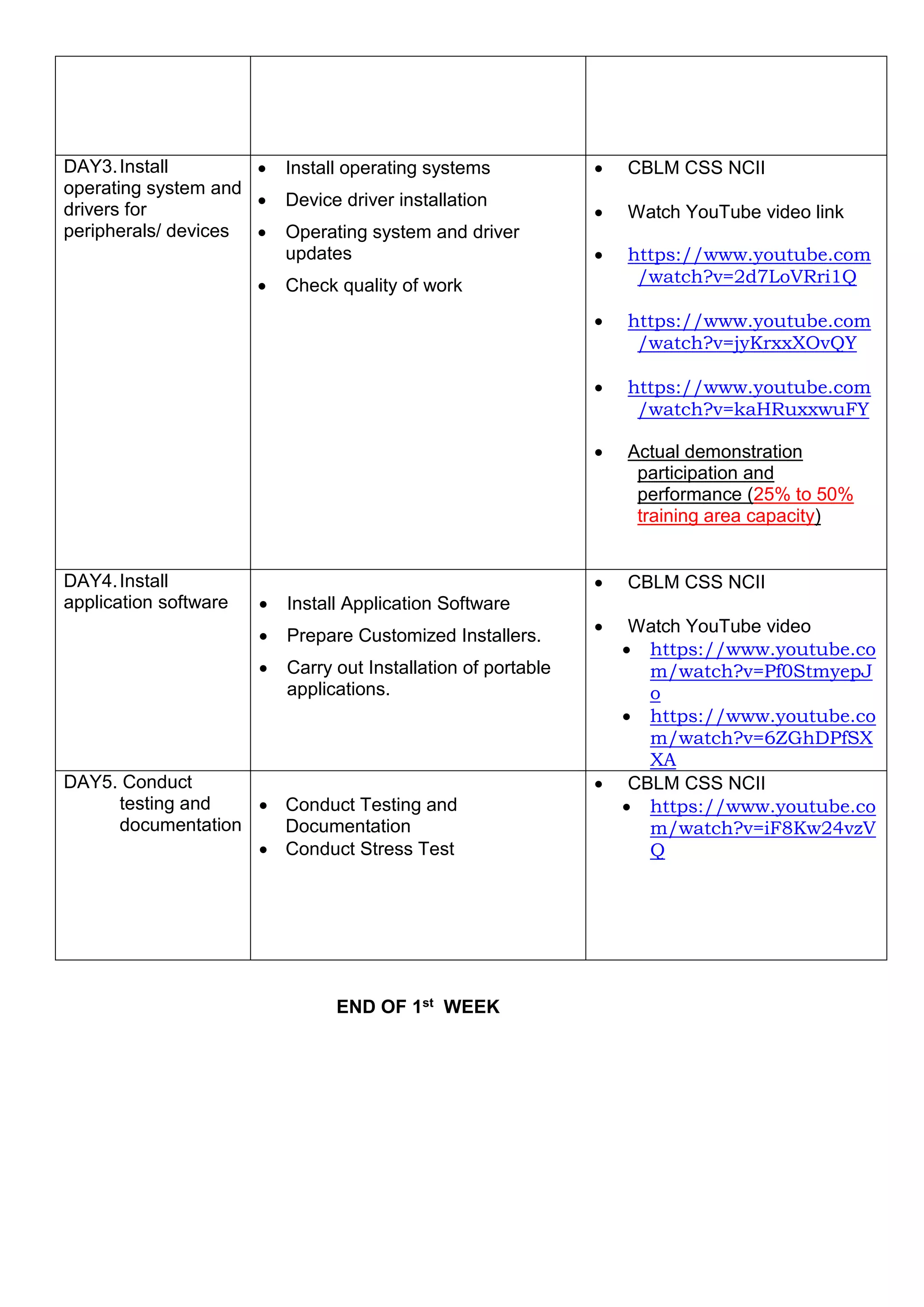
END OF 1st WEEK
DAY3.Install
operating system and
drivers for
peripherals/ devices
 Install operating systems
 Device driver installation
 Operating system and driver
updates
 Check quality of work
 CBLM CSS NCII
 Watch YouTube video link
 https://www.youtube.com
/watch?v=2d7LoVRri1Q
 https://www.youtube.com
/watch?v=jyKrxxXOvQY
 https://www.youtube.com
/watch?v=kaHRuxxwuFY
 Actual demonstration
participation and
performance (25% to 50%
training area capacity)
DAY4.Install
application software  Install Application Software
 Prepare Customized Installers.
 Carry out Installation of portable
applications.
 CBLM CSS NCII
 Watch YouTube video
 https://www.youtube.co
m/watch?v=Pf0StmyepJ
o
 https://www.youtube.co
m/watch?v=6ZGhDPfSX
XA
DAY5. Conduct
testing and
documentation
 Conduct Testing and
Documentation
 Conduct Stress Test
 CBLM CSS NCII
 https://www.youtube.co
m/watch?v=iF8Kw24vzV
Q
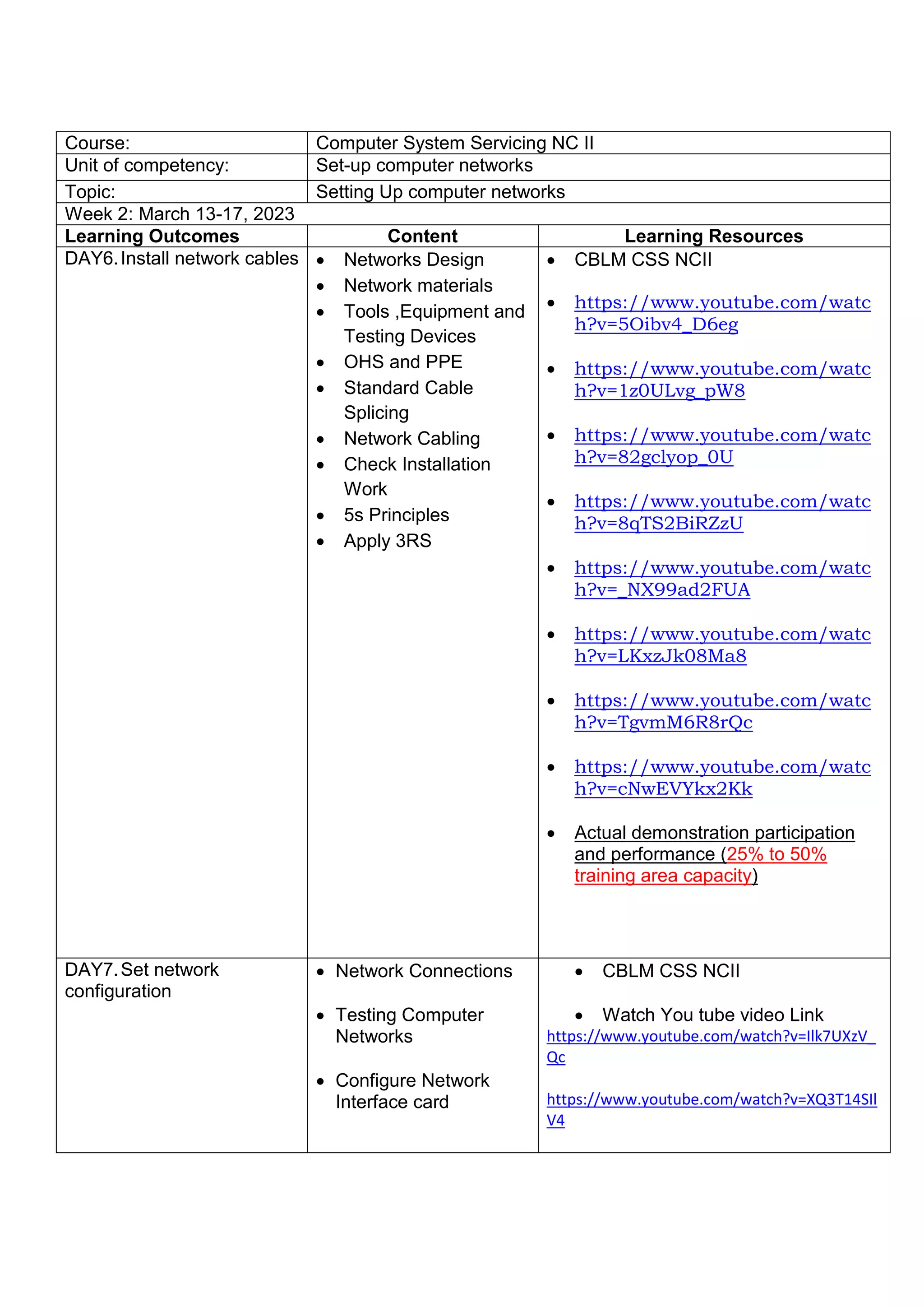
Course: Computer System Servicing NC II
Unit of competency: Set-up computer networks
Topic: Setting Up computer networks
Week 2: March 13-17, 2023
Learning Outcomes Content Learning Resources
DAY6.Install network cables  Networks Design
 Network materials
 Tools ,Equipment and
Testing Devices
 OHS and PPE
 Standard Cable
Splicing
 Network Cabling
 Check Installation
Work
 5s Principles
 Apply 3RS
 CBLM CSS NCII
 https://www.youtube.com/watc
h?v=5Oibv4_D6eg
 https://www.youtube.com/watc
h?v=1z0ULvg_pW8
 https://www.youtube.com/watc
h?v=82gclyop_0U
 https://www.youtube.com/watc
h?v=8qTS2BiRZzU
 https://www.youtube.com/watc
h?v=_NX99ad2FUA
 https://www.youtube.com/watc
h?v=LKxzJk08Ma8
 https://www.youtube.com/watc
h?v=TgvmM6R8rQc
 https://www.youtube.com/watc
h?v=cNwEVYkx2Kk
 Actual demonstration participation
and performance (25% to 50%
training area capacity)
DAY7.Set network
configuration
 Network Connections
 Testing Computer
Networks
 Configure Network
Interface card
 CBLM CSS NCII
 Watch You tube video Link
https://www.youtube.com/watch?v=Ilk7UXzV_
Qc
https://www.youtube.com/watch?v=XQ3T14SIl
V4
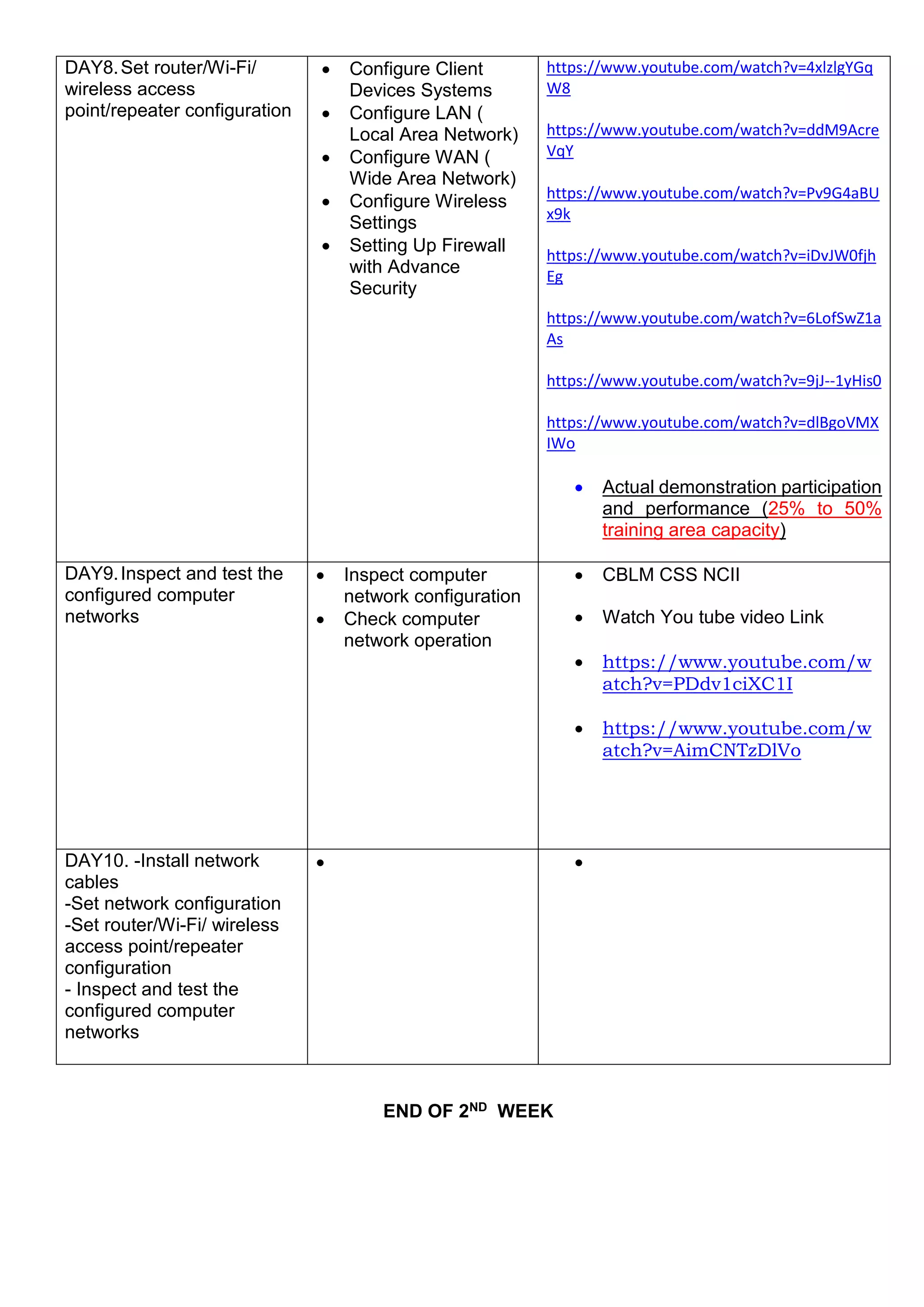
END OF 2ND WEEK
DAY8.Set router/Wi-Fi/
wireless access
point/repeater configuration
 Configure Client
Devices Systems
 Configure LAN (
Local Area Network)
 Configure WAN (
Wide Area Network)
 Configure Wireless
Settings
 Setting Up Firewall
with Advance
Security
https://www.youtube.com/watch?v=4xlzlgYGq
W8
https://www.youtube.com/watch?v=ddM9Acre
VqY
https://www.youtube.com/watch?v=Pv9G4aBU
x9k
https://www.youtube.com/watch?v=iDvJW0fjh
Eg
https://www.youtube.com/watch?v=6LofSwZ1a
As
https://www.youtube.com/watch?v=9jJ--1yHis0
https://www.youtube.com/watch?v=dlBgoVMX
IWo
 Actual demonstration participation
and performance (25% to 50%
training area capacity)
DAY9.Inspect and test the
configured computer
networks
 Inspect computer
network configuration
 Check computer
network operation
 CBLM CSS NCII
 Watch You tube video Link
 https://www.youtube.com/w
atch?v=PDdv1ciXC1I
 https://www.youtube.com/w
atch?v=AimCNTzDlVo
DAY10. -Install network
cables
-Set network configuration
-Set router/Wi-Fi/ wireless
access point/repeater
configuration
- Inspect and test the
configured computer
networks
 
END OF 3RD WEEK
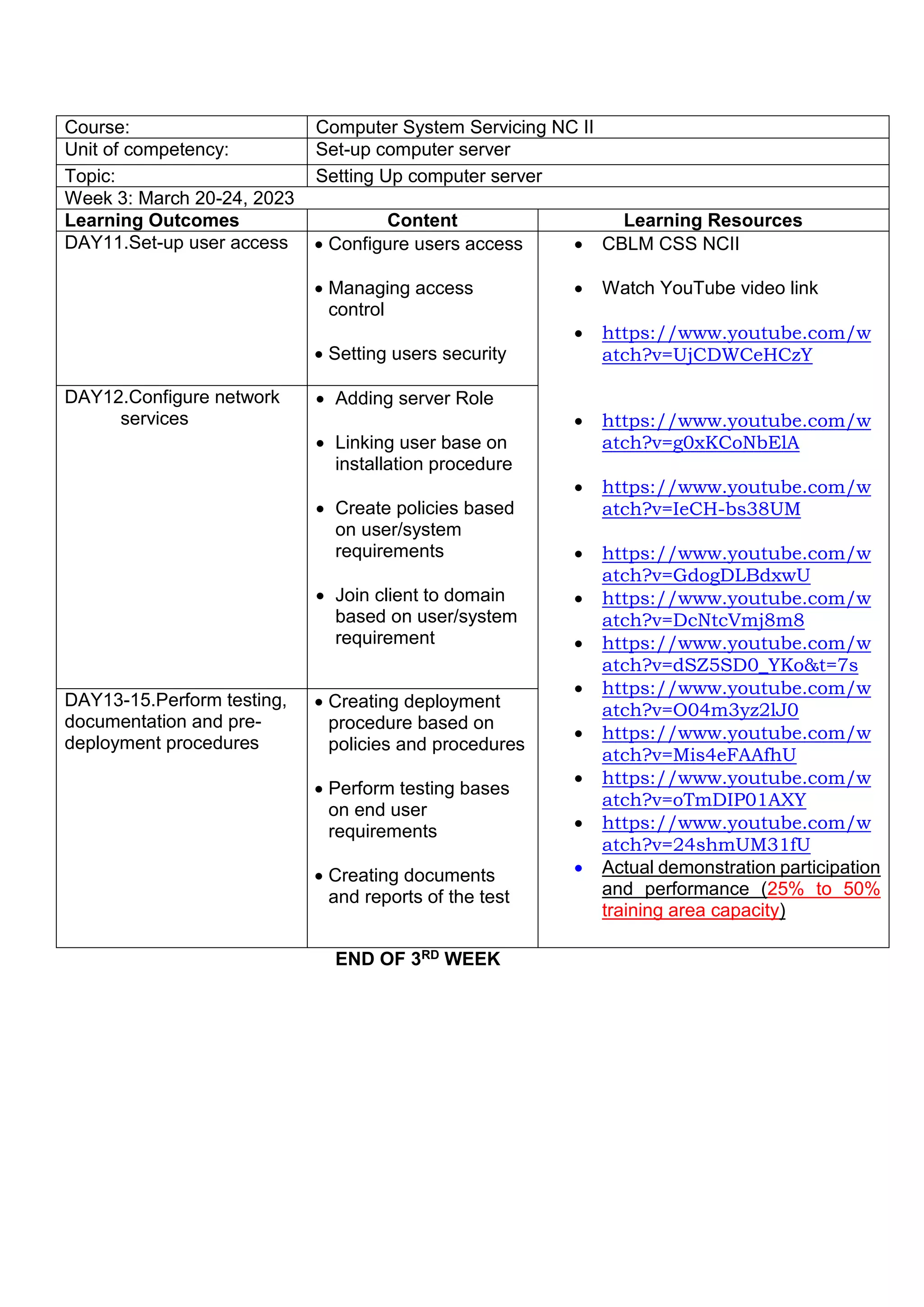
Course: Computer System Servicing NC II
Unit of competency: Set-up computer server
Topic: Setting Up computer server
Week 3: March 20-24, 2023
Learning Outcomes Content Learning Resources
DAY11.Set-up user access  Configure users access
 Managing access
control
 Setting users security
 CBLM CSS NCII
 Watch YouTube video link
 https://www.youtube.com/w
atch?v=UjCDWCeHCzY
 https://www.youtube.com/w
atch?v=g0xKCoNbElA
 https://www.youtube.com/w
atch?v=IeCH-bs38UM
 https://www.youtube.com/w
atch?v=GdogDLBdxwU
 https://www.youtube.com/w
atch?v=DcNtcVmj8m8
 https://www.youtube.com/w
atch?v=dSZ5SD0_YKo&t=7s
 https://www.youtube.com/w
atch?v=O04m3yz2lJ0
 https://www.youtube.com/w
atch?v=Mis4eFAAfhU
 https://www.youtube.com/w
atch?v=oTmDIP01AXY
 https://www.youtube.com/w
atch?v=24shmUM31fU
 Actual demonstration participation
and performance (25% to 50%
training area capacity)
DAY12.Configure network
services
 Adding server Role
 Linking user base on
installation procedure
 Create policies based
on user/system
requirements
 Join client to domain
based on user/system
requirement
DAY13-15.Perform testing,
documentation and pre-
deployment procedures
 Creating deployment
procedure based on
policies and procedures
 Perform testing bases
on end user
requirements
 Creating documents
and reports of the test
Course: Computer System Servicing NC II
Unit of competency: Maintain and repair computer systems and networks
Topic: Maintaining and repair computer systems and networks
Week 4: March 27-31, 2023
Learning Outcomes Content Learning Resources
DAY16.Plan and prepare for
maintenance and repair
 Pan/conduct
maintenance
procedures according
to job requirements
 Safety measures are
observed at all times
 Prepare tools and test
equipment
 Identify computer
specifications and
schematic diagrams
 Identify or obtain
network functions and
specifications
 CBLM CSS NCII
 Watch YouTube video link
 https://www.youtube.com/w
atch?v=JqOBH0KevC8
 https://www.youtube.com/w
atch?v=s7jbyKHCkRE
 https://www.youtube.com/w
atch?v=rHtK_Gs4uws
 https://www.youtube.com/w
atch?v=RPIdvfHefnk
 https://www.youtube.com/w
atch?v=5Zkvlcnv-UU
 https://www.youtube.com/w
atch?v=gPiid3NyN6U
 https://www.youtube.com/w
atch?v=oqIhQ5Y0mrg
 Actual demonstration
participation and performance
(25% to 50% training area
capacity)
DAY17. Maintain computer
systems and networks
 Procedures in
maintaining computer
and systems are
checked and tested
 Safety measures are
observed
 Diagnose and identify
fault systems
 Run diagnostic
software
 Repair or replace fault
system
 Burn-in or test repaired
or replace computer
system
DAY18. Diagnose
faults of computer systems
 Check the computer
systems to ensure safe
operations
 Run or conduct
computer to computer
communications
 Run diagnostic
software
 Repair or replace fault
system
 Return Document the
task undertaken
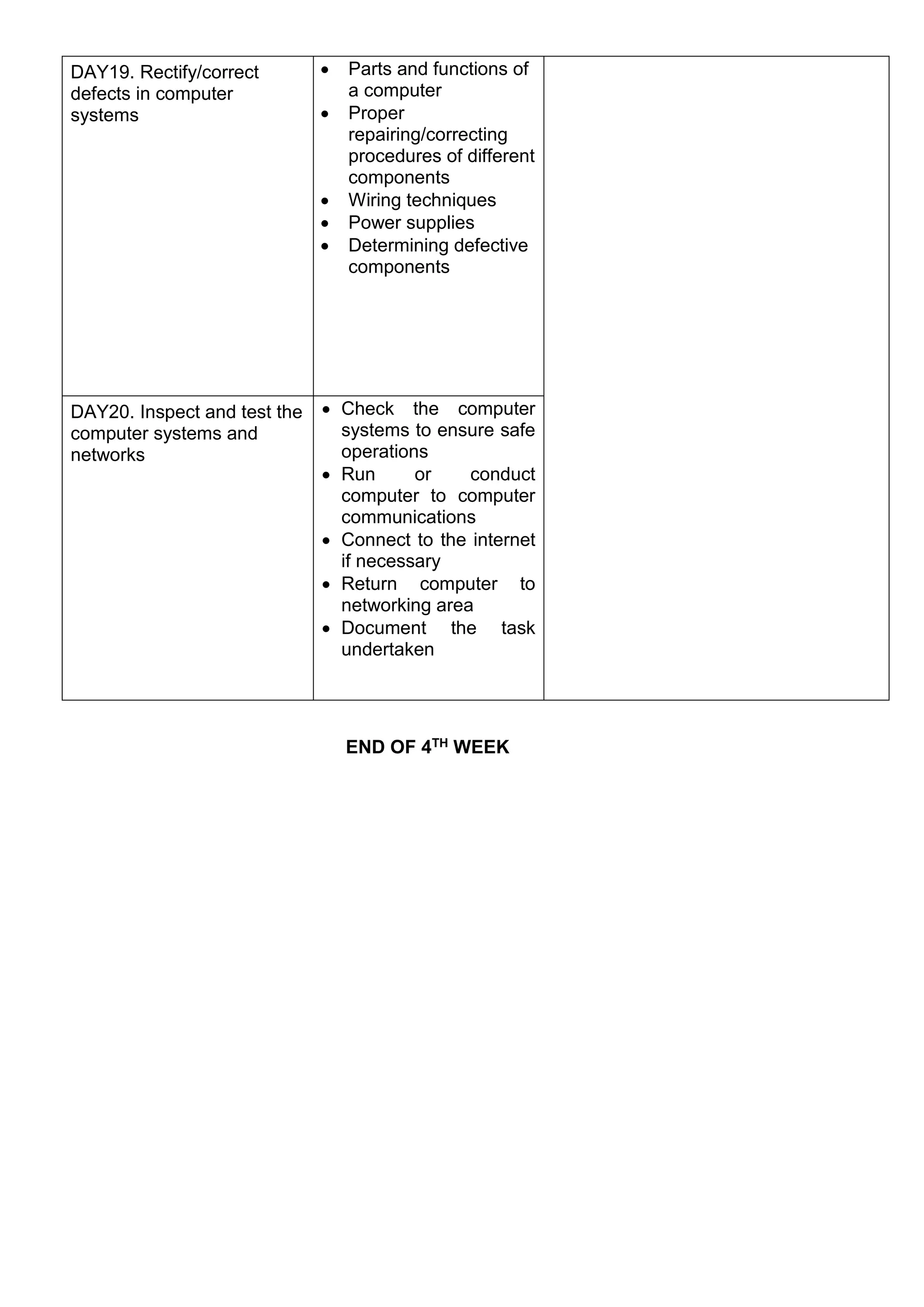
END OF 4TH WEEK
DAY19. Rectify/correct
defects in computer
systems
 Parts and functions of
a computer
 Proper
repairing/correcting
procedures of different
components
 Wiring techniques
 Power supplies
 Determining defective
components
DAY20. Inspect and test the
computer systems and
networks
 Check the computer
systems to ensure safe
operations
 Run or conduct
computer to computer
communications
 Connect to the internet
if necessary
 Return computer to
networking area
 Document the task
undertaken

Training-Plan-CSS.docx

  • 1.
    INTERNATIONAL COLLEGE OFPHILSOUTH Technical Excellence + Personal Qualities + Environmental Awareness = HOLISTIC PROFESSIONAL TRAINING PLAN COMPUTER SYSTEMS SERVICING NCII March 6- 31, 2023 Course: Computer System Servicing NC II Unit of competency: Install and configure computer systems Topic: Installing and configuring computer systems Week 1: March 6-10,2023 Learning Outcomes Content Learning Resources DAY1.Assemble computer hardware  Safety procedures  Basic terms, concepts, functions and characteristics of PC hardware components  System’s specifications of each device and peripherals  Familiarization with the various computer systems’ components and peripherals  CBLM CSS NCII  Watch online YouTube video  https://www.youtube.com/ watch?v=LGz0Io_dh_I  https://www.youtube.com/ watch?v=9MyaZGCA_TI  Watch offline downloaded Videos About disassembling and Assembling computer DAY2. Prepare installer  Create portable bootable devices.  Prepare Customized Installers.  Carry out Installation of portable applications.  CBLM CSS NCII  Watch online YouTube videos  https://www.youtube.com/ watch?v=e9REr-JgSxE  https://www.youtube.com/ watch?v=K7SlsJEVSXc  Watch offline downloaded Videos About disassembling and Assembling computer  Actual demonstration participation and performance (25% to 50% training area capacity)
  • 2.
    END OF 1stWEEK DAY3.Install operating system and drivers for peripherals/ devices  Install operating systems  Device driver installation  Operating system and driver updates  Check quality of work  CBLM CSS NCII  Watch YouTube video link  https://www.youtube.com /watch?v=2d7LoVRri1Q  https://www.youtube.com /watch?v=jyKrxxXOvQY  https://www.youtube.com /watch?v=kaHRuxxwuFY  Actual demonstration participation and performance (25% to 50% training area capacity) DAY4.Install application software  Install Application Software  Prepare Customized Installers.  Carry out Installation of portable applications.  CBLM CSS NCII  Watch YouTube video  https://www.youtube.co m/watch?v=Pf0StmyepJ o  https://www.youtube.co m/watch?v=6ZGhDPfSX XA DAY5. Conduct testing and documentation  Conduct Testing and Documentation  Conduct Stress Test  CBLM CSS NCII  https://www.youtube.co m/watch?v=iF8Kw24vzV Q
  • 3.
    Course: Computer SystemServicing NC II Unit of competency: Set-up computer networks Topic: Setting Up computer networks Week 2: March 13-17, 2023 Learning Outcomes Content Learning Resources DAY6.Install network cables  Networks Design  Network materials  Tools ,Equipment and Testing Devices  OHS and PPE  Standard Cable Splicing  Network Cabling  Check Installation Work  5s Principles  Apply 3RS  CBLM CSS NCII  https://www.youtube.com/watc h?v=5Oibv4_D6eg  https://www.youtube.com/watc h?v=1z0ULvg_pW8  https://www.youtube.com/watc h?v=82gclyop_0U  https://www.youtube.com/watc h?v=8qTS2BiRZzU  https://www.youtube.com/watc h?v=_NX99ad2FUA  https://www.youtube.com/watc h?v=LKxzJk08Ma8  https://www.youtube.com/watc h?v=TgvmM6R8rQc  https://www.youtube.com/watc h?v=cNwEVYkx2Kk  Actual demonstration participation and performance (25% to 50% training area capacity) DAY7.Set network configuration  Network Connections  Testing Computer Networks  Configure Network Interface card  CBLM CSS NCII  Watch You tube video Link https://www.youtube.com/watch?v=Ilk7UXzV_ Qc https://www.youtube.com/watch?v=XQ3T14SIl V4
  • 4.
    END OF 2NDWEEK DAY8.Set router/Wi-Fi/ wireless access point/repeater configuration  Configure Client Devices Systems  Configure LAN ( Local Area Network)  Configure WAN ( Wide Area Network)  Configure Wireless Settings  Setting Up Firewall with Advance Security https://www.youtube.com/watch?v=4xlzlgYGq W8 https://www.youtube.com/watch?v=ddM9Acre VqY https://www.youtube.com/watch?v=Pv9G4aBU x9k https://www.youtube.com/watch?v=iDvJW0fjh Eg https://www.youtube.com/watch?v=6LofSwZ1a As https://www.youtube.com/watch?v=9jJ--1yHis0 https://www.youtube.com/watch?v=dlBgoVMX IWo  Actual demonstration participation and performance (25% to 50% training area capacity) DAY9.Inspect and test the configured computer networks  Inspect computer network configuration  Check computer network operation  CBLM CSS NCII  Watch You tube video Link  https://www.youtube.com/w atch?v=PDdv1ciXC1I  https://www.youtube.com/w atch?v=AimCNTzDlVo DAY10. -Install network cables -Set network configuration -Set router/Wi-Fi/ wireless access point/repeater configuration - Inspect and test the configured computer networks  
  • 5.
    END OF 3RDWEEK Course: Computer System Servicing NC II Unit of competency: Set-up computer server Topic: Setting Up computer server Week 3: March 20-24, 2023 Learning Outcomes Content Learning Resources DAY11.Set-up user access  Configure users access  Managing access control  Setting users security  CBLM CSS NCII  Watch YouTube video link  https://www.youtube.com/w atch?v=UjCDWCeHCzY  https://www.youtube.com/w atch?v=g0xKCoNbElA  https://www.youtube.com/w atch?v=IeCH-bs38UM  https://www.youtube.com/w atch?v=GdogDLBdxwU  https://www.youtube.com/w atch?v=DcNtcVmj8m8  https://www.youtube.com/w atch?v=dSZ5SD0_YKo&t=7s  https://www.youtube.com/w atch?v=O04m3yz2lJ0  https://www.youtube.com/w atch?v=Mis4eFAAfhU  https://www.youtube.com/w atch?v=oTmDIP01AXY  https://www.youtube.com/w atch?v=24shmUM31fU  Actual demonstration participation and performance (25% to 50% training area capacity) DAY12.Configure network services  Adding server Role  Linking user base on installation procedure  Create policies based on user/system requirements  Join client to domain based on user/system requirement DAY13-15.Perform testing, documentation and pre- deployment procedures  Creating deployment procedure based on policies and procedures  Perform testing bases on end user requirements  Creating documents and reports of the test
  • 6.
    Course: Computer SystemServicing NC II Unit of competency: Maintain and repair computer systems and networks Topic: Maintaining and repair computer systems and networks Week 4: March 27-31, 2023 Learning Outcomes Content Learning Resources DAY16.Plan and prepare for maintenance and repair  Pan/conduct maintenance procedures according to job requirements  Safety measures are observed at all times  Prepare tools and test equipment  Identify computer specifications and schematic diagrams  Identify or obtain network functions and specifications  CBLM CSS NCII  Watch YouTube video link  https://www.youtube.com/w atch?v=JqOBH0KevC8  https://www.youtube.com/w atch?v=s7jbyKHCkRE  https://www.youtube.com/w atch?v=rHtK_Gs4uws  https://www.youtube.com/w atch?v=RPIdvfHefnk  https://www.youtube.com/w atch?v=5Zkvlcnv-UU  https://www.youtube.com/w atch?v=gPiid3NyN6U  https://www.youtube.com/w atch?v=oqIhQ5Y0mrg  Actual demonstration participation and performance (25% to 50% training area capacity) DAY17. Maintain computer systems and networks  Procedures in maintaining computer and systems are checked and tested  Safety measures are observed  Diagnose and identify fault systems  Run diagnostic software  Repair or replace fault system  Burn-in or test repaired or replace computer system DAY18. Diagnose faults of computer systems  Check the computer systems to ensure safe operations  Run or conduct computer to computer communications  Run diagnostic software  Repair or replace fault system  Return Document the task undertaken
  • 7.
    END OF 4THWEEK DAY19. Rectify/correct defects in computer systems  Parts and functions of a computer  Proper repairing/correcting procedures of different components  Wiring techniques  Power supplies  Determining defective components DAY20. Inspect and test the computer systems and networks  Check the computer systems to ensure safe operations  Run or conduct computer to computer communications  Connect to the internet if necessary  Return computer to networking area  Document the task undertaken