

Marc Pous
CEO, thethings.iO
marc@thethings.io
(+34) 936 816 891
training
T R A I N I N G
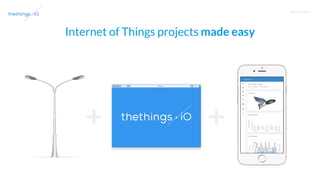
Internet of Things projects made easy
+ +
T R A I N I N G
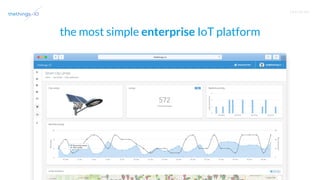
the most simple enterprise IoT platform
T R A I N I N G
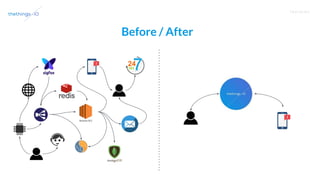
Before / After
T R A I N I N G
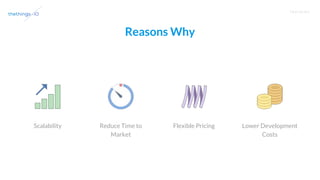
Reasons Why
Scalability Reduce Time to
Market
Flexible Pricing Lower Development
Costs
T R A I N I N G
Use Cases
T R A I N I N G
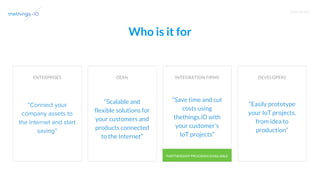
Who is it for
ENTERPRISES OEMs INTEGRATION FIRMS DEVELOPERS
“Scalable and
flexible solutions for
your customers and
products connected
to the Internet”
“Save time and cut
costs using
thethings.iO with
your customer’s
IoT projects”
“Easily prototype
your IoT projects,
from idea to
production”
PARTNERSHIP PROGRAM AVAILABLE
Certification
Set Up Training
T R A I N I N G
T R A I N I N G
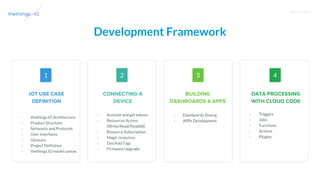
Development Framework
1 2 3 4
- Activate and get tokens
- Resources Access
(Write/Read/ReadAll)
- Resource Subscription
- Magic resources
- Get/Add Tags
- Firmware Upgrade
- Dashboards Desing
- APPs Development
- Triggers
- Jobs
- Functions
- Actions
- Plugins
- thethings.iO Architecture
- Product Structure
- Networks and Protocols
- User Interfaces
- Glossary
- Project Definition
- thethings.iO model canvas
1. IoT use case definition
Setup Basics
T R A I N I N G
T R A I N I N G
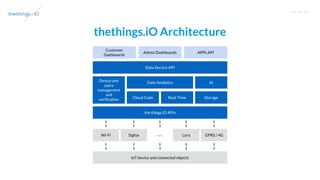
thethings.iO Architecture
Customer
Dashboards
Admin Dashboards APPs API
Data Service API
Cloud Code Real-Time Storage
Device and
users
management
and
verification
the things.iO APIs
IoT device and connected objects
Sigfox Lora GPRS / 4GWi-Fi ...
Data Analytics AI
T R A I N I N G
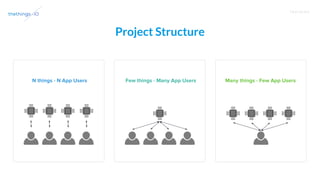
Project Structure
T R A I N I N G
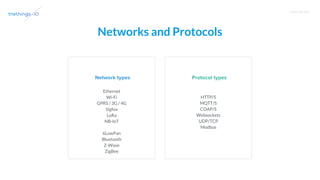
Networks and Protocols
Ethernet
Wi-Fi
GPRS / 3G / 4G
Sigfox
LoRa
NB-IoT
6LowPan
Bluetooth
Z-Wave
ZigBee
HTTP/S
MQTT/S
COAP/S
Websockets
UDP/TCP
Modbus
T R A I N I N G
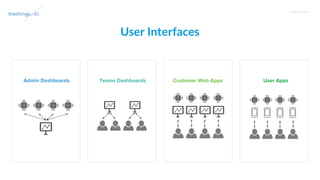
User Interfaces
T R A I N I N G
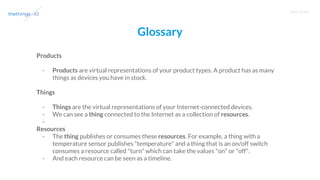
Glossary
Products
- Products are virtual representations of your product types. A product has as many
things as devices you have in stock.
Things
- Things are the virtual representations of your Internet-connected devices.
- We can see a thing connected to the Internet as a collection of resources.
-
Resources
- The thing publishes or consumes these resources. For example, a thing with a
temperature sensor publishes "temperature" and a thing that is an on/off switch
consumes a resource called "turn" which can take the values "on" or "off".
- And each resource can be seen as a timeline.
T R A I N I N G
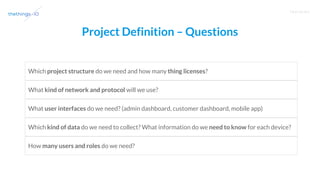
Project Definition – Questions
Which project structure do we need and how many thing licenses?
What kind of network and protocol will we use?
What user interfaces do we need? (admin dashboard, customer dashboard, mobile app)
Which kind of data do we need to collect? What information do we need to know for each device?
How many users and roles do we need?
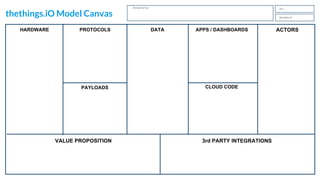
HARDWARE PROTOCOLS
PAYLOADS
DATA APPS / DASHBOARDS ACTORS
CLOUD CODE
VALUE PROPOSITION 3rd PARTY INTEGRATIONS
Designed by: On:
Iteration #
thethings.iO Model Canvas
2. Connecting a Device
Setup Basics
T R A I N I N G
T R A I N I N G
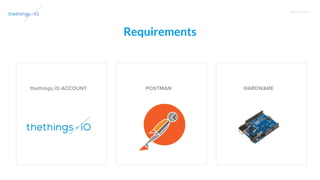
Requirements
T R A I N I N G
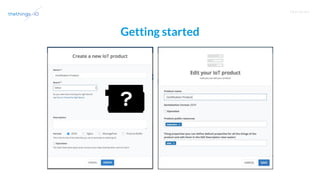
Getting started
T R A I N I N G
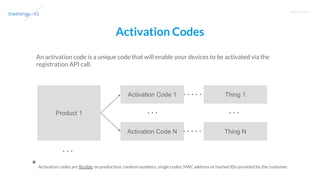
Activation Codes
An activation code is a unique code that will enable your devices to be activated via the
registration API call.
Product 1
Activation Code 1
Activation Code N
Thing 1
Thing N
* Activation codes are flexible on production: random numbers, single codes, MAC address or hashed IDs provided by the customer.
T R A I N I N G
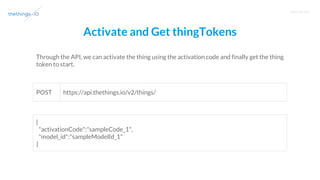
Activate and Get thingTokens
Through the API, we can activate the thing using the activation code and finally get the thing
token to start.
https://api.thethings.io/v2/things/
{
"activationCode":"sampleCode_1",
"model_id":"sampleModelId_1"
}
POST
T R A I N I N G
Resources Access: Write
We can start sending values to the resources.
https://api.thethings.io/v2/things/THING_TOKEN
{
"values": [ {
"key": "temperature",
"value": "21"
} ]
}
POST
T R A I N I N G
Resources Access: Read
We can read the sent values.
https://api.thethings.io/v2/things/THING_TOKEN/resource/RESOURCE_NAME
[{
"key": "temperature",
"value": "21",
"datetime": "2017-03-08T11:21:20.703Z"
}]
GET
Response example:
https://api.thethings.io/v2/things/THING_TOKEN/all_resourcesGET
T R A I N I N G
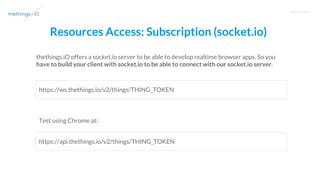
Resources Access: Subscription (socket.io)
thethings.iO offers a socket.io server to be able to develop realtime browser apps. So you
have to build your client with socket.io to be able to connect with our socket.io server.
https://ws.thethings.io/v2/things/THING_TOKEN
https://api.thethings.io/v2/things/THING_TOKEN
Test using Chrome at:
T R A I N I N G
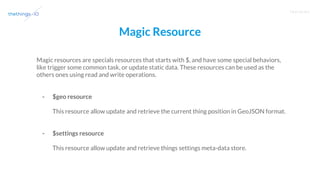
Magic Resource
Magic resources are specials resources that starts with $, and have some special behaviors,
like trigger some common task, or update static data. These resources can be used as the
others ones using read and write operations.
- $geo resource
This resource allow update and retrieve the current thing position in GeoJSON format.
- $settings resource
This resource allow update and retrieve things settings meta-data store.
T R A I N I N G
Magic Resource: Write
https://api.thethings.io/v2/things/THING_TOKENPOST
{
"Values": [{
"key": "$geo",
"value" : {
"type": "Point",
"coordinates": [2.154007, 41.390205]
}
}]
}
T R A I N I N G
Magic Resource: Read
https://api.thethings.io/v2/things/THING_TOKEN/resources/$MAGIC_RESOURCEGET
[{
"key": "$geo",
"value": {
"type": "Point",
"coordinates": [
2.154007,
41.390207
]
}}]
Response example:
T R A I N I N G
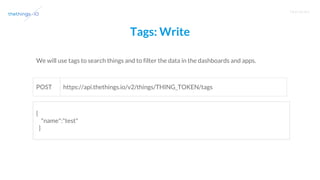
Tags: Write
https://api.thethings.io/v2/things/THING_TOKEN/tagsPOST
{
"name":"test"
}
We will use tags to search things and to filter the data in the dashboards and apps.
T R A I N I N G
Tags: Read
https://api.thethings.io/v2/things/THING_TOKEN/tagsGET
{
"status": "success",
"tags": [
{
"_id": "test",
"name": "test"
}
]
}
Response example:
T R A I N I N G
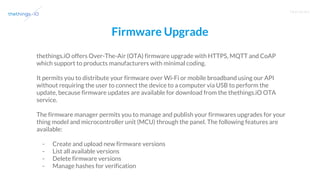
Firmware Upgrade
thethings.iO offers Over-The-Air (OTA) firmware upgrade with HTTPS, MQTT and CoAP
which support to products manufacturers with minimal coding.
It permits you to distribute your firmware over Wi-Fi or mobile broadband using our API
without requiring the user to connect the device to a computer via USB to perform the
update, because firmware updates are available for download from the thethings.iO OTA
service.
The firmware manager permits you to manage and publish your firmwares upgrades for your
thing model and microcontroller unit (MCU) through the panel. The following features are
available:
- Create and upload new firmware versions
- List all available versions
- Delete firmware versions
- Manage hashes for verification
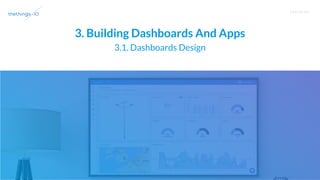
3. Building Dashboards And Apps
3.1. Dashboards Design
T R A I N I N G
T R A I N I N G
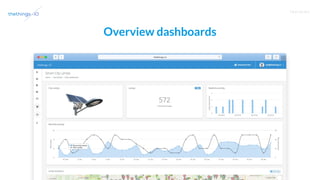
Overview dashboards
T R A I N I N G
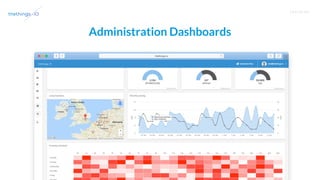
Administration Dashboards
T R A I N I N G
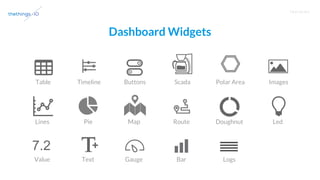
Dashboard Widgets
Lines Pie Map Route
Table Timeline Buttons Scada
Value Text Gauge Bar
Doughnut
Polar Area
Logs
Led
Images
7.2
T R A I N I N G
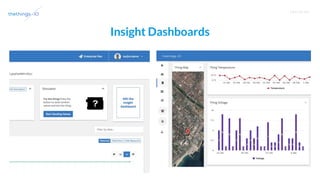
Insight Dashboards
3. Building Dashboards And Apps
3.2. APPs Development
T R A I N I N G
T R A I N I N G
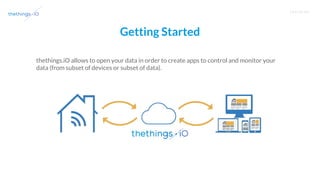
Getting Started
thethings.iO allows to open your data in order to create apps to control and monitor your
data (from subset of devices or subset of data).
T R A I N I N G
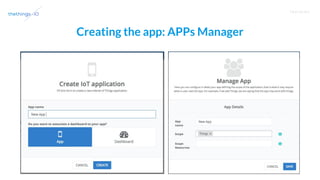
Creating the app: APPs Manager
T R A I N I N G
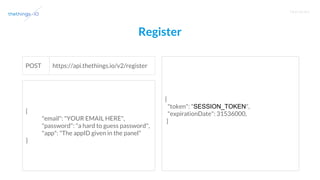
Register
https://api.thethings.io/v2/registerPOST
{
"email": "YOUR EMAIL HERE",
"password": "a hard to guess password",
"app": "The appID given in the panel"
}
{
"token": "SESSION_TOKEN",
"expirationDate": 31536000,
}
T R A I N I N G
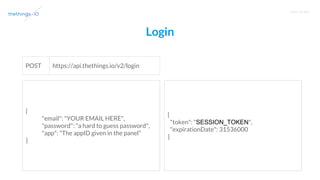
Login
https://api.thethings.io/v2/loginPOST
{
"email": "YOUR EMAIL HERE",
"password": "a hard to guess password",
"app": "The appID given in the panel"
}
{
"token": "SESSION_TOKEN",
"expirationDate": 31536000
}
T R A I N I N G
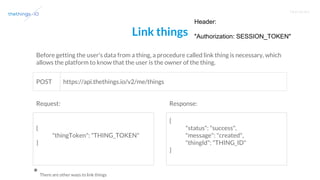
Link things
https://api.thethings.io/v2/me/thingsPOST
{
"thingToken": "THING_TOKEN"
}
Before getting the user's data from a thing, a procedure called link thing is necessary, which
allows the platform to know that the user is the owner of the thing.
{
"status": "success",
"message": "created",
"thingId": "THING_ID"
}
Request: Response:
* There are other ways to link things
Header:
"Authorization: SESSION_TOKEN"
T R A I N I N G
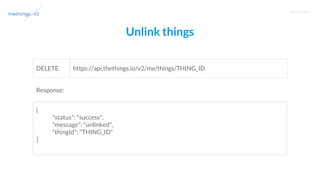
Unlink things
https://api.thethings.io/v2/me/things/THING_IDDELETE
{
"status": "success",
"message": "unlinked",
"thingId": "THING_ID"
}
Response:
T R A I N I N G
List all user resources
https://api.thethings.io/v2/me/resourcesGET
[
{
"name" : "temperature",
"things" : ["thingId1", "thingId2"]
},
{
"name": "another resource name",
"things" : ["thingId2", "thingId3", ...]
},
...
]
Response:
T R A I N I N G
Getting resource values
https://api.thethings.io/v2/me/resources/RESOURCEGET
{
"thingId1" : [
{"value":15, "datetime" : "20150202T220035.00Z"},
{"value":17, "datetime" : "20150202T210035.00Z"}
]
}
Response:
T R A I N I N G
Getting all resources values
https://api.thethings.io/v2/me/all_resources/THING_IDGET
[{
key: 'temperature',
values: [ { value: 23, datetime: '2016-03-16T10:29:18.772Z' } ]
},{
key: 'voltage',
values: [ { value: 5, datetime: '2016-03-16T10:29:18.772Z' } ]
},{
key: 'current',
values: [ { value: 0.32, datetime: '2016-03-16T10:29:18.772Z' } ]
}]
Response:
T R A I N I N G
Resource Subscription
https://api.thethings.io/v2/me/resources/RESOURCE?subscribe=true&keepAlive=TIME_MSGET
[
{
"value":15,
"id": "thingId1"
}
]
Response:
T R A I N I N G
Magic Resource
https://api.thethings.io/v2/me/resources/RESOURCE/THING_IDPOST
{
"Values": [{
"key": "$geo",
"value" : {
"type": "Point",
"coordinates": [2.154007, 41.390205]
}
}]
}
T R A I N I N G
User Settings
https://api.thethings.io/v2/me/settingsGET
{
"hair-color" : "pink",
"phones" : ["123456", "998965"]
}
https://api.thethings.io/v2/me/settingsPUT
GET Response:
{
status: 'success',
message: 'updated'
}
PUT Response:
Q&A
T R A I N I N G
4. Data Processing with Cloud Code
Setup Basics
T R A I N I N G
T R A I N I N G
Triggers
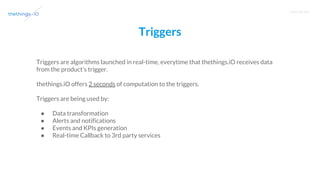
Triggers are algorithms launched in real-time, everytime that thethings.iO receives data
from the product’s trigger.
thethings.iO offers 2 seconds of computation to the triggers.
Triggers are being used by:
● Data transformation
● Alerts and notifications
● Events and KPIs generation
● Real-time Callback to 3rd party services
T R A I N I N G
Jobs
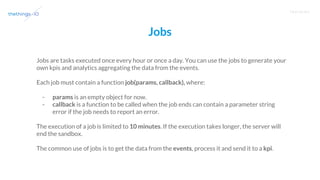
Jobs are tasks executed once every hour or once a day. You can use the jobs to generate your
own kpis and analytics aggregating the data from the events.
Each job must contain a function job(params, callback), where:
- params is an empty object for now.
- callback is a function to be called when the job ends can contain a parameter string
error if the job needs to report an error.
The execution of a job is limited to 10 minutes. If the execution takes longer, the server will
end the sandbox.
The common use of jobs is to get the data from the events, process it and send it to a kpi.
T R A I N I N G
Functions
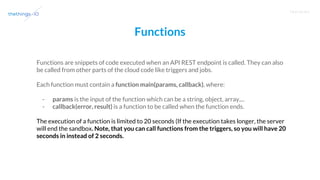
Functions are snippets of code executed when an API REST endpoint is called. They can also
be called from other parts of the cloud code like triggers and jobs.
Each function must contain a function main(params, callback), where:
- params is the input of the function which can be a string, object, array,...
- callback(error, result) is a function to be called when the function ends.
The execution of a function is limited to 20 seconds (If the execution takes longer, the server
will end the sandbox. Note, that you can call functions from the triggers, so you will have 20
seconds in instead of 2 seconds.
T R A I N I N G
Functions
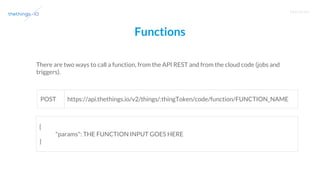
There are two ways to call a function, from the API REST and from the cloud code (jobs and
triggers).
{
"params": THE FUNCTION INPUT GOES HERE
}
https://api.thethings.io/v2/things/:thingToken/code/function/FUNCTION_NAMEPOST
T R A I N I N G
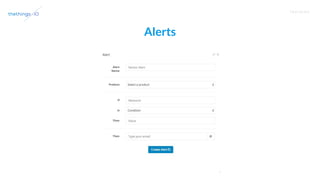
Alerts
T R A I N I N G
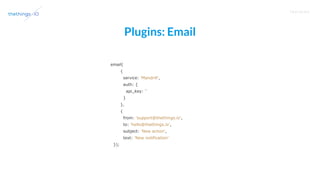
Plugins: Email
email(
{
service: 'Mandrill',
auth: {
api_key: ''
}
},
{
from: 'support@thethings.io',
to: 'hello@thethings.io',
subject: 'New action',
text: 'New notification'
});
T R A I N I N G
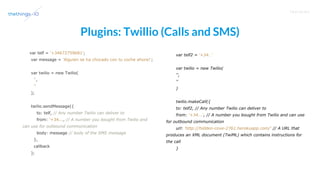
Plugins: Twillio (Calls and SMS)
var telf = '+34672759681';
var message = 'Alguien se ha chocado con tu coche ahora!';
var twilio = new Twilio(
'',
''
);
twilio.sendMessage({
to: telf, // Any number Twilio can deliver to
from: '+34..., // A number you bought from Twilio and
can use for outbound communication
body: message // body of the SMS message
},
callback
);
var telf2 = '+34..'
var twilio = new Twilio(
'',
''
)
twilio.makeCall({
to: telf2, // Any number Twilio can deliver to
from: '+34...', // A number you bought from Twilio and can use
for outbound communication
url: 'http://hidden-cove-2761.herokuapp.com/' // A URL that
produces an XML document (TwiML) which contains instructions for
the call
}
T R A I N I N G
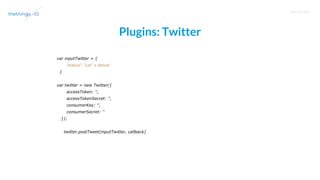
Plugins: Twitter
var inputTwitter = {
'status': 'Let´s dance'
}
var twitter = new Twitter({
accessToken: '',
accessTokenSecret: '',
consumerKey: '',
consumerSecret: ''
});
twitter.postTweet(inputTwitter, callback)
T R A I N I N G
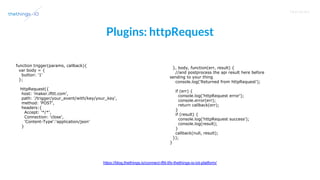
Plugins: httpRequest
function trigger(params, callback){
var body = {
button: '1'
};
httpRequest({
host: 'maker.ifttt.com',
path: '/trigger/your_event/with/key/your_key',
method: 'POST',
headers:{
Accept: '*/*',
Connection: 'close',
'Content-Type':'application/json'
}
}, body, function(err, result) {
//and postprocess the api result here before
sending to your thing
console.log('Returned from httpRequest');
if (err) {
console.log('httpRequest error');
console.error(err);
return callback(err);
}
if (result) {
console.log('httpRequest success');
console.log(result);
}
callback(null, result);
});
}
https://blog.thethings.io/connect-ifttt-lifx-thethings-io-iot-platform/
T R A I N I N G
Plugins: analytics (events and kpis)
function trigger(params, callback) {
if (params.action !== 'write') {
return callback();
}
var values = params.values;
var lastSwitch = null;
for (var i = 0; i < values.length; ++i) {
//console.log(values[i].key, values[i].value)
if (values[i].key === 'switch') {
lastSwitch = values[i].value;
}
}
analytics.events.create({name:'switch',
value:lastSwitch});
callback();
}
function job(params, callback) {
analytics.events.getValuesByName('switch', function(error, data) {
if (error) return callback(error);
analytics.kpis.create('button presses', data.count());
callback();
});
}
T R A I N I N G
Plugins: thethingsAPI
Var thingToken = params.thingToken;
Var resource ='myResource';
thethingsAPI.thingRead(thingToken, 'Site', function(err, result) {
if (err) return callback(err);
callaback(null, result[0].value);
}
var data = {key:'$geo', value:0, geo: key_stat.geo};
var values = [data];
thethingsAPI.thingWrite(thingToken, {values: values} , function
(error, res) {
if (error) {
console.log(error, thingToken);
return callback(error);
}
return callback(null,'Success');
});
T R A I N I N G
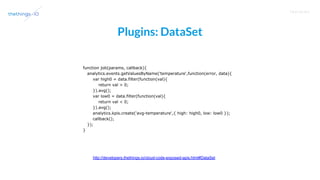
Plugins: DataSet
http://developers.thethings.io/cloud-code-exposed-apis.html#DataSet
function job(params, callback){
analytics.events.getValuesByName('temperature',function(error, data){
var high0 = data.filter(function(val){
return val > 0;
}).avg();
var low0 = data.filter(function(val){
return val < 0;
}).avg();
analytics.kpis.create('avg-temperature',{ high: high0, low: low0 });
callback();
});
}
T R A I N I N G
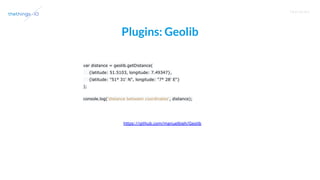
Plugins: Geolib
var distance = geolib.getDistance(
{latitude: 51.5103, longitude: 7.49347},
{latitude: "51° 31' N", longitude: "7° 28' E"}
);
console.log(‘distance between coordinates’, distance);
https://github.com/manuelbieh/Geolib
(+34) 936 816 891
T R A I N I N G
training, thank you

Training thethings.iO

  • 1.
  • 2.
    T R AI N I N G Internet of Things projects made easy + +
  • 3.
    T R AI N I N G the most simple enterprise IoT platform
  • 4.
    T R AI N I N G Before / After
  • 5.
    T R AI N I N G Reasons Why Scalability Reduce Time to Market Flexible Pricing Lower Development Costs
  • 6.
    T R AI N I N G Use Cases
  • 7.
    T R AI N I N G Who is it for ENTERPRISES OEMs INTEGRATION FIRMS DEVELOPERS “Scalable and flexible solutions for your customers and products connected to the Internet” “Save time and cut costs using thethings.iO with your customer’s IoT projects” “Easily prototype your IoT projects, from idea to production” PARTNERSHIP PROGRAM AVAILABLE
  • 8.
  • 9.
    T R AI N I N G Development Framework 1 2 3 4 - Activate and get tokens - Resources Access (Write/Read/ReadAll) - Resource Subscription - Magic resources - Get/Add Tags - Firmware Upgrade - Dashboards Desing - APPs Development - Triggers - Jobs - Functions - Actions - Plugins - thethings.iO Architecture - Product Structure - Networks and Protocols - User Interfaces - Glossary - Project Definition - thethings.iO model canvas
  • 10.
    1. IoT usecase definition Setup Basics T R A I N I N G
  • 11.
    T R AI N I N G thethings.iO Architecture Customer Dashboards Admin Dashboards APPs API Data Service API Cloud Code Real-Time Storage Device and users management and verification the things.iO APIs IoT device and connected objects Sigfox Lora GPRS / 4GWi-Fi ... Data Analytics AI
  • 12.
    T R AI N I N G Project Structure
  • 13.
    T R AI N I N G Networks and Protocols Ethernet Wi-Fi GPRS / 3G / 4G Sigfox LoRa NB-IoT 6LowPan Bluetooth Z-Wave ZigBee HTTP/S MQTT/S COAP/S Websockets UDP/TCP Modbus
  • 14.
    T R AI N I N G User Interfaces
  • 15.
    T R AI N I N G Glossary Products - Products are virtual representations of your product types. A product has as many things as devices you have in stock. Things - Things are the virtual representations of your Internet-connected devices. - We can see a thing connected to the Internet as a collection of resources. - Resources - The thing publishes or consumes these resources. For example, a thing with a temperature sensor publishes "temperature" and a thing that is an on/off switch consumes a resource called "turn" which can take the values "on" or "off". - And each resource can be seen as a timeline.
  • 16.
    T R AI N I N G Project Definition – Questions Which project structure do we need and how many thing licenses? What kind of network and protocol will we use? What user interfaces do we need? (admin dashboard, customer dashboard, mobile app) Which kind of data do we need to collect? What information do we need to know for each device? How many users and roles do we need?
  • 17.
    HARDWARE PROTOCOLS PAYLOADS DATA APPS/ DASHBOARDS ACTORS CLOUD CODE VALUE PROPOSITION 3rd PARTY INTEGRATIONS Designed by: On: Iteration # thethings.iO Model Canvas
  • 18.
    2. Connecting aDevice Setup Basics T R A I N I N G
  • 19.
    T R AI N I N G Requirements
  • 20.
    T R AI N I N G Getting started
  • 21.
    T R AI N I N G Activation Codes An activation code is a unique code that will enable your devices to be activated via the registration API call. Product 1 Activation Code 1 Activation Code N Thing 1 Thing N * Activation codes are flexible on production: random numbers, single codes, MAC address or hashed IDs provided by the customer.
  • 22.
    T R AI N I N G Activate and Get thingTokens Through the API, we can activate the thing using the activation code and finally get the thing token to start. https://api.thethings.io/v2/things/ { "activationCode":"sampleCode_1", "model_id":"sampleModelId_1" } POST
  • 23.
    T R AI N I N G Resources Access: Write We can start sending values to the resources. https://api.thethings.io/v2/things/THING_TOKEN { "values": [ { "key": "temperature", "value": "21" } ] } POST
  • 24.
    T R AI N I N G Resources Access: Read We can read the sent values. https://api.thethings.io/v2/things/THING_TOKEN/resource/RESOURCE_NAME [{ "key": "temperature", "value": "21", "datetime": "2017-03-08T11:21:20.703Z" }] GET Response example: https://api.thethings.io/v2/things/THING_TOKEN/all_resourcesGET
  • 25.
    T R AI N I N G Resources Access: Subscription (socket.io) thethings.iO offers a socket.io server to be able to develop realtime browser apps. So you have to build your client with socket.io to be able to connect with our socket.io server. https://ws.thethings.io/v2/things/THING_TOKEN https://api.thethings.io/v2/things/THING_TOKEN Test using Chrome at:
  • 26.
    T R AI N I N G Magic Resource Magic resources are specials resources that starts with $, and have some special behaviors, like trigger some common task, or update static data. These resources can be used as the others ones using read and write operations. - $geo resource This resource allow update and retrieve the current thing position in GeoJSON format. - $settings resource This resource allow update and retrieve things settings meta-data store.
  • 27.
    T R AI N I N G Magic Resource: Write https://api.thethings.io/v2/things/THING_TOKENPOST { "Values": [{ "key": "$geo", "value" : { "type": "Point", "coordinates": [2.154007, 41.390205] } }] }
  • 28.
    T R AI N I N G Magic Resource: Read https://api.thethings.io/v2/things/THING_TOKEN/resources/$MAGIC_RESOURCEGET [{ "key": "$geo", "value": { "type": "Point", "coordinates": [ 2.154007, 41.390207 ] }}] Response example:
  • 29.
    T R AI N I N G Tags: Write https://api.thethings.io/v2/things/THING_TOKEN/tagsPOST { "name":"test" } We will use tags to search things and to filter the data in the dashboards and apps.
  • 30.
    T R AI N I N G Tags: Read https://api.thethings.io/v2/things/THING_TOKEN/tagsGET { "status": "success", "tags": [ { "_id": "test", "name": "test" } ] } Response example:
  • 31.
    T R AI N I N G Firmware Upgrade thethings.iO offers Over-The-Air (OTA) firmware upgrade with HTTPS, MQTT and CoAP which support to products manufacturers with minimal coding. It permits you to distribute your firmware over Wi-Fi or mobile broadband using our API without requiring the user to connect the device to a computer via USB to perform the update, because firmware updates are available for download from the thethings.iO OTA service. The firmware manager permits you to manage and publish your firmwares upgrades for your thing model and microcontroller unit (MCU) through the panel. The following features are available: - Create and upload new firmware versions - List all available versions - Delete firmware versions - Manage hashes for verification
  • 32.
    3. Building DashboardsAnd Apps 3.1. Dashboards Design T R A I N I N G
  • 33.
    T R AI N I N G Overview dashboards
  • 34.
    T R AI N I N G Administration Dashboards
  • 35.
    T R AI N I N G Dashboard Widgets Lines Pie Map Route Table Timeline Buttons Scada Value Text Gauge Bar Doughnut Polar Area Logs Led Images 7.2
  • 36.
    T R AI N I N G Insight Dashboards
  • 37.
    3. Building DashboardsAnd Apps 3.2. APPs Development T R A I N I N G
  • 38.
    T R AI N I N G Getting Started thethings.iO allows to open your data in order to create apps to control and monitor your data (from subset of devices or subset of data).
  • 39.
    T R AI N I N G Creating the app: APPs Manager
  • 40.
    T R AI N I N G Register https://api.thethings.io/v2/registerPOST { "email": "YOUR EMAIL HERE", "password": "a hard to guess password", "app": "The appID given in the panel" } { "token": "SESSION_TOKEN", "expirationDate": 31536000, }
  • 41.
    T R AI N I N G Login https://api.thethings.io/v2/loginPOST { "email": "YOUR EMAIL HERE", "password": "a hard to guess password", "app": "The appID given in the panel" } { "token": "SESSION_TOKEN", "expirationDate": 31536000 }
  • 42.
    T R AI N I N G Link things https://api.thethings.io/v2/me/thingsPOST { "thingToken": "THING_TOKEN" } Before getting the user's data from a thing, a procedure called link thing is necessary, which allows the platform to know that the user is the owner of the thing. { "status": "success", "message": "created", "thingId": "THING_ID" } Request: Response: * There are other ways to link things Header: "Authorization: SESSION_TOKEN"
  • 43.
    T R AI N I N G Unlink things https://api.thethings.io/v2/me/things/THING_IDDELETE { "status": "success", "message": "unlinked", "thingId": "THING_ID" } Response:
  • 44.
    T R AI N I N G List all user resources https://api.thethings.io/v2/me/resourcesGET [ { "name" : "temperature", "things" : ["thingId1", "thingId2"] }, { "name": "another resource name", "things" : ["thingId2", "thingId3", ...] }, ... ] Response:
  • 45.
    T R AI N I N G Getting resource values https://api.thethings.io/v2/me/resources/RESOURCEGET { "thingId1" : [ {"value":15, "datetime" : "20150202T220035.00Z"}, {"value":17, "datetime" : "20150202T210035.00Z"} ] } Response:
  • 46.
    T R AI N I N G Getting all resources values https://api.thethings.io/v2/me/all_resources/THING_IDGET [{ key: 'temperature', values: [ { value: 23, datetime: '2016-03-16T10:29:18.772Z' } ] },{ key: 'voltage', values: [ { value: 5, datetime: '2016-03-16T10:29:18.772Z' } ] },{ key: 'current', values: [ { value: 0.32, datetime: '2016-03-16T10:29:18.772Z' } ] }] Response:
  • 47.
    T R AI N I N G Resource Subscription https://api.thethings.io/v2/me/resources/RESOURCE?subscribe=true&keepAlive=TIME_MSGET [ { "value":15, "id": "thingId1" } ] Response:
  • 48.
    T R AI N I N G Magic Resource https://api.thethings.io/v2/me/resources/RESOURCE/THING_IDPOST { "Values": [{ "key": "$geo", "value" : { "type": "Point", "coordinates": [2.154007, 41.390205] } }] }
  • 49.
    T R AI N I N G User Settings https://api.thethings.io/v2/me/settingsGET { "hair-color" : "pink", "phones" : ["123456", "998965"] } https://api.thethings.io/v2/me/settingsPUT GET Response: { status: 'success', message: 'updated' } PUT Response:
  • 50.
    Q&A T R AI N I N G
  • 51.
    4. Data Processingwith Cloud Code Setup Basics T R A I N I N G
  • 52.
    T R AI N I N G Triggers Triggers are algorithms launched in real-time, everytime that thethings.iO receives data from the product’s trigger. thethings.iO offers 2 seconds of computation to the triggers. Triggers are being used by: ● Data transformation ● Alerts and notifications ● Events and KPIs generation ● Real-time Callback to 3rd party services
  • 53.
    T R AI N I N G Jobs Jobs are tasks executed once every hour or once a day. You can use the jobs to generate your own kpis and analytics aggregating the data from the events. Each job must contain a function job(params, callback), where: - params is an empty object for now. - callback is a function to be called when the job ends can contain a parameter string error if the job needs to report an error. The execution of a job is limited to 10 minutes. If the execution takes longer, the server will end the sandbox. The common use of jobs is to get the data from the events, process it and send it to a kpi.
  • 54.
    T R AI N I N G Functions Functions are snippets of code executed when an API REST endpoint is called. They can also be called from other parts of the cloud code like triggers and jobs. Each function must contain a function main(params, callback), where: - params is the input of the function which can be a string, object, array,... - callback(error, result) is a function to be called when the function ends. The execution of a function is limited to 20 seconds (If the execution takes longer, the server will end the sandbox. Note, that you can call functions from the triggers, so you will have 20 seconds in instead of 2 seconds.
  • 55.
    T R AI N I N G Functions There are two ways to call a function, from the API REST and from the cloud code (jobs and triggers). { "params": THE FUNCTION INPUT GOES HERE } https://api.thethings.io/v2/things/:thingToken/code/function/FUNCTION_NAMEPOST
  • 56.
    T R AI N I N G Alerts
  • 57.
    T R AI N I N G Plugins: Email email( { service: 'Mandrill', auth: { api_key: '' } }, { from: 'support@thethings.io', to: 'hello@thethings.io', subject: 'New action', text: 'New notification' });
  • 58.
    T R AI N I N G Plugins: Twillio (Calls and SMS) var telf = '+34672759681'; var message = 'Alguien se ha chocado con tu coche ahora!'; var twilio = new Twilio( '', '' ); twilio.sendMessage({ to: telf, // Any number Twilio can deliver to from: '+34..., // A number you bought from Twilio and can use for outbound communication body: message // body of the SMS message }, callback ); var telf2 = '+34..' var twilio = new Twilio( '', '' ) twilio.makeCall({ to: telf2, // Any number Twilio can deliver to from: '+34...', // A number you bought from Twilio and can use for outbound communication url: 'http://hidden-cove-2761.herokuapp.com/' // A URL that produces an XML document (TwiML) which contains instructions for the call }
  • 59.
    T R AI N I N G Plugins: Twitter var inputTwitter = { 'status': 'Let´s dance' } var twitter = new Twitter({ accessToken: '', accessTokenSecret: '', consumerKey: '', consumerSecret: '' }); twitter.postTweet(inputTwitter, callback)
  • 60.
    T R AI N I N G Plugins: httpRequest function trigger(params, callback){ var body = { button: '1' }; httpRequest({ host: 'maker.ifttt.com', path: '/trigger/your_event/with/key/your_key', method: 'POST', headers:{ Accept: '*/*', Connection: 'close', 'Content-Type':'application/json' } }, body, function(err, result) { //and postprocess the api result here before sending to your thing console.log('Returned from httpRequest'); if (err) { console.log('httpRequest error'); console.error(err); return callback(err); } if (result) { console.log('httpRequest success'); console.log(result); } callback(null, result); }); } https://blog.thethings.io/connect-ifttt-lifx-thethings-io-iot-platform/
  • 61.
    T R AI N I N G Plugins: analytics (events and kpis) function trigger(params, callback) { if (params.action !== 'write') { return callback(); } var values = params.values; var lastSwitch = null; for (var i = 0; i < values.length; ++i) { //console.log(values[i].key, values[i].value) if (values[i].key === 'switch') { lastSwitch = values[i].value; } } analytics.events.create({name:'switch', value:lastSwitch}); callback(); } function job(params, callback) { analytics.events.getValuesByName('switch', function(error, data) { if (error) return callback(error); analytics.kpis.create('button presses', data.count()); callback(); }); }
  • 62.
    T R AI N I N G Plugins: thethingsAPI Var thingToken = params.thingToken; Var resource ='myResource'; thethingsAPI.thingRead(thingToken, 'Site', function(err, result) { if (err) return callback(err); callaback(null, result[0].value); } var data = {key:'$geo', value:0, geo: key_stat.geo}; var values = [data]; thethingsAPI.thingWrite(thingToken, {values: values} , function (error, res) { if (error) { console.log(error, thingToken); return callback(error); } return callback(null,'Success'); });
  • 63.
    T R AI N I N G Plugins: DataSet http://developers.thethings.io/cloud-code-exposed-apis.html#DataSet function job(params, callback){ analytics.events.getValuesByName('temperature',function(error, data){ var high0 = data.filter(function(val){ return val > 0; }).avg(); var low0 = data.filter(function(val){ return val < 0; }).avg(); analytics.kpis.create('avg-temperature',{ high: high0, low: low0 }); callback(); }); }
  • 64.
    T R AI N I N G Plugins: Geolib var distance = geolib.getDistance( {latitude: 51.5103, longitude: 7.49347}, {latitude: "51° 31' N", longitude: "7° 28' E"} ); console.log(‘distance between coordinates’, distance); https://github.com/manuelbieh/Geolib
  • 65.
    (+34) 936 816891 T R A I N I N G training, thank you