LIFE ON CLOUDS, A FORENSICS OVERVIEW
MARCO SCARITO – MATTIA EPIFANI – FRANCESCO PICASSO
DFRWS 2016 EU – LAUSANNE
31/03/2016
OUR DIGITAL LIFE IS ON THE CLOUD
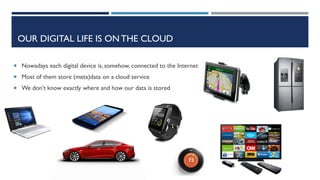
 Nowadays each digital device is, somehow, connected to the Internet
 Most of them store (meta)data on a cloud service
 We don’t know exactly where and how our data is stored
CLOUD SERVICES
 Cloud services include:
 Storage
 Documents
 Email
 Calendar
 Applications
 Virtual machines
 Other services
HOW CAN WE ACCESS CLOUD STORAGE DATA?
Each vendor provides a specific client to access data
other than a web browser access.
During a forensic analysis, when we know the user
credentials or we have a valid token, the usage of
standard clients is absolutely unsuitable and
web access is often uncomfortable
API ACCESS
 Fortunately, all vendors provide API (Application Program
Interface) to access data on cloud services
 Some forensics software for cloud acquisition rely on the APIs, some
others emulate a browser and parse information, but most of them are
focused on retrieving files (eventually deleted or previous versions)
ignoring almost completely all available metadata
 During our research, we developed some pieces of software (Python
scripts) that implement the vendor’s API, focusing more on metadata
than on files
CLOUD DATA STORAGE PLAYERS
 We have developed acquisition scripts for DropBox and Google (Drive
and other services) and we called them «CLOUDIAN»
CLOUDIAN – API INSTALLATION
 Both DropBox and Google provide an API interface and a dedicated Python
SDK
 After installing Python you need to install the proper SDKs
$ pip install dropbox
$ pip install --upgrade google-api-python-client
CLOUDIAN – REGISTERYOUR APPLICATION ON DROPBOX
 In order to register a new application you
need a DropBox® account
 Go to https://www.dropbox.com/developers
 The app must have full write access
 Choose an app name
 Obtain
 App key
 App secret
CLOUDIAN-DBOX
flow = dropbox.client.DropboxOAuth2FlowNoRedirect(app_key,
app_secret)
authorize_url = flow.start()
webbrowser.open_new(authorize_url)
print ('1. Click "Allow" (you might have to log in first)')
print ("2. Copy the authorization code.")
code = raw_input("Enter the authorization code here: ").strip()
access_token, user_id = flow.finish(code)
client = dropbox.client.DropboxClient(access_token)
Now that you have a
proprer App key and
App secret, you can use
Python APIs to connect to
a Dropbox account with
proper username and
password (or valid token)
CLOUDIAN-DBOX
 Once your own App is authorized, you can easily access data
and/or metadata of all files stored in the account using APIs
 First of all you can retrieve Account Information using the
command:
account = client.account_info()
CLOUDIAN-DBOX
 Then you can retrieve the content of a particular path, for example,
starting from the root and recursively browsing the complete tree:
metadata = client.metadata(path, list = True,
include_deleted = True)
 This command retrieves all metadata available for the specified «path»
and, if it is a directory, it retrieves also metadata of contained files and
subdirectories (including deleted ones)
CLOUDIAN-DBOX
 If a file has previous versions, you can retrieve a list of all revisions using the
command:
revisions = client.revisions(path, rev_limit=1000)
 Then you can retrieve metadata of each revision stored on Dropbox account:
for revision in revisions:
metatada = client.metadata(path, rev=revision,
include_media_info=True)
 The include_media_info paramenter permits to collect Exif information stored in
metadata
CLOUDIAN-DBOX
 Once you have downloaded all metadata
information you can start analyzing them
 They are downloaded in JSON format,
so it is quite easy to manage information
 Here is JSON sample returned by the
client.account_info()call
"account information": {
"referral_link": "https://db.tt/UE4wbELS",
"display_name": "REALITY NET System Solutions",
"uid": 466040986,
"locale": "it",
"email_verified": true,
"email": "info@realitynet.it",
"is_paired": false,
"team": null,
"name_details": {
"familiar_name": "REALITY NET",
"surname": "System Solutions",
"given_name": "REALITY NET"
},
"country": "IT",
"quota_info": {
"datastores": 0,
"shared": 0,
"quota": 1101659111424,
"normal": 7661774
}
},
CLOUDIAN-DBOX
 Here is the JSON describing a Folder
 As you can see there are some useful
info:
 The «last modified date»
 The folder is shared with someone
"/RW_shared": {
"meta": {
"read_only": false,
"modifier": null,
"icon": "folder_user",
"bytes": 0,
"thumb_exists": false,
"rev": "4e3c55f906",
"modified": "Fri, 25 Mar 2016 09:40:23 +0000",
"shared_folder": {
"shared_folder_id": "1180320204",
"is_team_only_shared_folder": false
},
"path": "/RW_shared",
"is_dir": true,
"size": "0 bytes",
"root": "dropbox",
"revision": 78
},
CLOUDIAN-DBOX
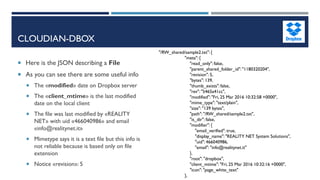
 Here is the JSON describing a File
 As you can see there are some useful info
 The «modified» date on Dropbox server
 The «client_mtime» is the last modified
date on the local client
 The file was last modified by «REALITY
NET» with uid «466040986» and email
«info@realitynet.it»
 Mimetype says it is a text file but this info is
not reliable because is based only on file
extension
 Notice «revision»: 5
"/RW_shared/sample2.txt": {
"meta": {
"read_only": false,
"parent_shared_folder_id": "1180320204",
"revision": 5,
"bytes": 139,
"thumb_exists": false,
"rev": "5465a41cc",
"modified": "Fri, 25 Mar 2016 10:32:58 +0000",
"mime_type": "text/plain",
"size": "139 bytes",
"path": "/RW_shared/sample2.txt",
"is_dir": false,
"modifier": {
"email_verified": true,
"display_name": "REALITY NET System Solutions",
"uid": 466040986,
"email": "info@realitynet.it"
},
"root": "dropbox",
"client_mtime": "Fri, 25 Mar 2016 10:32:16 +0000",
"icon": "page_white_text"
},
CLOUDIAN-DBOX
 Let’s analyze another file
 As you can see there are some useful info
 The file was «deleted»
 The «modified» date says when the file was
deleted
 The last modifier does not coincide with
the user who deleted the file (i know that i
used another one )
 The «client_mtime» has no sense
 It is not possible to download a deleted file:
you have to find the most recent «previous
version» of the deleted file
 Notice «revision»: 6
"/RW_shared/sample2.txt": {
"meta": {
"read_only": false,
"parent_shared_folder_id": "1180320204",
"is_deleted": true,
"revision": 6,
"bytes": 0,
"thumb_exists": false,
"rev": "6465a41cc",
"modified": "Fri, 25 Mar 2016 10:33:16 +0000",
"mime_type": "text/plain",
"size": "0 bytes",
"path": "/RW_shared/sample2.txt",
"is_dir": false,
"modifier": {
"email_verified": true,
"display_name": "REALITY NET System Solutions",
"uid": 466040986,
"email": "info@realitynet.it"
},
"root": "dropbox",
"client_mtime": "Wed, 31 Dec 1969 23:59:59 +0000",
"icon": "page_white_text"
CLOUDIAN-DBOX
 Let’s analyze a third file:
 This one was modified by
another user 
 Notice that «client_mdate» and
«modified» are perfectly the
same, this could indicate that the
file was uploaded with the web
interface
 Notice «revision»: 1
"/RW_shared/sample1.txt": {
"meta": {
"read_only": false,
"parent_shared_folder_id": "1180320204",
"revision": 1,
"bytes": 30,
"thumb_exists": false,
"rev": "1465a41cc",
"modified": "Fri, 25 Mar 2016 09:57:32 +0000",
"mime_type": "text/plain",
"size": "30 bytes",
"path": "/RW_shared/sample1.txt",
"is_dir": false,
"modifier": {
"email_verified": true,
"display_name": "Marco Scarito",
"uid": 24169827,
"email": "marcoscarito@outlook.com"
},
"root": "dropbox",
"client_mtime": "Fri, 25 Mar 2016 09:57:32 +0000",
"icon": "page_white_text"
},
CLOUDIAN-DBOX
Name Revision Modified Modifier Client-mdate Deleted
sample1.txt 1 Fri, 25 Mar 2016
09:57:32
Marco Scarito Fri, 25 Mar 2016
09:57:32
No
sample1.txt 2 Fri, 25 Mar 2016
10:20:39
REALITY NET
System Solutions
Fri, 25 Mar 2016
10:20:34
No
sample1.txt 3 Fri, 25 Mar 2016
10:31:12
REALITY NET
System Solutions
Wed, 31 Dec
1969 23:59:59
Yes
sample2.txt 4 Fri, 25 Mar 2016
10:31:12
REALITY NET
System Solutions
Fri, 25 Mar 2016
10:20:34
No
sample2.txt 5 Fri, 25 Mar 2016
10:32:58
REALITY NET
System Solutions
Fri, 25 Mar 2016
10:32:16
No
sample2.txt 6 Fri, 25 Mar 2016
10:33:16
REALITY NET
System Solutions
Wed, 31 Dec
1969 23:59:59
Yes
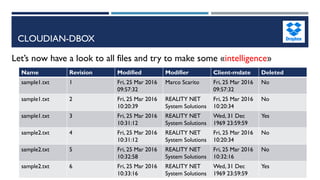
Let’s now have a look to all files and try to make some «intelligence»
CLOUDIAN-DBOX
What did we add to ensure a «forensically sound» environment?
 You can include in your «project» info about:
 Examiner name
 Examiner Company
 Other info are generated automatically:
 Start date and time
 MD5 and SHA-256 hashes based on metadata retrieved during acquisition
If you are able to «freeze» the hashes (for example you could send them immediately to your
«customer» using a secure channel), you can ensure that retrieved data will not be «tampered»
by anyone
CLOUDIAN-DBOX
What can we do to ensure a more «forensically
sound» environment?
 We can improve the script on some fields:
 We can retrieve «timing information» from a secure source (public NTP)
 We can «sniff» network traffic generated by the script
 We can improve the output data type (for example we could generate a time line)
CLOUDIAN – REGISTERYOUR APPLICATION ON GOOGLE DEVS
 In order to register a new application you
need a Google account
 Go to https://console.developers.google.com
 Create a new project
 Activate API for desired service (Drive, Gmail,
Calendar, …)
 Click on “Create Credential”
 Download the json file containing
 Client ID
 Client Secret
 Other information
CLOUDIAN – GOOGLE
 Google Cloud Services are more complex than Dropbox
 There is a huge amount of different services on Google Cloud
 Gmail
 Drive
 Calendar
 Contacts
 And other free services
 Moreover, there are a lot of professional services (like Cloud Computing, Cloud SQL,
CloudVirtual Networks, …)
 Each service has its own set of API constantly improved
CLOUDIAN – GOOGLE
 In our research we decided to focus only on free services:
 Google Calendar
 Google Drive
 The API approach is similar to the Dropbox one: you need to connect to a known
account with your application in order to retrieve data from Google data centers
 All metadata are exposed as JSON objects
 In most cases you can retrieve metadata without downloading the data
 Google APIs are «forensics friendly» as you can set read only access
CLOUDIAN-GCAL
 When you access Google Calendar using APIs, you can retrieve all information about
the user’s calendar and all other calendars that are shared with the user
while True:
calendar_list = service.calendarList().list(pageToken=page_token).execute()
for item in calendar_list['items']:
calendars.append(item)
page_token = calendar_list.get('nextPageToken')
if not page_token:
break
CLOUDIAN-GCAL
USER MAIN CALENDAR
"kind": "calendar#calendarListEntry",
"foregroundColor": "#000000",
"defaultReminders": [ … ],
"primary": true,
"colorId": "3",
"selected": true,
"summary":"marco.scarito@realitynet.it",
"etag": ""1435832228655000"",
"backgroundColor": "#f83a22",
"timeZone": "Europe/Rome",
"accessRole": "owner",
"id": "marco.scarito@realitynet.it"
SHARED CALENDARWITH FULL RIGHT
"kind": "calendar#calendarListEntry",
"foregroundColor": "#000000",
"defaultReminders": [],
"colorId": "15",
"selected": true,
"summary": "mattia.epifani@realitynet.it",
"etag": ""1458923654259000"",
"backgroundColor": "#9fc6e7",
"timeZone": "Europe/Rome",
"accessRole": "owner",
"id": mattia.epifani@realitynet.it
SHARED CALENDAR FREE/BUSY
"kind": "calendar#calendarListEntry",
"foregroundColor": "#000000",
"defaultReminders": [],
"colorId": "22",
"selected": true,
"summary": "Marco Scarito",
"etag": ""1459329937764000"",
"backgroundColor": "#f691b2",
"timeZone": "Europe/Rome",
"accessRole": "freeBusyReader",
"id": "marcoscarito@gmail.com"
CLOUDIAN-GCAL
 Analizing each single event in the JSON structure you can retrieve a lot of useful
information
 How organize the event (it should be another user)
 Start and End date and time
 Attendees
 Creation date and time
 Visibility
 Summary
 Recurrence
 And much more
CLOUDIAN-GDRIVE
 When you access Google Drive using APIs, you can retrieve all information about the
user activities
 User files with previous versions
 Deleted file
 Google photo files
 All files accessed by the user within the google docs platform
 Shared files
 And much more
CLOUDIAN-GDRIVE
 Focusing on metadata
 For each file you have directly the MD5 hash on metadata (without downloading the
file)
 For each shared document you can access the full list of users with specific
permissions
 For multimedia files you can access specific metadata (like video length in seconds,
image dimension in pixel, EXIF metadata)
CLOUDIAN-GDRIVE
 The most interesting aspect in our research (not yet implemented) is that,
using APIs, you can search for files using metadata parameters like:
 modification date range (if you are looking for an event in a specific time period)
 Hash value (if you are looking if a user has a specific file)
 Camera Model (if you are looking for photos shot with a specific camera)
 And so on…
CLOUDIAN-GDRIVE
Latest discovery:
 Analyzing my own Google Drive account I discovered that some
years ago I opened a document named “plaso reinventing the
super timeline - 2013 DFIR Summit.pdf” that was published as a
public Google docs document
Q&A
Marco Scarito
Digital Forensics Analyst and Mobile Device Security Analyst
CTO @ REALITY NET –System Solutions
Member of CLUSIT, DFA, IISFA, ONIF
marco.scarito@realitynet.it
@marcoscarito
http://www.linkedin.com/in/marcoscarito
http://blog.digital-forensics.it
http://www.realitynet.it

Life on Clouds: a forensics overview

  • 1.
    LIFE ON CLOUDS,A FORENSICS OVERVIEW MARCO SCARITO – MATTIA EPIFANI – FRANCESCO PICASSO DFRWS 2016 EU – LAUSANNE 31/03/2016
  • 2.
    OUR DIGITAL LIFEIS ON THE CLOUD  Nowadays each digital device is, somehow, connected to the Internet  Most of them store (meta)data on a cloud service  We don’t know exactly where and how our data is stored
  • 3.
    CLOUD SERVICES  Cloudservices include:  Storage  Documents  Email  Calendar  Applications  Virtual machines  Other services
  • 4.
    HOW CAN WEACCESS CLOUD STORAGE DATA? Each vendor provides a specific client to access data other than a web browser access. During a forensic analysis, when we know the user credentials or we have a valid token, the usage of standard clients is absolutely unsuitable and web access is often uncomfortable
  • 5.
    API ACCESS  Fortunately,all vendors provide API (Application Program Interface) to access data on cloud services  Some forensics software for cloud acquisition rely on the APIs, some others emulate a browser and parse information, but most of them are focused on retrieving files (eventually deleted or previous versions) ignoring almost completely all available metadata  During our research, we developed some pieces of software (Python scripts) that implement the vendor’s API, focusing more on metadata than on files
  • 6.
    CLOUD DATA STORAGEPLAYERS  We have developed acquisition scripts for DropBox and Google (Drive and other services) and we called them «CLOUDIAN»
  • 7.
    CLOUDIAN – APIINSTALLATION  Both DropBox and Google provide an API interface and a dedicated Python SDK  After installing Python you need to install the proper SDKs $ pip install dropbox $ pip install --upgrade google-api-python-client
  • 8.
    CLOUDIAN – REGISTERYOURAPPLICATION ON DROPBOX  In order to register a new application you need a DropBox® account  Go to https://www.dropbox.com/developers  The app must have full write access  Choose an app name  Obtain  App key  App secret
  • 9.
    CLOUDIAN-DBOX flow = dropbox.client.DropboxOAuth2FlowNoRedirect(app_key, app_secret) authorize_url= flow.start() webbrowser.open_new(authorize_url) print ('1. Click "Allow" (you might have to log in first)') print ("2. Copy the authorization code.") code = raw_input("Enter the authorization code here: ").strip() access_token, user_id = flow.finish(code) client = dropbox.client.DropboxClient(access_token) Now that you have a proprer App key and App secret, you can use Python APIs to connect to a Dropbox account with proper username and password (or valid token)
  • 10.
    CLOUDIAN-DBOX  Once yourown App is authorized, you can easily access data and/or metadata of all files stored in the account using APIs  First of all you can retrieve Account Information using the command: account = client.account_info()
  • 11.
    CLOUDIAN-DBOX  Then youcan retrieve the content of a particular path, for example, starting from the root and recursively browsing the complete tree: metadata = client.metadata(path, list = True, include_deleted = True)  This command retrieves all metadata available for the specified «path» and, if it is a directory, it retrieves also metadata of contained files and subdirectories (including deleted ones)
  • 12.
    CLOUDIAN-DBOX  If afile has previous versions, you can retrieve a list of all revisions using the command: revisions = client.revisions(path, rev_limit=1000)  Then you can retrieve metadata of each revision stored on Dropbox account: for revision in revisions: metatada = client.metadata(path, rev=revision, include_media_info=True)  The include_media_info paramenter permits to collect Exif information stored in metadata
  • 13.
    CLOUDIAN-DBOX  Once youhave downloaded all metadata information you can start analyzing them  They are downloaded in JSON format, so it is quite easy to manage information  Here is JSON sample returned by the client.account_info()call "account information": { "referral_link": "https://db.tt/UE4wbELS", "display_name": "REALITY NET System Solutions", "uid": 466040986, "locale": "it", "email_verified": true, "email": "info@realitynet.it", "is_paired": false, "team": null, "name_details": { "familiar_name": "REALITY NET", "surname": "System Solutions", "given_name": "REALITY NET" }, "country": "IT", "quota_info": { "datastores": 0, "shared": 0, "quota": 1101659111424, "normal": 7661774 } },
  • 14.
    CLOUDIAN-DBOX  Here isthe JSON describing a Folder  As you can see there are some useful info:  The «last modified date»  The folder is shared with someone "/RW_shared": { "meta": { "read_only": false, "modifier": null, "icon": "folder_user", "bytes": 0, "thumb_exists": false, "rev": "4e3c55f906", "modified": "Fri, 25 Mar 2016 09:40:23 +0000", "shared_folder": { "shared_folder_id": "1180320204", "is_team_only_shared_folder": false }, "path": "/RW_shared", "is_dir": true, "size": "0 bytes", "root": "dropbox", "revision": 78 },
  • 15.
    CLOUDIAN-DBOX  Here isthe JSON describing a File  As you can see there are some useful info  The «modified» date on Dropbox server  The «client_mtime» is the last modified date on the local client  The file was last modified by «REALITY NET» with uid «466040986» and email «info@realitynet.it»  Mimetype says it is a text file but this info is not reliable because is based only on file extension  Notice «revision»: 5 "/RW_shared/sample2.txt": { "meta": { "read_only": false, "parent_shared_folder_id": "1180320204", "revision": 5, "bytes": 139, "thumb_exists": false, "rev": "5465a41cc", "modified": "Fri, 25 Mar 2016 10:32:58 +0000", "mime_type": "text/plain", "size": "139 bytes", "path": "/RW_shared/sample2.txt", "is_dir": false, "modifier": { "email_verified": true, "display_name": "REALITY NET System Solutions", "uid": 466040986, "email": "info@realitynet.it" }, "root": "dropbox", "client_mtime": "Fri, 25 Mar 2016 10:32:16 +0000", "icon": "page_white_text" },
  • 16.
    CLOUDIAN-DBOX  Let’s analyzeanother file  As you can see there are some useful info  The file was «deleted»  The «modified» date says when the file was deleted  The last modifier does not coincide with the user who deleted the file (i know that i used another one )  The «client_mtime» has no sense  It is not possible to download a deleted file: you have to find the most recent «previous version» of the deleted file  Notice «revision»: 6 "/RW_shared/sample2.txt": { "meta": { "read_only": false, "parent_shared_folder_id": "1180320204", "is_deleted": true, "revision": 6, "bytes": 0, "thumb_exists": false, "rev": "6465a41cc", "modified": "Fri, 25 Mar 2016 10:33:16 +0000", "mime_type": "text/plain", "size": "0 bytes", "path": "/RW_shared/sample2.txt", "is_dir": false, "modifier": { "email_verified": true, "display_name": "REALITY NET System Solutions", "uid": 466040986, "email": "info@realitynet.it" }, "root": "dropbox", "client_mtime": "Wed, 31 Dec 1969 23:59:59 +0000", "icon": "page_white_text"
  • 17.
    CLOUDIAN-DBOX  Let’s analyzea third file:  This one was modified by another user   Notice that «client_mdate» and «modified» are perfectly the same, this could indicate that the file was uploaded with the web interface  Notice «revision»: 1 "/RW_shared/sample1.txt": { "meta": { "read_only": false, "parent_shared_folder_id": "1180320204", "revision": 1, "bytes": 30, "thumb_exists": false, "rev": "1465a41cc", "modified": "Fri, 25 Mar 2016 09:57:32 +0000", "mime_type": "text/plain", "size": "30 bytes", "path": "/RW_shared/sample1.txt", "is_dir": false, "modifier": { "email_verified": true, "display_name": "Marco Scarito", "uid": 24169827, "email": "marcoscarito@outlook.com" }, "root": "dropbox", "client_mtime": "Fri, 25 Mar 2016 09:57:32 +0000", "icon": "page_white_text" },
  • 18.
    CLOUDIAN-DBOX Name Revision ModifiedModifier Client-mdate Deleted sample1.txt 1 Fri, 25 Mar 2016 09:57:32 Marco Scarito Fri, 25 Mar 2016 09:57:32 No sample1.txt 2 Fri, 25 Mar 2016 10:20:39 REALITY NET System Solutions Fri, 25 Mar 2016 10:20:34 No sample1.txt 3 Fri, 25 Mar 2016 10:31:12 REALITY NET System Solutions Wed, 31 Dec 1969 23:59:59 Yes sample2.txt 4 Fri, 25 Mar 2016 10:31:12 REALITY NET System Solutions Fri, 25 Mar 2016 10:20:34 No sample2.txt 5 Fri, 25 Mar 2016 10:32:58 REALITY NET System Solutions Fri, 25 Mar 2016 10:32:16 No sample2.txt 6 Fri, 25 Mar 2016 10:33:16 REALITY NET System Solutions Wed, 31 Dec 1969 23:59:59 Yes Let’s now have a look to all files and try to make some «intelligence»
  • 19.
    CLOUDIAN-DBOX What did weadd to ensure a «forensically sound» environment?  You can include in your «project» info about:  Examiner name  Examiner Company  Other info are generated automatically:  Start date and time  MD5 and SHA-256 hashes based on metadata retrieved during acquisition If you are able to «freeze» the hashes (for example you could send them immediately to your «customer» using a secure channel), you can ensure that retrieved data will not be «tampered» by anyone
  • 20.
    CLOUDIAN-DBOX What can wedo to ensure a more «forensically sound» environment?  We can improve the script on some fields:  We can retrieve «timing information» from a secure source (public NTP)  We can «sniff» network traffic generated by the script  We can improve the output data type (for example we could generate a time line)
  • 21.
    CLOUDIAN – REGISTERYOURAPPLICATION ON GOOGLE DEVS  In order to register a new application you need a Google account  Go to https://console.developers.google.com  Create a new project  Activate API for desired service (Drive, Gmail, Calendar, …)  Click on “Create Credential”  Download the json file containing  Client ID  Client Secret  Other information
  • 22.
    CLOUDIAN – GOOGLE Google Cloud Services are more complex than Dropbox  There is a huge amount of different services on Google Cloud  Gmail  Drive  Calendar  Contacts  And other free services  Moreover, there are a lot of professional services (like Cloud Computing, Cloud SQL, CloudVirtual Networks, …)  Each service has its own set of API constantly improved
  • 23.
    CLOUDIAN – GOOGLE In our research we decided to focus only on free services:  Google Calendar  Google Drive  The API approach is similar to the Dropbox one: you need to connect to a known account with your application in order to retrieve data from Google data centers  All metadata are exposed as JSON objects  In most cases you can retrieve metadata without downloading the data  Google APIs are «forensics friendly» as you can set read only access
  • 24.
    CLOUDIAN-GCAL  When youaccess Google Calendar using APIs, you can retrieve all information about the user’s calendar and all other calendars that are shared with the user while True: calendar_list = service.calendarList().list(pageToken=page_token).execute() for item in calendar_list['items']: calendars.append(item) page_token = calendar_list.get('nextPageToken') if not page_token: break
  • 25.
    CLOUDIAN-GCAL USER MAIN CALENDAR "kind":"calendar#calendarListEntry", "foregroundColor": "#000000", "defaultReminders": [ … ], "primary": true, "colorId": "3", "selected": true, "summary":"marco.scarito@realitynet.it", "etag": ""1435832228655000"", "backgroundColor": "#f83a22", "timeZone": "Europe/Rome", "accessRole": "owner", "id": "marco.scarito@realitynet.it" SHARED CALENDARWITH FULL RIGHT "kind": "calendar#calendarListEntry", "foregroundColor": "#000000", "defaultReminders": [], "colorId": "15", "selected": true, "summary": "mattia.epifani@realitynet.it", "etag": ""1458923654259000"", "backgroundColor": "#9fc6e7", "timeZone": "Europe/Rome", "accessRole": "owner", "id": mattia.epifani@realitynet.it SHARED CALENDAR FREE/BUSY "kind": "calendar#calendarListEntry", "foregroundColor": "#000000", "defaultReminders": [], "colorId": "22", "selected": true, "summary": "Marco Scarito", "etag": ""1459329937764000"", "backgroundColor": "#f691b2", "timeZone": "Europe/Rome", "accessRole": "freeBusyReader", "id": "marcoscarito@gmail.com"
  • 26.
    CLOUDIAN-GCAL  Analizing eachsingle event in the JSON structure you can retrieve a lot of useful information  How organize the event (it should be another user)  Start and End date and time  Attendees  Creation date and time  Visibility  Summary  Recurrence  And much more
  • 27.
    CLOUDIAN-GDRIVE  When youaccess Google Drive using APIs, you can retrieve all information about the user activities  User files with previous versions  Deleted file  Google photo files  All files accessed by the user within the google docs platform  Shared files  And much more
  • 28.
    CLOUDIAN-GDRIVE  Focusing onmetadata  For each file you have directly the MD5 hash on metadata (without downloading the file)  For each shared document you can access the full list of users with specific permissions  For multimedia files you can access specific metadata (like video length in seconds, image dimension in pixel, EXIF metadata)
  • 29.
    CLOUDIAN-GDRIVE  The mostinteresting aspect in our research (not yet implemented) is that, using APIs, you can search for files using metadata parameters like:  modification date range (if you are looking for an event in a specific time period)  Hash value (if you are looking if a user has a specific file)  Camera Model (if you are looking for photos shot with a specific camera)  And so on…
  • 30.
    CLOUDIAN-GDRIVE Latest discovery:  Analyzingmy own Google Drive account I discovered that some years ago I opened a document named “plaso reinventing the super timeline - 2013 DFIR Summit.pdf” that was published as a public Google docs document
  • 31.
    Q&A Marco Scarito Digital ForensicsAnalyst and Mobile Device Security Analyst CTO @ REALITY NET –System Solutions Member of CLUSIT, DFA, IISFA, ONIF marco.scarito@realitynet.it @marcoscarito http://www.linkedin.com/in/marcoscarito http://blog.digital-forensics.it http://www.realitynet.it