Tracing a little for big Improvements:
  Application of Learning Analytics
    and Videogames for Student
               Assessment
         Baltasar Fernández-Manjón
              balta@fdi.ucm.es
           e-UCM research group
               www.e-ucm.es


              VS-GAMES 2012, Genoa, Italy
Educational videogames
• Teachers are starting to use educational
  videogames in order to explore new ways to
  educate their students
  – Still low adoption

• Videogames left as “low-weight”
  complementary content
  – Mainly used for motivational purposes
  – No actual impact on the final mark
Serious games assessment
• No many serious games include in-game
  evaluation

• Serious games with integrated assessment
  usually rely in Q&A structures

• … but games produce a lot of data that can be
  analyzed with educational/assessment purposes

• The “box” game should be open …(white box)
What do we analyze?
• Every game is very different
  – But we can group them by:
     • Game mechanics
     • Game genre
     • …..
  – There some regularities that can be exploited

• Can we define a simple set of universal traces
  to analyze?
Start, end, quit game traces
• Start game: whenever a student launches the game
   – Information: How many students played the game, who
     they were and when they played.
• End game: whenever a student successfully the game.
   – Information: who accomplished the goals established for
     the game
   – Does the optimal goal attain?
• Quit game: whenever a student quits the game, before
  finishing
   – Information: who abandoned the game before finishing it,
     and with the appropriate context, where he quitted.
Phase changes
• Usually, games are divided in phases.
  – In an educational videogame, these phases can
    mark several educational sub-goals.
• Tracing phases changes can be used to:
     • Identifying most time-consuming phases
     • Understand how each part of the game is being
       accessed (if the phase exploration sequence is not
       linear)
• … helping to improve the educational game
Significant variables

• Games rely on variables to represent their
  state
  – Some of those variables can be relevant for the
    assessment
  – Logging when and with which values these
    variables are updated
User interaction
• Raw user interaction (mouse clicks, screen
  touches, keys pressed…) can be used to
  retrieve some useful information
  – Heat maps:
     • To detect game design flaws
• If all user interaction is logged, the whole
  game play could be reproduced
Some requirements
• Most of games are black boxes.
  – No access to what is going on during game play.


• We need access to game “guts”

• Or… the game must communicate with the
  outside world, using some logging framework
  – Not applicable to COTS games (yet)
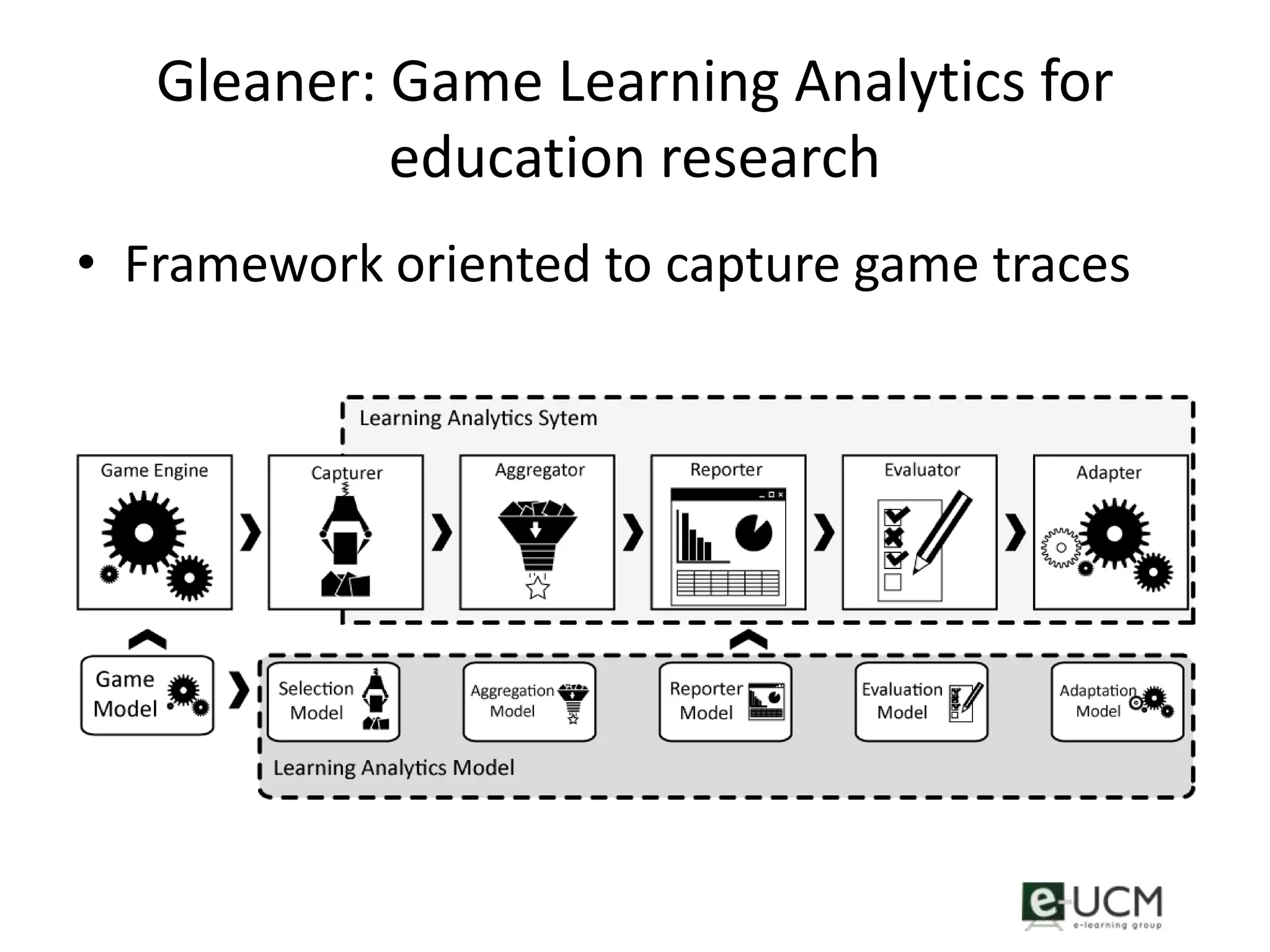
Gleaner: Game Learning Analytics for
            education research
• Framework oriented to capture game traces
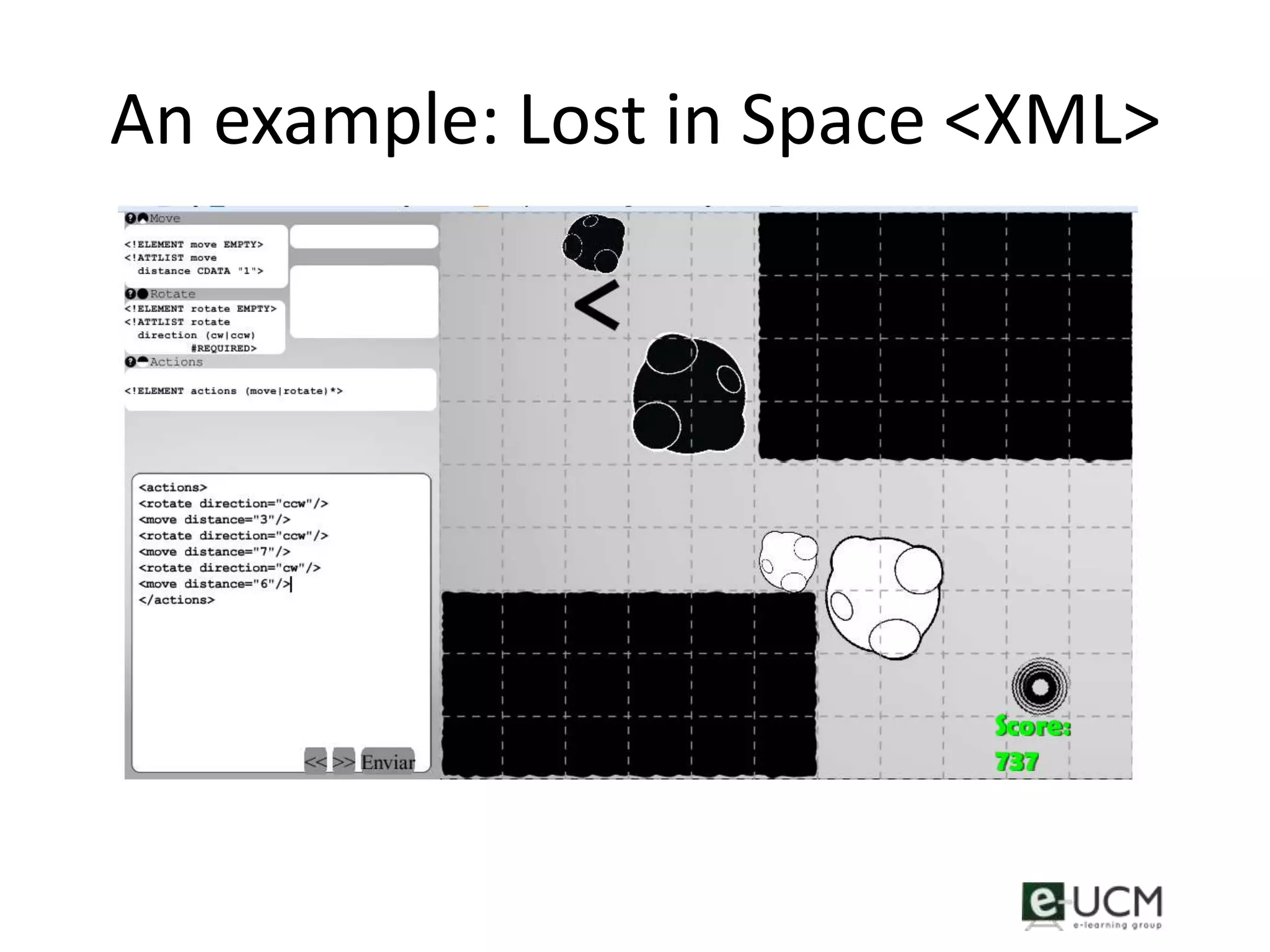
An example: Lost in Space <XML>
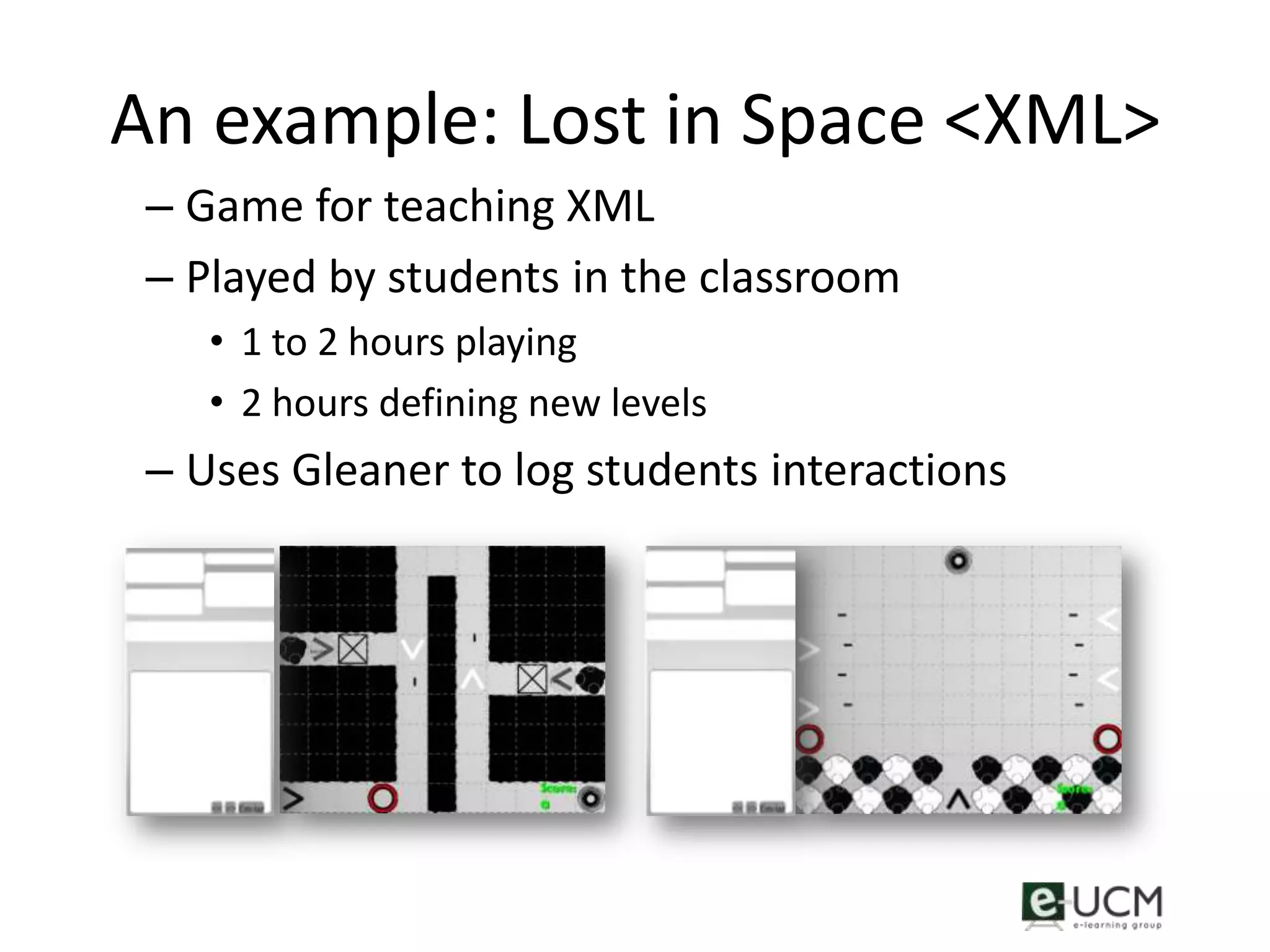
 – Game for teaching XML
 – Played by students in the classroom
    • 1 to 2 hours playing
    • 2 hours defining new levels
 – Uses Gleaner to log students interactions
Metrics in “Lost in Space <XML>”
• Start and end game
• Phases changes
• Significant variables:
  – XML commands introduced by the students
  – Phases scores
• User interaction
  – Clicks on help button
Some early results
• Real time metrics
  – Teacher could see student progress in real time
    from its computer
  – At the end of the class, he knew how many
    students had completed the game
• Post-analysis
  – Most common pitfalls in XML commands where
    detected
  – Interactions with the help button indicated those
    phases where students had more trouble
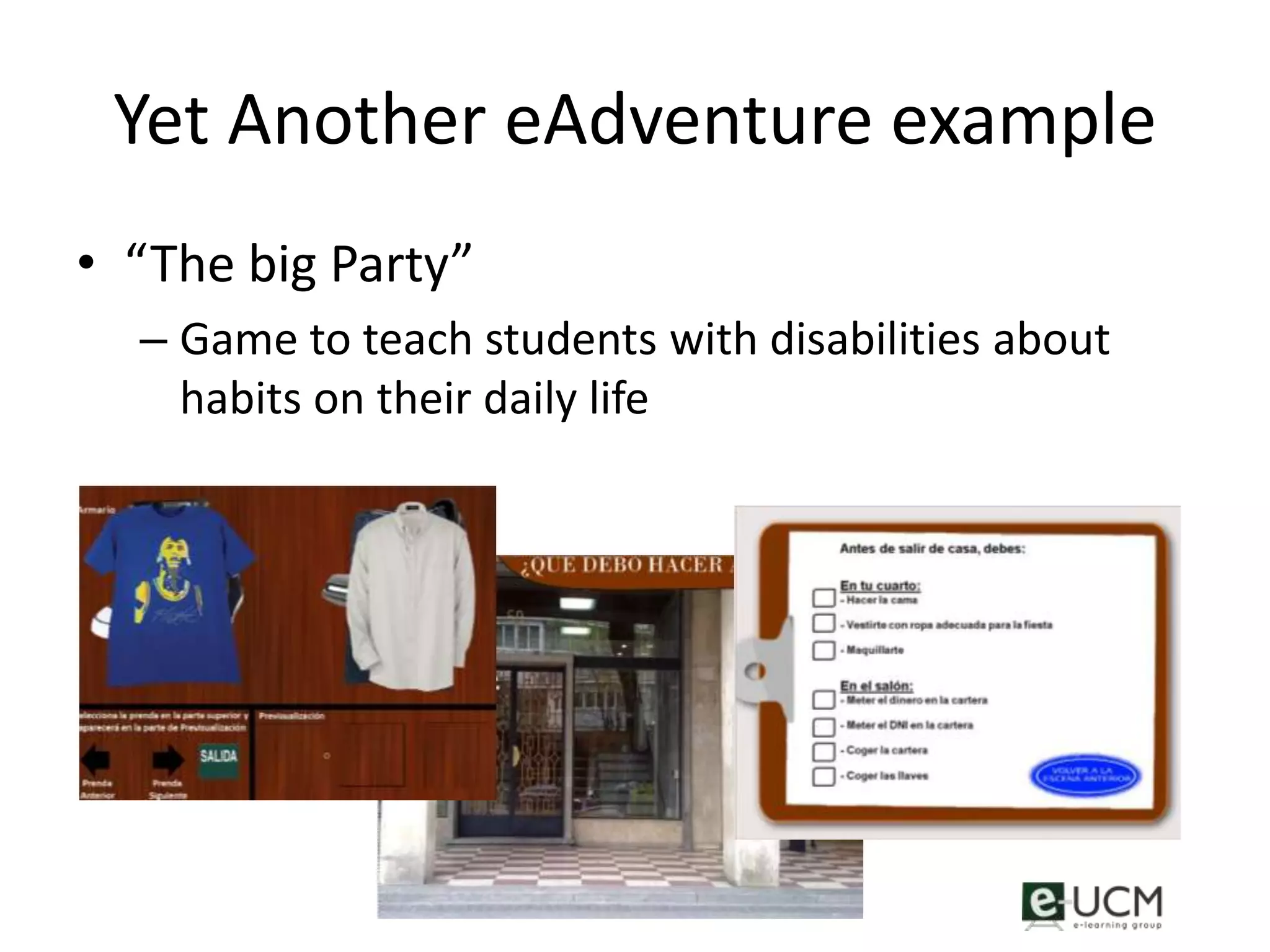
Yet Another eAdventure example
• “The big Party”
  – Game to teach students with disabilities about
    habits on their daily life
Metrics in “The big party”
• Implemented with a add-on to an eAdventure
  game
• Information collected
  – User interactions
     • All mouse interactions (including movement)
  – Phases changes
  – Times spent in every phase
  – Order in phase discovery
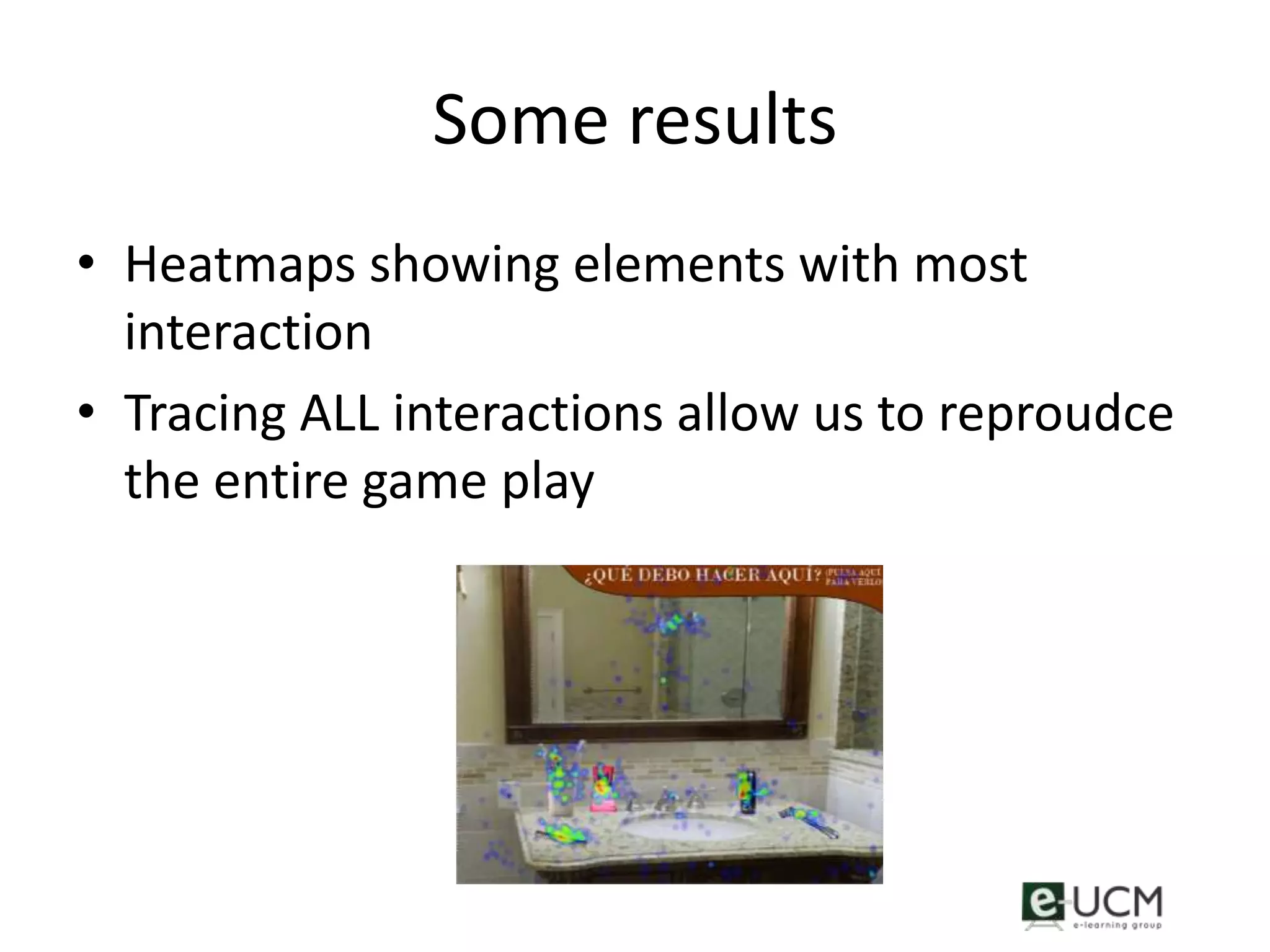
Some results
• Heatmaps showing elements with most
  interaction
• Tracing ALL interactions allow us to reproudce
  the entire game play
Conclusions
• With simple traces, we can know a lot of about
  what is going on in our educational games
• We can provided real-time feedback to teachers
  and students, and significantly improve the
  educational process
• This process can also help to improve the game
  quality
• However, rigorous assessment should be based
  on a deeper data analysis. This is only a first step.
• http://e-adventure.e-ucm.es
   –   New 1.5 version (include Chinese, Rusian and Brasilian version)
   –   Multiplatform (Windows, Linux, Mac)
   –   Videos (also in youtube in the eAdventureUCM channel)
   –   Tutorials
   –   Games (that you can reuse and modify)
• Open source code
   – Sourceforge.net
   – You can contribute (e.g. coding, eA translation)
• Baltasar Fernandez-Manjon
   balta@fdi.ucm.es

Learning Analytics in serious games

  • 1.
    Tracing a littlefor big Improvements: Application of Learning Analytics and Videogames for Student Assessment Baltasar Fernández-Manjón balta@fdi.ucm.es e-UCM research group www.e-ucm.es VS-GAMES 2012, Genoa, Italy
  • 2.
    Educational videogames • Teachersare starting to use educational videogames in order to explore new ways to educate their students – Still low adoption • Videogames left as “low-weight” complementary content – Mainly used for motivational purposes – No actual impact on the final mark
  • 3.
    Serious games assessment •No many serious games include in-game evaluation • Serious games with integrated assessment usually rely in Q&A structures • … but games produce a lot of data that can be analyzed with educational/assessment purposes • The “box” game should be open …(white box)
  • 4.
    What do weanalyze? • Every game is very different – But we can group them by: • Game mechanics • Game genre • ….. – There some regularities that can be exploited • Can we define a simple set of universal traces to analyze?
  • 5.
    Start, end, quitgame traces • Start game: whenever a student launches the game – Information: How many students played the game, who they were and when they played. • End game: whenever a student successfully the game. – Information: who accomplished the goals established for the game – Does the optimal goal attain? • Quit game: whenever a student quits the game, before finishing – Information: who abandoned the game before finishing it, and with the appropriate context, where he quitted.
  • 6.
    Phase changes • Usually,games are divided in phases. – In an educational videogame, these phases can mark several educational sub-goals. • Tracing phases changes can be used to: • Identifying most time-consuming phases • Understand how each part of the game is being accessed (if the phase exploration sequence is not linear) • … helping to improve the educational game
  • 7.
    Significant variables • Gamesrely on variables to represent their state – Some of those variables can be relevant for the assessment – Logging when and with which values these variables are updated
  • 8.
    User interaction • Rawuser interaction (mouse clicks, screen touches, keys pressed…) can be used to retrieve some useful information – Heat maps: • To detect game design flaws • If all user interaction is logged, the whole game play could be reproduced
  • 9.
    Some requirements • Mostof games are black boxes. – No access to what is going on during game play. • We need access to game “guts” • Or… the game must communicate with the outside world, using some logging framework – Not applicable to COTS games (yet)
  • 10.
    Gleaner: Game LearningAnalytics for education research • Framework oriented to capture game traces
  • 11.
    An example: Lostin Space <XML>
  • 12.
    An example: Lostin Space <XML> – Game for teaching XML – Played by students in the classroom • 1 to 2 hours playing • 2 hours defining new levels – Uses Gleaner to log students interactions
  • 13.
    Metrics in “Lostin Space <XML>” • Start and end game • Phases changes • Significant variables: – XML commands introduced by the students – Phases scores • User interaction – Clicks on help button
  • 14.
    Some early results •Real time metrics – Teacher could see student progress in real time from its computer – At the end of the class, he knew how many students had completed the game • Post-analysis – Most common pitfalls in XML commands where detected – Interactions with the help button indicated those phases where students had more trouble
  • 15.
    Yet Another eAdventureexample • “The big Party” – Game to teach students with disabilities about habits on their daily life
  • 16.
    Metrics in “Thebig party” • Implemented with a add-on to an eAdventure game • Information collected – User interactions • All mouse interactions (including movement) – Phases changes – Times spent in every phase – Order in phase discovery
  • 17.
    Some results • Heatmapsshowing elements with most interaction • Tracing ALL interactions allow us to reproudce the entire game play
  • 18.
    Conclusions • With simpletraces, we can know a lot of about what is going on in our educational games • We can provided real-time feedback to teachers and students, and significantly improve the educational process • This process can also help to improve the game quality • However, rigorous assessment should be based on a deeper data analysis. This is only a first step.
  • 19.
    • http://e-adventure.e-ucm.es – New 1.5 version (include Chinese, Rusian and Brasilian version) – Multiplatform (Windows, Linux, Mac) – Videos (also in youtube in the eAdventureUCM channel) – Tutorials – Games (that you can reuse and modify) • Open source code – Sourceforge.net – You can contribute (e.g. coding, eA translation) • Baltasar Fernandez-Manjon balta@fdi.ucm.es