2014.03.07 V1.1
22014.03.07 V1.1
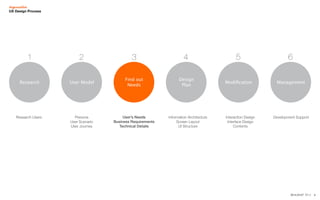
Research User Model
Find out
Needs
Design
Plan
Modification Management
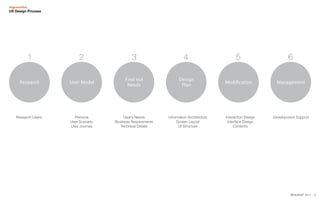
1 2 3 4 5 6
Research Users Persona
User Scenario
User Journey
User’s Needs
Business Requirements
Technical Details
Information Architecture
Screen Layout
UI Structure
Interaction Design
Interface Design
Contents
Development Support
UX Design Process
32014.03.07 V1.1
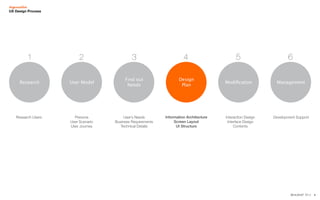
Research User Model
Find out
Needs
Design
Plan
Modification Management
1 2 3 4 5 6
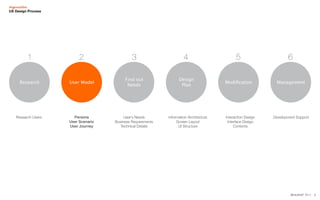
Research Users Persona
User Scenario
User Journey
User’s Needs
Business Requirements
Technical Details
Information Architecture
Screen Layout
UI Structure
Interaction Design
Interface Design
Contents
Development Support
UX Design Process
42014.03.07 V1.1
2.User Model
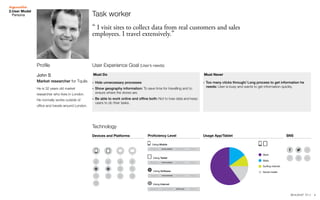
Persona
He is 32 years old market
researcher who lives in London.
He normally works outside of
office and travels around London.
Task worker
“ I visit sites to collect data from real customers and sales
employees. I travel extensively.”
Devices and Platforms Proficiency Level
Using Mobile
Using Tablet
Using Internet
Using Software
Usage App/Tablet
Work
Mails
Surfing internet
Social media
Must Do Must Never
User Experience Goal (User’s needs)
Technology
SNS
-- Hide unnecessary processes
-- Show geography information: To save time for travelling and to
ensure where the stores are.
-- Be able to work online and offine both: Not to lose data and keep
users to do their tasks.
-- Too many clicks through/ Long process to get information he
needs: User is busy and wants to get information quickly.
John S
Market researcher for Tquila
Profile
52014.03.07 V1.1
2.User Model
User Journey
User’s Needs
Engage and Connect Learn and Discover Manage and Use Evaluate and Share
Action
Motivation
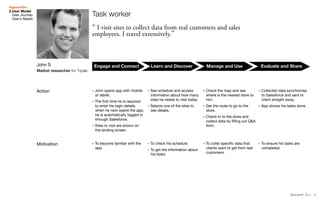
-- John opens app with mobile
or tablet.
-- The first time he is required
to enter his login details.
when he next opens the app,
he is automatically logged in
through Salesforce.
-- Sites to visit are shown on
the landing screen.
-- See schedule and access
information about how many
sites he needs to visit today.
-- Selects one of the sites to
see details.
-- Collected data synchronise
to Salesforce and sent to
client straight away.
-- App shows his tasks done.
-- To become familiar with the
app.
-- To check his schedule.
-- To get the information about
his tasks.
-- To collet specific data that
clients want to get from real
customers.
-- To ensure his tasks are
completed.
-- Check the map and see
where is the nearest store to
him.
-- Get the route to go to the
store.
-- Check-in to the store and
collect data by filling out Q&A
form.
Task worker
“ I visit sites to collect data from real customers and sales
employees. I travel extensively.”
John S
Market researcher for Tquila
62014.03.07 V1.1
Research User Model
Find out
Needs
Design
Plan
Modification Management
1 2 3 4 5 6
Research Users Persona
User Scenario
User Journey
User’s Needs
Business Requirements
Technical Details
Information Architecture
Screen Layout
UI Structure
Interaction Design
Interface Design
Contents
Development Support
UX Design Process
72014.03.07 V1.1
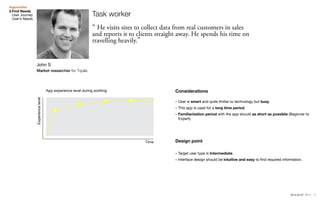
Time
App experience level during working
Experiencelevel
Considerations
-- User is smart and quite fmiliar to technology but busy.	
-- This app is used for a long time period.
-- Familiarisation period with the app should as short as possible (Beginner to
Expert).
-- Target user type is Intermediate.
-- Interface design should be intuitive and easy to find required information.
Design point
3.Find Needs
User Journey
User’s Needs
Task worker
“ He visits sites to collect data from real customers in sales
and reports it to clients straight away. He spends his time on
travelling heavily.”
John S
Market researcher for Tquila
82014.03.07 V1.1
Research User Model
Find out
Needs
Design
Plan
Modification Management
1 2 3 4 5 6
Research Users Persona
User Scenario
User Journey
User’s Needs
Business Requirements
Technical Details
Information Architecture
Screen Layout
UI Structure
Interaction Design
Interface Design
Contents
Development Support
UX Design Process
92014.03.07 V1.1
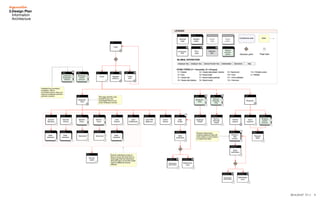
3.Design Plan
Informaiton
Architecture
102014.03.07 V1.1
3.Design Plan
Screen Layout
Design Concept
with sketches
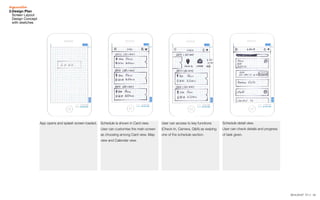
App opens and splash screen loaded. Schedule is shown in Card view.
User can customise the main screen
as choosing among Card view, Map
view and Calendar view.
User can access to key functions
(Check-In, Camera, Q&A) as swiping
one of the schedule section.
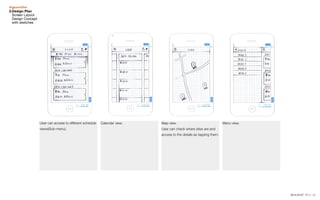
User can access to different schedule
views(Sub-menu).
Schedule detail view.
User can check details and progress
of task given.
112014.03.07 V1.1
Schedule detail view.
User can check details and progress
of task given.
Calendar view. Map view.
User can check where sites are and
access to the details as tapping them.
Menu view.User can access to different schedule
views(Sub-menu).
3.Design Plan
Screen Layout
Design Concept
with sketches
122014.03.07 V1.1
4.Design Plan
Detailed sketches
with key interactions
DD MM
0km
00:00
Place
Address
DD MM
0km
00:00
Place
Address
DD MM
0km
00:00
Place
Address
DD MM
DD MM
0km
00:00
Place
Address
DD MM
0km
00:00
Place
Address
Check-In Take photo Q&A
Q
A
DD MM
0km
00:00
Place
Address
DD MM
0km
00:00
Place
Address
DD MM
0km
00:00
Place
Address
Map Cal Card
Search
Home
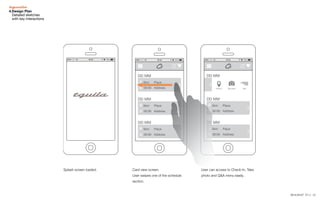
Splash screen loaded. Card view screen.
User swipes one of the schedule
section.
User can access to Check-In, Take
photo and Q&A menu easily.
132014.03.07 V1.1
0km
00:00
Place
Address
0km
00:00
Place
Address
0km
00:00
Place
Address
00
DD
DD
DD
Search
Home
My profile
Chatter
Settings
Log out
Date
DD/MM/YY 00:00
Reschedule
Date
Address
Place
Previous Visits
Staff
View details
DD MM
0km
00:00
Place
Address
DD MM
0km
00:00
Place
Address
DD MM
0km
00:00
Place
Address
DD MM
DD MM
0km
00:00
Place
Address
DD MM
0km
00:00
Place
Address
Check-In Take photo Q&A
Q
A
DD MM
0km
00:00
Place
Address
DD MM
0km
00:00
Place
Address
DD MM
0km
00:00
Place
Address
Map Cal Card
DD
00
00
00
00
00
Search
Home
0km
00:00
Place
Address
0km
00:00
Place
Address
0km
00:0
DD
DD
DD
Search
Home
My profile
Chatter
Settings
Log out
Date
DD/MM/YY 00:00
Reschedule
Date
Address
Place
Previous Visits
Staff
View details
4.Design Plan
Detailed sketches
with key interactions
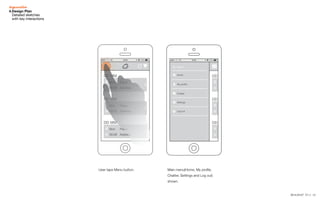
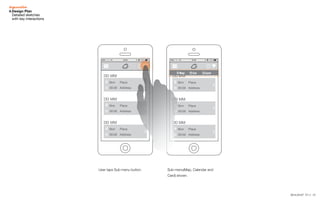
User taps Menu button. Main menu(Home, My profile,
Chatter, Settings and Log out)
shown.
142014.03.07 V1.1
0km
00:00
Place
Address
0km
00:00
Place
Address
0km
00:00
Place
Address
00
DD
DD
DD
Search
Home
My profile
Chatter
Settings
Log out
Date
DD/MM/YY 00:00
Reschedule
Date
Address
Place
Previous Visits
Staff
View details
DD MM
0km
00:00
Place
Address
DD MM
0km
00:00
Place
Address
DD MM
0km
00:00
Place
Address
DD MM
DD MM
0km
00:00
Place
Address
DD MM
0km
00:00
Place
Address
Check-In Take photo Q&A
Q
A
DD MM
0km
00:00
Place
Address
DD MM
0km
00:00
Place
Address
DD MM
0km
00:00
Place
Address
Map Cal Card
DD
00
00
00
00
00
Search
Home
4.Design Plan
Detailed sketches
with key interactions
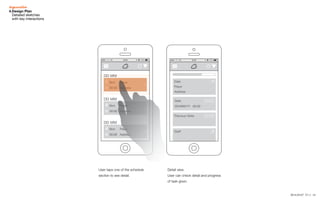
User taps one of the schedule
section to see detail.
Detail view.
User can check detail and progress
of task given.
152014.03.07 V1.1
DD MM
0km
00:00
Place
Address
DD MM
0km
00:00
Place
Address
DD MM
0km
00:00
Place
Address
DD MM
DD MM
0km
00:00
Place
Address
DD MM
0km
00:00
Place
Address
Check-In Take photo Q&A
Q
A
DD MM
0km
00:00
Place
Address
DD MM
0km
00:00
Place
Address
DD MM
0km
00:00
Place
Address
Map Cal Card
DD MM
00:00
00:00
00:00
00:00
00:00
Place
Address
0
0
0
0
0
D
Search
Home
DD
00:
00:
00:
00:
00:
Map
DD MM
0km
00:00
Place
Address
DD MM
0km
00:00
Place
Address
DD MM
0km
00:00
Place
Address
DD MM
DD MM
0km
00:00
Place
Address
DD MM
0km
00:00
Place
Address
Check-In Take photo Q&A
Q
A
DD MM
0km
00:00
Place
Address
DD MM
0km
00:00
Place
Address
DD MM
0km
00:00
Place
Address
Map Cal Card
DD
00
00
00
00
00
Search
Home
4.Design Plan
Detailed sketches
with key interactions
User taps Sub-menu button. Sub-menu(Map, Calendar and
Card) shown.
162014.03.07 V1.1
DD MM
DD MM
0km
00:00
Place
Address
DD MM
0km
00:00
Place
Address
Check-In Take photo Q&A
Q
A
DD MM
0km
00:00
Place
Address
DD MM
0km
00:00
Place
Address
DD MM
0km
00:00
Place
Address
Map Cal Card
DD MM
00:00
00:00
00:00
00:00
00:00
Place
Address
0
0
0
0
0
D DD MM
00:00
00:00
00:00
00:00
00:00
Place
Address
0
0
0
0
0
D
Map Cal Card
DD MM
DD MM
0km
00:00
Place
Address
DD MM
0km
00:00
Place
Address
Check-In Take photo Q&A
Q
A
DD MM
0km
00:00
Place
Address
DD MM
0km
00:00
Place
Address
DD MM
0km
00:00
Place
Address
Map Cal Card
DD MM
00:00
00:00
00:00
00:00
00:00
Place
Address
0
0
0
0
0
D DD MM
00:00
00:00
00:00
00:00
00:00
Place
Address
0
0
0
0
0
D
Map Cal Card
4.Design Plan
Detailed sketches
with key interactions
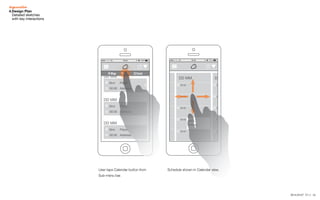
User taps Calendar button from
Sub-menu bar.
Schedule shown in Calendar view.
172014.03.07 V1.1
Card
DD MM
00:00
00:00
00:00
00:00
00:00
Place
Address
0
0
0
0
0
D DD MM
00:00
00:00
00:00
00:00
00:00
Place
Address
0
0
0
0
0
D
Map Cal Card
DD MM
0km
00:00
Place
Address
DD MM
0km
00:00
Place
Address
DD MM
0km
00:00
Place
Address
00:00
Address
0
DD
DD
DD
Search
Home
My profile
Chatter
Settings
Log out
Date
DD/MM/YY 00:00
Reschedule
Date
Address
Place
Previous Visits
Staff
View details
00:
4.Design Plan
Detailed sketches
with key interactions
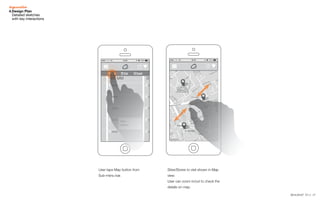
User taps Map button from
Sub-menu bar.
Sites/Stores to visit shown in Map
view.
User can zoom in/out to check the
details on map.
182014.03.07 V1.1
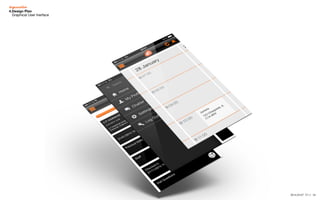
4.Design Plan
Graphical User Inerface
192014.03.07 V1.1
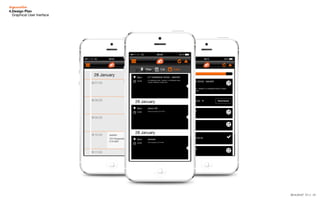
4.Design Plan
Graphical User Inerface

Tquila UX Lean Process

  • 1.
  • 2.
    22014.03.07 V1.1 Research UserModel Find out Needs Design Plan Modification Management 1 2 3 4 5 6 Research Users Persona User Scenario User Journey User’s Needs Business Requirements Technical Details Information Architecture Screen Layout UI Structure Interaction Design Interface Design Contents Development Support UX Design Process
  • 3.
    32014.03.07 V1.1 Research UserModel Find out Needs Design Plan Modification Management 1 2 3 4 5 6 Research Users Persona User Scenario User Journey User’s Needs Business Requirements Technical Details Information Architecture Screen Layout UI Structure Interaction Design Interface Design Contents Development Support UX Design Process
  • 4.
    42014.03.07 V1.1 2.User Model Persona Heis 32 years old market researcher who lives in London. He normally works outside of office and travels around London. Task worker “ I visit sites to collect data from real customers and sales employees. I travel extensively.” Devices and Platforms Proficiency Level Using Mobile Using Tablet Using Internet Using Software Usage App/Tablet Work Mails Surfing internet Social media Must Do Must Never User Experience Goal (User’s needs) Technology SNS -- Hide unnecessary processes -- Show geography information: To save time for travelling and to ensure where the stores are. -- Be able to work online and offine both: Not to lose data and keep users to do their tasks. -- Too many clicks through/ Long process to get information he needs: User is busy and wants to get information quickly. John S Market researcher for Tquila Profile
  • 5.
    52014.03.07 V1.1 2.User Model UserJourney User’s Needs Engage and Connect Learn and Discover Manage and Use Evaluate and Share Action Motivation -- John opens app with mobile or tablet. -- The first time he is required to enter his login details. when he next opens the app, he is automatically logged in through Salesforce. -- Sites to visit are shown on the landing screen. -- See schedule and access information about how many sites he needs to visit today. -- Selects one of the sites to see details. -- Collected data synchronise to Salesforce and sent to client straight away. -- App shows his tasks done. -- To become familiar with the app. -- To check his schedule. -- To get the information about his tasks. -- To collet specific data that clients want to get from real customers. -- To ensure his tasks are completed. -- Check the map and see where is the nearest store to him. -- Get the route to go to the store. -- Check-in to the store and collect data by filling out Q&A form. Task worker “ I visit sites to collect data from real customers and sales employees. I travel extensively.” John S Market researcher for Tquila
  • 6.
    62014.03.07 V1.1 Research UserModel Find out Needs Design Plan Modification Management 1 2 3 4 5 6 Research Users Persona User Scenario User Journey User’s Needs Business Requirements Technical Details Information Architecture Screen Layout UI Structure Interaction Design Interface Design Contents Development Support UX Design Process
  • 7.
    72014.03.07 V1.1 Time App experiencelevel during working Experiencelevel Considerations -- User is smart and quite fmiliar to technology but busy. -- This app is used for a long time period. -- Familiarisation period with the app should as short as possible (Beginner to Expert). -- Target user type is Intermediate. -- Interface design should be intuitive and easy to find required information. Design point 3.Find Needs User Journey User’s Needs Task worker “ He visits sites to collect data from real customers in sales and reports it to clients straight away. He spends his time on travelling heavily.” John S Market researcher for Tquila
  • 8.
    82014.03.07 V1.1 Research UserModel Find out Needs Design Plan Modification Management 1 2 3 4 5 6 Research Users Persona User Scenario User Journey User’s Needs Business Requirements Technical Details Information Architecture Screen Layout UI Structure Interaction Design Interface Design Contents Development Support UX Design Process
  • 9.
  • 10.
    102014.03.07 V1.1 3.Design Plan ScreenLayout Design Concept with sketches App opens and splash screen loaded. Schedule is shown in Card view. User can customise the main screen as choosing among Card view, Map view and Calendar view. User can access to key functions (Check-In, Camera, Q&A) as swiping one of the schedule section. User can access to different schedule views(Sub-menu). Schedule detail view. User can check details and progress of task given.
  • 11.
    112014.03.07 V1.1 Schedule detailview. User can check details and progress of task given. Calendar view. Map view. User can check where sites are and access to the details as tapping them. Menu view.User can access to different schedule views(Sub-menu). 3.Design Plan Screen Layout Design Concept with sketches
  • 12.
    122014.03.07 V1.1 4.Design Plan Detailedsketches with key interactions DD MM 0km 00:00 Place Address DD MM 0km 00:00 Place Address DD MM 0km 00:00 Place Address DD MM DD MM 0km 00:00 Place Address DD MM 0km 00:00 Place Address Check-In Take photo Q&A Q A DD MM 0km 00:00 Place Address DD MM 0km 00:00 Place Address DD MM 0km 00:00 Place Address Map Cal Card Search Home Splash screen loaded. Card view screen. User swipes one of the schedule section. User can access to Check-In, Take photo and Q&A menu easily.
  • 13.
    132014.03.07 V1.1 0km 00:00 Place Address 0km 00:00 Place Address 0km 00:00 Place Address 00 DD DD DD Search Home My profile Chatter Settings Logout Date DD/MM/YY 00:00 Reschedule Date Address Place Previous Visits Staff View details DD MM 0km 00:00 Place Address DD MM 0km 00:00 Place Address DD MM 0km 00:00 Place Address DD MM DD MM 0km 00:00 Place Address DD MM 0km 00:00 Place Address Check-In Take photo Q&A Q A DD MM 0km 00:00 Place Address DD MM 0km 00:00 Place Address DD MM 0km 00:00 Place Address Map Cal Card DD 00 00 00 00 00 Search Home 0km 00:00 Place Address 0km 00:00 Place Address 0km 00:0 DD DD DD Search Home My profile Chatter Settings Log out Date DD/MM/YY 00:00 Reschedule Date Address Place Previous Visits Staff View details 4.Design Plan Detailed sketches with key interactions User taps Menu button. Main menu(Home, My profile, Chatter, Settings and Log out) shown.
  • 14.
    142014.03.07 V1.1 0km 00:00 Place Address 0km 00:00 Place Address 0km 00:00 Place Address 00 DD DD DD Search Home My profile Chatter Settings Logout Date DD/MM/YY 00:00 Reschedule Date Address Place Previous Visits Staff View details DD MM 0km 00:00 Place Address DD MM 0km 00:00 Place Address DD MM 0km 00:00 Place Address DD MM DD MM 0km 00:00 Place Address DD MM 0km 00:00 Place Address Check-In Take photo Q&A Q A DD MM 0km 00:00 Place Address DD MM 0km 00:00 Place Address DD MM 0km 00:00 Place Address Map Cal Card DD 00 00 00 00 00 Search Home 4.Design Plan Detailed sketches with key interactions User taps one of the schedule section to see detail. Detail view. User can check detail and progress of task given.
  • 15.
    152014.03.07 V1.1 DD MM 0km 00:00 Place Address DDMM 0km 00:00 Place Address DD MM 0km 00:00 Place Address DD MM DD MM 0km 00:00 Place Address DD MM 0km 00:00 Place Address Check-In Take photo Q&A Q A DD MM 0km 00:00 Place Address DD MM 0km 00:00 Place Address DD MM 0km 00:00 Place Address Map Cal Card DD MM 00:00 00:00 00:00 00:00 00:00 Place Address 0 0 0 0 0 D Search Home DD 00: 00: 00: 00: 00: Map DD MM 0km 00:00 Place Address DD MM 0km 00:00 Place Address DD MM 0km 00:00 Place Address DD MM DD MM 0km 00:00 Place Address DD MM 0km 00:00 Place Address Check-In Take photo Q&A Q A DD MM 0km 00:00 Place Address DD MM 0km 00:00 Place Address DD MM 0km 00:00 Place Address Map Cal Card DD 00 00 00 00 00 Search Home 4.Design Plan Detailed sketches with key interactions User taps Sub-menu button. Sub-menu(Map, Calendar and Card) shown.
  • 16.
    162014.03.07 V1.1 DD MM DDMM 0km 00:00 Place Address DD MM 0km 00:00 Place Address Check-In Take photo Q&A Q A DD MM 0km 00:00 Place Address DD MM 0km 00:00 Place Address DD MM 0km 00:00 Place Address Map Cal Card DD MM 00:00 00:00 00:00 00:00 00:00 Place Address 0 0 0 0 0 D DD MM 00:00 00:00 00:00 00:00 00:00 Place Address 0 0 0 0 0 D Map Cal Card DD MM DD MM 0km 00:00 Place Address DD MM 0km 00:00 Place Address Check-In Take photo Q&A Q A DD MM 0km 00:00 Place Address DD MM 0km 00:00 Place Address DD MM 0km 00:00 Place Address Map Cal Card DD MM 00:00 00:00 00:00 00:00 00:00 Place Address 0 0 0 0 0 D DD MM 00:00 00:00 00:00 00:00 00:00 Place Address 0 0 0 0 0 D Map Cal Card 4.Design Plan Detailed sketches with key interactions User taps Calendar button from Sub-menu bar. Schedule shown in Calendar view.
  • 17.
    172014.03.07 V1.1 Card DD MM 00:00 00:00 00:00 00:00 00:00 Place Address 0 0 0 0 0 DDD MM 00:00 00:00 00:00 00:00 00:00 Place Address 0 0 0 0 0 D Map Cal Card DD MM 0km 00:00 Place Address DD MM 0km 00:00 Place Address DD MM 0km 00:00 Place Address 00:00 Address 0 DD DD DD Search Home My profile Chatter Settings Log out Date DD/MM/YY 00:00 Reschedule Date Address Place Previous Visits Staff View details 00: 4.Design Plan Detailed sketches with key interactions User taps Map button from Sub-menu bar. Sites/Stores to visit shown in Map view. User can zoom in/out to check the details on map.
  • 18.
  • 19.