The product:
Insert afew sentences about the app, website, or other
product that you designed and the target users
Project overview
Project duration:
Insert the time that you worked on this design
project - e.g., Month Year to Month Year
Preview of selected
polished designs.
3.
The problem:
Insert oneto two sentences about the
problem(s) you were trying to solve.
Project overview
The goal:
Insert one to two sentences about the goal of
the project.
4.
My role:
Identify yourrole in the project - e.g., lead UX
designer, UX researcher, etc.
Project overview
Responsibilities:
List the responsibilities you had throughout
the project - e.g., user research, wireframing,
prototyping, etc.
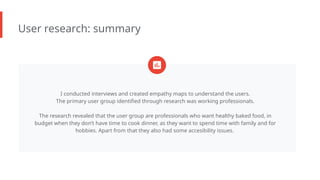
User research: summary
Iconducted interviews and created empathy maps to understand the users.
The primary user group identified through research was working professionals.
The research revealed that the user group are professionals who want healthy baked food, in
budget when they don’t have time to cook dinner, as they want to spend time with family and for
hobbies. Apart from that they also had some accesibility issues.
7.
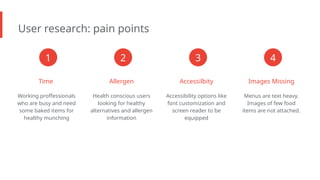
User research: painpoints
Time
Working proffessionals
who are busy and need
some baked items for
healthy munching
Allergen
Health conscious users
looking for healthy
alternatives and allergen
information
Accessilbity
Accessibility options like
font customization and
screen reader to be
equipped
Images Missing
Menus are text heavy.
Images of few food
items are not attached.
1 2 3 4
8.
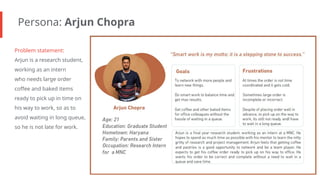
Persona: Arjun Chopra
Problemstatement:
Arjun is a research student,
working as an intern
who needs large order
coffee and baked items
ready to pick up in time on
his way to work, so as to
avoid waiting in long queue,
so he is not late for work.
9.
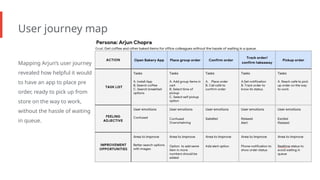
User journey map
MappingArjun’s user journey
revealed how helpful it would
to have an app to place pre
order, ready to pick up from
store on the way to work,
without the hassle of waiting
in queue.
10.
● Paper wireframes
●Digital wireframes
● Low-fidelity prototype
● Usability studies
Starting
the design
11.
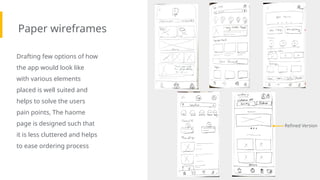
Paper wireframes
Drafting fewoptions of how
the app would look like
with various elements
placed is well suited and
helps to solve the users
pain points, The haome
page is designed such that
it is less cluttered and helps
to ease ordering process
Refined Version
12.
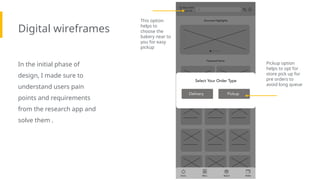
Digital wireframes
In theinitial phase of
design, I made sure to
understand users pain
points and requirements
from the research app and
solve them .
Insert first wireframe
example that
demonstrates design
thinking aligned with
user research
Pickup option
helps to opt for
store pick up for
pre orders to
avoid long queue
This option
helps to
choose the
bakery near to
you for easy
pickup
13.
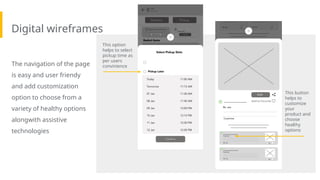
Digital wireframes
The navigationof the page
is easy and user friendy
and add customization
option to choose from a
variety of healthy options
alongwith assistive
technologies
This button
helps to
customize
your
product and
choose
healthy
options
This option
helps to select
pickup time as
per users
convinience
14.
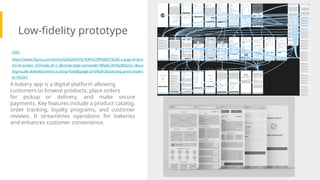
Low-fidelity prototype
Screenshot of
prototypewith
connections or
prototype GIF
Link:
https://www.figma.com/proto/QGGzIA0Yfy1EWTu7tfPA84/C%26C-Large-Androi
d-Full-screen_V2?node-id=1-3&node-type=canvas&t=Wfpbi7AH9zzBQzGJ-1&sca
ling=scale-down&content-scaling=fixed&page-id=0%3A1&starting-point-node-i
d=1%3A3
A bakery app is a digital platform allowing
customers to browse products, place orders
for pickup or delivery, and make secure
payments. Key features include a product catalog,
order tracking, loyalty programs, and customer
reviews. It streamlines operations for bakeries
and enhances customer convenience.
15.
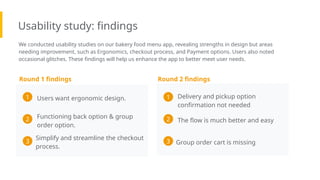
Usability study: findings
Weconducted usability studies on our bakery food menu app, revealing strengths in design but areas
needing improvement, such as Ergonomics, checkout process, and Payment options. Users also noted
occasional glitches. These findings will help us enhance the app to better meet user needs.
Round 1 findings
Delivery and pickup option
confirmation not needed
1
The flow is much better and easy
2
Round 2 findings
Group order cart is missing
3
Users want ergonomic design.
1
Functioning back option & group
order option.
2
Simplify and streamline the checkout
process.
3
Mockups
[Your notes aboutgoals
and thought process]
Image of
selected
screen before
usability study
Before usability study After usability study
Image of
selected
screen after
usability study
18.
Mockups
[Your notes aboutgoals
and thought process]
Before usability study After usability study
Image of
selected
screen before
usability study
Image of
selected
screen after
usability study
Accessibility considerations
Insert oneto two
sentence summaries
describing each
accessibility
consideration applied in
your designs.
Insert one to two
sentence summaries
describing each
accessibility
consideration applied in
your designs.
Insert one to two
sentence summaries
describing each
accessibility
consideration applied in
your designs.
1 2 3
Takeaways
Impact:
Insert one totwo sentences summarizing
the impact of your designs. In the real world,
you’d include data like number of downloads
or sign ups, but since this is a course project,
you can include a positive quote from a peer
or study participant.
What I learned:
Insert a few sentences summarizing what you
learned throughout the project.
24.
Next steps
Insert afew sentences
summarizing the
next steps you would take
with this project and why.
Insert a few sentences
summarizing the
next steps you would take
with this project and why.
Insert a few sentences
summarizing the
next steps you would take
with this project and why.
1 2 3
25.
Let’s connect!
Insert abrief sentence or two about contacting you and/or reviewing more of your work.
Provide your contact information here. This might include your email address, phone number, and
website or link to other professional platforms.

![Mockups
[Your notes about goals
and thought process]
Image of
selected
screen before
usability study
Before usability study After usability study
Image of
selected
screen after
usability study](https://image.slidesharecdn.com/casestudyslidedeckv2-251224090437-e62317c3/85/Case-study-slide-deck_V2-pptx-for-C-Cnnnnnnnnnnnnnnnn-17-320.jpg)
![Mockups
[Your notes about goals
and thought process]
Before usability study After usability study
Image of
selected
screen before
usability study
Image of
selected
screen after
usability study](https://image.slidesharecdn.com/casestudyslidedeckv2-251224090437-e62317c3/85/Case-study-slide-deck_V2-pptx-for-C-Cnnnnnnnnnnnnnnnn-18-320.jpg)
![High-fidelity
prototype
[Link to high-fidelity
prototype]
Screenshot of
prototype with
connections or
prototype GIF](https://image.slidesharecdn.com/casestudyslidedeckv2-251224090437-e62317c3/85/Case-study-slide-deck_V2-pptx-for-C-Cnnnnnnnnnnnnnnnn-20-320.jpg)