Fundamentals of Information
Systems, Second Edition
1
Hardware and Software
Chapter 2
Fundamentals of Information
Systems, Second Edition
2
Learning Objectives
– Identify and discuss the role of the essential
hardware components of a computer system.
– List and describe popular classes of computer
systems and discuss the role of each.
– Outline the role of the operating system and
discuss how operating systems have evolved
over time.
– Identify and briefly describe the functions of
the two basic kinds of software.
Fundamentals of Information
Systems, Second Edition
3
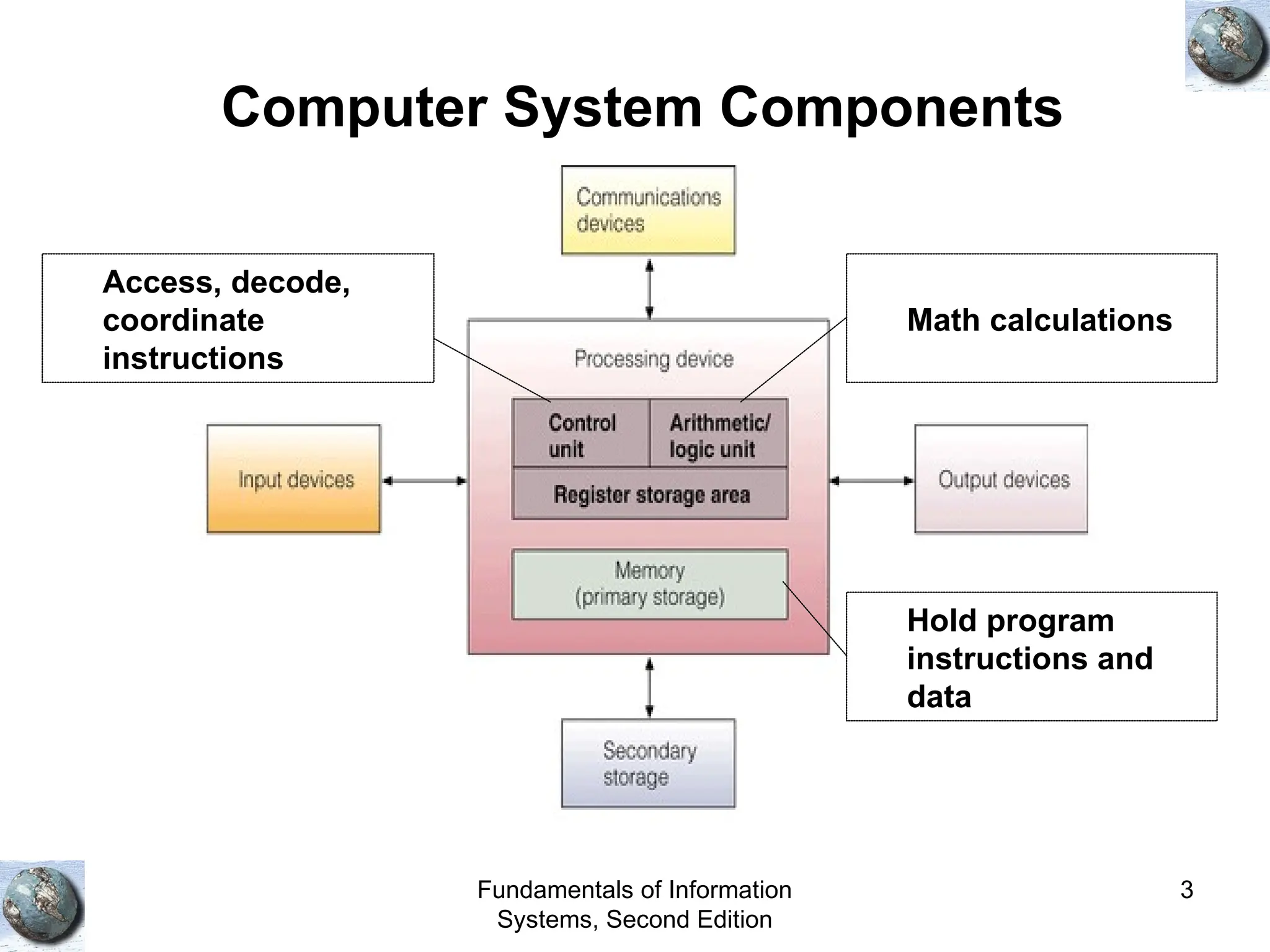
Computer System Components
Math calculations
Access, decode,
coordinate
instructions
Hold program
instructions and
data
Fundamentals of Information
Systems, Second Edition
4
Hardware Components in Action
• Instruction phase
– Step 1: Fetch instruction
– Step 2: Decode instruction
• Execution phase
– Step 3: Execute the instruction
– Step 4: Store the results
Fundamentals of Information
Systems, Second Edition
5
Execution of an Instruction
Fundamentals of Information
Systems, Second Edition
6
Processing and Memory
Devices
Fundamentals of Information
Systems, Second Edition
7
Processing Characteristics and
Functions
• Machine cycle time: Time to execute the
instruction phase
• Clock speed:
– Rate at which electronic pulses are produces.
– Measured in MHz
• Wordlength
– Bit (Binary digiT): 0 or 1
– Unit for moving data
– Wordlength: The number of bits a CPU can process in
a unit time
– 32-64 bit processors
Fundamentals of Information
Systems, Second Edition
8
Moore’s Law
• Number of
transistors
doubles
every 18
months
Fundamentals of Information
Systems, Second Edition
9
Number of Bytes
Fundamentals of Information
Systems, Second Edition
10
Types of Memory (1)
• Random access memory (RAM)
– Volatile
– Extended Data Out (EDO) RAM
– Dynamic Ram (DRAM)
– Synchronous DRAM:
• Faster transfer speed between memory and
processor
Fundamentals of Information
Systems, Second Edition
11
Types of Memory (2)
Read-only memory (ROM)
– Non-volatile
– Permanent data and instructions from
manufacturer
– Types
• PROM: Programmable
• EPROM: Erasable programmable
Fundamentals of Information
Systems, Second Edition
12
Basic Types of Memory Chips
Fundamentals of Information
Systems, Second Edition
13
Secondary Storage and Output
Devices
Fundamentals of Information
Systems, Second Edition
14
Cost Comparisons for Various Forms of
Data Storage
Fundamentals of Information
Systems, Second Edition
15
Secondary Storage Access Methods
• Sequential access
– Access in the same order it was written
– Ex: Need to access memory location 5. Then, you
need to go through 1, 2, 3, and 4 first.
• Direct access
– Directly access the location
– Faster than sequential access
• Sequential access storage devices (SASD)
• Direct access storage devices (DASD)
Fundamentals of Information
Systems, Second Edition
16
Secondary Storage Devices (1)
• Magnetic tapes: Similar to audio tapes, SASD
• Magnetic discs: Hard disk, DASD
• RAID: Redundant array of independent
inexpensive disks
– Data stored more than once in one of the disks
– Even if one disk fails, data can still be retrieved
• SAN: Storage area network
– Consist of many storage devices
• Optical discs, DASD
– CD-ROM
Fundamentals of Information
Systems, Second Edition
17
Secondary Storage Devices (2)
• Magneto-optical discs
• Digital versatile discs (DVD): Up to 17 GB
storage
• Memory cards
– Installed in a slot
– Portable
• Expandable storage: Removable disk cartridges
– Portable
– Zip drives
Fundamentals of Information
Systems, Second Edition
18
Types of Secondary Storage
Fundamentals of Information
Systems, Second Edition
19
Hard Disc
Fundamentals of Information
Systems, Second Edition
20
Storage Area Network
Fundamentals of Information
Systems, Second Edition
21
Digital Versatile Disc Player
Fundamentals of Information
Systems, Second Edition
22
Expandable Storage
Fundamentals of Information
Systems, Second Edition
23
Comparison of Secondary Storage
Devices
Fundamentals of Information
Systems, Second Edition
24
Input Devices
• Personal computer input devices
– Keyboard
– Mouse
• Voice-recognition devices
– Microphone
– Software to convert voice into bits
• Digital computer cameras
– Record images and video
• Terminals
– Connects to a powerful server for computations
• Scanning devices
– Page
– Handheld
• Touch-sensitive Screens
Fundamentals of Information
Systems, Second Edition
25
A PC Equipped with a Computer Camera
Fundamentals of Information
Systems, Second Edition
26
Output Devices
• Display Monitors
– Cathode Ray Tube (CRT)
– Wide
– Lights up pixels
• Liquid Crystal Displays (LCDs)
– Flat panel
• Printers and Plotters
– Speed measured in pages (page printed per minute)
• Music Devices
– MP3 Players
Fundamentals of Information
Systems, Second Edition
27
Laser Printer
Fundamentals of Information
Systems, Second Edition
28
Types of Computer Systems
Fundamentals of Information
Systems, Second Edition
29
Overview of Software
Fundamentals of Information
Systems, Second Edition
30
Overview of Software
• Computer programs: Sequences of instructions
• Documentation: Describe program functions
• Systems software: Coordinate the activities of
the hardware
• Computer system platform:
– Hardware configuration + systems software
• Application software: Programs that help users
with certain tasks
Fundamentals of Information
Systems, Second Edition
31
Classifying Software by Type and Sphere
of Influence
Fundamentals of Information
Systems, Second Edition
32
Systems Software
Fundamentals of Information
Systems, Second Edition
33
Operating Systems
• Perform common computer hardware functions
– Ex: Get input from keyboard
• Provide a user interface
– Command-based user interface (ms-dos)
– Graphical-user interface (windows)
• Provide a degree of hardware independence
– Application program interface
• Manage system memory
– Convert logical view to physical view
Fundamentals of Information
Systems, Second Edition
34
Operating Systems
• Manage processing tasks
– Allocate computer resources
– Multitasking (run more than once application at a
time)
– Time-sharing (allow multiple access to a system)
• Provide networking capability
– Enable connection to the Internet
• Control access to system resources
– Authentication
• Manage files
– Access to files
Fundamentals of Information
Systems, Second Edition
35
Role of the Operating System
Fundamentals of Information
Systems, Second Edition
36
Application Program Interface
Fundamentals of Information
Systems, Second Edition
37
An Example of the Operating System
Controlling Physical Access to Data
Fundamentals of Information
Systems, Second Edition
38
Popular Operating Systems
Fundamentals of Information
Systems, Second Edition
39
Workgroup Operating Systems
• Windows 2000 Server
• Unix
• Netware
• Red Hat Linux
• Mac OS X Server
Fundamentals of Information
Systems, Second Edition
40
Consumer Appliance Operating Systems
• Windows CE .NET
• Windows XP Embedded
• Handheld PC
• Pocket PC
• Palm OS
Fundamentals of Information
Systems, Second Edition
41
Summary
• Hardware devices work together to perform input, processing, data
storage, and output.
• There are two main categories of software: systems software and
application software.
• An operating system (OS) is a set of computer programs that
controls the computer hardware to support users’ computing needs.
• Application software may be proprietary or off-the-shelf.
• There are five generations of programming languages, plus object-
oriented programming languages.

towards understanding the fundamental of computer hardware

  • 1.
    Fundamentals of Information Systems,Second Edition 1 Hardware and Software Chapter 2
  • 2.
    Fundamentals of Information Systems,Second Edition 2 Learning Objectives – Identify and discuss the role of the essential hardware components of a computer system. – List and describe popular classes of computer systems and discuss the role of each. – Outline the role of the operating system and discuss how operating systems have evolved over time. – Identify and briefly describe the functions of the two basic kinds of software.
  • 3.
    Fundamentals of Information Systems,Second Edition 3 Computer System Components Math calculations Access, decode, coordinate instructions Hold program instructions and data
  • 4.
    Fundamentals of Information Systems,Second Edition 4 Hardware Components in Action • Instruction phase – Step 1: Fetch instruction – Step 2: Decode instruction • Execution phase – Step 3: Execute the instruction – Step 4: Store the results
  • 5.
    Fundamentals of Information Systems,Second Edition 5 Execution of an Instruction
  • 6.
    Fundamentals of Information Systems,Second Edition 6 Processing and Memory Devices
  • 7.
    Fundamentals of Information Systems,Second Edition 7 Processing Characteristics and Functions • Machine cycle time: Time to execute the instruction phase • Clock speed: – Rate at which electronic pulses are produces. – Measured in MHz • Wordlength – Bit (Binary digiT): 0 or 1 – Unit for moving data – Wordlength: The number of bits a CPU can process in a unit time – 32-64 bit processors
  • 8.
    Fundamentals of Information Systems,Second Edition 8 Moore’s Law • Number of transistors doubles every 18 months
  • 9.
    Fundamentals of Information Systems,Second Edition 9 Number of Bytes
  • 10.
    Fundamentals of Information Systems,Second Edition 10 Types of Memory (1) • Random access memory (RAM) – Volatile – Extended Data Out (EDO) RAM – Dynamic Ram (DRAM) – Synchronous DRAM: • Faster transfer speed between memory and processor
  • 11.
    Fundamentals of Information Systems,Second Edition 11 Types of Memory (2) Read-only memory (ROM) – Non-volatile – Permanent data and instructions from manufacturer – Types • PROM: Programmable • EPROM: Erasable programmable
  • 12.
    Fundamentals of Information Systems,Second Edition 12 Basic Types of Memory Chips
  • 13.
    Fundamentals of Information Systems,Second Edition 13 Secondary Storage and Output Devices
  • 14.
    Fundamentals of Information Systems,Second Edition 14 Cost Comparisons for Various Forms of Data Storage
  • 15.
    Fundamentals of Information Systems,Second Edition 15 Secondary Storage Access Methods • Sequential access – Access in the same order it was written – Ex: Need to access memory location 5. Then, you need to go through 1, 2, 3, and 4 first. • Direct access – Directly access the location – Faster than sequential access • Sequential access storage devices (SASD) • Direct access storage devices (DASD)
  • 16.
    Fundamentals of Information Systems,Second Edition 16 Secondary Storage Devices (1) • Magnetic tapes: Similar to audio tapes, SASD • Magnetic discs: Hard disk, DASD • RAID: Redundant array of independent inexpensive disks – Data stored more than once in one of the disks – Even if one disk fails, data can still be retrieved • SAN: Storage area network – Consist of many storage devices • Optical discs, DASD – CD-ROM
  • 17.
    Fundamentals of Information Systems,Second Edition 17 Secondary Storage Devices (2) • Magneto-optical discs • Digital versatile discs (DVD): Up to 17 GB storage • Memory cards – Installed in a slot – Portable • Expandable storage: Removable disk cartridges – Portable – Zip drives
  • 18.
    Fundamentals of Information Systems,Second Edition 18 Types of Secondary Storage
  • 19.
    Fundamentals of Information Systems,Second Edition 19 Hard Disc
  • 20.
    Fundamentals of Information Systems,Second Edition 20 Storage Area Network
  • 21.
    Fundamentals of Information Systems,Second Edition 21 Digital Versatile Disc Player
  • 22.
    Fundamentals of Information Systems,Second Edition 22 Expandable Storage
  • 23.
    Fundamentals of Information Systems,Second Edition 23 Comparison of Secondary Storage Devices
  • 24.
    Fundamentals of Information Systems,Second Edition 24 Input Devices • Personal computer input devices – Keyboard – Mouse • Voice-recognition devices – Microphone – Software to convert voice into bits • Digital computer cameras – Record images and video • Terminals – Connects to a powerful server for computations • Scanning devices – Page – Handheld • Touch-sensitive Screens
  • 25.
    Fundamentals of Information Systems,Second Edition 25 A PC Equipped with a Computer Camera
  • 26.
    Fundamentals of Information Systems,Second Edition 26 Output Devices • Display Monitors – Cathode Ray Tube (CRT) – Wide – Lights up pixels • Liquid Crystal Displays (LCDs) – Flat panel • Printers and Plotters – Speed measured in pages (page printed per minute) • Music Devices – MP3 Players
  • 27.
    Fundamentals of Information Systems,Second Edition 27 Laser Printer
  • 28.
    Fundamentals of Information Systems,Second Edition 28 Types of Computer Systems
  • 29.
    Fundamentals of Information Systems,Second Edition 29 Overview of Software
  • 30.
    Fundamentals of Information Systems,Second Edition 30 Overview of Software • Computer programs: Sequences of instructions • Documentation: Describe program functions • Systems software: Coordinate the activities of the hardware • Computer system platform: – Hardware configuration + systems software • Application software: Programs that help users with certain tasks
  • 31.
    Fundamentals of Information Systems,Second Edition 31 Classifying Software by Type and Sphere of Influence
  • 32.
    Fundamentals of Information Systems,Second Edition 32 Systems Software
  • 33.
    Fundamentals of Information Systems,Second Edition 33 Operating Systems • Perform common computer hardware functions – Ex: Get input from keyboard • Provide a user interface – Command-based user interface (ms-dos) – Graphical-user interface (windows) • Provide a degree of hardware independence – Application program interface • Manage system memory – Convert logical view to physical view
  • 34.
    Fundamentals of Information Systems,Second Edition 34 Operating Systems • Manage processing tasks – Allocate computer resources – Multitasking (run more than once application at a time) – Time-sharing (allow multiple access to a system) • Provide networking capability – Enable connection to the Internet • Control access to system resources – Authentication • Manage files – Access to files
  • 35.
    Fundamentals of Information Systems,Second Edition 35 Role of the Operating System
  • 36.
    Fundamentals of Information Systems,Second Edition 36 Application Program Interface
  • 37.
    Fundamentals of Information Systems,Second Edition 37 An Example of the Operating System Controlling Physical Access to Data
  • 38.
    Fundamentals of Information Systems,Second Edition 38 Popular Operating Systems
  • 39.
    Fundamentals of Information Systems,Second Edition 39 Workgroup Operating Systems • Windows 2000 Server • Unix • Netware • Red Hat Linux • Mac OS X Server
  • 40.
    Fundamentals of Information Systems,Second Edition 40 Consumer Appliance Operating Systems • Windows CE .NET • Windows XP Embedded • Handheld PC • Pocket PC • Palm OS
  • 41.
    Fundamentals of Information Systems,Second Edition 41 Summary • Hardware devices work together to perform input, processing, data storage, and output. • There are two main categories of software: systems software and application software. • An operating system (OS) is a set of computer programs that controls the computer hardware to support users’ computing needs. • Application software may be proprietary or off-the-shelf. • There are five generations of programming languages, plus object- oriented programming languages.