Toward Everday Gaze Input
Accuracy and Precision of EyeTracking and
Implications for Design
Anna Maria Feit1,2, ShaneWilliams2, ArturoToledo2,3, Ann Paradiso2,
Harish Kulkarni2, Shaun Kane2,4, Meredith Ringel Morris2
Aalto University1, Microsoft Research2,Toledo Design3, University of Colorado4
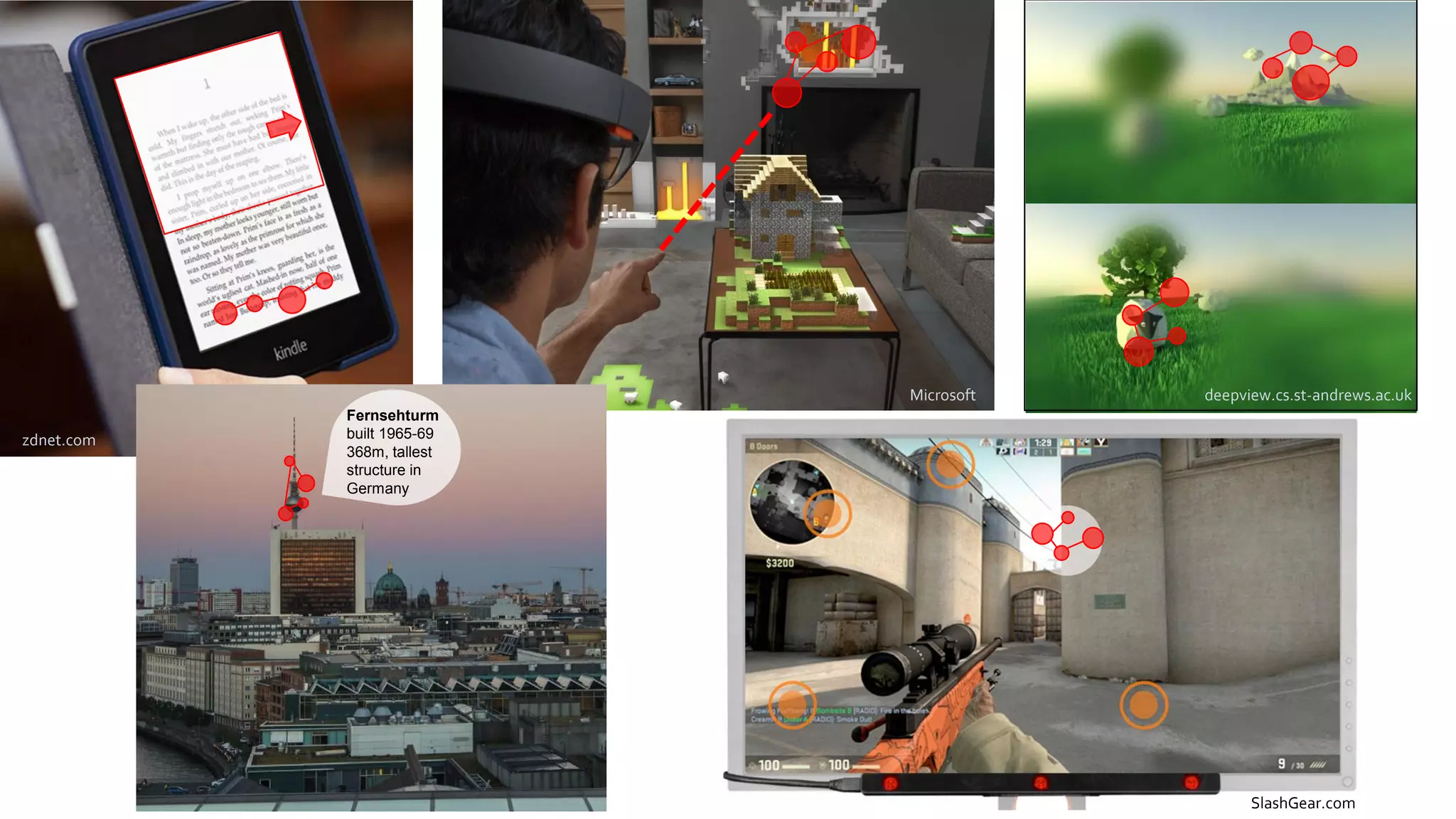
zdnet.com
Microsoft
zdnet.com
Fernsehturm
built 1965-69
368m, tallest
structure in
Germany
SlashGear.com
deepview.cs.st-andrews.ac.uk
No standard for the most basic design questions
Which region of the screen is easiest to interact with?
How accurate can we expect the users’ input to be?
How large should gaze targets be? …
It depends…
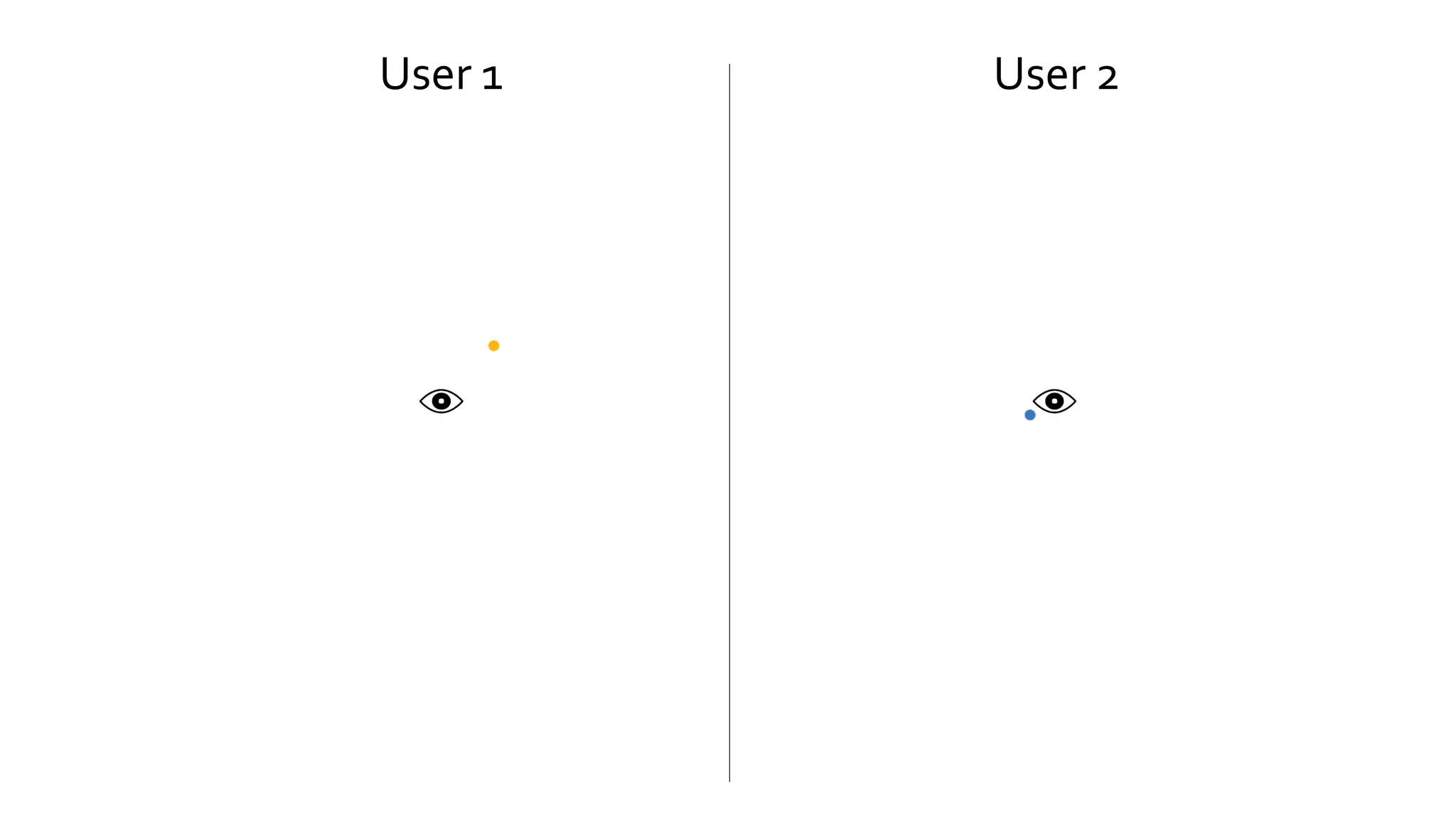
User 1 User 2
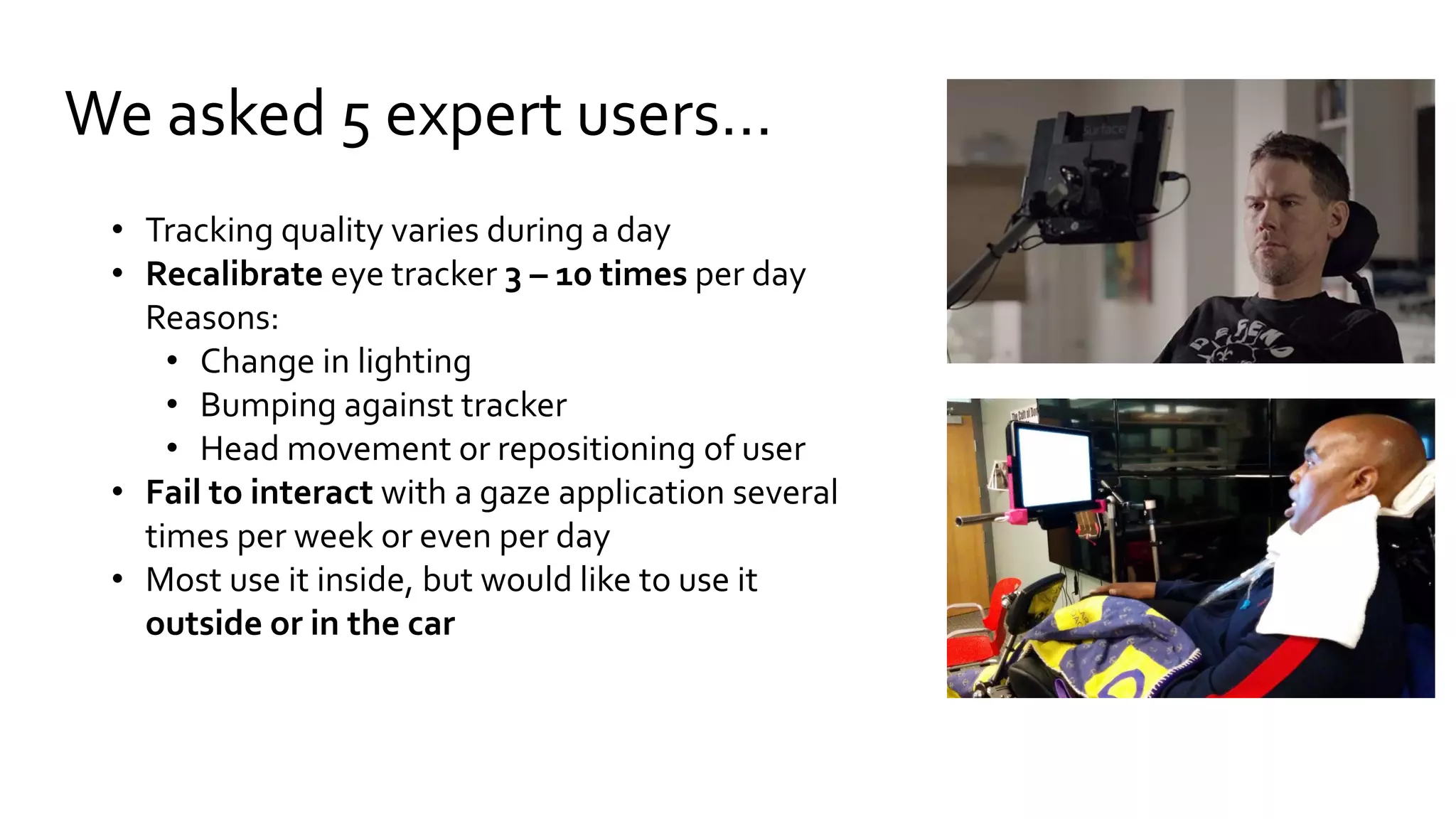
We asked 5 expert users…
• Tracking quality varies during a day
• Recalibrate eye tracker 3 – 10 times per day
Reasons:
• Change in lighting
• Bumping against tracker
• Head movement or repositioning of user
• Fail to interact with a gaze application several
times per week or even per day
• Most use it inside, but would like to use it
outside or in the car
Remote eye tracking
pupil and corneal reflection tracking
Detection accuracy can be influenced by
• Artificial lighting or sunlight
• Eye physiology, drooping eyelids etc.
• Corrective glasses and lenses
• Mascara
• Camera resolution and focus
• Calibration procedure
• …
[see Holmqvist et al. 2011]
How to make gaze interaction more robust?
Algorithmic approaches:
• Filtering and correction [see overview in Holmqvist et al. 2011]
• Error modeling and prediction [e.g. Barz et al. 2016]
Design approaches:
• Increase gaze target size, or dwell time, hierarchical menus, etc.
• Zooming or fisheye lenses [e.g. Ashmore et al. 2005, Blignaut et al. 2014]
• Gaze gestures or smooth pursuit [e.g. Drewes and Schmidt 2007,Vidal et al. 2013]
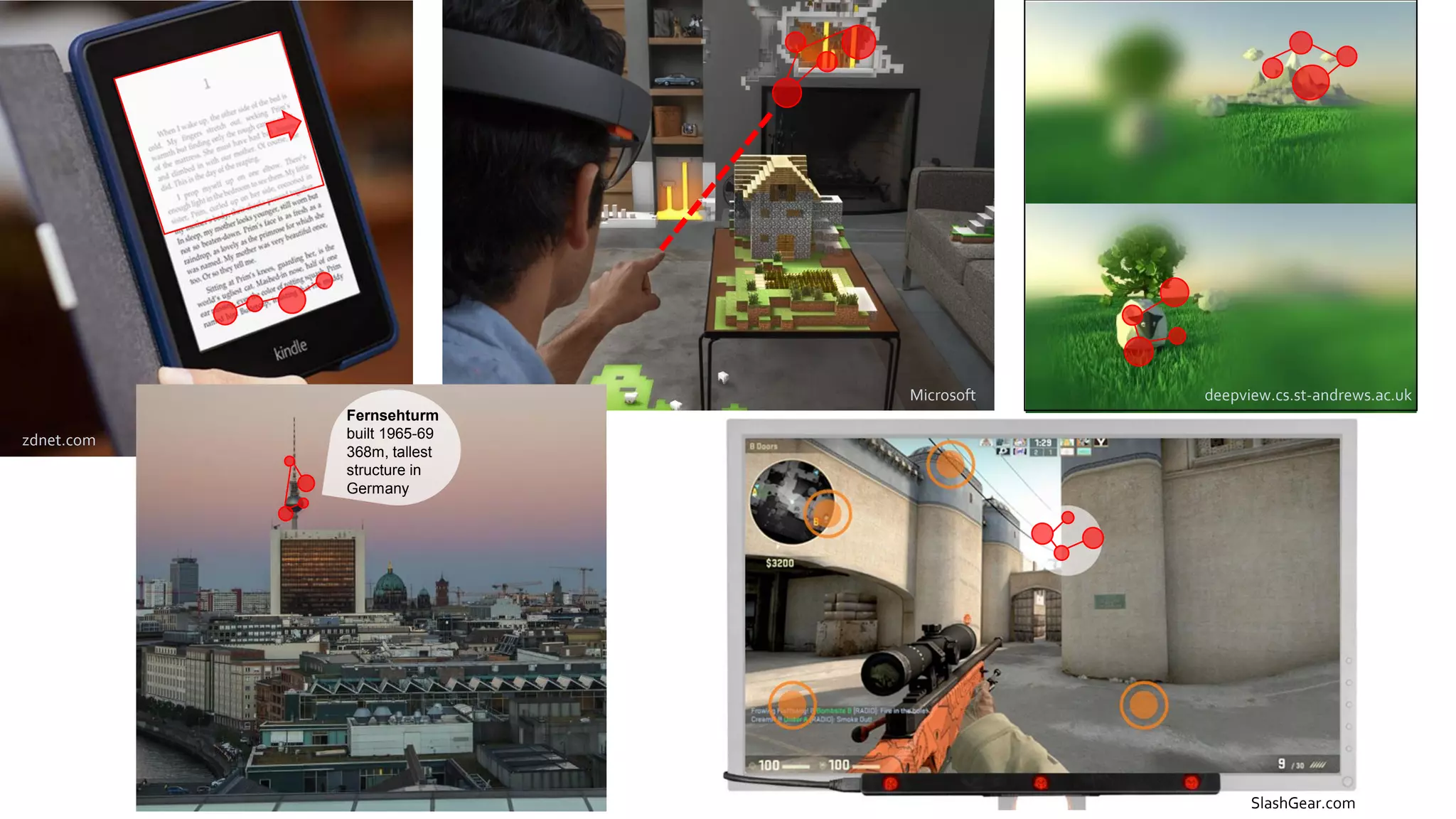
For eye tracking to become a part of
everyday computer interaction gaze
applications need to adapt to the
uncertainty in the signal
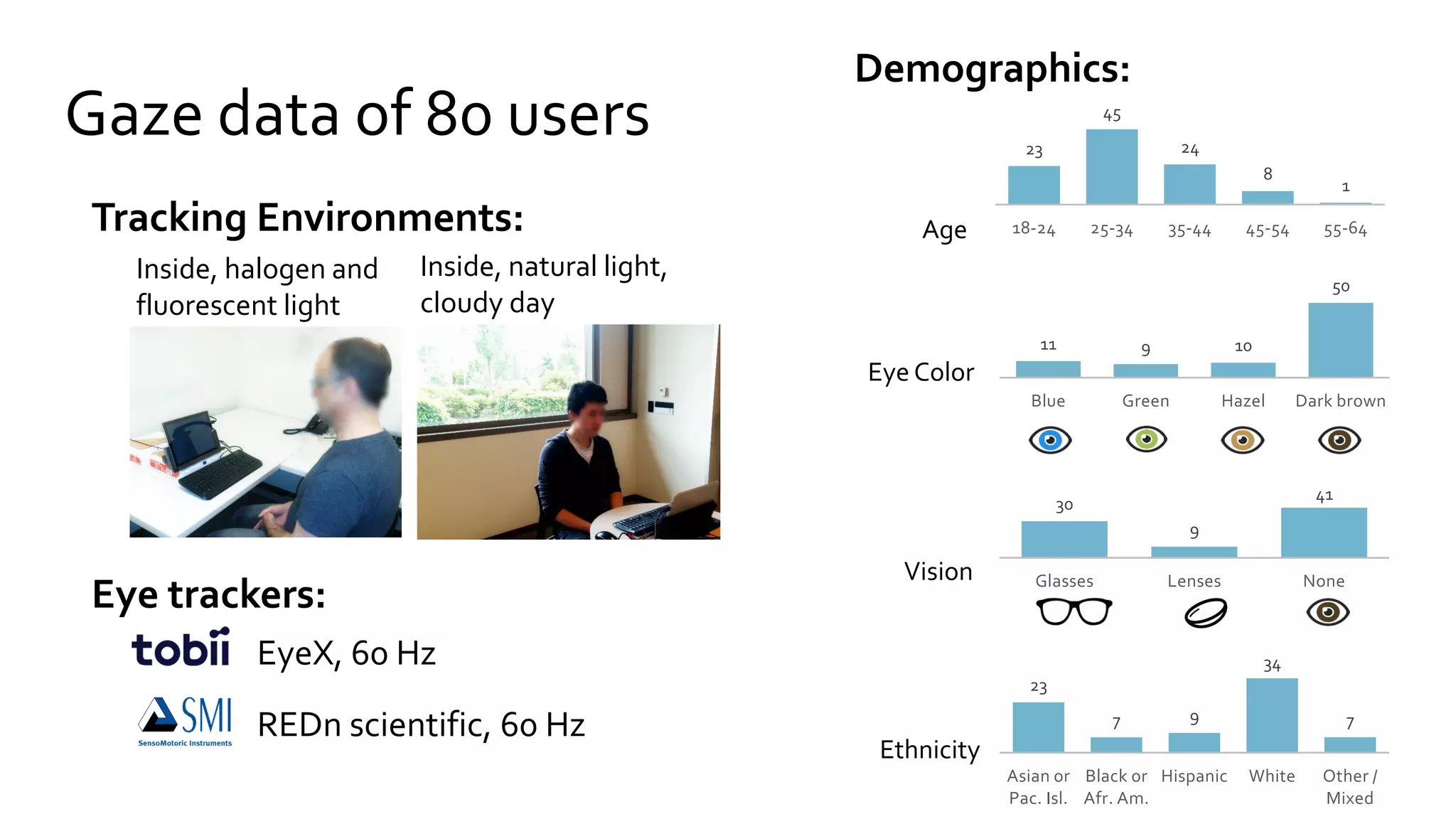
Gaze data of 80 users 23
45
24
8
1
18-24 25-34 35-44 45-54 55-64Age
11 9 10
50
Blue Green Hazel Dark brown
Eye Color
23
7 9
34
7
Asian or
Pac. Isl.
Black or
Afr. Am.
Hispanic White Other /
Mixed
Ethnicity
Inside, natural light,
cloudy day
Inside, halogen and
fluorescent light
REDn scientific, 60 Hz
EyeX, 60 Hz
Tracking Environments:
Demographics:
Eye trackers:
30
9
41
Glasses Lenses NoneVision
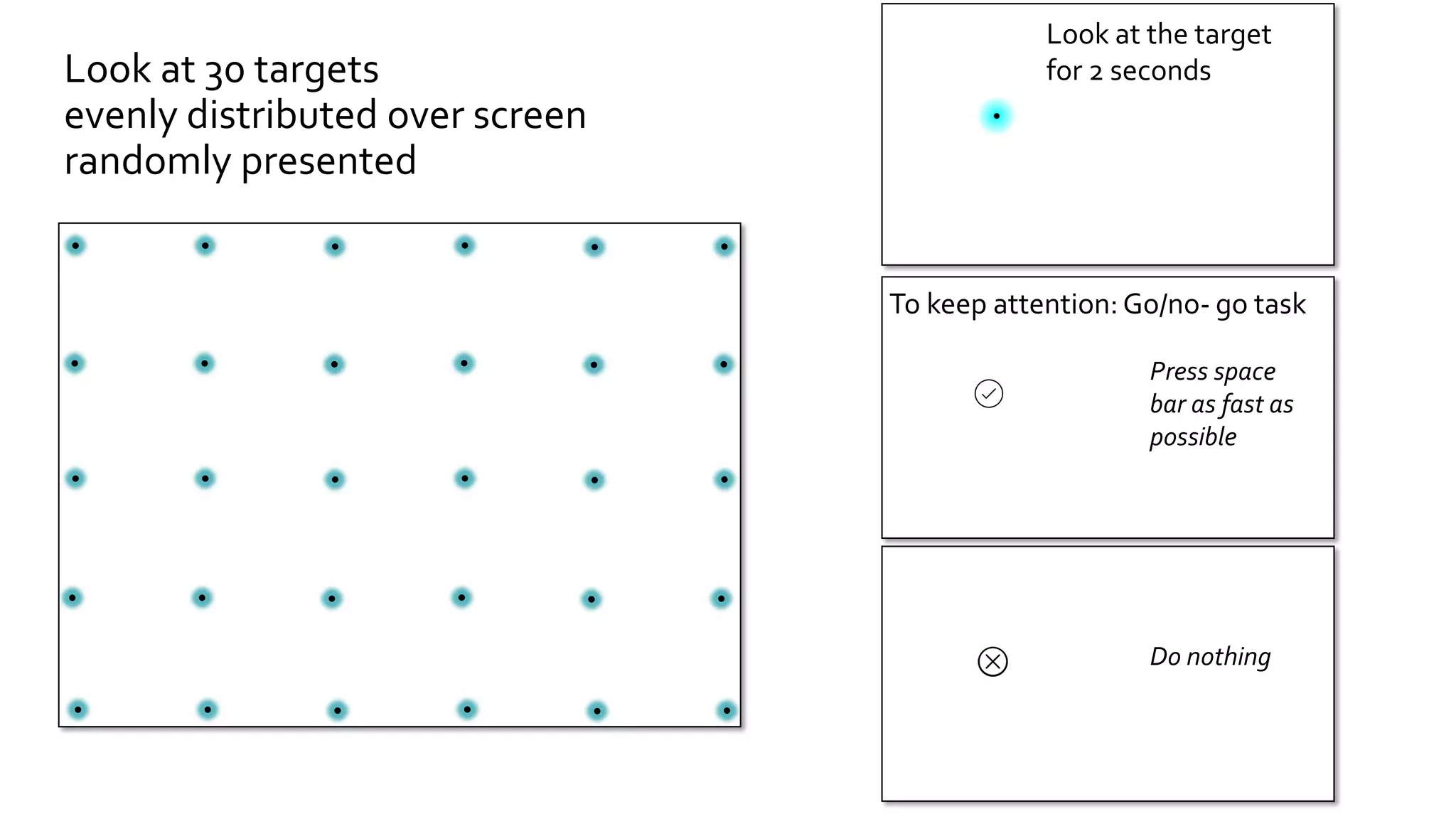
To keep attention: Go/no- go task
Press space
bar as fast as
possible
Do nothing
Look at 30 targets
evenly distributed over screen
randomly presented
Look at the target
for 2 seconds
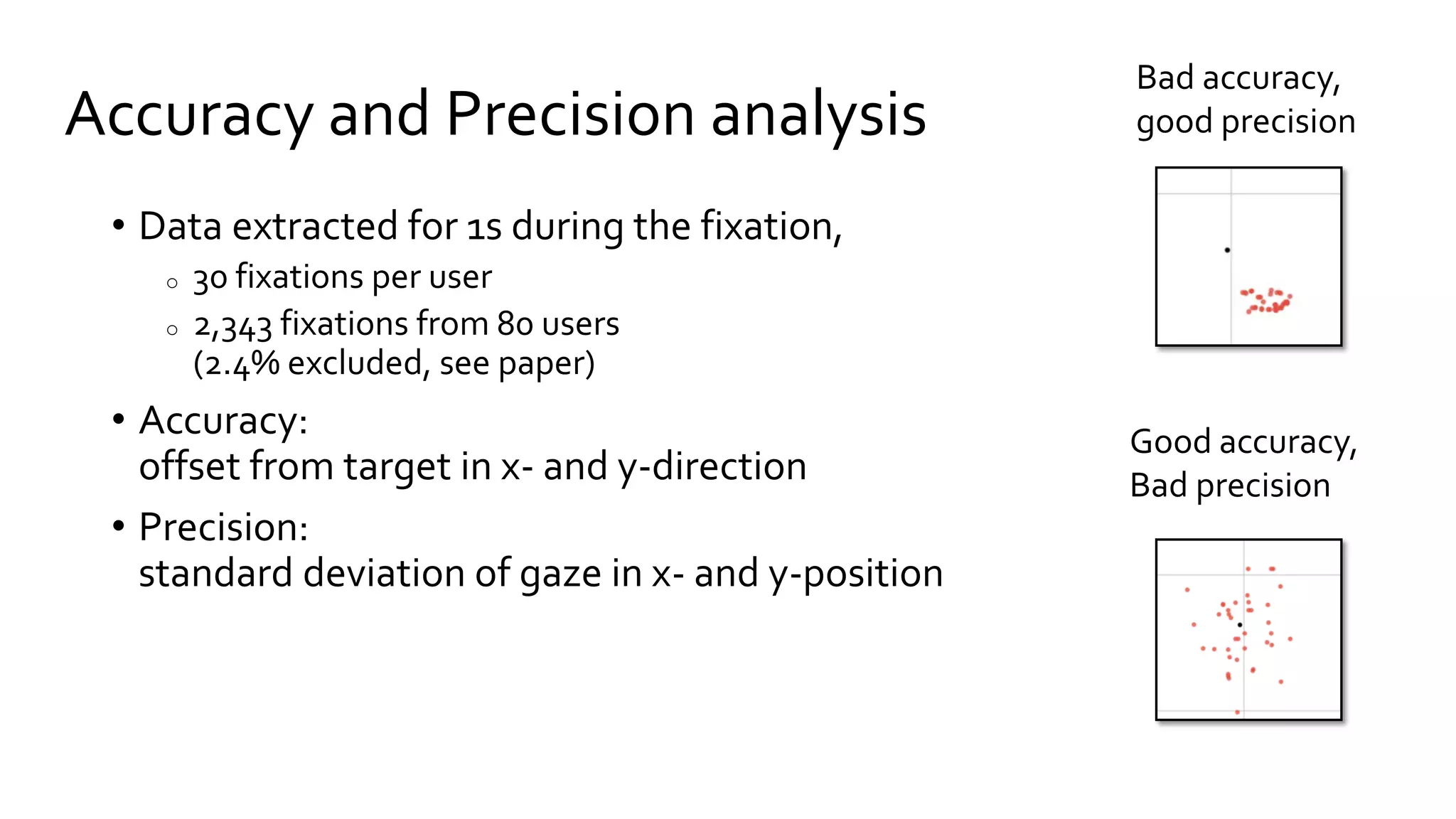
Accuracy and Precision analysis
• Data extracted for 1s during the fixation,
o 30 fixations per user
o 2,343 fixations from 80 users
(2.4% excluded, see paper)
• Accuracy:
offset from target in x- and y-direction
• Precision:
standard deviation of gaze in x- and y-position
Bad accuracy,
good precision
Good accuracy,
Bad precision
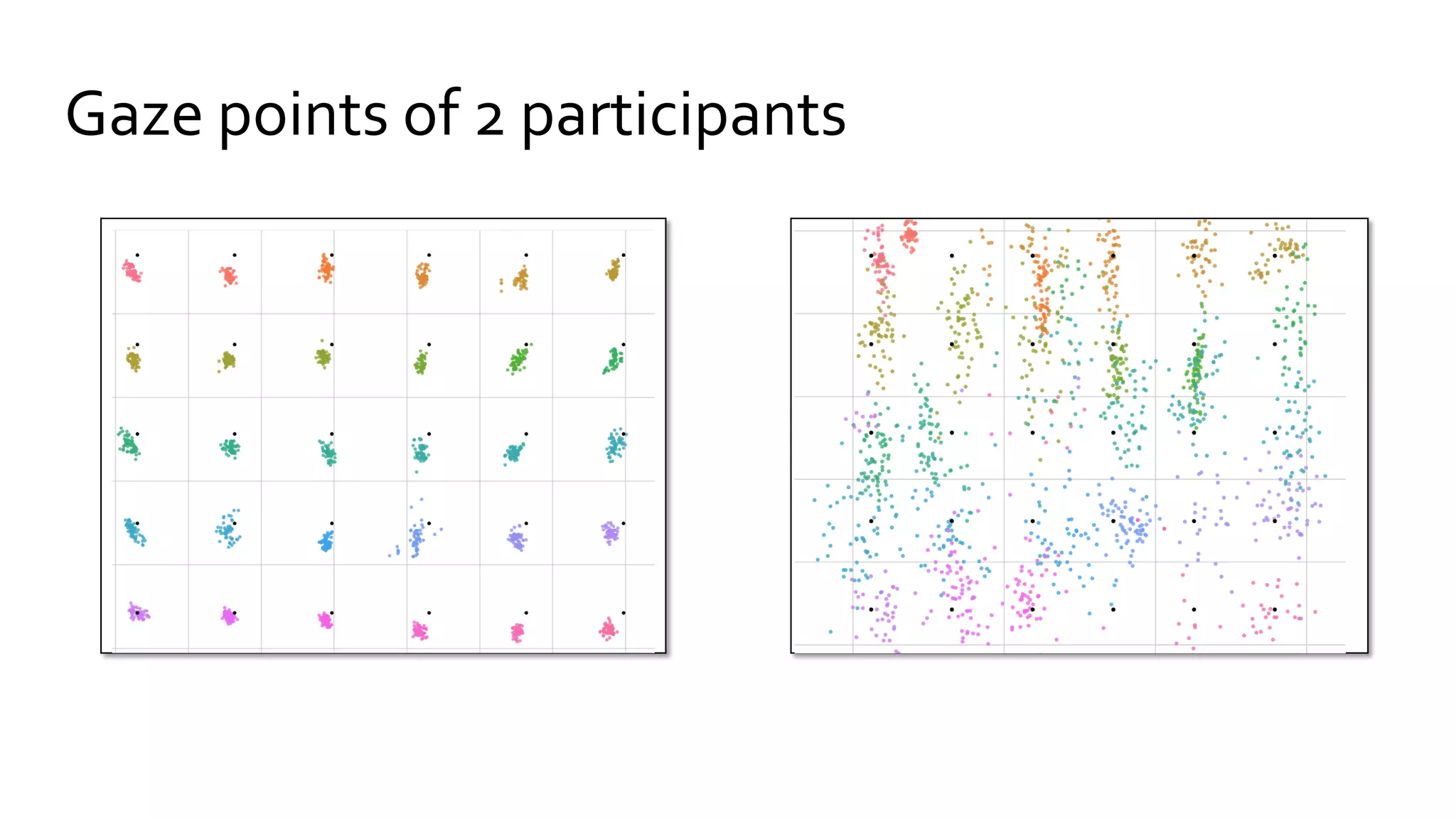
Gaze points of 2 participants
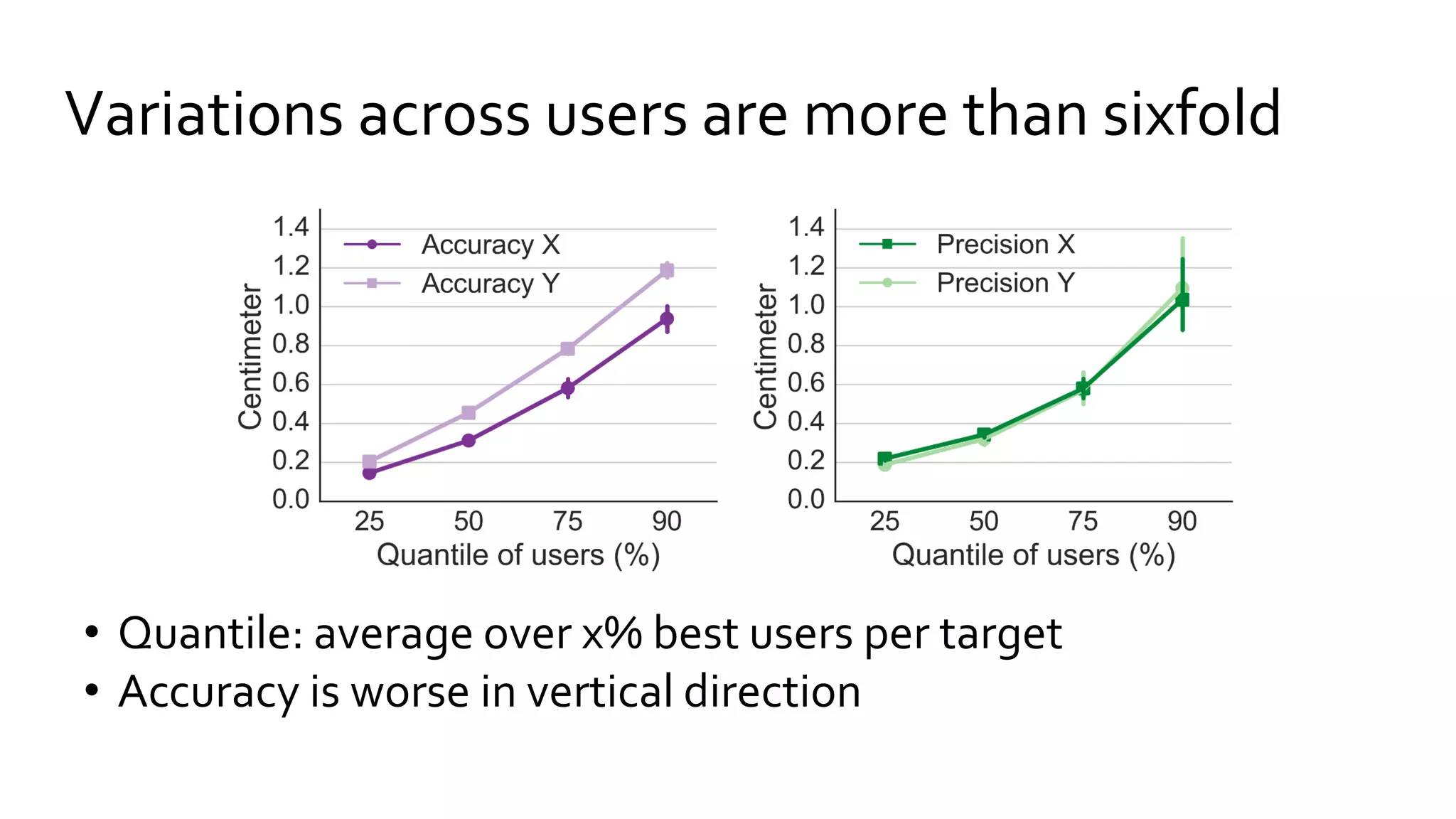
• Quantile: average over x% best users per target
• Accuracy is worse in vertical direction
Variations across users are more than sixfold
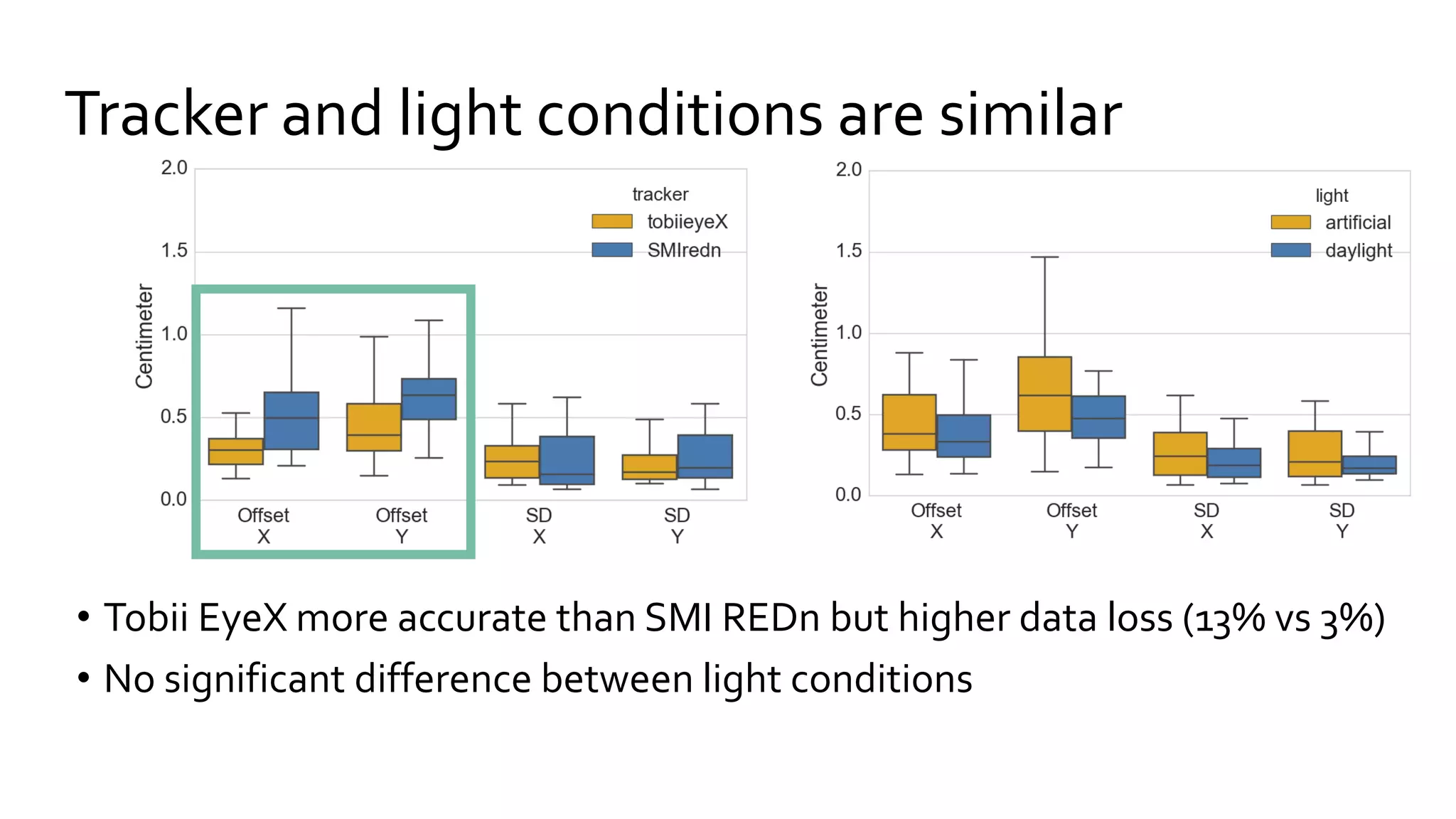
Tracker and light conditions are similar
• Tobii EyeX more accurate than SMI REDn but higher data loss (13% vs 3%)
• No significant difference between light conditions
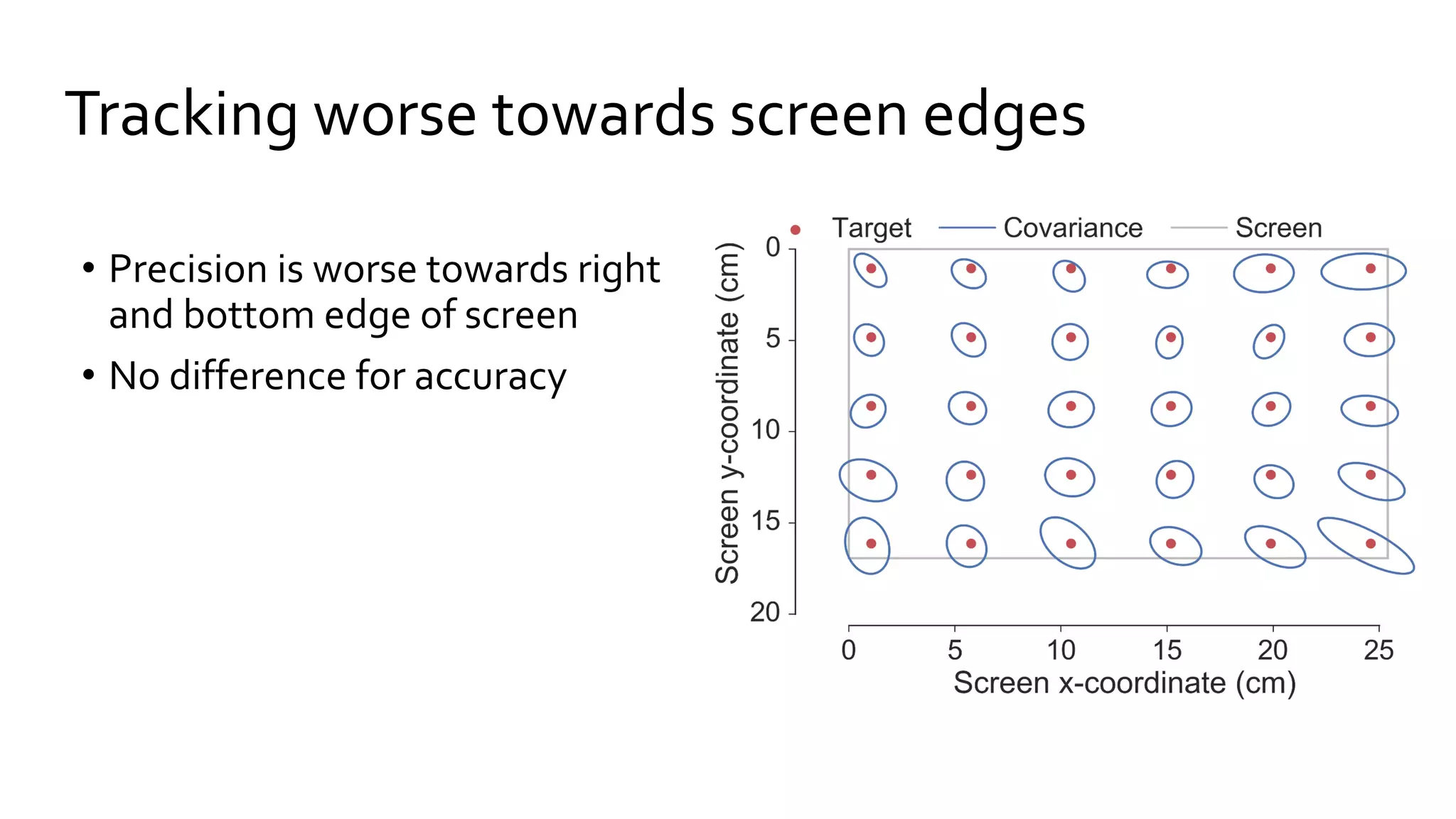
• Precision is worse towards right
and bottom edge of screen
• No difference for accuracy
Tracking worse towards screen edges
3 ways to inform the design of gaze applications
1. Compute target size for reliable interaction
2. Optimize filter parameters
3. Determine best screen region
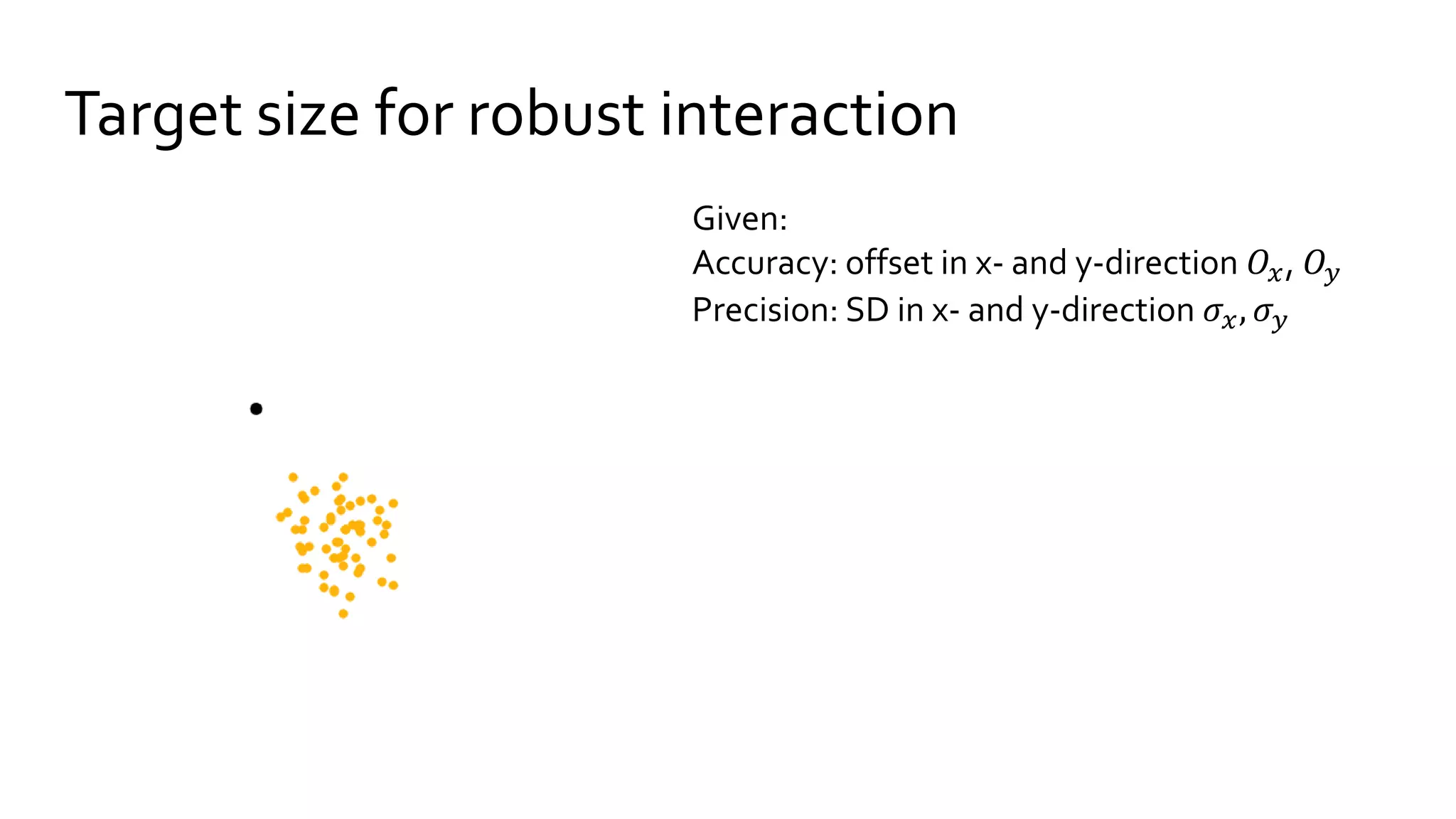
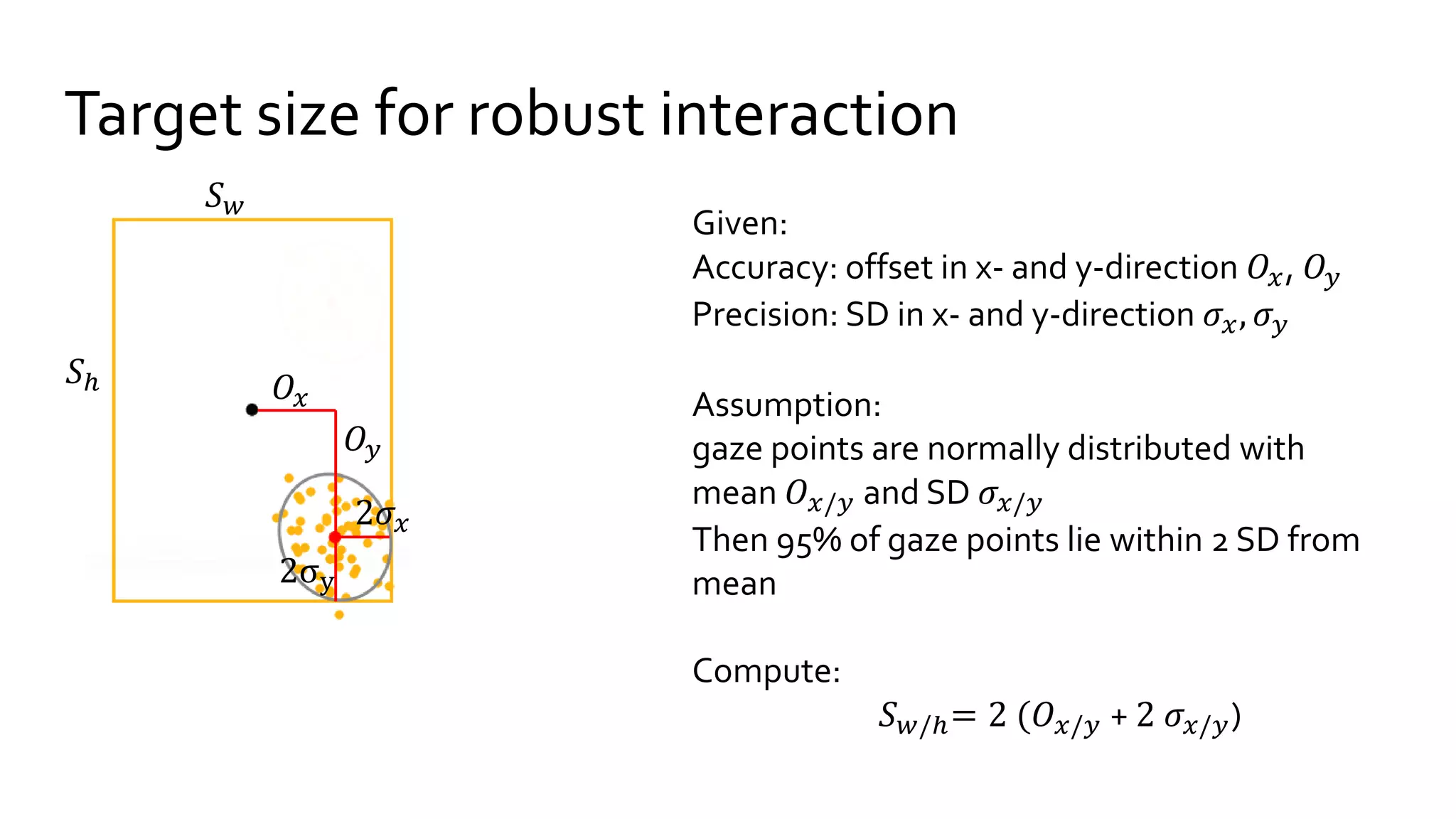
Target size for robust interaction
Given:
Accuracy: offset in x- and y-direction 𝑂𝑥, 𝑂𝑦
Precision: SD in x- and y-direction 𝜎𝑥, 𝜎 𝑦
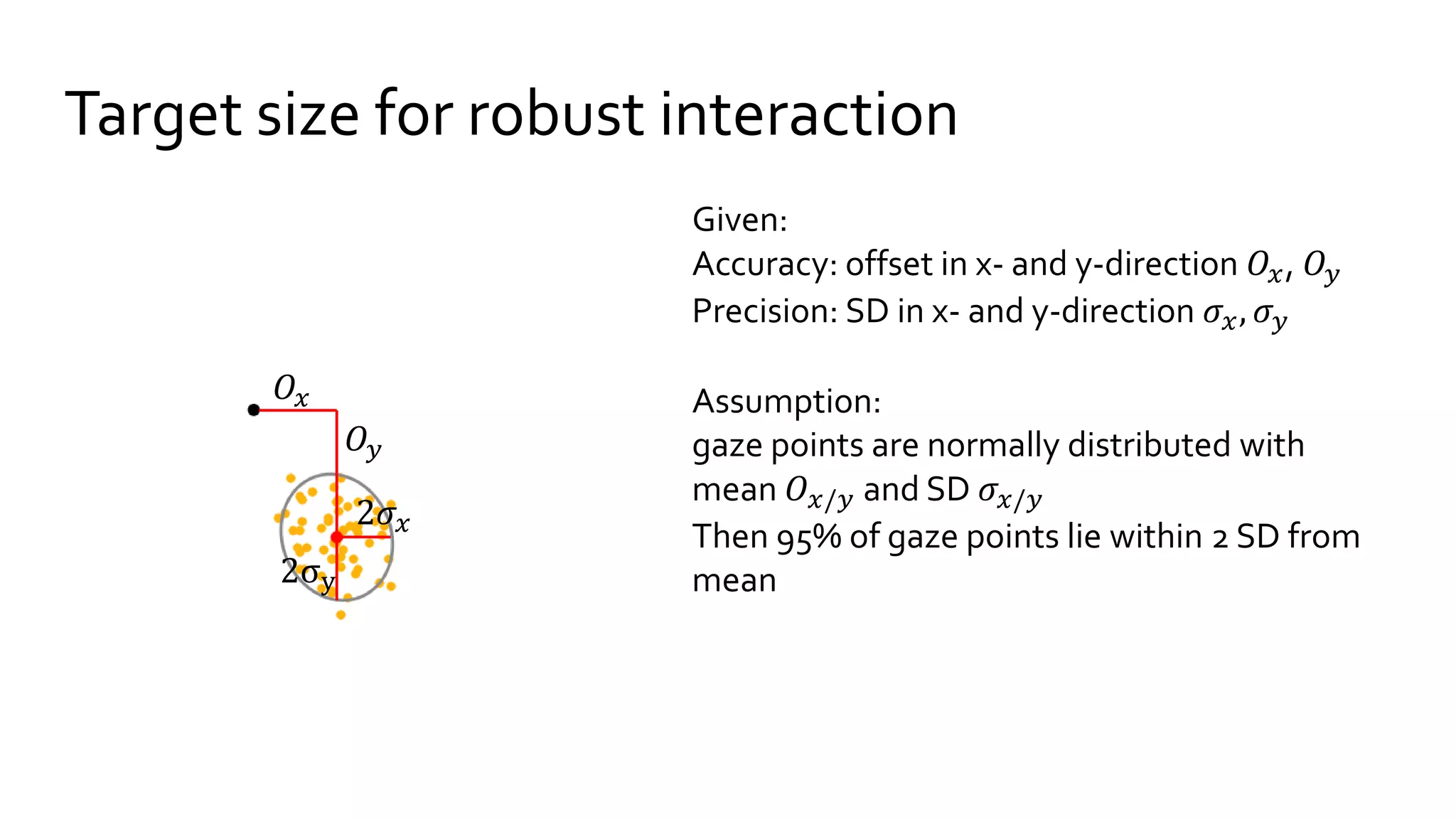
Target size for robust interaction
Given:
Accuracy: offset in x- and y-direction 𝑂𝑥, 𝑂𝑦
Precision: SD in x- and y-direction 𝜎𝑥, 𝜎 𝑦
Assumption:
gaze points are normally distributed with
mean 𝑂 𝑥/𝑦 and SD 𝜎𝑥/𝑦
Then 95% of gaze points lie within 2 SD from
mean
𝑂𝑦
2𝜎𝑥
2σy
𝑂𝑥
Target size for robust interaction
Given:
Accuracy: offset in x- and y-direction 𝑂𝑥, 𝑂𝑦
Precision: SD in x- and y-direction 𝜎𝑥, 𝜎 𝑦
Assumption:
gaze points are normally distributed with
mean 𝑂 𝑥/𝑦 and SD 𝜎𝑥/𝑦
Then 95% of gaze points lie within 2 SD from
mean
Compute:
𝑆 𝑤/ℎ= 2 (𝑂 𝑥/𝑦 + 2 𝜎𝑥/𝑦)
𝑂𝑦
2𝜎𝑥
2σy
𝑂𝑥
𝑆 𝑤
𝑆ℎ
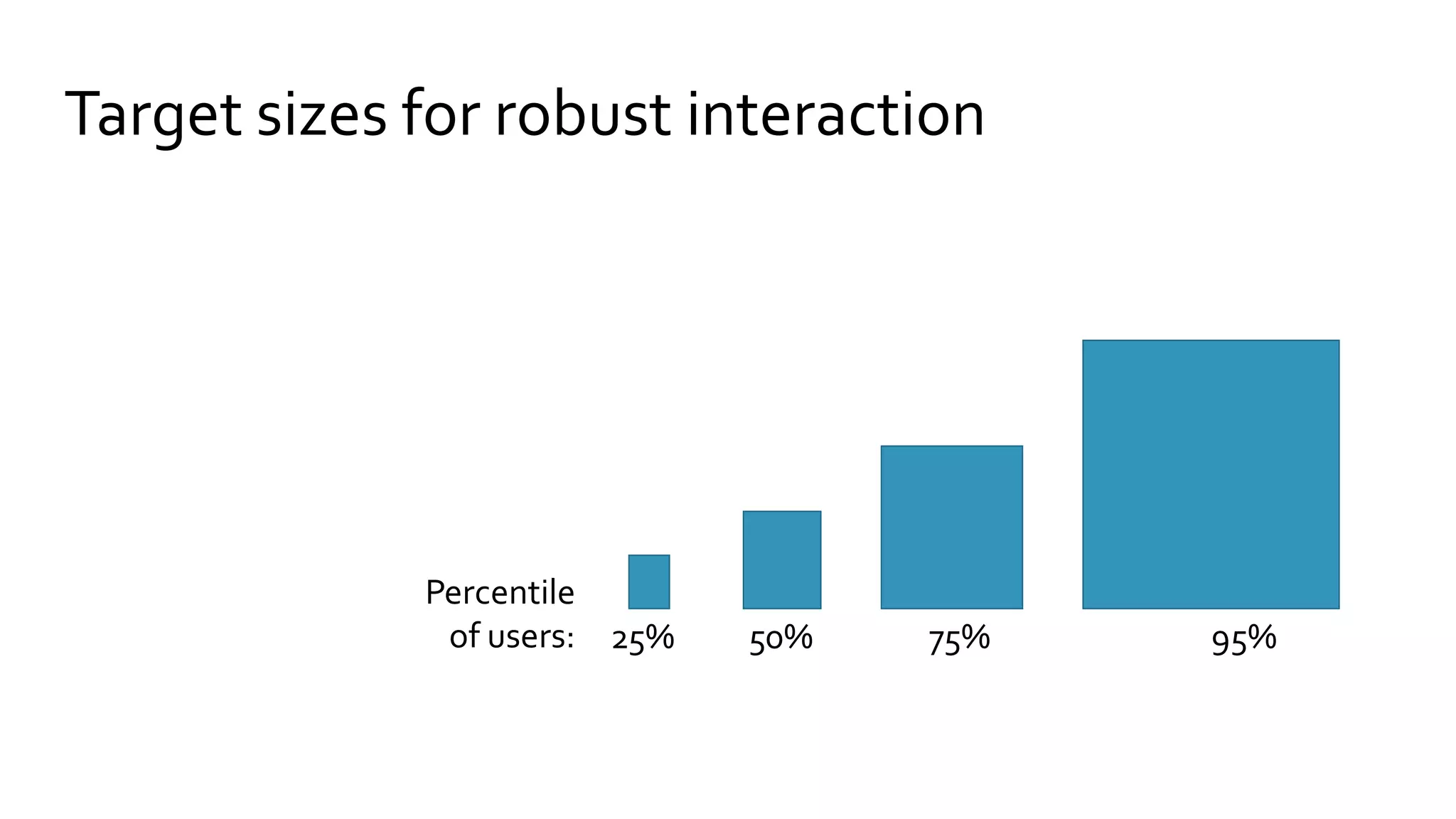
Target sizes for robust interaction
25% 50% 75% 95%
Percentile
of users:
Optimize filter parameters
• Stampe filter [Stampe 1993]
• Weighted Average [e.g. Jimenez 2008, Wood 2014]
• Saccade detection [similar to Salvucci 2000]
• Outlier correction [Kumar 2008]
• 1€ Filter [Casiez 2012]
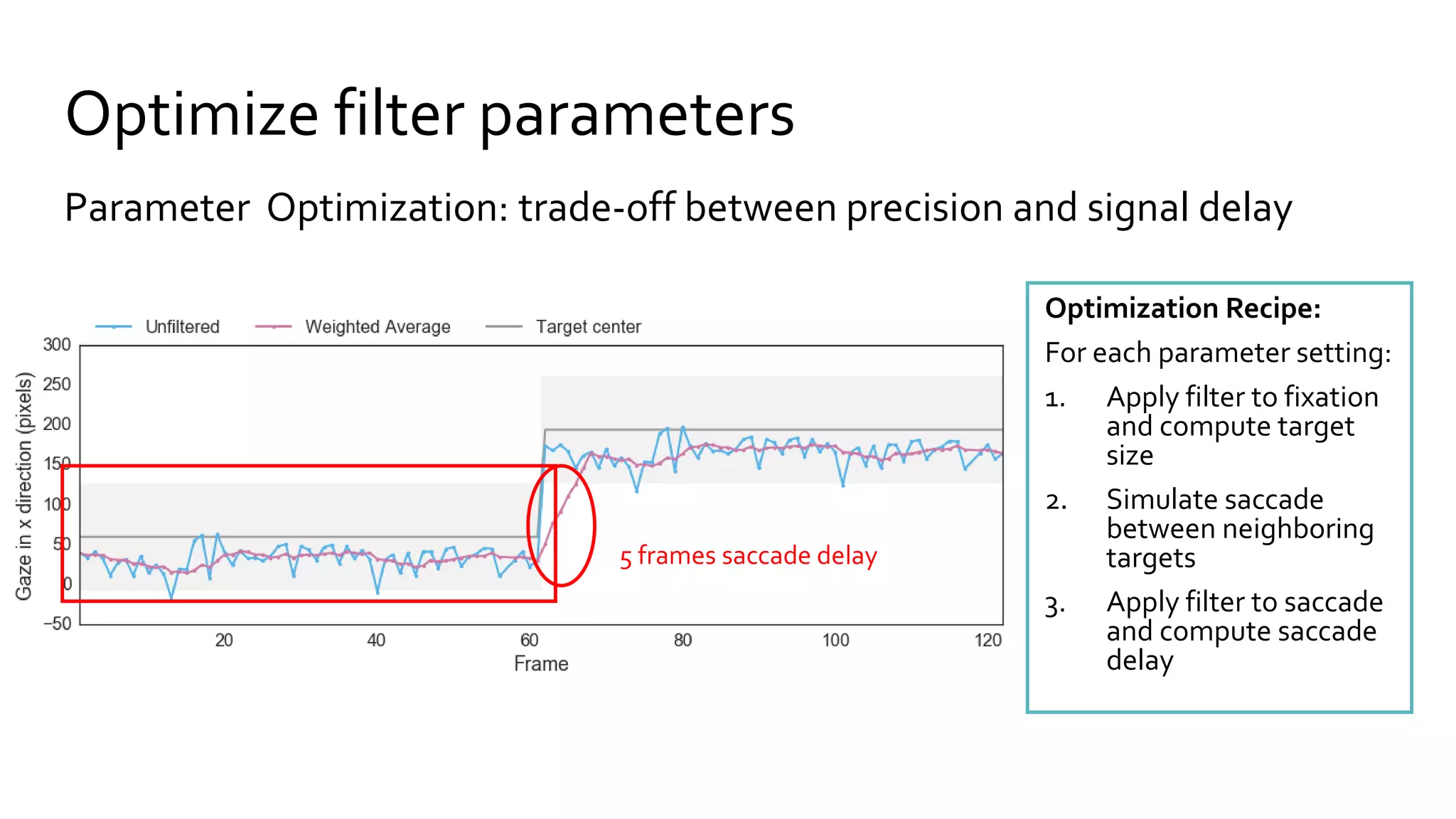
Optimize filter parameters
Parameter Optimization: trade-off between precision and signal delay
Optimization Recipe:
For each parameter setting:
1. Apply filter to fixation
and compute target
size
2. Simulate saccade
between neighboring
targets
3. Apply filter to saccade
and compute saccade
delay
5 frames saccade delay
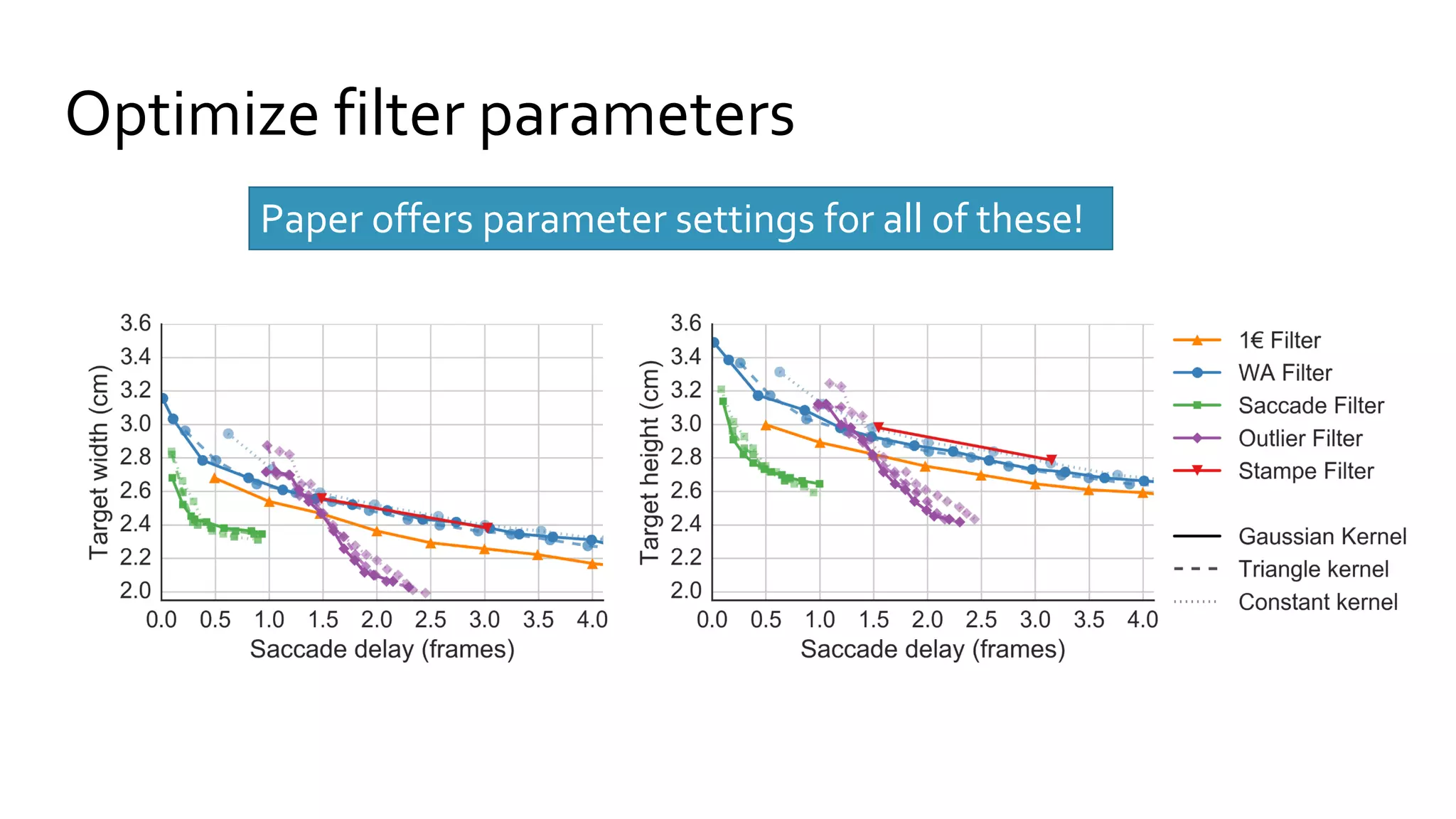
Optimize filter parameters
Paper offers parameter settings for all of these!
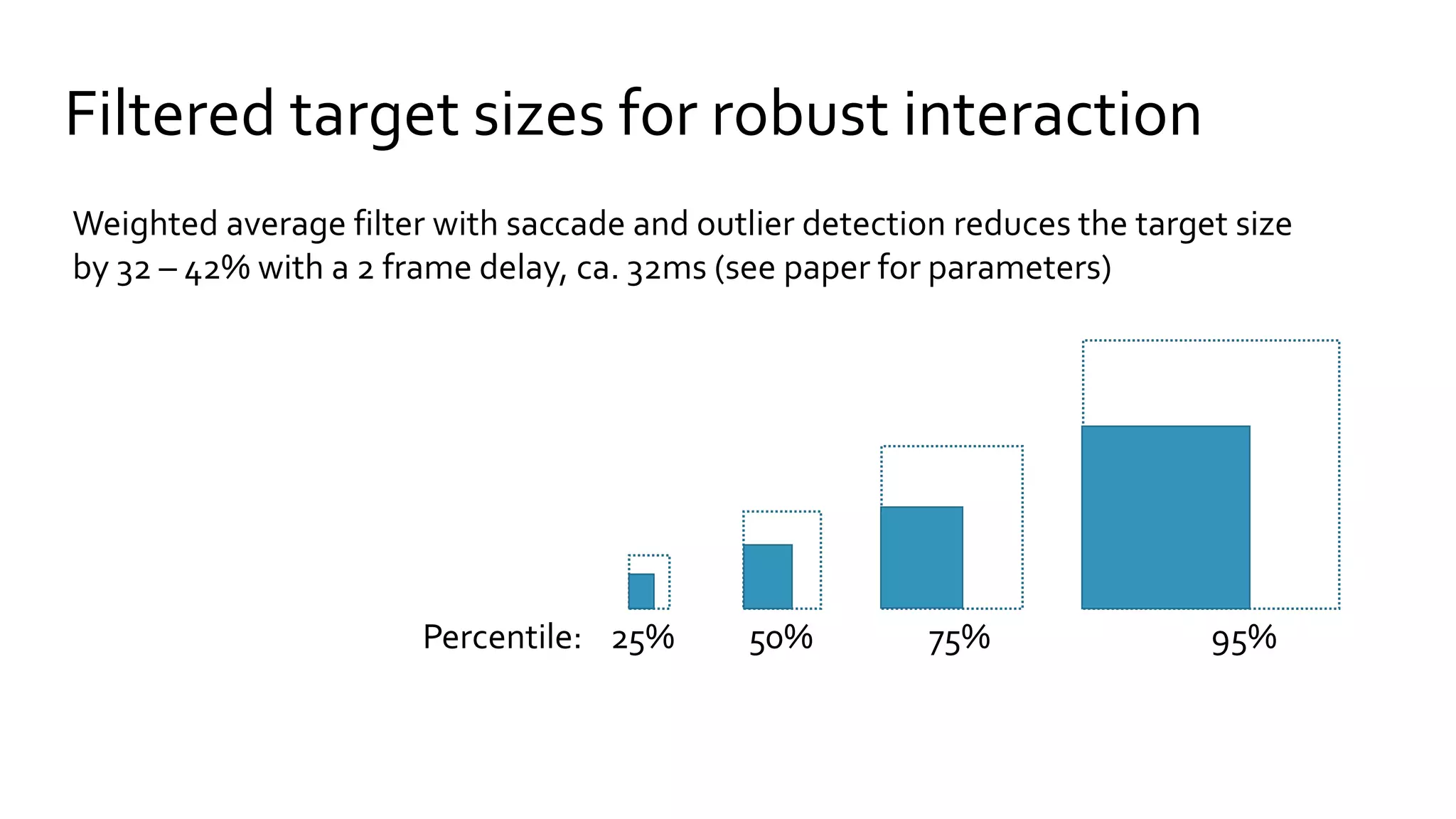
Filtered target sizes for robust interaction
25% 50% 75% 95%Percentile:
Weighted average filter with saccade and outlier detection reduces the target size
by 32 – 42% with a 2 frame delay, ca. 32ms (see paper for parameters)
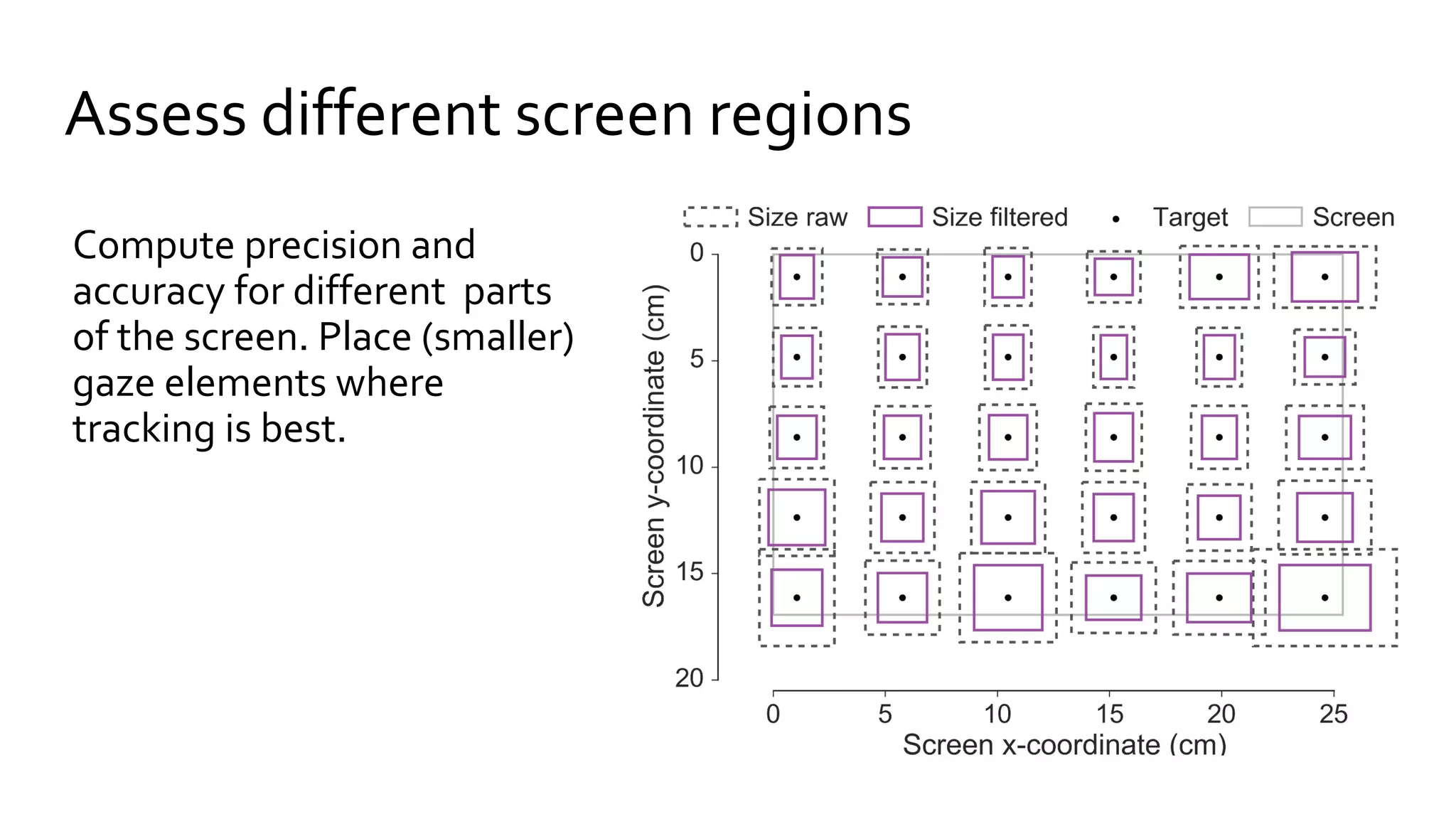
Assess different screen regions
Compute precision and
accuracy for different parts
of the screen. Place (smaller)
gaze elements where
tracking is best.
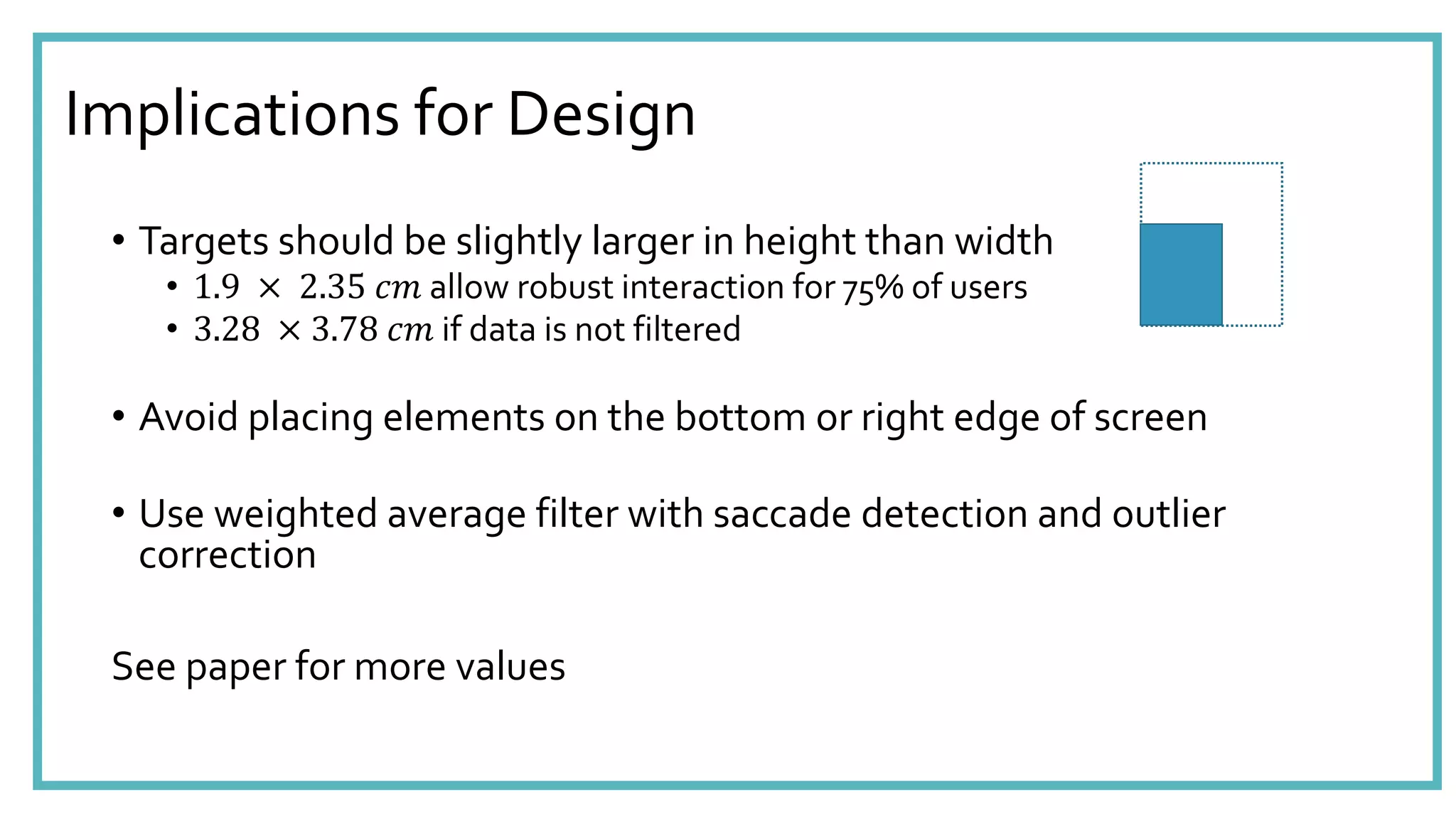
Implications for Design
• Targets should be slightly larger in height than width
• 1.9 × 2.35 𝑐𝑚 allow robust interaction for 75% of users
• 3.28 × 3.78 𝑐𝑚 if data is not filtered
• Avoid placing elements on the bottom or right edge of screen
• Use weighted average filter with saccade detection and outlier
correction
See paper for more values
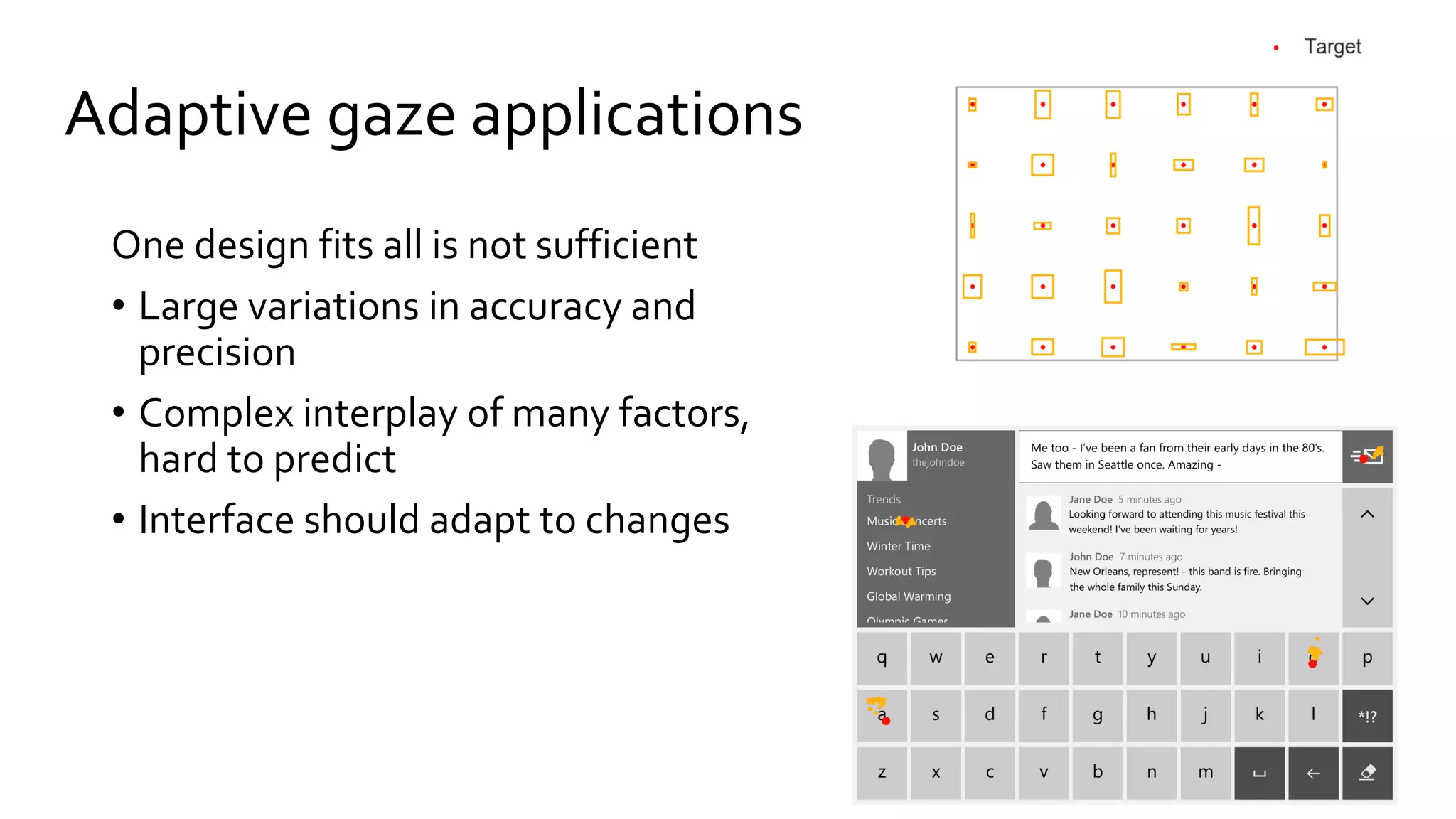
Adaptive gaze applications
One design fits all is not sufficient
• Large variations in accuracy and
precision
• Complex interplay of many factors,
hard to predict
• Interface should adapt to changes
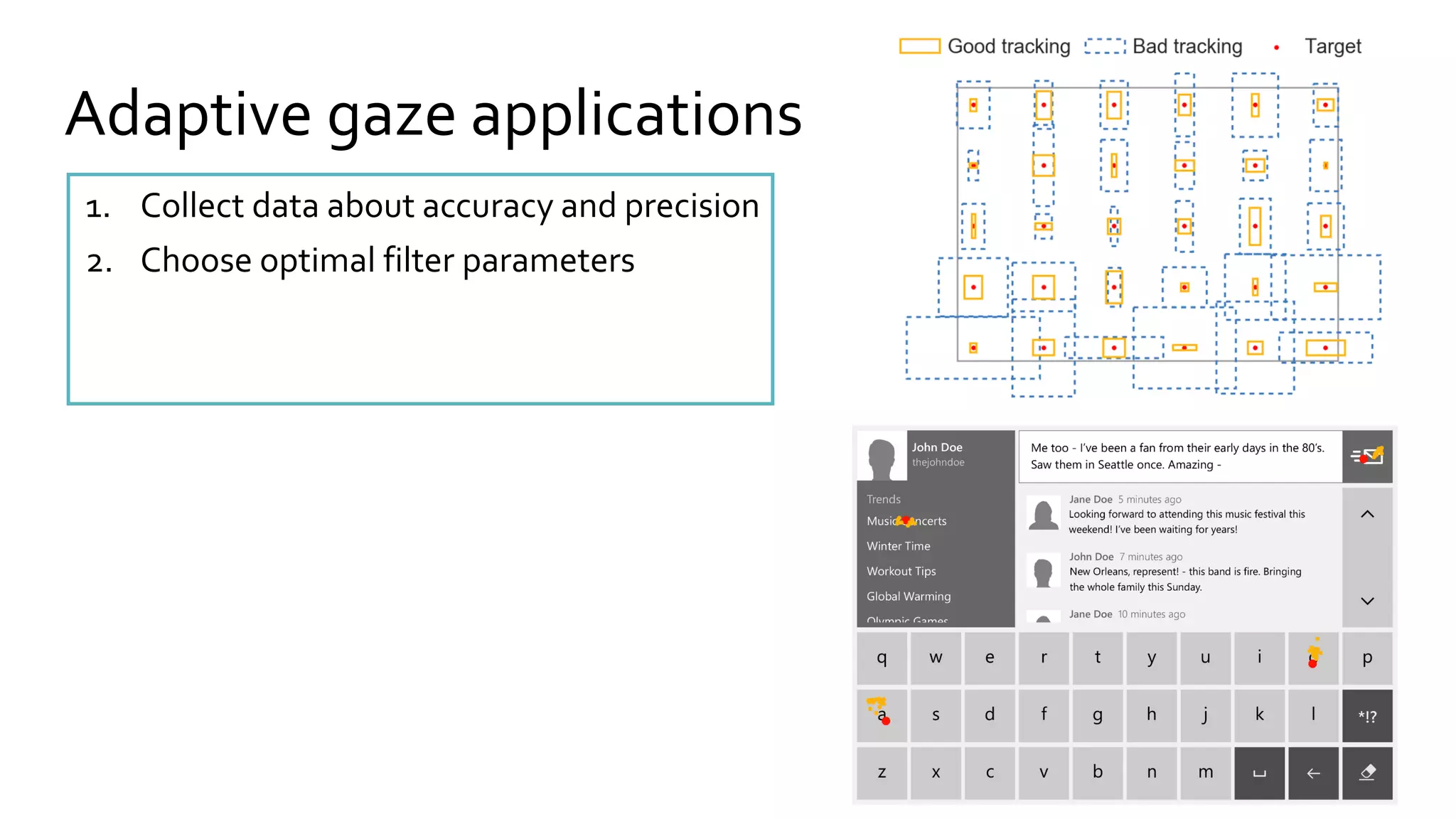
Adaptive gaze applications
1. Collect data about accuracy and precision
2. Choose optimal filter parameters
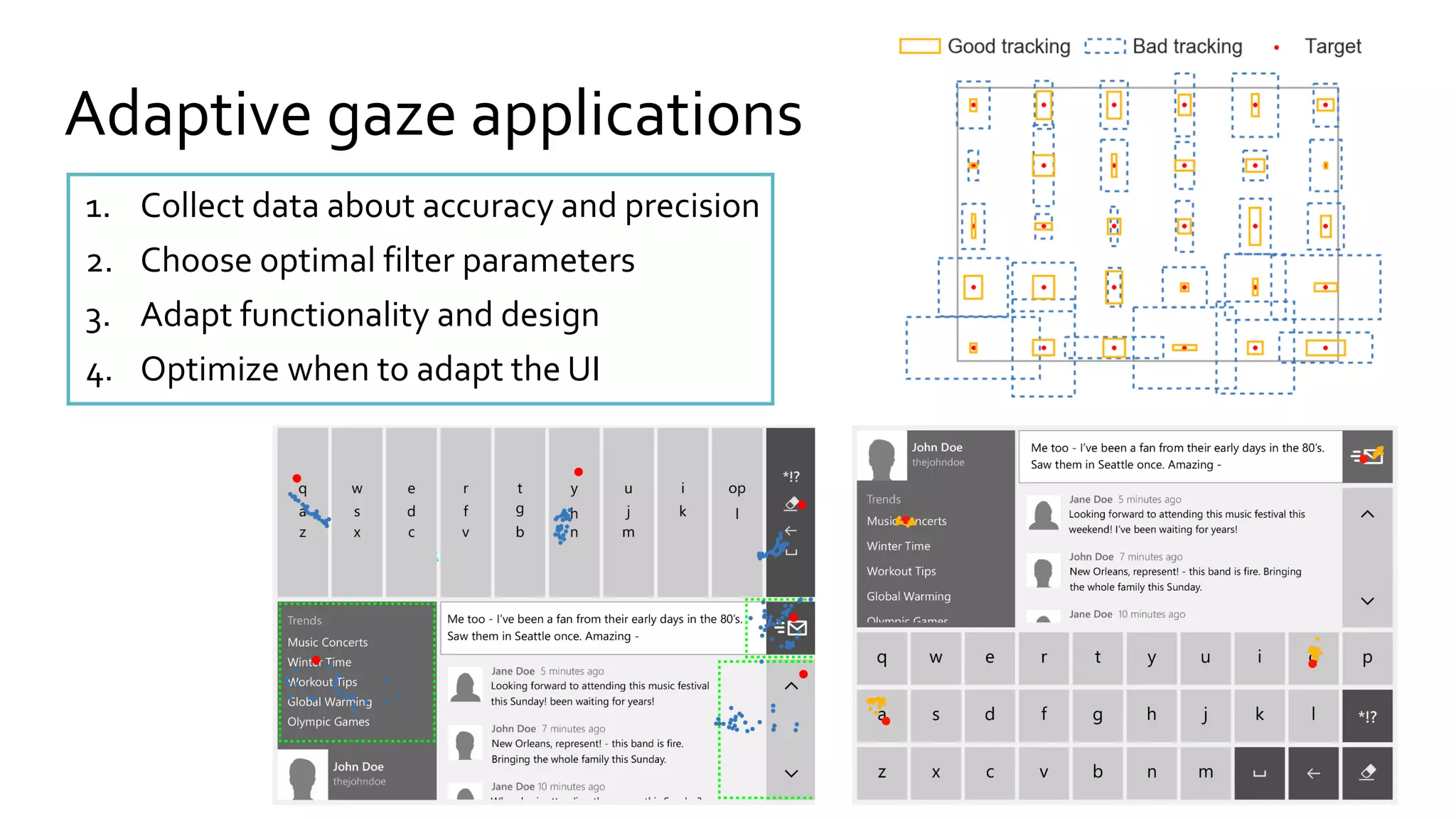
Adaptive gaze applications
1. Collect data about accuracy and precision
2. Choose optimal filter parameters
3. Adapt functionality and design
4. Optimize when to adapt the UI
zdnet.com
Microsoft
zdnet.com
Fernsehturm
built 1965-69
368m, tallest
structure in
Germany
SlashGear.com
deepview.cs.st-andrews.ac.uk
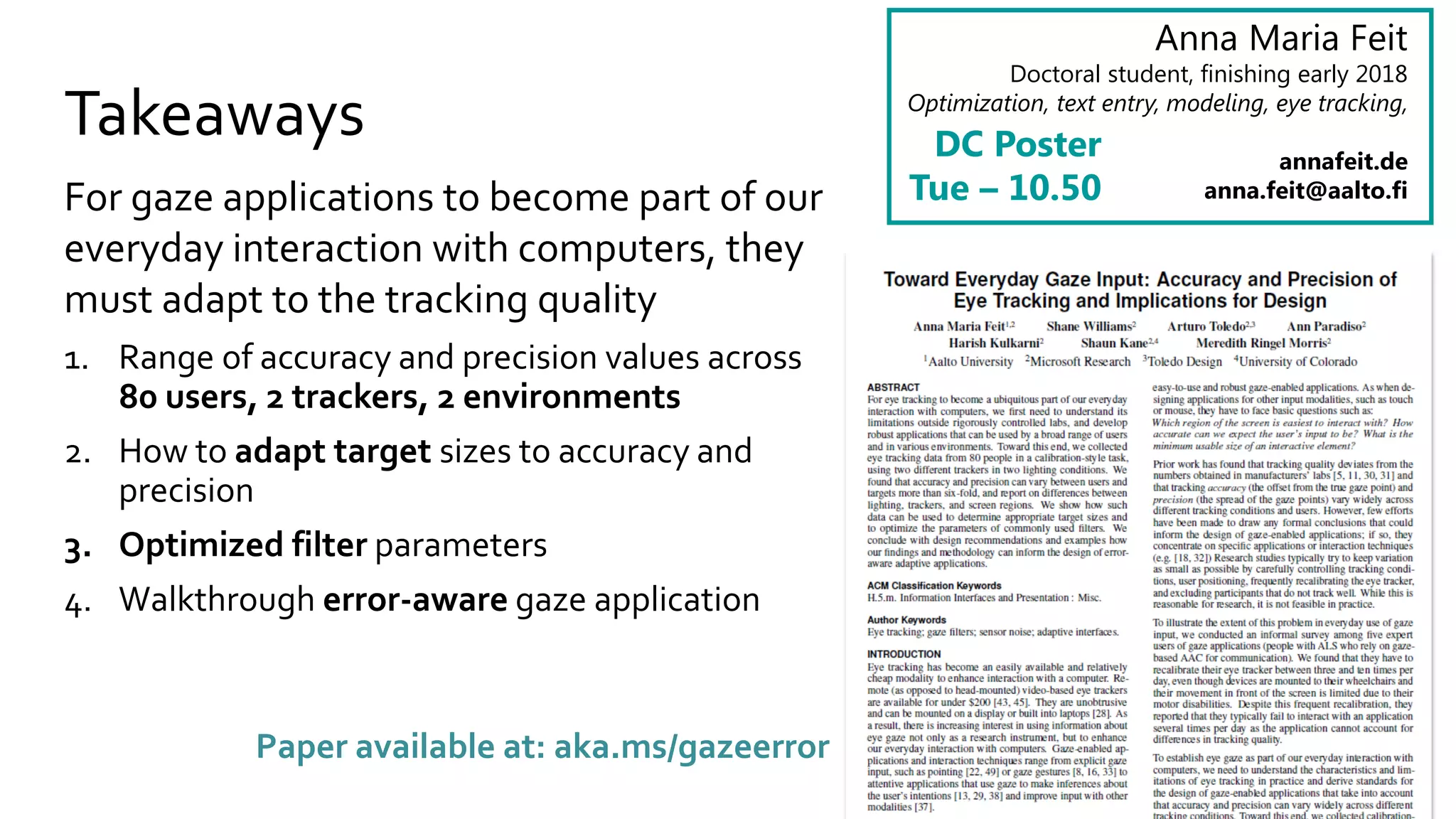
Takeaways
For gaze applications to become part of our
everyday interaction with computers, they
must adapt to the tracking quality
1. Range of accuracy and precision values across
80 users, 2 trackers, 2 environments
2. How to adapt target sizes to accuracy and
precision
3. Optimized filter parameters
4. Walkthrough error-aware gaze application
Anna Maria Feit
Doctoral student, finishing early 2018
Optimization, text entry, modeling, eye tracking,
annafeit.de
anna.feit@aalto.fi
DC Poster
Tue – 10.50
Paper available at: aka.ms/gazeerror

Toward Everyday Gaze Input: Accuracy and Precision of Eye Tracking and Implications for Design

  • 1.
    Toward Everday GazeInput Accuracy and Precision of EyeTracking and Implications for Design Anna Maria Feit1,2, ShaneWilliams2, ArturoToledo2,3, Ann Paradiso2, Harish Kulkarni2, Shaun Kane2,4, Meredith Ringel Morris2 Aalto University1, Microsoft Research2,Toledo Design3, University of Colorado4
  • 2.
    zdnet.com Microsoft zdnet.com Fernsehturm built 1965-69 368m, tallest structurein Germany SlashGear.com deepview.cs.st-andrews.ac.uk
  • 3.
    No standard forthe most basic design questions Which region of the screen is easiest to interact with? How accurate can we expect the users’ input to be? How large should gaze targets be? … It depends…
  • 4.
  • 5.
    We asked 5expert users… • Tracking quality varies during a day • Recalibrate eye tracker 3 – 10 times per day Reasons: • Change in lighting • Bumping against tracker • Head movement or repositioning of user • Fail to interact with a gaze application several times per week or even per day • Most use it inside, but would like to use it outside or in the car
  • 6.
    Remote eye tracking pupiland corneal reflection tracking Detection accuracy can be influenced by • Artificial lighting or sunlight • Eye physiology, drooping eyelids etc. • Corrective glasses and lenses • Mascara • Camera resolution and focus • Calibration procedure • … [see Holmqvist et al. 2011]
  • 7.
    How to makegaze interaction more robust? Algorithmic approaches: • Filtering and correction [see overview in Holmqvist et al. 2011] • Error modeling and prediction [e.g. Barz et al. 2016] Design approaches: • Increase gaze target size, or dwell time, hierarchical menus, etc. • Zooming or fisheye lenses [e.g. Ashmore et al. 2005, Blignaut et al. 2014] • Gaze gestures or smooth pursuit [e.g. Drewes and Schmidt 2007,Vidal et al. 2013]
  • 8.
    For eye trackingto become a part of everyday computer interaction gaze applications need to adapt to the uncertainty in the signal
  • 9.
    Gaze data of80 users 23 45 24 8 1 18-24 25-34 35-44 45-54 55-64Age 11 9 10 50 Blue Green Hazel Dark brown Eye Color 23 7 9 34 7 Asian or Pac. Isl. Black or Afr. Am. Hispanic White Other / Mixed Ethnicity Inside, natural light, cloudy day Inside, halogen and fluorescent light REDn scientific, 60 Hz EyeX, 60 Hz Tracking Environments: Demographics: Eye trackers: 30 9 41 Glasses Lenses NoneVision
  • 10.
    To keep attention:Go/no- go task Press space bar as fast as possible Do nothing Look at 30 targets evenly distributed over screen randomly presented Look at the target for 2 seconds
  • 11.
    Accuracy and Precisionanalysis • Data extracted for 1s during the fixation, o 30 fixations per user o 2,343 fixations from 80 users (2.4% excluded, see paper) • Accuracy: offset from target in x- and y-direction • Precision: standard deviation of gaze in x- and y-position Bad accuracy, good precision Good accuracy, Bad precision
  • 12.
    Gaze points of2 participants
  • 13.
    • Quantile: averageover x% best users per target • Accuracy is worse in vertical direction Variations across users are more than sixfold
  • 14.
    Tracker and lightconditions are similar • Tobii EyeX more accurate than SMI REDn but higher data loss (13% vs 3%) • No significant difference between light conditions
  • 15.
    • Precision isworse towards right and bottom edge of screen • No difference for accuracy Tracking worse towards screen edges
  • 16.
    3 ways toinform the design of gaze applications 1. Compute target size for reliable interaction 2. Optimize filter parameters 3. Determine best screen region
  • 17.
    Target size forrobust interaction Given: Accuracy: offset in x- and y-direction 𝑂𝑥, 𝑂𝑦 Precision: SD in x- and y-direction 𝜎𝑥, 𝜎 𝑦
  • 18.
    Target size forrobust interaction Given: Accuracy: offset in x- and y-direction 𝑂𝑥, 𝑂𝑦 Precision: SD in x- and y-direction 𝜎𝑥, 𝜎 𝑦 Assumption: gaze points are normally distributed with mean 𝑂 𝑥/𝑦 and SD 𝜎𝑥/𝑦 Then 95% of gaze points lie within 2 SD from mean 𝑂𝑦 2𝜎𝑥 2σy 𝑂𝑥
  • 19.
    Target size forrobust interaction Given: Accuracy: offset in x- and y-direction 𝑂𝑥, 𝑂𝑦 Precision: SD in x- and y-direction 𝜎𝑥, 𝜎 𝑦 Assumption: gaze points are normally distributed with mean 𝑂 𝑥/𝑦 and SD 𝜎𝑥/𝑦 Then 95% of gaze points lie within 2 SD from mean Compute: 𝑆 𝑤/ℎ= 2 (𝑂 𝑥/𝑦 + 2 𝜎𝑥/𝑦) 𝑂𝑦 2𝜎𝑥 2σy 𝑂𝑥 𝑆 𝑤 𝑆ℎ
  • 20.
    Target sizes forrobust interaction 25% 50% 75% 95% Percentile of users:
  • 21.
    Optimize filter parameters •Stampe filter [Stampe 1993] • Weighted Average [e.g. Jimenez 2008, Wood 2014] • Saccade detection [similar to Salvucci 2000] • Outlier correction [Kumar 2008] • 1€ Filter [Casiez 2012]
  • 22.
    Optimize filter parameters ParameterOptimization: trade-off between precision and signal delay Optimization Recipe: For each parameter setting: 1. Apply filter to fixation and compute target size 2. Simulate saccade between neighboring targets 3. Apply filter to saccade and compute saccade delay 5 frames saccade delay
  • 23.
    Optimize filter parameters Paperoffers parameter settings for all of these!
  • 24.
    Filtered target sizesfor robust interaction 25% 50% 75% 95%Percentile: Weighted average filter with saccade and outlier detection reduces the target size by 32 – 42% with a 2 frame delay, ca. 32ms (see paper for parameters)
  • 25.
    Assess different screenregions Compute precision and accuracy for different parts of the screen. Place (smaller) gaze elements where tracking is best.
  • 26.
    Implications for Design •Targets should be slightly larger in height than width • 1.9 × 2.35 𝑐𝑚 allow robust interaction for 75% of users • 3.28 × 3.78 𝑐𝑚 if data is not filtered • Avoid placing elements on the bottom or right edge of screen • Use weighted average filter with saccade detection and outlier correction See paper for more values
  • 27.
    Adaptive gaze applications Onedesign fits all is not sufficient • Large variations in accuracy and precision • Complex interplay of many factors, hard to predict • Interface should adapt to changes
  • 28.
    Adaptive gaze applications 1.Collect data about accuracy and precision 2. Choose optimal filter parameters
  • 29.
    Adaptive gaze applications 1.Collect data about accuracy and precision 2. Choose optimal filter parameters 3. Adapt functionality and design 4. Optimize when to adapt the UI
  • 30.
    zdnet.com Microsoft zdnet.com Fernsehturm built 1965-69 368m, tallest structurein Germany SlashGear.com deepview.cs.st-andrews.ac.uk
  • 31.
    Takeaways For gaze applicationsto become part of our everyday interaction with computers, they must adapt to the tracking quality 1. Range of accuracy and precision values across 80 users, 2 trackers, 2 environments 2. How to adapt target sizes to accuracy and precision 3. Optimized filter parameters 4. Walkthrough error-aware gaze application Anna Maria Feit Doctoral student, finishing early 2018 Optimization, text entry, modeling, eye tracking, annafeit.de anna.feit@aalto.fi DC Poster Tue – 10.50 Paper available at: aka.ms/gazeerror