Updated at 2013-12-1 -1- www.euchips.com
DMX Controller
DMX-P05F
General Introduction:
Technical Parameter
Input Voltage: 5V , 500mA
Power Consumption: < 3W
Connection: Mini-usb, Power, DMX
Memory: Internal flash memory
Output channel: 128 channels
Dry contact trigger ports 1
Transmission signal: DMX512(1990)
Versions: Black(DMX-P05F-B) , White(DMX-P05F-W)
Lamp type: Wallwashing light, Tube light,
Cube light,etc.
Software Euchips One
OS Requirement Windows XP/VISTA/SEVEN 32/64
Environment IP20, 0℃ to 50℃
Certifications EC, EMC, ROHS, ETL, UL
(some are in progress)
Package
Panel: 86x86x10 mm
Package: 145x135x48 mm
N.W.: 94g
G.W.: 250g
DMX Touch-sensitive Control Panel DMX-P05F
○ USB Connection, program by PC software
Features
○ Live setting of the intensity and color of a scene.
○ 1 dry contact trigger port
○ Compatible with any DMX fixture or DMX LED driver.
○ Wall mountable.
○ DMX512 Stand Alone Controller with a glass face
○ Stand alone mode with 1 areas and 24 scenes
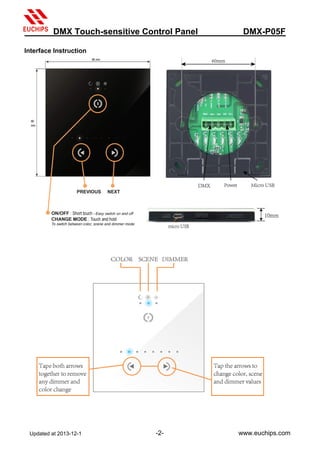
○ 3 touch sentitive buttons(on/off/mode, previous,next)
○ 128 DMX channels in stand alone
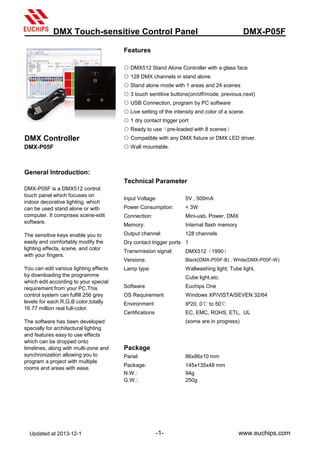
DMX-P05F is a DMX512 control
touch panel which focuses on
indoor decorative lighting, which
can be used stand alone or with
computer. It comprises scene-edit
software.
The sensitive keys enable you to
easily and comfortably modify the
lighting effects, scene, and color
with your fingers.
You can edit various lighting effects
by downloading the programme
which edit according to your special
requirement from your PC.This
control system can fulfill 256 grey
levels for each R,G,B color,totally
16.77 million real full-color.
The software has been developed
specially for architectural lighting
and features easy to use effects
which can be dropped onto
timelines, along with multi-zone and
synchronization allowing you to
program a project with multiple
rooms and areas with ease.
○ Ready to use(pre-loaded with 8 scenes)
Updated at 2013-12-1 -2- www.euchips.com
Interface Instruction
DMX Touch-sensitive Control Panel DMX-P05F
Updated at 2013-12-1 -3- www.euchips.com
Installltion guide
1. Mount an electrical box inside the wall
DMX-P05F can be installed in a standard 60mm
electrical backbox.
you can insert the AC/DC adapter inside
or outside the backbox.
2. Connect the wires
DMX: Connect the DMX cable to the lighting
receivers ( Leds, Dimmers, Fixtures..)
(for XLR: 1=ground 2=dmx- 3=dmx+)
POWER: Connect the AC/DC adapter.
Make sure to not invert the + and the ground(GND).
3. Mount the interface on the wall
First, plug the 2 connectors(green connector block)
Secondly,mount the back side of the interface on the wall with 2 or more screws,
Then, close the unit by clipping the front panel onto the back plate.
Software
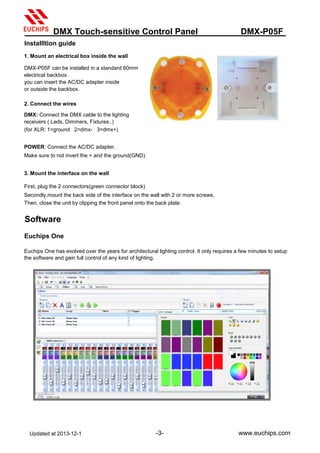
Euchips One
Euchips One has evolved over the years for architectural lighting control. It only requires a few minutes to setup
the software and gain full control of any kind of lighting.
DMX Touch-sensitive Control Panel DMX-P05F

touch panel DMX controller DMX-P05F

  • 1.
    Updated at 2013-12-1-1- www.euchips.com DMX Controller DMX-P05F General Introduction: Technical Parameter Input Voltage: 5V , 500mA Power Consumption: < 3W Connection: Mini-usb, Power, DMX Memory: Internal flash memory Output channel: 128 channels Dry contact trigger ports 1 Transmission signal: DMX512(1990) Versions: Black(DMX-P05F-B) , White(DMX-P05F-W) Lamp type: Wallwashing light, Tube light, Cube light,etc. Software Euchips One OS Requirement Windows XP/VISTA/SEVEN 32/64 Environment IP20, 0℃ to 50℃ Certifications EC, EMC, ROHS, ETL, UL (some are in progress) Package Panel: 86x86x10 mm Package: 145x135x48 mm N.W.: 94g G.W.: 250g DMX Touch-sensitive Control Panel DMX-P05F ○ USB Connection, program by PC software Features ○ Live setting of the intensity and color of a scene. ○ 1 dry contact trigger port ○ Compatible with any DMX fixture or DMX LED driver. ○ Wall mountable. ○ DMX512 Stand Alone Controller with a glass face ○ Stand alone mode with 1 areas and 24 scenes ○ 3 touch sentitive buttons(on/off/mode, previous,next) ○ 128 DMX channels in stand alone DMX-P05F is a DMX512 control touch panel which focuses on indoor decorative lighting, which can be used stand alone or with computer. It comprises scene-edit software. The sensitive keys enable you to easily and comfortably modify the lighting effects, scene, and color with your fingers. You can edit various lighting effects by downloading the programme which edit according to your special requirement from your PC.This control system can fulfill 256 grey levels for each R,G,B color,totally 16.77 million real full-color. The software has been developed specially for architectural lighting and features easy to use effects which can be dropped onto timelines, along with multi-zone and synchronization allowing you to program a project with multiple rooms and areas with ease. ○ Ready to use(pre-loaded with 8 scenes)
  • 2.
    Updated at 2013-12-1-2- www.euchips.com Interface Instruction DMX Touch-sensitive Control Panel DMX-P05F
  • 3.
    Updated at 2013-12-1-3- www.euchips.com Installltion guide 1. Mount an electrical box inside the wall DMX-P05F can be installed in a standard 60mm electrical backbox. you can insert the AC/DC adapter inside or outside the backbox. 2. Connect the wires DMX: Connect the DMX cable to the lighting receivers ( Leds, Dimmers, Fixtures..) (for XLR: 1=ground 2=dmx- 3=dmx+) POWER: Connect the AC/DC adapter. Make sure to not invert the + and the ground(GND). 3. Mount the interface on the wall First, plug the 2 connectors(green connector block) Secondly,mount the back side of the interface on the wall with 2 or more screws, Then, close the unit by clipping the front panel onto the back plate. Software Euchips One Euchips One has evolved over the years for architectural lighting control. It only requires a few minutes to setup the software and gain full control of any kind of lighting. DMX Touch-sensitive Control Panel DMX-P05F