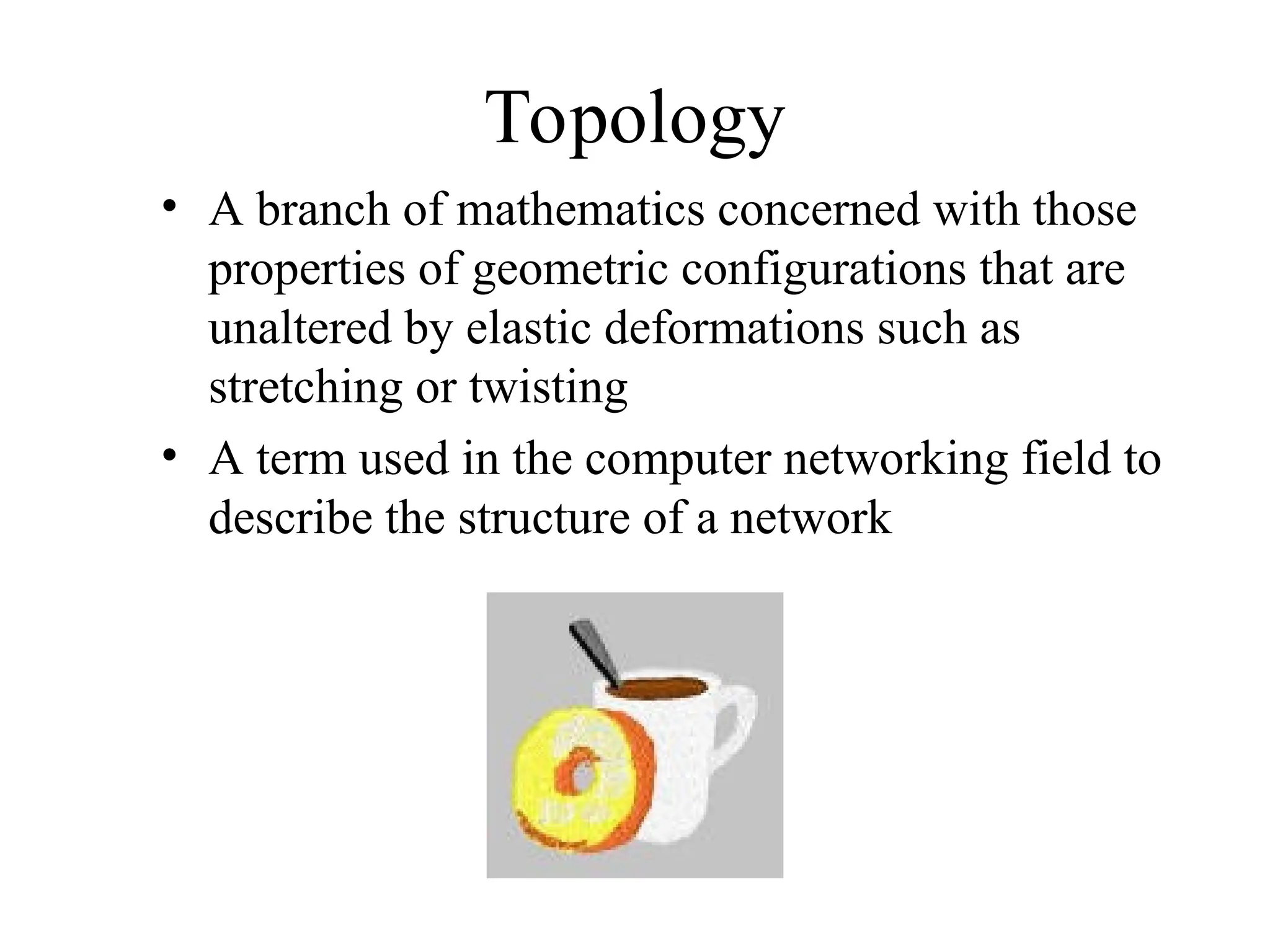
Topology
• A branchof mathematics concerned with those
properties of geometric configurations that are
unaltered by elastic deformations such as
stretching or twisting
• A term used in the computer networking field to
describe the structure of a network
Why Use aHierarchical Model?
• Reduces workload on network devices
– Avoids devices having to communicate with too
many other devices (reduces “CPU adjacencies”)
• Constrains broadcast domains
• Enhances simplicity and understanding
• Facilitates changes
• Facilitates scaling to a larger size
5.
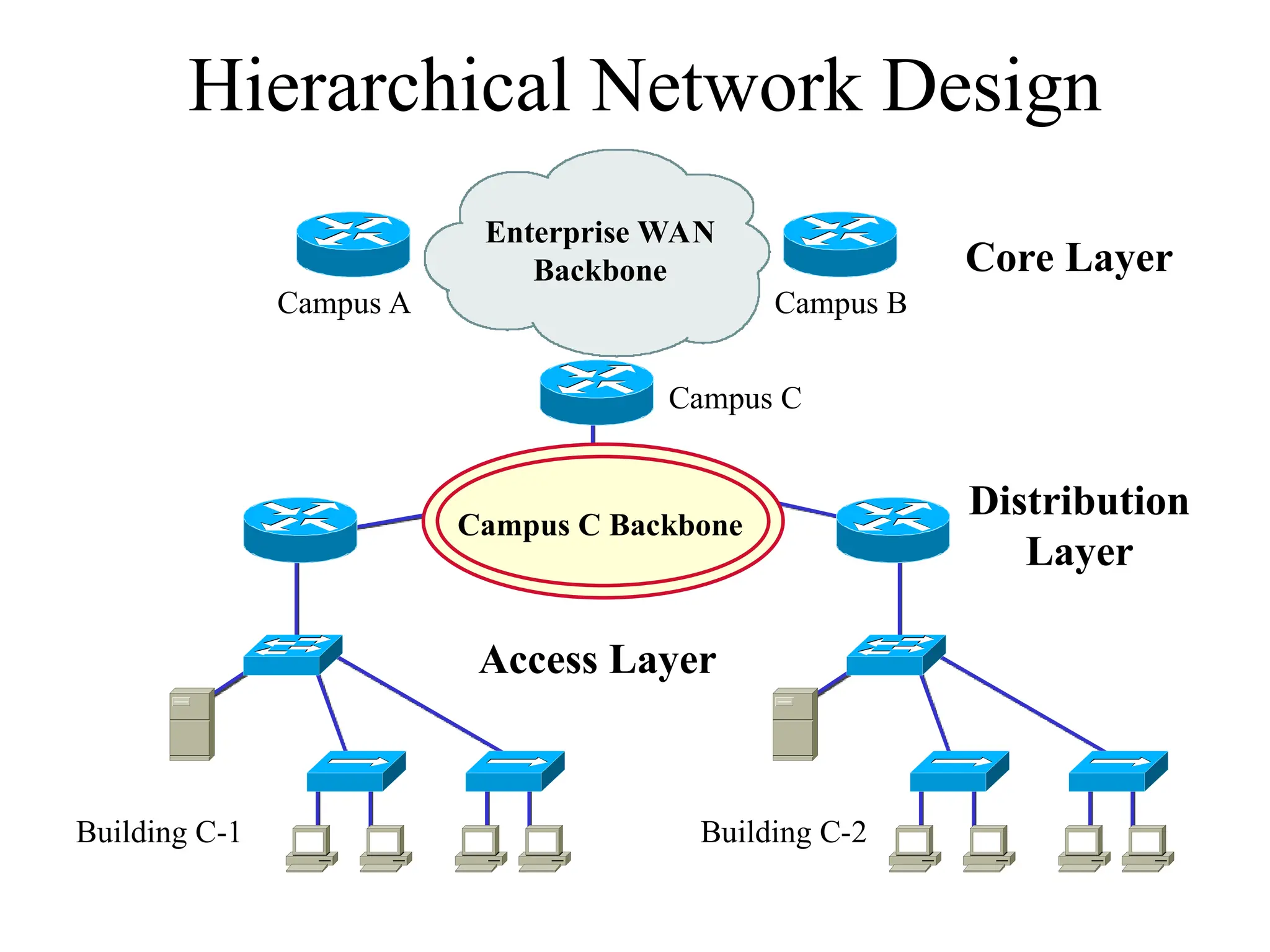
Hierarchical Network Design
EnterpriseWAN
Backbone
Campus A Campus B
Campus C
Building C-1 Building C-2
Campus C Backbone
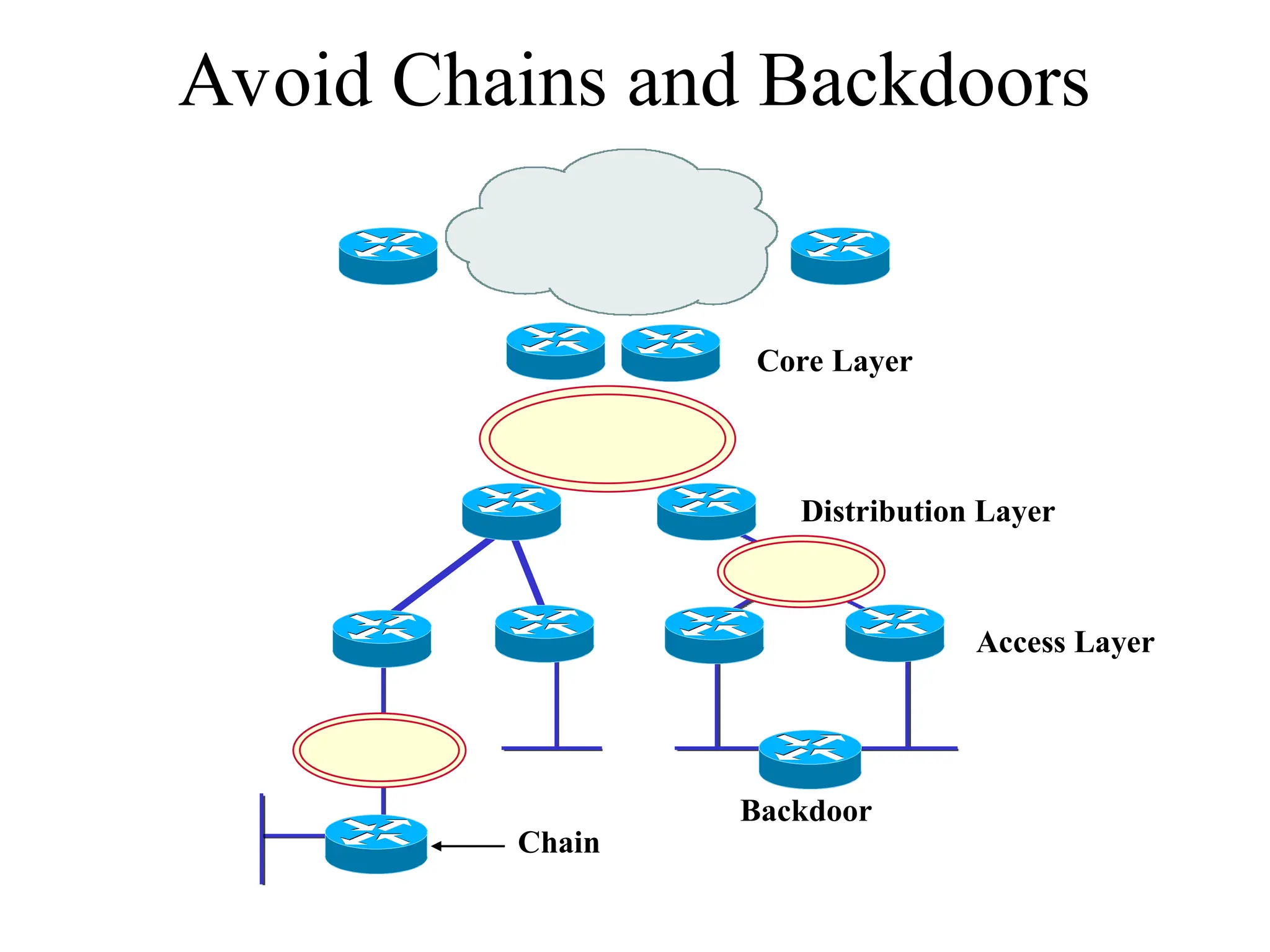
Core Layer
Distribution
Layer
Access Layer
6.
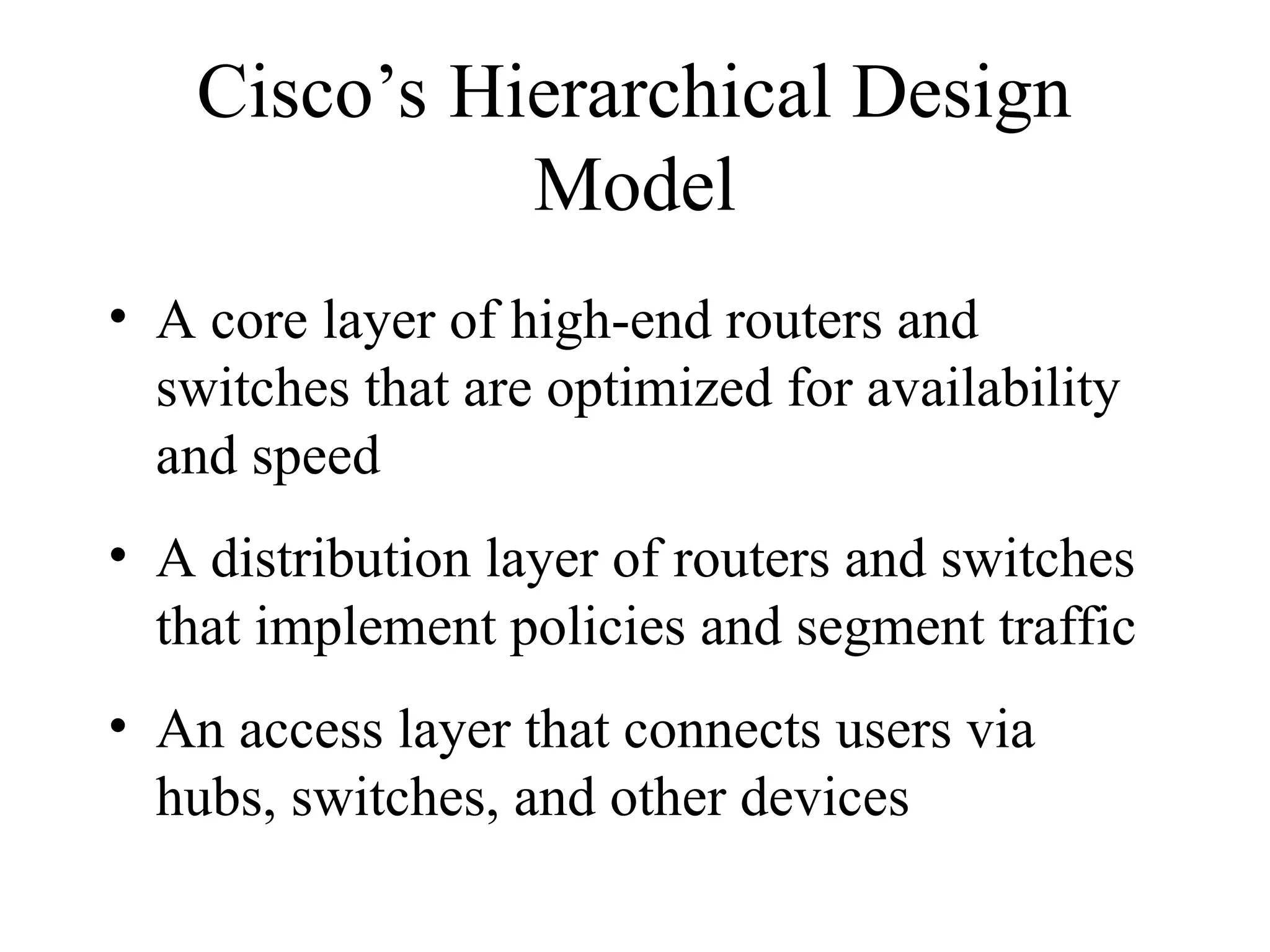
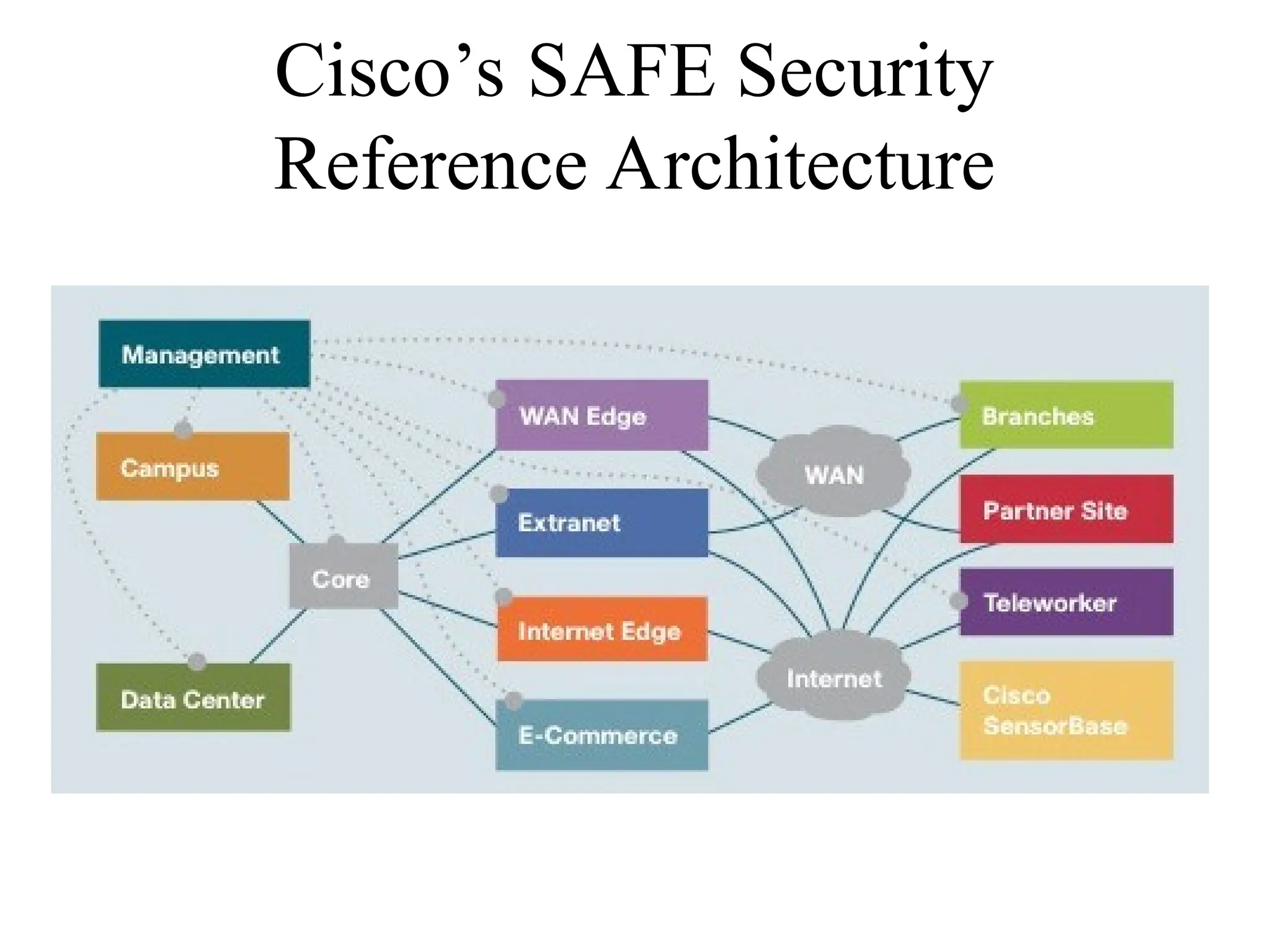
Cisco’s Hierarchical Design
Model
•A core layer of high-end routers and
switches that are optimized for availability
and speed
• A distribution layer of routers and switches
that implement policies and segment traffic
• An access layer that connects users via
hubs, switches, and other devices
7.
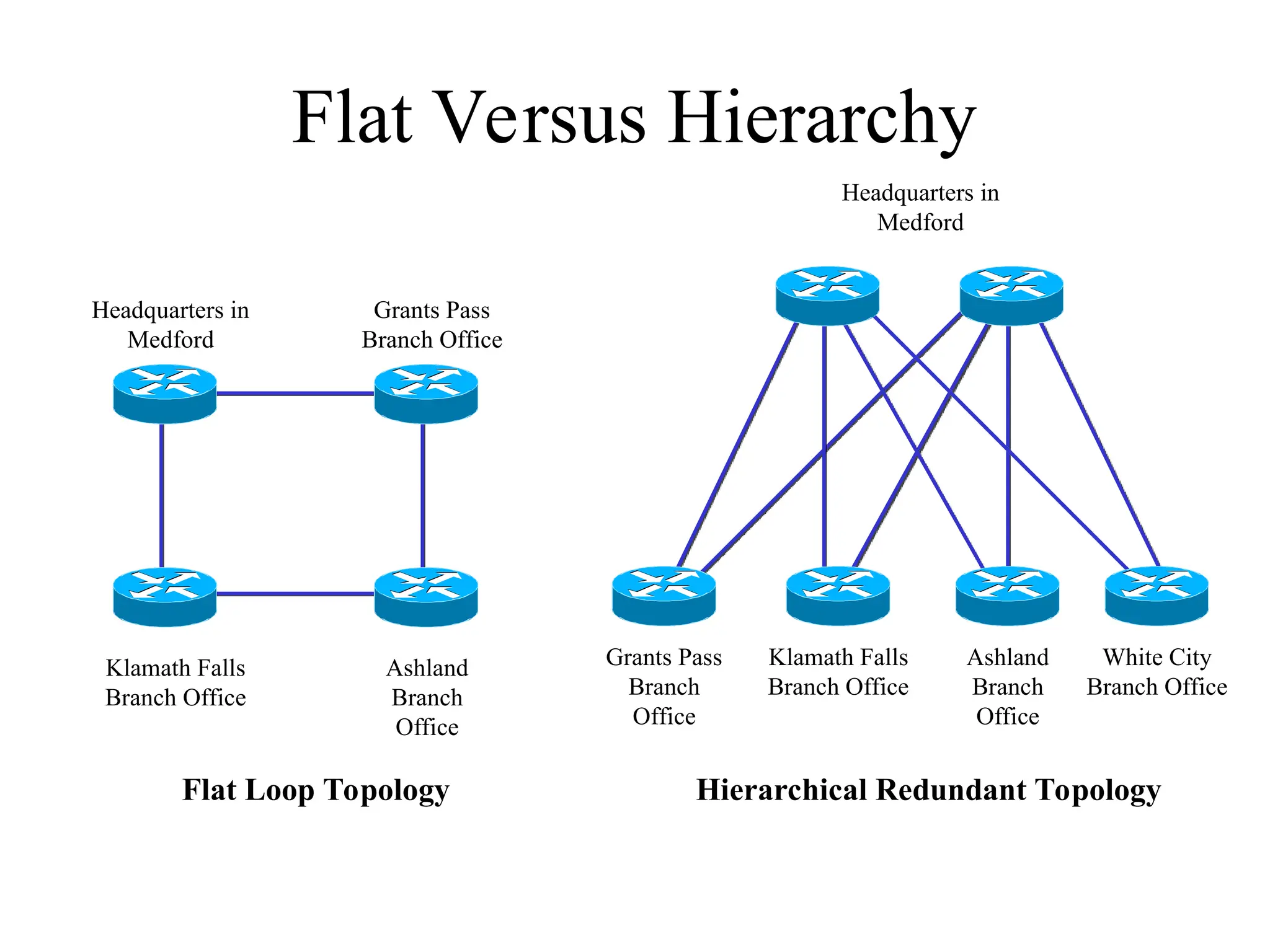
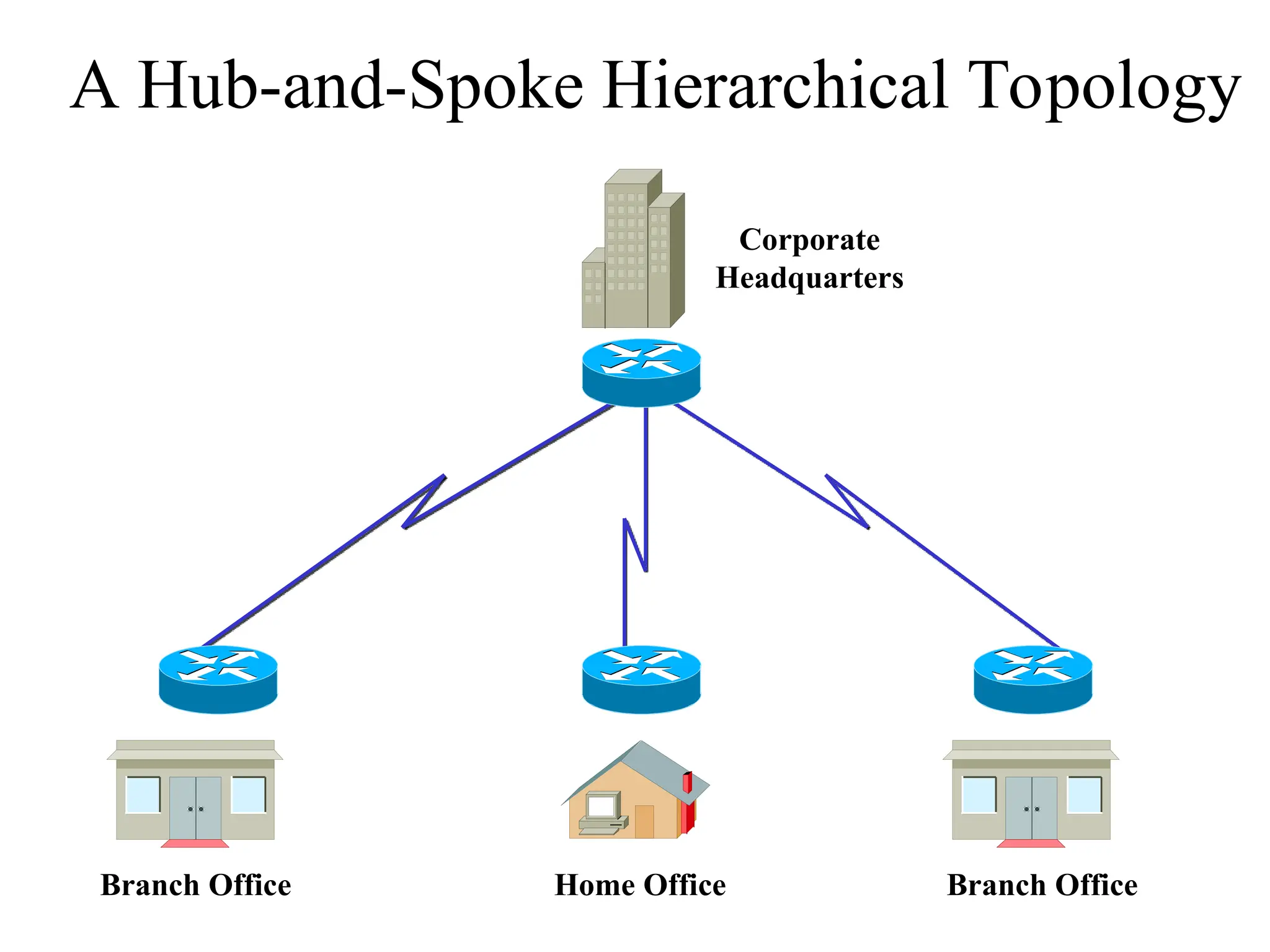
Flat Versus Hierarchy
FlatLoop Topology
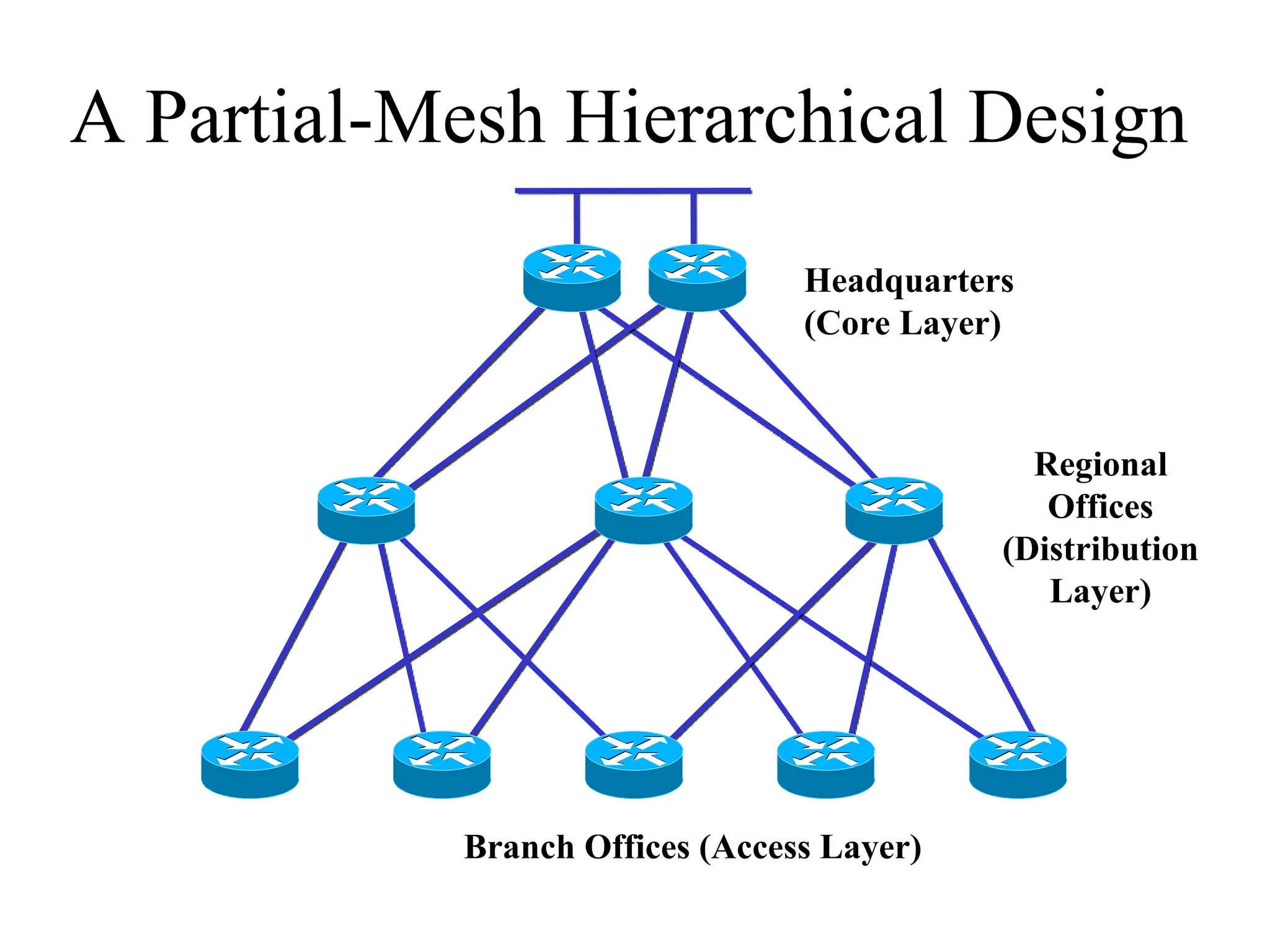
Headquarters in
Medford
Grants Pass
Branch Office
Ashland
Branch
Office
Klamath Falls
Branch Office
Headquarters in
Medford
Ashland
Branch
Office
Klamath Falls
Branch Office
Grants Pass
Branch
Office
White City
Branch Office
Hierarchical Redundant Topology
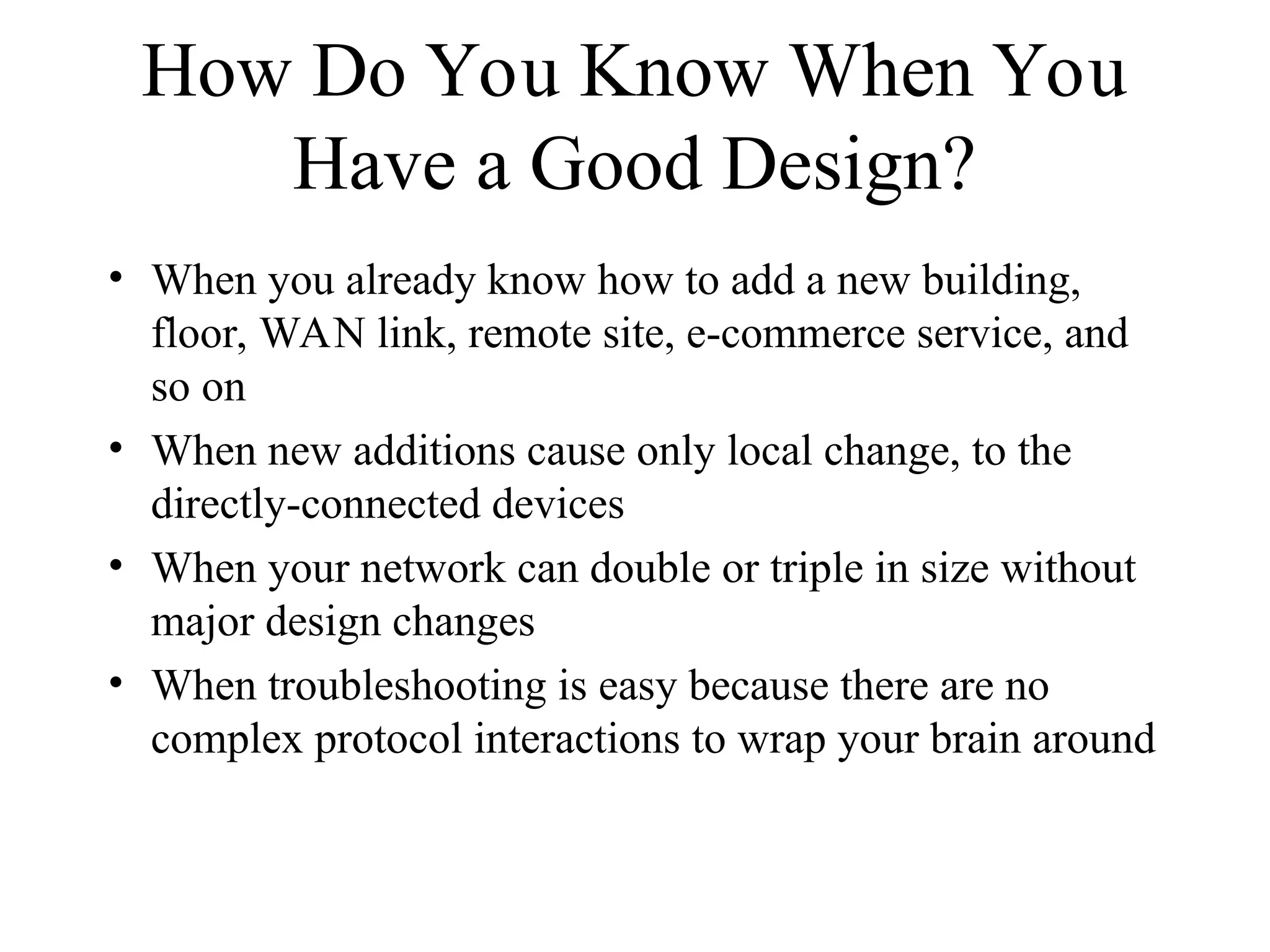
How Do YouKnow When You
Have a Good Design?
• When you already know how to add a new building,
floor, WAN link, remote site, e-commerce service, and
so on
• When new additions cause only local change, to the
directly-connected devices
• When your network can double or triple in size without
major design changes
• When troubleshooting is easy because there are no
complex protocol interactions to wrap your brain around
Campus Topology Design
•Use a hierarchical, modular approach
• Minimize the size of bandwidth domains
• Minimize the size of broadcast domains
• Provide redundancy
– Mirrored servers
– Multiple ways for workstations to reach a
router for off-net communications
15.
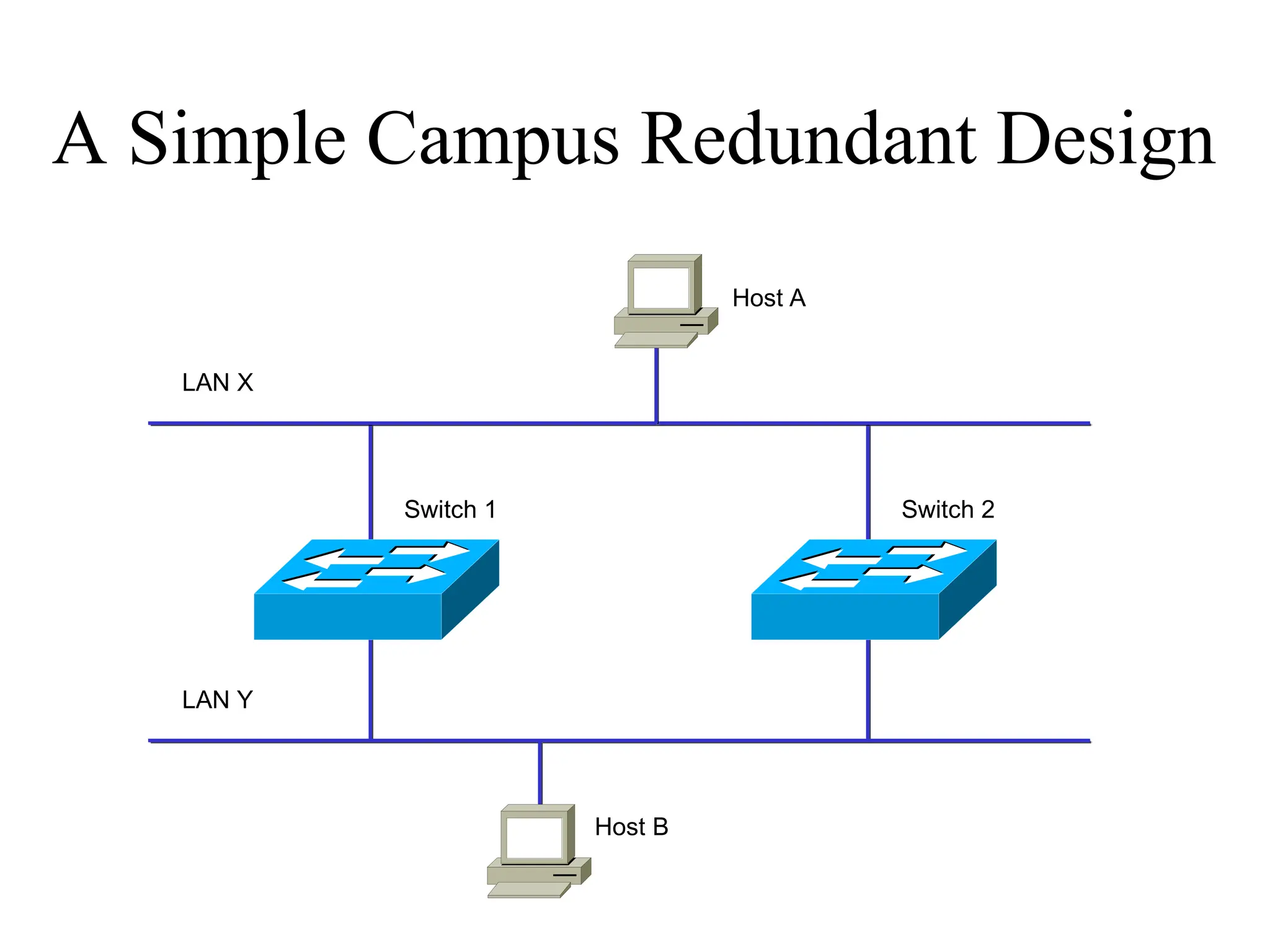
A Simple CampusRedundant Design
Host A
Host B
LAN X
LAN Y
Switch 1 Switch 2
16.
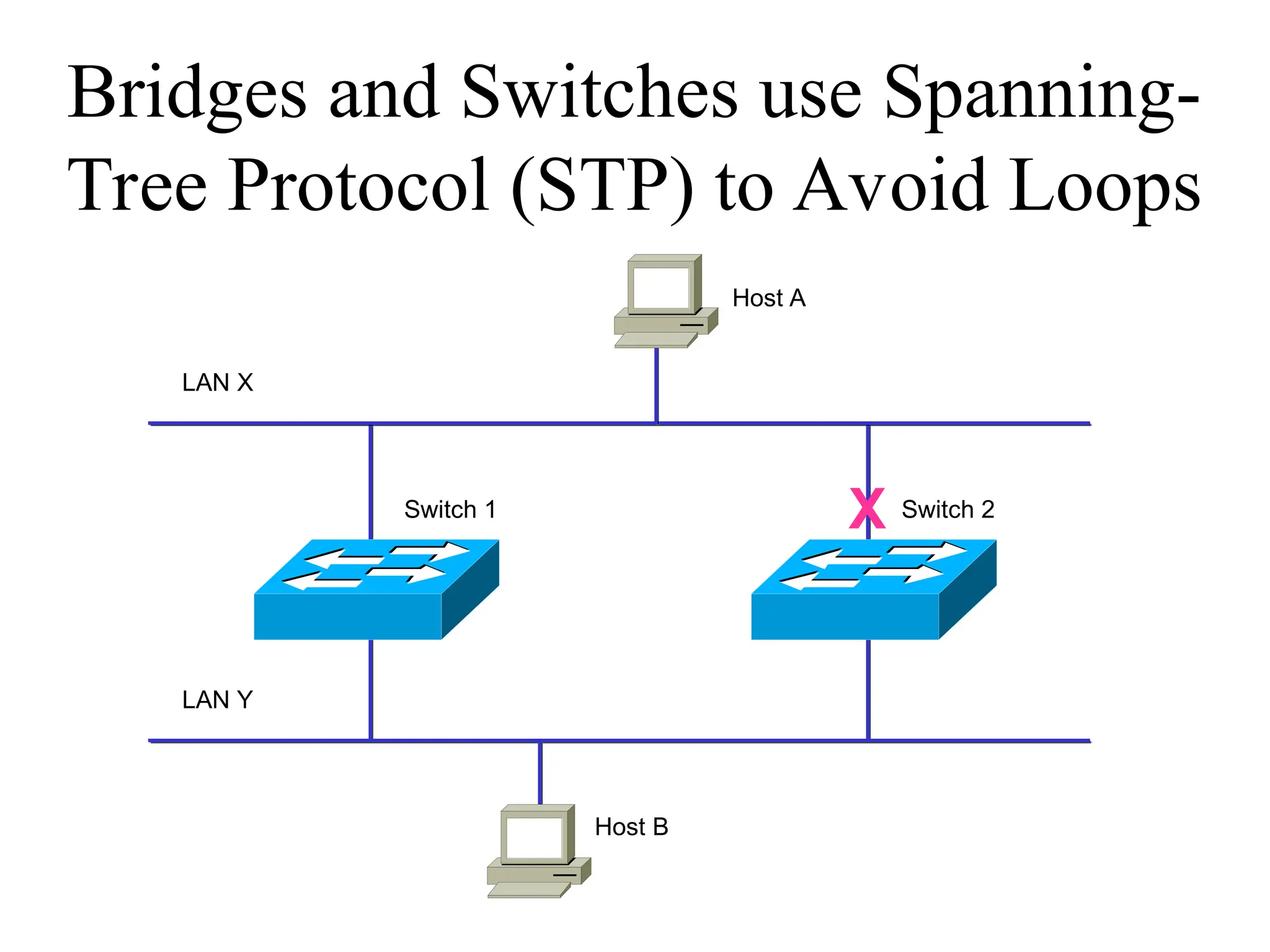
Bridges and Switchesuse Spanning-
Tree Protocol (STP) to Avoid Loops
X
Host A
Host B
LAN X
LAN Y
Switch 1 Switch 2
17.
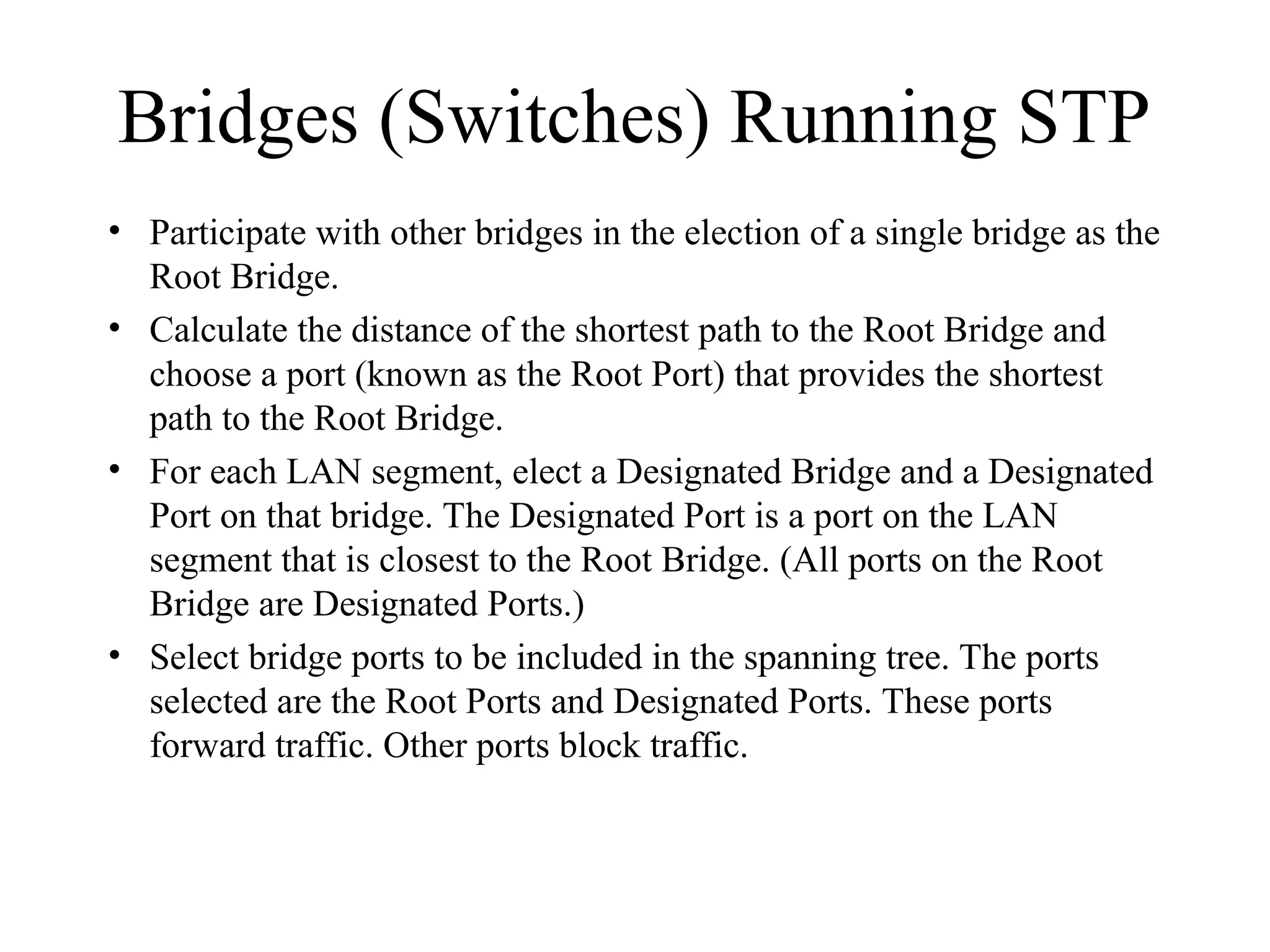
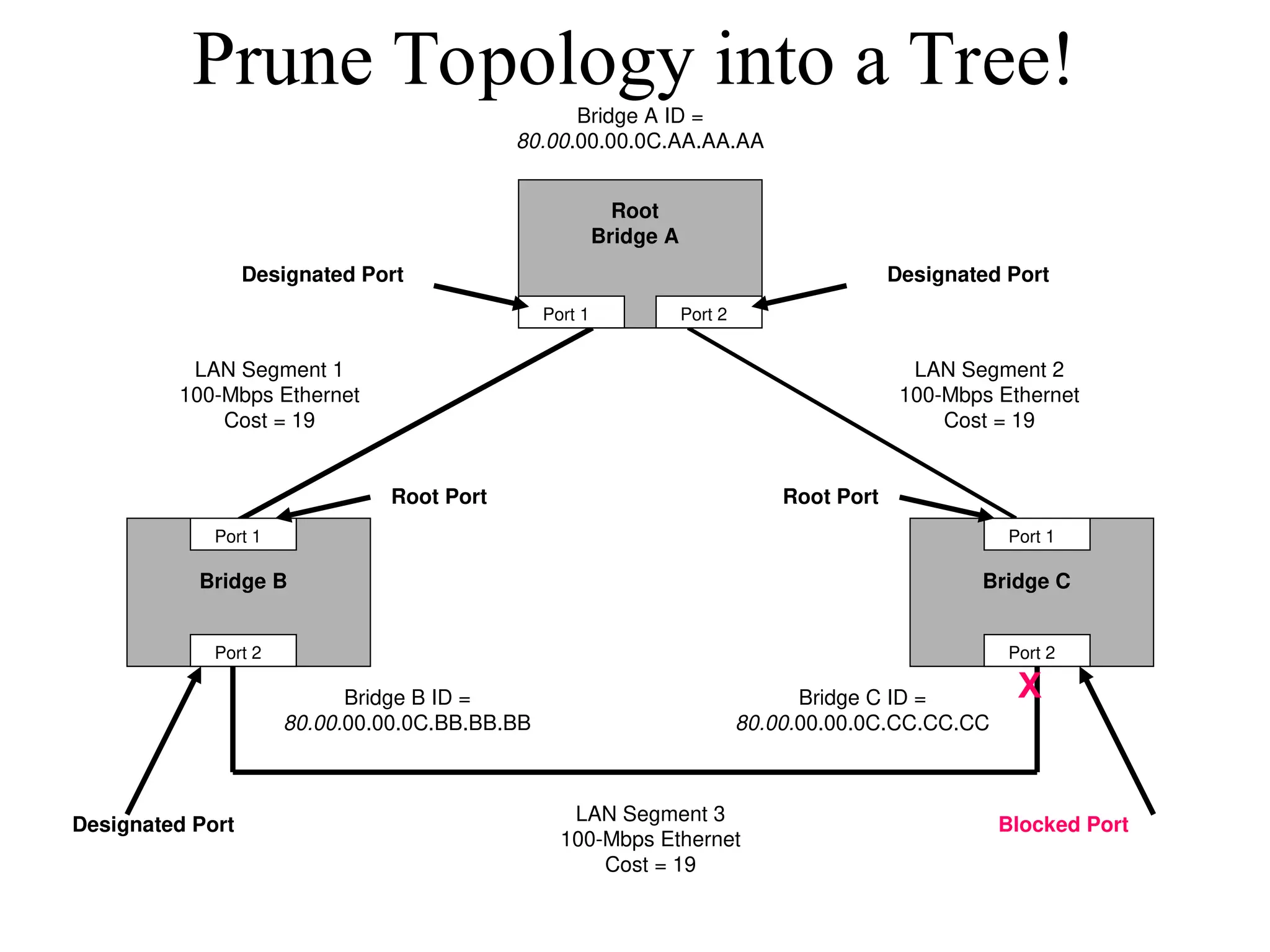
Bridges (Switches) RunningSTP
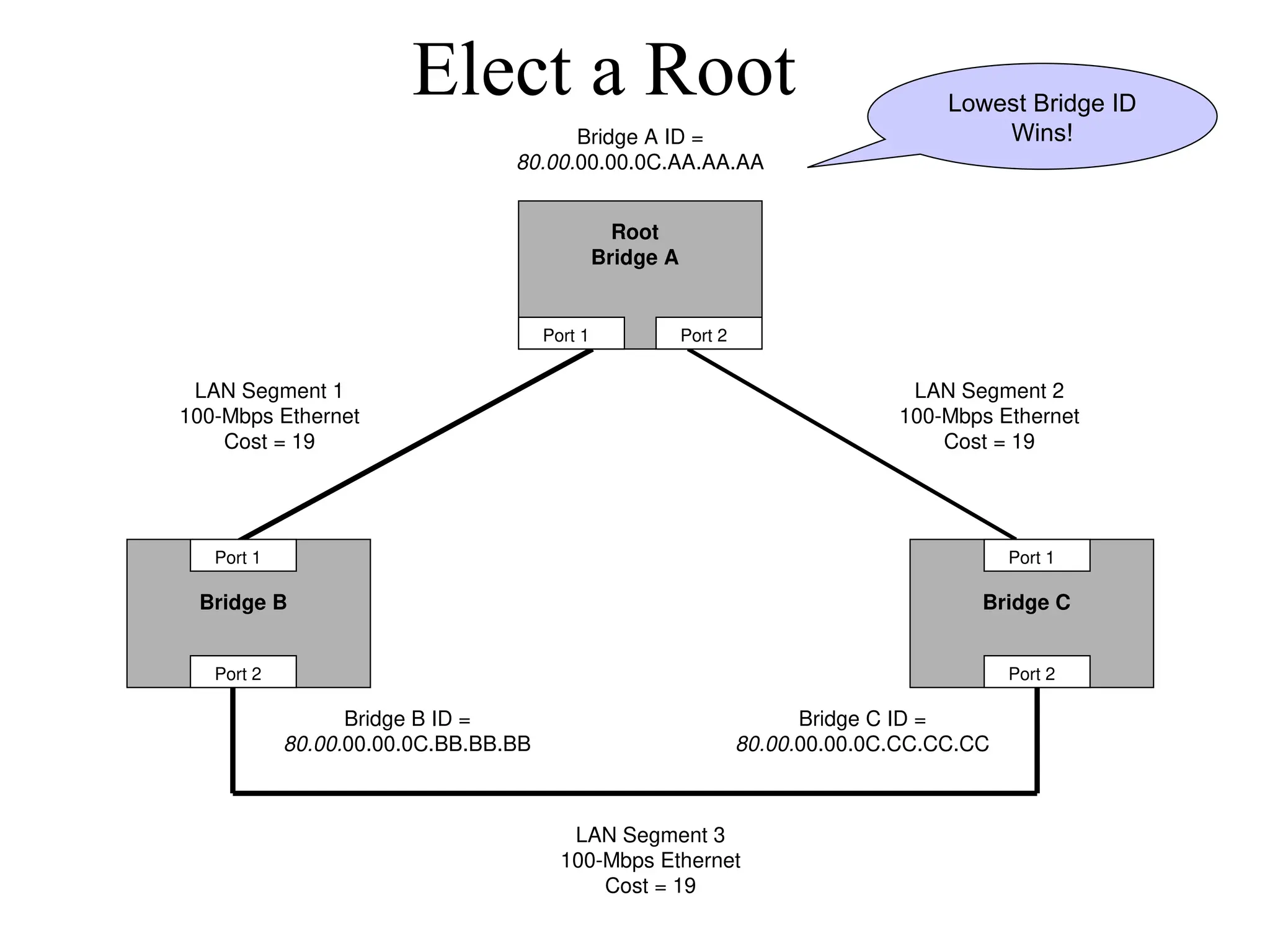
• Participate with other bridges in the election of a single bridge as the
Root Bridge.
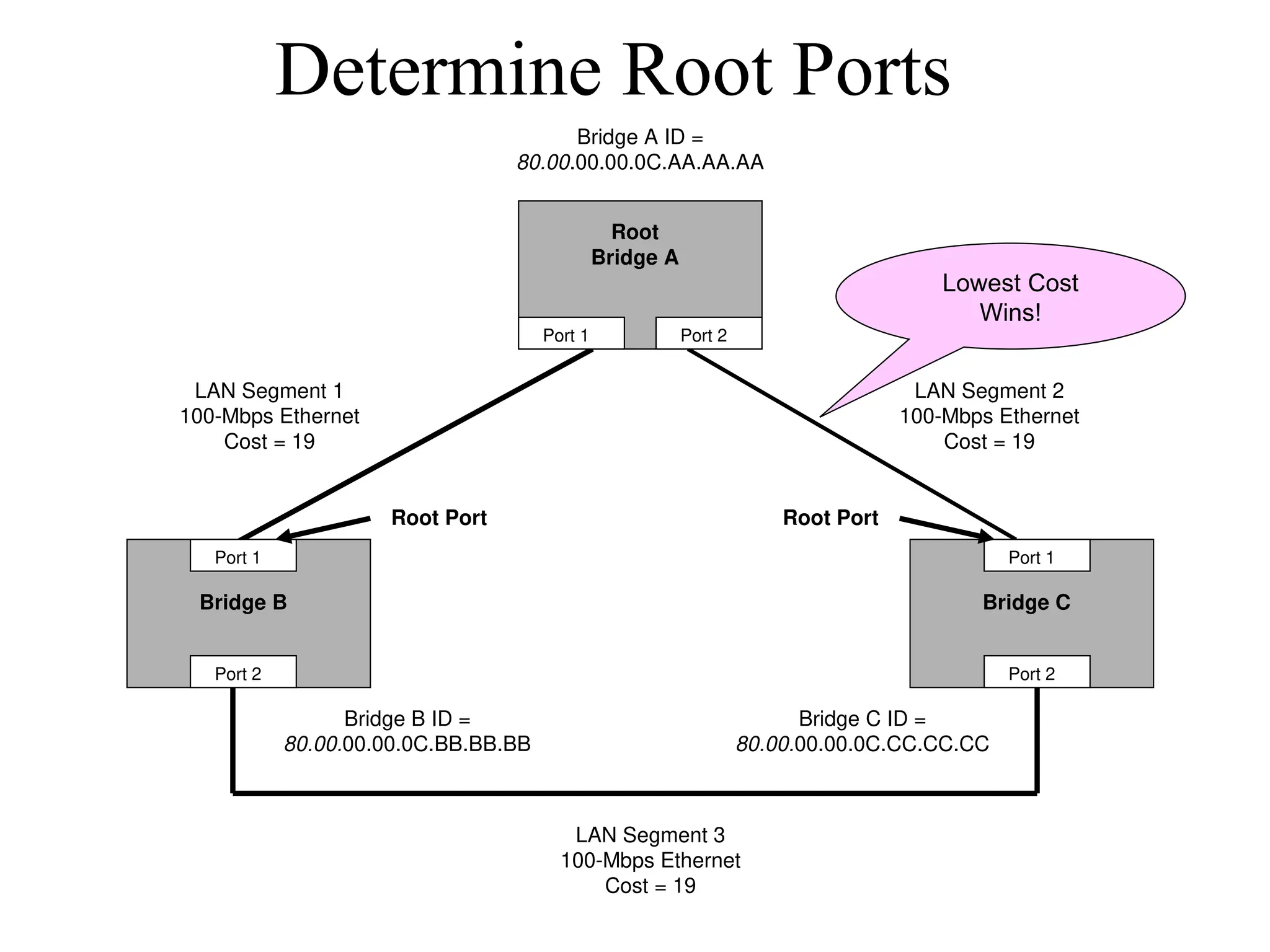
• Calculate the distance of the shortest path to the Root Bridge and
choose a port (known as the Root Port) that provides the shortest
path to the Root Bridge.
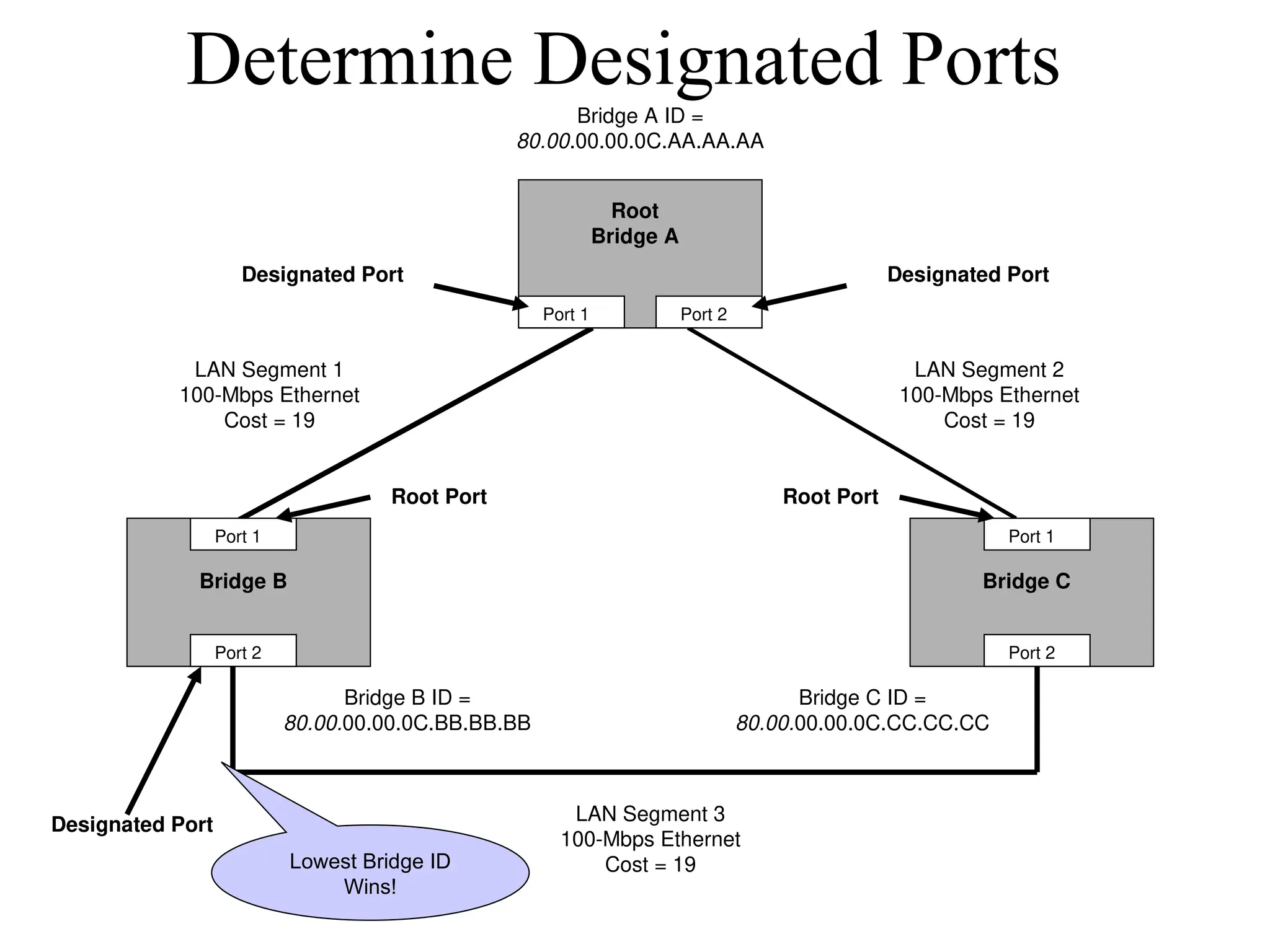
• For each LAN segment, elect a Designated Bridge and a Designated
Port on that bridge. The Designated Port is a port on the LAN
segment that is closest to the Root Bridge. (All ports on the Root
Bridge are Designated Ports.)
• Select bridge ports to be included in the spanning tree. The ports
selected are the Root Ports and Designated Ports. These ports
forward traffic. Other ports block traffic.
18.
Elect a Root
BridgeB Bridge C
Bridge A ID =
80.00.00.00.0C.AA.AA.AA
Bridge B ID =
80.00.00.00.0C.BB.BB.BB
Bridge C ID =
80.00.00.00.0C.CC.CC.CC
Port 1
Port 2
Port 1
Port 2
Port 1 Port 2
LAN Segment 2
100-Mbps Ethernet
Cost = 19
LAN Segment 1
100-Mbps Ethernet
Cost = 19
LAN Segment 3
100-Mbps Ethernet
Cost = 19
Root
Bridge A
Lowest Bridge ID
Wins!
19.
Determine Root Ports
BridgeB Bridge C
Root
Bridge A
Bridge A ID =
80.00.00.00.0C.AA.AA.AA
Bridge B ID =
80.00.00.00.0C.BB.BB.BB
Bridge C ID =
80.00.00.00.0C.CC.CC.CC
Port 1
Port 2
Port 1
Port 2
Port 1 Port 2
LAN Segment 2
100-Mbps Ethernet
Cost = 19
LAN Segment 1
100-Mbps Ethernet
Cost = 19
LAN Segment 3
100-Mbps Ethernet
Cost = 19
Root Port Root Port
Lowest Cost
Wins!
20.
Determine Designated Ports
BridgeB Bridge C
Root
Bridge A
Bridge A ID =
80.00.00.00.0C.AA.AA.AA
Bridge B ID =
80.00.00.00.0C.BB.BB.BB
Bridge C ID =
80.00.00.00.0C.CC.CC.CC
Port 1
Port 2
Port 1
Port 2
Port 1 Port 2
LAN Segment 2
100-Mbps Ethernet
Cost = 19
LAN Segment 1
100-Mbps Ethernet
Cost = 19
LAN Segment 3
100-Mbps Ethernet
Cost = 19
Root Port Root Port
Designated Port Designated Port
Designated Port
Lowest Bridge ID
Wins!
21.
Bridge B BridgeC
Root
Bridge A
Bridge A ID =
80.00.00.00.0C.AA.AA.AA
Bridge B ID =
80.00.00.00.0C.BB.BB.BB
Bridge C ID =
80.00.00.00.0C.CC.CC.CC
Port 1
Port 2
Port 1
Port 2
Port 1 Port 2
LAN Segment 2
100-Mbps Ethernet
Cost = 19
LAN Segment 1
100-Mbps Ethernet
Cost = 19
LAN Segment 3
100-Mbps Ethernet
Cost = 19
Root Port Root Port
Designated Port Designated Port
Designated Port Blocked Port
X
Prune Topology into a Tree!
22.
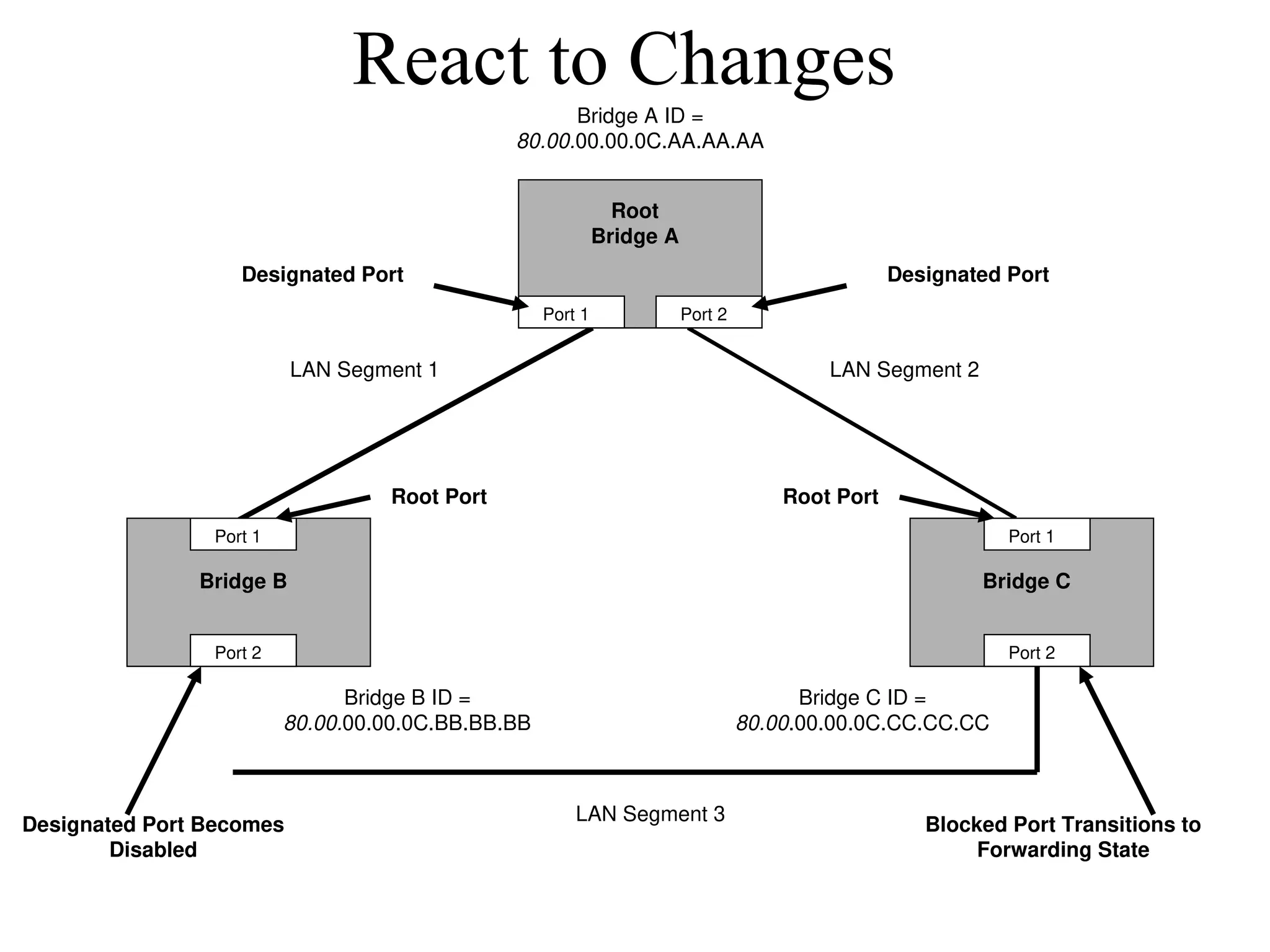
React to Changes
BridgeB Bridge C
Root
Bridge A
Bridge A ID =
80.00.00.00.0C.AA.AA.AA
Bridge B ID =
80.00.00.00.0C.BB.BB.BB
Bridge C ID =
80.00.00.00.0C.CC.CC.CC
Port 1
Port 2
Port 1
Port 2
Port 1 Port 2
LAN Segment 2
LAN Segment 1
LAN Segment 3
Root Port Root Port
Designated Port Designated Port
Designated Port Becomes
Disabled
Blocked Port Transitions to
Forwarding State
23.
Scaling the SpanningTree
Protocol
• Keep the switched network small
– It shouldn’t span more than seven switches
• Use BPDU skew detection on Cisco switches
• Use IEEE 802.1w
– Provides rapid reconfiguration of the spanning
tree
– Also known as RSTP
24.
Virtual LANs (VLANs)
•An emulation of a standard LAN that allows
data transfer to take place without the
traditional physical restraints placed on a
network
• A set of devices that belong to an
administrative group
• Designers use VLANs to constrain broadcast
traffic
25.
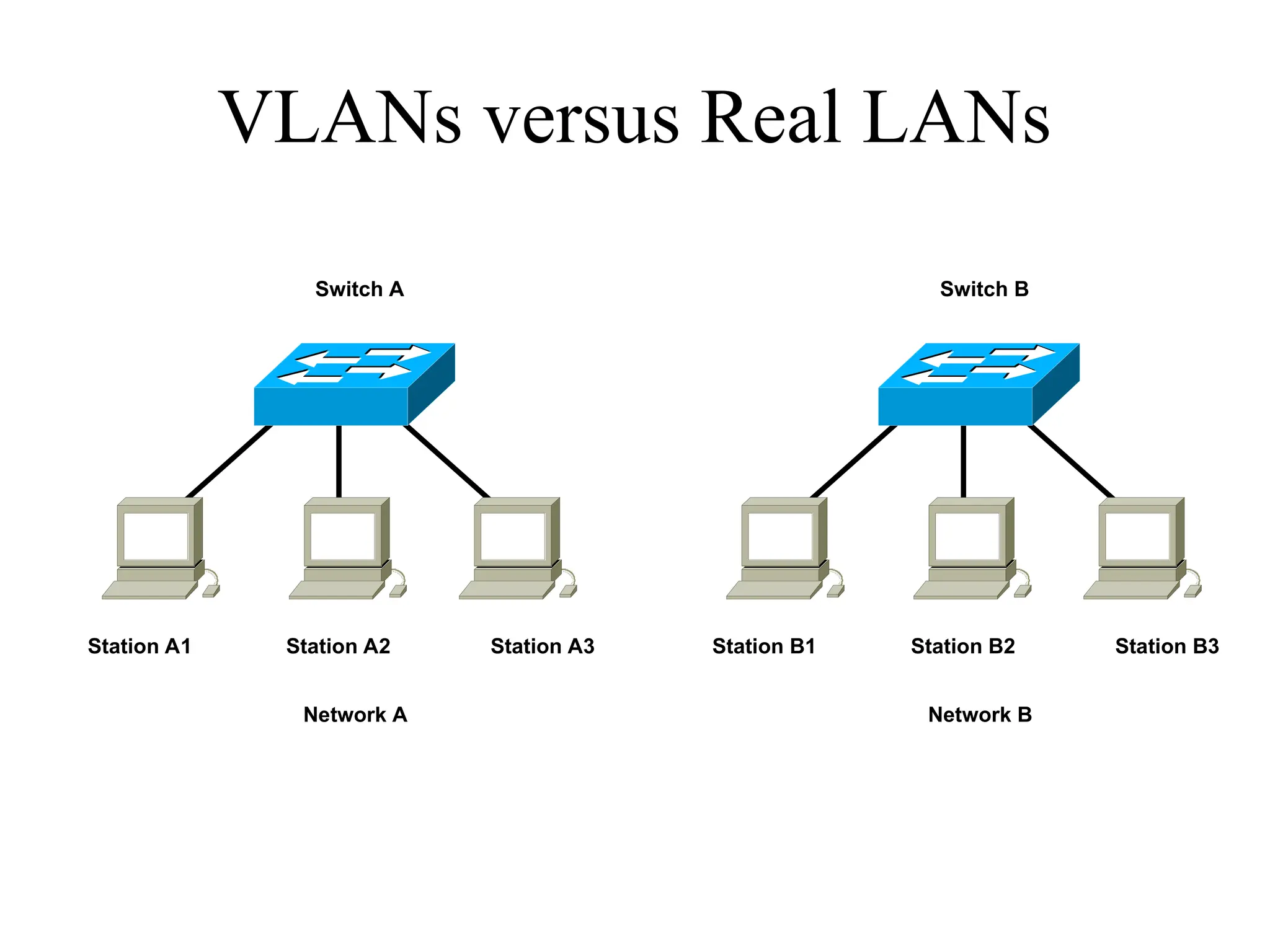
VLANs versus RealLANs
Switch A
Station A1 Station A2 Station A3
Network A
Switch B
Station B1 Station B2 Station B3
Network B
26.
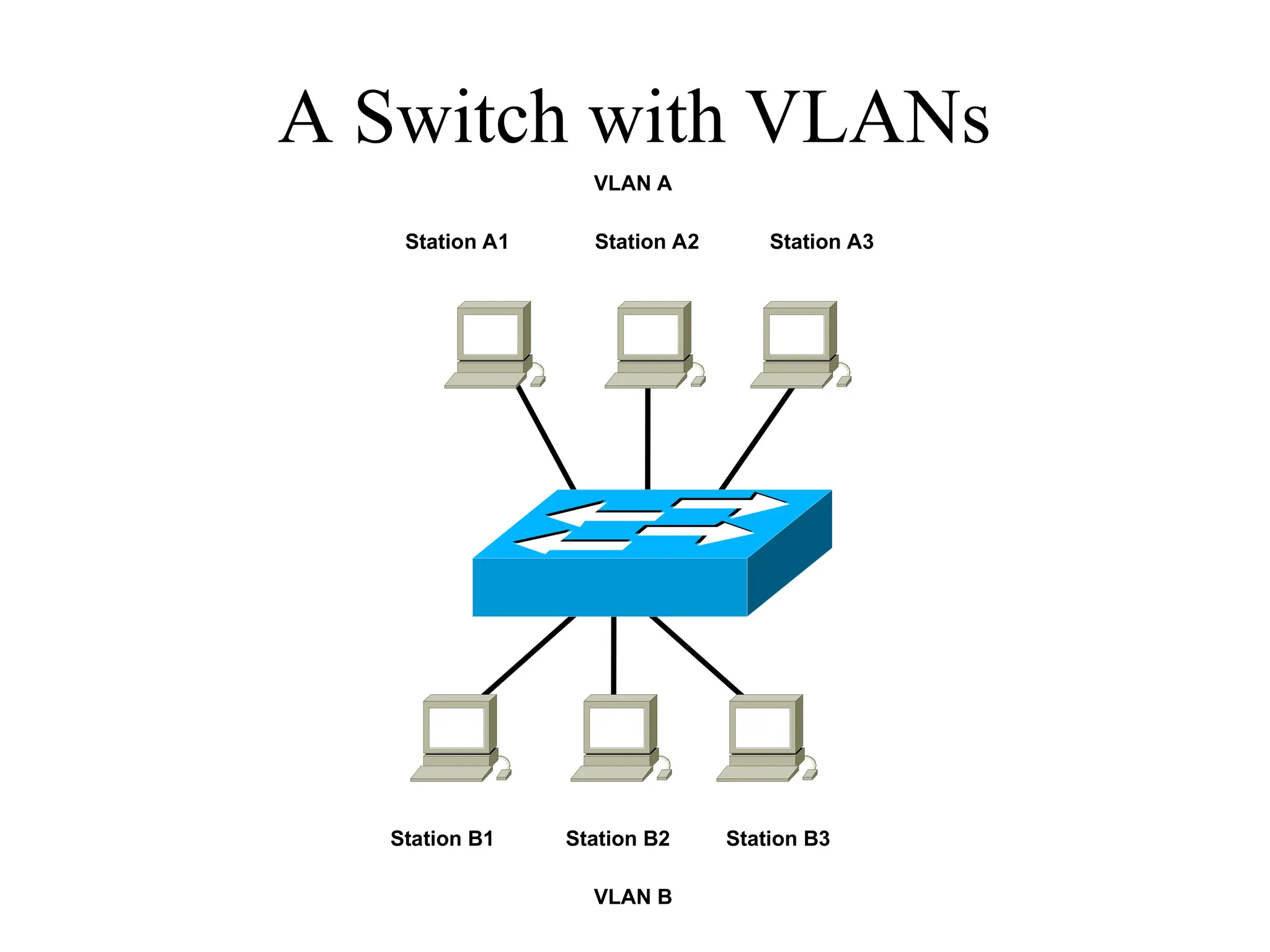
A Switch withVLANs
Station A1 Station A2 Station A3
VLAN A
Station B1 Station B2 Station B3
VLAN B
27.
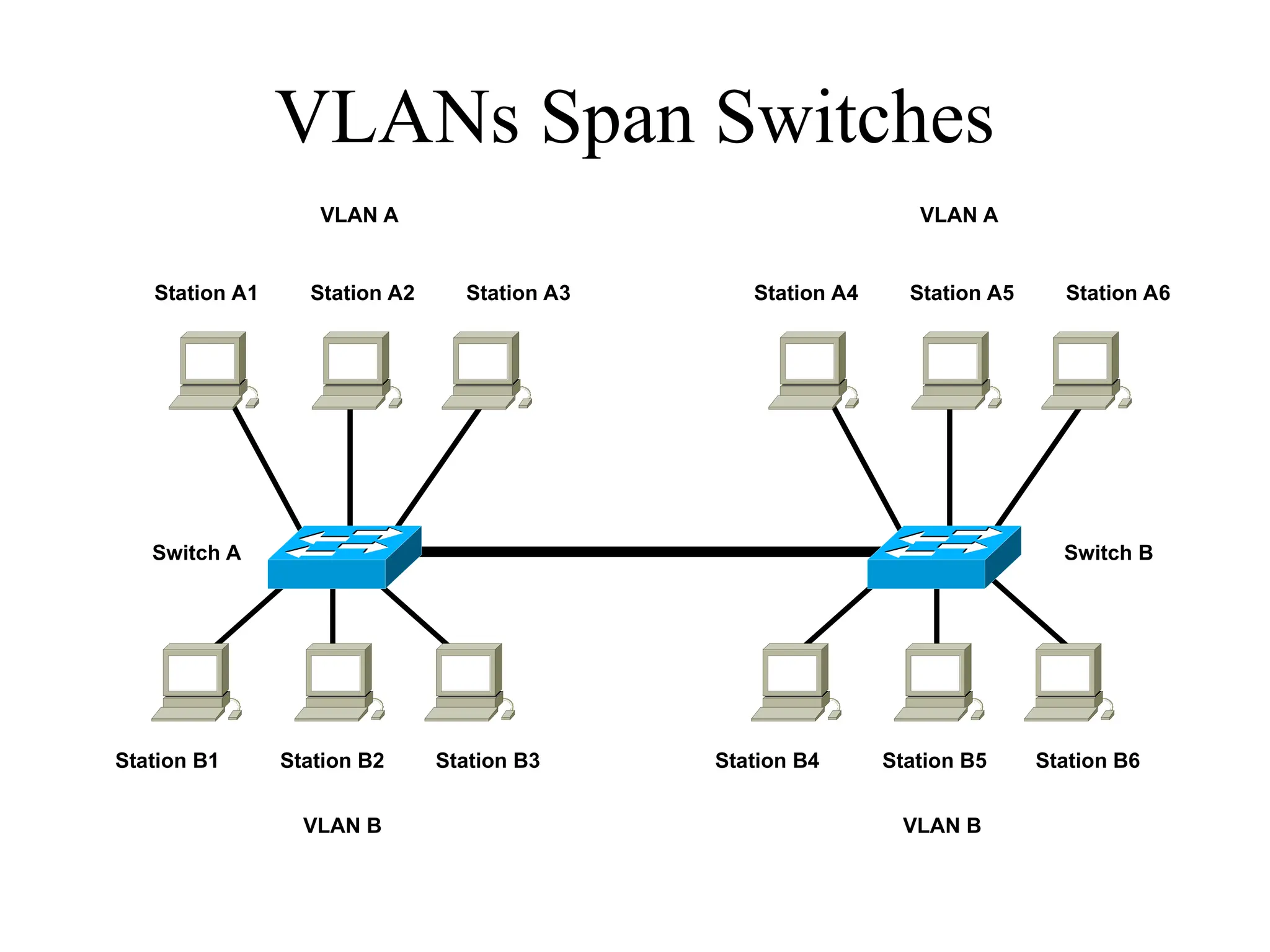
VLANs Span Switches
SwitchA
Station B1 Station B2 Station B3
Switch B
Station B4 Station B5 Station B6
Station A1 Station A2 Station A3 Station A4 Station A5 Station A6
VLAN B
VLAN A
VLAN B
VLAN A
28.
WLANs and VLANs
•A wireless LAN (WLAN) is often implemented as a
VLAN
• Facilitates roaming
• Users remain in the same VLAN and IP subnet as
they roam, so there’s no need to change addressing
information
• Also makes it easier to set up filters (access control
lists) to protect the wired network from wireless
users
29.
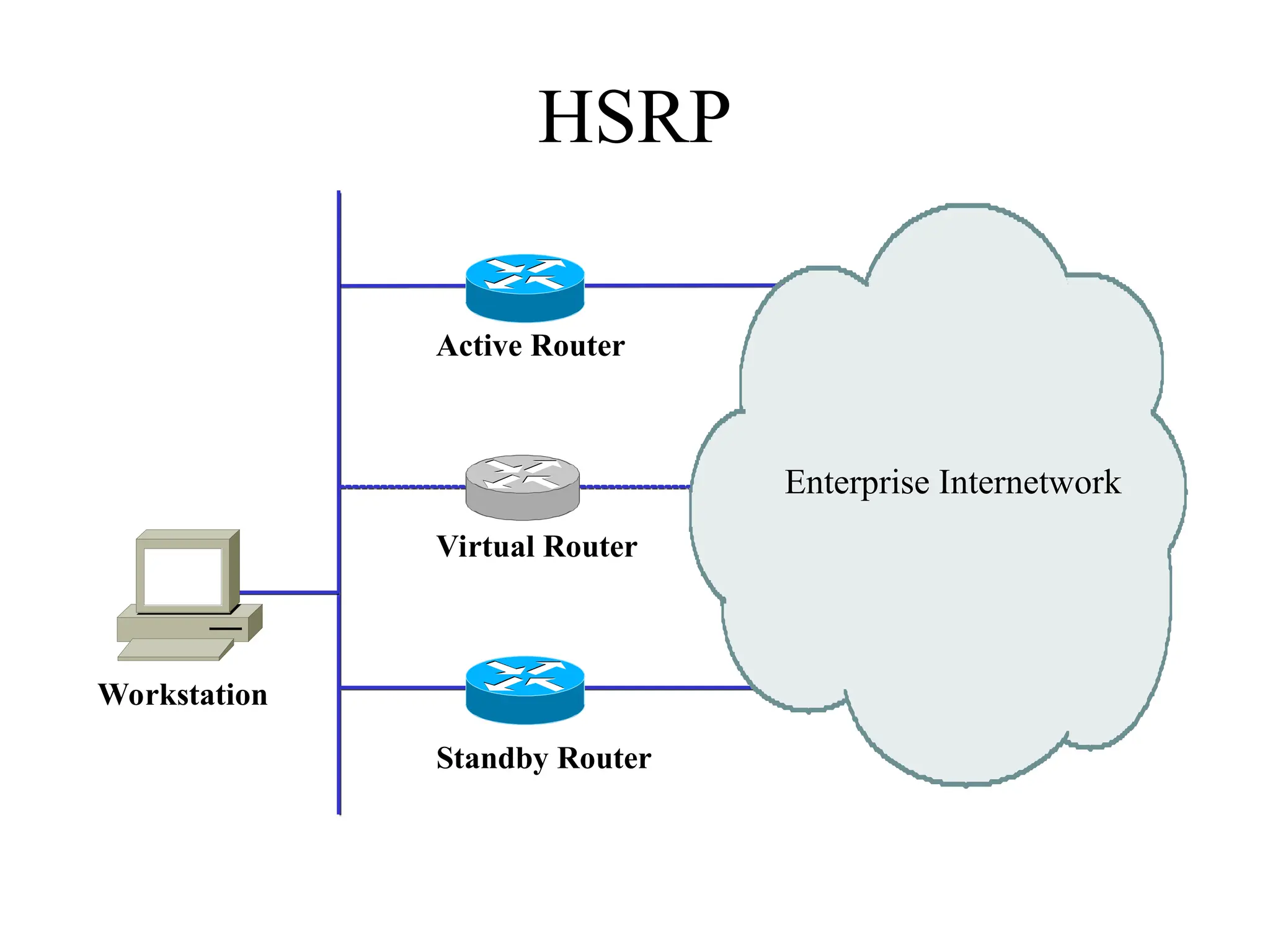
Workstation-to-Router
Communication
• Proxy ARP(not a good idea)
• Listen for route advertisements (not a great
idea either)
• ICMP router solicitations (not widely used)
• Default gateway provided by DHCP (better
idea but no redundancy)
– Use Hot Standby Router Protocol (HSRP) for
redundancy
Summary
• Use asystematic, top-down approach
• Plan the logical design before the physical
design
• Topology design should feature hierarchy,
redundancy, modularity, and security
35.
Review Questions
• Whyare hierarchy and modularity important for
network designs?
• What are the three layers of Cisco’s hierarchical
network design?
• What are the major components of Cisco’s enterprise
composite network model?
• What are the advantages and disadvantages of the
various options for multihoming an Internet
connection?
Editor's Notes
#2 Did you know that according to topologists, a coffee cup and donut are the same shape? If they were made of clay, for example, consider how easy it would be to mold the one to look like the other, while retaining the most significant characteristics (such as the roundedness and the hole).
Just like with coffee and donuts made of clay, in the networking field, during the logical design phase, we are more concerned with the overall architecture, shape, size, and interconnectedness of a network, than with the physical details.
For more information regarding topology, coffee, and donuts, see:
http://en.wikipedia.org/wiki/Topology
#12 Said by Dr. Peter Welcher, consultant and author of many networking articles in magazines, etc.
#17 If all ports have equal distance to the Root Bridge, then the Designated Port is chosen by lowest sender Bridge ID. If the IDs are the same, then the port is chosen by lowest Port ID.
In general, STP checks for the best information by using these four criteria in the following order:
Lowest Root Bridge ID
Lowest path cost to the Root Bridge
Lowest sender Bridge ID
Lowest Port ID
See Top-Down Network Design for more details.
#25 To understand VLANs, it helps to think about real (non-virtual) LANs first. Imagine two switches that are not connected to each other in any way. Switch A connects stations in Network A and Switch B connects stations in Network B,
When Station A1 sends a broadcast, Station A2 and Station A3 receive the broadcast, but none of the stations in Network B receive the broadcast, because the two switches are not connected. This same configuration can be implemented through configuration options in a single switch, with the result looking like the next slide.
#26 Through the configuration of the switch there are now two virtual LANs implemented in a single switch, instead of two separate physical LANs. This is the beauty of VLANs. The broadcast, multicast, and unknown-destination traffic originating with any member of VLAN A is forwarded to all other members of VLAN A, and not to a member of VLAN B. VLAN A has the same properties as a physically separate LAN bounded by routers. The protocol behavior in this slide is exactly the same as the protocol behavior in the previous slide.
#27 VLANs can span multiple switches. In this slide, both switches contain stations that are members of VLAN A and VLAN B. This design introduces a new problem, the solution to which is specified in the IEEE 802.1Q standard and the Cisco proprietary Inter-Switch Link (ISL) protocol. The problem has to do with the forwarding of broadcast, multicast, or unknown-destination frames from a member of a VLAN on one switch to the members of the same VLAN on the other switch.
In this slide, all frames going from Switch A to Switch B take the same interconnection path. The 802.1Q standard and Cisco's ISL protocol define a method for Switch B to recognize whether an incoming frame belongs to VLAN A or to VLAN B. As a frame leaves Switch A, a special header is added to the frame, called the VLAN tag. The VLAN tag contains a VLAN identifier (ID) that specifies to which VLAN the frame belongs.
Because both switches have been configured to recognize VLAN A and VLAN B, they can exchange frames across the interconnection link, and the recipient switch can determine the VLAN into which those frames should be sent by examining the VLAN tag. The link between the two switches is sometimes called a trunk link or simply a trunk.
Trunk links allow the network designer to stitch together VLANs that span multiple switches. A major design consideration is determining the scope of each VLAN and how many switches it should span. Most designers try to keep the scope small. Each VLAN is a broadcast domain. In general, a single broadcast domain should be limited to a few hundred workstations (or other devices, such as IP phones).



![[DSC Europe 25] Branko Dzakula - From Defense to Attack: How AI Redefines Cyb...](https://cdn.slidesharecdn.com/ss_thumbnails/80bdzdxpr3ky2g0qvyk9-8-251211083048-ce5fc1ee-thumbnail.jpg?width=640&height=640&fit=bounds)
![[DSC Europe 25] Jon Dajci - Bridging TradFi and DeFi: Building the Future of ...](https://cdn.slidesharecdn.com/ss_thumbnails/fqmhfvlbqhkihjvqvhmu-7-251211083849-6af7e325-thumbnail.jpg?width=640&height=640&fit=bounds)


![[DSC Europe 25] Imai Jen-La Plante - The New Generation: AI and the Future of...](https://cdn.slidesharecdn.com/ss_thumbnails/kxi8t2l5rggivgcenyba-1-jenlaplante-dsc-251208152532-d1e076c2-thumbnail.jpg?width=640&height=640&fit=bounds)
![[DSC Europe 25] Aleksandra Dragicevic - AI-Boosted Research in Healthcare: Fr...](https://cdn.slidesharecdn.com/ss_thumbnails/iqwngszurf2r7pi1lnnj-4-aleksandra-dragicevic-ad-dsc-europe-conference-20-251208151905-37c3238a-thumbnail.jpg?width=640&height=640&fit=bounds)
![[DSC Europe 25] Milan Sekuloski - Data, Defence, and Development: Cybersecuri...](https://cdn.slidesharecdn.com/ss_thumbnails/dfrkwwx4qly6atqpbl4z-4-251209104645-c3d4b0ca-thumbnail.jpg?width=640&height=640&fit=bounds)
![[DSC Europe 25] Ivan Peric - Intelligence Swarm Logic and Techno-Functional M...](https://cdn.slidesharecdn.com/ss_thumbnails/7my7c97fsduiccadgavw-2-251212103249-5a03f7c6-thumbnail.jpg?width=640&height=640&fit=bounds)

![[DSC Europe 25] Behzad Hosseini - AI Agents in the Wild: Deploying Models tha...](https://cdn.slidesharecdn.com/ss_thumbnails/3qtejajvsjqrzwfept2c-10-251212103250-7f2b1068-thumbnail.jpg?width=640&height=640&fit=bounds)


![[DSC Europe 25] Marko Krstic - Understanding the AI Threat Landscape - Risks,...](https://cdn.slidesharecdn.com/ss_thumbnails/tiyim1ins5jvbrvzpzla-2-251209104645-c69d3553-thumbnail.jpg?width=640&height=640&fit=bounds)