COMPUTER NETWORKS
Presentation by:
Asst Professor. D.Vengaimarbhan
Department of Information Technology
V.S.B. Engineering College Karur
INTRODUCTION TO THE FUNDAMENTALS
OF COMPUTER NETWORKS
 Introduction to Networks
 Network elements
 Network Components
 Basic Networks Types
 Network Topology
WHAT IS NETWORK?
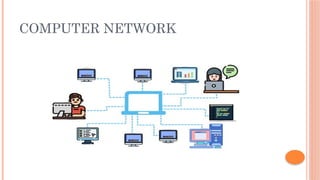
 A computer network is defined as a system that
connects two or more computing devices for
transmitting and sharing information.
 The establishment of a computer network
depends on the requirements of the
communication channel, i.e., the network can be
wired or wireless.
COMPUTER NETWORK
ELEMENTS OF COMPUTER NETWORK
 Computing devices
 Transmission medium (wired or wireless)
 Protocols
 Network software
NETWORKS COMPONENTS
 Computer network components are the major
parts which are needed to install the software.
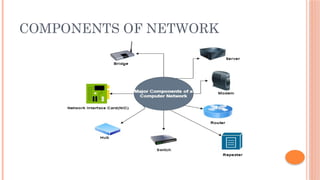
Some important network components
are NIC, switch, cable, hub, router,
and modem. Depending on the type of network
that we need to install, some network
components can also be removed. For example,
the wireless network does not require a cable.
COMPONENTS OF NETWORK
BASIC NETWORK TYPES (SIZE)
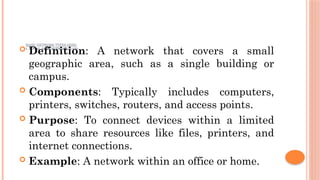
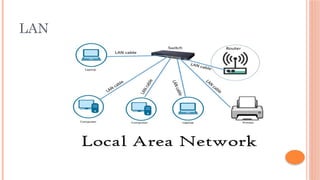
1. LOCAL AREA NETWORK (LAN)
 Definition: A network that covers a small
geographic area, such as a single building or
campus.
 Components: Typically includes computers,
printers, switches, routers, and access points.
 Purpose: To connect devices within a limited
area to share resources like files, printers, and
internet connections.
 Example: A network within an office or home.
LAN
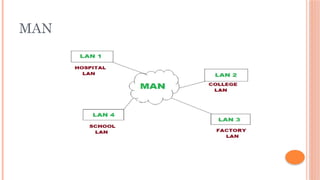
2. METROPOLITAN AREA NETWORK (MAN)
 Definition: A network that spans a metropolitan
area, such as a city or a large campus.
 Components: Larger than a LAN but smaller
than a WAN, often using high-speed connections
like fiber optic cables.
 Purpose: To connect multiple LANs within a
city or campus.
 Example: A city's public Wi-Fi network or a
university campus network.
MAN
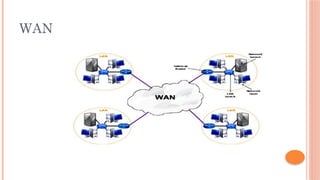
3. WIDE AREA NETWORK (WAN)
 Definition: A network that covers a broad area,
such as a city, country, or even globally.
 Components: Comprises multiple LANs
connected via routers and communication links
like leased lines, satellite links, or the internet.
 Purpose: To connect devices and LANs across
large distances.
 Example: The internet is the largest example of
a WAN.
WAN
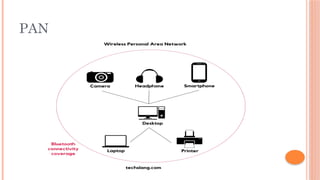
4. PERSONAL AREA NETWORK (PAN)
 Definition: A network for personal devices,
typically within a range of a few meters.
 Components: Includes devices like
smartphones, tablets, laptops, and Bluetooth-
enabled devices.
 Purpose: To connect personal devices for data
synchronization, file sharing, and internet access.
 Example: A Bluetooth connection between a
smartphone and a wireless headset.
PAN
NETWORK TOPOLOGY
Physical topology is the geometric representation
of all the nodes in a network. There are six types
of network topology which are Bus Topology,
Ring Topology, Star Topology, Mesh
Topology, and Hybrid Topology.
BUS TOPOLOGY
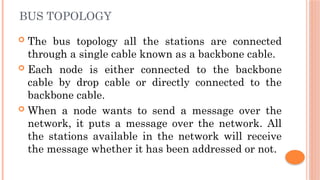
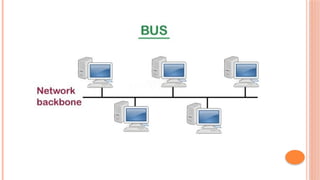
 The bus topology all the stations are connected
through a single cable known as a backbone cable.
 Each node is either connected to the backbone
cable by drop cable or directly connected to the
backbone cable.
 When a node wants to send a message over the
network, it puts a message over the network. All
the stations available in the network will receive
the message whether it has been addressed or not.
ADVANTAGES OF BUS TOPOLOGY:
 Low-cost cable: In bus topology, nodes are directly
connected to the cable without passing through a hub.
Therefore, the initial cost of installation is low.
 Moderate data speeds: Coaxial or twisted pair cables are
mainly used in bus-based networks that support upto 10
Mbps.
 Familiar technology: Bus topology is a familiar technology
as the installation and troubleshooting techniques are well
known, and hardware components are easily available.
 Limited failure: A failure in one node will not have any
effect on other nodes.
DISADVANTAGES OF BUS TOPOLOGY:
 Extensive cabling: A bus topology is quite simpler, but still
it requires a lot of cabling.
 Difficult troubleshooting: If any fault occurs in the cable,
then it would disrupt the communication for all the nodes.
 Signal interference: If two nodes send the messages
simultaneously, then the signals of both the nodes collide
with each other.
 Reconfiguration difficult: Adding new devices to the
network would slow down the network.
 Attenuation: Attenuation is a loss of signal leads to
communication issues. Repeaters are used to regenerate the
signal.
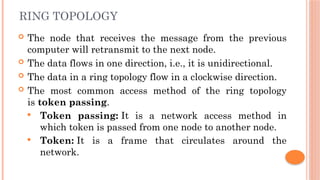
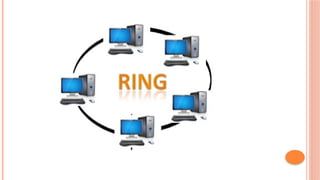
RING TOPOLOGY
 The node that receives the message from the previous
computer will retransmit to the next node.
 The data flows in one direction, i.e., it is unidirectional.
 The data in a ring topology flow in a clockwise direction.
 The most common access method of the ring topology
is token passing.
 Token passing: It is a network access method in
which token is passed from one node to another node.
 Token: It is a frame that circulates around the
network.
ADVANTAGES OF RING TOPOLOGY:
 Network Management: Faulty devices can be removed
from the network without bringing the network down.
 Product availability: Many hardware and software
tools for network operation and monitoring are available.
 Cost: Twisted pair cabling is inexpensive and easily
available. Therefore, the installation cost is very low.
 Reliable: It is a more reliable network because the
communication system is not dependent on the single
host computer.
DISADVANTAGES OF RING TOPOLOGY:
 Difficult troubleshooting: It requires specialized test
equipment to determine the cable faults. If any fault occurs
in the cable, then it would disrupt the communication for all
the nodes.
 Failure: The breakdown in one station leads to the failure
of the overall network.
 Reconfiguration difficult: Adding new devices to the
network would slow down the network.
 Delay: Communication delay is directly proportional to the
number of nodes. Adding new devices increases the
communication delay.
STAR TOPOLOGY
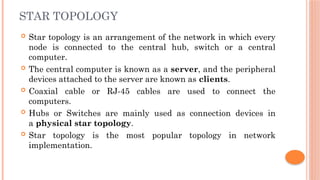
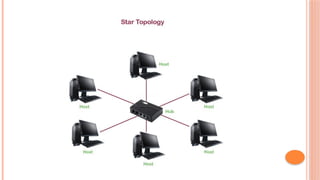
 Star topology is an arrangement of the network in which every
node is connected to the central hub, switch or a central
computer.
 The central computer is known as a server, and the peripheral
devices attached to the server are known as clients.
 Coaxial cable or RJ-45 cables are used to connect the
computers.
 Hubs or Switches are mainly used as connection devices in
a physical star topology.
 Star topology is the most popular topology in network
implementation.
ADVANTAGES OF STAR TOPOLOGY
 Efficient troubleshooting: Therefore, the network
administrator has to go to the single station to troubleshoot the
problem.
 Network control: Any changes made in the star topology are
automatically accommodated.
 Limited failure: failure in one cable will not affect the entire
network.
 Familiar technology: Star topology is a familiar technology
as its tools are cost-effective.
 Easily expandable: It is easily expandable as new stations
can be added to the open ports on the hub.
 Cost effective: Star topology networks are cost-effective as it
uses inexpensive coaxial cable.
DISADVANTAGES OF STAR TOPOLOGY
 A Central point of failure: If the central hub or
switch goes down, then all the connected nodes will
not be able to communicate with each other.
 Cable: Sometimes cable routing becomes difficult
when a significant amount of routing is required.
MESH TOPOLOGY
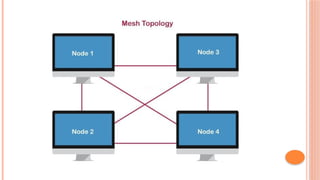
 Mesh technology is an arrangement of the
network in which computers are interconnected
with each other through various redundant
connections.
 There are multiple paths from one computer to
another computer.
 It does not contain the switch, hub or any central
computer which acts as a central point of
communication.
ADVANTAGES OF MESH TOPOLOGY:
 Reliable: The mesh topology networks are very
reliable as if any link breakdown will not affect the
communication between connected computers.
 Fast Communication: Communication is very fast
between the nodes.
 Easier Reconfiguration: Adding new devices would
not disrupt the communication between other devices.
DISADVANTAGES OF MESH TOPOLOGY
 Cost: A mesh topology contains a large number of
connected devices such as a router and more
transmission media than other topologies.
 Management: Mesh topology networks are very
large and very difficult to maintain and manage. If
the network is not monitored carefully, then the
communication link failure goes undetected.
 Efficiency: In this topology, redundant connections
are high that reduces the efficiency of the network.
HYBRID TOPOLOGY
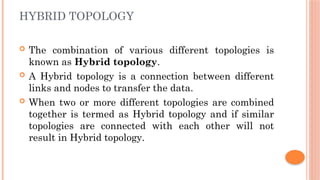
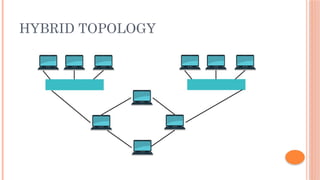
 The combination of various different topologies is
known as Hybrid topology.
 A Hybrid topology is a connection between different
links and nodes to transfer the data.
 When two or more different topologies are combined
together is termed as Hybrid topology and if similar
topologies are connected with each other will not
result in Hybrid topology.
HYBRID TOPOLOGY
THANK YOU

Computer Networks basics presentation.pptx

  • 1.
    COMPUTER NETWORKS Presentation by: AsstProfessor. D.Vengaimarbhan Department of Information Technology V.S.B. Engineering College Karur
  • 2.
    INTRODUCTION TO THEFUNDAMENTALS OF COMPUTER NETWORKS  Introduction to Networks  Network elements  Network Components  Basic Networks Types  Network Topology
  • 3.
    WHAT IS NETWORK? A computer network is defined as a system that connects two or more computing devices for transmitting and sharing information.  The establishment of a computer network depends on the requirements of the communication channel, i.e., the network can be wired or wireless.
  • 4.
  • 5.
    ELEMENTS OF COMPUTERNETWORK  Computing devices  Transmission medium (wired or wireless)  Protocols  Network software
  • 6.
    NETWORKS COMPONENTS  Computernetwork components are the major parts which are needed to install the software. Some important network components are NIC, switch, cable, hub, router, and modem. Depending on the type of network that we need to install, some network components can also be removed. For example, the wireless network does not require a cable.
  • 7.
  • 8.
    BASIC NETWORK TYPES(SIZE) 1. LOCAL AREA NETWORK (LAN)  Definition: A network that covers a small geographic area, such as a single building or campus.  Components: Typically includes computers, printers, switches, routers, and access points.  Purpose: To connect devices within a limited area to share resources like files, printers, and internet connections.  Example: A network within an office or home.

  • 9.
  • 10.
    2. METROPOLITAN AREANETWORK (MAN)  Definition: A network that spans a metropolitan area, such as a city or a large campus.  Components: Larger than a LAN but smaller than a WAN, often using high-speed connections like fiber optic cables.  Purpose: To connect multiple LANs within a city or campus.  Example: A city's public Wi-Fi network or a university campus network.
  • 11.
  • 12.
    3. WIDE AREANETWORK (WAN)  Definition: A network that covers a broad area, such as a city, country, or even globally.  Components: Comprises multiple LANs connected via routers and communication links like leased lines, satellite links, or the internet.  Purpose: To connect devices and LANs across large distances.  Example: The internet is the largest example of a WAN.
  • 13.
  • 14.
    4. PERSONAL AREANETWORK (PAN)  Definition: A network for personal devices, typically within a range of a few meters.  Components: Includes devices like smartphones, tablets, laptops, and Bluetooth- enabled devices.  Purpose: To connect personal devices for data synchronization, file sharing, and internet access.  Example: A Bluetooth connection between a smartphone and a wireless headset.
  • 15.
  • 16.
    NETWORK TOPOLOGY Physical topologyis the geometric representation of all the nodes in a network. There are six types of network topology which are Bus Topology, Ring Topology, Star Topology, Mesh Topology, and Hybrid Topology.
  • 17.
    BUS TOPOLOGY  Thebus topology all the stations are connected through a single cable known as a backbone cable.  Each node is either connected to the backbone cable by drop cable or directly connected to the backbone cable.  When a node wants to send a message over the network, it puts a message over the network. All the stations available in the network will receive the message whether it has been addressed or not.
  • 19.
    ADVANTAGES OF BUSTOPOLOGY:  Low-cost cable: In bus topology, nodes are directly connected to the cable without passing through a hub. Therefore, the initial cost of installation is low.  Moderate data speeds: Coaxial or twisted pair cables are mainly used in bus-based networks that support upto 10 Mbps.  Familiar technology: Bus topology is a familiar technology as the installation and troubleshooting techniques are well known, and hardware components are easily available.  Limited failure: A failure in one node will not have any effect on other nodes.
  • 20.
    DISADVANTAGES OF BUSTOPOLOGY:  Extensive cabling: A bus topology is quite simpler, but still it requires a lot of cabling.  Difficult troubleshooting: If any fault occurs in the cable, then it would disrupt the communication for all the nodes.  Signal interference: If two nodes send the messages simultaneously, then the signals of both the nodes collide with each other.  Reconfiguration difficult: Adding new devices to the network would slow down the network.  Attenuation: Attenuation is a loss of signal leads to communication issues. Repeaters are used to regenerate the signal.
  • 21.
    RING TOPOLOGY  Thenode that receives the message from the previous computer will retransmit to the next node.  The data flows in one direction, i.e., it is unidirectional.  The data in a ring topology flow in a clockwise direction.  The most common access method of the ring topology is token passing.  Token passing: It is a network access method in which token is passed from one node to another node.  Token: It is a frame that circulates around the network.
  • 23.
    ADVANTAGES OF RINGTOPOLOGY:  Network Management: Faulty devices can be removed from the network without bringing the network down.  Product availability: Many hardware and software tools for network operation and monitoring are available.  Cost: Twisted pair cabling is inexpensive and easily available. Therefore, the installation cost is very low.  Reliable: It is a more reliable network because the communication system is not dependent on the single host computer.
  • 24.
    DISADVANTAGES OF RINGTOPOLOGY:  Difficult troubleshooting: It requires specialized test equipment to determine the cable faults. If any fault occurs in the cable, then it would disrupt the communication for all the nodes.  Failure: The breakdown in one station leads to the failure of the overall network.  Reconfiguration difficult: Adding new devices to the network would slow down the network.  Delay: Communication delay is directly proportional to the number of nodes. Adding new devices increases the communication delay.
  • 25.
    STAR TOPOLOGY  Startopology is an arrangement of the network in which every node is connected to the central hub, switch or a central computer.  The central computer is known as a server, and the peripheral devices attached to the server are known as clients.  Coaxial cable or RJ-45 cables are used to connect the computers.  Hubs or Switches are mainly used as connection devices in a physical star topology.  Star topology is the most popular topology in network implementation.
  • 27.
    ADVANTAGES OF STARTOPOLOGY  Efficient troubleshooting: Therefore, the network administrator has to go to the single station to troubleshoot the problem.  Network control: Any changes made in the star topology are automatically accommodated.  Limited failure: failure in one cable will not affect the entire network.  Familiar technology: Star topology is a familiar technology as its tools are cost-effective.  Easily expandable: It is easily expandable as new stations can be added to the open ports on the hub.  Cost effective: Star topology networks are cost-effective as it uses inexpensive coaxial cable.
  • 28.
    DISADVANTAGES OF STARTOPOLOGY  A Central point of failure: If the central hub or switch goes down, then all the connected nodes will not be able to communicate with each other.  Cable: Sometimes cable routing becomes difficult when a significant amount of routing is required.
  • 29.
    MESH TOPOLOGY  Meshtechnology is an arrangement of the network in which computers are interconnected with each other through various redundant connections.  There are multiple paths from one computer to another computer.  It does not contain the switch, hub or any central computer which acts as a central point of communication.
  • 31.
    ADVANTAGES OF MESHTOPOLOGY:  Reliable: The mesh topology networks are very reliable as if any link breakdown will not affect the communication between connected computers.  Fast Communication: Communication is very fast between the nodes.  Easier Reconfiguration: Adding new devices would not disrupt the communication between other devices.
  • 32.
    DISADVANTAGES OF MESHTOPOLOGY  Cost: A mesh topology contains a large number of connected devices such as a router and more transmission media than other topologies.  Management: Mesh topology networks are very large and very difficult to maintain and manage. If the network is not monitored carefully, then the communication link failure goes undetected.  Efficiency: In this topology, redundant connections are high that reduces the efficiency of the network.
  • 33.
    HYBRID TOPOLOGY  Thecombination of various different topologies is known as Hybrid topology.  A Hybrid topology is a connection between different links and nodes to transfer the data.  When two or more different topologies are combined together is termed as Hybrid topology and if similar topologies are connected with each other will not result in Hybrid topology.
  • 34.
  • 35.