1
Tizen-based Samsung TV SDK IDE Help Guide
This document is the user guide for the Tizen-based Samsung TV SDK IDE, which helps Tizen-based Samsung
TV Application developers to understand and use the IDE in better way.
Contents
Prerequisites
Creating web app templates and samples
Running web app in web simulator
Prerequisites
The required environment is as following :
For the operating system:
 Windows 7 (recommended), Windows XP service pack 2 or higher
 Linux (Ubuntu Recommended)
 Mac OS X
For the JDK:
 Oracle JDK 1.7 or above
For the Eclipse:
 Eclipse 3.7.2 Indigo
For Run App:
 Tizen TV Web Simulator Application (Samsung TV)
Creating web app templates and samples
This session introduce a Tizen web app to demonstrate the creation processes by using Tizen-based Samsung TV SDK.
1. Creating the Project
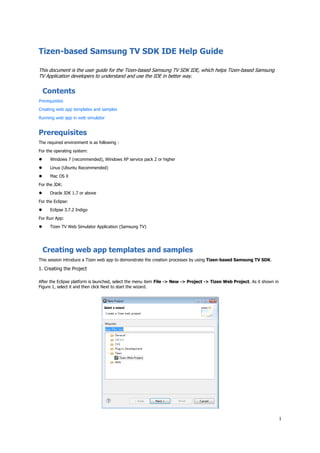
After the Eclipse platform is launched, select the menu item File -> New -> Project -> Tizen Web Project. As it shown in
Figure 1, select it and then click Next to start the wizard.
2
Figure 1: New Project Wizard
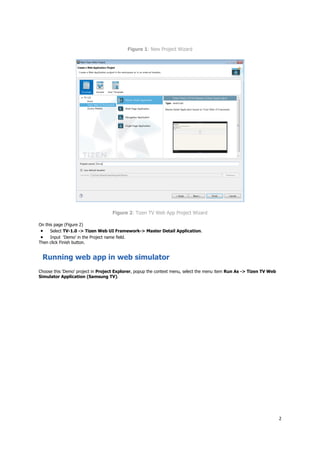
Figure 2: Tizen TV Web App Project Wizard
On this page (Figure 2)
 Select TV-1.0 -> Tizen Web UI Framework-> Master Detail Application.
 Input 'Demo' in the Project name field.
Then click Finish button.
Running web app in web simulator
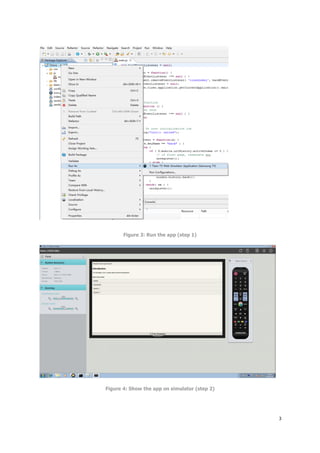
Choose this 'Demo' project in Project Explorer, popup the context menu, select the menu item Run As -> Tizen TV Web
Simulator Application (Samsung TV).
3
Figure 3: Run the app (step 1)
Figure 4: Show the app on simulator (step 2)

Tizen-based Samsung TV SDK IDE Help Guide

  • 1.
    1 Tizen-based Samsung TVSDK IDE Help Guide This document is the user guide for the Tizen-based Samsung TV SDK IDE, which helps Tizen-based Samsung TV Application developers to understand and use the IDE in better way. Contents Prerequisites Creating web app templates and samples Running web app in web simulator Prerequisites The required environment is as following : For the operating system:  Windows 7 (recommended), Windows XP service pack 2 or higher  Linux (Ubuntu Recommended)  Mac OS X For the JDK:  Oracle JDK 1.7 or above For the Eclipse:  Eclipse 3.7.2 Indigo For Run App:  Tizen TV Web Simulator Application (Samsung TV) Creating web app templates and samples This session introduce a Tizen web app to demonstrate the creation processes by using Tizen-based Samsung TV SDK. 1. Creating the Project After the Eclipse platform is launched, select the menu item File -> New -> Project -> Tizen Web Project. As it shown in Figure 1, select it and then click Next to start the wizard.
  • 2.
    2 Figure 1: NewProject Wizard Figure 2: Tizen TV Web App Project Wizard On this page (Figure 2)  Select TV-1.0 -> Tizen Web UI Framework-> Master Detail Application.  Input 'Demo' in the Project name field. Then click Finish button. Running web app in web simulator Choose this 'Demo' project in Project Explorer, popup the context menu, select the menu item Run As -> Tizen TV Web Simulator Application (Samsung TV).
  • 3.
    3 Figure 3: Runthe app (step 1) Figure 4: Show the app on simulator (step 2)