Introduction to TIZEN SDK 
Hyungoo Kang, Kangho Kim 
S-Core, Samsung 
April, 2012 
© 2012 SAMSUNG Electronics Co.
2/20 © 2012 SAMSUNG Electronics Co. 
• Overview 
• Tizen SDK (selected features) 
• Demo (10 minutes) 
• Conclusion 
Contents
Overview (1/3) 
• Tizen SDK is a comprehensive set of tools for Tizen app development 
IDE Target like Emulator 
• Various Device Emulation based on open source QEMU 
• Event Injector such as Call/SMS send and receive 
GUI Builder Others 
3/20 © 2012 SAMSUNG Electronics Co. 
• Competitive editor for HTML, CSS, Javascript 
• Project management, templates, samples, documentation 
• Multiple target (Emulator/Device) management 
• Debugging & profiling based on remote web inspector 
• One step install, Multi-OS support 
• Platform development (native) support 
• Productive and visual WYSIWYG builder 
• Web GUI Builder supporting Tizen JQM based UI framework 
(TBD)
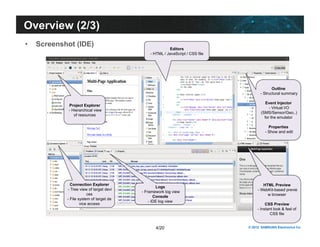
Editors 
- HTML / JavaScript / CSS file 
4/20 © 2012 SAMSUNG Electronics Co. 
Overview (2/3) 
• Screenshot (IDE) 
Outline 
- Structural summary 
Event Injector 
- Virtual I/O 
(SMS/Sensor/Geo..) 
for the emulator 
Properties 
- Show and edit 
HTML Preview 
- WebKit-based previe 
w browser 
CSS Preview 
- Instant look & feel of 
CSS file 
Project Explorer 
- Hierarchical view 
of resources 
Connection Explorer 
- Tree view of target devi 
ces 
- File system of target de 
vice access 
Logs 
- Framework log view 
Console 
- IDE log view
Technology 
5/20 © 2012 SAMSUNG Electronics Co. 
Overview (3/3) 
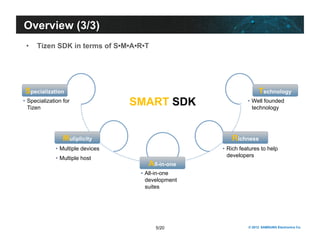
• Tizen SDK in terms of S•M•A•R•T 
Specialization 
Muliplicity 
All-in-one 
Richness 
• Specialization for SMART SDK 
Tizen 
• Multiple devices 
• Multiple host 
• All-in-one 
development 
suites 
• Well founded 
technology 
• Rich features to help 
developers
All-in-one Suites 
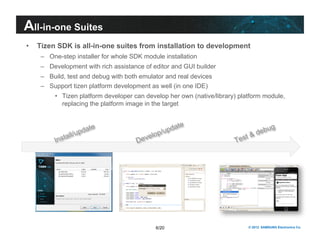
• Tizen SDK is all-in-one suites from installation to development 
– One-step installer for whole SDK module installation 
– Development with rich assistance of editor and GUI builder 
– Build, test and debug with both emulator and real devices 
– Support tizen platform development as well (in one IDE) 
• Tizen platform developer can develop her own (native/library) platform module, 
replacing the platform image in the target 
6/20 © 2012 SAMSUNG Electronics Co.
All-in-one Suites 
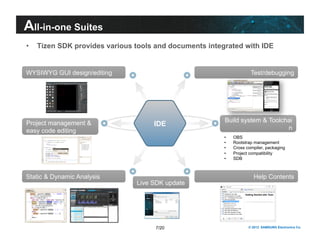
• Tizen SDK provides various tools and documents integrated with IDE 
7/20 © 2012 SAMSUNG Electronics Co. 
WYSIWYG GUI design/editing 
Static & Dynamic Analysis 
Test/debugging 
Help Contents 
Project management & 
easy code editing 
Build system & Toolchai 
IDE n 
Live SDK update 
• OBS 
• Rootstrap management 
• Cross compiler, packaging 
• Project compatibility 
• SDB
Specialization for Tizen 
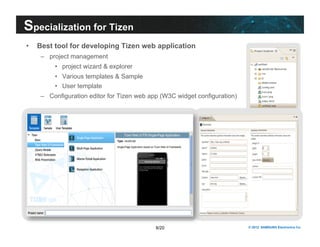
• Best tool for developing Tizen web application 
8/20 © 2012 SAMSUNG Electronics Co. 
– project management 
• project wizard & explorer 
• Various templates & Sample 
• User template 
– Configuration editor for Tizen web app (W3C widget configuration)
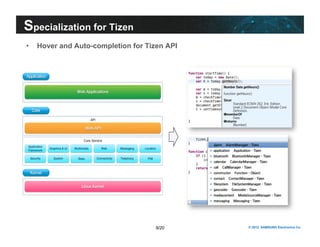
• Hover and Auto-completion for Tizen API 
9/20 © 2012 SAMSUNG Electronics Co. 
Specialization for Tizen
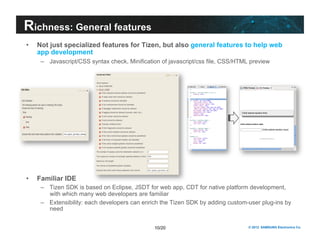
Richness: General features 
• Not just specialized features for Tizen, but also general features to help web 
app development 
– Javascript/CSS syntax check, Minification of javascript/css file, CSS/HTML preview 
10/20 © 2012 SAMSUNG Electronics Co. 
• Familiar IDE 
– Tizen SDK is based on Eclipse, JSDT for web app, CDT for native platform development, 
with which many web developers are familiar 
– Extensibility: each developers can enrich the Tizen SDK by adding custom-user plug-ins by 
need
11/20 © 2012 SAMSUNG Electronics Co. 
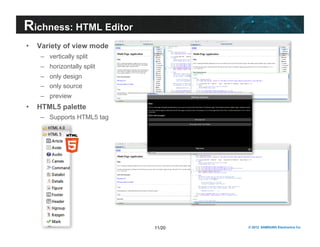
Richness: HTML Editor 
• Variety of view mode 
– vertically split 
– horizontally split 
– only design 
– only source 
– preview 
• HTML5 palette 
– Supports HTML5 tag
12/20 © 2012 SAMSUNG Electronics Co. 
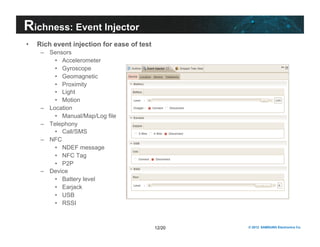
Richness: Event Injector 
• Rich event injection for ease of test 
– Sensors 
• Accelerometer 
• Gyroscope 
• Geomagnetic 
• Proximity 
• Light 
• Motion 
– Location 
• Manual/Map/Log file 
– Telephony 
• Call/SMS 
– NFC 
• NDEF message 
• NFC Tag 
• P2P 
– Device 
• Battery level 
• Earjack 
• USB 
• RSSI
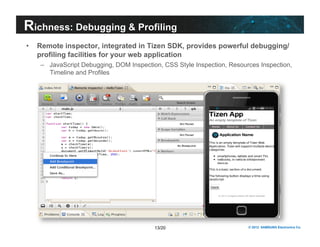
Richness: Debugging & Profiling 
• Remote inspector, integrated in Tizen SDK, provides powerful debugging/ 
profiling facilities for your web application 
– JavaScript Debugging, DOM Inspection, CSS Style Inspection, Resources Inspection, 
13/20 © 2012 SAMSUNG Electronics Co. 
Timeline and Profiles
Richness: Web App Simulator 
• A browser with some (subset) Tizen API simulation 
– No packaging/installation process to target (real device or emulator) 
– Run web app w/o target for the purpose of quick/instant test (e.g., UI mock-up) 
14/20 © 2012 SAMSUNG Electronics Co.
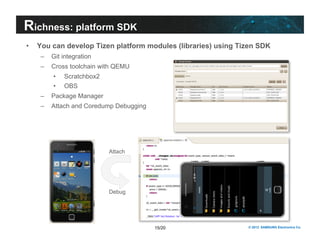
Richness: platform SDK 
• You can develop Tizen platform modules (libraries) using Tizen SDK 
15/20 © 2012 SAMSUNG Electronics Co. 
– Git integration 
– Cross toolchain with QEMU 
• Scratchbox2 
• OBS 
– Package Manager 
– Attach and Coredump Debugging 
Attach 
Debug
16/20 © 2012 SAMSUNG Electronics Co. 
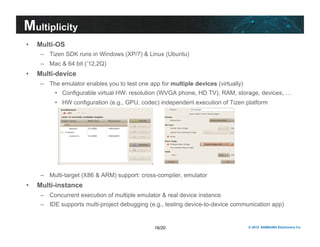
Multiplicity 
• Multi-OS 
– Tizen SDK runs in Windows (XP/7) & Linux (Ubuntu) 
– Mac & 64 bit (‘12,2Q) 
• Multi-device 
– The emulator enables you to test one app for multiple devices (virtually) 
• Configurable virtual HW: resolution (WVGA phone, HD TV), RAM, storage, devices, … 
• HW configuration (e.g., GPU, codec) independent execution of Tizen platform 
– Multi-target (X86 & ARM) support: cross-compiler, emulator 
• Multi-instance 
– Concurrent execution of multiple emulator & real device instance 
– IDE supports multi-project debugging (e.g., testing device-to-device communication app)
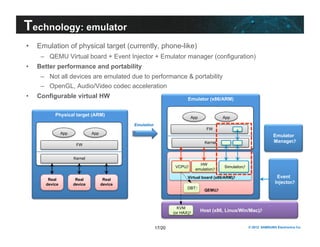
Technology: emulator 
• Emulation of physical target (currently, phone-like) 
– QEMU Virtual board + Event Injector + Emulator manager (configuration) 
App App 
HW 
emulation 
Virtual board (x86/ARM) 
17/20 © 2012 SAMSUNG Electronics Co. 
• Better performance and portability 
– Not all devices are emulated due to performance & portability 
– OpenGL, Audio/Video codec acceleration 
• Configurable virtual HW Emulator (x86/ARM) 
QEMU 
VCPU 
Simulation 
DBT 
Physical target (ARM) 
FW 
Kernel 
Real 
device 
FW 
Kernel 
Real 
device 
Real 
device 
App 
Emulation 
Host (x86, Linux/Win/Mac) 
Event 
Injector 
App 
KVM 
(or HAX) 
Emulator 
Manager
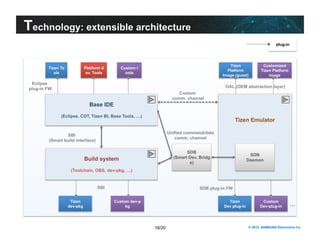
Technology: extensible architecture 
Tizen Emulator 
SDB 
Platform d 
ev. Tools 
Custom t 
ools 
Build system Daemon 
18/20 © 2012 SAMSUNG Electronics Co. 
(Toolchain, OBS, dev-pkg, …) 
Tizen To 
ols 
Eclipse 
plug-in FW 
Custom 
comm. channel 
SBI 
(Smart build interface) 
Unified command/data 
comm. channel 
Base IDE 
(Eclipse, CDT, Tizen BI, Base Tools, …) 
Tizen 
dev-pkg 
Custom dev-p 
kg 
Tizen 
Platform 
Image (guest) 
Tizen … 
Dev plug-in 
Custom 
Dev-plug-in 
SDB 
(Smart Dev. Bridg 
e) 
SBI SDB plug-in FW 
plug-in 
Customized 
Tizen Platform 
image 
OAL (OEM abstraction layer)
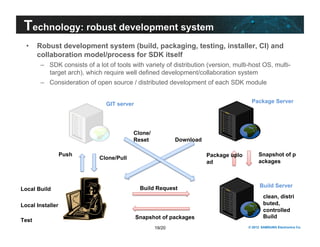
Technology: robust development system 
• Robust development system (build, packaging, testing, installer, CI) and 
collaboration model/process for SDK itself 
– SDK consists of a lot of tools with variety of distribution (version, multi-host OS, multi-target 
arch), which require well defined development/collaboration system 
– Consideration of open source / distributed development of each SDK module 
Package Server 
Snapshot of p 
ackages 
Build Server 
Package uplo 
ad 
Download 
Build Request 
Snapshot of packages 
19/20 © 2012 SAMSUNG Electronics Co. 
GIT server 
Push Clone/Pull 
Local Build 
Local Installer 
Test 
clean, distri 
buted, 
controlled 
Build 
Clone/ 
Reset
© 2012 SAMSUNG Electronics Co. 
Demo
21/20 © 2012 SAMSUNG Electronics Co. 
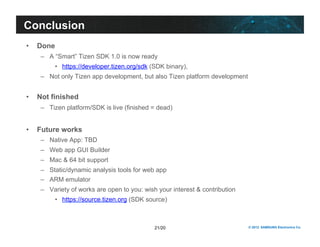
Conclusion 
• Done 
– A “Smart” Tizen SDK 1.0 is now ready 
• https://developer.tizen.org/sdk (SDK binary), 
– Not only Tizen app development, but also Tizen platform development 
• Not finished 
– Tizen platform/SDK is live (finished = dead) 
• Future works 
– Native App: TBD 
– Web app GUI Builder 
– Mac & 64 bit support 
– Static/dynamic analysis tools for web app 
– ARM emulator 
– Variety of works are open to you: wish your interest & contribution 
• https://source.tizen.org (SDK source)
Thank You.
© 2012 SAMSUNG Electronics Co. 
Appendix.
24/20 © 2012 SAMSUNG Electronics Co. 
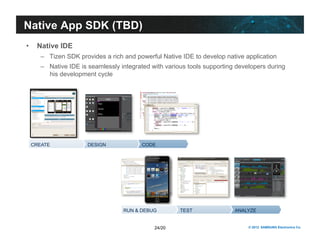
Native App SDK (TBD) 
• Native IDE 
– Tizen SDK provides a rich and powerful Native IDE to develop native application 
– Native IDE is seamlessly integrated with various tools supporting developers during 
his development cycle 
CREATE DESIGN CODE 
RUN & DEBUG TEST ANALYZE

Introdução ao Tizen

  • 1.
    Introduction to TIZENSDK Hyungoo Kang, Kangho Kim S-Core, Samsung April, 2012 © 2012 SAMSUNG Electronics Co.
  • 2.
    2/20 © 2012SAMSUNG Electronics Co. • Overview • Tizen SDK (selected features) • Demo (10 minutes) • Conclusion Contents
  • 3.
    Overview (1/3) •Tizen SDK is a comprehensive set of tools for Tizen app development IDE Target like Emulator • Various Device Emulation based on open source QEMU • Event Injector such as Call/SMS send and receive GUI Builder Others 3/20 © 2012 SAMSUNG Electronics Co. • Competitive editor for HTML, CSS, Javascript • Project management, templates, samples, documentation • Multiple target (Emulator/Device) management • Debugging & profiling based on remote web inspector • One step install, Multi-OS support • Platform development (native) support • Productive and visual WYSIWYG builder • Web GUI Builder supporting Tizen JQM based UI framework (TBD)
  • 4.
    Editors - HTML/ JavaScript / CSS file 4/20 © 2012 SAMSUNG Electronics Co. Overview (2/3) • Screenshot (IDE) Outline - Structural summary Event Injector - Virtual I/O (SMS/Sensor/Geo..) for the emulator Properties - Show and edit HTML Preview - WebKit-based previe w browser CSS Preview - Instant look & feel of CSS file Project Explorer - Hierarchical view of resources Connection Explorer - Tree view of target devi ces - File system of target de vice access Logs - Framework log view Console - IDE log view
  • 5.
    Technology 5/20 ©2012 SAMSUNG Electronics Co. Overview (3/3) • Tizen SDK in terms of S•M•A•R•T Specialization Muliplicity All-in-one Richness • Specialization for SMART SDK Tizen • Multiple devices • Multiple host • All-in-one development suites • Well founded technology • Rich features to help developers
  • 6.
    All-in-one Suites •Tizen SDK is all-in-one suites from installation to development – One-step installer for whole SDK module installation – Development with rich assistance of editor and GUI builder – Build, test and debug with both emulator and real devices – Support tizen platform development as well (in one IDE) • Tizen platform developer can develop her own (native/library) platform module, replacing the platform image in the target 6/20 © 2012 SAMSUNG Electronics Co.
  • 7.
    All-in-one Suites •Tizen SDK provides various tools and documents integrated with IDE 7/20 © 2012 SAMSUNG Electronics Co. WYSIWYG GUI design/editing Static & Dynamic Analysis Test/debugging Help Contents Project management & easy code editing Build system & Toolchai IDE n Live SDK update • OBS • Rootstrap management • Cross compiler, packaging • Project compatibility • SDB
  • 8.
    Specialization for Tizen • Best tool for developing Tizen web application 8/20 © 2012 SAMSUNG Electronics Co. – project management • project wizard & explorer • Various templates & Sample • User template – Configuration editor for Tizen web app (W3C widget configuration)
  • 9.
    • Hover andAuto-completion for Tizen API 9/20 © 2012 SAMSUNG Electronics Co. Specialization for Tizen
  • 10.
    Richness: General features • Not just specialized features for Tizen, but also general features to help web app development – Javascript/CSS syntax check, Minification of javascript/css file, CSS/HTML preview 10/20 © 2012 SAMSUNG Electronics Co. • Familiar IDE – Tizen SDK is based on Eclipse, JSDT for web app, CDT for native platform development, with which many web developers are familiar – Extensibility: each developers can enrich the Tizen SDK by adding custom-user plug-ins by need
  • 11.
    11/20 © 2012SAMSUNG Electronics Co. Richness: HTML Editor • Variety of view mode – vertically split – horizontally split – only design – only source – preview • HTML5 palette – Supports HTML5 tag
  • 12.
    12/20 © 2012SAMSUNG Electronics Co. Richness: Event Injector • Rich event injection for ease of test – Sensors • Accelerometer • Gyroscope • Geomagnetic • Proximity • Light • Motion – Location • Manual/Map/Log file – Telephony • Call/SMS – NFC • NDEF message • NFC Tag • P2P – Device • Battery level • Earjack • USB • RSSI
  • 13.
    Richness: Debugging &Profiling • Remote inspector, integrated in Tizen SDK, provides powerful debugging/ profiling facilities for your web application – JavaScript Debugging, DOM Inspection, CSS Style Inspection, Resources Inspection, 13/20 © 2012 SAMSUNG Electronics Co. Timeline and Profiles
  • 14.
    Richness: Web AppSimulator • A browser with some (subset) Tizen API simulation – No packaging/installation process to target (real device or emulator) – Run web app w/o target for the purpose of quick/instant test (e.g., UI mock-up) 14/20 © 2012 SAMSUNG Electronics Co.
  • 15.
    Richness: platform SDK • You can develop Tizen platform modules (libraries) using Tizen SDK 15/20 © 2012 SAMSUNG Electronics Co. – Git integration – Cross toolchain with QEMU • Scratchbox2 • OBS – Package Manager – Attach and Coredump Debugging Attach Debug
  • 16.
    16/20 © 2012SAMSUNG Electronics Co. Multiplicity • Multi-OS – Tizen SDK runs in Windows (XP/7) & Linux (Ubuntu) – Mac & 64 bit (‘12,2Q) • Multi-device – The emulator enables you to test one app for multiple devices (virtually) • Configurable virtual HW: resolution (WVGA phone, HD TV), RAM, storage, devices, … • HW configuration (e.g., GPU, codec) independent execution of Tizen platform – Multi-target (X86 & ARM) support: cross-compiler, emulator • Multi-instance – Concurrent execution of multiple emulator & real device instance – IDE supports multi-project debugging (e.g., testing device-to-device communication app)
  • 17.
    Technology: emulator •Emulation of physical target (currently, phone-like) – QEMU Virtual board + Event Injector + Emulator manager (configuration) App App HW emulation Virtual board (x86/ARM) 17/20 © 2012 SAMSUNG Electronics Co. • Better performance and portability – Not all devices are emulated due to performance & portability – OpenGL, Audio/Video codec acceleration • Configurable virtual HW Emulator (x86/ARM) QEMU VCPU Simulation DBT Physical target (ARM) FW Kernel Real device FW Kernel Real device Real device App Emulation Host (x86, Linux/Win/Mac) Event Injector App KVM (or HAX) Emulator Manager
  • 18.
    Technology: extensible architecture Tizen Emulator SDB Platform d ev. Tools Custom t ools Build system Daemon 18/20 © 2012 SAMSUNG Electronics Co. (Toolchain, OBS, dev-pkg, …) Tizen To ols Eclipse plug-in FW Custom comm. channel SBI (Smart build interface) Unified command/data comm. channel Base IDE (Eclipse, CDT, Tizen BI, Base Tools, …) Tizen dev-pkg Custom dev-p kg Tizen Platform Image (guest) Tizen … Dev plug-in Custom Dev-plug-in SDB (Smart Dev. Bridg e) SBI SDB plug-in FW plug-in Customized Tizen Platform image OAL (OEM abstraction layer)
  • 19.
    Technology: robust developmentsystem • Robust development system (build, packaging, testing, installer, CI) and collaboration model/process for SDK itself – SDK consists of a lot of tools with variety of distribution (version, multi-host OS, multi-target arch), which require well defined development/collaboration system – Consideration of open source / distributed development of each SDK module Package Server Snapshot of p ackages Build Server Package uplo ad Download Build Request Snapshot of packages 19/20 © 2012 SAMSUNG Electronics Co. GIT server Push Clone/Pull Local Build Local Installer Test clean, distri buted, controlled Build Clone/ Reset
  • 20.
    © 2012 SAMSUNGElectronics Co. Demo
  • 21.
    21/20 © 2012SAMSUNG Electronics Co. Conclusion • Done – A “Smart” Tizen SDK 1.0 is now ready • https://developer.tizen.org/sdk (SDK binary), – Not only Tizen app development, but also Tizen platform development • Not finished – Tizen platform/SDK is live (finished = dead) • Future works – Native App: TBD – Web app GUI Builder – Mac & 64 bit support – Static/dynamic analysis tools for web app – ARM emulator – Variety of works are open to you: wish your interest & contribution • https://source.tizen.org (SDK source)
  • 22.
  • 23.
    © 2012 SAMSUNGElectronics Co. Appendix.
  • 24.
    24/20 © 2012SAMSUNG Electronics Co. Native App SDK (TBD) • Native IDE – Tizen SDK provides a rich and powerful Native IDE to develop native application – Native IDE is seamlessly integrated with various tools supporting developers during his development cycle CREATE DESIGN CODE RUN & DEBUG TEST ANALYZE