

Tizen DevLabs
Paris, France
2015-02-28
<https://wiki.tizen.org/wiki/Events>
Publish Tizen apps to Z1
Welcome to TizenStore and Community
Philippe Coval
https://wiki.tizen.org/wiki/User:Pcoval
2
Tizen DevLabs 2015 <http://wiki.tizen.org/wiki/User:Pcoval>
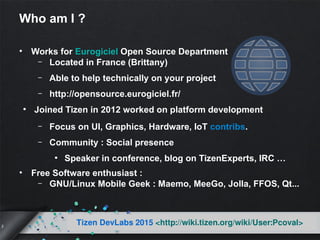
Who am I ?
• Works for Eurogiciel Open Source Department
– Located in France (Brittany)
– Able to help technically on your project
– http://opensource.eurogiciel.fr/
●
Joined Tizen in 2012 worked on platform development
– Focus on UI, Graphics, Hardware, IoT contribs.
– Community : Social presence
●
Speaker in conference, blog on TizenExperts, IRC …
• Free Software enthusiast :
– GNU/Linux Mobile Geek : Maemo, MeeGo, Jolla, FFOS, Qt...
3
Tizen DevLabs 2015 <http://wiki.tizen.org/wiki/User:Pcoval>
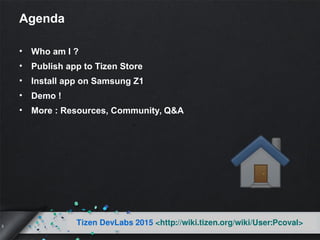
Agenda
• Who am I ?
• Publish app to Tizen Store
• Install app on Samsung Z1
• Demo !
• More : Resources, Community, Q&A
Publish app to
Tizen Store
5
Tizen DevLabs 2015 <http://wiki.tizen.org/wiki/User:Pcoval>
Create application
• Use supported SDK :
– Eclipse based IDE with emulator
– Tizen-2.2+ , later is better
– https://developer.tizen.org/downloads/tizen-sdk
• Use Tizen supported technologies :
– JavaScript : HTML5, jquery-mobile
●
Or your favorite framework (angular...)
– C : EFL / OpenGL
• Or other toolkits based on supported ones : Unity3d, Qt? etc
6
Tizen DevLabs 2015 <http://wiki.tizen.org/wiki/User:Pcoval>
Manage certificates from Samsung
• Download and install certificate tool
• Meanwhile create account on :
– http://developer.samsung.com/signup
• Start wizard (button between Redo and Debug)
– Developer certificate should be issued
●
Upload “author.csr” to the web
●
Get “author.crt” back by email
– Device profile should be issued too : “device-profile.xml”
●
Configure IDE :
– Connection Explorer :
“permit to install application”
7
Tizen DevLabs 2015 <http://wiki.tizen.org/wiki/User:Pcoval>
Test application
• On SDK emulator or “Remote Test Lab” service
• Or actual devices : RDPQ, SamsungZ1, others ?
• Double Check :
– Install / uninstall fine
– Works good on 1st lunch
– Should not hang
– Close properly (trap event from buttons)
– Profile app to check resources usage
– All UI elements should provide feedback
8
Tizen DevLabs 2015 <http://wiki.tizen.org/wiki/User:Pcoval>
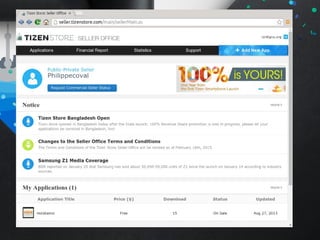
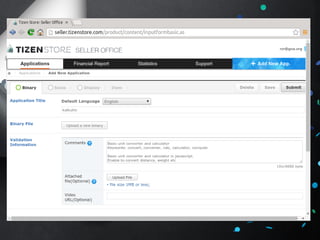
Developer upload application
• Log in : http://seller.tizenstore.com/
• Fill form : description, screenshots etc
– Correct metadata and comply to rules (copyrights, crypto)
• Upload package
– *.wgt : web widget (HTML app)
– *.tpk : natives apps (using EFL …)
• Wait for feedback
• Fix defects and upload revisions
• Repeat until accepted (couple of day delay)
Install app on
Samsung Z1
12
Tizen DevLabs 2015 <http://wiki.tizen.org/wiki/User:Pcoval>
About : Tizen Samsung Z1
• First retail Tizen phone
• Lunched in India on Jan 2015, extending to Asia...
• Affordable (less than 100USD)
• Features:
– Dual SIM, Dual Cam, GPS, Sensors
– Dual-core 1.2 GHz Cortex-A7 CPU + Mali-400 GPU
• OS: Tizen-2.3 is partially Open Source :
– “SM-Z130H_Opensource.zip” o/
●
Community / Z1Club :
– https://wiki.tizen.org/wiki/SamsungZ1
13
Tizen DevLabs 2015 <http://wiki.tizen.org/wiki/User:Pcoval>
Install app from Source using SDK
●
Configure device to developer mode :
– Open Settings and then press Home button
– Dial : tel:*#84936#
– Select Icon on Right Hand Side to enable Developer Options
– Close Settings app (hold “Home” button then close)
– Settings : Developer Options / USB Debugging
●
Deploy as on emulator and lunch from Home Screen
– On issue uninstall by long click
●
Screenshot tip :
– Hold : Power + Home
– ./opt/usr/media/Images/Screenshots
14
Tizen DevLabs 2015 <http://wiki.tizen.org/wiki/User:Pcoval>
Share Source to Community
●
Store and Opensource are compatible !
●
Benefit for you : Feedback from community, Trust
●
How :
– http://ChooseALicense.com/
– Copy text to COPYING file in sources tree
– Publish archive or repo
●
Promote :
– https://wiki.tizen.org/wiki/Applications
Demo !
mapo-tizen-z1-20150205rzr
More ...
17
Tizen DevLabs 2015 <http://wiki.tizen.org/wiki/User:Pcoval>
Summary
• Create your application using SDK
– http://tizen.org
• Register to store and get certificates
• Install, use and test :
– Emulator, Device
• Publish package :
– http://seller.tizenstore.com/
• Check status of validation process
– Fix mistakes
• Promote your app to :
– Tizen users and developers communies
18
Tizen DevLabs 2015 <http://wiki.tizen.org/wiki/User:Pcoval>
Resources
• SamsungZ1 / Store :
– http://developer.samsung.com/samsung-z
– https://dockr.eurogiciel.fr/blogs/embedded/tag/z1/
– http://developer.samsung.com/technical-doc/view.do?
v=T000000198
– http://download.tizen.org/misc/media/conference2014/slide
s/
tdc2014-tizen-application-validation.pdf
• Community :
– https://wiki.tizen.org/wiki/Category:Community
– http://lists.tizen.org Or irc://irc.freenode.net/#tizen
19
Tizen DevLabs 2015 <http://wiki.tizen.org/wiki/User:Pcoval>
Thanks
• TizenDevLab Organizer team : BeMyApp
• Seoz from Samsung for tips and sources
• Kamil form Samsung
• Tizen developers and related communities
– Ash from TizenExperts.com
• Linux Foundation, Tizen Association
• Eurogiciel Opensource departement
Q & A
Ask me online too !
<https://wiki.tizen.org/wiki/User:Pcoval>
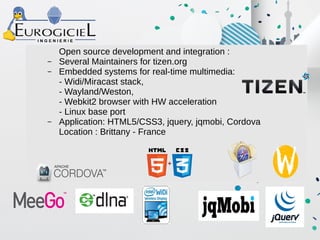
Open source development and integration :
– Several Maintainers for tizen.org
– Embedded systems for real-time multimedia:
- Widi/Miracast stack,
- Wayland/Weston,
- Webkit2 browser with HW acceleration
- Linux base port
– Application: HTML5/CSS3, jquery, jqmobi, Cordova
Location : Brittany - France

Tizen store-z1-20150228rzr

  • 1.
    Tizen DevLabs Paris, France 2015-02-28 <https://wiki.tizen.org/wiki/Events> PublishTizen apps to Z1 Welcome to TizenStore and Community Philippe Coval https://wiki.tizen.org/wiki/User:Pcoval
  • 2.
    2 Tizen DevLabs 2015<http://wiki.tizen.org/wiki/User:Pcoval> Who am I ? • Works for Eurogiciel Open Source Department – Located in France (Brittany) – Able to help technically on your project – http://opensource.eurogiciel.fr/ ● Joined Tizen in 2012 worked on platform development – Focus on UI, Graphics, Hardware, IoT contribs. – Community : Social presence ● Speaker in conference, blog on TizenExperts, IRC … • Free Software enthusiast : – GNU/Linux Mobile Geek : Maemo, MeeGo, Jolla, FFOS, Qt...
  • 3.
    3 Tizen DevLabs 2015<http://wiki.tizen.org/wiki/User:Pcoval> Agenda • Who am I ? • Publish app to Tizen Store • Install app on Samsung Z1 • Demo ! • More : Resources, Community, Q&A
  • 4.
  • 5.
    5 Tizen DevLabs 2015<http://wiki.tizen.org/wiki/User:Pcoval> Create application • Use supported SDK : – Eclipse based IDE with emulator – Tizen-2.2+ , later is better – https://developer.tizen.org/downloads/tizen-sdk • Use Tizen supported technologies : – JavaScript : HTML5, jquery-mobile ● Or your favorite framework (angular...) – C : EFL / OpenGL • Or other toolkits based on supported ones : Unity3d, Qt? etc
  • 6.
    6 Tizen DevLabs 2015<http://wiki.tizen.org/wiki/User:Pcoval> Manage certificates from Samsung • Download and install certificate tool • Meanwhile create account on : – http://developer.samsung.com/signup • Start wizard (button between Redo and Debug) – Developer certificate should be issued ● Upload “author.csr” to the web ● Get “author.crt” back by email – Device profile should be issued too : “device-profile.xml” ● Configure IDE : – Connection Explorer : “permit to install application”
  • 7.
    7 Tizen DevLabs 2015<http://wiki.tizen.org/wiki/User:Pcoval> Test application • On SDK emulator or “Remote Test Lab” service • Or actual devices : RDPQ, SamsungZ1, others ? • Double Check : – Install / uninstall fine – Works good on 1st lunch – Should not hang – Close properly (trap event from buttons) – Profile app to check resources usage – All UI elements should provide feedback
  • 8.
    8 Tizen DevLabs 2015<http://wiki.tizen.org/wiki/User:Pcoval> Developer upload application • Log in : http://seller.tizenstore.com/ • Fill form : description, screenshots etc – Correct metadata and comply to rules (copyrights, crypto) • Upload package – *.wgt : web widget (HTML app) – *.tpk : natives apps (using EFL …) • Wait for feedback • Fix defects and upload revisions • Repeat until accepted (couple of day delay)
  • 11.
  • 12.
    12 Tizen DevLabs 2015<http://wiki.tizen.org/wiki/User:Pcoval> About : Tizen Samsung Z1 • First retail Tizen phone • Lunched in India on Jan 2015, extending to Asia... • Affordable (less than 100USD) • Features: – Dual SIM, Dual Cam, GPS, Sensors – Dual-core 1.2 GHz Cortex-A7 CPU + Mali-400 GPU • OS: Tizen-2.3 is partially Open Source : – “SM-Z130H_Opensource.zip” o/ ● Community / Z1Club : – https://wiki.tizen.org/wiki/SamsungZ1
  • 13.
    13 Tizen DevLabs 2015<http://wiki.tizen.org/wiki/User:Pcoval> Install app from Source using SDK ● Configure device to developer mode : – Open Settings and then press Home button – Dial : tel:*#84936# – Select Icon on Right Hand Side to enable Developer Options – Close Settings app (hold “Home” button then close) – Settings : Developer Options / USB Debugging ● Deploy as on emulator and lunch from Home Screen – On issue uninstall by long click ● Screenshot tip : – Hold : Power + Home – ./opt/usr/media/Images/Screenshots
  • 14.
    14 Tizen DevLabs 2015<http://wiki.tizen.org/wiki/User:Pcoval> Share Source to Community ● Store and Opensource are compatible ! ● Benefit for you : Feedback from community, Trust ● How : – http://ChooseALicense.com/ – Copy text to COPYING file in sources tree – Publish archive or repo ● Promote : – https://wiki.tizen.org/wiki/Applications
  • 15.
  • 16.
  • 17.
    17 Tizen DevLabs 2015<http://wiki.tizen.org/wiki/User:Pcoval> Summary • Create your application using SDK – http://tizen.org • Register to store and get certificates • Install, use and test : – Emulator, Device • Publish package : – http://seller.tizenstore.com/ • Check status of validation process – Fix mistakes • Promote your app to : – Tizen users and developers communies
  • 18.
    18 Tizen DevLabs 2015<http://wiki.tizen.org/wiki/User:Pcoval> Resources • SamsungZ1 / Store : – http://developer.samsung.com/samsung-z – https://dockr.eurogiciel.fr/blogs/embedded/tag/z1/ – http://developer.samsung.com/technical-doc/view.do? v=T000000198 – http://download.tizen.org/misc/media/conference2014/slide s/ tdc2014-tizen-application-validation.pdf • Community : – https://wiki.tizen.org/wiki/Category:Community – http://lists.tizen.org Or irc://irc.freenode.net/#tizen
  • 19.
    19 Tizen DevLabs 2015<http://wiki.tizen.org/wiki/User:Pcoval> Thanks • TizenDevLab Organizer team : BeMyApp • Seoz from Samsung for tips and sources • Kamil form Samsung • Tizen developers and related communities – Ash from TizenExperts.com • Linux Foundation, Tizen Association • Eurogiciel Opensource departement
  • 20.
    Q & A Askme online too ! <https://wiki.tizen.org/wiki/User:Pcoval>
  • 21.
    Open source developmentand integration : – Several Maintainers for tizen.org – Embedded systems for real-time multimedia: - Widi/Miracast stack, - Wayland/Weston, - Webkit2 browser with HW acceleration - Linux base port – Application: HTML5/CSS3, jquery, jqmobi, Cordova Location : Brittany - France