Final Project
: literature review
       강가영
       정동녘
Screen complexity and user design
preferences in windows applications (1994)


   • opening screen in 13 windows app.
   • 30 subjects - ranked
   • A significant negative correlation was
     found between the subjects’ rankings and
     the complexity ratings, indicating that
     users’ do not like “simple” screens.
• Shannon formula for entropy
• used for typography by Bonsieppe
 • 2 types of order in typographical design
• for text screens by Tullis
• for Windows app. screen by Comber and
  Maltby
• design goals
 • minimize the complexity of a display
 • make screen a predictable as possible
Measuring the Screen Complexity of
Web Pages

Purpose
: The purpose of this study is to propose determinants of and formulae for
calculating the complexity of Web pages.


• To propose a valid numerical tool to measure the screen complexity
according to users’ viewpoints when browsing a Web site.

• The tool is developed based on the four key elements of screen complexity.
• the key elements of complexity in GUI design
 : size, local density, grouping and alignment
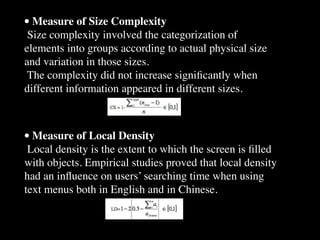
• Measure of Size Complexity
 Size complexity involved the categorization of
elements into groups according to actual physical size
and variation in those sizes.
 The complexity did not increase significantly when
different information appeared in different sizes.


• Measure of Local Density
 Local density is the extent to which the screen is filled
with objects. Empirical studies proved that local density
had an influence on users’ searching time when using
text menus both in English and in Chinese.
• Measure of Group
 The group measure reflects coherence: the degree to
which all elements seem belong together and appear
visually as one piece. Grouping makes it easier for the
users to extract the information assigned to the group.
Empirical study proved that the proper grouping results
in shorter search times.


• Measure of Alignment
 The smaller the number of alignment points, the better.
Measuring the level of alignment for simplicity (AS) of a
graphic screen involves counting the number of different
rows and columns on the screen that are used as starting
positions of objects.
Empirical Study
 According to previous experimental studies, users had
longer periods of fixation durations while on the first
pages compared to the second pages, implying that the
first page of a web site is more important than the other
pages.


Methodology
 They first translated the real screens to serve as model
screens.
They then compared the viewers’ judgment of the actual
screens with the complexity values counted from our
tool, and determined the level of consistency between the
two.
RESULT
 Viewers’ judgments of the real screens almost mirror the
complexity values from the model screens, which
confirms the usefulness of the tool measuring
complexity.

 One inconsistent result which emerged from the real
screen judgment of and aggregate complexity value for
the Ebay USA site hints at the need for further studies on
the method for calculating the preference weight of
complexity values or other influencing variables on the
screen complexity of Web pages.
Layout Complexity: Does It Measure Usability?
Tim Comber, John R. Maltby


• To investigates the validity of the layout complexity metric to GUI screen design.
• This metric offers a simple method to gauge the complexity of the visual design of a computer
screen by classifying screen objects into classes based on common dimensions and positions.

• Layout complexity and compares it to other measures eg white space, balance, and symmetry,
to assess the usability of screen designs.


                                      N = total number of objects (widths or
                                           heights, distance from top or side of
                                           page)
                                      n = number of classes (number of unique
                                          widths, heights or distances)
                                      ni = number of objects in the ith class pi =
                                           proportion of the ith class.
Hypotheses
• As the complexity figure becomes smaller, it becomes more difficult to distinguish
different interface objects and the interface takes on an artificial regularity.

• The interface becomes more predictable. At the other extreme as the interface
approaches maximum complexity, it looks artificially irregular. However, the increase in
complexity does mean that the user has more information and therefore more choice of
operations.


                                                              Relationship between complexity and usability
  Methodology
  • Experimental design
  • An important characteristic of usability testing is that it should be carried out
  "by real users carrying out real tasks in a real technical, physical and organisational
  environment"
FINDINGS
•A number of applications, including Microsoft Word and Excel, received rankings
opposite to that good layout design strives to be simple. This suggests that users prefer
more complex layouts.

• A pilot experiment (Comber and Maltby 1995) was designed to test three components of
usability; effectiveness, learnability, and attitude.

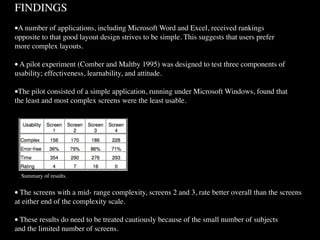
•The pilot consisted of a simple application, running under Microsoft Windows, found that
the least and most complex screens were the least usable.


  Summary of results.


• The screens with a mid- range complexity, screens 2 and 3, rate better overall than the screens
at either end of the complexity scale.

• These results do need to be treated cautiously because of the small number of subjects
and the limited number of screens.
Connecting with ACT-R

•   Interfacing ACT-R to External Simulations Using
    Segman Robert St. Amant and Frank E.
    Ritter(2003)

•   Interfacing ACT-R with External Simulations (Slide)
Conclusion
• Defining components and relationship
  •   Ref. Measuring the Screen Complexity of Web Pages


• Evaluating screen design complexity
  •   Ref. Screen complexity and user design preferences in windows
      applications


• Driving situation with controlling navigation
   and getting information
  • Ref. Layout Complexity: Does It Measure Usability?
•   디자인 복잡도가 몇 이다?

•   배치와 구성에 따른 복잡도 평가의 유용성?

•   목적, 상황 하에서의 디자인 복잡도 정의

    •   특정 용도의 가중치 부여

    •   선택창, 입력창, 탐색창

    •   메뉴, 문자, 그림, 창

    •   색, 크기, 비율, 밀집도, 입체감(중첩도)

Tim,john(1994)_final project

  • 1.
    Final Project : literaturereview 강가영 정동녘
  • 2.
    Screen complexity anduser design preferences in windows applications (1994) • opening screen in 13 windows app. • 30 subjects - ranked • A significant negative correlation was found between the subjects’ rankings and the complexity ratings, indicating that users’ do not like “simple” screens.
  • 3.
    • Shannon formulafor entropy • used for typography by Bonsieppe • 2 types of order in typographical design • for text screens by Tullis • for Windows app. screen by Comber and Maltby
  • 4.
    • design goals • minimize the complexity of a display • make screen a predictable as possible
  • 6.
    Measuring the ScreenComplexity of Web Pages Purpose : The purpose of this study is to propose determinants of and formulae for calculating the complexity of Web pages. • To propose a valid numerical tool to measure the screen complexity according to users’ viewpoints when browsing a Web site. • The tool is developed based on the four key elements of screen complexity. • the key elements of complexity in GUI design : size, local density, grouping and alignment
  • 7.
    • Measure ofSize Complexity Size complexity involved the categorization of elements into groups according to actual physical size and variation in those sizes. The complexity did not increase significantly when different information appeared in different sizes. • Measure of Local Density Local density is the extent to which the screen is filled with objects. Empirical studies proved that local density had an influence on users’ searching time when using text menus both in English and in Chinese.
  • 8.
    • Measure ofGroup The group measure reflects coherence: the degree to which all elements seem belong together and appear visually as one piece. Grouping makes it easier for the users to extract the information assigned to the group. Empirical study proved that the proper grouping results in shorter search times. • Measure of Alignment The smaller the number of alignment points, the better. Measuring the level of alignment for simplicity (AS) of a graphic screen involves counting the number of different rows and columns on the screen that are used as starting positions of objects.
  • 9.
    Empirical Study Accordingto previous experimental studies, users had longer periods of fixation durations while on the first pages compared to the second pages, implying that the first page of a web site is more important than the other pages. Methodology They first translated the real screens to serve as model screens. They then compared the viewers’ judgment of the actual screens with the complexity values counted from our tool, and determined the level of consistency between the two.
  • 10.
    RESULT Viewers’ judgmentsof the real screens almost mirror the complexity values from the model screens, which confirms the usefulness of the tool measuring complexity. One inconsistent result which emerged from the real screen judgment of and aggregate complexity value for the Ebay USA site hints at the need for further studies on the method for calculating the preference weight of complexity values or other influencing variables on the screen complexity of Web pages.
  • 11.
    Layout Complexity: DoesIt Measure Usability? Tim Comber, John R. Maltby • To investigates the validity of the layout complexity metric to GUI screen design. • This metric offers a simple method to gauge the complexity of the visual design of a computer screen by classifying screen objects into classes based on common dimensions and positions. • Layout complexity and compares it to other measures eg white space, balance, and symmetry, to assess the usability of screen designs. N = total number of objects (widths or heights, distance from top or side of page) n = number of classes (number of unique widths, heights or distances) ni = number of objects in the ith class pi = proportion of the ith class.
  • 12.
    Hypotheses • As thecomplexity figure becomes smaller, it becomes more difficult to distinguish different interface objects and the interface takes on an artificial regularity. • The interface becomes more predictable. At the other extreme as the interface approaches maximum complexity, it looks artificially irregular. However, the increase in complexity does mean that the user has more information and therefore more choice of operations. Relationship between complexity and usability Methodology • Experimental design • An important characteristic of usability testing is that it should be carried out "by real users carrying out real tasks in a real technical, physical and organisational environment"
  • 13.
    FINDINGS •A number ofapplications, including Microsoft Word and Excel, received rankings opposite to that good layout design strives to be simple. This suggests that users prefer more complex layouts. • A pilot experiment (Comber and Maltby 1995) was designed to test three components of usability; effectiveness, learnability, and attitude. •The pilot consisted of a simple application, running under Microsoft Windows, found that the least and most complex screens were the least usable. Summary of results. • The screens with a mid- range complexity, screens 2 and 3, rate better overall than the screens at either end of the complexity scale. • These results do need to be treated cautiously because of the small number of subjects and the limited number of screens.
  • 14.
    Connecting with ACT-R • Interfacing ACT-R to External Simulations Using Segman Robert St. Amant and Frank E. Ritter(2003) • Interfacing ACT-R with External Simulations (Slide)
  • 15.
    Conclusion • Defining componentsand relationship • Ref. Measuring the Screen Complexity of Web Pages • Evaluating screen design complexity • Ref. Screen complexity and user design preferences in windows applications • Driving situation with controlling navigation and getting information • Ref. Layout Complexity: Does It Measure Usability?
  • 16.
    디자인 복잡도가 몇 이다? • 배치와 구성에 따른 복잡도 평가의 유용성? • 목적, 상황 하에서의 디자인 복잡도 정의 • 특정 용도의 가중치 부여 • 선택창, 입력창, 탐색창 • 메뉴, 문자, 그림, 창 • 색, 크기, 비율, 밀집도, 입체감(중첩도)