1
Snowflake Time Travel
 Using Time Travel, following actions within a defined period of time can
be performed:
 Query data in the past that has since been updated or deleted
 Create clones of entire tables, schemas, and databases at or before specific
points in the past
 Restore tables, schemas, and databases that have been dropped
 Once the defined period of time has elapsed, the data is moved
into Snowflake Fail-safe and these above actions can no longer be
performed
2
Snowflake Time Travel
3
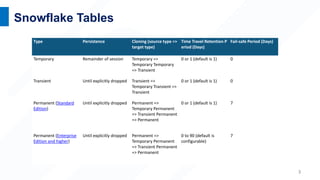
Snowflake Tables
Type Persistence Cloning (source type =>
target type)
Time Travel Retention P
eriod (Days)
Fail-safe Period (Days)
Temporary Remainder of session Temporary =>
Temporary Temporary
=> Transient
0 or 1 (default is 1) 0
Transient Until explicitly dropped Transient =>
Temporary Transient =>
Transient
0 or 1 (default is 1) 0
Permanent (Standard
Edition)
Until explicitly dropped Permanent =>
Temporary Permanent
=> Transient Permanent
=> Permanent
0 or 1 (default is 1) 7
Permanent (Enterprise
Edition and higher)
Until explicitly dropped Permanent =>
Temporary Permanent
=> Transient Permanent
=> Permanent
0 to 90 (default is
configurable)
7
Snowflake Time Travel
4
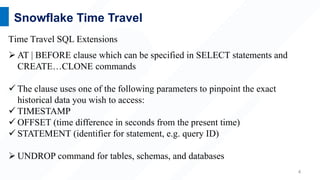
Time Travel SQL Extensions
 AT | BEFORE clause which can be specified in SELECT statements and
CREATE…CLONE commands
 The clause uses one of the following parameters to pinpoint the exact
historical data you wish to access:
 TIMESTAMP
 OFFSET (time difference in seconds from the present time)
 STATEMENT (identifier for statement, e.g. query ID)
 UNDROP command for tables, schemas, and databases
5
Snowflake Time Travel (optional )
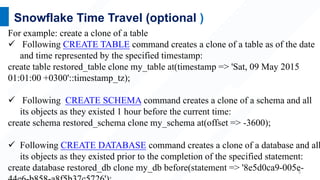
For example: create a clone of a table
 Following CREATE TABLE command creates a clone of a table as of the date
and time represented by the specified timestamp:
create table restored_table clone my_table at(timestamp => 'Sat, 09 May 2015
01:01:00 +0300'::timestamp_tz);
 Following CREATE SCHEMA command creates a clone of a schema and all
its objects as they existed 1 hour before the current time:
create schema restored_schema clone my_schema at(offset => -3600);
 Following CREATE DATABASE command creates a clone of a database and all
its objects as they existed prior to the completion of the specified statement:
create database restored_db clone my_db before(statement => '8e5d0ca9-005e-
6
Snowflake Time Travel
Dropping and Restoring Objects
Following commands are used to Drop a Table, Schema, or Database :
DROP TABLE
DROP SCHEMA
DROP DATABASE
7
Snowflake Time Travel
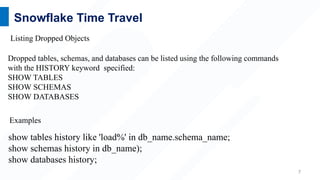
show tables history like 'load%' in db_name.schema_name;
show schemas history in db_name);
show databases history;
Dropped tables, schemas, and databases can be listed using the following commands
with the HISTORY keyword specified:
SHOW TABLES
SHOW SCHEMAS
SHOW DATABASES
Listing Dropped Objects
Examples
8
Snowflake Time Travel
A dropped object that has not been purged from the system can be restored using the
following commands:
UNDROP TABLE
UNDROP SCHEMA
UNDROP DATABASE
Restoring Objects
For example:
undrop table table_name;
undrop schema schema_name;
undrop database database_name;

Time-Travel.pptx

  • 1.
    1 Snowflake Time Travel Using Time Travel, following actions within a defined period of time can be performed:  Query data in the past that has since been updated or deleted  Create clones of entire tables, schemas, and databases at or before specific points in the past  Restore tables, schemas, and databases that have been dropped  Once the defined period of time has elapsed, the data is moved into Snowflake Fail-safe and these above actions can no longer be performed
  • 2.
  • 3.
    3 Snowflake Tables Type PersistenceCloning (source type => target type) Time Travel Retention P eriod (Days) Fail-safe Period (Days) Temporary Remainder of session Temporary => Temporary Temporary => Transient 0 or 1 (default is 1) 0 Transient Until explicitly dropped Transient => Temporary Transient => Transient 0 or 1 (default is 1) 0 Permanent (Standard Edition) Until explicitly dropped Permanent => Temporary Permanent => Transient Permanent => Permanent 0 or 1 (default is 1) 7 Permanent (Enterprise Edition and higher) Until explicitly dropped Permanent => Temporary Permanent => Transient Permanent => Permanent 0 to 90 (default is configurable) 7
  • 4.
    Snowflake Time Travel 4 TimeTravel SQL Extensions  AT | BEFORE clause which can be specified in SELECT statements and CREATE…CLONE commands  The clause uses one of the following parameters to pinpoint the exact historical data you wish to access:  TIMESTAMP  OFFSET (time difference in seconds from the present time)  STATEMENT (identifier for statement, e.g. query ID)  UNDROP command for tables, schemas, and databases
  • 5.
    5 Snowflake Time Travel(optional ) For example: create a clone of a table  Following CREATE TABLE command creates a clone of a table as of the date and time represented by the specified timestamp: create table restored_table clone my_table at(timestamp => 'Sat, 09 May 2015 01:01:00 +0300'::timestamp_tz);  Following CREATE SCHEMA command creates a clone of a schema and all its objects as they existed 1 hour before the current time: create schema restored_schema clone my_schema at(offset => -3600);  Following CREATE DATABASE command creates a clone of a database and all its objects as they existed prior to the completion of the specified statement: create database restored_db clone my_db before(statement => '8e5d0ca9-005e-
  • 6.
    6 Snowflake Time Travel Droppingand Restoring Objects Following commands are used to Drop a Table, Schema, or Database : DROP TABLE DROP SCHEMA DROP DATABASE
  • 7.
    7 Snowflake Time Travel showtables history like 'load%' in db_name.schema_name; show schemas history in db_name); show databases history; Dropped tables, schemas, and databases can be listed using the following commands with the HISTORY keyword specified: SHOW TABLES SHOW SCHEMAS SHOW DATABASES Listing Dropped Objects Examples
  • 8.
    8 Snowflake Time Travel Adropped object that has not been purged from the system can be restored using the following commands: UNDROP TABLE UNDROP SCHEMA UNDROP DATABASE Restoring Objects For example: undrop table table_name; undrop schema schema_name; undrop database database_name;

Editor's Notes

  • #2 Time Travel Snowflake Time Travel enables accessing historical data (i.e. data that has been changed or deleted) at any point within a defined period. It serves as a powerful tool for performing the following tasks: Restoring data-related objects (tables, schemas, and databases) that might have been accidentally or intentionally deleted. Duplicating and backing up data from key points in the past. Analyzing data usage/manipulation over specified periods of time.
  • #3 Time Travel Snowflake Time Travel enables accessing historical data (i.e. data that has been changed or deleted) at any point within a defined period. It serves as a powerful tool for performing the following tasks: Restoring data-related objects (tables, schemas, and databases) that might have been accidentally or intentionally deleted. Duplicating and backing up data from key points in the past. Analyzing data usage/manipulation over specified periods of time.
  • #4 After creation, temporary tables cannot be converted to any other table type. After creation, transient tables cannot be converted to any other table type.
  • #5 To support Time Travel, the following SQL extensions have been implemented: AT | BEFORE clause which can be specified in SELECT statements and CREATE … CLONE commands (immediately after the object name). The clause uses one of the following parameters to pinpoint the exact historical data you wish to access: TIMESTAMP OFFSET (time difference in seconds from the present time) STATEMENT (identifier for statement, e.g. query ID) UNDROP command for tables, schemas, and databases.
  • #6 select * from my_table before(statement => '8e5d0ca9-005e-44e6-b858-a8f5b37c5726'); 8e5d0ca9-005e-44e6-b858-a8f5b37c5726 - Previous select id before modifying any data in the table
  • #7 After dropping an object, creating an object with the same name does not restore the object. Instead, it creates a new version of the object. The original, dropped version is still available and can be restored. Restoring a dropped object restores the object in place (i.e. it does not create a new object).
  • #8 The output includes all dropped objects and an additional DROPPED_ON column, which displays the date and time when the object was dropped. If an object has been dropped more than once, each version of the object is included as a separate row in the output. After the retention period for an object has passed and the object has been purged, it is no longer displayed in the SHOW <object_type> HISTORY output.
  • #9 Calling UNDROP restores the object to its most recent state before the DROP command was issued A dropped object that has not been purged from the system (i.e. the object is displayed in the SHOW <object_type> HISTORY output) can be restored using the following commands: If an object with the same name already exists, UNDROP fails. You must rename the existing object, which then enables you to restore the previous version of the object.