LESS is more – How to get more fun out of your CSS
Willem Meints
willemm@infosupport.com
Lead Developer
Info Support
[PIC]
• CSS Development sucks
(most of the time).
– I will teach you to do LESS
and get more
1
Info Support PechaKucha
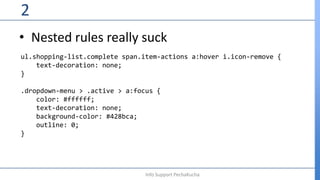
• Nested rules really suck
2
Info Support PechaKucha
ul.shopping-list.complete span.item-actions a:hover i.icon-remove {
text-decoration: none;
}
.dropdown-menu > .active > a:focus {
color: #ffffff;
text-decoration: none;
background-color: #428bca;
outline: 0;
}
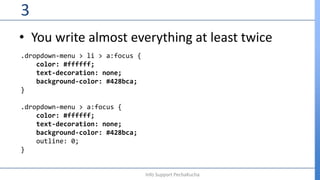
• You write almost everything at least twice
3
Info Support PechaKucha
.dropdown-menu > li > a:focus {
color: #ffffff;
text-decoration: none;
background-color: #428bca;
}
.dropdown-menu > a:focus {
color: #ffffff;
text-decoration: none;
background-color: #428bca;
outline: 0;
}
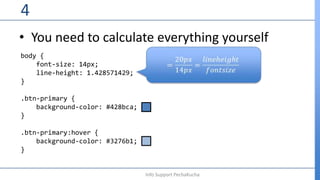
• You need to calculate everything yourself
4
Info Support PechaKucha
body {
font-size: 14px;
line-height: 1.428571429;
}
.btn-primary {
background-color: #428bca;
}
.btn-primary:hover {
background-color: #3276b1;
}
• Stop repeating yourself, start doing LESS today
5
Info Support PechaKucha
• Use variables for colors, fonts, sizes:
6
Info Support PechaKucha
body {
font-family: @font-family-base;
font-size: @font-size-base;
line-height: @line-height-base;
color: @text-color;
background-color: @body-bg;
}
• Create mix-ins to build patterns
7
Info Support PechaKucha
// Clearfix mix-in, makes sure that float settings are fixed.
.clearfix() {
&:before, &:after {
content: " "; /* 1 */
display: table; /* 2 */
}
&:after {
clear: both;
}
}
.element {
.clearfix();
}
Call mix-ins like
methods!
Define like CSS classes
• Nest rules to make things easy to remember
8
Info Support PechaKucha
ul.shopping-list {
border-left: 1px solid @gray-lighter;
border-top: 1px solid @gray-lighter;
border-right: 1px solid @gray-lighter;
span.item-actions {
text-decoration: none;
a:hover i.icon-edit {
text-decoration: none;
}
}
}
• Stop calculating everything, LESS calculations
are better and easier.
9
Info Support PechaKucha
• Use math to define sizes for elements
10
Info Support PechaKucha
body {
font-size: 14px;
line-height: (20px / 14px);
}
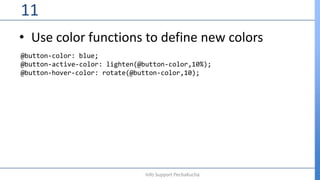
• Use color functions to define new colors
11
Info Support PechaKucha
@button-color: blue;
@button-active-color: lighten(@button-color,10%);
@button-hover-color: rotate(@button-color,10);
• Make relative sizes super easy
12
Info Support PechaKucha
@font-size: convert(14px,em);
@heading-size: unit(14px,pt);
• Build LESS libraries and get more.
13
Info Support PechaKucha
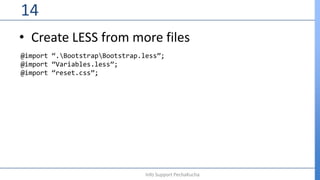
• Create LESS from more files
14
Info Support PechaKucha
@import “.BootstrapBootstrap.less”;
@import “Variables.less”;
@import “reset.css”;
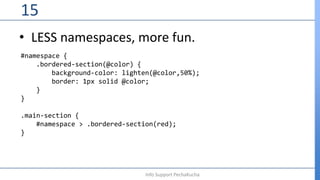
• LESS namespaces, more fun.
15
Info Support PechaKucha
#namespace {
.bordered-section(@color) {
background-color: lighten(@color,50%);
border: 1px solid @color;
}
}
.main-section {
#namespace > .bordered-section(red);
}
• Build a gridsystem with LESS code.
16
Info Support PechaKucha
.grid-col(@span,@numcols)
{
width: percentage(@span/@numcols);
}
.grid-generator(@span: 12, @numcols: 12, @mq: '') when (@span > 0) {
(~".@{mq}g-@{span}-@{numcols}") {
.grid-col(@span, @numcols);
}
.grid-generator(@span - 1,@numcols,@mq);
}
.grid-generator();
• Use LESS stuff in your dev environment.
17
Info Support PechaKucha
• LESS code, live in your website.
18
Info Support PechaKucha
<head>
<script src=“less.js”></script>
<link rel=“stylesheet/less” type=“text/css” href=“mystyles.less”/>
</head>
• LESS Files inside your VS2012 solution
19
Info Support PechaKucha
• LESS compiling in your nightly build
20
Info Support PechaKucha
<Import Project=“$(SolutionDir).webcompilerWebCompilerTasks.targets"/>

LESS is more

  • 1.
    LESS is more– How to get more fun out of your CSS Willem Meints willemm@infosupport.com Lead Developer Info Support [PIC]
  • 2.
    • CSS Developmentsucks (most of the time). – I will teach you to do LESS and get more 1 Info Support PechaKucha
  • 3.
    • Nested rulesreally suck 2 Info Support PechaKucha ul.shopping-list.complete span.item-actions a:hover i.icon-remove { text-decoration: none; } .dropdown-menu > .active > a:focus { color: #ffffff; text-decoration: none; background-color: #428bca; outline: 0; }
  • 4.
    • You writealmost everything at least twice 3 Info Support PechaKucha .dropdown-menu > li > a:focus { color: #ffffff; text-decoration: none; background-color: #428bca; } .dropdown-menu > a:focus { color: #ffffff; text-decoration: none; background-color: #428bca; outline: 0; }
  • 5.
    • You needto calculate everything yourself 4 Info Support PechaKucha body { font-size: 14px; line-height: 1.428571429; } .btn-primary { background-color: #428bca; } .btn-primary:hover { background-color: #3276b1; }
  • 6.
    • Stop repeatingyourself, start doing LESS today 5 Info Support PechaKucha
  • 7.
    • Use variablesfor colors, fonts, sizes: 6 Info Support PechaKucha body { font-family: @font-family-base; font-size: @font-size-base; line-height: @line-height-base; color: @text-color; background-color: @body-bg; }
  • 8.
    • Create mix-insto build patterns 7 Info Support PechaKucha // Clearfix mix-in, makes sure that float settings are fixed. .clearfix() { &:before, &:after { content: " "; /* 1 */ display: table; /* 2 */ } &:after { clear: both; } } .element { .clearfix(); } Call mix-ins like methods! Define like CSS classes
  • 9.
    • Nest rulesto make things easy to remember 8 Info Support PechaKucha ul.shopping-list { border-left: 1px solid @gray-lighter; border-top: 1px solid @gray-lighter; border-right: 1px solid @gray-lighter; span.item-actions { text-decoration: none; a:hover i.icon-edit { text-decoration: none; } } }
  • 10.
    • Stop calculatingeverything, LESS calculations are better and easier. 9 Info Support PechaKucha
  • 11.
    • Use mathto define sizes for elements 10 Info Support PechaKucha body { font-size: 14px; line-height: (20px / 14px); }
  • 12.
    • Use colorfunctions to define new colors 11 Info Support PechaKucha @button-color: blue; @button-active-color: lighten(@button-color,10%); @button-hover-color: rotate(@button-color,10);
  • 13.
    • Make relativesizes super easy 12 Info Support PechaKucha @font-size: convert(14px,em); @heading-size: unit(14px,pt);
  • 14.
    • Build LESSlibraries and get more. 13 Info Support PechaKucha
  • 15.
    • Create LESSfrom more files 14 Info Support PechaKucha @import “.BootstrapBootstrap.less”; @import “Variables.less”; @import “reset.css”;
  • 16.
    • LESS namespaces,more fun. 15 Info Support PechaKucha #namespace { .bordered-section(@color) { background-color: lighten(@color,50%); border: 1px solid @color; } } .main-section { #namespace > .bordered-section(red); }
  • 17.
    • Build agridsystem with LESS code. 16 Info Support PechaKucha .grid-col(@span,@numcols) { width: percentage(@span/@numcols); } .grid-generator(@span: 12, @numcols: 12, @mq: '') when (@span > 0) { (~".@{mq}g-@{span}-@{numcols}") { .grid-col(@span, @numcols); } .grid-generator(@span - 1,@numcols,@mq); } .grid-generator();
  • 18.
    • Use LESSstuff in your dev environment. 17 Info Support PechaKucha
  • 19.
    • LESS code,live in your website. 18 Info Support PechaKucha <head> <script src=“less.js”></script> <link rel=“stylesheet/less” type=“text/css” href=“mystyles.less”/> </head>
  • 20.
    • LESS Filesinside your VS2012 solution 19 Info Support PechaKucha
  • 21.
    • LESS compilingin your nightly build 20 Info Support PechaKucha <Import Project=“$(SolutionDir).webcompilerWebCompilerTasks.targets"/>