The LinkedIn® Basics

A quick introduction of how to use
      the power of LinkedIn

www.million-dollar-networker.com
The LinkedIn® Basics

            Context


www.million-dollar-networker.com
Why LinkedIn?
• If you’re in business, whether you like Social
  Media or not, LinkedIn is your best friend:
• Recruiters use it
• Your suppliers use it
• Your customers use it
• Your prospects use it
• In short, it’s a GOLD MINE of business waiting
  to be exploited!
              www.million-dollar-networker.com
Why LinkedIn? Cont’d
• The 3 degrees:
   – 1st : your direct contacts
   – 2nd : their direct contacts (friends of friends)
   – 3rd : contacts of your 2nd degree
• What this means in reality http://press.linkedin.com/about :
   – With over 200m professionals on LinkedIn, you
     have a huge pool of opportunities at your
     fingertips – you just have to find each-other!!
   – My network = ~5,800 (1st) and ~20m (3rd)


                  www.million-dollar-networker.com
It’s all about 3’s!
• Three Degrees
• Three Key Elements
  – Your Profile
  – Your Network
  – Your Groups
• Three Key Activity Areas
  – Quality – Make sure it adds value
  – Quantity – Do a lot of it
  – Consistency – Do it often and do it well

               www.million-dollar-networker.com
Overview of LinkedIn® Elements


                          Profile
The Goldmine


          Network                     Groups


               www.million-dollar-networker.com
The LinkedIn® Basics

          Your Profile


www.million-dollar-networker.com
Profile – Overview
• Whether you’re job hunting or networking for
  business, your profile is critical to your
  effectiveness on LinkedIn All the recruiters use it
• The more detailed your profile, the more likely
  you are to appear in search results – make sure
  the key words you want to be found for are in
  your profile.
• In search results, which are listed in order by
  what LinkedIn thinks is most relevant, it’s just
  your picture and your headline that appears - The
  better it looks, the more likely people are to click
  through - a great headline is essential!

               www.million-dollar-networker.com
Profile – Essential Elements 1
1. Photo – Make it a good one, you can view it
   enlarged by clicking in the bottom right corner
2. Headline – Get it right – don’t just use the one from
   your current role!
3. Profile URL – Change it to just your name in a form
   that is clear
4. Contact Info – Choose “Other” for websites, then
   insert name, Put interests, Associations, etc.
See next slide . . .


                www.million-dollar-networker.com
Profile – Essential Elements 1
1                                         2


             4

3

       www.million-dollar-networker.com
Profile – Essential Elements 2
•   The main body of your profile is broken down into a
    number of sections, some of which can be dragged
    and dropped to rearrange their order
•   The most important sections, as they appear in my
    profile (uk.linkedin.com/in/rorymurray/ ) are:
    –   ACTIVITY
    –   SUMMARY
    –   SLIDESHARE PRESENTATIONS (embed content like this!!)
    –   SKILLS & EXPERTISE
    –   EXPERIENCE


                    www.million-dollar-networker.com
Profile – Activity
“Activity” is a list of things that have happened on your profile
recently – people you’ve connected with and endorsed, etc. You
can also share an update with your network from here.


                   www.million-dollar-networker.com
Profile – Summary
The essence of who you are / what you do - pack it with industry
and skill key words that are important – make this as long as it
needs to be but keep it “punchy”


                   www.million-dollar-networker.com
Profile – Skills & Expertise
This is a recently introduced section and it’s very powerful
because your network can endorse your skills here – and you can
do the same for them! Use it to re-open dialogue with old
contacts!


                  www.million-dollar-networker.com
Profile – Experience
This is your CV/Resume – Cover every role in detail! Key words,
activities, results, the whole 9 yards!
Your Contacts can write Recommendations against these roles,
where they have worked with you.


                   www.million-dollar-networker.com
Profile – Additional Sections
• There are additional sections for:
  – Languages
  – Certifications
  – Education
  – Additional info
  – Honors & Awards
  – Organisations


              www.million-dollar-networker.com
Profile – Bottom Area
• Recommendations:
   – Here you’ll find a list of the formal Recommendations that
     people in your network have given you – VERY
     POWERFUL!!
• Connections:
   – This shows a selection of your contacts and on other
     people’s profiles it will show any mutual 1st degree
     connections
• Groups:
   – Your Groups (Max 50) See what groups others belong to!!
• Following:
   – Companies you follow (see who others follow)

                  www.million-dollar-networker.com
The LinkedIn® Basics

     Your Profile – Cool Stuff


www.million-dollar-networker.com
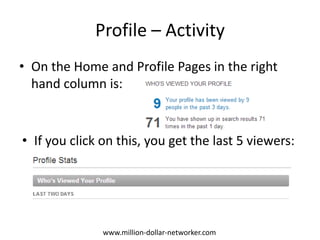
Profile – Activity
• On the Home and Profile Pages in the right
  hand column is:


• If you click on this, you get the last 5 viewers:


               www.million-dollar-networker.com
Profile Activity – Useful Stats
                                                                           Total 3rd degree
1st   Degree connections
                                                                           network and Group
                                                                           members


      Trends are on your Profile Stats Page on the right – Click on “Who’s viewed your profile”


                               www.million-dollar-networker.com
Potential Connections
• When you visit a profile, the right hand
  column gives you interesting facts:


              www.million-dollar-networker.com
The LinkedIn® Basics

      How To Use LinkedIn


www.million-dollar-networker.com
Activity Overview
• Quality (A man is judged by the company he keeps)
    – Focus on creating and recruiting a high quality network
    – Look for active networkers in your field
    – Seek out industry figureheads and experts
• Quantity (You can never have too many friends)
    – A large network gives you “reach” and “findability”, so that you can search and
      be found more easily and more often
    – Actively seek out Open Networkers, LIONs, TopLinked, etc.
    – Don’t lose sight of quality
• Consistency (Personality opens doors. Only character keeps them open)
    – Work at LinkedIn 1 day /week (~1 hour/day) until you hit 1,000+ contacts
    – Actively seek to add value to connections and Groups
    – Build a consistent online brand in the way you communicate that works for
      you and your company

                        www.million-dollar-networker.com
Network – Essential Elements
• You can easily find (and be found by) people within your 3 degrees
  and members of your Groups, so a big network is important!
• Deep and Wide – Think oak tree! The roots/trunk are your sector
  contacts, the branches/canopy are your extended network
• Connect with ALL your ex-colleagues, clients, etc. – upload your
  email address book directly into LinkedIn (it’s safe!)
• Search for and connect with influential people in your sector
• Connect with “power” and “open” networkers
• Focus on connecting with “LION” and “TopLinked” members
• Accept all (or most) invitations to connect
• Try to connect with ~10 new people per day in the early days
• Message people who accept your connections requests to say
  “Thanks!”
• Join Industry Groups – See next slide

                    www.million-dollar-networker.com
Groups – Essential Elements
• Groups are a very powerful way to demonstrate your expertise and
  connect with people
• You can join up to 50 Groups and unlimited sub-groups
• Search for Groups that align with what you do and look to see
  which Groups other people belong to
• Connect with active members and Group owners
• Interact on and start your own discussions to demonstrate your
  expertise
• Look for highly connected members and connect with them
• Subscribe to the daily digests for your Groups, to monitor all the
  good stuff you might have missed
• Join highly connected groups like TopLinked and LIONs, so you have
  easy access to the most connected people on LinkedIn


                    www.million-dollar-networker.com
Activity - Tips and Tricks
• Do your network building in this order:
  1.   Build your detailed and complete profile first,
  2.   Join some key groups with large memberships,
  3.   Connect with people you already know, like & trust
  4.   THEN search for new contacts
       • Open networkers will never decline an invitation!
       • Fellow group members will rarely refuse to connect,
         especially if you’ve interacted with them
• Write personalised connection requests
  highlighting why they should connect!

                   www.million-dollar-networker.com
Activity - Tips and Tricks
                                                                    Choose a specific
                                                                    company and when
                                                                    they were there
      Choose specific
      keywords


   Choose a specific
   country or
   “anywhere”


   Choose a specific                                             Available on paid
   industry or                                                   memberships – I
   multiple selections                                           never saw the value
                                                                 in paying!


  Choose groups to
  search within


Choose which layer
of your network to
search – More
distant relationships
give you greater
reach faster
                              www.million-dollar-networker.com
Activity - Tips and Tricks


   Groups makes
   connecting EASY!


Personalise the
message!


                           www.million-dollar-networker.com
LinkedIn Best Practice 1
• Spend time on your profile content, so your knowledge, experience and
  achievements are clear.
• Get a good photo, so people know what you really look like.
• Give honest but strong recommendations to colleagues and clients – do it
  proactively.
• Regularly check who’s viewed you (Home – middle right) and contact /
  connect with good people.
• Join Groups and actively participate in discussions to demonstrate your
  expertise.
• Consider connecting your Twitter account to your LinkedIn account.
• Add other relevant websites to your profile.
• Upload existing contacts, connect with them and look for additional
  contacts in People You May Know (“PYMK”) –> (Home – top right).
• In PYMK also seek people with high numbers of mutual connections,
  LIONs & Open Networkers.


                      www.million-dollar-networker.com
LinkedIn Best Practice 2
• Never “IDK” – Don’t click the “I don’t know” option on an invitation.
    – If you don’t want to connect, just Archive or Delete it (unless it really is Spam!).
• Always personalise invitations and give a valid reason why they should
  connect with you.
• Connect others – suggest connections to your contacts that may help
  them & forward requests.
• Check your Inbox regularly – not all messages are notified via email.
• Be cautious of connecting with recruiters you don’t know, like, trust and
  respect.
• As you meet good people IMMEDIATELY add them to your network and
  message them.
• Keep in touch and congratulate contacts with changes on their profiles
  (e.g. New job/Promotion).
• Keep your own profile up to date on a regular basis.


                           www.million-dollar-networker.com

The linked in® basics

  • 1.
    The LinkedIn® Basics Aquick introduction of how to use the power of LinkedIn www.million-dollar-networker.com
  • 2.
    The LinkedIn® Basics Context www.million-dollar-networker.com
  • 3.
    Why LinkedIn? • Ifyou’re in business, whether you like Social Media or not, LinkedIn is your best friend: • Recruiters use it • Your suppliers use it • Your customers use it • Your prospects use it • In short, it’s a GOLD MINE of business waiting to be exploited! www.million-dollar-networker.com
  • 4.
    Why LinkedIn? Cont’d •The 3 degrees: – 1st : your direct contacts – 2nd : their direct contacts (friends of friends) – 3rd : contacts of your 2nd degree • What this means in reality http://press.linkedin.com/about : – With over 200m professionals on LinkedIn, you have a huge pool of opportunities at your fingertips – you just have to find each-other!! – My network = ~5,800 (1st) and ~20m (3rd) www.million-dollar-networker.com
  • 5.
    It’s all about3’s! • Three Degrees • Three Key Elements – Your Profile – Your Network – Your Groups • Three Key Activity Areas – Quality – Make sure it adds value – Quantity – Do a lot of it – Consistency – Do it often and do it well www.million-dollar-networker.com
  • 6.
    Overview of LinkedIn®Elements Profile The Goldmine Network Groups www.million-dollar-networker.com
  • 7.
    The LinkedIn® Basics Your Profile www.million-dollar-networker.com
  • 8.
    Profile – Overview •Whether you’re job hunting or networking for business, your profile is critical to your effectiveness on LinkedIn All the recruiters use it • The more detailed your profile, the more likely you are to appear in search results – make sure the key words you want to be found for are in your profile. • In search results, which are listed in order by what LinkedIn thinks is most relevant, it’s just your picture and your headline that appears - The better it looks, the more likely people are to click through - a great headline is essential! www.million-dollar-networker.com
  • 9.
    Profile – EssentialElements 1 1. Photo – Make it a good one, you can view it enlarged by clicking in the bottom right corner 2. Headline – Get it right – don’t just use the one from your current role! 3. Profile URL – Change it to just your name in a form that is clear 4. Contact Info – Choose “Other” for websites, then insert name, Put interests, Associations, etc. See next slide . . . www.million-dollar-networker.com
  • 10.
    Profile – EssentialElements 1 1 2 4 3 www.million-dollar-networker.com
  • 11.
    Profile – EssentialElements 2 • The main body of your profile is broken down into a number of sections, some of which can be dragged and dropped to rearrange their order • The most important sections, as they appear in my profile (uk.linkedin.com/in/rorymurray/ ) are: – ACTIVITY – SUMMARY – SLIDESHARE PRESENTATIONS (embed content like this!!) – SKILLS & EXPERTISE – EXPERIENCE www.million-dollar-networker.com
  • 12.
    Profile – Activity “Activity”is a list of things that have happened on your profile recently – people you’ve connected with and endorsed, etc. You can also share an update with your network from here. www.million-dollar-networker.com
  • 13.
    Profile – Summary Theessence of who you are / what you do - pack it with industry and skill key words that are important – make this as long as it needs to be but keep it “punchy” www.million-dollar-networker.com
  • 14.
    Profile – Skills& Expertise This is a recently introduced section and it’s very powerful because your network can endorse your skills here – and you can do the same for them! Use it to re-open dialogue with old contacts! www.million-dollar-networker.com
  • 15.
    Profile – Experience Thisis your CV/Resume – Cover every role in detail! Key words, activities, results, the whole 9 yards! Your Contacts can write Recommendations against these roles, where they have worked with you. www.million-dollar-networker.com
  • 16.
    Profile – AdditionalSections • There are additional sections for: – Languages – Certifications – Education – Additional info – Honors & Awards – Organisations www.million-dollar-networker.com
  • 17.
    Profile – BottomArea • Recommendations: – Here you’ll find a list of the formal Recommendations that people in your network have given you – VERY POWERFUL!! • Connections: – This shows a selection of your contacts and on other people’s profiles it will show any mutual 1st degree connections • Groups: – Your Groups (Max 50) See what groups others belong to!! • Following: – Companies you follow (see who others follow) www.million-dollar-networker.com
  • 18.
    The LinkedIn® Basics Your Profile – Cool Stuff www.million-dollar-networker.com
  • 19.
    Profile – Activity •On the Home and Profile Pages in the right hand column is: • If you click on this, you get the last 5 viewers: www.million-dollar-networker.com
  • 20.
    Profile Activity –Useful Stats Total 3rd degree 1st Degree connections network and Group members Trends are on your Profile Stats Page on the right – Click on “Who’s viewed your profile” www.million-dollar-networker.com
  • 21.
    Potential Connections • Whenyou visit a profile, the right hand column gives you interesting facts: www.million-dollar-networker.com
  • 22.
    The LinkedIn® Basics How To Use LinkedIn www.million-dollar-networker.com
  • 23.
    Activity Overview • Quality(A man is judged by the company he keeps) – Focus on creating and recruiting a high quality network – Look for active networkers in your field – Seek out industry figureheads and experts • Quantity (You can never have too many friends) – A large network gives you “reach” and “findability”, so that you can search and be found more easily and more often – Actively seek out Open Networkers, LIONs, TopLinked, etc. – Don’t lose sight of quality • Consistency (Personality opens doors. Only character keeps them open) – Work at LinkedIn 1 day /week (~1 hour/day) until you hit 1,000+ contacts – Actively seek to add value to connections and Groups – Build a consistent online brand in the way you communicate that works for you and your company www.million-dollar-networker.com
  • 24.
    Network – EssentialElements • You can easily find (and be found by) people within your 3 degrees and members of your Groups, so a big network is important! • Deep and Wide – Think oak tree! The roots/trunk are your sector contacts, the branches/canopy are your extended network • Connect with ALL your ex-colleagues, clients, etc. – upload your email address book directly into LinkedIn (it’s safe!) • Search for and connect with influential people in your sector • Connect with “power” and “open” networkers • Focus on connecting with “LION” and “TopLinked” members • Accept all (or most) invitations to connect • Try to connect with ~10 new people per day in the early days • Message people who accept your connections requests to say “Thanks!” • Join Industry Groups – See next slide www.million-dollar-networker.com
  • 25.
    Groups – EssentialElements • Groups are a very powerful way to demonstrate your expertise and connect with people • You can join up to 50 Groups and unlimited sub-groups • Search for Groups that align with what you do and look to see which Groups other people belong to • Connect with active members and Group owners • Interact on and start your own discussions to demonstrate your expertise • Look for highly connected members and connect with them • Subscribe to the daily digests for your Groups, to monitor all the good stuff you might have missed • Join highly connected groups like TopLinked and LIONs, so you have easy access to the most connected people on LinkedIn www.million-dollar-networker.com
  • 26.
    Activity - Tipsand Tricks • Do your network building in this order: 1. Build your detailed and complete profile first, 2. Join some key groups with large memberships, 3. Connect with people you already know, like & trust 4. THEN search for new contacts • Open networkers will never decline an invitation! • Fellow group members will rarely refuse to connect, especially if you’ve interacted with them • Write personalised connection requests highlighting why they should connect! www.million-dollar-networker.com
  • 27.
    Activity - Tipsand Tricks Choose a specific company and when they were there Choose specific keywords Choose a specific country or “anywhere” Choose a specific Available on paid industry or memberships – I multiple selections never saw the value in paying! Choose groups to search within Choose which layer of your network to search – More distant relationships give you greater reach faster www.million-dollar-networker.com
  • 28.
    Activity - Tipsand Tricks Groups makes connecting EASY! Personalise the message! www.million-dollar-networker.com
  • 29.
    LinkedIn Best Practice1 • Spend time on your profile content, so your knowledge, experience and achievements are clear. • Get a good photo, so people know what you really look like. • Give honest but strong recommendations to colleagues and clients – do it proactively. • Regularly check who’s viewed you (Home – middle right) and contact / connect with good people. • Join Groups and actively participate in discussions to demonstrate your expertise. • Consider connecting your Twitter account to your LinkedIn account. • Add other relevant websites to your profile. • Upload existing contacts, connect with them and look for additional contacts in People You May Know (“PYMK”) –> (Home – top right). • In PYMK also seek people with high numbers of mutual connections, LIONs & Open Networkers. www.million-dollar-networker.com
  • 30.
    LinkedIn Best Practice2 • Never “IDK” – Don’t click the “I don’t know” option on an invitation. – If you don’t want to connect, just Archive or Delete it (unless it really is Spam!). • Always personalise invitations and give a valid reason why they should connect with you. • Connect others – suggest connections to your contacts that may help them & forward requests. • Check your Inbox regularly – not all messages are notified via email. • Be cautious of connecting with recruiters you don’t know, like, trust and respect. • As you meet good people IMMEDIATELY add them to your network and message them. • Keep in touch and congratulate contacts with changes on their profiles (e.g. New job/Promotion). • Keep your own profile up to date on a regular basis. www.million-dollar-networker.com